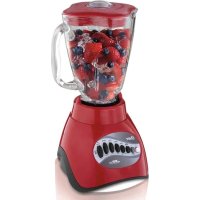
6831 - Blender OSTER - Free user manual and instructions
Find the device manual for free 6831 OSTER in PDF.



| Product type | Blender |
| Brand | Oster |
| Model | 6831 |
| Container material | Durable glass (5-cup models) or unbreakable glass (6-cup models) |
| Container capacity | 5 cups (1.18 L) or 6 cups (1.42 L) depending on model |
| Blade type | Ice crushing blade |
| Motor technology | ALL-METAL DRIVE™ |
| Main functions | Pulse, food/drink selection, Easy Clean, Auto Blend (on select models) |
| Control buttons | Depending on version: up/down slider, push buttons, rotary dial |
| Auto shut-off function | Yes, after a few minutes of inactivity; also after 3 minutes of continuous operation |
| Maximum continuous operation time | 3 minutes |
| Plug type | Polarized (safety) |
| Cleaning | Container, lid, measuring cap, blade, gasket, ring, and locking ring are dishwasher safe (ring and locking ring top rack only); motor base to be cleaned with a damp sponge |
| Easy Clean cleaning function | Yes (hot water + detergent, 10-15 second cycle) |
| Warranty | 1 year limited warranty (parts and labor) |
| Use | Household use only |
Frequently Asked Questions - 6831 OSTER
User questions about 6831 OSTER
0 question about this device. Answer the ones you know or ask your own.
Ask a new question about this device
Download the instructions for your Blender in PDF format for free! Find your manual 6831 - OSTER and take your electronic device back in hand. On this page are published all the documents necessary for the use of your device. 6831 by OSTER.
USER MANUAL 6831 OSTER
PLEASE READ ALL INSTRUCTIONS BEFORE USING THIS APPLIANCE
MANUEL D'INSTRUCTIONS
MELANGEUR
LIRE TOUTES LES INSTRUCTIONS AVANT D'UTILIZER CET APPAREIL
When using electrical appliances, basic safety precautions should be followed, including the following:
- READ ALL INSTRUCTIONS BEFORE USE
- Unplug cord from outlet when not in use or before cleaning
- To protect against risk of electrical shock, do not immerse the cord, plug or motor base in water or any other liquids
- Do not let cord hang over edge of table or counter or touch hot surfaces
- Never leave appliance unattended when in use
- Close supervision is necessary when used near children
- Avoid contact with moving parts. Keep hands and utensils out of jar while blending to prevent personal injury or damage to the Blender. A rubber spatula may be used only when the blender is not running
The Blade is sharp. Handle with care
Always put the Lid on the Jar before operating the Blender - Do not operate any appliance with a damaged cord or plug or after the appliance malfunctions or is dropped or damaged in any manner. Return the appliance to the nearest Authorized OSTER Service Center for examination, repair or electrical or mechanical adjustment
- Do not use outdoors or for commercial purposes; this appliance is intended for household use only
- Use this appliance for its intended use as described in this manual. Do not use attachments that are not recommended by the manufacturer; they may cause injury
Always operate on a flat surface - Unplug the Blender when it is not in use, before taking off or putting on parts and before cleaning
- The use of attachments not made by Sunbeam Products, Inc., including canning or ordinary jar and processing assembly parts is not recommended, and may cause injury to persons
- This product is for household use only
- The maximum rating marked on the product is based on the attachment that draws the greatest load. Other attachments may draw less power
- Do not operate blender continuously for more than 3 minutes
SAVE THESE INSTRUCTIONS
(Precautions For 120 & 127 Volts Markets Only)
To reduce the risk of electrical shock, this appliance has a polarized plug (one blade is wider than the other). This plug fits a polarized outlet only one way. This is a safety feature intended to help reduce the risk of electrical shock. If the plug does not fit fully into the outlet, reverse the plug. If it still does not fit, contact a qualified electrician. Do not attempt to defeat this safety feature.
DESCRIPTION OF THE APPLIANCE
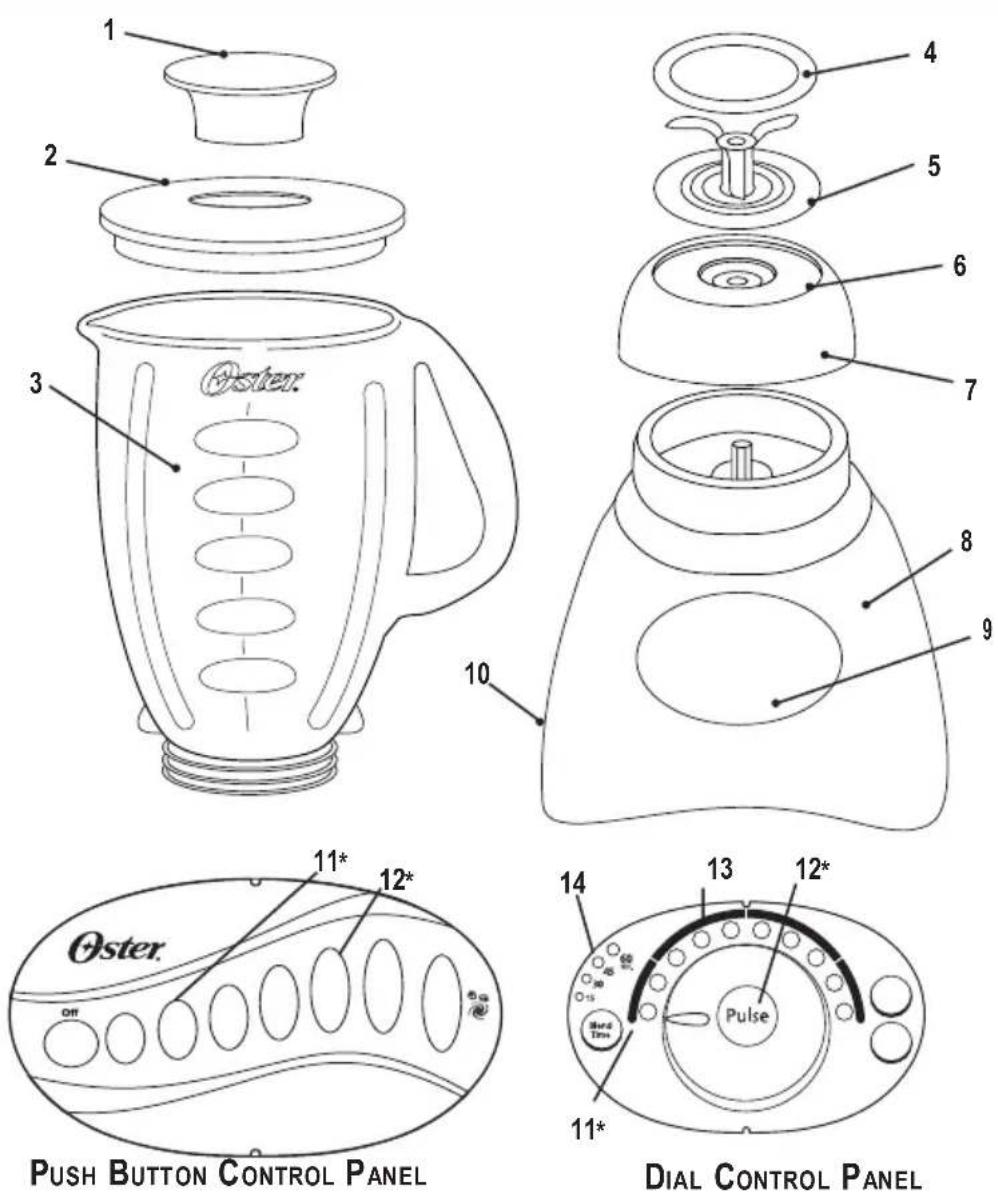
- Feeder Cap for adding ingredients while blending
- Leakproof Lid
-
Jar - Your OsER ® Blender includes one of the following (depending on the model):
-
5-Cup Dishwasher Safe/Scratch Resistant Glass Jar
-
6-Cup Break-Resistant Jar
-
Sealing Ring for tight seal
- Ice Crush Blade pulverizes ice for smooth frozen drinks
- Threaded Bottom Disc
-
Collar for stability from countertop to refrigerator to table
-
Powerful Motor with exclusive ALL-METAL DRIVE™ system for extra durability
- Control Panel
- Convenient Cord Storage
- Easy-Clean Feature - quickly cleans jars in between batches
- Pulse for precise blending control
- Food and drink selections for perfect results - controls allow you to keep your blender set at your favorite food/drink selection
- Auto Blend™ Timer (selected models only)
INSTRUCTION FOR USE
ASSEMBLING YOUR BLENDER
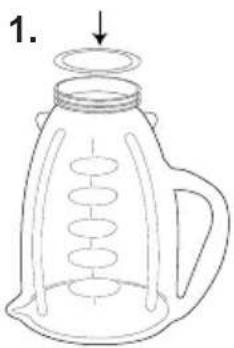
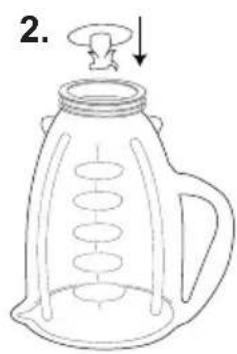
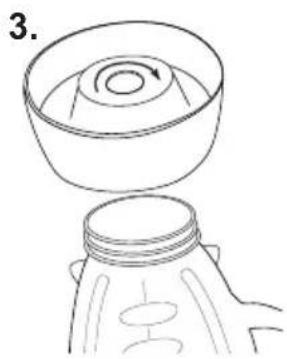
- Turn Jar upside down so the small opening is at the top. Place Sealing Ring over Jar opening.
- Place Blade into Jar.
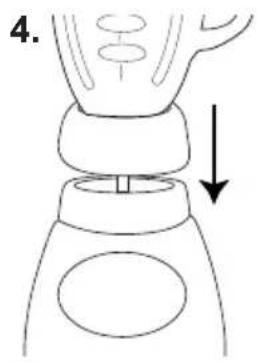
- Snap Threaded Bottom Disc and Collar together. Place Collar over Blade and Jar. (Note: If there are slots on top of Collar, line them up with notches on Jar.) Place the Collar on Jar and turn the Threaded Bottom Disc clockwise to tighten.
- Place Jar assembly onto base.
SELECTING THE SPEED
PUSH BUTTON MODELS
Slide switch to High or Low (if your model does not have a slide switch, push the High or Low button.)
Push desired speed and blend ingredients to desired consistency.
IMPORTANT: Do not operate blender continuously for more than 3 minutes.
Push OFF button "O" to stop the Blender and turn Blender off.
To use PULSE, select High or Low. Push PULSE and hold down for desired length of time. Release PULSE and allow Blade to stop. Repeat cycle as desired.
TIP: Refer to the "Guide For Processing Foods in Blender" located on page 5 for information on processing foods.
DIAL MODELS WITHOUT TIMER
Turn Dial to desired food/ drink selection.
Press ON "I" and blend ingredients to desired consistency.
IMPORTANT: Do not operate blender continuously for more than 3 minutes.
Press OFF "O" to stop the Motor and turn Blender off.
Note: Food/ drink selection can be changed during blending by turning the Dial to the desired selection.
Note: This Blender is programmed to turn the power off automatically if not used for a period of several minutes.
To use PULSE, turn Dial to desired food/ drink selection. Press PULSE and hold down for desired length of time. Release and allow Blade to stop. Repeat cycle as desired.
DIAL MODELS WITH TIMER
PRESS POWER TO TURN THE BLENDER ON.
The Blender is set to the food/ drink selection identified by a blinking indicator light. Turn Dial to change the food/ drink selection.
Press START “▶” and blend ingredients to desired consistency.
Press STOP "■" to stop the Motor. (Pressing POWER "O" stops the Motor and turns the Blender off.)
Note: Food/ drink selection can be changed during blending by turning the Dial to the desired selection.
Note: This Blender is programmed to turn the power off automatically if not used for a period of several minutes.
To use PULSE, turn Dial to desired food/ drink selection. Press PULSE and hold down for desired length of time. Release and allow Blade to stop. Repeat cycle as desired.
To use Auto Blend Timer, press BLEND TIME "☑" until desired length of blending time (15, 30, 45, 60 seconds) is illuminated.
Turn Dial to desired food/ drink selection.
Press START “▶”. Blender will automatically stop when selected time has elapsed.
To stop Blender before elapsed time, press STOP "■".
To use Blender without Timer, press BLEND TIME " until no lights are illuminated.
BLENDING TIPS
- Put liquids in the Jar first, unless a recipe says otherwise.
- Grinding ice: Crush 6 ice cubes or approximately 2 cups of ice at a time.
- This Blender has been designed to gently process foods when operating at low speeds. If blades do not rotate during operation, simply choose a higher speed.
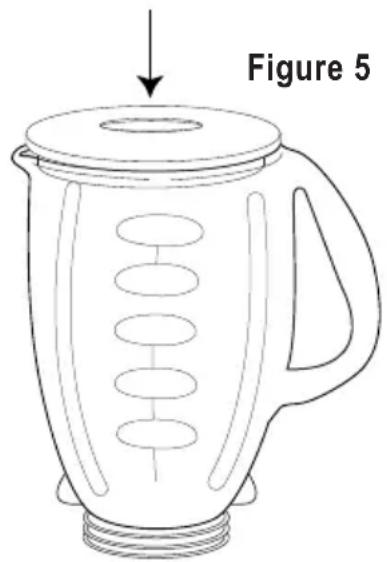
- Do not remove the Lid while in use. Remove Feeder Cap to add smaller ingredients. (Figure 5)
- Cut all firm fruits and vegetables, cooked meats, fish and seafood into pieces no larger than 1/2 inch (1.8 cm) to 1 inch (2.5 cm). Cut all kinds of cheeses into pieces no larger than 1/2 inch (1.8 cm).
- This Blender will not mash potatoes, whip egg whites or substitute dairy toppings, mix stiff dough or grind raw meat.
GUIDE FOR PROCESSING FOODS IN BLENDER
| Food | PROCESSSED QUANTITY | UNPROCESSSED QUANTITY | SPECIAL INSTRUCTIONS |
| Breadcrumbs 1/2-cup (125 ml) | 1 slice, torn in 8 pieces | Pulse 1 – 4 times | |
| Celery 3/4-cup (200 ml) 1-cup of 1-inch (2.5 cm) pieces | (250 ml) Pulse 2 – 3 times | ||
| Cheese, Cheddar of 1-inch (2.5 cm) pieces | 1-cup (250 ml) | 1-cup (250 ml) Pulse 2 times | |
| Cheese, Swiss of 1-inch (2.5 cm) pieces | 1-cup (250 ml) | 1-cup (250 ml) Pulse 5 times | |
| Cheese, Hard or Semi-Hard | 1-cup (250 ml) | 1-cup (250 ml) Chop continuously of 1-inch (2.5 cm) pieces | |
| Coffee Beans | 1-cup (250 ml) | 1-cup (250 ml) | Grind 45 seconds for percolators and 60 seconds for drip |
| Cookies, Wafer | 1/2-cup (125 ml) 10 waters | Pulse 3 times | |
| Crackers, Graham | 1/2-cup (125 ml) 8 crackers | Pulse 3 times | |
| Peppers | 2/3-cup (150 ml) 1-cup | (250 ml) Pulse 1 time | |
| Meat, Boneless, Cooked of 1-inch (2.5 cm) pieces | 1-cup (250 ml) | 1-cup (250 ml) | Chop continuously |
| Nuts, almonds, peanuts, pecans, walnuts | 1-cup (250 ml) | 1-cup (250 ml) | Pulse 2 – 4 times |
CARING FOR YOUR BLENDER AFTER USE
IMPORTANT: UNPLUG BEFORE CLEANING BASE and DO NOT IMMERSE THE BLENDER BASE IN WATER OR ANY OTHER LIQUIDS. Use a damp, soft sponge with mild detergent to clean the outside of the Blender base. All parts except for the Blender base are dishwasher safe. Collar and Threaded Bottom Disc are top rack dishwasher safe ONLY. Collar and Threaded Bottom Disc can be separated for cleaning. Hold Collar with both hands and press down on top of Disc with thumbs. Place Sealing Ring in bottom basket of dishwasher. You can also wash the parts in warm, soapy water. Rinse well and dry.
EASY CLEAN
Pour 3 cups of warm water in the Blender Jar. Add 1 - 2 drops of liquid dishwashing detergent. Select Easy Clean. Blend detergent for 10 - 15 seconds. Empty Jar of soapy water into sink. Rinse Jar thoroughly with clean water. Note: Easy Clean is not a substitute for regular cleaning described above. It is especially important to disassemble and thoroughly clean your Blender when processing milk, dairy products, meats, seafood and eggs.
STORING YOUR BLENDER
After cleaning, reassemble Blade to Jar with Sealing Ring and Collar. Store Blender with Cover ajar to prevent container odor.
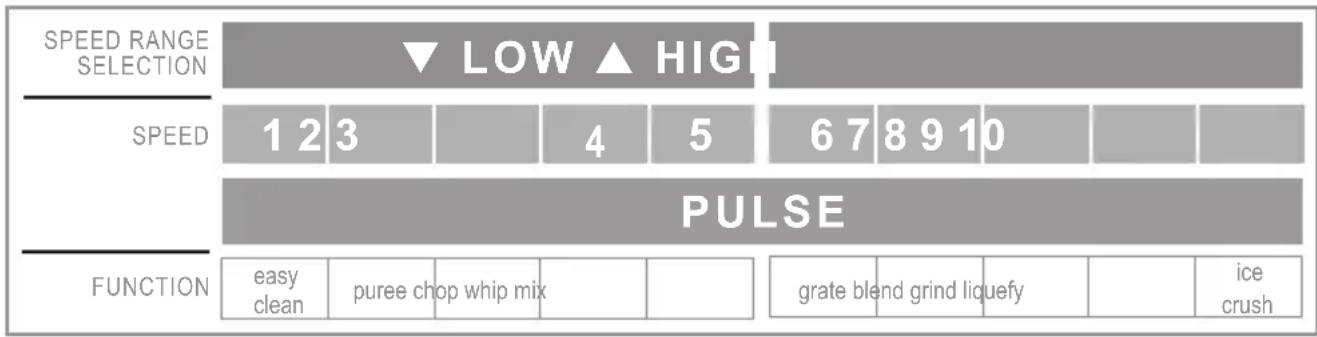
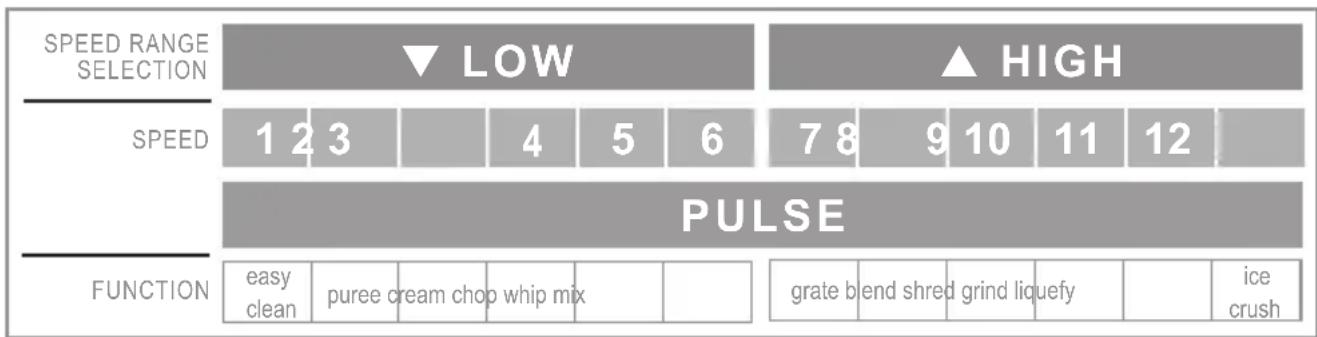
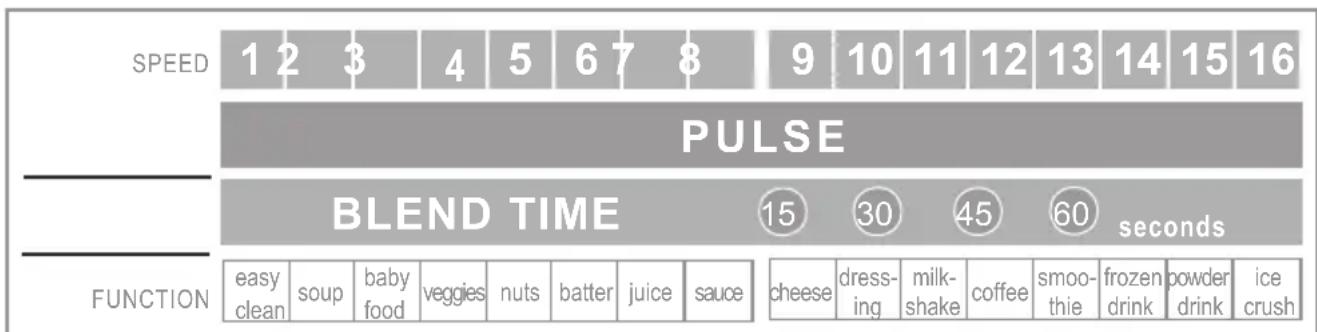
SPEED CHART
In the table below you will find a typical application for each speed to better guide you when using your Blender (follow the speed that corresponds to the specific model and number of speeds of your Blender).
10 SPEED
12 SPEED
14 SPEED

16 SPEED
I - YEAR LIMITED WARRANTY
Sunbeam Products, Inc. ("Sunbeam") doing business as Jarden Consumer Solutions warrants that for a period of ONE year from the date of purchase, this product will be free from defects in material and workmanship. Sunbeam, at its option, will repair or replace this product or any component of the product found to be defective during the warranty period. Replacement will be made with a new or remanufactured product or component. If the product is no longer available, replacement may be made with a similar product of equal or greater value. This is your exclusive warranty.
This warranty is valid for the original retail purchaser from the date of initial retail purchase and is not transferable. Keep the original sales receipt. Proof of purchase is required to obtain warranty performance. OsIER *dealers, service centers, or retail stores selling OsER products do not have the right to alter, modify or any way change the terms and conditions of this warranty.
This warranty does not cover normal wear of parts or damage resulting from any of the following: negligent use or misuse of the product, use on improper voltage or current, use contrary to the operating instructions, disassembly, repair or alteration by anyone other than an Oster® Authorized Service Center. Further, the warranty does not cover: Acts of God, such as fire, flood, hurricanes and tornadoes.
Sunbeam shall not be liable for any incidental or consequential damages caused by the breach of any express, implied or statutory warranty or condition. Except to the extent prohibited by applicable law, any implied warranty or condition of merchantability or fitness for a particular purpose is limited in duration to the duration of the above warranty.
How To Obtain Warranty Service: Please see the country specific warranty insert or contact your local authorized distributor.
PLEASE DO NOT RETURN THIS PRODUCT TO THE PLACE OF PURCHASE
MESURES PREVENTIVES IMPORTANTES
MODELE A CADRAN AVEC MINUTERIE
©2005 Sunbeam Products, Inc. doing business as Jarden Consumer Solutions. All rights reserved. Distributed by Sunbeam Products, Inc., doing business as Jarden Consumer Solutions, Boca Raton, Florida 33431. The product you buy may differ slightly from the one shown on this carton due to continuing product development.
One year limited warranty - please see inside for details.
- SAVE THESE INSTRUCTIONS
- (Precautions For 120 & 127 Volts Markets Only)
- DESCRIPTION OF THE APPLIANCE
- INSTRUCTION FOR USE
- ASSEMBLING YOUR BLENDER
- SELECTING THE SPEED
- PUSH BUTTON MODELS
- DIAL MODELS WITHOUT TIMER
- DIAL MODELS WITH TIMER
- BLENDING TIPS
- GUIDE FOR PROCESSING FOODS IN BLENDER
- CARING FOR YOUR BLENDER AFTER USE
- EASY CLEAN
- STORING YOUR BLENDER
- SPEED CHART
- SPEED
- SPEED
- SPEED
- SPEED
- I - YEAR LIMITED WARRANTY
- MESURES PREVENTIVES IMPORTANTES
- MODELE A CADRAN AVEC MINUTERIE
Brand : OSTER
Model : 6831
Category : Blender