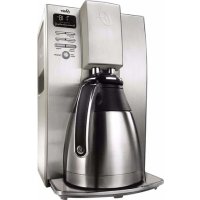
USER MANUAL BVSTDC4411013 OSTER
MODELS/MODELOS
MODÈLES
BVSTDC4411
INSTRUCTION MANUAL
10 CUP PROGRAMMABLE THERMAL COFFEE MAKER
READ ALL INSTRUCTIONS BEFORE USING THIS APPLIANCE
MANUAL DE INSTRUÇÕES
CAFETEIRA PROGRAMÁVEL PARA 30 XÍCARAS
LEIA TODAS AS INSTRUÇÕES ANTES DE USAR ESTE APARELHO
MANUEL D'INSTRUCTIONS
CAFETIERE THERMIQUE PROGRAMMABLE A 10 TASSES
LIRE TOUTES LES INSTRUCTIONS AVANT D'UTILISER CET APPAREIL
IMPORTANT SAFEGUARDS
To reduce the risk of fire, electric shock and/or injury to persons, basic safety precautions should always be followed when using electrical appliances, including the following:
-
READ ALL INSTRUCTIONS BEFORE USING THE COFFEE MAKER.
-
⚠️ DO NOT touch the coffee maker's hot surfaces. Use handles or knobs.
-
To protect against electric shock, DO NOT immerse the power cord, power plug or coffee maker in water or in any other liquid.
-
Turn the coffee maker off and unplug the power cord from the power source when the coffee maker and clock are not in use and before cleaning. Allow the coffee maker parts to cool before putting on or taking off parts and before cleaning the appliance.
-
DO NOT operate any appliance with a damaged power cord or power plug, or operate it after the appliance malfunctions, or has been damaged in any manner. Take this appliance only to the nearest Authorized Oster® Service Center for examination, repair or adjustment.
-
The use of accessory attachments other than those recommended by the manufacturer may cause hazards or injuries.
-
DO NOT use the coffee maker outdoors.
-
DO NOT let the power cord hang over edge of table or counter, or allow it to come into contact with hot surfaces.
-
DO NOT place this coffee maker on or near a hot gas stove or electric burner or in a heated oven.
-
To disconnect the coffee maker, turn it off, then remove the power plug from the power supply.
-
Place the appliance on a hard, flat level surface to avoid interruption of airflow underneath the coffee maker.
-
Avoid contact with any moving parts.
-
This coffee maker is designed for household use only.
-
DO NOT use appliance for other than intended use.
-
This appliance is not intended for use by persons (including children) with reduced physical, sensory or mental capabilities, or lack of experience and knowledge, unless they have been given supervision or instruction concerning use of the appliance by a person responsible for their safety. Children should be supervised to ensure that they DO NOT play with the appliance.
-
Close supervision is necessary when any appliance is used by or near children, or incapacitated individuals.
-
The instructions shall state that appliances are not intended to be operated by means of an external timer or separate remote-control system
-
This appliance is intended to be used in household and similar applications such as: staff kitchen areas in shops, offices and other working environments, farm houses, by clients in hotels, motels and other residential type environments, bed and breakfast type environments.
THERMAL CARAFE USE AND CARE
Follow the instructions below to reduce or eliminate the chance of breaking the thermal carafe:
- This thermal carafe was designed for use only with your Oster ^ coffee maker and therefore must never be used on a range top or in any oven, including a microwave oven.
• DO NOT set a hot thermal carafe on a wet or cold surface.
• DO NOT use a cracked carafe or a carafe having a loose or weakened handle.
- DO NOT clean the carafe with abrasive cleaners, steel wool pads or other abrasive materials.
• Discard the carafe immediately if it is ever boiled dry.
- Protect the carafe from sharp blows, scratches or rough handling.
NOTE: Scalding may occur if the lid is removed during brewing cycles.
WARNING! To reduce the risk of fire or electric shock, do not remove any service covers. There are no user serviceable parts inside the coffee maker.
Only authorized personnel should repair the coffee maker. Please read ALL of the instructions in this manual carefully before you begin to use this appliance.
Proper care and maintenance will ensure a long life and a trouble-free operation for this appliance. Please save these instructions and refer to them for cleaning and care tips.
SAVE THESE INSTRUCTIONS
SPECIAL CORD SET INSTRUCTIONS
- A short power supply cord is provided to reduce the hazards resulting from a person or pet becoming entangled in, or tripping over, a longer cord.
- An extension cord may be purchased and used if care is exercised in its use.
- If an extension cord is used, the marked electrical rating of the extension cord must be at least the same or higher than that of your appliance. The resulting extended cord must be arranged so that it will not drape over a countertop or tabletop where it can be pulled on by children or tripped over accidentally.
DESCRIPTION OF THE APPLIANCE
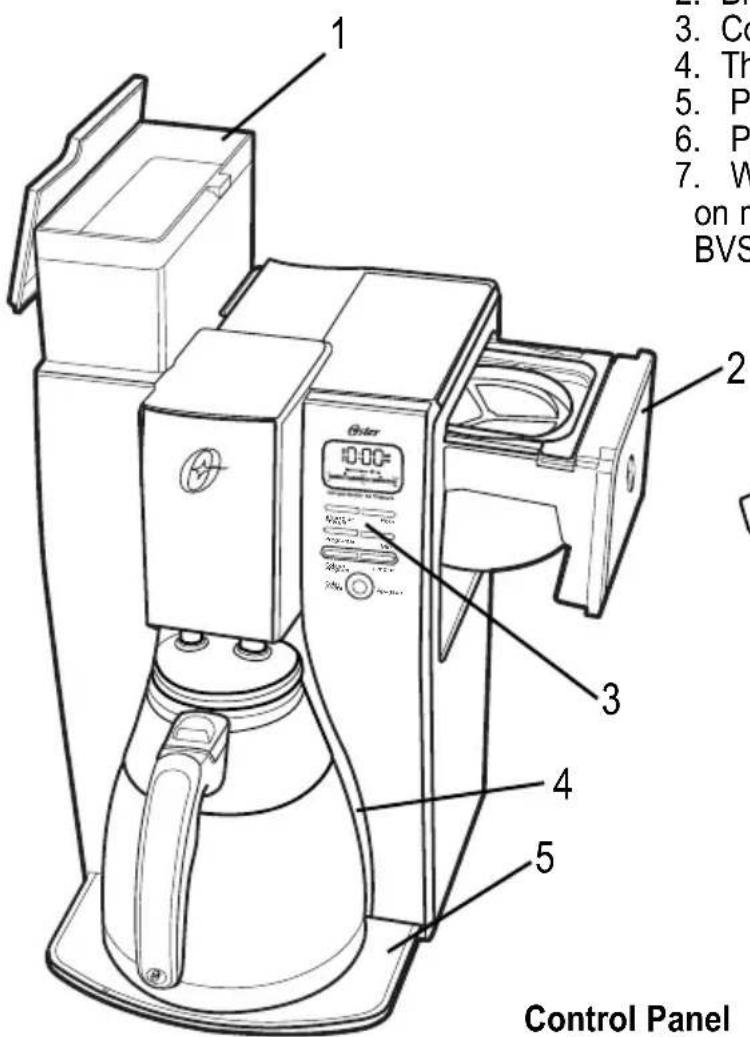
- Removable Water Reservoir
- Brew Basket Drawer
- Control Panel
- Thermal Carafe
- Platform
- Permanent Filter
- Water Filter (Not included on models BVSTDC4411-017 & BVSTDC4411-057 for Brazil)
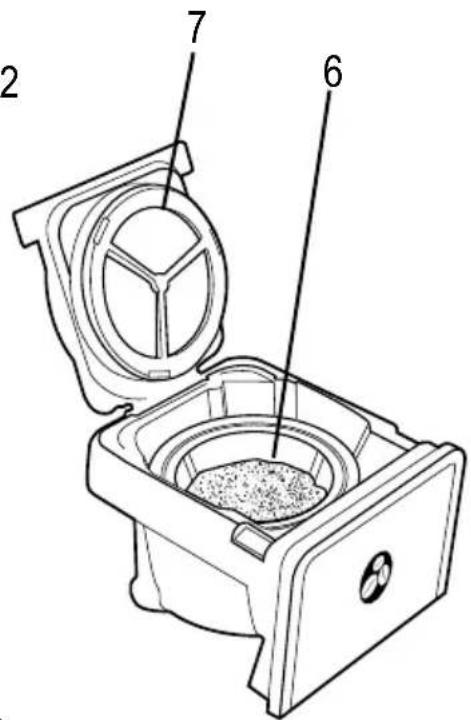
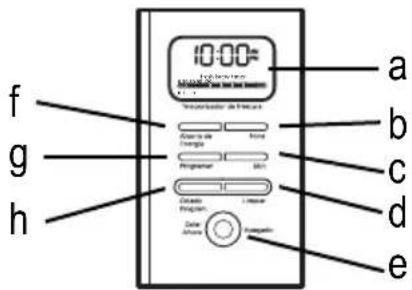
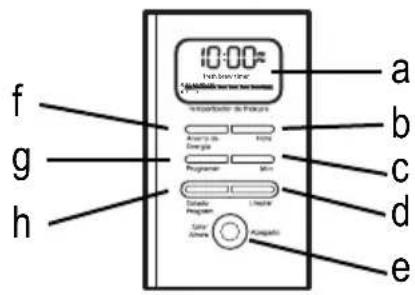
Control Panel
a. Clock Display / Fresh Brew Timer Display
b. Hour
c. Minute
d. Clean Cycle
e. Brew Now/Off Button
f. Dim/Energy Saving Mode
g. Set Delay
h. Delay Brew
COFFEE MAKER FEATURES AND BENEFITS
Your new Oster ^® coffee maker has the following features:
- Brewing Capacity – 10 Cups – thermal carafe.
- Removable Filter Basket – The filter basket pulls out for fast and easy cleaning and filling.
- Removable Water Reservoir – Allows you to take the water reservoir out for easy filling. Prevents the thermal decanter from cooling down prior to brewing cycle.
- Pause ‘n Serve – Can’t wait for the coffee to finish brewing? The Pause ‘n Serve feature allows you up to 30 seconds to pour a cup of coffee while the coffee maker is still brewing. Carefully remove the carafe and the Pause ‘n Serve feature will be automatically activated, temporarily stopping the flow of coffee into the carafe.
- Dim/Energy saving mode – Save energy by reducing the brightness of the display.
- Water Filtration System (Not included on models BVSTDC4411-017 & BVSTDC4411-057 for Brazil) – Great tasting coffee begins with great water! Improves the taste of your coffee by removing 97% of the chlorine from the water you use for brewing.
- Cord Storage – Safely stores excess cord to keep your countertop neat.
• Programmable Controls:
Clock – The clock serves as a handy kitchen clock and allows you to set the delay brew feature and functions as the fresh brew timer feature.
Fresh Brew Timer feature – Lets you know how long your coffee has been waiting for you.
Audible Signal – Alerts you at the end of a brew or clean cycle.
Delay Brew – Would you like to wake up to a fresh pot of coffee? The timer allows you to preset when you would like the coffee maker to automatically begin brewing your coffee, up to 24 hours in advance.
Special Cleaning Cycle – Enables you to easily maintain and clean mineral deposits from your coffee maker.
BEFORE USING YOUR COFFEE MAKER FOR THE FIRST TIME
Make sure your first cup of coffee is as good as can be by cleaning your Oster ^® coffee maker before its first use. Just follow these simple steps:
- Wash the thermal carafe, thermal carafe lid and the filter basket in a mixture of mild detergent and water. Rinse each thoroughly (please refer to the Description of the Appliance).
- Replace all the parts and attach the water reservoir. Then, run a brew cycle with water only, without adding coffee and coffee filter.
- When brewing is complete, turn your coffee maker off, discard the water in the thermal carafe and rinse the carafe, carafe lid, and filter basket.
Your coffee maker is now ready to use. Enjoy it!
SETTING THE CLOCK AND DELAY BREW TIME
To Set the Clock:
- Plug the power cord into a standard electrical outlet.
The clock will flash on the control panel to indicate that the time has not been set yet.
- Press and hold the hour "Hora" and minute "Min" buttons until you reach the current time. The AM or PM indicator will light at the bottom of the display (Figure 1).
The clock is now set!
NOTE: Pressing any button before setting the clock will cause the clock to start keeping time from 12:00 a.m. You must set the clock if you want to use the Delay Brew feature.
To Set the Delay Brew Time:
While the display is in the clock mode, simply press the set delay "Programar" button (Figure 2) and, set the brew time by pressing the hour "Hora" and minute "Min" buttons (Figure 3). The AM or PM indicator will light at the bottom of the clock display.
Within a few seconds the display will change to the current time.
The Delay Brew Time is now set!
NOTE: To activate the delay brew cycle, see the Brewing Coffee Later section.
To check the programmed time, push the set delay "Programar" button. The display will show the time you have programmed the coffee to brew. If you press the set delay "Progamar" button again or wait a few seconds, the display will switch back.
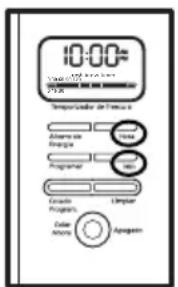
Figure 1
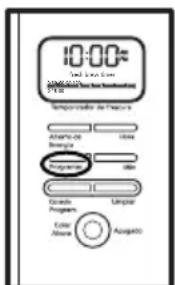
Figure 2
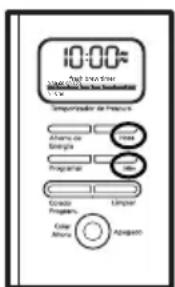
Figure 3
PREPARING FOR USE
Selecting and Measuring Ground Coffee
For best results, use a level tablespoon for ground coffee measurement. Make sure you use medium grind coffee for a perfect brew.
A. Suggested Coffee Measurement Chart
| To Brew Ground Coffee | |
| 10 Cups 7.5 tbsp. | |
| 8 Cups 6.5 tbsp. | |
| 6 Cups 4.5 tbsp. | |
| 4 Cups 3 tbsp. | |
| 1 level tablespoon (tbsp) = 5 gr./0.17 oz.1 cup = 5 fl. oz. (148 mL) of brewed coffeeUse more or less coffee to suit your taste. |
B. Water Filtration System (Not included on models BVSTDC4411-017 & BVSTDC4411-057 for Brazil)
Congratulations! You are the owner of a Oster® water filtration system. This carbon-based water filter improves the taste of your coffee by removing up to 97% of the chlorine from the water you may use to brew your coffee.
To use the water filtration system in your Oster® Coffee maker, please follow these steps:
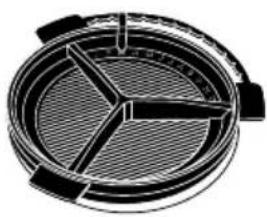
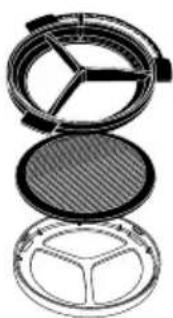
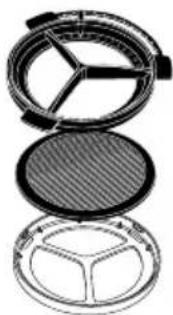
- Align the red indicator on the frame to the letter that corresponds with the month that you are using the disk for the first time. This serves to remind you to change the disk every month (approx. 30 brewing cycles).
NOTE: For optimum results, use the water filtration system with the permanent filter.
-
Rinse the water filter in fresh water before first use.
-
Follow Adding Water and Coffee instructions.
-
When you are done brewing your coffee, rinse the water filter with fresh water. Do not put your water filter in the dishwasher.
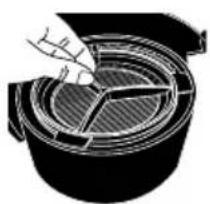
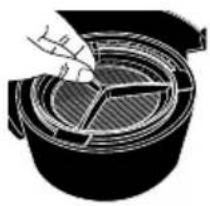
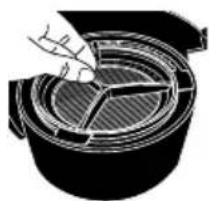
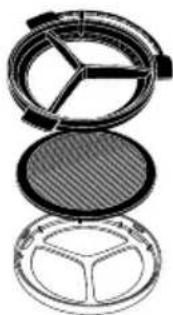
To replace the water filter disks, twist the gray disk cover from your water filtration system. Remove the used disk. Insert the new disk into the frame and twist the cover back into place.
natural_image
Technical diagram of a circular mechanical component with internal divisions (no text or symbols)
natural_image
Diagram of a mechanical component with internal channels and a hand interacting with it (no text or symbols)
natural_image
Cross-sectional diagram of a compact makeup palette with internal compartments (no text or symbols)
C. Adding Water and Ground Coffee
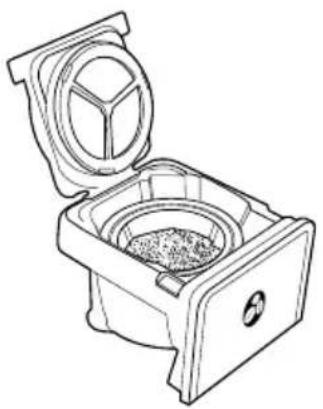
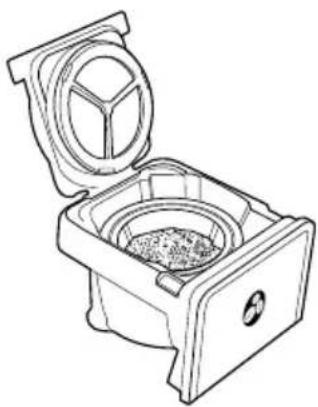
- Open the brew basket drawer (Figure 4).
- Place a 10–12 cup paper basket-style filter or the permanent filter into the brew basket.
NOTE: If using paper filters, it is important that the sides of the filter fit flush against the side of the filter basket. If filter collapse occurs, dampen the filter before placing in the filter basket and adding ground coffee and water.
-
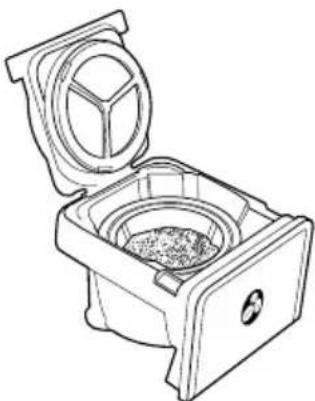
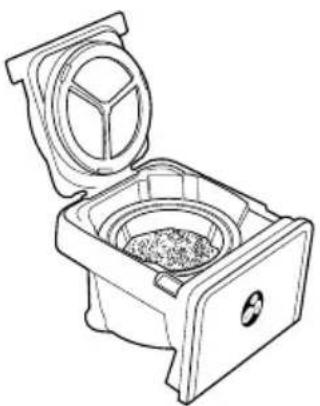
Add the desired amount of coffee and gently shake to level the coffee. See the Suggested Coffee Measurement Chart (Figure 5).
-
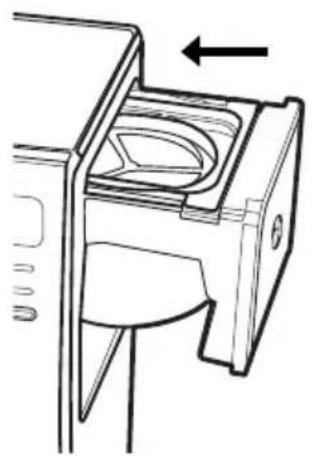
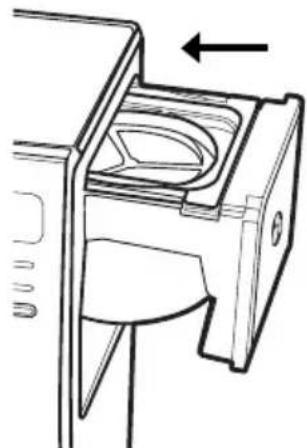
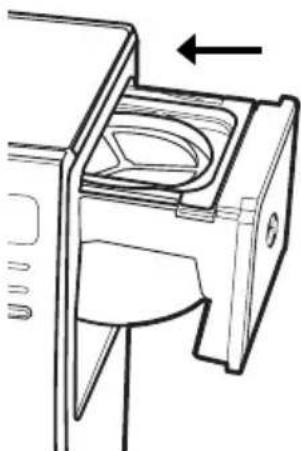
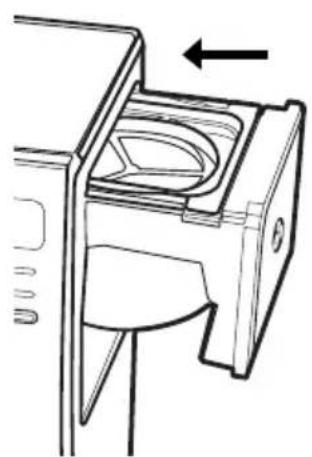
Slide the brew basket back into place (Figure 6).
-
Fill the removable water reservoir with cold, fresh water to the desired capacity (1 cup equals 148 mL). For easy and accurate filling, the water markings on the removable water reservoir show the amount of water needed to make the corresponding desired number of cups. Do not fill past the “10-cup MAX line” or water will flow out of the coffee maker.
NOTE: The amount of coffee brewed will always be slightly less than the amount of water poured in the water reservoir. This is due to the minimum absorption of water by the coffee grounds.
NOTE: If the thermal carafe is not in place then the coffee maker will not brew. The brew now "Colar Ahora" LED will flash to signal that there is an error.
CAUTION: Do not place the thermal carafe in the dishwasher.

natural_image
Technical line drawing of a mechanical component with an arrow indicating direction (no text or symbols)
Figure 4
natural_image
Line drawing of a mechanical device with an open lid and internal compartments (no text or symbols)
Figure 5
natural_image
Technical line drawing of a mechanical component with an arrow indicating direction (no text or symbols)
Figure 6
BREWING COFFEE NOW
- After completing the steps in the Adding Water and Coffee section and with the thermal carafe and the filter basket securely in place, turn the coffee maker on by pressing the brew now "Colar Ahora" button once (Figure 7). The brew now "Colar Ahora" light will turn on and pulse to signal that the coffee maker is on and brewing.
- After the used coffee grounds have cooled, carefully remove the filter basket and discard them.
NOTE: The brew basket drawer is hot after brewing. Always allow the coffee maker to cool down before cleaning.
- Prior to making a second pot of coffee, turn the coffee maker off. This will reset the fresh brew timer feature. To turn the coffee maker off, press the brew now/off "Colar Ahora/Apagado" button until all lights turn off.
- Make sure the thermal carafe is empty before starting to brew coffee.
- Be sure to turn your coffee maker off when no longer using it.
The Fresh Brew Timer Feature
The fresh brew timer feature lets you know how long your coffee has been waiting for you. At the start of the brew cycle, the fresh brew timer feature will automatically be activated. The timer will appear in the lower part of the display under the clock (Figure 8). This display will be visible any time you are brewing coffee. The display will change to show the time since brewing began in 15-minute intervals.
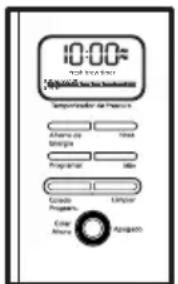
Figure 7
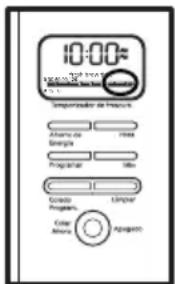
Figure 8
BREWING COFFEE LATER
- You must first set the time for when you would like the coffee maker to begin brewing your coffee as described in Setting the Clock and the Delay Brew Timer section.
- Prepare your coffee maker as described in Adding Water and Ground Coffee section.
- To activate the delay brew function and program your coffee maker to brew coffee at a later time, press the delay brew "Colado Program." button once. The delay brew "Colado Program." light will illuminate. The coffee maker is now set to automatically brew coffee at the pre-set time (Figure 9).
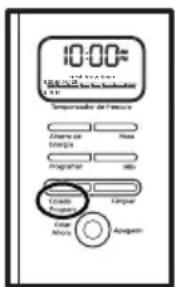
Figure 9
- At the pre-set time, the brew now "Colar Ahora" light will turn on and the delay brew "Colado Program." light will turn off, indicating the brewing has started. The fresh brew timer feature will start.
As a safety feature, your coffee maker will NOT start again automatically the next day. If you want your coffee to brew at the same time the following day, simply add a new filter, coffee and water and set delay brew, by repeating Steps 2 and 3 above.
NOTE: If the thermal carafe is not in place then the coffee maker will not brew.
To cancel delay brew:
Press the delay brew “Colado Program.” button until all lights turn off (Figure 9).
CLEANING AND MAINTAINING YOUR COFFEE MAKER
Daily Cleaning
Always unplug the coffee maker and allow it to cool before cleaning.
Remove the filter basket, permanent filter, thermal carafe and thermal carafe lid and wash them in a solution of hot water and mild liquid soap.
Never use abrasive cleansers, steel wool pads or other abrasive materials.
CAUTION! Never immerse the coffee maker itself in water, in any other liquid or place in the dishwasher.
Regular Cleaning and Maintenance
Decalcifying your Oster® coffee maker minerals (calcium/limestone) found in water will leave deposits in your coffee maker and affect its performance. It's recommended that you regularly remove these deposits using vinegar.
- Prepare a solution using 1 L of undiluted white household vinegar may be used to clean.
- Pour the vinegar into the water reservoir. Before decalcifying, remove the water filtration disk from the machine.
- Place an empty 10–12 cup basket-style paper filter or the permanent filter that came with the unit into the filter basket and slide the brew basket in place.
- Place the empty thermal carafe back in the unit.
- Press the clean "Limpiar" button until the clean "Limpiar" indicator light turns on (Figure 10). For your convenience the cleaning cycle is automatic. The entire cycle will take 45–60 minutes to complete.
During the cleaning your coffee maker will:
a. Slow brew approx. 750 mL of cleaning solution.
b. Pause for 30 minutes (the clean "limpiar" light will remain on to alert you that the process is active).
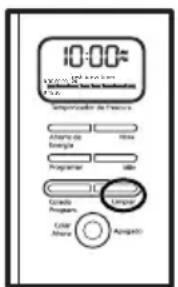
Figure 10
c. After 30 minutes, your coffee maker will brew the remainder of the cleaning solution.
d. When complete, the clean "Limpiar" light will turn off and your coffee maker will turn off.
- Discard the cleaning solution and rinse the thermal carafe thoroughly with clean water.
- Fill the water reservoir with clean, fresh water.
- Place the empty thermal carafe back on the coffee maker.
- Remove and discard the paper filter used during the cleaning cycle. If the permanent was used during cleaning, remove it and rinse it thoroughly before replacing it in the filter basket.
- Begin brewing and allow the full brew cycle to complete.
- Repeat steps 5 through 9 one more time.
Your coffee maker is now clean and ready to brew the next pot of delicious, hot coffee!
Suggested Decalcifying Interval
| Type of Water Cleaning Frequency | |
| Soft Water Every 80 Brew Cycles | |
| Hard Water Every 40 Brew Cycles | |
| or when red light is flashing |
Water Filtration Disk Replacement (Not included on models BVSTDC4411-017 & BVSTDC4411-057 for Brazil)
Your water filtration disk will need to be replaced once a month (approx. 30 brew cycles). If the unit will not be in use for an extended period of time, rinse the water filter with running water and clean the coffee maker before use.
Cleaning the Thermal Carafe
Hard water can leave a whitish stain inside the thermal carafe, and coffee may then turn this stain brown.
To remove thermal carafe stains:
- Fill the carafe with a solution of equal parts water and vinegar and let the solution stand in it for approximately 20 minutes.
- Discard the solution, then wash and rinse the thermal carafe.
DO NOT use harsh abrasive cleaners that may scratch the thermal carafe.
TROUBLESHOOTING YOUR COFFEE MAKER
Your coffee maker has been carefully designed to give you many years of trouble-free service. In the unlikely event that your new coffee maker does not operate satisfactorily, please review the following potential problems and try the steps recommended BEFORE you call or take it to an Authorized Oster® Service Center.
| PROBLEM POSSIBLE CAUSE SOLUTION | |
| The brew now “Colar Ahora” light does not light up | •The appliance is unplugged.•There’s a power outage. | •Plug unit in.•Wait for power to be restored. |
| The coffee is not brewing | •The appliance is unplugged.•There’s a power outage.•Not enough water in water reservoir.•The filter basket is not properly inserted.•The thermal carafe is not placed all the way on the platform. | •Plug unit in.•Wait for power to be restored.•Fill water reservoir above minimum level marking.•Insert filter basket correctly.•Place thermal carafe correctly on platform. |
| The coffee maker only brews water | •There are no coffee grounds in the filter basket. | •Add the desired amount of coffee to the filter. |
| The coffee maker brews slowly | •The coffee maker needs cleaning. | •Clean coffee maker as described in “cleaning and maintaining” section. |
| The filter basket overflows | •The filter basket is not properly inserted.•The thermal carafe is not placed all the way on the platform.•Too many coffee grounds were place in the filter.•The thermal carafe was removed from the platform for more than 30 seconds. | •Insert filter basket correctly.•Place thermal carafe correctly on platform.•Remove filter and discard ground. If using paper filter, replace it. If using permanent filter, rinse it. Begin brewing process again.•Turn off and unplug the unit. Allow it to cool. Wipe up spill |
| The coffee is not hot | •There is a power outage. •Wait for power to be restored. |
| The coffee tastes bad •Coffee grounds other than for an automatic drip coffee maker was used.•The ground coffee-to-water ratio was unbalanced.•The coffee maker needs cleaning. | •Use coffee grounds recommended for automatic drip coffee makers.•Use correct ground coffee-to-water ratio.•Clean coffee maker as described in “Maintaining your coffee maker” section. |
| The grounds are in the coffee •The filter is not properly seated in the basket.•The filter collapsed. | •Seat filter properly described within the filter basket.•Remove filter and replace. |
| The “brew now” led is flashing fast | •Thermal carafe is not placed all the way on the platform.•Not enough water in water reservoir. | •Place thermal carafe correctly on platform.•Fill the water reservoir above minimum level marking. |
PRECAUCIONES IMPORTANTES
natural_image
Technical diagram of a circular mechanical component with three internal slots and a central slot (no text or symbols)
natural_image
Diagram of a mechanical component with internal channels and a hand holding a tool (no text or symbols)
natural_image
Cross-sectional diagram of a compact appliance with internal compartments (no text or symbols)
natural_image
Technical line drawing of a mechanical component with an arrow indicating direction (no text or symbols)
Figura 4
natural_image
Line drawing of a mechanical device with an open lid and internal cavity (no text or symbols)
Figura 5
natural_image
Technical line drawing of a mechanical component with an arrow indicating direction (no text or symbols)
Figura 6
COLAR AHORA
Figura 1
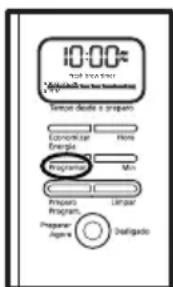
Figura 2
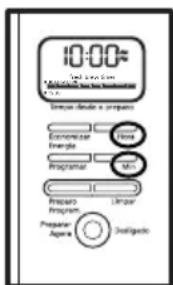
Figura 3
natural_image
Three technical diagrams of a mechanical device with cross-sectional views showing internal components (no text or symbols)
C.Como adicionar água e o café moído
natural_image
Technical line drawing of a mechanical component with an arrow indicating direction (no text or symbols)
Figura 4
natural_image
Line drawing of a mechanical device with an open lid and internal compartments (no text or symbols)
Figura 5
natural_image
Technical line drawing of a mechanical component with an arrow indicating direction (no text or symbols)
Figura 6
PREPARO AGORA
Figura 7
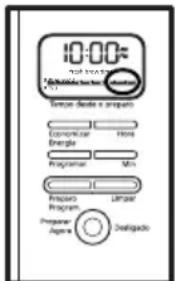
Figura 8
PREPARO PROGRAMADO
Figura 9
Figura 10
Panneau de commande
natural_image
Circular mechanical component with three cross-shaped blades, no visible text or symbols
natural_image
Cross-sectional diagram of a mechanical component with internal channels and a hand holding a tool (no text or labels)
natural_image
Cross-sectional diagram of a compact makeup compact with internal compartments (no text or symbols)
natural_image
Technical line drawing of a mechanical component with an arrow indicating direction (no text or symbols)
Figure 4
natural_image
Line drawing of a mechanical device with a lid and internal housing (no text or symbols)
Figure 5
natural_image
Technical line drawing of a mechanical component with an arrow indicating direction (no text or symbols)
Figure 6
PRÉPARATION IMMÉDIATE DU CAFÉ
Never use abrasive cleansers, steel wool pads or other abrasive materials.
The following information is intended for Mexico only
© 2013 Sunbeam Products, Inc. All rights reserved. Distributed by Sunbeam Latin America, LLC, 5200 Blue Lagoon Drive, Suite 470, Miami, FL 33126.
One year limited warranty – please see insert for details.