BVSTDCP121B - Coffee machine OSTER - Free user manual and instructions
Find the device manual for free BVSTDCP121B OSTER in PDF.


Pick your language and provide your email: we'll send you a specifically translated version.
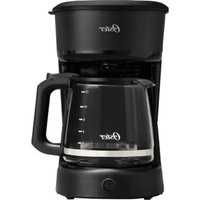
| Product Type | Coffee Machine (Drip) |
| Brand | Oster |
| Model | BVSTDCP121B |
| Dimensions (W x D x H) | 10.2 x 8.3 x 13.5 inches |
| Weight | 5.5 lbs |
| Power Supply | 120V / 60Hz, 900W |
| Water Reservoir Capacity | 12 cups (60 oz) |
| Carafe Type | Glass Carafe with Ergonomic Handle |
| Brewing Features | Pause & Serve; Programmable Timer; Auto Shut-off |
| Filter Type | No. 4 Cone Paper Filter or Permanent Filter (optional) |
| Programmable Clock | Yes, 24-hour |
| Brew Strength Selector | Not specified (assume standard) |
| Cleaning & Maintenance | Descaling recommended every 3 months; removable filter basket; washable parts |
| Safety Features | Auto shut-off after 2 hours; boil-dry protection |
| Spare Parts Availability | Carafe, filter basket, water reservoir available via Oster |
| Warranty | 1-year limited warranty |
| User Manual Included | Yes, PDF available online |
Frequently Asked Questions - BVSTDCP121B OSTER
How do I set the programmable timer on my Oster BVSTDCP121B coffee maker?
Press the Program button, then use the Hour and Min buttons to set the desired brew time. Press Program again to confirm. The clock must be set first.
Why is my coffee maker leaking water?
Check if the water reservoir is properly seated, the carafe is correctly positioned, or the filter basket is overloaded. Also, ensure the lid is closed tightly. If the problem persists, descale the machine.
What type of filter should I use?
The Oster BVSTDCP121B uses No. 4 cone paper filters. A permanent filter is also compatible (sold separately).
How do I clean and descale the coffee maker?
Mix equal parts water and white vinegar, fill the reservoir, and run a brew cycle without coffee. Then run two cycles with fresh water. Repeat every 3 months or as needed.
My coffee is weak/not hot enough. What can I do?
Ensure you are using the correct coffee-to-water ratio (typically 1-2 tablespoons per cup). Also, clean the machine regularly, as mineral buildup can affect temperature and extraction.
Can I use the Pause & Serve feature to pour a cup mid-brew?
Yes, the Pause & Serve feature allows you to remove the carafe for up to 30 seconds to pour a cup. The brew basket will stop dripping, but replace the carafe quickly to avoid overflow.
How do I reset the clock after a power outage?
Press and hold the Clock button, then use Hour and Min to set the correct time. Press Clock again to save.
What does the 'Auto Shut-off' feature do?
The coffee maker will automatically turn off 2 hours after the brew cycle ends, ensuring safety and energy efficiency.
Where can I find a replacement carafe or filter basket?
Replacement parts are available on the Oster website or through authorized retailers. Use model number BVSTDCP121B to search.
Is the Oster BVSTDCP121B compatible with a permanent filter?
Yes, it works with a standard No. 4 permanent filter. This can reduce waste and save money on paper filters.
User questions about BVSTDCP121B OSTER
0 question about this device. Answer the ones you know or ask your own.
Ask a new question about this device
No questions yet. Be the first to ask one.
Download the instructions for your Coffee machine in PDF format for free! Find your manual BVSTDCP121B - OSTER and take your electronic device back in hand. On this page are published all the documents necessary for the use of your device. BVSTDCP121B by OSTER.
USER MANUAL BVSTDCP121B OSTER

Manual assistant
Powered by Anthropic
Waiting for your message
Product information
Brand : OSTER
Model : BVSTDCP121B
Category : Coffee machine