
LUCID i10 - Vacuum Cleaner SOLAC - Free user manual and instructions
Find the device manual for free LUCID i10 SOLAC in PDF.

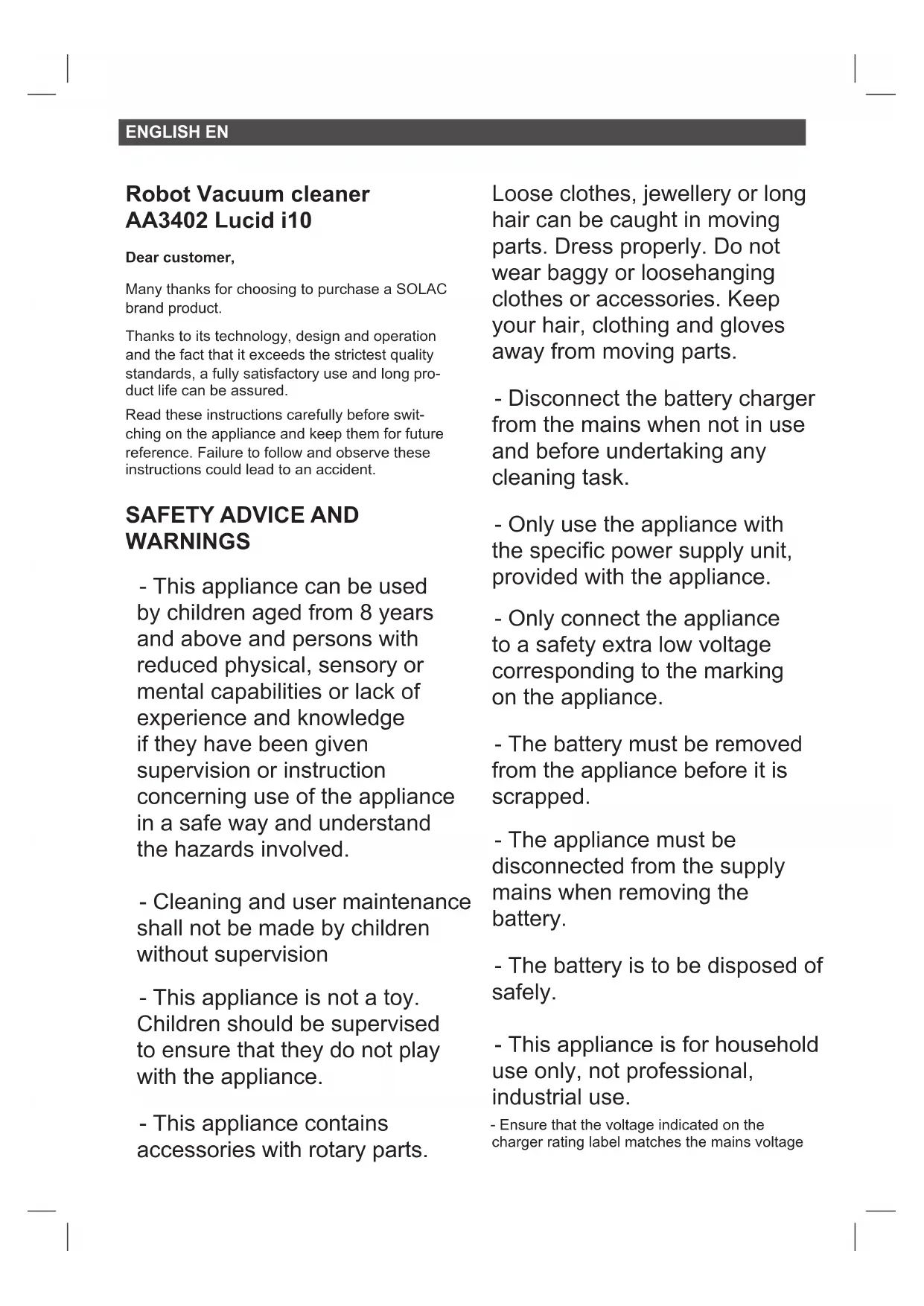


| Product type | Robot vacuum cleaner |
| Brand | Solac |
| Model | LUCID i10 (AA3402) |
| Usage | Household |
| Power supply | Rechargeable battery, mains charger |
| Cleaning modes | Auto, Spiral, Perimeter, Room, Max, Go Home |
| Scheduling | Clock and cleaning schedule via remote control |
| Remote control | Yes, with 2 AAA batteries (not included) |
| Water tank | Yes, for mopping function with microfiber cloth |
| Sensors | Front impact infrared sensor, 4 cliff sensors |
| Brushes | Central rotating brush, 2 side brushes, self-cleaning brush |
| Filters | Textile pre-filter, EPA filter, sponge filter |
| Charging base | Yes, automatic contact alignment |
| Light indicators | Blue (charging/standby), pink (low battery), red (error) |
| Safety | Anti-fall sensors, bumper, automatic stop |
| Maintenance | Empty bin after each use; clean filters weekly, brushes monthly |
| Spare parts | Brushes, filters, battery, water tank, cloth |
| Dimensions (approx.) | 30 cm diameter, 8 cm height |
| Weight (approx.) | 2.5 kg |
| Warranty | Solac authorized technical service |
Frequently Asked Questions - LUCID i10 SOLAC
User questions about LUCID i10 SOLAC
0 question about this device. Answer the ones you know or ask your own.
Ask a new question about this device
Download the instructions for your Vacuum Cleaner in PDF format for free! Find your manual LUCID i10 - SOLAC and take your electronic device back in hand. On this page are published all the documents necessary for the use of your device. LUCID i10 by SOLAC.
USER MANUAL LUCID i10 SOLAC
ROBOT ASPIRADOR
INSTRUCCIONES DE USO
AUTOMATIC VACUUM-CLEANER
INSTRUCTIONS FOR USE
ASPIRATEUR ROBOT
MODE D'EMPLOI
ROBÔ ASPIRADOR
ISTRUZIONI PER L'USO

Robot Aspirador AA3402 Lucid i10
natural_image
Line drawing of a modern living room interior with sofa, coffee table, and TV (no text or symbols)natural_image
Architectural diagram of a balcony with railing and circular base (no text or symbols)INSTALACIÓN
natural_image
Illustration of a hand using a tool to adjust or install electronic components on a circular device (no text or symbols visible)CARGA DE LA BATERÍA
natural_image
Diagram showing a hand inserting a device into a circular mechanical component with internal components (no text or symbols visible)natural_image
Line drawing of a robotic vacuum cleaner next to a circular vacuum cleaner in a room with an electrical outlet (no text or symbols)natural_image
Silhouette of a hand pressing a button with a power button icon (no text or symbols)natural_image
Silhouette of a hand pressing a button with a power button icon (no text or symbols)MODOS DE LIMPIEZA
MODO DE LIMPIEZA AUTO
MODO DE LIMPIEZA MAX
natural_image
Line drawing of a robotic vacuum cleaner next to an appliance, with no text or symbols present.natural_image
Line drawing of a mechanical device with a faucet and internal components (no text or symbols)natural_image
Technical line drawing of a mechanical component with an arrow indicating downward motion (no text or symbols)natural_image
Line drawing of a robotic vacuum cleaner with a mounted device and a separate housing (no text or symbols)IMPORTANTE:
natural_image
Line drawing of a robotic vacuum cleaner with a circular top and attached housing (no text or symbols)natural_image
Line drawings showing hands holding a device and a mechanical component with particles (no text or symbols)CAMBIO DE FILTROS:
natural_image
Technical line drawing of a mechanical device with an inset showing a close-up of a textured surface (no text or symbols)natural_image
Line drawing of hands using a tool to apply material to a container with scattered dots (no text or symbols)CAMBIO DE BATERIA:
natural_image
Technical diagram showing two views of a mechanical assembly with no visible text or symbolsnatural_image
Mechanical assembly diagram showing a component being inserted into a car hood, with no visible text or symbols.natural_image
Diagram of a car engine bay with a black plastic component and two arrows indicating assembly or inspection (no text or symbols present)LIMPIEZA DE LA MOPA:
natural_image
Three technical line drawings showing internal components of a device, with no visible text or symbols.natural_image
Technical line drawing of a mechanical component with hands adjusting parts (no text or symbols)natural_image
Line drawing of a hand holding a tool with a hexagonal base, no text or symbols presentnatural_image
Technical diagram of a mechanical assembly with an inset close-up showing internal components (no text or labels)LIMPIEZA DE LOS SENSORES DE DESNIVEL:
natural_image
Technical line drawing of a helicopter cockpit with internal components and a magnified inset showing the cockpit interior (no text or symbols)natural_image
Line drawing of a hand inserting a card into a device (no text or symbols)CONSUMIBLES
natural_image
Technical diagram showing two views of a vehicle's front and side views of a control panel with a 3D box (no text or symbols present)natural_image
Mechanical assembly diagram showing a component being inserted into a car hood, with no visible text or symbols.Many thanks for choosing to purchase a SOLAC brand product.
Thanks to its technology, design and operation and the fact that it exceeds the strictest quality standards, a fully satisfactory use and long product life can be assured.
Read these instructions carefully before switching on the appliance and keep them for future reference. Failure to follow and observe these instructions could lead to an accident.
SAFETY ADVICE AND WARNINGS
- This appliance can be used by children aged from 8 years and above and persons with reduced physical, sensory or mental capabilities or lack of experience and knowledge if they have been given supervision or instruction concerning use of the appliance in a safe way and understand the hazards involved.
- Cleaning and user maintenance shall not be made by children without supervision
- This appliance is not a toy. Children should be supervised to ensure that they do not play with the appliance.
- This appliance contains accessories with rotary parts.
Loose clothes, jewellery or long hair can be caught in moving parts. Dress properly. Do not wear baggy or loosehanging clothes or accessories. Keep your hair, clothing and gloves away from moving parts.
- Disconnect the battery charger from the mains when not in use and before undertaking any cleaning task.
- Only use the appliance with the specific power supply unit, provided with the appliance.
- Only connect the appliance to a safety extra low voltage corresponding to the marking on the appliance.
- The battery must be removed from the appliance before it is scrapped.
- The appliance must be disconnected from the supply mains when removing the battery.
- The battery is to be disposed of safely.
- This appliance is for household use only, not professional, industrial use.
- Ensure that the voltage indicated on the charger rating label matches the mains voltage
before plugging in the charger.
- Connect the appliance to a socket that can supply a minimum of 10 amperes.
- The charger's plug must fit correctly into the mains socket. Do not alter the plug. Do not use plug adaptors.
- Do not force the power cord. Never use the power cord to lift up, carry or unplug the battery charger.
- Do not touch the plug with wet hands.
- Do not use the appliance if the cable or plug is damaged.
- If any of the appliance casings breaks, immediately disconnect the appliance from the mains to prevent the possibility of an electric shock.
- Do not use the appliance if it has fallen on the floor, if there are visible signs of damage or if it has a leak.
- Avoid all contact with the liquid that could be released from the battery. In case of contact with eyes, wash them thoroughly and seek medical advice. The liquid spilled from the battery may cause irritation or burns.
USE AND CARE:
- Do not use the appliance if its accessories are not properly fitted.
- Do not use the appliance to gather up water or any other liquid.
- Do not use the appliance if the on/off switch does not work.
- Respect the MAX level indicator.
- Remove the batteries from the appliance if you are not going to use it for some time.
- Store this appliance out of reach of children and/or persons with physical, sensory or reduced mental or lack of experience and knowledge.
- Do not work on areas where there are metal objects, such as nails and/or screws.
- Never vacuum hot or sharp objects (cigarette butts, ashes, nails, etc.).
- Do not open the battery/ies under any circumstances whatsoever.
- When the battery/ies is not in use, keep it away
from other metal objects like paper clips, coins, keys, screws ... that could connect a terminal to another.
- Do not shortcircuit the battery terminals as this may cause an explosion or fire.
- The battery/ies should be stored at a temperature of below 40^ C.
- Recharge the battery/ies only with the charger supplied by the manufacturer. A charger that is suitable for one type of battery may cause explosion or fire hazard when used with other battery/ies.
- Use the device only with the battery/ies for which has been specifically designed. The use of any other battery/ies can cause an explosion or fire hazard.
SERVICE:
- Make sure that the appliance is serviced only by specialist personnel, and that only original spare parts or accessories are used to replace existing parts/accessories.
- CAUTION: There is a risk of fire if the appliance's cleaning is not done according to these instructions.
- Any misuse or failure to follow the instructions for use renders the guarantee and the manufacturer's liability null and void.
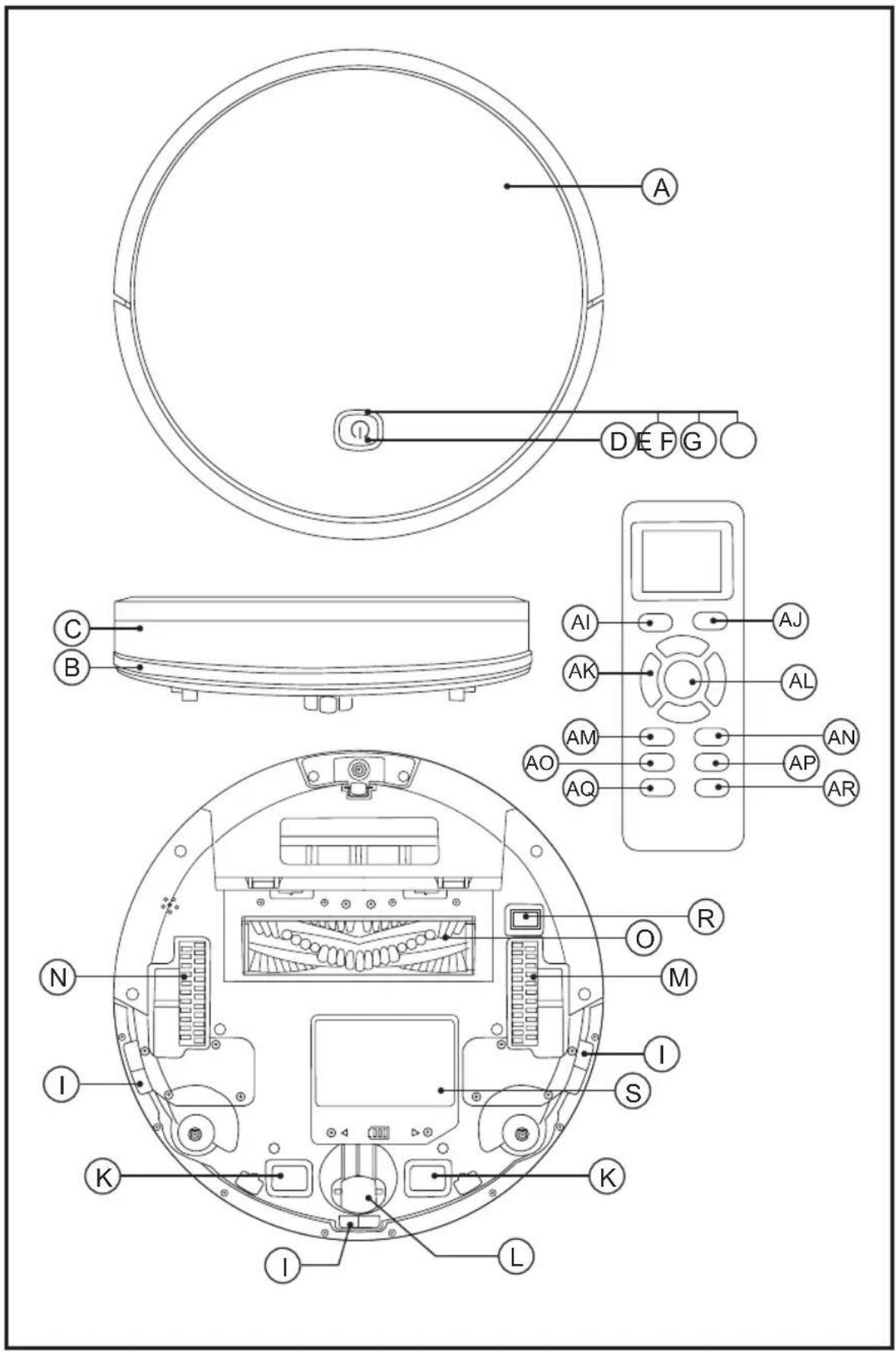
DESCRIPTION
TOP VIEW
A Robot vacuum cleaner top cover
B Antiscratch band
C Front impact infrared sensor
D Operation button
E Red light fixed or blinking error
F Operating light
G Charge light indicator.
H Selfcleaning brush
BOTTOM VIEW
I Antifall sensors
J Side brushes
K Load contact points
L Swivel wheels
M Right wheel
N Left wheel
O Main rotative brush
R Power interruptor
S Battery cover
CHARGING BASE
U Charging base
V Sensor base
W Charger
X Load contact points
DUST TANK
Y Dust tank Z Dust tank cover AA Textile prefilter AB EPA Filter AC Sponge Filter AD Dust container removal button
WATER TANK
AE Water tank AF Microfiber mop AG Hermetic water tank lid AH Water tank removal button
REMOTE CONTROL
AI AUTO cleaning mode button
AJ Button Cleaning mode Go Home (returns to the charging station automatically)
AK Direction buttons (up / down / right / left)
AL Start button or stop
AM Button to select the time
AN Button to select the schedule
AO Spiral cleaning mode button
AP Edge Cleaning Mode button
AQ Button Room cleaning mode
AR Maximum suction button in room and AUTO.
NOTA: Insert 2 AAA batteries before using the remote control for the first time. Make sure that the positive and negative poles are located in the correct direction in the battery compartment.
If the model of your appliance does not have the accessories described above, they can also be bought separately from the Technical Assistance Service.
IMPORTANT:
- Cables or other objects on the ground can hinder the mobility of the robot. Remove these objects before using the robot vacuum cleaner.

natural_image
Line drawing of a modern living room with sofa, coffee table, and TV (no text or symbols)- Use the vacuum cleaner the robot only on short pile carpets. - Furniture less than 8cm can block the robot. Lift the furniture if you need to clean this area. - Put a safety barrier on the stairs to prevent it from falling in case the fall arrest sensors do not work properly.

natural_image
Architectural diagram of a bathroom with railing and circular object (no text or symbols)INSTALLATION
- Be sure to remove all packaging material from inside the appliance.
CHARGING BASE POSITION:
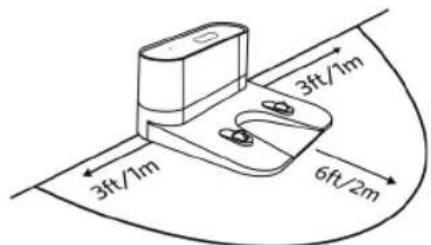
- Connect the charger to the charging base. - Place the load base flat and next to the wall. - To receive a good signal, you must leave a radius of 1m to the right and left and 2 meters forward of the base.
- Connect to the power.
INSTALL SIDE BRUSHES:
- Mount the side brushes on the bottom of the robot by pressing the brushes into its slot.

natural_image
Illustration of a hand using a tool to adjust internal components of an electronic device (no text or symbols visible)BATTERY CHARGE:
- Warning: A new battery does not come with a full charge and must be fully charged before using the device for the first time.
- Charge the battery at room temperature between 4 and 40°C.
- Turn on the ON / OFF button located on the bottom of the robot.

natural_image
Diagram showing a hand using a magnifying tool to inspect a circular electronic device with labeled components (no text or symbols present)- Put the robot in the charging base and ensure that the automatic charging poles are aligned correctly.

natural_image
Line drawing of a robotic vacuum cleaner next to a mounted device in a room (no text or symbols)- Operation button (D): the red LED will light blinking. When the LED stops blinking the robot is loaded. Load the robot for 4 hours before the first use.
ACTIVATE THE ROBOT
- Before starting use, ensure that the power switch (R) is on.
- Press the operation button (D) to awaken the robot.

natural_image
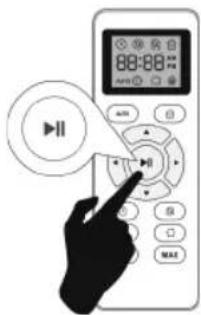
Silhouette of a hand pointing at a button with a power button icon (no text or symbols)- Press the operation button (D) to start cleaning in AUTO (AI) mode, you can also start cleaning by pressing the AUTO button on the remote control.
- NOTE: If the battery is about to run out, the robot will return to the charging base automatically to recharge.
- NOTE: If the load base is inaccessible, the robot can not be recharged, it will return to the initial situation and the cleaning system will end. In this case, place the robot manually in the charging base so that it can be recharged correctly.
PAUSE THE ROBOT
- To stop the robot press the operation button (D) or press the on / off button (AL) on the remote control.

natural_image
Silhouette of a hand pressing a button with a power button icon (no text or symbols)
- To resume the cleaning cycle, press the operation button (D) again.
- For the robot to return to the charging base (U) press the Go Home button (AJ).
POWER OFF THE ROBOT
- To turn off the robot press the operation button (D) next until the operation indicator goes off.

natural_image
Silhouette of a hand pressing a button with a power button icon (no text or symbols)CLEANING MODES
AUTO CLEANING MODE
- The robot starts to vacuum automatically and combines the different cleaning modes in one optimizing the cleaning of your home to the maximum. To use the AUTO cleaning mode, press the button (AI) on the remote control.

- When the cleaning cycle ends or if the battery runs out, it returns to the charging base automatically.
SPIRAL CLEANING MODE
- The robot starts vacuum at a particular point by spiraling outward approximately (1 meter) in diameter and then spiraling inward to where it started. To use the spiral cleaning mode, press the (AO) button on the remote control.

MAX CLEANING MODE
- The robot increases its suction power to provide a deeper cleaning.

- To use the MAX cleaning mode, press the (AR) button on the remote control.
- MAX cleaning mode can only be activated
during operation in AUTO cleaning mode.
EDGE CLEANING MODES
- Once the robot finishes cleaning the open areas of your floor, use the perimeter mode to make sure it has been cleaned along the walls and around the legs of the furniture.

- If you prefer a faster cleaning of the edges, press the button (AP) on the remote control.
SMALL ROOM CLEANING MODE
- When it is necessary to clean a specific room, press the room cleaning mode button on the remote control (AQ).

- When the cleaning is finished, the robot will stop.
- Make sure to close the doors of the room while using this mode.
GO HOME MODE
- Mode of return to the charging base automatically when the robot detects that only 15% of the battery is left.

natural_image
Line drawing of a robotic vacuum cleaner next to a mounted device, with no text or symbols present.- To activate the Go Home mode, press the (AJ) button on the remote control.
WATER TANK ICON CONTROL MODE
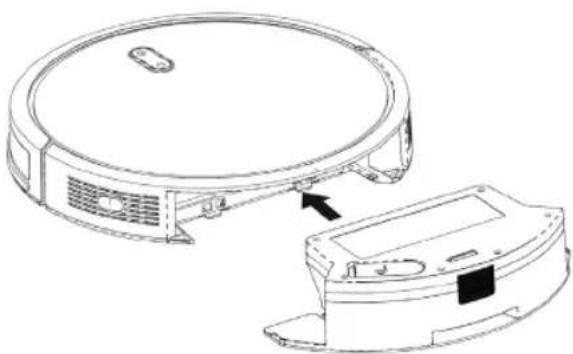
- At the end of the suction process, you can change the dust deposit through the water tank (AE) to continue cleaning. The water tank works by dripping so the mop will moisten and mop the floor.
- Open the hermetic lid of the tank (AG) and introduce water into the tank.

natural_image
Technical line drawing of a mechanical device with a faucet and base plate (no text or symbols)- Put the mop that is fastened securely.

natural_image
Technical line drawing of a mechanical component with an arrow indicating downward motion (no text or symbols)- Enter the water tank and select the cleaning mode you need.

natural_image
Technical line drawing of a circular device with a separate base component, showing internal components and mounting points (no text or symbols)IMPORTANT:
- Do not use the mop outdoors.
- Remove the carpets to avoid damaging them.
- Before loading the robot, remove the water tank and the mop.
CLEANING SCHEDULE
- The robot vacuum cleaner has cleaning schedule settings that allow you to customize when you clean your home.
- These settings can only be confirmed via the remote control.
IMPORTANT:
- Make sure that the remote control is close to the robot while setting the clock or time.
- Make sure that the power switch is in the ON position.
1) CONFIGURE THE CLOCK OF THE REMOTE CONTROL
Press the (AM) button on the remote control, the time selector starts blinking.

Press the direction buttons ▲ to select the desired time.
Press the direction buttons or to select the minutes or hours.
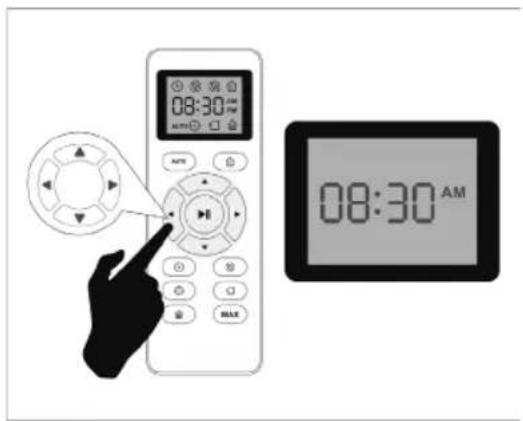
Press the (AL) button in progress or stop the robot will beep when the time setting is completed.
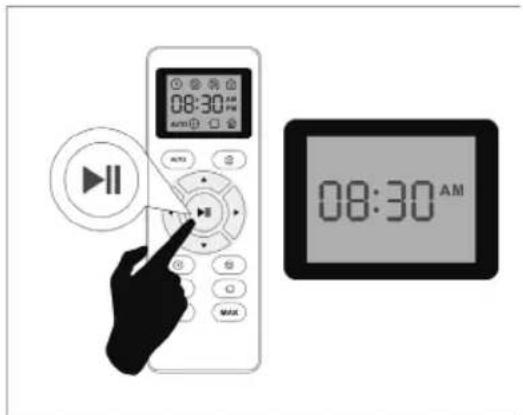
2) CONFIGURE THE CLEANING HOURS
- Press the (AN) button on the remote control, the time selector starts blinking.
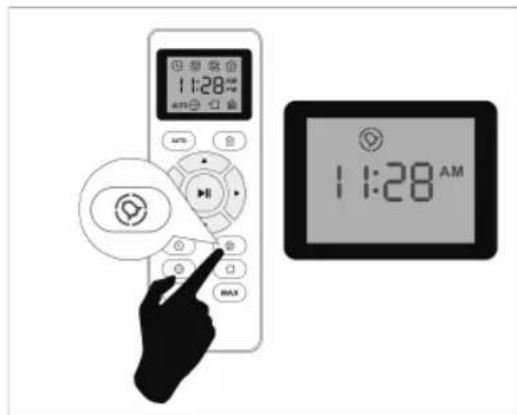
- Press the direction buttons or to select the desired time.

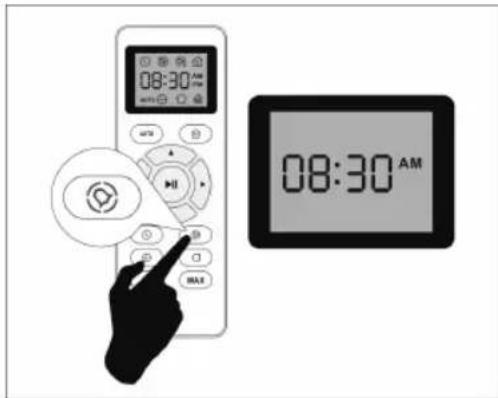
- Press the direction buttons or to select the minutes or hours.
- Press the (AL) button in progress or stop the robot will beep when the time setting is completed.

3) CANCEL THE SETTINGS OF THE CLEANING HOURS
Press the (AN) button on the remote control for 4 seconds, the vacuum cleaner will emit a beep when the cleaning schedule confirmation is canceled.
LED INDICATOR
| LED LIGHT ROBOT STATUS | |
| Flashing blue Charging | |
| Solid blue Standby / Cleaning / Fully charged | |
| Solid pink Low power and returning to Charging Dock | |
| Off Robot is off. To conserve power, the light automatically turns off when robot is not docked to the charging doc and has been inactive for 1 minute. | |
| Flashing / Solid Red + Beeping | Robot has an error. Refer to the troubleshooting section "Anomalies" in this manual for solutions |
MAINTENANCE
- Disconnect the battery charger from the mains and allow it to cool before undertaking any cleaning task.
- Clean the equipment with a damp cloth with a few drops of washingup liquid and then dry.
- Do not use solvents, or products with an acid or base pH such as bleach, or abrasive products, for cleaning the appliance.
- Do not let water or any other liquid get into the air vents to avoid damage to the inner parts of the appliance.
- Never submerge the appliance in water or any other liquid or place it under running water.
- Never submerge the connector in water or any
other liquid or place it under running water.
| LUCID i10 CLEANING REPLACEMENT FREQUENCY | ||
| Dust Bin After each use | - | |
| Filters Once every week | Every 2 months | |
| Rolling Brush | Once every week | Every 6-12 months |
| Side Brushes | Once every month | Every 3-6 months(or when visibly worn) |
| Sensors | Once every month | - |
| Charging Pins | Once every month | - |
| Swivel wheel | Once every month | - |
EMPTYING THE POWDER TANK:
- Empty the dust container after each use.
- Uncouple the dust container from the appliance.

natural_image
Technical line drawing of a circular device with ventilation slots and a separate housing component (no text or symbols)- Open the emptying lid of the tank where indicated by the arrows and pour its contents into an appropriate waste container.

natural_image
Line drawings of hands holding a device and a mechanical component with particles (no text or symbols)CHANGE OF FILTERS:
- Disconnect the powder container from the appliance.
- Open the lid of the filter compartment located in the upper part of the dust tank.
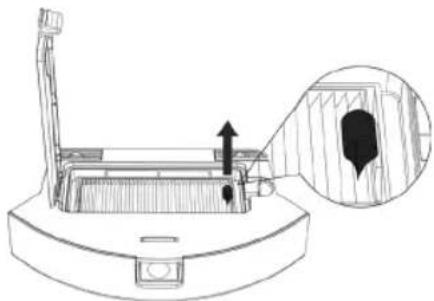
natural_image
Technical line drawing of a mechanical device with an inset showing a close-up view of internal components (no text or symbols)- Extract the filter and shake lightly to expose the dust.

natural_image
Line drawing of hands using a tool to apply material to a container with scattered dots (no text or symbols)CAMBIO DE BATERIA:
- Unscrew the screw of the battery cover and remove the cover.
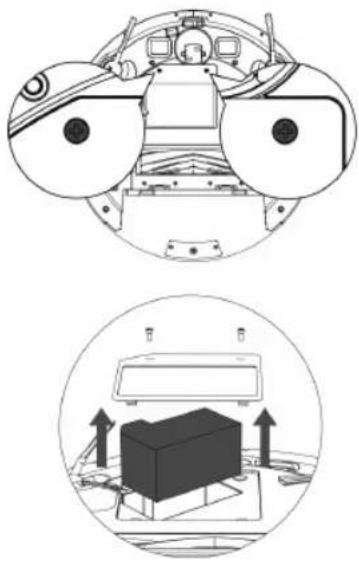
natural_image
Technical diagram showing two views of a mechanical assembly with no visible text or symbols- Disconnect the plug between the battery and the robot.

natural_image
Mechanical assembly diagram showing a component inserted into a car hood with toolbars and a downward arrow indicating motion (no text or symbols present)- Insert the new battery, connect it to the robot and close the lid.
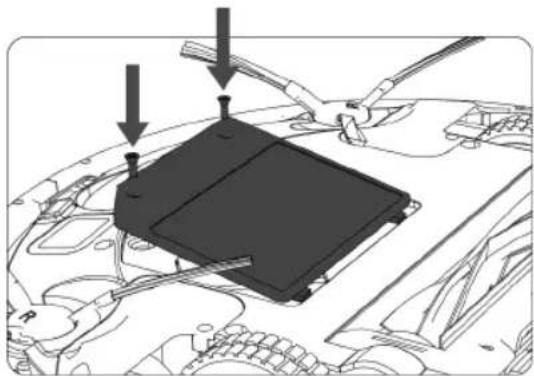
natural_image
Diagram of a car engine bay with a black plastic component and three arrows pointing to it (no text or symbols present)CLEANING MOP
- Remove the tank lid.
- Wash the mop with water and let it dry.
CLEANING ROBOT'S MAIN ROTATIVE BRUSH AND SIDE BRUSHES:
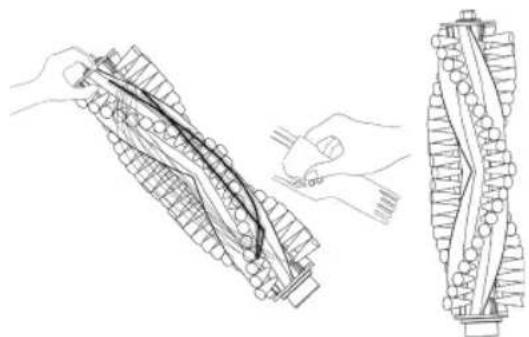
- Open the compartment lid, remove the brush and clean the compartment with a damp cloth.
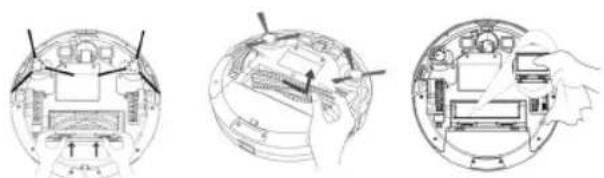
natural_image
Three technical line drawings showing a device interior with labeled components, no text or symbols present.- Clean the central rotating brush. Cut the hair wrapped in the brush with the blade that includes the selfcleaning brush.

natural_image
Technical line drawing of a mechanical component with hands adjusting parts (no text or symbols)- Remove the side brushes using a damp cloth to clean them.

natural_image
Line drawing of a hand holding a small mechanical component (no text or symbols)CLEANING ROBOT'S SWIVEL WHEEL:
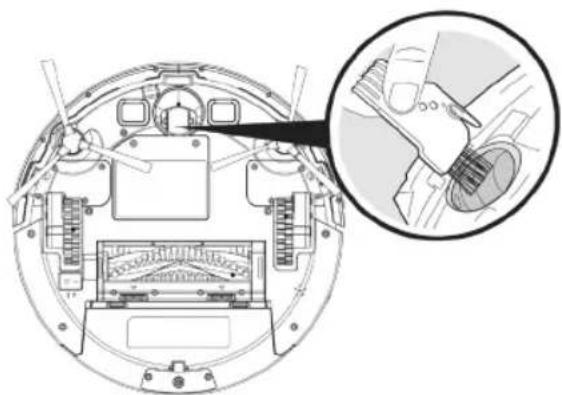
- Remove the castor wheel and then use the selfcleaning brush to clean the dust.
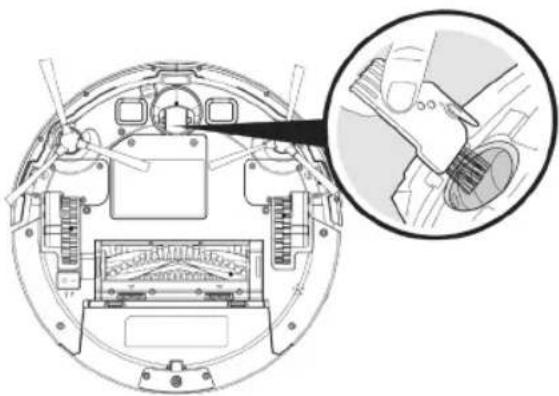
natural_image
Technical diagram of a mechanical device with an inset close-up showing internal components (no text or labels)CLEANING ROBOT'S ANTIFALLING SENSORS:
natural_image
Technical line drawing of a helicopter cockpit interior with instrument panels and control panel (no text or labels)CLEANING ROBOT'S LOAD CONTACT POINTS:
- Clean the automatic loading poles and load it with the cleaning cloth and a dry cloth.
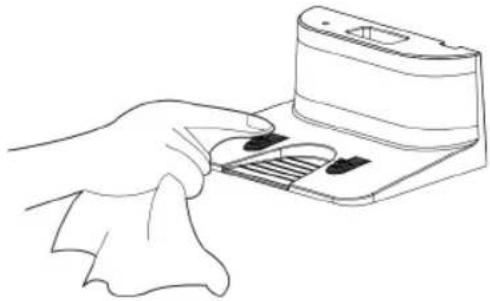
natural_image
Line drawing of a hand inserting a card into a device (no text or symbols)REPAIR
- Take the appliance to an authorised technical support service if product is damaged or other problems arise. Do not attempt to disassemble or repair the appliance yourself as this may be dangerous.
FOR EU PRODUCT VERSIONS AND/OR IN CASE THAT IT IS REQUESTED IN YOUR COUNTRY:
ECOLOGY AND RECYCLABILITY OF THE PRODUCT
- The materials of which the packaging of this appliance consists are included in a collection, classification and recycling system. Should you wish to dispose of them, use the appropriate public recycling bins for each type of material.
- The product does not contain concentrations of substances that could be considered harmful to the environment.
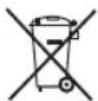
This symbol means that in case you wish to dispose of the product once its working life has ended; take it to an authorised waste agent for the selective collection of Waste from Electric and Electronic
Equipment (WEEE).

This symbol means that product may include a battery or batteries; user must to remove them before disposing of the product. Remember that batteries must
be disposed of in duly authorised containers. Do not dispose of them in fire.
HOW TO REMOVE THE BATTERIES FROM THE INTERIOR OF THE DEVICE:
- CAUTION: It is important that the batteries are fully discharged prior to its withdrawal from the apparatus.
- CAUTION: the appliance must be disconnected from the supply mains when removing the batteries.
- To remove the batteries, once the life of the appliance, proceed as follows:
- Unscrew the screw of the battery cover and remove the cover.
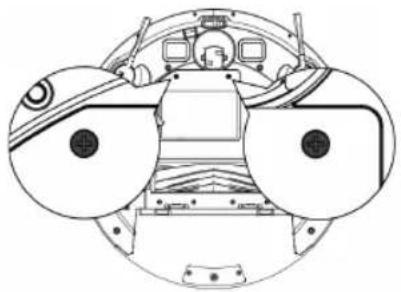
natural_image
Top-down schematic of a spacecraft's cockpit and surrounding equipment (no text or labels)
natural_image
Diagram of a 3D printer with an open lid and upward arrows indicating orientation or operation (no text or symbols present)- Disconnect the plug between the battery and the robot.

natural_image
Mechanical assembly diagram showing a component inserted into a vehicle headstock with a downward arrow indicating motion (no text or symbols present)This appliance complies with Directive 2014/35/EU on Low Voltage, Directive 2014/30/EU on Electromagnetic Compatibility, Directive 2011/65/EU on the restrictions of the use of certain hazardous substances in electrical and electronic equipment and Directive 2009/125/EC on the ecodesign requirements for energy-related products
ANOMALIES
- In case of detecting any anomaly, check the following table:
| ERROR N° BLINKS AND BEEPS LIKELY CAUSE WHAT TO DO | |||
| 1 | Robot's side | BEEP ONCE Front | caster wheel is stuck |
| 2 BEEP TWICE | brush probably stuck | ||
| 3 BEEP TRIPLE | CATOR LIGHT | fan is stuck or its filter is clogged. | |
| 4 BEEP QUARTIC | Robot's rolling | brush can't turn. | |
| 5 | E Robot's cliff sen-BREATH RED INDICATOR LIGHT | BEEP TWICE Bumper is stuck. Check | whether the bumper is flexible. |
| 6 BEEP TRIPL | sors are dirty or it is stuck on a dark surface. | ||
| 7 BEEP QUARTIC "Robot cannot | return to its Charging Dock or starting position. | ||
_
| _
一
1
FRANÇAIS FR
natural_image
Line drawing of a modern living room with sofa, coffee table, and TV (no text or symbols)natural_image
Architectural diagram of a bathroom with railing and toilet (no text or symbols)INSTALLATION
natural_image
Illustration of a hand using a tool to adjust or install electronic components inside a circular device (no text or symbols visible)CHARGEMENT DE LA BATTERIE
natural_image
Diagram showing a hand inserting a device into a circular mechanical component with internal components (no text or symbols visible)natural_image
Line drawing of a robotic vacuum cleaner and a mounted device in a room with an electrical outlet (no text or symbols)natural_image
Silhouette of a hand holding a button with a power button icon (no text or symbols)natural_image
Silhouette of a hand pointing at a button with an 'Power' icon, enclosed in a circular frame (no text or symbols)MODES DE NETTOYAGE
MODE NETTOYAGE AUTO
MODE NETTOYAGE MAX
natural_image
Line drawing of a robotic vacuum cleaner next to a circular vacuum cleaner in a room with an electrical outlet (no text or symbols)natural_image
Line drawing of a mechanical device with a faucet and base plate (no text or symbols)natural_image
Technical line drawing of a mechanical component with an arrow indicating downward motion (no text or symbols)natural_image
Technical line drawing of a circular device with an attached component, showing no text or symbols.IMPORTANT :
natural_image
Line drawing of a robotic vacuum cleaner with a circular top and attached housing (no text or symbols)natural_image
Line drawing of two hands holding a device (no text or symbols)
natural_image
Line drawing of a printer with an open lid and falling particles below (no text or symbols)natural_image
Technical line drawing of a mechanical component with an inset showing a close-up view of a textured surface (no text or symbols)natural_image
Illustration of hands using a tool to process a wafer or sample being poured into a container (no text or symbols present)REEMPLACEMENT DE LA BATTERIE :
natural_image
Technical diagram showing two views of a vehicle's front and side views with no visible text or symbolsnatural_image
Technical diagram of a car engine bay with a black component being inserted, showing no text or symbols.natural_image
Diagram of a car engine bay with a black plastic component being inserted, showing arrows indicating assembly or inspection (no text or symbols present)NETTOYAGE DE LA SERPILLIÈRE :
natural_image
Three technical line drawings of a device interior showing internal components and a hand operating the base panel (no text or symbols present)natural_image
Technical line drawing of a mechanical component with two views: top shows a wire being handled, bottom shows a side view of a cylindrical component (no text or symbols)natural_image
Line drawing of a hand holding a small object with a hexagonal hole, no text or symbols presentNETTOYAGE DE LA ROUE PIVOTANTE :
natural_image
Technical diagram of a mechanical assembly with an inset showing a close-up view of a component (no text or symbols present)natural_image
Technical line drawing of a circular mechanical component with internal components and a magnified inset showing a hand operating the control panel (no text or symbols present)natural_image
Line drawing of a hand inserting a card into a device (no text or symbols)ACCESSOIRES
natural_image
Top-down schematic of a helicopter cockpit showing front, rear, and top views (no text or labels)
natural_image
Diagram of a device with an open lid and upward arrows indicating motion or operation (no text or symbols present)natural_image
Mechanical assembly diagram showing a battery mounted on a vehicle head with no visible text or symbolsnatural_image
Line drawing of a modern living room with sofa, coffee table, and TV (no text or symbols)natural_image
Line drawing of a balcony with railing and circular object (no text or symbols)INSTALAÇÃO
natural_image
Illustration of a hand using a tool to adjust or install electronic components on a circular device (no text or symbols visible)natural_image
Diagram showing a hand inserting a device into a circular device with internal components (no text or symbols visible)natural_image
Line drawing of a robotic vacuum cleaner next to a mounted device, with no text or symbols present.natural_image
Silhouette of a hand pressing a button with a power button icon (no text or symbols)natural_image
Silhouette of a hand holding a button with an 'Power' icon inside a circular frame (no text or symbols)MODOS DE LIMPEZA
MODO DE LIMPEZA AUTOMÁTICA
natural_image
Simple line drawing of a looped cable with a circular component, no text or symbols presentnatural_image
Simple spiral diagram with an arrow indicating direction (no text or symbols)MODO DE LIMPIEZA MAX

natural_image
Simple line drawing of a curved pipe with a circular component at one end (no text or symbols)natural_image
Line drawing of a robotic vacuum cleaner inside a room with an electrical outlet (no text or symbols)natural_image
Line drawing of a mechanical device with a faucet and base plate (no text or symbols)natural_image
Technical line drawing of a mechanical component with an arrow indicating downward motion (no text or symbols)3) Insira o deposito de água e seleccione o modo de limpeza desejado.
natural_image
Line drawing of a circular device with ventilation slots and a separate rectangular component, showing no text or symbols.IMPORTANTE
natural_image
Line drawing of a circular device with ventilation slots and a separate rectangular component, showing no text or symbols.natural_image
Illustration showing a hand holding a game controller and a device with particles falling into a container (no text or symbols)natural_image
Technical line drawing of a mechanical component with an inset showing a close-up detail (no text or symbols)natural_image
Line drawing of hands using a tool to apply material to a container with scattered dots (no text or symbols)natural_image
Top-down schematic of a vehicle cockpit with two large circular components (no text or symbols)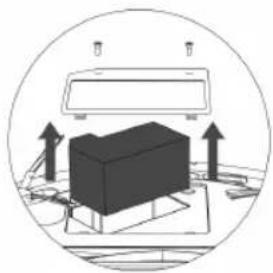
natural_image
Diagram of a device with upward arrows indicating motion or force, enclosed in a circular frame (no text or symbols)natural_image
Technical diagram of a car engine bay with a black component and directional arrow indicating assembly (no text or symbols present)natural_image
Diagram of a car engine bay with a black plastic enclosure and two arrows indicating assembly or repair points (no text or symbols present)LIMPIEZA DA MOPA:
natural_image
Three technical line drawings of a device interior with labeled components, showing hand positioning and assembly (no text or symbols)- Limpe a escova rotativa central. Corte os cabelos enrolados na escova com a tesoura incluída na escova de auto limpeza.
natural_image
Technical line drawing of a mechanical component with two views: top shows a wire being inserted, bottom shows the same component being handled (no text or symbols)natural_image
Line drawing of a hand holding a tool with a hexagonal nut (no text or symbols)LIMPEZA DA RODA PIVÔ:
- Retire a roda pivô e utilize a escova de auto limpeza para limpar o pó.
natural_image
Technical diagram of a mechanical device with an inset showing a close-up view of internal components (no text or symbols)natural_image
Technical line drawing of a helicopter cockpit interior with instrument panels and control panel (no text or labels)natural_image
Line drawing of a hand inserting a card into a device (no text or symbols)CONSUMÍVEIS
natural_image
Technical diagram showing top and side views of a vehicle cockpit with internal components and a 3D box (no text or labels)- Desligue a ficha entre a bateria e o robot.

natural_image
Mechanical assembly diagram showing a component being inserted into a car hood, with no visible text or symbols.This product enjoys the recognition and protection of the legal guarantee in accordance with current legislation. To enforce your rights or interests you must go to any of our official technical assistance services.
You can find the closest one by accessing the following web link: http://solac.com
You can also request related information by contacting us by phone.
You can download this instruction manual and its updates at http://solac.com
DE) GARANTIE UND TECHNIS- CHER SERVICE
Unit 25 & 26, San Croy Office Park, Die Agora
Road, Croydon, Kempton Park, 1619
Johannesburg
(+27) 011 392 5652
_
| _
一
1
sOlac
what we do, we do well
Español / ES
English / EN
Français / FR
Português / PT




- Robot Aspirador AA3402 Lucid i10
- INSTALACIÓN
- CARGA DE LA BATERÍA
- MODOS DE LIMPIEZA
- MODO DE LIMPIEZA AUTO
- MODO DE LIMPIEZA MAX
- IMPORTANTE:
- CAMBIO DE FILTROS:
- CAMBIO DE BATERIA:
- LIMPIEZA DE LA MOPA:
- LIMPIEZA DE LOS SENSORES DE DESNIVEL:
- CONSUMIBLES
- SAFETY ADVICE AND WARNINGS
- USE AND CARE:
- SERVICE:
- DESCRIPTION
- TOP VIEW
- BOTTOM VIEW
- CHARGING BASE
- DUST TANK
- WATER TANK
- REMOTE CONTROL
- IMPORTANT:
- INSTALLATION
- CHARGING BASE POSITION:
- INSTALL SIDE BRUSHES:
- BATTERY CHARGE:
- ACTIVATE THE ROBOT
- PAUSE THE ROBOT
- POWER OFF THE ROBOT
- CLEANING MODES
- AUTO CLEANING MODE
- SPIRAL CLEANING MODE
- MAX CLEANING MODE
- EDGE CLEANING MODES
- SMALL ROOM CLEANING MODE
- GO HOME MODE
- WATER TANK ICON CONTROL MODE
- CLEANING SCHEDULE
- 1) CONFIGURE THE CLOCK OF THE REMOTE CONTROL
- 2) CONFIGURE THE CLEANING HOURS
- 3) CANCEL THE SETTINGS OF THE CLEANING HOURS
- MAINTENANCE
- EMPTYING THE POWDER TANK:
- CHANGE OF FILTERS:
- CLEANING MOP
- CLEANING ROBOT'S MAIN ROTATIVE BRUSH AND SIDE BRUSHES:
- CLEANING ROBOT'S SWIVEL WHEEL:
- CLEANING ROBOT'S ANTIFALLING SENSORS:
- CLEANING ROBOT'S LOAD CONTACT POINTS:
- REPAIR
- FOR EU PRODUCT VERSIONS AND/OR IN CASE THAT IT IS REQUESTED IN YOUR COUNTRY:
- ECOLOGY AND RECYCLABILITY OF THE PRODUCT
- HOW TO REMOVE THE BATTERIES FROM THE INTERIOR OF THE DEVICE:
- ANOMALIES
- FRANÇAIS FR
- CHARGEMENT DE LA BATTERIE
- MODES DE NETTOYAGE
- MODE NETTOYAGE AUTO
- MODE NETTOYAGE MAX
- IMPORTANT :
- REEMPLACEMENT DE LA BATTERIE :
- NETTOYAGE DE LA SERPILLIÈRE :
- NETTOYAGE DE LA ROUE PIVOTANTE :
- ACCESSOIRES
- INSTALAÇÃO
- MODOS DE LIMPEZA
- MODO DE LIMPEZA AUTOMÁTICA
- IMPORTANTE
- LIMPIEZA DA MOPA:
- LIMPEZA DA RODA PIVÔ:
- CONSUMÍVEIS
- DE) GARANTIE UND TECHNIS- CHER SERVICE
- sOlac
Brand : SOLAC
Model : LUCID i10
Category : Vacuum Cleaner