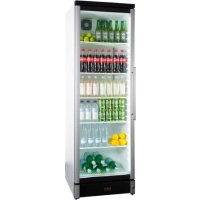
VESTFROST M 180 - Fridge

M 180 - Fridge VESTFROST - Free user manual and instructions

Find the device manual for free M 180 VESTFROST in PDF.

📄 72 pages English EN Download 💬 AI Question 10 questions ⚙️ Specs
Notice VESTFROST M 180 - page 2
View the manual : Français FR Dansk DA Deutsch DE English EN
Pick your language and provide your email: we'll send you a specifically translated version.
Product type Glass door refrigerator
Brand Vestfrost
Model M 180
Net weight 36 kg
Dimensions (H × W) 2000 × 650 mm
Power supply 220–240 V ~ 50 Hz
Recommended fuse 10–13 A
Ambient operating temperature 10 °C to 32 °C
Refrigerant Flammable hydrocarbon (quantity on rating plate)
Minimum room volume 1 m³ per 8 g of refrigerant
Defrost type Automatic (refrigerator)
Temperature control Electronic with digital display
Special functions ECO mode, manual defrost, on/off
Door reversibility Yes
Lighting LED (class 1 diodes, eye-safe)
Fan Yes
Number of shelves 1 shelf (removable)
Safety Door lock (key), child safety
Cleaning Warm water and mild dish soap; no abrasives
Door gasket maintenance Regular cleaning with clear water
Warranty Subject to manufacturer's terms and conditions

Frequently Asked Questions - M 180 VESTFROST

How to adjust the refrigerator temperature?
Use the ▲ and ▼ buttons on the control panel. Press ▲ to increase the temperature, ▼ to decrease it. The display shows the actual temperature.
How to reverse the door opening direction?
Unplug the appliance. Follow the detailed steps in the manual: unscrew the top panel, remove the door, move the hinge and latch. Two people are recommended. After reversal, wait 2 hours before plugging back in.
What to do if water is flowing at the bottom of the refrigerator?
The defrost water drain hole is clogged. Clean the channel with a cotton pipe cleaner. Use a disinfectant like Rodalon two to three times a year.
How to defrost the appliance?
Defrosting is automatic. If manual defrost is needed, press the ECO button for more than 2 seconds. Defrosting lasts 30 minutes, then normal mode resumes.
What type of refrigerant is used? Is it dangerous?
The appliance uses a flammable refrigerant (hydrocarbon). The quantity is indicated on the rating plate. Ensure the room is well ventilated (1 m³ per 8 g of refrigerant). In case of a leak, do not damage the circuit.
Can I use an extension cord?
No, extension cords are prohibited. Plug the appliance directly into a 220-240 V / 50 Hz grounded outlet.
How to clean the interior of the refrigerator?
Turn off the appliance. Use a soft cloth with warm water (max. 65 °C) and a little dish soap. Rinse with clear water and wipe dry. Never use abrasive products.
What to do in case of a power outage?
Temperature settings are automatically saved. When power returns, the appliance resumes normal operation. If the outage is long, avoid opening the door.
How to adjust the feet to level the appliance?
The adjustable feet are under the appliance. Turn them to adjust the height and ensure stable support. The appliance must be perfectly level.
What is the ECO mode for?
ECO mode increases the set point to save energy. It is activated by pressing the ECO button. It also activates automatically if the door remains closed for 3 hours and stops at the first opening.

User questions about M 180 VESTFROST

0 question about this device. Answer the ones you know or ask your own.

Ask a new question about this device

The email remains private: it is only used to notify you if someone responds to your question.

No questions yet. Be the first to ask one.

Download the instructions for your Fridge in PDF format for free! Find your manual M 180 - VESTFROST and take your electronic device back in hand. On this page are published all the documents necessary for the use of your device. M 180 by VESTFROST.

USER MANUAL M 180 VESTFROST

natural_image Three empty refrigerators with black and white panels, no visible text or labels

VESTFROST M 180 - 1

M150 / 180 / 190

GB Instructions for use

As the appliance contains a flammable refrigerant, it is essential to ensure that the refrigerant pipes are not damaged.

The quantity and type of the refrigerant used in your appliance is indicated on the rating plate.

Standard EN378 specifies that the room in which you install your appliance must have a volume of 1 m^3 per 8 g of hydrocarbon refrigerant used in the appliances. This is to avoid the formation of flammable gas/air mixtures in the room where the appliance is located in the event of a leak in the refrigerant circuit.

WARNING:

Keep ventilation openings in the appliance's cabinet or in the built-in structure clear of obstruction

WARNING:

Do not use other mechanical devices or other means to accelerate the defrosting process than those recommended by the manufacturer

WARNING:

Do not damage the refrigerant system

WARNING:

Do not use electrical appliances inside the refrigerated storage compartment, unless they are of a type recommended by the manufacturer

WARNING:

Do not expose the appliance to rain

WARNING:

This appliance is not intended for use by children and above and persons with reduced physical, sensory or mental capabilities or lack of experience and knowledge if they have been given supervision or instruction concerning use of the appliance in a safe way and understand the hazards involved

WARNING:

Danger risk of fire or explosion if flammable refrigerant are used. To be repaired only by trained personnel.
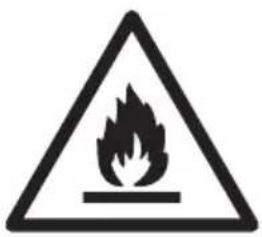
Warning sign depicting a flame symbol in a triangular shape, commonly used to indicate hazard or caution.

WARNING:

Do not store explosives, such as aerosol cans with ammable propellants in the unit.

WARNING:

Cleaning and user maintenance shall not be made by children without supervision

• Always keep the keys in a separate place and out of reach of children
- Before servicing or cleaning the appliance, unplug the appliance from the mains or disconnect the electrical power supply
- If the supply cord is damaged, it must be replaced by the manufacturer, its service agent, or similarly qualified persons in order to avoid a hazard
- Relevant for Australia: Supply cord tted with a plug complies with AS/NZS 3112.

- Frost formation on the interior evaporator wall and upper parts is a natural phenomenon. Therefore, the appliance should be defrosted during normal cleaning or maintenance.

- Please note that changes to the appliance construction will cancel all warranty and product liability

CLASS 1 LED PRODUCT

Contents

Warning 2

Before starting the appliance ....4

Get to know ....5

Electrical connection....6

Installation 6

Ventilation 7

Controller 8

Reversing the door 9

Fault finding ....15

Defrosting, cleaning and maintenance . 16

Warranty, spare parts ....17

Disposal 18

Before starting the appliance

Before operating your new appliance, please read the following instructions carefully as they contain important information on safety, installation, operation and maintenance. Keep the instructions for future reference.

On receipt, check to ensure that the appliance has not been damaged during transport. Transport damage should be reported to the local distributor before the appliance is put to use.

Remove the transport protector before the appliance is put to use. Hang it on one of the shelves as it can be used to readjust the door.

Get to know your wine or bottle cooler:
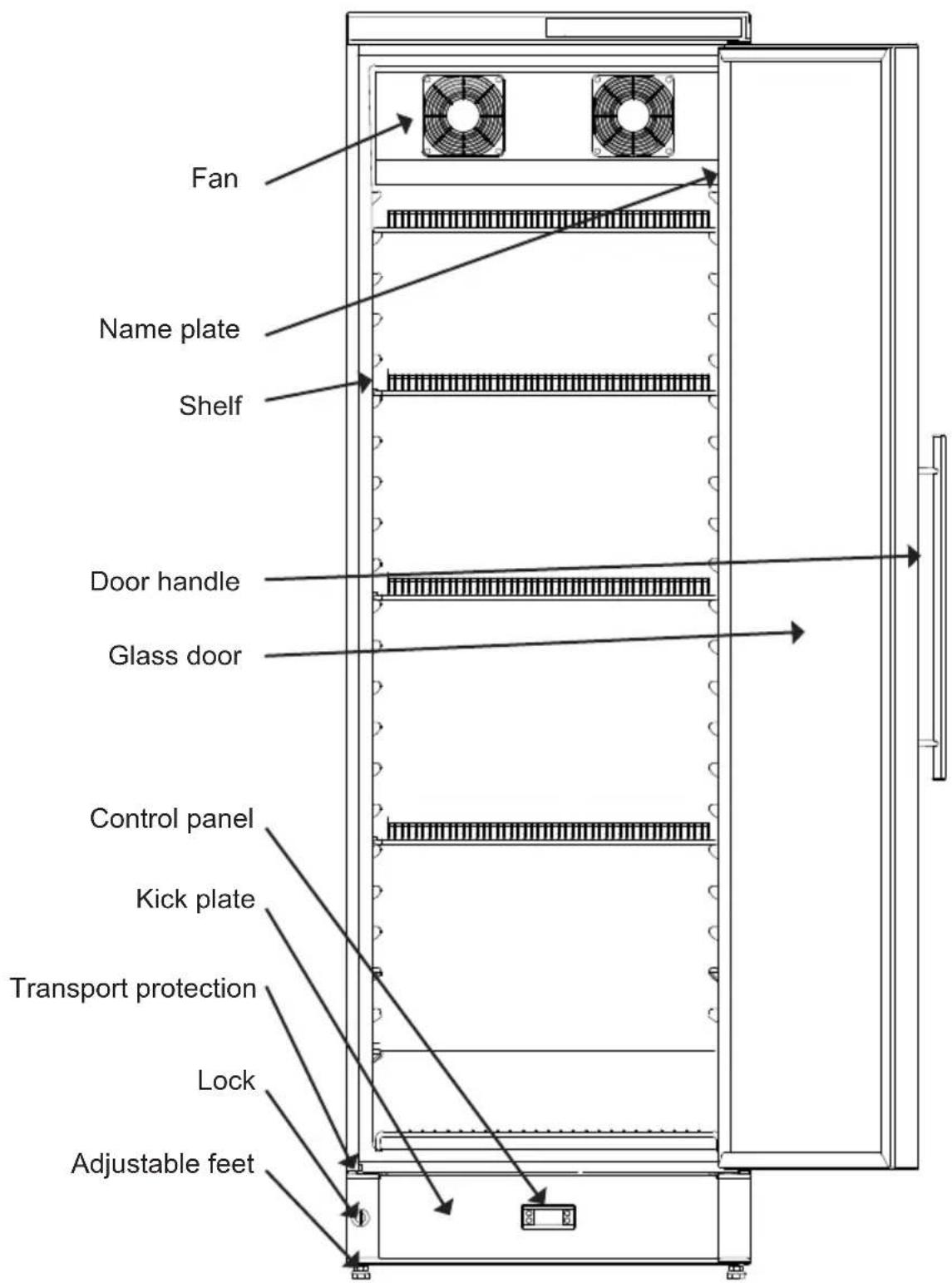
Fan Name plate Shelf Door handle Glass door Control panel Kick plate Transport protection Lock Adjustable feet

fig. 1

Electrical connection

Wiring and connections in power supply systems must been all applicable (local and national) electrical codes. Consult these codes lengths and sizes prior to cabinet installation.

This device complies with relevant EU directives including Low Voltage Directive 2014/35/EU and Electromagnetic Compatibility Directive 2014/30/EU

The socket should be freely accessible.

Connect the appliance only to 220/240 V / 50Hz alternating current via a correctly installed earthed socket.

The socket must be fused with a 10-13 A fuse.

If the appliance is to be operated in a non-European country, check on the rating plate whether the indicated voltage and current type correspond to the values of your mains supply.

Information regarding voltage, current or power are given on the rating plate

The power cord may be replaced by a technician only.

The rating plate provides various technical information as well as type and serial number.

Installation and start-up

Placement

For safety and operational reasons, the appliance shall not be exposed to rain.

The appliance should be placed on a level surface in a dry, well ventilated room (max. 70% relative air humidity). Never place the appliance close to sources of heat and avoid placing it in direct sunlight.

The surface on which the appliance is to be placed must be level. Do not use a frame or similar.

The appliance can be installed as a free-standing unit against a wall or side-by-side with other appliances (see fig. 4)

Room temperature

The climate class is stated on the name plate (see fig. 1). This specifies the optimum room temperature.

Note that the appliance operates best at room temperatures from 10^ C to 32^ C.

Installation of ventilation guard

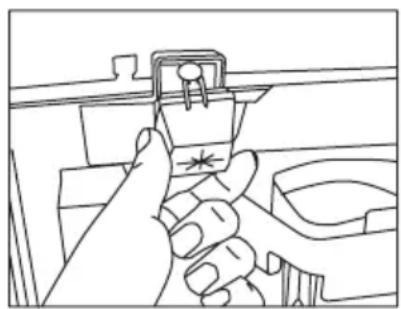
Close the two ventilationguards placed on the rear of the appliance, to ensure sufficient air circulation

VESTFROST M 180 - Installation of ventilation guard - 1

natural_image Line drawing of a hand pressing a component on a mechanical assembly (no text or symbols)

fig. 2

Ventilation

It is important that the appliance be well ventilated and that air can circulate unhindered above, below and around it. Keep ventilation openings, in the appliance enclosure or in the built-in structure, clear of obstruction. The figures below illustrate the clearance necessary to achieve the required air circulation.

OBS: There must be at least 30 mm between the cabinet and the wall behind it.
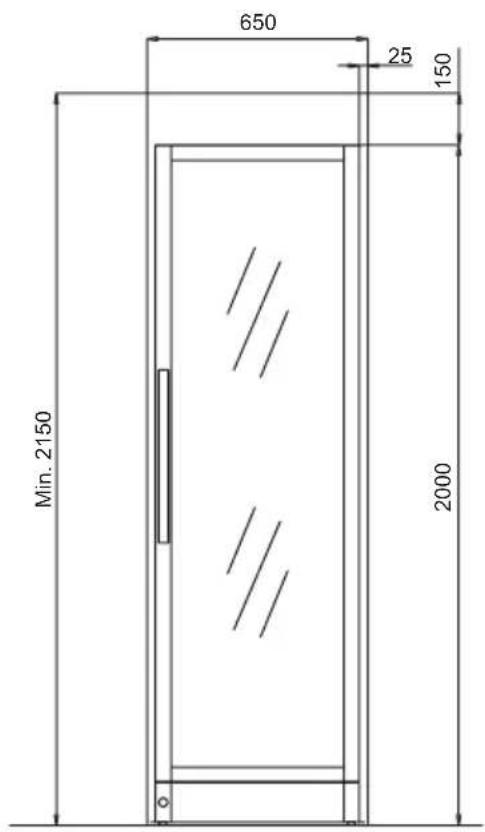
650 25 150 Min. 2150 2000

fig. 3

Side by side

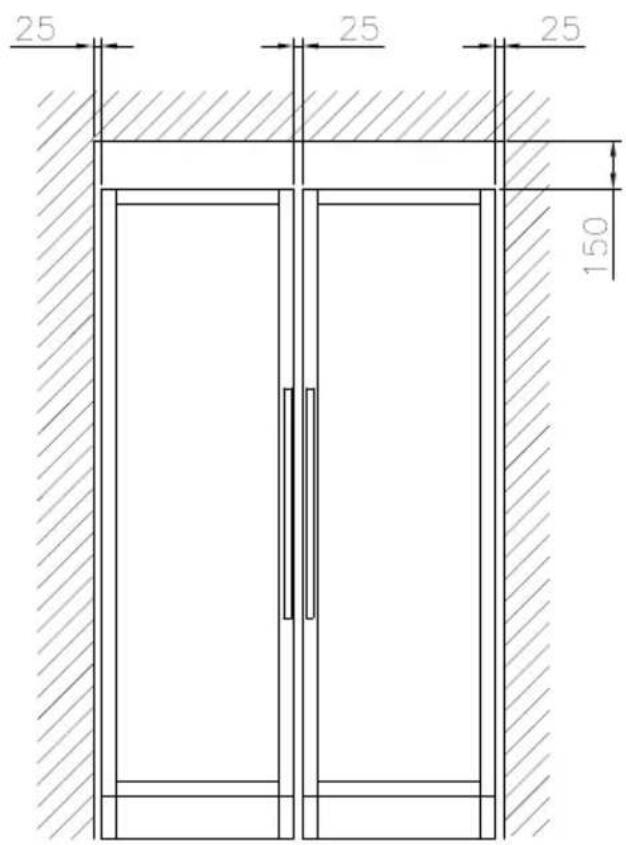
In side-by-side arrangement, there must be at least 25 mm between and at the sides of the cabinets, so the doors can be opened freely

25 25 25 150

fig.4

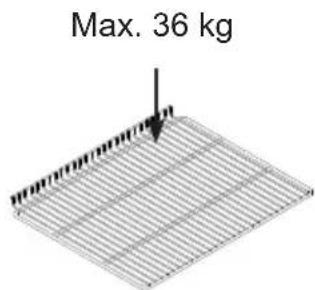
Max. 36 kg

Controller - Operation and function

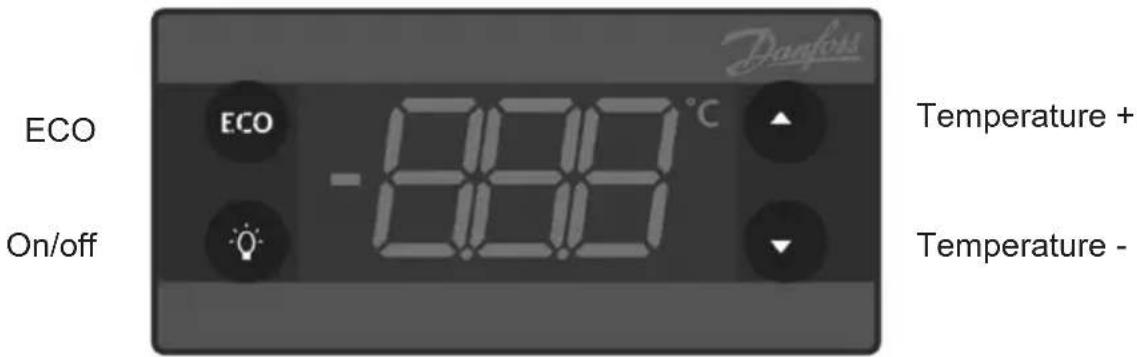
ECO ECO -12.00°C On/off Temperature + Temperature - Davfons

fig. 5

Electronic controls

The electronic controls ensure that the set temperature is maintained.

Following any power failure, the temperature settings are automatically recalled.

ECO mode:

In ECO mode the set point is higher than in serving mode.

ECO mode is switched ON/OFF by pushing the ECO button

ECO mode is also switched ON when the door has not been opened for 3 hours, and switched OFF again at the first door opening.

ON/OFF

Push and hold the bottom ⚙️ for more than 2 sec. to switch the appliance on and off.

Temperature display

The display shows the actual temperature in the cabinet, and indicates that power is connected.

Temperature setting

Push the buttom ▲ to increase set point and ▼ to decrease the set point.

Manual defrosting

If there is a need for manual defrosting, push the ECO button for more than 2 sec-ond and a manual defrost will start.

After 30 min. the electronic control will return to normal mode.

Reversing the door

If reversing the door with the unit in normal position, then it is recommended to be two people.

Else the unit can be placed on its back on the floor. If this method is used the unit must be placed in normal upright position at least two hours before connecting to power.

Extension cords terminal block and left bracket is optional. Request a spare parts list

VESTFROST M 180 - Reversing the door - 1

natural_image Close-up of a black metal door with a pull rod inserted, mounted on a wall (no text or symbols visible)
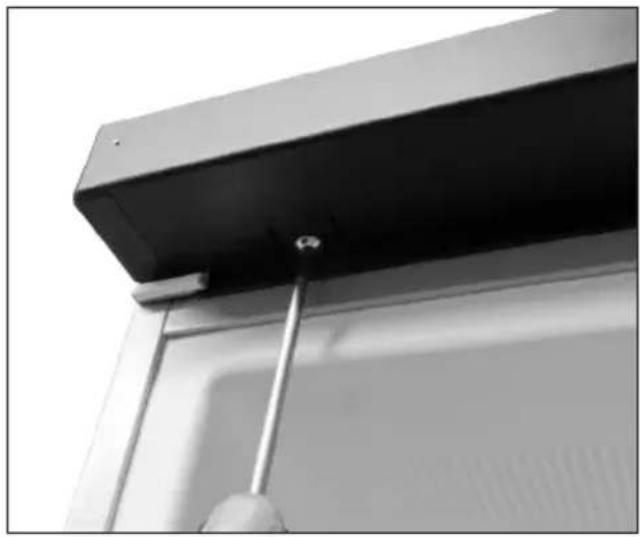
  1. Disconnect the power supply Loosen the two screws in the top panel. Pull out carefully the top panel.

VESTFROST M 180 - Reversing the door - 2

natural_image Close-up of a window frame corner with metal framing and mounting bracket (no text or symbols visible)
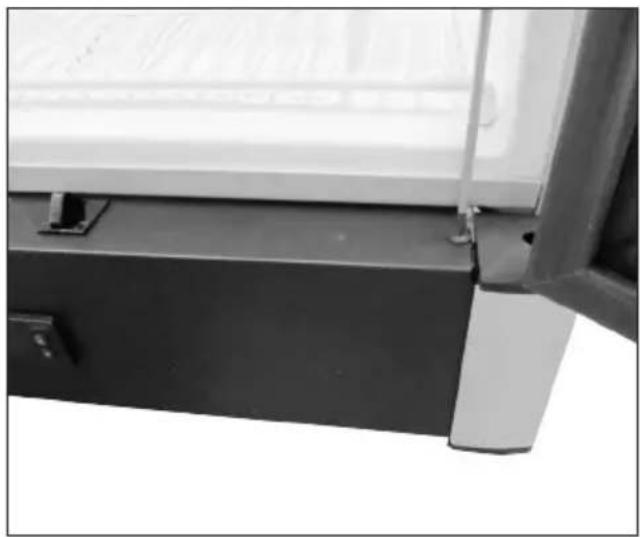
  1. Unscrew the two screws in the lower panel.
VESTFROST M 180 - Reversing the door - 3

natural_image Close-up of a hand holding a tool near a vehicle door (no visible text or symbols)
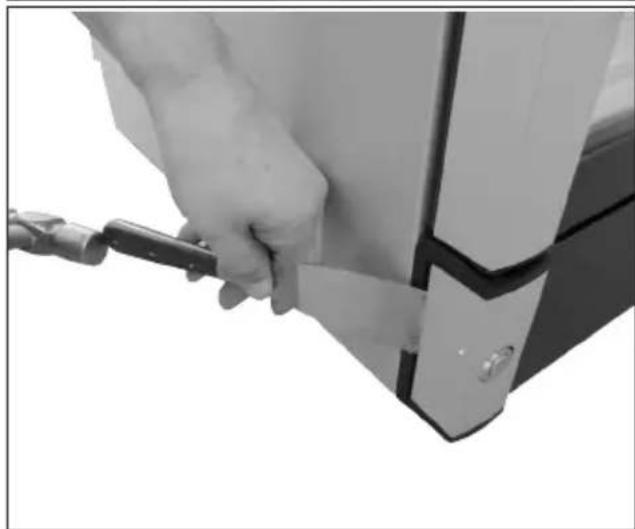
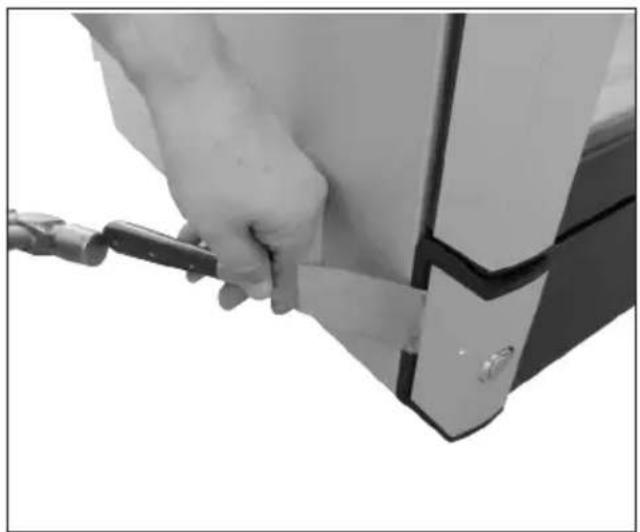
  1. Remove the cover by using suitable tool and a hammer

VESTFROST M 180 - Reversing the door - 4

natural_image Close-up of a hand holding a white scraper blade inserted into a black electronic device (no visible text or symbols)
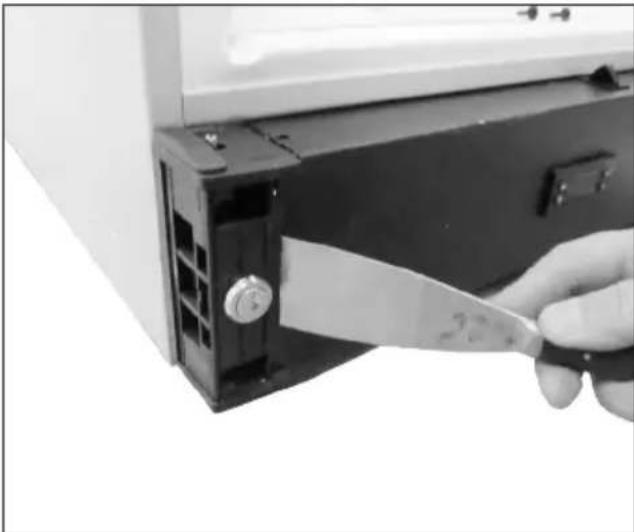
  1. Remove the lower panel by use of a suitable tool. Place the lower panel in front of the unit without pulling in the wires

VESTFROST M 180 - Reversing the door - 5

natural_image Close-up of hands assembling electronic components with wires and a small black component (no visible text or symbols)
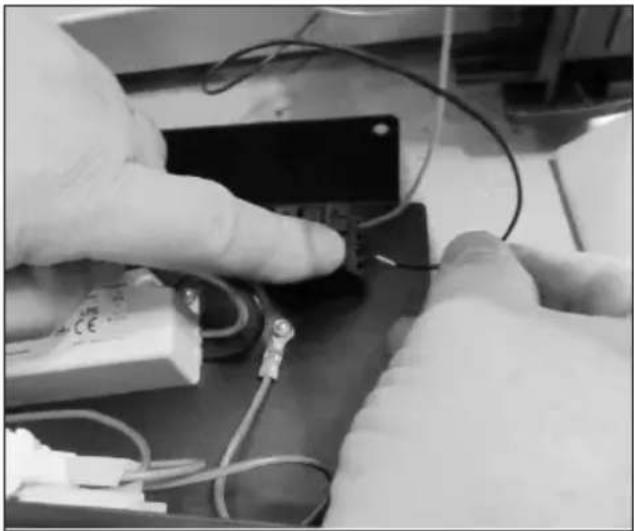
  1. Remove the black and red wire from the connector by pressing down the clips.

VESTFROST M 180 - Reversing the door - 6

natural_image Close-up of a hand inserting a small electronic component into a refrigerator (no text or symbols visible)
  1. Unscrew the bracket in the top. NOTE: The door is now loose! Be careful that the door does not fall down!
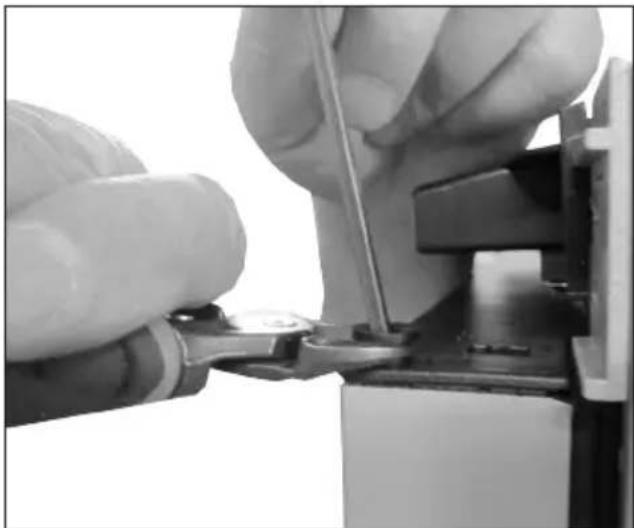
VESTFROST M 180 - Reversing the door - 7

natural_image Close-up of hands using a tool to adjust or install electronic components (no visible text or symbols)
  1. Remome the bush and door closer by use of a pincher. Place the bush in the opposite side of the door. Do not place the door closer yet.

VESTFROST M 180 - Reversing the door - 8

natural_image Industrial machine with wiring and a worker operating equipment (no visible text or symbols)
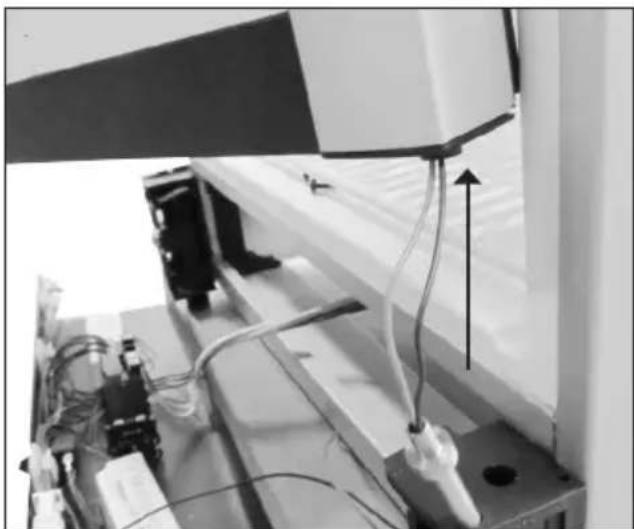
  1. Lift up the door. The wires from the door are pulled up together with the door pin. Place the door pin in the opposite side of the cabinet.

VESTFROST M 180 - Reversing the door - 9

natural_image Close-up of a hand holding a flexible cable against a wall, no visible text or symbols
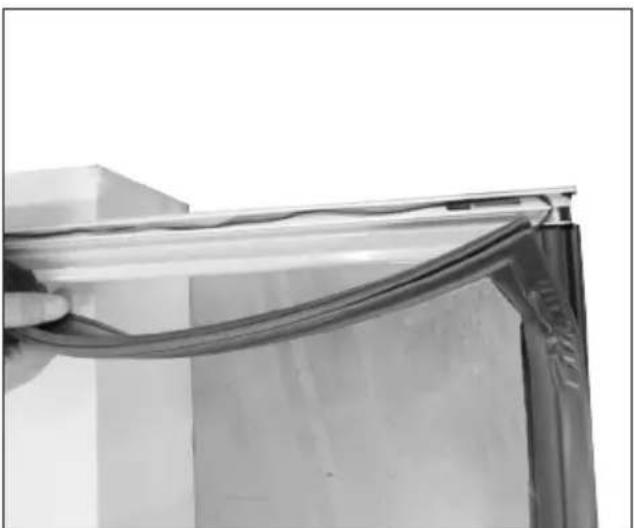
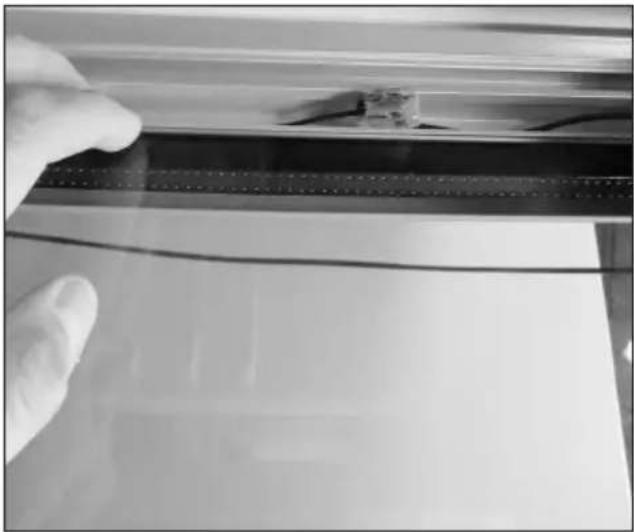
  1. Rotate the door 180 degrees. Place the door, with the front facing down, on a soft surface. Remove the gasket in the left side and pull out the wires for the door light.
VESTFROST M 180 - Reversing the door - 10

natural_image Close-up of a gloved hand touching a thin, flat surface with a small object on top (no text or symbols visible)

OBS: Extension cords, terminal block and left bracket is optional

  1. Extension cords mounted using the terminal block Push the wires through the hole and-pull out 65cm

  2. Mount the gasket again

VESTFROST M 180 - OBS: Extension cords, terminal block and left bracket is optional - 1

natural_image Close-up of a hand inserting a small black plastic clip into a white refrigerator (no text or symbols visible)
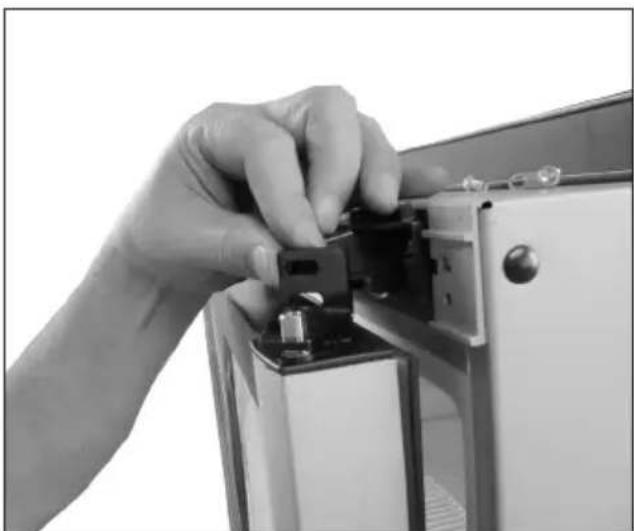
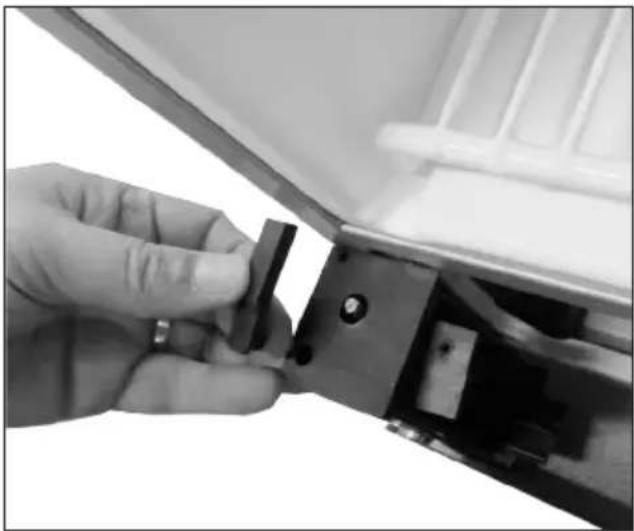
  1. Lift up the sliding part and move it to the opposite side

VESTFROST M 180 - OBS: Extension cords, terminal block and left bracket is optional - 2

natural_image Close-up of a mechanical device with a metallic bracket and mounting bracket (no visible text or symbols)
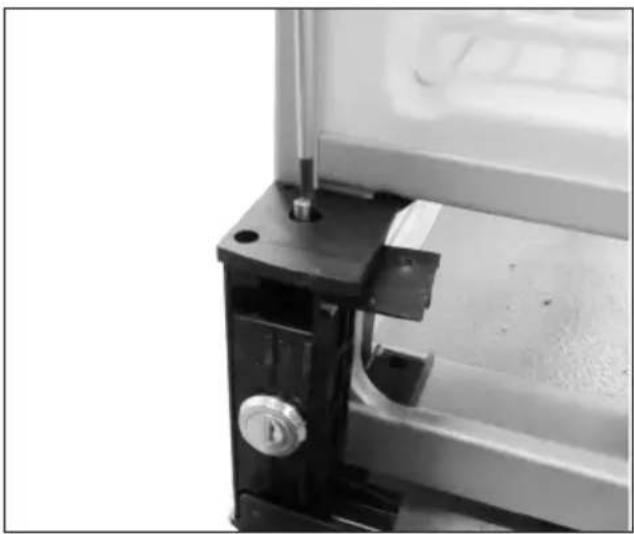
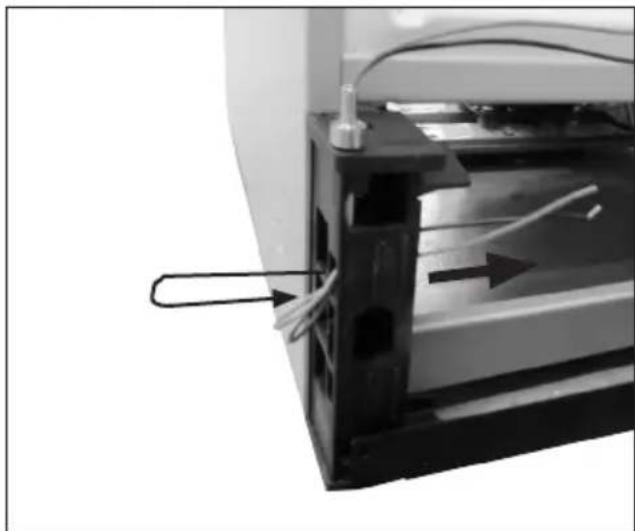
  1. Unscrew the locking pin. Pull the lock out. Refit both parts on the opposite side.
VESTFROST M 180 - OBS: Extension cords, terminal block and left bracket is optional - 3

natural_image Close-up of a mechanical device with a paperclip attached to a component, showing internal wiring and a directional arrow (no text or symbols visible)

VESTFROST M 180 - OBS: Extension cords, terminal block and left bracket is optional - 4

natural_image Close-up of a mechanical or electrical component with internal compartments and wires (no visible text or symbols)
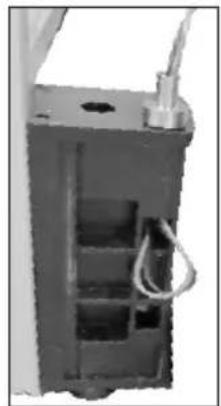
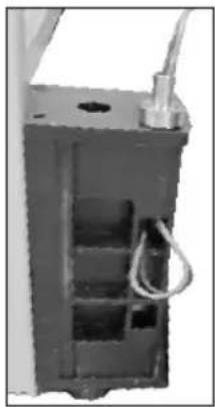
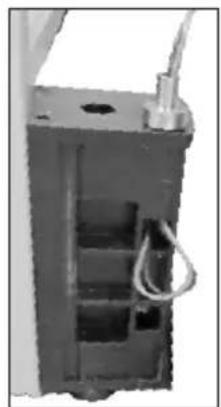
  1. Push the wires from the door down into the door pin and drag them through the door support.
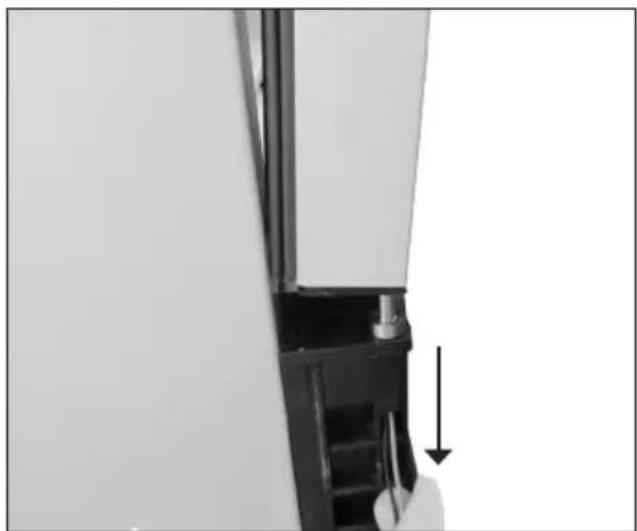
VESTFROST M 180 - OBS: Extension cords, terminal block and left bracket is optional - 5

natural_image Close-up of a mechanical component with a hand holding a tool, showing a downward arrow (no text or symbols visible)
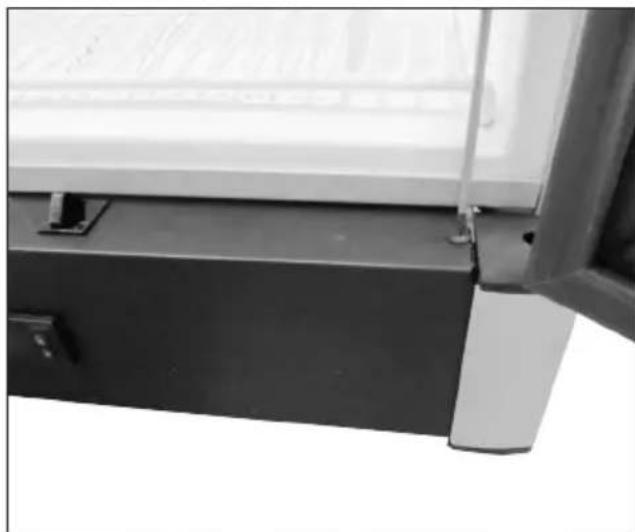
  1. Mount the door on the top of the door pin and at the same time draw the wires gently down so that it are not pinched. Press the door completely down over the door pin!
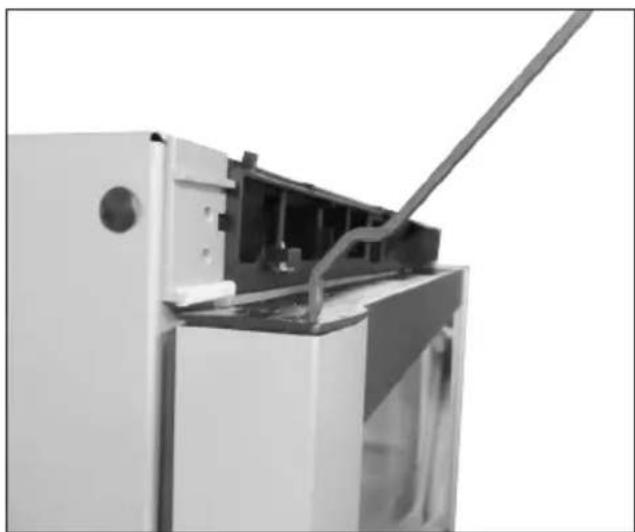
VESTFROST M 180 - OBS: Extension cords, terminal block and left bracket is optional - 6

natural_image Exterior view of a refrigerator with visible door, front panel, and cable (no text or symbols)
  1. Put the door closer back in the door in the opposite side. The door closer must be positioned as shown in the picture.
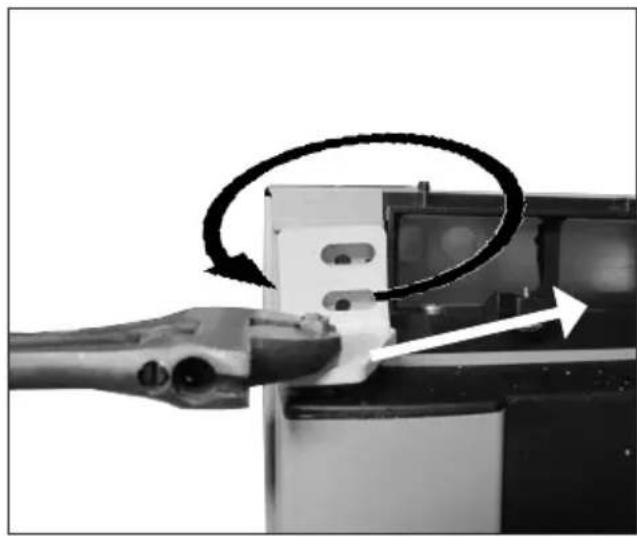
VESTFROST M 180 - OBS: Extension cords, terminal block and left bracket is optional - 7

natural_image Close-up of a hand inserting a cable into a device, showing mechanical components and a circular arrow indicating rotation (no text or symbols)
  1. Place the left hinge on the top of the door closer.

Twist the hinge ( a quarter turn) in place with a wrench and tighten it with the two screws.

The door is now fixed again.
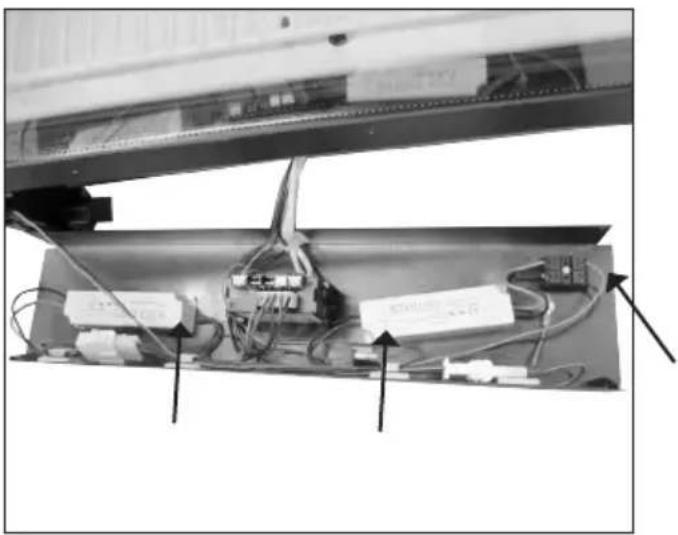
VESTFROST M 180 - OBS: Extension cords, terminal block and left bracket is optional - 8

natural_image Interior view of a mechanical or electronic device with visible wiring, components, and connectors (no readable text or symbols)
  1. Click the wires to the door light onto the wire retainers and mount them in the connector.

  2. Mount the lower panel and top panel.

If the unit has been laid down, it must stand upright for at least 2 hours before reconnecting to power.

Fault finding

Fault Possible causeRemedy
The unit does not workThe appliance is switched off.Power failure; the fuse is blown; the appliance is not plugged in correctly.Press the on/off switch.Check that power is connected. Reset the fuse.
Water collects in the bottom of the cabinet.The defrost water pipe is blocked.Clean the defrost water channel and the drain hole on the rear wall of the cabinet.
Vibration or bothersome noise.The appliance is not level.The appliance is resting against other kitchen elements.Containers or bottles inside the cabinet are rattling against one another.Level the appliance using a spirit level.Move the appliance away from the kitchen elements or appliances it is in contact with.Move containers and/or bottles apart.
Compressor runs continuously.High room temperature. Ensure adequate ventilation.

Defrosting, cleaning and maintenance

Automatic defrosting.

The unit is defrosted automatically. Defrost water runs through a pipe and is collected in a tray above the compressor where the heat generated by the compressor causes it to evaporate. The defrost water tray should be cleaned at intervals.

Cleaning.

Before cleaning the appliance, unplug it from the main supply. The cabinet is best cleaned using warm water (max. 65°C) with a little mild detergent. Never use cleaning agents that scour. Use a soft cloth. Rinse with clean water and dry thoroughly.

The defrost water channel, in which condensation from the evaporator runs, is located at the bottom of the rear inside wall of the cabinet and must be kept clean. Add a few drops of disinfectant, e.g. Rodalon, to the defrost water drain a couple of times a year, and clean the drain using a pipe cleaner or similar. Never use sharp or pointed implements.

The sealing strip around the door must be cleaned regularly to prevent discolouration and prolong service life. Use clean water. After cleaning the sealing strip, check that it continues to provide a tight seal.

Dust collecting on the condenser on the rear of the cabinet, the compressor and in the compressor compartment is best removed using a vacuum cleaner.

Warranty, spare parts and service

Warranty disclaimer

Faults and damage caused directly or indirectly by incorrect operation, misuse, insufficient maintenance, incorrect building, installation or mains connection. Fire, accident, lightening, voltage variation or other electrical interference, including defective fuses or faults in mains installations.

Repairs performed by others than approved service centres and any other faults and damage that the manufacturer can substantiate are caused by reasons other than manufacturing or material faults are not covered by the warranty.

Please note that changes to the construction of the appliance or changes to the component equipment of the appliance will invalidate warranty and product liability, and the appliance cannot be used lawfully. The approval stated on rating plate will also be invalidated.

Transport damage discovered by the buyer is primarily a matter to be settled between the buyer and the distributor, i.e. the distributor must ensure that such complaints are resolved to the buyer's satisfaction.

Before calling for technical assistance, please check whether you are able to rectify the fault yourself. If your request for assistance is unwarranted, e.g. if the appliance has failed as a result of a blown fuse or incorrect operation, you will be charged the costs incurred by your call for technical assistance.

Spare parts

When ordering spare parts, please state the type, serial and product numbers of your appliance. This information is given on the rating plate. The rating plate contains various technical information, including type and serial numbers.
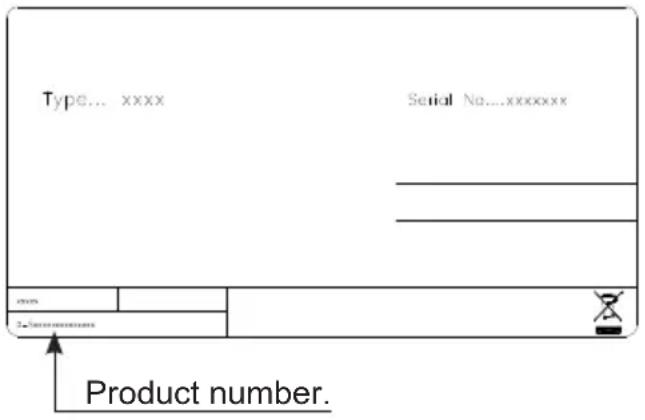
Type... xxxx Serial No....xxxxxxxxx Product number.

Disposal

Information for Users on Collection and Disposal of Old Equipment and used Batteries
VESTFROST M 180 - Disposal - 1

These symbols on the products, packaging, and/or accompanying documents mean that used electrical and electronic products and batteries should not be mixed with general household waste. For proper treatment, recovery and recycling of old products and used batteries, please take them to applicable collection points, in accordance with your national legislation and the Directives 2002/96/EC and 2006/66/EC.

By disposing of these products and batteries correctly, you will help to save valuable resources and prevent any potential negative effects on human health and the environment which could otherwise arise from inappropriate waste handling.

For more information about collection and recycling of old products and batteries, please contact your local municipality, your waste disposal service or the point of sale where you purchased the items.

Penalties may be applicable for incorrect disposal of this waste, in accordance with national legislation.
VESTFROST M 180 - Disposal - 2

For business users in the European Union.

If you wish to discard electrical and electronic equipment, please contact your dealer or supplier for further information.

Information on Disposal in other Countries outside the European Union

These symbols are only valid in the European Union. If you wish to discard this product, please contact your local authorities or dealer and ask for the correct method of disposal.

Note for the battery symbol :

VESTFROST M 180 - Note for the battery symbol : - 1

This symbol might be used in combination with a chemical symbol. In this case it complies with the requirement set by the Directive for the chemical involved.

Warnung

WARNUNG:

natural_image 3D wire mesh grid with a vertical arrow pointing downward (no text or symbols)

Belüftung

natural_image Line drawing of a hand inserting a plastic clip into a housing (no text or symbols)

Abb.4

natural_image Close-up of a black metal frame with a vertical support and mounting bracket (no text or symbols visible)
natural_image Close-up of a window frame with a door and metal bracket, no visible text or symbols
natural_image Close-up of a hand holding a tool near a wall-mounted device (no visible text or symbols)
natural_image Close-up of a hand holding a white scraper blade inserted into a black electronic device (no visible text or symbols)
natural_image Close-up of hands assembling electronic components with wires and a small black component (no visible text or symbols)
natural_image Close-up of a hand inserting a small electronic component into a refrigerator (no text or symbols visible)
natural_image Close-up of hands using a tool to adjust or install electronic components (no visible text or symbols)
natural_image Industrial machine with wiring and a worker operating equipment (no visible text or symbols)
natural_image Close-up of a hand holding a flexible cable against a wall, no visible text or symbols
natural_image Close-up of a hand pressing down on a transparent surface with visible cracks and wires (no text or symbols)
natural_image Close-up of a hand adjusting a small black component on a metal door (no visible text or symbols)
natural_image Close-up of a mechanical device with a metallic bracket and mounting bracket (no visible text or symbols)
natural_image Close-up of a mechanical device with a paperclip attached to the side panel (no visible text or symbols)

VESTFROST M 180 - Belüftung - 1

natural_image Close-up of a black industrial enclosure with visible internal compartments and wiring (no text or symbols)
natural_image Close-up of a mechanical component with a downward arrow indicating a force or direction (no visible text or symbols)
natural_image Exterior view of a refrigerator with a cable inserted, showing internal components and a handle (no text or symbols visible)
natural_image Close-up of a hand inserting a cable into a device component, showing a circular arrow indicating rotation (no text or symbols present)
natural_image Interior view of an electronic device with cables, wires, and components (no visible text or symbols)
natural_image Warning symbol of a flame inside a triangle (no text or numbers)

AVERTISSEMENT:

natural_image Line drawing of a hand inserting a plastic clip into a door (no text or symbols)

fig. 3

Ventilation

natural_image Close-up of a metal frame structure with a mounting bracket and vertical rod (no text or symbols visible)
natural_image Close-up of a window frame with metal framing and mounting points (no text or symbols visible)
natural_image Close-up of a hand holding a tool near a wall-mounted device (no visible text or symbols)
natural_image Close-up of a hand holding a white scraper blade inserted into a black electronic device (no visible text or symbols)
natural_image Close-up of hands assembling electronic components with wires and a small black component (no visible text or symbols)
natural_image Close-up of a hand inserting a small electronic component into a refrigerator (no text or symbols visible)
natural_image Close-up of hands using a tool to adjust or install electronic components (no visible text or symbols)
natural_image Industrial machine with wiring and a worker operating equipment (no visible text or symbols)
natural_image Close-up of a hand holding a flexible cable against a wall, no visible text or symbols
natural_image Close-up of a gloved hand touching a transparent rectangular object with a small inset showing internal components (no text or symbols visible)
natural_image Close-up of a hand adjusting a small electronic component with a black clip (no visible text or symbols)
natural_image Close-up of a mechanical device with a metallic knob and mounting bracket (no visible text or symbols)
natural_image Close-up of a mechanical device with wires and a paperclip attached to a component (no visible text or symbols)

VESTFROST M 180 - Ventilation - 1

natural_image Interior view of a mechanical device with internal compartments and wiring (no visible text or symbols)
natural_image Close-up of a mechanical component with a downward arrow indicating a force or movement (no visible text or symbols)
natural_image Exterior view of a white refrigerator with a cable inserted, showing internal components and a handle (no text or symbols visible)
natural_image Close-up of a hand inserting a cable into a device component, showing a circular arrow indicating rotation (no text or symbols present)
natural_image Interior view of an electronic device with cables, wires, and connectors (no visible text or symbols)
natural_image Line drawing of hands installing or adjusting a mechanical component (no text or symbols)

fig. 2

Side by side

natural_image Close-up of a black metal frame mounted on a wall, with a metallic rod inserted at the base (no text or symbols visible)

VESTFROST M 180 - Side by side - 1

natural_image Close-up of a window frame with a black metal bracket and a metallic clip, no visible text or symbols

VESTFROST M 180 - Side by side - 2

natural_image Close-up of a hand holding a tool near a wall-mounted device (no visible text or symbols)
  1. Afbryd strømmen.
natural_image Close-up of a hand holding a white scraper blade inserted into a black electronic device (no visible text or symbols)
natural_image Close-up of hands assembling electronic components with wires and a small black component (no visible text or symbols)
natural_image Close-up of a hand inserting a small electronic component into a refrigerator (no text or symbols visible)
natural_image Close-up of hands using a tool to adjust or install electronic components (no visible text or symbols)
natural_image Industrial machine with wiring and a worker operating equipment (no visible text or symbols)
natural_image Close-up of a hand holding a flexible cable against a wall, no visible text or symbols
natural_image Close-up of a gloved hand touching a thin, flat surface with a small object on top (no text or symbols visible)
natural_image Close-up of a hand inserting a small black component into a white refrigerator (no text or symbols visible)
natural_image Close-up of a mechanical device with a metallic knob and mounting bracket (no visible text or symbols)
natural_image Close-up of a mechanical device with wires and a paperclip attached to its side (no visible text or symbols)

VESTFROST M 180 - Side by side - 3

natural_image Interior view of a mechanical or electrical enclosure with internal compartments and wiring (no visible text or symbols)
natural_image Close-up of a mechanical component with a downward arrow indicating a force or direction (no visible text or symbols)
natural_image Exterior view of a white refrigerator with a diagonal cable extending from its side (no visible text or symbols)
natural_image Close-up of a hand inserting a cable into a device component, showing a circular arrow indicating rotation (no text or symbols present)
natural_image Interior view of an electronic device with cables, wires, and components (no visible text or symbols)

UK Reserving the right to alter specifications without prior notice.

Manual assistant
Powered by Anthropic
Waiting for your message
Product information

Brand : VESTFROST

Model : M 180

Category : Fridge