
KX-FL401FR - Fax machine PANASONIC - Free user manual and instructions
Find the device manual for free KX-FL401FR PANASONIC in PDF.


User questions about KX-FL401FR PANASONIC
0 question about this device. Answer the ones you know or ask your own.
Ask a new question about this device
Download the instructions for your Fax machine in PDF format for free! Find your manual KX-FL401FR - PANASONIC and take your electronic device back in hand. On this page are published all the documents necessary for the use of your device. KX-FL401FR by PANASONIC.
USER MANUAL KX-FL401FR PANASONIC
natural_image
Line drawing of a classic printer with paper feed and control panel (no text or symbols)Panasonic
Manuel utilisateur
natural_image
Interior view of a modern meeting room with a large round table, wooden chairs, and floral arrangement (no visible text or symbols)You can select English for the display and report (feature #48, page 42).
text_image
Illustration showing a hand holding an open notebook with a curved arrow indicating the direction of change, and another hand holding an open booklet with a blank page.natural_image
Black curved arrow pointing left, no text or symbols presentDIFFUSION MANUELLE ②
ENVOI MEMOIRE 18
FAX 16
IDENTITE APPELANTS 5
MENU 9
5 12
PRISE DE LIGNE 14
R 4
RECEPTION SELECTIVE 10
REGLAGE 7
REPONSE AUTO 19
SECRET COMBINE 13
STOP 15
Panasonic Testing Centre
Winsbergring 15, 22525 Hamburg, Allemagne
Copyright:
natural_image
Technical illustration of a printer with labeled parts (1 and 2), showing internal structure without any text or symbols beyond labels.
Unité de fusion
Cartouche d'encre
natural_image
Illustration of a gray electronic device casing with grid pattern and central slot (no text or symbols)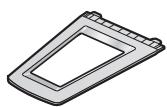
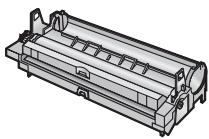
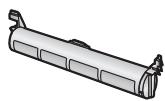

⑪

natural_image
Simple illustration of a folded paper with three horizontal lines (no text or symbols)Remarque:
text_image
Diagram of a 12-pin printer with numbered parts for identificationtext_image
Diagram of a printer with labeled parts, showing front and back views with numbered annotations.natural_image
Illustration of a hand holding a mechanical device with motion lines indicating movement (no text or symbols)natural_image
Illustration of a hand pressing down on a cylindrical object with an arrow indicating motion (no text or symbols)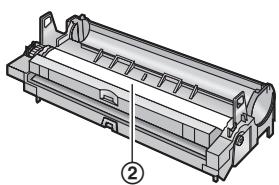
natural_image
Technical line drawing of a mechanical component with no visible text or symbolstext_image
Technical diagram of a printer holder with labeled parts ① and ②natural_image
Illustration of hands assembling a mechanical component (no text or symbols visible)natural_image
Technical illustration of a mechanical component with an inset showing a close-up view of a cylindrical part (no text or symbols present)text_image
Diagram of a printer with labeled parts showing internal structure and component insertionnatural_image
Technical diagram of a telephone receiver with labeled parts (no text or symbols present)text_image
Diagram showing a printer's internal structure with labeled parts and an arrow indicating rotation or assembly.natural_image
Technical illustration of a printer with internal structure and labeled component (no text or symbols present)natural_image
Illustration of a printer with control panel and paper feed, labeled with number ① (no text or symbols on the device itself)text_image
Diagram of a printer with labeled parts showing front, back, and top viewsRemarque:
text_image
Diagram of a printer with labeled parts showing front, back, and side views for assembly or maintenance.Remarque:
text_image
Diagram of a printer with labeled parts showing front, back, and side views for printing or assembly.Remarque:
text_image
Diagram of a printer with labeled parts showing internal components and connection arrowsnatural_image
Line drawing of a hand holding a stack of books (no text or symbols present)natural_image
Illustration of a hand inserting a card into a digital textile machine (no text or symbols visible)text_image
Diagram of a printer with labeled parts showing front and side views of the printer's internal structure.natural_image
Illustration of a printer or printer with a blank sheet, no text or symbols present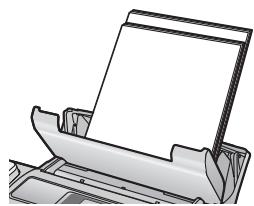
natural_image
Illustration of a printer or printer with a blank cover, no text or symbols presentnatural_image
Illustration of a hand pressing down on a document into a printer (no text or symbols visible)2.1 Connexions
Attention:
text_image
Diagram of a printer with labeled parts and connections, showing internal structure and fluid flow paths.Remarque:
text_image
Diagram showing a device connected to a connector with labeled parts and directional arrows indicating connection points.text_image
[REGLAGE] [◀][▶] [MENU]J:10/M:08/A:06 HEURE:03:15PM
4.2 Exigences relatives aux documents
Format minimum des documents
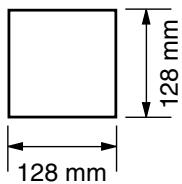
text_image
128 mm 128 mmFormat maximum des documents
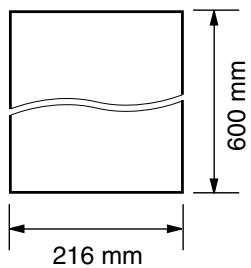
text_image
600 mm 216 mmtext_image
[DEPART] RESPONSE AUTOtext_image
RESPONSE AUTORemarque:
text_image
RESPONSE AUTORemarque:
text_image
RESPONSE AUTOtext_image
[STOP] [DEPART] RESPONSE AUTOtext_image
[STOP] RESPONSE AUTOtext_image
[▶][+][-] [STOP][DEPART] [COPIE]natural_image
Illustration of a mechanical component with motion lines indicating movement (no text or symbols)natural_image
Illustration of a hand holding a cylindrical object with a directional arrow, labeled with number 1 (no text or symbols on the object itself)text_image
Diagram of a printer with numbered parts showing internal structure and operation arrowstext_image
Diagram of printer printing process showing two steps: opening and inserting a paper into a printer.text_image
Technical diagram showing two views of a mechanical component with numbered annotations indicating assembly steps.text_image
Technical diagram of a printer or scanner assembly with labeled parts ①, ②, and ③text_image
Diagram showing a hand inserting a component into a printer, with numbered instructions for each step.Remarque:
text_image
Technical diagram of a printer or scanner assembly with labeled parts ① and ②natural_image
Illustration of hands assembling a cylindrical mechanical component (no text or symbols visible)natural_image
Technical illustration of a mechanical component with an inset showing a close-up view of a cylindrical part (no text or symbols present)text_image
Technical diagram of a printer with labeled parts, showing internal structure and part number ②natural_image
Illustration of a printer being inserted into a rack, showing internal components and a hand holding the rack (no text or symbols present)natural_image
Technical illustration of a printer with internal structure and labeled component (no text or symbols present)natural_image
Illustration of a printer with paper feed and control panel (no text or symbols)text_image
Diagram of a printer with numbered parts showing internal structure and operation, likely for printer or printer design.text_image
Technical diagram of a printer with labeled parts, showing internal structure and page number ① and ②natural_image
Illustration of a printer with paper feed and control panel (no text or symbols)text_image
Diagram of a printer with labeled parts showing paper feeding and printing process, including steps ①, ②, and ③.text_image
Diagram of printer printing process with numbered parts and directional arrows indicating stepsnatural_image
Diagram of a printer internal structure showing internal components and two circular insets (no text or symbols)natural_image
Illustration of hands operating a printer with a paper airplane being inserted (no text or symbols present)natural_image
Technical illustration of a printer with internal structure and two circular insets showing internal components (no text or symbols)natural_image
Illustration of a printer with control panel and paper feed (no text or symbols visible)text_image
Diagram of a printer presser with labeled parts, showing front panel and control panel assemblytext_image
Diagram showing a hand pressing down on a document into a printer, with labeled parts ① and ② indicating process steps.natural_image
Illustration of a digital fax machine with a hand inserting paper into it, no text or symbols present.text_image
Diagram of a printer with labeled parts showing paper feed, printer body, and internal components
Attention:
natural_image
Illustration of hands operating a printer with a magnified inset showing the process (no text or symbols)Remarque:
natural_image
Diagram of a printer with a paper feed and a prohibition symbol overlay (no text or labels)natural_image
Technical illustration of a printer with internal components and paper feed (no text or symbols)natural_image
Illustration of a printer with paper feed and paper roll, showing internal circuitry (no text or symbols)text_image
Diagram of a printer with labeled parts and magnified view showing internal structuretext_image
Diagram of a printer with labeled parts showing paper feeding and printing process, including steps ①, ②, and ③.
Attention:
text_image
Diagram of a printer with labeled parts and an inset showing the printer's internal structure.natural_image
Illustration of hands operating a printer with a magnified inset showing the process (no text or symbols)natural_image
Technical illustration of a printer with paper feeding into a slot (no text or symbols visible)text_image
Technical diagram of a printer with numbered parts labeled ①, ②, and ③, showing internal structure and assembly.natural_image
Illustration of hands operating a printer with a paper airplane being inserted (no text or symbols visible)natural_image
Technical diagram of a mechanical device with labeled component (1), showing internal components without any readable text or symbols.natural_image
Illustration of a printer being inserted into a slot, showing internal structure and motion direction (no text or symbols)natural_image
Technical illustration of a printer with internal structure and labeled component (no text or symbols)natural_image
Illustration of a printer with paper feed and control panel, labeled with number 1 (no text or symbols on the device itself)- “RECEPT. JOURNAL”:
Modified Huffman (MH), Modified READ (MR), Modified Modified READ (MMR)
Vitesse de transmission:
text_image
THE SLEREXE COMPANY LIMITED SAPRIS LAME - WORKS - CABBAY - 2011.5.08 WALVON MOYA (MAD) 1917 - March (2016) Dut Ref.: 350/1961/SIG 18th January, 1971. Dr. P.H. Ondall, Hilling days led., Ruiseyd Road, Nasting, Borths. Dear Fee, Permit me to introduce you to the facility of farsimile transmission. In farmmill's a photocoll in caused to perform a master seen over the subject copy. The variations of parent density on the document came the physical to generate an analogous electrical video signal. This signal is used to mobilize a carrier, which is transmitted in a remote destination over a radio or cable communication link. At the remote terminal, demodulation reonscreen the video signal, which is used to modulate the density of parent produced by a printing device. This device is assuming a master seen synchronised with that at the transmitting terminal. As a result, a feedwall copy of the subject document is produced. Probably you have needs for this facility in your organisation. Youn sincerely, P.J. GROSS Group Leader - Ferimile ResearchRemarque:
text_image
Table of Contents. 1. Table of Contents: 1. Introduction and Installation Measures 2. A local server accessing an 1.2 Security Information Panel with the Controls 3. Description of details, 1.4 Security Information Panel 4. Time series (any data unit) 5. Document tray 1.7 (Target tray, R/Wosening user), Preparation 6. Connections 2.2 (Starting the power switch, 98% Rate Switch, 2nd Function Units) 7. Adjusting volume: Internal Programming 5.1 (Switch back, 3.0 Data and time, 7. Use Open/Off Page number, 3.0/100, Copy, 100/100, Copy, 100/100, Copy, 100/100, Copy, 100/100, Copy, 100/100, Copy, 100/100, Copy, 100/100, Copy, 100/100, Copy, 100/100, Copy, 10 2. Making a copy 3. Key copying Features 3. PC Operations: Setup & Setup (no operator) 4. Local server: External Service Unit & Starting Multi-Accessing Station Floating 4. Using the unit as a printer Screening Software & Using the unit as a manner/Remote Control 4. Use the unit from your own device to the client 5. Fax: Setting/receiving using Multi-Accession Station 6. Receiving the sampler in the Internet (with the optional LAN board) 6. Refrinating the status of the unit's 1.1 (Case 1) 7. Use the unit to use your unit's 1.2 (Case 2 / FAX ONLY) 8. Case 2a: Distortion Ring (1 phone with 2 or more phone numbers) 9. Case 2b: Distortion Ring (2 phone with 2 or more phone numbers) 9. Case 2c: EDS (350, External Wireless Working Machine) Tables of Contents. 1. Table of Contents 2. Included accessories, 3. Accessory information Finding (Controls) 3. Use the unit to access your device to the client's file and then set up 4. Document tray 1.7 (Target tray, R/Wosening user), Preparation 5. Connections 2.2 (Starting the power switch, 98% Rate Switch, 2nd Function Units) 6. Adjusting volume: Internal Programming 5.1 (Switch back, 3.0 Data and time, 7. Use Open/Off Page number, 3.0/100, Copy, 100/100, Copy, 100/100, Copy, 100/100, Copy, 100/100, Copy, 100/100, Copy, 2 3. Use the unit to use your unit's 1.2 (Case 2 / FAX ONLY) 4. Case 2a: Distortion Ring (1 phone with 2 or more phone numbers) 5. Case 2b: Distortion Ring (2 phone with 2 or more phone numbers) 6. Case 2c: EDS (350, External Wireless Working Machine) Help you for parking a Remote fan for machine. Hours have shown a record of Attach your website content items. For your future reference Date of October Serial number (found on the row of the unit) Teacher's name and address Teacher's to Facebook numbertext_image
Table of Document, 1. Table of Document 2. 1. Annotation 3. 2. Annotation information: Finding the Controls 4. 3. Annotation of Hellen, 5. 4. Description Installation: 6. 5. Screen settings and draw unit 7. 6. Output tray 8. 7. Projection 9. 8. Connection 10. 9. Starting the power within OR Info duties 11. 10. Help function functions 12. 11. Adjusting volume Internal Programming 13. 12. Binding notes 14. 13. Use of the unit to monitor 15. 14. Use of the unit as a remote computer. 16. 15. Using the unit as a remote computer. 17. 16. Starting BMI=10000000000000000000000000000000000000000000000000000000000000000000000000000000000000000000000000000 Thank you for purchasing a Panasonic the machine. Dresses you should have a room of Attach your sales receipt here. For your future information Date of purchase Date number (round on the rear of the unit) Date number (round on the rear of the unit) Date number (round on the rear of the unit)text_image
Table of Contents. 1. Table of Contents / Information and Installation Accessories 2. 1. Blocked Accessories 3. 2. Accessories/Information/Finding the Controls 4. 3. Connection Settings 5. 4. Draw components and tools unit 6. 5. Output tray 7. Preparation 8. Connection 9. Turning the power on Web Button 10. Help Function Options 11. Alcoholic insulin: Recital Programming 12. Building mode 2, 3, Date and Time. Thank you for purchasing a Panasonic fan machine, them you should keep a room of Attach your skills relevant item, for your lifetime reference Date of purchase Serial Number (Period on the rear of the unit) Dealer's name and address Dealer's Refinance readerGARANTIE CONDITIONS DE GARANTIE
Panasonic Communications (Malaysia) Sdn. Bhd.
PLO No.1, Kawasan Perindustrian Senai, KB No. 104, 81400 Senai, Negeri Johor Darul Ta'zim, Malaysia
Site Web mondial:
http://panasonic.net