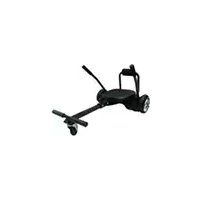
eKart - Electric hoverboard ARCHOS - Free user manual and instructions
Find the device manual for free eKart ARCHOS in PDF.



| Product Type | Electric hoverboard with seat (kart) |
| Brand | ARCHOS |
| Model | eKart |
| Use | Outdoor, flat terrain |
| Power Supply | Rechargeable lithium battery, mains charger |
| Battery Life | Varies by weight, terrain and temperature |
| Maximum Speed | 16 km/h |
| Maximum User Weight | 120 kg |
| Minimum User Weight | 30 kg |
| Sensors | Gyroscope, accelerometer, pressure sensors on footrests |
| Usage Modes | Hoverboard alone or with kart kit |
| Steering in Kart Mode | Steering levers |
| Balancing System | Dynamic self-balancing |
| Battery Indicator | Green/red LED indicator, beep for low battery |
| Safety | Automatic shutdown on low battery, speed limit beep, user detection |
| Assembly | Kart kit to assemble: backrest, seat, levers, straps |
| Included Accessories | Kart kit, mains charger |
| Compliance | Directive 1999/5/EC |
| Maintenance | Keep clean and dry, do not charge if port is wet |
| Warranty | Check ARCHOS website for terms |
Frequently Asked Questions - eKart ARCHOS
User questions about eKart ARCHOS
0 question about this device. Answer the ones you know or ask your own.
Ask a new question about this device
Download the instructions for your Electric hoverboard in PDF format for free! Find your manual eKart - ARCHOS and take your electronic device back in hand. On this page are published all the documents necessary for the use of your device. eKart by ARCHOS.
USER MANUAL eKart ARCHOS
Congratulations for the purchase of an ARCHOS device! This quick start guide helps you to start using your device properly. If you have more questions concerning the use of your device, visit us at:

twitter.com/archos

www.facebook.com/archos
Blog
https://blog.archos.com/

http://faq.archos.com/

www.archos.com, click Support > After-sales support

www.archos.com, click Support > Downloads > Declaration of conformity
As we are often updating and improving our products, your device's software may have a slightly different appearance or modified functionality than presented in this quick start guide.

Unboxing
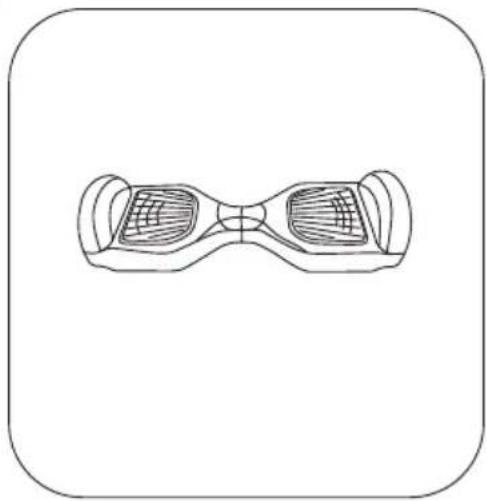
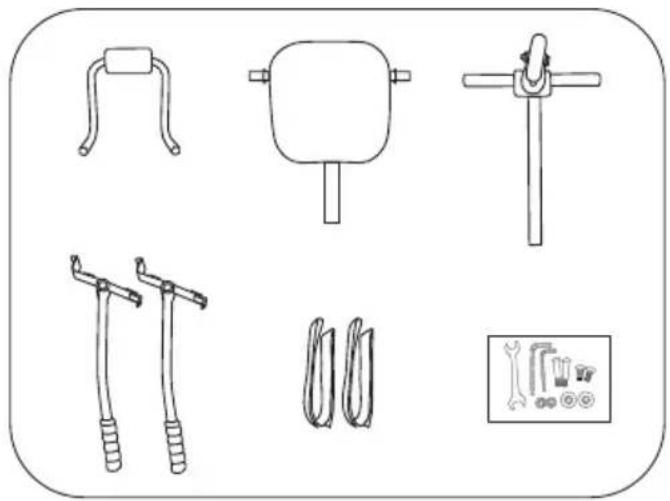
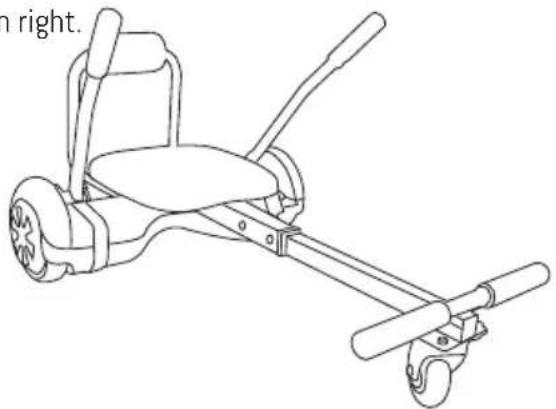
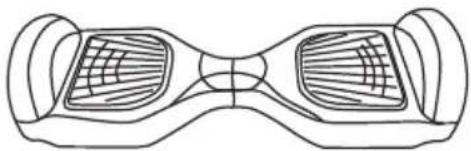
Hoverboard Kart elements
Quick start guide
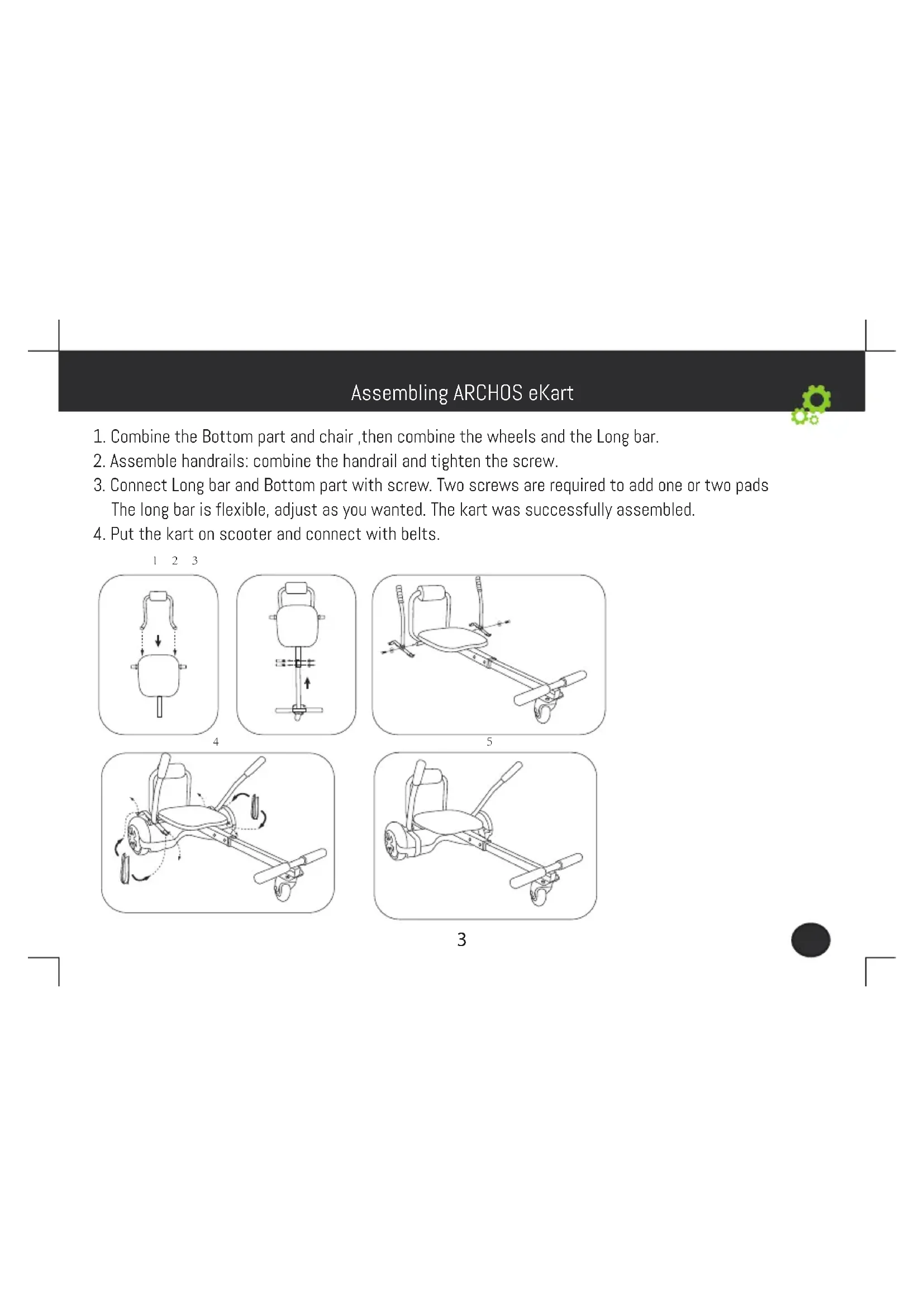
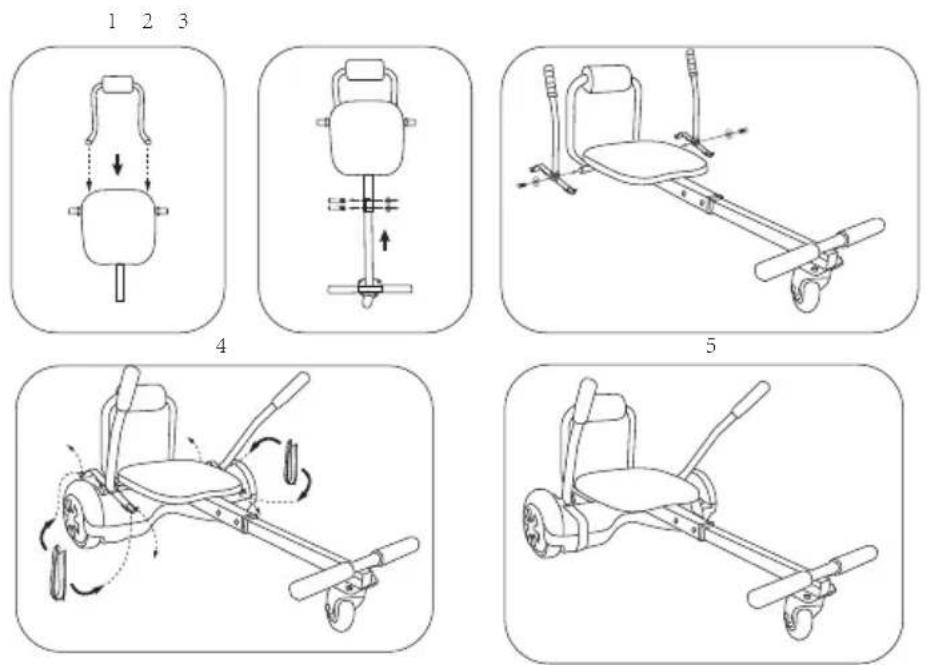
Assembling ARCHOS eKart

- Combine the Bottom part and chair, then combine the wheels and the Long bar.
- Assemble handrails: combine the handrail and tighten the screw.
- Connect Long bar and Bottom part with screw. Two screws are required to add one or two pads. The long bar is flexible, adjust as you wanted. The kart was successfully assembled.
- Put the kart on scooter and connect with belts.
3

Read carefully
- Always wear shoes, a helmet, and appropriate safety gear such as knee and elbow pads when riding. Use an approved bicycle or skateboard helmet that fits properly with the chin strap in place, and provides protection for the Front, back and sides of your head.
- Do not ride without proper training, please review manual before use.
- Avoid obstacles and slippery surfaces that could result in a loss of balance or traction and cause a fall.
- Do not ride at high speeds, on uneven terrain, or on slopes. Do not perform stunts or turn abruptly.
- Never place anything on the rider detection pads except your feet. Doing so could interfere with the Rider Detection system and may allow the ARCHOS eKart to travel on its own, risking running into a person or property and causing injury or damage.
- Never step off of the ARCHOS eKart when it is in motion. If you step off of the ARCHOS eKart while in motion, you risk injury to yourself, others, and damage to the ARCHOS eKart.
- Although the ARCHOS eKart is designed to be as stable as possible for a design that utilizes two self-balancing wheels, it is possible to "override" the ARCHOS eKart and tip over when riding too fast for the conditions. Always be aware of the riding surface and environmental conditions while riding. Be alert. Scan both far ahead and in front of the Wheels—your eyes are your best tool for safely avoiding obstacles and slippery surfaces.
- Do not carry more than one passenger.
- Do not ride your ARCHOS eKart after consumption of alcohol, drugs, or while intoxicated. You must comply with local laws and give way to pedestrians.
- All riders must be over 30kg . The maximum weight limit 265 lbs(120 kg).
RISK OF DEATH OR SERIOUS INJURY
Assumption of Risk: By riding our ARCHOS eKart the user acknowledges and accept responsibility of all risks associated with the use of the ARCHOS eKart Hands-Free Smart Board, which may include, but are not limited to, muscle injuries, broken bones, lacerations, serious injury, and possibly death, which may be sustained while using the ARCHOS eKart. To ride safely, you must read and follow all instructions and warnings in the User Manual.
Using the ARCHOS eKart

You can either use the hoverboard alone or combine it with the kart.
Using the hoverboard
The hoverboard self-balances and moves because of Dynamic Equilibrium. It uses an internal gyroscope and acceleration sensors to move based on your center of gravity. When you lean forward, it will sense your actions and accelerate. When you need to turn, slow down and gently shift the weight on your left or right foot to turn the opposite direction.
It has an inertial dynamic stabilization system that keeps you upright. However, it will stop detecting you if you lean too far left or right or you take a foot off the board. Slow down before turning or you will fall off and be injured.
- Press the power switch to turn on the hoverboard.
- Get ready to drive. First, step on one pedal to trigger the foot-switch. The system will enter selfbalancing mode. Then step on with your other foot.
- Stand upright but relaxed. Do not make any sudden or jerky movements. Shift your weight forward or back to control the hoverboard.
- Shift your weight to turn. Putting more weight on your right foot turns left. Putting more weight on your left foot turns right.
- Get off. Before you get off, make sure that the hoverboard is stopped, then step off one foot at a time. Please be careful.
Do not turn suddenly while driving fast, accidents will result.
Do not ride sideways or turn on a slope. The self-balancing sensors will malfunction, jeopardizing your safety


Using the ARCHOS eKart
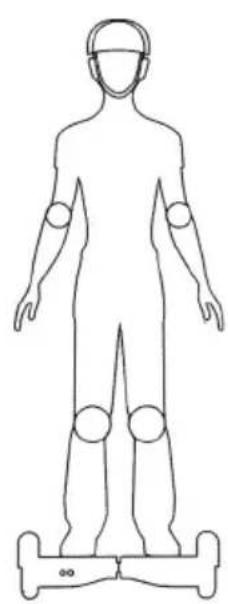
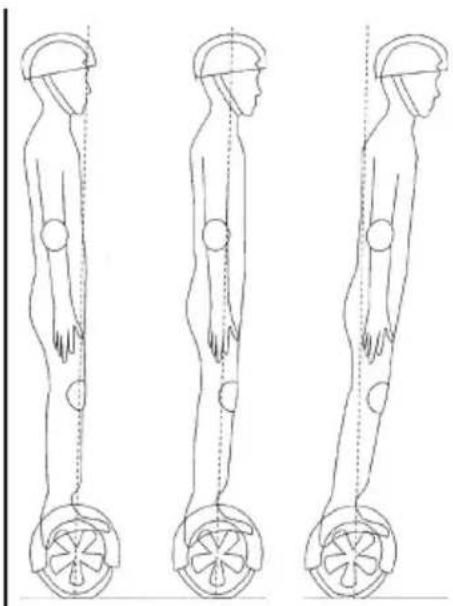
Using the ARCHOS eKart

You can either use the hoverboard alone or combine it with the kart.
Using the hoverboard with the ARCHOS eKart
For a proper use, charge the hoverboard before.
- Assemble the kart elements. Make sure all parts are screwed properly.
- Install the hoverboard under the kart and attach solidly.
- Turn on the hoverboard.
- Sit on the kart and start driving.
- Keep your feet on the footrest at all times.
- If you push the two handles forward, the ARCHOS eKart will move forward. If you push the two handles backward, the ARCHOS eKart will move backward. If you push only the left handle, the ARCHOS eKart will turn left. If you push only the right handle, the ARCHOS eKart will turn right.

- Locate the charging port on the back of the ARCHOS eKart.
- Ensure the charging port is dry.
- First plug the charger into the wall, then plug the other end of the charger into the ARCHOS eKart. When the indicator light changes from red to green, the battery is fully charged. Please stop charging. If you keep it on the charger, it will reduce the battery life.
Please keep the charging environment clean and dry.
If the charging port is damp, don't charge it.
Notice

When riding the ARCHOS eKart, you must make sure that you are touching the footrests.
Do not lean too far back or forward, and do not ride on a slope.
Don't put objects on the ARCHOS eKart. The ARCHOS eKart will not lock, increasing the possibility that it will drive off and crash into something, damaging the ARCHOS eKart and possibly causing injury. Do not step on the center pivot point of the ARCHOS eKart. This is dangerous, and may break your ARCHOS eKart.
- Battery indicator: A green light means the battery is fully charged. When the light flashes green, that means there is 50% battery life remaining. When it turns red and is beeping it is below 20% battery life.
Stop using the ARCHOS eKart immediately and recharge the battery.
- Operation indicator: When the pedal is triggered, the operation indicator will light up green to show that the system is operating normally. If the system experiences an error, the indicator will turn red.
Immediately get off the ARCHOS eKart if the low battery indicator comes on. The ARCHOS eKart will not self balance and you will fall.
Weight limitation
- The reason for the weight limitation: 1. To guarantee the safety of the operator; 2. To ensure the ARCHOS eKart operates properly.
Maximum load: (120 KG)
Minimum load: (30KG)
Range per charge
The range per charge is related to many factors.for example:
- Topography: On smooth even road, the range per charge will increase. If you are on rough terrain or on a slope, it will decrease.
- Weight: The weight of the operator will influence the driving distance.
- Temperature: If the ARCHOS eKart gets too hot or too cold, it will decrease the driving distance.
- Maintenance: If the ARCHOS eKart is charged properly and the battery is kept in good condition, the driving distance will increase. Improper charging and maintenance will decrease the driving distance.
- Speed and driving style: keep a moderate, consistent speed to increase the driving distance.

Notice
Frequently starts, stops, acceleration, and deceleration will reduce the driving distance. Max. Speed
The maximum speed of the ARCHOS eKart is 16km / h
- When the operator exceeds the maximum speed, the ARCHOS eKart will sound an alarm.
- At recommended speeds, the electric hoverboard will balance itself well. When the speed is faster than the recommended speed, you will lose balance and fall off.
- When you are learning to use the ARCHOS eKart, make sure that all safety measures are made. Wear a helmet, knee pads, elbow pads, and other protective gear.
- The ARCHOS eKart is only for personal entertainment. You may not be allowed to ride it on sidewalks and streets. Check your local laws first.
- Do not ride in traffic.
Children, the elderly, and pregnant women should not drive the ARCHOS eKart.
- Do not drive while intoxicated or under the influence of medication or drugs. It is dangerous and illegal.
- Do not carry items when driving.
- When driving the ARCHOS eKart you must comply with local laws and give way to pedestrians.
- Please be alert to your surroundings to ensure a safe ride. Do not drive in dimly lit or dark places.
- Relax your legs while driving, knees slightly bent. This helps maintain balance when you encounter uneven ground.
- Make sure your feet are always on the pedals. Taking your feet off the ARCHOS eKart while driving is incredibly dangerous.
- Please wear appropriate clothes and safety gear, this will help you handle emergencies better.
- The ARCHOS eKart can only support one person. Do not let two or more people ride it.
- Do not start or stop suddenly.
- Avoid driving on steep slopes.

Joining us

www.archos.com, click Support > After-sales support

www.archos.com, click Support > Downloads > Declaration of conformity