
Access 57 4G - Smartphone ARCHOS - Free user manual and instructions
Find the device manual for free Access 57 4G ARCHOS in PDF.


| Product Type | Smartphone |
| Brand | ARCHOS |
| Model | Access 57 4G |
| Dimensions | 152.5 x 72.5 x 9.5 mm |
| Weight | 165 g |
| Display Size | 5.7 inches |
| Display Type | IPS LCD |
| Resolution | 720 x 1440 pixels |
| Operating System | Android (version may vary) |
| Processor | Quad-core 1.3 GHz |
| RAM | 2 GB |
| Internal Storage | 16 GB |
| Expandable Storage | <>MicroSD up to 128 GB|
| Battery Capacity | 2500 mAh |
| Rear Camera | 8 MP |
| Front Camera | 5 MP |
| Connectivity | 4G LTE, Wi-Fi, Bluetooth 4.2 |
| SIM | Dual SIM (Micro-SIM) |
| Sensors | Accelerometer, proximity |
| Power Supply | 5V/1A charger |
| Maintenance | Clean with dry cloth; avoid water |
| Safety | Do not disassemble; use only approved charger |
| Spare Parts | Battery, screen, charging port |
Frequently Asked Questions - Access 57 4G ARCHOS
User questions about Access 57 4G ARCHOS
0 question about this device. Answer the ones you know or ask your own.
Ask a new question about this device
Download the instructions for your Smartphone in PDF format for free! Find your manual Access 57 4G - ARCHOS and take your electronic device back in hand. On this page are published all the documents necessary for the use of your device. Access 57 4G by ARCHOS.
USER MANUAL Access 57 4G ARCHOS

HP Color LaserJet Pro M479
User Guide
Copyright and License
© Copyright 2019 HP Development Company, L.P.
Reproduction, adaptation, or translation without prior written permission is prohibited, except as allowed under the copyright laws.
The information contained herein is subject to change without notice.
The only warranties for HP products and services are set forth in the express warranty statements accompanying such products and services. Nothing herein should be construed as constituting an additional warranty. HP shall not be liable for technical or editorial errors or omissions contained herein.
Edition 1, 4/2019
Trademark Credits
Adobe®, Adobe Photoshop®, Acrobat®, and PostScript® are trademarks of Adobe Systems Incorporated.
Apple and the Apple logo are trademarks of Apple Inc., registered in the U.S. and other countries.
macOS is a trademark of Apple Inc., registered in the U.S. and other countries.
AirPrint is a trademark of Apple Inc., registered in the U.S. and other countries.
Google™ is a trademark of Google Inc.
Microsoft®, Windows®, Windows® XP, and Windows Vista® are U.S. registered trademarks of Microsoft Corporation.
UNIX® is a registered trademark of The Open Group.
Table of contents
1 Printer overview .... 1
Warning icons .... 1
Potential shock hazard 2
Open source license 3
Printer views 4
Printer front view 4
Printer back view 5
Control panel view 6
How to use the touchscreen control panel 8
Printer specifications 9
Technical specifications 9
Supported operating systems 10
Mobile printing solutions 12
Printer dimensions 12
Power consumption, electrical specifications, and acoustic emissions 14
Operating environment range 14
Printer hardware setup and software installation 15
2 Paper trays 17
Introduction 17
Load paper to Tray 1 18
Introduction 18
Load Paper Tray 1 (multipurpose tray) 18
Tray 1 paper orientation .... 19
Load paper to Tray 2 22
Introduction 22
Load paper Tray 2 22
Tray 2 paper orientation 24
Load paper to Tray 3 27
Introduction 27
Load paper to Tray 3 (optional) 27
Tray 3 paper orientation .... 29
Load and print envelopes 31
Introduction 31
Print envelopes 31
Envelope orientation 31
3 Supplies, accessories, and parts 33
Order supplies, accessories, and parts 34
Ordering 34
Supplies and accessories 34
Customer self-repair parts 36
Dynamic security 36
Configure the HP toner-cartridge-protection supply settings 37
Introduction 37
Enable or disable the Cartridge Policy feature 38
Use the printer control panel to enable the Cartridge Policy feature 38
Use the printer control panel to disable the Cartridge Policy feature 38
Use the HP Embedded Web Server (EWS) to enable the Cartridge Policy feature 38
Use the HP Embedded Web Server (EWS) to disable the Cartridge Policy feature ...... 39
Troubleshoot Cartridge Policy control panel error messages 39
Enable or disable the Cartridge Protection feature 41
Use the printer control panel to enable the Cartridge Protection feature 41
Use the printer control panel to disable the Cartridge Protection feature 41
Use the HP Embedded Web Server (EWS) to enable the Cartridge Protection feature ..... 42
Use the HP Embedded Web Server (EWS) to disable the Cartridge Protection feature .... 42
Troubleshoot Cartridge Protection control panel error messages 43
Replace the toner cartridges 44
Toner cartridge information 44
Remove and replace the toner cartridges 46
4 Print 51
Print tasks (Windows) 52
How to print (Windows) 52
Automatically print on both sides (Windows) 52
Manually print on both sides (Windows) 53
Print multiple pages per sheet (Windows) 53
Select the paper type (Windows) 54
Additional print tasks 54
Print tasks (macOS) 55
How to print (macOS) 55
Automatically print on both sides (macOS) 55
Manually print on both sides (macOS) 55
Print multiple pages per sheet (macOS) 56
Select the paper type (macOS) 56
Additional print tasks 57
Store print jobs on the printer to print later or print privately 58
Introduction 58
Before beginning 58
Set up job storage 58
Disable or enable the job storage feature 59
Create a stored job (Windows) 60
Create a stored job (macOS) 60
Print a stored job 61
Delete a stored job 63
Delete a job that is stored on the printer 63
Information sent to printer for Job Accounting purposes 63
Mobile printing 64
Introduction 64
Wi-Fi Direct printing (wireless models only) 65
To turn on Wi-Fi Direct 65
Change the printer Wi-Fi Direct name 66
Step one: Open the HP Embedded Web Server 66
Step two: Change the Wi-Fi Direct name 66
HP ePrint via Email 66
AirPrint 67
Android embedded printing 67
Print from a USB flash drive 68
Introduction 68
Print USB documents 68
5 Copy 69
Make a copy 69
Copy on both sides (duplex) 70
Copy on both sides automatically 70
Copy on both sides manually 70
Copy an identification card 70
Additional copy tasks 71
6 Scan 73
Scan by using HP Scan software (Windows) 73
Scan by using HP Easy Scan Software (macOS) 74
Set up Scan to Email 75
Introduction 75
Before you begin 75
Method one: Use the Scan to Email Wizard (Windows) 75
Method two: Set up the Scan to Email feature via the HP Embedded Web Server 78
Step one: Access the HP Embedded Web Server (EWS) 78
Step two: Configure the Scan to Email feature 78
Set up Scan to Network Folder 79
Introduction 79
Before you begin 79
Method one: Use the Scan to Network Folder Wizard (Windows) 79
Method two: Set up the Scan to Network Folder feature via the HP Embedded Web Server 82
Step one: Access the HP Embedded Web Server (EWS) 82
Step two: Configure the Scan to Network Folder feature 82
Set up Scan to SharePoint 83
Step one: Access the HP Embedded Web Server (EWS) 83
Step two: Set up Scan to SharePoint 83
Set up Scan to Computer (Windows) 84
Enable scanning to a computer (Windows) 84
Scan to a USB flash drive 84
Scan to email 85
Scan to a network folder 85
Scan to SharePoint 86
Scan to a computer (Windows) 86
Additional scan tasks 87
7 Fax 89
Connect and configure the printer for fax 90
Connect the printer to a telephone line 90
Configure the printer for fax 91
Configure the fax time, date and header using the HP Fax Setup Wizard 91
Configure the time, date, and header using the printer control panel 91
Configure the time, date, and header using the HP Embedded Web Server and Printer Home Page (EWS) 92
Configure for stand-alone fax 93
Configure for an answering machine 93
Install the HP Fax software in Windows (optional) 94
Send a fax 95
Send a fax by dialing manually from the printer control panel 95
Fax from the flatbed scanner 95
Fax from the document feeder 96
Schedule a fax to be sent later 97
Use phone book entries 97
Send a fax from the software (Windows) 98
Send a fax from a third-party software program, such as Microsoft Word 99
Create, edit, and delete phone book entries 100
Create and edit individual phone-book entries 100
Create and edit group phone-book entries 100
Delete phone book entries 100
Reprint a received fax from the printer memory 101
Additional fax tasks 101
8 Manage the printer 103
Use HP Web Services applications 103
Change the printer connection type (Windows) 104
Advanced configuration with HP Embedded Web Server and Printer Home Page (EWS) 105
Method one: Open the HP Embedded Web Server (EWS) from the software 105
Method two: Open the HP Embedded Web Server (EWS) from a web browser 105
Configure IP network settings 109
Introduction 109
Printer sharing disclaimer 109
View or change network settings 109
Rename the printer on a network 109
Manually configure IPv4 TCP/IP parameters from the control panel 110
Link speed and duplex settings 110
Printer security features 112
Introduction 112
Assign or change the system password using the Embedded Web Server 112
Energy-conservation settings 113
Introduction 113
Print with EconoMode 113
Set the Sleep Mode setting 113
Set the Shutdown Mode setting 113
Set the Disable Shutdown setting 114
HP Web Jetadmin 114
Update the firmware 115
Method one: Update the firmware using the control panel 115
Method two: Update the firmware using the HP Printer Update utility 115
9 Solve problems 117
Customer support 117
Control panel help system 118
Restore the factory-set defaults 118
A "Cartridge is low" or "Cartridge is very low" message displays on the printer control panel 119
Change the "Very Low" settings 120
Change the "Very Low" settings from the control panel 120
For printers with fax capability 120
Order supplies 120
Printer does not pick up paper or misfeeds 122
Introduction 122
The printer picks up multiple sheets of paper 122
The printer does not pick up paper 124
The document feeder jams, skews, or picks up multiple sheets of paper 126
Clear paper jams 127
Introduction 127
Experiencing frequent or recurring paper jams? 127
Paper jam locations 128
Clear paper jams in the document feeder 128
Clear paper jams in Tray 1 - 13.02 .... 131
Clear paper jams in Tray 2 - 13.03 133
Clear paper jams in the output bin - 13.10, 13.11, 13.12 135
Clear paper jams in the duplexer (duplex models only) - 13.14, 13.15 .... 135
Clear paper jams in the toner cartridge or fuser area - 13.08, 13.09 136
Resolving print quality problems 138
Introduction 138
Troubleshoot print quality 139
Update the printer firmware 139
Print from a different software program 139
Check the paper-type setting for the print job 140
Check the paper type setting on the printer 140
Check the paper type setting (Windows) 140
Check the paper type setting (macOS) 140
Check toner-cartridge status 141
Step one: Print a supplies status page 141
Step two: Check supplies status 141
Print a cleaning page 141
Visually inspect the toner cartridge or cartridges 142
Check paper and the printing environment 143
Step one: Use paper that meets HP specifications 143
Step two: Check the environment 143
Step three: Set the individual tray alignment
Try a different print driver
Troubleshoot color quality
Calibrate the printer to align the colors
Adjust color settings (Windows)
Print and interpret the print quality page
Check the EconoMode settings
Adjust print density
Troubleshoot image defects
Improve copy and scan image quality
Introduction
Check the scanner glass for dirt and smudges
Check the paper settings
Check the image adjustment settings
Optimize for text or pictures
Check the scanner resolution and color settings on the computer 159
Resolution and color guidelines 159
Color 160
Edge-to-edge copying 160
Clean the pickup rollers and separation pad in the document feeder 160
Improve fax image quality 163
Introduction 163
Check the scanner glass for dirt and smudges 163
Check the send-fax resolution settings 164
Check the Error Correction Mode setting 164
Send to a different fax machine 164
Check the sender's fax machine 164
Solve wired network problems 165
Introduction 165
Poor physical connection 165
The computer is using the incorrect IP address for the printer 165
The computer is unable to communicate with the printer 165
The printer is using incorrect link and duplex settings for the network 166
New software programs might be causing compatibility problems 166
The computer or workstation might be set up incorrectly 166
The printer is disabled, or other network settings are incorrect 166
Solve wireless network problems 167
Introduction 167
Wireless connectivity checklist 167
The printer does not print after the wireless configuration completes 168
The printer does not print, and the computer has a third-party firewall installed 168
The wireless connection does not work after moving the wireless router or printer 168
Cannot connect more computers to the wireless printer 169
The wireless printer loses communication when connected to a VPN 169
The network does not appear in the wireless networks list 169
The wireless network is not functioning 169
Perform a wireless network diagnostic test 170
Reduce interference on a wireless network 170
Solve fax problems 171
Introduction 171
Fax troubleshooting checklist 171
Solve general fax problems 173
Faxes are sending slowly 173
Fax quality is poor 173
Fax cuts off or prints on two pages 174
Index 175
1 Printer overview
Review the location of features on the printer, the physical and technical specifications of the printer, and where to locate setup information.
- Warning icons • Potential shock hazard Open source license Printer views • Printer specifications • Printer hardware setup and software installation
For more information:
For video assistance, see www.hp.com/videos/LaserJet.
The following information is correct at the time of publication. For current information, see www.hp.com/support/colorljM479MFP.
HP's all-inclusive help for the printer includes the following information:
• Install and configure - Learn and use - Solve problems - Download software and firmware updates - Join support forums • Find warranty and regulatory information
Warning icons
Use caution if you see a warning icon on your HP printer, as indicated in the icon definitions.
• Caution: Electric shock

- Caution: Hot surface

- Caution: Keep body parts away from moving parts

- Caution: Sharp edge in close proximity

- Warning

Potential shock hazard
Review this important safety information.
- Read and understand these safety statements to avoid an electrical shock hazard. • Always follow basic safety precautions when using this product to reduce risk of injury from fire or electric shock.
- Read and understand all instructions in the user guide.
- Observe all warnings and instructions marked on the product.
- Use only a grounded electrical outlet when connecting the product to a power source. If you do not know whether the outlet is grounded, check with a qualified electrician.
- Do not touch the contacts on any of the sockets on the product. Replace damaged cords immediately.
- Unplug this product from wall outlets before cleaning.
- Do not install or use this product near water or when you are wet. Install the product securely on a stable surface. Install the product in a protected location where no one can step on or trip over the power cord.
Open source license
For information on open source software used in this printer, visit www.hp.com/software/opensource.
Printer views
Identify parts on the printer and buttons on the control panel.
Printer front view, Printer back view, Control panel view
Printer front view
Identify the parts on the front of the printer.
Figure 1-1 Printer front view
Number Description
| 1 Scanner |
| 2 Document feeder |
| 3 Regulatory label (inside the front door) |
| 4 Tray 2 |
| 5 Tray 1 |
| 6 Power on/off button |
| 7 Front door (provides toner cartridge access) |
| 8 Output bin extension |
| 9 Output bin |
| 10 Walk-up USB port (for printing and scanning without a computer) |
| 11 Touchscreen control panel (tilts up for easier viewing) |
Printer back view
Identify the parts on the back of the printer.
Figure 1-2 Printer rear view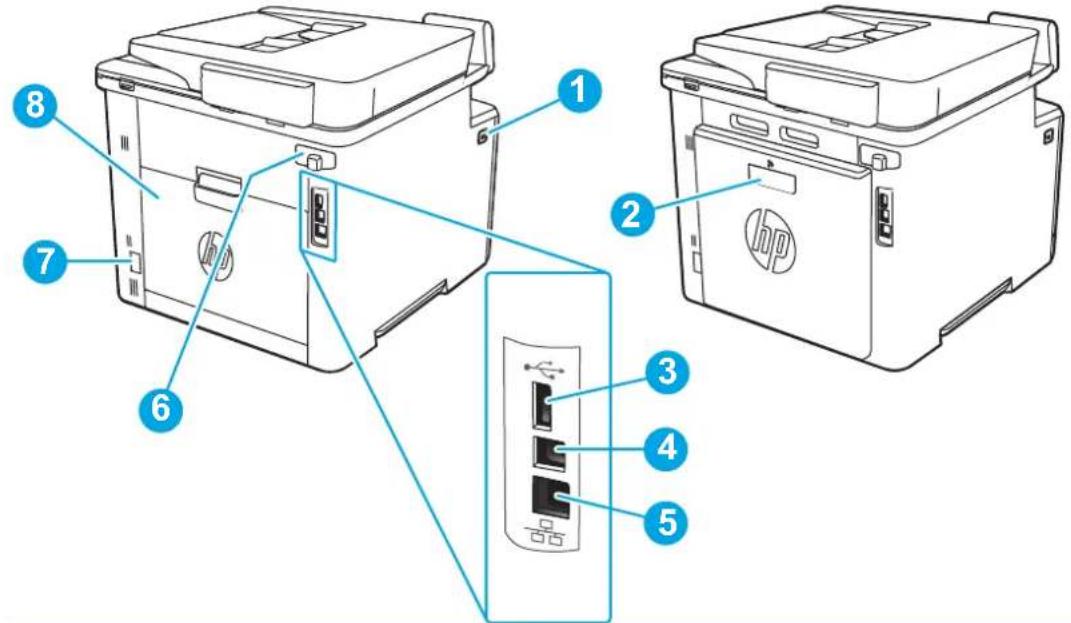
| Number Description |
| 1 Front door release button |
| 2 Duplexer (dw, fdn, and fdw models only) |
| 3 USB port for job storage |
| 4 USB port for direct connection to a computer |
| 5 Ethernet port |
| 6 Fax ports cover |
| NOTE: The fax ports are behind the cover. |
| 7 Power connection |
| 8 Rear door (fnw model only) (provides access for clearing jams) |
Control panel view
Identify the buttons and features on the touchscreen control panel.
• How to use the touchscreen control panel
The Home screen provides access to the printer features and indicates the current status of the printer.
Return to the Home screen at any time by touching the Home button on the bottom of the printer control panel.

NOTE: For more information about the printer control panel features, go to www.hp.com/support/colorljM479MFP.

NOTE: The features that appear on the Home screen can vary, depending on the printer configuration.
Figure 1-3 Control panel view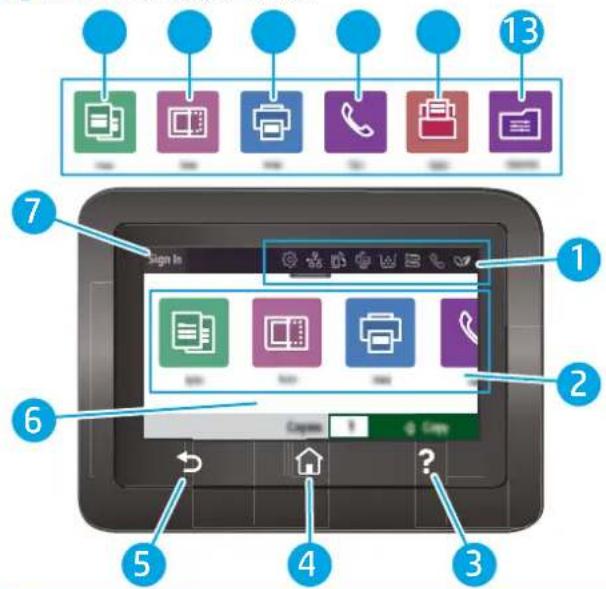
Number Item Description
| 1 Home screen dashboard display icons | See the table that follows for a description of the icons.Pull down this tab to open the Jobs menu. |
2 Home screen icons Touch these icons to open the menus for these functions. 3 Help button Provides access to the control panel help system. 4 Home button Provides access to the Home screen. 5 Back button Returns to the previous screen. 6 Color touchscreen Provides access to menus, help animations, and printer information. 7 Sign In button Touch this button to sign in to the printer.
8 Copy icon: Touch this icon to open the Copy menu.
| Number Item Description | ||
9 Scan icon: Touch to open the Scan menus: | ||
10 Print icon: Touch to open the Print menus. | ||
11  | Fax icon: Touch this icon to open the Fax menus. | |
12  | Apps icon: Touch this icon to open the Apps menu to print directly from select Web applications. | |
13 Quick Sets icon | this icon to access shortcut jobs that are set up for frequently performed tasks. This icon appears after a Quick Set is configured.Quick Sets are configured in the Embedded Web Server (EWS), under Settings►Control Panel Customization. | |

NOTE: While the control panel does not have a standard Cancel button, during many printer processes a Cancel button appears on the touchscreen. This permits users to cancel a process before the printer completes it.
Home screen dashboard display icons
Table 1-1 Home screen icons
| Icon Purpose | |
 | Setup icon: Opens the Setup menu, where you can change preferences and perform maintenance functions. |
| [K20A] | Wireless icon: Opens the Wireless Summary menu, where you can check wireless status and change wireless settings. You can also print a wireless test report, which helps diagnosing network connection issues. |
 | HP ePrint icon: Opens the Web Services Summary menu, where you can check ePrint status details, change ePrint settings, or print an Info page. |
 | Wi-Fi Direct icon: Opens the Wi-Fi Direct menu, where you can turn on Wi-Fi Direct, turn off Wi-Fi Direct, and display the Wi-Fi Direct name and password. |
 | Cartridge icon: Opens the Cartridge Information screen, where you can view the estimated levels and pages remaining for the toner cartridges. |
  | Paper Setup icon: Opens the Paper Setup menu, where you can configure the default Paper Size and Paper Type for the paper trays.Fax Status icon: Displays status information for the Auto Answer function, fax logs, and the fax sound volume. |
 | ECO icon: Allows you to configure some of the printer environmental features. |
How to use the touchscreen control panel
Use the following actions to use the printer touchscreen control panel.
Table 1-2 How to use the touchscreen control panel
| Action Description Example | ||
| Touch Touch an item on the screen to select that item or open that menu. Also, when scrolling through menus, briefly touch the screen to stop the scrolling. | Touch the Setup open to open the Setup menu. | |
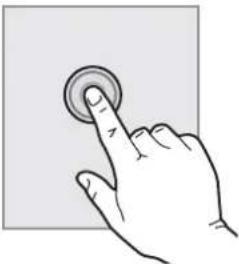 | ||
| Swipe | Touch the screen and then move your finger horizontally to scroll the screen sideways. | Swipe the Home screen to access additional menu options. |
 | ||
| Scroll | Touch the screen and then move your finger vertically to scroll the screen up and down. When scrolling through menus, briefly touch the screen to stop the scrolling. | Scroll through the Setup menu. |
 | ||
Printer specifications
Review hardware, software, and printer environment specifications.
• Technical specifications • Supported operating systems • Mobile printing solutions • Printer dimensions • Power consumption, electrical specifications, and acoustic emissions • Operating environment range

IMPORTANT: The following specifications are correct at the time of publication, but they are subject to change.
For current information, see www.hp.com/support/colorljM479MFP.
Technical specifications
Review the technical specifications for the printer.
For current information, see www.hp.com/support/colorljM479MFP.
Table 1-3 Technical specifications
| Model name | M479dw | M479fnw | M479fdn | M479fdw | |
| Product number | W1A77A | W1A78A | W1A79A | W1A80A | |
| Paper handling Tray 1 (50-sheet capacity) Included Included Included Included | |||||
| Paper handling Tray 2 (250-sheet capacity) Included Included Included Included | |||||
| Paper handling Optional 550-sheet accessory tray Optional Optional Optional Optional | |||||
| Paper handling | Automatic duplex printing | Included | Not available | Included | Included |
| Connectivity 10/100/1000 Ethernet LAN connection with IPv4 and IPv6 | Included Included Included Included | ||||
| Connectivity Hi-Speed USB 2.0 | Included Included Included Included | ||||
| Connectivity Walk-up USB port | Included Included Included Included | ||||
| Connectivity | Print server for wireless connectivity | Included | Included | Not available | Included |
| Connectivity | Bluetooth Low Energy (BLE) | Included | Included | Not available | Included |
| Connectivity Wi-Fi Direct for printing from mobile devices | Included Included Not available Included | ||||
| Control-panel display and input | Color touchscreen control panel | Included Included Included Included | |||
| Prints 27 pages per minute (ppm) on A4 and 28 ppm on letter-size paper | Included Included Included Included | ||||
| USB printing (no computer required) | Included | Included | Included | Included | |
| Print Job storage and private printing(Requires a 16 GB or greater USB thumb drive.) | Included Included Included Included | ||||
| Fax Fax features Not available | Included Included Included | ||||
| Fax HP Digital Fax (Fax to Email and Fax to Network Folder options) | Not available Included Included Included | ||||
| Copy and Scan Copies 19 pages per minute (ppm) and scans up to 26 ppm. NOTE: Copy and scan speeds are subject to change. | Included Included Included Included | ||||
| Copy and Scan 50-page document feeder with dual-head scanning for single-pass duplex copying and scanning | Not available Included Included Included | ||||
| Copy and Scan 50-page document feeder with simplex copying and scanning | Included Included Included Included | ||||
| Copy and Scan Scan to E-mail, | Scan to USB, and Scan to Network Folder options | Included Included Included Included | |||
Supported operating systems
The following information applies to the printer-specific Windows and HP print drivers for macOS and to the software installer.
Windows: The HP Software Installer installs either a V3 or V4 PCL 6 print driver depending on the Windows operating system, along with optional software when using the full software installer. See the software installation notes for more information.
macOS: Mac computers and Apple mobile devices are supported with this printer. Download HP Easy Start either from 123.hp.com/laserjet or from the Printer Support page, and then use HP Easy Start to install the HP print driver. HP Easy Start is not included in the HP Software Installer.
- Go to 123.hp.com/laserjet.
- Follow the steps provided to download HP Easy Start.
Linux: For information and print drivers for Linux, go to www.hp.com/go/linuxprinting.
UNIX: For information and print drivers for UNIX, go to www.hp.com/go/unixmodelscripts.
Table 1-4 Supported operating systems and print drivers
| Operating system Print driver installed (from the software on the web) | |
| Windows 7, 32-bit and 64-bit | The HP PCL 6 (V3) printer-specific print driver is installed for this operating system as part of the software installation. |
| Windows 8, 32-bit and 64-bit | The HP PCL 6 (V3) printer-specific print driver is installed for this operating system as part of the software installation.1 |
| Windows 8.1, 32-bit and 64-bit | The HP PCL-6 (V4) printer-specific print driver is installed for this operating system as part of the software installation. 2 |
| Windows 10, 32-bit and 64-bit | The HP PCL-6 (V4) printer-specific print driver is installed for this operating system as part of the software installation. |
| Windows Server 2008 R2, 64-bit | The HP PCL 6 (V3) printer-specific print driver is available for download from the printer support website. Download the driver, and then use the Microsoft Add Printer tool to install it. 3 |
| Windows Server 2008 R2, SP1, 64-bit | The HP PCL 6 (V3) printer-specific print driver is available for download from the printer support website. Download the driver, and then use the Microsoft Add Printer tool to install it. |
| Windows Server 2012 | The HP PCL 6 (V3) printer-specific print driver is available for download from the printer support website. Download the driver, and then use the Microsoft Add Printer tool to install it. |
| Windows Server 2012 R2 | The HP PCL 6 (V3) printer-specific print driver is available for download from the printer support website. Download the driver, and then use the Microsoft Add Printer tool to install it. |
| Windows Server 2016, 64-bit | The HP PCL 6 (V3) printer-specific print driver is available for download from the printer support website. Download the driver, and then use the Microsoft Add Printer tool to install it. |
| macOS Sierra 10.12, macOS High Sierra 10.13, macOS Mojave 10.14 | To install the print driver, download HP Easy Start from 123.hp.com/laserjet. Follow the steps provided to install the printer software and print driver. |
1 Windows 8 RT support is provided through Microsoft IN OS Version 4, 32-bit driver. 2 Windows 8.1 RT support is provided through Microsoft IN OS Version 4, 32-bit driver. 3 Microsoft retired mainstream support for Windows Server 2008 in January 2015. HP will continue to provide best effort support for the discontinued Server 2008 operating system.

NOTE: For a current list of supported operating systems, go to www.hp.com/support/colorljM479MFP for HP's all-inclusive help for the printer.

NOTE: For details on client and server operating systems and for HP UPD PCL6 and UPD PS driver support for this printer, go to www.hp.com/go/upd and click Specifications.
Table 1-5 Minimum system requirements
| Windows 7, 8, 8.1, 10 macOS Sierra v10.12, macOSHigh Sierra v10.13, macOSMojave v10.14 Mobile devices, iOS, Android | ||
| •32-bit or 64-bit | •2 GB of available hard disk space | Router connection not requiredwww.hp.com/go/mobileprinting |
| •2 GB of available hard disk space | •Internet connection | |
| •Microsoft Internet Explorer | ||
| •Internet connection | ||
| •USB port | ||
Mobile printing solutions
HP offers multiple mobile and ePrint solutions to enable easy printing to an HP printer from a laptop, tablet, smartphone, or other mobile device.
To see the full list and to determine the best choice, go to www.hp.com/go/MobilePrinting.
The printer supports the following software for mobile printing:
• Wi-Fi Direct (wireless models only) - Bluetooth Low Energy • HP Smart app for iOS and Android devices - Google Cloud Print AirPrint - Android Printing HP Roam
Printer dimensions
Make sure your printer environment is large enough to accommodate the printer.
Dimensions for the M479fnw model
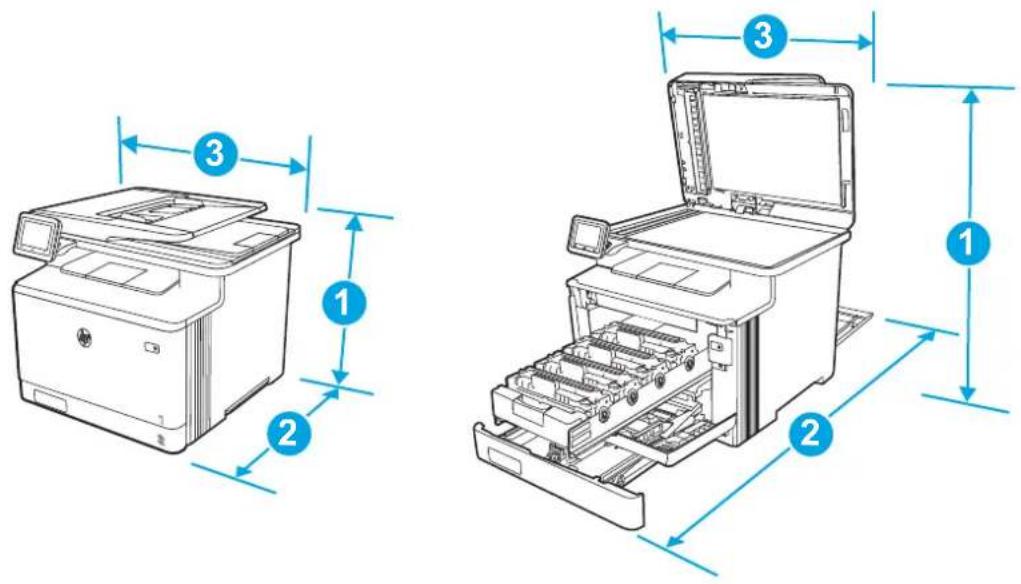
Table 1-6 Dimensions for the M479fnw model
| Measurement Printer fully closed Printer fully opened |
| 1 - Height 399.8 mm (15.74 in) 656 mm (25.83 in) |
| 2 - Depth 461 mm (18.15 in) 1025 mm (40.35 in) |
| 3 - Width 415.4 mm (16.35 in) 415.4 mm (16.35 in) |
| Weight (with cartridges) 21.8 kg (48.06 lb) 21.8 kg (48.06 lb) |
Dimensions for the M479dw, M479fdn, and M479fdw models
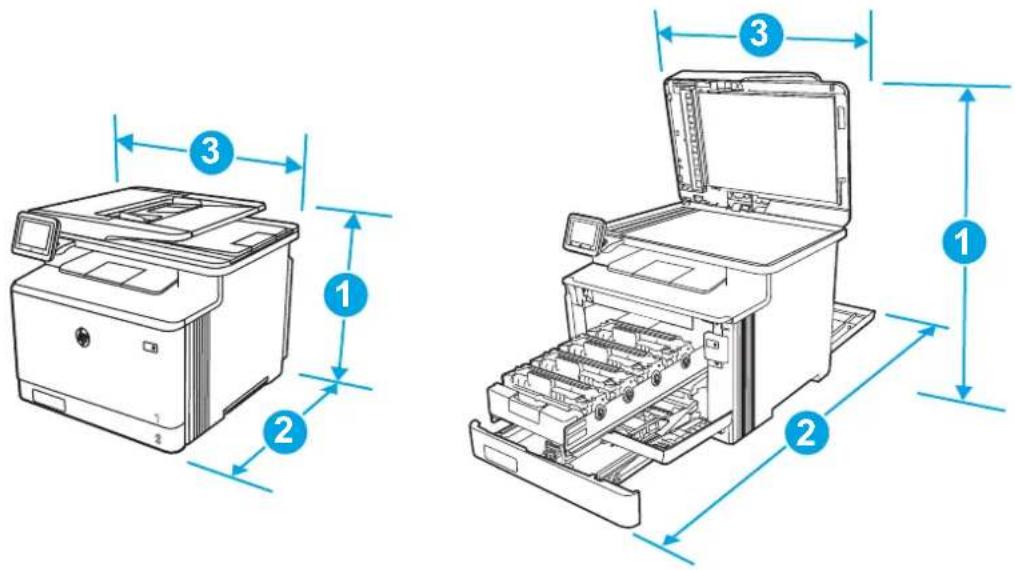
Table 1-7 Dimensions for the M479dw, M479fdn, and M479fdw models
| Measurement Printer fully closed Printer fully opened |
| 1 - Height 399.8 mm (15.74 in) 656 mm (25.83 in) |
| 2 - Depth 472 mm (18.59 in) 1124.4 mm (44.27 in) |
| 3 - Width 415.4 mm (16.35 in) 415.4 mm (16.35 in) |
| Weight (with cartridges) 23.2 kg (51.15 lb) 23.2 kg (51.15 lb) |
Dimensions for models with optional Tray 3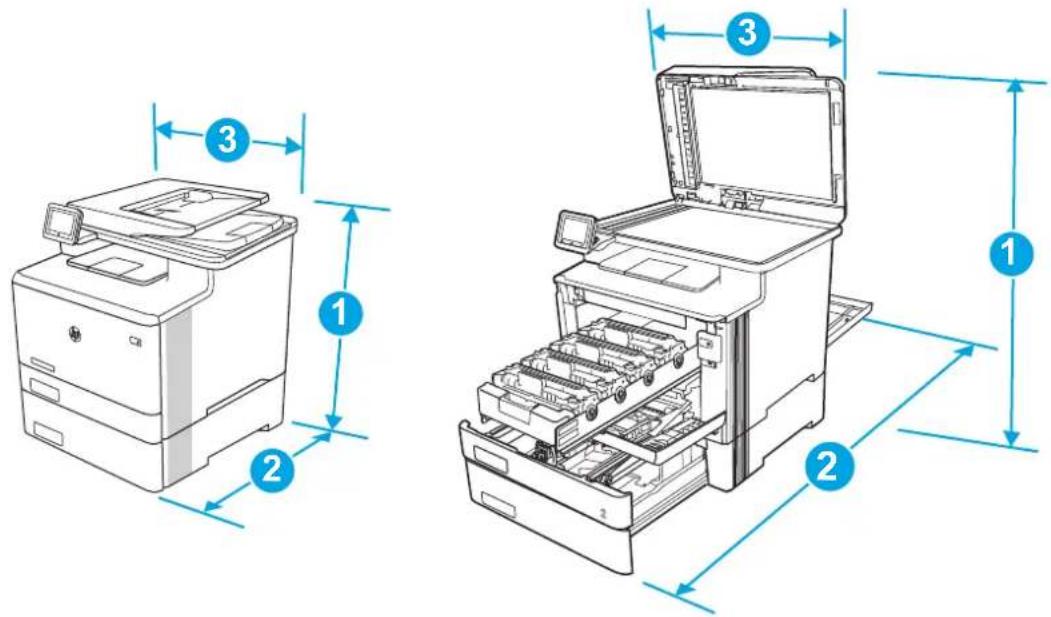
Table 1-8 Dimensions for the printer with the optional Tray 3
| Measurement Printer fully closed Printer fully opened | |
| 1 - Height 531.8 mm (20.93 in) 788 mm (31.02 in) | |
| 2 - Depth 461 mm (18.15 in) (fnw model) | 1025 mm (40.35 in) (fnw model) |
| 472.3 mm (18.59 in) (dw, fdn, and fdw models) | 1124.4 mm (44.27 in) (dw, fdn, and fdw models) |
| 3 - Width 415.4 mm (16.35 in) 415.4 mm (16.35 in) | |
| Weight (with cartridge) 27 kg (59.52 lb) (fnw model) | 27 kg (59.52 lb) (fnw model) |
| 28.4 kg (62.61 lb) (dw. fdn, and fdw models) | 28.4 kg (62.61 lb) (dw. fdn, and fdw models) |
Power consumption, electrical specifications, and acoustic emissions
In order to operate properly, the printer must be in an environment that meets certain power specifications. For current information, see the support home page for your printer: www.hp.com/support/colorljM479MFP.

CAUTION: Power requirements are based on the country/region where the printer is sold. Do not convert operating voltages. This will damage the printer and void the printer warranty.
Operating environment range
Review the recommended operating-environment specifications for your printer.
Table 1-9 Operating environment specifications
| Environment Recommended Allowed |
| Temperature 15° to 27°C (59° to 80.6°F) 15° to 30°C (59° to 86°F) |
| Relative humidity 20% to 70% relative humidity (RH) 10% to 80% RH |
Printer hardware setup and software installation
For basic setup instructions, see the Hardware Installation Guide that came with the printer. For additional instructions, go to HP support on the web.
Go to www.hp.com/support/colorljM479MFP for HP's all-inclusive help for the printer, which includes the following information:
• Install and configure - Learn and use - Solve problems - Download software and firmware updates - Join support forums • Find warranty and regulatory information
- Find instructions about how to use the Microsoft Add Printer tool
2 Paper trays
Discover how to load and use the paper trays, including how to load special items such as envelopes.
Introduction - Load paper to Tray 1 - Load paper to Tray 2 - Load paper to Tray 3 - Load and print envelopes
For more information:
HP's all-inclusive help for the printer includes the following information:
• Install and configure - Learn and use - Solve problems - Download software and firmware updates - Join support forums • Find warranty and regulatory information
Introduction
Review the following information about the paper trays.

CAUTION: Do not extend more than one paper tray at a time.
Do not use paper tray as a step.
Keep hands out of paper trays when closing.
All trays must be closed when moving the printer.
Load paper to Tray 1
Review the following information about loading paper to Tray 1.
Introduction • Load Paper Tray 1 (multipurpose tray) Tray 1 paper orientation
Introduction
The following information describes how to load paper into Tray 1.
Load Paper Tray 1 (multipurpose tray)
Follow these steps to load paper in Tray 1.
This tray holds up to 50 sheets of 75 g/m² (20 lb) paper.

CAUTION: To avoid jams, never add or remove paper from Tray 1 during printing.
- Open Tray 1 by grasping the handles on the left and right side of the tray and pulling down.
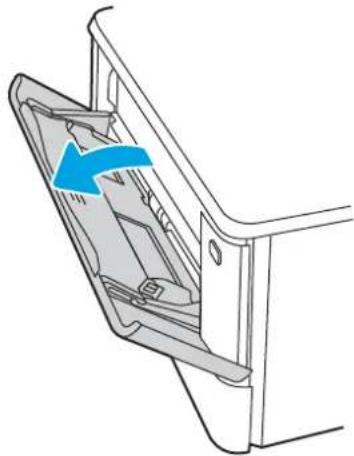
- Slide out the tray extension.

- Press down on the tab on the right paper guide, and then spread the paper guides to the correct size.

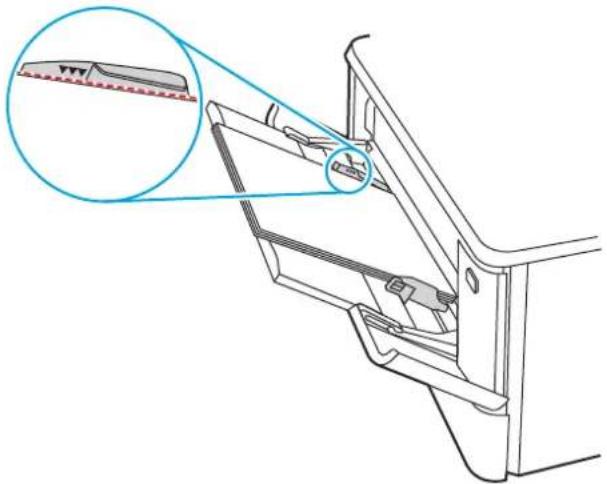
- Load the paper into the tray. Make sure that the paper fits under the tabs and below the maximum height indicators.
For information on how to orient the paper, see Tray 1 paper orientation on page 19.
- At the computer, begin the printing process from the software application. Make sure that the driver is set to the correct paper type and size for the paper being printed from the tray.
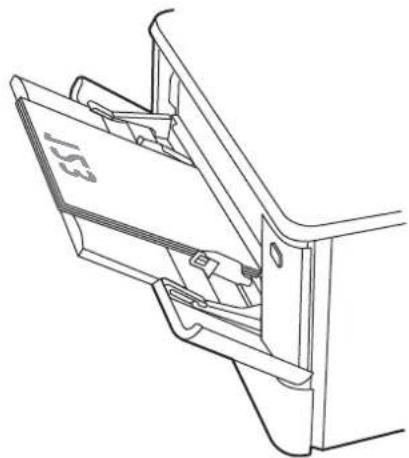
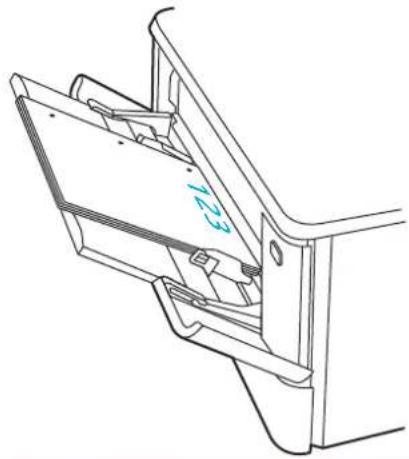
Tray 1 paper orientation
When using paper that requires a specific orientation, load it according to the information in the following table.
Table 2-1 Tray 1 paper orientation
Paper type Output How to load paper
Letterhead or preprinted 1-sided printing Face-up
Top edge leading into the printer
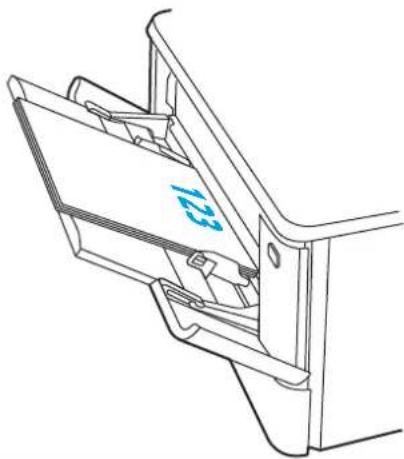
Table 2-1 Tray 1 paper orientation (continued)
| Paper type Output How to load paper | |
| Letterhead or preprinted 2-sided printing Face-down | Top edge away from the printer |
 | |
| Pre-punched 1-sided or 2-sided printing Face-up | Holes toward the left side of the printer |
 | |
Load paper to Tray 2
Review the following information about loading paper to Tray 2.
Introduction - Load paper Tray 2 Tray 2 paper orientation
Introduction
The following information describes how to load paper into Tray 2.
Load paper Tray 2
This tray holds up to 250 sheets of 75 g/m² (20 lb) paper.
- Open tray 2.

- Adjust the paper-width guides by squeezing the adjustment latches on the guides and then sliding the guides to the size of the paper being used.
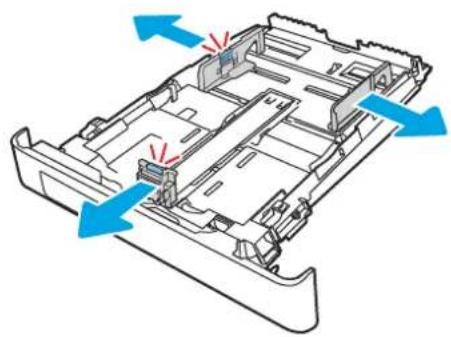
- To load legal-size paper, extend the tray front by squeezing the front latch and pulling the front of the tray.
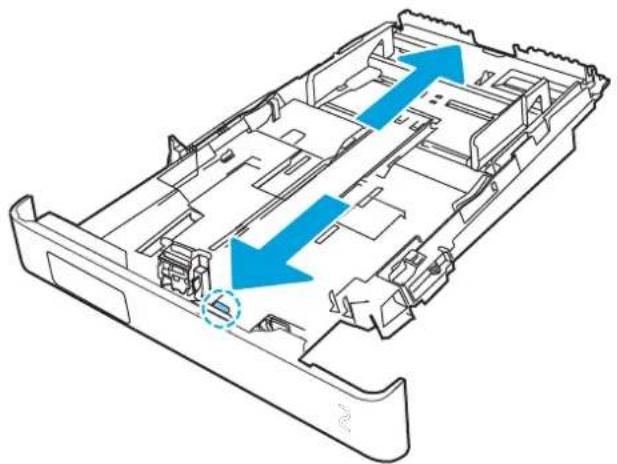

NOTE: When loaded with legal-size paper, Tray 2 extends from the front of the printer approximately 2 in (51 mm).
- Load the paper into the tray.
For information about how to orient the paper, see Tray 2 paper orientation on page 24.
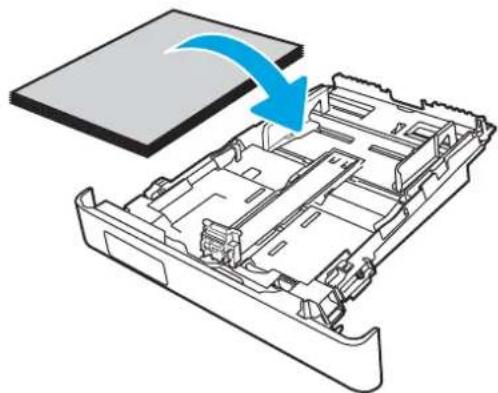
- Make sure that the paper stack is flat at all four corners. Slide the paper length and width guides so that they are against the stack of paper.

NOTE: To prevent jams, do not overfill the tray. Be sure that the top of the stack is below the tray full indicator.
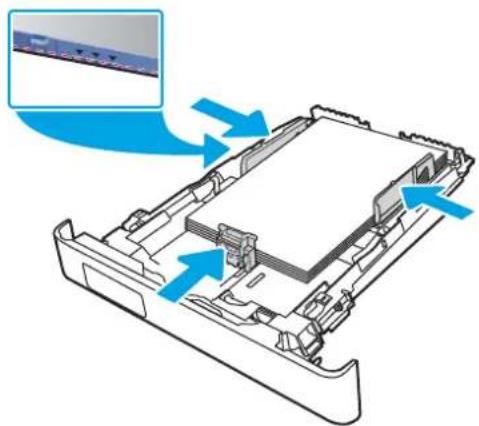
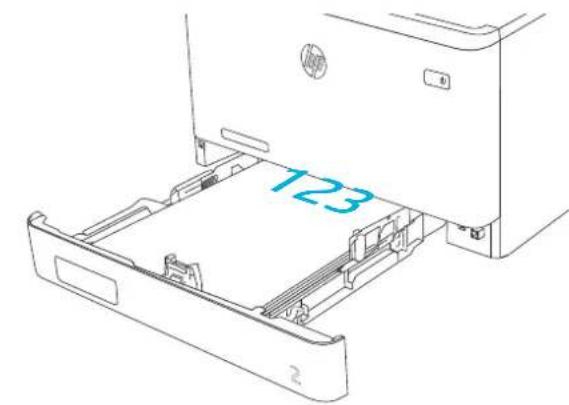
- After making sure that the paper stack is below the tray full indicator, close the tray.

- At the computer, begin the printing process from the software application. Make sure that the driver is set to the correct paper type and size for the paper being printed from the tray.
Tray 2 paper orientation
When using paper that requires a specific orientation, load it according to the information in the following table.
Table 2-2 Tray 2 paper orientation
| Paper type Output How to load paper | |
| Letterhead or preprinted 1-sided printing Face-up | Top edge toward the printer. |
 | |
| Letterhead or preprinted 2-sided printing Face-down | Top edge away from the printer |
 | |
| Prepunched 1-sided printing or 2-sided printing Face-up | Holes toward the left side of the printer |
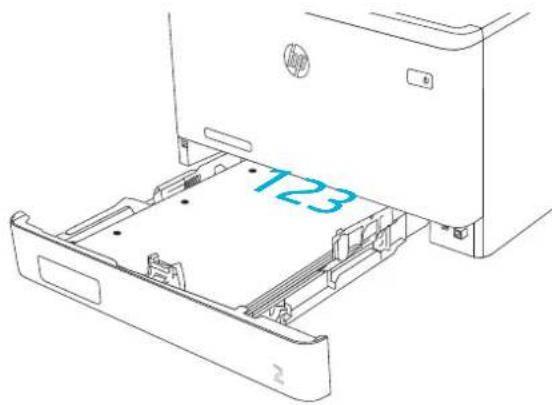 | |
For information about positioning and orienting envelopes in Tray 2, see Envelope orientation on page 31.
Load paper to Tray 3
Review the following information about loading paper to Tray 3.
Introduction • Load paper to Tray 3 (optional) Tray 3 paper orientation
Introduction
The following information describes how to load paper into Tray 3.
Load paper to Tray 3 (optional)
This tray holds up to 550 sheets of 75 g/m² (20 lb) paper.
Do not print envelopes, labels, or unsupported sizes of paper from Tray 3. Print these types of paper only from Tray 1.
- Open Tray 3.

- Adjust the paper-width guides by squeezing the adjustment latches on the guides and then sliding the guides to the size of the paper being used.
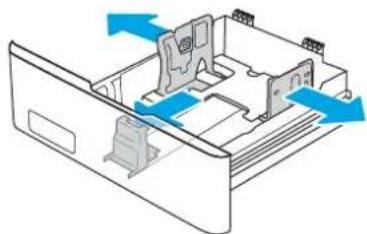
- To load legal-size paper, extend the tray front by squeezing the front latch and pulling the front of the tray.
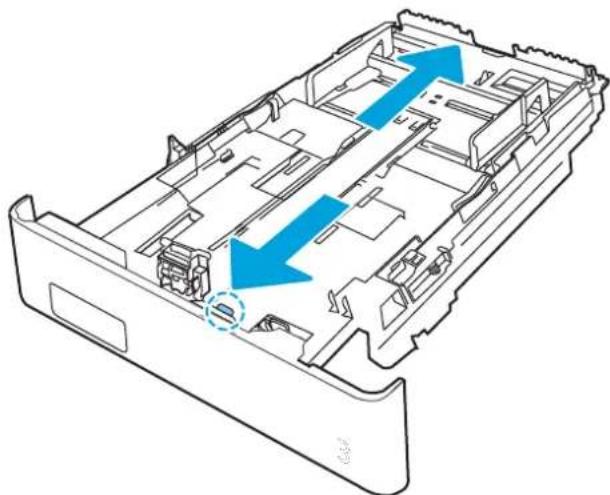
- Load paper into the tray.
For information about how to orient the paper, see Tray 3 paper orientation on page 29.
- Make sure that the paper stack is flat at all four corners. Slide the paper length and width guides so that they are against the stack of paper.

NOTE: To prevent jams, do not overfill the tray. Be sure that the top of the stack is below the tray full indicator.

- After making sure that the paper stack is below the tray full indicator, close the tray.
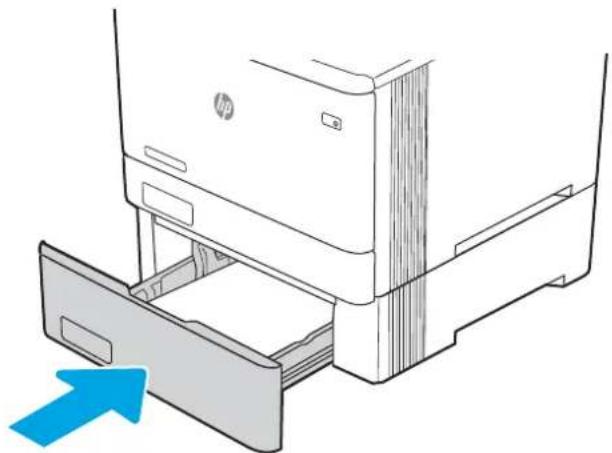
- At the computer, begin the printing process from the software application. Make sure that the driver is set to the correct paper type and size for the paper being printed from the tray.
Tray 3 paper orientation
When using paper that requires a specific orientation, load it according to the information in the following table.
Table 2-3 Tray 3 paper orientation
| Paper type Output How to load paper |
Letterhead or preprinted 1-sided printing Face-up
Top edge toward the printer.
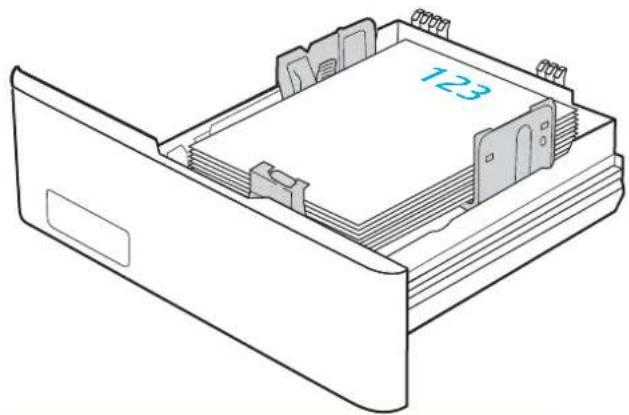
Table 2-3 Tray 3 paper orientation (continued)
Paper type Output How to load paper
Letterhead or preprinted 2-sided printing Face-down
Top edge away from the printer

Prepunched 1-sided printing or 2-sided printing Face-up
Holes on left side of the printer

Load and print envelopes
Review the following information about loading and printing envelopes.
Introduction - Print envelopes • Envelope orientation
Introduction
The following information describes how to print and load envelopes.
Print envelopes
To print envelopes using either Tray 1 or Tray 2, follow the steps to select the correct settings in the print driver. Tray 1 holds up to 10 envelopes.
- From the software program, select the Print option.
- Select the printer from the list of printers, and then click or tap the Properties or Preferences button to open the print driver.
NOTE: The name of the button varies for different software programs.
- Click or tap the Paper/Quality tab.
- In the Paper size drop-down list, select the correct size for the envelopes.
- In the Paper type drop-down list, select Envelope.
- In the Paper source drop-down list, select Manual feed.
- Click the OK button to close the Document Properties dialog box.
- In the Print dialog box, click the OK button to print the job.
Envelope orientation
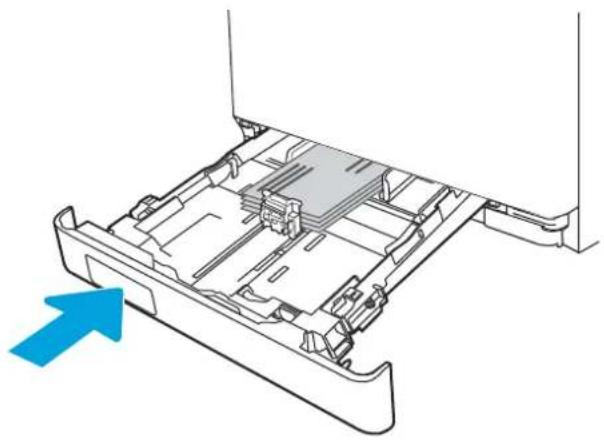
When using envelopes, load them according to the information in the following table.
Table 2-4 Envelope orientation
| Tray How to load | |
| Tray 1 Face-up | Short, postage-end leading into the printer |
 | |
| Tray 2 Face-up | Short, postage-end leading into the printer |
 | |
3 Supplies, accessories, and parts
Order supplies or accessories, replace the toner cartridges, or remove and replace another part.
• Order supplies, accessories, and parts • Dynamic security - Configure the HP toner-cartridge-protection supply settings - Replace the toner cartridges
For video assistance, see www.hp.com/videos/LaserJet.
For more information:
HP's all-inclusive help for the printer includes the following information:
• Install and configure - Learn and use - Solve problems - Download software and firmware updates - Join support forums • Find warranty and regulatory information
Order supplies, accessories, and parts
Review details about ordering supplies, accessories and parts for your printer.
- Ordering • Supplies and accessories
- Customer self-repair parts
Ordering
Find information and links for ordering supplies, parts, and accessories for your printer.
| Ordering option Ordering information | |
| Order supplies and paper www.hp.com/go/suresupply | ____ |
| Order genuine HP parts or accessories www.hp.com/buy/parts | ____ |
| Order through service or support providers Contact an HP-authorized service or support provider. | |
| Order using the HP Embedded Web Server (EWS) To access, in a supported Web browser on your computer, enter the printer IP address or host name in the address/URL field. The EWS contains a link to the HP SureSupply Web site, which provides options for purchasing Original HP supplies. | |
Supplies and accessories
Find information about the supplies and accessories that are available for your printer.
CAUTION: Cartridges are for distribution and use within their designated region only; they will not work outside of their designated region.
Table 3-1 Supplies
| Item Description Cartridge number Part number | ||
| Supplies | ||
| For use in North America and Latin America only | ||
| HP 414A Black Original LaserJet Toner Cartridge | Standard-capacity replacement black toner cartridge | 414A W2020A |
| HP 414A Cyan Original LaserJet Toner Cartridge | Standard-capacity replacement cyan toner cartridge | 414A W2021A |
| HP 414A Yellow Original LaserJet Toner Cartridge | Standard-capacity replacement yellow toner cartridge | 414A W2022A |
| HP 414A Magenta Original LaserJet Toner Cartridge | Standard-capacity replacement magenta toner cartridge | 414A W2023A |
| HP 414X High Yield Black Original LaserJet Toner Cartridge | High-capacity replacement black toner cartridge | 414X W2020X |
| HP 414X High Yield Cyan Original LaserJet Toner Cartridge | High-capacity replacement cyan toner cartridge | 414X W2021X |
| HP 414X High Yield Yellow Original LaserJet Toner Cartridge | High-capacity replacement yellow toner cartridge | 414X W2022X |
| HP 414X High Yield Magenta Original LaserJet Toner Cartridge | High-capacity replacement magenta toner cartridge | 414X W2023X |
| For use in Europe, Middle East, Russia, CIS, and Africa only | ||
| HP 415A Black Original LaserJet Toner Cartridge | Standard-capacity replacement black toner cartridge | 415A W2030A |
| HP 415A Cyan Original LaserJet Toner Cartridge | Standard-capacity replacement cyan toner cartridge | 415A W2031A |
| HP 415A Yellow Original LaserJet Toner Cartridge | Standard-capacity replacement yellow toner cartridge | 415A W2032A |
| HP 415A Magenta Original LaserJet Toner Cartridge | Standard-capacity replacement magenta toner cartridge | 415A W2033A |
| HP 415X High Yield Black Original LaserJet Toner Cartridge | High-capacity replacement black toner cartridge | 415X W2030X |
| HP 415X High Yield Cyan Original LaserJet Toner Cartridge | High-capacity replacement cyan toner cartridge | 415X W2031X |
| HP 415X High Yield Yellow Original LaserJet Toner Cartridge | High-capacity replacement yellow toner cartridge | 415X W2032X |
| HP 415X High Yield Magenta Original LaserJet Toner Cartridge | High-capacity replacement magenta toner cartridge | 415X W2033X |
| For use in Asia Pacific only | ||
| HP 416A Black Original LaserJet Toner Cartridge | Standard-capacity replacement black toner cartridge | 416A W2040A |
| HP 416A Cyan Original LaserJet Toner Cartridge | Standard-capacity replacement cyan toner cartridge | 416A W2041A |
| HP 416A Yellow Original LaserJet Toner Cartridge | Standard-capacity replacement yellow toner cartridge | 416A W2042A |
| HP 416A Magenta Original LaserJet Toner Cartridge | Standard-capacity replacement magenta toner cartridge | 416A W2043A |
| HP 416X High Yield Black Original LaserJet Toner Cartridge | High-capacity replacement black toner cartridge | 416X W2040X |
| HP 416X High Yield Cyan Original LaserJet Toner Cartridge | High-capacity replacement cyan toner cartridge | 416X W2041X |
| HP 416X High Yield Yellow Original LaserJet Toner Cartridge | High-capacity replacement yellow toner cartridge | 416X W2042X |
| HP 416X High Yield Magenta Original LaserJet Toner Cartridge | High-capacity replacement magenta toner cartridge | 416X W2043X |
Table 3-2 Accessories
| Item Description Part number |
| Accessories |
| Optional 550-sheet paper feeder Optional Tray 3 CF404A |
| USB 2.0 printer cable A-to-B cable (2-meter standard) DT2738 |
Customer self-repair parts
Customer Self-Repair (CSR) parts are available for many HP LaserJet printers to reduce repair time.
More information about the CSR program and benefits can be found at www.hp.com/go/csr-support and www.hp.com/go/csr-faq.
Genuine HP replacement parts can be ordered at www.hp.com/buy/parts or by contacting an HP-authorized service or support provider. When ordering, one of the following will be needed: part number, serial number (found on back of printer), product number, or printer name.
- Parts listed as Mandatory self-replacement are to be installed by customers, unless you are willing to pay HP service personnel to perform the repair. For these parts, on-site or return-to-depot support is not provided under the HP printer warranty.
- Parts listed as Optional self-replacement can be installed by HP service personnel at your request for no additional charge during the printer warranty period.
Table 3-3 Customer self-repair parts
| Item Description Self-replacement options Part number | |||
| 150-sheet paper input tray Replacement cassette for Tray 2 Mandatory RM2-6377-000CN | |||
| 550-sheet paper feeder | Replacement optional Tray 3 | Mandatory | CF404-67901 |
Dynamic security
Learn about dynamic-security-enabled printers.
Certain HP printers use cartridges that have security chips or electronic circuitry. Cartridges using a non-HP chip or modified or non-HP circuitry* might not work. And, those that work today might not work in the future.
As is standard in the printing business, HP has a process for authenticating cartridges. HP continues to use security measures to protect the quality of our customer experience, maintain the integrity of our printing systems, and protect our intellectual property. These measures include authentication methods that change periodically and might prevent some third-party supplies from working now or in the future. HP printers and original HP cartridges deliver the best quality, security and reliability. When cartridges are cloned or counterfeited, the customer is exposed to quality and potential security risks, compromising the printing experience.
*Non-HP Chips and modified or non-HP electronic circuitry are not produced or validated by HP. HP cannot guarantee that these chips or circuitry will work in your printer now or in the future. If you are using a non-original HP cartridge, please check with your supplier to ensure your cartridge has an original HP security chip or unmodified HP electronic circuitry.
Configure the HP toner-cartridge-protection supply settings
A network administrator can configure the toner-cartridge-protection settings using the printer control panel or the HP Embedded Web Server (EWS).
Introduction - Enable or disable the Cartridge Policy feature - Enable or disable the Cartridge Protection feature
Introduction
Use HP Cartridge Policy and Cartridge Protection to control which cartridges are installed in the printer and protect the cartridges that are installed from theft.
- Cartridge Policy: This feature protects the printer from counterfeit toner cartridges by allowing only genuine HP cartridges to be used with the printer. Using genuine HP cartridges ensures the best possible print quality. When someone installs a cartridge that is not a genuine HP cartridge, the printer control panel displays a message that the cartridge is unauthorized and it provides information explaining how to proceed.
- Cartridge Protection: This feature permanently associates toner cartridges with a specific printer, or fleet of printers, so they cannot be used in other printers. Protecting cartridges protects your investment. When this feature is enabled, if someone attempts to transfer a protected cartridge from the original printer into an unauthorized printer, that printer will not print with the protected cartridge. The printer control panel displays a message that the cartridge is protected, and it provides information explaining how to proceed.
CAUTION: After enabling cartridge protection for the printer, all subsequent toner cartridges installed in the printer are automatically and permanently protected. To avoid protecting a new cartridge, disable the feature before installing the new cartridge.
Turning the feature off does not turn off protection for cartridges that are currently installed.
Both features are off by default. Follow these procedures to enable or disable them.
Enable or disable the Cartridge Policy feature
The Cartridge Policy feature can be enabled or disabled using the control panel or the Embedded Web Server (EWS).
• Use the printer control panel to enable the Cartridge Policy feature • Use the printer control panel to disable the Cartridge Policy feature • Use the HP Embedded Web Server (EWS) to enable the Cartridge Policy feature • Use the HP Embedded Web Server (EWS) to disable the Cartridge Policy feature - Troubleshoot Cartridge Policy control panel error messages

NOTE: Enabling or disabling this feature might require entering an administrator password.
Check with your administrator to determine if an administrator password has been set. EWS passwords cannot be recovered.
Use the printer control panel to enable the Cartridge Policy feature
From the printer control panel, a network administrator can enable the Cartridge Policy feature. This allows only genuine HP cartridges to be used with the printer.
- From the Home screen on the printer control panel, swipe the tab at the top of the screen downward to open the Dashboard, and then touch the Setup icon
- Open the following menus:
- Supply Settings
- Cartridge Policy
- Touch Authorized HP to enable the feature.
Use the printer control panel to disable the Cartridge Policy feature
From the printer control panel, a network administrator can disable the Cartridge Policy feature. This removes the restriction that only genuine HP cartridges can be used.
- From the Home screen on the printer control panel, swipe the tab at the top of the screen downward to open the Dashboard, and then touch the Setup icon
- Open the following menus:
- Supply Settings
- Cartridge Policy
- Touch Off to disable the feature.
Use the HP Embedded Web Server (EWS) to enable the Cartridge Policy feature
From the EWS, a network administrator can enable the Cartridge Policy feature. This allows only genuine HP cartridges to be used with the printer.
- Open the HP Embedded Web Server (EWS):
a. From the Home screen on the printer control panel, touch the Wireless icon (P) or the Ethernet icon to view the printer's IP address or host name. b. Open a web browser, and in the address line, type the IP address or host name exactly as it displays on the printer control panel. Press the Enter key on the computer keyboard. The EWS opens.

https://10.10.XXXXX/

NOTE: If a message displays in the web browser indicating that the website might not be safe, select the option to continue to the website. Accessing this website will not harm the computer.
- On the EWS Home page, click the Settings tab.
- In the left navigation pane, click Supplies to expand the options, and then click Supply Settings.
- In the Cartridge Policy area, click the drop-down menu and select Authorized HP.
- Click Apply to save the changes.
Use the HP Embedded Web Server (EWS) to disable the Cartridge Policy feature
From the EWS, a network administrator can disable the Cartridge Policy feature. This removes the restriction that only genuine HP cartridges can be used.
- Open the HP Embedded Web Server (EWS):
a. From the Home screen on the printer control panel, touch the Wireless icon (P) or the Ethernet icon to view the printer's IP address or host name. b. Open a web browser, and in the address line, type the IP address or host name exactly as it displays on the printer control panel. Press the Enter key on the computer keyboard. The EWS opens.

https://10.10.XXXXX/

NOTE: If a message displays in the web browser indicating that the website might not be safe, select the option to continue to the website. Accessing this website will not harm the computer.
- On the EWS Home page, click the Settings tab.
- In the left navigation pane, click Supplies to expand the options, and then click Supply Settings.
- In the Cartridge Policy area, click the drop-down menu and select Off.
- Click Apply to save the changes.
Troubleshoot Cartridge Policy control panel error messages
Review the recommended actions for Cartridge Policy error messages.
Table 3-4 Cartridge Policy control panel error messages
| Error message Description Recommended action | |
| 10.0X.30 Unauthorized<Color> Cartridge The administrator has configured this printer to use only genuine HP supplies that are still under warranty. The cartridge must be replaced to continue printing. | Replace the cartridge with a genuine HP toner cartridge.If you believe you purchased a genuine HP supply, visitwww.hp.com/go/anticounterfeit to determine if the toner cartridge is a genuine HP cartridge, and learn what to do if it is not a genuine HP cartridge. |
Enable or disable the Cartridge Protection feature
The Cartridge Protection feature can be enabled or disabled using the control panel or the Embedded Web Server (EWS).
• Use the printer control panel to enable the Cartridge Protection feature • Use the printer control panel to disable the Cartridge Protection feature • Use the HP Embedded Web Server (EWS) to enable the Cartridge Protection feature • Use the HP Embedded Web Server (EWS) to disable the Cartridge Protection feature - Troubleshoot Cartridge Protection control panel error messages

NOTE: Enabling or disabling this feature might require entering an administrator password.
Check with your administrator to determine if an administrator password has been set. EWS passwords cannot be recovered.
Use the printer control panel to enable the Cartridge Protection feature
From the printer control panel, a network administrator can enable the Cartridge Protection feature. This protects the cartridges associated with the printer from being stolen and used in other printers.
- From the Home screen on the printer control panel, swipe the tab at the top of the screen downward to open the Dashboard, and then touch the Setup icon.
- Open the following menus:
- Supply Settings
- Cartridge Protection
- Touch Protect Cartridges to enable the feature.

CAUTION: After enabling cartridge protection for the printer, all subsequent toner cartridges installed in the printer are automatically and permanently protected. To avoid protecting a new cartridge, disable the feature before installing the new cartridge.
Turning the feature off does not turn off protection for cartridges that are currently installed.
Use the printer control panel to disable the Cartridge Protection feature.
From the printer control panel, a network administrator can disable the Cartridge Protection feature. This removes protection for any new cartridges installed in the printer.
- From the Home screen on the printer control panel, swipe the tab at the top of the screen downward to open the Dashboard, and then touch the Setup icon.
- Open the following menus:
- Supply Settings
- Cartridge Protection
- Touch Off to disable the feature.
Use the HP Embedded Web Server (EWS) to enable the Cartridge Protection feature.
From the EWS, a network administrator can enable the Cartridge Protection feature. This protects the cartridges that are associated with the printer from being stolen and used in other printers.
- Open the HP Embedded Web Server (EWS):
a. From the Home screen on the printer control panel, touch the Wireless icon (1) or the Ethernet icon to view the printer's IP address or host name.
b. Open a web browser, and in the address line, type the IP address or host name exactly as it displays on the printer control panel. Press the Enter key on the computer keyboard. The EWS opens.
https://10.10.XXXXX/
NOTE: If a message displays in the web browser indicating that the website might not be safe, select the option to continue to the website. Accessing this website will not harm the computer.
- On the EWS Home page, click the Settings tab.
- In the left navigation pane, click Supplies to expand the options, and then click Supply Settings.
- In the Cartridge Protection area, click the drop-down menu and select On.
- Click Apply to save the changes.
CAUTION: After enabling Cartridge Protection for the printer, all subsequent toner cartridges installed in the printer are automatically and permanently protected. To avoid protecting a new cartridge, disable the feature before installing the new cartridge.
Turning the feature off does not turn off protection for cartridges that are currently installed.
Use the HP Embedded Web Server (EWS) to disable the Cartridge Protection feature
From the EWS, a network administrator can disable the Cartridge Protection feature. This removes protection for any new cartridges installed in the printer.
- Open the HP Embedded Web Server (EWS):
a. From the Home screen on the printer control panel, touch the Wireless icon (P) or the Ethernet icon to view the printer's IP address or host name.
b. Open a web browser, and in the address line, type the IP address or host name exactly as it displays on the printer control panel. Press the Enter key on the computer keyboard. The EWS opens.
https://10.10.XX.XXX/
NOTE: If a message displays in the web browser indicating that the website might not be safe, select the option to continue to the website. Accessing this website will not harm the computer.
- On the EWS Home page, click the Settings tab.
- In the left navigation pane, click Supplies to expand the options, and then click Supply Settings.
- In the Cartridge Protection area, click the drop-down menu and select Off.
- Click Apply to save the changes.
Troubleshoot Cartridge Protection control panel error messages
Review the recommended actions for Cartridge Protection error messages.
Table 3-5 Cartridge Protection control panel error messages
| Error message Description Recommended action | ||
| 10.0X.57 Protected<Color> Cartridge The cartridge can only be used in the printer or fleet of printers that initially protected it using HP Cartridge Protection.The Cartridge Protection feature allows an administrator to restrict cartridges to work in only one printer or fleet of printers. The cartridge must be replaced to continue printing. | Replace the cartridge with a new toner cartridge. | |
Replace the toner cartridges
Replace the toner cartridges if you receive a message on the printer, or if you have print quality problems.
• Toner cartridge information - Remove and replace the toner cartridges
Toner cartridge information
Review details about ordering replacement toner cartridges.
The printer indicates when the toner cartridge level is low. The actual toner cartridge life remaining can vary. Consider having a replacement cartridge available to install when print quality is no longer acceptable.
To purchase cartridges or check cartridge compatibility for the printer, go to HP SureSupply at www.hp.com/go/suresupply. Scroll to the bottom of the page and verify that the country/region is correct.
The printer uses four colors and has a different toner cartridge for each color: yellow (Y), magenta (M), cyan (C), and black (K). The toner cartridges are inside the front door.

CAUTION: Cartridges are for distribution and use within their designated region only; they will not work outside of their designated region.
Table 3-6 Supplies
| Item Description Cartridge number Part number | ||
| Supplies | ||
| For use in North America and Latin America only | ||
| HP 414A Black Original LaserJet Toner Cartridge | Standard-capacity replacement black toner cartridge | 414A W2020A |
| HP 414A Cyan Original LaserJet Toner Cartridge | Standard-capacity replacement cyan toner cartridge | 414A W2021A |
| HP 414A Yellow Original LaserJet Toner Cartridge | Standard-capacity replacement yellow toner cartridge | 414A W2022A |
| HP 414A Magenta Original LaserJet Toner Cartridge | Standard-capacity replacement magenta toner cartridge | 414A W2023A |
| HP 414X High Yield Black Original LaserJet Toner Cartridge | High-capacity replacement black toner cartridge | 414X W2020X |
| HP 414X High Yield Cyan Original LaserJet Toner Cartridge | High-capacity replacement cyan toner cartridge | 414X W2021X |
| HP 414X High Yield Yellow Original LaserJet Toner Cartridge | High-capacity replacement yellow toner cartridge | 414X W2022X |
| HP 414X High Yield Magenta Original LaserJet Toner Cartridge | High-capacity replacement magenta toner cartridge | 414X W2023X |
| For use in Europe, Middle East, Russia, CIS, and Africa only | ||
| HP 415A Black Original LaserJet Toner Cartridge | Standard-capacity replacement black toner cartridge | 415A W2030A |
| HP 415A Cyan Original LaserJet Toner Cartridge | Standard-capacity replacement cyan toner cartridge | 415A W2031A |
| HP 415A Yellow Original LaserJet Toner Cartridge | Standard-capacity replacement yellow toner cartridge | 415A W2032A |
| HP 415A Magenta Original LaserJet Toner Cartridge | Standard-capacity replacement magenta toner cartridge | 415A W2033A |
| HP 415X High Yield Black Original LaserJet Toner Cartridge | High-capacity replacement black toner cartridge | 415X W2030X |
| HP 415X High Yield Cyan Original LaserJet Toner Cartridge | High-capacity replacement cyan toner cartridge | 415X W2031X |
| HP 415X High Yield Yellow Original LaserJet Toner Cartridge | High-capacity replacement yellow toner cartridge | 415X W2032X |
| HP 415X High Yield Magenta Original LaserJet Toner Cartridge | High-capacity replacement magenta toner cartridge | 415X W2033X |
| For use in Asia Pacific only | ||
| HP 416A Black Original LaserJet Toner Cartridge | Standard-capacity replacement black toner cartridge | 416A W2040A |
| HP 416A Cyan Original LaserJet Toner Cartridge | Standard-capacity replacement cyan toner cartridge | 416A W2041A |
| HP 416A Yellow Original LaserJet Toner Cartridge | Standard-capacity replacement yellow toner cartridge | 416A W2042A |
| HP 416A Magenta Original LaserJet Toner Cartridge | Standard-capacity replacement magenta toner cartridge | 416A W2043A |
| HP 416X High Yield Black Original LaserJet Toner Cartridge | High-capacity replacement black toner cartridge | 416X W2040X |
| HP 416X High Yield Cyan Original LaserJet Toner Cartridge | High-capacity replacement cyan toner cartridge | 416X W2041X |
| HP 416X High Yield Yellow Original LaserJet Toner Cartridge | High-capacity replacement yellow toner cartridge | 416X W2042X |
| HP 416X High Yield Magenta Original LaserJet Toner Cartridge | High-capacity replacement magenta toner cartridge | 416X W2043X |
Do not remove the toner cartridge from its package until it is time to replace it.

CAUTION: To prevent damage to the toner cartridge, do not expose it to light for more than a few minutes. If the toner cartridge must be removed from the printer for an extended period of time, place the cartridge in the original plastic packaging, or cover the cartridge with a lightweight opaque item.
The following illustration shows the toner cartridge components.
Figure 3-1 Toner cartridge components
Number Description
1 Handle 2 Imaging drum 3 Memory chip
CAUTION: If toner gets on clothing, wipe it off by using a dry cloth and wash the clothes in cold water. Hot water sets toner into fabric. NOTE: Information about recycling used toner cartridges is in the toner cartridge box.
Remove and replace the toner cartridges
Follow these steps to replace the toner cartridge.
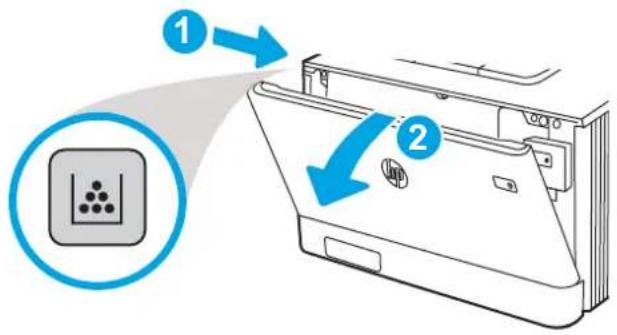
- Open the front door by pressing the button on the left panel.
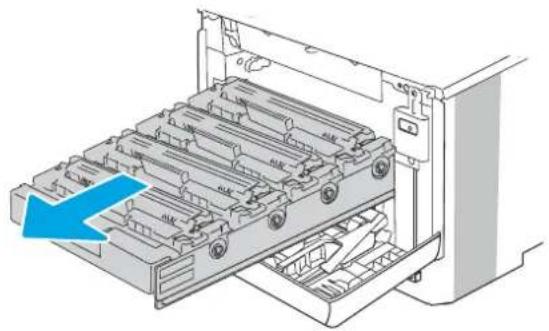
- Grasp the blue handle on the toner cartridge drawer, and then pull out the drawer.
- Grasp the handle on the toner cartridge, and then pull the toner cartridge straight up to remove it.
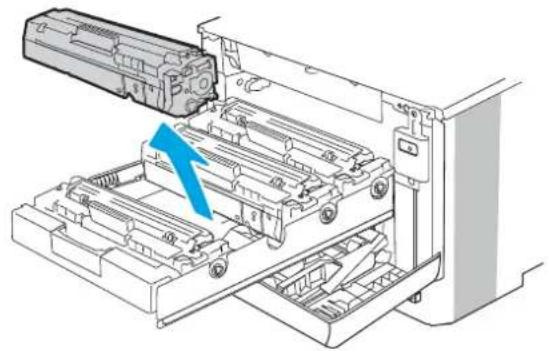
- Remove the new toner cartridge package from the box, and then pull the release tab on the packaging.

- Remove the toner cartridge from the opened packaging shell. Place the used toner cartridge in the shell for recycling.

- Hold both ends of the toner cartridge and rock it 5-6 times.
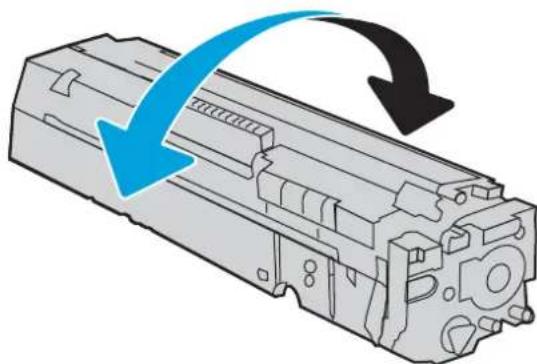
- Do not touch the imaging drum on the bottom of the toner cartridge. Fingerprints on the imaging drum can cause print-quality problems. Also, do not expose the cartridge to light unnecessarily.
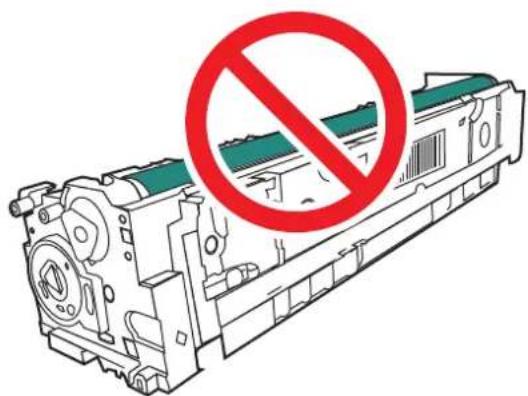
- Insert the new toner cartridge into the drawer. Make sure that the color chip on the cartridge matches the color chip on the drawer.

- Close the toner cartridge drawer.

- Close the front door.

- Pack the used toner cartridge into the box the new cartridge came in, or use a large cardboard box and fill it with several cartridges you need to recycle. See the enclosed recycling guide for information about recycling.
In the US, a pre-paid shipping label is included in the box. In other countries/regions, go to www.hp.com/recycle to print a pre-paid shipping label.
Adhere the pre-paid shipping label to the box, and return the used cartridge to HP for recycling.


http://www.hp.com/recycle
4 Print
Print using the software, or print from a mobile device or USB flash drive.
• Print tasks (Windows) • Print tasks (macOS) • Store print jobs on the printer to print later or print privately - Mobile printing • Print from a USB flash drive
For video assistance, see www.hp.com/videos/LaserJet.
For more information:
HP's all-inclusive help for the printer includes the following information:
• Install and configure - Learn and use - Solve problems - Download software and firmware updates - Join support forums • Find warranty and regulatory information
Print tasks (Windows)
Learn about common printing tasks for Windows users.
• How to print (Windows) • Automatically print on both sides (Windows) • Manually print on both sides (Windows) • Print multiple pages per sheet (Windows) • Select the paper type (Windows) • Additional print tasks
How to print (Windows)
Use the Print option from a software application to select the printer and basic options for your print job.
The following procedure describes the basic printing process for Windows.
- From the software program, select the Print option.
- Select the printer from the list of printers. To change settings, click the Properties or Preferences button to open the print driver.

NOTE:
- The name of the button varies for different software programs.
- For the HP PCL-6 V4 driver, the HP AiO Printer Remote application downloads additional driver features when More settings is selected.
- For more information, click the Help (?) button in the print driver.
- Click the tabs in the print driver to configure the available options. For example, set the paper orientation on the Finishing tab, and set the paper source, paper type, paper size, and quality settings on the Paper/Quality tab.
- Click the OK button to return to the Print dialog box. Select the number of copies to print from this screen.
- Click the Print button to print the job.
Automatically print on both sides (Windows)
If your printer has an automatic duplexer installed, you can automatically print on both sides of the paper. Use a paper size and type supported by the duplexer.
- From the software program, select the Print option.
- Select the printer from the list of printers, and then click the Properties or Preferences button to open the print driver.

NOTE:
• The name of the button varies for different software programs. - For the HP PCL-6 V4 driver, the HP AiO Printer Remote application downloads additional driver features when More settings is selected.
- Click the Finishing tab.
- Select Print on both sides. Click OK to close the Document Properties dialog.
- In the Print dialog, click Print to print the job.
Manually print on both sides (Windows)
Use this procedure for printers that do not have an automatic duplexer installed or to print on paper that the duplexer does not support.
- From the software program, select the Print option.
- Select the printer from the list of printers, and then click the Properties or Preferences button to open the print driver.

NOTE:
- The name of the button varies for different software programs.
- For the HP PCL-6 V4 driver, the HP AiO Printer Remote application downloads additional driver features when More settings is selected.
- Click the Finishing tab.
- Select Print on both sides (manually), and then click OK to close the Document Properties dialog.
- In the Print dialog, click Print to print the first side of the job.
- Retrieve the printed stack from the output bin, and place it in Tray 1.
- If prompted, select the appropriate control panel button to continue.
Print multiple pages per sheet (Windows)
When you print from a software application using the Print option, you can select an option to print multiple pages on a single sheet of paper. For example, you might want to do this if you are printing a very large document and want to save paper.
- From the software program, select the Print option.
- Select the printer from the list of printers, and then click the Properties or Preferences button to open the print driver.

NOTE:
- The name of the button varies for different software programs.
- For the HP PCL-6 V4 driver, the HP AiO Printer Remote application downloads additional driver features when More settings is selected.
- Click the Finishing tab.
- Select the number of pages per sheet from the Pages per sheet drop-down.
- Select the correct Print page borders, Page order, and Orientation options. Click OK to close the Document Properties dialog.
- In the Print dialog, click Print to print the job.
Select the paper type (Windows)
When you print from a software application using the Print option, you can set the paper type you are using for your print job. For example, if your default paper type is Letter, but you are using a different paper type for a print job, select that specific paper type.
- From the software program, select the Print option.
- Select the printer from the list of printers, and then click or tap the Properties or Preferences button to open the print driver.

NOTE:
● The name of the button varies for different software programs. - For the HP PCL-6 V4 driver, the HP AiO Printer Remote application downloads additional driver features when More settings is selected.
- Click the Paper/Quality tab.
- Select the option for the type of paper you are using, and then click OK.
- Click OK to close the Document Properties dialog.
- In the Print dialog, click Print to print the job.
Additional print tasks
Locate information on the Web for performing common printing tasks.
Go to www.hp.com/support/colorljM479MFP.
Instructions are available for print tasks, such as the following:
- Create and use printing shortcuts or presets
- Select the paper size, or use a custom paper size
- Select the page orientation
- Create a booklet
• Scale a document to fit a specific paper size • Print the first or last pages of the document on different paper • Print watermarks on a document
Print tasks (macOS)
Print using the HP printing software for macOS, including how to print on both sides or print multiple pages per sheet.
• How to print (macOS) • Automatically print on both sides (macOS) • Manually print on both sides (macOS) • Print multiple pages per sheet (macOS) • Select the paper type (macOS) • Additional print tasks
How to print (macOS)
Use the Print option from a software application to select the printer and basic options for your print job.
The following procedure describes the basic printing process for macOS.
- Click the File menu, and then click the Print option.
- Select the printer.
- Click Show Details or Copies & Pages, and then select other menus to adjust the print settings.

NOTE: The name of the item varies for different software programs.
- Click the Print button.
Automatically print on both sides (macOS)
If your printer has an automatic duplexer installed, you can automatically print on both sides of the paper. Use a paper size and type supported by the duplexer.
This feature is available if you install the HP print driver. It might not be available if you are using AirPrint.
- Click the File menu, and then click the Print option.
- Select the printer.
- Click Show Details or Copies & Pages, and then click the Layout menu. NOTE: The name of the item varies for different software programs.
- Select a binding option from the Two-Sided drop-down list.
- Click the Print button.

Manually print on both sides (macOS)
If your printer does not have an automatic duplexer installed, or you are using a paper size or type not supported by the duplexer, you can print on both sides of the paper using a manual process. You will need to reload the pages for the second side.
This feature is available if you install the HP print driver. It might not be available if you are using AirPrint.
- Click the File menu, and then click the Print option.
- Select the printer.
- Click Show Details or Copies & Pages, and then click the Manual Duplex menu.

NOTE: The name of the item varies for different software programs.
- Click the Manual Duplex check box, and select a binding option.
- Go to the printer, and remove any blank paper that is in Tray 1.
- Click the Print button.
- Retrieve the printed stack from the output bin and place it with the printed-side facing down in the input tray.
- If prompted, touch the appropriate control panel button to continue.
Print multiple pages per sheet (macOS)
When you print from a software application using the Print option, you can select an option to print multiple pages on a single sheet of paper. For example, you might want to do this if you are printing a very large document and want to save paper.
- Click the File menu, and then click the Print option.
- Select the printer.
- Click Show Details or Copies & Pages, and then click the Layout menu.

NOTE: The name of the item varies for different software programs.
- From the Pages per Sheet drop-down list, select the number of pages that you want to print on each sheet.
- In the Layout Direction area, select the order and placement of the pages on the sheet.
- From the Border menu, select the type of border to print around each page on the sheet.
- Click the Print button.
Select the paper type (macOS)
When you print from a software application using the Print option, you can set the paper type you are using for your print job. For example, if your default paper type is Letter, but you are using a different paper type for a print job, select that specific paper type.
- Click the File menu, and then click the Print option.
- Select the printer.
- Click Show Details or Copies & Pages, and then click the Media & Quality menu or the Paper/Quality menu.

NOTE: The name of the item varies for different software programs.
- Select from the Media & Quality or Paper/Quality options.

NOTE: This list contains the master set of options available. Some options are not available on all printers.
• Media Type: Select the option for the type of paper for the print job. - Print Quality: Select the resolution level for the print job. - EconoMode: Select this option to conserve toner when printing drafts of documents.
5. Click the Print button.
Additional print tasks
Locate information on the Web for performing common printing tasks.
Go to www.hp.com/support/colorljM479MFP.
Instructions are available for print tasks, such as the following:
- Create and use printing shortcuts or presets
- Select the paper size, or use a custom paper size
- Select the page orientation
- Create a booklet • Scale a document to fit a specific paper size • Print the first or last pages of the document on different paper
- Print watermarks on a document
Store print jobs on the printer to print later or print privately
Store print jobs in the printer memory for printing at a later time.
Introduction Before beginning - Set up job storage - Disable or enable the job storage feature • Create a stored job (Windows) • Create a stored job (macOS) - Print a stored job - Delete a stored job
• Information sent to printer for Job Accounting purposes
Introduction
The following information provides procedures for creating and printing documents that are stored on the USB flash drive. These jobs can be printed at a later time or printed privately.
Before beginning
Review the requirements for using the job storage feature.
The job storage feature has the following requirements:
A dedicated USB 2.0 storage device with at least 16 GB free space must be installed in the rear host USB. This USB storage device holds the job storage jobs sent to the printer. Removing this USB storage device from the printer disables the job storage feature. If you are using an HP Universal Print Driver (UPD), you must use UPD version 5.9.0 or above.
Set up job storage
Set up job storage in the print driver, insert the storage media (USB flash drive) in the printer, and verify the feature is ready to use.
Before you begin, install the printer software if it is not already installed. Go to www.hp.com/support, click Software and Drivers, and then follow the onscreen instructions to download the latest HP software.
When the print driver is installed, the Job Storage option is set to Automatic by default. The option is located as follows:
- Windows: Devices and Printers > Printer Properties > Device Settings • macOS: Printers & Scanners > Options & Supplies
To complete Job Storage setup:
- Locate the rear USB port.
On some models, the rear USB port is covered. Remove the rear USB port cover before proceeding.
- Insert the USB flash drive into the rear USB port.
Figure 4-1 Insert USB flash drive
A message displays on the control panel warning that the USB drive will be formatted. Select OK to complete the procedure.
- Open the print driver to verify the Job Storage tab is visible. If it is visible, the feature is ready to use.
From a software program, select the Print option, select your printer from the list of printers, and do the following:
- Windows: Select Properties or Preferences. Click the Job Storage tab.
If the Job Storage tab is not showing, activate it as follows:
From the Start menu, open Settings, click Devices, and then click Devices and Printers. Right-click on the printer name and click Printer Properties. Click the Device Settings tab, click on Job Storage, and then select Automatic. Click Apply and OK.
- macOS: The print driver displays the Copies & Pages menu. Open the drop-down list, and then click the Job Storage menu.
If the Job Storage menu is not showing, close the Print window and then reopen it to activate the menu.
Disable or enable the job storage feature
Disable the job storage feature to make it unavailable, even if a USB drive is inserted into the printer. Enable the feature to make it available again.
- Open the Printer Properties:
- Windows: From the Start menu, open Settings, click Devices, and then click Devices and Printers. Right-click on the printer and click Printer properties.
- macOS: From the Apple menu, open System Preferences, and then click Printers & Scanners. Select the printer and click Options & Supplies.
- Disable the Job Storage option as follows:
- Windows: Click the Device settings tab, click on Job Storage, and then select Disable. • macOS: On the Options tab, clear the Job Storage check box.
To enable the feature, set the Job Storage option back to Automatic (Windows), or select the Job Storage check box (macOS).
Create a stored job (Windows)
Store jobs on the USB flash drive for private or delayed printing.
- From the software program, select the Print option.
- Select the printer from the list of printers, and then select Properties or Preferences.

NOTE:
- The name of the button varies for different software programs.
- For the HP PCL-6 V4 driver, the HP AiO Printer Remote application downloads additional driver features when More settings is selected.
- Click the Job Storage tab.

NOTE: If the Job Storage tab is not showing, follow the instructions in the "Disable or enable job storage feature" section to activate the tab.
- Select a Job Storage Mode option:
- Proof and Hold: Print and proof one copy of a job, and then print more copies. The first copy prints immediately. Printing of the subsequent copies must be initiated from the device's front control panel. For example, if 10 copies are sent, one copy prints immediately, and the other nine copies will print when the job is retrieved. The job is deleted after all copies are printed.
- Personal Job: The job does not print until you request it at the printer control panel. For this job-storage mode, you can select one of the Make Job Private/Secure options. If you assign a personal identification number (PIN) to the job, you must provide the required PIN at the control panel. If you encrypt the job, you must provide the required password at the control panel. The print job is deleted from memory after it prints.
- Quick Copy: Print the requested number of copies of a job and store a copy of the job in the printer memory so you can print it again later. The job is deleted manually or by the job retention schedule.
- Stored Job: Store a job on the printer and allow other users to print the job at any time. For this job-storage mode, you can select one of the Make Job Private/Secure options. If you assign a personal identification number (PIN) to the job, the person who prints the job must provide the required PIN at the control panel. If you encrypt the job, the person who prints the job must provide the required password at the control panel. The job is deleted manually or by the job retention schedule.
- To use a custom user name or job name, click the Custom button, and then enter the user name or the job name.
Select which option to use if another stored job already has that name:
• Use Job Name + (1-99): Append a unique number to the end of the job name. - Replace Existing File: Overwrite the existing stored job with the new one.
- Click the OK button to close the Document Properties dialog box. In the Print dialog box, click the Print button to print the job.
Create a stored job (macOS)
Store jobs on the USB flash drive for private or delayed printing.
- Click the File menu, and then click the Print option.
- In the Printer menu, select the printer.
- Click Show Details or Copies & Pages, and then click the Job Storage menu.

NOTE: If the Job Storage menu is not showing, follow the instructions in the "Disable or enable job storage feature" section to activate the menu.
- In the Mode drop-down list, select the type of stored job.
- Proof and Hold: Print and proof one copy of a job, and then print more copies. The first copy prints immediately. Printing of the subsequent copies must be initiated from the device's front control panel. For example, if 10 copies are sent, one copy prints immediately, and the other nine copies will print when the job is retrieved. The job is deleted after all copies are printed.
- Personal Job: The job does not print until someone requests it at the printer control panel. If the job has a personal identification number (PIN), provide the required PIN at the control panel. The print job is deleted from memory after it prints.
- Quick Copy: Print the requested number of copies of a job and store a copy of the job in the printer memory to print it again later. The job is deleted manually or by the job retention schedule.
- Stored Job: Store a job on the printer and allow other users to print the job at any time. If the job has a personal identification number (PIN), the person who prints the job must provide the required PIN at the control panel. The job is deleted manually or by the job retention schedule.
- To use a custom user name or job name, click the Custom button, and then enter the user name or the job name.

NOTE: macOS 10.14 Mojave and later: The print driver no longer includes the Custom button. Use the options below the Mode drop-down list to set up the saved job.
Select which option to use if another stored job already has that name.
- Use Job Name + (1-99): Append a unique number to the end of the job name.
- Replace Existing File: Overwrite the existing stored job with the new one.
- If you selected the Stored Job or Personal Job option in the Mode drop-down list, you can protect the job with a PIN. Type a 4-digit number in the Use PIN to Print field. When other people attempt to print this job, the printer prompts them to enter this PIN.
- Click the Print button to process the job.
Print a stored job
Print a job that is stored on a USB flash drive.
- From the Home screen on the printer control panel, touch the Print icon, and then touch Job Storage.
- Scroll to and touch the name of the folder where the job is stored.
- Scroll to and touch the name of the job that you want to print.
If the job is private or encrypted, enter the PIN or password, and then touch Done.
- To adjust the number of copies, touch the box to the left of the Print button and then enter the number of copies using the touch keypad. Touch Done to close the keypad.
- Touch Print to print the job.
Delete a stored job
When a new job is stored on a USB flash drive, any previous jobs with the same user and job name are overwritten. If the memory on the USB flash drive is full, the following message displays on the printer control panel: The USB flash storage device is out of memory. Delete unused jobs, and then try again. Existing stored jobs must be deleted before additional print jobs can be stored.
Delete a job that is stored on the printer
Delete a job that is stored on the printer
Delete a job that is stored on a USB flash drive.
- From the Home screen on the printer control panel, touch the Print icon, and then touch Job Storage.
- Scroll to and touch the name of the folder where the job is stored.
- Scroll to and touch the name of the job that you want to delete.
If the job is private or encrypted, enter the PIN or password, and then touch Done.
- Touch the Trash icon, and then touch Delete to delete the job.
Information sent to printer for Job Accounting purposes
Printing jobs sent from drivers on the client (e.g., PC) may send personally identifiable information to HP's Printing and Imaging devices. This information may include, but is not limited to, user name and client name from which the job originated that may be used for job accounting purposes, as determined by the Administrator of the printing device. This same information may also be stored with the job on the mass storage device (e.g., disk drive) of the printing device when using the job storage feature.
Mobile printing
Mobile and ePrint solutions enable easy printing to an HP printer from a laptop, tablet, smartphone, or other mobile device.
Introduction • Wi-Fi Direct printing (wireless models only) HP ePrint via Email AirPrint • Android embedded printing
Introduction
Review the following information about mobile printing.
To see the full list of mobile and ePrint solutions and determine the best choice, go to www.hp.com/go/LaserJetMobilePrinting.
Wi-Fi Direct printing (wireless models only)
Wi-Fi Direct enables printing from a wireless mobile device without requiring a connection to a network or the Internet.
• To turn on Wi-Fi Direct • Change the printer Wi-Fi Direct name

NOTE: Not all mobile operating systems are currently supported by Wi-Fi Direct.
Use Wi-Fi Direct to print wirelessly from the following devices:
- Android mobile devices compatible with the Android embedded print solution
- iPhone, iPad, or iPod touch using Apple AirPrint or the HP Smart app
- Android mobile devices using the HP Smart app or the Android embedded print solution • PC and Mac devices using the HP ePrint Software HP Roam
For more information on Wi-Fi Direct printing, go to www.hp.com/go/wirelessprinting.
Wi-Fi Direct can be enabled or disabled from the printer control panel.
To turn on Wi-Fi Direct
To print wirelessly from mobile devices, Wi-Fi Direct must be turned on.
Follow these steps to turn on Wi-Fi Direct from the printer control panel.
- From the Home screen on the printer control panel, swipe the tab at the top of the screen downward to open the Dashboard, and then touch the Wi-Fi Direct icon
- Touch the Settings icon.
- If Wi-Fi Direct is set to Off, touch the switch to turn it on.

NOTE: In environments where more than one model of the same printer is installed, it might be helpful to provide each printer a unique Wi-Fi Direct name for easier printer identification when using Wi-Fi Direct printing.
To view the Wi-Fi Direct Name on the printer control panel, go to the Home screen, swipe the Dashboard tab downward, and then touch the Wi-Fi Direct icon.
Change the printer Wi-Fi Direct name.
Change the printer Wi-Fi Direct name using the HP Embedded Web Server (EWS):
• Step one: Open the HP Embedded Web Server • Step two: Change the Wi-Fi Direct name
Step one: Open the HP Embedded Web Server.
Use the EWS to manage your printer from a computer instead of the printer control panel.
Your printer must be connected to an IP-based network before you can access the EWS.
- From the Home screen on the printer control panel, touch the Wireless icon (「) or the Ethernet icon □ to view the printer's IP address or host name.
- Open a web browser, and in the address line, type the IP address or host name exactly as it displays on the printer control panel. Press the Enter key on the computer keyboard. The EWS opens.


NOTE: If a message displays in the web browser indicating that the website might not be safe, select the option to continue to the website. Accessing this website will not harm the computer.
Step two: Change the Wi-Fi Direct name
Use the following procedure to change the Wi-Fi Direct name.
- On the EWS Home page, click the Network tab.
- In the left navigation pane, click Wi-Fi Direct.
- Under the Status field, click Edit Settings.
- In the Wi-Fi Direct Name field, enter the new name, and then click Apply.
HP ePrint via Email
Use HP ePrint to print documents by sending them as an email attachment to the printer's email address from any email-enabled device.
To use HP ePrint, the printer must meet these requirements:
- The printer must be connected to a wired or wireless network and have Internet access. HP Web Services must be enabled on the printer, and the printer must be registered with HP Connected.
Follow these steps to enable HP Web Services and register with HP Connected:
- From the Home screen on the printer control panel, swipe the tab at the top of the screen downward to open the Dashboard, and then touch the HP ePrint icon.
- On the HP ePrint screen, touch Setup in the lower right corner.
- On the Setup Web Services screen, read the terms of use agreement, and then touch Yes to accept the terms and enable HP Web Services. The printer enables Web Services and then prints an information page. The information page contains the printer code that is necessary to register the printer at HP Connected.
- Go to www.hpconnected.com to create an HP ePrint account and complete the setup process.
AirPrint
With Apple AirPrint, you can print directly to the printer from your iOS device or Mac computer, without having a print driver installed.
AirPrint is supported for iOS and from Mac computers running macOS (10.7 Lion and newer).
Use AirPrint to print directly to the printer from an iPad, iPhone (3GS or later), or iPod touch (third generation or later) in the following mobile applications:
Mail • Photos • Safari • iBooks - Select third-party applications
To use AirPrint, the printer must be connected to the same network (sub-net) as the Apple device. For more information about using AirPrint and about which HP printers are compatible with AirPrint, go to www.hp.com/go/LaserJetMobilePrinting.

NOTE: Before using AirPrint with a USB connection, verify the version number. AirPrint versions 1.3 and earlier do not support USB connections.
Android embedded printing
HP's built-in print solution for Android and Kindle enables mobile devices to automatically find and print to HP printers that are either on a network or within wireless range for Wi-Fi Direct printing.
The printer must be connected to the same network (sub-net) as the Android device.
The print solution is built into the supported operating systems, so installing drivers or downloading software is not necessary.
For more information on how to use Android embedded printing and which Android devices are supported, go to www.hp.com/go/LaserJetMobilePrinting.
Print from a USB flash drive
Learn how to print directly from a USB flash drive.
Introduction • Print USB documents
Introduction
This printer features walk-up USB printing, for quickly printing files without sending them from a computer. The printer accepts standard USB flash drives in the USB port that is located below the control panel. It supports the following types of files:
.pdf .jpg •.prn and .PRN •.pcl and .PCL - .ps and .PS .doc and .docx •.ppt and .pptx
Print USB documents
Use the following procedure to print USB documents.
- Insert the USB flash drive into the USB port on the front of the printer. A Reading... message displays on the printer control panel.
- On the Memory Device Options screen, touch Print Documents.
- Scroll to and touch the name of the file that you want to print. If the file is stored in a folder, touch the name of the folder, and then scroll to and touch the name of the file.
- When the Print from USB menu displays, touch any of the following menu items to change the settings for the print job:
• 2-Sided - Tray Selection • Copies • Quality
For additional options, touch the Settings icon ⚙️
- Touch Print to print the job.
- Retrieve the printed job from the output bin, and then remove the USB flash drive from the USB port.
5 Copy
Make copies with the printer, learn how to copy a two-sided document, and locate additional copy tasks on the Web.
Make a copy • Copy on both sides (duplex) • Copy an identification card • Additional copy tasks
For more information:
HP's all-inclusive help for the printer includes the following information:
• Install and configure - Learn and use - Solve problems - Download software and firmware updates - Join support forums • Find warranty and regulatory information
Make a copy
Copy a document or picture from the scanner glass or automatic document feeder.
- Load the original print-side down on the scanner glass or print-side up in the automatic document feeder.
- From the Home screen on the printer control panel, touch the Copy icon.
- Touch the Document icon.
- On the Document Copy menu, select the settings for your copy job. For additional copy options, touch the Settings icon ⚙️
- To adjust the number of copies, touch the box to the left of the Copy button and then enter the number of copies using the touch keypad. Touch Done to close the keypad.
- Touch Copy to begin copying.
Copy on both sides (duplex)
The printer allows you to copy a two-sided document. You can select an automatic or manual method, depending on if you copy from a document feeder or from the scanner glass.
• Copy on both sides automatically • Copy on both sides manually
Copy on both sides automatically
Use the automatic document feeder to copy a two-sided document without manual intervention.
- Load the original documents into the document feeder with the first page facing up, and with the top of the page leading.
- Adjust the paper guides to fit the size of the document.
- From the Home screen on the printer control panel, touch the Copy icon.
- Touch the Document icon.
- Touch 2-Sided, and then touch the option you want to use for your copy job.
- Touch the Copy button to start copying.
Copy on both sides manually
Use the scanner to copy a two-sided document using a manual process. The printer prompts when to place and copy each page.
- Place the document face-down on the scanner glass with the upper-left corner of the page in the upper-left corner of the glass, and then close the scanner lid.
- From the Home screen on the printer control panel, touch the Copy icon.
- Touch the Document icon.
- Touch 2-Sided, and then touch the option you want to use for your copy job.
- Touch the Copy button to start copying.
- The printer prompts you to load the next original document. Place it on the glass, and then touch the OK button.
- Repeat this process until you have scanned the last page. Touch the Done button to finish printing the copies.
Copy an identification card
Use this feature to copy both sides of an identification card, or other small-sized documents, onto the same side of one sheet of paper. The printer prompts you to copy the first side, and then turn the card over to copy the other side.
- Place the ID card onto the scanner glass, near the icon at the back left corner, and slightly away from the edges of the scanner glass.
- Close the scanner lid.
- From the Home screen on the printer control panel, touch the Copy icon.
- Touch the ID Card icon.
- Select the copy orientation and tray settings, and then touch Copy.
- Follow the prompts on the control panel screen to copy the first side of the ID card and then turn the card over to copy the other side.
Additional copy tasks
Locate information on the Web for performing common copy tasks.
Go to www.hp.com/support/colorljM479MFP.
Instructions are available for copy tasks, such as the following:
- Copy or scan pages from books or other bound documents
- Copy mixed-size documents
- Copy or scan a document into a booklet format
6 Scan
Scan using the software, or scan directly to email, a USB flash drive, a network folder or another destination.
• Scan by using HP Scan software (Windows) • Scan by using HP Easy Scan Software (macOS) - Set up Scan to Email • Set up Scan to Network Folder • Set up Scan to SharePoint • Set up Scan to Computer (Windows) - Scan to a USB flash drive - Scan to email - Scan to a network folder - Scan to SharePoint - Scan to a computer (Windows) • Additional scan tasks
For more information:
HP's all-inclusive help for the printer includes the following information:
• Install and configure - Learn and use - Solve problems - Download software and firmware updates - Join support forums • Find warranty and regulatory information
Scan by using HP Scan software (Windows)
Use the HP Scan software to initiate scanning from software on your computer. You can save the scanned image as a file or send it to another software application.
- Open the HP Printer Assistant.
- Windows 10: From the Start menu, click All Apps, click HP, and then select the printer name.
- Windows 8.1: Click the down arrow in lower left corner of the Start screen, and then select the printer name.
- Windows 8: Right-click an empty area on the Start screen, click All Apps on the app bar, and then select the printer name.
- Windows 7: From the computer desktop, click Start, select All Programs, click HP, click the folder for the printer, and then select the printer name.
- In the HP Printer Assistant, select Scan, and then select Scan a Document or Photo.
- Adjust the settings if necessary.
- Click Scan.
Scan by using HP Easy Scan Software (macOS)
Use the HP Easy Scan software to initiate scanning from software on your computer.
- Load the document in the document feeder or on the scanner glass according to the indicators on the printer.
- From the computer, open HP Easy Scan, which is located in the Applications folder.
- Follow the on-screen instructions to scan the document.
- When you have scanned all the pages, click File and then Save to save them to a file.
Set up Scan to Email
The Scan to Email feature allows you to scan a document and send it directly to one or more email addresses. The printer must be connected to a network, and the Scan to Email feature must be set up by a network administrator before it can be used.
Introduction Before you begin • Method one: Use the Scan to Email Wizard (Windows) • Method two: Set up the Scan to Email feature via the HP Embedded Web Server
Introduction
There are two methods for configuring Scan to Email: the Scan to Email Setup Wizard (Windows), which is installed in the HP program group for the printer as part of the full software installation, and the Scan to Email Setup through the HP Embedded Web Server (EWS).
Before you begin
To set up the Scan to Email feature, the network administrator needs access to the printer and to SMTP information, including the server, port, and other authentication requirements. The printer must have an active network connection to the same network as the computer that will run the setup process.
Administrators need the following information before beginning the configuration process.
- Administrative access to the printer • SMTP server (e.g., smtp.mycompany.com)
NOTE: If you do not know the SMTP server name, SMTP port number, or authentication information, contact the email/Internet service provider or system administrator for the information. SMTP server names and port names are typically easy to find by doing an Internet search. For example, use terms like "gmail smtp server name" or "yahoo smtp server name" to search.
- SMTP port number
- SMTP server authentication requirements for outgoing email messages, including the user name and password used for authentication, if applicable.
NOTE: Consult your email service provider's documentation for information on digital sending limits for your email account. Some providers may temporarily lock your account if you exceed your sending limit.
Method one: Use the Scan to Email Wizard (Windows)
Use the Scan to Email Wizard, available from the HP Printer Assistant application (Windows), to set up the Scan to Email feature.
Some operating systems do not support the Scan to Email Wizard.
- Open the HP Printer Assistant.
- Windows 10: From the Start menu, click All Apps, click HP, and then select the printer name.
- Windows 8.1: Click the down arrow in the lower left corner of the Start screen, and then select the printer name.
- Windows 8: Right-click an empty area on the Start screen, click All Apps on the app bar, and then select the printer name.
- Windows 7: From the computer desktop, click Start, select All Programs, click HP, click the folder for the printer, and then select the printer name.
- In the HP Printer Assistant, select Scan, and then select Scan to E-mail Wizard.

NOTE: If the Scan to E-mail Wizard option is not available, use Method two: Set up the Scan to Email feature via the HP Embedded Web Server on page 78.
- In the Outgoing Email Profiles dialog, click the New button. The Scan to Email Setup dialog opens.
- On the 1. Start page, enter the sender's email address in the Email Address field.
- In the Display Name field, enter the sender's name. This is the name that will display on the printer control panel.
- To require a PIN to be entered on the printer control panel before the printer can send an email, enter a 4-digit PIN in the Security PIN field, and then re-enter the PIN in the Confirm Security PIN field, and then click Next. HP recommends creating a PIN to secure the email profile. When a PIN is created, it must be entered on the printer control panel each time the profile is used to send a scan to email.
- On the 2. Authenticate page, enter the SMTP Server name and SMTP Port number.

NOTE: In most cases, the default port number does not need to be changed.

NOTE: If you are using a hosted SMTP service such as Gmail, verify the SMTP address, port number, and SSL settings from the service provider's website or other sources. Typically, for Gmail, the SMTP address is smtp.gmail.com, port number 465, and the SSL should be enabled.
Please refer to online sources to confirm these server settings are current and valid at the time of configuration.
- If you are using Google™ Gmail for email service, select the Always use secure connection (SSL/TLS) check box.
- Select the Maximum Size of Email from the drop-down menu. HP recommends using the default file size of Automatic for the maximum size.
- If the SMTP server requires authentication to send an email, select the Email Log-in Authentication check box, enter the User ID and Password, and then click Next.
- On the 3. Configure page, to automatically copy the sender on email messages sent from the profile, select Include sender in all email messages sent out successfully from the printer, and then click Next.
- On the 4. Finish page, review the information and verify all the settings are correct. If there is an error, click the Back button to correct the error. If the settings are correct, click the Save and Test button to test the configuration.
- When the Congratulations message displays, click Finish to complete the configuration.
- The Outgoing Email Profiles dialog now shows the newly added sender email profile. Click Close to exit the wizard.
Method two: Set up the Scan to Email feature via the HP Embedded Web Server
Use the HP Embedded Web Server (EWS) to set up the Scan to Email feature. This method is available for all supported operating systems.
- Step one: Access the HP Embedded Web Server (EWS)
- Step two: Configure the Scan to Email feature
Step one: Access the HP Embedded Web Server (EWS)
Locate the printer's IP address and then enter it into a Web browser to access the EWS.
Your printer must be connected to an IP-based network before you can access the EWS.
- From the Home screen on the printer control panel, touch the Wireless icon ( F ) or the Ethernet icon to view the printer's IP address or host name.
- Open a web browser, and in the address line, type the IP address or host name exactly as it displays on the printer control panel. Press the Enter key on the computer keyboard. The EWS opens.

https://10.10.XXXXX/

NOTE: If a message displays in the web browser indicating that the website might not be safe, select the option to continue to the website. Accessing this website will not harm the computer.
Step two: Configure the Scan to Email feature
Use the Embedded Web Server (EWS) to set up the Scan to Email feature. Define the email settings and the default scan and file options, and add contacts to the Address Book.
- On the Home tab in the EWS, click Scan to Email.
- On the Outgoing Email Settings page that appears, do the following:
- If your organization uses one email server for all its emails: Set up your email addresses and the SMTP server information. Click Apply.
- If your organization uses multiple email servers for its emails: Set up the email addresses, names, and security PINs for each email profile. Click Apply.
After completing the email settings, the EWS displays the Scan tab.
- On the Scan tab, click Scan to Email, and then click Default Settings. Select your default scan and file settings, and then click Apply.
- Set up your contact list or lists. On the Scan tab, click Address Book.
- A local address book can be set up on the device. Click Contacts to configure a local address book.
- A Network Directory Server (LDAP) can be set up to search for users within a company. Click Address Book Settings to configure LDAP.
- After setting up your contacts, click Apply.
Set up Scan to Network Folder
The Scan to Folder feature allows you to scan a document directly to a network folder. The printer must be connected to a network, and the Scan to Folder feature must be set up by a network administrator before it can be used.
Introduction Before you begin: Method one: Use the Scan to Network Folder Wizard (Windows). Method two: Set up the Scan to Network Folder feature via the HP Embedded Web Server.
Introduction
There are two methods for configuring Scan to network folder: the Scan to Network Folder Wizard (Windows), which is installed in the HP program group for the printer as part of the full software installation, and the Network Folder Setup through the HP Embedded Web Server (EWS).
Before you begin
To set up the Scan to Folder feature, the network administrator needs access to the printer and information about the network path and destination folder. The printer must have an active network connection to the same network as the computer that will run the setup process.
Administrators need the following information before beginning the configuration process.
- Administrative access to the printer
- The network path of the destination folder (e.g., \\servername.us.companyname.net\scans)

NOTE: The network folder must be set up as a shared folder for the Scan to Network Folder feature to work.
Method one: Use the Scan to Network Folder Wizard (Windows)
Use the Scan to Network Folder Wizard, available from the HP Printer Assistant application (Windows), to set up the Scan to Network Folder feature.
Some operating systems do not support the Scan to Network Folder Wizard.
- Open the HP Printer Assistant.
- Windows 10: From the Start menu, click All Apps, click HP, and then select the printer name.
- Windows 8.1: Click the down arrow in lower left corner of the Start screen, and then select the printer name.
- Windows 8: Right-click an empty area on the Start screen, click All Apps on the app bar, and then select the printer name.
- Windows 7: From the computer desktop, click Start, select All Programs, click HP, click the folder for the printer, and then select the printer name.
- In the HP Printer Assistant, select Scan, and then select Scan to Network Folder Wizard.

NOTE: If the Scan to Network Folder Wizard option is not available, use Method two: Set up the Scan to Network Folder feature via the HP Embedded Web Server on page 82.
- In the Network Folder Profiles dialog, click the New button. The Scan to Network Folder Setup dialog opens.
- On the 1. Start page, enter the folder name in the Display Name field. This is the name that will display on the printer control panel.
- Complete the Destination Folder field in one of the following ways:
a. Enter the file path manually. b. Click the Browse button and navigate to the folder location. c. Complete the following task to create a shared folder:
- Click Share Path.
- In the Manage Network Shares dialog, click New.
- In the Share Name field, enter the name to display for the shared folder.
- To complete the Folder Path field, click the Browse button, and then select one of the following options. Click OK when done.
Navigate to an existing folder on the computer.
Click Make New Folder to create a new folder.
- If the shared path needs a description, enter a description in the Description field.
- In the Share Type field, select one of the following options, and then click Apply.
Public
Private

NOTE: For security considerations, HP recommends selecting Private as the share type.
- When the message "The share was successfully created" displays, click OK.
- Select the check box for the destination folder, and then click OK.
- To create a shortcut to the network folder on the computer desktop, select the "Create a Desktop shortcut to the network folder" check box.
- To require a PIN to be entered on the printer control panel before the printer can send a scanned document to a network folder, enter a 4-digit PIN in the Security PIN field, and then re-enter the PIN in the Confirm Security PIN field. Click Next.
HP recommends creating a PIN to secure the destination folder. When a PIN is created, it must be entered on the printer control panel each time a scan is sent to the network folder.
- On the 2. Authenticate page, enter the Windows User Name and Windows Password used to log in to the computer, and then click Next.
- On the 3. Configure page, select the default scan settings by completing the following task, and then click Next.
a. From the Document Type drop-down, select the default file format for scanned files. b. From the Color Preference drop-down, select Black & White or Color. c. From the Paper Size drop-down, select the default paper size for scanned files. d. From the Quality Settings drop-down, select the default resolution for scanned files.

NOTE: Higher resolution images have more dots per inch (dpi), so they show more detail. Lower resolution images have fewer dots per inch and show less detail, but the file size is smaller.
e. In the Filename Prefix field, enter a file name prefix (e.g., MyScan).
- On the 4. Finish page, review the information and verify all the settings are correct. If there is an error, click the Back button to correct the error. If the settings are correct, click the Save and Test button to test the configuration.
- When the Congratulations message displays, click Finish to complete the configuration.
- The Network Folder Profiles dialog now shows the newly added sender email profile. Click Close to exit the wizard.
Method two: Set up the Scan to Network Folder feature via the HP Embedded Web Server
Use the HP Embedded Web Server (EWS) to set up the Scan to Network Folder feature. This method is available for all supported operating systems.
- Step one: Access the HP Embedded Web Server (EWS)
- Step two: Configure the Scan to Network Folder feature
Step one: Access the HP Embedded Web Server (EWS)
Locate the printer's IP address and then enter it into a Web browser to access the EWS.
Your printer must be connected to an IP-based network before you can access the EWS.
- From the Home screen on the printer control panel, touch the Wireless icon ( ) or the Ethernet icon ( ) to view the printer's IP address or host name.
- Open a web browser, and in the address line, type the IP address or host name exactly as it displays on the printer control panel. Press the Enter key on the computer keyboard. The EWS opens.

https://10.10.XXXXX/

NOTE: If a message displays in the web browser indicating that the website might not be safe, select the option to continue to the website. Accessing this website will not harm the computer.
Step two: Configure the Scan to Network Folder feature
Use the Embedded Web Server (EWS) interface to set up the Scan to Folder feature.
- On the Settings tab in the EWS, click Control Panel Customization, and then click Quick Sets.
- Click + (Add), for Type select Scan to Network Folder, and follow the onscreen instructions for adding a Quick Set profile for a network folder. When finished, click Next.
- In this page, follow the onscreen instructions for setting up the network folder, authentication requirements, and scan and file configurations. When finished, click Apply.
- In the settings page, follow the onscreen instructions for configuring scan settings, such as paper size and scan resolution. When finished, click Save.

NOTE: You can change the default scan and file settings for future Scan to Network Folder Quick Sets. In the EWS, click the Scan tab, click Scan to Network Folder, and then click Default Settings.
Set up Scan to SharePoint
Learn how to set up the Scan to SharePoint feature in the Embedded Web Server (EWS) so you can scan and save files to a SharePoint site from the printer.
- Step one: Access the HP Embedded Web Server (EWS)
• Step two: Set up Scan to SharePoint

NOTE: Scan to SharePoint is not supported with SharePoint 365.
Step one: Access the HP Embedded Web Server (EWS)
Locate the printer's IP address and then enter it into a Web browser to access the EWS.
Your printer must be connected to an IP-based network before you can access the EWS.
- From the Home screen on the printer control panel, touch the Wireless icon (「) or the Ethernet icon □ to view the printer's IP address or host name.
- Open a web browser, and in the address line, type the IP address or host name exactly as it displays on the printer control panel. Press the Enter key on the computer keyboard. The EWS opens.

https://10.10.XXXXX/

NOTE: If a message displays in the web browser indicating that the website might not be safe, select the option to continue to the website. Accessing this website will not harm the computer.
Step two: Set up Scan to SharePoint
Use the Embedded Web Server (EWS) interface to set up the Scan to SharePoint feature.
- On the Settings tab, click Control Panel Customization, and then click Quick Sets.
- Click + (Add), for Type select Scan to SharePoint, and follow the onscreen instructions for adding a Quick Set profile for the SharePoint destination. When finished, click Next.
- In this page, follow the onscreen instructions for setting up the SharePoint destination, authentication requirements, and scan and file configurations. When finished, click Apply.

NOTE: You can change the default scan and file settings for future Scan to SharePoint Quick Sets. In the EWS, click the Scan tab, click Scan to SharePoint, and then click Default Settings.
Set up Scan to Computer (Windows)
Follow the procedure if this feature has been disabled, and you want to enable it.
- Enable scanning to a computer (Windows)
This feature is available for Windows only.

IMPORTANT: For security purposes, scanning remotely is disabled by default. To enable this feature, in the Embedded Web Server, open the Settings tab, click Security, click Administrator Settings, select the Enable checkbox beside Scan from a Computer or Mobile Device, and then click Apply.
When this feature is enabled, anyone with access to the printer can scan whatever is on the scanner glass.
Enable scanning to a computer (Windows)
Use the HP Printer Assistant application to enable Scan to Computer if it has been disabled.
- Open the HP Printer Assistant.
- Windows 10: From the Start menu, click All Apps, click HP, and then select the printer name.
- Windows 8.1: Click the down arrow in lower left corner of the Start screen, and then select the printer name.
- Windows 8: Right-click an empty area on the Start screen, click All Apps on the app bar, and then select the printer name.
- Windows 7: From the computer desktop, click Start, select All Programs, click HP, click the folder for the printer, and then select the printer name.
- Go to the Scan section.
- Select Manage Scan to Computer.
- Click Enable.
Scan to a USB flash drive
Use the printer control panel to scan a file directly to a USB flash drive.
- Place the document on the scanner glass or into the document feeder according to the indicators on the printer.
- Insert the USB flash drive into the USB port on the front of the printer. A Reading... message displays on the printer control panel.
- On the Memory Device Options screen, touch Scan To.
- Select a file type from the Save As list.
- Touch and then use the keypad to assign a name to the scanned file. Touch Save
- If you want to preview the scan or change the scan options, do the following:
- To preview the scan, touch the Preview icon or Touch to Preview (the scan preview option varies depending on the printer model).
- For additional scan options, touch the Settings icon.

7. Touch Save

Scan to email
Use the printer control panel to scan a file directly to an email address or contact list. The scanned file is sent to the address as an email message attachment.
In order to use this feature, the printer must be connected to a network and the Scan to Email feature must be configured by using the Scan to Email Setup Wizard (Windows) or the HP Embedded Web Server.
- Load the document on the scanner glass or into the document feeder according to the indicators on the printer.
- From the Home screen on the printer control panel, touch the Scan icon, and then touch E-mail.
- If prompted, enter your login information in the Sign In screen. This will set the From (or sender) address to the email address associated with your login.
- Enter the email recipient or recipients:
- Touch Enter email address to enter an email address using the keypad. Touch Done.
- Touch the Address Book icon to select an individual or group contact in an address book.
- Select the Address Book you want to use from the list, and enter the password if required.
- Select the individual or group contacts you want to send to.
- Touch Continue.
- Touch Subject to add a subject line.
- If you want to preview the scan or change the scan options, do the following:
- To preview the scan, touch the Preview icon or Touch to Preview (the scan preview option varies depending on the printer model).
- For additional scan options, touch the Settings icon.

7. Touch Send or Start Scan

Scan to a network folder
Use the printer control panel to scan a document and save it to a folder on the network.
In order to use this feature, the printer must be connected to a network and the Scan to Network Folder feature must be configured by using the Scan to Network Folder Setup Wizard (Windows) or the HP Embedded Web Server.
- Load the document on the scanner glass or into the document feeder according to the indicators on the printer.
- From the Home screen on the printer control panel, touch the Scan icon, and then touch the Network Folder icon.
- In the list of network folders, select the folder to which you want to save the document.
- If prompted, enter the PIN.
- Select a file type from the Save As list.
- Touch and use the keypad to assign a name to the scanned file. Touch Done.
- If you want to preview the scan or change the scan options, do the following:
- To preview the scan, touch the Preview icon or Touch to Preview (the scan preview option varies depending on the printer model).
- For additional scan options, touch the Settings icon.
- Touch Send or Start Scan.

Scan to SharePoint
Use the printer control panel to scan a document directly to a SharePoint site.

NOTE: Scan to SharePoint is not supported with SharePoint 365.
- Load the document on the scanner glass or into the document feeder according to the indicators on the printer.
- Touch the Scan icon, the SharePoint icon, and then select the SharePoint folder.
- If prompted, enter the PIN.
- Select a file type from the Save As list.
- Touch and use the keypad to assign a name to the scanned file. Touch Done.
- If you want to preview the scan or change the scan options, do the following:
- To preview the scan, touch the Preview icon or Touch to Preview (the scan preview option varies depending on the printer model).
- For additional scan options, touch the Settings icon.
- Touch Send or Start Scan.

Scan to a computer (Windows)
Use this feature to scan directly to a computer from the printer control panel.
This feature is available for Windows only.
Before scanning to a computer, make sure you have already installed the HP recommended printer software. The printer and computer must be connected and turned on. The printer software must be running before you scan.
- Load the document on the scanner glass or into the document feeder according to the indicators on the printer.
- From the Home screen on the control panel, touch the Scan icon.
- Swipe right and then touch the Computer icon.
- Select the computer you want to scan to.
- Verify the Scan Shortcut is the option you want to use, or touch Scan Shortcut to select a different scan option.
- If you are using the automatic document feeder (ADF) and your original is single-sided, touch the left side of the Original 2-sided slider to move it to the off position.
- To select any additional scan options, touch the Settings icon.
- Touch Send or Start Scan

Additional scan tasks
Locate information on the Web for performing common scan tasks.
Go to www.hp.com/support/colorljM479MFP.
Instructions are available for scan tasks, such as the following:
• How to scan a general photo or document • How to scan as editable text (OCR) - How to scan multiple pages into a single file
7 Fax
Configure the fax features, and send and receive faxes using the printer.
- Connect and configure the printer for fax. Send a fax. Create, edit, and delete phone book entries. Reprint a received fax from the printer memory. Additional fax tasks.
For more information:
HP's all-inclusive help for the printer includes the following information:
• Install and configure • Learn and use • Solve problems • Download software and firmware updates • Join support forums • Find warranty and regulatory information
Connect and configure the printer for fax
Before using the printer to fax, connect the printer to a telephone line and configure the fax settings.
- Connect the printer to a telephone line
- Configure the printer for fax
Connect the printer to a telephone line
This printer is an analog fax device. HP recommends using the printer on a dedicated analog telephone line.
Connect the telephone cable to the fax port on the printer and to the telephone jack on the wall.
NOTE: On some printers, the fax port might be above the phone port. Refer to the icons on the printer. NOTE: Some countries/regions might require an adapter for the telephone cable that came with the printer.
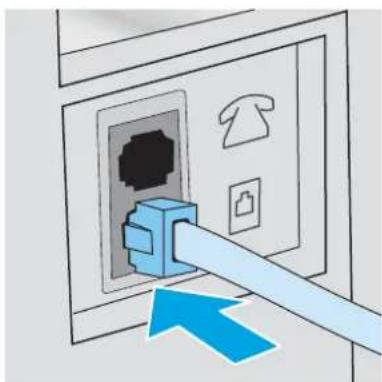
Configure the printer for fax
Use this information to configure the fax settings after the printer is connected to a phone line.
- Configure the fax time, date and header using the HP Fax Setup Wizard
- Configure the time, date, and header using the printer control panel
- Configure the time, date, and header using the HP Embedded Web Server and Printer Home Page (EWS)
- Configure for stand-alone fax
- Configure for an answering machine • Install the HP Fax software in Windows (optional)
To begin, use one of the following methods:
- Configure the fax time, date and header using the HP Fax Setup Wizard on page 91 (recommended method)
- Configure the time, date, and header using the printer control panel on page 91
- Configure the time, date, and header using the HP Embedded Web Server and Printer Home Page (EWS) on page 92 (if the software is installed)

NOTE: In the United States and many other countries/regions, setting the time, date, and other fax header information is a legal requirement.
Configure the fax time, date and header using the HP Fax Setup Wizard
Configure the fax settings using the HP Fax Setup Wizard in Windows.
Access the Fax Setup Wizard after initial setup and software installation by following these steps.

NOTE: Some operating systems do not support the Fax Setup Wizard.
- Open the HP Printer Assistant.
- Windows 10: From the Start menu, click All Apps, click HP, and then select the printer name.
- Windows 8.1: Click the down arrow in the lower left corner of the Start screen, and then select the printer name.
- Windows 8: Right-click an empty area on the Start screen, click All Apps on the app bar, and then select the printer name.
- Windows 7: From the computer desktop, click Start, select All Programs, click HP, click the folder for the printer, and then select the printer name.
- In the HP Printer Assistant, select Fax, and then select Fax Setup Wizard.
- Follow the on-screen instructions in the HP Fax Setup Wizard to configure the fax settings.
Configure the time, date, and header using the printer control panel.
Change the fax settings using the printer control panel (after first-time setup using the Fax Setup Wizard).
- From the Home screen on the printer control panel, swipe the tab at the top of the screen downward to open the Dashboard, and then touch the Setup icon.
- Touch Preferences, and then touch Date and Time.
- Touch Set the Date, swipe each column to set the month, day, and year, and then touch Done.
- Touch Set the Time, swipe each column to set the hour, minute, and AM/PM setting, and then touch Done.
- Touch the Back button ↩ to return to the Setup menu, and then scroll to and touch Fax Setup.
- Touch Preferences, and then scroll to and touch Fax Header.
- Enter your personal or company name using the touch keypad, and then touch Done.

NOTE: The maximum number of characters for the fax header is 25.
- Enter your fax number using the touch keypad, and then touch Done.

NOTE: The maximum number of characters for the fax number is 20.
Configure the time, date, and header using the HP Embedded Web Server and Printer Home Page (EWS)
Configure the fax settings using the HP Embedded Web Server (EWS).
- Access the EWS using one of the following methods:
Access the EWS from the software:
a. Open the HP Printer Assistant:
- Windows 10: From the Start menu, click All Apps, click HP, and then select the printer name.
- Windows 8.1: Click the down arrow in lower left corner of the Start screen, and then select the printer name.
- Windows 8: Right-click an empty area on the Start screen, click All Apps on the app bar, and then select the printer name.
- Windows 7: From the computer desktop, click Start, select All Programs, click HP, click the folder for the printer, and then select the printer name.
b. In the HP Printer Assistant, select Print, and then select Printer Home Page (EWS). The EWS opens.
Access the EWS from a web browser:
a. Locate the printer's IP address: From the Home screen on the printer control panel, touch the Wireless icon or the Ethernet icon to view the printer's IP address or host name.
b. Open a web browser, and in the address line, type the IP address or host name exactly as it displays on the printer control panel. Press the Enter key on the computer keyboard. The EWS opens.

https://10.10.XXXXX/

NOTE: If a message displays in the web browser indicating that the website might not be safe, select the option to continue to the website. Accessing this website will not harm the computer.
- On the EWS Home page, click the Fax tab.
- Follow the on-screen instructions to configure the fax settings.
Configure for stand-alone fax
Configure the printer to use as a stand-alone fax machine without connecting it to a computer or a network.
- From the Home screen on the printer control panel, swipe right and then touch the Fax icon.
- Swipe right and touch the Setup icon, and then touch Setup Wizard.
- Follow the on-screen instructions to configure the fax settings.
Configure for an answering machine
Follow these steps to set up the printer on a shared voice/fax line with an answering machine.
- Disconnect any devices that are connected to the telephone jack.
- Remove the plug from the telephone line out port on the rear of the printer.
- Connect the telephone cable to the fax port on the printer and to the telephone jack on the wall. Some countries/regions might require an adapter for the telephone cable that came with the printer.

NOTE: On some printers, the fax port might be above the phone port. Refer to the icons on the printer.

- Connect the answering machine telephone cable to the telephone line out port on the rear of the printer.
If you do not connect the answering machine directly to the printer, the answering machine might record fax tones from a sending fax machine and the printer might not receive faxes. If the answering machine does not have a built-in telephone, connect a telephone to the OUT port on the answering machine for convenience.

- Configure the Rings to Answer setting on the printer:
a. From the Home screen on the printer control panel, swipe the tab at the top of the screen downward to open the Dashboard, and then touch the Setup icon. b. Scroll to and touch Fax Setup, and then touch Preferences. c. Scroll to and touch Rings to Answer, select the number of rings, and then touch Done to return to the Preferences menu.
- Configure the printer to answer fax calls automatically:
▲ From the Preferences menu, touch Auto Answer to turn on the setting.
Install the HP Fax software in Windows (optional)
With the HP Fax software, you can fax electronic documents from a computer using the printer.
To use the HP Fax software, the following conditions are required:
The printer is connected directly to the computer or to a network to which the computer is connected. The printer software is installed on the computer. The computer operating system is supported by the printer.

NOTE: The HP Fax software that came with the printer is the only computer fax program that can be used with the printer. The printer is not compatible with fax software produced by other manufacturers.
Download from the Web: Go to www.hp.com/support, click Software and Drivers, and then follow the onscreen instructions to download the latest HP software.
When prompted by the software installer, make sure you select HP Fax Software as one of the software components to install.
Send a fax
Send a fax from the printer or a third-party software program. Learn how to use speed dials and group-dial entries.
- Send a fax by dialing manually from the printer control panel. Fax from the flatbed scanner. Fax from the document feeder. Schedule a fax to be sent later. Use phone book entries.
- Send a fax from the software (Windows)
- Send a fax from a third-party software program, such as Microsoft Word
Send a fax by dialing manually from the printer control panel
Send a fax manually using the printer control panel.
- Load the document:
- If you are loading an original on the scanner glass, place it face-down on the left rear corner of the glass.
- If you are loading multiple pages in the document feeder, load the pages face-up and adjust the paper guides so they are snug against the paper.
If documents are in the document feeder and on the scanner glass at the same time, the printer processes the document in the document feeder and not the one on the scanner glass.
- From the Home screen on the printer control panel, swipe right and then touch the Fax icon.
- Touch Send Now.
- Enter the fax number using the touch keypad.
To use access codes, credit cards, or calling cards, you must dial the fax number manually to allow for pauses and dialing codes. To send a fax to an international destination, dial manually to allow for pauses and international dialing codes. You cannot use speed dials with access codes, credit cards, calling cards, or to dial international destinations.
- Touch Send to send the fax.
If you are faxing from the scanner glass and your document includes multiple pages, follow the control panel prompts to confirm and load additional pages.
Fax from the flatbed scanner
Fax a document using the scanner glass.
- Place the document face-down on the scanner glass.
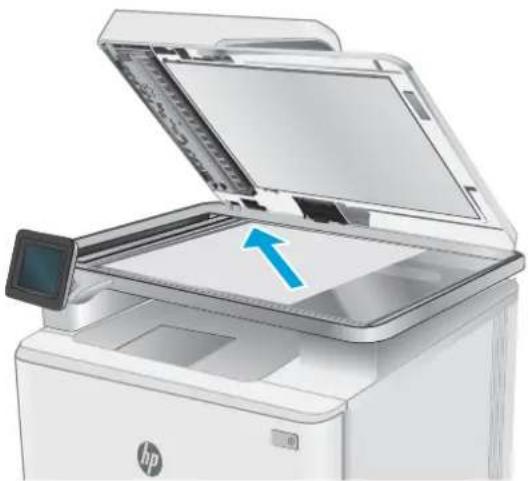
- From the Home screen on the printer control panel, swipe right and then touch the Fax icon.
- Touch Send Now.
- Enter the fax number using the touch keypad, and then touch Send.
Fax from the document feeder
Fax a document using the document feeder.
- Insert the originals into the document feeder face-up.

CAUTION: To prevent damage to the printer, do not use an original that contains correction tape, correction fluid, paper clips, or staples. Also, do not load photographs, small originals, or fragile originals into the document feeder.
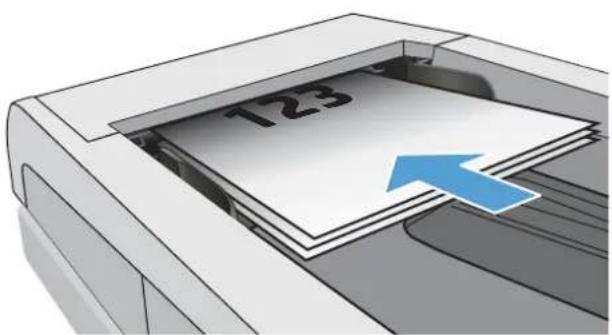
- Adjust the paper guides until they are snug against the paper.
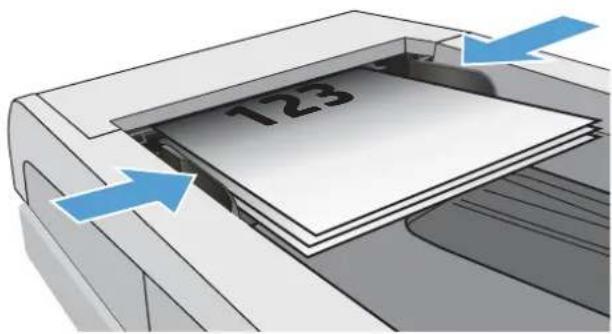
- From the Home screen on the printer control panel, touch the Fax icon.
- Touch Send Now.
- Enter the fax number using the touch keypad, and then touch Send.
The printer sends the fax.
Schedule a fax to be sent later
Use the printer control panel to schedule a fax to be automatically sent at a future time within the next 24 hours. When using this option, the printer scans the document into memory and then returns to a Ready state to fax the document at the specified time.
- Load the document:
- If you are loading an original on the scanner glass, place it face-down on the left rear corner of the glass.
- If you are loading multiple pages in the document feeder, load the pages face-up and adjust the paper guides so they are snug against the paper.
If documents are in the document feeder and on the scanner glass at the same time, the printer processes the document in the document feeder and not the one on the scanner glass.
- From the Home screen on the printer control panel, swipe right and then touch the Fax icon.
- Touch Send Later.
- Swipe the columns on the screen to set the hour and minute to the specific time you want to send the fax.
- Enter the fax number using the touch keypad, and then touch Send.
The printer will scan the document and save it in the printer's memory until the scheduled time, and then it will automatically send the fax at that time.
Use phone book entries
Send a fax to an individual or a group that has already been added to the phone book.

NOTE: Before you can send a fax using phone book entries, you must first add contacts to the phone book.
- Load the document onto the scanner glass or into the document feeder.

- From the Home screen on the printer control panel, touch the Fax icon.
- Touch Send Now.
- Touch the Phone Book icon .
- Touch the local phone book, touch the name of the individual or group entry that you want to use, and then touch Select.
- Touch Send to send the fax.
Send a fax from the software (Windows)
Fax a document using the HP Fax software in Windows.
The procedure to send a fax varies according to your specifications. The most typical steps follow.
- Open the HP Printer Assistant.
- Windows 10: From the Start menu, click All Apps, click HP, and then select the printer name.
- Windows 8.1: Click the down arrow in the lower left corner of the Start screen, and then select the printer name.
- Windows 8: Right-click an empty area on the Start screen, click All Apps on the app bar, and then select the printer name.
- Windows 7: From the computer desktop, click Start, select All Programs, click HP, click the folder for the printer, and then select the printer name.
- In the HP Printer Assistant, select Fax, and then select Send Fax.
The fax software opens.
- Enter the fax number of one or more recipients.
- Place the document on the scanner glass or load it in the document feeder.
- Click Add Scan.
- Click Send Now.
Send a fax from a third-party software program, such as Microsoft Word
If you created a document using a third-party software program, such as Microsoft Word, you can fax the document directly from the software.
- Open a document in a third-party program.
- Click the File menu, and then click Print.
- Select the fax print driver from the print driver drop-down list. The fax software opens.
- Enter the fax number of one or more recipients.
- Include any pages loaded at the printer. This step is optional.
- Click Send Now.
Create, edit, and delete phone book entries
You can store frequently dialed fax numbers in the phone book as individual entries, or a group of entries.
• Create and edit individual phone-book entries • Create and edit group phone-book entries - Delete phone book entries
Create and edit individual phone-book entries
Add new individual entries to the phone book, or edit existing entries.
- From the Home screen on the printer control panel, swipe right and then touch the Fax icon.
- Swipe right and then touch the Phone Book icon.
- Touch Local Phone Book, and then proceed with one of the following options:
- Add a new contact: Touch the Add Contact icon

- Edit an existing contact: Touch the name of the contact in the list.
- Touch Name, enter (or edit) the name of the contact using the touch keypad, and then touch Done.
- Touch Fax Number, enter (or edit) the fax number using the touch keypad, and then touch Done.
- Touch Add to save a new contact, or touch Done to save the changes you made to an existing contact.
Create and edit group phone-book entries
Create or edit group entries in the address book.
- From the Home screen on the printer control panel, swipe right and then touch the Fax icon.
- Swipe right and then touch the Phone Book icon.
- Touch Local Phone Book.
- Touch the Phone Book icon, and then touch the Group icon.

To edit an existing group, touch the name of the group and then make the changes in the Edit Group menu.
- Touch Add New Group.

- Touch Name, enter a name for the group using the touch keypad, and then touch Done.
- Touch Number of Members, touch the names of the contacts that you want to add to the group, and then touch Select.
- Touch Create to save the new group.
Delete phone book entries
Delete entries from the phone book.
- From the Home screen on the printer control panel, swipe right and then touch the Fax icon.
- Swipe right and then touch the Phone Book icon.
- Touch Local Phone Book, and then scroll to and touch the name of the contact or group that you want to delete.
- On the Edit Contact or Edit Group screen, touch Delete, and then touch Yes to confirm that you want to delete the contact.
Reprint a received fax from the printer memory
Received faxes that are not printed are stored in the printer's memory. Reprint a received fax that is stored in the memory.
After the memory becomes full, the printer cannot receive a new fax until you print or delete the faxes from memory. You might also want to delete the faxes in memory for security or privacy purposes.
- Make sure paper is loaded in the main paper tray.
- From the Home screen on the printer control panel, swipe right and then touch the Fax icon.
- Touch Reprint.
- Scroll to and touch the name of the received fax that you want to print, and then touch Print.
Additional fax tasks
Locate information on the Web for performing common fax tasks.
Go to www.hp.com/support/colorljM479MFP.
Instructions are available for fax tasks, such as the following:
- Configure fax billing codes
- Use a fax printing schedule
- Block incoming faxes • Fax archiving and forwarding
- Create and manage fax speed dial lists
8 Manage the printer
Utilize management tools, security and energy-conservation settings, and firmware updates for the printer.
• Use HP Web Services applications • Change the printer connection type (Windows) • Advanced configuration with HP Embedded Web Server and Printer Home Page (EWS) - Configure IP network settings • Printer security features • Energy-conservation settings HP Web Jetadmin Update the firmware
For more information:
HP's all-inclusive help for the printer includes the following information:
• Install and configure • Learn and use • Solve problems • Download software and firmware updates • Join support forums • Find warranty and regulatory information
Use HP Web Services applications
With Web Services, you can add print apps to your printer using HP Connected. Print apps is a content-on-demand delivery platform that allows you to browse and view popular web destinations and print in an easy-to-read format.
- From the Home screen on the printer control panel, swipe right and then touch Apps.
- Touch the print app that you want to use.
For more information about individual print apps and to create an account, visit HP Connected. With an HP Connected account, you can add, configure, or remove print apps, and set the order in which the apps appear on your printer control panel.

NOTE: The HP Connected website might not be available in all countries/regions.
You can also turn off print apps using the EWS. To do so, open the EWS (see Open the Embedded Web Server), click the Settings tab, click Security and then click Administrator Settings. Disable the Only Print Apps option.
Change the printer connection type (Windows)
If you are already using the printer and you wish to change the way it is connected, use Device Setup & Software to change the connection. For example, connect the new printer to the computer using a USB or network connection, or change the connection from a USB to a wireless connection.
To open Device Setup & Software, complete the following procedure:
- Open the HP Printer Assistant.
- Windows 10: From the Start menu, click All Apps, click HP, and then select the printer name.
- Windows 8.1: Click the down arrow in the lower left corner of the Start screen, and then select the printer name.
- Windows 8: Right-click an empty area on the Start screen, click All Apps on the app bar, and then select the printer name.
- Windows 7, Windows Vista, and Windows XP: From the computer desktop, click Start, select All Programs, click HP, click the folder for the printer, and then select the printer name.
- In the HP Printer Assistant, select Tools from the navigation bar, and then select Device Setup & Software.
Advanced configuration with HP Embedded Web Server and Printer Home Page (EWS)
Use the HP Embedded Web Server to manage printing functions from your computer instead of the printer control panel.
• Method one: Open the HP Embedded Web Server (EWS) from the software • Method two: Open the HP Embedded Web Server (EWS) from a web browser
• View printer status information
• Determine the remaining life for all supplies and order new ones
• View and change tray configurations (paper types and sizes)
• View and print internal pages
• View and change network configuration
The HP Embedded Web Server works when the printer is connected to an IP-based network. The HP Embedded Web Server does not support IPX-based printer connections. You do not have to have Internet access to open and use the HP Embedded Web Server.
When the printer is connected to the network, the HP Embedded Web Server is automatically available.

NOTE: Printer Home Page (EWS) is software used to connect to the HP Embedded Web Server when the printer is connected to a computer via USB. It is available only if a full installation was performed when the printer was installed on a computer. Depending on how the printer is connected, some features might not be available.

NOTE: The HP Embedded Web Server is not accessible beyond the network firewall.
Method one: Open the HP Embedded Web Server (EWS) from the software
Use this method to open the EWS from the HP Printer Assistant software.
- Open the HP Printer Assistant.
- Windows 10: From the Start menu, click All Apps, click HP, and then select the printer name.
- Windows 8.1: Click the down arrow in lower left corner of the Start screen, and then select the printer name.
- Windows 8: Right-click an empty area on the Start screen, click All Apps on the app bar, and then select the printer name.
- Windows 7, Windows Vista, and Windows XP: From the computer desktop, click Start, select All Programs, click HP, click the folder for the printer, and then select the printer name.
- In the HP Printer Assistant, select Print, and then select Printer Home Page (EWS).
Method two: Open the HP Embedded Web Server (EWS) from a web browser
Use the EWS to manage your printer from a computer instead of the printer control panel.
Your printer must be connected to an IP-based network before you can access the EWS.
- From the Home screen on the printer control panel, touch the Wireless icon (☐) or the Ethernet icon (☑) to view the printer's IP address or host name.
- Open a web browser, and in the address line, type the IP address or host name exactly as it displays on the printer control panel. Press the Enter key on the computer keyboard. The EWS opens.

https://10.10.XXXXX/

NOTE: If a message displays in the web browser indicating that the website might not be safe, select the option to continue to the website. Accessing this website will not harm the computer.
Table 8-1 HP Embedded Web Server tabs
| Tab or section Description | |
| Home tabProvides printer, status, and configuration information. | Scan to Email: Scan documents and send them as email attachments.HP Digital Fax: Configure the printer to save faxes to a network folder or to forward faxes to an email address.Sleep Mode: Configure the Sleep Mode settings.Web Services: Set up and manage Web Services such as HP ePrint and Print Apps.Printer Update: Check for new printer updates.Estimated Cartridge Levels: View the status of the cartridges and the estimated cartridge levels.Network Summary: View a summary of the printer's network settings.Print Quality Toolbox: Use maintenance tools to improve the print quality of your printouts.Wireless Setup Wizard: Connect the printer to a wireless network.Wi-Fi Direct: View and edit Wi-Fi Direct settings.AirPrint: View and edit AirPrint settings.Printer Information: View general information about the printer.Administrator: Set up and manage advanced security and usage controls for the printer.Shutdown Mode: Configure Shutdown Mode settings.Usage Report: View detailed information about printer usage.Fax Log: View the printer's fax log.Fax Setup Wizard: Set up the fax.Firewall: Set up and manage the printer's firewall.Printer Reports: View the reports available for the printer.Webscan: Scan documents from the web browser.Backup: Back up the printer settings into a password-encrypted file.Personalize: Add or remove features that display on the Home tab. |
| Scan tab(MFP models only) | •Scan to Computer•Scan to Email•Scan to Network Folder•Scan to Sharepoint•Scan to USB•Address Book |
| Copy/Print tabProvides the ability to change default copy and print settings from your computer. | •Copy•Print |
| Fax tab(Fax models only) | •Settings•Information•HP Digital Fax |
| Web Services tab •Web Services Settings | |
| Network tab(Network- connected printers only)Provides the ability to change network settings from your computer. | •General•Wired (802.3)•Wireless (802.11)•Wi-Fi Direct•Bluetooth Smart•AirPrint•Google Cloud Print•Internet Printing Protocol•Security•Advanced Settings |
| Tools tab •Product Information | |
| •Reports | |
| •Utilities | |
| •Backup and Restore | |
| •Printer Restart | |
| •Printer Updates | |
| Settings tab •Power Management | |
| •Preferences | |
| •Supplies | |
| •Control Panel Customization | |
| •Security | |
| •Email Alerts | |
| •Restore Defaults | |
| •Firewall | |
Configure IP network settings
Review the following information about configuring IP network settings.
Introduction • Printer sharing disclaimer • View or change network settings - Rename the printer on a network • Manually configure IPv4 TCP/IP parameters from the control panel • Link speed and duplex settings
Introduction
Use the information in the following sections to configure the printer network settings.
Printer sharing disclaimer
HP does not support peer-to-peer networking, as the feature is a function of Microsoft operating systems and not of the HP printer drivers.
Go to Microsoft at www.microsoft.com.
View or change network settings
Use the HP Embedded Web Server to view or change IP configuration settings.
- Open the HP Embedded Web Server (EWS):
a. From the Home screen on the printer control panel, touch the Wireless icon (P) or the Ethernet icon to view the printer's IP address or host name. b. Open a web browser, and in the address line, type the IP address or host name exactly as it displays on the printer control panel. Press the Enter key on the computer keyboard. The EWS opens.

https://10.10.XXXXX/

NOTE: If a message displays in the web browser indicating that the website might not be safe, select the option to continue to the website. Accessing this website will not harm the computer.
- On the EWS Home page, click the Network tab to view network information. Change settings as needed.
Rename the printer on a network
Use the HP Embedded Web Server (EWS) to rename the printer on a network so it can be uniquely identified.
- Open the HP Embedded Web Server (EWS):
a. From the Home screen on the printer control panel, touch the Wireless icon (P) or the Ethernet icon to view the printer's IP address or host name.
b. Open a web browser, and in the address line, type the IP address or host name exactly as it displays on the printer control panel. Press the Enter key on the computer keyboard. The EWS opens.

NOTE: If a message displays in the web browser indicating that the website might not be safe, select the option to continue to the website. Accessing this website will not harm the computer.
- On the EWS Home page, click the Network tab.
- In the left navigation pane, click General to expand the options, and then click Network Identification.
- In the Host Name text field, enter a name to uniquely identify this printer, and then click Apply to save the changes.
Manually configure IPv4 TCP/IP parameters from the control panel
Use the control-panel menus to manually set the IPv4 address, subnet mask, and default gateway.
- From the Home screen on the printer control panel, swipe the tab at the top of the screen downward to open the Dashboard, and then touch the Setup icon
- Touch Network Setup, and then scroll to and touch one of the following menus:
- Ethernet Settings (for a wired network) ● Wireless Settings (for a wireless network)
- Touch IP Settings.
- Touch Manual, and then touch IP Address.
- Touch each of the following menu items and then use the touch keypad to enter the information:
- IP Address
- Subnet Mask
- Default Gateway
- Touch Apply to save the settings.
Link speed and duplex settings
The link speed and communication mode of the print server must match the network hub. For most situations, leave the printer in automatic mode. Incorrect changes to the link speed and duplex settings might prevent the printer from communicating with other network devices. If you need to make changes, use the printer control panel.
NOTE: This information applies only to Ethernet (wired) networks. It does not apply to wireless networks. NOTE: The printer setting must match the setting for the network device (a network hub, switch, gateway, router, or computer). NOTE: Making changes to these settings causes the printer to turn off and then on. Make changes only when the printer is idle.
- From the Home screen on the printer control panel, swipe the tab at the top of the screen downward to open the Dashboard, and then touch the Setup icon.
- Touch Network Setup.
- Touch Ethernet Settings, and then touch Link Speed.
- Select one of the following options:
| Setting Description | |
| Automatic | The print server automatically configures itself for the highest link speed and communication mode allowed on the network. |
| 10T Full 10 Mbps, full-duplex operation | |
| 10T Half 10 Mbps, half-duplex operation | |
| 100TX Full 100 Mbps, full-duplex operation | |
| 100TX Half 100 Mbps, half-duplex operation | |
| 1000T Full 1000 Mbps, full-duplex operation |
After making a change to the setting, the printer turns off and then on.
Printer security features
Review the following information about the printer security features.
Introduction - Assign or change the system password using the Embedded Web Server
Introduction
The printer includes several security features to restrict who has access to configuration settings, to secure data, and to prevent access to valuable hardware components.
Assign or change the system password using the Embedded Web Server
Assign an administrator password for access to the printer and the HP Embedded Web Server so that unauthorized users cannot change the printer settings.
- Open the HP Embedded Web Server (EWS):
a. From the Home screen on the printer control panel, touch the Wireless icon (☐) or the Ethernet icon (☐) to view the printer's IP address or host name. b. Open a web browser, and in the address line, type the IP address or host name exactly as it displays on the printer control panel. Press the Enter key on the computer keyboard. The EWS opens.

https://10.10.XXXXX/

NOTE: If a message displays in the web browser indicating that the website might not be safe, select the option to continue to the website. Accessing this website will not harm the computer.
- On the EWS Home page, click the Settings tab.
- In the left navigation pane, click Security to expand the options, and then click General Security.
- Enter a password.
- Re-enter the password in the Confirm Password field, and then click Apply.
Make note of the password and store it in a safe place.
Energy-conservation settings
Learn about the energy-conservation settings that are available on your printer.
Introduction • Print with EconoMode - Set the Sleep Mode setting • Set the Shutdown Mode setting • Set the Disable Shutdown setting
Introduction
The printer includes several economy features to conserve energy and supplies.
Print with EconoMode
This printer has an EconoMode option for printing drafts of documents. Using EconoMode can use less toner. However, using EconoMode can also reduce print quality.
HP does not recommend the full-time use of EconoMode. If EconoMode is used full-time, the toner supply might outlast the mechanical parts in the toner cartridge. If print quality begins to degrade and is no longer acceptable, consider replacing the toner cartridge.

NOTE: If this option is not available in your print driver, you can set it using the HP Embedded Web Server.
- From the software program, select the Print option.
- Select the printer, and then click the Properties or Preferences button.
- Click the Paper/Quality tab.
- Click the EconoMode check box.
Set the Sleep Mode setting
Use the control panel menus to specify the amount of time the printer must be inactive before it goes into sleep mode.
- From the Home screen on the printer control panel, swipe the tab at the top of the screen downward to open the Dashboard, and then touch the Setup icon
- Scroll to and open the following menus:
- Power Management
- Sleep Mode
- Touch an option to specify the amount of time the printer must be inactive before it goes into sleep mode.
Set the Shutdown Mode setting
Use the control panel menus to specify the amount of time the printer must be inactive before it shuts down.

NOTE: After the printer shuts down, the power consumption is 1 watt or less.
- From the Home screen on the printer control panel, swipe the tab at the top of the screen downward to open the Dashboard, and then touch the Setup icon
- Scroll to and open the following menus:
- Power Management
- Shutdown Mode
- Touch an option to specify the amount of time the printer must be inactive before it shuts down.
Set the Disable Shutdown setting
Use the control panel menus to disable the printer from shutting down after a period of inactivity.
- From the Home screen on the printer control panel, swipe the tab at the top of the screen downward to open the Dashboard, and then touch the Setup icon
- Scroll to and open the following menus:
- Power Management
- Disable Shutdown
- Touch one of the following options:
- When ports are active: The printer will not shut down unless all ports are inactive. An active network link or fax connection will prevent the printer from shutting down.
- Do not disable: The printer will shut down after a period of inactivity as determined by the Shutdown Mode setting.

NOTE: The default setting is When ports are active.
HP Web Jetadmin
HP Web Jetadmin is an award-winning, industry-leading tool for efficiently managing a wide variety of networked HP products, including printers, multifunction printers, and digital senders. This single solution allows you to remotely install, monitor, maintain, troubleshoot, and secure your printing and imaging environment — ultimately increasing business productivity by helping you save time, control costs, and protect your investment.
HP Web Jetadmin upgrades are periodically made available to provide support for specific printer features. Go to www.hp.com/go/webjetadmin for more information.
Update the firmware
HP offers periodic printer updates, new Web Services apps, and new features to existing Web Services apps. Follow these steps to update the printer firmware for a single printer. When you update the firmware, Web Service apps will update automatically.
• Method one: Update the firmware using the control panel • Method two: Update the firmware using the HP Printer Update utility
There are two supported methods to perform a firmware update on this printer. Use only one of the following methods to update the printer firmware.
Method one: Update the firmware using the control panel
Follow these steps to update the firmware using the printer control panel (for network-connected printers only), and/or set the printer to install future firmware updates automatically. For USB-connected printers, skip to Method two.
- Make sure the printer is connected to a wired (Ethernet) or wireless network with an active Internet connection.
NOTE: The printer must be connected to the internet to update the firmware via a network connection.
- From the Home screen on the printer control panel, swipe the tab at the top of the screen downward to open the Dashboard, and then touch the Setup icon.
- Scroll to and touch Printer Maintenance, and then touch Update the Printer.
If the Update the Printer option is not listed, use Method two.
- Touch Check for Printer Updates Now to check for updates.
NOTE: The printer automatically checks for an update, and if a newer version is detected, the update process starts automatically.
- Set the printer to automatically update the firmware when updates become available:
a. From the Home screen on the printer control panel, swipe the tab at the top of the screen downward to open the Dashboard, and then touch the Setup icon. b. Scroll to and touch Printer Maintenance, and then touch Update the Printer. c. Touch Manage Updates, touch Allow Updates, and then touch Yes. d. Touch the Back button, touch Printer Update Options, and then touch Install Automatically (Recommended).
Method two: Update the firmware using the HP Printer Update utility
Follow these steps to manually download and install the HP Printer Update utility.

NOTE: This method is the only firmware update option available for printers connected to the computer via a USB cable. This method also works for printers that are connected to a network.

NOTE: You must have a print driver installed in order to use this method.
- Go to www.hp.com/go/support, click Software and Drivers, and then click Printer.
- In the text field, type the printer name, click Submit, and then click your printer model from the list of search results.
- In the Firmware section, locate the Firmware Update file.
- Click Download, and then click Run.
- When the HP Printer Update utility launches, select the printer that you wish to update, and then click Update.
- Follow the on-screen instructions to complete the installation, and then click the OK button to close the utility.
9 Solve problems
Troubleshoot problems with the printer. Locate additional resources for help and technical support.
- Customer support • Control panel help system
- Restore the factory-set defaults A "Cartridge is low" or "Cartridge is very low" message displays on the printer control panel • Printer does not pick up paper or misfeeds Clear paper jams • Resolving print quality problems
- Improve copy and scan image quality
- Improve fax image quality
- Solve wired network problems
- Solve wireless network problems
- Solve fax problems
For more information:
HP's all-inclusive help for the printer includes the following information:
• Install and configure - Learn and use - Solve problems - Download software and firmware updates - Join support forums • Find warranty and regulatory information
Customer support
Find support contact options for your HP printer.
Table 9-1 HP support options
| Support option Contact information | |
| Get telephone support for your country/regionHave the printer name, serial number, date of purchase, and problem description ready | Country/region phone numbers are on the flyer that was in the box with the printer or atwww.hp.com/support. |
| Get 24-hour Internet support, and download software utilities and drivers | www.hp.com/support/colorljM479MFP |
| Order additional HP service or maintenance agreements www.hp.com/go/carepack | |
| Register the printer www.register.hp.com | |
Control panel help system
The printer has a built-in Help system that explains how to use each screen.
To open the Help system, touch the Help icon in the lower-right corner of the screen.
Tips for using the online Help:
- For some screens, the Help opens to a global menu where you can search for specific topics. You can browse through the menu structure by touching the buttons in the menu. Some Help screens include animations that guide you through procedures, such as clearing jams.
- For screens that contain settings for individual jobs, the Help opens to a topic that explains the options for that screen.
- If the printer alerts you of an error or warning, touch the Help icon to open a message that describes the problem. The message also contains instructions to help solve the problem.
Restore the factory-set defaults
Restoring the factory-set defaults returns all of the printer and network settings to the factory defaults. It will not reset the page count, or tray size.
To restore the printer to the factory-default settings, follow these steps.

CAUTION: Restoring the factory-set defaults returns all of the settings to the factory defaults, and it also deletes any pages that are stored in the memory.
- From the Home screen on the printer control panel, swipe the tab at the top of the screen downward to open the Dashboard, and then touch the Setup icon.
- Scroll to and open the following menus:
- Printer Maintenance
- Restore
- Restore Factory Defaults
The printer automatically restarts.
A “Cartridge is low” or “Cartridge is very low” message displays on the printer control panel
Understand the cartridge-related messages on the control panel and what actions to take.
- Change the "Very Low" settings Order supplies
Cartridge is low: The printer indicates when a toner cartridge level is low. Actual toner cartridge life remaining may vary. Consider having a replacement available to install when print quality is no longer acceptable. The toner cartridge does not need to be replaced now.
Continue printing with the current cartridge until redistributing the toner no longer yields acceptable print quality. To redistribute the toner, remove the toner cartridge from the printer and gently rock the cartridge back and forth about its horizontal axis. For graphical representation, see cartridge replacement instructions. Reinsert the toner cartridge into the printer and close the cover.
Cartridge is very low: The printer indicates when the toner cartridge level is very low. Actual toner cartridge life remaining may vary. Consider having a replacement available to install when print quality is no longer acceptable. The toner cartridge does not need to be replaced now unless the print quality is no longer acceptable.
HP's Premium Protection Warranty expires when a message indicating that HP's Premium Protection Warranty on this supply has ended appears on the Supplies Status Page or the EWS.
Change the "Very Low" settings
You can change the way the printer reacts when supplies reach the Very Low state. You do not have to re-establish these settings when you install a new toner cartridge.
- Change the "Very Low" settings from the control panel • For printers with fax capability
Change the "Very Low" settings from the control panel
Determine how the printer will notify you about very low cartridge levels.
- From the Home screen on the printer control panel, swipe the tab at the top of the screen downward to open the Dashboard, and then touch the Setup icon
- Scroll to and open the following menus:
- Supply Settings
- Black Cartridge or Color Cartridge
- Very Low Setting
- Select one of the following options:
- Select the Stop option to set the printer to stop printing until you replace the toner cartridge.
- Select the Prompt option to set the printer to stop printing and prompt you to replace the toner cartridge. You can acknowledge the prompt and continue printing.
- Select the Continue option to set the printer to alert you that the toner cartridge is very low, but to continue printing.
- (For Color Cartridges) Select the Print Black option to set the printer to alert you that the toner cartridge is very low, but to continue printing using black only.

NOTE: The Low Threshold option allows you to define the level of ink that is considered very low.
For printers with fax capability
When the printer is set to the Stop or Prompt option, there is some risk that faxes will not print when the printer resumes printing. This can occur if the printer has received more faxes than the memory can hold while the printer is waiting.
The printer can print faxes without interruption when it passes the Very Low threshold if you select the Continue option for the toner cartridge, but print quality might degrade.
Order supplies
Order supplies and paper for your HP printer.
Table 9-2 Options for ordering supplies
| Ordering options Contact information | |
| Order supplies and paper www.hp.com/go/suresupply | ____ |
| Order through service or support providers Contact an HP-authorized service or support provider. | |
| Order using the HP Embedded Web Server (EWS) To access, in a supported web browser on your computer, enter the printer IP address or host name in the address/URL field. The EWS contains a link to the HP SureSupply website, which provides options for purchasing Original HP supplies. | |
Printer does not pick up paper or misfeeds
Review the following information about the printer not picking up paper or misfeeding paper.
Introduction • The printer picks up multiple sheets of paper • The printer does not pick up paper The document feeder jams, skews, or picks up multiple sheets of paper
Introduction
The following solutions can help solve problems if the printer is not picking up paper from the tray or is picking up multiple sheets of paper at one time. Either of these situations can result in paper jams.
The printer picks up multiple sheets of paper
If the printer picks up multiple sheets of paper from the tray, try these solutions.
- Remove the stack of paper from the tray and flex it, rotate it 180 degrees, and flip it over. Do not fan the paper. Return the stack of paper to the tray.

NOTE: Fanning the paper introduces static electricity. Instead of fanning the paper, flex the stack by holding it at each end and bringing the ends up to form a U shape. Then, rotate the ends down to reverse the U shape. Next, hold each side of the stack of paper, and repeat this process. This process releases individual sheets without introducing static electricity. Straighten the paper stack against a table before returning it to the tray.
Figure 9-1 Technique for flexing the paper stack
1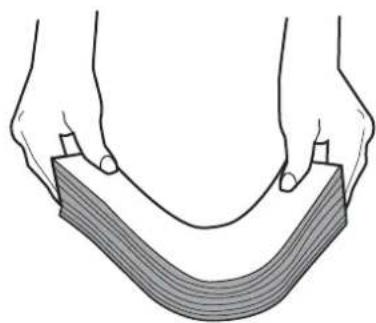
2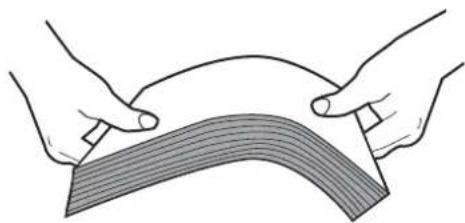
- Use only paper that meets HP specifications for this printer.
- Verify that the humidity in the room is within specifications for this printer, and that paper is being stored in unopened packages. Most reams of paper are sold in moisture-proof wrapping to keep paper dry.
In high-humidity environments, paper at the top of the stack in the tray can absorb moisture, and it might have a wavy or uneven appearance. If this happens, remove the top 5 to 10 sheets of paper from the stack.
In low-humidity environments, excess static electricity can cause sheets of paper to stick together. If this happens, remove the paper from the tray, and flex the stack as described above.
- Use paper that is not wrinkled, folded, or damaged. If necessary, use paper from a different package.
- Make sure the tray is not overfilled by checking the stack-height markings inside the tray. If it is overfilled, remove the entire stack of paper from the tray, straighten the stack, and then return some of the paper to the tray.
The following images show examples of the stack-height markings in the trays for various printers. Most HP printers have markings similar to these. Also make sure that all sheets of paper are below the tabs near the stack-height marks. These tabs help hold the paper in the correct position as it enters the printer.
Figure 9-2 Stack height markings
Figure 9-3 Tab for the paper stack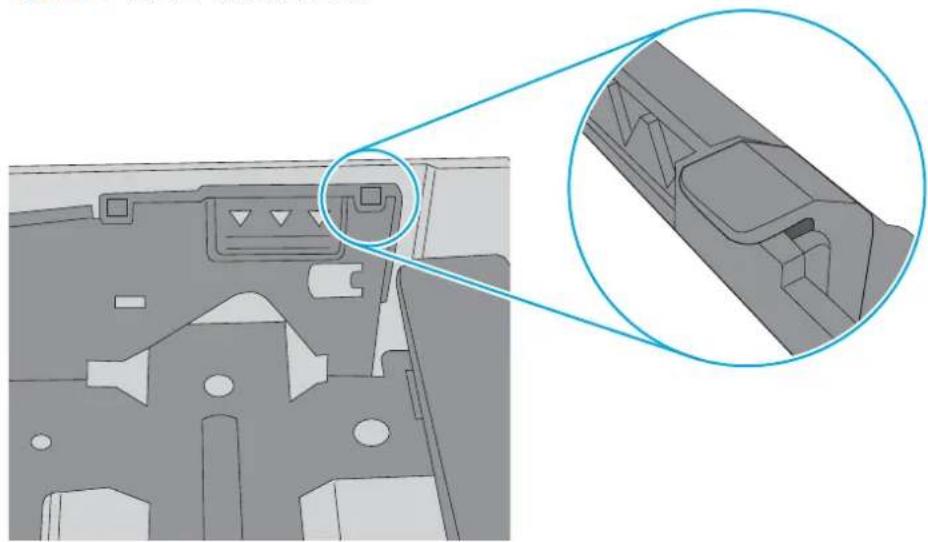
- Make sure the paper guides in the tray are adjusted correctly for the size of paper. Adjust the guides to the appropriate indentation in the tray.
- Make sure the printing environment is within recommended specifications.
The printer does not pick up paper
If the printer does not pick up paper from the tray, try these solutions.
- Open the printer and remove any jammed sheets of paper. Verify that no torn remnants of paper remain inside of the printer.
- Load the tray with the correct size of paper for the job.
- Make sure the paper size and type are set correctly on the printer control panel.
- Make sure the paper guides in the tray are adjusted correctly for the size of paper. Adjust the guides to the appropriate indentation in the tray. The arrow on the tray guide should line up exactly with the marking on the tray.

NOTE: Do not adjust the paper guides tightly against the paper stack. Adjust them to the indentations or markings in the tray.
The following image shows examples of the paper-size indentations in the trays. Most HP printers have markings similar to these.
Figure 9-4 Examples of size markings
- Verify that the humidity in the room is within specifications for this printer, and that paper is being stored in unopened packages. Most reams of paper are sold in moisture-proof wrapping to keep paper dry.
In high-humidity environments, paper at the top of the stack in the tray can absorb moisture, and it might have a wavy or uneven appearance. If this happens, remove the top 5 to 10 sheets of paper from the stack.
In low-humidity environments, excess static electricity can cause sheets of paper to stick together. If this happens, remove the paper from the tray, and flex the stack by holding it at each end and bringing the ends up to form a U shape. Then, rotate the ends down to reverse the U shape. Next, hold each side of the stack of paper, and repeat this process. This process releases individual sheets without introducing static electricity. Straighten the paper stack against a table before returning it to the tray.
Figure 9-5 Technique for flexing the paper stack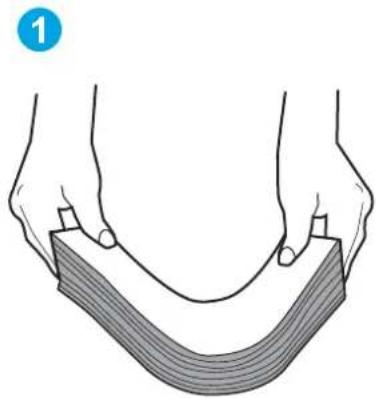
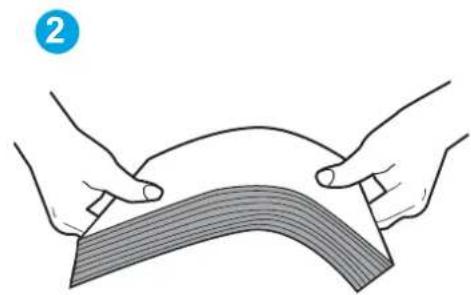
- Check the printer control panel to see if it is displaying a prompt to feed the paper manually. Load paper, and continue.
- The rollers above the tray might be contaminated. Clean the rollers with a lint-free cloth dampened with warm water. Use distilled water, if it is available.

CAUTION: Do not spray water directly on to the printer. Instead, spray water on the cloth or dab the cloth in water and wring it out before cleaning the rollers.
The following image shows examples of the roller location for various printers.
Figure 9-6 Roller locations for Tray 1 or the multipurpose tray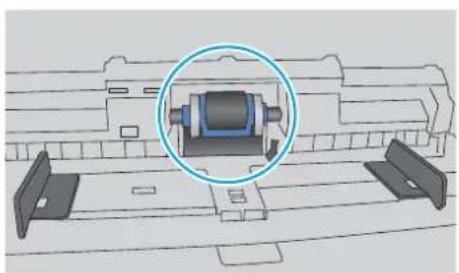
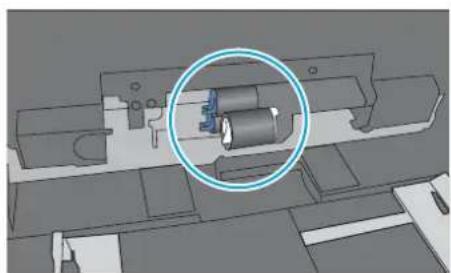
The document feeder jams, skews, or picks up multiple sheets of paper
Try the suggested fixes if the document feeder is jamming, skewing pages, or picking up multiple sheets of paper at a time.

NOTE: This information applies to MFP printers only.
The original might have something on it, such as staples or self-adhesive notes, that must be removed. - Check that all rollers are in place and that the roller-access cover inside the document feeder is closed. • Make sure that the top document-feeder cover is closed. - The pages might not be placed correctly. Straighten the pages and adjust the paper guides to center the stack. - The paper guides must be touching the sides of the paper stack to work correctly. Make sure that the paper stack is straight and the guides are against the paper stack. The document feeder input tray or output bin might contain more than the maximum number of pages. Make sure the paper stack fits below the guides in the input tray, and remove pages from the output bin. - Verify that there are no pieces of paper, staples, paper clips, or other debris in the paper path. - Clean the document-feeder rollers and the separation pad. Use compressed air or a clean, lint-free cloth moistened with warm water. If misfeeds still occur, replace the rollers.
Clear paper jams
Review the following information about clearing paper jams.
Introduction • Experiencing frequent or recurring paper jams? Paper jam locations • Clear paper jams in the document feeder • Clear paper jams in Tray 1 - 13.02 • Clear paper jams in Tray 2 - 13.03 • Clear paper jams in the output bin - 13.10, 13.11, 13.12 • Clear paper jams in the duplexer (duplex models only) - 13.14, 13.15 • Clear paper jams in the toner cartridge or fuser area - 13.08, 13.09
Introduction
The following information includes instructions for clearing paper jams from the printer.
Experiencing frequent or recurring paper jams?
Follow the steps to solve problems with frequent paper jams. If the first step does not resolve the problem, continue with the next step until you have resolved the problem.
- If paper has jammed in the printer, clear the jam and then print a configuration page to test the printer.
- Check that the tray is configured for the correct paper size and type on the printer control panel. Adjust paper settings if necessary. a. From the Home screen on the printer control panel, swipe the tab at the top of the screen downward to open the Dashboard, and then touch the Setup icon. b. Touch Paper setup. c. Select the tray from the list. d. Select Paper Type, and then select the type of paper that is in the tray. e. Select Paper Size, and then select the size of paper that is in the tray.
- Turn the printer off, wait 30 seconds, and then turn it on again.
- Print a cleaning page to remove excess toner from inside the printer:
a. From the Home screen on the printer control panel, swipe the tab at the top of the screen downward to open the Dashboard, and then touch the Setup icon.
b. Open the following menus:
- Printer Maintenance
- Print Quality Tools
- Print a configuration page to test the printer:
a. From the Home screen on the printer control panel, swipe the tab at the top of the screen downward to open the Dashboard, and then touch the Setup icon. b. Open the following menus:
- Reports
- Printer Configuration Report
If none of these steps resolves the problem, the printer might need service. Contact HP customer support.
Paper jam locations
Jams can occur in these locations.
Figure 9-7 Jam locations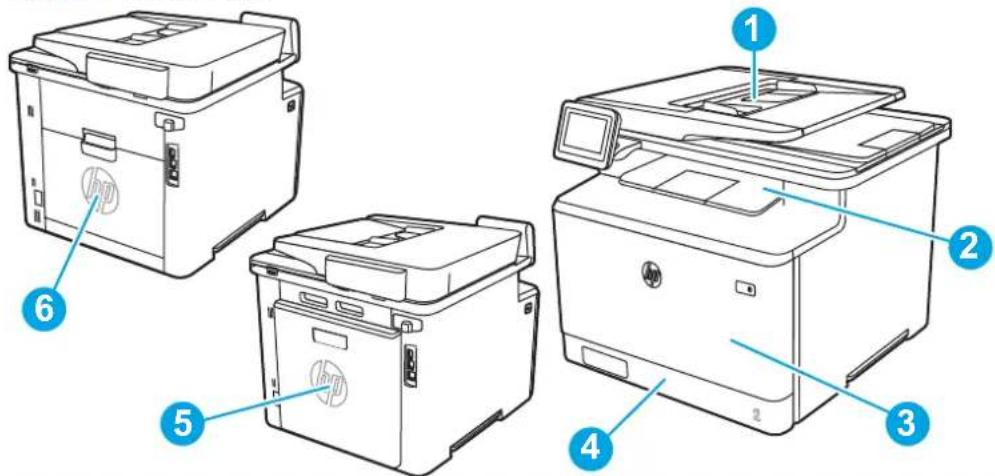
Number Description
1 Document feeder 2 Output bin 3 Tray 1 4 Tray 2 5 Rear door and fuser area 6 Duplexer (duplex models only)
Clear paper jams in the document feeder
Use the following procedure to check for paper in all possible jam locations related to the document feeder.
When a jam occurs, the control panel displays an animation that assists in clearing the jam.
- Open the document feeder cover.

- Remove any jammed paper.
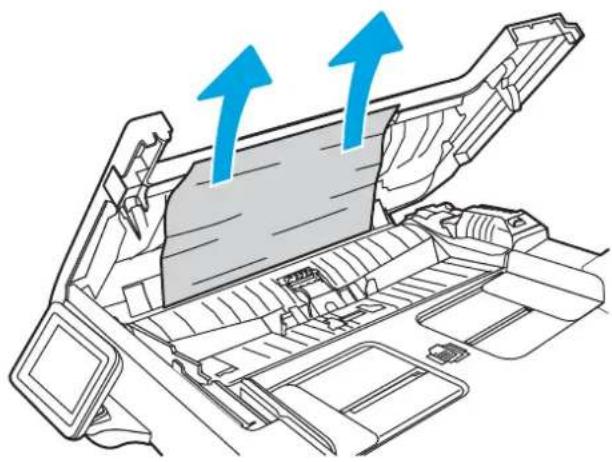
- Close the document feeder cover.

- Lift the document feeder input tray to provide better access to the document feeder output bin, and then remove any jammed paper from the output area.

- Open the scanner lid. If paper is jammed behind the white plastic backing, gently pull it out.
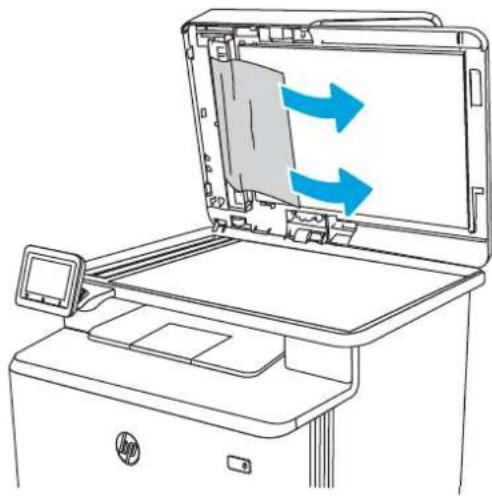
- Lower the scanner lid.
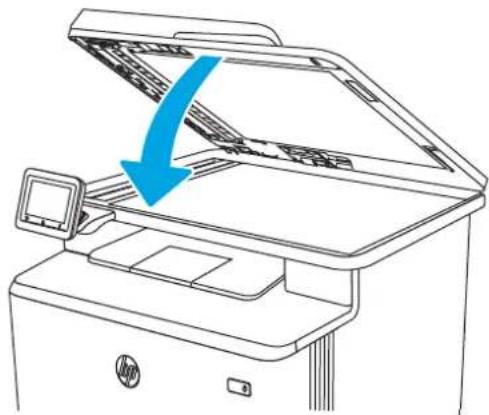
NOTE: To avoid jams, make sure the guides in the document feeder input tray are adjusted tightly against the document. Remove all staples and paper clips from original documents.
NOTE: Original documents that are printed on heavy, glossy paper can jam more frequently than originals that are printed on plain paper.
Clear paper jams in Tray 1 - 13.02
Use the following procedure to clear paper jams in Tray 1.
When a jam occurs, the control panel displays an animation that assists in clearing the jam.
NOTE: If the sheet tears, remove all fragments before resuming printing.
- If you can see the jammed sheet in Tray 1, remove the jammed sheet by pulling it straight out.
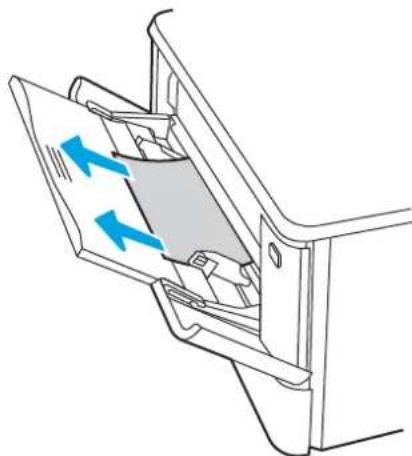
- If you cannot see the jammed sheet, close Tray 1, and then remove Tray 2.

- At the left side of the Tray 2 cavity, press the tab to lower the tray plate, and then remove any paper. Remove the jammed sheet by gently pulling it straight out.
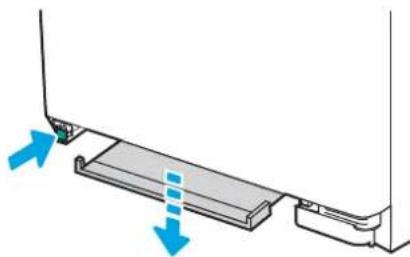
- Push the tray plate back up into place.
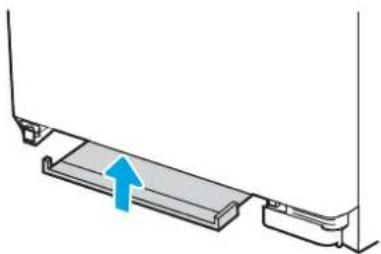
- Reinstall Tray 2.
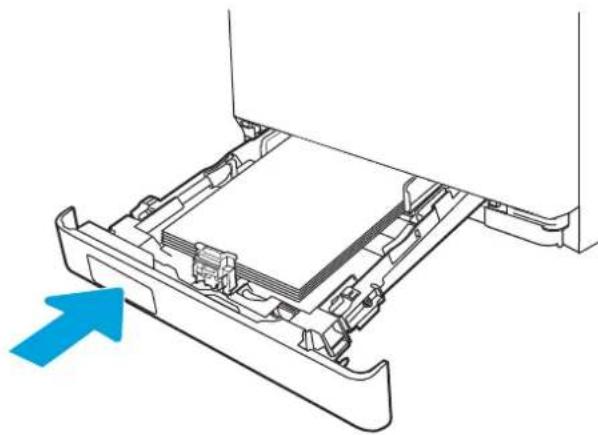
- Reopen Tray 1 and load paper into the tray.
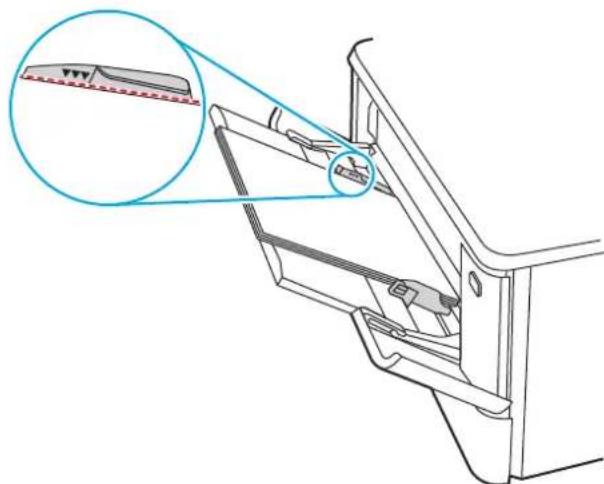
Clear paper jams in Tray 2 - 13.03
Use the following procedure to check for a paper jam in Tray 2.
When a jam occurs, the control panel displays an animation that assists in clearing the jam.
- Pull the tray completely out of the printer.

- Remove any jammed or damaged sheets of paper.
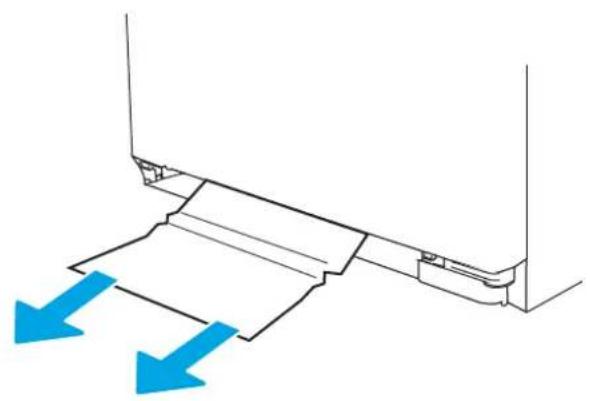
- Reinsert and close Tray 2.
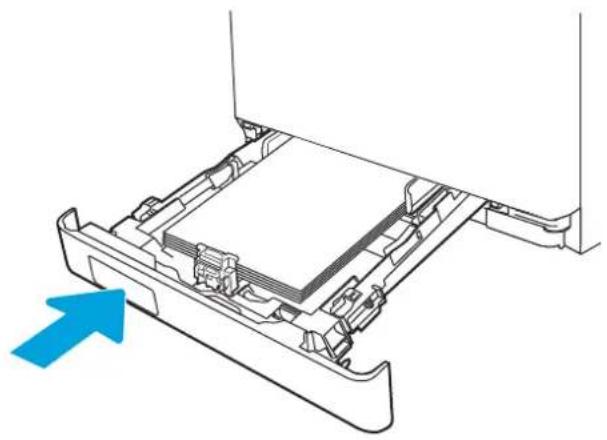

NOTE: When reinserting the paper, make sure the paper guides are adjusted properly for the paper size. For more information, see Load paper to Tray 2 on page 22.
Clear paper jams in the output bin - 13.10, 13.11, 13.12
Use the following procedure to check for paper in all possible jam locations related to the output bin.
When a jam occurs, the control panel displays an animation that assists in clearing the jam.
If paper is visible in the output bin, grasp the leading edge and remove it.

Clear paper jams in the duplexer (duplex models only) - 13.14, 13.15
Use the following procedure to check for paper in all possible jam locations in the automatic duplexer.
When a jam occurs, the control panel displays an animation that assists in clearing the jam.
- At the rear of the printer, open the duplexer.

- Remove any jammed or damaged sheets of paper.

CAUTION: The fuser is located above the rear door, and it is hot. Do not attempt to reach into the area above the rear door until the fuser is cool.
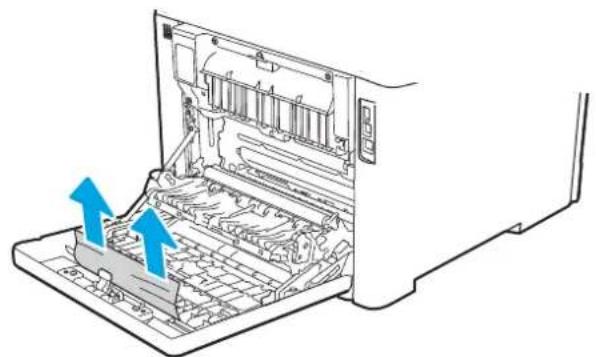
- Close the duplexer.
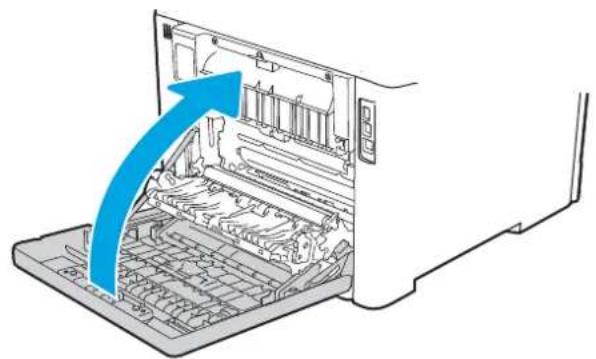
Clear paper jams in the toner cartridge or fuser area - 13.08, 13.09
Use the following procedure to check for paper in all possible jam locations in the toner cartridge or fuser area.
When a jam occurs, the control panel displays an animation that assists in clearing the jam.
- Open the rear door.

- Gently pull out any jammed paper from the rollers in the rear door area.
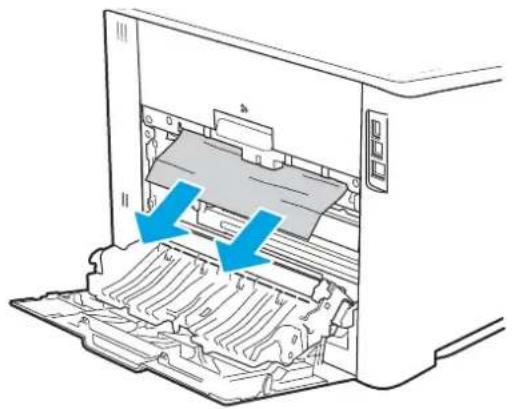
- Close the rear door.

Resolving print quality problems
Review the following information about resolving print quality problems.
Introduction - Troubleshoot print quality - Troubleshoot image defects
Introduction
Use the information below to troubleshoot print-quality problems, including issues with image quality and color quality.
The troubleshooting steps can help resolve the following defects:
- Blank pages
- Black pages
- Colors that do not align
- Curled paper
- Dark or light bands
- Dark or light streaks
- Fuzzy print
- Gray background or dark print
- Light print
- Loose toner
Missing toner
To resolve print-quality issues, try these steps in the order presented.
- Update the printer firmware • Print from a different software program
- Check the paper-type setting for the print job
- Check toner-cartridge status • Print a cleaning page • Visually inspect the toner cartridge or cartridges • Check paper and the printing environment • Try a different print driver Troubleshoot color quality
- Check the EconoMode settings
- Adjust print density
To troubleshoot specific image defects, see Troubleshoot Image Defects.
Update the printer firmware
Try upgrading the printer firmware.
See www.hp.com/support for more information.
Print from a different software program
Try printing from a different software program.
If the page prints correctly, the problem is with the software program from which you were printing.
Check the paper-type setting for the print job
Check the paper type setting when printing from a software program and the printed pages have smears, fuzzy or dark print, curled paper, scattered dots of toner, loose toner, or small areas of missing toner.
- Check the paper type setting on the printer • Check the paper type setting (Windows) • Check the paper type setting (macOS)
Check the paper type setting on the printer
Check the paper type setting on the printer control panel, and change the setting as needed.
- Open the tray.
- Verify that the tray is loaded with the correct type of paper.
- Close the tray.
- Follow the control panel instructions to confirm or modify the paper type settings for the tray.
Check the paper type setting (Windows)
Check the paper type setting for Windows, and change the setting as needed.
- From the software program, select the Print option.
- Select the printer, and then click the Properties or Preferences button.
- Click the Paper/Quality tab.
- From the Paper Type drop-down list, click the More... option.
- Expand the list of Type is: options.
- Expand the category of paper types that best describes your paper.
- Select the option for the type of paper you are using, and click the OK button.
- Click the OK button to close the Document Properties dialog box. In the Print dialog box, click the OK button to print the job.
Check the paper type setting (macOS)
Check the paper type setting for macOS, and change the setting as needed.
- Click the File menu, and then click the Print option.
- In the Printer menu, select the printer.
- Click Show Details or Copies & Pages.
- Open the menus drop-down list, and then click the Paper/Quality menu.
- Select a type from the Media Type drop-down list.
- Click the Print button.
Check toner-cartridge status
Follow these steps to check the estimated life remaining in the toner cartridges, and if applicable, the status of other replaceable maintenance parts.
• Step one: Print a supplies status page • Step two: Check supplies status
Step one: Print a supplies status page
Use the control panel menus to print a supplies status page.
- From the Home screen on the printer control panel, swipe the tab at the top of the screen downward to open the Dashboard, and then touch the Setup icon.
- Scroll to and touch Reports.
- Scroll to and touch Supplies Status Page to print the report.
Step two: Check supplies status
The supplies status page contains information about the cartridges and other replaceable maintenance parts.
- Look at the supplies status page to check the percent of life remaining for the toner cartridges, and if applicable, the status of other replaceable maintenance parts.
- Print quality problems can occur when using a toner cartridge that is at its estimated end of life. The supplies status page indicates when a supply level is very low.
- HP's Premium Protection Warranty expires when a message indicating that HP's Premium Protection Warranty on this supply has ended appears on the supplies status page or in the EWS.
- The toner cartridge does not need to be replaced now unless the print quality is no longer acceptable. Consider having a replacement cartridge available to install when print quality is no longer acceptable.
- If you determine that you need to replace a toner cartridge, or another replaceable maintenance part, the genuine HP part numbers are listed on the supplies status page.
- Check to see if you are using a genuine HP cartridge.
A genuine HP toner cartridge has "HP" on it, or it has the HP logo. For more information on identifying HP cartridges go to www.hp.com/go/learnaboutsupplies.
Print a cleaning page
During the printing process, paper, toner, and dust particles can accumulate inside the printer and can cause print-quality issues such as toner specks or spatter, smears, streaks, lines, or repeating marks.
Use the following procedure to print a cleaning page:
- From the Home screen on the printer control panel, swipe the tab at the top of the screen downward to open the Dashboard, and then touch the Setup icon
- Scroll to and touch the following menus:
- Printer Maintenance
- Print Quality Tools
- When prompted, load plain Letter or A4 size paper, and then touch OK.
A Cleaning message displays on the printer control panel. Wait until the process is complete. Discard the page that prints.
Visually inspect the toner cartridge or cartridges
Follow these steps to inspect each toner cartridge:
- Remove the toner cartridge from the printer, and verify that the sealing tape has been removed.
- Check the memory chip for damage.
- Examine the surface of the green imaging drum.

CAUTION: Do not touch the imaging drum. Fingerprints on the imaging drum can cause print-quality problems.
- If you see any scratches, fingerprints, or other damage on the imaging drum, replace the toner cartridge.
- Reinstall the toner cartridge and print a few pages to see if the problem has resolved.
Check paper and the printing environment
Use the following information to check the paper selection and the printing environment.
- Step one: Use paper that meets HP specifications • Step two: Check the environment • Step three: Set the individual tray alignment
Step one: Use paper that meets HP specifications
Some print-quality problems arise from using paper that does not meet HP specifications.
● Always use a paper type and weight that this printer supports. - Use paper that is of good quality and free of cuts, nicks, tears, spots, loose particles, dust, wrinkles, voids, staples, and curled or bent edges. - Use paper that has not been previously printed on. - Use paper that does not contain metallic material, such as glitter. - Use paper that is designed for use in laser printers. Do not use paper that is designed only for use in Inkjet printers. • Use paper that is not too rough. Using smoother paper generally results in better print quality.
Step two: Check the environment
The environment can directly affect print quality and is a common cause of print-quality or paper-feeding issues. Try the following solutions:
- Move the printer away from drafty locations, such as open windows or doors, or air-conditioning vents. • Make sure the printer is not exposed to temperatures or humidity outside of printer specifications.
- Do not place the printer in a confined space, such as a cabinet.
- Place the printer on a sturdy, level surface.
- Remove anything that is blocking the vents on the printer. The printer requires good air flow on all sides, including the top.
- Protect the printer from airborne debris, dust, steam, grease, or other elements that can leave residue inside the printer.
Step three: Set the individual tray alignment
Follow these steps when text or images are not centered or aligned correctly on the printed page when printing from specific trays.
- From the Home screen on the printer control panel, swipe the tab at the top of the screen downward to open the Dashboard, and then touch the Setup icon.
- Scroll to and open the following menus:
- Tray Management
- Image Adjust
- Select the tray to adjust, and then touch Print Test Page to print the report.
- Follow the instructions on the printed pages.
- Touch Print Test Page again to verify the results, and then make further adjustments if necessary.
Try a different print driver
Try a different print driver when printing from a software program and the printed pages have unexpected lines in graphics, missing text, missing graphics, incorrect formatting, or substituted fonts.
Download any of the following drivers from the HP Web site: www.hp.com/support/colorljM479MFP.
Table 9-3 Print drivers
| Driver Description | |
| HP PCL.6 driver | If available, this printer-specific print driver supports older operating systems like Windows XP and Windows Vista. For a list of supported operating systems, go towww.hp.com/go/support. |
| HP PCL 6 driver | This printer-specific print driver supports Windows 7 and newer operating systems that support version 3 drivers. For a list of supported operating systems, go towww.hp.com/go/support. |
| HP PCL-6 driver | This product-specific print driver supports Windows 8 and newer operating systems that support version 4 drivers. For a list of supported operating systems, go towww.hp.com/go/support. |
| HP UPD PS driver | Recommended for printing with Adobe software programs or with other highly graphics-intensive software programsProvides support for printing from Postscript emulation needs, or for Postscript flash font support |
| HP UPD PCL 6 | Recommended for printing in all Windows environmentsProvides the overall best speed, print quality, and printer feature support for most usersDeveloped to align with Windows Graphic Device Interface (GDI) for best speed in Windows environmentsMight not be fully compatible with third-party and custom software programs that are based on PCL 5 |
Troubleshoot color quality
Try the suggested steps if you have issues with color alignment or the quality of color images.
• Calibrate the printer to align the colors - Adjust color settings (Windows) • Print and interpret the print quality page
Calibrate the printer to align the colors
Calibration is a printer function that optimizes print quality, and can help resolve print-quality problems such as misaligned color, colored shadows, blurry graphics, or other print-quality issues.
- From the Home screen on the printer control panel, swipe the tab at the top of the screen downward to open the Dashboard, and then touch the Setup icon
- Scroll to and touch the following menus:
- Printer Maintenance
- Color Calibration
A Calibrating message will display on the printer control panel. The calibration process takes a few minutes to complete. Do not turn off the printer until the calibration process has finished.
- Wait while the printer calibrates, and then try printing again.
Adjust color settings (Windows)
When printing from a software program, follow these steps if colors on the printed page do not match colors on the computer screen, or if the colors on the printed page are not satisfactory.
- From the software program, select the Print option.
- Select the printer, and then click the Properties or Preferences button.
- Click the Color tab.
- Click the Print in Grayscale option to print a color document in black and shades of gray. Use this option to print color documents for photocopying or faxing. Also use this option to print draft copies or to save color toner.
- Click the OK button to close the Document Properties dialog box. In the Print dialog box, click the OK button to print the job.
Print and interpret the print quality page
Use the following procedure to print and interpret the print quality page.
- From the Home screen on the printer control panel, swipe the tab at the top of the screen downward to open the Dashboard, and then touch the Setup icon
- Scroll to and open the following menus:
- Reports
- Print Quality Report
3. Touch OK to print the page.
This page contains five bands of color, which are divided into four groups as indicated in the following illustration. By examining each group, you can isolate the problem to a particular toner cartridge.
Figure 9-8 Print quality page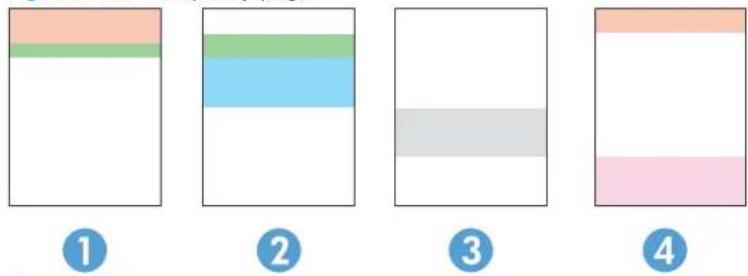
Section Toner cartridge
| 1 Yellow |
| 2 Cyan |
| 3 Black |
| 4 Magenta |
- If dots or streaks appear in only one of the groups, replace the toner cartridge that correlates with that group.
- If dots appear in more than one group, print a cleaning page. If this does not solve the problem, determine if the dots are always the same color; for example, if magenta dots appear in all five color bands. If the dots are all the same color, replace that toner cartridge.
- If streaks appear in multiple color bands, contact HP. A component other than the toner cartridge is probably causing the problem.
Check the EconoMode settings
HP does not recommend the full-time use of EconoMode. If EconoMode is used full-time, the toner supply might outlast the mechanical parts in the toner cartridge. If print quality begins to degrade and is no longer acceptable, consider replacing the toner cartridge.

NOTE: This feature is available with the PCL 6 print driver for Windows. If you are not using that driver, you can enable the feature by using the HP Embedded Web Server.
Follow these steps if the entire page is too dark or too light:
- From the software program, select the Print option.
- Select the printer, and then click the Properties or Preferences button.
- Click the Paper/Quality tab, and locate the Print Quality area.
- If the entire page is too dark, use these settings:
- Select the 600 dpi option, if available.
- Select the EconoMode check box to enable it.
If the entire page is too light, use these settings:
- Select the FastRes 1200 option, if available. Clear the EconoMode check box to disable it.
- Click the OK button to close the Document Properties dialog box. In the Print dialog, click the OK button to print the job.
Adjust print density
Adjust the print density when your printing results are too dense or too light in color.
Complete the following steps to adjust the print density:
- Open the HP Embedded Web Server:
a. From the Home screen on the printer control panel, touch the Wireless icon (P) or the Ethernet icon to view the printer's IP address or host name. b. Open a web browser, and in the address line, type the IP address or host name exactly as it displays on the printer control panel. Press the Enter key on the computer keyboard. The EWS opens.

https://10.10.XXXXX/

NOTE: If a message displays in the web browser indicating that the website might not be safe, select the option to continue to the website. Accessing this website will not harm the computer.
- On the EWS Home page, click the Tools tab.
- In the left navigation pane, click Utilities to expand the options, and then click Print Density.
- Under Print Density, adjust the setting as desired.
- Click Apply to save the changes.
Troubleshoot image defects
Review examples of image defects and steps to resolve these defects.
Table 9-4 Image defects table quick reference Defect Defect Defect
| AaBbCcAaBbCcAaBbCcAaBbCcAaBbCcAaBbCc | AaBbCcAaBbCcAaBbCcAaBbCcAaBbCcAaBbCcAaBbCc |
Table 9-6 Black page on page 150 Table 9-5 Banding defects on page 150 Table 9-14 Streak defects on page 156
Table 9-4 Image defects table quick reference (continued)
| Defect Defect Defect | ||
| Table 9-9 Fixing/fuser defects on page 152 | Table 9-11 Image placement defects on page 153 | Table 9-8 Color plane registrations defects (color models only) on page 151 |
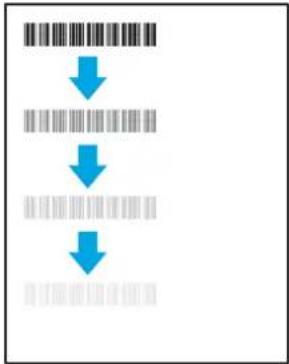 |  |  |
Table 9-13 Output defects on page 155

Image defects, no matter the cause, can often be resolved using the same steps. Use the following steps as a starting point for solving image defect issues.
- Reprint the document. Print quality defects can be intermittent in nature or can go away completely with continued printing.
- Check the condition of the cartridge or cartridges. If a cartridge is in a Very Low state (it has passed the rated life), replace the cartridge.
- Make sure that the driver and tray print mode settings match the media that is loaded in the tray. Try using a different ream of media or a different tray. Try using a different print mode.
- Make sure the printer is within the supported operating temperature/humidity range.
- Make sure that the paper type, size, and weight are supported by the printer. See the printer support page at support.hp.com for a list of the supported paper sizes and types for the printer.

NOTE: The term "fusing" refers to the part of the printing process where toner is affixed to paper.
The following examples depict letter-size paper that has passed through the printer with the short edge first.
Table 9-5 Banding defects
| Sample Description Possible solutions | ||
| Dark or light lines which repeat down the length of the page, and are wide-pitch and/or impulse bands. They might be sharp or soft in nature. The defect displays only in areas of fill, not in text or sections with no printed content. | 1. Reprint the document.2. Try printing from another tray.3. Replace the cartridge.4. Use a different paper type.5. Enterprise models only: From the Home screen on the printer control panel, go to theAdjust Paper Typesmenu, and then choose a print mode that is designed for a slightly heavier media than what you are using. This slows the print speed and might improve the print quality.6. If the issue persists, go tosupport.hp.com. | |
Table 9-6 Black page
| Sample Description Possible solutions | |
| The entire printed page is black. | |
| 1. Visually inspect the cartridge to check for damage. | |
| 2. Make sure that the cartridge is installed correctly. | |
| 3. Replace the cartridge. | |
| 4. If the issue persists, go tosupport.hp.com. | |
Table 9-7 Blank page — No print
| Sample Description Possible solutions | |
| The page is completely blank and contains no printed content. | |
| 1. Make sure that the cartridges are genuine HP cartridges. | |
| 2. Make sure that the cartridge is installed correctly. | |
| 3. Print with a different cartridge. | |
| 4. Check the paper type in the paper tray and adjust the printer settings to match. If necessary, select a lighter paper type. | |
| 5. If the issue persists, go tosupport.hp.com. | |
Table 9-8 Color plane registrations defects (color models only)
| Sample Description Possible solutions | ||
| One or more color plane(s) is not aligned with the other color planes. This registration error will typically occur with yellow. | 1. Reprint the document.2. From the printer control panel, calibrate the printer.3. If a cartridge has reached a Very Low state, or the printed output is severely faded, replace the cartridge.4. From the printer control panel use theRestore Calibrationfeature to reset the printer's calibration settings to the factory defaults.5. If the issue persists, go tosupport.hp.com. | |
Table 9-9 Fixing/fuser defects
| Sample Description Possible solutions | ||
 | Slight shadows or offsets of the image are repeated down the page. The repeated image might fade with each recurrence. | 1. Reprint the document.2. Check the paper type in the paper tray and adjust the printer settings to match. If necessary, select a lighter paper type.3. If the issue persists, go tosupport.hp.com. |
 | Toner rubs off along either edge of the page. This defect is more common at the edges of high-coverage jobs, and on light media types, but can occur anywhere on the page. | 1. Reprint the document.2. Check the paper type in the paper tray and adjust the printer settings to match. If necessary, select a heavier paper type.3. Enterprise models only: From the printer control panel, go to theEdge-to-Edgemenu and then selectNormal.Reprint the document.4. Enterprise models only: From the printer control panel, selectAuto Include Marginsand then reprint the document.5. If the issue persists, go tosupport.hp.com. |
Table 9-10 Gray background or dark print
| Sample Description Possible solutions | ||
| The image or text is darker than expected and/or the background is gray. | 1. Make sure that the paper in the trays has not already been run through the printer.2. Use a different paper type.3. Reprint the document.4. Mono models only: From the Home screen on the printer control panel, go to theAdjust Toner Densitymenu, and then adjust the toner density to a lower level.5. Make sure that the printer is within the supported operating temperature and humidity range.6. Replace the cartridge.7. If the issue persists, go tosupport.hp.com. | |
Table 9-11 Image placement defects
| Sample Description Possible solutions | ||
 | The image is not centered, or is skewed on the page. The defect occurs when the paper is not positioned properly as it is pulled from the tray and moves through the paper path. | 1. Reprint the document.2. Remove the paper and then reload the tray. Make sure that all the paper edges are even on all sides.3. Make sure that the top of the paper stack is below the tray-full indicator. Do not overfill the tray.4. Make sure that the paper guides are adjusted to the correct size for the paper. Do not adjust the paper guides tightly against the paper stack. Adjust them to the indentations or markings in the tray.5. If the issue persists, go tosupport.hp.com. |
Table 9-12 Light print
| Sample Description Possible solutions | ||
| The printed content is light or faded on the entire page. | 1. Reprint the document.2. Remove the cartridge, and then shake it to redistribute the toner.3. Mono models only: Make sure that the EconoMode setting is disabled, both at the printer control panel and in the print driver.4. Make sure that the cartridge is installed correctly.5. Print a Supplies Status Page and check the life and usage of the cartridge.6. Replace the cartridge.7. If the issue persists, go tosupport.hp.com. | |
Table 9-13 Output defects
| Sample Description Possible solutions | ||
 | Printed pages have curled edges. The curled edge can be along the short or long side of the paper. Two types of curl are possible:Positive curl: The paper curls toward the printed side. The defect occurs in dry environments or when printing high-coverage pages.Negative curl: The paper curls away from the printed side. The defect occurs in high-humidity environments or when printing low-coverage pages. | 1. Reprint the document.2. Positive curl: From the printer control panel, select a heavier paper type. The heavier paper type creates a higher temperature for printing.Negative curl: From the printer control panel, select a lighter paper type. The lighter paper type creates a lower temperature for printing. Try storing the paper in a dry environment prior to use, or use freshly opened paper.3. Print in duplex mode.4. If the issue persists, go tosupport.hp.com. |
 | The paper does not stack well in the output tray. The stack might be uneven, skewed, or the pages might be pushed out of the tray and onto the floor. Any of the following conditions can cause this defect:Extreme paper curlThe paper in the tray is wrinkled or deformedThe paper is a non-standard papertype, such as envelopesThe output tray is too full | 1. Reprint the document.2. Extend the output bin extension.3. If the defect is caused by extreme paper curl, refer to the troubleshooting steps for "Output curl."4. Use a different paper type.5. Use freshly opened paper.6. Remove the paper from the output tray before the tray gets too full.7. If the issue persists, go tosupport.hp.com. |
Table 9-14 Streak defects
| Sample Description Possible solutions | ||
 | Light vertical streaks that usually span the length of the page. The defect displays only in areas of fill, not in text or sections with no printed content. | 1. Reprint the document.2. Remove the cartridge, and then shake it to redistribute the toner.3. If the issue persists, go tosupport.hp.com.NOTE: Both light and dark vertical streaks can occur when the printing environment is outside the specified range for temperature or humidity. Refer to your printer's environmental specifications for allowable temperature and humidity levels. |
 | Dark vertical lines which occur down the length of the page. The defect might occur anywhere on the page, in areas of fill or in sections with no printed content. On color models, these lines or streaks will also be visible on the ITB cleaning page. | 1. Reprint the document.2. Remove the cartridge, and then shake it to redistribute the toner.3. Print a cleaning page.4. Check the toner level in the cartridge.5. If the issue persists, go tosupport.hp.com. |
Improve copy and scan image quality
Learn how to improve the quality of copies and scanned images, and how to properly clean the scanner glass.
Introduction - Check the scanner glass for dirt and smudges - Check the paper settings - Check the image adjustment settings - Optimize for text or pictures - Check the scanner resolution and color settings on the computer - Edge-to-edge copying - Clean the pickup rollers and separation pad in the document feeder
Introduction
If the printer is having image quality problems, try the following solutions in the order presented to resolve the issue.
Try these few simple steps first:
- Use the flatbed scanner rather than the document feeder.
- Use high-quality originals.
- When using the document feeder, load the original document into the feeder correctly, using the paper guides, to avoid unclear or skewed images.
If the problem still exists, try these additional solutions. If they do not fix the problem, see "Improve print quality" for further solutions.
Check the scanner glass for dirt and smudges
Over time, specks of debris might collect on the scanner glass and white plastic backing, which can affect performance. Use the following procedure to clean the scanner.
- Press the Power button to turn off the printer, and then disconnect the power cable from the electrical outlet.
- Open the scanner lid.
- Clean the scanner glass and the white plastic backing underneath the scanner lid with a soft cloth or sponge that has been moistened with nonabrasive glass cleaner.

CAUTION: Do not use abrasives, acetone, benzene, ammonia, ethyl alcohol, or carbon tetrachloride on any part of the printer; these can damage the printer. Do not place liquids directly on the glass or platen. They might seep and damage the printer.
- Dry the glass and white plastic parts with a chamois or a cellulose sponge to prevent spotting.
- Connect the power cable to an outlet, and then press the Power button to turn on the printer.
Check the paper settings
Follow these steps to check the paper settings on the printer control panel.
- From the Home screen on the printer control panel, swipe the tab at the top of the screen downward to open the Dashboard, and then touch the Setup icon
- Scroll to and touch Paper Setup, and then touch the name of the tray you are printing from.
- Touch Paper Size, and then touch the paper size option that matches the size of paper in the tray.
- Touch Paper Type, and then touch the paper type option that matches the type of paper in the tray.
Check the image adjustment settings
To improve copy quality, adjust the image settings using the printer control panel.
- From the Home screen on the printer control panel, touch the Copy icon.
- Touch the Document or ID Card icon.
- Touch the Settings icon ⚙, and then scroll to and touch the following menu items to adjust the settings: ●Quality: Choose the output quality for the image. ●Lighter/Darker: Adjust the lightness/darkness setting. ●Enhancements: Choose an image enhancement option. • Binding Margin: Turn the binding margin setting on or off.
- Touch the Back button ↩ to return to the main copy menu, and then touch Copy to begin copying.
Optimize for text or pictures
Follow these steps to optimize the scan or copy for text or pictures.
- From the Home screen on the printer control panel, touch the Copy icon.
- Touch the Document or ID Card icon.
- Touch the Settings icon ⚙️, and then scroll to and touch Enhancements.
- Touch one of the following options depending on the type of document you are copying:
- None: Use this setting when you are not concerned about the quality of the copy. This is the default setting.
- Text: Use this setting for documents that contain mostly text. • Photo: Use this setting for photos or documents that contain mostly graphics.
- Mixed: Use this setting for documents that contain a mixture of text and graphics.
Check the scanner resolution and color settings on the computer.
If you are printing a scanned image, and the quality is not what you expected, you might have selected a resolution or color setting in the scanner software that does not match your needs. Resolution and color affect the following features of scanned images:
• Resolution and color guidelines Color - Image clarity • Texture of gradations (smooth or rough) - Scan time - File size
Scanning resolution is measured in pixels per inch (ppi).

NOTE: Scanning ppi levels are not interchangeable with printing dpi (dots per inch) levels.
Color, grayscale, and black and white define the number of colors possible. You can adjust the scanner hardware resolution for up to 1200 ppi.
The resolution and color guidelines table lists simple tips that you can follow to meet your scanning needs.

NOTE: Setting the resolution and color to a high value can create large files that take up disk space and slow the scanning process. Before setting the resolution and color, determine how you are going to use the scanned image.
Resolution and color guidelines
The following table describes the recommended resolution and color settings for different types of scan jobs.

NOTE: The default resolution is 200 ppi.
Table 9-15 Resolution and color guidelines
| Intended use Recommended resolution Recommended color settings | |
| Fax 150 ppi • Black and White | |
| Email 150 ppi • Black and White, if the image does not require smooth gradation• Grayscale, if the image requires smooth gradation• Color, if the image is in color | |
| Edit text 300 ppi • Black and White |
Table 9-15 Resolution and color guidelines (continued)
| Intended use Recommended resolution Recommended color settings | |
| Print (graphics or text) 600 ppi for complex graphics, or if you want to significantly enlarge the document | Black and White for text and line artGrayscale for shaded or colored graphics and photosColor, if the image is in color |
| 300 ppi for normal graphics and text | |
| 150 ppi for photos | |
| Display on screen 75 ppi • Black and White for text | Grayscale for graphics and photosColor, if the image is in color |
Color
You can set the color values to the following settings when scanning.
Table 9-16 Color settings
| Setting Recommended use | |
| Color Use this setting for high-quality color photos or documents in which the color is important. | |
| Black and White Use this setting for text documents. | |
| Grayscale | Use this setting when file size is an issue or when you want to scan a document or photograph quickly. |
Edge-to-edge copying
The printer cannot print fully edge-to-edge. There is a 4 mm (1/6 inch) unprintable border around the page.
Considerations for printing or scanning documents with cropped edges:
- When the original is smaller than the output size, move the original 4 mm (1/6 inch) away from the corner indicated by the icon on the scanner. Recopy or scan in this position.
- When the original is the size of the printed output that you want, use the Reduce/Enlarge feature to reduce the image so the copy is not cropped.
Clean the pickup rollers and separation pad in the document feeder
If the document feeder experiences paper handling problems, such as jams or multiple-page feeds, clean the document feeder rollers and separation pad.
- Open the document feeder access cover.

- Use a moist, lint-free cloth to wipe both pickup rollers and the separation pad to remove dirt.
CAUTION: Do not use abrasives, acetone, benzene, ammonia, ethyl alcohol, or carbon tetrachloride on any part of the printer; these can damage the printer.

- Close the document feeder access cover.
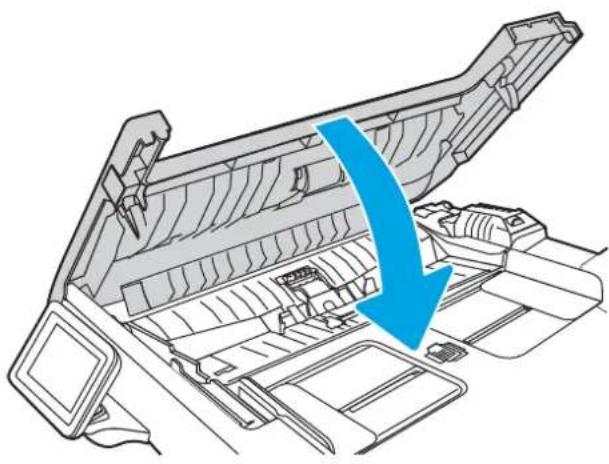
Improve fax image quality
Review the following information to improve fax image quality.
Introduction - Check the scanner glass for dirt and smudges - Check the send-fax resolution settings - Check the Error Correction Mode setting - Send to a different fax machine - Check the sender's fax machine
Introduction
If the printer is having image quality problems, try the following solutions in the order presented to resolve the issue.
Try these few simple steps first:
- Use the flatbed scanner rather than the document feeder.
- Use high-quality originals.
- When using the document feeder, load the original document into the feeder correctly, using the paper guides, to avoid unclear or skewed images.
If the problem still exists, try these additional solutions. If they do not fix the problem, see "Improve print quality" for further solutions.
Check the scanner glass for dirt and smudges
Over time, specks of debris might collect on the scanner glass and white plastic backing, which can affect performance. Use the following procedure to clean the scanner.
- Press the Power button to turn off the printer, and then disconnect the power cable from the electrical outlet.
- Open the scanner lid.
- Clean the scanner glass and the white plastic backing underneath the scanner lid with a soft cloth or sponge that has been moistened with nonabrasive glass cleaner.
CAUTION: Do not use abrasives, acetone, benzene, ammonia, ethyl alcohol, or carbon tetrachloride on any part of the printer; these can damage the printer. Do not place liquids directly on the glass or platen. They might seep and damage the printer.
- Dry the glass and white plastic parts with a chamois or a cellulose sponge to prevent spotting.
- Connect the power cable to an outlet, and then press the Power button to turn on the printer.
Check the send-fax resolution settings
If the printer was unable to send a fax because the receiving fax machine did not answer or was busy, the printer attempts to redial based on the redial-on-busy, redial-on-no-answer, and redial-on-communication-error options.
- From the Home screen on the printer control panel, swipe right and touch the Fax icon.
- Touch Send Now, and then touch the Settings icon.
- Touch Resolution, and then touch the desired setting.
Try the Standard resolution setting if the fax will not send with a higher resolution.
Check the Error Correction Mode setting
Usually, the printer monitors the signals on the telephone line while it is sending or receiving a fax. If the printer detects an error during the transmission and the Error Correction Mode setting is On, the printer can request that the portion of the fax be resent. The factory-set default for error correction is On.
You should turn off error correction only if you are having trouble sending or receiving a fax, and you are willing to accept the errors in the transmission. Turning off the setting might be useful when you are trying to send a fax overseas or receive one from overseas, or if you are using a satellite telephone connection.
- From the Home screen on the printer control panel, swipe right and then touch the Fax icon.
- Swipe right and touch the Setup icon.
- Touch Preferences.
- Scroll to Error Correction Mode and then touch the button to turn the setting off or on.
Send to a different fax machine
Try sending the fax to a different fax machine. If the fax quality is better, the problem is related to the initial recipient's fax machine settings or supplies status.
Check the sender's fax machine
Ask the sender to try sending from a different fax machine. If the fax quality is better, the problem is with the sender's fax machine. If a different fax machine is unavailable, ask the sender to consider making the following changes:
- Make sure the original document is on white (not colored) paper.
- Increase the fax resolution, quality level, or contrast settings.
- If possible, send the fax from a computer software program.
Solve wired network problems
Check the following information to resolve wired network issues.
Introduction • Poor physical connection • The computer is using the incorrect IP address for the printer • The computer is unable to communicate with the printer • The printer is using incorrect link and duplex settings for the network • New software programs might be causing compatibility problems • The computer or workstation might be set up incorrectly • The printer is disabled, or other network settings are incorrect
Introduction
Certain types of problems can indicate there is a network communication problem. These problems include the following issues:
Poor physical connection
Check the cable connections.
- Verify that the printer is attached to the correct network port using a cable of the correct length.
- Verify that cable connections are secure.
- Look at the network port connection on the back of the printer, and verify that the amber activity light flashes indicating network traffic, and the green link-status light is continuously lit indicating a network link.
- If the problem continues, try a different cable or port on the hub.
The computer is using the incorrect IP address for the printer
If the computer is using the incorrect IP address for the printer, try these solutions.
- Open the printer properties and click the Ports tab. Verify that the current IP address for the printer is selected. The printer IP address is listed on the printer configuration page.
- If you installed the printer using the HP standard TCP/IP port, select the check box next to Always print to this printer, even if its IP address changes.
- If you installed the printer using a Microsoft standard TCP/IP port, use the hostname instead of the IP address.
- If the IP address is correct, delete the printer and then add it again.
The computer is unable to communicate with the printer.
Verify that the printer is communicating with the network and your computer.
- Test network communication by pinging the network.
a. Open a command-line prompt on your computer.
- For Windows, click Start, click Run, type cmd, and then press Enter.
- For macOS, go to Applications, then Utilities, and open Terminal.
b. Type ping followed by the IP address for your printer.
c. If the window displays round-trip times, the network is working.
- If the ping command failed, verify that the network hubs are on, and then verify that the network settings, the printer, and the computer are all configured for the same network (also known as subnet).
- If the network is working, make sure that the computer is using the correct IP address for the printer.
a. Open the printer properties and click the Ports tab. Verify that the current IP address for the printer is selected. The printer IP address is listed on the printer configuration page.
b. If you installed the printer using the HP standard TCP/IP port, select the box labeled Always print to this printer, even if its IP address changes.
c. If you installed the printer using a Microsoft standard TCP/IP port, use the printer's hostname instead of the IP address.
d. If the IP address is correct, delete the printer and then add it again.
The printer is using incorrect link and duplex settings for the network.
HP recommends leaving these settings in automatic mode (the default setting). If you change these settings, you must also change them for your network.
New software programs might be causing compatibility problems.
Verify that any new software programs are correctly installed and that they use the correct print driver.
The computer or workstation might be set up incorrectly.
An incorrectly configured computer can cause issues with printing.
- Check the network drivers, print drivers, and the network redirection settings.
- Verify that the operating system is configured correctly.
The printer is disabled, or other network settings are incorrect.
Check the network settings.
- Review the printer's configuration/networking pages to check the status of the network settings and protocols.
- Reconfigure the network settings if necessary.
Solve wireless network problems.
To resolve network issues, try these steps in the order presented.
Introduction • Wireless connectivity checklist • The printer does not print after the wireless configuration completes • The printer does not print, and the computer has a third-party firewall installed • The wireless connection does not work after moving the wireless router or printer • Cannot connect more computers to the wireless printer • The wireless printer loses communication when connected to a VPN • The network does not appear in the wireless networks list • The wireless network is not functioning • Perform a wireless network diagnostic test • Reduce interference on a wireless network
Introduction
Use the troubleshooting information to help resolve issues.

NOTE: To determine whether Wi-Fi Direct printing is enabled on your printer, print a configuration page from the printer control panel.
Wireless connectivity checklist
Review the following information to check wireless connectivity.
- Verify that the network cable is not connected.
- Verify that the printer and the wireless router are turned on and have power. Also make sure that the wireless radio in the printer is turned on.
- Verify that the service set identifier (SSID) is correct. Print a configuration page to determine the SSID. If you are not sure the SSID is correct, run the wireless setup again.
- With secured networks, verify that the security information is correct. If the security information is incorrect, run the wireless setup again.
- If the wireless network is working correctly, try accessing other computers on the wireless network. If the network has Internet access, try connecting to the Internet over a wireless connection.
- Verify that the encryption method (AES or TKIP) is the same for the printer as it is for the wireless access point (on networks using WPA security).
- Verify that the printer is within the range of the wireless network. For most networks, the printer must be within 30 m (100 ft) of the wireless access point (wireless router).
- Verify that obstacles do not block the wireless signal. Remove any large metal objects between the access point and the printer. Make sure poles, walls, or support columns containing metal or concrete do not separate the printer and wireless access point.
- Verify that the printer is located away from electronic devices that might interfere with the wireless signal. Many devices can interfere with the wireless signal, including motors, cordless phones, security system cameras, other wireless networks, and some Bluetooth devices.
- Verify that the print driver is installed on the computer.
- Verify that you have selected the correct printer port.
- Verify that the computer and printer connect to the same wireless network.
- For macOS, verify that the wireless router supports Bonjour.
The printer does not print after the wireless configuration completes.
If the printer does not print after the wireless configuration completes, try these solutions.
- Make sure that the printer is turned on and in the ready state.
- Turn off any third-party firewalls on your computer.
- Make sure that the wireless network is working correctly.
- Make sure that your computer is working correctly. If necessary, restart the computer.
- Verify that you can open the printer HP Embedded Web Server from a computer on the network.
The printer does not print, and the computer has a third-party firewall installed.
If the printer does not print, and the computer has a third-party firewall installed, try these solutions.
- Update the firewall with the most recent update available from the manufacturer.
- If programs request firewall access when you install the printer or try to print, make sure you allow the programs to run.
- Temporarily turn off the firewall, and then install the wireless printer on the computer. Enable the firewall when you have completed the wireless installation.
The wireless connection does not work after moving the wireless router or printer
If the wireless connection does not work after moving the wireless router or printer, try these solutions.
- Make sure that the router or printer connects to the same network that your computer connects to.
- Print a configuration page.
- Compare the service set identifier (SSID) on the configuration page to the SSID in the printer configuration for the computer.
- If the numbers are not the same, the devices are not connecting to the same network. Reconfigure the wireless setup for the printer.
Cannot connect more computers to the wireless printer
If additional computers cannot connect to the wireless printer, try these solutions.
- Make sure that the other computers are within the wireless range and that no obstacles block the signal. For most networks, the wireless range is within 30 m (100 ft) of the wireless access point.
- Make sure that the printer is turned on and in the ready state.
- Make sure there are not more than 5 concurrent Wi-Fi Direct users.
- Turn off any third-party firewalls on your computer.
- Make sure that the wireless network is working correctly.
- Make sure that your computer is working correctly. If necessary, restart the computer.
The wireless printer loses communication when connected to a VPN
Typically, you cannot connect to a VPN and other networks at the same time.
The network does not appear in the wireless networks list
If the network does not appear in the wireless networks list, try these solutions.
- Make sure the wireless router is turned on and has power.
- The network might be hidden. However, you can still connect to a hidden network.
The wireless network is not functioning
If the wireless network is not functioning, try these solutions.
- Make sure that the network cable is not connected.
- To verify if the network has lost communication, try connecting other devices to the network.
- Test network communication by pinging the network.
a. Open a command-line prompt on your computer.
- For Windows, click Start, click Run, type cmd, and then press Enter.
- For macOS, go to Applications, then Utilities, and open Terminal.
b. Type ping followed by the router IP address.
c. If the window displays round-trip times, the network is working.
- Make sure that the router or printer connects to the same network that the computer connects to.
a. Print a configuration page. b. Compare the service set identifier (SSID) on the configuration report to the SSID in the printer configuration for the computer. c. If the numbers are not the same, the devices are not connecting to the same network. Reconfigure the wireless setup for the printer.
Perform a wireless network diagnostic test
From the printer control panel, you can run a diagnostic test that provides information about the wireless network settings.
- From the Home screen on the printer control panel, swipe the tab at the top of the screen downward to open the Dashboard, and then touch the Setup icon
- Scroll to and touch Reports.
- Scroll to and touch Wireless Test Report.
The printer prints a test page that shows test results.
Reduce interference on a wireless network
The following tips can reduce interference in a wireless network:
- Keep the wireless devices away from large metal objects, such as filing cabinets, and other electromagnetic devices, such as microwaves and cordless telephones. These objects can disrupt radio signals.
- Keep the wireless devices away from large masonry structures and other building structures. These objects can absorb radio waves and lower signal strength.
- Position the wireless router in a central location in line of sight with the wireless printers on the network.
Solve fax problems
Use the following information to solve fax problems.
Introduction • Fax troubleshooting checklist - Solve general fax problems
Introduction
Use the fax troubleshooting information to help resolve issues.
Fax troubleshooting checklist
After each recommended action, retry faxing to see if the problem is resolved.
For best results during fax problem solving, make sure the line from the printer is connected directly to the wall phone port. Disconnect all other devices that are connected to the printer.
- Verify that the telephone cord is connected to the correct port on the back of the printer.
- Check the phone line by using the fax test:
a. From the Home screen on the printer control panel, swipe the tab at the top of the screen downward to open the Dashboard, and then touch the Setup icon.
b. Scroll to and open the following menus:
- Fax Setup
- Tools
- Run Fax Test
The printer prints a fax test report. The report contains the following possible results:
• Pass: The report contains all of the current fax settings for review. - Fail: The report indicates the nature of the error and contains suggestions for how to resolve the issue.
- Verify that the printer firmware is current:

NOTE: To determine the current firmware version on your printer, print a Printer Status Report from the printer control panel, and then look on the report to find the firmware date code. Then visit the HP product support page (using the steps below) and compare the firmware date code to the latest firmware version that is available from HP. If there is a newer version available, follow the steps below to update the firmware on your printer.
a. Go to www.hp.com/go/support, click the Drivers & Software link, type the printer name in the search field, press the ENTER button, and then select the printer from the list of search results. b. Select the operating system. c. Under the Firmware section, locate the Firmware Update Utility.

NOTE: Make sure to use the firmware update utility that is specific to the printer model.
d. Click Download, click Run, and then click Run again. e. When the utility launches, select the printer from the drop-down list, and then click Send Firmware. f. Follow the on-screen instructions to complete the installation, and then click the Exit button to close the utility.
- Verify that the fax was set up when the printer software was installed.
From the computer, in the HP program folder, run the Fax Setup Utility.
- Verify that the telephone service supports analog fax.
- If using ISDN or digital PBX, contact your service provider for information about configuring to an analog fax line.
- If using a VoIP service, change the Fax Speed setting to Speed-Slow (9600 bps). From the control panel Home Screen, select Fax, select Setup, and then select Preferences.
- Ask if your service provider supports fax, and what the recommended fax modem speed is. Some companies might require an adapter.
- If you are using a DSL service, make sure that a filter is included on the phone-line connection to the printer. Contact the DSL service provider, or purchase a DSL filter if you do not have one. If a DSL filter is installed, try another filter because filters can be defective.
Solve general fax problems
Review suggestions and tips for resolving various fax-related issues.
• Faxes are sending slowly • Fax quality is poor • Fax cuts off or prints on two pages
Faxes are sending slowly
The printer is experiencing poor phone line quality.
Try the following suggestions to resolve the issue:
- Try resending the fax when the line conditions have improved.
- Check with the phone service provider to verify that the line supports fax.
• Turn off the Error Correction Mode setting:
- From the Home screen on the printer control panel, swipe right and then touch the Fax icon.
- Swipe right and touch the Setup icon.
- Touch Preferences.
- Scroll to Error Correction Mode and then touch the button to turn off the setting.
NOTE: This can reduce image quality.
- Use white paper for the original. Do not use colors such as gray, yellow, or pink.
- Increase the Fax Speed setting:
- From the Home screen on the printer control panel, swipe right and then touch the Fax icon.
- Swipe right and touch the Setup icon.
- Touch Preferences, and then scroll to and touch Speed.
- Touch the desired speed setting.
- Divide large fax jobs into smaller sections, and then fax them individually.
Fax quality is poor
Faxes are blurry or too light.
Try the following suggestions to resolve the issue:
- Increase fax resolution when sending faxes:
NOTE: Resolution does not affect received faxes.
- From the Home screen on the printer control panel, swipe right and then touch the Fax icon.
- Touch the Send Now icon.
- Touch the Settings icon ⚙, and then touch Resolution.
- Touch the desired resolution setting.

NOTE: Increasing resolution slows transmission speed.
• Turn on the Error Correction Mode setting:
- From the Home screen on the printer control panel, swipe right and then touch the Fax icon.
- Swipe right and touch the Setup icon.
- Touch Preferences.
- Scroll to Error Correction Mode and then touch the button to turn on the setting.
- Check the toner cartridges and replace if necessary.
- Ask the sender to darken the contrast setting on the sending fax machine, and then resend the fax.
Fax cuts off or prints on two pages
If the paper size settings on the printer do not match the paper size of the document being faxed, the received fax might be missing content, or it could print on two pages.
Try the following suggestions to resolve the issue:
- Set the Default Paper Size setting:

NOTE: Faxes print on a single size of paper based on the Default Paper Size settings.
- From the Home screen on the printer control panel, swipe the tab at the top of the screen downward to open the Dashboard, and then touch the Setup icon.
- Scroll to and open the following menus:
- Tray Management
- Tray Assignment
- Default Paper Size
- Touch the desired paper size from the list of options.
- Set the paper type and size for the tray that is used for faxes.
Symbols/Numerics
550-sheet paper trays
part numbers 34
A
accessories
ordering 34
part numbers 34
acoustic specifications 14
Address Book
set up 78
AirPrint 64, 67
Android devices
printing from 64, 67
applications
downloading 103
Apps menu 103
B
bin, output locating 4
browser requirements
HP Embedded Web Server 105
C
calibrate colors 145
cartridge dynamic security 36
replacing 44
cartridge policy 37, 38
cartridge protection 37, 41
cartridges
cartridge policy 37, 38
cartridge protection 37, 41
cartridges
order numbers 44
checklist
fax troubleshooting 171
wireless connectivity 167
cleaning
glass 157, 163
paper path 139
color options
changing, Windows 145
color theme
changing, Windows 145
colors
calibrate 145
Contact Lists
set up 78
control panel
help 118
locating 4
locating features 6
copying
edges of documents 157, 160
multiple copies 69
optimizing for text or pictures 157
setting paper size and type 157
single copies 69
two-sided documents 70
customer support
online 117
D
deleting
stored jobs 58, 63
dimensions, printer 12
document feeder 70
copying two-sided documents 70
faxing from 95
jams 128
paper-feeding problems 126
double-sided copying 70
double-sided printing
Mac 55
Windows 52
drivers, supported 10
duplex 70
duplex printing
Mac 55
duplex printing (double-sided)
settings (Windows) 52
Windows 52
duplexer
clear jams 135
duplexing
automatically (Windows) 52
manually (Mac) 55
manually (Windows) 52
dynamic security
toner cartridge 36
E
EconoMode setting 113, 139
economy settings 113
electrical specifications 14
electronic faxes
sending 95
Embedded Web Server (EWS)
assigning passwords 112
features 105
envelopes
orientation 19, 31
envelopes, loading 31
Ethernet (RJ-45)
locating 5
F
fax
sending from software 95
solve general problems 171, 173
speed dials 95, 100
fax port
locating 5
fax troubleshooting
checklist 171
faxing
from a computer (Windows) 95
from the document feeder 95
from the flatbed scanner 95
firmware
updating 115
fuser
jams 136
G
genuine HP cartridges 37, 38
glass, cleaning 157, 163
H
Help button
locating 6
help, control panel 118
Home button
locating 6
HP Customer Care 117
HP Easy Scan Software (macOS) 74
HP Embedded Web Server (EWS) features 105
HP ePrint 66
HP EWS, using 105
HP Printer Home Page, using 105
HP Scan software (Windows) 73
HP Web Jetadmin 114
HP Web Services
applications 103
enabling 103
|
image quality
check toner-cartridge status 139, 141
image quality issues
examples and solutions 138
interface ports
locating 5
IP network settings
configure 109
J
jams
causes of 127
document feeder 128
duplexer 135
fuser 136
locations 128
output bin 128, 135
Tray 1 131
Tray 2 133
Jetadmin, HP Web 114
jobs, stored
creating (Windows) 58
deleting 58, 63
Mac settings 58
printing 58
L
LAN port
locating 5
loading
paper in Tray 1 18
paper in Tray 2 22
paper in Tray 3 27
local area network (LAN)
locating 5
M
Mac driver settings
Job Storage 58
manual duplex
Mac 55
Windows 52
memory
included 9
memory chip (toner)
locating 44
Microsoft Word, faxing from 95
mobile printing
Android devices 64, 67
mobile printing, software supported 12
multiple pages per sheet
printing (Mac) 55
printing (Windows) 52
N
network settings 109
networks
HP Web Jetadmin 114
supported 9
number of copies, changing 69
0
on/off button
locating 4
online help, control panel 118
online support 117
Open source license 3
operating systems, supported 10
ordering
supplies and accessories 34
output bin
clear jams 128, 135
locating 4
P
pages per minute 9
pages per sheet
selecting (Mac) 55
selecting (Windows) 52
paper
jams 127
loading Tray 1 18
loading Tray 2 22
loading Tray 3 27
selecting 139, 143
Tray 1 orientation 19
Tray 2 orientation 24
Tray 3 orientation 29
paper jams
document feeder 128
duplexer 135
fuser 136
locations 128
output bin 128, 135
Tray 1 131
Tray 2 133
paper pickup problems
solving 122, 124
paper trays
part numbers 34
paper type
selecting (Windows) 52
paper types
selecting (Mac) 55
paper, ordering 34
part numbers
accessories 34
replacement parts 36
supplies 34
toner cartridges 34
phone book, fax adding entries 95, 100
ports locating 5
potential shock hazard 2
power consumption 14
power connection locating 5
power switch locating 4
print drivers, supported 10
print on both sides Mac 55 manually, Windows 52 Windows 52
printing from USB flash drives 68 stored jobs 58
printing on both sides settings (Windows) 52
private printing 58
product number locating 4
protect cartridges 37, 41
R
replacement parts part numbers 36
replacing toner cartridges 44
RJ-45 port locating 5
S
scan setup scan to computer 84 scan to email 75 scan to network folder 79 scan to SharePoint 83
Scan to Email set up with EWS 78
scanner faxing from 95 glass cleaning 157, 163
scanning from HP Easy Scan Software (macOS) 74 from HP Scan software (Windows) 73
to computer 86 to email 85 to network folder 85 to SharePoint 86 to USB drive 84
security features 112
sending faxes from software 95
serial number locating 4
shut down after delay setting 113
Sign In button locating 6
Sign Out button, locating 6
sleep delay setting 113
software sending faxes 95
solve problems fax 171, 173
specifications electrical and acoustic 14 printer 9
speed dials deleting entries 100 editing entries 100 programming 95
Start Copy button, locating 6
storage, job Mac settings 58
store print jobs 58
stored jobs creating (Mac) 58 creating (Windows) 58 deleting 58, 63 printing 58
storing jobs with Windows 58
supplies low threshold settings 119 ordering 34
part numbers 34
replacing toner cartridges 44 using when low 119
support online 117
supported operating systems 10
system requirements HP Embedded Web Server 105 minimum 9
T
technical support online 117
toner cartridge dynamic security 36 low threshold settings 119 using when low 119
toner cartridges components 44 order numbers 44 part numbers 34 replacing 44
touchscreen locating features 6
Tray 1 jams 131 loading 18 loading envelopes 31 paper orientation 19
Tray 2 jams 133 loading 22 paper orientation 24
Tray 3 loading 27 paper orientation 29
trays capacity 9 included 9 locating 4
troubleshooting check toner-cartridge status 139, 141 color quality 145 faxes 171 jams 127 network problems 165 paper feed problems 122 print quality 139 wired network 165 wireless network 167
two-sided copying 70 two-sided printing settings (Windows) 52
U
USB 2.0 printing port
locating 5
USB flash drives
printing from 68
USB port
locating 5
W
walk-up USB printing 68
web browser requirements
HP Embedded Web Server 105
Web Services
applications 103
enabling 103
Web sites
customer support 117
HP Web Jetadmin, downloading
114
weight, printer 12
Wi-Fi Direct Print 12
Wi-Fi Direct Printing 64, 65
Windows
faxing from 95
wireless network
troubleshooting 167
wireless network interference 167, 170
Word, faxing from 95



- COPYRIGHT AND LICENSE
- TRADEMARK CREDITS
- TABLE OF CONTENTS
- PRINTER OVERVIEW
- PAPER TRAYS
- MANAGE THE PRINTER
- SOLVE PROBLEMS
- WARNING ICONS
- POTENTIAL SHOCK HAZARD
- OPEN SOURCE LICENSE
- PRINTER VIEWS
- PRINTER FRONT VIEW
- PRINTER BACK VIEW
- CONTROL PANEL VIEW
- HOW TO USE THE TOUCHSCREEN CONTROL PANEL
- PRINTER SPECIFICATIONS
- TECHNICAL SPECIFICATIONS
- SUPPORTED OPERATING SYSTEMS
- MOBILE PRINTING SOLUTIONS
- PRINTER DIMENSIONS
- POWER CONSUMPTION, ELECTRICAL SPECIFICATIONS, AND ACOUSTIC EMISSIONS
- OPERATING ENVIRONMENT RANGE
- PRINTER HARDWARE SETUP AND SOFTWARE INSTALLATION
- FOR MORE INFORMATION
- INTRODUCTION
- LOAD PAPER TO TRAY
- LOAD PAPER TRAY 1 (MULTIPURPOSE TRAY)
- TRAY 1 PAPER ORIENTATION
- LOAD PAPER TRAY
- TRAY 2 PAPER ORIENTATION
- LOAD PAPER TO TRAY 3 (OPTIONAL)
- TRAY 3 PAPER ORIENTATION
- LOAD AND PRINT ENVELOPES
- PRINT ENVELOPES
- ENVELOPE ORIENTATION
- SUPPLIES, ACCESSORIES, AND PARTS
- ORDER SUPPLIES, ACCESSORIES, AND PARTS
- ORDERING
- SUPPLIES AND ACCESSORIES
- CUSTOMER SELF-REPAIR PARTS
- DYNAMIC SECURITY
- CONFIGURE THE HP TONER-CARTRIDGE-PROTECTION SUPPLY SETTINGS
- ENABLE OR DISABLE THE CARTRIDGE POLICY FEATURE
- USE THE PRINTER CONTROL PANEL TO ENABLE THE CARTRIDGE POLICY FEATURE
- USE THE PRINTER CONTROL PANEL TO DISABLE THE CARTRIDGE POLICY FEATURE
- USE THE HP EMBEDDED WEB SERVER (EWS) TO ENABLE THE CARTRIDGE POLICY FEATURE
- USE THE HP EMBEDDED WEB SERVER (EWS) TO DISABLE THE CARTRIDGE POLICY FEATURE
- TROUBLESHOOT CARTRIDGE POLICY CONTROL PANEL ERROR MESSAGES
- ENABLE OR DISABLE THE CARTRIDGE PROTECTION FEATURE
- USE THE PRINTER CONTROL PANEL TO ENABLE THE CARTRIDGE PROTECTION FEATURE
- USE THE PRINTER CONTROL PANEL TO DISABLE THE CARTRIDGE PROTECTION FEATURE
- USE THE HP EMBEDDED WEB SERVER (EWS) TO ENABLE THE CARTRIDGE PROTECTION FEATURE
- USE THE HP EMBEDDED WEB SERVER (EWS) TO DISABLE THE CARTRIDGE PROTECTION FEATURE
- TROUBLESHOOT CARTRIDGE PROTECTION CONTROL PANEL ERROR MESSAGES
- REPLACE THE TONER CARTRIDGES
- TONER CARTRIDGE INFORMATION
- NUMBER DESCRIPTION
- REMOVE AND REPLACE THE TONER CARTRIDGES
- PRINT TASKS (WINDOWS)
- HOW TO PRINT (WINDOWS)
- NOTE
- AUTOMATICALLY PRINT ON BOTH SIDES (WINDOWS)
- MANUALLY PRINT ON BOTH SIDES (WINDOWS)
- PRINT MULTIPLE PAGES PER SHEET (WINDOWS)
- SELECT THE PAPER TYPE (WINDOWS)
- ADDITIONAL PRINT TASKS
- PRINT TASKS (MACOS)
- HOW TO PRINT (MACOS)
- AUTOMATICALLY PRINT ON BOTH SIDES (MACOS)
- MANUALLY PRINT ON BOTH SIDES (MACOS)
- PRINT MULTIPLE PAGES PER SHEET (MACOS)
- SELECT THE PAPER TYPE (MACOS)
- CLICK THE PRINT BUTTON
- STORE PRINT JOBS ON THE PRINTER TO PRINT LATER OR PRINT PRIVATELY
- BEFORE BEGINNING
- SET UP JOB STORAGE
- DISABLE OR ENABLE THE JOB STORAGE FEATURE
- CREATE A STORED JOB (WINDOWS)
- CREATE A STORED JOB (MACOS)
- PRINT A STORED JOB
- DELETE A STORED JOB
- DELETE A JOB THAT IS STORED ON THE PRINTER
- INFORMATION SENT TO PRINTER FOR JOB ACCOUNTING PURPOSES
- MOBILE PRINTING
- WI-FI DIRECT PRINTING (WIRELESS MODELS ONLY)
- TO TURN ON WI-FI DIRECT
- CHANGE THE PRINTER WI-FI DIRECT NAME
- STEP ONE: OPEN THE HP EMBEDDED WEB SERVER
- STEP TWO: CHANGE THE WI-FI DIRECT NAME
- HP EPRINT VIA EMAIL
- AIRPRINT
- ANDROID EMBEDDED PRINTING
- PRINT FROM A USB FLASH DRIVE
- PRINT USB DOCUMENTS
- COPY
- MAKE A COPY
- COPY ON BOTH SIDES (DUPLEX)
- COPY ON BOTH SIDES AUTOMATICALLY
- COPY ON BOTH SIDES MANUALLY
- COPY AN IDENTIFICATION CARD
- ADDITIONAL COPY TASKS
- SCAN
- SCAN BY USING HP SCAN SOFTWARE (WINDOWS)
- SCAN BY USING HP EASY SCAN SOFTWARE (MACOS)
- SET UP SCAN TO EMAIL
- BEFORE YOU BEGIN
- METHOD ONE: USE THE SCAN TO EMAIL WIZARD (WINDOWS)
- METHOD TWO: SET UP THE SCAN TO EMAIL FEATURE VIA THE HP EMBEDDED WEB SERVER
- STEP ONE: ACCESS THE HP EMBEDDED WEB SERVER (EWS)
- STEP TWO: CONFIGURE THE SCAN TO EMAIL FEATURE
- SET UP SCAN TO NETWORK FOLDER
- METHOD ONE: USE THE SCAN TO NETWORK FOLDER WIZARD (WINDOWS)
- METHOD TWO: SET UP THE SCAN TO NETWORK FOLDER FEATURE VIA THE HP EMBEDDED WEB SERVER
- STEP TWO: CONFIGURE THE SCAN TO NETWORK FOLDER FEATURE
- SET UP SCAN TO SHAREPOINT
- STEP TWO: SET UP SCAN TO SHAREPOINT
- SET UP SCAN TO COMPUTER (WINDOWS)
- ENABLE SCANNING TO A COMPUTER (WINDOWS)
- SCAN TO A USB FLASH DRIVE
- TOUCH SAVE
- SCAN TO EMAIL
- TOUCH SEND OR START SCAN
- SCAN TO A NETWORK FOLDER
- SCAN TO SHAREPOINT
- SCAN TO A COMPUTER (WINDOWS)
- ADDITIONAL SCAN TASKS
- FAX
- CONNECT AND CONFIGURE THE PRINTER FOR FAX
- CONNECT THE PRINTER TO A TELEPHONE LINE
- CONFIGURE THE PRINTER FOR FAX
- CONFIGURE THE FAX TIME, DATE AND HEADER USING THE HP FAX SETUP WIZARD
- CONFIGURE THE TIME, DATE, AND HEADER USING THE PRINTER CONTROL PANEL
- CONFIGURE THE TIME, DATE, AND HEADER USING THE HP EMBEDDED WEB SERVER AND PRINTER HOME PAGE (EWS)
- CONFIGURE FOR STAND-ALONE FAX
- CONFIGURE FOR AN ANSWERING MACHINE
- INSTALL THE HP FAX SOFTWARE IN WINDOWS (OPTIONAL)
- SEND A FAX
- SEND A FAX BY DIALING MANUALLY FROM THE PRINTER CONTROL PANEL
- FAX FROM THE FLATBED SCANNER
- FAX FROM THE DOCUMENT FEEDER
- SCHEDULE A FAX TO BE SENT LATER
- USE PHONE BOOK ENTRIES
- SEND A FAX FROM THE SOFTWARE (WINDOWS)
- SEND A FAX FROM A THIRD-PARTY SOFTWARE PROGRAM, SUCH AS MICROSOFT WORD
- CREATE, EDIT, AND DELETE PHONE BOOK ENTRIES
- CREATE AND EDIT INDIVIDUAL PHONE-BOOK ENTRIES
- CREATE AND EDIT GROUP PHONE-BOOK ENTRIES
- DELETE PHONE BOOK ENTRIES
- REPRINT A RECEIVED FAX FROM THE PRINTER MEMORY
- ADDITIONAL FAX TASKS
- USE HP WEB SERVICES APPLICATIONS
- CHANGE THE PRINTER CONNECTION TYPE (WINDOWS)
- ADVANCED CONFIGURATION WITH HP EMBEDDED WEB SERVER AND PRINTER HOME PAGE (EWS)
- METHOD ONE: OPEN THE HP EMBEDDED WEB SERVER (EWS) FROM THE SOFTWARE
- METHOD TWO: OPEN THE HP EMBEDDED WEB SERVER (EWS) FROM A WEB BROWSER
- CONFIGURE IP NETWORK SETTINGS
- PRINTER SHARING DISCLAIMER
- VIEW OR CHANGE NETWORK SETTINGS
- RENAME THE PRINTER ON A NETWORK
- MANUALLY CONFIGURE IPV4 TCP/IP PARAMETERS FROM THE CONTROL PANEL
- LINK SPEED AND DUPLEX SETTINGS
- PRINTER SECURITY FEATURES
- ASSIGN OR CHANGE THE SYSTEM PASSWORD USING THE EMBEDDED WEB SERVER
- ENERGY-CONSERVATION SETTINGS
- PRINT WITH ECONOMODE
- SET THE SLEEP MODE SETTING
- SET THE SHUTDOWN MODE SETTING
- SET THE DISABLE SHUTDOWN SETTING
- HP WEB JETADMIN
- UPDATE THE FIRMWARE
- METHOD ONE: UPDATE THE FIRMWARE USING THE CONTROL PANEL
- METHOD TWO: UPDATE THE FIRMWARE USING THE HP PRINTER UPDATE UTILITY
- CUSTOMER SUPPORT
- CONTROL PANEL HELP SYSTEM
- RESTORE THE FACTORY-SET DEFAULTS
- A “CARTRIDGE IS LOW” OR “CARTRIDGE IS VERY LOW” MESSAGE DISPLAYS ON THE PRINTER CONTROL PANEL
- CHANGE THE "VERY LOW" SETTINGS
- CHANGE THE "VERY LOW" SETTINGS FROM THE CONTROL PANEL
- FOR PRINTERS WITH FAX CAPABILITY
- ORDER SUPPLIES
- PRINTER DOES NOT PICK UP PAPER OR MISFEEDS
- THE PRINTER PICKS UP MULTIPLE SHEETS OF PAPER
- THE PRINTER DOES NOT PICK UP PAPER
- THE DOCUMENT FEEDER JAMS, SKEWS, OR PICKS UP MULTIPLE SHEETS OF PAPER
- NOTE: THIS INFORMATION APPLIES TO MFP PRINTERS ONLY
- CLEAR PAPER JAMS
- EXPERIENCING FREQUENT OR RECURRING PAPER JAMS
- PAPER JAM LOCATIONS
- CLEAR PAPER JAMS IN THE DOCUMENT FEEDER
- CLEAR PAPER JAMS IN TRAY
- CLEAR PAPER JAMS IN THE OUTPUT BIN
- CLEAR PAPER JAMS IN THE DUPLEXER (DUPLEX MODELS ONLY)
- CLEAR PAPER JAMS IN THE TONER CARTRIDGE OR FUSER AREA
- RESOLVING PRINT QUALITY PROBLEMS
- MISSING TONER
- UPDATE THE PRINTER FIRMWARE
- PRINT FROM A DIFFERENT SOFTWARE PROGRAM
- CHECK THE PAPER-TYPE SETTING FOR THE PRINT JOB
- CHECK THE PAPER TYPE SETTING ON THE PRINTER
- CHECK THE PAPER TYPE SETTING (WINDOWS)
- CHECK THE PAPER TYPE SETTING (MACOS)
- CHECK TONER-CARTRIDGE STATUS
- STEP ONE: PRINT A SUPPLIES STATUS PAGE
- STEP TWO: CHECK SUPPLIES STATUS
- PRINT A CLEANING PAGE
- VISUALLY INSPECT THE TONER CARTRIDGE OR CARTRIDGES
- CHECK PAPER AND THE PRINTING ENVIRONMENT
- STEP ONE: USE PAPER THAT MEETS HP SPECIFICATIONS
- STEP TWO: CHECK THE ENVIRONMENT
- STEP THREE: SET THE INDIVIDUAL TRAY ALIGNMENT
- TRY A DIFFERENT PRINT DRIVER
- TROUBLESHOOT COLOR QUALITY
- CALIBRATE THE PRINTER TO ALIGN THE COLORS
- ADJUST COLOR SETTINGS (WINDOWS)
- PRINT AND INTERPRET THE PRINT QUALITY PAGE
- TOUCH OK TO PRINT THE PAGE
- CHECK THE ECONOMODE SETTINGS
- ADJUST PRINT DENSITY
- TROUBLESHOOT IMAGE DEFECTS
- IMPROVE COPY AND SCAN IMAGE QUALITY
- CHECK THE SCANNER GLASS FOR DIRT AND SMUDGES
- CHECK THE PAPER SETTINGS
- CHECK THE IMAGE ADJUSTMENT SETTINGS
- OPTIMIZE FOR TEXT OR PICTURES
- CHECK THE SCANNER RESOLUTION AND COLOR SETTINGS ON THE COMPUTER
- RESOLUTION AND COLOR GUIDELINES
- COLOR
- EDGE-TO-EDGE COPYING
- CLEAN THE PICKUP ROLLERS AND SEPARATION PAD IN THE DOCUMENT FEEDER
- IMPROVE FAX IMAGE QUALITY
- CHECK THE SEND-FAX RESOLUTION SETTINGS
- CHECK THE ERROR CORRECTION MODE SETTING
- SEND TO A DIFFERENT FAX MACHINE
- CHECK THE SENDER'S FAX MACHINE
- SOLVE WIRED NETWORK PROBLEMS
- POOR PHYSICAL CONNECTION
- THE COMPUTER IS USING THE INCORRECT IP ADDRESS FOR THE PRINTER
- THE COMPUTER IS UNABLE TO COMMUNICATE WITH THE PRINTER
- THE PRINTER IS USING INCORRECT LINK AND DUPLEX SETTINGS FOR THE NETWORK
- NEW SOFTWARE PROGRAMS MIGHT BE CAUSING COMPATIBILITY PROBLEMS
- THE COMPUTER OR WORKSTATION MIGHT BE SET UP INCORRECTLY
- THE PRINTER IS DISABLED, OR OTHER NETWORK SETTINGS ARE INCORRECT
- SOLVE WIRELESS NETWORK PROBLEMS
- WIRELESS CONNECTIVITY CHECKLIST
- THE PRINTER DOES NOT PRINT AFTER THE WIRELESS CONFIGURATION COMPLETES
- THE PRINTER DOES NOT PRINT, AND THE COMPUTER HAS A THIRD-PARTY FIREWALL INSTALLED
- THE WIRELESS CONNECTION DOES NOT WORK AFTER MOVING THE WIRELESS ROUTER OR PRINTER
- CANNOT CONNECT MORE COMPUTERS TO THE WIRELESS PRINTER
- THE WIRELESS PRINTER LOSES COMMUNICATION WHEN CONNECTED TO A VPN
- THE NETWORK DOES NOT APPEAR IN THE WIRELESS NETWORKS LIST
- THE WIRELESS NETWORK IS NOT FUNCTIONING
- PERFORM A WIRELESS NETWORK DIAGNOSTIC TEST
- REDUCE INTERFERENCE ON A WIRELESS NETWORK
- SOLVE FAX PROBLEMS
- FAX TROUBLESHOOTING CHECKLIST
- SOLVE GENERAL FAX PROBLEMS
- FAXES ARE SENDING SLOWLY
- FAX QUALITY IS POOR
- FAX CUTS OFF OR PRINTS ON TWO PAGES
- SYMBOLS/NUMERICS
- A
- B
- CALIBRATE COLORS
- D
- E
- F
- R
- S
- T
- U
- W
Brand : ARCHOS
Model : Access 57 4G
Category : Smartphone