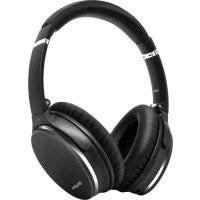
NiceComfort 35 - Earphones Srhythm - Free user manual and instructions
Find the device manual for free NiceComfort 35 Srhythm in PDF.


| Product Type | Active Noise Cancelling Bluetooth Headphones |
| Brand | Srhythm |
| Model | NiceComfort 35 (NC35) |
| Net Weight | 180 g |
| Battery Type | Built-in Li-Polymer, 800 mAh |
| Battery Life | 30 to 40 hours |
| Charging Time | 1 to 2 hours |
| Charging Input | 5V - 12V (via USB Type-C) |
| Bluetooth Version | 5.0 |
| Bluetooth Profiles | A2DP, AVRCP, HSP, HFP, CVC |
| Bluetooth Range | 10 meters (33 feet) |
| Impedance | 32 Ω |
| Frequency Response | 20 Hz - 20 kHz |
| Driver Diameter | 40 mm |
| Water Resistance Rating | IPX4 |
| Active Noise Cancellation (ANC) | Yes, on/off via dedicated button |
| Main Functions | Bluetooth, ANC, wired mode, built-in controls (volume, track, call), voice dialing |
| Care and Cleaning | Use a soft dry cloth; do not use corrosive cleaners; avoid water |
| Operating Temperature | -15°C to 55°C |
| Safety | Do not use while driving; avoid prolonged listening at high volume; do not expose to water |
| Included Accessories | Carrying case, 3.5mm audio cable, Type-C charging cable, airplane adapter, 3.5mm to 6.35mm adapter |
Frequently Asked Questions - NiceComfort 35 Srhythm
User questions about NiceComfort 35 Srhythm
0 question about this device. Answer the ones you know or ask your own.
Ask a new question about this device
Download the instructions for your Earphones in PDF format for free! Find your manual NiceComfort 35 - Srhythm and take your electronic device back in hand. On this page are published all the documents necessary for the use of your device. NiceComfort 35 by Srhythm.
USER MANUAL NiceComfort 35 Srhythm
Find the rhythm of your soul
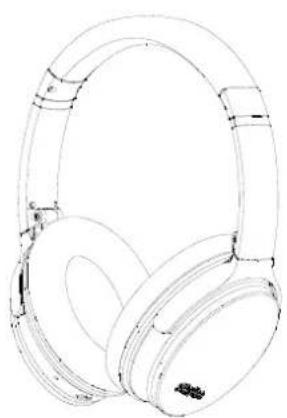
NiceComfort 35(NC35)
User Manual
English 1-13
Deutsch 14-26
Francais 27-39
Italiana 40-52
Espanol 53-65
日本語 66-78
User Manual
Safety instructions
Hearing safety:
- Please do not use telephone while driving and charging.
- Please use cautiously and stop using headphone in dangerous situation.
- Please do not listen for a long time at high volume to avoid hearing damage.
4.For your safety,please do not turn the volume too high while running outside to ensure that you can hear sound in your surroundings.
Operation Safety:
1.Use original or certified cables for charging and voltage within 6.3V.Power will be cut off and start protection mode when the voltage exceed 6.3V and within 36V.Headphone will be broken when the voltage over 36V.
2. Keep away from children to avoid danger from improper use.
3.Avoid dropping headphone and operating in the extreme temperature. Please use headphone within operation temperature range: -15^ 5F- 55^ C(131 F).
4.Do not submerge headphone in the water.
5.Do not use corrosive cleaner/oil to clean. headache
6. Turn off headphone Bluetooth and ANC function to save power when you do not use headphone.
English
How to Use
Use ANC Function

Press the ANC Button to turn Active Noise Cancellation ON/OFF (the LED indicator light will be green when ANC ON.)
Use Bluetooth Function

1.Hold the Multi-function Button for 3-5 seconds to turn headphone Bluetooth on,then enter pairing mode.(the LED indicator light will be blue and red flashing quickly.)
2.Start your mobile phone Bluetooth and find headphone Bluetooth pairing name "NC35" to click it to pair.(the LED indicator light will be blue flashing slowly after pairing successfully.)
3.Hold the Multi-function Button for 3-5 seconds to turn headphone Bluetooth off.
Press to adjust volume. Long press to skip to next/previousong.

Press the Multi-function Button to play/pause music or answer/end call.

Double-press the Multi-function Button to reject an incoming call.
Function Details
Easy Paring
- Hold the Multi-function Button for 3-5 seconds to turn headphone Bluetooth on,then enter pairing mode.(the LED indicator light will be blue and red flashing quickly.)
- Keep headphone and your mobile phone as close as possible during pairing process.
- Turn on your mobile phone Bluetooth. Search for headphone Bluetooth signal on mobile phone and click "NC35" to pair.(the LED indicator light will be blue flashing slowly after pairing successfully.)
- If you are asked for a password/ PIN code during pairing procedure, please enter "0000" (four zeros).
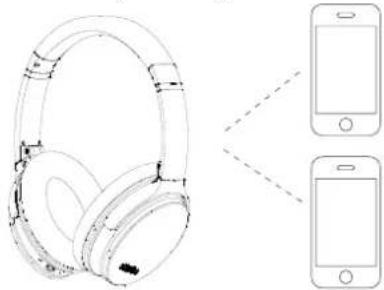
Pair to the Second Bluetooth Device
- Please make sure that headphone is connected to the first Bluetooth device successfully and music is not playing.
- Hold the Multi-function button until the headphone switch off and continue with the steps "Easy Pairing"(Let the headphone re-enter pairing mode, the LED indicator light will flash blue and red alternately).
- Pair headphone with the second device according to "Easy Pairing" steps.
- Return to the first Bluetooth device and pair it with headphone again. Now both of your devices are paired with headphone.
English
Active Noise Canceling(ANC) ON/OFF
To turn on ANC, press the ANC Button; (the LED indicator light will be green when ANC ON.) To turn off ANC, press the ANC Button; (the LED indicator light green color will be off when ANC OFF.)
Wired Mode
- Headphone support AUX input for wired external audio source connection. Simply turn headphone Bluetooth off and plug in the audio cable. For any ANC Bluetooth headphone, it is still need battery power support for wired mode.
ANC also works in wired mode. Microphones only works in Bluetooth mode, not for wired mode.
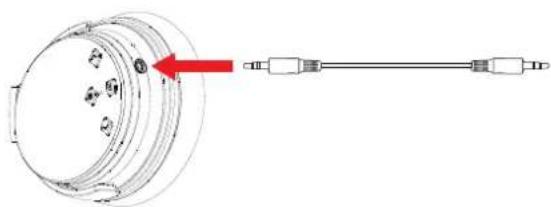
Please note that CAN NOT adjust volume on headphones in wired mode
7
Voice Dialing
Press both "Volume Up" and "Volume Down" buttons simultaneously to activate voice dialing function (compatible with iPhone Siri and selected Android voice dialing software).
How to Wear
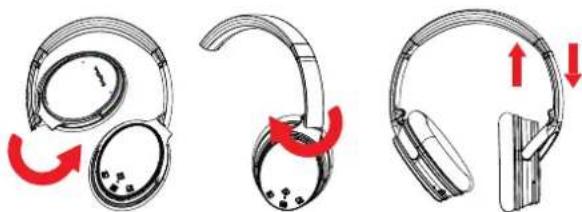
Folding to be portable
Adjustable Headband
8
Airplane Adaptor Connection
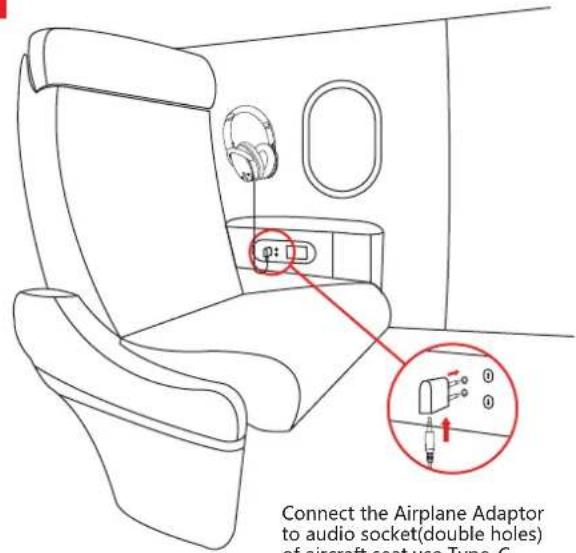
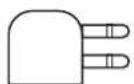
Connect the Airplane Adaptor to audio socket(double holes) of aircraft seat,use Type-C audio cable to connect with your headphone and Airplane Adaptor.
Warning:
Only use for airplane,Can not be plugged into the power socket
Headphone Specification
LED Indicator Light
- Pairing: Blue and red lights flash alternately
- Paired: Blue light flashes
- Playing:Blue light slowly flashes
- Charging: Red light turns on
Full Charge: Red light turns off or Blue light turns on
Battery Low: Red light turns on with voice prompt
ANC ON:Green light turns on
ANC OFF: Green light turns off
Bluetooth OFF: Blue and red lights turn off - Please kindly note that perhaps sometimes these LED indicator light color will be mixed to become other colors(pink,purple,etc.) occasionally.
Technical Specification
Product name: Srhythm NC35
Battery capacity: 800mAh
-Input: 5V-12V
-Chip: CSR
Charging time: About 1-2 hours
Use time: 30-40 hours
-Bluetooth version: V5.0
-Bluetooth profile: A2DP, AVRCP, HSP, HFP, CVC
-Bluetooth range: 10m/33ft
Waterproof rating: IPX4
Net weight: 180g Impedance: 32Ω
-Driver diameter: 40mm
Frequency response: 20-20KHz
English
Charging
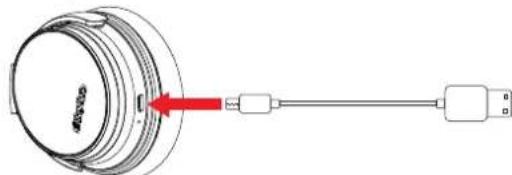
Use the included Type-C charging cable to connect to
headphone Charging Port. Connect the other end of
charging cable to a computer USB port or USB wall
charger under 6.3V voltageTURN off headphone
Bluetooth and ANC function before charging.Please
don't use headphone while charging.The LED
indicator light will be off or blue color when full of
charge basing on headphone turn off status.
Start your mobile phone Bluetooth and find
headphone Bluetooth pairing name NC35 to click it to
pair.(the LED indicator light will be blue flashing slowly after pairing successfully.)
Hold the Multi-function Button for 3-5 seconds to
turn headphone Bluetooth off.
If any issues, here tips for you:1. Full charge your headphone (connect to 5-12V fast charger[Not included])2. Reset headphone by inserting audio cable into headphone audio socket then removing it. Or the upgraded NC35 headphones would be reset automatically when charging.
Delete Pairing: Hold both "Volume Up" and "Volume Down" buttons simultaneously for 5 seconds
Q&A
- Q: Why can't headphone pair with my mobile phone?
A: Please check if your headphone is in pairing mode or reconnection mode,check if Bluetoothsearch function of your Bluetooth device is turned on,if all done,then go to Bluetooth menu of your Bluetooth device,delete/ignore the headphone Bluetooth pairing name NC35.After that,you can try to reconnect Bluetooth according to above "Easy Pairing" steps.
- Q: Why can't headphone turn on?
A: Please double check the battery status of your headache. 3.Q: Can I replace battery in the headache?
A: No, you can not. Headphone uses a built-in non-detachable Li-Polymer battery that can't be replaced.
- Q: Can I use headphone while driving?
A: For your safety, we strongly recommend that you do not use headphones while driving to avoid distraction.
- Q: Why does headphone sometimes disconnects with Bluetooth device within 10 meters?
A: Please check if there are any metal materials or obstacles within a relatively close range or your surroundings that perhaps interfering with Bluetooth connection. This may happen because Bluetooth is a radio technology which is sensitive to objects between headphone and other devices. 6. Q: Why can't I hear any sound from my computer or mobile phone?
A: Please check if output channel of your computer supports A2DP profile. Also check the volume settings on your headache and computer/mobile phone.
- Q: Why am I unable to use headphone to control the volume of a track playing on an APP on my mobile phone?
A: Due to configurations of different application software,headphone may not be completely compatible with some APPs.