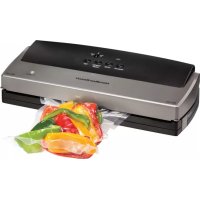
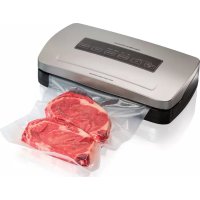
NutriFresh 78214 - Vacuum packaging machines HAMILTON BEACH - Free user manual and instructions
Find the device manual for free NutriFresh 78214 HAMILTON BEACH in PDF.


| Product Type | Vacuum Sealer |
| Brand | Hamilton Beach |
| Model | NutriFresh 78214 |
| Main Functions | Vacuum and seal, seal only, vacuum only, cancel, normal/extended seal selector |
| Seal Type | Heat seal via heating bar |
| Seal Switch | Normal (dry foods) / Extended (moist foods or thick bags) |
| Power Indicator | Green (standby) / Red (operating) |
| Thermal Protection | Automatic shutdown on overheating, 20-minute cooling required |
| Interval Between Cycles | At least 20 seconds |
| Compatible Bag Types | Heat-sealable bags with at least one textured side (Do not use ordinary plastic bags) |
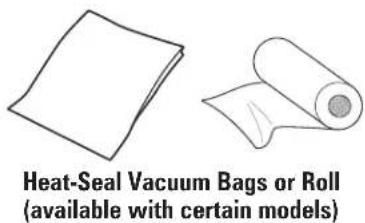
| Included Accessories | Bags or rolls for vacuum packaging (varies by model) |
| Lights and Controls | Buttons: Vacuum and seal, Seal only, Vacuum only/accessory, Cancel |
| Care and Cleaning | Wipe exterior with a damp cloth after unplugging and cooling |
| Replacement Parts | Available at hamiltonbeach.ca or by phone at 1 800 267 2826 (Canada) |
| Warranty | 5 years in Canada, 1 year in the USA (defects in materials and workmanship) |
| High Altitude Use | Possible, press Seal Only if pump runs more than 30 seconds |
| Use with Moist Foods | Pre-freezing recommended, use extended seal mode |
| Use with Fragile Foods | Press Seal Only to stop vacuum manually |
| Sous Vide Cooking | Possible with suitable heat-sealable bags |
| Safety | Polarized plug, do not immerse, supervision required, unplug before cleaning |
Frequently Asked Questions - NutriFresh 78214 HAMILTON BEACH
User questions about NutriFresh 78214 HAMILTON BEACH
0 question about this device. Answer the ones you know or ask your own.
Ask a new question about this device
Download the instructions for your Vacuum packaging machines in PDF format for free! Find your manual NutriFresh 78214 - HAMILTON BEACH and take your electronic device back in hand. On this page are published all the documents necessary for the use of your device. NutriFresh 78214 by HAMILTON BEACH.
USER MANUAL NutriFresh 78214 HAMILTON BEACH
Visit www.hamiltonbeach.com for our complete line of products and Use and Care Guides – as well as delicious recipes, tips, and to register your product online.
For questions: 1.800.851.8900 For recipes, tips, product information and registration: hamiltonbeach.com
natural_image
Exterior view of a Hamilton Bosch printer (no visible text or symbols on body)English 2
Français 16
Español.... 30
IMPORTANT SAFEGUARDS
When using electrical appliances, basic safety precautions should always be followed to reduce the risk of fire, electric shock, and/or injury to persons, including the following:
- Read all instructions.
- This appliance is not intended for use by persons (including children) with reduced physical, sensory, or mental capabilities, or lack of experience and knowledge, unless they are closely supervised and instructed concerning use of the appliance by a person responsible for their safety.
- Close supervision is necessary when any appliance is used by or near children. Children should be supervised to ensure that they do not play with the appliance.
- Never let the vacuum sealer run unattended. Disconnect the vacuum sealer from the power source before leaving the work area.
- To protect against risk of electric shock, do not immerse cord, plug, or vacuum sealer in water or other liquid.
-
Unplug from outlet when not in use and before cleaning.
-
Do not operate any appliance with a damaged supply cord or plug, or after the appliance malfunctions or has been dropped or damaged in any manner. Supply cord replacement and repairs must be conducted by the manufacturer, its service agent, or similarly qualified persons in order to avoid a hazard. Call the provided customer service number for information on examination, repair, or adjustment.
- The use of accessory attachments not recommended by the appliance manufacturer may cause injuries.
- Do not use outdoors.
- Do not let cord hang over edge of table or counter, or touch hot surfaces, including stove.
- Do not disassemble this appliance. Doing so may result in personal injury.
- Do not place on or near a hot gas or electric burner, or in a heated oven.
- Do not use for other than intended purpose.
SAVE THESE INSTRUCTIONS
Other Consumer Safety Information
This appliance is intended for household use only.
⚠ WARNING Electrical Shock Hazard: This appliance is provided with a polarized plug (one wide blade) to reduce the risk of electric shock. The plug fits only one way into a polarized outlet. Do not defeat the safety purpose of the plug by modifying the plug in any way or by using an adapter. If the plug does not fit fully into the outlet, reverse the plug. If it still does not fit, have an electrician replace the outlet.
The length of the cord used on this appliance was selected to reduce the hazards of becoming tangled in or tripping over a longer cord. If a longer cord is necessary, an approved extension cord may be used. The electrical rating of the extension cord must be equal to or greater than the rating of the appliance. Care must be taken to arrange the extension cord so that it will not drape over the countertop or tabletop where it can be pulled on by children or accidentally tripped over.
Thermal Overload Protection
The vacuum sealer will automatically shut off if it overheats. If this occurs, unplug the unit and open the vacuum lid. Resume normal operation after the unit cools or about 20 minutes.
Always allow 20 seconds minimum for cool down between operations.
- This allows the heat-seal bar to cool down.
- Placing a new bag in the unit and closing the lid when the heat-seal bar is still hot will cause the bag to prematurely melt together before vacuum seal operation.
⚠️ CAUTION Burn Hazard. Avoid touching the heat-seal bar.
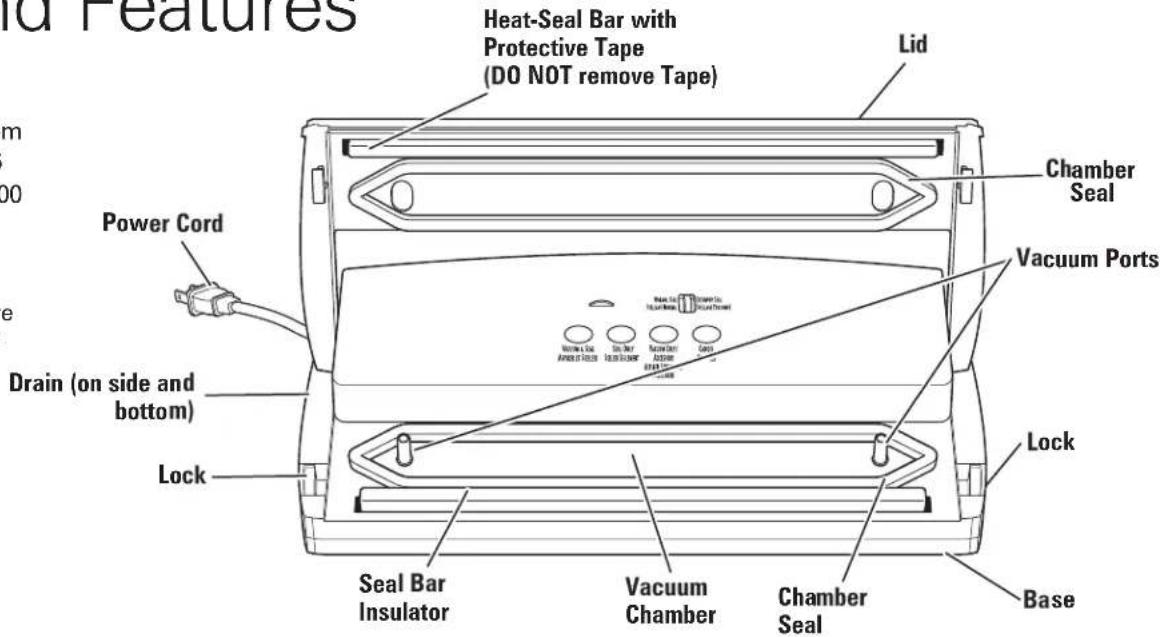
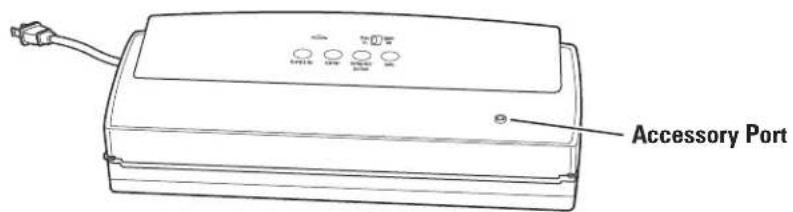
Parts and Features
To order parts:
US: 1.800.851.8900
www.hamiltonbeach.com
Canada: 1.800.267.2826
Mexico: 01 800 71 16 100
NOTE: Not all available parts and accessories are shown here. Please visit our website or call for a complete list.
Control Panel
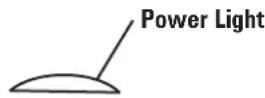
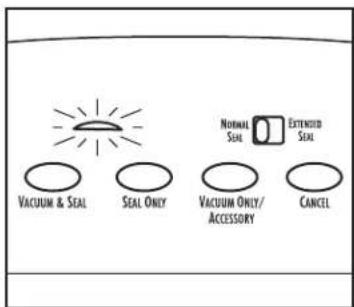
Power Light: The Power Light will turn green when the Vacuum Sealer is plugged into an outlet and turns red while in use.
Normal/Extended Seal Switch: Slide switch to Normal Seal to vacuum-seal dry ingredients. Slide switch to Extended Seal to vacuum-seal thicker bags or foods with moisture.
Vacuum & Seal Button: Press this button to start the vacuum pump and activate the Seal Bar heating element.
Seal Only Button: Press this button to seal bags without vacuuming air out of them, when making bags from rolls or press to stop vacuuming and seal.
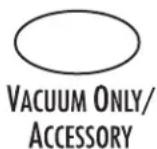
Vacuum Only/Accessory Button: Use with any external accessories.
Cancel Button: Press this button to stop the vacuum/seal process at any time in the cycle.




Before You Start Vacuum-Sealing
A vacuum bag is sealed when the two layers of the bag are heated from the Heat-Seal Bar causing the bag to be permanently sealed. NOTICE: THIS VACUUM SEALER IS INTENDED TO BE USED ONLY WITH HEAT-SEAL VACUUM BAGS, WHICH HAVE AT LEAST ONE SIDE THAT IS TEXTURED FOR AIRFLOW. FOR BEST RESULTS, AND TO AVOID DAMAGING THE VACUUM SEALER, USE ONLY HEAT-SEAL VACUUM BAGS. DO NOT USE HOUSEHOLD PLASTIC BAGS.
How to Use Extended Seal Switch
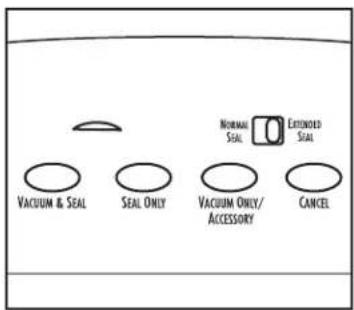
Slide switch to Extended Seal position.
This slows and extends the sealing time which is better when sealing moist foods or thicker bags. Switch to this function when vacuum-sealing if there is moisture in the Heat-Seal Vacuum Bag.
NOTE: If liquid is drawn into Vacuum Ports, the unit will no longer work.
Using the Locks

- Locks can be used if you do not want to hold the Lid down when making bags, sealing, or vacuum-sealing.
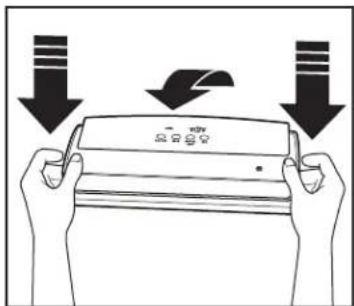
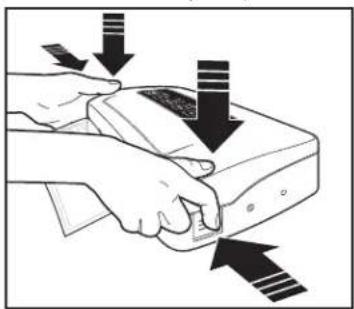
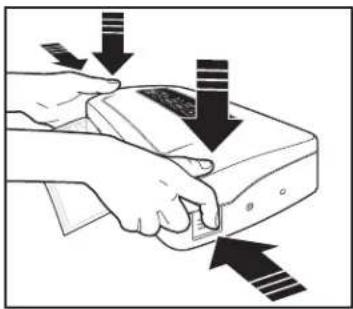
- Close Lid. Press down on both corners and push in Locks on both sides to lock Lid. The Locks will release automatically after sealing or vacuum-sealing. Press down corners to release Lid, if Lid remains locked.
Do not store with Lid locked. This can cause foam Chamber Seal to deform and result in poor sealing.
Making Bags From Rolls
NOTES:
- Allow 20 seconds between each use.
• Never open the Lid during use. - Do not let moisture into the Vacuum Chamber. This may damage the motor. If liquid gets into Chamber, wipe dry immediately.
natural_image
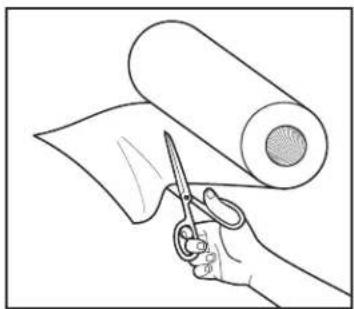
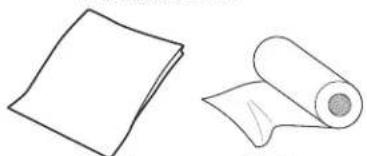
Line drawing of a hand holding scissors cutting a piece of paper with a rolled-up sheet (no text or symbols)- Determine size of bag needed based on size of what is being vacuum-sealed. Allow 2-3" (5-7.5 cm) extra space for sealing top and bottom of bag. Cut straight to size.
natural_image
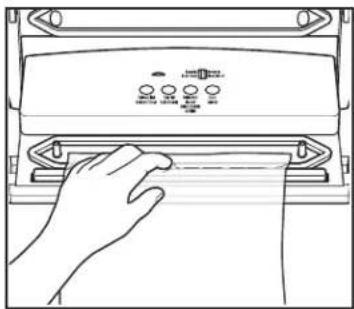
Line drawing of a hand pressing down on a device panel (no text or symbols visible)- Center open end of bag within Vacuum Chamber.
natural_image
Illustration of hands using a handheld device to press or install a device, with arrows indicating motion (no text or symbols present)- Lower Lid. Press down on both corners and push in Locks on both sides to lock Lid. Press Seal Only button. Button turns red when cycle starts.
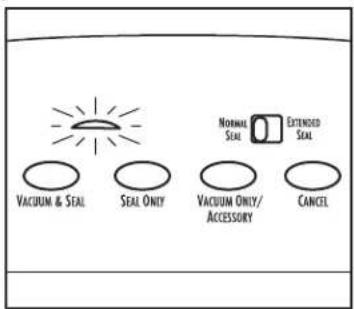
- Wait until Power Light turns green before opening Lid and removing bag.
CAUTION Burn Hazard. Seal bar is hot. Avoid touching it. Allow unit to cool 20 seconds before making or vacuum-sealing another bag.
How to Vacuum-Seal
natural_image
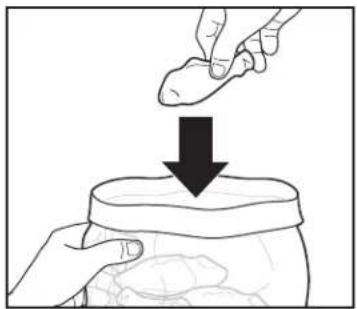
Illustration of a hand placing a finger into a jar with a downward arrow (no text or symbols)- Add food to Heat-Seal Vacuum Bag. For better sealing, fold over top of bag to keep clean while adding food. Unfold top of bag after filling.
natural_image
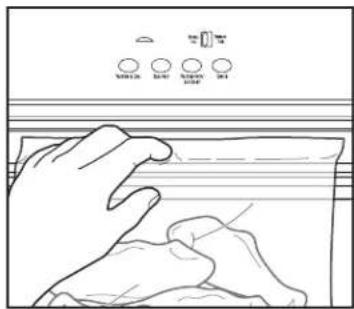
Line drawing of a hand pressing down on a surface with three circular indicators above (no text or symbols)- Center open edge of bag within Vacuum Chamber and make sure edge of bag is inside Chamber Seal and between the two Ports.
natural_image
Illustration of hands using a handheld device to press or install a device with arrows indicating motion (no text or symbols)- Lower Lid. Press down on both corners and push in Locks on both sides to lock Lid. Press Vacuum & Seal button. Button turns red when cycle starts.
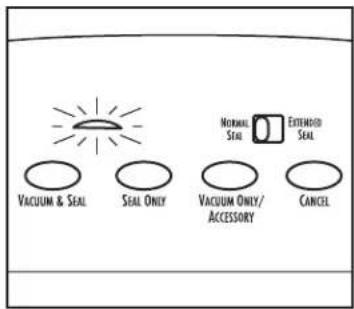
- Wait until Power Light turns green and Lid releases before opening Lid and removing bag. Allow 20 seconds between each use.
⚠️ CAUTION Burn Hazard. Seal bar is hot. Avoid touching it.
How to Vacuum-Seal Fragile Foods or Nonfood Items
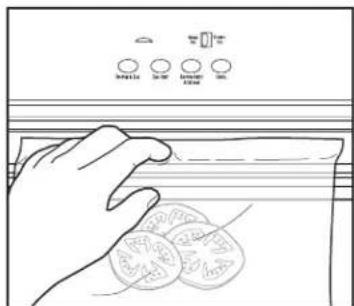
- Add fragile food or item to Heat-Seal Vacuum Bag. Center open edge of bag within Vacuum Chamber and between the 2 Ports.
natural_image
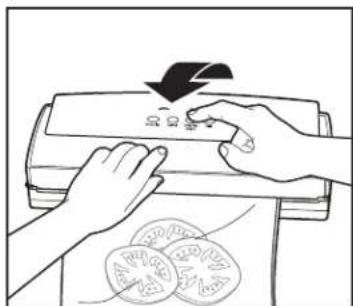
Line drawing of hands pressing down on a printer with a downward arrow (no text or symbols)- Lower Lid. Press down on both corners and push in Locks on both sides to lock Lid. Press Vacuum Only button. Button turns red when cycle starts.
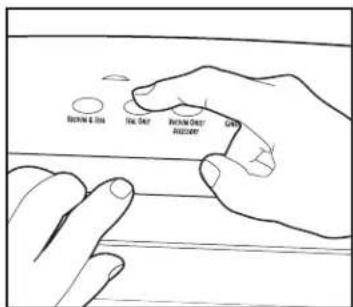
- When enough air is removed, press Seal Only button.
- Wait until Power Light turns green and Lid releases before letting go of Lid and removing sealed bag. Allow 20 seconds between each use.
NOTES:
• Never open the Lid during use.
- Do not let moisture into the Vacuum Chamber. This may damage the motor. If liquid gets into Chamber, wipe dry immediately.
⚠️ CAUTION Burn Hazard. Seal bar is hot. Avoid touching it.
How to Vacuum-Seal Moist Foods
NOTICE: If liquid is drawn into the Vacuum Ports, the unit will no longer work.
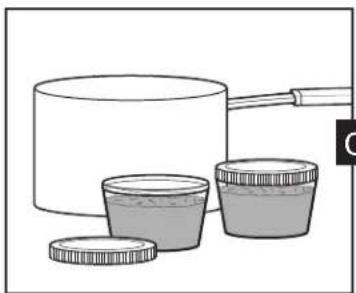
PREFREEZING: For best results and to prevent accidental entry of fluids into the Vacuum Sealer, it is best to prefreeze meats, delicate fruits, and baked foods before vacuum-sealing. Prefreeze casseroles, sauces, and soups in plastic containers before vacuum-sealing.
natural_image
Illustration of a cooking pot with three containers, no text or symbols present- Pour cooled liquids or moist food into freezer-safe containers and freeze.
natural_image
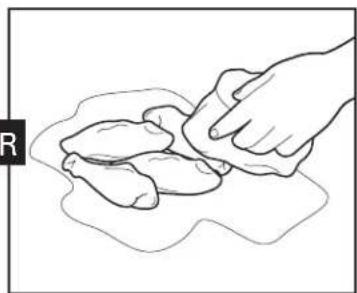
Line drawing of a hand cleaning a piece of dough (no text or symbols)- If prefreezing is not practical, dry moist foods with a paper towel before vacuum-sealing.

natural_image
Illustration of two hands holding a rectangular object with arrows indicating motion or force direction (no text or symbols)- Fold over 1 1/2" (3.8 cm) of the top edge of bag to prevent moisture transfer from food to top surfaces of bag.
natural_image
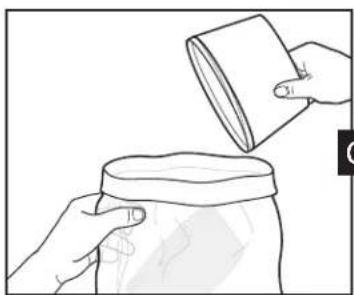
Line drawing of hands pouring liquid from a cup into a jar (no text or symbols)- Invert freezer container to remove frozen food. Place frozen food in Heat-Seal Vacuum Bag. Unfold top of bag.
natural_image
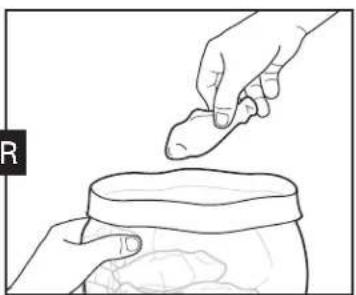
Line drawing of a hand placing a small object into a jar (no text or symbols)- Add food to Heat-Seal Vacuum Bag.
natural_image
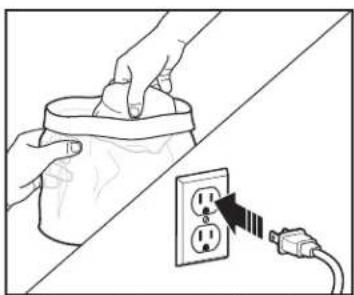
Illustration showing hands inserting a cup into a socket connected to an electrical outlet (no text or symbols)- Wipe and dry top 2" (5 cm) interior surfaces of the bag with another paper towel. Unfold top of bag after filling. Plug into outlet.
natural_image
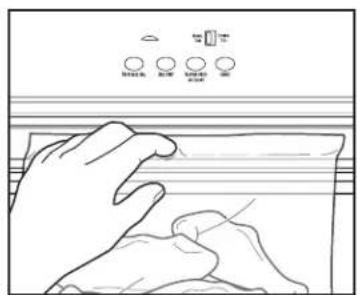
Line drawing of two hands pressing down on a surface with control switches above (no text or symbols)- Center open edge within the Vacuum Chamber. Ensure entire edge of bag is inside the chamber and bag is flat with no folds or wrinkles.
Care and Cleaning
WARNING Electrical Shock Hazard:
Before cleaning, assembling, or disassembling the vacuum sealer, make sure the vacuum sealer is unplugged.
Unplug. Let unit cool completely before cleaning. Wipe the outside of the Vacuum Sealer with a damp cloth or paper towel.
NOTICE: Do not use the Locks when storing. Using the Locks for an extended time will damage the Vacuum Sealer.
Vacuum-Sealing Food Guidelines
- Avoid sharp items around Heat-Seal Vacuum Bags or rolls when vacuum-sealing. Punctured bags will not seal properly.
- Buy foods in bulk and vacuum-seal to save time and money.
- Wash and dry all fruit and vegetables before vacuum-sealing.
- Washed leafy vegetables can be quickly dried with salad spinners.
• To avoid crushing berries when vacuum-sealing, freeze them first. To freeze, wash, dry, and freeze on cookie sheets. Then vacuum-seal frozen berries. - Vegetables such as broccoli, Brussels sprouts, carrots, cabbage, cauliflower, green beans, kale, onions, peas, peppers, snap peas, and squash need to be blanched and frozen before vacuum-sealing.
- Before vacuum-sealing soups, stews, stocks, and casseroles, freeze in serving-size portions. To freeze portions, pour mixtures in freezer-safe containers; top with a lid and freeze. Remove from container and immediately vacuum-seal; then return to freezer.
• After defrosting vacuum-sealed meats, poultry, and seafood, cook to a safe internal temperature.
• Always cook foods to a safe internal temperature. - For food safety information, visit www.foodsafety.gov.
Sous Vide Guidelines
- Sous vide is a no-fail method of cooking vacuum-sealed food in a precisely temperature-controlled water bath, ensuring that food is evenly cooked throughout and reducing chance of over- or undercooking.
- Use only Heat-Seal Vacuum Bags made especially for sous vide cooking.
- Follow directions for vacuum-sealing moist foods when preparing meats, fish, and poultry for sous vide. Juices from meat cannot be drawn into the Vacuum Port or the unit will no longer work.
- Follow recommended sous vide cooking times to ensure optimal results. Visit hamiltonbeach.com and search "sous vide" for more information.
Nonfood Guidelines
- Nonfood items, such as a batteries, boating licenses, matches, and passports can be vacuum-sealed to keep safe when boating, camping, or traveling.
- Keys, utensils, and other sharp or pointed objects can be vacuum-sealed. Make sure to wrap the item in paper towels or some type of cushion before vacuum-sealing.
- You will need scissors to open your nonfood items.
Food Storage Guidelines
• Always defrost frozen vacuum-sealed foods in the refrigerator for food safety.
- Store all vacuum-sealed cooked foods in the refrigerator or freezer.
• Vacuum-sealed bags of coffee beans, crackers, cereal, granola, and nuts can be stored at room temperature.
High Altitude Guidelines (greater than 5,500 feet above sea level)
- If all the air has been removed from the bag, yet the pump keeps running for more than 30 seconds, you can override the program by pressing the Seal Only button. This will stop the vacuum pump and start the sealing process.
- Contact your local County Extension Agents for high altitude information in your area.
- Visit www.fsis.usda.gov for High Altitude Cooking and Food Safety.
Troubleshooting
My Vacuum Sealer shut off and won't turn on again.
- Check power at outlet.
- The thermal overload protector may have been activated. In this case, allow the Vacuum Sealer to cool by opening the Lid for approximately 20 minutes. Be sure to leave the Lid open between each use.
The Seal Bar melts through the bag.
- The Vacuum Sealer is only intended to be used with vacuum-sealing bags. Only Heat-Seal Vacuum Bags should be used. DO NOT USE PLASTIC HOUSEHOLD BAGS with the Vacuum Sealer.
- Bag cut at an angle may not seal properly. Make sure bag is cut perpendicular to sides.
- Unit stored with Lid locked, causing Chamber Seal to become deformed or over-compressed. Replace Chamber Seal if damaged. Do not store with Lid locked.
- Check the condition of the Seal Bar tape strips. Replace if needed.
- Open Lid and allow the Seal Bar to cool for 5-10 minutes. Always leave the Lid open between bags, and allow at least 20 seconds between each use.
The bag seal pulls apart.
- The seal of the bag may be incomplete. If the seal has a crease in it, or if a liquid or powder has been trapped between the layers of the bag, the layers may not have been welded together properly. Cut off the seal and wipe the inside of the bag clean. Then, try to vacuum-seal the bag again.
The vacuum pump starts, but no air is being removed from the Heat-Seal Vacuum Bag.
- Be sure you either use the Locks or push down on the Lid throughout the vacuum-seal process.
- Use only Heat-Seal Vacuum Bags with one textured side for the best airflow. For best results, use Hamilton Beach Heat-Seal Vacuum Bags.
- Be sure the bag is inserted properly. The open end of the bag should be centered within the Vacuum Chamber. Be sure not to cover the Vacuum Ports.
- The bag may have a leak. If there is a leak in the bag, air will be pulled into the bag from the outside. Check for tears or punctures. If you are using a bag that was made from a roll of material, double-check that the end of the bag is sealed.
Locks will not engage.
- Be sure to push down firmly on both corners while pushing in Locks.
Lid will not open.
- Press down on front Lid corners to release.
- Plug into outlet to release Lid.
All the air has been removed from the bag, yet the pump keeps running for more than 30 seconds.
- Altitudes over 5,500 feet above sea level will cause this. Override the program by pressing Seal Only button.
Limited Warranty
This warranty applies to products purchased and used in the U.S. and Canada. This is the only express warranty for this product and is in lieu of any other warranty or condition.
This product is warranted to be free from defects in material and workmanship for a period of five (5) years from the date of original purchase in Canada and one (1) year from the date of original purchase in the U.S. During this period, your exclusive remedy is repair or replacement of this product or any component found to be defective, at our option; however, you are responsible for all costs associated with returning the product to us and our returning a product or component under this warranty to you. If the product or component is no longer available, we will replace with a similar one of equal or greater value.
This warranty does not cover glass, filters, wear from normal use, use not in conformity with the printed directions, or damage to the product resulting from accident, alteration, abuse, or misuse. This warranty extends only to the original consumer purchaser or gift recipient. Keep the original sales receipt, as proof of purchase is required to make a warranty claim. This warranty is void if the product is used for other than single-family household use or subjected to any voltage and waveform other than as specified on the rating label (e.g., 120V \~ 60 Hz).
We exclude all claims for special, incidental, and consequential damages caused by breach of express or implied warranty. All liability is limited to the amount of the purchase price. Every implied warranty, including any statutory warranty or condition of merchantability or fitness for a particular purpose, is disclaimed except to the extent prohibited by law, in which case such warranty or condition is limited to the duration of this written warranty. This warranty gives you specific legal rights. You may have other legal rights that vary depending on where you live. Some states or provinces do not allow limitations on implied warranties or special, incidental, or consequential damages, so the foregoing limitations may not apply to you.
To make a warranty claim, do not return this appliance to the store. Please call 1.800.851.8900 in the U.S. or 1.800.267.2826 in Canada or visit hamiltonbeach.com in the U.S. or hamiltonbeach.ca in Canada. For faster service, locate the model, type, and series numbers on your appliance.
Notes
PRÉCAUTIONS IMPORTANTES
natural_image
Line drawing of a rectangular electronic device with ports and cables (no text or symbols)Orifice accessoire
natural_image
Two hand-drawn sketches: a rolled-up sheet and a blank sheet, both without any text or symbols.natural_image
Line drawing of a hand holding scissors cutting a piece of paper with a rolled-up sheet (no text or symbols)natural_image
Line drawing of a hand pressing down on a device panel (no text or symbols visible)natural_image
Illustration of hands using a handheld device to press or install a button, with arrows indicating downward force (no text or symbols present)natural_image
Illustration of a hand placing a small object into a jar with a downward arrow (no text or symbols)natural_image
Line drawing of a hand washing clothes on a surface with three circular indicators above (no text or symbols)natural_image
Illustration of hands pressing down on a printer with a downward arrow and circular items below (no text or symbols)natural_image
Illustration of a container with liquid and two smaller containers, no text or symbols presentnatural_image
Line drawing of a hand pressing down on a piece of dough (no text or symbols)natural_image
Illustration of two hands holding a rectangular object with arrows indicating motion or force direction (no text or symbols)natural_image
Line drawing of hands pouring liquid from a cup into a jar (no text or symbols)natural_image
Line drawing of a hand placing a small object into a jar (no text or symbols)natural_image
Illustration of hands installing a wall socket into a power outlet, with a separate plug inserted (no text or symbols)natural_image
Line drawing of two hands pressing down on a surface with control switches above (no text or symbols)natural_image
Two hand-drawn sheets: one plain, one rolled with a circular object (no text or symbols)natural_image
Line drawing of a hand pressing down on a surface with control switches (no text or symbols)natural_image
Line drawing of a hand holding scissors cutting a piece of paper with a rolled-up sheet (no text or symbols)natural_image
Line drawing of a hand pressing down on a device with control knobs (no text or symbols)natural_image
Illustration of hands operating a device with arrows indicating motion or force (no text or symbols)natural_image
Illustration of a hand placing a small object into a jar with a downward arrow (no text or symbols)natural_image
Line drawing of a hand pressing down on a surface with three circular indicators above (no text or symbols)natural_image
Illustration of hands using a handheld device to press or install a device with arrows indicating motion (no text or symbols present)natural_image
Illustration of hands using a printer to press or spread materials, with a downward arrow indicating compression (no text or symbols present)natural_image
Illustration of a container with liquid and two containers, no text or symbols presentnatural_image
Line drawing of a hand pressing down on a surface with irregular shapes (no text or symbols)natural_image
Illustration of two hands performing a physical maneuver with arrows indicating direction (no text or symbols)natural_image
Line drawing of hands pouring liquid from a cup into a jar (no text or symbols)natural_image
Line drawing of a hand placing a small object into a jar (no text or symbols)natural_image
Illustration showing hands installing a cup cover onto an electrical outlet with a plug (no text or symbols)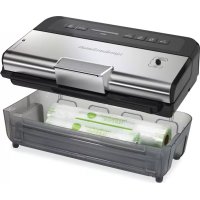
- IMPORTANT SAFEGUARDS
- SAVE THESE INSTRUCTIONS
- Other Consumer Safety Information
- This appliance is intended for household use only.
- Thermal Overload Protection
- Parts and Features
- Control Panel
- Before You Start Vacuum-Sealing
- How to Use Extended Seal Switch
- Using the Locks
- Making Bags From Rolls
- NOTES:
- How to Vacuum-Seal
- How to Vacuum-Seal Fragile Foods or Nonfood Items
- How to Vacuum-Seal Moist Foods
- Care and Cleaning
- Vacuum-Sealing Food Guidelines
- Sous Vide Guidelines
- Nonfood Guidelines
- Food Storage Guidelines
- High Altitude Guidelines (greater than 5,500 feet above sea level)
- Troubleshooting
- My Vacuum Sealer shut off and won't turn on again.
- The Seal Bar melts through the bag.
- The bag seal pulls apart.
- The vacuum pump starts, but no air is being removed from the Heat-Seal Vacuum Bag.
- Locks will not engage.
- Lid will not open.
- All the air has been removed from the bag, yet the pump keeps running for more than 30 seconds.
- Limited Warranty
- Notes
- PRÉCAUTIONS IMPORTANTES
Brand : HAMILTON BEACH
Model : NutriFresh 78214
Category : Vacuum packaging machines