
PANASONIC KXTG6522G - Cordless phone

KXTG6522G - Cordless phone PANASONIC - Free user manual and instructions

Find the device manual for free KXTG6522G PANASONIC in PDF.

📄 56 pages English EN Download 💬 AI Question 10 questions ⚙️ Specs
Notice PANASONIC KXTG6522G - page 54
View the manual : Français FR Deutsch DE English EN
Pick your language and provide your email: we'll send you a specifically translated version.
Product typeDECT cordless phone with integrated answering machine
BrandPanasonic
ModelKX-TG6522G
Base power supply220-240 V AC, 50/60 Hz (PQLV219CE adapter included)
Handset power supply2 Ni-MH AAA (R03) rechargeable batteries supplied
Standby timeUp to 170 hours
Talk timeUp to 18 hours
Charging timeApprox. 7 hours
Answering machine capacityUp to 20 minutes / 64 messages
Phonebook100 names and numbers
Call list50 entries
Main functionsCall waiting, conference, eco mode, handset search, keypad lock, hands-free function, internal call
StandardDECT / GAP
Frequency1.88 GHz – 1.90 GHz
RangeUp to 50 m indoors, up to 300 m outdoors
DisplayBacklit LCD screen
CompatibilityCaller ID (CLIP), voicemail
MaintenanceClean with a soft, dry cloth; do not use solvents
Approximate handset weightApprox. 130 g (with batteries)
Approximate base weightApprox. 200 g
Operating temperature0 °C to 40 °C

Frequently Asked Questions - KXTG6522G PANASONIC

How to register a new handset to the base?
On the handset, press #130. Then, on the base KX-TG6521/TG6522, press and hold the [] button for about 5 seconds until a beep sounds. Enter the base PIN (default 0000) within 90 seconds. The handset will display Y once registered.
What to do if the handset does not display 'Y' even when near the base?
This means the handset is not registered. Follow the registration procedure (previous question). Also check that the base is powered on and the handset is on. If the problem persists, reset the base by unplugging its adapter for a few seconds.
How to activate eco mode to reduce radiation?
Press the ECO/R button on the handset in standby. The ECO icon appears and the base transmission power is reduced. To deactivate, press again. This mode is not available if a repeater is activated.
The handset batteries do not last long, what to do?
Use only supplied or recommended Ni-MH AAA batteries. Clean the battery and handset contacts with a dry cloth. If battery life remains low, replace the batteries with new ones (ref. HHR-55AAAB or N4DHYYYY00005). The first charge cycle may not reach full capacity.
How to listen to answering machine messages remotely?
Call your line from a touch-tone phone. When the answering machine answers, enter your remote access code (programmed via #306). Follow the voice instructions. You can use the following keys: 1 to repeat, 2 to skip, 4 for new messages, 5 for all, 9 to stop, 0 to turn off the answering machine.
Why is the answering machine not recording messages?
Check that the answering machine is turned on (AB Ein button on the base or #327 on the handset). The memory may be full (delete old messages). Make sure the recording time is not set to 'Nur Begrüß.' (greeting only). Finally, if you are using the operator's voicemail, turn off the phone's answering machine.
How to block unwanted calls?
This model (KX-TG6522G) can block up to 30 numbers. From the call list, select a number and choose 'Anrufer sperren'. You can also add a number manually via #217. Blocked calls are silently rejected and appear with × in the list.
How to set date and time automatically via caller ID?
Activate the function by pressing #226 and selecting 'Anrufer ID'. The phone will update the date and time each time caller data is received. If the time is incorrect, deactivate this option and set manually via #101.
The handset does not ring for incoming calls, why?
Check that the handset ringer is not off. Press #160 and set the volume to a non-zero level (1 to 6). If the Å icon is displayed, the ringer is disabled. Also check that the handset is registered and within range of the base.
How to transfer an external call to another handset?
During an external call, press [] to put it on hold. Select the target handset with the navigation keys and press OK. Wait for the recipient to answer, then press [] to hang up and complete the transfer. For a conference, press [] instead of hanging up.

User questions about KXTG6522G PANASONIC

0 question about this device. Answer the ones you know or ask your own.

Ask a new question about this device

The email remains private: it is only used to notify you if someone responds to your question.

No questions yet. Be the first to ask one.

Download the instructions for your Cordless phone in PDF format for free! Find your manual KXTG6522G - PANASONIC and take your electronic device back in hand. On this page are published all the documents necessary for the use of your device. KXTG6522G by PANASONIC.

USER MANUAL KXTG6522G PANASONIC

Panasonic Testing Centre

Panasonic Marketing Europe GmbH

DECT (Digital Enhanced

Cordless Telecommunications: Digitale,** verbessertechnurloseTelekommunikation),
GAP (Generic Access Profile: Allgemeines Zugriffsprofil)

Frequenzbereich:

*1 KX-TG6511/KX-TG6512

*2 KX-TG6521/KX-TG6522/KX-TG6523/

KX-TG6524

Hinweis:
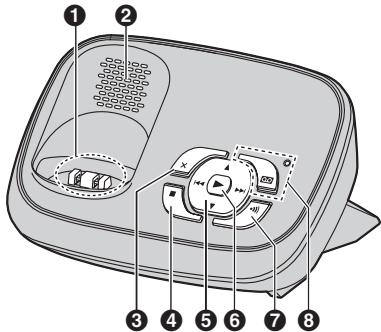
PANASONIC KXTG6522G - 1
KX-TG6521/KX-TG6522/
KX-TG6523/KX-TG6524
*1 KX-TG6521/KX-TG6522/
KX-TG6523/KX-TG6524

PANASONIC KXTG6522G - 2

PANASONIC KXTG6522G - 3

PANASONIC KXTG6522G - 4

PANASONIC KXTG6522G - 5

Erste Schritte

KX-TG6521/KX-TG6522/

KX-TG6523/KX-TG6524
(Personal Identification Number:

Persönliche

KX-TG6521/KX-TG6522/

KX-TG6523/KX-TG6524

A C E L L N R S S U Y Z Z

*1 KX-TG6521/KX-TG6522/KX-TG6523/KX-TG6524

Aufladen des Akkus

*1 KX-TG6521/KX-TG6522/KX-TG6523/KX-TG6524

Anrufbeantworter (KX-TG6521/KX-TG6522/KX-TG6523/KX-TG6524)

Rufton (Mobileil): 18, 24

1-62, 4-chome, Minoshima, Hakata-ku, Fukuoka 812-8531, Japan

Urheberrecht:

Table of contents Click a title to access it
Manual assistant
Powered by Anthropic
Waiting for your message
Product information

Brand : PANASONIC

Model : KXTG6522G

Category : Cordless phone