ILCO Unican 4000 Mortise - Electronic lock KABA - Free user manual and instructions
Find the device manual for free ILCO Unican 4000 Mortise KABA in PDF.


| Product Type | Electronic Pushbutton Lock |
| Brand | KABA |
| Model | ILCO Unican 4000 Mortise |
| Power Supply | 4 AA alkaline batteries (1.5 V each, 6 V total) |
| Battery Life | Up to 4 years or 80,000 openings (whichever occurs first) |
| Standard Door Preparation | Body housing 54 mm, latch 25 mm, backset 60 mm (commercial and residential doors) |
| Keypad Material | Metal, vandal-resistant |
| Available Finishes | Satin Chrome (626/US26D), Satin Brass (606/US4), Bright Brass (605/US3) |
| Fire Resistance | UL/ULC listed 3 hours for Category A doors |
| Operating Temperature (Indoor) | 0°C to 49°C |
| Operating Temperature (Outdoor) | -35°C to 66°C |
| Security Levels | 3 levels: Master (1 code 8 digits), Manager (3 codes 7 digits), User (18 codes + 1 Service code 3 to 6 digits) |
| Max Number of User Codes | 18 User codes + 1 Service code |
| Main Functions | Code programming, passage mode, temporary lockout, penalty mode (30 s to 15 min), remote release (optional, max 30 m) |
| Emergency Mechanical Key | Yes, in outer lever – unlocks the lock in case of dead batteries or penalty mode |
| Indicators | Green/red LEDs and audible buzzer (adjustable: silent, low, high) |
| Factory Reset | Internal Reset button – restores default Master code 12345678 and commercial configuration |
| Maintenance | Replace AA alkaline batteries; no special cleaning required (avoid harsh chemicals) |
| Spare Parts / Repairability | AA alkaline batteries, remote release kit part no. 062-507810, compatible interchangeable core cylinder |
| Certifications | ANSI/BHMA Grade 1, UL/ULC 3-hour fire rated, ADA compliant |
Frequently Asked Questions - ILCO Unican 4000 Mortise KABA
User questions about ILCO Unican 4000 Mortise KABA
0 question about this device. Answer the ones you know or ask your own.
Ask a new question about this device
Download the instructions for your Electronic lock in PDF format for free! Find your manual ILCO Unican 4000 Mortise - KABA and take your electronic device back in hand. On this page are published all the documents necessary for the use of your device. ILCO Unican 4000 Mortise by KABA.
USER MANUAL ILCO Unican 4000 Mortise KABA
For your protection,
return the warranty card located in the
4000 Series
Installation
instructions.
IMPORTANTE
natural_image
Illustration of a digital door key with keypad and handle (no text or symbols)ILCO
UNICAN
IMPORTANT IMPORTANTE IMPORTANT
The 4000 Series Quick Reference card — A handy reference for programming steps and command codes for the 4000 Series lock.
4000 Series Programmable Pushbutton Lock Operations Manual
Second Edition
No part of this book may be reproduced or transmitted in any form or by any means, electronic or mechanical, including photocopying, recording, or by any information storage and retrieval system, without prior written permission from the publisher. The information contained in this publication is accurate to the best of ILCO UNICAN's knowledge. Specifications are subject to change without notice.
ILCO
UNICAN.
The UNICAN Group
08-P09-2471 E/S/F 08/00
Pensions: Canada
Table of Contents
1 Introduction ....5
2 Lock Hardware Features ....6
3 Lock Programming Features 7
4 Lock Operating Instructions 8
4.1 Principles of Operation ....8
4.2 User Interface 10
4.3 Programming Command Codes ....13
5 Getting Started 18
6 Security & Maintenance 20
6.1 Security .20
6.2 Maintenance 20
7 Troubleshooting & Technical support 24
8 Code Record Log Sheet for the 4000 Series Lock .....26
Chapter 1
Introduction
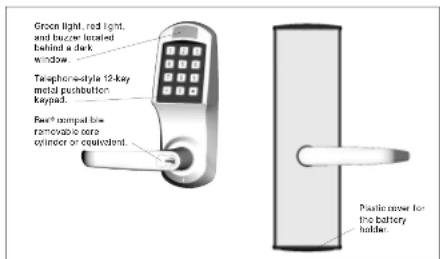
The 4000 Series lockset is a completely stand-alone programmable pushbutton lock that is powered by alkaline batteries and requires no cabling or computer to operate it. The lock grants access to authorized users only, and it has a mechanical key override for emergency situations. User access (entry) codes can be added, changed, or deleted in seconds, and a facility allows the temporary lockout of an individual or a group of users during non working hours. The lock can also be put in passage mode at any time. This all-weather, heavy-duty cylindrical lockset is ANSI/BHMA 156.2 Grade 1 certified and carries a 3-hour UL/ULC fire rating for "A" labeled doors. The lock is handed at the factory but can be changed in the field.
The 4000 Series lock is ideal for high-frequency use in locations such as commercial, government, military, and industrial buildings, hospitals, university dormitories, condominiums, or anywhere that key control is a problem and secure access control is needed.
Front View Back View
4
4000 Series Programmable Pushbutton Lock
4000 Series Programmable Pushbutton Lock
5
Chapter 2
Lock Hardware Features
• Durable heavy-duty cylindrical lockset with clutch mechanism
- Standard 161 door preparation: 2 ^ V (54mm) cross bore and 1" (25mm) latch bore; also supports 2 ^ V (70mm) and 2 ^ V (60mm) backsets for commercial and residential door applications
• ANSI/BHMA 156.2 certified as a Grade 1 lock: ANSI/BHMA 156.2 standard
• 3-hour UL/ULC fire rating for "A" labeled doors
• Weather-resistant indoor/outdoor lock;
for indoor applications, operates between +32°F and +120°F (0°C and +49°C); for outdoor applications, operates at ambient temperatures between -31°F and +151°F (-35°C and +66°C)
- Field-reversible lever set conforming to Americans with Disabilities Act (ADA) requirements
- Key override accepts Best and compatibles, Modeco/ASSA, Schlago, and Yale removable core cylinders
- Rugged vandal-resistant 12-button metal keypad used to gain entry and for all programming functions
- Minor modifications are required to retrofit the lock to competitors' pushbutton locks.
• Attractive finishes—605 (03) Bright Brass, 606 (04) Brushed Brass, 626 (26D) Satin Chrome, and 695 (55) Duranodic Dark Bronze
Chapter 3
Lock Programming Features
The easy-to-understand user interface is equipped with both visual (green and red lights) and audible (loud and soft beeps) indicators.
- Three security levels—Master (one code), Manager (three codes), and User (up to 18 User codes and one Service code)—allow flexible management of access control.
• Factory-programmed lock configurations are supplied for Commercial, Residential, and Handicapped access situations.
• The lock can be programmed in seconds to add, change, or delete any or all User access codes using a Master or Manager authorization code.
- Up to 1,000,000 unique access codes are possible; the User access code length can be specified from three to six digits.
• Temporary lockouts can be used for utmost security: individuals, groups, or all access codes can be temporarily locked out during non-working hours or holidays.
- For convenience, the passage mode allows entry without an access code.
• A temporary shut down of the lock for up to 15 minutes results from four successive illegal or invalid attempts to enter an access code.
- The lock is powered by four standard AA alkaline batteries that last up to four years or 80,000 openings (whichever comes first).
+ The lock provides advance audio and visual warning of low batteries and will continue to function until the batteries are completely discharged.
- The lock can be remotely unlocked from inside from up to 90° (30m) using 24 AWG twisted pair wire connecting a normally open pushbutton switch and the inside lock housing.
- The Master authorization code can be reset to the factory default in a secure way from inside if the current Master authorization code is forgotten.
Chapter 4
Lock Operating Instructions
4.1 Principles of Operation
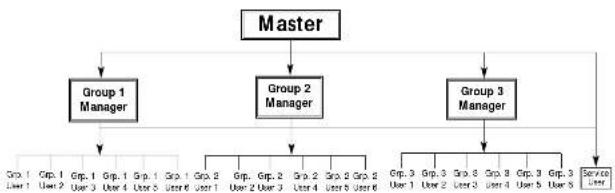
The 4000 Series lock is managed using three security levels: Master, Manager (sub Master), and User.
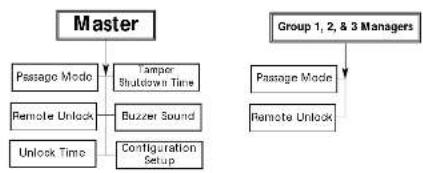
At the Master level of security, there is only one code, which must be eight digits in length. This is an authorization or control code—not an access code—that is used to control authorization codes, access codes, and other programming features of the lock. The holder of the Master code has the ability to change the Master authorization code, add, change, delete, lock put, or reactivate the Manager authorization codes, User access codes, and Service access codes; and to program the lock as follows:
- Enable and disable the passage mode
- Enable and disable the remote-unlock feature
- Set the unlock time from one to 20 seconds
- Set the tamper shut-down time from 30 seconds to 15 minutes
- Set the buzzer sound volume to off, soft, or loud
- Set the lock configuration to Commercial, Residential, or Handicapped
At the Manager level, there are three codes, which must be seven digits long. These codes are also authorization codes, not access codes. Each Manager authorization code is used to control a particular Group of up to six User access codes by performing the same functions as the Master code: adding, changing, deleting, locking out, or reactivating codes. This code is also used to program the lock as follows:
- Enable and disable the passage mode
- Enable and disable the remote-unlock feature
At the User level, there are 18 User access codes and one Service access code. Those 19 access codes can be set to a length of three, four, five, or six digits; however, all codes must be of the same length. The length of the codes affects the total number of unique access code combinations possible; for six digits, 1,000,000; for five digits, 100,000; for four digits, 10,000; and for three digits, 1,000.
B
4000 Series Programmable Pushbutton Lock
Lock Operating Instructions
The following diagram describes the 4000 Series lock's programming authorization control structure.
Programming Authorization Control Structure
User Access Control
Lock Function Control
flowchart
graph TD
    A["Master"] --> B["Passage Mode"]
    A --> C["Remote Unlock"]
    A --> D["Unlock Time"]
    A --> E["Tamper Shutdown Time"]
    A --> F["Buzzer Sound"]
    A --> G["Configuration Setup"]
    H["Group 1, 2, & 3 Managers"] --> I["Passage Mode"]
    H --> J["Remote Unlock"]
The 4000 Series lock has four modes of operation:
- Normal—The lock unlocks when a valid access code is entered.
- Programming—A Master or Manager authorization code has been used to initiate a program to program the link.
To inmate a session to program the lock. • Passage—The lock allows entry without a - Tamper shut down—The lock is disabled due to four successive invalid
access code entries.
4000 Series Programmable Pushbutton Lock
9
Chapter 4
4.2 User Interface
Interaction with the lock is accomplished via the pushbutton keypad, the green and red status lights, the audible buzzer, the outside lock lever, and the mechanical override key. Through these components, those who are Master and Manager authorized program the lock and those with access codes unlock it. There is free egress at all times from Inside by turning the Inside lock lever.
4.2.1 Pushbutton Keypad
The keypad, located on the outside housing of the lock, is a standard telephone-style metal-pushbutton keypad displaying ten numeric keys from zero to nine and the alphanumeric keys <^> and <#> .
By entering a valid access code combination and turning the outside lock lever, the user unlocks the door. The keypad is also used to program the lock, including adding, deleting, or changing authorization and access codes or enabling a special lock mode such as passage mode. The <#> key is used to start and end a programming session and is also used following each command code entered.
If an undesired command code is entered, the <^> key can be used to clear the command before the <#> key is pressed. However, once the <#> key is pressed, the command is executed.
While entering an access code or during a programming session, five seconds is allowed between pushbutton entries; however, once the five seconds is up, a timeout occurs and the access code or the programming session is aborted.
4.2.2 Green And Red Status Lights
The green and red status lights, Light Emitting Diodes (LEDs), are located immediately above the keypad behind a dark window. The lights are visual indicators for the lock operations as described below.
Green Light
- Access granted—when a valid access code is entered, flashes every half a second for the unlock time period or until the lever is released after unlocking
- Valid programming-session entry and end of session—after each valid entry (an authorization, command, or access code followed by the <#> key), lights for one second; when the <#> key is pressed at the end of the programming session, lights for one second
- Expiration of tamper shut-down time—at the end of the of the shut down period, lights for three seconds to indicate the lack is in its normal mode of operation
Lock Operating Instructions
Red Light
- Pushbutton pressed—when a pushbutton on the keypad is pressed, lights for half a second
- Access denied—when an invalid access code is entered, lights for one second
- Invalid programming-session entry—after an invalid entry, lights for one second
- Commencement of lock tamper shut-down period—after the fourth successive illegal or invalid access code is entered, lights for three seconds to indicate the beginning of the shut-down period
• Tamper shut down—during the entire shut-down period, lights for half a second every ten seconds
Both Lights
- Low batteries indicator (advance visual warning)—when a valid access code is entered, if the battery power is weak but the lock is still functioning, each light flashes alternately every half a second for the unlock time period or until the lever is released after unlocking
No Lights
- Dead batteries—the batteries are completely discharged and there is not enough battery power to operate the lock
- Loose cable—the cable between the rear housing and the front housing of the lock might not have been properly secured in its connector when the lock was installed
4.2.3 Audible Buzzer
The buzzer is an audible status indicator located inside the dark window on the front lock housing. The buzzer can be programmed to sound at loud or soft levels or it can be disabled; however, regardless of the setting, it is always enabled at the loud volume level during a programming session when command codes are entered. The buzzer emits two tones: one high-pitched and the other low-pitched. These tones are used as audible indicators for the lock operations as described below.
High-Pitched Tone (buzzer sound level loud or soft)
- Pushbutton pressed—when a pushbutton on the keypad is pressed, omits a short beep
- Access granted—when a valid access code is entered, emits a beep for one second
- Valid programming-session entry and end of session—after each valid entry, emits three beeps (one long and two short); when the cifs key is pressed at the end of the programming session, emits three beeps (one long and two short)
- Reset button pressed—if the reset button is pressed, omits a beep for five seconds
Chapter 4
Low-Pitched Tone (buzzer sound level loud or soft)
- Access denied—when an invalid access code is entered, emits a beep for one second
- Invalid programming session entry—after an invalid entry, emits a beep for one second
- Commencement of tamper shutdown period—after the fourth successive illegal or invalid access code is entered, emits a beep for three seconds to indicate the beginning of the shut-down time period
- Low battery indicator (advance audible warning)—when a valid access code is entered, if the battery power is weak but the lock is still functioning, emits a beep every half a second (in sequence with the flashing rod light) for the unlock time period or until the lever is released after unlocking
4.2.4 Outside Lock Lever
Enter a valid entry code and turn the outside lever downward to unlock the lock. When the outside lever is released (after unlocking), the lock mechanism relocks immediately.
4.2.5 Mechanical Override Key
Where the override key cylinder is housed in the lever handle, the mechanical override key can be used at any time as an emergency key to unlock the lock. It is used when the battery power is too weak to operate the lock or when the lock is in tamper shutdown mode.
To activate the mechanical override mechanism, turn the key 90° in the same direction as the lever turns (as handed at the factory). Note that changing the handing to left- or right-handed might change the direction in which the key must be turned.
Important: To unlock the lock with the mechanical override key, turn the key and then turn the lever. Simply turning the override key does not retract the latch.
Lock Operating Instructions
4.3 Programming Command Codes
4.3.1 Definitions
A programming session is used to manage authorization and access codes, to enable and disable the passage mode and the remote unlock feature, to set the unlock time and tamper shut-down time, to set the buzzer sound level, and to modify the lock configuration setup.
The lock is programmed by entering an eight-digit Master or a seven-digit Manager authorization code and a three-digit command code. Each command code consists of a one-digit primary sub-command and a two-digit secondary sub-command which identify the desired action and the specific authorization or access codes) to which this action is applied.
For example, the command code 010 is used to temporarily disable access codes (0) for all users in Group 1 (10).
A lock programming session consists of the following steps:
- To start the programming session, press <#>.
- Enter a valid Master or Manager authorization code.
- Press
. - Enter a command code.
-
Prose <#>
Note: When adding or changing a code, enter the code and press <#>. For the Master authorization code, enter the code a second time to verify the change and press <#>. -
To end the programming session, press <#>
Tips
- An eight-digit Master or a seven-digit Manager authorization code is required to program the lock.
- Start and end each programming session by pressing the <#> key.
- If an undesired command code is entered by mistake, use the <^> key to clear the command before pressing the <#> key. Once the <#> is pressed, the command is executed.
- Follow every authorization, command, and access code with the <#> key.
- Command codes can be chained within the same programming session by repeating steps 4 and 5 in the above procedure.
There are nine primary sub commands (0 to 8) and secondary sub-command sets (00 to 99; although, not all numbers are valid) which are described in the following table. The Master authorization code can be used to program the lock with any command code. The command codes available to be programmed using the Manager authorization code are identified in the right-hand column. Note that Manager authorization codes can manage only those User access codes within their own User Group (up to six).
Chapter 4
4000 Series Lock Command Codes (Primary + Secondary number)
| Command Code Name Primary Secondary Sub-command & ManagerSub-command Description Authorized? | |||
| Disable code temporary (unknown) Of 30/13: Manage | 00: All codes except Master No. 10,20,30 Group 1, 2 or 3 access codes Yes 11 to 15 Group 1 User access codes Yes 21 to 26 Group 2 User access codes Yes 31 to 35 Group 3 User access codes Yes 77: Service access code | No | |
| He-activate previously disabled code | 1 00: All codes No01 02:03 Manager authorization codes No10,20,30 Group 1, 2 or 3 access codes Yes 11 to 15 Group 1 User access codes Yes 21 to 26 Group 2 User access codes Yes 31 to 35 Group 3 User access codes Yes 77: Service access code | Yes | |
| And or charge code | 2 90: Manager authorization codes No01,02,03 Manager authorization codes No11 to 15 Group 1 User access codes Yes 21 to 26 Group 2 User access codes Yes 31 to 35 Group 3 User access codes Yes 77: Service access code | Yes | |
| Disable code permanently | 3 00: All codes (except Master) No01,02,03 Manager authorization codes No10,20,30 Group 1, 2 or 3 access codes Yes 11 to 15 Group 1 User access codes Yes 21 to 26 Group 2 User access codes Yes 31 to 35 Group 3 User access codes Yes 77: Service access code | Yes | |
| Passage mode | 4 00: Disable Yes | ||
| Yes | |||
| Remote unlock | No | ||
| Yes | |||
| Set unlock time 5 01 to 20 | 1 to 20 sec. | No | |
| Set tempor shutdown time | 5 | 00 to 15: 30 sec. (00 to 15 min. -15) | No |
| Buzzor sound | 7 00: Off | No | |
| 01: Sott | No | ||
| 02: Loud | No | ||
| Configuration setup | 9 00: Commercial | No | No |
| 01: Residential | No | ||
| 02: Handslapped | No | ||
Each command code consists of a primary and a secondary number.
e following are examples of how to use the above table:
• To enable passage mode, use the code 4 01.
• To add a third User access code to Group 2, use the code 2 25.
Lock Operating Instructions
This Operations Manual is supplemented with a plastic quick reference card, the 4000 Series Lock Quick Reference, that includes the steps for programming the lock and the command codes. It is the size of a credit card and can be kept in your wallet or purse.
4.3.2 Rules
The following rules must be observed when programming the look:
- It is not possible to disable or delete the Master authorization code;
however, it can be changed. - The Master authorization code can be used to program all functions of the lock.
- When adding or changing the Master authorization code, the new code must be entered twice (followed each time by the <#> key) to confirm its correct entry.
- When the first access code is created, its code length (three, four, five, or six digits) determines the length of all the remaining User access codes, the Service access code, and therefore the number of unique access code combinations possible. User access codes cannot vary in length. To change the code length, all User and Service access codes must be permanently deleted and replaced with codes of the new length.
- The same User access code can be programmed for users in multiple groups. For example, the User access code 12345 can be assigned to a Group 1 user, a Group 2 user, and a Group 3 user. If that code is deleted in Group 1, the access code will still unlock the door because the code is still valid in Groups 2 and 3. For utmost security, do not use duplicate User access codes despite this ability.
- When the four AA alkaline batteries are replaced, all authorization codes, access codes, and lock settings remain unchanged except the passage mode setting. If the lock was programmed for passage mode, it will return to the normal locked mode once the batteries are changed.
- During the tamper shut-down time, only the remote unlock from inside (if enabled) and the mechanical override key can unlock the lock. If the remote unlock is used, the tamper shut-down time is reset and the lock returns to its normal mode of operation. However, when the override key is used, the shut-down time period is not reset but counts down the entire period before the lock returns to its normal mode.
Chapter 4
Lock Operating Instructions
4.3.3 Examples
The following examples can be performed on the lock in sequence.
- Set the tamper shutdown time to 30 seconds using the Master authorization code 12345678.
-1-2-3-4-5-6-7-8-#-6-0-0-#-#
- Change the factory default Master authorization code from 12345678 to 87654321. Use the original Master authorization code 12345678 to program the change and enter the new code twice to confirm it.
-1-2-3-4-5-6-7-8-#-2-9-9-#-8-7-6-5-4-3-2-1-#-8-7-6-5-4-3-2-1-##
- Permanently delete all existing Manager authorization and User access codes so that you can change the code length for maximum security (from the default access code length of four—1234) using the Master authorization code 87654321.
8-7-6-5-4-3-2-1-#3-0-0-#
- Add the Group 1 Manager authorization code 1123456 using the Master authorization code 87654321. Use the <> key to correct the mistakenly entered code 202 (adds a Group 2 Manager authorization code). #-8-7-6-5-4-3-2-1-#-2-0-2-*2-0-1-#-1-1-2-3-4-5-6-##
- Add the Group 1 User 2 access code 12345 using the Master authorization code 67654321.
-8-7-6-5-4-3-2-1-#-2-1-2-#-1-2-3-4-5-#-#
- Add the Service access code 77777 using the Master authorization code 87654321.
8-7-6-5-4-3-2-1#-2-7-7#-7-7-7-7-7-##
- Temporarily disable (lockout) all Manager authorization codes, the Service access code, and all User access codes using the Master authorization code 87654321.
- Change the Group 1 User 2 access code 12345 to 54321 using the Group 1 Manager authorization code 1123456.
-1-1-2-3-4-5-6-#-2-1-2-#-5-4-3-2-1-#-#
-
Permanently deletes the Service access code 77777 using the Group 1 Manager authorization code 1123456. θ-1-1-2-3-4-5-6-θ-3-7-7-θ
-
Set the factory-programmed lock configuration to Handicapped using the Master authorization code 87654321.
- Enable the passage mode using the Group 1 Manager authorization code 1123456.
- Chain a series of command codos using the Master authorization code 87654321. Disable the passage mode and return the lock to normal lock mode, set the unlock time to eight seconds, set the lock tamper shut-down time to fifteen minutes, and set the buzzer sound level to soft. 0 8 7 6 5 4 3 2 1 0 4 0 0 0 5 0 8 0 6 1 5 0 7 0 1 0
- Change the Master authorization code back to the factory default 12345678 using the Master authorization code 87654321. 0-8-7-6-5-4-3-2-1-02-9-9-0-1-2-3-4-5-6-7-8-0-1-2-3-4-5-6-7-8-0-0
- Set the lock configuration to Commercial (factory default) using the Master authorization code 12345678.
-1-2-3-4-5-6-7-8-#-8-0-0-#-#
- Chain a series of command codes using the Master authorization code 87654321. Delete all users and then add the service access code 4000 (factory default).
The 4000 Series lock can now be programmed as desired. Start by programming the Master authorization code to an eight-digit number other than the factory default 12345678. See the last page of this manual where a "Code Record Log Sheet for the 4000 Series Lock" is provided to record all authorization and access codes for the lock. Store this document in a secure place. From this record, the lock can be easily programmed with all the required codes.
Ensure that the 4000 Series lockset, the latch, and the strike plate are properly installed. The signal cable inter-connecting the front and the back housing must be correctly connected, and the four AA alkaline batteries (included) must be inside the battery holder and conform to the marked polarities for the lock to work.
The lock is delivered from the factory with one access code—the Service code 4000. (Note: If the examples on pages 17 and 18 were performed on the lock, this code might have been deleted.) This access code can be used by the person who installs the lock to test that the lock operates. When the access code is entered using the keypad, the lock should unlock. After verifying several times that the lock works properly, delete all access codes using the factory-default Master authorization code 12345678.
-1-2-3-4-5-6-7-8-#-3-0-0-#-
The lock is now configured in the Commercial setup (factory default). Note: If the examples on pages 17 and 18 were performed on the lock, ensure that step 15 was performed to set the configuration to Commercial.
The following table compares the three available lock configurations:
| Commercial Residential Handicapped | |||
| Command code 800 801 802 | |||
| Unlock time 5 seconds 5 seconds 20 seconds | |||
| Buzzer sound | loud | soft | loud |
| Tamper shutdown time | 4 minutes | 2 minutes | 1 minute |
The following parameters are identical for all three of the above setups:
Master authorization code 12345678
All 3 Manager authorization codes blank or deleted
All 18 User access codes blank or deleted
Service access code blank of deleted
Hard-wired remote unlock disabled
Chapter 6
Security & Maintenance
6.1 Security
- Change the Master authorization code to an eight-digit code (command code 299) other than the factory default 12345878. Record the new code using the "Code Record Log Sheet for the 4000 Series Lock" described in the section 6.2.1 "Code Record Log Sheet".
- The mechanical override key is provided for use as an emergency key only and should be stored in a secure location. However, the key should be readily available to authorized personnel when it is required in an emergency unlock situation.
- For utmost security, select the maximum length of six digits for all User and Service access codes. The number of possible unique access codes is increased to 1,000,000, reducing the chance of someone correctly guessing the combination.
- If there is concern within your facility regarding illegal attempts to guess access codes, select the maximum tamper shutdown time of 15 minutes. Note, however, that the lock is shut down for the entire time period, regardless of whether the attempts were legal or simply invalid. In the tamper shut-down mode, the lock can only be unlocked using the mechanical override key or remote unlocking.
6.2 Maintenance
6.2.1 Code Record Log Sheet
Photocopy the "Code Record Log Sheet for the 4000 Series Lock" printed on the last page of this manual. Use this sheet to record all authorization and access codes and all current setup parameters for the lock. Store it in a secure location. Perform this task for all 4000 Series locks in your facility so that a complete hard-copy record for all locks exists for easy maintenance.
Security & Maintenance
6.2.2 Alkaline Batteries
The 4000 Series lock low battery indicator consists of an advance visual and audible warning—alternately flashing gun and rod lights and a low-pitched beep every half a second in sequence with the flashing red light. The indicator is activated when a valid access code is entered and lasts for the unlock time or until the lever is released after unlocking. The lock will continue to function until the batteries are completely discharged.
Warning: The batteries used in the lock must be alkaline. Non-alkaline batteries can cause the lock to fail.
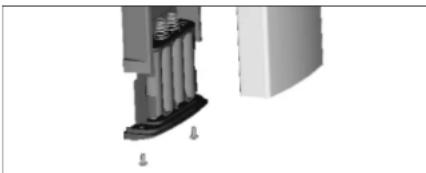
Replace the factory-supplied AA alkaline batteries (1.5 Volts x 4 - 6 Volts) with four new, over-the-counter AA alkaline batteries as soon as possible:
- Remove the two screws that secure the battery pack plastic cover to the bottom of the backplate of the inside housing using the 1" (2mm) Allen key.
- Slide out the battery holder containing the sealed battery pack.
- Slit open the scaled battery pack with a knife and replace the old batteries, while observing the polarity (+ and -) of the batteries as marked on the battery holder.
- Slide the battery holder back into place, ensuring that the circuit connection is intact.
Note: The battery pack casing (the side with the sharp corners) should face the door, and the battery pack (the side with the rounded corners) should face out—away from the door.
- Reinstall the plastic cover with the two Allen screws.
All lock codes and setup information remain intact in the lock memory for up to ten years while the power is disconnected. If the lock is in passage mode when the low battery indicator is activated (the battery is low and the lock is alternately flashing red and green lights), the lock reverts to normal locked mode when the batteries are replaced. Test the lock to ensure that it operates properly.
natural_image
3D mechanical assembly diagram showing a cylindrical component inserted into a housing, with no visible text or symbolsChapter 6
6.2.3 Reset Button
If the Master authorization code is lost or forgotten and the number has not been recorded on a "Code Record Log Sheet for the 4000 Series Lock," the lock can be reset to the factory defaults by pressing the reset button located inside the inside housing.
Warning: When the lock is reset, all existing authorization and access codes are deleted, and the lock's passage and hard wired remote unlock are disabled (if previously enabled).
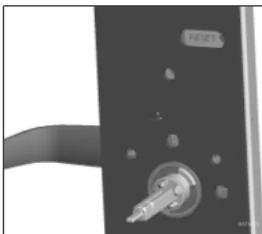
To access the reset button, proceed as follows:
- Gain access to the inside housing by unlocking the lock using a valid access code, the mechanical override key, or remote unlocking.
- Remove the 8-23 x -y" (22mm) set screw securing the inside handle using the "√" (2mm) Allen key.
- Remove the inside handle and inside cover assembly.
- With a pointed tool, such as a small screwdriver or a straightened paperclip, pierce the circle on the "Reset" label on the back plate. When the button is pressed, a high-pitched tone sounds. Depress the button for a period of three seconds and the lock will reset.
- Replace the inside cover assembly and the inside handle.
natural_image
Close-up of a black door handle with a metallic knob and a 'RESET' button (no text or symbols on the main subject)The lock is now reset to the factory-configured Commercial setup with the default Master authorization code 12345678. The lock can now be programmed as desired. It is recommended that you record codes and settings using the "Code Record Log Sheet for the 4000 Series Lock" printed on the last page of this manual.
Security & Maintenance
6.2.4 Hard-Wired Remote Unlocking
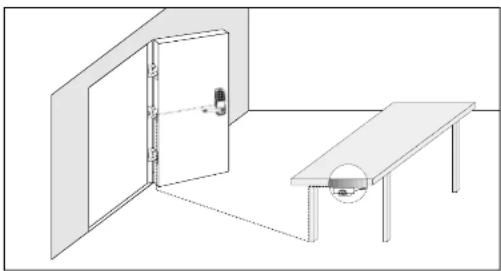
The optional "Hard-Wired Remote Unlock Kit," P/N: 062-507810, can be used to unlock the 4000 Series lock from a remote location inside the door up to 90° (30m) from the lock. This kit can be purchased from your local ILCO UNICAN dealer and consists of a 90° (30m) 24 AWG twisted pair wire and a normally open pushbutton switch. The instructions included with the kit describe how to install and use this function.
Once the kit is installed, the remote unlock feature must be enabled in the lock (command code 491). Pressing the remote unlock switch at any time, even during a tamper shut down, unlocks the lock. Note that remotely unlocking the lock during a tamper shut down is the only way to reset the shut-down time—end the shut-down period.
natural_image
Simple line drawing of a room with a door, table, and wall (no text or symbols)Chapter 7
Troubleshooting & Technical Support
? Problem
→ Possible cause
or Solution
? The lock does not respond at all—no lights and no sound—when a key is pressed.
→ 1. The connector end of the ribbon cable connecting the front-housing and the inside-housing is not snugly pushed in.
→ Push in the connector so that it locks snugly and makes a good connection.
→2. The batteries are missing, the battery connector is not connected, one or more batteries are placed with the wrong polarity, the batteries are completely discharged, or non-alkaline batteries are in use.
^77 Correct the above condition and retry
→ 3. The lock is currently in tamper shut-down mode.
To open the lock, use the mechanical override key, press the hard-wired remote-unlock switch (if enabled), or simply wait until the tamper shutdown time period (30 seconds to 15 minutes) has elapsed.
? A User access or Service access code is not accepted—will not unlock the lock.
→ The access code is not programmed into the lock.
Program the lock to add the access code.
? The lock can be opened without an access code.
→ The lock is in passage mode.
Program the lock to disable the passage mode (command code 400), if desired.
Troubleshooting & Technical Support
? A deleted User access code is accepted—unlocks the lock.
→ A user with the identical access code exists in another User Group.
3 Ensure that duplicate access codes do not exist across Groups.
? When a valid access code is entered, the lock unlocks but it alternately flashes the green and red lights during the unlock time period instead of just the green light.
→ This is the low battery indicator. The lock batteries are weakening; however, the lock will continue to operate for up to 2 000 openings after the first warning.
Replace all four AA alkaline batteries with new batteries.
? No sound is heard from the lock when access codes are entered—when a pushbutton is pressed or access is granted.
→ The lock buzzer sound is set to off.
Program the lock buzzer sound to loud (command code 702) or soft command code 701) as desired.
For Technical Support, call 800 849 8324 or (336) 725 1331 (Winston-Salem, NC U.S.A.) from 8:00 AM to 5:00 PM Eastern time, Monday to Friday (except holidays).
Code Record Log Sheet for the 4000 Series Lock
| Serial Number: | Location: | |
| Name Authority | Authorization Code | |
| Master | ||
| Group 1 Manager | ||
| Group 2 Manager | ||
| Group 3 Manager | ||
| Name Group # User # Access Code | ||
| 1 1 | ||
| 1 2 | ||
| 1 3 | ||
| 1 4 | ||
| 1 5 | ||
| 1 6 | ||
| 2 1 | ||
| 2 2 | ||
| 2 3 | ||
| 2 4 | ||
| 2 5 | ||
| 2 6 | ||
| 3 1 | ||
| 3 2 | ||
| 3 3 | ||
| 3 4 | ||
| 3 5 | ||
| 3 6 | ||
| Service User | ||
| Operational Parameters Current Setting | ||
| Passage mode | □ Disabled □ Enabled | |
| Remote unlock | □ Disabled □ Enabled | |
| Unlock time Seconds (1 to 20) | ||
| Tamper shutdown time Minutes ( % to 15) | ||
| Buzzer sound | □ Off □ Soft □ Loud | |
| Configuration | □ Commercial □ Residential □ Handicapped | |
natural_image
Close-up of a mechanical component with a metallic fitting and a curved handle (no visible text or symbols)natural_image
Simple line drawing of a room with a door, table, and wall (no text or symbols)Capítulo 7
-1-2-3-4-5-6-7-8-#-6-0-0-#-
-8-7-6-5-4-3-2-1-#-2-7-7-#-7-7-7-7-7-#-
8-7-6-5-4-3-2-1-#8-0-2-#-
-1-2-3-4-5-6-7-8-#-8-0-0-
natural_image
Close-up of a mechanical component with a metallic knob and a label 'RENET' (no readable text or symbols beyond the label)natural_image
Simple line drawing of a room with a door, table, and circular object (no text or symbols)Chapitre 7
2941 Indiana Avenue, Winston-Salem, NC 27105 U.S.A.
Tel.: 800 849 8324 / (336) 725 1331 Fax: (336) 722 8814
E-Mail: info@win.ilcpurican.com
Canada & International: ILCO UNICAN INC.
7301 Decarla Blvd., Montreal, Qc H4P 2G7 Canada.
Tel.: (514) 735 5410 Fax: (514) 735 8707
E-Mail: info@ilccounican.com
www.ilcounican.com
P-trend in Records
PK24715P1200
- IMPORTANT IMPORTANTE IMPORTANT
- Series Programmable Pushbutton Lock Operations Manual
- Table of Contents
- Introduction
- Lock Hardware Features
- Lock Programming Features
- Lock Operating Instructions
- Principles of Operation
- User Interface
- Pushbutton Keypad
- Green And Red Status Lights
- Green Light
- Red Light
- Both Lights
- No Lights
- Audible Buzzer
- High-Pitched Tone (buzzer sound level loud or soft)
- Low-Pitched Tone (buzzer sound level loud or soft)
- Outside Lock Lever
- Mechanical Override Key
- Programming Command Codes
- Definitions
- Tips
- Rules
- Examples
- -1-2-3-4-5-6-7-8-#-6-0-0-#-#
- -1-2-3-4-5-6-7-8-#-2-9-9-#-8-7-6-5-4-3-2-1-#-8-7-6-5-4-3-2-1-##
- 8-7-6-5-4-3-2-1-#3-0-0-#
- -8-7-6-5-4-3-2-1-#-2-1-2-#-1-2-3-4-5-#-#
- 8-7-6-5-4-3-2-1#-2-7-7#-7-7-7-7-7-##
- -1-1-2-3-4-5-6-#-2-1-2-#-5-4-3-2-1-#-#
- -1-2-3-4-5-6-7-8-#-8-0-0-#-#
- -1-2-3-4-5-6-7-8-#-3-0-0-#-
- Security & Maintenance
- Security
- Maintenance
- Code Record Log Sheet
- Alkaline Batteries
- Reset Button
- Hard-Wired Remote Unlocking
- Troubleshooting & Technical Support
- ? Problem
- -1-2-3-4-5-6-7-8-#-6-0-0-#-
- -8-7-6-5-4-3-2-1-#-2-7-7-#-7-7-7-7-7-#-
- 8-7-6-5-4-3-2-1-#8-0-2-#-
- -1-2-3-4-5-6-7-8-#-8-0-0-
Brand : KABA
Model : ILCO Unican 4000 Mortise
Category : Electronic lock