GO4 - Speaker Paradigm - Free user manual and instructions
Find the device manual for free GO4 Paradigm in PDF.


| Product Type | Outdoor passive satellite speaker |
| Brand | Paradigm |
| Model | GO4 |
| Category | Outdoor audio speaker |
| Use | Outdoor, all-weather |
| Material | UV-treated ABS plastic |
| Speaker Type | Satellite |
| Power | Passive, requires external amplifier (recommended Crown CDi 1000) |
| Impedance | 8 ohms |
| Package Contents | 1 speaker with mounting arm, 1 off-season cover, 2 silicone cable caps |
| Mounting Options (sold separately) | Ground stake, surface mount, underground junction box |
| Recommended Cable Gauge | 18 AWG up to 30 m, 16 AWG up to 45 m, 14 AWG up to 61 m, 12 AWG up to 122 m, 10 AWG up to 198 m |
| Warranty | 3-year limited |
| Installation Required | Trench 15-20 cm deep, test before installation |
| Maintenance | Use off-season cover, avoid excessive volume |
| Safety | Do not let + and - strands touch to avoid short circuit |
Frequently Asked Questions - GO4 Paradigm
User questions about GO4 Paradigm
0 question about this device. Answer the ones you know or ask your own.
Ask a new question about this device
Download the instructions for your Speaker in PDF format for free! Find your manual GO4 - Paradigm and take your electronic device back in hand. On this page are published all the documents necessary for the use of your device. GO4 by Paradigm.
USER MANUAL GO4 Paradigm
Garden Garden Garden


GO4 GO6
Outdoor Satellite Speakers
OWNER'S MANUAL
TABLE OF CONTENTS
Overview 3
Garden Oasis Premium Satellite Speakers 3
Required Tools 3
Power 3
Planning The Install 4
Wiring Recommendations 5
Installation Considerations 5
Wiring & Speaker Installation 6
Mono Setup Using 4 Conductor Burial Cable &
Crown Amplifier 6
Preparing the 4 Conductor Burial Cable 6
Installing Ground Stake Accessory &
Attaching Speaker 7
Installing Surface Mount Accessory &
Attaching Speaker 9
Speaker & Burial Cable Connections. 11
Speaker Direction & Settings 11
Optional Inground Conduit Box 12
OPTION 1: PVC Conduit Installation 12
OPTION 2: Burial Cable Installation. 12
Test System 13
To Avoid Speaker Damage 14
Listening Outdoors 14
Off Season Speaker Cover 14
Audio Settings Chart 15
Limited Warranty. 16
OVERVIEW
Garden Oasis Premium Satellite Speakers
The Garden Oasis series Satellite speakers are premium sounding all season outdoor speakers ideal for backyards ranging from 2,000 to 3,000 sq. feet.
G04 and G06 are sold individually and can be ordered in accordance with the area to be covered.
Made of durable UV treated ABS plastic, Garden Oasis speakers can endure the elements while providing years of trouble free service.
While installation is relatively easy, Paradigm's Garden Oasis series is designed to be installed by your authorized Paradigm dealer.
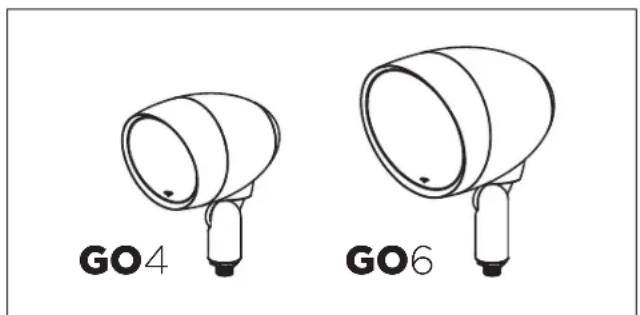

PLEASE NOTE: CONTENTS OF GO4 AND GO6 SATELLITE SPEAKERS DO NOT CONTAIN MOUNTING OPTIONS. YOU MUST PURCHASE MOUNTING OPTIONS SEPARATELY:
Contents of GO4 and GO6:
[1] Speaker with Mounting Arm
(1) Off-Season Speaker Cover
[2] Silicone-Filled Wire Connectors
Mounting Options [Sold Separately]:
Ground Stake
Surface Mount
- Inground Conduit Box
Required Tools:
Shovel
- Cable Strippers
- Phillips Screwdriver
Wrench
Power
Crown Amplifier (available direct from Paradigm).
The Paradigm G04 and G06 are passive speakers. These speakers are optimized for use with the Crown CDi 1000 amplifier which is pre-programmed with customized DSP settings for a variety of different speaker/subwoofer installation scenarios.
PLANNING THE INSTALL
- Identify the location.
- Determine the positioning of subwoofer and satellite speakers.
- Dig the trench according to speakers and accessories to be installed.
The trench should be 6^ - 8^ deep.
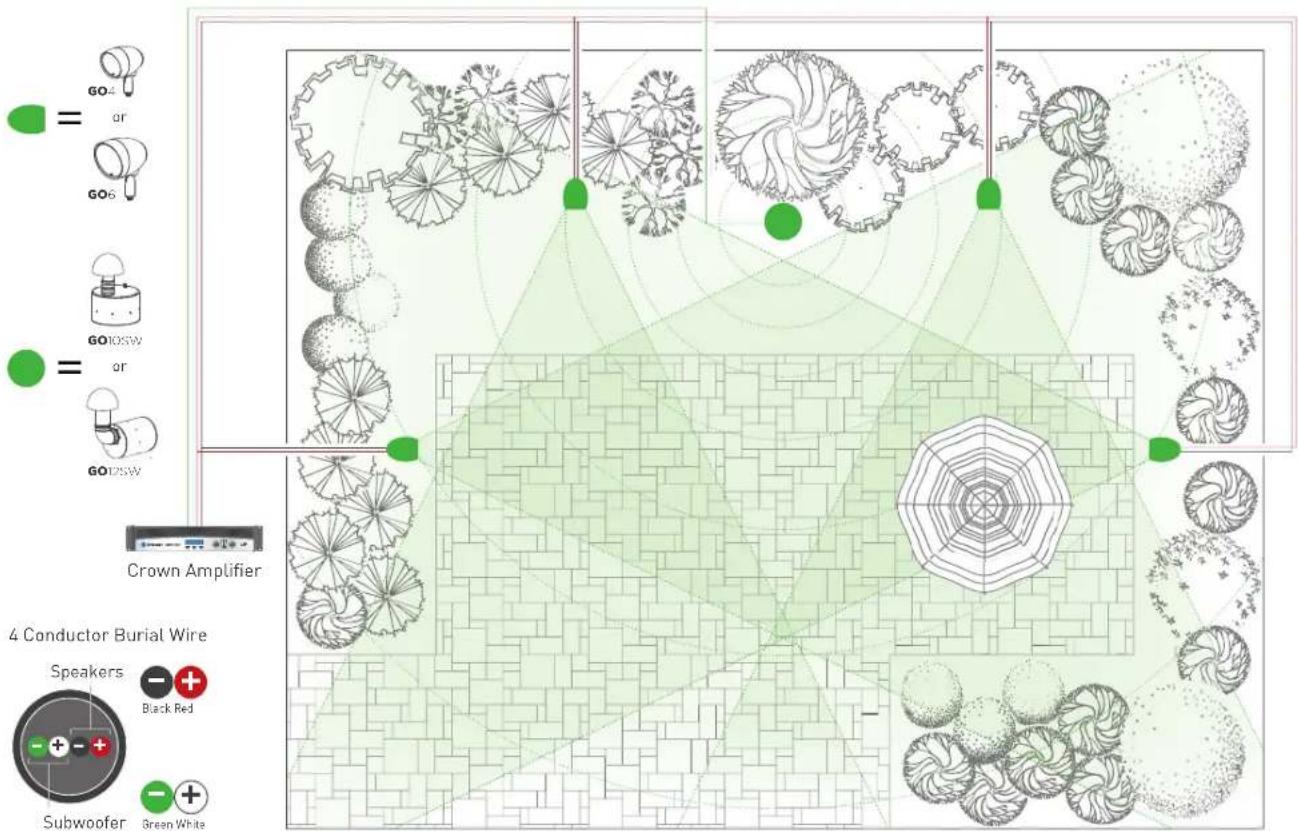
CABLE RECOMMENDATIONS
We strongly recommend using burial-rated cable (not included) when installing any of the Garden Oasis Satellite Speakers. In addition, it's critical to use the proper speaker cable gauge. Please review the chart below.
| CABLE GAUGE CHART | |
| Cable Gauge Distance | |
| 18 Gauge Up to | 100 feet (30 meters) |
| 16 Gauge Up to | 150 feet (45 meters) |
| 14 Gauge Up to | 200 feet (61 meters) |
| 12 Gauge Up to | 400 feet (122 meters) |
| 10 Gauge Up to | 650 feet (198 meters) |
INSTALLATION CONSIDERATIONS
There a few considerations before you start digging a trench:
- Ensure that ALL Speakers are tested prior to installation.
- Ensure that the proposed area is easily accessed and that the area is not prone to flooding, standing water or where the speakers can be easily damaged, kicked or struck.
- Consider Overall Landscape/Garden Design and positioning in relation to listening area
WIRING & SPEAKER INSTALLATION
Mono Setup Using 4 Conductor Burial Cable & Crown Amplifier

Preparing the 4 Conductor Burial Cable
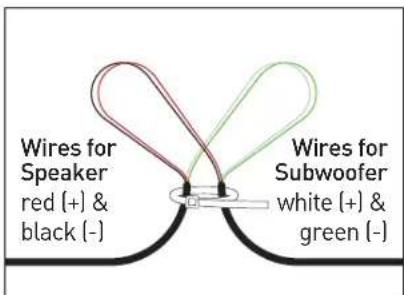
- Starting with the first speaker and every speaker/ sub that comes after, create a loop approximately 6" in length.

- Recommended: Use a wire tie (not included) to keep the wire loop intact and act as a strain relief.

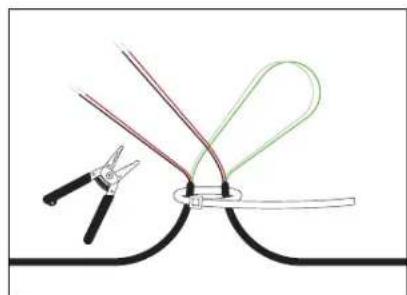
3.Use a Round Cable Stripper to remove the outside protective cable jacket to expose the four color-coded wires. Separate the wire loops as shown.
- Cut the red (+) and black (-) wires with cable strippers and strip off 1 inch (25.4mm) of insulation from the ends if the wires to expose the copper conductor.
WIRING & SPEAKER INSTALLATION (CONT'D)
Installing Ground Stake Accessory & Attaching Speaker
- Remove nut from the threaded end of the speaker arm.
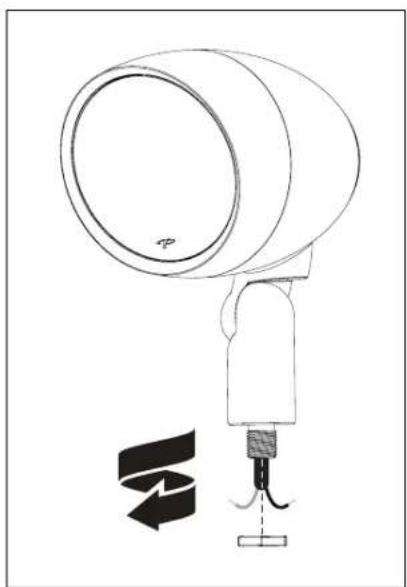
- Remove the twist cap and gasketed aluminum washer from the ground stake accessory.

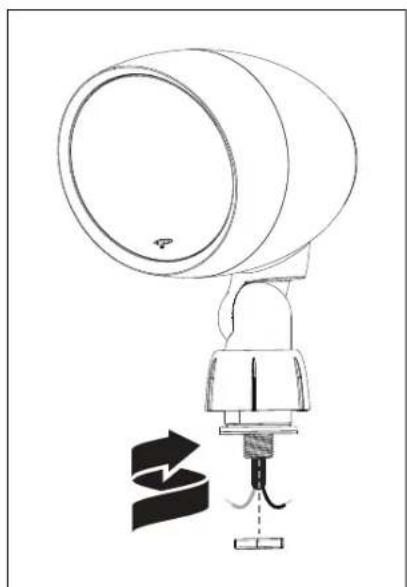
- Slide the twist cap over the speaker arm then slide the gasketed aluminum washer (from the ground stake) over the threaded end of speaker arm.
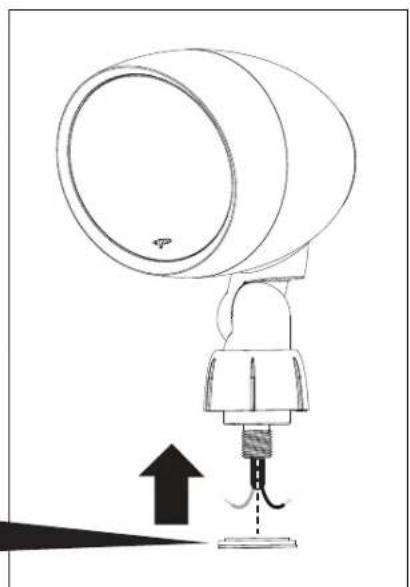
- Using a wrench, thread and firmly tighten the nut (removed in step 1) over the threaded end of the speaker arm.
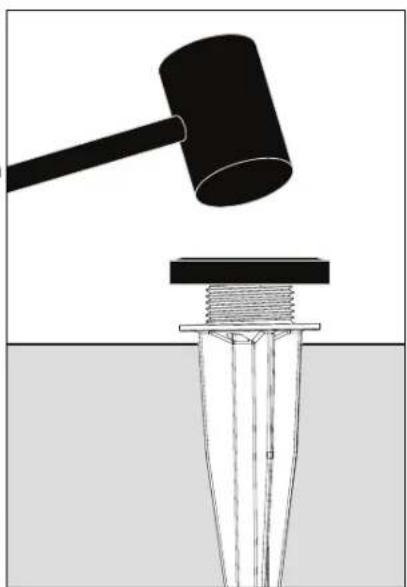
- Using a mallet and a wooden block, pound the ground stake into the ground. Drive the ground stake down until the ground stake flange is nearly flush with the surface. Note: Leave a slight gap between the ground stake flange and the ground surface in order to thread speaker wiring through the wiring hole in the ground stake.
- Thread the speaker's wiring through the wiring hole in the ground stake.
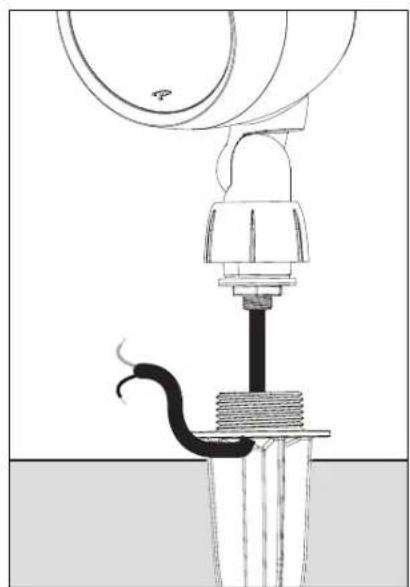
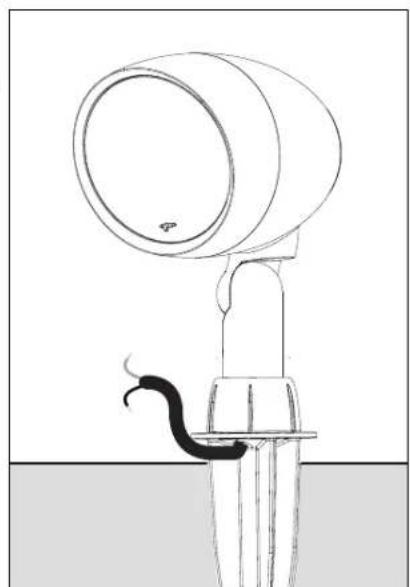
- To attach the speaker to the ground stake, hand thread the twist cap to the ground stake.
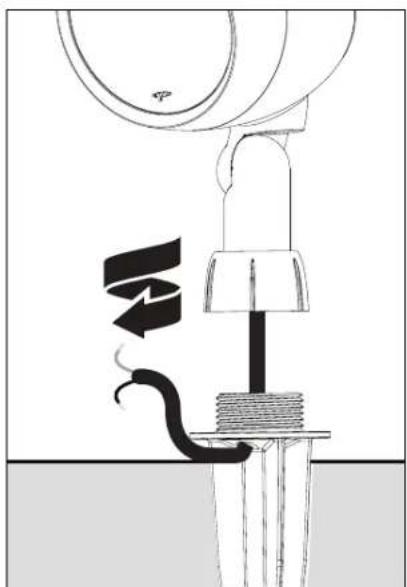
- The speaker is now mounted to the ground stake. The next step is wiring, go the 'Wiring' section for instructions.
WIRING & SPEAKER INSTALLATION (CONT'D)
Installing Surface Mount Accessory & Attaching Speaker
- Remove nut from the threaded end of the speaker arm.
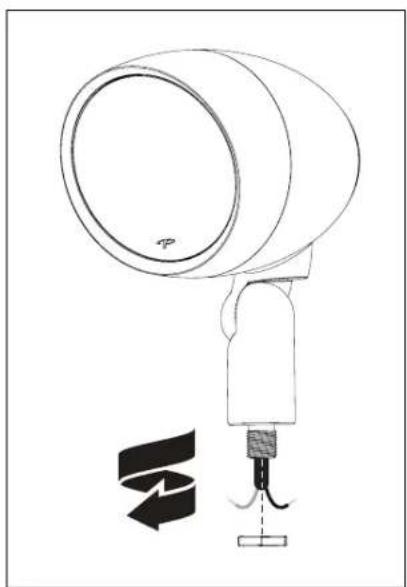
- Remove the twist cap and gasketed aluminum washer from the surface mount accessory.

- Slide the twist cap over the speaker arm then slide the gasketed aluminum washer (from the ground stake) over the threaded end of speaker arm.
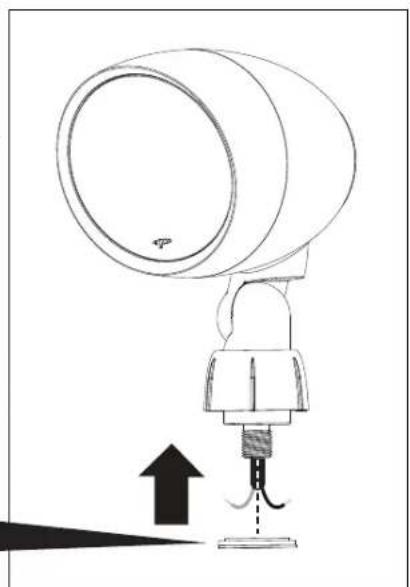
- Using a wrench, thread and firmly tighten the nut [removed in step 1] over the threaded end of the speaker arm.
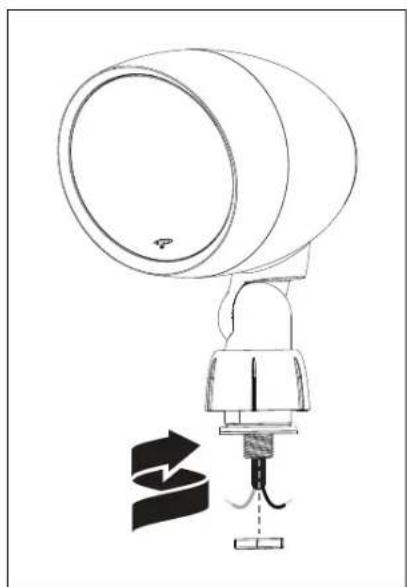
- Thread the speaker wire through the center hole and out of the wire opening on the surface mount base. Place surface mount base flush against the surface you wish to install your speaker. To attach surface mount base to the surface, use appropriate screws (not supplied) for your installation. For specifications on screws, see your dealer for details.

- To attach the speaker to the surface mount base: a) First hand thread the twist cap to the surface mount base. b) Now firmly tighten the twist cap with the provided wrench.

For wiring instructions see 'Speaker & Burial Cable Connections' on page 11.
Note: For a wall mounted installation where a wire connection is contained within the surface mount base, please follow these instructions. It is recommend that the speaker wire be cut short and the wire sleeve should be removed to expose the red + and black - wires. Follow steps 6 a-b, but do not attach the assembled speaker with surface mount base until your wire connections are made with silicone-filled wire connectors covering the exposed wire connections. The wire connections with silicone-filled wire connectors must be stuffed inside the surface mount base before attaching to the desired surface with appropriate screws (not supplied) for your installation. For specifications on screws, see your dealer for details.
WIRING & SPEAKER INSTALLATION (CONT'D)
Speaker & Burial Cable Connections
Combine and twist (clockwise) the red wires (as shown in the diagram) from the amp, speaker and to the next speaker. Secure these three wires using the provided silicone-filled wire connectors;
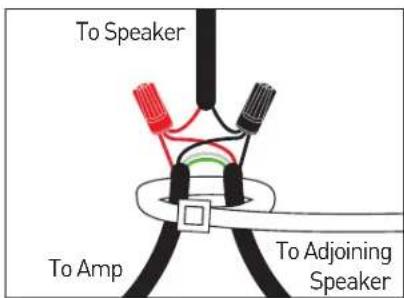
Repeat procedure for Black wires. NOTE: you may have to cut some of the speaker cable emanating from the speaker to a more manageable size.
Speaker Direction & Settings
- Aim the speaker by loosening the screw in the speaker arm and re-tightening once the desired aim is achieved.
- Once your system is setup, set the dial on each satellite speaker to correspond with the number of satellite speakers and subwoofer in the installation (see 'Audio Settings Chart' on page 15).

OPTIONALINGROUND CONDUITBOX
Following the same instructions outlined for the ground stake or surface mount accessory. The Garden Oasis Inground Conduit Box can be substituted. Knock out holes in the Inground Conduit Box as needed. Conduit is sold separately.
Included:
(1) Inground Conduit Box
[1] Two Piece Mounting Post
[8] Stainless Steel Screws
(4) Ground Stakes
Recommended Tools:
- Drill
- PVC Glue - for PVC conduit or fittings
Silicone Caulk
Shovel - Hammer
2 Phillips Screwdriver
Wrench
Installation Instructions

*IMPORTANT! Test your system before gluing or caulking any part of the Inground Conduit Box or any conduit piping connections. Use
silicone caulk to seal any openings used for cable. Allow caulk and glue to dry completely before burying the Inground Conduit Box.
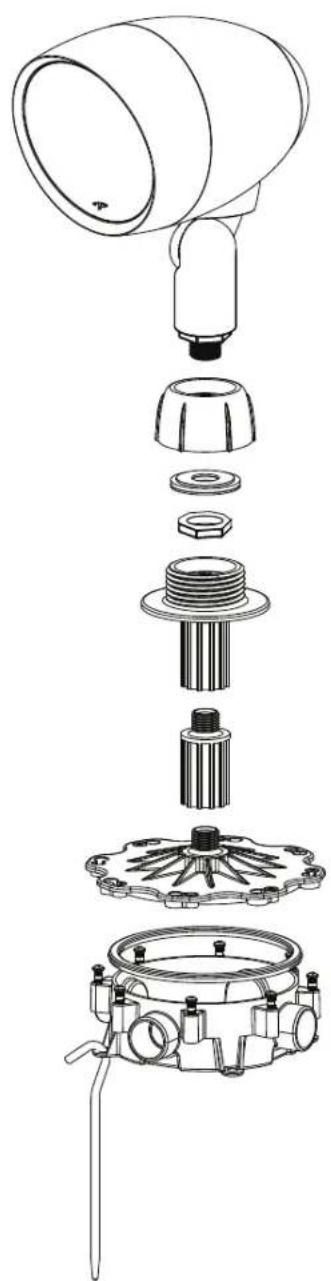
OPTION 1: PVC Conduit Installation - Knock out the conduit openings to be used. Glue the conduit piping to the Inground Conduit Box.* Draw the cable through the conduit and pull at least 8 inches of cable into the box cavity.
Note: The Inground Conduit Box openings are 3/4'' in diameter. Other conduit piping sizes may be used with adapters.
OPTIONAL INGROUND CONDUIT BOX (CONT'D)
OPTION 2: Inground Cable Installation - Drill a hole into the center of the knock out slightly larger than the cable. Route the cable through and pull at least 8 inches of cable into the box cavity. Seal the entrance completely with silicone.* Place the Inground Conduit Boxes in their appropriate trench location, ensuring a minimum depth of 6 inches.
- Install the satellite speaker to the Inground Conduit Box lid, using the two piece post. Use silicone in the threads to enhance sealing of the Inground Conduit Box against moisture.*
-
Use the silicone-filled wire connectors included with the speaker to terminate the wiring connections. Turn the silicone-filled wire connectors clockwise by hand until they are tight.
-
The box may now be closed. A weatherproof gasket is attached to the cover, but for additional water intrusion protection, line the inside edge of the cover with silicone where it contacts the box, then assemble the box using the 8 screws.* Tighten the screws tightly by hand with a #2 screwdriver.
- Anchor Inground Conduit Box in the hole using the 4 provided stakes. Install all speakers and test the system before burying the boxes and wiring.
- Using a screw driver, adjust the speaker angle and position last.
*See 'Important!' notice on the previous page.
TEST SYSTEM
After all satellites and subwoofer connections are completed, connect the wires to your receiver or amplifier.
IMPORTANT: Be sure not to let any stray' ^+ and'- strands touch each other. Touching strands will cause a short circuit which could damage your amplifier.
Turn your receiver or amplifier 'On' and test the system with your favorite music. If the speakers are operating properly, refill the wire trench and enjoy your new speakers.
TO AVOID SPEAKER DAMAGE
Don't be fooled by your amplifier's volume control. It adjusts listening level—it does not indicate power output. If your speakers begin to sound harsh or grating, or if you hear the bass breaking up, turn the volume down immediately or you will damage your speakers! This type of damage constitutes abuse and is not covered by the warranty!
Tone controls and equalizers can demand even more power from an amplifier, lowering the point at which it produces clipping distortion. Use them sparingly, if at all, and do not use them when listening at loud levels.
LISTENING OUTDOORS
Outdoors there are no walls to contain sound. Background noise is louder and the distance listeners are from the speaker(s) is usually greater. Achieving a reasonable listening level can be more difficult. The tendency is to turn up the volume, however this may disturb neighbors and when turned up too high, can seriously damage the speakers or your amplifier.
The solution? In larger areas we recommend using multiple Paradigm Garden Oasis speakers. Using more speakers ensures that sound is evenly distributed, allowing for reasonable listening levels at lower volumes. Demand on the amplifier is reduced and neighbors are not disturbed. Think of it this way: When lighting a large outdoor area, using multiple floodlights on a dimmer set to a low setting is far more effective than using a single floodlight with the dimmer set to high.
During the off season, when your speakers are not in use for prolonged periods, you can cover your speakers from the elements using the cover included. This cover is breathable, while protecting your speaker for harsh, inclement weather.
AUDIO SETTINGS CHART
INSTALLATION USING LONG WIRES (100 feet or longer)
| CHANNEL #1 ON AMP | CHANNEL #2 ON AMP | PRESETS ON CROWN AMP | PRESET NAME | POWER OUTPUT | SET DIAL ON SATELLITE SPEAKER | ||
| Wire Product to Channel #1 on the Crown Amplifier | Wire Product to Channel #2 on the Crown Amplifier | Select the Preset number on the Crown Amplifier specified below | Signal level provided to subwoofer / speakers | Remove the cap from the rear of the satellite speaker and position the dial to the appropriate wattage setting below | |||
| GO105W or GO12SW plus GO4 or GO6 satellite speakers | G0105W G04 | Preset 2 for GO10SW and GO4 | G04_10SW | 8 ohm / 70V hybrid | Speakers: 1-12 3 | DW [or less] | |
| G010SW G06 | Preset 3 for GO10SW and GO6 | G06_10SW | 8 ohm / 70V hybrid | Speakers: 13-24 1 | 5W [or less] | ||
| G012SW G04 | Preset 4 for GO12SW and GO4 | G04_12SW | 8 ohm / 70V hybrid | Speakers: 25-50 7 | 5W [or less] | ||
| G012SW G06 | Preset 5 for GO12SW and GO6 | G06_12SW | 8 ohm / 70V hybrid | Speakers: 50-100 3 | 3.8W [or less] | ||
| NO subwoofer and GO4 or GO6 satellite speakers | G04 G04 | Preset 10 for GO4 in Mono | GO_4_MO NA | 70V Speakers: 1-1 | 2 30W [or less] | ||
| G06 G06 | Preset 11 for GO6 in Mono | GO_6_MO NA | 70V Speakers: 13-24 15W [or less] | ||||
| G04 G04 | Preset 12 for GO4 in Stereo | GO_4_ST NA | 70V Speakers: 25-50 7.5W [or less] | ||||
| G06 G06 | Preset 13 for GO6 in Stereo | GO_6_ST NA | 70V Speakers: 50-100 3.8W [or less] | ||||
INSTALLATION USING SHORT WIRES (less than 100 feet) FOR 4 OR FEWER SPEAKERS
| CHANNEL #1 ON AMP | CHANNEL #2 ON AMP | PRESETS ON CROWN AMP | PRESET NAME | POWER OUTPUT | SET DIAL ON SATELLITE SPEAKER | |
| Wire Product to Channel #1 on the Crown Amplifier | Wire Product to Channel #2 on the Crown Amplifier | Select the Preset number on the Crown Amplifier specified below | Signal level provided to subwoofer / speakers | Remove the cap from the rear of the satellite speaker and position the dial to the appropriate wattage setting below | ||
| GO10SW or GO12SW plus 4 or less GO4 or GO6 satellite speakers | G010SW G04 | Preset 6 for GO10SW and GO4 | 8GO410SW 8 ohm / 8ohm | 8ohms | ||
| G010SW G06 | Preset 7 for GO10SW and GO 6 | 8GO610SW 8 ohm / 8ohm | ||||
| G012SW G04 | Preset 8 for GO12SW and GO4 | 8GO412SW 8 ohm / 8ohm | ||||
| G012SW G06 | Preset 9 for GO12SW and GO6 | 8GO612SW 8 ohm / 8ohm | ||||
| No Subwoofer and 4 or less GO4 or GO6 satellite speakers | G04 G04 | Preset 14 for GO4 in mono | 8GO_4_MO NA / 8ohm | 8ohms | ||
| G06 G06 | Preset 15 for GO6 in mono | 8GO_6_MO NA / 8ohm | ||||
| G04 G04 | Preset 16 for GO4 in stereo | 8GO_4_ST | NA / 8ohm | |||
| G06 G06 | Preset 17 for GO6 in stereo | 8GO_6_ST | NA / 8ohm | |||
LIMITED WARRANTY
Paradigm Garden Oasis Satellite Speakers are warranted to be and remain free of manufacturing and/or material defects for a period of three (3) years from the date of original purchase. Within the time period specified, repair, replacement or adjustment of parts for manufacturing and/or material defects will be free of charge to the original owner. Thermal or mechanical abuse/misuse is not covered under warranty.
Limitations:
- Warranty begins on date of original retail purchase from an Authorized Paradigm® Dealer only. It is not transferable.
- Warranty applies to product in normal residential use only. If product is subjected to any of the conditions outlined in the next section, warranty is void.
- Warranty does not apply if the product is used in professional or commercial applications.
- Warranty also excludes normal cosmetic deterioration caused by environmental conditions.
Warranty is Void if:
- The product has been abused (intentionally or accidentally).
- The product has been used in conjunction with unsuitable or faulty equipment.
- The product has been subjected to damaging signals, derangement in transport, mechanical damage or any abnormal conditions.
- The product (including cabinet) has been tampered with or damaged by an unauthorized service facility.
- The serial number has been removed or defaced.
Owner Responsibilities:
- Provide normal/reasonable operating care and maintenance.
- Provide or pay for transportation charges for product to service facility.
- Provide proof of purchase (your sales receipt given at time of purchase from your Authorized Paradigm® Dealer must be retained for proof-of-purchase date).
Should servicing be required, contact your nearest Authorized Paradigm® Dealer, Paradigm Electronics Inc. or Import Distributor (outside the U.S. and Canada) to arrange, bring in or ship prepaid, any defective unit. Visit our website, www.paradigm.com for more information.
Paradigm Electronics Inc. reserves the right to improve the design of any product without assuming any obligation to modify any product previously manufactured.
This warranty is in lieu of all other warranties expressed or implied, of merchantability, fitness for any particular purpose and may not be extended or enlarged by anyone. In no event shall Paradigm Electronics Inc., their agents or representatives be responsible for any incidental or consequential damages. Some jurisdictions do not allow limitation of incidental or consequential damages, so this exclusion may not apply to you.
Retain this manual and your sales receipt for proof of warranty term and proof of purchase.
NOTES
Paradigm®
Garden Garden Garden


GO4
GO6
Enceintes
satellites
extérieures
MANUEL DE L'UTILISATEUR
TABLE DES MATIÈRES
Apercu. 3
Enceintes satellites premium Garden Oasis. 3
Outilnsecessaires 3
Alimentation. 3
Planification de l'installation 4