
Founder 120H - Speaker Paradigm - Free user manual and instructions
Find the device manual for free Founder 120H Paradigm in PDF.


| Product Type | Hybrid 3-way column speaker with active bass |
| Brand | Paradigm |
| Model | Founder 120H |
| Category | Audio Speaker |
| Dimensions (H x W x D) | 115.3 cm x 35.4 cm x 44.1 cm |
| Unit Weight | 41.7 kg (92 lbs) |
| Power Supply | 100-240 V AC, 50/60 Hz (active bass section) |
| Recommended Amplifier Power | 15 to 400 watts |
| Maximum Input Power | 300 watts |
| Impedance | 8 ohms |
| Frequency Response (on axis) | 42 Hz - 23 kHz (±2 dB) |
| Low Frequency Extension | 18 Hz (DIN) |
| Sensitivity (room/anechoic) | 95 dB / 92 dB |
| Drivers | 1 x 25 mm AL-MAC ceramic dome tweeter, 1 x 152 mm AL-MAG cone midrange, 3 x 215 mm CARBON-X cone woofers |
| Correction Technology | Integrated Anthem Room Correction (ARC) |
| Connectivity | Binding posts, USB for ARC, Bluetooth for pairing |
| Available Finishes | Piano Black, Black Walnut, Midnight Cherry, Walnut |
| Maintenance | Soft damp cloth, avoid abrasive cleaners |
| Safety | Do not open, avoid moisture, move with care |
| Warranty | 5-year limited (manufacturing defects) |
| Spare Parts and Repairability | Contact authorized Paradigm dealer or customer service |
Frequently Asked Questions - Founder 120H Paradigm
User questions about Founder 120H Paradigm
0 question about this device. Answer the ones you know or ask your own.
Ask a new question about this device
Download the instructions for your Speaker in PDF format for free! Find your manual Founder 120H - Paradigm and take your electronic device back in hand. On this page are published all the documents necessary for the use of your device. Founder 120H by Paradigm.
USER MANUAL Founder 120H Paradigm
In accordance with the European Union WEEE (Waste Electrical and Electronic Equipment) directive effective August 13, 2005, we would like to notify you that our speakers may contain regulated materials which, upon disposal, require special reuse and recycling processing. For this reason Paradigm Electronics Inc. (the manufacturer of Paradigm speakers and Anthem electronics products) has arranged with its distributors in European Union member nations to collect and recycle this product at no cost to you. To find your local distributor please contact the dealer from whom you purchased this product or go to our website at paradigm.com.
Please note that only the product falls under the WEEE directive. When disposing of packaging and other shipping material we encourage you to recycle through the normal channels.
PARADIGM, PARADIGM REFERENCE COLLECTION, Founder and all associated proprietary and patented designs and technologies are registered trademarks of Paradigm Electronics Inc. Copyright © Paradigm Electronics Inc. All rights reserved. All other trademarks are the property of their respective owner(s). Paradigm Electronics reserves the right to change specifications and/or features without notice as design improvements are incorporated.
paradigm.com

TABLE OF CONTENTS
Introduction 1
Unpacking Instructions (Floorstanding)
Speakers) Securing Rubber Feet (Floor) or Spikes (Carpet) 2
General Tips 3
Break in 3
Cleaning 3
Preventing Speaker Damage 3
Amplifier Distortion - The #1 Culprit! . . 3
More Powerful Amplifiers are Safer 3
Volume Control 3
There is a Limit! 4
The Right Amount of Power 4
Your Listening Room 4
Stand Mounting [Optional] 5
Attaching Bumper Pads to Bookshelf/ Center/Surround Speakers 6
Bookshelf and Center Speakers 6
Placement: Front Left & Right Speakers 7
Accurate Timbre 8
Balanced Bass 9
Optimal Imaging 10
Placement: Center Speaker 11
Anthem Room Correction (ARCTM) 12 (Founder 120H Only)
WhyARC? 12
How Does ARC Work? 12
What's Included With ARC? 13
Microphone Positioning & Connection. 14
Pairing 14
Testing Procedure 16
Quick Measure Speaker Position Helper 16
Basic ARC Measurements 17
Advanced Users 17
Speaker Connection 18
Minimum Gauge Requirements 18
Standard Connection for All Speakers. 19
Bi-Wire Connection 20
Bi-Amp Connection 21
Horizontal Bi-Amplification 22
Vertical Bi-Amplification 22
Fine Tuning 22
Basic Troubleshooting 23
Specifications 24
Limited Warranty 27
INTRODUCTION
Thank you for purchasing Paradigm® Founder Series speakers; we are confident that you will hear a stunning difference in your music and home theater system listening experience.
Paradigm's Comprehensive R&D, leading-edge technology, use of the finest materials and sophisticated manufacturing and quality control techniques provide vastly superior performance for each component part and at every stage of design. Paradigm® Founder speakers will provide you with unparalleled listening pleasure for many years to come.
To achieve all of the exceptional sound that these speakers are capable of providing requires care in installation and operation. Please take the time to read this manual and follow all instructions. If you have further questions, contact your Authorized Paradigm® Reference Collection Dealer or visit the Frequently Asked Questions page in the Support section of our website at paradigm.com.
UNPACKING INSTRUCTIONS (FLOORSTANDING SPEAKERS)

IMPORTANT!
FOLLOW THESE STEPS BEFORE PROCEEDING!


21180j


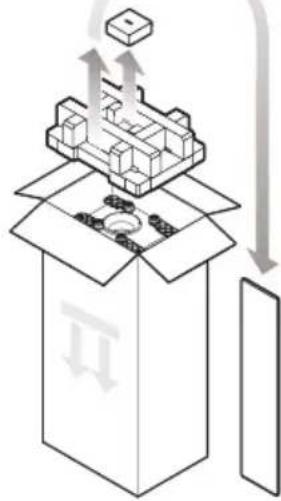
34
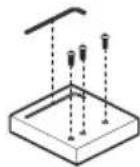
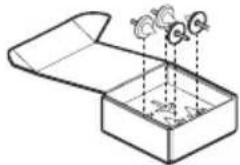
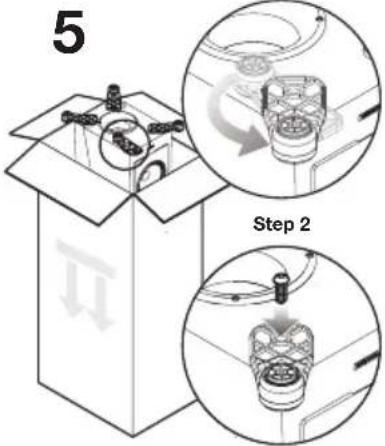
Step 1
6
OPTIONAL
Install carpet spikes if
placing speaker on carpet.
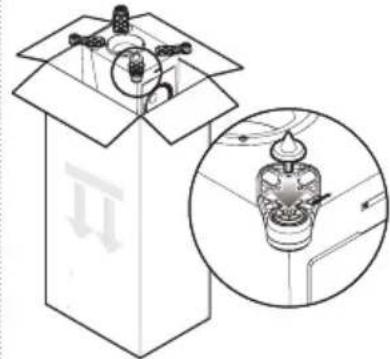

7

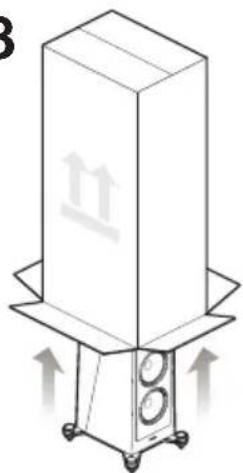
8
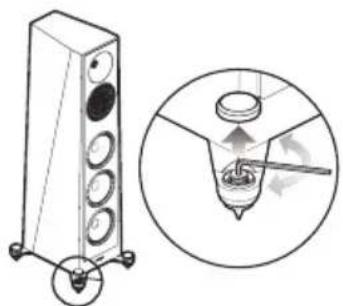
9
GENERAL TIPS
Break-In
Although Paradigm Founder speakers sound great "out of the carton," they will sound even better once they are "broken in." Allow them to play for several hours before you begin any critical listening.
NOTE: If your speakers have been transported or stored in the cold, let them warm to room temperature before use.
Cleaning
Founder speakers have a durable premium finish. To clean, use a damp soft cloth. Do not use a strong or abrasive cleaner. Avoid getting any part of the speaker system wet. Do not place wet objects (drinking glasses, potted plants, etc.) on top of the speakers—if allowed to soak in, even a small amount of water may permanently damage the speaker enclosure.
PREVENTING SPEAKER DAMAGE
Paradigm Founder speakers are efficient and can be driven to loud listening levels with moderate amplifier power. They are also able to handle the output of very powerful amplifiers. To prevent damage to your speakers, please read the following guidelines before hooking them up.
Amplifier Distortion — The #1 Culprit!
Amplifier distortion is the principal cause of speaker damage. When listening at loud levels your amplifier may run out of clean power. It will then begin to produce distorted power several times greater than its rated output power. This will damage any brand of speaker very quickly! (Ask your Dealer for amplifier recommendations.)
More Powerful Amplifiers are Safer
A 40 watt/channel amplifier will have substantial distortion above 40 watts. If driven to 50 watts, this amplifier will deliver distorted power—which will damage the speaker! A 100 watt/channel amplifier will have substantial distortion above 100 watts, but very low distortion below 100 watts. Therefore, when the speaker requires 50 watts, this more powerful amplifier will deliver clean power and speaker damage is less likely to occur.
Volume Control
Do not be fooled by the Volume Control of your receiver/preamplifier. It only adjusts listening level—it is not a "power-output" dial. The amount of amplifier power actually used at a given Volume Control setting depends solely on the nature of the music you are listening to.
At a given Volume Control setting a quiet section of music will use less amplifier power than a loud section. With typical pop-rock, jazz or large scale classical music, the rated output power of many receivers/amplifiers is often reached when the Volume Control is between the "11 and 1 o'clock" settings (with bass/treble and loudness controls not used—otherwise rated power may be reached at even lower Volume Control settings).
PREVENTING SPEAKER DAMAGE (continued)
Remember, all amplifiers produce distortion when operated beyond their rated output power. The resulting distortion will damage all speakers! Exercise caution! If you listen at loud levels, be careful to listen for the point of audible distortion—if the speakers begin to sound distressed turn the Volume Control down or your speakers and/or amplifier(s) will be damaged! This type of damage constitutes abuse and is not covered by the warranty. If louder volumes are desired, obtain a more powerful amplifier.
There is a Limit!
Although more powerful amplifiers are safer, there is a point at which you could have more power than the speaker can handle. At that point you will overpower the speaker and damage it. Exercise caution! At loud levels do not increase bass/treble controls from zero and ensure that all loudness/contour/bass EQ buttons are off (otherwise rated output power will be reached at lower volume control settings). If you listen at loud levels, watch for excessive visible cone excursion (grille movement) from the woofer—then turn the Volume Control down.
The Right Amount of Power
A power-range rating is given as a guide to indicate the approximate minimum and maximum power input of your Paradigm Founder speakers. Amplifiers that exceed your speaker's power-range rating are recommended. Their greater power reserves provide better sound. However, exercise caution! Use the speakers within their power-range rating to prevent damage (keep listening levels below the point of excessive woofer cone excursion).
YOUR LISTENING ROOM
Paradigm Founder speakers are designed to provide superior high-end sound in a wide variety of domestic settings. However, it is important to note that listening room construction, dimensions and furnishings all play a part in the quality of sound you will ultimately achieve. Your listening room will impose its own character on the performance capabilities of any speaker system. The extra care you take in correctly positioning the speakers will result in greater listening enjoyment. Keep the following guidelines in mind when deciding on the best.
- Mid and high frequencies are affected by the amount of soft furnishings in your room—curtains, carpets, sofas, wall coverings, etc. An excess of such items can result in a somewhat dull sound. The same room without any soft furnishings can produce a bright overall sound. The typical quantity of soft furnishings found in most living situations provide the right acoustic characteristics to allow the speakers to sound balanced;
Concrete floors and walls tend to aggravate low-frequency standing wave problems and are less preferred; - Rooms where height, width and length are similar should be avoided as they can exhibit significant low-frequency standing wave problems. This may result in reduced clarity. If no other room is possible, experiment with speaker placement to minimize acoustic problems.
STAND MOUNTING (optional)
The Paradigm Founder 90C center channel speakers can be mounted to Paradigm's J-18C stand if desired. Ask your Paradigm dealer for details.
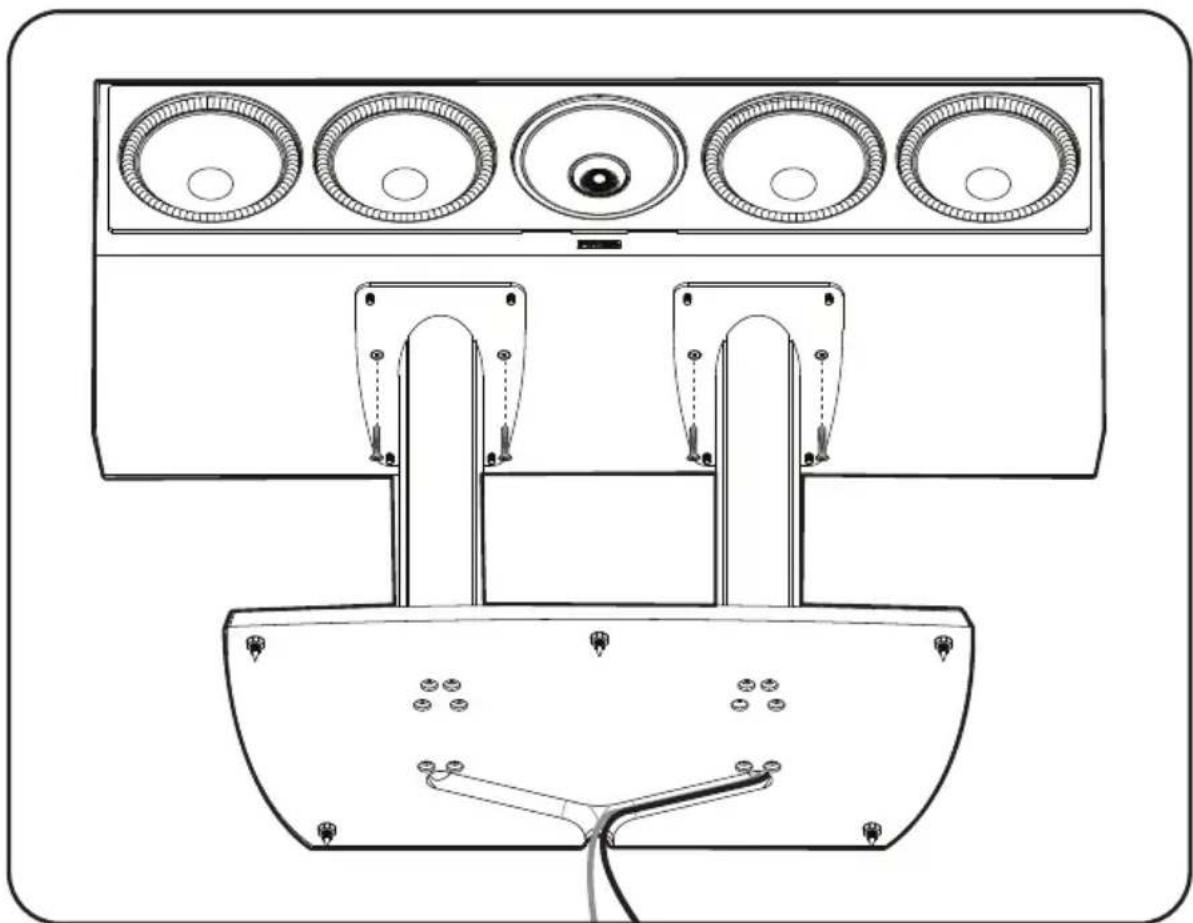
Stand Mounting a Center Channel Speaker (Founder 90C Shown)
ATTACHING BUMPER PADS TO BOOKSHELF & CENTER SPEAKERS

IMPORTANT! To prevent damage to your speaker's finish, place the top side of your speaker on a soft surface (rug, blanket, etc.) before applying the bumper pads to the bottom side corners.
Bookshelf and Center Speakers
Self-adhesive bumper pads (included) should be applied to the bottom corners of Paradigm Founder bookshelf and center-channel speakers (see illustrations below) when placed on a shelf or other flat surface. This will isolate your speakers from the solid surface, improving overall sound quality.
NOTE: As an alternative, you may choose to stand mount your Paradigm Founder 40B bookshelf speakers using Paradigm stands. Ask your Paradigm dealer for details.
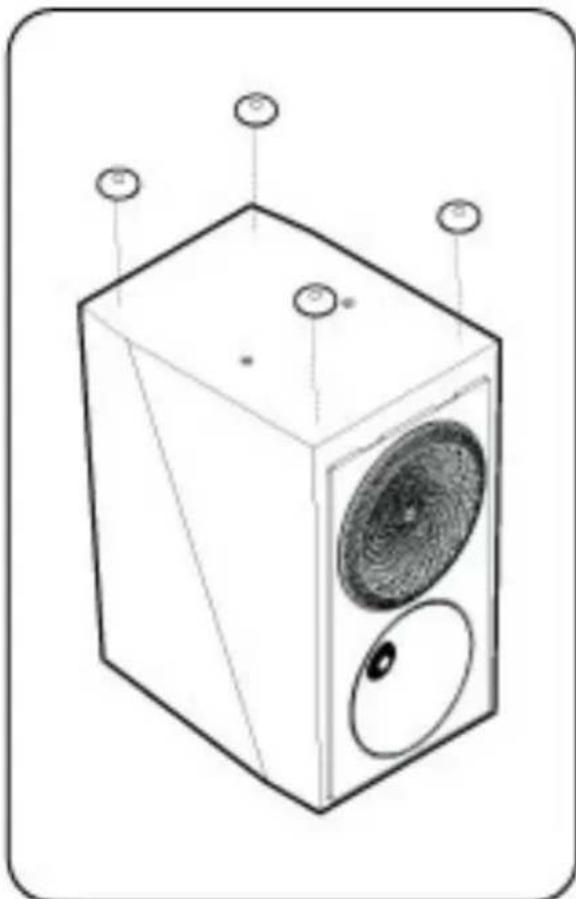
Bookshelf Speaker (Founder 40B Shown)
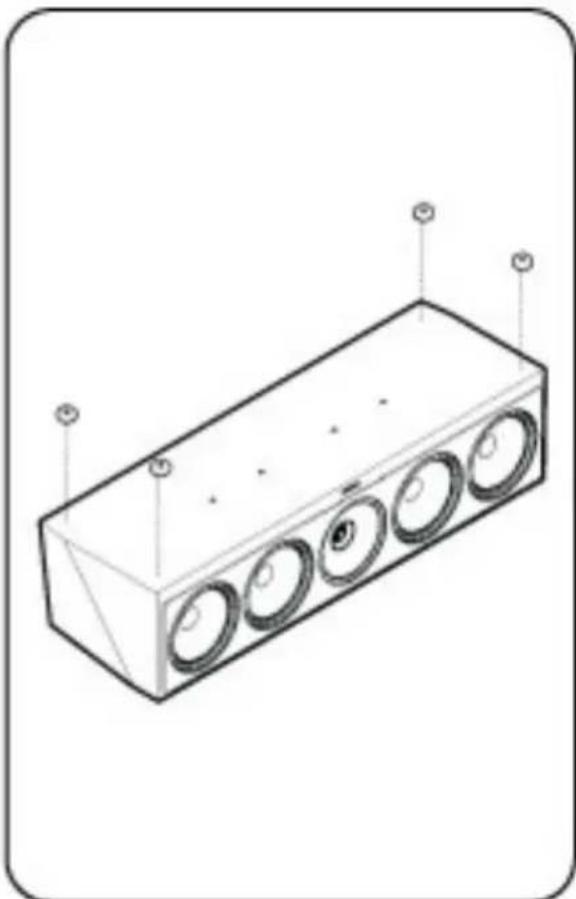
Center Channel Speaker (Founder 90C Shown)
PLACEMENT: FRONT LEFT & RIGHT SPEAKERS
Pardigm Founder front speakers are designed to allow flexible placement while providing a very large window of sound throughout your listening room. To ensure the best performance possible we strongly recommend that you observe the placement guidelines on the following pages ...
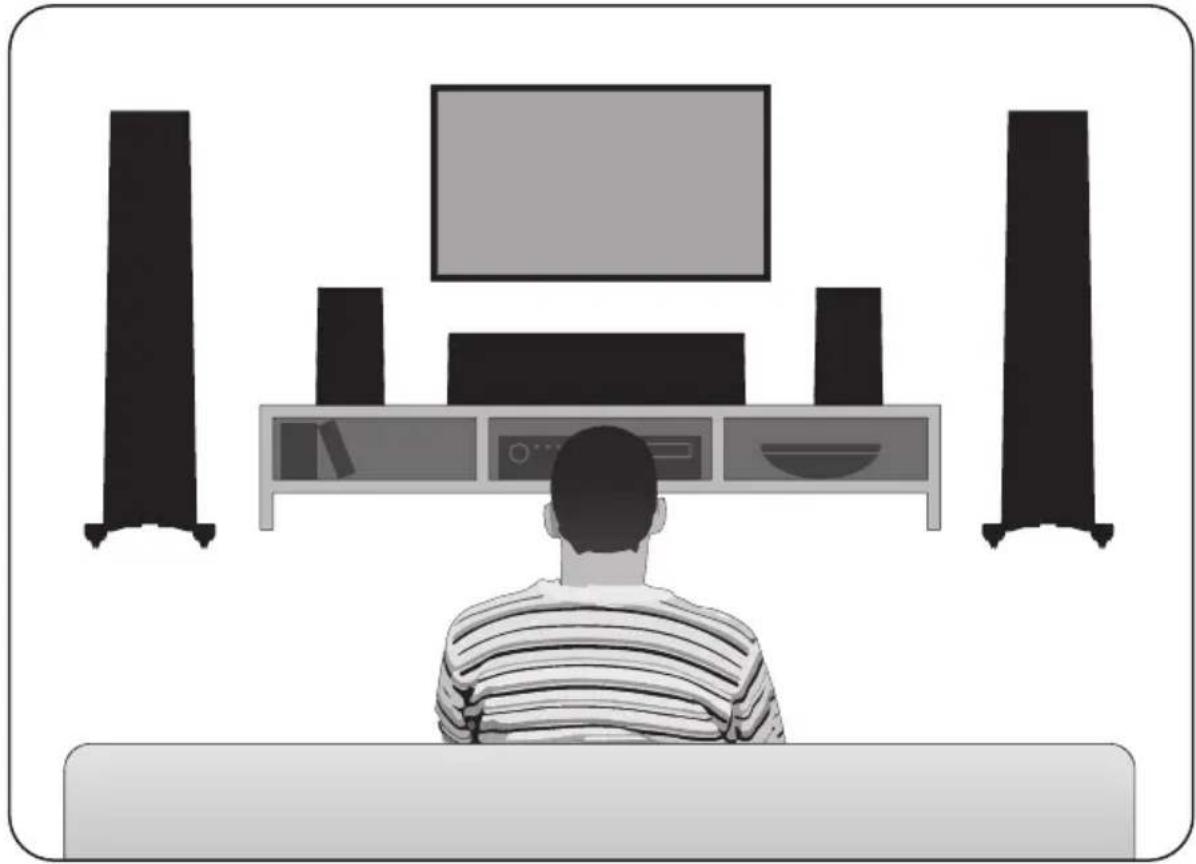
Ideal placement of left and right speakers
PLACEMENT: FRONT LEFT & RIGHT SPEAKERS (continued)
Accurate Timbre
For the most accurate and natural timbre, place front speakers so that their high-frequency drivers are approximately at ear level, as shown below.
Placing bookshelf models on Paradigm speaker stands (sold separately) or bookshelves raises their high-frequency drivers to approximately ear level, thereby ensuring the best performance possible.
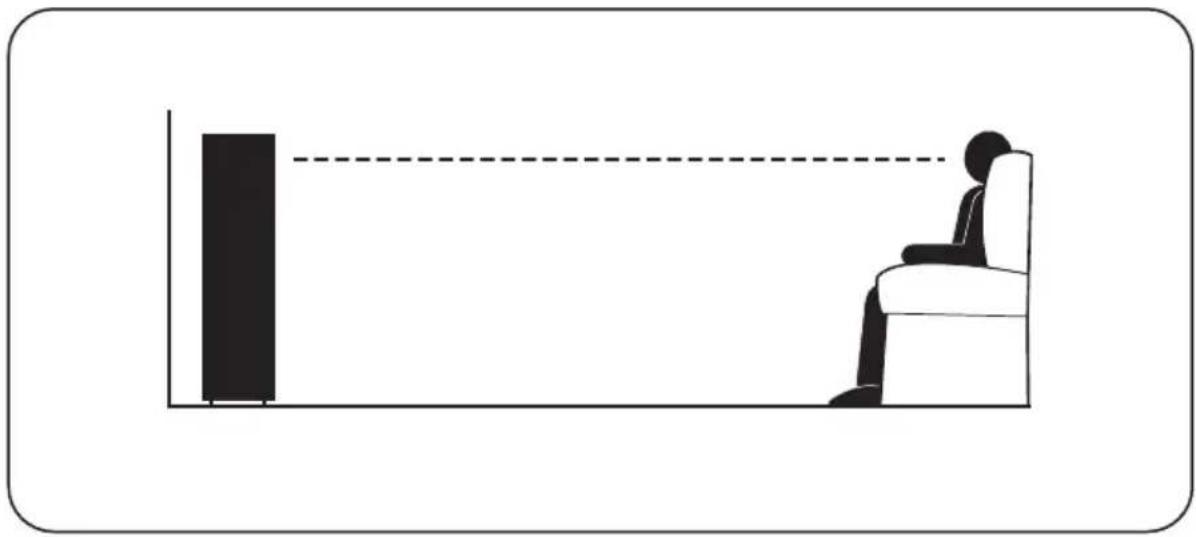
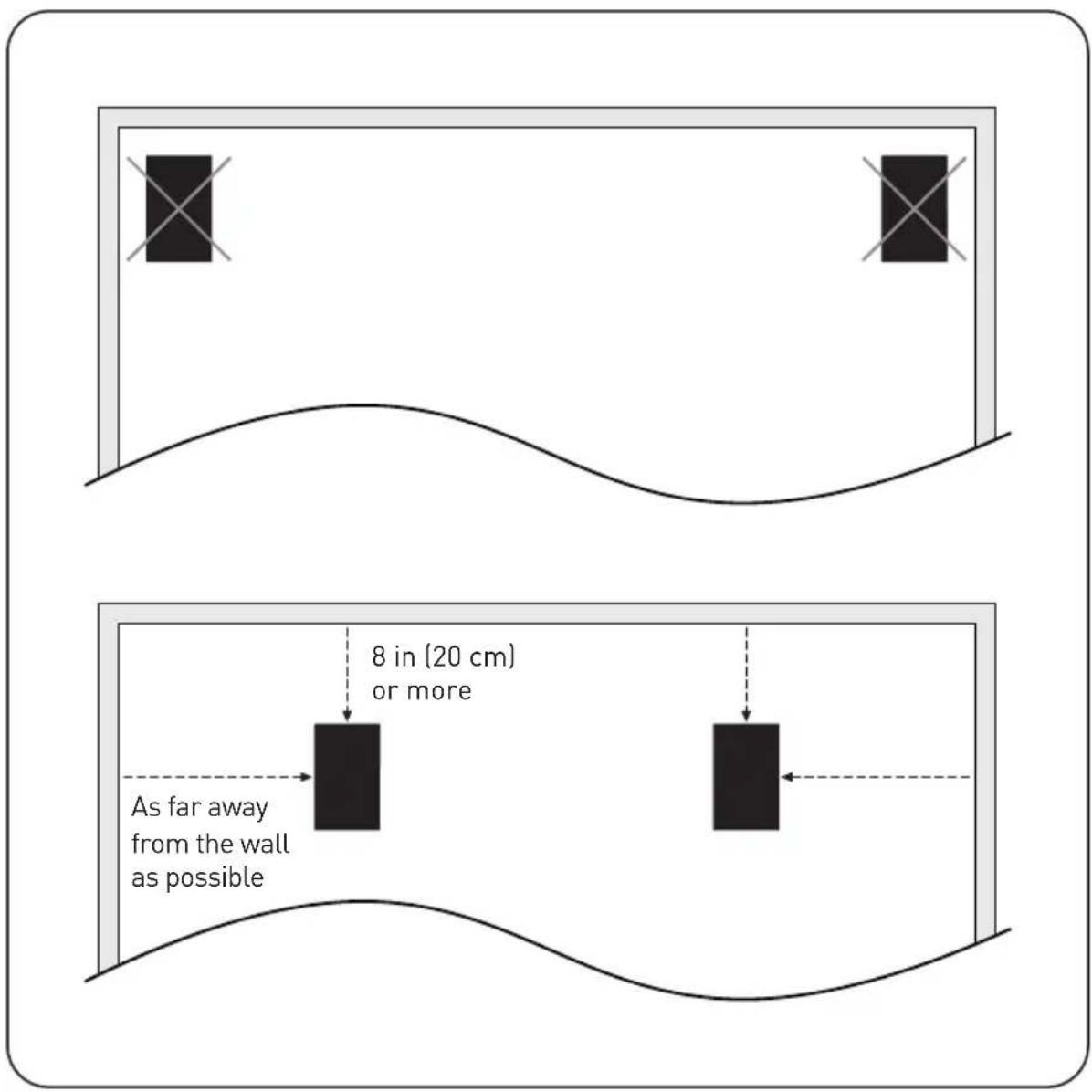
Balanced Bass
Placing front speakers in corners will over-emphasize bass and reduce overall clarity. Avoid corner placement. Position front speakers 8 in (20 cm) or more from the wall behind the speaker and as much as possible from either side wall, as shown below. This will ensure better bass performance and optimal midrange clarity.
PLACEMENT: FRONT LEFT & RIGHT SPEAKERS (continued)
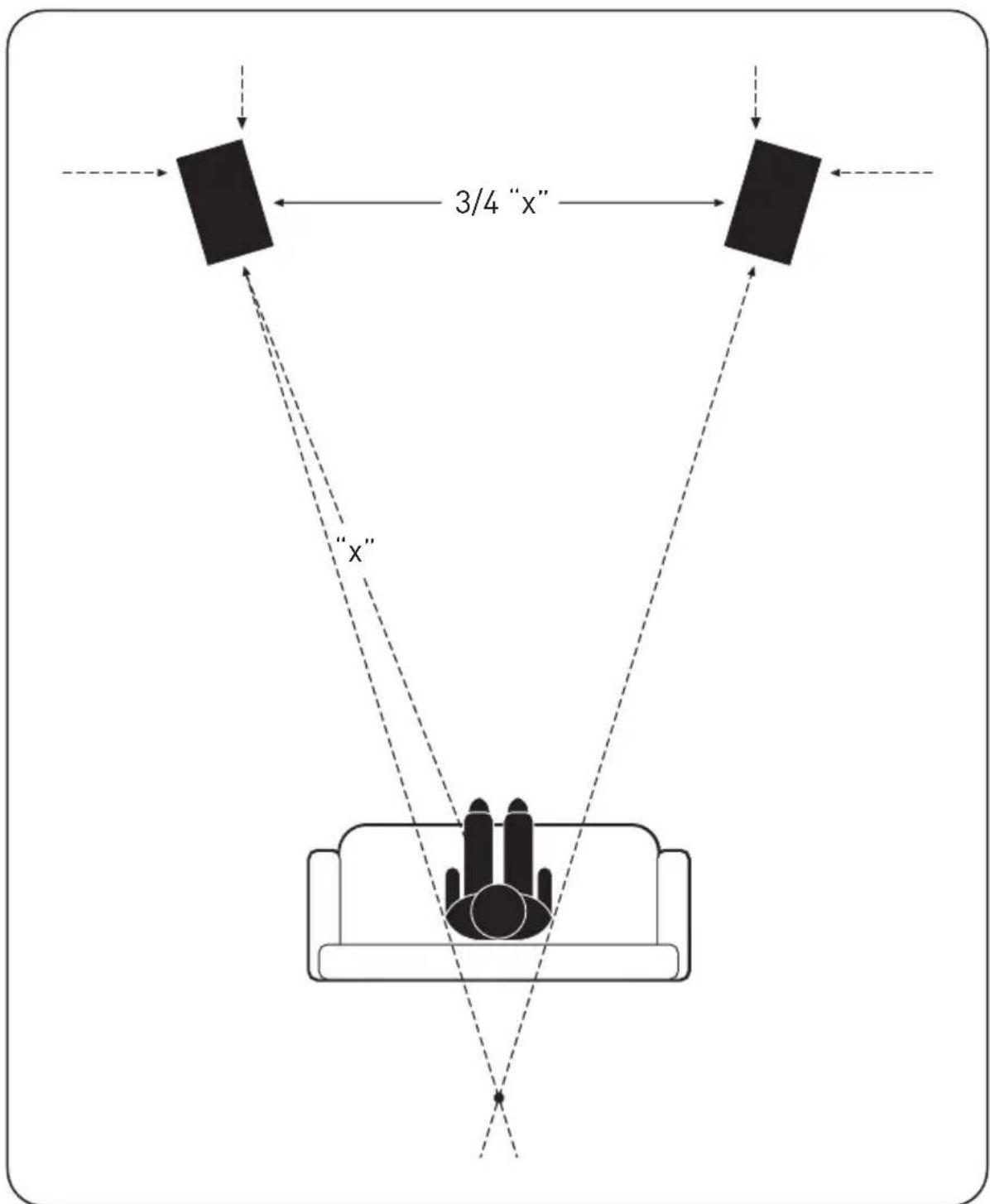
Optimal Imaging
Measure the distance from your main listening area to the front speakers ("X"). For best imaging, place speakers from three-quarters of that distance up to that same distance from each other (3/4 of "X" to "X"), as shown. To further optimize imaging, toe speakers slightly inward so they point toward the listening position with their axes crossing just behind it, as shown.
PLACEMENT:CENTER SPEAKER
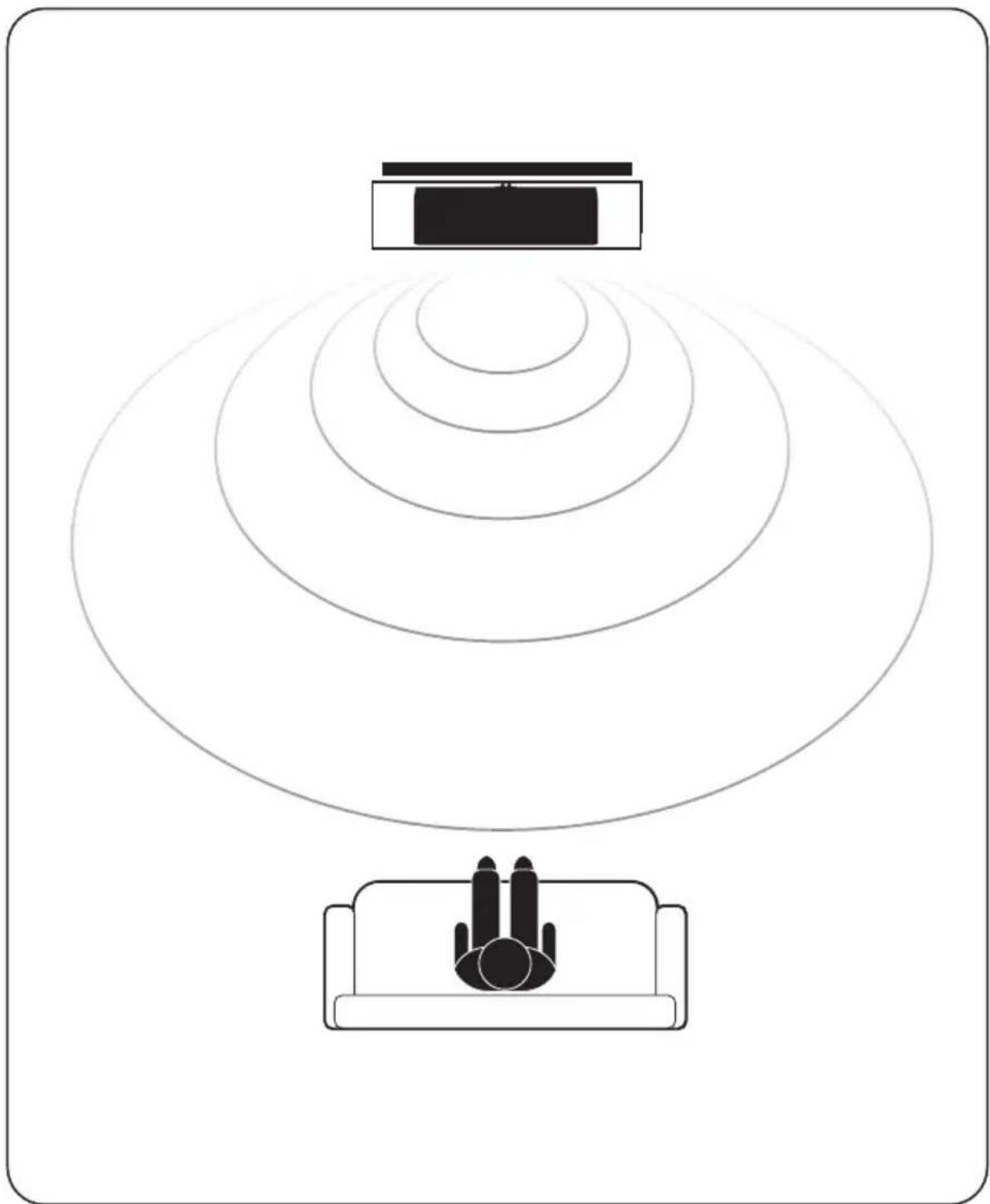
Paradigm Founder Series center channel speakers are designed to cover a large, wide listening area, allowing listeners throughout the room to hear center-channel information with unprecedented clarity and intelligibility.
Placing your center-channel speaker below (or above) the TV will ensure the best possible clarity and intelligibility. Position the speaker flush with the front of the TV or speaker shelf to minimize unwanted sound reflections. Make sure the center-channel is approximately the same distance away from the primary listening position as your front speakers. (Some A/V receivers/processors can electronically adjust for differences in distance.)
ANTHEM ROOM CORRECTION (ARCTM) - Founder 120H Only
A True Scientific Solution to the Problems of the Room
Anthem Room Correction Technology is a proprietary digital signal processing system that allows you to quickly and accurately optimize the performance of your Founder 120H to better suit the unique parameters of your room.
By listening to your room's acoustic signature, ARC can tune your equipment to correct for the performance-robbing effects (reflections, resonances, standing waves, etc.) of the various surfaces and other obstacles in your room.
ARC is easy to use, and just a few simple steps can customize your Founder 120H for your unique listening space. ARC is sophisticated, one of the most accurate and detailed digital room correction technologies available today. ARC will work tomorrow, too; with constant advances and updates available for download on the Anthem website.
WHYARC?
ARC is a state-of-the-art room correction system that analyzes bass response in your room, and then sets the correct equalization parameters to attain optimal sound. ARC improves bass response and enhances seamless dynamic blending.
Computer-assisted ARC applies super-efficient Infinite Impulse Response (IIR)
Filters, in addition to Custom Filter Topology, to minimize delay and reduce processing noise. If any audio artifacts could overcome this unique combination of IIR plus Custom Filtering, they would be so small as to be completely inaudible. ARC is just that effective.
ARC requires multiple microphone measurements. Most room equalization methods work from only a single point source, taking one measurement at the "primary listening position." ARC measures room response from at least five user-selected measurement points (up to ten positions may be measured), beginning with a "main measurement position." Additional measurement positions are symmetrically spaced a minimum of 2 feet from the first position (see diagram). This multi-measurement process ensures optimal bass performance throughout the listening area.
Unlike other "Room EQ" systems, ARC applies correction to peaks (modes) and dips (anti-modes). Correcting both allows ARC to achieve a far more accurate and natural room response. To limit the demands on the amplifier and maximize signal-to-noise ratio, ARC applies appropriate limits to this correction.
ARC is Ultra-Accurate! Your own computer's 64-bit floating-point processor does the hard work of calculating the correction curves, which greatly minimizes the rounding
errors common with less sophisticated room correction systems
HOW DOES ARC WORK?
The "room correction" process begins when a test signal generated from your speaker and is picked up by the ARC calibrated microphone. The system then runs a frequency sweep to highlight possible problem areas and determine necessary adjustments. Once your ARC measurements are captured by the microphone and saved on the connected PC, the optimized solutions are calculated by ARC and uploaded to your speaker.
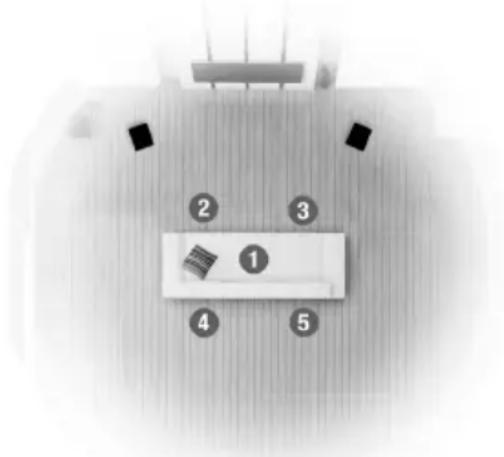
You will hear the difference, with more realistic, better-blended bass response.
ANTHEM ROOM CORRECTION (ARC) - Founder 120H Only (cont'd)
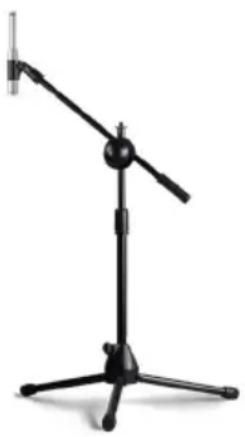
WHAT'S INCLUDED WITH ARC:
Your ARC Kit Includes:
- Microphone and microphone clip
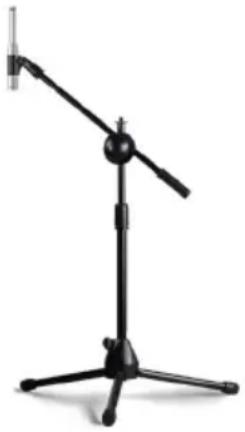
- Telescoping stand and base
- 2 USB cables (1 in speaker box)
Before you begin
- Ensure that the ARC software you are using, and the audio equipment you are using it with, are compatible. Check anthemav.com/arc for the latest software versions and the latest equipment compatibility list.
- Your computer must be running Windows 7, Mac OS 10.2 or later. If you're using a laptop computer, check its power settings and battery meter to ensure that ARC procedures will not be interrupted.
- The ARC acoustic measurement process rejects typical background noise, but if loud noise is present it may interfere with the ARC process. ARC may indicate that re-measurement is required. To avoid this, ensure that the room being tested will be sufficiently quiet during measurement.
ARC Software Installation
- Download the latest software version to your computer desktop at anthemav.com/arc
- Right-click on the downloaded .zip file folder and extract to desktop.
- Open the extracted folder and double-click on "Setup."
- Software installation instructions will appear on your screen.
- Go to Start Menu and "run" ARC.
If you are downloading an ARC update, make sure the existing ARC program is closed on your computer before installing a new version.
MICROPHONE POSITIONING & CONNECTION
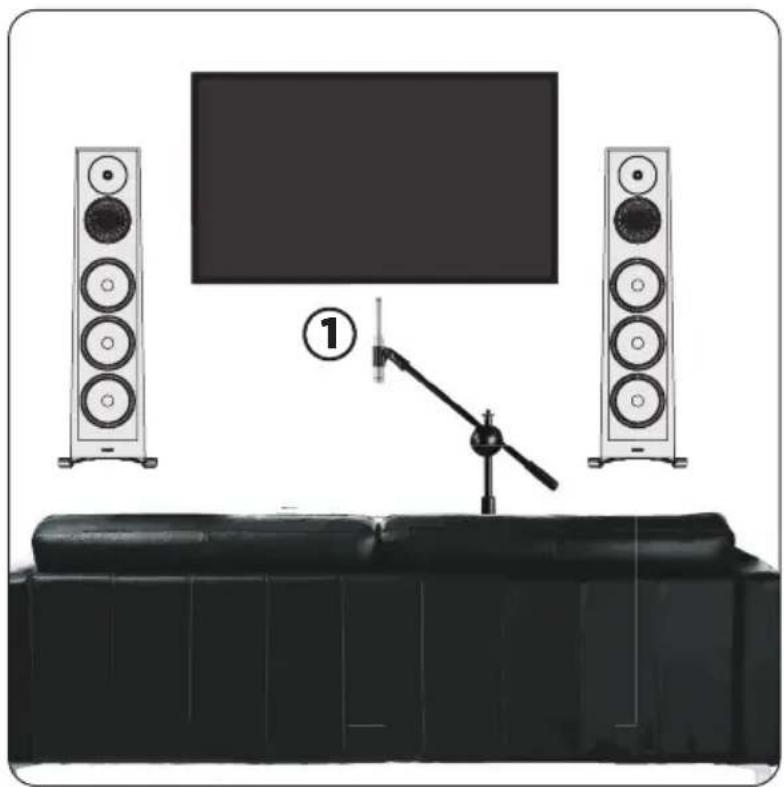
During all measurements, the microphone must point straight up.
The microphone's height is critical to proper measurement. The microphone should be positioned at ear-level when seated and should correspond with the height of the high-frequency drivers in the front speaker array.
Incorrect microphone positioning may result in a dull or bright sound. Readjust the microphone to seated ear-level in line with the high-frequency drivers and repeat ARC measurements.
To adjust the length of the telescoping tube, first loosen its clamp by rotating it counterclockwise; reposition, then rotate clockwise to lock. Set the microphone in the first position. Don't stand near the microphone while sweep tones are playing, otherwise, reflections from your body may cause bad measurements.
PAIRING
Founder 120H speakers have the ability to be set up as a pair. Once you pair two Founder 120H speakers, you will be able to connect to both speakers simultaneously to run ARC either via Bluetooth or USB connection.
All Founder 120H speakers start as a "Left" speaker from the factory and are automatically looking to pair with a "Right" speaker. To set up a pair of 120H to run ARC on, you need to set one up as a "Right" speaker. Speakers can only be paired if they also share the same name.
When pairing multiple sets of 120Hs, you will need to use a different name for the additional pairs of speakers. You can custom name your Founder 120H speakers up to 14 characters, as long as it matches the speaker that it is intended to pair with.
If using an odd number of speakers (ex: one as a center channel), follow the steps below but rename it to something different in the pairing menu so it won't attempt to pair with the "Right" speaker.
To pair 120H speakers:
- Connect both speakers to AC power
- Connect your laptop to the speaker you placed in the "Right" position using the provided USB cable
- Open ARC Genesis
- Click on "Pairing Tool" under "OTHER TOOLS" on the left side of the screen
- Click on the 120H speaker icon
- From the drop down menu set the "Type" to be "Right"
- Click "Apply Changes"
ANTHEM ROOM CORRECTION (ARC) - Founder 120H Only (cont'd)
TESTING PROCEDURE
We recommend you measure audio response at a minimum of FIVE listening positions. Up to TEN positions can be tested with ARC if your room is unusually large (more than 40' x 40') or unusually shaped—more is not necessarily better.
POSITION ONE: This "main measurement position" should be located at or just in front of the central seating position (the "Sweet Spot"). This is the "main measurement position" that is used to set the bass volume levels.
ADDITIONAL POSITIONS: All additional measurement positions should be spaced a minimum of 2 feet from position one* (see Diagram A).
NOTE: If your "main measurement position" is against a wall, additional measurement positions should be in front of the seating area. Vary the distance of these positions relative to the wall by 1 foot or more from each other so they are not all the same distance from the wall (see Diagram B).
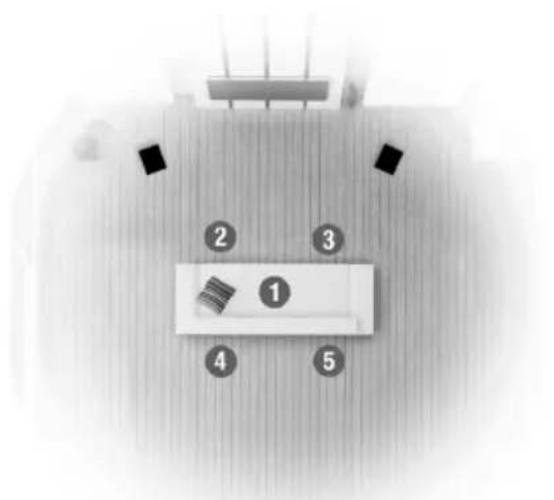
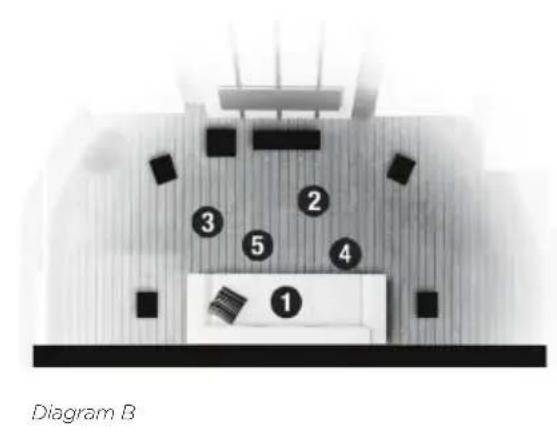
Diagram A
If speaker positioning is flexible, you can try using Quick Measure before running ARC. (Alternatively you can start with a full measurement and then see whether it might be necessary to re-position speakers.) To use Quick Measure:
- Click the Quick Measure icon.
- Click Connect and then select the device you want to measure.
- Once connected, click Start to enable the sweep tone for the speaker that you are positioning.
- After a few sweeps the graph will show a live update of the uncorrected measurement. It will keep running until you turn it off.
- You may now move your speaker around the room and watch for when the response graph is flattest.
- Leave speakers where the graph is flattest, particularly in the bass frequencies, click Stop and close the Quick Measure window, and then run ARC normally.
NOTE: If you are using multiple speakers, you must repeat the process for each one.
BASIC ARC MEASUREMENT
- With your microphone set in Position One, the "main measurement position," use the USB to connect both the microphone and the ARC-ready equipment being measured to a USB input on your computer.
- Run ARC by selecting it from the Start Menu. The program will guide you through the measurement steps. At the end of the process, ARC will automatically load the room correction data to your equipment. The process takes about 10 minutes depending on the number of measurements.
- You can name the measurement data file saved to your computer. Up to 16 characters may be used to name a measurement. Additional characters will be removed. Valid naming characters are: a-z, A-Z, 0-9, " ", "-", ".", ".", ";", ";", "<", "="", >", ?", and "@". Other characters will not be allowed.
- Once the ARC program is finished, you can disconnect your computer. You can break down and store the microphone set safely for future use.
- If the positions of your speakers change, or if new furniture or other sound-reflective materials are introduced into the room, or your main listening position changes, you will have to re-measure.
ADVANCED USERS
One of the incredible features of ARC is that it gives you the tools to customize your room response curves. This is recommended only for more advanced users.
For the latest instructions for advanced users, please visit anthemav.com/arc.
SPEAKER CONNECTION

IMPORTANT! Turn your amplifier(s) OFF before connecting your speakers. This will avoid damage which could result from accidental shorting of speaker cables.
For optimum sound, the use of high quality speaker cable is essential. The chart below identifies the minimum gauge requirements for various lengths (See your Dealer for recommendations).
| MINIMUM GAUGE REQUIREMENTS | ||
| LENGTH DIAMETER | GAUGE | |
| Under 4.5 m (15 ft) | 1.3 mm (0.05 in) | 16 awg |
| Under 9 m (30 ft) | 1.6 mm (0.06 in) | 14 awg |
| Over 9 m (30 ft) | 2.0 mm (0.08 in) | 12 awg |
Standard Connection for All Speakers

DO NOT attempt to bi-wire or bi-amplify speakers unless you have removed the jumper bars.
All Paradigm Founder speakers have two sets of input terminals connected externally with jumper bars. These speakers can be bi-wired or bi-amplified to achieve even better performance.
For standard connection of speakers with two input terminals, leave the jumper bars attached and connect using either set of input terminals.
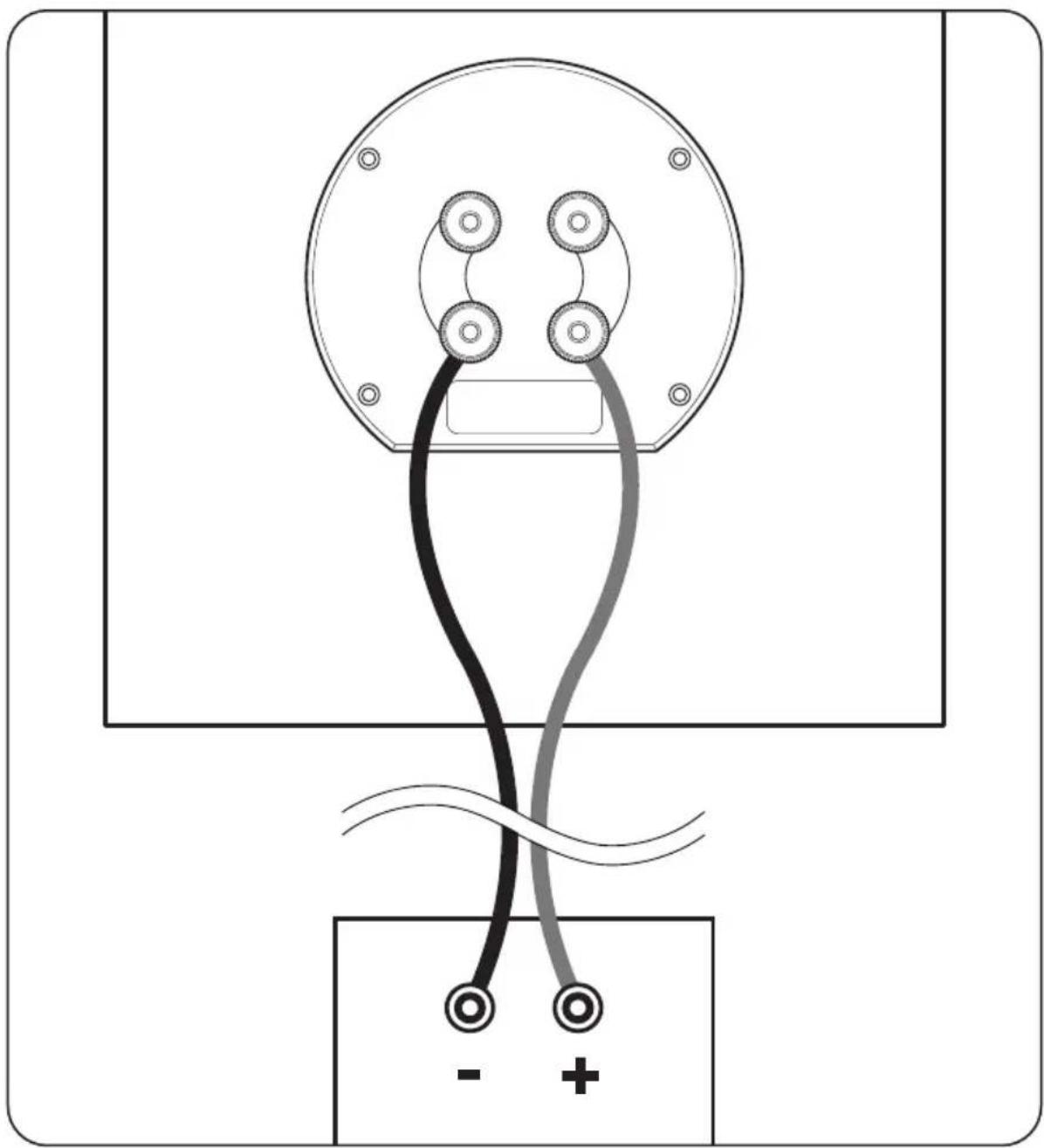
SPEAKER CONNECTION (continued)
Bi-Wire Connection
Bi-wiring can improve clarity and openness with less grain and more solidity to the bass. Two speaker cables are required for each speaker that is bi-wired.
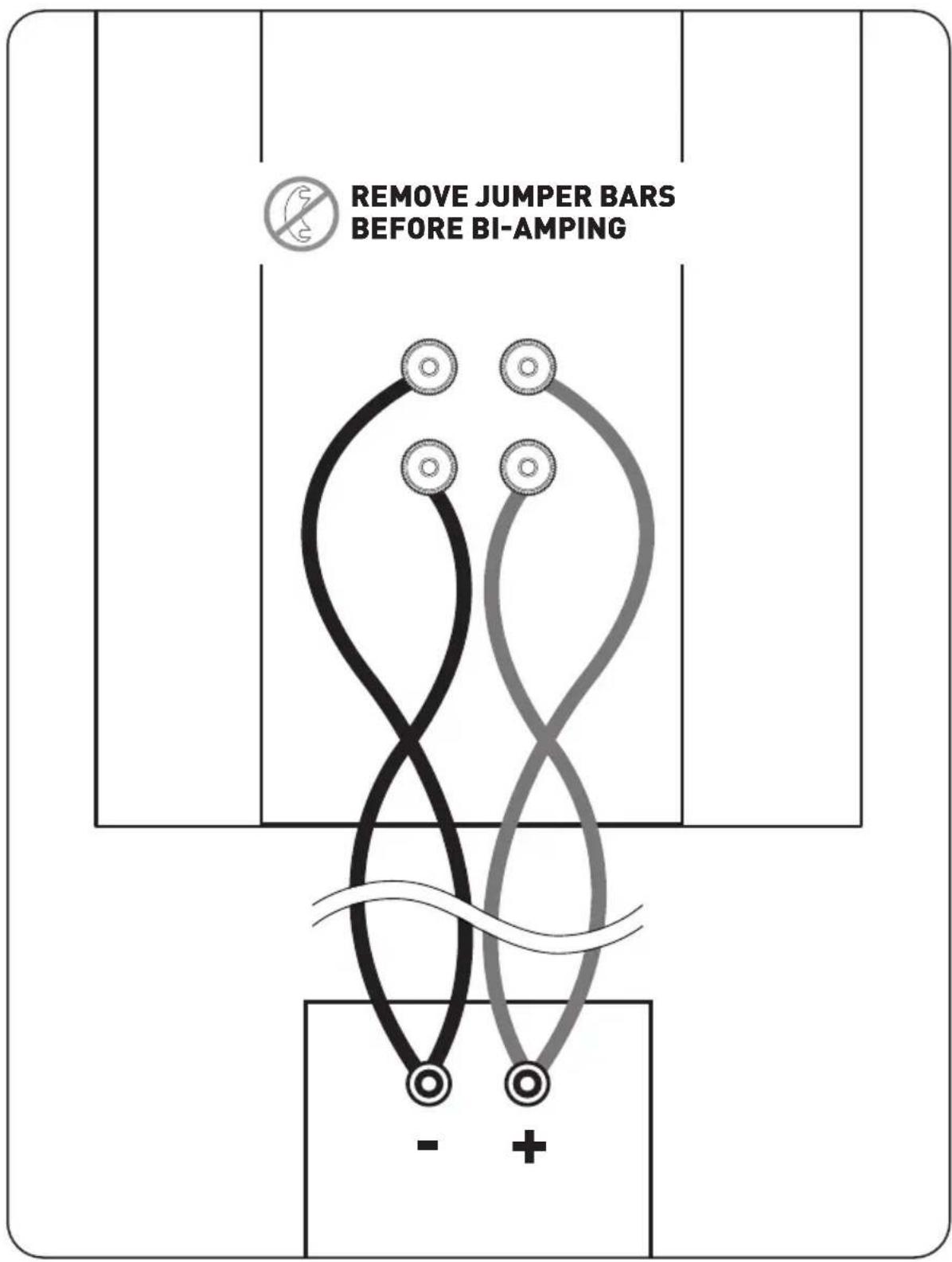
Bi-Amp Connection
IMPORTANT! When bi-amping, always use amplifiers with identical gain. If uniform amplifier gain is not maintained the speaker-to-speaker balance will be incorrect when vertically bi-amped, or the speaker system's frequency balance will be incorrect when horizontally bi-amped. To prevent problems, use identical amplifiers (brand and model). Make sure they are operating in the same non-bridged or bridged mode.
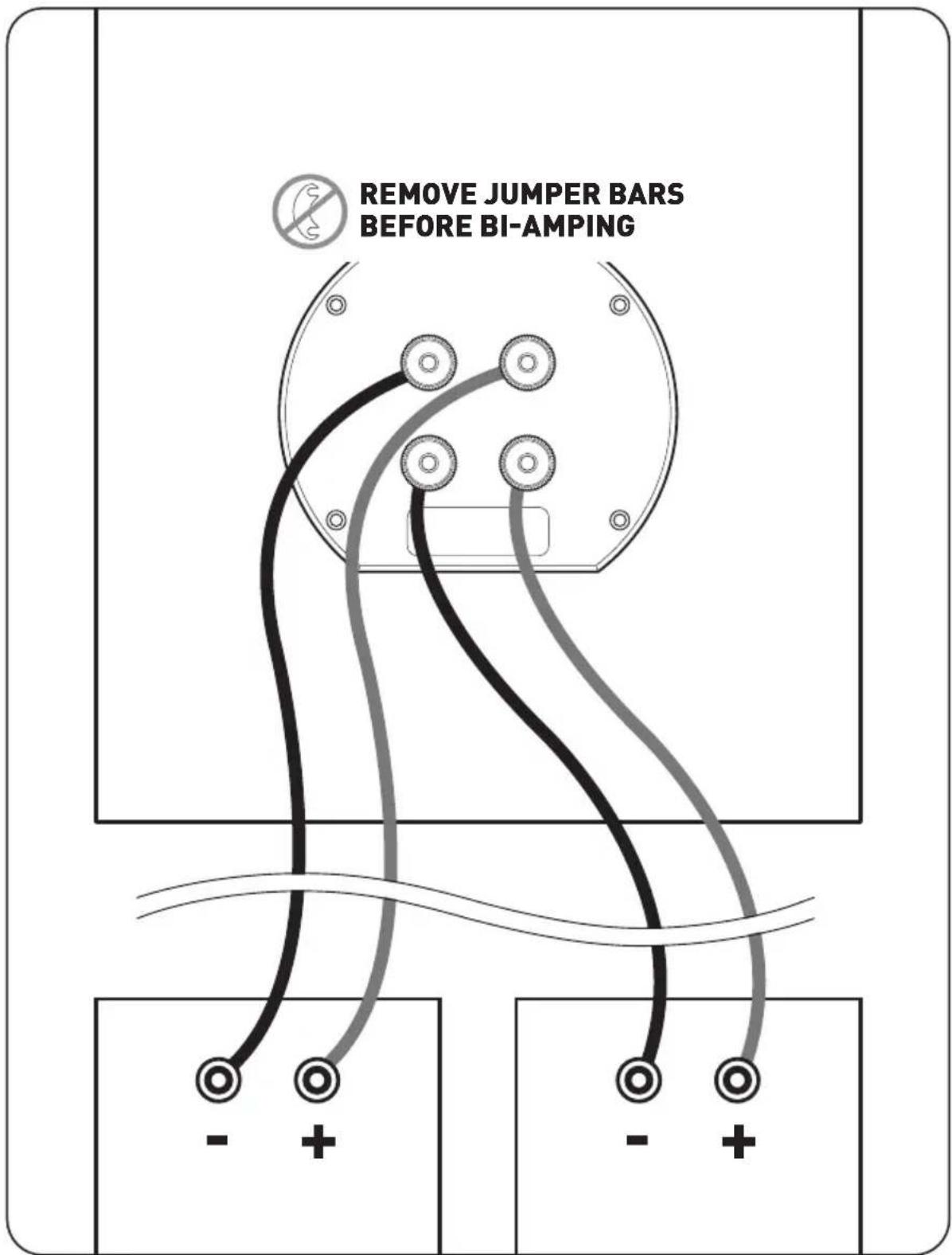
SPEAKER CONNECTION (continued)
Passive bi-amping offers a dramatic improvement in clarity, openness and detail, with much better bass solidity and definition. The presentation of music and movie soundtracks is simply more intelligible and transparent.
With passive bi-amping, the speaker's internal passive crossovers remain connected. An external electronic crossover is not required and cannot be used (there is no direct electrical access to individual drive units). This saves expense and setup difficulties. Passive bi-amping optimizes your speaker to achieve the best possible high-end performance.
To bi-amplify, two power amplifiers are required. Connection can be either vertical or horizontal.
Horizontal Bi-Amplification
Horizontal Bi-Amplification (shown on previous page) dedicates one amplifier to your speakers' mid/low-frequency inputs and another to their high-frequency inputs. This configuration can maintain better clarity when listening at loud levels—if low-frequency demands cause amplifier clipping, distortion will still be kept away from high-frequency drivers. Connect your speakers to one amplifier at a time.
Vertical Bi-Amplification
Vertical Bi-Amplification (not shown) dedicates one amplifier to each speaker. This configuration provides complete channel separation, which optimizes your system's imaging ability. Connect your speakers to one amplifier at a time.
FINE TUNING
Once you have your speakers positioned in the room and have set speaker distances and calibrated speaker levels through your A/V Processor or A/V Receiver, it's time for a little fine tuning.
Following the instructions in this Owner's Manual, once you have your speakers positioned in the room and have set speaker distances and speaker level calibration with your A/V Processor or A/V Receiver, it's time for a little fine tuning.
Since Paradigm Founder speakers are designed to provide exceptional high-end performance in a variety of room settings, fine tuning is simply a matter of making slight adjustments to their placement in the room, if necessary.
Start with just the front speakers and listen to familiar music in stereo. The soundstage will be both wide and deep, but this can be tuned to your personal preference by adjusting the toe-in (the amount the speakers are turned toward the listening area). More toe-in will increase image depth and localization; less toe-in will increase image width. Adjust the toe-in in small increments, listening each time, until you achieve the soundstage balance you prefer.
Toe-in is not applicable to the other speakers in your system since their position and sound distribution pattern is fixed.
Fine tuning for the center channel is simply a matter of making level adjustments that may be required for any particular multichannel music or movie program. If required, adjust A/V Processor or A/V Receiver levels to ensure that there is always a cohesive overall soundstage.
To Fine tune the subwoofer, please refer to the Owner's Manual that was included with your subwoofer.
BASIC TROUBLESHOOTING

Warning: Do not open the product. Under no circumstances should the product be repaired by anyone other than an authorized Paradigm Dealer, as this will invalidate the warranty. Please contact Paradigm Customer Support for more information.
If a problem occurs, you can try the troubleshooting suggestions listed below. If one of these doesn't remedy the problem, or you are not sure how to proceed, please contact the Paradigm Customer Support team and we will be happy to help.
Customer Support
- Visit our website at paradigm.com/support
- Email us at support@paradigm.com
| SOLUTIONPROBLEM | |
| No Sound | ·Make sure receiver, preamp or amplifier is plugged in and turned on. ·Check power outlet at the wall is working. ·Are headphones plugged in, or is the system on Mute? ·Re-check all connections. |
| No Sound from One or More Speakers | ·Check your balance control. ·Check that all power cords are properly plugged in and functioning. |
| Lack of Bass or Dislocated Image | ·One or more speakers may be connected out of phase (their polarity is reversed). ·Re-check to ensure that each speaker's cable is connected with correct polarity: red (+) to red (+) and black (-) to black (-). |
SPECIFICATIONS
| Founder 120H Founder 100F | ||
| Design | 5-driver, 3 way hybrid floorstanding with active bass, ported enclosure | 5-driver, 3 way floorstanding, ported enclosure |
| High-Frequency Driver | 1" (25mm) AL-MAC™ Ceramic Dome with Oblate Spheroid Waveguide (OSWTM) and Perforated Phase-Aligning (PPATM) Tweeter Lens, ferro-fluid damped / cooled | 1" (25mm) AL-MAC™ Ceramic Dome with Oblate Spheroid Waveguide (OSWTM) and Perforated Phase-Aligning (PPATM) Tweeter Lens, ferro-fluid damped / cooled |
| Mid Frequency Driver | 6" (152mm) AL-MAG™ Cone with Perforated Phase-Aligning (PPATM) Lens, SHOCK-MOUNT™ Isolation Mounting System, and a 2" high-temp multi-layered voice coil with ventilated Apical™ former | 6" (152mm) AL-MAG™ Cone with Perforated Phase-Aligning (PPATM) Lens, SHOCK-MOUNT™ Isolation Mounting System, and a 2" high-temp multi-layered voice coil with ventilated Apical™ former |
| Mid/Bass Frequency Drivers | N/A | N/A |
| Bass Frequency Driver | Three 8" (215mm) Ultra-High-Excursion CARBON-X™ Unibody Cone, Gen3 Active Ridge Technology (ART™) with Vertical Mounting System, Advanced SHOCK-MOUNT™ Isolation, and a 1.5" high-temp multi-layered voice coil with ventilated Apical™ former | Three 7" (177mm) Ultra-High-Excursion CARBON-X™ Unibody Cone, Gen3 Active Ridge Technology (ART™) with Vertical Mounting System, Advanced SHOCK-MOUNT™ Isolation, and a 1.5" high-temp multi-layered voice coil with ventilated Apical™ former |
| Passive Radiator | N/A | N/A |
| Frequency Response On-Axis | ±2dB from 42 Hz - 23 kHz | ±2dB from 42 Hz - 23 kHz |
| Frequency Response 30° Off-Axis | ±2dB from 22 Hz - 20 kHz | ±2dB from 42 Hz - 20 kHz |
| Low-Frequency Extension** | 18 Hz (DIN) | 26 Hz (DIN) |
| Sensitivity Room / Anechoic | 95 dB / 92 dB | 93 dB / 90 dB |
| Crossover | 2nd order at 2.4 kHz (tweeter), 2nd order digital/analog @ 300 Hz (bass) | 2nd order at 2.1 kHz (tweeter), 2nd order digital/analog @ 500 Hz (bass) |
| Suitable Amplifier Power | 15 - 400 watts | 15 - 350 watts |
| RangeMaximum Input Power** | 300 watts | 250 watts |
| Impedance | Compatible with 8 ohms | Compatible with 8 ohms |
| Weight | 92 lbs (41.7 kg) each | 72 lbs (32.7 kg) each |
| Dimensions (in x w x d) | 45.4" x 13.9" x 17.4" (115.3cm x 35.4cm x 44.1cm) | 41.9" x 12.9" x 16.1" (106.5cm x 32.8cm x 40.9cm) |
| Finishes | Piano Black, Black Walnut, Midnight Cherry, Walnut | Piano Black, Black Walnut, Midnight Cherry, Walnut |
- DIN 45 500. Indicates -3 dB in a typical listening room. ** With typical program source provided the amplifier clips no more than 10% of the time.
^ Add 1-1/8" or 2.9 cm to account for the depth of terminal posts.
| Founder 80F Founder 90C | Founder 70LCR | |
| 4-driver, 2.5 way floorstanding, ported enclosure | 4-driver, 2 passive radiator, 3 way center channel | 4-driver, 3 way LCR, sealed enclosure |
| 1" (25mm) AL-MAC™ Ceramic Dome with Oblate Spheroid Waveguide (OSW™) and Perforated Phase-Aligning (PPATM) Tweeter Lens, ferro-fluid damped / cooled | Coaxial 1" (25mm) AL-MAC™ Ceramic Dome with Oblate Spheroid Waveguide (OSW™) and Perforated Phase-Aligning (PPATM) Tweeter Lens, ferro-fluid damped / cooled, Patented Dual Sync™ Continuous Flux Motor | Coaxial 1" (25mm) AL-MAC™ Ceramic Dome with Oblate Spheroid Waveguide (OSW™) and Perforated Phase-Aligning (PPATM) Tweeter Lens, ferro-fluid damped / cooled, Patented Dual-Sync™ Continuous Flux Motor |
| N/A | Coaxial 6" (152mm) AL-MAG™ Cone with SHOCK-MOUNT™ Isolation Mounting System, a 2" high-temp multi-layered voice coil with Apical™ former, Patented Dual-Sync™ Continuous Flux Motor | Coaxial 6" (152mm) AL-MAG™ Cone with SHOCK-MOUNT™ Isolation Mounting System, a 2" high-temp multi-layered voice coil with Apical™ former, Patented Dual-Sync™ Continuous Flux Motor |
| 6" (152mm) Ultra-High-Excursion AL-MAG™ Cone with Perforated Phase-Aligning (PPATM) Lens, Gen3 Active Ridge Technology (ART™) with Vertical Mounting System, Advanced SHOCK-MOUNT™ Isolation, and a 1.5" high-temp multi-layered voice coil with ventilated Apical™ former | N/A | N/A |
| Two 6" (152mm) Ultra-High-Excursion CARBON-X™ Unibody Cone, Gen3 Active Ridge Technology (ART™) with Vertical Mounting System, Advanced SHOCK-MOUNT™ Isolation, and a 1.5" high-temp multi-layered voice coil with ventilated Apical™ former | Two 7" (177mm) Ultra-High-Excursion CARBON-X™ Unibody Cone, Gen3 Active Ridge Technology (ART™) with Vertical Mounting System, Advanced SHOCK-MOUNT™ Isolation, and a 1.5" high-temp multi-layered voice coil with ventilated Apical™ former | Two 5.5" (127mm Ultra-High-Excursion CARBON-X™ Unibody Cone, Gen3 Active Ridge Technology (ART™) and a 1.5" high-temp multi-layered voice coil with ventilated Apical™ former |
| N/A | Two 7" (177mm) Ultra-High-Excursion CARBON-X™ Unibody Cone, Gen3 Active Ridge Technology (ART™) with Vertical Mounting System, Advanced SHOCK-MOUNT™ Isolation, Passive | N/A |
| ±2dB from 50 Hz - 23 kHz | ±2dB from 42 Hz - 23 kHz | ±2dB from 79 Hz - 23 kHz |
| ±2dB from 50 Hz - 20 kHz | ±2dB from 55 Hz - 17 kHz | ±2dB from 79 Hz - 17 kHz |
| 28 Hz (DIN) | 37 Hz (DIN) | 47 Hz (DIN) |
| 93 dB / 90 dB | 94 dB / 91 dB | 92 dB / 89 dB |
| 2nd order at 1.8 kHz (tweeter), 2nd order digital/analog @ 500 Hz (bass) | 2nd order at 2.5 kHz (tweeter), 2nd order digital/analog @ 500 Hz (bass) | 2nd order electro-acoustic at 2.2 kHz (tweeter), 2nd order @ 700 Hz (bass) |
| 15 - 220 watts | 15 - 260 watts | 15 - 220 watts |
| 180 watts | 200 watts | 150 watts |
| Compatible with 8 ohms | Compatible with 8 ohms | Compatible with 8 ohms |
| 52 lbs (23.6 kg) each | 48 lbs (21.8 kg) each | 30 lbs (13.6 kg) each |
| 38.2" x 11.7" x 14"(97.1cm x 29.8cm x 35.6cm) | 8.9" x 35.7" x 12.9"(22.6cm x 90.8cm x 32.7cm) | 8" x 18.9" x 12.3"(20.4cm x 48cm x 31.2cm) |
| Piano Black, Black Walnut, Midnight Cherry, Walnut | Piano Black, Black Walnut, Midnight Cherry, Walnut | Piano Black, Black Walnut, Midnight Cherry, Walnut |
SPECIFICATIONS (continued)
| Founder 40B | |
| Design | 2-driver, 2 way standmount, ported enclosure |
| High-Frequency Driver | 1" (25mm) AL-MAC™ Ceramic Dome with Oblate Spheroid Waveguide (OSWTM) and Perforated Phase-Aligning (PPATM) Tweeter Lens, ferro-fluid damped / cooled |
| Mid Frequency Driver | N/A |
| Mid/Bass Frequency Drivers | 6" (152mm) Ultra-High-Excursion AL-MAG™ Cone with Perforated Phase-Aligning (PPATM) Lens, Gen3 Active Ridge Technology (ART™) with Vertical Mounting System, Advanced SHOCK-MOUNT™ Isolation, and a 1.5" high-temp multi-layered voice coil with ventilated Apical™ former |
| Bass Frequency Driver | N/A |
| Passive Radiator | N/A |
| Frequency Response On-Axis | ±2dB from 69 Hz - 23 kHz |
| Frequency Response 30° Off-Axis | ±2dB from 69 Hz - 20 kHz |
| Low-Frequency Extension** | 41 Hz (DIN) |
| Sensitivity Room / Anechoic | 92 dB / 89 dB |
| Crossover | 2nd order electro-acoustic at 1.6kHz (tweeter/midbass) |
| Suitable Amplifier Power | 15 - 150 watts |
| RangeMaximum Input Power** | 120 watts |
| Impedance | Compatible with 8 ohms |
| Weight | 25lbs (11.3kg) each |
| Dimensions (h x w x d)† | 14.5" x 7.8" x 12.8" (36.8cm x 19.7cm x 32cm) |
| Finishes | Piano Black, Black Walnut, Midnight Cherry, Walnut |
LIMITED WARRANTY
Paradigm® Founder speakers covered in this manual are warranted to be and remain free of manufacturing and/or material defects for a period of five (5) years from the date of original purchase. Within the time period specified, repair, replacement or adjustment of parts for manufacturing and/or material defects will be free of charge to the original owner.
Thermal or mechanical abuse/misuse is not covered under warranty.
Limitations:
- Warranty begins on date of original retail purchase from an Authorized Paradigm® Dealer only. It is not transferable;
- Warranty applies to product in normal home use only. If product is subjected to any of the conditions outlined in the next section, warranty is void:
- Warranty does not apply if the product is used in professional or commercial applications.
Warranty is Void if:
- The product has been abused (intentionally or accidentally);
- The product has been used in conjunction with unsuitable or faulty equipment;
- The product has been subjected to damaging signals, derangement in transport, mechanical damage or any abnormal conditions;
- The product (including cabinet) has been tampered with or damaged by an unauthorized service facility;
- The serial number has been removed or defaced.
Owner Responsibilities:
- Provide normal/reasonable operating care and maintenance;
- Provide or pay for transportation charges for product to service facility;
- Provide proof of purchase (your sales receipt given at time of purchase from your Authorized Paradigm® Dealer must be retained for proof-of-purchase date).
Should servicing be required, contact your nearest Authorized Paradigm® Dealer, Paradigm Electronics Inc. or Import Distributor (outside the U.S. and Canada) to arrange, bring in or ship prepaid, any defective unit. Visit our website, paradigm.com for more information.
Paradigm Electronics Inc. reserves the right to improve the design of any product without assuming any obligation to modify any product previously manufactured.
This warranty is in lieu of all other warranties expressed or implied, of merchantability, fitness for any particular purpose and may not be extended or enlarged by anyone. In no event shall Paradigm Electronics Inc., their agents or representatives be responsible for any incidental or consequential damages. Some jurisdictions do not allow limitation of incidental or consequential damages, so this exclusion may not apply to you.
Retain this manual and your sales receipt for proof of warranty term and proof of purchase.
NOTES
Paradigm
Founder
SERIES
Anthem Room Correction (ARC™) 12
(Founder 120H Only)
PourquoiARC? 12
Bi-amplification Verticale 22
Réglage fin 22
CE QUI EST INCLUS AVEC ARC :
ANTHEM ROOM CORRECTION (ARC) - Founder 120H Only (suite)
PROCEDURE DE TEST
ANTHEM ROOM CORRECTION (ARC) - Founder 120H Only (suite)
MESURE DE BASE DE L'ARC
Bi-amplification verticale

- TABLE OF CONTENTS
- INTRODUCTION
- UNPACKING INSTRUCTIONS (FLOORSTANDING SPEAKERS)
- IMPORTANT!
- GENERAL TIPS
- Break-In
- Cleaning
- PREVENTING SPEAKER DAMAGE
- Amplifier Distortion — The #1 Culprit!
- More Powerful Amplifiers are Safer
- Volume Control
- PREVENTING SPEAKER DAMAGE (continued)
- There is a Limit!
- The Right Amount of Power
- YOUR LISTENING ROOM
- STAND MOUNTING (optional)
- ATTACHING BUMPER PADS TO BOOKSHELF & CENTER SPEAKERS
- Bookshelf and Center Speakers
- PLACEMENT: FRONT LEFT & RIGHT SPEAKERS
- PLACEMENT: FRONT LEFT & RIGHT SPEAKERS (continued)
- Accurate Timbre
- Balanced Bass
- Optimal Imaging
- PLACEMENT:CENTER SPEAKER
- ANTHEM ROOM CORRECTION (ARCTM) - Founder 120H Only
- A True Scientific Solution to the Problems of the Room
- WHYARC?
- Computer-assisted ARC applies super-efficient Infinite Impulse Response (IIR)
- HOW DOES ARC WORK?
- ANTHEM ROOM CORRECTION (ARC) - Founder 120H Only (cont'd)
- WHAT'S INCLUDED WITH ARC:
- Your ARC Kit Includes:
- Before you begin
- ARC Software Installation
- MICROPHONE POSITIONING & CONNECTION
- PAIRING
- To pair 120H speakers:
- TESTING PROCEDURE
- BASIC ARC MEASUREMENT
- ADVANCED USERS
- SPEAKER CONNECTION
- Standard Connection for All Speakers
- SPEAKER CONNECTION (continued)
- Bi-Wire Connection
- Bi-Amp Connection
- Horizontal Bi-Amplification
- Vertical Bi-Amplification
- FINE TUNING
- BASIC TROUBLESHOOTING
- Customer Support
- SPECIFICATIONS
- LIMITED WARRANTY
- Limitations:
- Warranty is Void if:
- Owner Responsibilities:
- Paradigm
- Founder
- Réglage fin 22
- CE QUI EST INCLUS AVEC ARC :
- ANTHEM ROOM CORRECTION (ARC) - Founder 120H Only (suite)
- PROCEDURE DE TEST
- MESURE DE BASE DE L'ARC
- Bi-amplification verticale
Brand : Paradigm
Model : Founder 120H
Category : Speaker