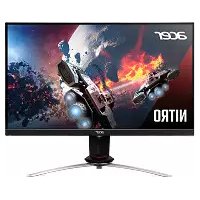
XV253Q - Monitor ACER - Free user manual and instructions
Find the device manual for free XV253Q ACER in PDF.
 FR
FR
 BG
BG
 CS
CS
 DA
DA
 DE
DE
 EL
EL
 EN
EN
 ES
ES
 ET
ET
 FI
FI
 HU
HU
 IT
IT
 JA
JA
 LT
LT
 LV
LV
 NL
NL
 NO
NO
 PL
PL
 PT
PT
 RO
RO
 RU
RU
 SK
SK
 SL
SL
 SV
SV
 TH
TH
 TR
TR
 UK
UK
 ZH
ZH
| Product type | LCD Monitor |
| Brand | Acer |
| Model | XV253Q |
| Screen size | 24.5 inches (62 cm) |
| Panel type | IPS (In-Plane Switching) |
| Maximum resolution | 1920 x 1080 @ 144 Hz |
| Brightness | 400 cd/m² (native and HDR) |
| Dynamic contrast (ACM) | 100,000,000:1 max |
| Response time | 2 ms (gray to gray) / 0.9 ms min |
| Viewing angle | 178° horizontal / 178° vertical |
| Input connectors | HDMI, DisplayPort |
| Built-in speakers | 2 x 2 watts (optional) |
| USB ports | 4 x USB 3.0 (optional) |
| Power supply | 100-240 V, 50/60 Hz |
| Power consumption (on) | 17.4 W typical |
| Power consumption (standby) | 0.45 W |
| Energy class | A |
| Dimensions with stand (W x H x D) | 557.79 x 397.84-512.84 x 236.27 mm |
| Net weight | 5.30 kg |
| Adjustments | Tilt (-5° to +25°), swivel (-20° to +20°), height (0-115 mm), pivot (-90° to +90°) |
| Key features | HDR, Adaptive-Sync, Overdrive, blue light filter, image modes, etc. |
| Maintenance and cleaning | Use a soft, slightly damp cloth (clean water). Do not spray directly onto the screen. Avoid products containing ammonia or alcohol. |
| Safety | Do not expose to moisture, rain, or direct sunlight. Do not press on the screen. Do not open the casing. Storage between -20°C and 60°C. |
| Repairability | Repair by an Acer authorized technician. Contact customer support. |
| General information | User manual available for free download. |
Frequently Asked Questions - XV253Q ACER
User questions about XV253Q ACER
0 question about this device. Answer the ones you know or ask your own.
Ask a new question about this device
Download the instructions for your Monitor in PDF format for free! Find your manual XV253Q - ACER and take your electronic device back in hand. On this page are published all the documents necessary for the use of your device. XV253Q by ACER.
USER MANUAL XV253Q ACER
Acer LCD Monitor Quick Start Guide (QSG)
Important safety instructions
Please read the following instructions carefully.
-
To clean the LCD monitor screen: Be sure that your monitor is electrically rated to operate with the AC power available in your location.
-
Turn off the LCD monitor and unplug the power cord.
Spray a non-solvent cleaning solution onto a rag and clean the screen gently.
NEVER SPRAY OR POUR ANY LIQUID DIRECTLY ONTO THE SCREEN OR CASE. - PLEASE DO NOT USE ANY AMMONIA OR ALCOHOL-BASED CLEANERS ON THE LCD DISPLAY SCREEN OR CASE.
-
Acer will not be liable for damage resulting from use of any ammonia or alcohol-based cleaners.
-
Do not place the LCD monitor near a window. Exposing the monitor to rain, moisture or sunlight can severely damage it.
- Do not apply pressure to the LCD screen. Excessive pressure may cause permanent damage to the display.
- Do not remove the cover or attempt to service this unit yourself. An authorized technician should perform servicing of any nature.
-
Store the LCD monitor in a room with a temperature of -20^ to 60^ C (-4^ to 140^ F). Storing the LCD monitor outside this range may result in permanent damage.
-
Immediately unplug your monitor and call an authorized technician if any of the following circumstances occur:
-
Monitor-to-PC signal cable is frayed or damaged.
- Liquid spills onto the LCD monitor or the monitor is exposed to rain.
The LCD monitor or case is damaged.
Attaching the monitor to the base
- Remove the monitor from the packaging.
- Attach the foot stand to the base. (for selected models)
- Turn clockwise to lock. Ensure that the base is locked onto the stand. (for selected models)
- Secure the base to the stand by turning the screw using the integrated tab or a suitable coin. (for selected models)
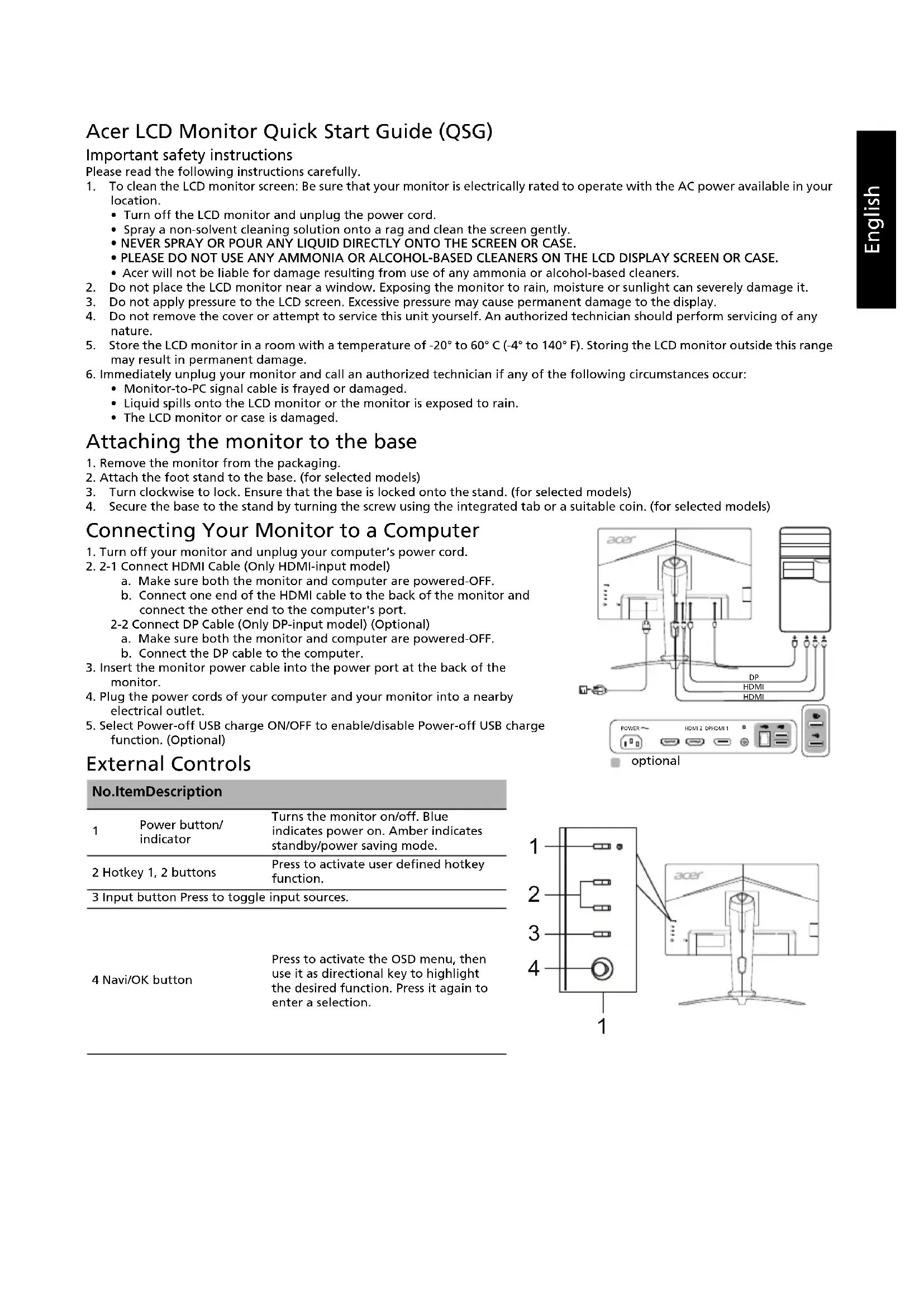
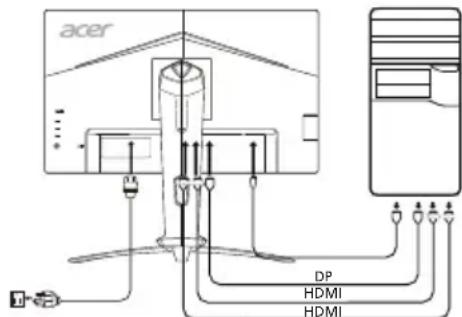
Connecting Your Monitor to a Computer
- Turn off your monitor and unplug your computer's power cord.
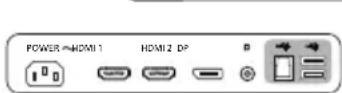
- 2-1 Connect HDMI Cable (Only HDMI-input model)
a. Make sure both the monitor and computer are powered-OFF.
b. Connect one end of the HDMI cable to the back of the monitor and connect the other end to the computer's port.
2-2 Connect DP Cable (Only DP-input model) (Optional)
a. Make sure both the monitor and computer are powered-OFF.
b. Connect the DP cable to the computer.
- Insert the monitor power cable into the power port at the back of the monitor.
-
Plug the power cords of your computer and your monitor into a nearby electrical outlet.
-
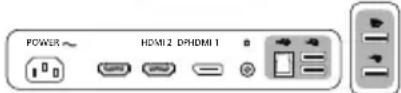
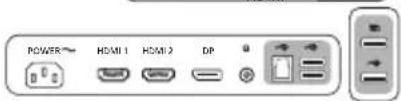
Select Power-off USB charge ON/OFF to enable/disable Power-off USB charge function. (Optional)
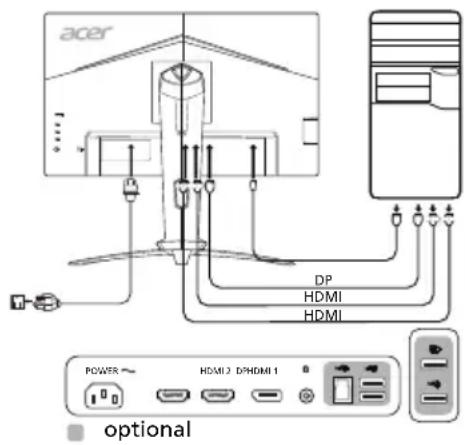
External Controls
| No.ItemDescription | ||
| 1 | Power button/indicator | Turns the monitor on/off. Blue indicates power on. Amber indicates standby/power saving mode. |
| 2 | Hotkey 1, 2 buttons | Press to activate user defined hotkey function. |
| 3 | Input button Press to toggle input sources. | |
| 4 | Navi/OK button | Press to activate the OSD menu, then use it as directional key to highlight the desired function. Press it again to enter a selection. |

Regulations and safety notices
FCC notice
This device has been tested and found to comply with the limits for a Class B digital device pursuant to Part 15 of the FCC rules. These limits are designed to provide reasonable protection against harmful interference in a residential installation. This device generates, uses, and can radiate radio frequency energy and, if not installed and used in accordance with the instructions, may cause harmful interference to radio communications.
However, there is no guarantee that interference will not occur in a particular installation. If this device does cause harmful interference to radio or television reception, which can be determined by turning the device off and on, the user is encouraged to try to correct the interference by one or more of the following measures:
Reorient or relocate the receiving antenna.
- Increase the separation between the device and receiver.
- Connect the device into an outlet on a circuit different from that to which the receiver is connected.
- Consult the dealer or an experienced radio/television technician for help.
CE declaration of Conformity
Hereby, Acer Inc., declares that this LCD monitor is in compliance with the essential requirements and other relevant provisions of EMC Directive 2014/30/EU, Low Voltage Directive 2014/35/EU, and RoHS Directive 2011/65/EU and Directive 2009/125/EC with regard to establishing a framework for the setting of ecodesign requirements for energy-related product.
Notice:
In order to prevent damage to the monitor, do not lift the monitor by its base.
Notice: Shielded cables
All connections to other computing devices must be made using shielded cables to maintain compliance with EMC regulations.
Notice:
Acer monitor is purported for video and visual display of information obtained from electronic devices.
Notice: Peripheral devices
Only peripherals (input/output devices, terminals, printers, etc.) certified to comply with the Class B limits may be attached to this equipment. Operation with non-certified peripherals is likely to result in interference to radio and TV reception.
Caution
Changes or modifications not expressly approved by the manufacturer could void the user authority, which is granted by the Federal Communications Commission, to operate this product.
Operation conditions
This device complies with Part 15 of the FCC Rules. Operation is subject to the following two conditions: (1) this device may not cause harmful interference, and (2) this device must accept any interference received, including interference that may cause undesired operation.
Notice: Canadian users
This Class B digital apparatus complies with Canadian ICES-003.
Disposal of Waste Equipment by Users in Private Household in the European Union
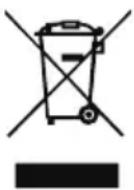
This symbol on the product or on its packaging indicates that this product must not be disposed of with your other household waste. Instead, it is your responsibility to dispose of your waste equipment by handing it over to a designated collection point for the recycling of waste electrical and electronic equipment. The separate collection and recycling of your waste equipment at the time of disposal will help to conserve natural resources and ensure that it is recycled in a manner that protects human health and the environment. For more information about where you can drop off your waste equipment for recycling, please contact your local city office, your household waste disposal service or the shop where you purchased the product.
SPECIFICATION
| LCD Panel | Driving System TFT Color LCD | |
| Size 24.5"W (62 cm) | ||
| Pixel Pitch 0.283 mm (H) x 0.280 mm (V) | ||
| Brightness | Native: 400 cd/m²; HDR400 mode: 400 cd/m² | |
| Contrast 100000000:1 Max (ACM) | ||
| Viewable Angle 178° (H) 178° (V) (CR=10) | ||
| Response Time 2 ms (G to G) / 0.9 ms (G to G, min) | ||
| Panel Type In-Plane Switching | ||
| H-Frequency | HDMI: 31 - 167 kHzDP: 167 - 167 kHz | |
| V-Frequency | HDMI: 56 - 144 HzDP: 48 - 144 Hz | |
| Display Colors 16.7 Million | ||
| Dot Clock 350 MHz | ||
| Maximum Resolution 1920 x 1080 @ 144 Hz | ||
| Plug & Play VESA DDCCI/DDC2B | ||
| Energy Efficiency Class A | ||
| *Annual Energy Consumption 31 (kWh) (for HDMI-Input Model) | ||
| Power Consumption (at 200 nits) | On Mode 17.4 W (Typical) | |
| Sleep Mode 0.45 W (Typical) | ||
| Off Mode | 0.25 W (Typical) | |
| Input Connector | HDMI (Only HDMI-Input Model)DP (Only DP-Input Model) | |
| Input Video Signal | HDMI (Only HDMI-Input Model) (Optional)DP (Only DP-Input Model) (Optional) | |
| Speakers | 2 W x 2 (Only Audio-Input Model) (Optional) | |
| USB | USB 3.0 x 4 (Optional) | |
| Maximum Screen Size | Horizontal: 543.744 mmVertical: 302.616 mm | |
| Power Source | 100-240 V, 50/60 Hz | |
| Environmental Considerations | Operating Temp: 0° to 40°CStorage Temp: -20° to 60°COperating Humidity: 20% to 80% | |
| Dimensions | 557.79 (W) x 397.84 ~ 512.84 (H) x 236.27 (D) mm | |
| Weight (N. W.) | 5.30 kg (net) | |
| Mechanism Specifications | Tilt: -5° to +25° (Only at the highest point can 25 degrees of recline be offered for the angle of elevation)Swivel: -20° to 20°Height adjustment: 0 mm to 115 mmPivot: -90° to 90°Detachable foot stand: Yes | |
| External Controls | Switch/Buttons | Power ButtonInputHotkey 1Menu/Navi/OKHotkey 2 |
| Functions | BrightnessVRBUltra-Low LatencyAim PointLanguageLanguageOSD TimeoutTransparencyOSD Lock | |
| Color TemperatureModesgColor SpaceHot Key AssignmentWide ModeDDC/CI | ||
| Grayscale Mode6-axis Hue6-axis SaturateVolumeQuick Start ModeMuteOver DriveAdaptive-SyncDisplay InformationReset All SettingsExit | ||
| All specifications are subject to change without notice. | ||
Find manuals and other documents for your Acer product on the official Acer support website.
*Annual energy consumption is calculated using the typical power consumption 4 hours per day, 365 days per year.
Panduan Praktis Monitor LCD Acer (QSG)
Snelstartgids Acer Icd-monitor
YCTaHOBka MOHHTopa Ha OCHOBaHne.
- N3BnEKeNTe MOHHTOp n3 ynaKOBKn.
- POncoeINHnTe cToKy K OCHOBaHnO (He nA BcEx MoJeIeN).
- NobepHnTe no yacOBo CTpeNke, YTO6bI 3aФнCupObaTb. Y6eINTEcB, YTO OCHOBaHne 3aФнCupObaHo Ha cToKne (He nra BceX MoJeNe).
- 3aKpeHnTe OCHOBaHHe Ha cToIke, NOBepHyB BnHT C NOMOuB CNeUaHOro INcTpMyeHa IIN NODXoJaEe MoHeTbI (He DnBCEx MoJeIe).
IopKIOUeHHe MOHITOPa K KOMNbIoTepy
- BbIKHouHTe MOHITOp n OTCoeDHNHe UHyp NTaHnKoMnblTepaOT cETN.
- 2-1ПодknHouTeHDMI-ka6eNb(ToIbkoДЯМоDEJIc BXOJOM HDMl)
a. Y6eNTecb, cTO NITAHNE MOHHTOPA IN KOMNbOTepa OTKJIIOHeHO.
b. PoiKIIIOHTe OIN KOHeu HDMI-Ka6eJIa 3aIHeN NaHEIn MoHITopa, a pyroI KOHeU - K NOpTy KOMNbHOtepa.
2-2 PtoKIOUHTe DP-Ka6eIb (ToIbKO IJRA MOeIN C BXOOM DP) (npno6peTaetcra OTDeJIbHO)
a. Y6eNTecb, TTO NITAHNE MOHHTOPA IN KOMNbOTepa OTKJIIOHeHO.
b. Поdkночite DP-ka6eIb K KOMMbItepy.
3.ПодкнIoUHTe Ka6eJIb ПИТаHЯ MOHITOPa K NOpTy PNTaHЯ Ha 3aIHeN PaHEnyycTpOJCTBa.
4.ПодключiteшурblпNTaHЯKOMNbIbTepaIMOHITopaK3JIeKTpUHeCKO pO3eTke.
5. Bb6epnte «3apjka ype3 USB npn BblknoyehHom nItaHNN BkN./BblKl.》,YtO6bi BkNoHTb/OTKnIOHTb fynKuio 3apjkn ype3 USB npn BblKnOyeHHom nItaHNN. (npno6petaetc oTdeIbHo)
npiobpeTaetcOtdeIbHO
BheHHe 3JeMeHTbI ynpabNeHnA
No 3JIeMeHT OnncaHne
PpimMeuHHe: IJIa NOJb3OBaTeJeB KaHaJe
Danhoe zinphioboe yctpoiNCTBO KnaCca B COOTBETCTByeT KaHaIcKOMy cTaHApTy ICES-003.
PbkoBODCTBO 3a 6bp3a HacTpoiKa Ha LCD MoHITop Acer
BaxKn HnHCTpyKun 3a 6e3oNaChOcT
MOJI, npOHTeTe BHNMaTeJHcneHnTe HCTpyKuN.
-
3a da nouchte ekapha ha LCD moHTopa: He 3a6paBraTe, ye Baunr MOHTOP e npedHa3HaueH 3a pa6oTa c IpomehnIBOTOKOBO 3axpaHbHe BbB Baun perNoH.
-
N3KJIIOUeTe LCD MOHITOPa IN 3BaIeTe 3axpaHbIaIIra Ka6eI OT KOHTaKaTa.
- HanpbckaIte nouHCTBaU pa3TBOp 6e3 pa3TBOpHTeIN Bbpxu Kbpna n NouHCTeTe BHMaTeHNO ekpaHa.
HE INBCKAITE HEN3INBAITE TEUHOCT INPEKTHOBbPXY EKPAHA INIIN KOPNYCA. - HE IN3I0JI3BAIte IIOUHCTBAUIN IPEIAPATN HA AMOHJYHA NII IN CINPTHA OCHOBA 3A IIOUHCTBAHE HA LCD EKPAHA INI KOPNYCA.
-
Acer He Hocn OTROBOPHOCT 3a NOBpeDN, HAcTBNIIN B pe3yNTaT Ha N3NOJ3BaHETo HA NOUHCTBaUNI INpeNapATN Ha AMOHRAHNA CInpTHA OCHOBA.
-
He nocTabaIte LCD MOHTopa 6JIIN3O Do npo3opeu. I3JIaHaTeTo Ha MOHTopa Ha IbXd, Bnra Hn CnBHeBa CBETnHa MoKe cepno3HO da ro nobpei.
- He npinlarate HATNC Bbpxy LCD ekpana. Ipekomepnrt HATNC MOKe da DOBeDe Do TpaH OYBpeJdaHe Ha DmCJIeJ.
- He oTcpaHbAte KaNaka H Ce OINTBaIe Da peMOHTnPaTe TOBa yCTpoiCTBO cAMN. YnbHOMOueH TexHk Tp6Ba da N3BbPbBa cepBn3HOTo 06CnyKBAHe 0f BCRAKBO eCTcTO.
- CbxaHraBaTe LCD MOHTopa B cTae TcempeaTypo ot -20° do 60°C (-4° do 140°F). CbxaHHeHTo Ha LCD MOHTopa H3BbH To3n DnaIa3OH MoKe Da DoBeDe Do TpaHObE YbpeKdaHe.
- He3abBHO n3BaTe Te IeNceJa OT KOHTaKTa Ha BaUma MOHtOp n Ce oBaTe Ha yIbJIHOMOueH TexHnK pN Bb3HnKBaHeTo Ha HRAKOe OCTeHNte OeCToTEnCTBa;
Kabet3a cunHan OT MOHITopa KbM KOMNIOBpa e npoTpu ININ NOBpeH.
Pa3JnBaHe Ha TeuHocBbpxy LCD MOHTopa NIM MOHTOpbTe n3IOKeH Ha DbXd.
LCDMOHToBtIINKOpNycbTa noBpeDeHN.
3akpenBaHe Ha MOHITopa KbM OCHObaTa
- OtctpaHete MOHTopa OT onakOBkata.
- 3akpenete cToKaTa KbM OCHOBaTa.(3a n36paHm Moen)
- 3aBbPteTe no YacOBHnKOBaTa CTpeJIka, 3a da 3akIIOHTe CToIkata. YBepeTe ce, ye ochOBaTa e 3akIOHeHa Bbpx y CToIkata. (3a H36paHm MoJeN)
- 3akpenete ochoBaTa KbM cToiKaTa KaTO 3aBbPTITE BnHTa C NOMOuTa Ha BrpaDeHOTe e3Nue HIN C NOxOJaMa MOHeTa. (3a IN36paHIMoJeI)
Cbbp3BaHe Ha MOHITopa KbM KOMNIOTBpa
1.ИЗКИнчete MOHITOPa ИИЗВадeTe 3axpaHbauЯ Ka6eI Ha KOMПOTbpa OTOKHTaT.
2. 2-1 CbpxkeHDMI ka6eHa (cAmo 3a moJeI c BxoHDMI)
a. YBepeTe Ce, Ye KaKTo MOHITOpbT, Taka N KOMNHTbpbT Ca N3KNIOyeHn.
b. CbpxKeTe eINHnKpaHa HDMI Ka6ena KbM 3aHaTa YacT Ha MOHTopa, a npyNkpa KbM NopTa Ha KOMNtbpa.
2-2 Cbpxke DT Ka6ena (cAmo 3a MoJeI c BxOJ DP) (onuia)
a. YBepeTe Ce, Ye KaKTo MOHHTOpbT, Taka N KOMNHTbpbT Ca N3KJIIOUeHN.
b. CbpxkeTe DP ka6eNa KbM KOMnIObpa.
- IocTabete 3axpaHbau nja Ka6eJ Ha MOHTopa B 3axpaHbau nja nopT ot 3aHaTa CtpaHa Ha MOHTopa.
- BkIIOHeTe 3axpaHbauNTe Ka6eNHa KOMnIOrTbpa N MoHITopa B 6NI3KIN
eNEKTPnueckn KOHTaKT - 136peTe BKN./M3Kl. HaФункиЯТа 3a 3apeXJaHne npE3 USB npn 13KIOueHo 3axpaHbAHe, 3a Da aKTINBpuTe/DeakTNBpuTe Ta3nФyHKUry. (OuIURA)

ONZ
BbHn6yToHn 3a ynpabJeHne
| Homep | Еlement | Описаиме |
| 1 | Бутон 3a Зхранвае/ Индikatop | Изключы/ВКлючы моинтора. Синbosу пока3ba, ye моинторьт e ВКлючey. ОранжевоTo o3нayа в ржим Ha готовноCT/пестое Ha eнергия. |
| 2 | Бурз клавиш 1, 2 6утона | Нат SCHETe 3a akTNВиразе Ha Функцията с НастpoeHи OT пOTpeбИтелЯ 6урз Клавиш. |
| 3Бутон 3a BxOD | Нат SCHETe 3a пeвSClouчBaHe Ha ИЗTOЧИцte Ha BXOD. | |
| 4 | Бутон Navi (Hавирази)/OK | Нат SCHETe 3a akTNВиразе Ha OSD MeHOTo, след ТОВа Г ИЗПОЛЗвай Te KaTo 6уTOH 3a НавиRGИразе, за д МаркURAпе Леганатa Функция.Нат SCHETe ro OTHOB 3a Быveждае Ha ИЗБор. |

Pa3npope6n n 6eJexKn 3a 6e3oNaChocT
BeneKka ot FeepaHaTa KOMncra 3a KOMyHnKaun (ΦKK)
ToBa yctpoiCTBO e TectBAHO nOTROBAPHa oRpaHueHnTa 3a cHpOBo yctpoiCTBO OT KNaC B,cbINaCHO aact 15 ot npabInata Ha KK Te3n orpaHueHnCa npedHa3NaHeH da ocryprBaT pa3ymHa 3auNTa Cpeuy BpeHN CmyeHn B kINIIuHn HcTalaun. ToBa yctpoiCTBO reHepnpa, INIOINBAHMOKe Da INIbYBa paoocetOTHa eHepnA n Ako He 6bDe MOHTnpaHO INIIOINBAHO, B cbOTBeTCTBmE C NHCtpKUnTE, MoKe Da npuHnBpeHN CMUeHn Ha paINO KOMyHnKaunTE.
BbnpkToBa, hma rapaHmU, ye hma Da Bb3HNKHat CmyeHnB KOHKpeTHa HCTaIauH. Ako yctpoictBOto npuHHBA BpeHn CmyeHnHa paIO n TeleBnHOH npHeMahe, KoTe MOKe Da ce ycTaHOB upe3 NkIOuBaHe N BKIOuBaHe Ha yCTpoICTBOTO, Notpe6ntJIeTc HacbpHabda Ce ONtA da Koprnpa CmyeHneTo Upe3 EdNa O T CneHnTe MEPKN:
- PpeopnHTnpaHe nn npemecTbaHe Ha aHTeHaTa Ha npneMHnka.
- YBeJIuHaBaHe Ha pa3CTOaHneTo MExdY yCTpOcTBOTn npMeMHnKa.
Cbbp3BaHe Ha ycTpOcTBOTB KOHTAKT BBB BEPnA, KOrTO e pa3nHAt O T Ta3N, B KOrTO e Cbbp3aH nPiemHkBT.
KohcyntaunCdoCTabuHKnOnnTeHpaDNo/TeJeBu3noHeTexHk 3a NOMOJI.
CE Deeknapaun 3a cbotBeTCTBne
C hactoIeTo, Acer Inc.,ДeKJIapnpa, Ye To3N LCD MOHITOp e B cBoTBeCTBne CbC cbUeCTBeHIne N3NCKBaHnN I npuIOxIMn pa3npoe6n Ha nipeKTnBaTa 3a eNeKtpomarHnTHa CbBMecTmOcT (EMC) 2014/30/EC, nipeKTnBaTa 3a Hncko HanpeXeHne 2014/35/EC n RoHS nipeKTnBaTa 2011/65/EC, n nipeKTnBa 2009/125/EO no OTHouEHe Na cb3daBaHeTo Ha paMka 3a onpeJeHne Ha n3NCKBaHnTa 3a ekOdu3aH 3a npOdyKt, Cbbp3aHn C eHeproNoTppeBleHne.
Bélejexka:
3a Da npedotbpatnte noBpeHa MoHITopa, He ro nobDnraTe OT OCHOBaTa My.
Белека:Екранирази Кабел.
BcHKn Bp3kn KbM dpny H3NcHnTeHN yCtpoCTBa Tp86Ba Da ce H3BbPWBaT c NOMOuTa Ha ekpaHnPaHn Ka6eJn, 3a da OTROBAPrHa pa3npoe6nte 3a eIekTpomarHHTHa CbBMecTUMocT (EMC).
Белекka: Периферни устор CTba
EINHCTBeHO nepupepn yctpoCTBa (BXOHN/3XoDnHy cTPOcTBa, TepMNHaN, pInHTepn n T.H.), KOnTO mAT cepTNpKnat 3a cbOTBeTCTBne C orpaHueHnra 3a Knac B Moar t da ce CBpb3Bat kM ToBa o6OpyDahe. Pa6oTaTc HecepTuHn npHepn ycTpoCTBa MOKe Da DoBeNe Do CMUeHn Ha padno N TeJeBn3NoHhTo npMeMaHe.
BHMMaHHe
PpOMeHn MmMOHnKauH, KOHTo He ca n3pnuHo OdopeHH OT npOn3BOJNTeIa Moar Da DOBeaT Do aHyInpaHe Ha IIbJIHOMoUHa Ta HApTe6nteHa, KoTo Ce pdeocTabr O T FeepaHata KOMNCnIO KOMyHKauNte 3a pa6ota C To3n IpOdyKT.
YcnoBnaHa pa6Ota
ToBa yCtpoiNCTBO e B CbOeTcBHe c qact 15 ot npaBnata Ha KKK. Pa6oTa t a e npEaMeH Na CteHNTE Dbe ycIOBn: (1) ToBa yCtpoiNCTBO He Tp8Ba Da npuHnBa BpeHN CmUeHn n (2) ToBa yCtpoiNCTBO Tp8Ba Da npneMa BCNUKN noTyHeHn CmUeHn, BKIIOHTeJIHO CmUeHn, KOINTo 6xNa MoTn Da npuHnHr HHexeJHa pa6oTa.
Белека: Канадскийnotpe6nteln
ToBa CnΦpOBO yCTPOIcTBO O KnaB O OTRObAp Ha pa3nope6aTa ICES-003 Ha KaHaJa.
Olulised ohutusalased juhised
a 157n n nn nnnn nnnn nnnn nnnn nnnn nnnn nnnn nnnn nnnn nnnn nnnn nnnn nnnn nnnn nnnn nnnn nnnn nnnn nnnn nnnn nnnn nnnn nnnn nnnn nnnn nnnn nnnn nnnn nnnn nnnn nnnn nnnn nnnn nnnn nn
- 1
Acer Inc., 2014/30/EU, Low Voltage Directive 2014/35/EU and RoHS Directive 2011/65/EU and Directive 2009/125/EC (to be amended) for the European Union
y
aunnnnne nnnae Class B nnnnnnnn nn Canadian ICES-003
aayaaayaaayaaayaaayaaayaaayaaayaaayaaayaaayaaayaaayaaayaaayaaayaaayaaayaaayaaayaaayaaayaaayaaayaaayaaayaaayaaayaaayaaayaaayaaayaaayaaayaaayaaayaaayaaayaaayaaayaaayaaayaaayaaayaaayaaayaaayaaayaaayaaayaaayaaa
y
| JEA LCD | 24.5"W (62 mm) | |
| 24.5"W (62 mm) | ||
| 24.5"W (62 mm) | ||
| 24.5"W (62 mm) | ||
| 24.5"W (62 mm) | ||
| 24.5"W (62 mm) | ||
| 24.5"W (62 mm) | ||
| 24.5"W (62mm) | ||
| 24.5"W (62mm) | ||
| 24.5"W (62mm) | ||
| 24.5"W (62mm) | ||
| 24.5"W (62mm) | ||
| 24.5"W (62mm) | ||
| 24.5"W (62mm) | ||
| 24.0"W (167 mm) | ||
| 24.0"W (167 mm) | ||
| 24.0"W (167 mm) | ||
| 24.0"W (167 mm) | ||
| 24.0"W (167 mm) | ||
| 24.0"W (167 mm) | ||
| 24.0"W (167 mm) | ||
Aaalalalalalalalalalalalalalalalalalal
4
140 60 20-
LCC
6.4.1.1.2
.
LCD
a 1
1
(j)all jin 1222 (g yal). 6x kdy dall ay 2
(jjbnssaaegasal),Jolalgicxell Jaa Jaaeclll jaeolly
(jall jssaa 4yag) aiaiaiaiaiaiaiaiaiaiaiaiaiaiaiaiaiaiaiaiaiaiaiaiaiaiaiaiaiaiaiaiaiaiaiaiaiaiaiaiaiaiaiaiaiaiaiaiaiaiaiaiaiaiaiaia

5
jgssll jgsaal
jssll jiee 1
(HDMI)HDMI 2-1.2
sall jg aalll jss
HDMI 1
ai + 1 = 12 · ai + 12
()(DPJ2j)DP 2-2
jssll jzg zaii jia 10
jssll jdpJscu
aaii jie gai jaiy gai yai bai iia aaiai ai Jss 3
4
3 = 1
1
ai a ai all j S i : j S ;
y
S OBC = S COD + S BOC - S BOC
j 1
A
aaii iiaai aaiy yiyaiy jao ay gaiy paaai baiy caiy ai aai aai aai ayal yaiy aai
15
(2).,
S OBC = S COD + S BOC - S BOC
ICES-003 1
Declaration of Conformity
We,
Acer Incorporated
8F, 88, Sec. 1, Xintai 5th Rd., Xizhi, New Taipei City 221, Taiwan
And,
Acer Italy s.r.l
We, Acer Incorporated, hereby declare under our sole responsibility that the product described above is in conformity with the relevant Union harmonization legislations as below Directive and following harmonized standards and/or other relevant standards have been applied:
EMC Directive: 2014/30/EU
EN55032:2012/AC:2013 Class B
EN55024:2010
EN55032:2015/AC:2016 Class B
EN61000-3-3:2013
EN61000-3-2:2014 Class D
LVD Directive: 2014/35/EU
EN60950-1:2006/A11:2009/A1:2010/A12:2011/A2:2013
RoHS Directive: 2011/65/EU
EN50581:2012
ErP Directive: 2009/125/EC
Regulation (EC) No. 1275/ 2008; EN 50564:2011
Year to begin affixing CE marking: 2019.
RU Jan / Sr. Manager
Acer Incorporated (Taipei, Taiwan)
Aug. 26, 2019
Date
8F, 88, Sec. 1, Xintai 5th Rd., Xizhi, New Taipei City 221, Taiwan
Und
Acer Italy s.r.l
RU Jan / leitender Manager
Acer Incorporated (Taipeh, Taiwan)
Aug. 26, 2019
Datum
8F, 88, Sec. 1, Xintai 5th Rd., Xizhi, New Taipei City 221, Taiwan
Y,
Acer Italy s.r.l
Acer Incorporated (Taipei, Taiwan)
Aug. 26, 2019
Fecha
8F, 88, Sec. 1, Xintai 5th Rd., Xizhi, New Taipei City 221, Taiwan
Et,
Acer Italy s.r.l
RU Jan / Sr. Manager
Acer Incorporated (Taipei, Taiwan)
Aug. 26, 2019
Date
8F, 88, Sec. 1, Xintai 5th Rd., Xizhi, New Taipei City 221, Taiwan
E,
Acer Italy s.r.l
RU Jan / Senior Manager
Acer Incorporated (Taipei, Taiwan)
Aug. 26, 2019
Data
8F, 88, Sec. 1, Xintai 5th Rd., Xizhi, New Taipei City 221, Taiwan
En,
Acer Italy s.r.l
RU Jan / Sr. Manager
Acer Incorporated (Taipei, Taiwan)
Aug. 26, 2019
Date
DECLARATION de Conformidade
Nos,
Acer Incorporated
8F, 88, Sec. 1, Xintai 5th Rd., Xizhi, New Taipei City 221, Taiwan
E,
Acer Italy s.r.l
Regulatory Compliance






acer
barcode
MC.TH511.003
Model No.: XV253Q
Part No.: MC.TH511.003

Fecychth Paper
