ManualGo.com
CB322QK - Monitor ACER - Free user manual and instructions
Find the device manual for free CB322QK ACER in PDF.


Download the instructions for your Monitor in PDF format for free! Find your manual CB322QK - ACER and take your electronic device back in hand. On this page are published all the documents necessary for the use of your device. CB322QK by ACER.
USER MANUAL CB322QK ACER
Moniteur LCD Acer Manuel de l'utilisateurCopyright © 2022. Acer Incorporated. All Rights Reserved. Acer LCD Monitor User's Guide Original Issue: 03/2022 Changes may be made periodically to the information in this publication without obligation to notify any person of such revisions or changes. Such changes will be incorporated in new editions of this manual or supplementary documents and publications. This company makes no representations or warranties, either expressed or implied, with respect to the contents hereof and specifically disclaims the implied warranties of merchantability or fitness for a particular purpose. Record the model number, serial number, purchase date and place of purchase information in the space provided below. The serial number and model number are recorded on the label affixed to your computer. All correspondence concerning your unit should include the serial number, model number and purchase information. No part of this publication may be reproduced, stored in a retrieval system, or transmitted, in any form or by any means, electronically, mechanically, by photocopy, recording or otherwise, without the prior written permission of Acer Incorporated. Acer LCD Monitor User's Guide Model number: _________________________________ Serial number: __________________________________ Date of purchase: ________________________________ Place of purchase: _______________________________ Acer and the Acer logo are registered trademarks of Acer Incorporated. Other companies' product names or trademarks are used herein for identification purposes only and belong to their respective companies.iii Remarques particulières concernant les moniteurs LCD Les mentions suivantes concernant les moniteurs LCD sont normales et n’indiquent pas de problème.
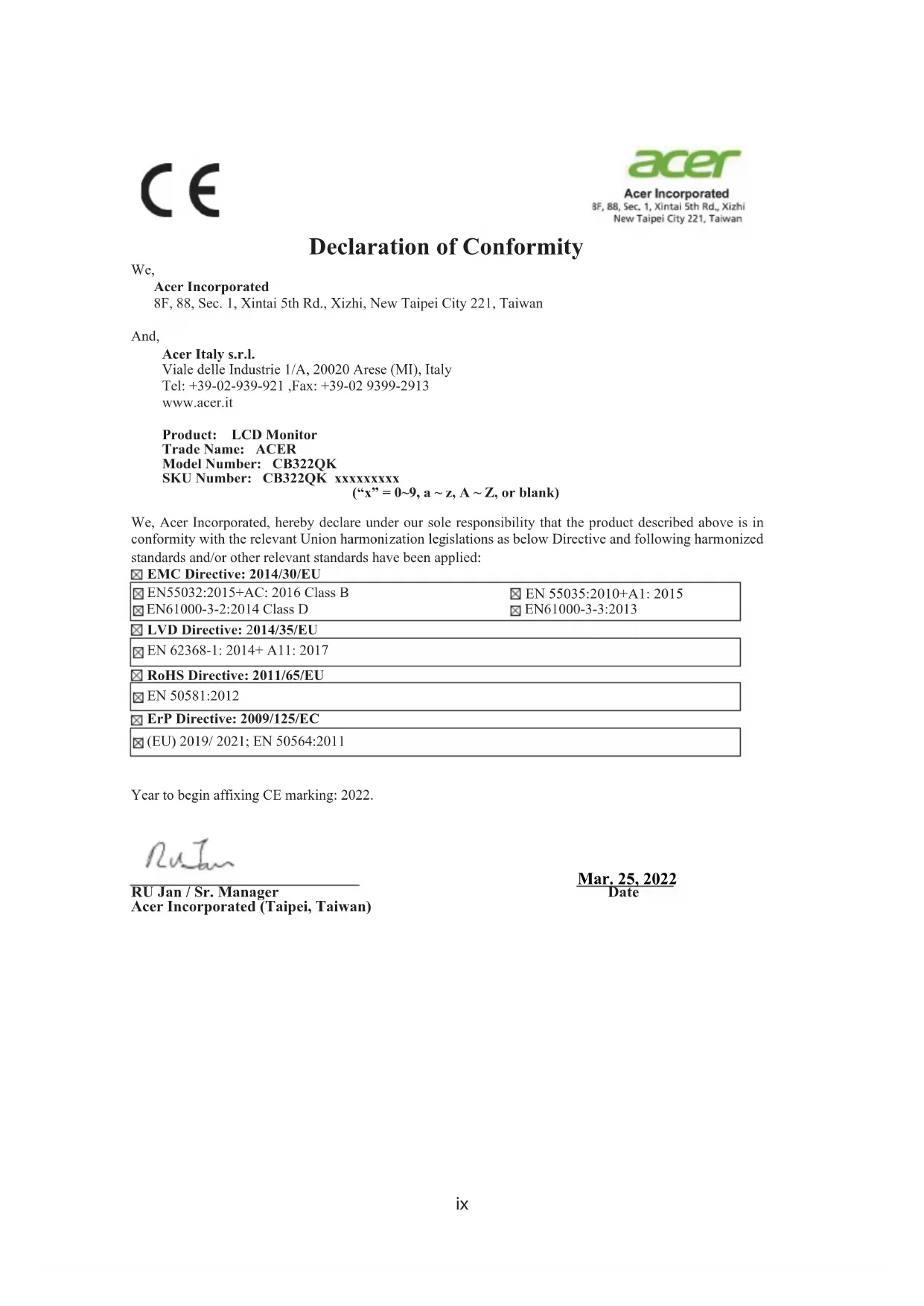
Declaration of Conformity We, Acer Incorporated 8F, 88, Sec. 1, Xintai 5th Rd., Xizhi, New Taipei City 221, Taiwan And, Acer Italy s.r.l. Viale delle Industrie 1/A, 20020 Arese (MI), Italy Tel: +39-02-939-921 ,Fax: +39-02 9399-2913 www.acer.it Product: LCD Monitor Trade Name: ACER Model Number: CB322QK SKU Number: CB322QK xxxxxxxxx (“x” = 0~9, a ~ z, A ~ Z, or blank) We, Acer Incorporated, hereby declare under our sole responsibility that the product described above is in conformity with the relevant Union harmonization leg islations as below Directive and following harmonized standards and/or other relevant standards have been applied: EMC Directive: 2014/30/EU EN55032:2015+AC: 2016 Class B EN61000-3-2:2014 Class D EN 55035:2010+A1: 2015 EN61000-3-3:2013 LVD Directive: 2014/35/EU EN 62368-1: 2014+ A11: 2017 RoHS Directive: 2011/65/EU EN 50581:2012 ErP Directive: 2009/125/EC (EU) 2019/ 2021; EN 50564:2011 Year to begin affixing CE marking: 2022.
Mar. 25, 2022 RU Jan / Sr. Manager Date Acer Incorporated (Taipei, Taiwan)
CE Declaration of Conformityx Federal Communications Commission Declaration of Conformity Federal Communications Commission Declaration of Conformity This device complies with Part 15 of the FCC Rules. Operation is subject to the following two conditions: (1) this device may not cause harmful interference, and (2) this device must accept any interference received, including interference that may cause undesired operation. The following local Manufacturer /Importer is responsible for this declaration: Product: LCD Monitor Model Number: CB322QK SKU Number: CB322QK xxxxxx; (“x” = 0~9, a ~ z, A ~ Z or Blank) Name of Responsible Party: Acer America Corporation Address of Responsible Party: 333 West San Carlos St. Suite 1500 San Jose, CA 95110 U. S. A. Contact Person: Acer Representative Phone No.: 254-298-4000 Fax No.: 254-298-4147 Acer America Corporation 333 West San Carlos St., Suite 1500 San Jose, CA 95110, U. S. A. Tel : 254-298-4000 Fax : 254-298-4147 www.acer.comxi A third-party certification according to ISO 14024 Say hello to a more sustainable product IT products are associated with a wide range of sustainability risks throughout their life cycle. Human rights violations are common in the factories. Harmful substances are used both in products and their manufacture. Products can often have a short lifespan because of poor ergonomics, low quality and when they are not able to be repaired or upgraded. This product is a better choice. It meets all the criteria in TCO Certified, the world’s most comprehensive sustainability certification for IT products. Thank you for making a responsible product choice, that help drive progress towards a more sustainable future! Criteria in TCO Certified have a life-cycle perspective and balance environmental and social responsibility. Conformity is verified by independent and approved verifiers that specialize in IT products, social responsibility or other sustainability issues. Verification is done both before and after the certificate is issued, covering the entire validity period. The process also includes ensuring that corrective actions are implemented in all cases of factory non-conformities. And last but not least, to make sure that the certification and independent verification is accurate, both TCO Certified and the verifiers are reviewed regularly. Want to know more? Read information about TCO Certified, full criteria documents, news and updates at tcocertified.com. On the website you’ll also find our Product Finder, which presents a complete, searchable listing of certified products. Toward sustainable IT products TCO Certifiedxii ENERGYSTAR® Acer’s ENERGY STAR qualified products save you money by reducing energy costs and helps protect the environment without sacrificing features or performance. Acer is proud to offer our customers products with the ENERGY STARmark. What is ENERGYSTAR? Products that are ENERGY STAR qualified use less energy and prevent greenhousegasemissionsbymeetingstrictenergyefficiencyguidelinessetbythe U.S. Environmental Protection Agency. Acer is committed to offer products and servicesworldwidethathelpcustomerssavemoney,conserveenergyandimprove the quality of our environment. The more energy we can save through energy efficiency, the more we reduce greenhouse gases and the risks of climate change. More information refers to http://www.energystar.gov. Acer ENERGY STAR qualified products:
Produce less heat and reduce cooling loads, and warmerclimates.
Automatically go into “display sleep” within 5 minutesof inactivity.
- Do not use mixed batteries of different types. Batteries of different types have different characteristics.
- Do not use mixed new and old batteries. If new batteries are used with old ones, the service life of the new ones will be shortened,or it may cause a leakage of the chemical substances in the old batteries.
- When the batteries are low, take out the batteries immediately. The chemical substances leaked from the battery may corrode the parts in the battery compartment. If a leakage of any chemical substance is found, use a cloth to thoroughly clean the chemical substance.
- If the remote control will not be used for a long time, take out the batteries from the remote control.
- Do not expose the batteries to direct sunlight, fire or other overheating environments. 1 Uncover the battery compartment.
- When inserting the batteries, note that the polarities of the batteries should match the polarities marked (e) and (f) on the battery compartment. 2 Insert two “AAA” batteries 3 Cover the battery compartment. When using the remote control, point it to the remote sensor. If there is an object between the remote control and the sensor window, normal operations may be prevented. Precautions regarding the remote control Inserting batteries Using the remote control Before using the TV set for the first time, insert two “AAA” batteries. When the batteries are low, and the remote control does not work, replace with new “AAA” batteries.
- Do not subject the remote control to violent vibration. In addition, do not dip the remote control in liquids, or place the remote control in a highly humid place.
- Never set up or place the remote control under direct sunlight. Heat may cause deformation of the remote control.
- When the TV set’s remote sensor is under direct sunlight or strong lighting, the remote control may fail. If this occurs, change the lighting or angle of the LCD TV set, or operate the remote control near the sensor. Caution Not using the batteries properly may cause a leakage of chemical substances or explosion. The following instructions must be followed.
- Do not use mixed batteries of different types. Batteries of different types have different characteristics.
- Do not use mixed new and old batteries. If new batteries are used with old ones, the service life of the new ones will be shortened,or it may cause a leakage of the chemical substances in the old batteries.
- When the batteries are low, take out the batteries immediately. The chemical substances leaked from the battery may corrode the parts in the battery compartment. If a leakage of any chemical substance is found, use a cloth to thoroughly clean the chemical substance.
- If the remote control will not be used for a long time, take out the batteries from the remote control.
- Do not expose the batteries to direct sunlight, fire or other overheating environments. 1 Uncover the battery compartment.
- When inserting the batteries, note that the polarities of the batteries should match the polarities marked (e) and (f) on the battery compartment. 2 Insert two “AAA” batteries 3 Cover the battery compartment. When using the remote control, point it to the remote sensor. If there is an object between the remote control and the sensor window, normal operations may be prevented. Precautions regarding the remote control Inserting batteries Using the remote control Before using the TV set for the first time, insert two “AAA” batteries. When the batteries are low, and the remote control does not work, replace with new “AAA” batteries.
- Do not subject the remote control to violent vibration. In addition, do not dip the remote control in liquids, or place the remote control in a highly humid place.
- Never set up or place the remote control under direct sunlight. Heat may cause deformation of the remote control.
- When the TV set’s remote sensor is under direct sunlight or strong lighting, the remote control may fail. If this occurs, change the lighting or angle of the LCD TV set, or operate the remote control near the sensor. Caution Not using the batteries properly may cause a leakage of chemical substances or explosion. The following instructions must be followed.
- Do not use mixed batteries of different types. Batteries of different types have different characteristics.
- Do not use mixed new and old batteries. If new batteries are used with old ones, the service life of the new ones will be shortened,or it may cause a leakage of the chemical substances in the old batteries.
- When the batteries are low, take out the batteries immediately. The chemical substances leaked from the battery may corrode the parts in the battery compartment. If a leakage of any chemical substance is found, use a cloth to thoroughly clean the chemical substance.
- If the remote control will not be used for a long time, take out the batteries from the remote control.
- Do not expose the batteries to direct sunlight, fire or other overheating environments. 1 Uncover the battery compartment.
- When inserting the batteries, note that the polarities of the batteries should match the polarities marked (e) and (f) on the battery compartment. 2 Insert two “AAA” batteries 3 Cover the battery compartment. When using the remote control, point it to the remote sensor. If there is an object between the remote control and the sensor window, normal operations may be prevented. Precautions regarding the remote control Inserting batteries Using the remote control Before using the TV set for the first time, insert two “AAA” batteries. When the batteries are low, and the remote control does not work, replace with new “AAA” batteries.
- Do not subject the remote control to violent vibration. In addition, do not dip the remote control in liquids, or place the remote control in a highly humid place.
- Never set up or place the remote control under direct sunlight. Heat may cause deformation of the remote control.
- When the TV set’s remote sensor is under direct sunlight or strong lighting, the remote control may fail. If this occurs, change the lighting or angle of the LCD TV set, or operate the remote control near the sensor.
- Lorsque vous insérez les piles, veuillez respecter les polarités comme indiquées par les repères (e) et (f) du compartiment des piles. Caution Not using the batteries properly may cause a leakage of chemical substances or explosion. The following instructions must be followed.
- Do not use mixed batteries of different types. Batteries of different types have different characteristics.
- Do not use mixed new and old batteries. If new batteries are used with old ones, the service life of the new ones will be shortened,or it may cause a leakage of the chemical substances in the old batteries.
- When the batteries are low, take out the batteries immediately. The chemical substances leaked from the battery may corrode the parts in the battery compartment. If a leakage of any chemical substance is found, use a cloth to thoroughly clean the chemical substance.
- If the remote control will not be used for a long time, take out the batteries from the remote control.
- Do not expose the batteries to direct sunlight, fire or other overheating environments. 1 Uncover the battery compartment.
- When inserting the batteries, note that the polarities of the batteries should match the polarities marked (e) and (f) on the battery compartment. 2 Insert two “AAA” batteries 3 Cover the battery compartment. When using the remote control, point it to the remote sensor. If there is an object between the remote control and the sensor window, normal operations may be prevented. Precautions regarding the remote control Inserting batteries Using the remote control Before using the TV set for the first time, insert two “AAA” batteries. When the batteries are low, and the remote control does not work, replace with new “AAA” batteries.
- Do not subject the remote control to violent vibration. In addition, do not dip the remote control in liquids, or place the remote control in a highly humid place.
- Never set up or place the remote control under direct sunlight. Heat may cause deformation of the remote control.
- When the TV set’s remote sensor is under direct sunlight or strong lighting, the remote control may fail. If this occurs, change the lighting or angle of the LCD TV set, or operate the remote control near the sensor.
- Do not use mixed batteries of different types. Batteries of different types have different characteristics.
- Do not use mixed new and old batteries. If new batteries are used with old ones, the service life of the new ones will be shortened,or it may cause a leakage of the chemical substances in the old batteries.
- When the batteries are low, take out the batteries immediately. The chemical substances leaked from the battery may corrode the parts in the battery compartment. If a leakage of any chemical substance is found, use a cloth to thoroughly clean the chemical substance.
- If the remote control will not be used for a long time, take out the batteries from the remote control.
- Do not expose the batteries to direct sunlight, fire or other overheating environments. 1 Uncover the battery compartment.
- When inserting the batteries, note that the polarities of the batteries should match the polarities marked (e) and (f) on the battery compartment. 2 Insert two “AAA” batteries 3 Cover the battery compartment. When using the remote control, point it to the remote sensor. If there is an object between the remote control and the sensor window, normal operations may be prevented. Precautions regarding the remote control Inserting batteries Using the remote control Before using the TV set for the first time, insert two “AAA” batteries. When the batteries are low, and the remote control does not work, replace with new “AAA” batteries.
- Do not subject the remote control to violent vibration. In addition, do not dip the remote control in liquids, or place the remote control in a highly humid place.
- Never set up or place the remote control under direct sunlight. Heat may cause deformation of the remote control.
- When the TV set’s remote sensor is under direct sunlight or strong lighting, the remote control may fail. If this occurs, change the lighting or angle of the LCD TV set, or operate the remote control near the sensor.11 Télécommande universelle
WW remote control Japan remote control
WW remote control Japan remote control