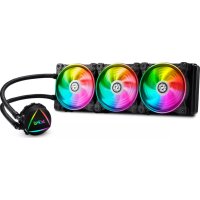
Levante 360 - CPU cooler XPG - Free user manual and instructions
Find the device manual for free Levante 360 XPG in PDF.


| Product type | All-in-one (AIO) liquid CPU cooler |
| Brand | XPG |
| Model | Levante 360 |
| Compatible CPU sockets | Intel LGA 1700/1200/115x/2066, AMD AM5/AM4/TR4 |
| Radiator dimensions | 394 x 120 x 27 mm |
| Radiator material | Aluminum |
| Fan dimensions | 120 x 120 x 25 mm (3 fans) |
| Fan speed | 600 – 2000 RPM (PWM) |
| Maximum airflow | ~75 CFM per fan |
| Noise level | ~30 dBA (quiet) |
| Pump speed | ~2800 RPM (PWM) |
| Total weight | Approximately 1.5 kg |
| Thermal paste | Pre-applied or included |
| Lighting | Addressable RGB (compatible with major controllers) |
| Warranty | 5 years (limited by manufacturer) |
| Maintenance and cleaning | Regular dusting of fans and radiator with a dry cloth or compressed air can |
| Safety instructions | Keep away from liquids; use in temperature range 0°C to 40°C; do not disassemble or repair yourself |
| After-sales service | Contact XPG/ADATA support online |
Frequently Asked Questions - Levante 360 XPG
User questions about Levante 360 XPG
0 question about this device. Answer the ones you know or ask your own.
Ask a new question about this device
Download the instructions for your CPU cooler in PDF format for free! Find your manual Levante 360 - XPG and take your electronic device back in hand. On this page are published all the documents necessary for the use of your device. Levante 360 by XPG.
USER MANUAL Levante 360 XPG
限用物质及其化学符(Restricted substance and its chemical symbols)
This form has been prepared in accordance with the provisions of SJ/T 11364-2014
表示该有害物质在该部件所有均质材料中的含量在GB/T26572规定的限量要求以下。Indicates toxic and hazardous substances in all homogeneous materials of the stated part is below the limit requirement of GB/T 26572-2011 standard
该有害物质至少在该部件的某均质材料中的含量超出GB/T26572-2011规定的限量要求且目前业界没有成熟的替代方案,符合欧盟RoHS指令环保要求Indicates toxic and hazardous substances in all homogeneous materials of the statedpart is within the limit requirement of the European Restriction of HazardousSubstances Directive 2011/65/EC(the 'RoHS Directive')
ADATA Technology Co., Ltd.
2F, No. 258, Liancheng Rd., Zhonghe Dist., New Taipei City 235, Taiwan
Product Name: XPG LEVANTE 360
產品類別:一體式水冷/一体式水冷
Radiator Installation 09
Pump Unit Installation 10
Specifications 12
Warranty Guide 13
SPECIFICATIONS and PRODUCT FEATURES
| WATER BLOCK | |
| Water Block Dimension | 86 x 72 x 36 mm |
| Water Black Material | Copper |
| CPU Socket Support | Intel: LGA 1200,1366,115x,2066,2011AMD: AM4 (TR4 Threadripper bracket not included) |
| Thermal Grease | Pre-Applied |
| RADIATOR | |
| Radiator Dimension | 394 x 120 x 27mm |
| Radiator Material | Aluminum |
| Tube | Sleeved Rubber tube |
| FAN | |
| Fan size | 3 Fan Slots (120mm) |
| Fan Dimension | 120 x 120 x 25 mm |
| Bearing Type | Fluid Dynamic Bearing |
| Fan Speed | 600-2000 RPM ± 10% |
| Fan Static Pressure | 1.42mm-H2O |
| Fan Air Flow | 61.5 CFM |
| Fan Noise 34.0 dB (A) | |
| Control Mode PWM (4-Pin) | |
| Protection Auto-Restart | |
PRODUCT FEATURES
Reliable high performance CPU Liquid Cooler with Asetek's Cooling Solution.
External ARGB Controller for the fans and the water pump.
3 Vibrant Dual-Ring 120mm ARGB Fans.
- Fluid Dynamic Bearing (FDB) fans with 4-Pin PWM design.
ARGB lighting for the water block and fans.
Large surface 360mm all aluminum radiator.
All-in-One hassle-free Installation, no additional setup required.
PACKAGE CONTENTS
CPU LIQUID COOLER
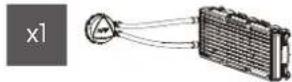
Intel Mounting Bracket


Intel LGA 2066/2011 STANDOFF SCREWS


PACKAGE CONTENT : MOUNTING AMD CPUs
AM4 STANOFF SCREWS

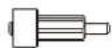
AMD AM4 Mounting Bracket

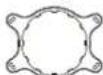
(AMD TR4 Threadripper bracket not Included)
04
MOTHERBOARD SETUP : Intel PLATFORM MOTHERBOARD SETUP : AMD PLATFORM
Intel Platform {LGA 1366 / 115X / 2066 / 2011 Socket}
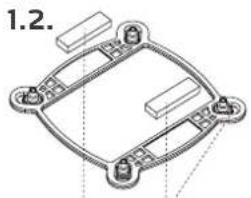
Attach the Double-sided Foam Tapes In the Backplate.
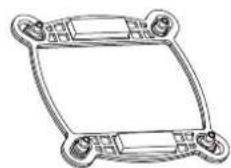
-For LGA 115X / 1200 Socket Installation, slide the backplate pins inwards.
-For LGA 1356 / 2056 / 2011 Socket Installation, slide the backplate pins outwards.
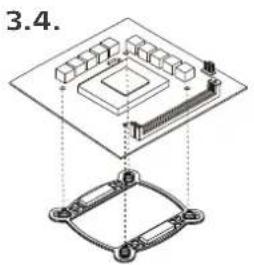
Install the Intel Backplate on the rear of the motherboard.

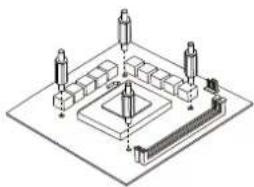
Screw the backplate with the provided standoffs.
AMD Platform (AM4 Socket)
- Remove the pre-installed AMD heatsink mount.
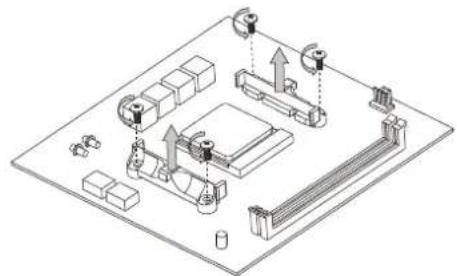
- Secure with the provided AM4 Standoff Screws.
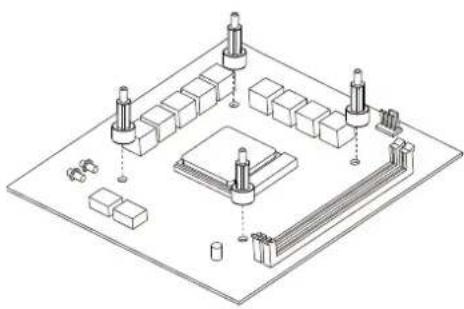
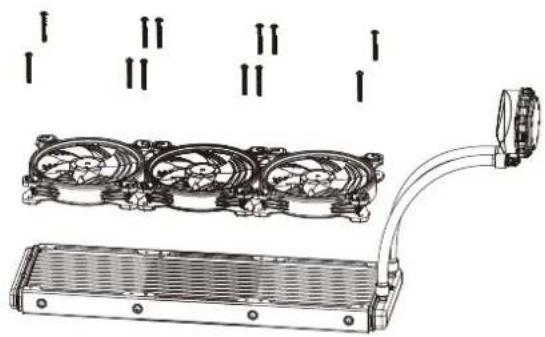
FAN INSTALLATION on the RADIATOR
- Use the provided Fan Screws to install the Fans on the Radiator.
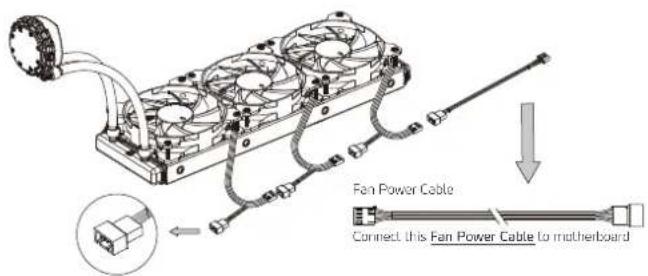
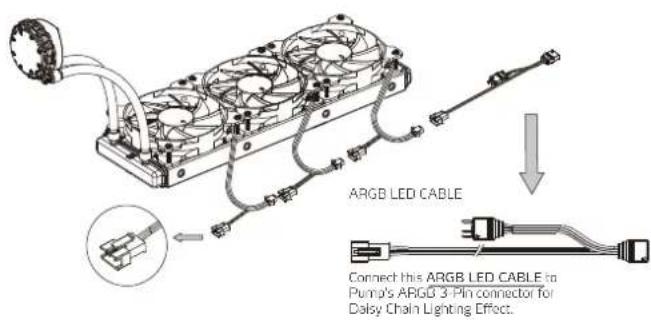
- Connect each 4-Pin Fan Power Connector in series as diagram below. Finally connect the provided Fan Power Cable to motherboard.
07
FAN INSTALLATION on the RADIATOR
- Connect each 3-Pin LED Cable in series as diagram below. Then connect the provided ARGB LED CABLE to motherboard or I/O Ports.
08
RADIATOR INSTALLATION
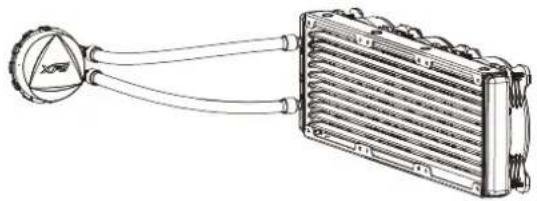
For the best cooling performance, we recommend mounting the fans as an air-intake to your PC case.
Refer to chassis manual for more information on Radiator Compatibility.
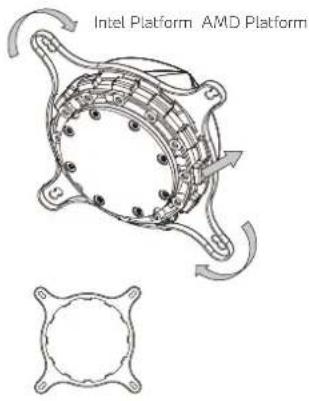
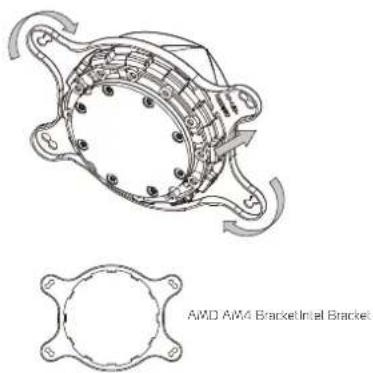
PUMP INSTALLATION : Intel and AMD BRACKET
09
PUMP INSTALLATION: DAISY CHAIN LIGHTING EFFECT
Connect Pump's ARGB 3-Pin to either motherboard, I/O's ARGB 3-Pin, or to the provided External LED LIGHTING CONTROLLER for Daisy Chain Effect.
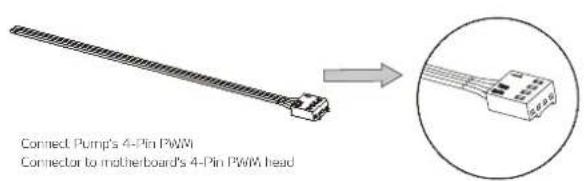
PUMP INSTALLATION : POWER
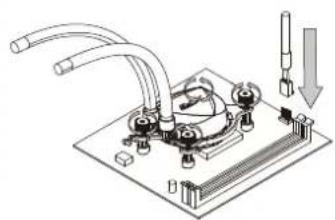
Intel Platform
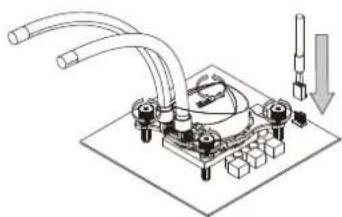
AMD Platform
10
An external LED LIGHTING CONTROLLER is provided to switch lighting effects (up to 13 pre-set Modes, 5 different levels of Speed and 5 different levels of Brightness).
| Function | _clk 1 | _clk 2 | _clk 3 | _clk 4 | _clk 5 | _clk 6 | _clk 7 | _clk 8 | _clk 9 | 1000 | 112 | |
| MODE | ||||||||||||
| SPEED | Change Lighting mode | Red | Green | Blue | Purple | Yellow | White | Orange | Brown | Green | Light up/Off No. 1-4 | |
| LIGHT | Change Lighting effect speed | 20s, 40s, 80s 50s, 100s | ||||||||||
| LIGHT | Change Lighting offset offsets | 20% - 40% - 60% - 80% - 100% | ||||||||||
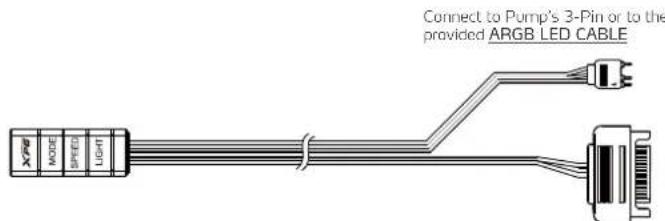
Connect to PSU's SATA Connector
11
EN
CLEANING INSTRUCTIONS
Please use a clean damp cloth to clean the product properly.
Do not apply any soap or solvent agent on the surface to preserve its integrity.
SAFETY INSTRUCTIONS
For a proper use of the product, and to ensure your safety, please follow the following instructions:
- Keep the device away from liquids, excess humidity or moisture to avoid any shock hazards. Should the device come into contact with liquids, please make sure to unplug the device immediately, store it in a dry place, and contact support for assistance.
- Operate the device only within the specific temperature range of 0^ (32^) to 40^ (104^) . Should the temperature exceed this range, unplug and/or switch off the device in order to let the temperature stabilize to an optimal level.
- Should you have any other trouble operating the device properly and normal troubleshooting does not work, please unplug the device and contact our service for support.
- Do not attempt to service or fix the device by yourself at any time.
DURATION OF WARRANTY
ADATA Technology Co., Ltd. provides a 5 year warranty period for this product unless regional laws and regulations state otherwise.
LIMITATION OF WARRANTY
This limited warranty covers only repairs or replacements of products manufactured by
ADATA Technology Co. Ltd. and its authorized partners. Please note that ADATA is responsible for providing free repairs except for the following reasons:
- The warranty label is altered, damaged or missing.
- Product serial number does not conform to our original system.
- Products purchased from an unauthorized agent.
- Damage caused by natural calamity
- Any abuse outside the intended product operation,
ONLINE CUSTOMER SERVICE
For frequently asked questions, additional information and service instruction please visit the product page at www.xpg.com
12
DE
aal aal alal alal alal alal alal alal alal
HHTEPAKTINBHAR CNYKBA NOIDEPKKN NOKYNATEJEI
IINIOPOCMOTBOPOCBOSBTBDBDIOHNHTHEBHIXCEBDEHNITHRCYPKDIIIO BbIaRnHHeHcOeKnykBaHNaNoceteneCTCPaHMyyctPpTaTbAHaBcSaTeWwXPGc
18
KR
长山
開天也青青書者,人音歌,樂,樂,樂,樂,樂,樂,樂,樂,樂,樂,樂,樂,樂,樂,樂,樂,樂,樂,樂,樂,樂,樂,樂,樂,樂,樂,樂,樂,樂,樂,樂,樂,樂,樂,樂,樂,樂,樂,樂,樂,樂,樂,樂,樂,樂,樂,樂,樂,樂,樂,
安原


- SPECIFICATIONS and PRODUCT FEATURES
- PRODUCT FEATURES
- PACKAGE CONTENTS
- PACKAGE CONTENT : MOUNTING AMD CPUs
- MOTHERBOARD SETUP : Intel PLATFORM MOTHERBOARD SETUP : AMD PLATFORM
- FAN INSTALLATION on the RADIATOR
- RADIATOR INSTALLATION
- PUMP INSTALLATION: DAISY CHAIN LIGHTING EFFECT
- CLEANING INSTRUCTIONS
- SAFETY INSTRUCTIONS
- DURATION OF WARRANTY
- LIMITATION OF WARRANTY
- ONLINE CUSTOMER SERVICE
- DE
- HHTEPAKTINBHAR CNYKBA NOIDEPKKN NOKYNATEJEI
- KR
- 长山
- 安原
Brand : XPG
Model : Levante 360
Category : CPU cooler