
LANCER CUDIMM RGB DDR5 - Memory XPG - Free user manual and instructions
Find the device manual for free LANCER CUDIMM RGB DDR5 XPG in PDF.


| Product Type | Desktop DDR5 Memory Module |
| Model | LANCER CUDIMM RGB DDR5 |
| Brand | XPG |
| Memory Type | DDR5 |
| Capacity | 16GB (2x8GB) Kit (typical) |
| Speed | DDR5-6000 MHz (typical) |
| CAS Latency | CL40 (typical) |
| Voltage | 1.1V (nominal) |
| Form Factor | 288-pin DIMM |
| RGB Lighting | Yes, addressable RGB |
| Heat Spreader | Aluminum heatsink |
| Dimensions (per module) | 133.35 x 40 x 8 mm (approx.) |
| Weight (per module) | ~50 g (approx.) |
| Power Consumption | ~3.5W per module (typical) |
| Operating Temperature | 0°C to 85°C |
| Compatibility | Intel XMP 3.0 / AMD EXPO ready |
| Warranty | Limited lifetime warranty |
| Maintenance | Keep contacts clean; avoid moisture |
| Safety | Handle with ESD precautions; install in grounded system |
| Spare Parts / Repairability | Not user-serviceable; replace module if faulty |
| General Information | Designed for high-performance gaming and overclocking |
Frequently Asked Questions - LANCER CUDIMM RGB DDR5 XPG
User questions about LANCER CUDIMM RGB DDR5 XPG
0 question about this device. Answer the ones you know or ask your own.
Ask a new question about this device
Download the instructions for your Memory in PDF format for free! Find your manual LANCER CUDIMM RGB DDR5 - XPG and take your electronic device back in hand. On this page are published all the documents necessary for the use of your device. LANCER CUDIMM RGB DDR5 by XPG.
USER MANUAL LANCER CUDIMM RGB DDR5 XPG
natural_image
Exterior view of a DDR5 processor with visible internal circuitry and color gradient overlay (no text or symbols on main components)Index
English 03 Czech 12
German 04 Turkish 13
Russian 05 Arabic 14
Spanish 06 Korean 15
Portuguese 07 Japanese 16
Italian 08 Vietnamese 17
French 09 Simplified Chinese 18
Dutch 10 Traditional Chinese 19
Polish 11
natural_image
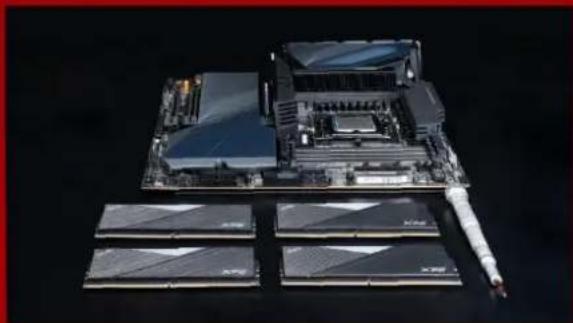
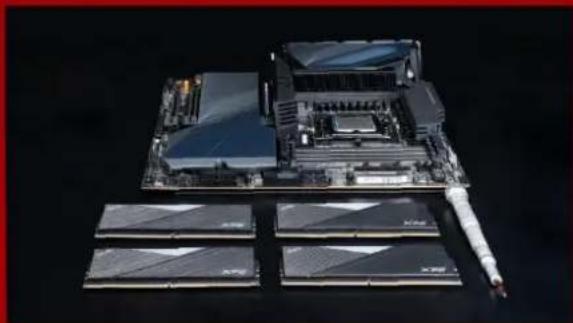
3D rendering of a computer motherboard with multiple RAM chips and a central processor (no visible text or symbols)- Confirm System Specifications: Only specific motherboards or CPU can execute the product at specified data-rate. For module parameter settings and installation conflicts, please refer to the instructions in the motherboard's manual.
natural_image
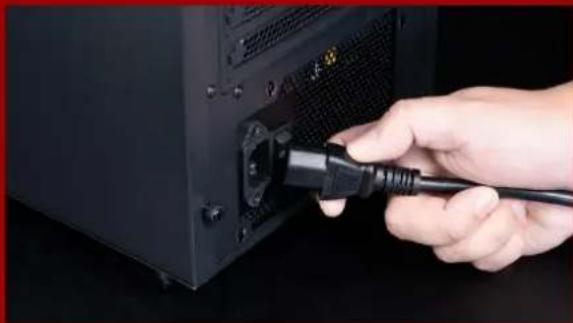
Hand inserting a black cable into a black computer tower (no visible text or symbols)- Shutdown and Unplug Computer: Turn off your computer, disconnect the AC power cord, and ground yourself on a metal object before touching DRAM module and/or any electronic components on the motherboard.

natural_image
Close-up of a hand inserting a device into a computer motherboard (no visible text or symbols)- Remove Old Memory: Installing memory modules with identical density or data-rate is recommended for better performance.

natural_image
Close-up of hands assembling a black CPU socket with visible internal components, inset shows close-up of train track (no text or symbols)- Install Memory Module: Ensure the memory module is properly aligned to the slot, then fully insert the module. Proper installation should automatically force the retaining clips to an inward or closed position. If the memory module does not slot properly, do not force the module into the slot to avoid damaging the product. You may be using the wrong memory type.
CAUTION
- Recommended voltage is shown on the DRAM label.
• Always turn off your computer before installing or removing a memory module.
natural_image
3D rendering of a computer motherboard with four RAM slots and a central processor (no visible text or symbols)natural_image
Hand inserting a black cable into a black computer tower (no visible text or symbols)natural_image
Close-up of a hand inserting a device into a computer motherboard (no visible text or symbols)natural_image
Close-up of hands assembling a black CPU socket with visible internal components (no text or symbols)natural_image
Disassembled computer motherboard with four RAM slots and a central processor unit (no visible text or labels)natural_image
Hand inserting a black cable into a black server rack (no visible text or symbols)natural_image
Close-up of a hand inserting a computer into a motherboard socket (no visible text or symbols)natural_image
Close-up of hands assembling a black CPU socket with visible internal components, inset shows close-up of train track (no text or symbols)natural_image
3D rendering of a computer motherboard with multiple RAM chips and a central processor (no visible text or symbols)natural_image
Hand inserting a black cable into a black server rack (no visible text or symbols)natural_image
Close-up of a hand inserting a computer into a motherboard socket (no visible text or symbols)natural_image
Close-up of hands assembling a black CPU socket with visible internal components (no text or symbols)natural_image
3D rendering of a computer motherboard with multiple RAM chips and a central processor (no visible text or symbols)natural_image
Hand inserting a black cable into a black server rack (no visible text or symbols)natural_image
Close-up of a hand inserting a computer into a motherboard socket (no visible text or symbols)natural_image
Close-up of hands assembling a black CPU socket with visible internal components, inset shows close-up of train track (no text or symbols)natural_image
3D rendering of a computer motherboard with multiple RAM chips and a central processor (no visible text or symbols)natural_image
Hand inserting a black cable into a black computer tower (no visible text or symbols)natural_image
Close-up of a hand inserting a device into a computer motherboard (no visible text or symbols)natural_image
Close-up of hands assembling a black CPU socket with visible internal components (no text or symbols)natural_image
3D rendering of a computer motherboard with multiple RAM chips and a central processor (no visible text or symbols)natural_image
Hand inserting a black cable into a black computer tower (no visible text or symbols)natural_image
Close-up of a hand inserting a device into a computer motherboard (no visible text or symbols)natural_image
Close-up of hands assembling a black CPU socket with visible internal components (no text or symbols)natural_image
3D rendering of a computer motherboard with multiple RAM chips and a central processor (no visible text or symbols)natural_image
Hand inserting a black cable into a black computer tower (no visible text or symbols)natural_image
Close-up of a hand inserting a device into a computer motherboard (no visible text or symbols)natural_image
Close-up of hands assembling a black CPU socket with visible internal components, showing a magnified inset of the circuit board (no text or symbols)natural_image
3D rendering of a computer motherboard with four RAM slots and a central processor (no visible text or symbols)natural_image
Hand inserting a black cable into a black computer tower (no visible text or symbols)natural_image
Close-up of a hand inserting a device into a computer motherboard (no visible text or symbols)natural_image
Close-up of hands assembling a black CPU socket with visible internal components (no text or symbols)natural_image
3D rendering of a computer motherboard with multiple RAM chips and a central processor (no visible text or symbols)natural_image
Hand inserting a black cable into a black server rack (no visible text or symbols)natural_image
Close-up of a hand inserting a computer into a motherboard socket (no visible text or symbols)natural_image
Close-up of hands assembling a black CPU socket with visible internal components, inset shows close-up of train track (no text or symbols)natural_image
3D rendering of a computer motherboard with multiple RAM chips and a central processor (no visible text or symbols)natural_image
Hand inserting a black cable into a black computer tower (no visible text or symbols)natural_image
Close-up of a hand inserting a device into a computer motherboard (no visible text or symbols)natural_image
Close-up of hands assembling a black CPU socket with visible internal components (no text or symbols)natural_image
Exploded view of a computer motherboard with multiple RAM chips and memory racks (no visible text or labels)natural_image
Hand inserting a black cable into a black server rack (no text or symbols visible)ن الكهرباء.

