B118008UHD - Computer and peripheral cables Tripp Lite - Free user manual and instructions
Find the device manual for free B118008UHD Tripp Lite in PDF.


| Product Type | 8-Port HDMI Coupler/Repeater |
| Brand | Tripp Lite |
| Model | B118-008-UHD |
| Maximum Resolution | 3840 x 2160 (4K UHD) at 24/30 Hz |
| 3D Support | Yes |
| Deep Color | 36-bit (12 bits per channel) |
| Audio Formats | DTS-HD, Dolby True HD, Dolby Digital Plus, LPCM 7.1 |
| Bandwidth | 340 MHz / 3.4 Gbps per channel (10.2 Gbps total) |
| HDCP Compatibility | Yes |
| EDID Compatibility | Yes |
| Number of HDMI Inputs | 1 |
| Number of HDMI Outputs | 8 |
| Maximum Source-to-Coupler Distance | 5 m (16.4 ft) |
| Maximum Coupler-to-Screen Distance | 7 m (23 ft) |
| Cascading | Up to 3 levels, up to 512 monitors |
| External Power Supply | Input: 100-240 V AC, 50/60 Hz, 0.6 A; Output: 5 V DC, 3 A |
| Power Supply Included | Yes, with NEMA, CEE, BS, AS/NZS adapters |
| Mounting Hardware | Included |
| Approximate Dimensions | 20 x 10 x 4 cm (estimated) |
| Approximate Weight | 500 g (estimated) |
| Maintenance | Clean with a soft dry cloth. Do not use chemicals. |
| Safety | Do not use in critical medical applications. Unplug before maintenance. |
| Spare Parts | Not available separately. Contact Tripp Lite customer service. |
| Repairability | Not user-serviceable. Refer to a qualified professional. |
Frequently Asked Questions - B118008UHD Tripp Lite
User questions about B118008UHD Tripp Lite
0 question about this device. Answer the ones you know or ask your own.
Ask a new question about this device
Download the instructions for your Computer and peripheral cables in PDF format for free! Find your manual B118008UHD - Tripp Lite and take your electronic device back in hand. On this page are published all the documents necessary for the use of your device. B118008UHD by Tripp Lite.
USER MANUAL B118008UHD Tripp Lite
Warranty & Product Registration 8
Espanol 10
Français 18
Pycckn 26
PROTECT YOUR INVESTMENT!
Register your product for quicker service and ultimate peace of mind. You could also win an ISOBAR6ULTRA surge protector—a $100 value!
www.triplite.com/warranty


Manufacturing Excellence.
1111 W. 35th Street, Chicago, IL 60609 • www.triplite.com/support
Copyright © 2018 Tripp Lite. All rights reserved.
Product Features
- Simultaneously transmit video and audio from an HDMI source to multiple HDMI monitors
Supports UHD 4K x 2K video resolutions up to 3840 x 2160 (24 Hz and 30 Hz) and 3D
Supports 36-bit Deep Color (12 bits per channel)
Supports DTS-HD, DolbyTrueHD, Dolby Digital Plus™ and LPCM 7.1 Channel Surround Sound audio
Supports video amplifier bandwidth of 340 MHz / 3.4 Gbps per channel (10.2 Gbps total)
HDCP and EDID compatible
Plug and play; no software or drivers required - The B118-002-UHD features a built-in cable to connect to the source
- The B118-008-UHD includes an international power supply with compatible North American, UK, European and Australian plug adapters
Supports lip sync pass-through
Supports xvYCC and x.vColor
Supports the use of DVI sources and displays with an optional DVI to HDMI adapter (sold separately)
Supports a maximum distance of 16.4 ft. (5 m) from source to splitter, and 23 ft. (7 m) from splitter to display, for a total of up to 39.4 ft. (12 m) - Cascade up to 3 levels of splitters to increase up to 512 connected monitors.
Package Contents
UHD 4Kx2K HDMI Splitter
- External Power Supply
B118-002-UHD (Input: 100-240V, 50/60 Hz, 0.2A; Output: 5V 1A)
B118-004-UHD (Input: 100-240V, 50/60 Hz, 0.35A; Output: 5V 2A)
B118-008-UHD (Input: 100-240V, 50/60 Hz, 0.6A; Output: 5V 3A)*
-
Mounting Hardware (B118-008-UHD only)
Owner's Manual -
Includes NEMA 1-15P (North America), CEE 7/16 Schuko (Europe), BS 1363 (UK) and AS/NZS 3112 (Australia) plugs.
Optional Accessories:
P130-000 HDMI to DVI Adapter
P566-Series HDMI to DVI Adapter Cables**
P568-Series High Speed HDMI Cables
**When using an HDMI to DVI adapter cable, only the video signal will be transmitted to the DVI monitor and video resolutions will be limited to those supported by the adapter.
Notes:
- The maximum distances referenced in these instructions have been tested at a UHD 4K x 2K video resolution of 3840 × 2160 @ 24Hz and 30Hz with 36-bit (12 bits per channel) Deep Color using 28 AWG (0.08 mm²) HDMI cables. Longer distances between the splitter and connected monitors are achievable using 24 AWG (0.2 mm²) HDMI cables.
- When connecting monitors that support different maximum resolutions, the video resolution displayed will be limited to the lowest maximum resolution. For example, if connecting a combination of 1080p and 4K × 2K monitors, a 1080p video resolution will be displayed on all screens.
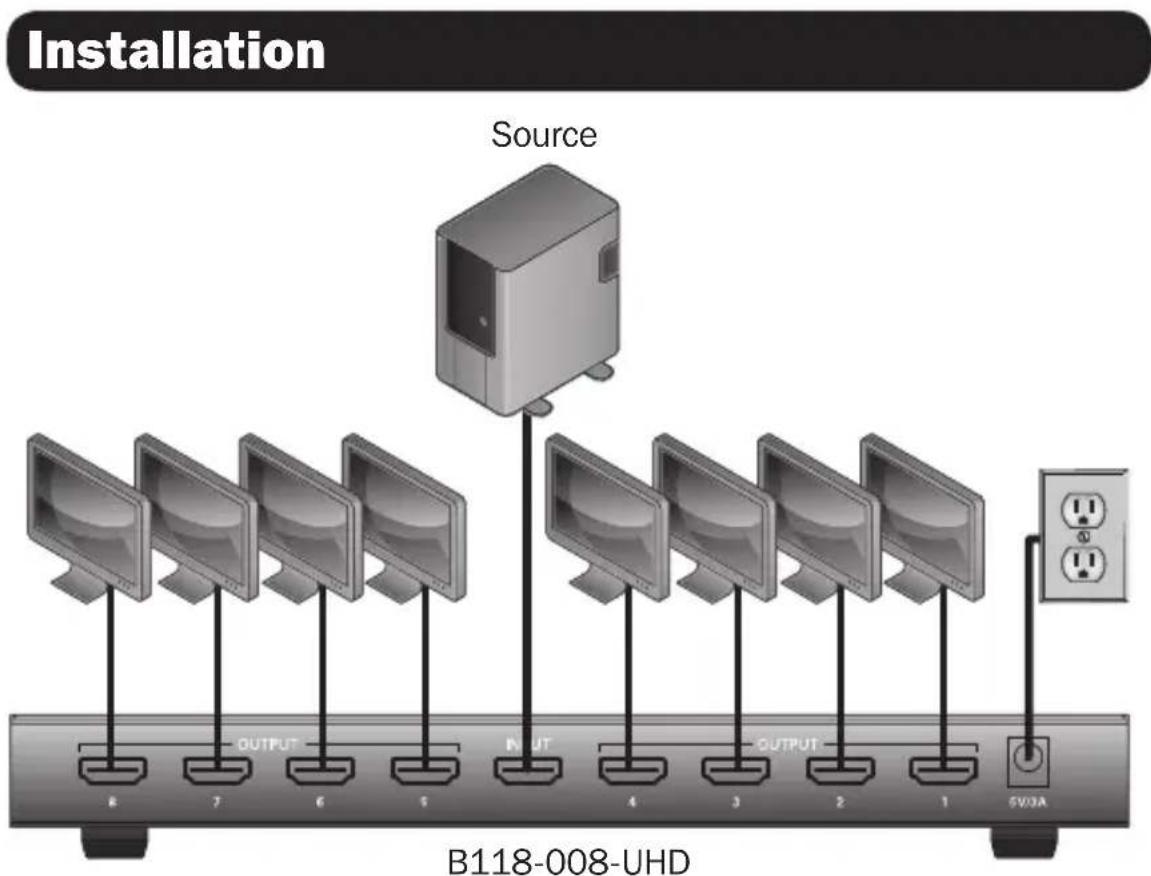
1 Make sure the power to all devices you will be connecting is turned off.
2 Connect the HDMI source to the Input port on the splitter. Note: The length of the HDMI cable connecting the source to the splitter must not exceed 16.4 ft. (5 m).
Installation
3 Connect an available Output port on the splitter to the HDMI input port of your display.
Note: The length of the HDMI cable connecting the splitter to the display must not exceed 23 ft. (7 m).
Repeat step 3 for the remaining Output ports on the splitter.
5 Connect the included power supply to the splitter, then plug it into a Tripp Lite Surge Protector, Power Distribution Unit (PDU), or Uninterruptible Power Supply (UPS).
6 Turn on the power to the HDMI source, splitter, and displays.
Cascade Installation
The number of connected monitors can be expanded by cascading up to three levels of splitters together. Up to 512 displays can be connected by cascading a B118-008-UHD from each port in a three level installation. It is recommended you use Tripp Lite's P569-XXX-CERT Series Premium High-Speed HDMI cables.
1 Make sure the power to all the devices you will be connecting is turned off.
2 Connect the HDMI source to the Input port on the first level splitter.
Note: The length of the HDMI cable connecting the source to the splitter must not exceed 16 ft. (5 m).
3 Connect an available Output port on the first level splitter to the HDMI Input port on a second level splitter.
Note: The length of the HDMI cable connecting the first and second level splitters must not exceed 10 ft. (3 m).
Repeat Step 3 for each additional splitter you wish to add (no more than 3 levels of splitters can be cascaded).
Installation
5 Connect an available Output port on your splitter(s) to the display's HDMI Input port.
Note: The length of the HDMI cable connecting the splitter to the display must not exceed 16 ft. (5 m).
6 Repeat Step 5 for the remaining Output ports in the installation.
7 Connect the included power supply to each splitter in the installation, then plug it into a Tripp Lite Surge Protector, Power Distribution Unit (PDU) or Uninterruptible Power Supply (UPS).
8 Turn on the power to the HDMI source and displays.
Troubleshooting
If you are unable to obtain an acceptable image after following the installation instructions, try the troubleshooting tips below:
Press the reset button on the splitter to reset the signal being sent to the connected displays.
Note: The B118-002-UHD does not feature a reset button.
Is the external power supply that came with the product connected and plugged into a working power source? For the product to function properly, it must be connected to and receiving power from the external power supply.
3 Was the power to the connected devices turned off prior to installation? If not, restart them.
4 What resolution are you trying to obtain? Tripp Lite's UHD 4K x 2K HDMI splitters are tested to support video resolutions up to 3840 x 2160 @ 24 Hz and 30 Hz, at 36-bit Deep Color (12 bits per channel).
Troubleshooting
5 What HDMI cable length are you using? (See the Installation section in this manual for details on the maximum cable distance). The shorter the cable being used, the higher the resolution you will be able to obtain. If you are not able to receive an acceptable image, try using a shorter cable, or lowering your source's video resolution or color depth settings.
6 What type of cabling are you using? Inferior cabling can result in poor performance, so it is important you use cables that can support the video resolution you are trying to obtain. It is recommended you use Tripp Lite's P568-Series High Speed HDMI cables, as they have been tested to work with the B118-Series splitters.
Test your cables to ensure they are working properly. For example, connect your HDMI cable between a source and monitor that you know works to see if the cable is functioning.
Is the unit located in an area that exposes it to higher temperatures? If the product is overheated, it will not function properly.
9 Are you connecting monitors that have different maximum resolutions? When doing so, the video resolution displayed will be that of the lowest maximum resolution supported among the connected monitors. For example, when connecting 1080p and 4K x 2K monitors, 1080p video will display.
Warranty & Product Registration
1-Year Limited Warranty
Tripp Lite warrants its products to be free from defects in materials and workmanship for a period of one (1) year from the date of initial purchase. Tripp Lite's obligation under this warranty is limited to repairing or replacing (at its sole option) any such defective products. To obtain service under this warranty, you must obtain a Returned Material Authorization (RMA) number from Tripp Lite or an authorized Tripp Lite service center. Products must be returned to Tripp Lite or an authorized Tripp Lite service center with transportation charges prepaid and must be accompanied by a brief description of the problem encountered and proof of date and place of purchase. This warranty does not apply to equipment which has been damaged by accident, negligence or misapplication or has been altered or modified in any way.
EXCEPT AS PROVIDED HEREIN, Tripp Lite MAKES NO WARRANTYES, EXPRESS OR IMPLIED, INCLUDING WARRANTYES OF MERCHANTABILITY AND FITNESS FOR A PARTICULAR PURPOSE.
Some states do not permit limitation or exclusion of implied warranties; therefore, the aforesaid limitation(s) or exclusion(s) may not apply to the purchaser.
EXCEPT AS PROVIDED ABOVE, IN NO EVENT WILL Tripp Lite BE LIABLE FOR DIRECT, INDIRECT, SPECIAL, INCIDENTAL OR CONSEQUENTIAL DAMAGES ARISING OUT OF THE USE OF THIS PRODUCT, EVEN IF ADVISED OF THE POSSIBILITY OF SUCH DAMAGE. Specifically, Tripp Lite is not liable for any costs, such as lost profits or revenue, loss of equipment, loss of use of equipment, loss of software, loss of data, costs of substitutes, claims by third parties, or otherwise.
FCC Notice, Class B
This device complies with part 15 of the FCC Rules. Operation is subject to the following two conditions: (1) This device may not cause harmful interference, and (2) this device must accept any interference received, including interference that may cause undesired operation.
Note: This equipment has been tested and found to comply with the limits for a Class B digital device, pursuant to part 15 of the FCC Rules. These limits are designed to provide reasonable protection against harmful interference in a residential installation. This equipment generates, uses and can radiate radio frequency energy and, if not installed and used in accordance with the instructions, may cause harmful interference to radio communications. However, there is no guarantee that interference will not occur in a particular installation. If this equipment does cause harmful interference to radio or television reception, which can be determined by turning the equipment off and on, the user is encouraged to try to correct the interference by one or more of the following measures:
- Reorient or relocate the receiving antenna.
- Increase the separation between the equipment and receiver.
- Connect the equipment into an outlet on a circuit different from that to which the receiver is connected.
- Consult the dealer or an experienced radio/TV technician for help.
Any changes or modifications to this equipment not expressly approved by Tripp Lite could void the user's authority to operate this equipment.
Warranty & Product Registration
PRODUCT REGISTRATION
Visit www.triplite.com/warranty today to register your new Tripp Lite product. You'll be automatically entered into a drawing for a chance to win a FREE Tripp Lite product!*
- No purchase necessary. Void where prohibited. Some restrictions apply. See website for details.
WEEE Compliance Information for Tripp Lite Customers and Recyclers (European Union)

Under the Waste Electrical and Electronic Equipment (WEEE) Directive and implementing regulations, when customers buy new electrical and electronic equipment from Tripp Lite they are entitled to:
- Send old equipment for recycling on a one-for-one, like-for-like basis (this varies depending on the country)
- Send the new equipment back for recycling when this ultimately becomes waste
WARNING
Use of this equipment in life support applications where failure of this equipment can reasonably be expected to cause the failure of the life support equipment or to significantly affect its safety or effectiveness is not recommended.
Tripp Lite has a policy of continuous improvement. Specifications are subject to change without notice.


Manufacturing Excellence,
1111 W. 35th Street, Chicago, IL 60609 • www.triplite.com/support
1111 W. 35th Street, Chicago, IL 60609 EE UU • www.triplite.com/support
1111 W. 35th Street, Chicago, IL 60609 EE UU • www.triplite.com/support
1111 W. 35th Street, Chicago, IL 60609 • www.triplite.com/support
1111 W. 35th Street, Chicago, IL 60609 • www.triplite.com/support
PyKOBODCTBO NOJIb30BaTeЯ
Pa3BcTbIteN UHD 4Kx2K HDMI
Moden: B118-002-UHD, B118-004-UHD, B118-008-UHD
XapakTepeNtKn npOdykta 27
Copepxmoe ynaKOBKn 28
yctaHOBka
29
BbIaBJIeHne n ycTaPaHHe HncnPaBHOcte 31
TapaHTnHbIe 06a3aTeJbCTBa 33
English
1
Espanol 10
Français 18


Prrnneepnnnne
1111 W. 35th Street, Chicago, IL 60609 - www.triplite.com/support
OxpaHaeTcA ABTopcMn PabOM © 2018 Tripp Lite. NpepeaTa zanpeaaetc.
XapakTepnCTnKn npOdyKta
- OndobpemeHHa nepea Bndeo- n ayinocnHaNoB ot nctouHka HDMi-cnHaHa na Ha Heckonbko HDMI-MOHHTopoB
- Повдержka видаораразецни UHD 4Kx2К до 3840 x 2160 (24 n 30 Г) и 3D
-Подержka 36-6ntoBOrO KoДированя CBeTa (no 12 6nt Ha KaHJI) - Повдержka aydnnoформатов DTS-HD, Dolby TrueHD, Dolby Digital Plus™ u LPCM 7.1 Channel Surround Sound
- Пордержka поисьnponyckаня услntеля вideocurhana shinpnoi 340 MГц / 3,4 Гит/ cHa KaЖдь кahan (10,2 Гит/c Ha BCE kaHabl)
Cobmectnmoctb c cnteMaHDCP u EDID - Поклоченье по Тхноги Plug-and-play 6e3 Heo6xOIMOCTN ИспьзOBaHЯ Кakux-ПИбО nporpamM ИпдраВеров
- Moèleb B118-002-UHD ochaetaeTcBMOHTnpoBaHHbIM Ka6eIeM dIy noKluOeHnK nCTOuHNky
MoIeB B118-008-UHD komnleKtyeTc6blokom nHTaHm MeKdyHapOndHO o6pa3ca co wTeNceIb-NepeXoHNKaMn IJI NaDKnUoyEHn K po3eTKam 3JeKTPnuecknx CeTei ceBepoAmePukahCKoro, 6pTuHcKO, eBPoneckoro n ABCTpaNNckoro CTaNdApTOB
-Поддержka cnHxpoHn3aunn n306paXeHnI nepeYebix cnHaIOB
-Подержka xvYCC u x.vColor - PoiDepKka IcNoIb3OBAHnI NcToUHnKOB IuCnIeEB DVI c nOMoUbIO ONUHOHaNbHO nepexoHnKa DVI-HDMI (npoJaTcra OTdEnbHo)
- PoiDepKkaФyHKUOHOpOBaHnHa paCtOAHn Do 5 M OT NCTOuHNKa Do pa3BeTBnTeNn Do 7 M OT pa3BeTBnTeNn Do nucPnE n cyMMapHOro paCtOAHn Do 12 M
- Bo3MoXHa KaKaJHnA yCTaHOBKa Do 3 yPoBHe pa3BeTBuTeNe iJyYBeNueHnKoJIueCTBa noDKIIOUaEmbIX MOHTOpO Do 512 wT.
CopexHmoe ynaKOBKN
Pa3BETBNTeJb UHD 4Kx2K HDMI
BheHn6JokNTaHn
B118-002-UHD (Bxo: 100-240 B, 50/60 Γι, 0,2 A; BbIxOδ: 5 B; 1 A)
B118-004-UHD (BxOJ: 100-240 B; 50/60 T; 0,35 A; BbIXoJ: 5 B, 2 A)
B118-008-UHD (BXOJ: 100-240 B, 50/60 Γι, 0,6 A; BBxOJ: 5 B; 3 A)*
-
MoHTaXHaA OChAcTa (ToIbKO IJRA MoD. B118-008-UHD)
-PykoBOOCTBONoIb30BaTeTnA -
Komplteуета разьемами Тuna NEMA 1-15P (Северая Ам扼иka), CEE 7/16 Schuko (Евponа), BS 1363 (Вениковштania) и AS/NZS 3112 (АBSTрал).
OnuohalbHbIe KOMnIeKTyUoune
-ПерекхднК P130-000HDMI-DVI
Ka6eHn-epexoHnKn HDMI - DVI cepnn P566**
- BbICOKoKOpocThbIe HDMI-Ka6eHn cepuN P568
EcnBbINOJIHeHne yKa3aHnI NO yCTaHOBKe He I03BOJAE TIOCTNcYb IIpNEMeMOrO KaueCTBa n3o6paXeHnI, nonpo6yTe BOCNoIb3OBaTbCnI pNBedeHHbIMn HIXke peKOMeHaZnAIMn IIO BbIABLeHnIO N UcTaPaeHnIO HeNCnpaBHOCTe:
1 Haxmnte KhoNky nepe3anycka Ha pa3BeTbTeNe iJra c6poca cnHana, nepedaBaemoro Ha noKJIuOeHHbIe IUCnJIeN.
PnimeaHne.MoJeB B118-002-UHD He IMeET KhoNk Nepe3anycka.
2ПоdkluoyenлnoocTaBnaeMbI B KOMPneKeTbHeuHn6loK NtAHNpa6oTaIoUeMy nToCHNu NtAHN?ДЯнdlexaJeroФyHKUHOHPOBaHnJaHHOrO 3DeJIIN OHO DoJIxHNo POnKIIUcA TbcR K BHeUHEmy 6loKy NtAHNr N3aNTbIBaTbcrOT Hero.
3 BbINO mOtKIOUeHO nHTaHne NOkIOUeHHbIX yCTpOietB Do Haayana yCTaHOBKn? Ecn HET, BbIOJHnTe IVx nepe3anyck.
4 KaKoro pa3peWeHn Bbl nbItaeTecb do6ntbc? Bblnyckaemble KOMnaHne Tripp Lite pa3BETBnTeHn UHD 4Kx2K HDMI TeCtIpyoTcH na ppeMToNDepKKN BnDeopa3peWeHn Do 3840 x 2160 npn 24 Tc n 30 Tc c 36-6ntOBbIM KoDnpoBaHnem ZBeTa (no 12 6nt Ha KaHaJ).
BbIaBHeHne uYcTpaHHeHne HncpapBHOtei
5 KaKoI dnnHbI Ka6eBb HDMl Bbl nCnoJb3yete? (NoDpO6Hee o MaKcImaJIbHOI npOTJKeHHocTn Ka6eJIa Cm. B pa3dJe UcTaHOBKa DaHOrO pyKOBODCTBa). Yem KopoYe nCNoJIb3YEmbI Ka6eJIb, Tem BblIe pa3peSeHne, KOtOpoe Bbl CMOKeTe noJyUHTb. B cIyuae HeBO3MOXHOCTN Do6ntbCra PnEEMJIeMOrO KaueCTBa I306paJxHnIe NOnpo6yIte NcNoJIb30BaTb 6OJee KopoTKn Ka6eJIb IIn60 yMeHbUHTb NapaMeTpbl BUnDeopa3peWeHnIu pa3PAnHOCTn UcBeTa CBOero NCTOChNka.
6 KaKoro Tnna Ka6eNn Bbl NcNoB3yeTe? NcNoB3OBaHne HeHaIeJkaUnx Ka6eNe MoKeT npNBecTN K yxuIeHnIO pa6OuNX xapaKTepNCtIK, B CBa3N C qem Heo6XoIMo NcNoB3OBaTB Ka6eNn, NOdEprXbBAUoUne ToT yPoBeHb BVInDeopA3peUeHnA, KOToPbI Bbl nbITaeTecb nOlyuNTb. PekOMeHNdyETcay NcNoB3OBaTB BblNyCkAeMbIe KOMNaHne Tripp Lite BBicOKocOpocThbIe HDMl-Ka6eNn cepuN P568, nockoNbky OHI ycPeUHO npOuIN mCnbItaHn Ha COBMeCTHyIO pa6Otu c pa3BeTbNTeJIaMn cepuN B118.
7 IpoBepbTe nCnoNb3yEmbIe Ka6eHn Ha npEmdTnx HndJeKaJero yh n OHHPOBaHnHa. HanpImep,ДЯ npOBepKn FyHKcNoHnpOBAHnHDMl-Ka6eNa coeHNHTe Upe3 Hero nCnpaBHO pa6oTaIOUne NCTOCHNK mOHITOp.
8 He noDBepraetcIy uCTpoiCTBO BO3dEiCTBIO NOBbIeHHbIX TemnepaTy B TOM MeTe, rIe OHO yCTaHOBIne? B cIyuae neperpeBa n3dJIeNe He moKET yHKUOHNPOBaTb HAnLeXaUIM 06pa3OM.
9 He nodklouaHcB nn MOHTOpbI c pa3nUHbIM MaKcMmaHbHbIM pa3peWeHHem? B 3tOM clyuae noLyuaeMoE BVideopazpeSeHne 6ydet orpaHnUBaTbcra HaimeHbImm n3 MaKcMaJIbHbIX 3NaueHm BVideopazpeSeHna NOkLIOUeHHbIX MOHTOpOB. Hanpimep, npi noDKlOueHm MOHTOpOB c pa3peSeHnA M1080p n 4Kx2K noLyuaeMbI BVideocnHaJ 6ydet nMeTb pa3peSeHne 1080p.
TapaHTnHbIe 06a3aTeIbCTBa
OrpaHueHHa rapaHTn1 ro
KoMaHnHa Tripp Lite rapaHTnpuyET OTCyTCTBne DeeKToB MaTePauNoB N3rOToBHeNb B TeueHne Ondoro (1) rOda C MoMeHtanebpOHaunbNo nokynKn. 06a3aTeNbCTBa KOMnAHn TrippLite No HAcToaee rapaHTn OrpaHUnBaHO TcpeMOHTom IIN 3aMeHo (no ee EInHOuHOMy yCMOTpeHIO) IIObix TaKxIe DeeKTHbIX N3dEiN. IIN PaOnUeHne Ycnyr NO daHNO rapaHTn Heo6XoHmOnnyuHbomeRrtned Material Authorization (RMA - pa3peSeHne Ha Bo3BpA MaTePauNoB) OT KOMnAHn TrippLite IIN ee aBTopn3OBaHHo cepBnCHoro cepBnCHoro zentpa. N3dEiN dOnJhbl 6bItb Bo3BpaUeHb B KOMnAHn TrippLite IIN ee aBTopn3OBaHHb CEHPc C npEonlato TPAHCnOpTbX pAcXoDob IN cOpBOXdTaBCra KpATKM OnncAHm E Bo3HNkWe np6IeMb IN DOKyMeHToM, NOITBeRJaUOIM DaTu M MeTO erO npio6pTeHna. DeiCTBne HAcToaee rapaHTn He paCnPoCTpaHReTc H o6OpdyOBaHne, NOpeJdeHoe B peYbTaTe abapnn, He6peXHOrO o6PaUeHn IN IN HeIpaBUNbHOro NcPONb3OBaHHa, a TAKKe BIDOn3MeHeHoe KaKIM 6bl To HN 6bl O6pa3OM.
3A NCKIIOUHHEM INPEYCMOTPEHHbIX 3DECb CUYAEB KOMIIAHNTRipp Lite HE INPEIOCTABJETKAKNX-JINBO ABHBIX JINIOPA3YMBAEMbIX TAPAHNTBI, BKIOUAYI TAPAHNTIKOMMEPUECKOIPNFOIDHOCTNI PPNOIDHOCTINJIA KAKOI-JINBO KOHKPETOHIE. B HeKoTOpbIX Wtatax/rocypaTbX OpauHueHne IIN NCKIOUHHe NOpa3yMaEBmIX rapaHTNI He donyckaetc; cJeIOBaTeJIbHo, Bbiweyka3aHHe(-) orpaHueHne(-) mryte paocpoCTpaHrTaC ha NOKyNaTeJIa.
3A NCKIIOUCHHNEIM PEPDYMCMOTPEHHbIX BblIE CUYAAEB KOMNIAHNA Tripp Lite HN IPNKAKNX OBCTOREJIbCTBAX HE HECET OTBETCTBEHHOCTN 3A IPRMbIe, KOCBEHHbIe, CUYAHHbIe ININ IOBOOHbIe YbITKN IINBO YbItKN, OIPDEJIAEMbIE OCObIMN OBCTOATEJBCTBAMN, BO3HNIKAIOUINE B CBA3N C NCPONJIb3OBAHmE MDAHHORO IN3DEINRA, JAXE B CIIyAE EE MHOPMNIPOBAHNA O BO3MOXHOCTN HACTYNJIEHNA TAKNX YbBITKOB. B qactHOCTn, KOMNaHNA Tripp Lite He Hecet OTBETCTBEHHoCTN 3a KaKne-Im60 IN3dePjKKn, TaKe KAK ynuuHbIe np6bIIN mIo DOxObl, NOTeR aOBOpDobAHNA, NOTeR BO3MOXHOCTN INCNOJIb3OBAHNA oOBOpDobAHNA, NOTeR pOrpammmHO oOecneueHna, NOTeR daHNbIX, paCXObl Ha 3aMeHHTEN, ypeTynPOBaHne pPeTeH3N TpeTbx NIn n np.
Информацьдя Клиентов Komпани Tripp Lite o co6niodeHn Tpe6obAHm ДиpeKTNBbl EC 06 otxodax элект pineckoro иэлекtpoHHoro obopudobahna (WEEE)

Corgnacno dnpkeTbE EC 06 oTxOax 3neKtpueckoro n 3neKtpoHoro 6obopyoBaHna (WEEE) npimehmblm Hopmam B cyuayx, KOrDa nokynatien npio6petaot HOBOe 3neKtpueckoe n 3neKtpoHhoe 6obopyoBaHme Komnahm Tripp Lite, OHN IMeOT npabo Ha cIeDyUoee:
- OtpaBky cIaporo 60bpyoBaHn, KOtOpe ABJIeTcK BUNBaIeHTbIM NO KOLJIueCTBy N IJeHTNUHbIM IOnyHeHHOMY HOBOMy 60bpyoBaHnIO, Ha yTINIm3aUIO (3TO yCIOBE MoKeT OTINuAeTBcB A3ABNCMOCnOT CTpaHbl)
- Otnpabky HOBORO o60pyoobAHMa 6bpaTHo Ha yTuIN3aUHIO, KOrDa OHO B KOHeuHOM NTore cTaHOBITcN 3HOWHEHHBM
BHIMAHNE!
He peKoMeHdyetca NcNoIb3ObaTb DaHHoe obOpydoBaHme B CnCTeMax Xm3Heo6ecneueHnB Tex CnyaX, KOrJa erO c6oBc60JIbwoBepoAHTocTBIO npBeTeK c6oIO obOpydoBaHnJ Xm3Heo6ecneueHnNIN 3HaHTeNbHOMy ChnxKeHIO erO 6e3OnaCHOCTn NIN3ΦeKTUBHOCTN.
KoMaHnHa TrippLite noCToRHHo COBepHeCTByET CBOIO npOdykUHO. B CBa3N C 3mM Bo3MOxHo N3MeHeHne TexHmecKnX xapaKTePncTK6e3 npeBaupntbHorO yBeDomHeHn.

1111 W. 35th Street, Chicago, IL 60609 - www.triplite.com/support
18-04-038 93-36A7_ReE