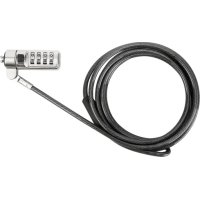
ASP66GLXS - Lock TARGUS - Free user manual and instructions
Find the device manual for free ASP66GLXS TARGUS in PDF.



| Product Type | Cable lock with code |
| Brand | Targus |
| Model | ASP66GLXS |
| Lock dimensions | 48.8 x 18.2 x 26.5 mm |
| Weight | 136.4 g |
| Cable length | 2 m |
| Cable diameter | 4 mm |
| Cable material | Steel with vinyl coating |
| Color | Nickel |
| Locking type | 4-digit code |
| Pre-set combination | Yes, code provided on sticker |
| Base plate included | Yes, with adhesive and screws |
| Usage | For laptop with security slot |
| Main functions | Theft protection, code lock, attachment to furniture |
| Care and cleaning | Clean with a dry cloth; avoid excessive moisture |
| Safety | Do not force the lock without the code |
| Spare parts and repairability | Lost code: contact Targus support (not resettable) |
Frequently Asked Questions - ASP66GLXS TARGUS
User questions about ASP66GLXS TARGUS
0 question about this device. Answer the ones you know or ask your own.
Ask a new question about this device
Download the instructions for your Lock in PDF format for free! Find your manual ASP66GLXS - TARGUS and take your electronic device back in hand. On this page are published all the documents necessary for the use of your device. ASP66GLXS by TARGUS.
USER MANUAL ASP66GLXS TARGUS
Features and specifications are subject to change without notice. All trademarks and registered trademarks are the property of their respective owners. All rights reserved. ©2017 Manufactured or imported by Targus. (for U.S. sales: 1211 North Miller Street, Anaheim, CA 92806 USA) whose Australian sales representative is Targus Australia Pty. Ltd., Suite 2, Level 8, 5 Rider Boulevard Rhodes, NSW 213B Australia
©2017 Manufactured or imported by Targus Europe Ltd., Feltham, Middlesex TW14 8HA, UK. All rights reserved. Targus is either a registered trademark or trademark of Targus in the United States and/or other countries. Features and specifications are subject to change without notice. All trademarks and registered trademarks are the property of their respective owners.


User Guide
Table of Contents
GB – English 3
DE-Deutsch 11
FR – Français 19
CZ – Ceština 27
DK – Dansk 35
FI – Suomi 43
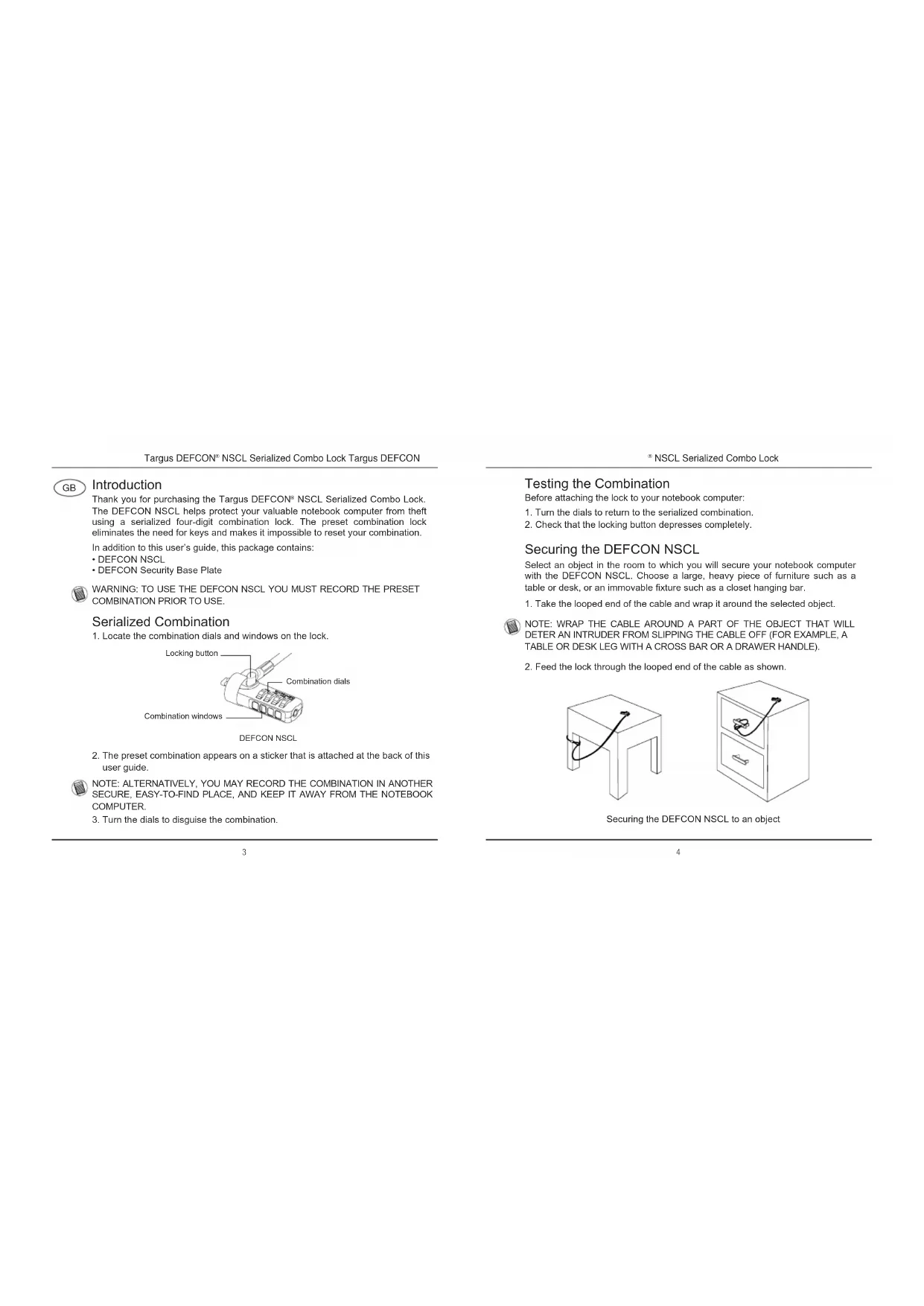
Thank you for purchasing the Targus DEFCON® NSCL Serialized Combo Lock. The DEFCON NSCL helps protect your valuable notebook computer from theft using a serialized four-digit combination lock. The preset combination lock eliminates the need for keys and makes it impossible to reset your combination.
In addition to this user's guide, this package contains:
• DEFCON NSCL
• DEFCON Security Base Plate

WARNING: TO USE THE DEFCON NSCL YOU MUST RECORD THE PRESET COMBINATION PRIOR TO USE.
Serialized Combination
- Locate the combination dials and windows on the lock.
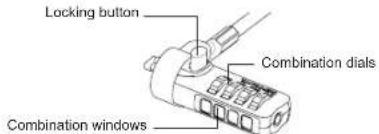
DEFCON NSCL
- The preset combination appears on a sticker that is attached at the back of this user guide.

NOTE: ALTERNATIVELY, YOU MAY RECORD THE COMBINATION IN ANOTHER SECURE, EASY-TO-FIND PLACE, AND KEEP IT AWAY FROM THE NOTEBOOK COMPUTER.
3. Turn the dials to disguise the combination.
Testing the Combination
Before attaching the lock to your notebook computer:
- Turn the dials to return to the serialized combination.
- Check that the locking button depresses completely.
Securing the DEFCON NSCL
Select an object in the room to which you will secure your notebook computer with the DEFCON NSCL. Choose a large, heavy piece of furniture such as a table or desk, or an immovable fixture such as a closet hanging bar.
- Take the looped end of the cable and wrap it around the selected object.

NOTE: WRAP THE CABLE AROUND A PART OF THE OBJECT THAT WILL DETER AN INTRUDER FROM SLIPPING THE CABLE OFF (FOR EXAMPLE, A TABLE OR DESK LEG WITH A CROSS BAR OR A DRAWER HANDLE).
2. Feed the lock through the looped end of the cable as shown.

natural_image
Line drawings of two furniture items: a small box with a cable and a double drawer with a handle (no text or symbols)Securing the DEFCON NSCL to an object
Locking the DEFCON NSCL to your Notebook Computer

NOTE: HOLD THE DEFCON NSCL WITH BOTH HANDS FOR ADDITIONAL STABILITY WHILE INSERTING OR REMOVING THE LOCK.
- Using the dials, enter the preset combination. Line up the combination so that it appears in the windows.
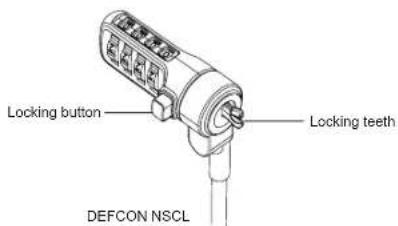
- Press and hold the locking button to align the locking teeth.

NOTE: FOR THE LOCKING BUTTON TO DEPRESS COMPLETELY YOU MUST ENTER THE CORRECT COMBINATION.
- Insert the DEFCON NSCL into your notebook computer's lock slot and release the locking button.
- Turn the dials to conceal your combination.
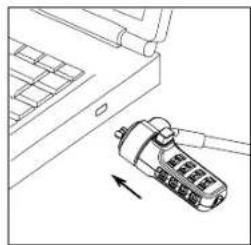
natural_image
Line drawing of a device with a scroll wheel and arrow indicating rotation (no text or symbols)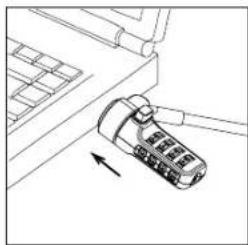
natural_image
Diagram of a device with a scroll wheel and directional arrow, no text or symbols presentUnlocking the DEFCON NSCL

WARNING: DO NOT ATTEMPT TO REMOVE THE DEFCON NSCL WITHOUT USING THE COMBINATION. TO DO SO WILL PHYSICALLY DAMAGE YOUR NOTEBOOK COMPUTER.
- Using the dials, enter the correct preset combination.
- The combination appears in the windows.
- Press and hold the locking button to realign the locking teeth.
- Remove the DEFCON NSCL from your notebook computer's lock slot.
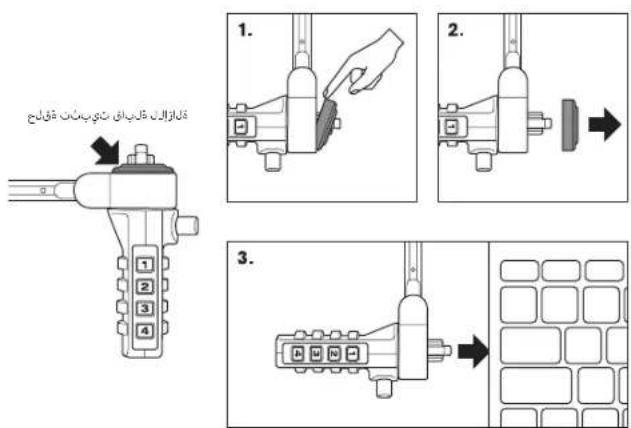
Removable Rubber Grommet
For devices that have a tighter security lock fit it is necessary to remove the grommet on the cable lock.
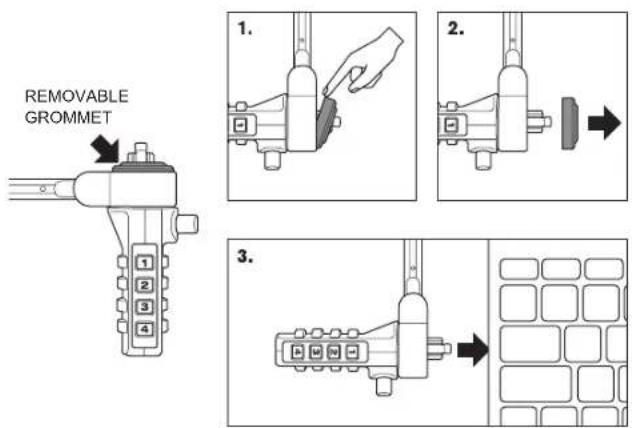
DEFCON Security Base Plate
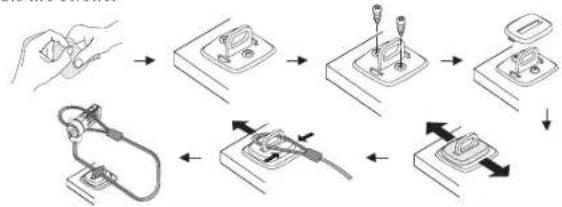
Included with your DEFCON NSCL Combination Cable Lock is the Security Base Plate for the security of desktop computers.
Using the DEFCON Security Base Plate
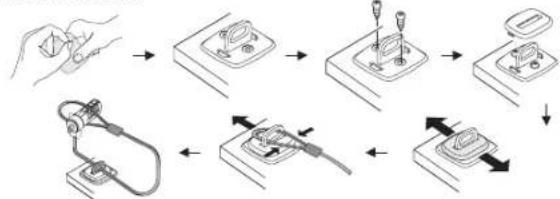
- Choose a solid location to attach the DEFCON Security Base Plate: a piece of furniture, or metal cabinet. If you plan to use the two screws, you can use the base plate as a template to pre-drill the holes.
- Use the abrasive pad, then the alcohol wipe to prepare the area when you will attach the DEFCON Security Base Plate.
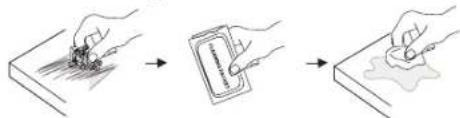
- After the alcohol dries, remove the backing on the base plate to expose the adhesive and place it on the prepared location. If desired, secure the base with the two screws.
flowchart
graph TD
    A["Hand holding plug"] --> B["Switch block with internal components"]
    B --> C["Switch component with internal pins"]
    C --> D["Switch module with internal pins"]
    D --> E["Switch socket with internal pins"]
    E --> F["Switch socket with internal pins"]
    F --> G["Switch socket with internal pins"]
    G --> H["Switch socket with internal pins"]

NOTE: WHEN USING THE ADHESIVE BACKING, APPLY AT ROOM TEMPERATURE -60°F (16°C). AND ALLOW IT TO BOND FOR MORE THAN 24 HOURS. NOT RECOMMEND TO USE IN OUTDOOR OR HIGH HUMIDITY ENVIRONMENT. BONDING TO GLASS, CERAMIC TILE, WATER-ABSORBENT MATERIALS, COPPER, BRASS, OR PLASTICIZED VINYL WITHOUT PRIMER SURFACE ARE NOT RECOMMENDED. TARGUS RECOMMENDS USING BOTH ADHESIVE AND SCREW TO PROVIDE MAXIMUM SECURITY. USING ONLY THE ADHESIVE PROVIDES MARGINAL SECURITY.
- Place the DEFCON Security Base Plate cover as shown and slide it to the left or right to secure it in place.
- Insert your DEFCON cable lock.
Specifications
General
Weight: Approx. 136.40g
Locking device
Dimensions: L48.8 x W18.2 x H26.5mm
Color: Nickle plated
Cable
Length: 6 feet 5 inches (2m)
Diameter: 0.16 inches (4 mm)
Material: Vinyl coated steel
DEFCON is a trademark of Targus. All other trademarks are the property of their respective owners.
Your Serialized Combination
Targus assumes no responsibility for lost, misplaced or forgotten combinations. Store this information in a secure place and/or store this combination electronically, in a secure location away from your notebook computer.
This is your combination code
Please refer to the back page

Einführung
natural_image
Line drawings of two furniture items: a simple side table and a closed drawer cabinet, both with wires attached (no text or symbols)natural_image
Line drawing of a device with a scroll wheel and cable, showing no text or symbols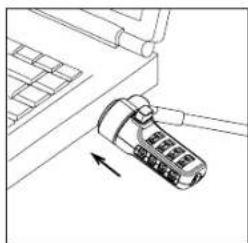
natural_image
Line drawing of a mechanical component with an arrow indicating direction (no text or symbols)flowchart
graph TD
    A["Hand holding plug"] --> B["Switch block with plug"]
    B --> C["Switch switch with plug"]
    C --> D["Switch switch with plug"]
    D --> E["Switch switch with plug"]
    E --> F["Switch switch with plug"]
    F --> G["Switch switch with plug"]
    G --> H["Switch switch with plug"]

natural_image
Line drawings of two furniture items: a small box with a cable and a two-drawer cabinet with a handle (no text or symbols)natural_image
Line drawing of a device with a USB flash drive and a separate component, no text or symbols present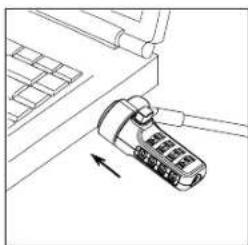
natural_image
Diagram of a device with a button and arrow indicating direction (no text or symbols)flowchart
graph LR
    A["Hand with cart"] --> B["Add card to cup"]
    B --> C["Add cup to cup"]
natural_image
Line drawings of two furniture items: a simple side table and a rectangular cabinet with a cable (no text or symbols)natural_image
Line drawing of a device with a scroll wheel and cable, no text or symbols present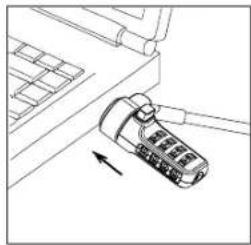
natural_image
Line drawing of a mechanical device with a scroll wheel and directional arrow (no text or symbols)flowchart
graph TD
    A["Hand holding plug"] --> B["Switch block with plug"]
    B --> C["Switch component with plug"]
    C --> D["Switch switch with plug"]
    D --> E["Switch switch with plug"]
    E --> F["Switch switch with plug"]

POZNÁMKA: PŘILNAVOU ZADNÍ STRANU APLIKUJTE PŘIPOKOJOVĚ TEPLOTĚ 16 °C A NECJEJTE 24 HODIN ZASCHNOUT. NEDOPORUČUJE SE PRO POUŽITÝ VE VENKOVNÍM PROSTŘEDÍ NEBO V PROSTŘEDÍ S VYSOKOU VZDUŠNOU VLHKOSTÍ. NEDOPORUČUJE SE LEPIT NA SKLO, KERAMICKÉ DLAŽDICE, MATERIÁL ABSORBUJÍCÍ VODU, MĚD, MOSAZ A PLASTICKÝ VINYL BEZ POUŽITÍ PODKLADOVĚHO MATERIÁLU. SPOLEČNOST TARGUS DOPORUČUJEPOUŽIT PŘILNAVOU PLOCHU SPOLEČNĚ SE ŠROUBY, ABY SE ZAJÍSTILA MAXIMÁLNÍ BEZPEČNOST. POKÚD SE POUŽIJE POUZE PŘILNAVÁ PLOCHA, BUDE BEZPEČNOST POUZE OMEZENÁ.
natural_image
Line drawing of a mechanical device with a button and arrow, no visible text or symbols
natural_image
Technical line drawing of a mechanical component with an arrow indicating direction (no text or symbols)flowchart
graph TD
    A["Hand holding plug"] --> B["Switch block with internal components"]
    B --> C["Switch block with internal components"]
    C --> D["Switch block with internal components"]
    D --> E["Switch block with internal components"]
    E --> F["Switch block with internal components"]
    F --> G["Switch block with internal components"]

BEMÆRK: KLÆBESIDEN SKAL FASTGÕRES VED STUETEMPERATUR, CA. 16 °C, OG DEREFTER HÆRDE I OVER 24 TIMER. ANBEFALES IKKE TIL BRUG UDEND∅RS ELLER I OMGIVELSER MED H∅J LUFTFUGTIGHED. ANBEFALES IKKE TIL FASTGÖRING PÅ GLAS, KERAMISKE FLISER, VANDABSORBERENDE MATERIALER, KOBBER, MESSING ELLER PLASTIFICERET VINYL UDEN GRUNDING AF OVERFLADEN. TARGUS ANBEFALER AT BRUGE BÅDE KLÆBNING OG SKRUER FOR AT OPNÅ MAKSIMAL SIKKERHED. KLÆBNING ALENE YDER KUN DELVIS BESKYTTELSE.
natural_image
Two simple line drawings of a small table and a two-door cabinet, both with wires attached (no text or symbols)natural_image
Line drawing of a device with a USB cable inserted into a laptop (no text or symbols)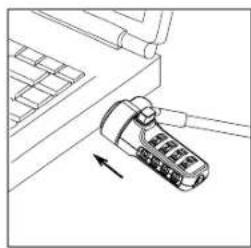
natural_image
Line drawing of a device with an arrow pointing to it, no text or symbols presentnatural_image
Line drawings of two furniture items: a simple side table and a rectangular cabinet with a cable (no text or symbols)natural_image
Line drawing of a device with a scroll wheel and cable, no text or symbols present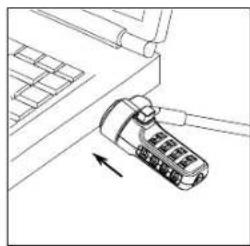
natural_image
Diagram of a device with an attached cable and directional arrow (no text or symbols)flowchart
graph LR
    A["Hand-drawn sketch of material"] --> B["Signing a document"]
    B --> C["Hand-drawn sketch of sealant"]
flowchart
graph TD
    A["Hand holding plug"] --> B["Switch with plug"]
    B --> C["Switch with plug and plug"]
    C --> D["Switch with plug and plug and plug"]
    D --> E["Switch with plug and plug and plug"]
    E --> F["Switch with plug and plug and plug"]
    F --> G["Switch with plug and plug and plug"]
    G --> H["Switch with plug and plug and plug"]

natural_image
Line drawings of two furniture items: a simple side table and a closed drawer with a cable (no text or symbols)natural_image
Line drawing of a device with a battery and cable inserted, showing no text or symbols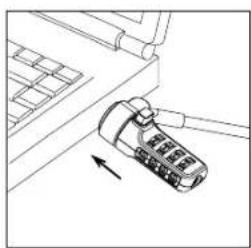
natural_image
Line drawing of a device with an arrow pointing to it, no text or symbols presentflowchart
graph TD
    A["Hand holding plug"] --> B["Switch block with internal components"]
    B --> C["Switch block with internal components"]
    C --> D["Switch block with internal components"]
    D --> E["Switch block with internal components"]
    E --> F["Switch block with internal components"]
    F --> G["Switch block with internal components"]

NOTA: QUANDO SI USA IL SUPPORTO ADESIVO, APPLICARE CON UNA TEMPERATURA DELLA STANZA DI 16 °C E LASCIAR FISSARE ALMENO PER 24 ORE. SI SCONSIGLIA DI USARE IN AMBIENTI ESTERNIO IN AMBIENTI CON UNA UMIDITA ELEVATA. IL FISSAGGIO SU VETRO, PIASTRELLE DI CERAMICA, MATERIALI CHE ASSORBONO ACQUA, RAME, OTTONE, O VINILE PLASTIFICATO SENZA AVERE PRIMERIZZATO LA SUPERFICIE NON È CONSIGLIATO. TARGUS RACCOMANDA DI USARE SIA L'ADESIVO SIA LE VITI PER GARANTIRE LA MASSIMA SICUREZZA. L'USO DEL SOLO ADESIVO FORNISCE UNA SICUREZZA MARGINALE.
natural_image
Line drawing of a device with a scroll wheel and arrow indicating motion (no text or symbols)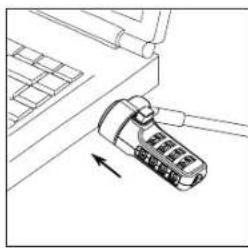
natural_image
Line drawing of a device with a scroll wheel and directional arrow (no text or symbols)De DEFCON NSCL losmaken

WAARSCHUWING: PROBEER DE DEFCON NSCL NIET TE VERWIJDEREN ZONDER GEBRUIK TE MAKEN VAN DE COMBINATIE. OP DIE MANIER KUNT U FYSIEKE SCHADE AAN UW NOTEBOOK TOEBRENGEN.
flowchart
graph TD
    A["Hand holding plug"] --> B["Plug socket with internal components"]
    B --> C["Switch inside socket"]
    C --> D["Switch with internal components"]
    D --> E["Load on socket"]
    E --> F["Load on socket with internal components"]
    F --> G["Switch with internal components"]
    G --> H["Load on socket"]
    H --> I["Load on socket with internal components"]

OPMERKING: ALS U DE ZELFKLEVENDE ACHTERKANT GEBRUIKT, BRENG DEZE DAN BIJ EEN KAMERTEMPERATUUR VAN 16°C AAN EN LAAT DE HECHTING LANGER DAN 24 UUR DROGEN, NIET AANBEVOLEN VOOR GEBRUIK IN BUITENRUIMTES OF IN OMGEVINGEN MET EEN HOGE VOCHTIGHEID. HET IS NIET AAN TE RADEN DE BASIS OP GLAS, KERAMISCHE TEGELS, WATERABSORBERENDE MATERIALEN, KOPER OF PLASTIC VINYL TE PLAKKEN ZONDER PRIMER. TARGUS ADVISEERT ZOWEL LIJM ALS SCHROEVEN TE GEBRUIKEN VOOR MAXIMALE HECHTING. MET ALLEEN DE LIJM HEBT U MINIMALE HECHTING.
natural_image
Line drawing of a device with an arrow pointing to it, next to a laptop keyboard (no text or symbols present)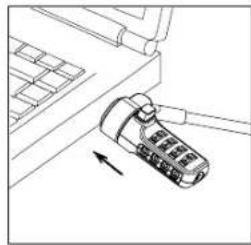
natural_image
Line drawing of a computer mouse with an arrow pointing to it (no text or symbols present)Låse opp DEFCON NSCL

ADVARSEL: IKKE PR∅V Å FJERNE DEFCON NSCL UTEN BRUK AV KOMBINASJONEN. DET VIL FYSISK SKADE DIN BÆRBARE DATAMASKIN.
flowchart
graph LR
    A["Hand with car"] --> B["Add a card"]
    B --> C["Add a paintbrush"]
- Når alkoholen har tørket, fjerner du belegget som beskytter limen på baksiden av platen og plasserer den på det klargjorte stedet. Du kan også sikre platen med de lo skruene.
flowchart
graph TD
    A["Hand holding plug"] --> B["Switch with socket"]
    B --> C["Switch with screw"]
    C --> D["Switch with plug"]
    D --> E["Plug plug"]
    E --> F["Switch with plug"]
    F --> G["Switch with plug"]

MERK: LIMEN PÅ BAKSIDEN FESTER BEST VED ROMTEMPERATUR PÅ 16°C OG DEN B∅R HERDE I MER ENN 24 TIMER. ANBEFALES IKKE Å BRUKES INNENDORS ELLER I MEGET FUKTIGE MILJ∅R. LIMING PÅ GLASS, KERAMIKKFLISER, VANNABSORBERENDE MATERIALER, KOPPER, MESSING ELLER PLAST-VINYL UTEN PRIMER PÅ OVERLFATEN, ANBEFALES IKKE. TARGUS ANEBFALER BRUK AV BADE LIM OG SKRUER FOR Å OPPNÅ BEST SIKKERHET. BRUK AV KUN LIM GIR LITEN BESKYTTELSE.
natural_image
Line drawing of a device with a USB cable inserted into a laptop (no text or symbols)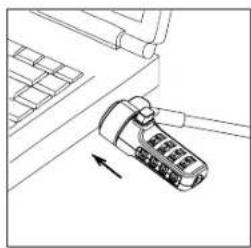
natural_image
Line drawing of a device with an arrow pointing to it, no text or symbols presentflowchart
graph LR
    A["Hand holding a document"] --> B["Add card to surface"]
    B --> C["Product applied on surface"]
flowchart
graph TD
    A["Hand input"] --> B["Switch block"]
    B --> C["Internal components: switch, plug, and terminal blocks"]
    C --> D["Terminal output"]
    D --> E["Output"]

UWAGA: W PRZYPADKU PRZYKLEJANIA PŁYTKI NALEŻY ROBIĆ TO W TEMPERATURZE 16°C I ZOSTAWIĆ NA PRZYNAJMNIJE 24 GODZINY. NIE REKOMENDUJEMY WYKORZYSTANIA NA ZEWNATRZ LUB W ŚRODOWISKACH O WYSOKIEJ WILGOTNOŚCI. NIE REKOMENDUJEMY PRZYKLEJANIA DO SZKŁA, PŁYTEK CERAMICZNYCH, MATERIAŁÓW WCHŁANIAJĄCYCH WILGOĆ, MIEDZI, MOSIĄDZU LUB PCW BEZ STOSOWANIA WARSTWY POŚREDNIEJ. FIRMA TARGUS REKOMENDUJE ZASTOSOWANIE ZARÓWNO KLEJU JAK I WKRETÓW, ABY ZAPEWNIĆ MAKSYMALNE BEZPIECZEŃSTWO. PRZYKLEJENIE PODSTAWKI ZAPEWNIA MARGINALNE BEZPIECZEŃSTWO.
Kolor: Powlekany niklem
Linka
Długość: 2 m
Obwód: 4 mm
Material: Stal pokryta winylem
Prender o DEFCON NSCL
natural_image
Two line drawings of simple furniture items: a square box with a cable and a two-door cabinet with a plug (no text or symbols)natural_image
Line drawing of a device with a button and arrow, no text or symbols present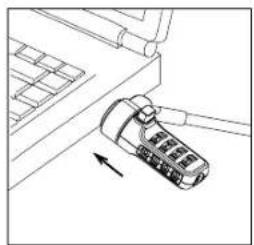
natural_image
Diagram of a mobile phone with an arrow indicating left-side motion (no text or symbols)Destrancar o DEFCON NSCL

AVISO: NÃO TENTE REMOVER O DEFCON NSCL SEM USAR A COMBINAÇÃO. PODE CAUSAR DANOS FÍSICOS NO COMPUTADOR PORTÁTIL.
natural_image
Two line drawings of a small table with a cable and attached drawer, no text or symbols present.natural_image
Line drawing of a device with a scroll wheel and arrow indicating motion (no text or symbols)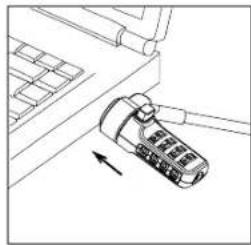
natural_image
Line drawing of a mechanical component with an arrow indicating direction (no text or symbols)flowchart
graph TD
    A["Hand holding plug"] --> B["Switch block with internal components"]
    B --> C["Switch component with internal pins"]
    C --> D["Switch switch with internal pins"]
    D --> E["Switch switch with internal pins"]
    E --> F["Switch switch with internal pins"]
    F --> G["Switch switch with internal pins"]
    G --> H["Switch switch with internal pins"]
    H --> I["Switch switch with internal pins"]

natural_image
Two simple line drawings of a small table and a two-door cabinet, both with wires attached (no text or symbols)natural_image
Two technical diagrams showing a device being inserted into a rack, with arrows indicating movement (no text or symbols present)flowchart
graph LR
    A["Hand holding water"] --> B["Add card to credit card"]
    B --> C["Hand holding tool to clean water"]
flowchart
graph TD
    A["Hand holding plug"] --> B["Switch with plug"]
    B --> C["Switch with plug"]
    C --> D["Switch with plug"]
    D --> E["Cable with cable"]
    E --> F["Cable with cable"]
    F --> G["Switch with plug"]

OBS! NÄR DU FÄSTER PLATTAN MED HJÄLP AV HÄFTYTAN PÅ BAKSIDAN – GÖR DET I RUMSTEMPERATUR (16-25 °C) OCH VÄNTA I MINST 24 TIMMAR FÖR MAXIMAL VIDHÄFTNING. REKOMMENDERAS EJ FÖR UTOMHUSBRUK ELLER I FUKTIGA MILJÖER. VIDHÄFTNING PÅ GLAS, KAKEL, VATTENABSORBERANDE MATERIAL, KOPPAR, MÄSSING ELLER VINYL UTAN GRUNDAD YTA REKOMMENDERAS INTE. FÖR MAXIMALT SKYDD REKOMMENDERAR TARGUS ATT DU ANVÄNDER BÅDE HÄFTYTAN OCH SKRUVAR FAST PLATTAN. ANVÄNDER DU ENBART HÄFTYTAN BLIR SKYDDET MARGINELLT.
natural_image
Line drawings of a small box and a two-hole cabinet with wires (no text or symbols)Targus DEFCON® NSCL Serialized Combo Lock (Seri Kombo Kilit) Targus DEFCON
NSCL Serialized Combo Lock (Seri Kombo Kilit)
natural_image
Line drawing of a mobile phone with an attached cable, showing no text or symbols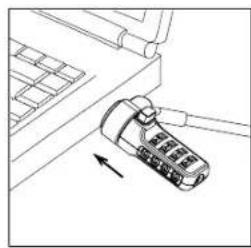
natural_image
Line drawing of a device with an arrow pointing to it, no text or symbols presentDEFCON NSCL'nin kilidini açma

UYARI: DEFCON NSCL'Yİ KOMBİNASYONU KULLANMADAN ÇIKARMAYA ÇALIŞMAYIN. BUNU YAPMAK DİZÜSTÜ BİLGİSAYARINIZDA FİZİKSEL HASARA YOL AÇACAKTIR.
Targus DEFCON® NSCL Serialized Combo Lock (Seri Kombo Kilit)
Targus DEFCON® NSCL Serialized Combo Lock (Seri Kombo Kilit)
flowchart
graph TD
    A["Hand holding plug"] --> B["Switch block with internal components"]
    B --> C["Switch block with internal components"]
    C --> D["Switch block with internal components"]
    D --> E["Switch block with internal components"]
    E --> F["Switch block with internal components"]
    F --> G["Switch block with internal components"]

NOT: YAPISKANLI ARKA KAPLAMAYI 16°C (-60°F) ODA SICAKLIGINDA UYGULAYIN VE IYİCE TUTUNMASI İÇİN EN AZ 24 SAAT BEKLEYİN. DIŞ MEKANLARDA VEYA YÜKSEK NEMLİ ORTAMLARDA KULLANIMA UYGUN DEĞILDIR. CAM, KARO SERAMİK, SU EMİCİ MADDELER, BAKIR, PİRİNÇ, VEYA PLASTİKLESTİRİLMİŞ VINİL MATERYALLERE ASTAR YÜZEY OLMADAN YAPIŞTIRILMASI ÖNERİLMEZ. TARGUS EN ÜST DÜZEYDE GÜVENLIK SAĞLAMAK İÇİN HEM YAPISKANLI YÜZEYİN HEM DE VİDALARIN BİRLİKTE KULLANILMASINI TAVSİYE EDER. YALNIZCA YAPISKANLI YÜZEYİN KULLANILMASI DÜSÜK DÜZEYDE GÜVENLIK SAĞLAYACAKTIR.
natural_image
Line drawings of a small box and a two-drawer cabinet with cable (no text or symbols)natural_image
Line drawing of a device with a scroll wheel and arrow indicating motion (no text or symbols)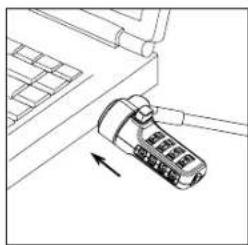
natural_image
Line drawing of a mechanical component with an arrow indicating direction (no text or symbols)flowchart
graph LR
    A["Hand-drawn sketch of material"] --> B["-->"]
    B --> C["-->"]
natural_image
Line drawing of a two-hole cabinet with a cable and handle (no text or symbols)DEFCON NSCL
نَم يَلْسَ لِسَ تُدًا يَفْقَ اوتُ لَا لَقْقِيلًا Targus DEFCON® NSCL.
natural_image
Line drawing of a device with a USB cable inserted into a laptop (no text or symbols)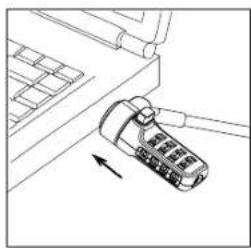
natural_image
Line drawing of a mechanical device with an arrow indicating direction (no text or symbols)QLAZIL L QLBPAC_0003_x0003_qyIqapm TiyBhT qCJlc
لَبْ الْمَالْ لِفْقِ عَلَعْ قَدُجِ وَمَلَّ تَيْرِبْتُ لِلَا قَذَرَحٍ ئَلَارٌ مَجْدِلٍ مَجْفٍ نَمْ أَنَا لِفْقِلٍ قَيْرِضُ أَذْرِيْجٍ تِيمْضُتِ يَتِكُ لَا قَزْهِ جَأَلْ لِلْ هَبْسِ زَلَاب
نَمْ يَلْرِسِ لِسْتَالَا يَفْقَ وَتُّاِ الْفِقِلًا Targus DEFCON® NSCL
flowchart
graph TD
    A["Hand holding plug"] --> B["Switch with switch"]
    B --> C["Switch with two pins"]
    C --> D["Switch with one pin"]
    D --> E["Switch with one outlet"]
    E --> F["Switch with one outlet"]
    F --> G["Switch with one outlet"]
    G --> H["Switch with one outlet"]
    H --> I["Switch with one outlet"]
نَم يَلْسَرِّىتُ وَلَا تَيْفَقَ وَلَا لَقَبْلًا Targus DEFCON® NSCI.
natural_image
Two simple line drawings of a side table and a filing cabinet, both with wires attached (no text or symbols)natural_image
Line drawing of a device with a USB cable inserted into a laptop (no text or symbols)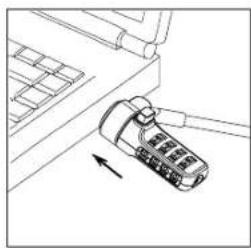
natural_image
Line drawing of a device with an attached plug and cable, showing no text or symbolsflowchart
graph TD
    A["Hand holding plug"] --> B["Switch block with plug"]
    B --> C["Switch component with plug"]
    C --> D["Switch switch with plug"]
    D --> E["Switch switch with plug"]
    E --> F["Switch switch with plug"]
    F --> G["Switch switch with plug"]

natural_image
Line drawings of two furniture items: a square box with a cable and a three-door drawer with a handle (no text or symbols)natural_image
Line drawing of a device with an attached cable and arrow indicating motion (no text or symbols)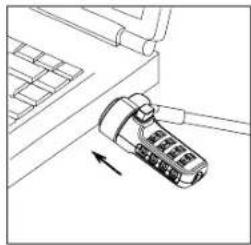
natural_image
Line drawing of a mechanical device with an arrow indicating motion (no text or symbols)flowchart
graph LR
    A["Hand holding a small object"] --> B["Add card to surface"]
    B --> C["Hand holding a tool on surface"]
flowchart
graph TD
    A["Hand holding plug"] --> B["Switch block with internal components"]
    B --> C["Switch component with internal contacts"]
    C --> D["Switch module with internal contacts"]
    D --> E["Switch socket with internal contacts"]
    E --> F["Switch socket with internal contacts"]

NAPOMENA: LJEPLJIVI STRAŽNJI DIO UPOTREBLJAVAJTE PRI TEMPERATURI OD 16 °C I OSTAVITE DA SE UČVRSTI DULJE OD 24 SATA. NIJE PREPORUČENO UPOTREBLJAVATI NA OTVORENOM ILI U OKRUŽENJU S VELIKOM RAZINOM VLAŽNOSTI. NE PREPORUČUJE SE PRIČVRSČIVANJE NA STAKLO, KERAMIČKU PLOČICU, MATERIJALE KOJI UPIJAJU VODU, BAKAR, MJED ILI PLASTIFICIRANI VINIL BEZ ZAŠTITNE POVRŠINE. TVRTKA TARGUS PREPORUČUJE UPOTREBU LJEPIILA I VIJAKA ZAJEDNO KAKO BI SE OMOGUČILA MAKSIMALNA SIGURNOST. AKO SE KORISTITE SAMO LJEPILOM, OMOGUČENA JE SAMO NAJNIŽA RAZINA SIGURNOSTI.
natural_image
Two simple line drawings of a small table and a two-door cabinet, both with wires attached (no text or symbols)natural_image
Line drawing of a device with a USB cable inserted into a laptop (no text or symbols)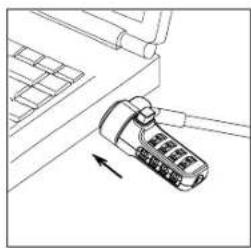
natural_image
Line drawing of a device with an arrow pointing to it, no text or symbols presentflowchart
graph TD
    A["Hand holding plug"] --> B["Switch with internal components"]
    B --> C["Switch with internal components"]
    C --> D["Switch with internal components"]
    D --> E["Switch with internal components"]
    E --> F["Switch with internal components"]
    F --> G["Switch with internal components"]
    G --> H["Switch with internal components"]

MEGJEGYZÉS: HA AZ ÖNTAPADÓS FELÜLETET HASZNÁLJA, SZOBAHÖMÉRSÉKLETEN (-60°F VAGY 16°C) RÖGZÍTSE AZT, ÉS HAGYJA SZÁRADNI LEGALÁBB 24 ÓRÁN ÁT. NEM JAVASOLT A KÜLTÉRI VAGY A MAGAS PÁRATARTALMÚ KÖRNYEZETBEN VALÓ HASZNÁLAT. AZ ÜVEGHEZ, KERÁMIALAPHOZ, NEDVSZÍVÓ ANYAGHOZ, RÉZHEZ, BRONZHOZ VAGY ALAPOZÓ FELÜLET NÉLKÜLI LÁGYÍTOTT VINIL FELÜLETHEZ TÖRTÉNÓ RÖGZÍTÉS NEM JAVASOLT. A TARGUS A MAXIMÁLIS BIZTONSÁG ÉRDEKÉBEN AZ ÖNTAPADÓS FELÜLET ÉS A CSAVAROZÁS EGYÜTÉS HASZNÁLATÁT JAVASOLJA. AZ ÖNTAPADÓS FELÜLET EGYEDÜLI HASZNÁLATÁ CSÖKKENTI A BIZTONSÁGOT.
natural_image
Line drawings of two furniture items: a small box with a cable and a two-drawer cabinet with a handle (no text or symbols)natural_image
Line drawing of a handheld device with an arrow indicating motion (no text or symbols)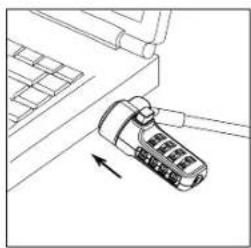
natural_image
Diagram of a device with a scroll wheel and directional arrow (no text or symbols)DEFCON NSCL atrakinimas

PERSPÉJIMAS: NEMÈGINKITE NUIMTI „DEFCON NSCL“ NESINAUDODAMI KOMBINACIJA. TAI DARYDAMI FIZIŠKAI APGADINSITE SAVO NEŠIOJAMAJI KOMPIUTERI.
flowchart
graph TD
    A["Hand holding plug"] --> B["Plug with socket"]
    B --> C["Switch with plug"]
    C --> D["Plug with socket"]
    D --> E["Switch with plug"]
    E --> F["Plug with socket"]
    F --> G["Switch with plug"]

PASTABA: KAII NAUDOJATE LIPNU PAGRINDA, JI KLIJUOKITE KAMBARIO TEMPERATÜROJE – 60 °F (16 °C) IR PALAUKITE, KOL GERAI PRILIPS (ILGIAU KAIP 24 VALANDAS); NEREKOMENDUOJAMA NAUDOTI LAUKE ARBA LABAI DRÉGNOJE APLINKOJE. NEREKOMENDUOJAMA KLIJUOTI PRIE STIKLO, KERAMIKINIŲ PLYTELIŲ, VANDENJ SUGERIANČIŲ MEDŽIAGŲ, VARIO, ŽALVARIO AR PLASTIFIKUOTO VINILO PRIEŠ TAI JŲ PAVIRŠIAUS NEPADENGUS GRUNTU „TARGUS“ REKOMENDUOJA NAUDOTI IR KLIJUS, IR VARŽTUS, TOKIU BUDU BUS UŽTIKRINTAS DIDŽIAUSIAS SAUGUMAS. NAUDOJANT TIK KLIJUS APSAUGOS LYGIS BUS ŽEMAS.
natural_image
Line drawing of a device with an arrow pointing to it, next to a laptop keyboard (no text or symbols present)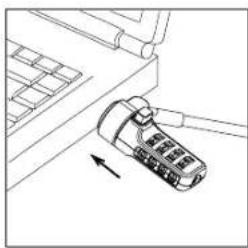
natural_image
Line drawing of a device with an arrow pointing to it, no text or symbols presentDeblocarea DEFCON NSCL

AVERTISMENT: NU INCERCATI SÄ SCOATEȚI DEFCON NSCL FĂRĂ A UTILIZA CIFRUL. ÎN CAZ CONTRAR, NOTEBOOKUL VA SUFERI DETERIORĂRI.
flowchart
graph LR
    A["Hand with tire"] --> B["Add card"]
    B --> C["Add tool"]
flowchart
graph TD
    A["Hand holding switch"] --> B["Switch panel with internal components"]
    B --> C["Switch with terminal pins"]
    C --> D["Switch with internal components"]
    D --> E["Switch with terminal pins"]
    E --> F["Switch with internal components"]
    F --> G["Cable connected cable"]

NOTĂ: CĂND UTILIZAȚI PROTECTIA ADEZIVĂ, APLICATI-O LA O TEMPERATURĂ A CAMEREI DE 16°C ȘI LĂSAȚI-O SĂ SE LIPEASCĂ TIMP DE PESTE 24 DE ORE. NU SE RECOMANDĂ UTILIZAREA ÎN SPAȚII EXTERIOARE SAU ÎN MEDII CU UMIDITATE RIDICATĂ. NU SE RECOMANDĂ LIPIREA PE STICLĂ, GRESIE, MATERIALE HIDROABSORBANTE, CUPRU, ALAMĂ SAU VINIL PLASTIFIAT, DACĂ NU EXISTĂ GRUND. PENTRU SIGURANȚĂ MAXIMĂ, TARGUS VĂ RECOMANDĂ SĂ UTILIZAȚI ȘI ADEZIVUL ȘI ȘURUBURILE. DACĂ UTILIZAȚI NUMAI ADEZIVUL, SE OBȚINE NUMAI UN GRAD REDUS DE SIGURANȚĂ.
Greutate: Aprox. 136,40g
natural_image
Two simple line drawings of a side table and a cabinet with wires (no text or symbols)Zabezpečenie zámku DEFCON NSCL k predmetu
natural_image
Line drawing of a device with a USB cable inserted into a laptop (no text or symbols)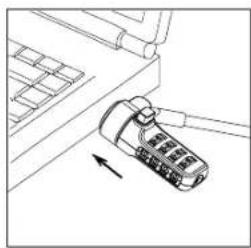
natural_image
Line drawing of a device with an attached plug and cable, showing no text or symbolsflowchart
graph TD
    A["Hand holding plug"] --> B["Switch with plug"]
    B --> C["Switch with plug"]
    C --> D["Switch with plug"]
    D --> E["Switch with plug"]
    E --> F["Switch with plug"]
    F --> G["Switch with plug"]

POZNÁMKA: KEĐ POUŽIJETE LEPIDLO NA DOSKE, PRILEPTE JU PRI IZBOVEJ TEPLOTE -80 °F (16 °C) A NECHAJTE SCHNÜT NAJMENEJ 24 HODÍN. NEODPORÚČA SA NA POUŽITIE V EXTERIÉRI ALEBO V PROSTREDÍ VYSOKEJ VLHKOSTI. NEODPORÚČA SA LEPENIE NA SKLO, KERAMICKÚ DLAŽBU, MEĐ, MOSADZ ALEBO PLASTIFIKOVANY VINYL BEZ PODKLADOVÉHO NÁTERU. TARGUS ODORÚČA POUŽIT LEPIDLO A AJ SKRUTKY NA DOSIAHNUTIE MAXIMÁLNEJ BEZPEČNOSTI. POUŽITIE SAMOTNÉHO LEPIDLA POSKYTUJE NÍZKU BEZPEČNOST.
natural_image
Line drawing of a device with a scroll wheel and arrow indicating motion (no text or symbols)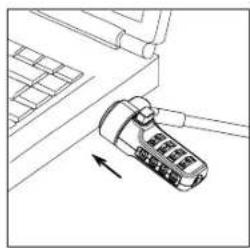
natural_image
Line drawing of a device with an arrow pointing to it, no text or symbols presentOdklepanje ključavnice DEFCON NSCL

OPOZORILO: NE POSKUŠAJTE ODSTRANITI KLJUČAVNICE DEFCON NSCL BREZ UPORABE KOMBINACIJE. V NASPROTNEM PRIMERU BO PRIŠLO DO POŠKODB PRENOSNEGA RAČUNALNIKA.
flowchart
graph LR
    A["Hand holding tire"] --> B["Add card to pad"]
    B --> C["Hand holding pad to surface"]
flowchart
graph TD
    A["Hand holding switch"] --> B["Switch panel with internal components"]
    B --> C["Switch with terminal pins"]
    C --> D["Switch with internal components"]
    D --> E["Switch with terminal pins"]
    E --> F["Switch with internal components"]
    F --> G["Cable connected cable"]

OPOMBA: ČE UPORABLJATE LEPILNO PLAST NA HRBTNI STRANI, PODNOŽJE NAMESTITE PRI TEMPERATURI PROSTORA 16 °C IN POČAKAJTE VEČ KOT 24 UR, DA SE VEŽE. UPORABA NA PROSTEM ALI V OKOLJU Z VISOKO VLAŽNOSTO NI PRIPOROČENA. LEPLJENJE NA STEKLO, KERAMIČNE PLOŠĆICE, VODOVPOJNE MATERIALE, BAKER, MEDENINO ALI PLASTIFICIRANI VINIL BREZ TEMELJNEGA PREMAZA NI PRIPOROČENO. ZA MAKSIMALNO VARNOST PODJETJE TARGUS PRIPOROČA, DA UPORABITE LEPILNO PLAST IN VIJAKE. PRITRJEVANJE ZGOLJ Z LEPLJENJEM ZAGOTAVLJA LE MEJNO VARNOST.
- Postavite varnostno podnožje DEFCON, kot je prikazano, in ga potisnite levo ali desno, da ga varno pritrdite.
- Vstavite kabelsko ključavnico DEFCON.
Tehnični podatki
Splošno
Teža: pribl. 136,40 g
natural_image
Line drawings of a small side table and a two-door cabinet with cable (no text or symbols)natural_image
Line drawing of a device with a scroll wheel and cable, no text or symbols present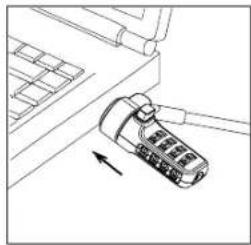
natural_image
Line drawing of a mechanical component with an arrow indicating direction (no text or symbols)Nonemams \_x0003\_Rubber starpgredzens
flowchart
graph LR
    A["Hand-drawn sketch"] --> B["Hand-drawn sketch"]
    B --> C["Hand-drawn sketch"]
flowchart
graph TD
    A["Hand holding plug"] --> B["Switch block with internal components"]
    B --> C["Switch block with internal components"]
    C --> D["Switch block with internal components"]
    D --> E["Switch block with internal components"]
    E --> F["Switch block with internal components"]
    F --> G["Switch block with internal components"]

IEVĚROJIET: IZMANTOJOT LÍMVIRSMU, DARIET TO ISTABAS TEMPERATŮRÁ 16°C UN ľAUJIET TAI SALIPT UZ VAIRŽK NEKÄ 24 STUNDÁM. NAV IETEICAMS IZMANTOT ÁRÄ VAI VIDĚ AR AUGSTU MITRUMA LIMENI. NAV IETEICAMS PIEVIENOT STIKLAM, KERÁMISKAJÁM FLIŽEM, ŌDENI UZSÚCOSIEM MATERIÁLIEM, VARAM, MISINAM VAI PLASTIFICĚTAM VINILAM, SAKOTNĚJI NEAPSTRADAJOT VIRSMU. TARGUS MAKSIMÁLAI DROŠÍBAI IESAKA IZMANTOT GAN LÍMVIRSMU, GAN SKRÜVES. TIKAI LÍMVIRSMAS IZMANTOŠANA NODROŠINA VIDĚJU DROŠÍBU.
natural_image
Two line drawings of a small table with a cable and a separate box with a handle (no text or symbols)DEFCON NSCLi kinnilamine esemele
DEFCON NSCLi kinnitamine sülearvutile

MÄRKUS. HOIDKE DEFCON NSCLI LUKU SISESTAMISE VÖI EEMALDAMISE AJAL MÖLEMA KÄEGA, ET TAGADA PAREM STABIILSUS.
natural_image
Line drawing of a device with a scroll wheel and cable, showing an arrow indicating direction (no text or symbols)
natural_image
Line drawing of a device with an arrow pointing to it, no text or symbols presentDEFCON NSCLi avamine

HOIATUS! ÄRGE PROOVIGE DEFCON NSCLI ÖIGET KOMBINATSIOONI SISESTAMATA EEMALDADA. SEDA PROOVIDES KAHJUSTATE FÜÜSILISELT OMA SÜLEARVUTIT.
flowchart
graph TD
    A["Hand holding plug"] --> B["Switch block with internal components"]
    B --> C["Switch block with internal components"]
    C --> D["Switch block with internal components"]
    D --> E["Switch block with internal components"]
    E --> F["Switch block with internal components"]

MÄRKUS, KUI KASUTATE PLAADIL OLEVAT LIIMI, KLEEPIGE SEE PINNALE TEMPERATUURIL 16°C (60°F) NING LUBAGE ÜLE 24 H KUIVADA. EI SOOVITA KASUTADA VÄLISKESKKONNAS VÖI NIISKES KESKKONNAS. EI SOOVITA KLEEPIMIST KLAASILE, KERAAMILISELE PLADILE, VETTHÜLGAVATELE MATERJALIDELE, VASELE, MESSINGULE VÖI PLASTIFITSEERITUD VINÜÜLILE ILMA EELNEVALT PINDA KRUNTIMATA. TARGUS SOOVITAB SUURIMA TURVALISUSE TAGAMISEKS KASUTADA NII LIIMI KUI KA KRUVE. AINULT LIIMI KASUTAMINE PAKUB VÄHEST KAITSET.
natural_image
Two technical diagrams showing a device being inserted into a rack, with arrows indicating the movement (no text or symbols present)解鎖 DEFCON NSCL

flowchart
graph TD
    A["Hand holding plug"] --> B["Switch block with plug"]
    B --> C["Switch block with plug and plug"]
    C --> D["Switch block with plug and plug and plug"]
    D --> E["Switch block with plug and plug and plug"]
    E --> F["Switch block with plug and plug and plug"]
    F --> G["Switch block with plug and plug and plug"]
    G --> H["Switch block with plug and plug and plug"]

natural_image
Line drawing of a two-door office cabinet with a cable and two drawers (no text or symbols)natural_image
Two technical diagrams showing a device being inserted into a rack, with arrows indicating direction (no text or symbols present)打开 DEFCON NSCL

flowchart
graph LR
    A["Hand holding a small object"] --> B["Add card to surface"]
    B --> C["Hand applying paint swab"]
flowchart
graph TD
    A["Hand holding plug"] --> B["Switch with plug"]
    B --> C["Switch with plug"]
    C --> D["Switch with plug"]
    D --> E["Switch with plug"]
    E --> F["Switch with plug"]
    F --> G["Switch with plug"]
    G --> H["Switch with plug"]

natural_image
Line drawings of a small side table and a two-door cabinet with cable (no text or symbols)natural_image
Line drawing of a device with a USB flash drive and attached cable (no text or symbols)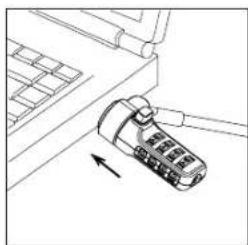
natural_image
Line drawing of a device with a scroll wheel and arrow indicating motion (no text or symbols)flowchart
graph TD
    A["Hand holding plug"] --> B["Switch block with plug"]
    B --> C["Switch block with plug and plug"]
    C --> D["Switch block with plug and plug and plug"]
    D --> E["Switch block with plug and plug and plug"]
    E --> F["Switch block with plug and plug and plug"]
    F --> G["Switch block with plug and plug and plug"]
    G --> H["Switch block with plug and plug and plug"]

natural_image
Line drawings of a small table and a two-door cabinet with cable (no text or symbols)DEFCON NSCL を物に繋ぐ
natural_image
Diagram of a device with a scroll wheel and directional arrow, no text or symbols present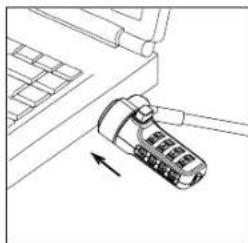
natural_image
Line drawing of a mechanical component with an arrow indicating direction (no text or symbols)DEFCON NSCL を解錠する

flowchart
graph TD
    A["Hand holding plug"] --> B["Switch block with plug"]
    B --> C["Switch component with plug"]
    C --> D["Switch block with plug"]
    D --> E["Switch component with plug"]
    E --> F["Switch block with plug"]
    F --> G["Switch component with plug"]
    G --> H["Switch block with plug"]

natural_image
Diagram of a device with a battery and arrow indicating rotation (no text or symbols)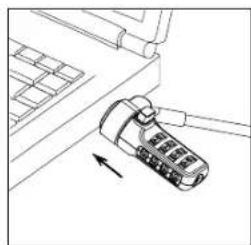
natural_image
Line drawing of a mechanical component with an arrow indicating direction (no text or symbols)Membuka Kunci DEFCON NSCL

PERINGATAN: JANGAN COBA UNTUK MELEPAS DEFCON NSCL TANPA MENGGUNAKAN KOMBINASI. JIKA DILAKUKAN AKAN MERUSAK FISIK KOMPUTER NOTEBOOK ANDA.
flowchart
graph TD
    A["Hand holding plug"] --> B["Switch block with internal components"]
    B --> C["Switch component with internal pins"]
    C --> D["Switch switch with internal pins"]
    D --> E["Switch switch with internal pins"]
    E --> F["Switch switch with internal pins"]
    F --> G["Switch switch with internal pins"]
    G --> H["Switch switch with internal pins"]
    H --> I["Switch switch with internal pins"]

CATATAN: SAAT MENGGUNAKAN LAPISAN PEREKAT, GUNAKAN DI SUHU RUANGAN -60°F (16°C), LALU BIARKAN MENEMPEL SELAMA LEBIH DARI 24 JAM. TIDAK DISARANKAN UNTUK PENGGUNAAN DI LUAR RUANGAN ATAU LINGKUNGAN DENGAN TINGKAT KELEMBAPAN TINGGI. PENEMPELAN PADA KACA, UBIN KERAMIK, MATERI YANG DAPAT MENYERAP AIR, PERUNGGU, KUNINGAN, ATAU VINIL PLASTIK TANPA PELAPIS DASAR TIDAK DISARANKAN. UNTUK MEMBERIKAN KEAMANAN OPTIMAL. TARGUS MENYARANKAN PENGGUNAAN PEREKAT DAN SEKRUP. PENGGUNAAN PEREKAT SAJA AKAN MEMBERIKAN KEAMANAN YANG MINIMAL.
Bahan: Baja berlapis vinil
natural_image
Line drawings of a small table with a cable and a separate box with a handle (no text or symbols)natural_image
Line drawing of a device with a USB flash drive and attached cable (no text or symbols)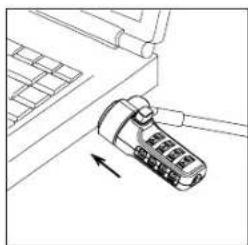
natural_image
Line drawing of a device with a scroll wheel and arrow indicating direction (no text or symbols)flowchart
graph TD
    A["Hand holding plug"] --> B["Plug socket with internal components"]
    B --> C["Switch with internal pins"]
    C --> D["Switch with internal pins"]
    D --> E["Switch with internal pins"]
    E --> F["Switch with internal pins"]
    F --> G["Switch with internal pins"]
    G --> H["Switch with internal pins"]
    H --> I["Switch with internal pins"]

Targus DEFCON® NSCL Serialized Combo Lock
Targus DEFCON® NSCL Serialized Combo Lock
Technical Support
For technical questions, please visit:
US Internet: http://targus.com/us/support
Australia Internet: http://www.targus.com/au/support
United Kingdom Internet: http://www.targus.com/uk/support
Product Registration
Targus recommends that you register your Targus accessory shortly after purchasing it. Go to: http://targus.com/us/product_registration
You will need to provide your full name, email address, country of residence and product information.
Warranty
2 YEAR LIMITED WARRANTY: We pride ourselves on the quality of our products. For complete warranty details and a list of our worldwide offices, please visit HYPERLINK "http://www.targus.com" www.targus.com
Targus product warranty does not cover any device or product that is not manufactured by Targus (including, but not limited to, laptops, smartphones, devices, or any other product that may be used in connection with the Targus product).
Targus is a registered trademark of Targus International LLC in the US and in certain other countries.
DEFCON is a trademark of Targus. All other trademarks are the property of their respective owners.
Windows is a registered trademark of Microsoft Corporation. Mac OS is a registered trademark of Apple Inc.
The "I" logo is a registered trademark of Facebook, Inc. The IN logo is a registered trademark of LinkedIn Corporation. Microsoft, Windows, and Windows Vista are either registered trademarks or trademarks of Microsoft Corporation in the United States and/or other countries.
Features and specifications are subject to change without notice. All logos, trademarks and registered trademarks are the property of their respective owners. All rights reserved.
©2017 Targus International, LLC. All rights reserved. Australian customers, please see inside of the packaging for warranty details.
Trademarks and registered trademarks are the property of their respective owners. targus.com
Targus International, LLC
1211 N. Miller Street, Anaheim, CA 92806
Targus Canada
6725 Edwards Blvd., Mississauga, ON, L5T 2V9
Targus Europe Ltd.
5 New Square, Bedfont Lakes Business Park, Feltham, Middlesex, TW14 8HA, UK
Targus Asia Pacic Ltd.
Unit 1202-04, 12/F, Mira Place Tower A, 132 Nathan Rd., Tsim Sha Tsui, Kowloon, HK
Targus Shanghai Co Ltd.
上海市静安区石門一路211号旺旺
Targus Australia Pty. Ltd.
Suite 2, Level 8, 5 Rider Boulevard, Rhodes NSW 2138
AUSTRALIAN AND NEW ZEALAND CONSUMERS ONLY
Thank you for your purchase. Targus warrants to the original purchaser that its products are free from defects in materials and workmanship and, during the specified warranty period, lasts as long as the original purchaser owns the product. The warranty period is stated on the packaging or in documentation provided with this Targus product. Targus' Limited Product Warranty excludes damage caused by accident, neglect, abuse, misuse, improper care, normal wear and tear, ownership transfer, or alteration. The limited warranty also excludes any product that is not manufactured by Targus (including, without limitation, laptops, smartphones, devices, tablets, or any other non-Targus item) that is used in connection with the Targus product.
In the event that the Targus product has a defect in materials or workmanship Targus will, after receiving a warranty claim and inspecting the product, at its discretion, do one of the following: repair, replace, or refund with the same or a similar product (or part) of no lesser quality and ship it to the original purchaser at Targus' expense. As part of this inspection, proof of purchase will be required. There is no charge for inspection. To make a warranty claim, please contact Targus Australia or New Zealand (see details below), or return the product to the place of purchase. The original purchaser must bear the cost of the delivery to Targus.
Under Australian and/or New Zealand Consumer Laws, in addition to any warranty Targus gives, our products come with guarantees that cannot be excluded. You are entitled to a replacement or refund for a major failure and compensation for any other reasonably foreseeable loss or damage. You are entitled to have the products repaired or replaced if they fail to be of acceptable quality and the failure does not amount to a major failure.
For any warranty question, contact Targus Australia Pty. Ltd. (i) by mail at Suite 2, Level 8, 5 Rider Boulevard, Rhodes NSW 2138, by phone AUS 1800 641 645 or NZ 0800 633 222 or by Email: infoaust@targus.com. For additional information, check out our website at targus.com/au/warranty.
- User Guide
- Table of Contents
- Serialized Combination
- Testing the Combination
- Securing the DEFCON NSCL
- Locking the DEFCON NSCL to your Notebook Computer
- Unlocking the DEFCON NSCL
- Removable Rubber Grommet
- DEFCON Security Base Plate
- Using the DEFCON Security Base Plate
- Specifications
- Your Serialized Combination
- This is your combination code
- Einführung
- De DEFCON NSCL losmaken
- Låse opp DEFCON NSCL
- Prender o DEFCON NSCL
- Destrancar o DEFCON NSCL
- DEFCON NSCL'nin kilidini açma
- DEFCON NSCL atrakinimas
- Deblocarea DEFCON NSCL
- Odklepanje ključavnice DEFCON NSCL
- Tehnični podatki
- Nonemams \_x0003\_Rubber starpgredzens
- DEFCON NSCLi kinnitamine sülearvutile
- DEFCON NSCLi avamine
- 解鎖 DEFCON NSCL
- 打开 DEFCON NSCL
- DEFCON NSCL を解錠する
- Membuka Kunci DEFCON NSCL
- Technical Support
- Product Registration
- Warranty
- AUSTRALIAN AND NEW ZEALAND CONSUMERS ONLY
Brand : TARGUS
Model : ASP66GLXS
Category : Lock