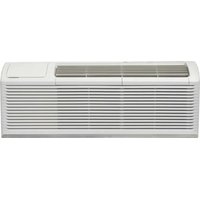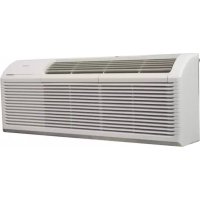
DPTA090HEB1WDB - Air Conditioning DANBY - Free user manual and instructions
Find the device manual for free DPTA090HEB1WDB DANBY in PDF.


| Product Type | PTAC (Packaged Terminal Air Conditioner) |
| Brand | Danby |
| Model | DPTA090HEB1WDB |
| Dimensions (W x H x D) | 106.7 cm x 40.8 cm x 60.6 cm |
| Power Supply | 230 V, 60 Hz (single phase) |
| Operating Modes | Cooling, heating (heat pump or electric), fan only |
| Control | Front panel with digital display and/or wall thermostat (optional) |
| Fan Speed | Low, medium, high |
| Adjustable Temperature Range | Depends on DIP settings from 16 °C to 30 °C (or 20-24 °C depending on configuration) |
| Air Filter | Washable with warm soapy water, clean every 2 weeks |
| Exterior Maintenance | Soft damp cloth, no chemicals |
| Safety | Mandatory grounding, cord with ground fault circuit interrupter (TEST/RESET) |
| Low Temperature Protection | Optional via DIP switch |
| Error Codes | AS, ES, CS, OS, HS, LE, LO, HI, FP (see manual) |
| Warranty | 2 years parts (except plastic 30 days), in-home service depending on distance |
| Installation | In wall sleeve, screw fixing, rear grille required |
| Country of Origin | Not specified |
Frequently Asked Questions - DPTA090HEB1WDB DANBY
User questions about DPTA090HEB1WDB DANBY
0 question about this device. Answer the ones you know or ask your own.
Ask a new question about this device
Download the instructions for your Air Conditioning in PDF format for free! Find your manual DPTA090HEB1WDB - DANBY and take your electronic device back in hand. On this page are published all the documents necessary for the use of your device. DPTA090HEB1WDB by DANBY.
USER MANUAL DPTA090HEB1WDB DANBY
Owner's Manual....1 - 11
CLIMATISEUR MURAL
Welcome to the Danby family. We are proud of our quality products and we believe in dependable service. We suggest that you read this owner's manual before plugging in your new appliance as it contains important operation information, safety information, troubleshooting and maintenance tips to ensure the reliability and longevity of your appliance.
Visit www.Danby.com to access self service tools, FAQs and much more. For additional assistance call 1-800-263-2629.
Note the information below; you will need this information to obtain service under warranty.
You must provide the original purchase receipt to validate your warranty and receive service.
Model Number: ____
Serial Number: ____
Date of Purchase: ____
Need Help?
Before you call for service, here are a few things you can do to help us serve you better.
Read this owner's manual:
It contains instructions to help you use and maintain your appliance properly.
If you receive a damaged appliance:
Immediately contact the retailer or builder that sold you the appliance.
Save time and money:
Check the troubleshooting section at the end of this manual before calling. This section will help you solve common problems that may occur.

natural_image
Simple black-and-white icon of a telephone handset inside a circle (no text or symbols)1-800-26- Danby
(1-800-263-2629)

Important Safety Information READ AND FOLLOW ALL SAFETY INSTRUCTIONS
ELECTRICAL REQUIREMENTS
All wiring must comply with local and national codes and must be installed by a qualified electrician. Check the available power supply and resolve any wiring problems before installing and operating this appliance.
This 230 V appliance may be used in any properly wired, general purpose household receptacle. The rating plate located on the right side of the appliance just above the power cord contains electrical and other technical data.
SAFETY INSTRUCTIONS
This appliance is not intended for use by persons, including children, with reduced physical, sensory or mental capabilities or lack of experience and knowledge, unless they have been given supervision or instruction concerning use of the appliance by a person responsible for their safety.
Children should be supervised to ensure that they do not play with the appliance.
Do not install the appliance where leakage of combustible gas is suspected.
POWER CORD INSTRUCTIONS
The power supply cord contains a current device that senses damage to the power cord. To test the power supply cord:
- Press the TEST button on the power supply cord. The RESET button will click and pop out.
- Press the RESET button until it clicks into place.
- The power supply cord is now supplying electricity to the appliance.
Do not use this device to turn the appliance on or off. Ensure that the RESET button is pushed in for correct operation. The power supply cord must be replaced if it fails to reset when the TEST button is pushed.
GROUNDING INSTRUCTIONS
This appliance must be grounded. Grounding reduces the risk of electrical shock by providing an escape wire for the electrical current.
This appliance has a cord that has a grounding wire with a 3-prong plug. The power cord must be plugged into an outlet that is properly grounded. If the outlet is a 2-prong wall outlet, it must be replaced with a properly grounded 3-prong wall outlet.
WARNING - Improper use of the grounding plug can result in a risk of electric shock. Consult a qualified electrician or service agent if the grounding instructions are not completely understood, or if doubt exists as to whether the appliance is properly grounded.
Do not connect your appliance to extension cords or together with another appliance in the same wall outlet. Do not splice the power cord. Do not under any circumstances cut or remove the third ground prong from the power cord. Do not use extension cords or ungrounded (two prongs) adapters.
If the power supply cord is damaged, it must be replaced by the manufacturer, its service agent or similar qualified person in order to avoid hazard.
INSTALLATION INSTRUCTIONS
DIMENSIONS
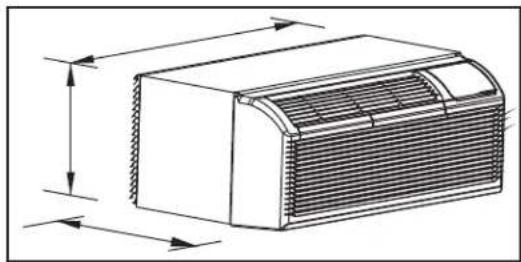
This appliance is 42 inches (106.7 cm) wide, 16 inches (40.8 cm) high and 23.9 inches (60.6 cm) deep.
natural_image
Technical line drawing of a rectangular air vent or duct with internal grating and side arrows indicating dimension (no text or symbols)WALL SLEEVE
All wall sleeves used to install the air conditioner must be in good structural condition and have a rear grille that securely attaches to the sleeve or the flange of the sleeve to secure the appliance.
Install the wall sleeve according to the wall sleeve installation instructions. When installing the sleeve make certain there is nothing within 20 inches (50.8 cm) of the back of the appliance that would interfere with heat radiation and exhaust air flow.
INSTALLATION
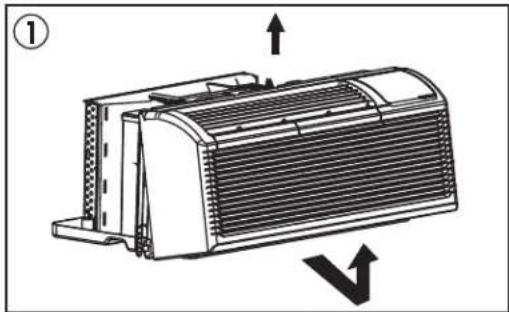
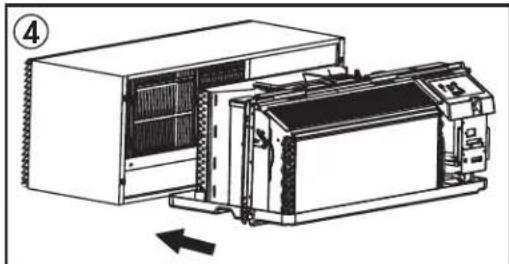
- Remove the front panel. Pull out from the bottom to release it from the tabs and then lift up.
- Remove the shipping screw from the vent door.
- Rotate the vent control lever to either open or close the vent door. When the vent control lever is set to "close", only the air inside the room is circulated. When the vent control lever is set to "open", outdoor air will be drawn into the room. This can reduce heating or cooling efficiency.
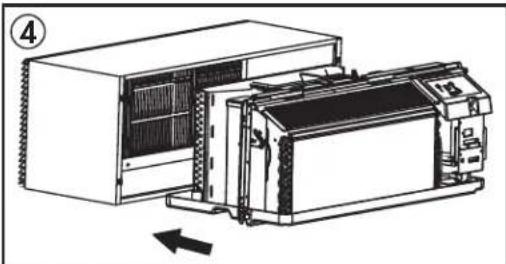
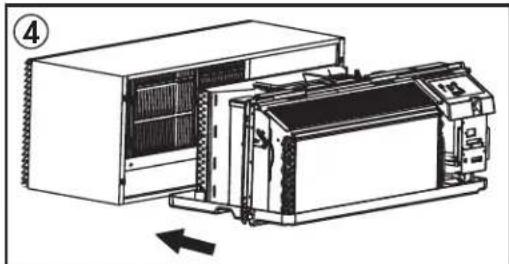
- Lift the appliance and slide it into the wall sleeve until it is set firmly against the front wall of the sleeve and secure with four screws through the flange holes.
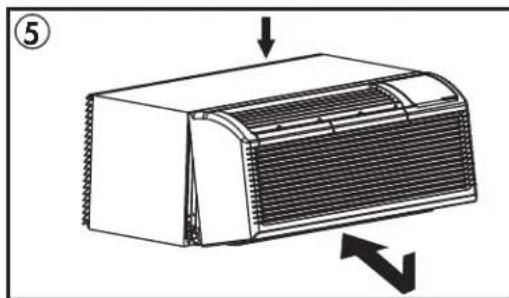
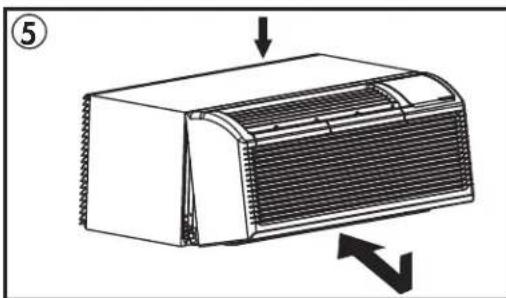
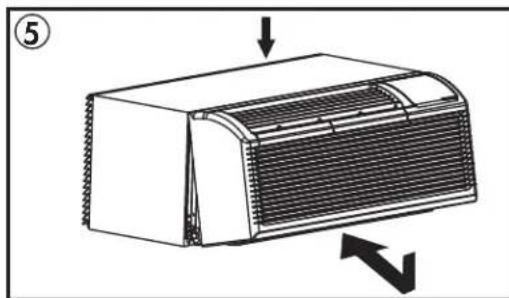
- Reinstall the front panel. Place the tabs over the top rail and push inward at the bottom until the panel snaps into place.
natural_image
Technical line drawing of a heat exchanger or cooling unit with directional arrows indicating flow (no text or symbols)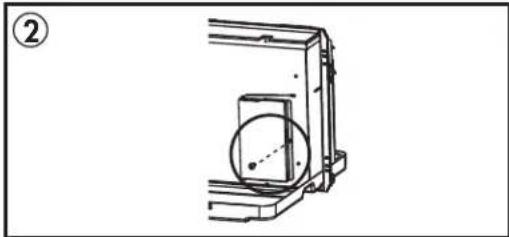
natural_image
Technical line drawing of a mechanical assembly with a circular component and bracket (no text or symbols)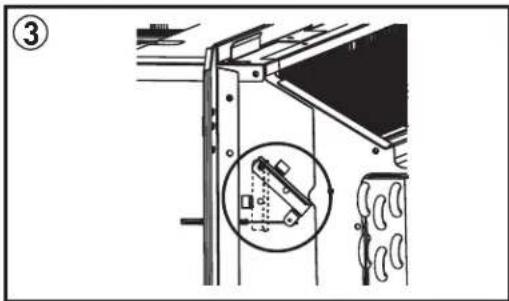
natural_image
Technical line drawing of a server rack unit with cooling fan and internal components, showing no text or symbols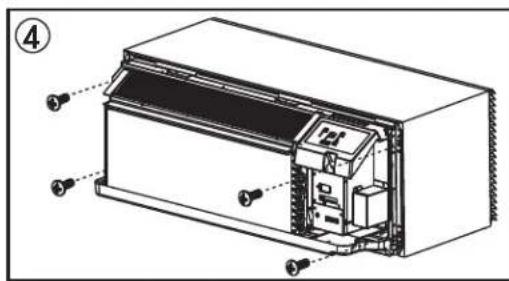
natural_image
Diagram of a heat exchanger unit with airflow direction arrows (no text or symbols)INSTALLATION INSTRUCTIONS
DIP SWITCHES
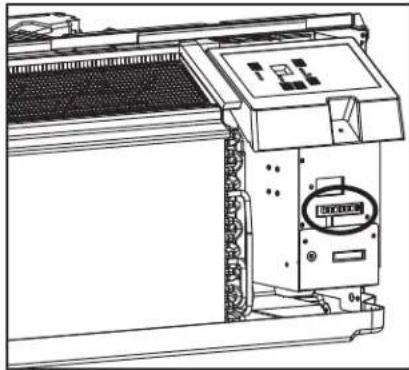
Dip switch controls are located behind the front panel through an opening below the control panel. Remove the front panel to access the dip switches.
Dip switches are accessible without opening the control box.
The appliance should be unplugged before making adjustments to the dip switches.
natural_image
Technical line drawing of an industrial machine with control panel and mounting bracket (no text or symbols)DIP SWITCH CONFIGURATIONS
See the table below for dip switch confi gurations and functions.
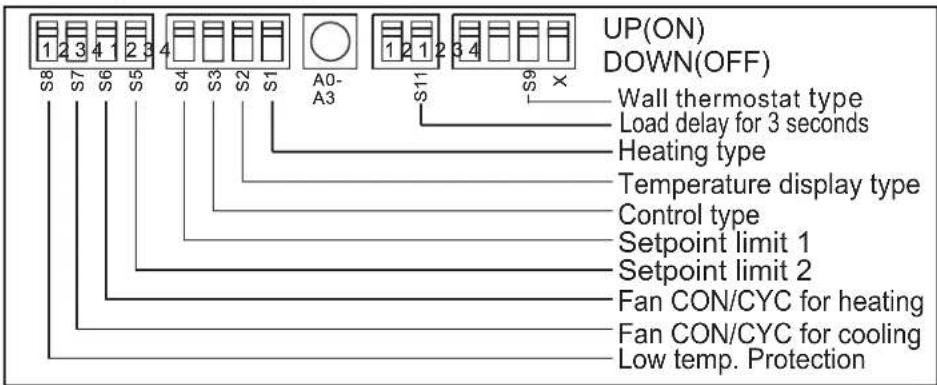
| Number | UP (ON) DOWN (OFF) Remarks | ||
| S1 Electric | heat only Electric and pump heat Heat pump model | only | |
| S2 Temperature display °F Temperature display °C | |||
| S3 Wall thermostat enable Control panel enable | |||
| S4*S5 | UP*UP: 61°F ~ 86°F (16°C ~ 30°C)UP*DOWN: 65°F ~ 78°F (18°C ~ 26°C)DOWN*UP: 63°F ~ 80°F (17°C ~ 27°C)DOWN*DOWN: 68°F ~ 75°F (20°C ~ 24°C) | Confi guration of S4 and S5 combine to select set point range | |
| S6 Fan continuous run for heating Fan cycle for heating | |||
| S7 Fan continuous run for cooling Fan cycle for cooling | |||
| S8 | Low temperature protection enable | Low temperature protection disable | |
| S9 (S3 UP) | Use some types of wall thermostat | Use PTAC other wall thermostat | Consult with sales agent or manufacturer for details |
| S9 (S3 DOWN) | Use control panel only | Use control panel or some types of wall thermostat | |
| Sw11 | Load delay for 3 seconds | Normal | Optional |
INSTALLATION INSTRUCTIONS
DIP SWITCH CONFIGURATIONS BY PANEL CONTROL
- Turn off the appliance.
- Press and hold the increase and decrease buttons at the same time for 3 seconds to activate the dip switch configuration by panel control.
- See the table below for dip switch configurations and functions by panel control.
- The display will show two numbers. The high left number is for dip switches, the low right number is for functions.
- Press the increase button to set the dip switches. Press the decrease button to set the functions.
- Press and hold the increase and decrease buttons at the same time for 3 seconds to confirm choices. The appliance will return to regular functioning after 30 seconds with no input.
Note: The LED display window will show "00" when first entering setting mode. Set switches in sequence one at a time.
Note: To activate front desk control function, set dip switch SW7 to "DOWN(OFF)" and then set the panel control to "A0".
| Number | High (left) Low (right) Remarks | |||
| /01-by panel control 0-by dip switches | ||||
| S111-electric heat only 0-electric and pump heat Heat pump | model only | |||
| S221-°F display 0-°C display | ||||
| S3*S9 | 33-use control panel or some types of wall thermostat2-use some types of wall thermostat1-use PTAC other wall thermostat0-use control panel | Consult with sales agent or manufacturer for details | ||
| S4*S5 | 44-62°F ~86°F (17°C~30°C)3-61°F~86°F (16°C~30°C)2-65°F~78°F (18°C~26°C)1-63°F~80°F (17°C~27°C)0-68°F~75°F (20°C~24°C) | |||
| S6 | 6 | 1-continuous fan for heating | 0-fan cycle for heating | Not available for “use PTAC other wall thermostat” |
| S771-continuous fan for cooling 0-fan cycle for cooling | ||||
| S881-low temperature protection enable | 0-low temperature protection disable | Optional | ||
| SW7 | A | 1-front desk control enable | 0-front desk control disable | Optional |
| Sw11 | B | 1-load delay for 3 seconds | 0-normal | Optional |
INSTALLATION INSTRUCTIONS
WALL THERMOSTAT TERMINAL
Note: Using a wall thermostat is optional.
Important: Only trained, qualified personnel should access the electrical panel on the appliance and install electrical accessories. Contact a local electrical contractor, dealer or distributor for assistance.
Thermostat Wire Routing
Thermostat wire is fi eld supplied. Recommended wire gauge is 18 to 20 gauge solid thermostat wire.
Note: It is recommended that extra wires are run to the appliance in case any are damaged during installation. Thermostat wire should always be routed around or under, never through the wall sleeve. The wire should be routed behind the front panel to the easily accessible terminal connector.
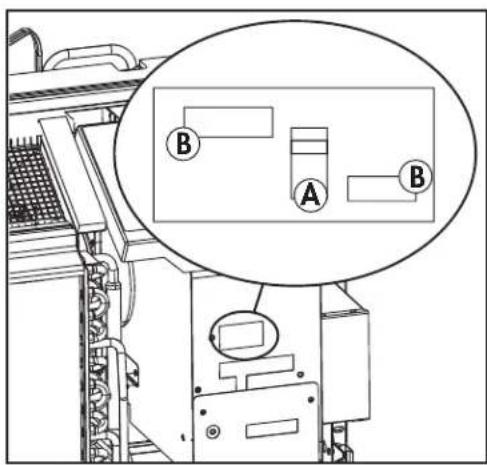
Pull the dip switch to the DOWN(OFF) position.
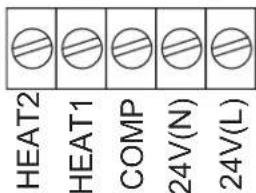
Insert the wire connector of the wall thermostat into the relevant terminal according to the different shapes as shown.
A: Dip switch
B: Terminal
PTAC Other Wall Thermostat
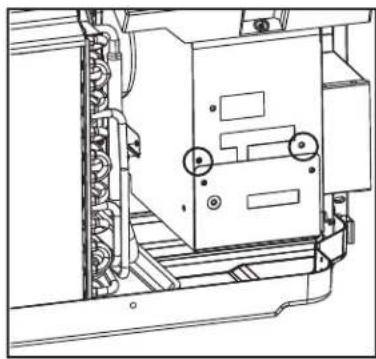
Remove the two screws as shown and take the cover panel down.
natural_image
Technical line drawing of a mechanical assembly with no visible text or symbolsTerminal of PTAC other wall thermostat (MODE A)
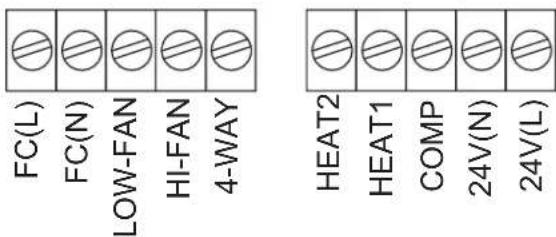
Terminal of PTAC other wall thermostat (MODE B)
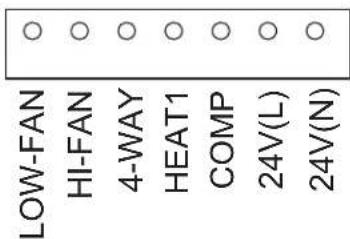
Caution: Failure to follow this caution may result in equipment damage or improper operation. Improper wiring may damage the electronics. Common busing is not permitted. Damage or erratic operation may result.
INSTALLATION INSTRUCTIONS
FRONT DESK CONTROL
Note: Using the front desk control is optional.
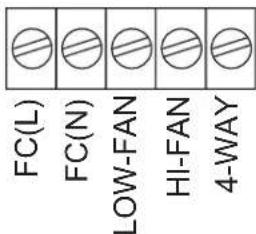
The controller can handle a switch signal from FC(L) and FC(N) input, called front desk control. Input must be 24VAC. If the system does not receive a 24VAC signal it will turn off; otherwise the appliance runs in normal control.
The dip switch can control the front desk control feature. If the dip switch is in the down position, the appliance will turn off, otherwise it will run as normal.
natural_image
Technical line drawing of a mechanical device with no visible text or symbolsADDITIONAL REQUIREMENTS
- Use 4-way terminal for heat pump connection only.
- Wall thermostat must be heating changeover 4-way valve.
- For thermostats that have only one fan speed output (on or auto) the fan speed is determined by how the terminal connector is wired. If low fan is desired, wire the G output from the thermostat to (LOW-FAN) on the appliance's terminal block. If high fan is desired, wire the G output from the thermostat to (HI-FAN) on the appliance's terminal block.
- The range of set temperature of wall thermostat must be in consonance with the range of dip switch setting.
- Wall thermostat must be set the type properly in consonance with the appliance type; heat pump or no heat pump.
- If the wall thermostat has only one electrical heater output, connect the two terminals of HEAT 1 and HEAT 2, the appliance can operate two electrical heaters (only if the appliance has two electrical heaters). Otherwise operate one electrical heater.
- Do not remove the control panel.
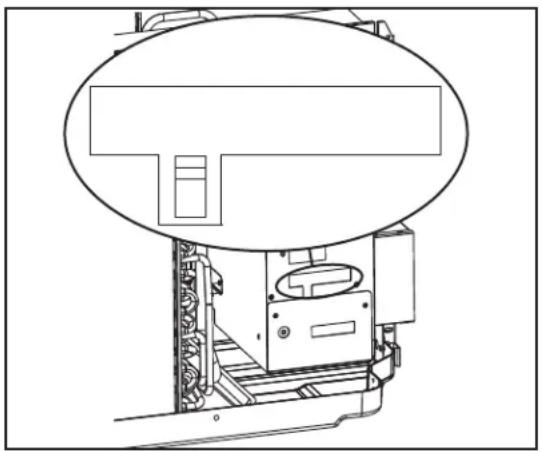
- If the appliance is being controlled by a wall mounted thermostat, place the provided cover over the control panel as per the below.
Note: When the display shows "LC" it means the buttons on the control panel are not available and the appliance should be controlled by the wall mounted thermostat that it is connected to.
natural_image
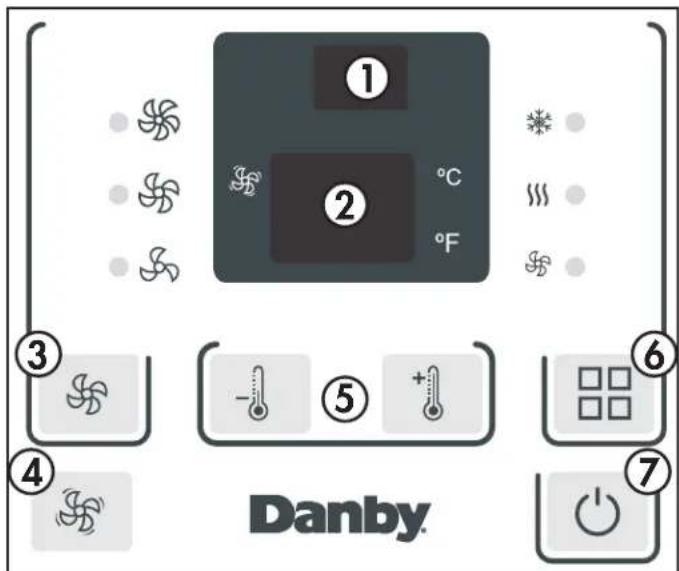
Solid dark gray rectangle centered on a horizontal gradient background (no text or symbols)- Remote control receiver
- Display Panel: Displays the set temperature. When in fan mode, displays the ambient temperature. To change the temperature scale being displayed, press and hold the up and down buttons at the same time for three seconds.
- Fan Button: Used to set the fan speed. The fan can be set to low, medium, and high. The lights will indicate the chosen fan speed.
- Continuous fan button: In cooling mode, press to set the fan to run continuously.
- Increase and decrease buttons: Used to adjust the set temperature in 1° increments.
- Mode button: Used to choose the operating mode. The lights will indicate the chosen mode, cool, heat or fan.
- Power button: Used to turn the appliance on or off.
OPERATING MODES
There are three operating modes to choose from. Press the Mode Button repeatedly to choose the desired mode. The adjacent indicator light will illuminate to show which mode has been selected.
- Cool Mode
Choose cool mode to set the cooling function. Use the up and down buttons to choose the desired temperature. When cool mode is selected, the fan speed can be adjusted by pressing the fan button.
- Heat Mode
Choose heat mode to set the heating function. Use the up and down buttons to choose the desired temperature.
- Fan Mode
Choose fan mode to run the internal fan without engaging the cooling function. Press the fan button repeatedly to choose the fan speed, low, med or high.
CARE & MAINTENANCE
AIR FILTER
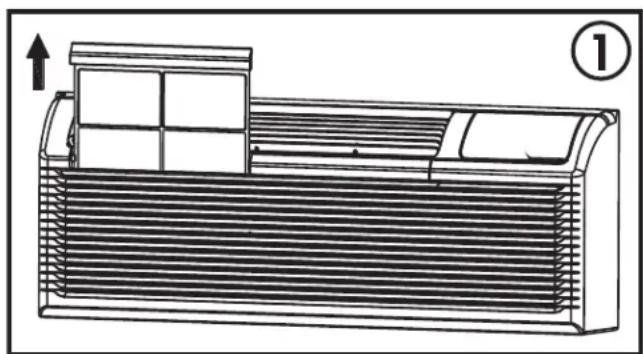
The air fi liter should be cleaned approximately every 2 weeks. The air fi liter may require more frequent cleaning if there is significant dander or fur in the air.
The air fi lter is located behind the front intake grill. Grasp the fi lter by the center and pull up and out.
Use a vacuum cleaner with a soft brush attachment to remove any large debris or dust build up from the air filter.
Wash the filter in lukewarm, soapy water, below 40^ C ( 104^ F), or use a neutral cleaning agent.
Rinse the filter with clean water and dry thoroughly before reinstalling in the appliance.
Note: Do not operate the appliance without the air filter installed.
natural_image
Technical line drawing of a heat exchanger or air conditioner unit with ventilation grilles and a vent, showing airflow direction (no text or symbols)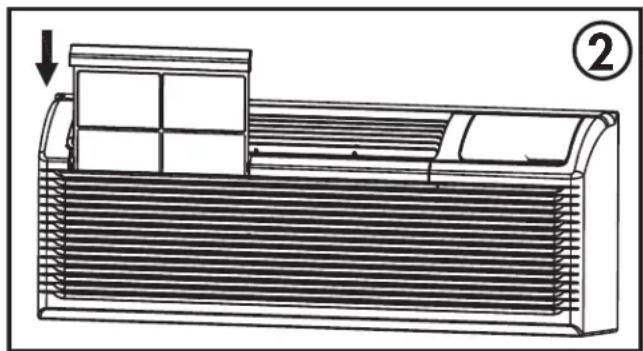
natural_image
Technical line drawing of a mechanical component with heat dissipation and a downward arrow indicator (no text or symbols)CLEANING
To avoid possible electric shock, ensure that the appliance is unplugged before performing any cleaning or maintenance.
The outside of the appliance can be wiped clean with a soft cloth or with a lukewarm, damp cloth if necessary.
Do not use gasoline, benzene, thinner or any other chemicals to clean this appliance as these substances can cause damage to the fi nish and deformation of plastic parts.
Never pour water directly onto the appliance as this will cause deterioration of electrical components and wiring insulation.
ERROR CODES
If any of the below error codes appear on the display, unplug the appliance and then plug it back in. If the error code persists, call for service.
AS - room temperature sensor error
ES - evaporator temperature sensor error
CS - condenser temperature sensor error
OS - outside temperature sensor error
HS - exhaust temperature sensor error
LE - wire controller error
LO - room temperature is lower than 0°C / 32°F
HI-room temperature is higher than 37^ / 99^
FP - low temperature protection
TROUBLESHOOTING
Danby Consumer Care: 1-800-263-2629
Hours of operation:
Monday to Thursday 8:30 am - 6:00 pm Eastern Standard Time
Friday 8:30 am - 4:00 pm Eastern Standard Time
Information in this manual is subject to change without notice.
| PROBLEM POSSIBLE CAUSE | |
| Appliance will not operate • Plug is not fully inserted into the wall outlet• Blown fuse or circuit breaker | |
| Insufficient cooling | • Air filter is dirty• Blocked air flow• Appliance size is too small for application |
| Noise • Inadequate support in window installation | |
| Odors • Formation of mold or mildew on internal wet surfaces• Place an algaecide tablet in base pan; push the tablet through the grill on either side of the appliance | |
| Water dripping inside • Appliance is not properly angled to allow water to drain to the outside | |
| Water dripping outside • On very hot or humid days dripping water from the back of the appliance is normal | |
| Frost build up • When outdoor temperatures are below 18.3°C (65°F) frost may form when the appliance is in cooling mode• Switch the appliance to fan only mode until the frost melts | |
LIMITED "IN HOME" WARRANTY
This quality product is warranted to be free from manufacturer's defects in material and workmanship, provided that the unit is used under the normal operating conditions intended by the manufacturer.
This warranty is available only to the person to whom the unit was originally sold by Danby Products Limited (Canada) or Danby Products Inc. (U.S.A.) (hereafter "Danby") or by an authorized distributor of Danby, and is non-transferable.
TERMS OF WARRANTY
Plastic parts are warranted for thirty (30) days from the date of purchase, with no extensions provided.
First 24 months During the first twenty four (24) months, any functional parts of this product found to be defective, will be repaired or replaced, at warrantor's option, at no charge to the original purchaser.
To obtain service Contact the dealer where the unit was purchased, or contact the nearest authorized Danby service depot, where service must be performed by a qualified service technician. If service is performed on the unit by anyone other than an authorized service depot, all obligations of Danby under this warranty shall be void.
Boundaries of in-home service Danby reserves the right to limit the boundaries of "In Home Service" to the proximity of an authorized service depot. Any appliance requiring service outside the limited boundaries of "In Home Service", will be the consumer's responsibility to transport at their own expense to the original point of purchase or a service depot for repair. If the appliance is installed in a location that is 100 kilometers (62 miles) or more from the nearest service center, it must be delivered to the nearest authorized Danby Service Depot by the purchaser.
Transportation charges to and from the service location are not protected by this warranty and are the responsibility of the purchaser.
Nothing within this warranty shall imply that Danby will be responsible or liable for any spoilage or damage to food or other contents of this appliance, whether due to any defect of the appliance, or its use, whether proper or improper.
EXCLUSIONS
Save as herein provided, by Danby, there are no other warranties, conditions, representations or guarantees, express or implied, made or intended by Danby or its authorized distributors and all other warranties, conditions, representations or guarantees, including any warranties, conditions, representations or guarantees under any Sale of Goods Act or like legislation or statute is hereby expressly excluded. Save as herein provided, Danby shall not be responsible for any damages to persons or property, including the unit itself, howsoever caused or any consequential damages arising from the malfunction of the unit and by the purchase of the unit, the purchaser does hereby agree to indemnify and hold harmless Danby from any claim for damages to persons or property caused by the unit.
GENERAL PROVISIONS
No warranty or insurance herein contained or set out shall apply when damage or repair is caused by any of the following:
1) Power failure.
2) Damage in transit or when moving the appliance.
3) Improper power supply such as low voltage, defective house wiring or inadequate fuses.
4) Accident, alteration, abuse or misuse of the appliance such as inadequate air circulation in the room or abnormal operating conditions (i.e. extremely high or low room temperature).
5) Use for commercial or industrial purposes (i.e. If the appliance is not installed in a domestic residence).
6) Fire, water damage, theft, war, riot, hostility, acts of God such as hurricanes, floods etc.
7) Service calls resulting in customer education.
8) Improper Installation (i.e. Building-in of a free standing appliance or using an appliance outdoors that is not approved for outdoor application, including but not limited to: garages, patios, porches or anywhere that is not properly insulated or climate controlled).
Proof of purchase date will be required for warranty claims; retain bills of sale. In the event that warranty service is required, present the proof of purchase to our authorized service depot.
Warranty Service
In Home
Danby Products Limited
PO Box 1778, Guelph, Ontario, Canada N1H 6Z9
Telephone: |519| 837-0920 FAX: |519| 837-0449
1-800-263-2629
04/17
Danby Products Inc
PO Box 669, Findlay, Ohio, U.S.A. 45840
Telephone: (419) 425-8627 FAX: (419) 425-8629
Bienvenue
natural_image
Simple black-and-white icon of a telephone handset inside a circle (no text or symbols)1-800-26- Danby
(1-800-263-2629)

natural_image
Technical line drawing of a rectangular air vent or duct with internal grating and side arrows indicating dimension (no text or symbols)DOUILLE MURALE
natural_image
Technical line drawing of a heat exchanger or cooling unit with directional arrows indicating flow (no text or symbols)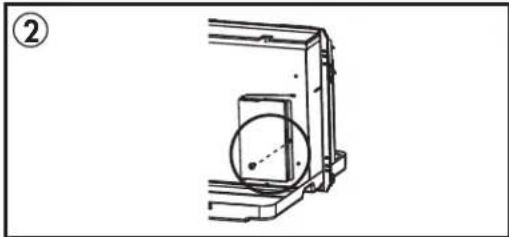
natural_image
Technical line drawing of a mechanical assembly with a circular component and bracket (no text or symbols)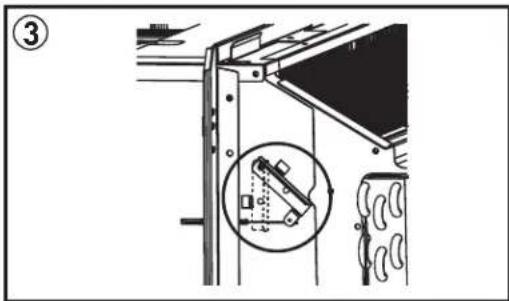
natural_image
Diagram of a server rack unit with cooling fan and internal components, showing no text or symbols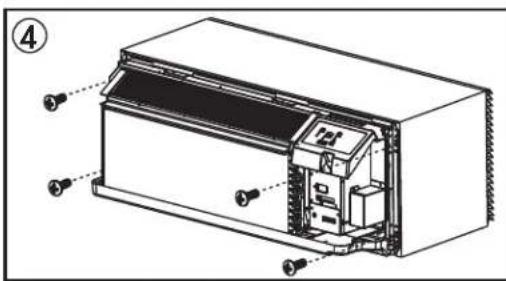
natural_image
Diagram of a heat exchanger unit with airflow direction arrows (no text or symbols)INSTRUCTIONS D'INSTALLATION
INTERRUPTEUR DIP
natural_image
Technical line drawing of an industrial machine with control panel and mounting bracket (no text or symbols)CONFIGURATIONS DE DIP SWITCH
natural_image
Technical line drawing of an electrical enclosure with cooling fans and mounting brackets (no text or symbols)Terminal d'un autre thermostat mural PTAC (MODE A)
natural_image
Pure technical line drawing of a mechanical assembly without any text, numbers, or symbolsEXIGENCES SUPPLÉMENTAIRES
natural_image
Technical line drawing of a refrigerated air conditioner unit with heat exchanger and vent slots (no text or symbols)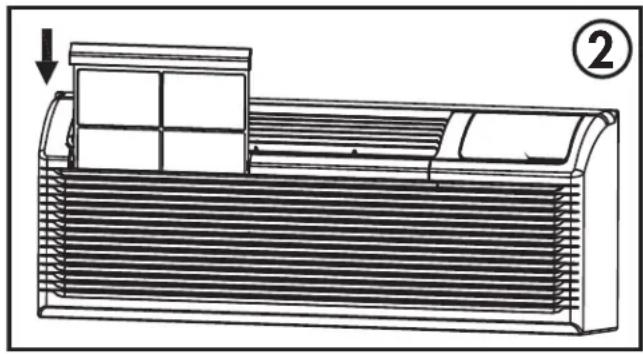
natural_image
Technical line drawing of a heat exchanger or air conditioner unit with cooling fins and ventilation slots (no text or symbols)NETTOYAGE
PROBLÈME CAUSE POSSIBLE
Danby Products Limited
PO Box 1778, Guelph, Ontario, Canada N1H 6Z9
natural_image
Technical line drawing of a rectangular industrial component with internal grating and dimension arrows (no text or symbols)MANGA DE PARED
natural_image
Technical line drawing of a heat exchanger or radiator component with directional arrows indicating flow or movement (no text or symbols present)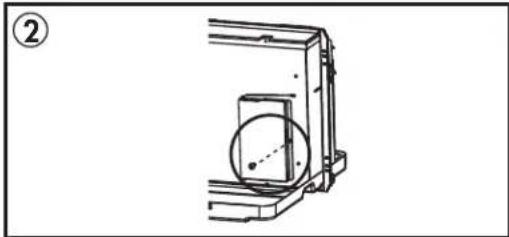
natural_image
Technical line drawing of a mechanical assembly with a circular component and bracket (no text or symbols)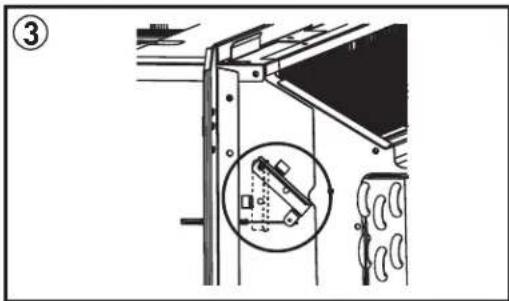
natural_image
Technical line drawing of a server rack unit with cooling fan and internal components, showing no text or symbols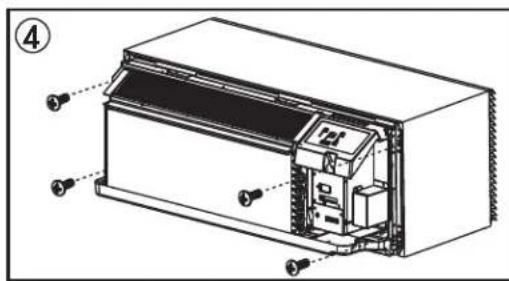
natural_image
Diagram of a heat exchanger or cooling unit with directional arrows indicating airflow or heat transfer (no text or symbols present)natural_image
Technical line drawing of an industrial machine with control panel and mounting bracket (no text or symbols)CONFIGURACIONES DEL INTERRUPTOR DIP
PTAC Otro termostato de pared
natural_image
Technical line drawing of a mechanical assembly with no visible text or symbols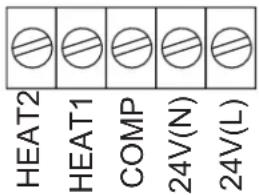
natural_image
Technical line drawing of a mechanical device with no visible text or symbolsnatural_image
Technical line drawing of a heat exchanger or air conditioner unit with no visible text or symbols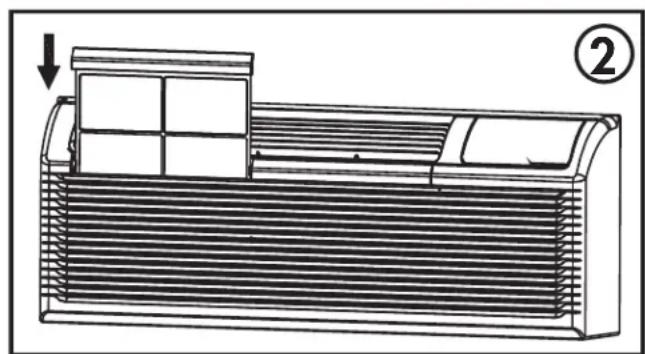
natural_image
Technical line drawing of a heat exchanger or air conditioner unit with cooling fins and a vent, showing internal structure and airflow direction (no text or symbols)LIMPIEZA
PROBLEMA CAUSA POSIBLE
Danby Products Limited
PO Box 1778, Guelph, Ontario, Canada N1H 6Z9
Telephone: [519] 837-0920 FAX: [519] 837-0449
1-800-263-2629
04/17
Danby Products Inc.
PO Box 669, Findlay, Ohio, U.S.A. 45840
Telephone: (419) 425-8627 FAX: (419) 425-8629
NOTES / REMARQUES / NOTAS :
MODEL • MODÈLE • MODELO
DPTA090HEB1WDB
DPTA120HEB1WDB
DPTA150HEB1WDB