
KX-TS710 - Phone PANASONIC - Free user manual and instructions
Find the device manual for free KX-TS710 PANASONIC in PDF.


| Product Type | USB Handset/Speakerphone for Internet Telephony |
| Brand | Panasonic |
| Model | KX-TS710 |
| Dimensions (H × W × D) | 119 mm × 47 mm × 43 mm |
| Weight | Approx. 85 g |
| Power Supply | USB (powered via computer's USB port) |
| Standby Power Consumption | Approx. 0.47 W |
| Maximum Power Consumption | Approx. 1.4 W |
| Interface | USB 1.1 |
| Compatible Operating Systems | Windows XP, Windows Vista, Mac OS X v10.3.9 Panther |
| Main Functions | Handset with flip, hands-free speakerphone, mute microphone, volume control (6 levels), status indicator (red/blue/flashing/off) |
| Use as External Speaker | Yes, for listening to music or lessons from the computer |
| Hands-Free Mode | Yes, with flip closed and microphone activated |
| Included Accessories | USB cable (part number PQJA10207Z) |
| Care and Cleaning | Clean with a soft, dry cloth; do not use benzene, solvent, or abrasive cleaner |
| Usage Precautions | Avoid heat sources, humidity, dust, vibrations; do not expose to sunlight; disconnect if not used for a long time |
| Operating Temperature | 5 °C to 40 °C |
| Repairability and Spare Parts | Contact Panasonic customer service in case of issues; one-year warranty (Canada); no spare parts listed |
| General Information | Ideal for free Internet calls or conferencing; easy setup; use with VoIP software |
Frequently Asked Questions - KX-TS710 PANASONIC
User questions about KX-TS710 PANASONIC
0 question about this device. Answer the ones you know or ask your own.
Ask a new question about this device
Download the instructions for your Phone in PDF format for free! Find your manual KX-TS710 - PANASONIC and take your electronic device back in hand. On this page are published all the documents necessary for the use of your device. KX-TS710 by PANASONIC.
USER MANUAL KX-TS710 PANASONIC
Operating Instructions
USB Speaker/Handset
Model No. KX-TS710
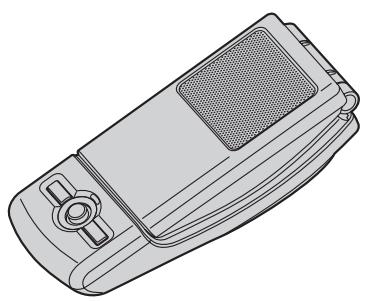
| Contents/Sommaire/Containido | Page/Page/Página |
| English instructions | 1 – 16 |
| Instructions en français | (1) – (12) |
| Instrucciones en español | <1> – <12> |
- Please read these Operating Instructions before using the unit and save for future reference.
- Be sure to use the USB cable included with the unit.



Table of Contents
Introduction
Feature highlights 3 System requirements for your computer 3 Accessory information 4 For best performance 4
Preparation
Installation (Connecting to a computer). 5 Controls 5
Using the Unit
Status indicator 6 Operation. 6
Useful Information
Troubleshooting 8 Important security notice 10 FCC and other information (for U.S. users only). 10 General warnings (for Australia and New Zealand users only). 11 Specifications 11 Customer services (for U.S. users only) 12 Warranty (for U.S. users only). 13 Warranty (for Canada users only) 15


Introduction
Thank you for purchasing the Panasonic USB Speaker/Handset.
Feature highlights
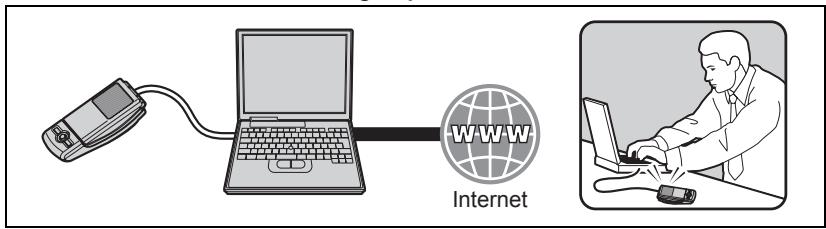
Ideal for free internet calls and group conference
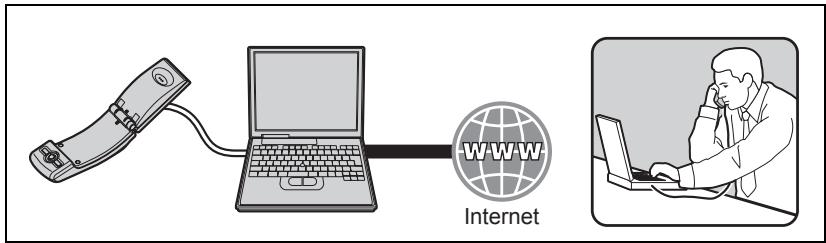
Open top cover to use conventionally for private conversations
Ideal for music enjoyment

Easy to install on your computer
System requirements for your computer
The following system requirements must be met in order to use the unit.
| Item | Description |
| Operating System | Microsoft®Windows®XP, Microsoft Windows Vista®, or Mac OS X v10.3.9 Panther |
| Others | USB interface (1.1) or higher |
3
Introduction
Accessory information
Included parts
USB Speaker/Handset
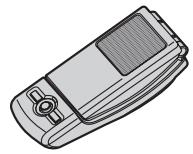
USB cable

Part No. PQJA10207Z
For best performance
Environment
- Keep the product away from electrical noise generating devices, such as fluorescent lamps and motors.
- The product should be kept free from excessive smoke, dust, high temperature, and vibration.
- The product should not be exposed to direct sunlight.
- Do not place heavy objects on top of the product.
- When you leave the product unused for a long period of time, disconnect the product from the computer.
- The product should be kept away from heat sources such as heaters, kitchen stoves, etc. It should not be placed in rooms where the temperature is less than 5 °C (41 °F) or greater than 40 °C (104 °F). Damp basements should also be avoided.
Connections
- Connect the unit to a USB port on your computer. For optimum performance, do not connect more than one unit to a single computer or the unit to your computer via a hub.
- The unit may not turn off and may consume electricity regardless of whether your computer is turned off or in sleep mode. By connecting/disconnecting the unit from an active computer, the unit will turn on/off. We recommend that you disconnect the unit from your computer when you are not using it.
Routine care
- To clean the product, use a dry soft cloth. The outer surface of the product can be scratched by wiping or rubbing with a hard cloth.
- Do not use benzine, thinner, or any abrasive powder.




Installation (Connecting to a computer)
Preparation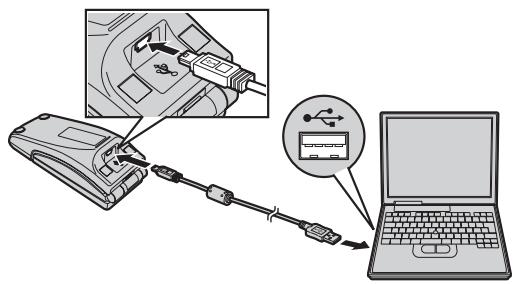
Important:
- Start the application software you want to use with the unit after installation. Connect the included USB cable to the unit and your computer.
- The status indicator lights up red when the computer is turned on. If the top cover is opened, the status indicator lights up blue (page 6).
- To assure continued emission limit compliance, use only the shielded USB cable included.
To disconnect the unit
Unplug the USB cable from the computer.
Controls
Closed top cover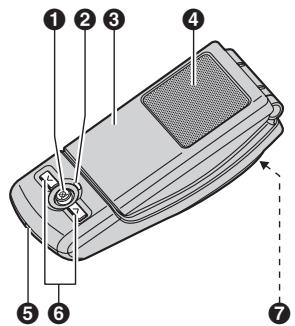
1 [☑] (Microphone-mute) 2 Status indicator 3 Top cover 4 Speaker
Opened top cover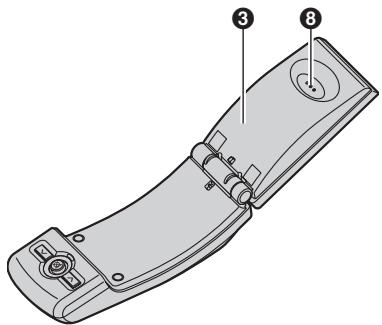
5 Microphone 6 Volume buttons ([V][A]) 7 USB port 8 Receiver
Using the Unit
Status indicator
| Light Status | Meaning | Function mode/Example of use |
| Red | The microphone is muted (page 7).Top cover closed: Ready to receive audio at the speaker.Top cover opened: Ready to receive audio at the receiver. | External speaker/Music player |
| Blue | The microphone is on.Top cover closed: Ready to talk and receive audio at the speaker.Top cover opened: Ready to talk and receive audio at the receiver. | Speakerphone or handset/Telephone |
| Flashing red | Error. See page 9. | - |
| OFF | The computer is either turned off or in suspend mode. | - |
Operation
Using the receiver for calls
Open the top cover and talk.
- To switch to the speakerphone, close the top cover and press [☑] until the status indicator lights up blue.
Using the speakerphone for calls
Close the top cover and talk. When the status indicator lights up red, press to turn the microphone-mute off (page 7). Then the status indicator turns blue.
- Speak alternately with the other party.
- To switch to the receiver, open the top cover.
Note:
- Use the speakerphone in a quiet environment.
- The unit is intended to be operated while adjacent to the computer when in speakerphone mode. The unit is not intended to be used adjacent to the ear in speakerphone mode (when closing the top cover).
Using the Unit
Using the unit as the external speaker of the computer
You can listen to sounds from the computer through the speaker on the unit when the top cover is closed.
- Press [☑] until the status indicator lights up red to activate the microphone-mute for clearer sound.
Adjusting the receiver/speaker volume
6 levels are available.
Press [v] or [A] repeatedly.
Microphone-mute
While microphone-mute is turned on, you can hear the other party, but the other party cannot hear you. Also, it keeps the sound clear when using the unit as the external speaker.
To activate the feature, press [×] until the status indicator lights up red.
- Press [☑] again to deactivate the feature. Opening the top cover also turns the feature off until it is closed again.



7



Useful Information
Troubleshooting
| Problem | Cause/solution |
| The speaker/receiver does not sound. | ·The application software you want to use with the unit was started before installing the unit. Please restart the application software. ·The USB cable is not connected properly to the unit and your computer. Connect it. ·Make sure that your computer audio device's playback volume is set to the maximum and that mute mode is not selected. ·The unit may not be selected as the audio device of your computer. Please confirm the setting of your computer as follows. Example: Windows XP 1 Click "start", then click "Control Panel". 2 Click "Sounds, Speech, and Audio Devices". → Click "Sounds and Audio Devices". → Click "Audio" tab. 3 Make sure that the default device of "Sound playback" is "Panasonic KX-TS710". ·The unit may not work properly depending on the power supply of your computer's USB port. If this is the case and your computer has multiple USB ports, we recommend that you try other USB ports. |


Useful Information
| Problem | Cause/solution |
| Other party cannot hear you. | ·The application software you want to use with the unit was started before installing the unit. Please restart the application software. ·The USB cable is not connected properly to the unit and your computer. Connect it. ·Make sure that your computer audio device's recording volume is set to the maximum. ·If the status indicator is red, press [⊗] to turn the microphone-mute off. ·The unit may not be selected as the audio device of your computer. Please confirm the setting of your computer as follows. Example: Windows XP 1 Click "start", then click "Control Panel". 2 Click "Sounds, Speech, and Audio Devices". → Click "Sounds and Audio Devices". → Click "Audio" tab. 3 Make sure that the default device of "Sound recording" is "Panasonic KX-TS710". ·The unit may not work properly depending on the power supply of your computer's USB port. If this is the case and your computer has multiple USB ports, we recommend that you try other USB ports. |
| The status indicator is flashing red. | ·Unplug the USB cable from the computer and the unit, then reconnect it. If the status indicator is still flashing red, there may be a problem with the unit. Contact the Panasonic service personnel. |
| The status indicator is OFF. | ·Make sure the USB cable is properly connected to the unit and your computer. ·The computer is turned off or in suspend mode. |
Useful Information
Important security notice
- Panasonic cannot accept any liability or provide warranty for security problems occurring in the following cases:
- when the internet security settings were not set during use,
- when VoIP (Voice over Internet Protocol) communication software was used.
FCC and other information (for U.S. users only)
This device complies with Part 15 of the FCC Rules. Operation is subject to the following two conditions:
(1) This device may not cause harmful interference, and (2) this device must accept any interference received, including interference that may cause undesired operation.
CAUTION:
Any changes or modifications not expressly approved by the party responsible for compliance could void the user's authority to operate this device.
NOTE:
This equipment has been tested and found to comply with the limits for a Class B digital device, pursuant to Part 15 of the FCC Rules. These limits are designed to provide reasonable protection against harmful interference in a residential installation. This equipment generates, uses, and can radiate radio frequency energy and, if not installed and used in accordance with the instructions, may cause harmful interference to radio communications. However, there is no guarantee that interference will not occur in a particular installation. If this equipment does cause harmful interference to radio or television reception, which can be determined by turning the equipment off and on, the user is encouraged to try to correct the interference by one or more of the following measures:
- Reorient or relocate the receiving antenna.
- Increase the separation between the equipment and receiver.
- Connect the equipment into an outlet on a circuit different from that to which the receiver is connected.
- Consult the dealer or an experienced radio/TV technician for help.
Responsible party:
Panasonic Corporation of North America
One Panasonic Way, Secaucus, New Jersey 07094
Phone number: 1-800-211-PANA (1-800-211-7262)
FCC Warning:
To ensure compliance with FCC emissions limits, a shielded USB cable with a ferrite core is included. Use only this cable when connecting the unit to a computer.
Useful Information
NOTE:
- USE ONLY WITH UL LISTED ITE (INFORMATION TECHNOLOGY EQUIPMENT).
- This USB Speaker/Handset does not connect to a PSTN and is not subject to FCC Part 68 and HAC requirements. Also, it can be used with various communications software, which may not guarantee E911 compatibility.
General warnings (for Australia and New Zealand users only)
- The earpiece on the USB Speaker/Handset is magnetised and may retain small metallic objects.
- For Australia users only: This equipment has been tested and found to comply with Radiocommunications (Electromagnetic Compatibility) Standard 2008 limits for electromagnetic interference. Any modifications to any part of the system or to any peripherals may void the EMC compliance of the system or the peripherals.
Specifications
| Operating environment | 5 °C – 40 °C (41 °F – 104 °F) |
| Dimensions | Approx. height 119 mm × width 47 mm × depth 43 mm (411/16 inches × 127/32 inches × 111/16 inches) |
| Mass (Weight) | Approx. 85 g (0.19 lb.) |
| Power consumption | Standby: Approx. 0.47 W Maximum: Approx. 1.4 W |
| Power supply | USB powered |
| Interface | USB: 1.1 |
Note:
- Design and specifications are subject to change without notice.
- The illustrations in these instructions may vary slightly from the actual product.
Trademarks
- Microsoft, Windows, and Windows Vista are either registered trademarks or trademarks of Microsoft Corporation in the United States and/or other countries.
- Mac OS is a trademark of Apple Inc., and registered in the U.S. and other countries.
- All other trademarks identified herein are the property of their respective owners.
Useful Information
Customer services (for U.S. users only)
Customer Services Directory
Obtain Product Information and Operating Assistance; locate your nearest
Dealer or Service Center; purchase Parts and Accessories; or make Customer Service and Literature requests by visiting our Web Site at:
http://www.panasonic.com/help
or, contact us via the web at:
http://www.panasonic.com/contactinfo
You may also contact us directly at: 1-800-211-PANA (1-800-211-7262), Monday - Friday 9 am to 9 pm; Saturday - Sunday 10 am to 7 pm, EST.
TTY users (hearing or speech impaired users) can call 1-877-833-8855.
Accessory Purchases
Purchase Parts, Accessories and Instruction Books online for all Panasonic Products by visiting our Web Site at:
http://www.pstc.panasonic.com
or, send your request by E-mail to:
npcparts@us.panasonic.com
You may also contact us directly at: 1-800-332-5368 (Phone) 1-800-237-9080 (Fax Only) (Monday - Friday 9 am to 9 pm, EST.) Panasonic Service and Technology Company 20421 84th Avenue South, Kent, WA 98032 (We Accept Visa, MasterCard, Discover Card, American Express, and Personal Checks.)
TTY users (hearing or speech impaired users) can call 1-866-605-1277.
Service in Puerto Rico
Panasonic Puerto Rico, Inc. San Gabriel Industrial Park, Ave. 65 de Infantería, Km. 9.5, Carolina, Puerto Rico 00985 Phone (787)750-4300, Fax (787)768-2910
Warranty (for U.S. users only)
PANASONIC CONSUMER
ELECTRONICS COMPANY, DIVISION
OF PANASONIC CORPORATION OF
NORTH AMERICA
One Panasonic Way,
Secaucus, New Jersey 07094
San Gabriel Industrial Park,
Ave. 65 de Infanteria, Km. 9.5,
Carolina, Puerto Rico 00985
Panasonic Accessory Products Limited Warranty
Limited Warranty Coverage
If your product does not work properly because of a defect in materials or workmanship, Panasonic Consumer Electronics Company or Panasonic Puerto Rico, Inc. (collectively referred to as "the warrantor") will, for the length of the period indicated on the chart below, which starts with the date of original purchase ("Limited Warranty period"), at its option either (a) repair your product with new or refurbished parts, or (b) replace it with a new or a refurbished product. The decision to repair or replace will be made by the warrantor.
Parts
Ninety (90) Days
Labor
Ninety (90) Days
During the "Labor" Limited Warranty period there will be no charge for labor. During the "Parts" Limited Warranty period, there will be no charge for parts. You must mail-in your product prepaid during the Limited Warranty period. This Limited Warranty only applies to products purchased and serviced in the United States or Puerto Rico. This Limited Warranty is extended only to the original purchaser and only covers products purchased as new. A purchase receipt or other proof of the original purchase date is required for warranty service.
To obtain service in the U.S.A. please contact:
PSTC (Panasonic) Exchange Center,
4900 George McVay Drive, Suite B Door #12, McAllen, TX 78503
panacare@us.panasonic.com
For assistance in Puerto Rico call Panasonic Puerto Rico, Inc. (787) 750-4300 or fax (787) 768-2910.
Useful Information
Limited Warranty Limits And Exclusions
This Limited Warranty ONLY COVERS failures due to defects in materials or workmanship, and DOES NOT COVER normal wear and tear or cosmetic damage. The Limited Warranty ALSO DOES NOT COVER damages which occurred in shipment, or failures which are caused by products not supplied by the warrantor, or failures which result from accidents, misuse, abuse, neglect, bug infestation, mishandling, misapplication, alteration, faulty installation, setup adjustments, misadjustment of consumer controls, improper maintenance, power line surge, lightning damage, modification, introduction of sand, humidity or liquids, commercial use such as hotel, office, restaurant, or other business or rental use of the product, or service by anyone other than a Factory Service Center or other Authorized Servicer, or damage that is attributable to acts of God.
THERE ARE NO EXPRESS WARRANTIES EXCEPT AS LISTED UNDER "LIMITED WARRANTY COVERAGE". THE WARRANTOR IS NOT LIABLE FOR INCIDENTAL OR CONSEQUENTIAL DAMAGES RESULTING FROM THE USE OF THIS PRODUCT, OR ARISING OUT OF ANY BREACH OF THIS LIMITED WARRANTY. (As examples, this excludes damages for lost time, travel to and from the servicer. The items listed are not exclusive, but are for illustration only.) ALL EXPRESS AND IMPLIED WARRANTIES, INCLUDING THE WARRANTY OF MERCHANTABILITY, ARE LIMITED TO THE PERIOD OF THE LIMITED WARRANTY.
Some states do not allow the exclusion or limitation of incidental or consequential damages, or limitations on how long an implied warranty lasts, so the exclusions may not apply to you.
This Limited Warranty gives you specific legal rights and you may also have other rights which vary from state to state. If a problem with this product develops during or after the Limited Warranty period, you may contact your dealer or Service Center. If the problem is not handled to your satisfaction, then write to the warrantor's Consumer Affairs Department at the addresses listed for the warrantor.
PARTS AND SERVICE, WHICH ARE NOT COVERED BY THIS LIMITED WARRANTY, ARE YOUR RESPONSIBILITY.
Warranty (for Canada users only)
Panasonic Canada Inc.
5770 Ambler Drive, Mississauga, Ontario L4W 2T3
PANASONIC PRODUCT - LIMITED WARRANTY
EXCHANGE PROGRAM
Panasonic Canada Inc. warrants this product to be free from defects in material and workmanship and agrees to replace the product for a period as stated below from the date of original purchase.
Telephone Accessory / Product - One (1) year
LIMITATIONS AND EXCLUSIONS
This warranty does not apply to products purchased outside Canada or to any product which has been improperly installed, subjected to usage for which the product was not designed, misused or abused, damaged during shipping, or which has been altered or repaired in any way that affects the reliability or detracts from the performance, nor does it cover any product which is used commercially. This warranty is extended to the original end user purchaser only. A purchase receipt or other proof of date of original purchase is required before warranty service is performed.
THIS EXPRESS, LIMITED WARRANTY IS IN LIEU OF ALL OTHER WARRANTIES, EXPRESS OR IMPLIED, INCLUDING ANY IMPLIED WARRANTY OF MERCHANTABILITY AND FITNESS FOR A PARTICULAR PURPOSE.
IN NO EVENT WILL PANASONIC CANADA INC. BE LIABLE FOR ANY SPECIAL, INDIRECT OR CONSEQUENTIAL DAMAGES.
In certain instances, some jurisdictions do not allow the exclusion or limitation of incidental or consequential damages, or the exclusion of implied warranties, so the above limitations and exclusions may not be applicable.
CONTACT INFORMATION
For product information and operation assistance, please contact:
Our Customer Care Centre: Telephone #: (905) 624-5505
1-800#: 1-800-561-5505
Fax#: (905) 238-2360
Email link: "customer support" on
www.panasonic.ca
For defective product exchange within the warranty period, please contact the original dealer or our Customer Care Centre.



We recommend keeping a record of the following information for future reference.
Serial No.
Date of purchase
(found on the bottom of the unit)
Name and address of dealer
Attach your purchase receipt here.
Sales Department:
Panasonic Consumer Electronics Company, Division of Panasonic Corporation of North America
One Panasonic Way, Secaucus, New Jersey 07094
Panasonic Puerto Rico, Inc.
San Gabriel Industrial Park, Ave. 65 de Inferencia, Km. 9.5, Carolina, Puerto Rico 00985
Panasonic Canada Inc.
5770 Ambler Drive, Mississauga, Ontario L4W 2T3
Panasonic Australia Pty. Limited
Austlink Corporate Park, 1 Garigal Road, Belrose NSW 2085,
Australia
Customer Support Centre Tel. No.: 132600 or website
www.panasonic.com.au

N52
Panasonic New Zealand Limited
350 Te Iirangi Drive, East Tamaki, Private Bag 14911 Panmure, Auckland, New Zealand
Customer Support Centre Tel.No.: (09) 272 0178 or website
www.panasonic.co.nz
Panasonic Systems Company
P.O.Box 1711, Halfway House, 1685, SOUTH AFRICA
Helpdesk contact telephone number.: 086 11 77 777
Panasonic Communications Co., Ltd.
1-62, 4-chome, Minoshima, Hakata-ku, Fukuoka 812-8531, Japan
Copyright:
This material is copyrighted by Panasonic Communications Co., Ltd., and may be reproduced for internal use only. All other reproduction, in whole or in part, is prohibited without the written consent of Panasonic Communications Co., Ltd.
© 2008 Panasonic Communications Co., Ltd. All Rights Reserved.
16





Panasonic
Panasonic Canada Inc.
5770 Ambler Drive, Mississauga, Ontario L4W 2T3
Panasonic Limited Warranty Certificate
EXCHANGE PROGRAM
TS710(fr-fr).book Page 12 Monday, January 21, 2008 4:56 PM

Panasonic Canada Inc.
5770 Ambler Drive, Mississauga, Ontario L4W 2T3
Panasonic Communications Co., Ltd.
1-62, 4-chome, Minoshima, Hakata-ku, Fukuoka 812-8531, Japan
Copyright:
Panasonic Communications Co., Ltd.
1-62, 4-chome, Minoshima, Hakata-ku, Fukuoka 812-8531, Japan
Copyright:


- OPERATING INSTRUCTIONS
- TABLE OF CONTENTS
- INTRODUCTION
- PREPARATION
- USING THE UNIT
- USEFUL INFORMATION
- FEATURE HIGHLIGHTS
- SYSTEM REQUIREMENTS FOR YOUR COMPUTER
- ACCESSORY INFORMATION
- INCLUDED PARTS
- FOR BEST PERFORMANCE
- ENVIRONMENT
- CONNECTIONS
- ROUTINE CARE
- INSTALLATION (CONNECTING TO A COMPUTER)
- IMPORTANT
- TO DISCONNECT THE UNIT
- CONTROLS
- STATUS INDICATOR
- OPERATION
- USING THE RECEIVER FOR CALLS
- USING THE SPEAKERPHONE FOR CALLS
- NOTE
- USING THE UNIT AS THE EXTERNAL SPEAKER OF THE COMPUTER
- ADJUSTING THE RECEIVER/SPEAKER VOLUME
- MICROPHONE-MUTE
- TROUBLESHOOTING
- IMPORTANT SECURITY NOTICE
- FCC AND OTHER INFORMATION (FOR U.S. USERS ONLY)
- CAUTION
- RESPONSIBLE PARTY
- FCC WARNING
- GENERAL WARNINGS (FOR AUSTRALIA AND NEW ZEALAND USERS ONLY)
- TRADEMARKS
- CUSTOMER SERVICES (FOR U.S. USERS ONLY)
- CUSTOMER SERVICES DIRECTORY
- ACCESSORY PURCHASES
- SERVICE IN PUERTO RICO
- WARRANTY (FOR U.S. USERS ONLY)
- PANASONIC ACCESSORY PRODUCTS LIMITED WARRANTY
- LIMITED WARRANTY LIMITS AND EXCLUSIONS
- WARRANTY (FOR CANADA USERS ONLY)
- EXCHANGE PROGRAM
- LIMITATIONS AND EXCLUSIONS
- CONTACT INFORMATION
- SALES DEPARTMENT
- PANASONIC CANADA INC
- PANASONIC AUSTRALIA PTY. LIMITED
- PANASONIC NEW ZEALAND LIMITED
- PANASONIC SYSTEMS COMPANY
- PANASONIC COMMUNICATIONS CO., LTD
- COPYRIGHT
- PANASONIC
Brand : PANASONIC
Model : KX-TS710
Category : Phone