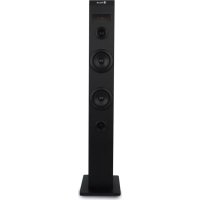
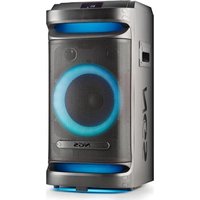
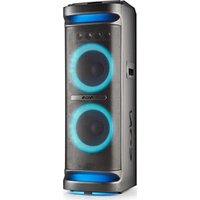
Sky Charm - Loudspeaker NGS - Free user manual and instructions
Find the device manual for free Sky Charm NGS in PDF.



| Product Type | Speaker |
| Brand | NGS |
| Model | Sky Charm |
| Output Power | 50 W (RMS 25 W) |
| Connectivity | Bluetooth, FM, USB, Auxiliary, Optical |
| Functions | Play/Pause, Next/Previous Track, Volume +/-, Equalizer (6 modes), Auxiliary mode, FM mode, Optical mode, Bluetooth mode, USB mode |
| Display | LED Display |
| Connectors | USB input, 3.5 mm auxiliary input, 3.5 mm auxiliary output, Optical input, USB charging port |
| Stereo compatibility | Ability to connect 2 speakers via 3.5 mm audio cable |
| Power supply | AC 100-240 V, 50/60 Hz |
| Dimensions (approx.) | 30 x 20 x 15 cm (H x W x D) |
| Weight (approx.) | 2.5 kg |
| Cabinet material | Wood |
| Cleaning and maintenance | Unplug before cleaning. Wipe with a soft, dry cloth. Do not use abrasive products. |
| Safety | Do not expose to water or humidity. Do not open the cabinet. Keep out of reach of children. |
| Spare parts and repairability | Contact NGS after-sales service for any repair or spare part. |
| General information | User manual available for download at notice-facile.com. |
Frequently Asked Questions - Sky Charm NGS
User questions about Sky Charm NGS
0 question about this device. Answer the ones you know or ask your own.
Ask a new question about this device
Download the instructions for your Loudspeaker in PDF format for free! Find your manual Sky Charm - NGS and take your electronic device back in hand. On this page are published all the documents necessary for the use of your device. Sky Charm by NGS.
USER MANUAL Sky Charm NGS
TOWER SPEAKER COMPATIBLE WITH BLUETOOTH


www.ngs.eu
USER'S MANUAL
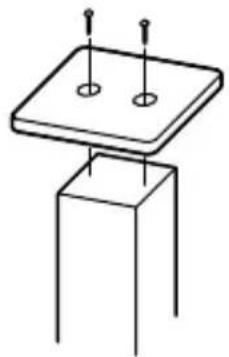
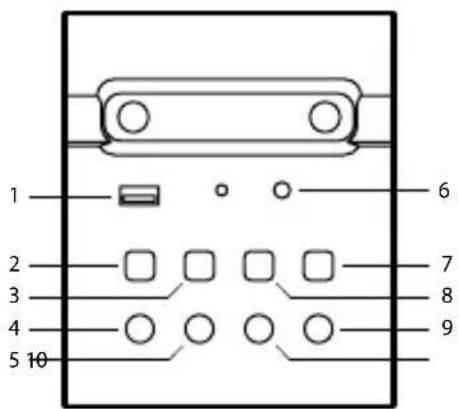
INSTALLATION DESCRIPTION OF TOP PANEL
- After all the screws are screwed in, tighten them evenly clockwise to avoid misplacement of the stand and the base plate.
- Do not force excessively in case of irreparable damage to the speaker cabinet.
1 USB audio input 6 Aux input
2 On/Off 7 Next/Forward
3 Play / Pause 8 Previous / Back
4 Mode 9 Volume up
5 Equaliser (6 modes) 10 Volume down
natural_image
Simple line drawing of a square plate mounted on a pedestal with two circular holes, no text or symbols present.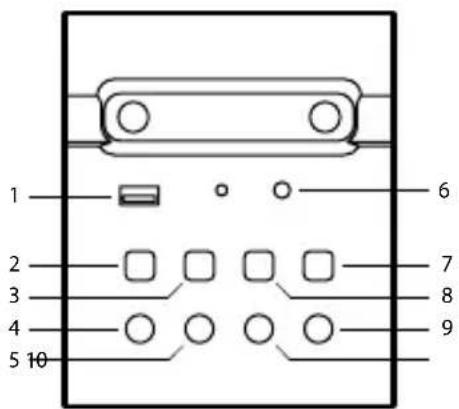
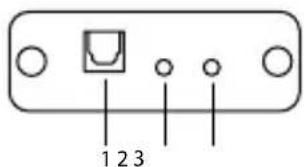
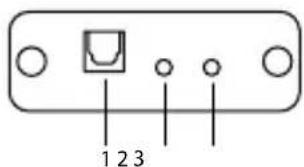
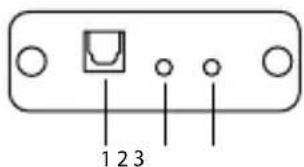
DESCRIPTION OF REAR PANEL
1 Optical input
2 Audio input
3 Audio output
DESCRIPTION OF REMOTE CONTROL
1 On/Off
2 Equaliser
(Choose between pop, rock, jazz, classical or country sound effects) Press and hold to restore default sound effect
3 Silence (Display symbol "=")
4 Volume up
5 Volume down
6 Play / Pause (Display symbol "II")
7 Previous track
8 Next track
9 Aux mode
0 FM mode
11 Optical mode*
12 Bluetooth mode
13 USB mode
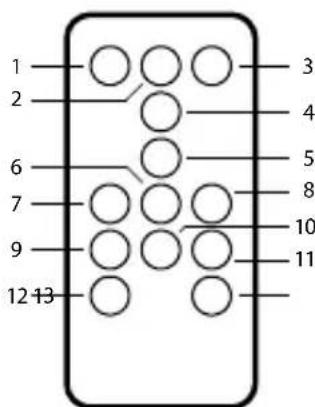
* Only works when there is optical input signal. If there is no signal, it remains in the current mode.
USER'S MANUAL
BLUETOOTH MODE
- Turn on the speaker and then switch to Bluetooth mode: the "Bluetooth mode" prompt tone will sound and the indicator will flash in red. Keep the speaker and Bluetooth-enabled device within a radius of ten metres.
- Set your mobile phone to search for Bluetooth devices.
- When the Bluetooth enabled finds the speaker, select "NGS SKYCHARM" from the list of found devices.
- If required, enter the password "0000".
• After successfully being paired, BT will light up on the display.
AUX MODE
- Keep the unit powered on. Plug one end of the 3.5mm AUX cord to the headphone jack on your device.
- Plug the other end of the 3.5mm AUX cord into the AUX jack on the speaker.
- Use the connected device's audio controls for music playback.
USB PLAYBACK MODE
- Turn on the unit. Push USB disk with MP3 music(s) into USB port, it will switch to USB Playback Mode and then start to play music automatically.
PLUG 2 INTO STEREO
- Plug the second NGS Skycharm speaker into the main one using a 3.5mm jack cable. Plug one end of the audio cable into the output port of the main speaker, which is located on the rear panel, and the other end of the cable into the input port of the secondary speaker (also at the rear).
• Control all functions from the main speaker.
Important
If you plug an audio cable into the audio input on the rear panel without the other end of the cable being connected to a speaker, the tower automatically shuts down and must be turned on again.
OPTICAL INPUT MODE
- Plug one end of the optical cable into your TV, make sure it is turned on and plug the other end into the NGS Skycharm speaker. The display will show "OP".
Note: You must select the optical audio output from the TV so that the sound signal reaches the speaker.
FM MODE
- Select FM mode.
- Press and hold the PLAY / PAUSE button for two seconds to automatically search for available stations. Press again to discontinue and store the searched stations.
- Press and hold the NEXT or PREV keys to switch channels.
- Press the NEXT or PREV keys to increase or decrease the frequency by 0.1 MHz each time and select the desired station.
- Press the FM key to save the selected station.
Note: channels are automatically assigned and sorted by ascending frequency.
USER'S MANUAL
TECHNICAL SPECIFICATIONS
Power Output 50W
Compatible with Bluetooth
Connect 2 and make it stereo through audio cable *
USB charging port
FM Radio
USB reader
Aux input
Aux output
Optical input
LED screen
Wooden case
RMS: 25W
* Connect 2 speakers in stereo using an Audio Cable, connecting the Audio output of the master speaker to the audio input of the slave tower. The slave speaker will then be controlled via the master tower.
ENGLISH

If at any time in the future you should need to dispose of this product please note that: Waste electrical products should not be disposed of with household waste. Please recycle where facilities exist.

Check with your Local Authority or retailer for recycling advice.
(Waste Electrical and Electronic Equipment Directive)
MANUEL DE L'UTILISATEUR
INSTALLATION DESCRIPTION DU
natural_image
Simple line drawing of a square base with two circular holes and three vertical posts on top (no text or symbols)PANNEAU SUPERIEUR
natural_image
Simple line drawing of a square base with two circular holes and three vertical rods, mounted on a stand (no text or symbols)PANEL SUPERIOR
natural_image
Simple line drawing of a square base with two circular holes and three vertical supports (no text or symbols)1 USB-Audioeingang
2 Ein / Aus
3 Wiedergabe / Pause
4 Modus
5 Equalizer (6 Modi)
natural_image
Simple line drawing of a square base with two circular holes and three vertical rods, mounted on a stand (no text or symbols)PANNELLO SUPERIORE
natural_image
Simple line drawing of a square base with two circular holes and three vertical posts on top (no text or symbols)PAINEL SUPERIOR
natural_image
Simple line drawing of a square plate mounted on a stand with two circular holes, no text or symbols present.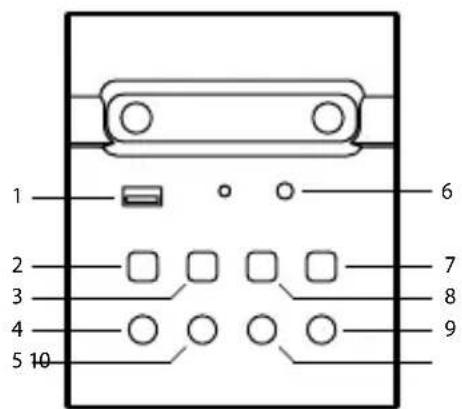
POLSKI
OPIS PANELU TYLNEGO
natural_image
Simple line drawing of a square base with two circular holes and three vertical rods, mounted on a stand (no text or symbols)BOVENSTE PANEEL
1 USB audio-ingang 6 Aux-ingang
2 Aan/Uit 7 Volgende/Vooruit
3 Afspelen/pauzeren 8 Vorige/Terug
4 Modus 9 Volume hoger
5 Equalizer (6 modi) 10 Volume lager
BESCHRIJVING VAN HET ACHTERPANEEL
1 Optische ingang
2 Audio-ingang
3 Audio-uitgang
BESCHRIJVING VAN DE AFSTANDSBEDIENING
natural_image
Simple line drawing of a square plate mounted on a stand with two circular holes, no text or symbols present.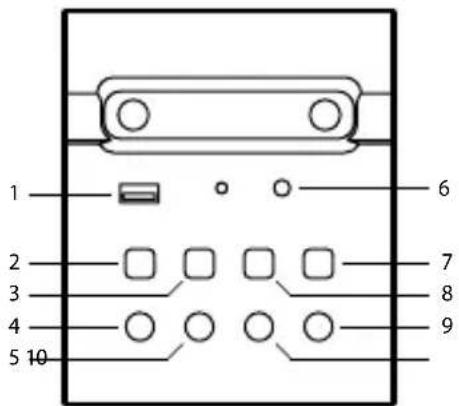
POPIS ZADNÍHO PANELU
natural_image
Simple line drawing of a square base with two circular holes and three vertical supports (no text or symbols)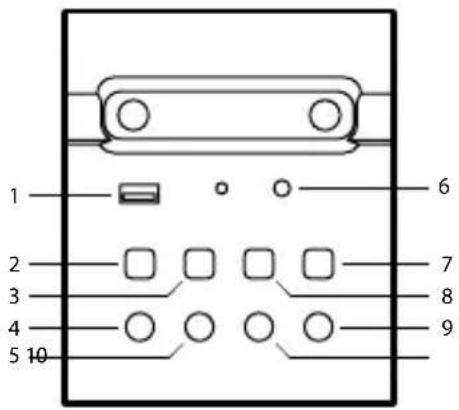
SLOVENČINA
POPIS DOLNÉHO PANELU
natural_image
Simple line drawing of a square base with two circular holes and three vertical rods, mounted on a stand (no text or symbols)natural_image
Simple line drawing of a square base with two circular holes and three vertical rods, mounted on a stand (no text or symbols)natural_image
Simple line drawing of a square base with two circular holes and three vertical rods, mounted on a stand (no text or symbols)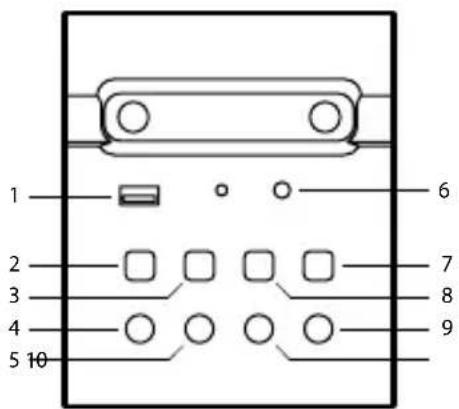
BESKRIVELSE AV BAKPANEL
natural_image
Simple line drawing of a square plate mounted on a stand with two circular holes, no text or symbols present.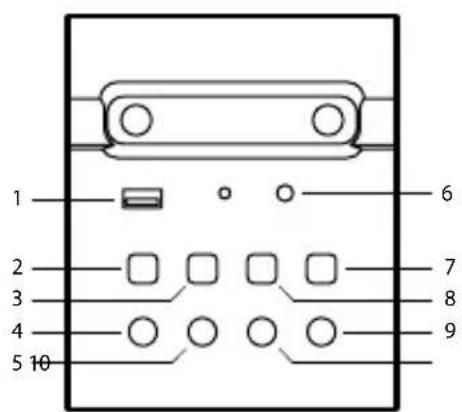
TAKAPANEELIN TIEDOT
1 Optinen Input
2 Audio Input
3 Audio Output
KAUKOSÄÄTIMEN TIEDOT
1 On/Off
2 Tasaus
natural_image
Simple line drawing of a square base with two circular holes and three vertical rods, mounted on a stand (no text or symbols)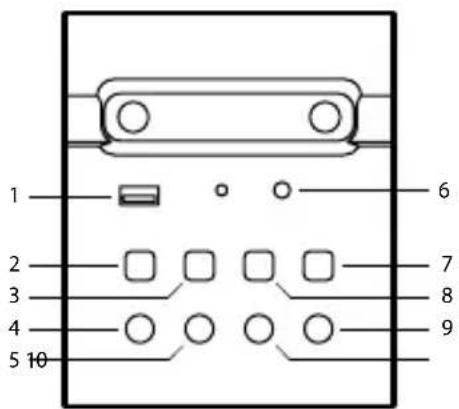
SVENSKA
BESKRIVNING AV BAKSIDAN
natural_image
Simple line drawing of a square base with two circular holes and three vertical rods, mounted on a stand (no text or symbols)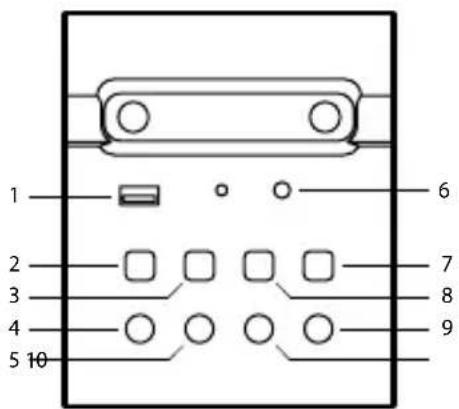
BESKRIVELSE AF PANELET PÅ BAGSIDEN
natural_image
Simple line drawing of a square plate mounted on a stand with two circular holes, no text or symbols present.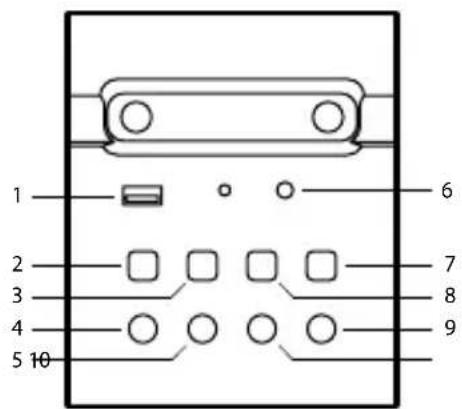
GALINIO SKYDELIO APRAŠYMAS
NGS: NGS SPEAKER COMPATIBLE WITH BLUETOOTH / MODEL: SKYCHARM
NGS: ALTAVOZ NGS COMPATIBLE CON BLUETOOTH / MODELO: SKYCHARM
HAS BEEN TESTED AND FOUND IN CONFORMITY WITH THE FOLLOWING HARMONIZED EUROPEAN STANDARDS:
HA SIDO TESTADO EN CONFORMIDAD CON LAS SIGUIENTES NORMAS STANDARD EUROPEAS ARMONIZADAS:
IEC 62321-3-1:2013, IEC 62321-5:2013,
IEC 62321-4:2013+AMD1:2017, IEC 62321-7-1:2015,
IEC 62321-7-2:2017, IEC 62321-6:2015,
IEC 62321-8:2017
AND THEREFORE COMPLY WITH THE ESSENTIAL REQUIREMENTS AND PROVISIONS OF THE FOLLOWING DIRECTIVES OF THE EUROPEAN PARLIAMENT AND EUROPEAN COUNCIL:
Y, POR LO TANTO, CUMPLE CON LOS REQUERIMIENTOS Y PROVISIONES DE LAS SIGUIENTES DIRECTIVAS DEL PARLAMENTO EUROPEO:
ELECTROMAGNETIC COMPATIBILITY DIRECTIVE (EMC) 2014/30/EU
RADIO EQUIPMENT DIRECTIVE 2014/53/EU
LOW VOLTAGE DIRECTIVE (LVD) 2014/35/EU
ROHS DIRECTIVE 2011/65/EU & (EU) 2015/863
DIRECTIVA DE COMPATIBILIDAD ELECTROMAGNÉTICA (EMC) 2014/30/EU
RAÚL MARTÍN
PRODUCT MANAGER
LURBE GRUP S.A, SAN SEBASTIAN, ESPAGNE, SOUS SA RESPONSABILITÉ EXCLUSIVE, CERTIFIE LA CONFORMITÉ DU PRODUIT :
LURBE GRUP S.A, SAN SEBASTIÁN, ESPAÑA, DECLARA SOB A SUA EXCLUSIVA RESPONSABILIDADE A CONFORMIDADE DO PRODUTO:
NGS : HAUT-PARLEUR NGS COMPATIBLE AVEC BLUETOOTH / MODELE : SKYCHARM
NGS: ALTO-FALANTE NGS COMPAÍVEL COM BLUETOOTH / MODELO: SKYCHARM
A ÉTÉ TESTÉ CONFORMÉMENT AUX NORMES STANDARD EUROPÉENNES HARMONISÉES SUIVANTES :
FOI TESTADO EM CONFORMIDADE COM AS SEGUINTES NORMAS STANDARD EUROPEIAS HARMONIZADAS:
IEC 62321-3-1:2013, IEC 62321-5:2013,
IEC 62321-4:2013+AMD1:2017, IEC 62321-7-1:2015,
IEC 62321-7-2:2017, IEC 62321-6:2015,
IEC 62321-8:2017
ET RESPECTE DONC LES EXIGENCES ET LES DISPOSITIONS DES DIRECTIVES SUIVANTES DU PARLEMENT EUROPÉEN :
E, POR CONSEGUINTE, CUMPRE COM OS REQUISITOS E PROVISÕES DAS SEGUINTES DIRECTIVAS DO PARLAMENTO EUROPEU:
DIRECTIVE DE COMPATIBILITÉ ÉLECTROMAGNÉTIQUE (EMC) 2014/30/EU
DIRECTIVE SUR LES ÉQUIPEMENTS RADIO 2014/53/EU
DIRECTIVE BASSE TENSION (LVD) 2014/35/EU
DIRECTIVE ROHS 2011/65/EU & (EU) 2015/863
DIRECTIVA DE COMPATIBILIDADE ELECTROMAGNÉTICA (EMC) 2014/30/EU
- USER'S MANUAL
- INSTALLATION DESCRIPTION OF TOP PANEL
- DESCRIPTION OF REAR PANEL
- DESCRIPTION OF REMOTE CONTROL
- BLUETOOTH MODE
- AUX MODE
- USB PLAYBACK MODE
- PLUG 2 INTO STEREO
- Important
- OPTICAL INPUT MODE
- FM MODE
- TECHNICAL SPECIFICATIONS
- MANUEL DE L'UTILISATEUR
- INSTALLATION DESCRIPTION DU
- PANNEAU SUPERIEUR
- PANEL SUPERIOR
- PANNELLO SUPERIORE
- PAINEL SUPERIOR
- OPIS PANELU TYLNEGO
- BOVENSTE PANEEL
- BESCHRIJVING VAN HET ACHTERPANEEL
- BESCHRIJVING VAN DE AFSTANDSBEDIENING
- POPIS ZADNÍHO PANELU
- SLOVENČINA
- POPIS DOLNÉHO PANELU
- BESKRIVELSE AV BAKPANEL
- TAKAPANEELIN TIEDOT
- KAUKOSÄÄTIMEN TIEDOT
- BESKRIVNING AV BAKSIDAN
- BESKRIVELSE AF PANELET PÅ BAGSIDEN
- GALINIO SKYDELIO APRAŠYMAS
Brand : NGS
Model : Sky Charm
Category : Loudspeaker