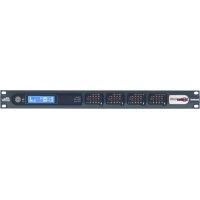
Soundweb London BLU806DA - Professional audio equipment BSS Audio - Free user manual and instructions
Find the device manual for free Soundweb London BLU806DA BSS Audio in PDF.


| Product Type | Multi-channel Digital Audio Processor |
| Brand | BSS Audio (Harman International) |
| Model | Soundweb London BLU806DA |
| Category | Professional Audio Equipment |
| Mounting | 19-inch Rack, 1U |
| Audio Inputs | 8 inputs (analog or digital depending on configuration) |
| Audio Outputs | 6 outputs (analog or digital depending on configuration) |
| Signal Processing | Configurable DSP: equalization, filtering, routing, mixing, gain control |
| Network Connectivity | Ethernet for control and configuration via Soundweb London software |
| Power Supply | 100-240 VAC, 50/60 Hz, typical consumption 60 W |
| Dimensions (W × H × D) | 483 × 44 × 254 mm |
| Weight | 4.5 kg |
| Safety | Compliant with CE, FCC Part 15, IEC/EN 60065 |
| Spare Parts | Fuse 13 A (ASTA/BSI), optional I/O expansion cards |
| Maintenance and Cleaning | Dust with a dry cloth; do not open or expose to moisture |
| Included Accessories | Power cord, documentation (manual) |
| Warranty | 2 years (parts and labor) |
| Manufacturer | Harman International, Salisbury House, London Wall, EC2M 5QQ, United Kingdom |
Frequently Asked Questions - Soundweb London BLU806DA BSS Audio
User questions about Soundweb London BLU806DA BSS Audio
0 question about this device. Answer the ones you know or ask your own.
Ask a new question about this device
Download the instructions for your Professional audio equipment in PDF format for free! Find your manual Soundweb London BLU806DA - BSS Audio and take your electronic device back in hand. On this page are published all the documents necessary for the use of your device. Soundweb London BLU806DA by BSS Audio.
USER MANUAL Soundweb London BLU806DA BSS Audio
IMPORTANT SAFETY INSTRUCTIONS
CAUTION
RISK OF ELECTRIC SHOCK DO NOT OPEN

ATTENTION: RISQUE DE CHOC ELECTRIQUE - NE PAS OUVRIR
WARNING: TO REDUCE THE RISK OF FIRE OR ELECTRIC
SHOCK DO NOT EXPOSE THIS EQUIPMENT TO RAIN OR MOISTURE
ATTENTION: POUR RÉDUIRE LE RISQUE D'INCENDIE OU
D'ÉLECTROCUTION N'EXPOSEZ PAS CET APPAREIL À LA PLUIE OU
L'HUMIDITÉ
The symbols shown above are internationally accepted symbols that warn of potential hazards with electrical products. The lightning flash with arrowpoint in an equilateral triangle means that there are dangerous voltages present within the unit. The exclamation point in an equilateral triangle indicates that it is necessary for the user to refer to the owner's manual.
These symbols warn that there are no user serviceable parts inside the unit. Do not open the unit. Do not attempt to service the unit yourself. Refer all servicing to qualified personnel. Opening the chassis for any reason will void the manufacturer's warranty. Do not get the unit wet. If liquid is spilled on the unit, shut it off immediately and take it to a dealer for service. Disconnect the unit during storms to prevent damage.
The following is indicative of low altitude use; do not use this product above 2000m.

U.K. MAINS PLUG WARNING
A molded mains plug that has been cut off from the cord is unsafe. Discard the mains plug at a suitable disposal facility.
NEVER UNDER ANY CIRCUMSTANCES SHOULD YOU INSERT A DAMAGED OR CUT MAINS PLUG INTO A 13 AMP POWER SOCKET.
Do not use the mains plug without the fuse cover in place.
Replacement fuse covers can be obtained from your local retailer. Replacement fuses are 13 amps and MUST be ASTA approved to BS1362.

If you want to dispose this product, do not mix it with general household waste. There is a separate collection system for used electronic products in accordance with legislation that requires proper treatment, recovery and recycling.
Private households in the 25 member states of the EU, in Switzerland and Norway may return their used electronic products free of charge to designated collection facilities or to a retailer (if you purchase a similar new one).
For Countries not mentioned above, please contact your local authorities for a correct method of disposal.
By doing so you will ensure that your disposed product undergoes the necessary treatment, recovery and recycling and thus prevent potential negative effects on the environment and human health.
WARNING FOR YOUR PROTECTION READ THE FOLLOWING:
READ THESE INSTRUCTIONS.
KEEP THESE INSTRUCTIONS.
HEED ALL WARNINGS.
FOLLOW ALL INSTRUCTIONS.
DO NOT USE THIS APPARATUS NEAR WATER.
CLEAN ONLY WITH A DRY CLOTH.
FOR INDOOR USE ONLY.
DO NOT BLOCK ANY OF THE VENTILATION OPENINGS. INSTALL IN ACCORDANCE WITH THE MANUFACTURER'S INSTRUCTIONS.
DO NOT INSTALL NEAR ANY HEAT SOURCES SUCH AS RADIATORS, HEAT REGISTERS, STOVES, OR OTHER APPARATUS (INCLUDING AMPLIFIERS) THAT PRODUCE HEAT.
ONLY USE ATTACHMENTS/ACCESSORIES SPECIFIED BY THE MANUFACTURER.
UNPLUG THIS APPARATUS DURING LIGHTNING STORMS OR WHEN UNUSED FOR LONG PERIODS OF TIME.
Do not defeat the safety purpose of the polarized or grounding-type plug. A polarized plug has two blades with one wider than the other. A grounding type plug has two blades and a third grounding prong. The wide blade or third prong are provided for your safety. If the provided plug does not fit your outlet, consult an electrician for replacement of the obsolete outlet.
Protect the power cord from being walked on or pinched particularly at plugs, convenience receptacles, and the point where they exit from the apparatus.
Use only with the cart stand, tripod bracket, or table specified by the manufacture, or sold with the apparatus. When a cart is used, use caution when moving the cart/apparatus combination to avoid injury from tip-over.

Refer all servicing to qualified service personnel. Servicing is required when the apparatus has been damaged in any way, such as power-supply cord or plug is damaged, liquid has been spilled or objects have fallen into the apparatus, the apparatus has been exposed to rain or moisture, does not operate normally, or has been dropped.
POWER ON/OFF SWITCH: The Power switch used in this piece of equipment DOES NOT break the connection from the mains.
MAINS DISCONNECT: The plug shall remain readily operable. For rack-mount or installation where plug is not accessible, an all-pole mains switch with a contact separation of at least 3 mm in each pole shall be incorporated into the electrical installation of the rack or building.
If connected to 240V supply, a suitable CSA/UL certified power cord shall be used for this supply.
This Equipment is intended for rack mount use only.
IMPORTANT SAFETY INSTRUCTIONS
ELECTROMAGNETIC COMPATIBILITY
This device complies with part 15 of the FCC Rules and the Product Specifications noted on the Declaration of Conformity. Operation is subject to the following two conditions:
- this device may not cause harmful interference, and
- this device must accept any interference received, including interference that may cause undesired operation.
Operation of this unit within significant electromagnetic fields should be avoided.
- use only shielded interconnecting cables.
SAFETY INSTRUCTIONS
NOTICE FOR CUSTOMERS IF YOUR UNIT IS EQUIPPED WITH A POWER CORD.
WARNING: THIS APPLIANCE SHALL BE CONNECTED TO A MAINS SOCKET OUTLET WITH A PROTECTIVE EARTHING CONNECTION.
THE CORES IN THE MAINS LEAD ARE COLOURED IN ACCORDANCE WITH THE FOLLOWING CODE:
AS COLOURS OF THE CORES IN THE MAINS LEAD OF THIS APPLIANCE MAY NOT CORRESPOND WITH THE COLOURED MARKINGS IDENTIFYING THE TERMINALS IN YOUR PLUG, PROCEED AS FOLLOWS:
- THE CORE WHICH IS COLOURED GREEN AND YELLOW MUST BE CONNECTED TO THE TERMINAL IN THE PLUG MARKED WITH THE LETTER E, OR WITH THE EARTH SYMBOL, OR COLOURED GREEN, OR GREEN AND YELLOW.
- THE CORE WHICH IS COLOURED BLUE MUST BE CONNECTED TO THE TERMINAL MARKED N OR COLOURED BLACK.
- THE CORE WHICH IS COLOURED BROWN MUST BE CONNECTED TO THE TERMINAL MARKED L OR COLOURED RED.
THIS EQUIPMENT MAY REQUIRE THE USE OF A DIFFERENT LINE CORD, ATTACHMENT PLUG, OR BOTH, DEPENDING ON THE AVAILABLE POWER SOURCE AT INSTALLATION. IF THE ATTACHMENT PLUG NEEDS TO BE CHANGED, REFER SERVICING TO QUALIFIED SERVICE PERSONNEL WHO SHOULD REFER TO THE TABLE BELOW. THE GREEN/YELLOW WIRE SHALL BE CONNECTED DIRECTLY TO THE UNITS CHASSIS.
| CONDUCTOR | WIRE COLOR | ||
| Normal | Alt | ||
| L | LIVE | BROWN | BLACK |
| N | NEUTRAL | BLUE | WHITE |
| E | EARTH GND | GREEN/YEL | GREEN |
WARNING: IF THE GROUND IS DEFEATED, CERTAIN FAULT CONDITIONS IN THE UNIT OR IN THE SYSTEM TO WHICH IT IS CONNECTED CAN RESULT IN FULL LINE VOLTAGE BETWEEN CHASSIS AND EARTH GROUND. SEVERE INJURY OR DEATH CAN THEN RESULT IF THE CHASSIS AND EARTH GROUND ARE TOUCHED SIMULTANEOUSLY.
WARNING:
• APPARATET MÅ TILKOPLES JORDET STIKKONTAKT.
• APPARATEN SKALL ANSLUTAS TILL JORDAT UTTAG.
• LAITE ON LIITETTÄVÄ SUOJAKOSKETTIMILLA VARUSTETTUUN PISTORASIAAN.
• APPARATET SKAL TILSLUTTES JORDET STIKKONTAKT.
DECLARATION OF CONFORMITY
Manufacturer's Name: BSS Audio
Manufacturer's Address: 10653 S. River Front
Parkway, Suite 300
South Jordan, Utah
84095, USA
declares that the product:
Product name: BLU 120, BLU 160,
BLU 320, BLU 325,
BLU 326, BLU 800,
BLU 805 and BLU 806
Note: Product name may be suffixed by a
combination of the letters EU, M, or V.
Product option: Various I/O Cards
conforms to the following Product Specifications:
Safety: IEC 60065-01+Amd 1 & 2
EMC: EN 55022:2010
EN 55024:2010
FCC Part 15
Supplementary Information:
The product herewith complies with the requirements of the:
Low Voltage Directive 2014/35/EU
EMC Directive 2014/
RoHS Directive 2011/65/EU
WEEE Directive 2012/19/EU
With regard to Directive 2005/32/EC and
EC Regulation 1275/2008 of 17 December
2008, this product is designed, produced, and
classified as Professional Audio Equipment and
thus is exempt from this Directive.
C. Rex Reed
Director, Engineering
Signal Processing
10653 S. River Front Parkway, Suite 300
South Jordan, Utah 84095, USA
Date: August 15, 2016
European Contact:
Harman International
Salisbury House
London Wall
EC2M 5QQ
+44 207 562 9450
or
Harman Professional Inc.
10653 S. River Front Parkway, Suite 300
South Jordan, Utah 84095, USA
Ph: (801) 566-8800
Fax: (801) 568-7583
DECLARATION OF CONFORMITY
Manufacturer's Name: BSS Audio
Manufacturer's Address: 10653 S. River Front
Parkway, Suite 300
South Jordan, Utah
84095, USA
declares that the product:
Product name: BLU 326 (DA) and 806 (DA)
Note: Product name may be suffixed by a
combination of the letters EU, M, or V.
Product option: Various I/O Cards
conforms to the following Product Specifications:
Safety: IEC 60065: 8th Ed. 2014
EMC: EN 55032: 2012
EN 55024: 2010
FCC Part 15
Supplementary Information:
The product herewith complies with the
requirements of the:
Low Voltage Directive 2014/35/EU
EMC Directive 2014/30/EU
RoHS Directive 2011/65/EU
WEEE Directive 2012/19/EU
With regard to Directive 2005/32/EC and
EC Regulation 1275/2008 of 17 December
2008, this product is designed, produced, and
classified as Professional Audio Equipment and
thus is exempt from this Directive.
C. Rex Reed
Director, Engineering
Signal Processing
10653 S. River Front Parkway, Suite 300
South Jordan, Utah 84095, USA
Date: March 14, 2017
European Contact:
Harman International
Salisbury House
London Wall
EC2M 5QQ
+44 207 562 9450
or
Harman Professional Inc.
10653 S. River Front Parkway, Suite 300
South Jordan, Utah 84095, USA
Ph: (801) 566-8800
Fax: (801) 568-7583
CONSIGNES DE SÉCURITÉ IMPORTANTES
CAUTION
RISK OF ELECTRIC SHOCK DO NOT OPEN

ATTENTION: RISQUE DE CHOC ELECTRIQUE - NE PAS OUVRIR
WARNING: TO REDUCE THE RISK OF FIRE OR ELECTRIC SHOCK DO NOT EXPOSE THIS EQUIPMENT TO RAIN OR MOISTURE
ATTENTION: POUR RÉDUIRE LE RISQUE D'INCENDIE OU D'ÉLECTROCUTION N'EXPOSEZ PAS CET APPAREIL À LA PLUIE OU L'HUMIDITÉ
AVERTISSEMENT POUR VOTRE SÉCURITÉ LIRE ATTENTIVEMENT :
LIRE CES CONSIGNES.
CONSERVER CES CONSIGNES.
RESPECTER TOUS LES AVERTISSEMENTS.
SUIVRE TOUTES LES CONSIGNES.
DÉCLARATION DE CONFORMITÉ
Nom du fabricant :
BSS Audio
10653 S. River Front
Parkway, Suite 300
South Jordan, Utah 84095, ÉTATS-UNIS
Directive RoHS 2011/65/UE
Directive DEEE 2012/19/UE
10653 S. River Front Parkway, Suite 300
South Jordan, Utah 84095, ÉTATS-UNIS
Date : 15 août 2016
Harman Professional Inc
10653 S. River Front Parkway, Suite 300
South Jordan, Utah 84095, ÉTATS-UNIS
DÉCLARATION DE CONFORMITÉ
Nom du fabricant :
BSS Audio
10653 S. River Front
Parkway, Suite 300
South Jordan, Utah 84095,
ÉTATS-UNIS
10653 S. River Front Parkway, Suite 300
South Jordan, Utah 84095, ÉTATS-UNIS
Date : 14 mars 2017
Option du produit :
Divers I / O Cartes
Directive RoHS 2011/65/UE
Directive DEEE 2012/19/UE
Harman Professional Inc
10653 S. River Front Parkway, Suite 300
South Jordan, Utah 84095, ÉTATS-UNIS
Product Registration/Warranty .... 1
Mechanical Installation....1
Front Panel 2
Input Card Monitoring....2
Clip....2
Signal 2
Sync/48V 2
Conductor |BLU-800/BLU-320/BLU160/BLU-120|
Master [BLU-805/BLU-806 (DA)/BLU-325/BLU-326 (DA)] 2
Network Link....2
Data Activity 2
LCD Display 2
LOCATE 2
Contrast (Hold) 2
Rear Panel 3
AC Mains....3
CobraNet™ Connectors-Primary/Secondary [BLU-800/BLU-320] 3
AVB [BLU-805/BLU-325]....3
Dante™/AES67 |BLU-806 (DA)/BLU-326 (DA) 3
BLU link 3
Locate....4
RS232 4
Ethernet....4
Word Clock
|Buddy Link or 48k| |BLU-800/BLU-805/BLU-806 (DA)/BLU-320/BLU-325/BLU-326 (DA)| ....4
Audio Cable Wiring 4
Audio Input & Output Wiring Convention 4
I/O Card Positions A, B, C & D....5
Control Inputs....5
2-Wire Mode 5
3-Wire Mode 5
Logic Outputs 6
Opto Output....6
Technical Specifications....7
Product Registration/Warranty
To register your product, please visit http://bssaudio.com/en-US/support/warranty_registration. For warranty information, please visit http://bssaudio.com/en-US/support/warranty_policy.
Mechanical Installation

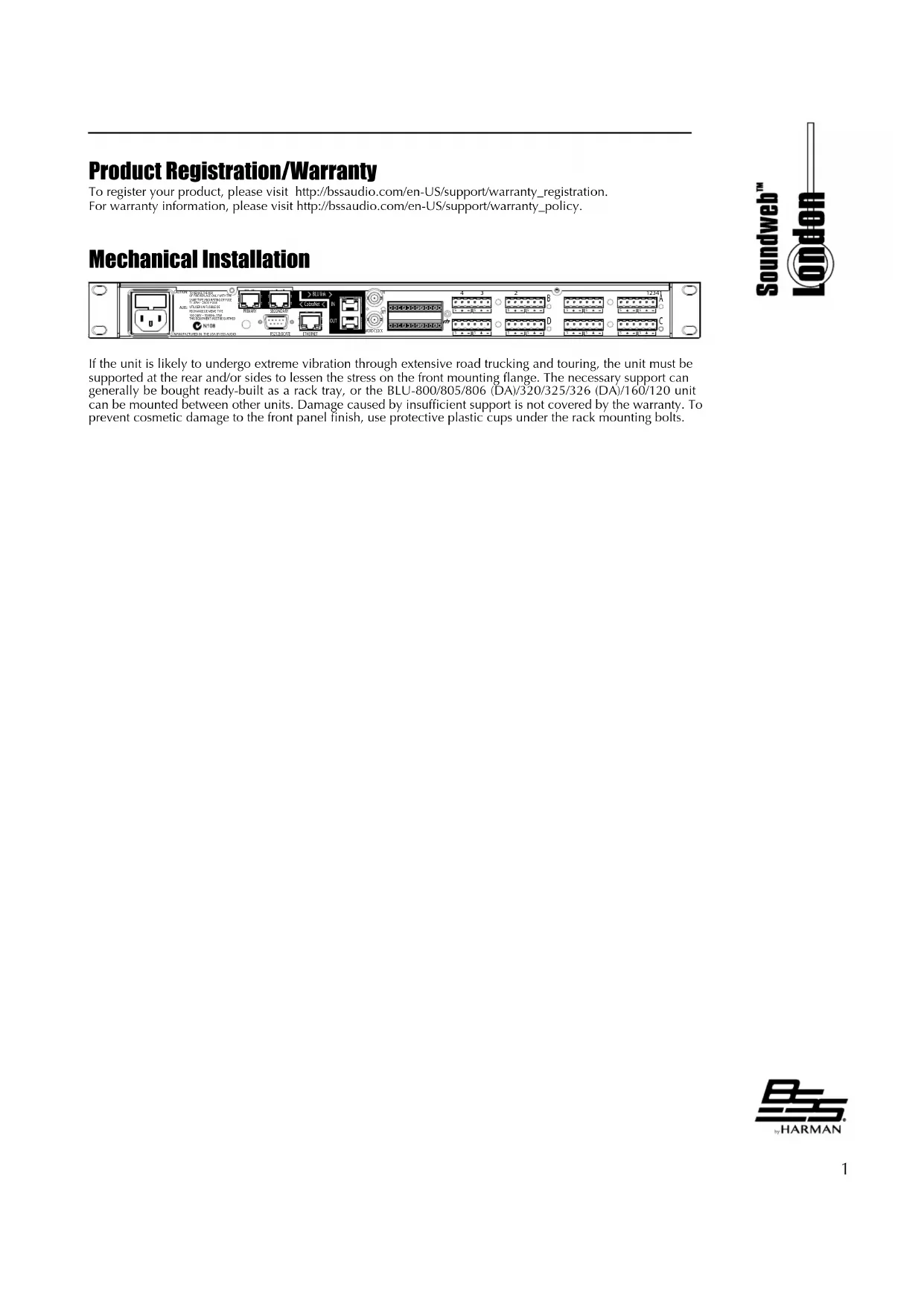
text_image
Internal panel diagram of a network device with labeled ports, connectors, and ports A-D, showing port labels and connections.If the unit is likely to undergo extreme vibration through extensive road trucking and touring, the unit must be supported at the rear and/or sides to lessen the stress on the front mounting flange. The necessary support can generally be bought ready-built as a rack tray, or the BLU-800/805/806 (DA)/320/325/326 (DA)/160/120 unit can be mounted between other units. Damage caused by insufficient support is not covered by the warranty. To prevent cosmetic damage to the front panel finish, use protective plastic cups under the rack mounting bolts.
text_image
Soundweb™ LondonFront Panel
Input Card Monitoring
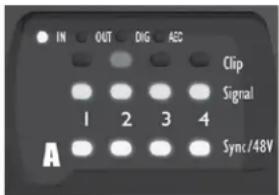
Each channel has 3 LED indicators showing:
- Clip
Illuminated–Indicates clipping in the analogue domain for each channel of the fitted Input or Output card. The LED will illuminate at +18.5dB.
- Signal
Illuminated-The Signal LED will illuminate for each channel of a fitted Input or Output card when the signal reaches or exceeds the signal threshold of -20dB.
- Sync/48V
Illuminated–Illuminates to indicate +48V phantom power has been activated for the relevant channel of a fitted input card. Also indicates sync status for digital I/O card.
text_image
IN OUT DIG ADC Clip Signal 1 2 3 4 Sync/48V AConductor [BLU-800/BLU-320/BLU160/BLU-120]
Master [BLÜ-805/BLU-806 (DA)/BLU-325/BLU-326 (DA)]
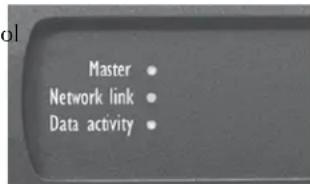
The master clock device of a CobraNe™ system is referred to as the Conductor—the CM-1 modules in the system auto-negotiate which device will transmit the Conductor beat packet. The LED illuminates to indicate which device is acting as the Conductor. The master clock device of an AVB or Dante™ system is indicated with a Master LED on the front panel of the device that is providing the master clock function.
![BSS Audio Soundweb London BLU806DA - Master [BLÜ-805/BLU-806 (DA)/BLU-325/BLU-326 (DA)] - 1](/content/2026/03/564581/images/7d2415d54c19ec8a5cd6fa95b7eaefde7c23eb598d08069d31236a229ccc8931.jpg)
text_image
Conductor Network link Data activityNetwork Link
The Network Link indicates the presence of Cat 5 Ethernet cables. If no cables are connected, the LED is unlit; the LED flashes if either a control or CobraNet™/AVB/Dante™ cable is fitted and remains illuminated if both cables are connected.
text_image
Master Network link Data activityData Activity
The Data Activity LED will flash to indicate that the device is communicating with another control device, either on the network or via the serial or control ports.
LCD Display
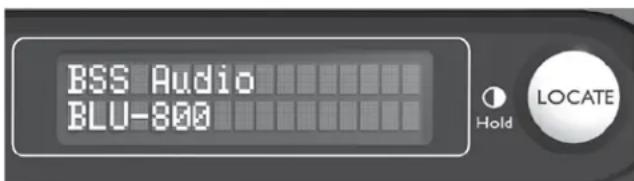
Top line Indicates device name and run state. Bottom line indicates Time, IP Address, Subnet Mask, and Model number with firmware version. Also, the device's MAC Address can be viewed by powering the device on whilst pressing and holding the Locate switch.
LOCATE
Pressing the Locate switch on the front of the unit will illuminate the Locate switch on the rear and identify the device within London Architect. Similarly the switch will illuminate if the device is selected from within London Architect or from the Locate switch on the rear.
text_image
BSS Audio BLU-800 Hold LOCATEContrast (Hold)
Pressing and holding the Locate switch will cycle the LCD through its contrast range.

Rear Panel
text_image
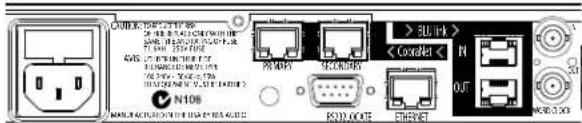
N108 300 MHz > 300 MHz > < Condnet < N OUT R2D-004E EthernetBLU-800 shown above. BLU-320 layout is identical. BLU-160 and BLU-120 have no CobraNet ^™ or WORD CLOCK BNC connectors, but are otherwise identical to the BLU-800 and BLU-320.
text_image
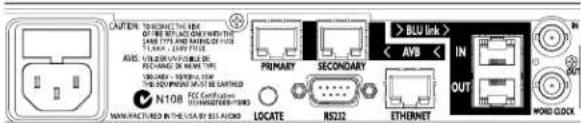
AUTEN TO RECONNECT THE HKEY OF THE INFORMATION IN THE LARGE TYPE AND NAME OF THIS TYPE. UNTINOIS & OTHERS RECOMMUNICIPAL ITEMS IN IN N108 N108 N108 N108 N108 N108 N108 N108 N108 N108 N108 N108 N108 N108 N108 N108 N108 N108 N108 N108 N106 N106 N106 N106 N106 N106 N106 N106 N106 N106 N106 N106 N106 N106 N106 N106 N106 N106 N106 N106 N104 N104 N104 N104 N104 N104 N104 N104 N104 N104 N104 N104 N104 N104 N104 N104 N104 N104 N104 N104 N102 N102 N102 N102 N102 N102 N102 N102 N102 N102 N102 N102 N102 N102 N102 N102 N102 N102 N102 N102 N104 N104 N104 N104 N104 N104 N104 N104 N104 N104 N104 N104 N104 N104 N104 N104 N104 N104 N104 N105 N105 N105 N105 N105 N105 N105 N105 N105 N105 N105 N105 N105 N105 N105 N105 N105 N105 N105 N105 N106BLU-805 shown above. BLU-325 layout is identical.
Soundweb™
text_image
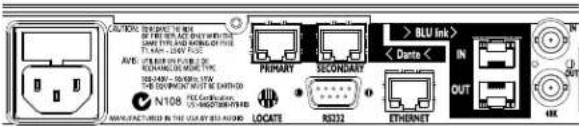
N108 N108 LOCATE RS222 ETHERNET BLU Ink > Dante < IN OUT IN IN IN IN IN IN IN IN IN IN IN IN IN IN IN IN IN IN IN IN IN IN IN IN IN IN IN IN IN IN IN IN IN IN IN IN IN IN IN IN IN IN IN IN IN IN IN IN IN IN InBLU-806 (DA) shown above. BLU-326 (DA) layout is identical.
AC Mains
AC Mains input to the universal switched-mode power supply, operates over a wide range of AC input voltages from 100V to 240V, 50/60Hz.
CobraNet™ Connectors—Primary/Secondary [BLU-800/BLU-320]
CobraNet ^™ is a licensed technology which allows CobraNet ^™ enabled Soundweb London devices to send and receive (simultaneously) up to 32 channels of audio to and from other CobraNet ^™ enabled devices. The CobraNet ^™ compatible devices within the Soundweb ^™ London system are fitted with a Peak Audio Cobranet ^™ CM-1 module. The module itself offers a Primary and a Secondary Cobranet ^™ port. Under normal operation, only the Primary port transmits and receives data to and from the network. Should the Primary port or connection fail, the CM-1 module automatically switches to receive from and transmit with the Secondary port.
AVB [BLU-805/BLU-325]
Ethernet AVB, or Audio/Video Bridging, is a common name for a set of IEEE standards that ensure the transmission of high quality streaming audio and video over a standard Ethernet connection. The BLU-805 and BLU-325 devices are fitted with an AVB module. The module allows Soundweb London devices to send and receive (simultaneously) up to 64 channels of audio to and from other AVB-enabled devices.
The module offers a Primary and a Secondary AVB port. Under normal operation, only the Primary port transmits and receives data to and from the network. Should the Primary port or connection fail, the AVB module automatically switches to receive from and transmit with the Secondary port. NOTE: The Secondary port is not currently enabled. It will be enabled in a future release of HiQnet London Architect. The physical AVB connections must be made using Cat 5e cables and an AVB compatible network switch. See 'Technical Specifications' for compatible Ethernet Switches. Do not connect the AVB ports to any switch which does not support AVB! When connecting only two AVB devices together, a direct connection between devices can be made from the primary of one device to the primary of the other.
Dante™/AES67 [BLU-806 (DA)/BLU-326 (DA)]
Dante™ is a licensed technology from Audinate®. It uses standard Internet Protocols over 100Mb and/or Gigabit Ethernet and is capable of transporting professional quality, low-latency audio. Dante™ runs on inexpensive off-the-shelf computer networking hardware and does not require dedicated network infrastructure; Ethernet switches transmit Dante™ digital media streams alongside ordinary data traffic. The BLU-806 (DA) and BLU-326 (DA) devices are fitted with a Dante™ module. The module allows Soundweb London devices to send and receive up to 64X64 channels of audio at 48 kHz (up to 32X32 channels at 96 kHz) to and from other Dante™-enabled devices. The module offers a Primary and a Secondary Dante™ port.
The Secondary port can be configured for Switched or Redundant operation using the Dante Controller software. When a device is set for Redundant operation, the device will duplicate Dante audio traffic to both Primary and Secondary Ethernet ports. When a device is set for Switched operation, the Secondary Ethernet port will behave as a standard switch port, allowing daisy-chaining through the device. The physical Dante™ connections must be made using Cat 5e or Cat 6 cables when using a Gigabit network (Cat 5 may be used for purely 100Mbps networks). AES67 audio transmission is achieved through the Dante ports on the BLU-806DA and BLU-326DA only. AES67 must be transmitted at 48kHz.
BLU link
The Soundweb London digital audio bus (also informally referred to as "BLU link") is a point-to-point digital audio bus with 256 audio channels at 48K sample rate or 128 audio channels at 96K sample rate. The physical connection is made with Cat 5e cable from the OUT port of one device to the IN port of another device. The devices are connected in a daisy chain fashion continuing with the OUT port of one device connected to the IN port of the next device. Redundancy can be provided by completing the loop and connecting the OUT port

text_image
Soundweb™ Londonfrom the last device to the IN port of the first device in the chain. DO NOT connect BLU link ports to a hub, network switch, or router. All devices connected in the BLU link ring/chain must be configured for the same audio sample rate.
Locate
Pressing the Locate switch on the rear of the unit will illuminate the Locate switch on the front and identify the device within London Architect. Similarly the switch will illuminate if the device is selected from within London Architect or from the Locate switch on the front panel.
RS232
The serial port allows 3rd-party control equipment to control and monitor the Soundweb London. The Soundweb London can also send custom serial strings (in Decimal, Hexadecimal, or ASCII format) through the serial port. Therefore, the Soundweb London can control virtually any device which has a serial port and a publicly available protocol guide.
Ethernet
The main connection for the proprietary system control network. The Ethernet port allows BLU-8v2's, BLU-10's, HiQnet London Architect, iOS devices, and 3rd-party control equipment to control and monitor the Soundweb London. The Ethernet port also allows the Soundweb London to send and receive design files to and from HiQnet London Architect. The Soundweb London can also send custom Ethernet messages (UDP or TCP; in Decimal, Hexadecimal, or ASCII format) through the Ethernet port. Therefore, the Soundweb London can control virtually any device which has an Ethernet port and a publicly available protocol guide.
Word Clock
[Buddy Link or 48k] [BLU-800/BLU-805/BLU-806 (DA)/BLU-320/BLU-325/BLU-326 (DA)]
On CobraNet™ equipped Soundweb London devices, these BNC connectors allow two similarly configured Soundweb London devices to be linked together and operate as a redundant pair. A 48kHz system clock is generated at the BNC OUT port when used in this fashion. If 'Box B' ceases to receive the 48kHz system clock from 'Box A', due to power failure of 'Box A', 'Box B' will take over and begin receiving and transmitting audio over the CobraNet™ network.
These connectors can also facilitate integration with external clocks when using BLU link or Dante ^TM , allowing the Soundweb London devices to sync to a 'house clock', a common requirement in post-production, theatre, and broadcast applications. Synchronizing the Soundweb London internal DSP processing clock to the house clock avoids having to use Sample Rate Conversion on digital signals, resulting in superior audio. The supported sync frequencies are 48 kHz, 48 kHz pull-down (47.952 kHz), 96 kHz, and 96 kHz pull-down (95.904 kHz). Please refer to the London Architect help file for more information. The sample rate at which the Soundweb London device is running will be present on the WORD CLOCK OUT.
NOTE: The BNC WORD CLOCK connectors serve no function when using AVB.
Audio Cable Wiring
All audio and control connections are made via Klippon pluggable terminal block connectors (also known as BL, Phoenix or Combicon). 6-way female Klippon connectors (part number: 32-1226) are supplied for making these connections.
Audio Input & Output Wiring Convention
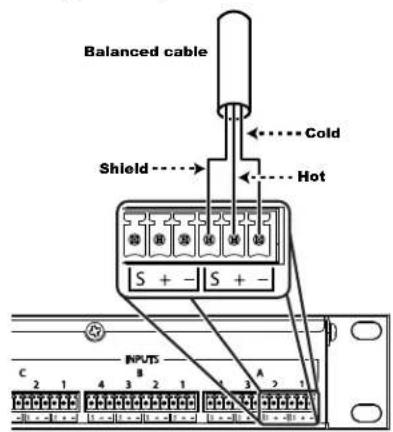
Soundweb products provide cable shielding 'back from the destination' to eliminate ground loop problems. This means that the shield (S) connection on an input is grounded, whereas the shield connection on an output is floating (although connected via an internal network to ground for EMC compliance).
Balanced wiring—The convention for balanced wiring (2-core plus shield) is shown here:
Unbalanced wiring—The convention for unbalanced wiring to the inputs (1-core plus shield) is shown here:
text_image
Balanced cable Cold Shield Hot S + - S + - INPUTS C 2 1 4 3 2 1 4 3 2 1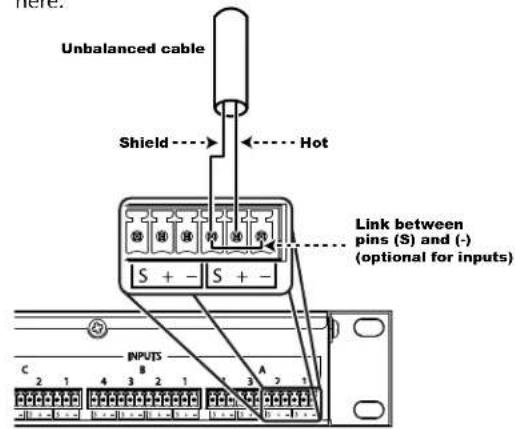
text_image
Unbalanced cable Shield Hot S + - S + - Link between pins (S) and (-) (optional for inputs) INPUTS C 2 1 4 3 2 1 1 3 2 1
I/O Card Positions A, B, C & D
text_image
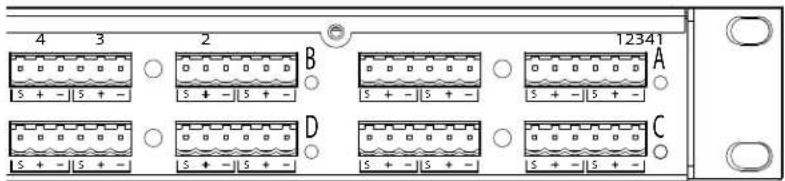
4 3 2 5 + - | 5 + - B 12341 A D C 5 + - | 5 + -These connectors provide the balanced connections for the I/O card fitted in the four card slots in a Soundweb London device. The analogue connections are balanced, on Phoenix/Combicon connectors. A green LED next to the slot assignment letter A, B, C or D indicates that an Input card is fitted and an amber LED when an output card is fitted. Digital input cards are indicated with a blue LED and digital outputs cards with a red LED. AEC input cards are indicated with a white LED. Telephone Hybrid cards are indicated with a yellow LED.
Control Inputs
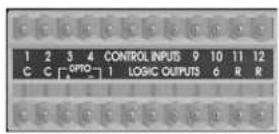
There are 12 control inputs, also known as 'General Purpose Inputs' or 'GPI'. The control inputs are used to connect contact closures (for control of binary parameters, such as mutes), resistor ladders (for control of multistate parameters, such as source selectors) or potentiometers (for control of continuous parameters, such as volume faders). There are two common (ground) connections 'C' to the left of the 12 control inputs, and two software-assignable reference voltage outputs 'R' to the right. The control ports have two modes of operation: 2-wire and 3-wire.
2-Wire Mode
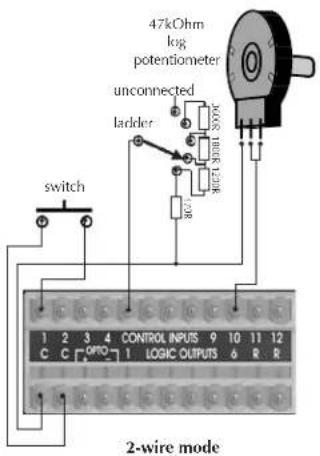
In this mode, the 12 control inputs are internally 'pulled up' to +5V DC via a 4.7kOhm resistor. Therefore, no external voltage source is needed to create contact closure to ground for switches such as mute buttons or, resistance to ground (for other multi-state or continuous controls such as Parameter Presets or faders).
See the Soundweb London help for a table of resistor values for use with Parameter Presets or source selectors.
A 47kOhm-log potentiometer connected between a control input and common will allow parameters to be controlled linearly.
text_image
47kOhm log potentiometer unconnected ladder switch control inputs 9 10 11 12 C C ORIO 1 LOGIC OUTPUTS 6 R R 2-wire mode3-Wire Mode
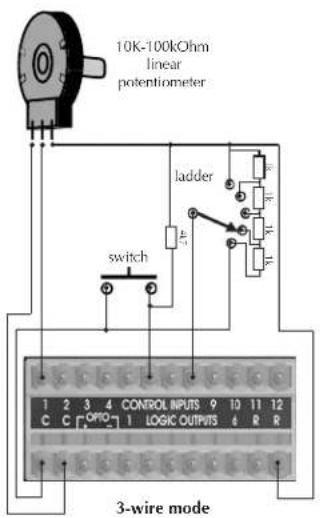
This mode allows the use of linear pots or faders for continuous controls. A pot would be wired as a potential divider with the top of the track connected to the reference output R, the wiper to a control input and the bottom of the track to a common C. High performance pots with track resistance between 10kOhms and 100kOhms are recommended.
text_image
10K-100kOhm linear potentiometer ladder switch 3-wire mode
text_image
Soundweb™ London
text_image
Soundweb™ LondonLogic Outputs
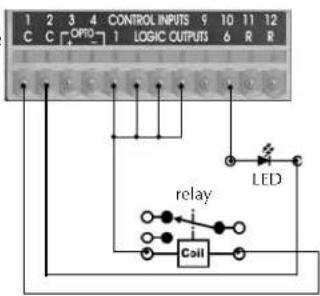
There are 6 logic outputs, also known as "General Purpose Outputs" or "GPO". They are used to control LED's or relays. The logic output can source 10mA at 5V DC, or sink 60mA up to 50V DC.
A high sensitivity relay (such as a reed relay) can be driven by connecting multiple logic outputs in parallel. In the diagram to the right, this arrangement will develop 4V across a 500-Ohm coil, providing that all four outputs are activated simultaneously.
text_image
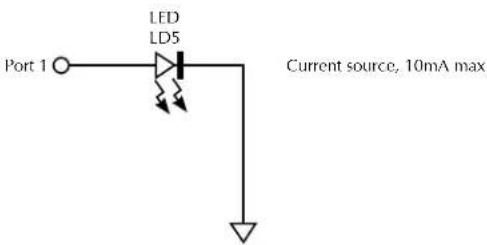
1 2 3 4 CONTROL INPUTS 9 10 11 12 C C OPTIO 1 LOGIC OUTPUTS 6 R R relay Coil LEDWhen sourcing from the Logic Output, an LED connected between one output (Anode, A) and common (Cathode, K) will illuminate when the logic output is activated, without requiring any external current limiting resistor (the Soundweb London contains an internal 440 Ohm resistor).
text_image
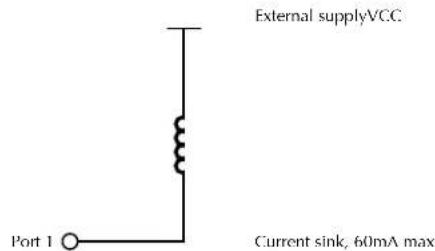
LED LD5 Port 1 Current source, 10mA maxFor higher current reed type relays you must use the Logic Output to sink current using an external power supply.
text_image
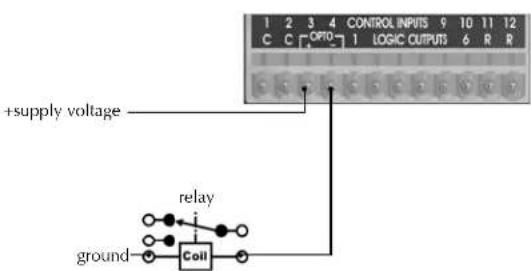
External supplyVCC Port 1 Current sink, 60mA maxOpto Output
In addition to the six standard logic outputs, there is an isolated output, which fails safe (open circuit) if the unit becomes faulty.
text_image
+supply voltage relay ground Coil CONTROL INPUTS 9 10 11 12 C C [OPTO] 1 LOGIC OUTPUTS 6 R R
Technical Specifications
FRONT PANEL LED INDICATORS
INPUT/OUTPUT: Per Input: Signal Present, CLIP, SYNC/48V, I/O card type [IN, OUT, DIG, AEC|BLU-800, BLU-805, BLU-806 (DA), BLU-320, BLU-326 (DA), BLU-325, BLU-160, BLU-120]
OTHER: LCD Display, Conductor active, Net Link active, Data Activity
ANALOGUE INPUTS
CONNECTORS: Up to 16 electronically balanced on Phoenix/Combicon removable screw connectors
MIC/LINE INPUTS: Nominal gain 0dB, electronically switchable up to +48dB, in +6dB steps
INPUT IMPEDANCE: 3.5kOhm
MAXIMUM INPUT LEVEL: +20dBu with 0dB input gain, [+8dBu with 12dB gain]
CMRR: >40dB at 1kHz
EQUIV. INPUT NOISE [EIN]: <-123dBu typ. with 150 Ohms source
PHANTOM POWER: 48V nominal, selectable per input
A/D LATENCY IREV.AI: 41/Fs |0.85ms@48k, 0.43ms@96k|
A/D LATENCY IREV. BI: 12/Fs [0.25ms@48k, 0.13ms@96k]
A/D BIT DEPTH: 24-bit
DIGITAL INPUTS
CONNECTORS: Up to 16 AES/EBU or S/PDIF on Phoenix/Combicon removable screw connectors
INPUT IMPEDANCE: 110 ohm [AES/EBU], 75 ohm [S/PDIF]
SAMPLE RATE: 48kHz or 96kHz
SAMPLE RATE CONVERSION: 8kHz-96kHz
THD+N: <-140dB
LATENCY: 3/Fso + [56.581/Fsi] + [55.658/Fso]
AEC ANALOGUE INPUTS
CONNECTORS: Up to 16 electronically balanced on Phoenix/Combicon removable screw connectors
MIC/LINE INPUTS: Nominal gain 0dB, electronically switchable up to +48dB, in +6dB steps
INPUT IMPEDANCE: 3.5kOhm
MAXIMUM INPUT LEVEL: +20dBu with 0dB input gain, +8dBu with 12dB gain
CMRR: >75dB at 1kHz
EQUIV. INPUT NOISE (EIN): <-128dBu typical with 150 Ohms source
PHANTOM POWER: 48V nominal, selectable per input
PRE-AEC INPUT LATENCY: 38/Fs [0.79ms@48k]
POST-AEC INPUT LATENCY: (Original 8k Algorithm): 2385/Fs [49.68ms@48k]
(Full Bandwidth Algorithm): 1609/Fs [33.52ms@48k]
TAIL LENGTH: 200 ms
CONVERGENCE RATE: 49 dB/s [Average convergence rate]
TELEPHONE INTERFACE. ANALOGUE INPUTS
CONNECTORS: 2 electronically balanced on Phoenix/Combicon removable screw connectors
MIC/LINE INPUTS: Nominal gain 0dB, electronically switchable up to +48dB, in +6dB steps
INPUT IMPEDANCE: 3.5kOhm
MAXIMUM INPUT LEVEL: +20dBu with 0dB input gain, +8dBu with 12dB gain, balanced, 150 ohm
CMRR: >75dB at 100Hz, >66dB at 1kHz
EQUIV. INPUT NOISE IEINI: <-128dBu typical with 150 Ohms source, 20kHz, +48dB gain
PHANTOM POWER: 48V nominal, selectable per input
A/D LATENCY: 12/Fs [0.25ms@48k]
TELEPHONE INTERFACE
AC-REN: 0.0B
DYNAMIC RANGE: 67 dB
FREQUENCY RESPONSE: 300 to 3.3kHz
THD: <0.3%
TRANSHYBRID LOSS: >48 dB with LEC enabled
LEC TAIL TIME: 64ms
TX LEVEL: -10dBm RMS average
RX LEVEL: +3.2dBm RMS
ANALOGUE OUTPUTS
CONNECTORS: Up to 16 electronically balanced on Phoenix/Combicon removable screw connectors
OUTPUT IMPEDANCE: 40 Ohms balanced, 20 Ohms unbalanced
MAXIMUM OUTPUT LEVEL: +19dBu
FREQUENCY RESPONSE: 20Hz to 20kHz [+0.5/-1dB]
THD: <0.01% [20Hz to 20kHz, +10dBu output]
DYNAMIC RANGE: 108dB typ. |22Hz to 22kHz unweighted|
CROSSTALK: <-75dB
D/A LATENCY: 28/Fs |0.58ms@48k, 0.29ms@96k|
D/A BIT DEPTH: 24-bit
DIGITAL OUTPUTS
CONNECTORS: Up to 16 AES/EBU or S/PDIF on Phoenix/Combicon removable screw connectors
OUTPUT IMPEDANCE: 110 ohm [AES/EBU], 75 ohm [S/PDIF]
SAMPLE RATE: 48kHz or 96kHz
SAMPLE RATE CONVERSION: 8kHz-96kHz
THD+N: <-140dB
LATENCY SRC OFF: 6/Fs [0.13ms@48k, 0.06ms@96k]
LATENCY SRC ON: 60/Fs [1.25ms@48k, 0.63ms@96k]
CONTROL PORTS
NUMBER OF PORTS: 12 inputs and 6 outputs
CONTROL INPUT VOLTAGE: 0 to 4.5v
CONTROL INPUT IMPEDANCE: 4.7kOhms to +5V [2-wire mode] >1MOhm [3-wire mode]
LOGIC OUTPUT VOLTAGE: 0 or +5V unloaded
LOGIC OUTPUT IMPEDANCE: 440 Ohm
LOGIC OUTPUT CURRENT: 10mA source, 60mA sink
WATCHDOG OUTPUT
CONNECTOR: Phoenix/Combicon connector for failsafe control
OPTO OUTPUT CURRENT: 14mA maximum
WITHSTANDING VOLTAGE: 80V maximum [Off]
SERIES IMPEDANCE: 220 Ohms [isolated]
CONTROL NETWORK
CONNECTORS: RJ45 Ethernet connector
MAXIMUM CABLE LENGTH: 100m/328ft on Category 5 cable between device and Ethernet switch
BLU LINK AUDIO NETWORK [BLU-800, 320, 160, 120]
CONNECTORS: 2 x RJ45 Ethernet connectors
MAXIMUM CABLE LENGTH: 100m/328ft on Category 5e cable between devices
LATENCY: 11/Fs [0.23ms@48k, 0.11ms@96k]
PASS THROUGH LATENCY: 4/Fs [0.08ms@48k, 0.04ms@96k]
COBRANET™ AUDIO NETWORK IBLU-80, 32, 800, 3201
CONNECTORS: 2 x RJ45 connectors
MAXIMUM CABLE LENGTH: 100m/328ft on Category 5 cable between device and Ethernet switch
LATENCY: 1.33ms-5.33ms
DANTE/AES67 AUDIO NETWORK IBLU-806 (DA), 326 (DA)
CONNECTORS: 2 x RJ45 connectors
MAXIMUM CABLE LENGTH: 100m/328ft on Category 5 (100Mbps) or Category 5e/Category 6 (Gigabit) cable between devices
LATENCY: 0.15ms-5.0ms
AVB AUDIO NETWORK [BLU-805, 325]
CONNECTORS: 2 x RJ45 connectors
MAXIMUM CABLE LENGTH: 100m/328ft on Category 5e cable between device and AVB compliant Ethernet switch
SAMPLE RATE: 48kHz
LATENCY: 0.5ms-2.0ms
COMPATIBLE AVB SWITCHES: BSS Audio/NETGEAR GS724T Ethernet Switch LABX Titanium 411 Ruggedized AVB Ethernet Bridge Switch
![BSS Audio Soundweb London BLU806DA - AVB AUDIO NETWORK [BLU-805, 325] - 1](/content/2026/03/564581/images/94a4c45da1c1fa788f9e546d0eb2186a6c5ebaa72d729f50762a9033f6fa7b9f.jpg)
POWER/TEMPERATURE
MAINS VOLTAGE: 100-240V AC, 50/60Hz
POWER CONSUMPTION: <35VA |BLU-80, 32, 16|; <55VA |BLU-800, 805, 806 (DA), 320, 325, 326 (DA), 160, 120|
BTU RATING: <120 BTU/hr [BLU-80, 32, 16]; <188 BTU/hr [BLU-800, 805, 806 (DA), 320, 325, 326 (DA),
160, 120]
OPERATING TEMPERATURE RANGE: 0° to 45°C [32" to 113"F]
PHYSICAL [BLU-120/160/320/325/326 (DA)/800/805/806 (DA)]
RACK SPACE: 1U
DIMENSIONS (H X W X D): 1.75" x 19" x 12.5" (45mm x 483mm x 318mm)
WEIGHT: 9 lbs / 4.1 kgs (estimated)
![BSS Audio Soundweb London BLU806DA - PHYSICAL [BLU-120/160/320/325/326 (DA)/800/805/806 (DA)] - 1](/content/2026/03/564581/images/7c4c3b733958c8a36612b054e4316086af1279a86ef068d757820f7093b56c2a.jpg)
text_image
Soundweb™ LondonBSS Audio incorporates high quality mechanical fans in some products. All mechanical fans have a limited life expectancy. We recommend annual inspection of fans for dust occlusion and excessive noise. Fan assemblies should be replaced after six to ten years of use. Environmental factors such as elevated temperature, dust, and smoke can adversely affect fan life. Systems exposed to these conditions should be inspected more frequently. Fan replacement can be performed either at the factory or by an experienced technician in the field. Please contact BSS Technical Support for more information on purchasing replacement parts or product service.
BSS Audio has a policy of continued product improvement and accordingly reserves the right to change features and specifications without prior notice.
![BSS Audio Soundweb London BLU806DA - PHYSICAL [BLU-120/160/320/325/326 (DA)/800/805/806 (DA)] - 2](/content/2026/03/564581/images/d594e113ba9983a7ca17e417b977b7acb678ec7b97e0e6c49ddd0152ff0dea68.jpg)
![BSS Audio Soundweb London BLU806DA - PHYSICAL [BLU-120/160/320/325/326 (DA)/800/805/806 (DA)] - 3](/content/2026/03/564581/images/5d049b6454bea5586e228e9d377340fe749231ff262cf277804409c72743db4a.jpg)
text_image
BSS® by HARMANPhone: (801) 566-8800
Website: bssaudio.com
Support: bssaudio.com/en-US/support
BSS Audio is a registered trademark of HARMAN
© 2017 HARMAN
All rights reserved
Printed in Malaysia