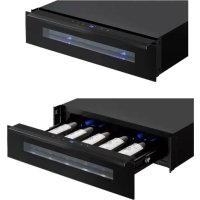
PVMC 155 - Beverage fridge Pando - Free user manual and instructions
Find the device manual for free PVMC 155 Pando in PDF.



| Product Type | Wine cooler (wine cellar) |
| Brand | Pando |
| Model | PVMC 155 |
| Dimensions (H x W x D) | 595 x 525 x 557 mm (approx.) |
| Weight | Approx. 30 kg (estimate) |
| Electrical Supply | 220-240 V, 50/60 Hz, dedicated 13 A circuit |
| Temperature Range | 5 °C to 20 °C (41 °F to 68 °F) |
| Bottle Capacity | Up to 5 bottles (max diameter 92 mm) |
| Interior Lighting | Multicolor LED (amber, white, blue) with functional and display modes |
| Display | LED screen with temperature indicator |
| Special Functions | DynaClima, silent mode, Sabbath mode, Eco Demo mode, temperature and door alarms |
| Refrigerant | R600a (isobutane), CFC-free |
| Climate Class | SN, N, ST, T (from +10 °C to +43 °C) |
| Installation | Built-in (column or drawer) – requires ventilation |
| Maintenance and Cleaning | Interior cleaning with baking soda, exterior with mild detergent, automatic defrost |
| Air Filter | Activated carbon filter (annual replacement) |
| LED Lighting | Not user-replaceable – contact customer service |
| Safety | Mandatory grounding, child lock, gas leak protection |
| Warranty | 3 years (parts and labor) |
| After-Sales Service | Pando website: www.pando.es/en/after-sales-service/ |
Frequently Asked Questions - PVMC 155 Pando
User questions about PVMC 155 Pando
0 question about this device. Answer the ones you know or ask your own.
Ask a new question about this device
Download the instructions for your Beverage fridge in PDF format for free! Find your manual PVMC 155 - Pando and take your electronic device back in hand. On this page are published all the documents necessary for the use of your device. PVMC 155 by Pando.
USER MANUAL PVMC 155 Pando
natural_image
Modern kitchen interior with white cabinetry, a black oven, and a set of glass jars and fruit (no visible text or symbols)PVMC 15-5
PVMC 15-5 PA
Pando
integralcooking
VINOTECA DE CAJÓN
Drawer wine cooler

User manual - EN Certificate of Guarantee

Pando
integralcooking
CAMPANASDECORATIVAS
HORNOS&MICROONDAS
Certificate of registration of carbon footprint, offsetting and CO2 absorption projects of the Ministry for Ecological Transition and Demographic Challenge (MITERD).
The Global Kitchen Partner
Images and content in this handbook is of exclusive property of Pando - INOXPAN S.L, for which it is completely forbidden the use of images as well as total or partial reproduction without previous authorisation in written.
LAS IMÁGENES MOSTRADAS EN ESTE MANUAL NO SON CONTRACTUALES.
THE IMAGES SHOWN IN THIS HANDBOOK ARE NOT CONTRACTUAL
Pando Technical Management reserves the right to modify, alter or improve any technical drawings exposed in this handbook without previous warning.
natural_image
Symbol of a discarded bin with crossed lines indicating no waste or plastic (no text or labels)
TRATAMIENTO DEL RESIDUO
pared. Nunca tire del cable.
natural_image
Diagram of a rectangular device with airflow indicators and sensor symbols, no readable text or labels presentnatural_image
Line drawings of six identical bottles arranged in two rows, each with a blank top panel (no text or symbols)Modo Eco Demo
natural_image
Technical line drawing of a mechanical assembly with an inset close-up showing a component detail (no text or symbols)
natural_image
Technical line drawing of a mechanical assembly with an inset close-up showing internal components (no text or symbols)natural_image
Diagram of a circular mechanical component with internal holes and directional arrows indicating rotation (no text or symbols)natural_image
Symbol of a waste bin with no text or labels
natural_image
Diagram of a rectangular frame with directional arrows and snowflake symbols at corners (no text or labels)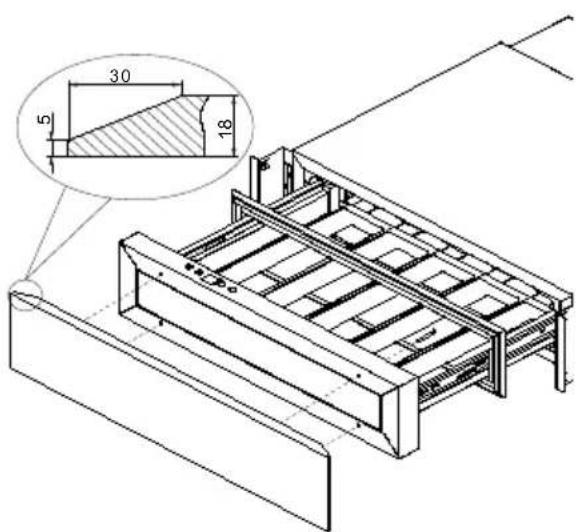
Ligação eléctrica
natural_image
Line drawings of six identical bottles arranged in two rows, each with a different shape and internal structure (no text or symbols)natural_image
Technical line drawing of a mechanical assembly with an inset close-up showing internal components (no text or symbols)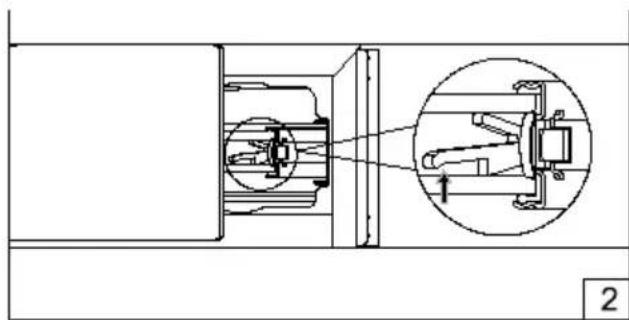
natural_image
Technical line drawing of a mechanical assembly with an inset close-up showing internal components (no text or symbols)Filtro de ar de carvão ativo
natural_image
Diagram of a circular device with internal components and bidirectional arrows indicating rotation (no text or symbols)Falha de energia
https://www.pando.es/en/after-sales-services/
FR
natural_image
Symbol of a trash bin crossed out by two crossed lines, with no text or labels present.
TRAITEMENT DES DÉCHETS
natural_image
Diagram of a rectangular frame with directional arrows and surrounding symbols, no readable text or labels present.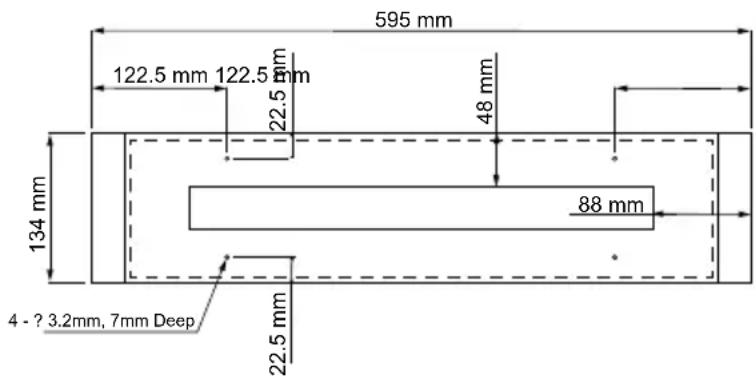
natural_image
Five identical line-drawn bottles arranged in a row, no text or symbols present
natural_image
Line drawing of five identical rectangular containers with pointed ends, arranged horizontally (no text or symbols)natural_image
Technical line drawing of a mechanical assembly with an inset close-up showing internal components (no text or symbols)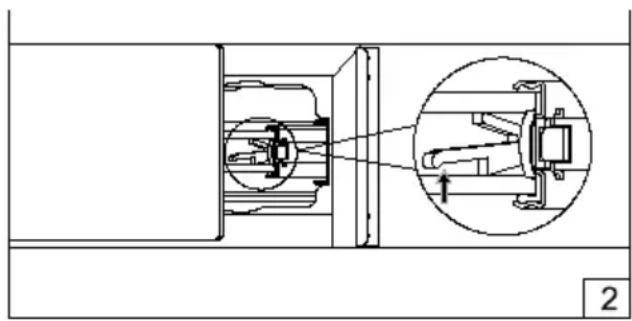
natural_image
Technical diagram of a mechanical assembly with an inset showing a close-up of a component (no text or labels present)natural_image
Diagram of a circular mechanical component with internal components and bidirectional arrows indicating rotation (no text or symbols)Coupure de courant
https://www.pando.es/en/after-sales-services/
FR
Pando reserves the right to change or cancel any measures of the articles in the manual without prior notice, without affecting the essential characteristics of functionality and safety, and is not responsible for any errors or omissions that may occur in the manual.
Technical specifications valid except for typographical errors, omission, or printing. The images and content of this manual are the exclusive property of Pando - INOXPAN S.L., and any appropriation of images and total or partial reproduction without prior written authorization is strictly prohibited.
THE IMAGES SHOWN IN THIS MANUAL ARE NOT CONTRACTUAL.
Pando's Technical Management reserves the right to modify, alter, or improve the technical drawings displayed in this manual without prior notice.
The paper version of this manual cannot be updated in real-time, to ensure the latest version of your product's instructions, we recommend consulting the digital version at www.pando.es
First of all, we would like to thank you for the trust you have placed in our company by purchasing one of our products.
For purchasing one of our products. We are sure that you have made the right decision.
At Pando, not only do we offer top quality products, but we also have a large team of professionals who will help you and advise you on any queries you may have during installation or operation.
To get to know us better, we invite you to visit our website (www.pando.es) where you can see our full range of products with the most up to date commercial and technical information.
Here you will find a wide selection of Decorative Hoods; wall-mounted, ceiling-mounted, island, integrated into furniture and integrated into the hob.
This variety allows us to adapt to any style of kitchen.
We also show you our collection of essential appliances in any home.
Appliances such as our collection of high-performance Ovens and Microwaves with high performance, Induction and Gas Hobs that will help you to make the best recipes, Wine Cellars and Ageing Cellars to maintain and preserve your wines in the best conditions, Dishwashers with the most modern technology and our with the most up-to-date technology and our range of Refrigerators and Freezers with Freezers and Refrigerators for panel integration together with those for free installation.
All this under a brand with a very long trajectory of more than 40 years in the sector, which manufactures its products as a sector, which manufactures its products like a true craftsman. Bringing the best of our experience to everything we do.
We sincerely hope you have fun, experience and enjoy the comfort and capabilities of what is already your new capabilities of what is already your new kitchen ally.
Thank you Pando team
ENVIRONMENTAL PROTECTION
The symbol on the product or its packaging indicates that this product cannot be disposed of like normal domestic waste. The product must be handed over at a collection point for recycling electrical and electronic equipment. If you ensure that this product is correctly disposed of, you will help to avoid the possible negative environmental and public health effects that could arise from incorrect disposal. For more detailed information about recycling this product, please contact your city authorities, the domestic waste service or the establishment where you purchased it. This electrical appliance is marked in compliance with European Directive 2012/19/EU on electrical and electronic appliance waste (WEEE).
COLLECTION OF HOUSEHOLD APPLIANCES

natural_image
Symbol of a trash bin crossed out by two crossed lines, with no text or labels present.
WASTE TREATMENT
DISPOSAL OF THE PACKAGING. The packaging is marked with in Green Dot.
In its commitment to the protection of the environment and in compliance with the provisions of the European Directive 94/62 / EC on packaging and packaging waste and the derived Law 22/2011 on Waste and Contaminated Soil, Pando entrusts entities of social economy an Integrated Management System, responsible for the periodic collection at the consumer's home or in its vicinity of used packaging and packaging waste for subsequent treatment.
To remove all packaging materials such as cardboard, expanded polyurethane, and film, use the appropriate containers.
This ensures the correct treatment and reuse of packaging materials.
INDEX
SAFETY WARNINGS....107
INSTALLATION....111
Before Installing the Appliance ....111
Product Dimensions....112
Integrated Wine Coolers In Column....112
Wine Coolers Integrated Drawer 114
Overlay Panel Installation Instructions....115
Door panel installation....115
Electrical Connection....116
Mains Connection for UK and IRL 116
USING THE WINE COOLERS....118
Operation....118
Display....118
ON/OFF 118
Light - 118
Plus +....119
Minus 119
Display....119
Indicator light / Multi-key function 119
Setting the temperature control....119
Settings mode....119
Multicolour function....119
°F/°C Selection 120
Display Brightness....120
Interior lighting brightness 120
Fan mode 120
Audible Tones....120
Temperature Indicator....121
Temperature Memory Function....121
Temperature Alarm 121
Door Alarm....121
Interior Light....122
Dynaclima / Silent Mode 122
Sabbath mode 122
Eco Demo Mode....122
Bottles And Storage....123
OPERATING NOISES....123
DEFROSTING / HYGROMETRY / VENTILATION....124
VACATION 125
TRANSPORTING THE APPARATUS....125
TABLE OF WINE SERVING TEMPERATURES......125
ENERGY SAVING TIPS....126
CARE AND MAINTENANCE....127
Cleaning the Appliance....127
Drawer Removal....127
Active Carbon Air Filter....128
Power Failure....128
TROUBLESHOOTING GUIDE....129
GUARANTEE....132
SAFETY WARNINGS
Please read these instructions carefully. This is the only way to use your appliance safely and correctly. We strongly recommend that you keep the operating instructions and installation instructions for future use or for subsequent owners.
Please note that ....
The appliance is intended to be used for the storage of wine. Use this appliance only as described in this manual. Other uses not recommended may cause fire, electric shock or personal injury.
This appliance can be used by children aged from 8 years and above and persons with reduced physical, sensory or mental capabilities or lack of experience and knowledge if they have been given supervision or instruction concerning use of the appliance in a safe way and understand the hazards involved. Children shall not play with the appliance.
According to IEC standards: this appliance is not intended for use by persons (including children) with reduced physical, sensory or mental capabilities or lack of experience and knowledge, unless they have been given supervision or instruction concerning use of the appliance by a person responsible for their safety. Children should be supervised to ensure that they do not play with the appliance. Always keep the device out of the reach of children. Keep the mains cable out of the reach of children. Do not let the mains cable hang over the edge of the table or worktop where the appliance is placed. Cleaning and maintenance shall not be made by children without supervision.
Children between the ages of 3 to 8 years are allowed to charge and discharge the cooling appliances.
To protect against the risk of electric shock, DO NOT immerse the unit, cord or plug in water or spray any other liquid.
Unplug appliances from the wall outlet when not in use, when moving from place to place, and before cleaning.
To disconnect the appliance, grasp the plug and pull it from the wall outlet. Never pull on the cord.
CAUTION: Please keep the appliance away from substances which can cause ignition. from substances, which may cause ignition. Do not operate the appliance in the presence of explosive gases and /or or flammable gases.
Do not place the appliance or any part of it near an open flame, cooker or other heating appliance
Do not operate the appliance with a damaged cord or plug, if the product is not working, or if it has been dropped or damaged in any way. If the power supply cord is damaged, it must be replaced by the manufacturer, an authorized service centre or similarly qualified persons in order to avoid a hazard.
The use of attachments or accessories not recommended by the manufacturer may be dangerous.
Place the unit on a dry, level surface.
Do not operate if the casing is removed or damaged.
A poor connection between the AC mains (wall) socket and the plug may cause overheating and deformation of the plug.
Contact a qualified electrician to replace the wall socket if it is loose or damaged.
Place the unit away from direct sunlight and heat sources (cooker, heater, radiator, etc.)
WARNING: This appliance is free of CFC and HFC gases and contains small amounts of isobutane (R600a), which is environmentally friendly but flammable. It does not damage the ozone layer, nor will it increase the greenhouse effect. Care must be taken during transport and commissioning of the machine to ensure that no parts of the refrigeration system are damaged. Leaking refrigerant can ignite and can damage the eyes.
In the event of refrigerant leakage, if the appliance is located in a small room, there is a danger that combustible gases will spread around the room. For every 8 g of refrigerant, at least 1 cubic metre of room space is required. The amount of refrigerant in the appliance is indicated on the rating plate inside the appliance.
It is dangerous for anyone other than an authorised service technician to carry out maintenance or repair work on this appliance.
WARNING: Keep ventilation openings, on the appliance or the integrated structure, free of obstructions. No liability will be accepted for any damage incurred due to misuse of the appliance or as a result of repairs carried out by unqualified personnel. In this case neither the warranty nor any other liability claims will be valid.
WARNING: Do not use mechanical devices or other means to accelerate the defrosting process other than those recommended by the manufacturer.
WARNING: Do not damage the refrigerant circuit. Never use an appliance with a damaged circuit.
WARNING: Do not use any electrical appliances inside the food compartment of the appliance, unless they are of the type recommended by the manufacturer.
WARNING: To avoid danger due to instability of the appliance, this appliance must be fixed in accordance with the instructions.
CAUTION: Please keep products away from fire or abrasive substances before installing the refrigerator.
WARNING: DO NOT store explosive substances such as aerosol cans with a flammable propellant in this appliance.
WARNING: When installing the appliance, ensure that the power cord is not trapped or damaged.
WARNING: Do not locate portable plugs, extension cords, or portable power supplies on the back of the unit.
To avoid contamination of stored products, observe the following instructions:
- Opening the door for extended periods of time may cause a significant temperature rise in the appliance compartments.
- Regularly clean surfaces that may come into contact with accidental liquid spills.
- If the refrigeration appliance is left empty for prolonged periods, switch off, defrost, clean, dry and leave the door open to prevent the formation of mould in the appliance.
The wine cooler is not intended for food preservation. The recommended use is for the preservation of bottled liquids.
This appliance is intended for DOMESTIC use and is NOT recommended for INDUSTRIAL use.
Do not attempt to repair or replace any part of this product unless specifically recommended in this manual. Any other service should be performed by a qualified technician.
Replace all panels after servicing before operating.
Use two or more people to move and install the appliance. Failure to do so may damage your back and/or result in other injuries.
Never clean parts of this appliance with flammable liquids.
Their vapors may cause a risk of fire or explosion. And do not store or use gasoline or other flammable liquids in the vicinity.
Their vapors may cause fire or accidental explosion.
Do not connect or disconnect the electrical plug with wet hands.
If equipped with a locking device, do not keep the key near the appliance or within reach of children.
A separate circuit, serving your appliance only, is recommended. Use mains sockets that cannot be switched off with a switch.
WARNING: To reduce the risk of fire, electric shock or personal injury, unplug or disconnect the appliance from the power supply before servicing.
SAVE THESE INSTRUCTIONS
If you are experiencing problems, refer to the Troubleshooting Guide at the back of this manual. It lists the causes of minor operating problems, which you can correct yourself.
PACKAGING AND END OF LIFE
You must dispose of the packaging of the appliance properly. Make sure that plastic wrappings, bags, etc. are disposed of in a safe manner and kept out of the reach of babies and small children.
CHOKING HAZARD!
Refrigeration equipment must be disposed of properly in a professional and appropriate manner, in accordance with current local regulations and laws protecting the environment. This applies to unserviceable devices and also
for your new unit once it has rea- ched the end of its service life.
WARNING: Make sure that old used appliances cannot be used after disposal by removing the doors, removing the plug, cutting the mains cable, and removing or destroying any spring-loaded fasteners or screws. This will prevent children from being locked in the appliance during play (risk of suffocation) or otherwise endangering their lives.
DO NOT dispose of the appliance in landfills with the insulation (cyclopentane) and refrigerant gas (R600a) contained in these appliances, as they are flammable.
DISPOSAL INSTRUCTIONS:
The appliance must not be disposed of in the rubbish or with normal household waste.
The cooling circuit, in particular the heat exchanger at the rear / bottom of the unit, must not be damaged.
INSTALLATION
Before Installing the Appliance
Remove all outer and inner packaging. Wipe the inside surface with warm water using a soft cloth.
The unit may have residual odours at first, these will disappear as the unit cools down.
-
Before connecting the appliance to the mains, leave it in an upright position for at least 24 hours. This will reduce the possibility of a malfunction in the refrigeration system caused by handling during transport to ensure that oil flows back to the compressor. During this time, we recommend that you leave the door open to remove any residual odours.
-
Install the handle on the door if necessary.
- WARNING: Do not store or install the unit outdoors. The unit is for indoor use only.
- WARNING: Do not install the appliance in the laundry room.
- WARNING: Avoid placing the appliance in damp areas.
- WARNING: Place the appliance on a surface strong enough to support the weight of the unit when it is fully loaded.
- WARNING: Check that the base on which the drawer will sit is clean and
level (use a spirit level). This is important for the unit to operate correctly.
- Insert the drawer into the housing unit and ensure that it is correctly aligned in the unit.
- Open the drawer and secure it to the side walls of the housing with the 4 screws provided.
NOTES:
- It is essential to maintain a 5 mm clearance on each side and at the top to ensure proper access and ventilation for servicing.
- Take care that the air outlet around the appliance is not covered or blocked in any way.
- Direct sunlight can affect the acrylic coating and heat sources can increase power consumption. Extremely cold ambient temperatures may also cause the unit to malfunction.
- Plug the unit into a dedicated, easily accessible power outlet. If you have any questions about power and/or grounding, contact a qualified electrician or an authorized service centre.
- The appliance must be installed with all electrical, plumbing, water and drain connections in accordance with state and local codes.
- IMPORTANT: VERY HUMID WEATHER. During periods of high humidity, some condensation may appear on the outside surface of the glass door. This condensation will disappear when humidity levels drop. To
avoid this, it is advisable to install the unit with sufficient ventilation in a dry and/or air-conditioned location.
NOTE: The appliance should be positioned so that the plug is accessible.
Product Dimensions

Integrated Wine Coolers In Column
The unit has an integrated ventilation system to disperse warm air automatically. The ventilation channels must have a minimum cross section of 200 square centimetres as the unit door almost completely seals the installed unit.
After installation, make sure that the unit door opens and closes properly.
IMPORTANT: To ensure correct operation of the appliance, the ventilation openings must never be blocked or covered.
Please refer to the diagrams on the following page.
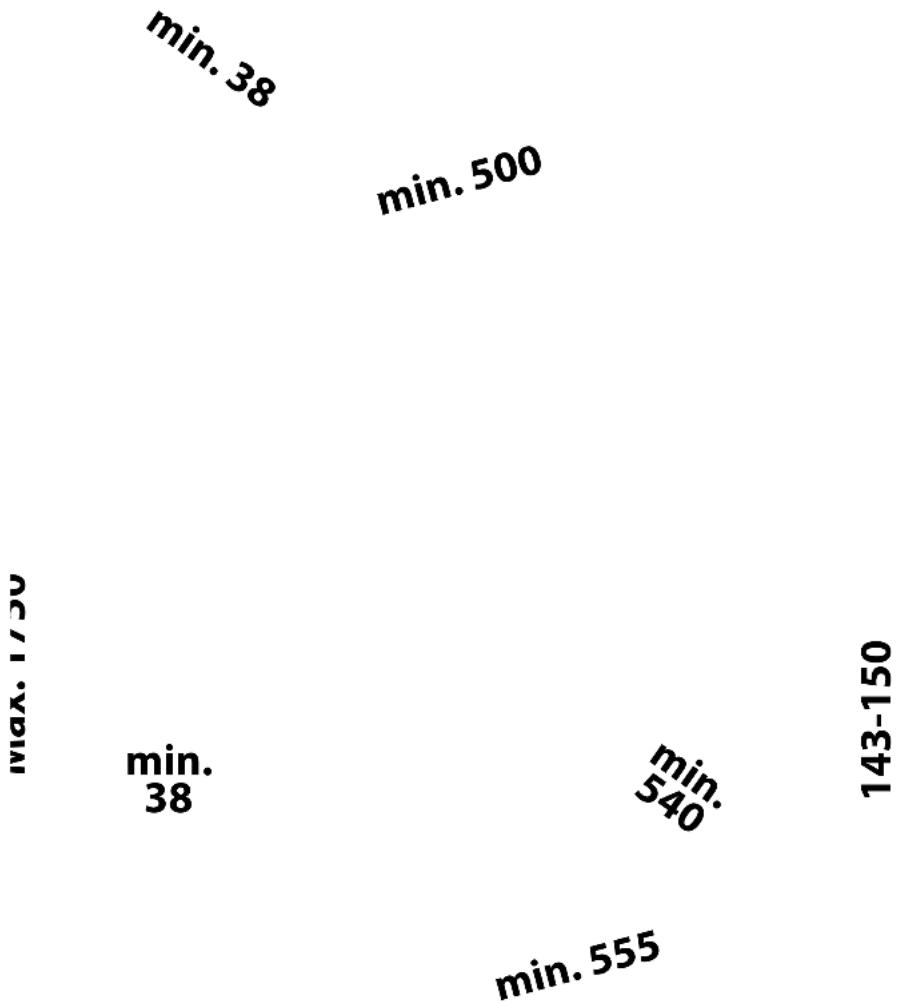
scatter
| Label | Value | |---|---| | min. 38 | min. 38 | | min. 500 | min. 500 | | max. 1750 | max. 1750 | | min. 38 | min. 38 | | min. 540 | min. 540 | | min. 555 | min. 555 | | 143-150 | 143-150 |Wine Coolers Integrated Drawer
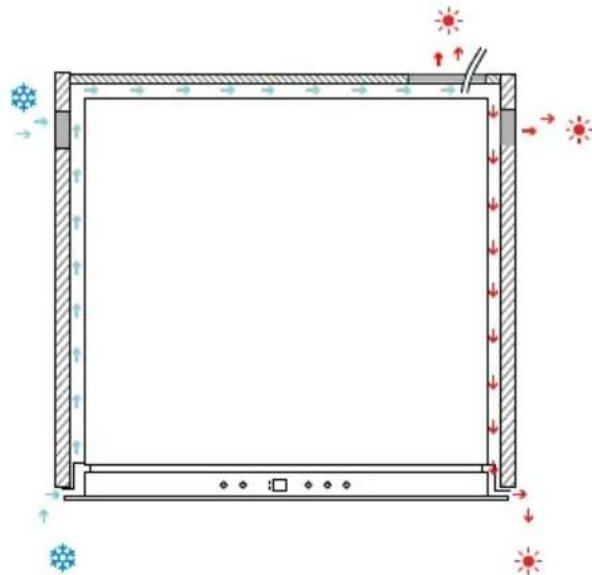
Integrated automatic ventilation system
The air at the rear of the unit is heated. The air inlet is on the right side of the drawer door and the cabinet, and the air outlet is on the rear and left side of the cabinet and on the right side of the door.
natural_image
Diagram of a rectangular frame with directional arrows and snowflake symbols, no text or labels presentA cutout of 100-200 x 140 mm is required on the right rear of the cabinet and two circular cutouts of 50 mm diameter on both sides of the cabinet for ventilation and the passage of the power cable. The air inlet and outlet must not be covered or blocked in any way. They should also be cleaned regularly from dust.
After installation, make sure that the appliance door opens and closes properly.

If there are any gaps at the top of the unit or between the rear wall of the unit and the back plate of the casing, use the supplied sponge to seal as in the figure below to create the ventilation channel.
WARNING: If the ventilation gaps indicated are not observed, the compressor will run more frequently and for longer periods of time. This will result in higher energy consumption and higher operating temperature for the compressor. This can, in turn, lead to damage to the compressor. It is imperative that the ventilation gaps indicated are observed.
Overlay Panel Installation Instructions
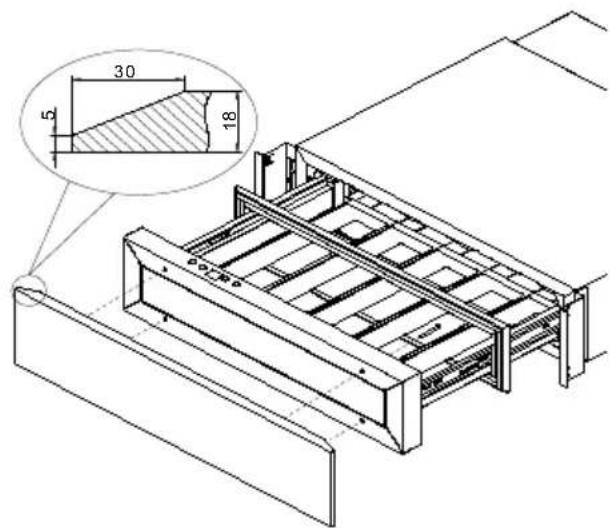
Prepare the overlay panel with the dimensions shown below. Then attach the handle to the overlay panel using the flat head screws and flush with the panel if necessary.
NOTES:
- The weight of the overlay panel should not exceed 2 kg.
- It is important to ensure that all holes are of the correct depth to prevent the wood/panel from cracking or tearing when installing the unit.
- Drill the handle installation holes in the overlay panel according to the handle you intend to use.
Door panel installation Door panel installation
- Remove the glass door seal completely. Start at one corner and pull outwards. This may require some force.
- Attach the wooden overlay panel to the glass door using the four ST4x48 Type AB Philips wood screws (3).
- Replace the door seal as usual.

Electrical Connection
WARNING: Improper use of the earthed plug may result in a risk of electric shock. If the power cord is damaged, it must be replaced by a qualified electrician or authorised service centre.
All electrical work must be carried out by a suitably qualified and competent person in accordance with
local and national safety regulations.
Check that the voltage indicated on the product corresponds to its supply voltage.
Connect this appliance to a separate circuit of at least 13A.
Connection must be made through a suitable and easily accessible switched socket outlet. For added safety, it is recommended to install a residual current device (RCD) with a trip current of 30 mA.
Have the socket and circuit checked by a qualified electrician to ensure that the socket is properly grounded.
Note: In places where lightning is frequent, it is advisable to use surge protectors.
Do not connect the appliance to the mains by means of an extension cord. Extension cords do not guarantee the necessary safety of the appliance (e.g. danger of overheating).
The appliance must not be used with a plug adapter, which may damage the electronic unit of the appliance.
The cable must be securely fastened behind the appliance and must not be left lying or hanging unprotected.
WARNING:
THIS APPARATUS MUST BE GROUNDED.
Mains Connection for UK and IRL
Check that the voltage marked on the product corresponds with your supply voltage. This product is fitted with a 13A plug complying with BS1363.
If this plug is unsuitable or needs to be replaced, please note the following:
WARNING:
THIS APPLIANCE MUST BE EARTHED.
Important: The wires in the mains lead are coloured in accordance with the following code:
This appliance is equipped with a plug fitted with a 13 amp fuse. Should the fuse fail, then it must be replaced with an ASTA approved fuse (conforming to BS1362) of the same rating. If you need to replace the plug or if the plug is of the incorrect type for your socket, remove it and replace it with an appropriate type. Dispose of the old plug safely.
As the colours of the wires in the mains lead of this appliance may not correspond with the coloured markings identifying the terminals in your plug, proceed as follows: The GREEN/YELLOW wire is the EARTH and must be connected to the terminal which is marked with the letter 'E' or by the earth symbol or coloured GREEN or GREEN/YELLOW.
The BLUE wire is the NEUTRAL and must be connected to the terminal which is marked with the letter 'N' or coloured BLACK. The BROWN wire is the LIVE wire and must be connected to the terminal which is marked with the Letter 'L' or coloured RED.
Always ensure that the plug cord grip is fastened correctly.
Code Rev. E 20240724 (IEC)
If in doubt consult a qualified electrician who will be pleased to do this for you. This product conforms to all stutatory safety standards.
NON-REWIREABLE MAINS PLUG
If your appliance is supplied with a non-rewireable plug fitted to the mains lead, you will find that it incorporates a fuse, the value of which is indicated either on the base of the plug or on the fuse carrier. Should the fuse need replacing, you must use an ASTA approved one (conforming to BS1362) of the same rating.
If the fuse cover is lost, the plug must not be used until a replacement is obtained from an electrical supplier.
If you need to remove the plug, cut it from the mains lead and immediately dispose of it. Never attempt to re-use this plug or insert it into a socket outlet as there is a very great risk of an electric shock.
DANGER
Electric Shock Risk


USING THE WINE COOLERS
This appliance is designed to operate at certain ambient temperatures.(The climate class is specified on the rating plate.)
| Climate class Ambient temperature | |
| SN From | +10°C to +32°C |
| N From | +16°C to +32°C |
| ST From | +16°C to +38°C |
| T From | +16°C to +43°C |
The appliance may not operate correctly if left for an extended period of time at a temperature outside the specified range. For example, placing the appliance in extremely hot or cold conditions may cause the indoor temperature to fluctuate and the range between 5°C and 20°C (41°F and 68°F) may not be reached.
NOTE: A unit without a heater will not raise its internal temperature if the ambient temperature where the unit is located is lower than the set temperature.
NOTE:
- When you use the unit for the first time or switch it on again after it has been switched off for a long time, there may be a few degrees difference between the set temperature and the temperature indicated on the LED display. This is normal and is due to the length of the activation time. Once the unit has been running for a few hours
everything will return to normal.
- If the appliance is unplugged, has been out of power or is switched off, you must wait 3 to 5 minutes before restarting the unit. If you try to restart before this time, the unit may not start.
- When the unit is first plugged in, it will automatically turn on with the default settings. The factory preset temperature is 16°C (61°F) (ideal ripening temperature). You can set the desired temperature by touching the UP or DOWN key.
Operation
Display
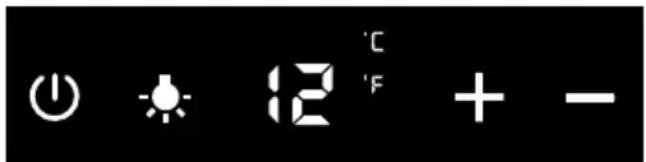
ON/OFF
To switch off the appliance, press and hold the key for 5 seconds until the temperature indicator goes out. To switch on the appliance, press and hold the key for 1 second until the temperature indicator lights up.
Light
To switch the interior light on or off, press and hold the key for 5 seconds. The interior light indicator will turn on or off to confirm the selection.
Plus Plus
Increases (warms up) the set temperature by 1^ C/ 1^ F.
Minus Minus
Decreases (cools down) the set temperature by 1^ C/ 1^ F.
DisplayDisplay
Displays the digital temperature and service indicators.
Indicator light / Multi-key function Ind
The interior light indicator is the dot at the bottom right of the display. The interior light indicator will light up in showcase mode.
The interior light indicator will flash when the multikey function is selected. To perform the multikey function, lightly touch and hold the first key, then touch the remaining key for at least 5 seconds, then release all keys.
Setting the temperature control, Setting
• The unit will adjust the temperature.
The temperature can be set between 5^ C and 20^ C ( 41^ F and 68^ F). It can be used as a wine ageing cabinet or as a wine serving cabinet.
The recommended temperature for wine ageing is between 11°C and 14°C (52°F and 57°F).
The recommended serving temperature for white wine is between 5°C and 10°C (41°F and 50°F) and the recommended serving temperature for red wine is be-
tween 15°C and 20°C (58°F and 68°F).
-
If you touch either of the two keys for the first time, the display will show the last previously set temperature. The temperature will increase by 1^ / 1^ if you touch the UP key once, or the temperature will decrease by 1^ / 1^ if you touch the DOWN key once. The display flashes while making the setting.
-
Once the temperature has been set, the display shows the current indoor temperature / Multi-key function
-
To view the set temperature at any time, touch the UP or DOWN key; the set temperature will temporarily flash on the display for 5 seconds. The display then returns to the current indoor temperature.
Settings mode
the term per a cycle settings can only be selected in the Settings mode.
Press and hold the UP key for 5 seconds to enter and exit the Settings mode. The appliance will automatically exit the Settings mode after approximately one minute.
Multicolour function
You can select the colour of the interior light whether you are in showcase mode or functional mode, allowing you to choose between amber, white or blue lights.
Each time you touch the LIGHT key (-_) you
will toggle between single colour mode and dynamic colour mode. In dynamic colour mode, the interior light will start to alternate between the 3 available colours.
Touching the LIGHT key (○) once when the desired colour is on, the interior light will change to that colour. To return to dynamic colour mode, touch the LIGHT key again.
^8 °F/°C Selection°F/°C Selection
-
Lightly touch and hold the UP key for 5 seconds to enter Setup mode.
-
Use the UP and DOWN keys to select the temperature display setting in Fahrenheit or Celsius.
-
Press and hold the UP key for 5 seconds to confirm the selection.
§ Display Brightness Display Brightness
-
Lightly touch and hold the UP key for 5 seconds to enter Setup mode, then touch the ON key once.
-
Use the UP and DOWN keys to select the brightness of the display when the door is closed.
d0: disabled (default)
d1: dimmer
d2: medium dimming
d3: brightest setting (same level as when opening the door)
- Press and hold the UP key for 5 seconds to confirm the selection.
8 Interior lighting brightnessInterior lighting
-
Lightly touch and hold the UP key for 5 seconds to enter Setup mode, then touch the ON key twice.
-
Use the UP and DOWN keys to select the brightness of the interior lighting when the door is closed.
L0: off when the door is closed or open
L1: dimmer setting
L2: medium setting
L3: brightest setting (default) (same level as when opening the door)
- Press and hold the UP key for 5 seconds to confirm the selection.
◇ Fan modeFan mode
-
Lightly touch and hold the UP key for 5 seconds to enter the Setup mode, then touch the ON key three (3) times.
-
Use the UP and DOWN keys to select the fan mode. F0: Silent Mode - Energy Saving Mode (default).
F1: DynaClima Mode - half time
F2: DynaClima Mode - full time
- Press and hold the UP key for 5 seconds to confirm selection.
Audible Tones Audible Tones
-
Lightly touch and hold the UP key for 5 seconds to enter Setup mode, then touch the ON key four (4) times.
-
Use the UP and DOWN keys to select the audible tones.
S0: keypad tone ON, alarm tone OFF
S1: keypad tone ON, alarm tone ON (default) S2: keypad tone OFF, alarm tone OFF
S3: keypad tone OFF, alarm tone ON
- Press and hold the UP key for 5 seconds to confirm the selection.
Temperature Indicator
During normal operation, the temperature indicator on the control panel shows the temperature inside the unit. The temperature indicator will flash if:
- A different temperature is being set.
- The zone temperature deviates more than 5^ (9°F) from the set temperature.
The flashing temperature display ensures that the temperature cannot inadvertently rise or fall and damage the wine.
Temperature Memory Function
In the event of a power failure (power surge, circuit breaker, etc.), the unit remembers the previous temperature settings. When the power is restored, the cabinet temperature will return to the same temperature setting as before the power interruption.
Temperature Alarm
An audible alarm will sound if the temperature rises or falls outside the temperature range. The temperature display will flash at the same time.
The temperature at which the appliance is set determines the temperature that the appliance recognises as too hot or too cold.
The acoustic alarm will sound and the temperature display will flash:
- When switching on the appliance, if the temperature inside the appliance is very different from the set temperature.
- When there has been a prolonged power interruption.
- When too many objects have been inserted at once. Or too much ambient air has entered when rearranging and removing the stored items.
- When the door is not properly closed.
• The appliance is faulty.
The acoustic alarm will be automatically silenced and the temperature display will stop flashing when the set temperature is reached again. However, if the noise bothers you, you can deactivate the audible alarm first if you wish by touching the POWER key once. The alarm will stop. The corresponding temperature display continues to flash until the set temperature is reached. The display then lights up permanently and the alarm system is fully active again.
Door Alarm
If the door remains open for more than 60 seconds, the audible alarm will sound. To deactivate the audible alarm, close the door or press the POWER key once.
Interior Light
The interior lighting makes it easier to see the wine labels and enhances the presentation of your collection. Touching the LIGHT key toggles between 2 modes of operation of the interior lights: functional mode (default) and showcase mode. If in functional mode (default), the lights will be switched on only when the door is open. The interior light will turn off approximately 5 seconds after the door is closed. If in showcase mode, the lights will turn on whether the door is open or not.
The unit is equipped with LED type lights and they are designed for an extremely long lifetime. Thanks to the LED lighting, the wine will not be adversely affected by heat or ultraviolet light. However, they cannot be repaired by the user. To replace them, please contact service.
NOTE: Use only the original LED lighting accessories supplied by the manufacturer.
Dynaclima / Silent Mode
The unit has two different operating modes:
- DynaClima
- Silent.
The DYNACLIMA (Dynamic Climate) mode allows the relative humidity inside the unit and the temperature to be evenly distributed throughout the interior so that you can store all your wine in exactly the same excellent conditions. If you want to
use the unit for long-term wine storage, the DYNACLIMA mode is a must. It will create a continuous climate in the cabinet that mimics that of a wine cellar.
In the DYNACLIMA mode, the indoor fan circulates the indoor air evenly even when the set temperature is reached. The use of the DINACLIMA mode increases the noise level during operation. In SILENT mode (also known as energy saving mode), the appliance will operate without a fan once the set temperature is reached.
Sabbath mode
Sabbath mode is available for the observance of certain religious holidays. This mode turns off the displays, interior light, sensor tones and audible alarms and prevents them from being turned on again. Normal cooling operations will continue to take place.
To initiate Sabbath mode, simultaneously press the POWER and LIGHT keys for at least 5 seconds. The displays and interior lights will turn off to confirm that Sabbath mode is activated.
Sabbath mode can be cancelled by repeating the above process. Sabbath mode will automatically deactivate after 96 hours.
Eco Demo Mode
Eco Demo mode can be activated by presenting the device at exhibitions or sales-rooms. In Eco Demo mode, the compressor and all fan motors are switched off. It
is also perfect as a cleaning mode. Refrigeration is switched off while the lights remain on.
By touching and holding the keys "UP"&"-DOWN" and "LIGHT" simultaneously for at least 5 seconds, the indicator light will flash to confirm the entry and the unit will operate in Eco Demo mode. The Eco Demo mode can be cancelled by repeating the above process.
Bottles And Storage
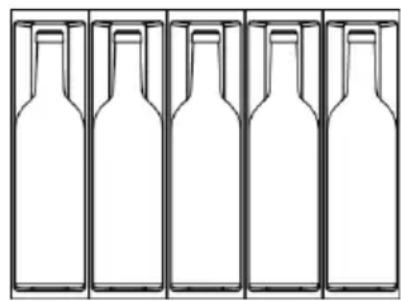
A maximum of 5 bottles up to 92 mm in diameter can be stored in this unit.
For bottles with a diameter of less than 86 mm, both loading plans can work. But if the diameter of the bottles
is between 86 mm and 92 mm, only the second bottle plan can work.
WARNING: To prevent bottles from falling, do not attempt to slide the shelf out beyond its stop position.
IMPORTANT: Do not cover any part of the rack with aluminium foil or any other material that prevents proper air circulation inside the cabinet.
For easy access to stored bottles, gently pull the rack outward until it stops.
Avoid obstructing the internal fans (located inside, on the rear panel of the unit).
Do not cross-contaminate. Store only wine in your unit to ensure an odour free environment.
Store wine only in unopened bottles. Opened bottles may spill.
natural_image
Five identical empty bottle outlines arranged horizontally (no text or symbols)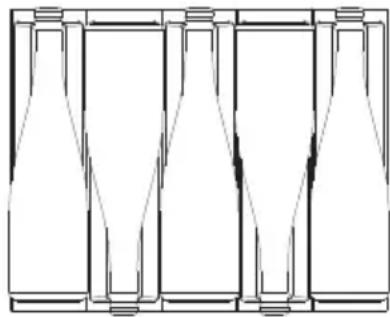
natural_image
Pure diagram of five identical rectangular containers arranged in a row, no text or symbols present.OPERATING NOISES
The unit is cooled by a compressor (cooling aggregate). The compressor pumps refrigerant through the cooling system, producing operating noise.
Even when the compressor is switched off, noises caused by temperature and pressure changes are unavoidable. The running noise will be most audible immediately after the compressor is switched on. It becomes quieter as the period of operation continues.
The following noises are normal and occur from time to time:
- Gurgling sound, caused by the refrigerant flowing through the coils of the appliance.
- Motor compressor hum. This noise may increase for short periods of time when the motor is running.
- Crackling and popping sounds, resulting from the contraction and expansion of materials due to temperature variations,
- Fan running sound, to circulate the air inside the wine box.
Unusual noises are usually the result of incorrect installation. Under no circumstances should the pipes come into contact with a wall, other furniture or other pipes.
If the unit is installed in an open kitchen or in partition walls, the operating noise level will be louder. However, this is due to the architecture of the environment and not to the unit.
The individual noise perception is directly related to the environment in which the appliance is located as well as to the specific model type. Our appliances comply with international standards for this type of appliance and the latest technical developments. But remember that noise from the compressor and the refrigerant circulating in the system is unavoidable.
DEFROSTING / HYGROMETRY / VENTILATION
Your unit is designed with an automatic defrosting system. During the "defrost cycle", the evaporator behind the rear wall of the unit defrosts automatically. Condensation collects in the drain trough behind the rear wall of the unit and some of it flows through the drain hole into the drip pan next to the compressor. Heat is transferred from the discharge pipe and evaporates any condensation that has accumulated in the drip pan. Some of the remaining water is collected inside the unit for humidity purposes.
This system creates the correct level of humidity inside your unit that the natural cork needs to maintain a lasting seal and provides natural ventilation and constant air circulation.
The appliance is not completely sealed: fresh air is allowed to enter through the drain pipe. Air is circulated through the appliance by a fan.
NOTE: Frost may accumulate on the evaporator if the unit is repeatedly opened in a very hot or humid location.
VACATION
Short holidays: Leave the unit running during holidays of less than three weeks.
Extended absences: If the unit will not be used for several months, remove all items, and unplug the unit. Clean and If this frost pattern does not disappear within 24 hours, your unit will require manual defrosting.
dry the interior. To avoid the formation of odours and mould, leave the door slightly open, blocking it if necessary.
TRANSPORTING THE APPARATUS
Disconnect the plug from the mains socket.
Remove the contents of the racks and all moving parts inside.
Tape the door shut and close it if it has a locking system.
Transport the appliance only in an upright position. Also protect the outside of the appliance with a blanket or similar item.
TABLE OF WINE SERVING TEMPERATURES
All wines mature at the same temperature, which is a constant temperature set between 11^ C and 14^ C. The following table indicates the best temperature for drinking different types of wine.
| Wine style °C °F | ||
| Champagne NV, Sparkling, Spumante | 6 43 | |
| Dry white Semillon, Sauvignon, Blanc | 8 46 | |
| Champagne Vintage 10 50 | ||
| Chardonnay dry white 10 50 | ||
| Dry white Gewürztraminer, Riesling, Pinot grigio | 10 50 | |
| Sweet white Sauternes, Barsac, Montbazillac, Ice wine, Late harvest | 10 50 | |
| Beaujolais 13 55 | ||
| Sweet White Vintage: Sauternes... | 14 57 | |
| White Chardonnay Vintage | 14 57 | |
| Pinot Noir red 16 61 | ||
| Grenache red, Syrah | 16 61 | |
| Pinot Noir red vintage | 18 65 | |
| Cabernet and Merlot: French, Australian, New Zealand, Chilean, Italian, Spanish, Californian, Argentinian... | 20 68 | |
| Vintage Bordeaux ... | Ambient temperature no higher than 20°C/68°F | |
Tip: Store wine 1 or 2 °C cooler than the recommended drinking temperature, as it warms up a little when served in the glass.
Tip: Full-bodied reds should be opened 2-3 hours before drinking to allow the wine to breathe and develop its aroma.
IMPORTANT TEMPERATURE INFORMATION
Your unit has been designed to ensure optimal storage and/or serving conditions for your wines.
Fine wines require a long and gentle evolution and need specific conditions to reach their full potential.
All wines mature at the same temperature, which is a constant temperature set between 11°C and 14°C. Only the temperature of "dégustation" (wine appreciation) varies according to the type of wine (see the table of wine serving temperatures above). That said, and as in the natural cellars used by wine producers for long storage periods, it is not the exact temperature that is important, but its constancy. In other words, as long as the temperature of your cellar is constant (between 11°C and 14°C, or 52°F and 57°F) your wines will be kept in perfect condition.
Not all wines improve with age. Some should be consumed at an early stage (2 to 3 years), while others have an enormous ageing capacity (50 years or more). All wines have a peak of maturity. Consult your wine merchant for the relevant information.
At too high a temperature (over 20^ C) the wine ripens too quickly, which prevents the aromas from developing further. The wine cannot fully mature at too low a temperature (below 5^ C).
Temperature fluctuations put the wine under stress and interrupt the maturation process. It is therefore very important to maintain a constant temperature.
ENERGY SAVING TIPS
If the unit is left empty for long periods of time, we suggest unplugging the appliance and, after careful cleaning, leaving the door ajar to allow air to circulate inside the cabinet to prevent the formation of condensation, mould or odours.
The appliance should be installed in the coolest part of the room, away from heat-producing appliances and direct sunlight.
Ensure that the unit is adequately ventilated. Never cover the ventilation openings. Clean dust and dirt from the condenser at regular intervals.
Open the door only as long as necessary and for as short a time as possible.
Store the contents of organised.
To circulate air, do not overfill the appliance.
CARE AND MAINTENANCE
WARNING: Failure to unplug the appliance during maintenance and cleaning may result in electric shock or other personal injury.
Cleaning the Appliance
Switch off the appliance, unplug it and remove all objects.
Wash the inside surfaces with a solution of warm water and baking soda. The solution should be about 2 tablespoons of baking soda per litre of water.
Wash the grilles with a mild detergent solution.
Wring excess water from the sponge or cloth when cleaning any area of the controls.
The sealing gasket around the door should be cleaned regularly to prevent discolouration and prolong the life of the door.
Use clean water. After cleaning the sealing gasket, check that it still provides a tight seal.
Wash the outside cabinet with warm water and mild liquid detergent. Rinse thoroughly and dry with a soft, clean cloth.
Do not clean stainless steel with steel wool. We recommend that you use an all-in-one stainless steel cleaner to clean stainless steel. Always clean in the direction of the grain.
Drawer Removal
To remove the drawer, extend the drawer out of the slide compartment until it stops and remove all bottles from the drawer.
Remove the screw that secures the cable cover to the drawer on the left side, as shown in figure 1, and remove the cable cover. Then disconnect the cable from the drawer.
Press down the unlocking lever on the left-hand slide and, at the same time, lift the lever on the corresponding right-hand slide and pull the drawer out until it is free of the slides and the cabinet, as shown in figure 2. To replace the shelf, repeat this procedure in reverse.

natural_image
Technical line drawing of a mechanical assembly with an inset close-up showing a component detail (no text or symbols)
natural_image
Technical diagram of a mechanical assembly with an inset showing a close-up of a component (no text or labels present)Active Carbon Air Filter
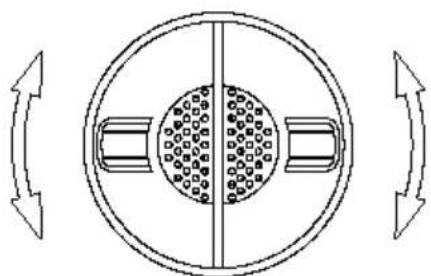
The active carbon air filter (if your model includes one) is located at the rear of the compartment. The
activated carbon filter achieves optimum air quality by filtering the incoming air and absorbing unwanted odours. Replace it with a new one once a year. You can purchase it from your dealer or from the Spare Parts department.
- Open the drawer.
- Hold the filter and turn it 90^ clockwise or counterclockwise to remove it.
- Insert the new filter vertically and 90^ clockwise or counterclockwise until it clicks into position.
natural_image
Diagram of a circular mechanical component with internal components and directional arrows indicating rotation (no text or symbols)Power Failure
In the event of a power failure, all previous temperature settings are automatically memorised. If the power is interrupted (power surge, circuit breaker, etc.) and re-connected, the unit will operate at the last temperature set point.
Most power outages are corrected within a few hours and should not affect the temperature of your appliance. If the power outage is going to last longer, you should take appropriate measures to protect your contents.
NOTE: Regardless of the cause, if you notice abnormal levels of temperature or humidity inside your unit, be assured that only prolonged and frequent exposure to these abnormal conditions can cause a detrimental effect on your wines.
TROUBLESHOOTING GUIDE
You can solve many common problems easily, saving you the cost of a possible service call. Try the following suggestions to see if you can solve the problem before calling customer service.
| Problem Possible Cause Solution | ||
| Nothing works. The appliance does not work. | ·The appliance is not connected to a power supply.·The appliance is switched off.·The appliance is switched off.·The circuit breaker has tripped or a fuse has blown.·The circuit breaker has tripped or has blown | ·Switch on the appliance.·Switch on the appliance.·Switch on the circuit breaker or replace the fuse. |
| The light does not come on. | ·The appliance is not connected to a power supply.·The circuit breaker has tripped or a fuse has blown.·The light went out on the control panel.·Light is faulty. | ·Switch on the appliance.·Switch on the circuit breaker or replace the fuse.·Switch on the light.·Call the service centre for replacement. |
| The appliance does not cool enough. | ·The temperature is not set correctly.·The room temperature may require a different temperature setting.·The door was opened too often.·The door was not closed all the way.·The door is not tightly closed.·The condenser is too dirty.·The vent is blocked or too dusty. | ·Check the set temperature.·Set another temperature.·Do not open the door wider than necessary·Close the door tightly.·Check the door seal and clean or replace it.·Clean the condenser when necessary.·Clear obstacles and dust |
| The appliance switches on and off frequently. | · The ambient temperature is higher than average.· A large number of bottles have been added to the unit.· The door is opened too often.· The door is not completely closed.· The door seal does not seal properly. | · Place the appliance in a cooler place.· Let the appliance run for a while until the set temperature is reached.· Do not open the door wider than necessary.· Close the door tightly.· Check the door seal and clean or replace it. |
| The appliance seems to make too much noise. | The rattling noise may come from the air flow, which is normal. At the end of each cycle, you may hear gurgling noises caused by the flow of refrigerant in your appliance.If temperature fluctuations occur, the contraction and expansion of the interior walls may cause cracking and popping noises. | |
| The door does not close properly. | · The appliance is not properly levelled.· The gasket is dirty.· The shelves are out of position. | · Level the appliance.· Clean the door seal.· Check the shelves and reposition them correctly. |
| E0, E1, E2, E3, E4, E5, E6, E7, the display shows E8 or E9. | Error codes Try to reset the controls | by switching off the power of the unit for 5 minutes and then switch it back on. If the error code reappears, the problem cannot be solved by the user. Call for service. |
| The alarm sounds and the temperature indicatorNOflashes (door alarm). | The door has been left open for more than 60 seconds. | Close the door or touch any key to deactivate the alarm.The alarm will reset when the door is closed. |
AFTER-SALES SERVICE (SAT) AND GUARANTEE
INOXPAN S.L., thanks you for choosing and placing your trust in a product of our brand Pando, which is distinguished by its Quality, Design and Innovation, being faithful to its origins and commitments.
PANDO WARRANTY CONDITIONS:
This appliance is guaranteed for 3 years from the date of purchase. This warranty exclusively covers the Pando product against any manufacturing defect that aff ects its proper functioning. In order for the warranty to be valid, it is essential to present the invoice or purchase receipt together with a photo of the label or registration number of the product to the Pando Authorised Service technician.
During this period, the Company undertakes to replace or repair free of charge any defective part due to a defect or manufacturing defect in the appliance, until it is in proper working order, as well as the necessary labour and expenses incurred as a result of such repair or replacement.
EXCLUSIONS FROM THE PANDO WARRANTY:
The following cases will not be covered by the guarantee of the product or wine cooler, or could be cause for cancellation of the same, in which case the user will be responsible for the cost of materials, labour and travel expenses of the technical service:
- The installation, servicing, cleaning or maintenance of the appliance.
- Any breakdown, malfunction or malfunction caused by incorrect installation or use.
- Breakdowns or damage caused by failure to observe or follow the safety instructions, recommendations for use and maintenance in the appliance's manuals.
- When the product is intended for commercial or non-residential use, for which it is not intended.
- Malfunctions or damage to the appliance due to non-compliance with the instructions described in the user manual, installation and ventilation instructions for the appliance.
- Breakdowns or damage caused by transport or transfer, and handling of the device by unauthorised personnel not belonging to this company or to the Pando brand.
- Bumps, dents, scratches or scrapes, broken glass.
- Presence of foreign bodies foreign to the device, inside or outside the product.
- The product is not accessible because there are elements that prevent easy and safe access. The means required for the authorised Pando technician to access the device shall be at the user's expense and responsibility.
- Improper handling of product wiring and connections.
- Faults or damage to the product caused by incorrect power supply or electrical connection.
- Aesthetic, wear and tear components, such as light screens, filters, lamps (LED), shelves, drawers, lids, gaskets, etc.
- Rust, stains, discolouration caused by improper application or unprotected exposure to corrosive elements such as cleaning products not recommended by the manufacturer and unsuitable cleaning agents, such as those containing corrosive chemicals, and exposure to sea breeze (saltpetre).
• Any damage to the wines or any other contents due to possible incidents or malfunctions of the appliance.
- Breakdowns or damage caused by variations in the electricity supply or fortuitous and natural causes of atmospheric or geological origin such as storms, lightning, earthquakes, floods, etc.
- Appliances from resale, second hand, trade-in or exhibitions that are more than three years old from the date of manufacture
INOXPAN, S.L., is expressly excluded from any liability for any direct or indirect damage to persons or things caused by a product installed, manipulated, used and/or maintained improperly.
Contact details Offi cial Authorised Pando Service Centre
ESPAÑA, PORTUGAL Y ANDORRA OTHER COUNTRIES:
https://www.pando.es/asistencia-tecnica/

EN
https://www.pando.es/en/after-sales-services/
Pol. Ind. El Cros
SERVICIO POST VENTA

Environmental Management System Certification
UNE-EN ISO 14001:2015
ES20/208675



- VINOTECA DE CAJÓN
- Pando
- integralcooking
- The Global Kitchen Partner
- TRATAMIENTO DEL RESIDUO
- Modo Eco Demo
- Ligação eléctrica
- Filtro de ar de carvão ativo
- Falha de energia
- TRAITEMENT DES DÉCHETS
- Coupure de courant
- ENVIRONMENTAL PROTECTION
- WASTE TREATMENT
- INDEX
- SAFETY WARNINGS....107
- INSTALLATION....111
- USING THE WINE COOLERS....118
- OPERATING NOISES....123
- DEFROSTING / HYGROMETRY / VENTILATION....124
- VACATION 125
- TRANSPORTING THE APPARATUS....125
- TABLE OF WINE SERVING TEMPERATURES......125
- ENERGY SAVING TIPS....126
- CARE AND MAINTENANCE....127
- TROUBLESHOOTING GUIDE....129
- GUARANTEE....132
- SAFETY WARNINGS
- Please note that ....
- SAVE THESE INSTRUCTIONS
- PACKAGING AND END OF LIFE
- CHOKING HAZARD!
- DISPOSAL INSTRUCTIONS:
- INSTALLATION
- Before Installing the Appliance
- NOTES:
- Integrated Wine Coolers In Column
- Wine Coolers Integrated Drawer
- Integrated automatic ventilation system
- Overlay Panel Installation Instructions
- Door panel installation Door panel installation
- Electrical Connection
- WARNING:
- THIS APPARATUS MUST BE GROUNDED.
- Mains Connection for UK and IRL
- THIS APPLIANCE MUST BE EARTHED.
- NON-REWIREABLE MAINS PLUG
- USING THE WINE COOLERS
- NOTE:
- Operation
- Display
- ON/OFF
- Light
- Plus Plus
- Minus Minus
- DisplayDisplay
- Indicator light / Multi-key function Ind
- Setting the temperature control, Setting
- Settings mode
- Multicolour function
- °F/°C Selection°F/°C Selection
- § Display Brightness Display Brightness
- Interior lighting brightnessInterior lighting
- ◇ Fan modeFan mode
- Audible Tones Audible Tones
- Temperature Indicator
- Temperature Memory Function
- Temperature Alarm
- Door Alarm
- Interior Light
- Dynaclima / Silent Mode
- Sabbath mode
- Eco Demo Mode
- Bottles And Storage
- OPERATING NOISES
- DEFROSTING / HYGROMETRY / VENTILATION
- VACATION
- TRANSPORTING THE APPARATUS
- TABLE OF WINE SERVING TEMPERATURES
- IMPORTANT TEMPERATURE INFORMATION
- ENERGY SAVING TIPS
- CARE AND MAINTENANCE
- Cleaning the Appliance
- Drawer Removal
- Active Carbon Air Filter
- Power Failure
- TROUBLESHOOTING GUIDE
- AFTER-SALES SERVICE (SAT) AND GUARANTEE
- PANDO WARRANTY CONDITIONS:
- EXCLUSIONS FROM THE PANDO WARRANTY:
- Contact details Offi cial Authorised Pando Service Centre
- ESPAÑA, PORTUGAL Y ANDORRA OTHER COUNTRIES:
Brand : Pando
Model : PVMC 155
Category : Beverage fridge