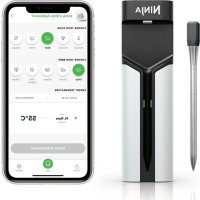
ProChef Wireless WP100 - Thermometer NINJA - Free user manual and instructions
Find the device manual for free ProChef Wireless WP100 NINJA in PDF.


| Product Type | Wireless Cooking Thermometer |
| Brand | Ninja |
| Model | ProChef Wireless WP100 |
| Power Supply | 1 AAA battery (for probe); charging stand |
| Connectivity | Bluetooth (max range 3 m) |
| Main Functions | Internal temperature measurement, SmartChef app, cooking alarm, cooking guide (cooking chart) |
| Sensors | Internal temperature sensor, ambient temperature sensor |
| Probe Material | Stainless steel |
| Probe Cleaning | Rinse with hot water, clean with a soapy sponge, dry completely; avoid abrasive sponges |
| Stand Cleaning | Damp cloth only; do not immerse |
| Safety Instructions | Do not use in microwave or pressure cooker; do not handle hot probe with bare hands; do not place on hot surface |
| Minimum Insertion Mark | Yes, the probe must be inserted beyond the mark for reliable measurement |
| Battery Indicator | Red LED if battery < 25% |
| Commercial Warranty | 2 years (online registration within 28 days) |
| Spare Parts | Available on ninjakitchen.eu |
| Usage | Food use only |
| Recommended Cooking Temperature (Meat) | Rare 50 °C, Medium Rare 55 °C, Medium 60 °C, Medium Well 65 °C, Well 70 °C |
| Cooking Note | Meat continues to cook off heat; remove before target temperature |
Frequently Asked Questions - ProChef Wireless WP100 NINJA
User questions about ProChef Wireless WP100 NINJA
0 question about this device. Answer the ones you know or ask your own.
Ask a new question about this device
Download the instructions for your Thermometer in PDF format for free! Find your manual ProChef Wireless WP100 - NINJA and take your electronic device back in hand. On this page are published all the documents necessary for the use of your device. ProChef Wireless WP100 by NINJA.
USER MANUAL ProChef Wireless WP100 NINJA
SCAN HERE to download
the Ninja Pro Connect App
REGISTER YOUR PURCHASE

ninjakitchen.eu/registerguarantee
RECORD THIS INFORMATION
Model Number: ____
Serial Number: ____
Date of Purchase:
(Keep receipt)
Store of Purchase:
SharkNinja Europe Ltd,
1st/2nd Floor Building 3150,
Thorpe Park, Century Way,
Leeds, England, LS15 8ZB
ninjakitchen.co.uk
SharkNinja Germany GmbH,
Rotfeder-Ring 9,
60327 Frankfurt am Main,
Germany
ninjakitchen.eu
NINJA® is a registered trademark in the United
Kingdom of SharkNinja Operating LLC.
WP100EU_IBQSG_MP_240328_Mv1
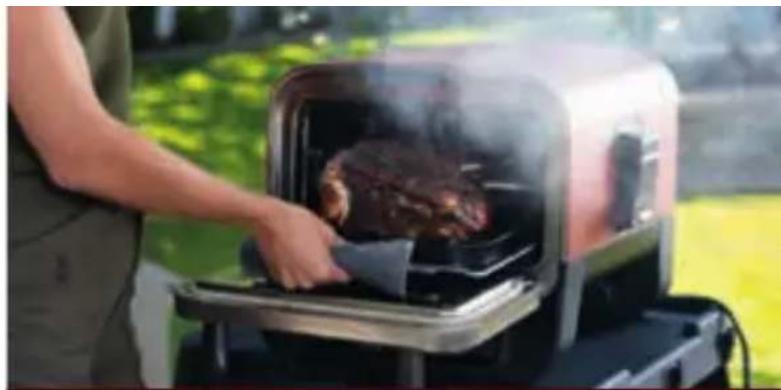
natural_image
Person using a steaming hot dog on an outdoor griddle (no text or symbols visible)NINJA
ProChef
WIRELESS
THERMOMETER
INDOOR & OUTDOOR

natural_image
Exterior view of a grilled outdoor grill with flames and a hand holding a piece of meat (no text or symbols visible)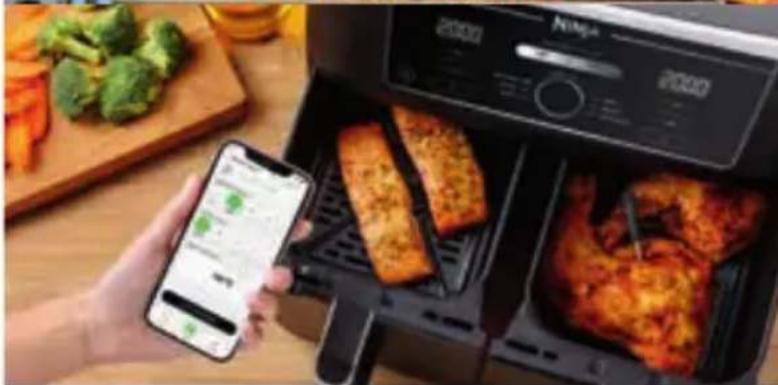
natural_image
Person using smartphone to scan food from a 2000 air fryer setup with fried chicken slices (no visible text or symbols)
INSTRUCTION BOOKLET
& QUICK START GUIDE

BEDIENUNGSANLEITUNG
& KURZANLEITUNG

MANUEL D'INSTRUCTION ET
GUIDE DE DÉMARRAGE RAPIDE
GETTING STARTED
ERSTE SCHRITTE
DÉMARRAGE

Insert AAA battery into holder
1


SCAN TO DOWNLOAD THE INJA PRO CONNECT APP

ISCANNEN SIE DEN QR-Code, IE NINJA PRO CONNECT-APP HERUNTERZULADEN

BALAYEZ LE CODE POUR TÉLÉCHARGER
L'APPLICATION NINJA PRO CONNECT

Register and pair yourroChef Thermometer
3

THERMOMETER PLACEMENT
CORRECT INCORRECT
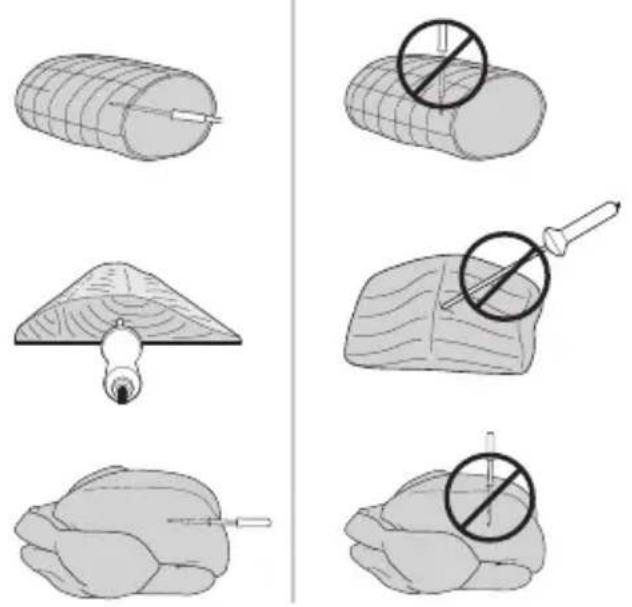
Insert thermometer horizontally into the center of the thickest part of the meat.
Make sure the thermometer is close to (but not touching) the bone and away from any fat or gristle.
Make sure the tip of the thermometer is inserted straight into the center of the meat, not angled.
THERMOMETERPOSITION
HOLDER PLACEMENT WHILE COOKING
Your thermometer holder should be kept within 3m of your cooker to stay connected to the thermometer, and to boost the signal.
Just make sure you don't leave it on any hot surfaces.

HALTERPOSITION
natural_image
Line drawing of a mechanical device with a cylindrical component and red concentric circles (no text or symbols)THERMOMETER AND HOLDER FEATURES
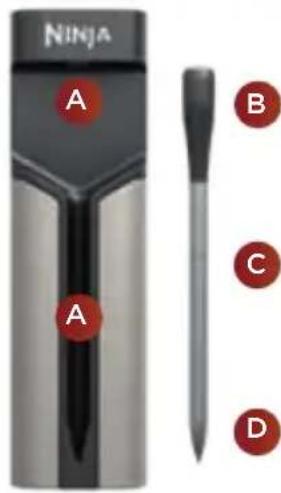
BATTERY LED
Press to view holder's battery level.
Green is above 25%.
Red or no light is below 25%.
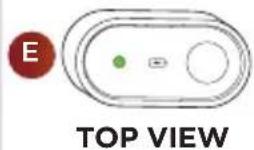

Charging Terminals
Ladeanschlüsse
Borne de recharge

Ambient Temperature Sensor
Minimum Insertion Line
Thermometer must be inserted into meat past this line to avoid risk of failure.

Internal Temperature Sensor

Innerer Temperatursensor

Red indicates battery below 25%

Batterie-LED
CLEANING INSTRUCTIONS
The thermometer should be rinsed under hot water, scrubbed with a sponge/soap, and then dried completely. Ensure your thermometer is totally clean before charging to make sure it has full contact with the three charging terminals.
You may need to use an abrasive sponge to clean the metal surface above the ambient temp sensor.
The holder should not be placed under water, and should only be wiped with a damp cloth if necessary.
REINIGUNG HINWEISE
THE IMPORTANCE OF RESTING MEAT
Did you know? Meat continues to cook even after you remove it from heat?
To prevent overcooking, the thermometer will automatically ask you to remove your food from the heat source, to ensure you reach your perfect cook level.
Skipping or ignoring the rest period and cutting into food immediately may result in a rarer result.
IMPORTANT: PLEASE READ THE TERMS AND CONDITIONS OF THIS LICENCE AGREEMENT CAREFULLY BEFORE COMMENCING USE OF THIS PRODUCT:
This End-User License Agreement ("EULA") is a legal agreement between you and SharkNinja Operating LLC's ("SharkNinja", "us" or "we") for [the]/[SharkNinja's] computer software which is preinstalled on your SharkNinja device, which you download in order to control the SharkNinja device from your phone or computer, or, in either case, is made available by way of updates (the "Software"), as well as any printed, online or electronic documents related to the Software (the "Documentation").
We grant you the right to use of the Software and Documentation on the terms of this Licence. We do not sell the Software or Documentation to you. We remain the owners of the Software and Documentation at all times.
If you do not agree to the terms of this EULA, do not install or use the Software, the Documentation or the SharkNinja device. In that case, you may return the unused SharkNinja device to us for a full refund. This does not affect your legal rights to return goods to your retailer if you change your mind or if they are faulty, or the terms of our separate manufacturer's guarantee, if any.
1. GRANT OF LICENSE.
Installation and Use. In return for you agreeing to comply with the terms of this EULA, SharkNinja grants you the right to use the Software and Documentation, and to receive and use any free supplementary software code or update of the Software incorporating "patches" and corrections of errors as may be provided by the Licensor from time to time, solely for the purpose of domestic operation and use of the SharkNinja device in relation to which the Software was supplied.
2. DESCRIPTION OF OTHER RIGHTS AND LIMITATIONS.
2.1 Maintenance of Copyright Notices. You must not remove or alter any copyright notices on any and all copies of the Software and Documentation.
2.2 Copying and Distribution. You must not make or distribute to third parties copies of the Software or the Documentation.
2.3 Prohibition on Reverse Engineering, Decompilation, and Disassembly. You must not reverse engineer, decompile, or disassemble the Software, except and only to the extent that such activity is expressly permitted by applicable law notwithstanding this limitation.
2.4 Rental. You must not rent, lease, or lend the Software or the Documentation without written permission from SharkNinja.
2.5 NOT FOR RESALE SOFTWARE. Software identified as "Not for Resale" or "NFR", must not be resold, transferred, or used for any purpose other than demonstration, test, or evaluation.
2.6 Support Services. SharkNinja may provide you with support services related to the Software or your SharkNinja device (the "Support Services"). Any supplemental software code provided to you as part of the Support Services shall be considered part of the Software and be subject to the terms and conditions of this EULA.
2.7 Ownership of Software. SharkNinja retains ownership of all intellectual property rights in the Software and the Documentation.
2.8 Compliance with Applicable Laws. You must comply with all applicable laws regarding use of the Software and Documentation.
3. UPDATES.
SharkNinja may upgrade or update, or require you to upgrade or update, the Software, provided that the Software shall always match the description of it that we provided to you before you bought your SharkNinja device. This EULA will govern any upgrades or updates provided by SharkNinja that replace and/or supplement the Software supplied pre-loaded to your SharkNinja device, unless such upgrade is accompanied by a separate End User Licence Agreement, in which case the terms of that End User Licence Agreement will govern.
4. DATA AND PRIVACY.
SharkNinja is committed to ensuring your privacy by adhering to high standards of fairness and integrity, and complying with applicable data protection laws. We are committed to keeping our customers informed about how we use the information we gather from you through the use of the Software. Our privacy practices are described in SharkNinja's Privacy Policy, as well as in separate notices given when an app, product, or service is purchased or downloaded. At all times your information will be treated in accordance with the SharkNinja Privacy Policy, which is incorporated by reference into this EULA and can be viewed on our official website at the bottom of our homepage. Please read and review our Privacy Policy and any other relevant privacy notices carefully to understand how your personal data is collected, processed and shared by SharkNinja, and your data subject rights in relation to such data.
5. THIRD-PARTY APPLICATION LIBRARIES AND EMBEDDED SOFTWARE
5.1 You acknowledge that Ayla Networks, Inc. ("Ayla") has provided certain application libraries that have been embedded into the Software ("Ayla Application Libraries") and enables SharkNinja devices to connect to the Ayla Cloud Service ("Ayla Embedded Software").
5.2 You must not use the Ayla Application Libraries except as an incorporated portion of the Software, unmodified from the form provided to you.
5.3 You must not use the Ayla Embedded Software except as an incorporated portion of your SharkNinja device, unmodified from the form provided to you.
5.4 You must not reverse engineer, decompile, or disassemble the Ayla Application Libraries or the Ayla Embedded Software, except and only to the extent that such activity is expressly permitted by applicable law notwithstanding this limitation.
5.5 SharkNinja retains ownership of all intellectual property rights in the Ayla Application Libraries and the Ayla Embedded Software incorporated into the Software.
5.6 You must not use the Ayla Application Libraries or Ayla Embedded Software to attempt to gain unauthorised access to or use of the systems/services of SharkNinja's other licensors; nor will you transmit viruses, worms, Trojan horses, time bombs, spyware, malware, cancelbots, passive collection mechanisms, robots, data mining software, or any other malicious or invasive code or program into the systems/services of SharkNinja's other licensors.
5.7 You will not use the Ayla Application Libraries or Ayla Embedded Software to interfere with, breach, or circumvent any security feature, authentication feature, or any other feature that restricts or enforces limitations on the use of, or access to, the systems/services of SharkNinja's other licensors.
5.8 You will not probe, attack, scan, or test the vulnerability of the systems/services of SharkNinja's other licensors.
5.9 SharkNinja's other licensors of the Software, Ayla Application Libraries, and the Ayla Embedded Software, are the express third-party beneficiaries of this EULA, and the provisions of this Section of this EULA are made expressly for the benefit of such licensors, and are enforceable by such licensors.
6. OUR RESPONSIBILITY FOR LOSS AND DAMAGE CONSUMERS SUFFER..
Without prejudice to any other rights, SharkNinja may terminate this EULA if you commit a material or persistent breach of this EULA which you fail to remedy (if remediable) within 14 days after the service of written notice requiring you to do so. Upon termination for any reason, all rights granted to you under this EULA shall cease, you must cease all activities authorised by this EULA, and you must immediately delete or remove the Software from all computer equipment in your possession and immediately destroy or return to us (at our option) all copies of the Software then in your possession, custody or control.
7. TERMINATION.
7.1 The Software is for domestic and private use. If you use the Software for any commercial, business or resale purpose we will have no liability to you for any loss of profit, loss of business, business interruption, or loss of business opportunity.
7.2 You acknowledge that the Software has not been developed to meet Your individual requirements, and that it is therefore Your responsibility to ensure that the Software as described in the Documents meets your requirements.
7.3 We are responsible for loss or damage you suffer that is a foreseeable result of our breaking this EULA or our failing to use reasonable care and skill, but we are not responsible for any loss or damage that is not foreseeable, except as set out at 7.3 to 7.4 below. Loss or damage is foreseeable if either it is obvious that it will happen or if, at the time this EULA came into force, both we and you knew it might happen.
7.4 If defective digital content that we have supplied damages a device or digital content belonging to you, then, in accordance with section 46 of the Consumer Rights Act 2015, we will either repair the damage or pay you compensation. However, we will not be liable for damage that you could have avoided by following our advice to apply an update or upgrade offered to you free of charge or for damage that was caused by you failing to correctly follow installation instructions or to have in place the minimum system requirements advised by us.
7.5 If you bought the SharkNinja device directly from SharkNinja or one of its group companies, we or our group company, as the seller, may be responsible to you under the contract of sale for loss or damage caused by your use of the Software. You can find our terms and conditions of sale on our official website at the bottom of our homepage. If you bought the SharkNinja device from another company, they may have a similar responsibility to you.
7.6 Many SharkNinja products come with a free manufacturer's guarantee. If you suffer loss or damage as a result of using the Software, you may be able to claim under the guarantee. You can find the terms of our guarantee on our official website at the bottom of our homepage.
7.7 We do not exclude or limit in any way our liability to you where it would be unlawful to do so. This includes liability for death or personal injury caused by our negligence or the negligence of our employees, agents or subcontractors or for fraud or fraudulent misrepresentation.
8. APPLICABLE LAW AND JURISDICTION.
This EULA is governed by English law and you can bring legal proceedings in respect of the products in the English courts. If you live in Scotland you can bring legal proceedings in respect of the products in either the Scottish or the English courts. If you live in Northern Ireland you can bring legal proceedings in respect of the products in either the Northern Irish or the English courts.
9. ASSIGNMENT.
We may transfer our rights and obligations under this EULA to another organisation. We will always tell you in writing if this happens and we will ensure that the transfer will not affect your rights under the EULA.
ENG IMPORTANT SAFETY INSTRUCTIONS
FOR HOUSEHOLD USE ONLY. READ ALL INSTRUCTIONS BEFORE USE.
Failure to follow these instructions could result in serious bodily injury or damage to property.
- WARNING. Do not use appliance for other than intended use.
- To eliminate a choking hazard for young children, discard all packaging materials immediately upon unpacking.
• ONLY for use with food. - Burn and scald hazard. DO NOT touch hot thermometer with bare hands. Ensure you wear heat resistant gloves when removing the probe from the cooked food.
- Probe is sharp! Care shall be taken when handling and used near children and certain persons with disabilities.
- This is not a toy. DO NOT allow children to use and play with device.
- Do not place the probe under running water immediately after cooking, allow it to cool down first.
- DO NOT use the thermometer in a microwave oven or pressure cooker. Damage may occur to probe or cooking apparatus.
- DO NOT place the thermometer and charging dock on any hot surface such as stove top, electric hob, or in a heated oven.
BATTERY SAFETY
- Place battery into charging case in proper polarity (+ and -)
- Remove battery during long periods of non-use. This may lead to battery inside to leak.
- Properly dispose of used battery. DO NOT dispose of battery in fire.
• DO NOT expose charging case to rain or moisture.
USE AND CARE
- Make sure the probe is fully inserted, exceeding the minimum insertion line. Damage to device may occur.
- Thermometer should be placed in the thickest part of the food, away from bone, fat, or gristle.
- DO NOT cover and wrap the probe in tinfoil. Loss of Bluetooth connection is possible. Recommend to poke through vs. cover.
- To prevent bacterial contamination, always wash hands after inserting probe into raw non-vegetarian/agrarian foods.
- DO NOT place the thermometer or charging case in the dishwasher, hand wash only.
- Clean with warm, soapy waste, and rinse and dry.
- DO NOT use scouring pats or abrasive cleaners as they will damage probe and surface.
- When not in use, store the thermometer and charging case in a cool and dry place. Be sure unit is dry before storing.
When a consumer buys a product in the UK, they get the benefit of legal rights relating to the quality of the product (your “legal rights”). You can enforce your legal rights against your retailer, including Ninja if you bought your Ninja kitchen appliance from ninjakitchen.co.uk. However, at Ninja we are so confident about the quality of our products that we give the owner an additional, free parts and labour manufacturer’s guarantee of up to 2 years.
The guarantee it comes with is an important consideration - and reflects how much confidence the manufacturer has in its product and manufacturing quality.
The manufacturer's guarantee does not affect your legal rights.
How long are new Ninja machines guaranteed for?
Our manufacturer's guarantee lasts for one year from the date of purchase as standard, or for two years if you register your purchase with us within 28 days.
How do I register my Ninja guarantee?
If you have purchased your Ninja kitchen appliance directly from ninjakitchen.co.uk your guarantee is registered automatically. If you bought it from anywhere else in the UK, you can register your guarantee online within 28 days of purchase.
- To register online, please visit www.ninjakitchen.co.uk/register-guarantee or scan the QR code in your instruction booklet.
- Keep a note of the date you purchased the machine.
IMPORTANT:
- Keep your receipt if you bought your Ninja kitchen appliance from anywhere except ninjakitchen.co.uk. You will need it to claim under your guarantee.
- The free Ninja guarantee only applies in the UK.
What are the benefits of registering my free Ninja guarantee?
When you register your guarantee, you will get an extra year of cover. We'll also have your details to hand if we ever need to get in touch. If you further agree to receive communications from us, you can also receive tips and advice on how to get the best out of your Ninja kitchen appliance and hear the latest news about new Ninja technology and launches.
What is covered by the free Ninja guarantee?
Repair or replacement (at Ninja's discretion) of your Ninja machine, including all parts and labour.
What is not covered by the free Ninja guarantee?
• Normal wear and tear.
- Accidental damage or faults caused by negligent use or care, misuse, neglect, careless operation or handling of the Ninja kitchen appliance which is not in accordance with the Ninja Operating Manual supplied with your machine.
- Damage caused by use of the Ninja kitchen appliance for anything other than normal domestic household purposes.
- Damage caused by use of parts not assembled or installed in accordance with the operating instructions.
- Damage caused by use of parts and accessories which are not Ninja Genuine Components
- Faulty installation (except where installed by Ninja).
- Repairs or alterations carried out by parties other than Ninja or its agents.
How can I claim under the free Ninja guarantee?
Contact our customer service helpline on 0800 862 0453. For service hours please visit our website under 'Contact Us'. It's free to call, and you'll be put straight through to a Ninja representative. You'll also find online support at https://support.ninjakitchen.co.uk/. The Ninja representative will go through some troubleshooting with you, and if we conclude that the item has failed, we will send you a replacement part or a returns label to send the defective item back to us free of charge. When you have delivered the defective product to us, we will send you a replacement.
Please remember that the item will need to be boxed when you return it to us. It can be any suitable box, it does not have to be the original packaging.
Where can I buy genuine Ninja spares and accessories?
Ninja spares and accessories are developed by the same engineers who developed your Ninja kitchen appliance. You'll find a full range of Ninja spares, replacement parts and accessories for all Ninja machines at www.ninjakitchen.co.uk. Please remember that damage caused by the use of non-Ninja spares may not be covered under your guarantee.
MANUFACTURER'S GUARANTEE (UK)
The Ninja Guarantee
When a consumer buys a product in the UK, they get the benefit of legal rights relating to the quality of the product (your “legal rights”). You can enforce your legal rights against your retailer, including Ninja if you bought your Ninja kitchen appliance from ninjakitchen.co.uk. However, at Ninja we are so confident about the quality of our products that we give the owner an additional, free parts and labour manufacturer’s guarantee of up to 2 years.
The guarantee it comes with is an important consideration - and reflects how much confidence the manufacturer has in its product and manufacturing quality.
The manufacturer's guarantee does not affect your legal rights.
How long are new Ninja machines guaranteed for?
Our manufacturer's guarantee lasts for one year from the date of purchase as standard, or for two years if you register your purchase with us within 28 days.
How do I register my Ninja guarantee?
If you have purchased your Ninja kitchen appliance directly from ninjakitchen.co.uk your guarantee is registered automatically. If you bought it from anywhere else in the UK, you can register your guarantee online within 28 days of purchase.
- To register online, please visit www.ninjakitchen.co.uk/register-guarantee or scan the QR code in your instruction booklet.
- Keep a note of the date you purchased the machine.
IMPORTANT:
- Keep your receipt if you bought your Ninja kitchen appliance from anywhere except ninjakitchen.co.uk. You will need it to claim under your guarantee.
- The free Ninja guarantee only applies in the UK.
What are the benefits of registering my free Ninja guarantee?
When you register your guarantee, you will get an extra year of cover. We'll also have your details to hand if we ever need to get in touch. If you further agree to receive communications from us, you can also receive tips and advice on how to get the best out of your Ninja kitchen appliance and hear the latest news about new Ninja technology and launches.
What is covered by the free Ninja guarantee?
Repair or replacement (at Ninja's discretion) of your Ninja machine, including all parts and labour.
What is not covered by the free Ninja guarantee?
• Normal wear and tear.
- Accidental damage or faults caused by negligent use or care, misuse, neglect, careless operation or handling of the Ninja kitchen appliance which is not in accordance with the Ninja Operating Manual supplied with your machine.
- Damage caused by use of the Ninja kitchen appliance for anything other than normal domestic household purposes.
- Damage caused by use of parts not assembled or installed in accordance with the operating instructions.
- Damage caused by use of parts and accessories which are not Ninja Genuine Components
- Faulty installation (except where installed by Ninja).
- Repairs or alterations carried out by parties other than Ninja or its agents.
How can I claim under the free Ninja guarantee?
Contact our customer service helpline on 0800 862 0453. For service hours please visit our website under 'Contact Us'. It's free to call, and you'll be put straight through to a Ninja representative. You'll also find online support at https://support.ninjakitchen.co.uk/. The Ninja representative will go through some troubleshooting with you, and if we conclude that the item has failed, we will send you a replacement part or a returns label to send the defective item back to us free of charge. When you have delivered the defective product to us, we will send you a replacement.
Please remember that the item will need to be boxed when you return it to us. It can be any suitable box, it does not have to be the original packaging.
Where can I buy genuine Ninja spares and accessories?
Ninja spares and accessories are developed by the same engineers who developed your Ninja kitchen appliance. You'll find a full range of Ninja spares, replacement parts and accessories for all Ninja machines at www.ninjakitchen.co.uk. Please remember that damage caused by the use of non-Ninja spares may not be covered under your guarantee.
STATEMENTS OF COMPLIANCE
The following only applies to the UK
Product
Name: Ninja ProChef Wireless Thermometer
Model Type: WP100EU
Batch: All UK product
Manufacturer
Name: SharkNinja Operating LLC
Address: 89 A St. Suite 100 Needham MA 02494, USA
This Statement of Compliance is prepared by the manufacturer of the product.
The object of this statement described above is in conformity with the following relevant requirements in 2023 No. 1007 CONSUMER PROTECTION The Product Security and Telecommunications Infrastructure (Security Requirements for Relevant Connectable Products) Regulations 2023:
☐ The applicable security requirements in Schedule 1.
☒ The deemed compliance conditions in Schedule 2:
☒ Provision 5.1-1, The item is not applicable because password is not used.
☒ Provision 5.1-2, The item is not applicable because password is not used.
Provision 5.2-1, and
☒ Provision 5.3-13 of ETSI EN 303 645 V2.1.1 published on 2020-06-29.
The defined support period for the product that was correct when the manufacturer first supplied the product. It is available on http://Ninjakitchen.co.uk/PSTlcompliance
Signature:
Name and function:
Walter Birdsell SR. Director, Global Safety & Compliance
Place and date of issue:
2/28/2024, Northbrook IL