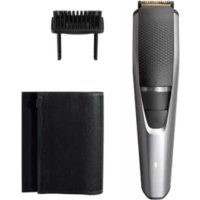
BT3221 - Beard trimmer PHILIPS - Free user manual and instructions
Find the device manual for free BT3221 PHILIPS in PDF.



| Product type | Beard trimmer |
| Brand | Philips |
| Model | BT3221 |
| Power supply | 100-240 V via mains adapter (detachable power supply unit) |
| Runtime | 90 minutes |
| Charging time | 1 hour |
| Cutting length | 0.5 to 10 mm with standard comb; 11 to 20 mm with long beard comb |
| Length setting | Incremental adjustment wheel |
| Battery | Built-in rechargeable battery (Li-ion) |
| Charge indicator | LED indicator: flashes orange (low battery), flashes green (charging), solid green (fully charged) |
| Cordless use | Yes |
| Cleaning | Trimmer head and guard washable under water; housing and comb cleaned with brush |
| Included accessories | Beard comb, long beard comb, large storage pouch, small storage pouch, cleaning brush |
| Dimensions (approx.) | Not specified |
| Weight (approx.) | 200 g |
| Safety | Do not immerse appliance; do not use if damaged; adapter not interchangeable |
| Warranty | International warranty (excluding normal wear of the trimmer head) |
Frequently Asked Questions - BT3221 PHILIPS
User questions about BT3221 PHILIPS
0 question about this device. Answer the ones you know or ask your own.
Ask a new question about this device
Download the instructions for your Beard trimmer in PDF format for free! Find your manual BT3221 - PHILIPS and take your electronic device back in hand. On this page are published all the documents necessary for the use of your device. BT3221 by PHILIPS.
USER MANUAL BT3221 PHILIPS
1 Cutting unit
2 Zoom wheel
3 On/off button
4 Battery status indicator
5 Socket for small plug
6 Beard comb
7 Long beard comb
8 Cleaning brush
9 Supply unit
10 Small plug
11 Large pouch
12 Small pouch
Important safety information
Read this important information carefully before you use the appliance and its accessories and save it for future reference. The accessories supplied may vary for different products.
Danger

- Keep the supply unit dry.
Warning
-
To charge the battery, only use the detachable supply unit (XXxxxx) provided with the appliance.
-
To charge the battery, only use the detachable supply unit provided with the appliance.
-
The supply unit contains a transformer. Do not cut off the supply unit to replace it with another plug, as this causes a hazardous situation.
-
This appliance can be used by children aged from 8 years and above and persons with reduced physical, sensory or mental capabilities or lack of experience and knowledge if they have been given supervision or instruction concerning use of the appliance in a safe way and understand the hazards involved. Children shall not play with the appliance. Cleaning and user maintenance shall not be made by children without supervision.
-
Always check the appliance before you use it. Do not use the appliance if it is damaged, as this may cause injury. Always replace a damaged part with one of the original type.
-
Do not open the appliance to replace the rechargeable battery.
Caution

- This appliance is not washable. Never immerse the appliance in water and do not rinse it under the tap.
- Only use this appliance for its intended purpose as shown in the user manual.
- For hygienic reasons, the appliance should only be used by one person.
- Never use compressed air, scouring pads, abrasive cleaning agents or aggressive liquids such as petrol or acetone to clean the appliance.
- Do not use the supply unit in or near wall sockets that contain an electric air freshener to prevent irreparable damage to the supply unit.
Electromagnetic fields (EMF)
This Philips appliance complies with all applicable standards and regulations regarding exposure to electromagnetic fields.
General
- The supply unit is suitable for mains voltages ranging from 100 to 240 volts.
- The supply unit transforms 100-240 volts to a safe low voltage of less than 24 volts.
Introduction
Congratulations on your purchase and welcome to Philips! To fully benefit from the support that Philips offers, register your product at www.philips.com/welcome.
Charging
Charge the appliance fully before you use it for the first time and after a long period of disuse.
It takes approximately 10 hours (BT3205 BT3206 BT3211) or 1 hour (BT3212 BT3215 BT3216 BT3221 BT3226 BT3227 BT3236 BT3237) to fully charge the appliance.
When it is fully charged, the appliance has a cordless operating time of up to 45 minutes (BT3205), 60 minutes (BT3211 BT3212 BT3215 BT3216 BT3226 BT3236) or 90 minutes (BT3221 BT3227 BT3237).
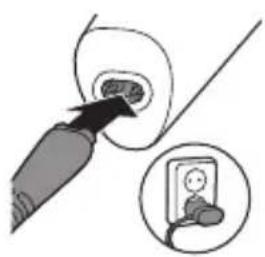
1 Make sure the appliance is switched off.
2 Insert the small plug into the appliance.
3 Put the supply unit in the wall socket.
4 After charging, remove the supply unit from the wall socket and pull the small plug out of the appliance.
Optimizing the lifetime of the rechargeable battery
When you have charged the appliance for the first time, we advise you to use it until the battery is completely empty. Continue to use the appliance until the motor almost stops running during a session. Then recharge the battery. Follow this procedure at least twice a year.
Battery status indicator
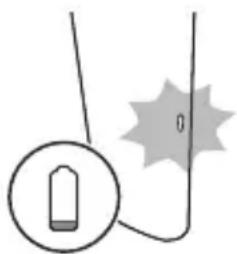
- Selected types (BT3205 BT3211 BT3212 BT3215 BT3216 BT3221 BT3227 BT3226) only.
- When the battery is almost empty, the battery charge indicator flashes orange.
- When the product is charging, the battery charge indicator flashes green.
- When the battery is fully charged, the battery charge indicator lights up green continuously.
Note: The lights switch off automatically after 30 minutes.
Using the appliance
Note: Switch off and clean the appliance and attachments after each use.
- Always comb your beard and/or moustache with a fine comb before you start trimming.
Be careful when you trim for the first time. Do not move the trimmer too fast. Make smooth and gentle movements.
Switching the appliance on and off
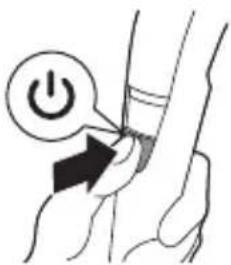
- Press the on/off button once to switch the appliance on or off.
Trimming with comb
Note: When you trim for the first time, start at the highest length setting to familiarize yourself with the appliance.
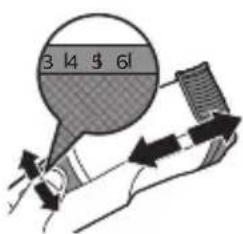
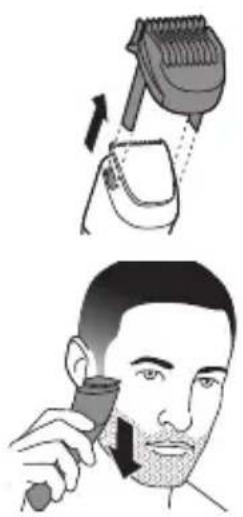
Use the trimming comb attached to the cutting element to trim your beard and moustache in your preferred style. Turn the zoom wheel to choose from length settings ranging from 0.5mm to 10mm (1/32in. to 13/32in.). With the long beard comb you can choose from length settings ranging from 11mm to 20mm (BT3236 BT3237).
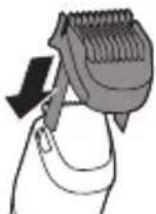
1 Slide the trimming comb straight into the guiding groove of the appliance.
2 Turn the zoom wheel to the desired setting. The desired hair length setting is shown in the center of the zoom wheel.
3 Switch the appliance on.
4 To trim most effectively, move the product against the hair growth direction. Make sure that the surface of the comb always stays in contact with the skin.
Since all hairs do not grow in the same direction, you may want to try different trimming positions (i.e. upwards, downwards, or across). Practice is best for optimum results.
12 English
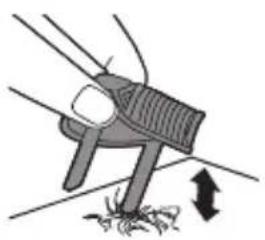
5 Regularly remove cut hair from the comb. If a lot of hair has accumulated in the comb, remove it from the appliance and blow and/or shake out the hairs. The selected hair length setting does not change when the comb is removed.
6 Switch off and clean the appliance after each use.
Trimming for 'stubble look'
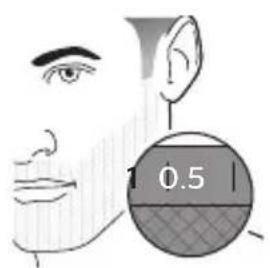
1 Be certain trimming comb is on product and use setting 0.5mm (1/32in.) to create a 'stubble look' trim.
Trimming without comb
Use the trimmer without the trimming comb to trim the edges and single hairs.
Be careful when you trim without the comb as the cutting unit will remove every hair it touches.
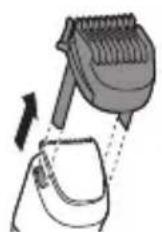
1 Pull the trimming guard straight off the appliance.
Cleaning
2 Switch the appliance on.
3 Make well-controlled movements. Touch the hair lightly with the trimmer.
Never use scouring pads, abrasive cleaning agents or aggressive liquids such as gasoline or acetone to clean the product.
Never dry the trimmer teeth with a towel or tissue, as this may damage the trimmer teeth.
1 Switch off the appliance and disconnect it from the power outlet.
2 Wipe the housing of the appliance with a dry cloth.
Caution: Never immerse the appliance in water, or rinse it under the tap. Only the cutting unit and guard can be rinsed under the tap.
3 Remove the comb and clean it with the cleaning brush and/or rinse it under the tap.
4 Remove the cutting unit by pushing against the teeth of the cutting unit and clean it with the brush or rinse it under the tap.
English
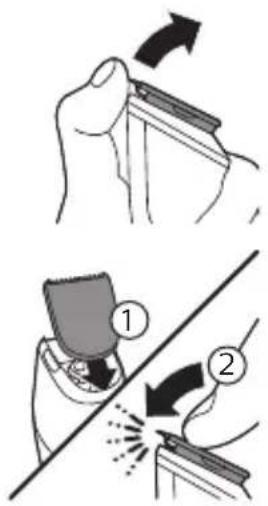
5 Carefully shake off excess water and let air dry completely.
6 Insert the lug of the cutting unit into the guiding slot and push the cutting unit back onto the appliance.
Storage
- Store the product in the pouch supplied. Make sure the product is dry before you store it in the pouch.
Ordering accessories
To buy accessories or spare parts, visit www.shop.philips.com/service or go to your Philips dealer. You can also contact the Philips Consumer Care Center in your country (see the international warranty leaflet for contact details).
Recycling
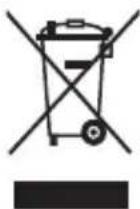
- This symbol means that this product shall not be disposed of with normal household waste (2012/19/EU).
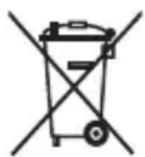
- This symbol means that this product contains a built-in rechargeable battery which shall not be disposed of with normal household waste (2006/66/EC). Please take your product to an official collection point or a Philips service center to have a professional remove the rechargeable battery.
- Follow your country's rules for the separate collection of electrical and electronic products and rechargeable batteries. Correct disposal helps prevent negative consequences for the environment and human health.
Warranty and support
If you need information or support, please visit www.philips.com/support or read the international warranty leaflet.
Warranty restrictions
Cutting units are not covered by the terms of the international warranty because they are subject to wear.
Encomendar acessórios
Trimming for "skaggstubb"
75% recycled paper
75% papier recyclé