HPR151i - Speaker QSC - Free user manual and instructions
Find the device manual for free HPR151i QSC in PDF.



| Product Type | Active subwoofer |
| Brand | QSC |
| Model | HPR151i |
| Frequency Response (-3 dB) | 51 Hz - 105 Hz |
| Frequency Range (-10 dB) | 43 Hz - 145 Hz |
| Maximum Peak SPL | 135 dB |
| Transducer | 381 mm (15 in) with 76 mm voice coil |
| Amplifier Power | 700 W |
| Input Sensitivity | 0.775 V (0 dBu) |
| Input Headroom | 10 V (22.2 dBu) |
| Input Impedance | 22 kΩ (balanced), 11 kΩ (unbalanced) |
| Input Connectors | 2 x XLR female (L and R) |
| Output Connectors | 4 x XLR male: 2 full range, 2 low-pass 100 Hz |
| Controls | Gain (21-position), polarity (normal/reverse), front indicator ON/OFF |
| Indicators | Power (blue), signal (green), limit (red) |
| Protection | Thermal, mute mode, power limiting, short circuit, RF, ultrasonic |
| Mains Power | 120 V or 230 V (depending on model) via locking IEC connector |
| Dimensions (H x W x D) | 651 mm x 559 mm x 525 mm |
| Weight | 44.5 kg |
| Finish | Black textured paint, perforated steel grille |
| Recommended Use | Floor or stage placement, 35 mm pole socket on top |
| Rear Clearance for Cooling | Minimum 152 mm |
| Maximum Ambient Temperature | 40 °C |
| Warranty | 3 years (USA), check dealer elsewhere |
Frequently Asked Questions - HPR151i QSC
User questions about HPR151i QSC
0 question about this device. Answer the ones you know or ask your own.
Ask a new question about this device
Download the instructions for your Speaker in PDF format for free! Find your manual HPR151i - QSC and take your electronic device back in hand. On this page are published all the documents necessary for the use of your device. HPR151i by QSC.
USER MANUAL HPR151i QSC
HPR Series Powered Loudspeaker Products
User Manual Manual del usuario Manuel d'utilisation Benutzerhandbuch
用户手册
HPR122i 12-inch two-way
HPR152i 15-inch two-way
HPR153i 15-inch three-way
HPR151i 15-inch subwoofer
HPR181i 18-inch subwoofer
natural_image
Technical line drawing of a rectangular electronic device with mounting flanges and internal components (no text or symbols)
natural_image
Line drawing of a rectangular industrial water heater unit (no text or symbols)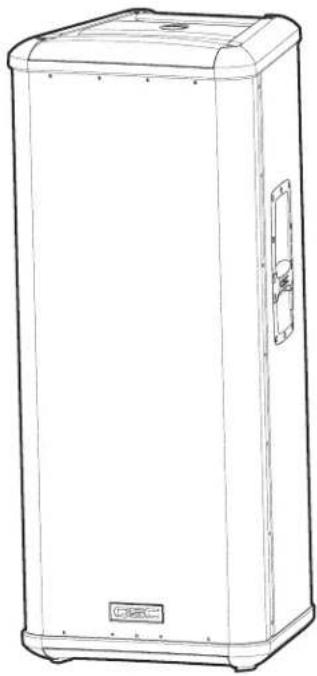
natural_image
Line drawing of a rectangular electronic device with lid and control panel (no text or symbols)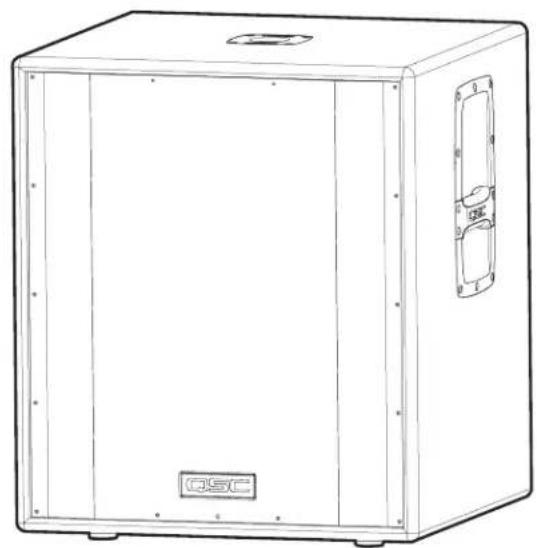
natural_image
Line drawing of a rectangular industrial enclosure with mounting flanges and a label 'QSC' on the front panel (no other text or symbols)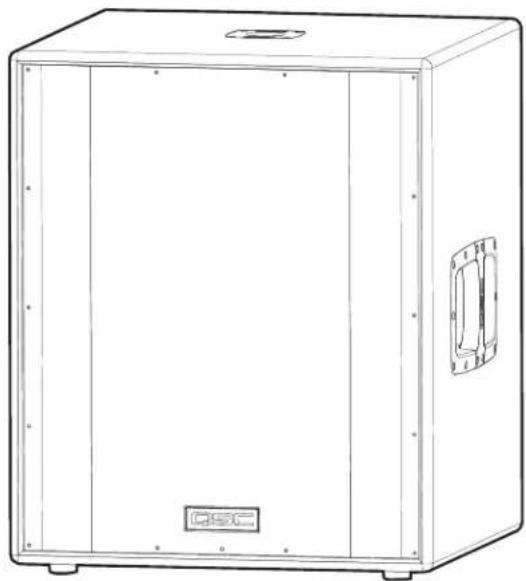
natural_image
Line drawing of a rectangular industrial enclosure with mounting flanges and a side panel (no text or symbols)Important Safety Precautions & Explanation of Symbols
Install in accordance with QSC Audio Product's instructions and under the supervision of a licensed Professional Engineer.

WARNING!

CAUTION: TO REDUCE THE RISK OF ELECTRIC SHOCK, DO NOT REMOVE THE COVER. NO USER-SERVICEABLE PARTS INSIDE. REFER SERVICING TO QUALIFIED PERSONNEL.

The lightning flash with arrowhead symbol within an equilateral triangle is intended to alert the user to the presence of uninsulated “dangerous” voltage within the product's enclosure that may be of sufficient magnitude to constitute a risk of electric shock to humans.

The exclamation point within an equilateral triangle is intended to alert the user to the presence of important operating and maintenance (servicing) instructions in this manual.
1- Read these instructions.
2- Keep these instructions.
3- Heed all warnings.
4- Follow all instructions.
5- WARNING: To prevent fire or electric shock, do not expose this equipment to rain or moisture. Do not use this apparatus near water.
6- Clean only with a dry cloth.
7- Allow a minimum of 6" (152mm) clearance at cabinet back for convection cooling. Keep anything that might restrict airflow away from the rear of the enclosure (i.e draperies, fabric, etc...). Do not block any ventilation openings. This product contains an internal power amplifier that produces heat.
8- Do not install near any heat sources such as radiators, heat registers, stoves, or other apparatus (including amplifiers) that produce heat.
9- Do not defeat the safety purpose of the grounding-type plug. The grounding plug has two blades and a grounding prong. The third prong is provided for your safety. If the provided plug does not fit your outlet, consult an electrician for the replacement of the obsolete outlet. Do not cut off the grounding prong or use an adapter that breaks the grounding circuit. This apparatus must be properly grounded for your safety.
10- Protect the power cord from being walked on or pinched, particularly plugs, convenience receptacles, and the point where they exit from the apparatus.
11- This product is not equipped with an all-pole mains switch. To fully disconnect from the AC mains, the AC plug must be removed from the AC outlet or the appliance coupler (IEC block) must be removed from the amplifier module. Ensure either the AC line cord plug or the appliance coupler are accessible in case of emergency disconnect requirement.
12- Use only attachments/accessories specified by QSC Audio Products, Inc.
13- Use only with hardware, brackets, stands, and components sold with the apparatus or by QSC Audio Products, Inc.
14- Unplug the apparatus during lightning storms or when unused for long periods of time.
15- Refer all servicing to qualified service personnel. Servicing is required when the apparatus has been damaged in any way, such as power supply cord or plug is damaged, liquid has been spilled or objects have fallen into the apparatus, the apparatus has been exposed to rain or moisture, does not operate normally, or has been dropped.
16- Before placing, installing, rigging, or suspending any speaker product, inspect all hardware, suspension, cabinets, transducers, brackets and associated equipment for damage. Any missing, corroded, deformed, or non-load rated component could significantly reduce the strength of the installation or placement. Any such condition severely reduces the safety of the installation and should be immediately corrected. Use only hardware which is rated for the loading conditions of the installation and any possible short-term, unexpected overloading. Never exceed the rating of the hardware or equipment.
17- Consult a licensed, Professional Engineer regarding physical equipment installation. All local, state and national regulations regarding the safety and operation of equipment are understood and adhered to.
18- HPR152i WARNING! Do not use a loudspeaker support pole longer than 26" (660mm) when supported by QSC's HPR151i or HPR181i subwoofer.
19- HPR122i WARNING! Do not use a loudspeaker support pole longer than 31" (787mm) when supported by QSC's HPR151i or HPR181i subwoofer.
20- Do not use the HPR152i, HPR153i, HPR151i, or HPR181i oriented horizontally. Horizontal orientation can cause overheating and thermal limiting. The cooling fins on the amplifier module must be vertically oriented in order to efficiently dissipate the heat generated by the amplifier.
21- The appliance shall not be exposed to dripping or splashing and no objects filled with liquids, such as vases, shall be placed on the apparatus.
Introduction
Congratulations and thank you for your purchase of this professional, powered loudspeaker product. To get the most from your investment, we recommend you review all the information provided in this User Manual.
The HPR self-powered loudspeakers provide excellent sound quality, durable construction and clean, efficient, on-board amplification. Amplifiers are matched to the drivers with active equalization and precise crossover control. Active power limiting and thermal management extends the life of drivers and the amplifier. The HPR series solves many application challenges with its great sound, built-in protection systems and self-contained portability. HPR is the perfect solution for public performances, corporate events and private parties demanding flexible and excellent sounding system solutions.
All models are self-powered using efficient amplifiers. AC line connection is fast and easy; an IEC-style quick-disconnect ensures reliable AC mains connection while providing an easy-to-remove power cord for cabinet mobility. Audio enters the self-powered loudspeaker via a female XLR connector with an additional parallel-wired male XLR output for daisy-chaining. No outboard signal processing is required as all models feature on-board filtering. The two-way and three-way full-range loudspeakers feature a switchable 100 Hz low-cut filter for use when subwoofers are part of the system. Subwoofer models have two full-range input connectors (left and right) and two sets of output connectors; one pair featuring a 100 Hz low-cut filter and one pair passing full-range signal.
Rear-panel LEDs alert the user to AC power status, input signal presence, and limiter operation. Additionally, a blue front-panel "power on" LED provides valuable visual power confirmation. It can also be disabled for applications where light toward the audience may interfere with stage aesthetics. All models feature a 21-step detent Gain control allowing precise control and repeatable setup. The enclosures are made of high-quality plywood and are texture-coated in black. The models HPR122i, HPR152i and HPR153i have integral M10 suspension points for permanent installation and "flying" applications. Features vary by model, so please refer to sales brochures or the specifications section of this manual for specific model information.
HPR122i Features HPR152i Features
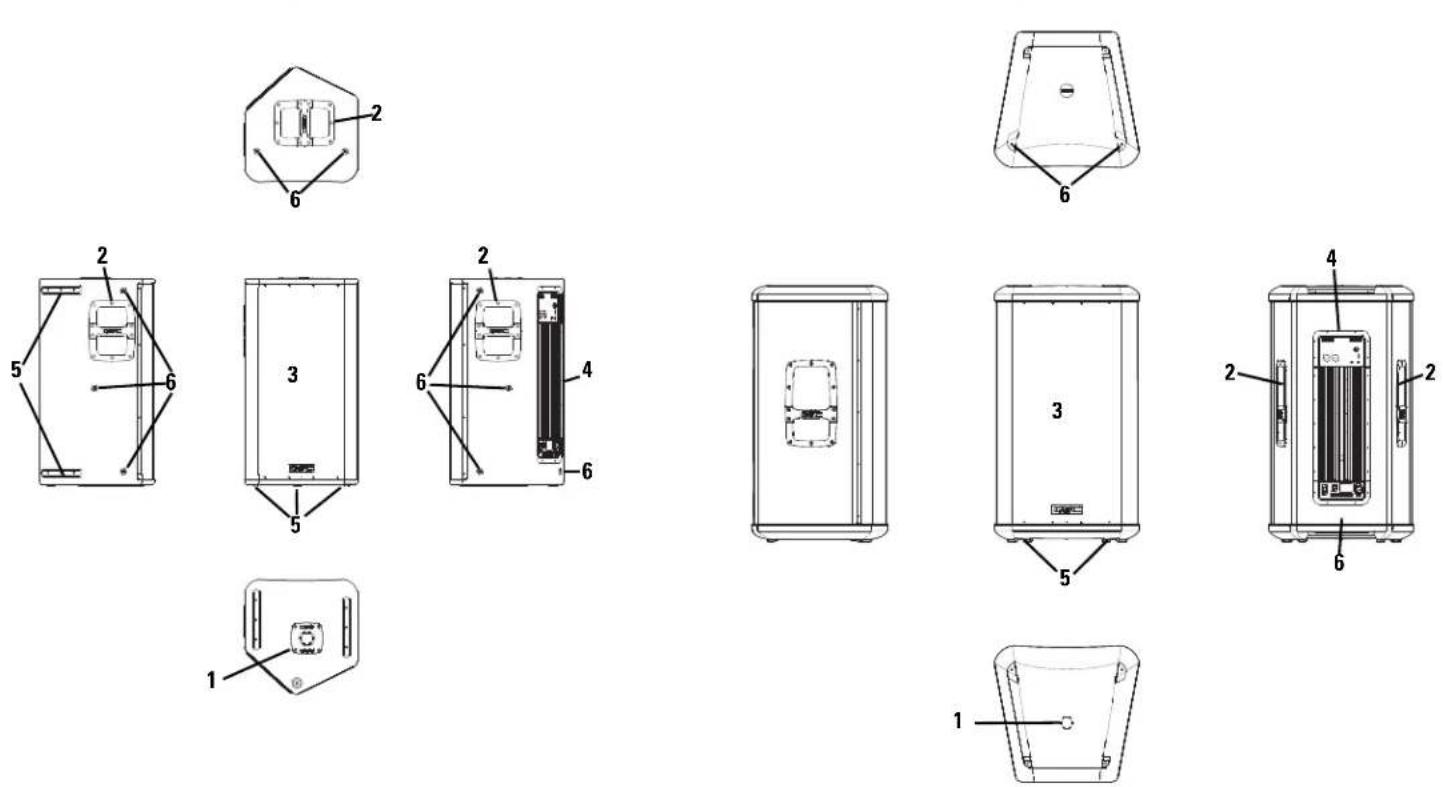
1- Pole Cup 4- Power Amplifier
2- Handles 5- Slip-resistant Feet
3- Grill 6- Rigging points
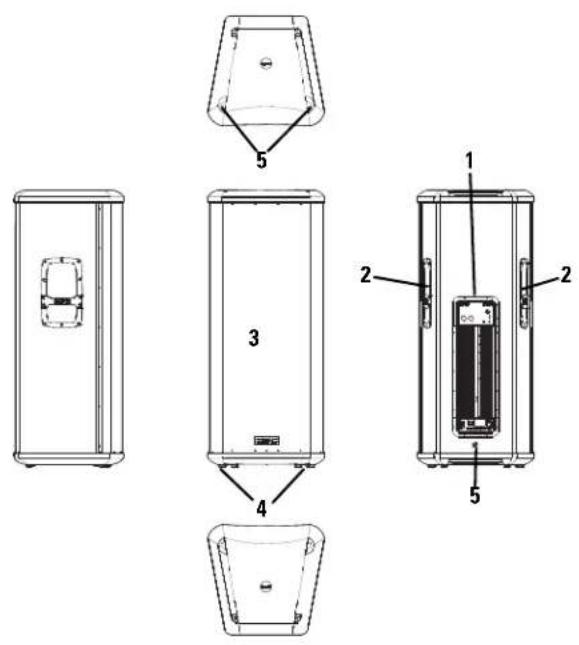
HPR153i Features
text_image
Technical diagram of a device with labeled components, showing front, side, and top views with numbered parts.1- Power Amplifier 4- Slip-resistant Feet
2- Handles 5- Rigging Points
3- Grill
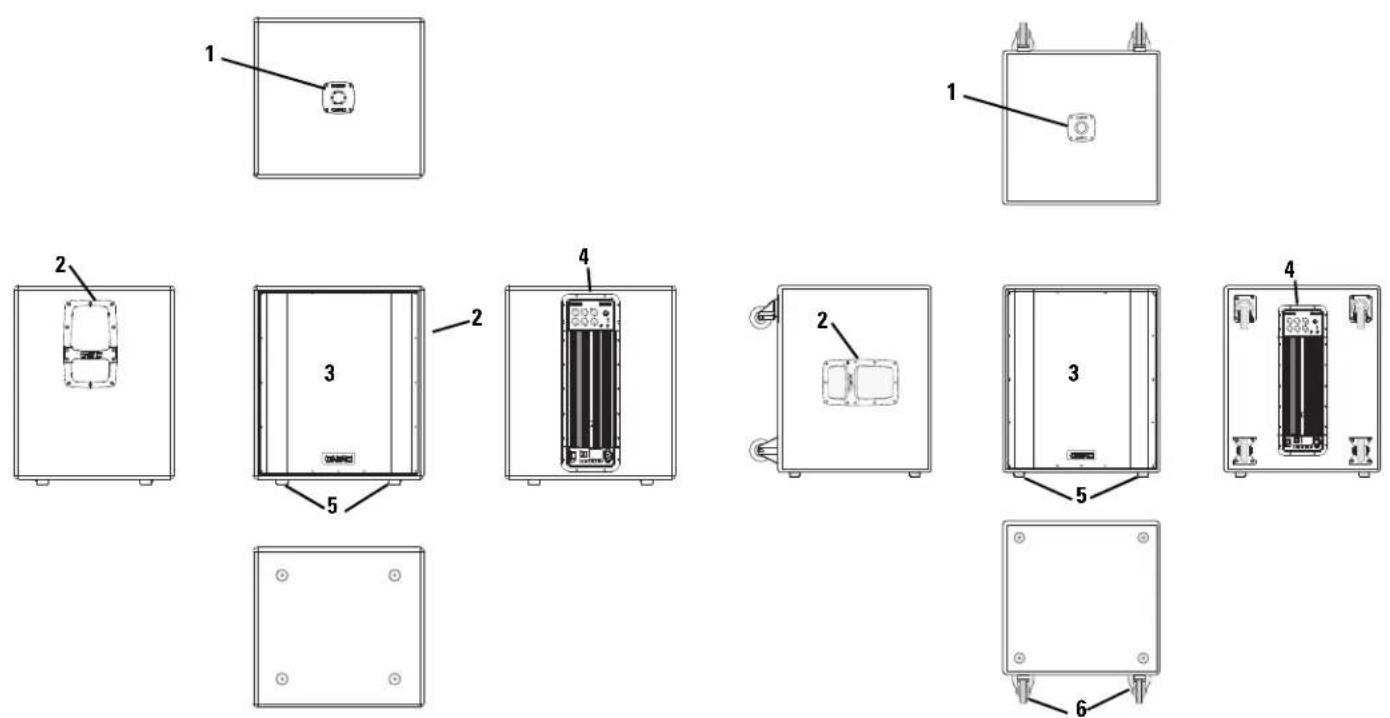
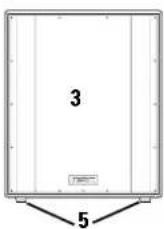
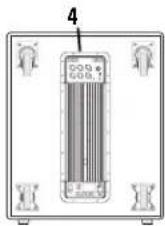
HPR151i Features HPR181i Features
text_image
Technical diagram showing six labeled views of an electrical enclosure or panel with numbered components and internal components.1- Pole Cup 4- Power Amplifier
2- Handles 5- Slip-resistant Feet
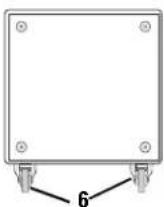
3- Grill 6- Casters (HPR181W only)
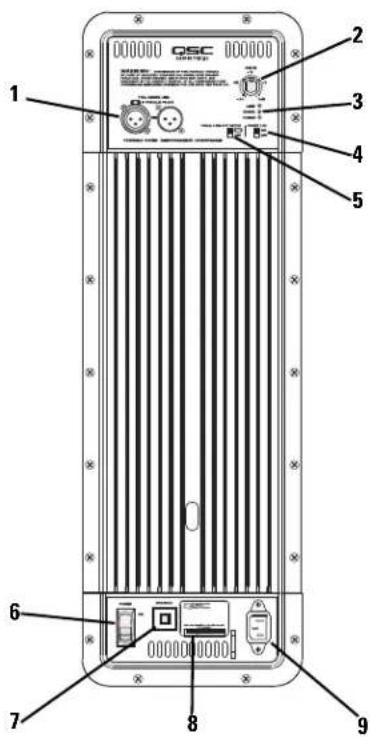
Full Range Amplifier Detail
1- Input and Output Connector(s)
2- Gain Control
3- Power, Signal, and Clip LED Indicators
4- Front LED Switch
5-100 Hz Low-Cut Filter Switch
6- Power Switch
7- Circuit Breaker
8- Serial Number Plate
9- Latching IEC Power Inlet
Subwoofer Amplifier Detail
1- Input and Output Connector(s)
2-Gain Control
3- Power, Signal, and Clip LED Indicators
4- Front LED Switch
5- Polarity Switch
6- Power Switch
7- Circuit Breaker
8- Serial Number Plate
9- Latching IEC Power Inlet
text_image
000000 000000 QSC 1 2 3 4 5 6 7 8 9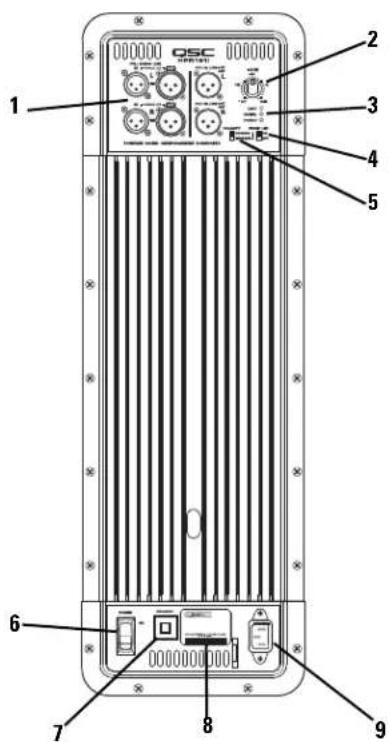
text_image
000000 QSC 000000 1 2 3 4 5 6 7 8 9Installation

Before placing, installing, rigging, or suspending any speaker product, inspect all hardware, suspension, cabinets, transducers, brackets and associated equipment for damage. Any missing, corroded, deformed, or non-load rated component could significantly reduce the strength of the installation or placement. Any such condition severely reduces the safety of the installation and should be immediately corrected. Use only hardware which is rated for the loading conditions of the installation and any possible short-term, unexpected overloading. Never exceed the rating of the hardware or equipment.
Consult a licensed, Professional Engineer regarding physical equipment installation. Ensure that all local, state and national regulations regarding the safety and operation of loudspeakers and related equipment are understood and adhered to.
How They Should Be Used
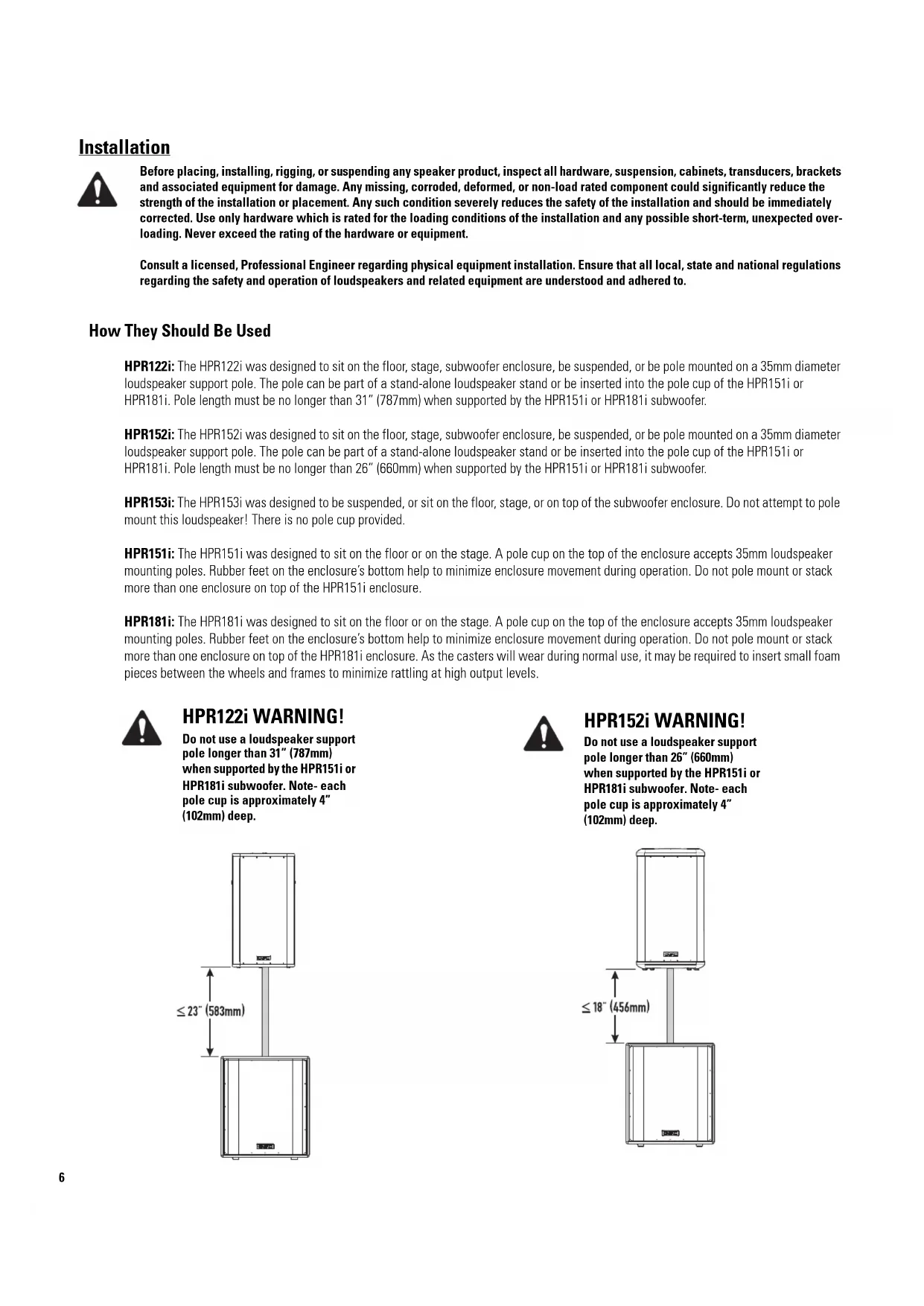
HPR122i: The HPR122i was designed to sit on the floor, stage, subwoofer enclosure, be suspended, or be pole mounted on a 35mm diameter loudspeaker support pole. The pole can be part of a stand-alone loudspeaker stand or be inserted into the pole cup of the HPR151i or HPR181i. Pole length must be no longer than 31" (787mm) when supported by the HPR151i or HPR181i subwoofer.
HPR152i: The HPR152i was designed to sit on the floor, stage, subwoofer enclosure, be suspended, or be pole mounted on a 35mm diameter loudspeaker support pole. The pole can be part of a stand-alone loudspeaker stand or be inserted into the pole cup of the HPR151i or HPR181i. Pole length must be no longer than 26" (660mm) when supported by the HPR151i or HPR181i subwoofer.
HPR153i: The HPR153i was designed to be suspended, or sit on the floor, stage, or on top of the subwoofer enclosure. Do not attempt to pole mount this loudspeaker! There is no pole cup provided.
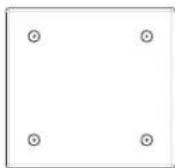
HPR151i: The HPR151i was designed to sit on the floor or on the stage. A pole cup on the top of the enclosure accepts 35mm loudspeaker mounting poles. Rubber feet on the enclosure's bottom help to minimize enclosure movement during operation. Do not pole mount or stack more than one enclosure on top of the HPR151i enclosure.
HPR181i: The HPR181i was designed to sit on the floor or on the stage. A pole cup on the top of the enclosure accepts 35mm loudspeaker mounting poles. Rubber feet on the enclosure's bottom help to minimize enclosure movement during operation. Do not pole mount or stack more than one enclosure on top of the HPR181i enclosure. As the casters will wear during normal use, it may be required to insert small foam pieces between the wheels and frames to minimize rattling at high output levels.

HPR122i WARNING!
Do not use a loudspeaker support pole longer than 31" (787mm) when supported by the HPR151i or HPR181i subwoofer. Note- each pole cup is approximately 4" (102mm) deep.
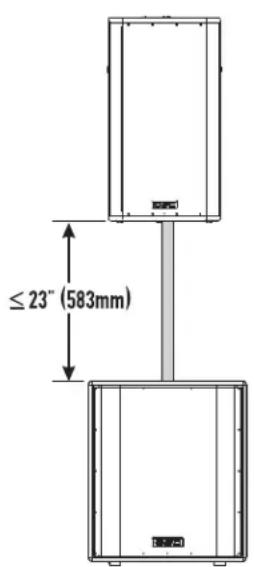
text_image
≤23" (583mm)
HPR152i WARNING!
Do not use a loudspeaker support pole longer than 26" (660mm) when supported by the HPR151i or HPR181i subwoofer. Note- each pole cup is approximately 4" (102mm) deep.
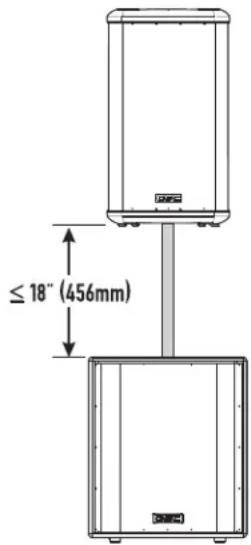
text_image
≤ 18" (456mm)Installation (continued)
Pick Points (suspended installations)
The HPR152i and HPR153i enclosures feature three load-rated pick points. The HPR122i enclosure features nine load-rated pick points. As shipped from the factory, each pick point has a bolt or plug installed to retain the air-tight design of the enclosure. Never operate the loudspeaker with the pick points open (unsealed) as it will degrade the performance of the product.

Ensure all pick-point fasteners are installed and correctly tightened in order to maintain enclosure's rated strength. Additionally, air leaks resulting from missing hardware will degrade the loudspeaker's performance.
Use only QSC's M10 forged shoulder eye bolts. Contact QSC Technical Services department for complete information.
Cooling
This is a self-powered loudspeaker containing an internal power amplifier that produces heat. Allow a minimum of 6" (152mm) clearance at cabinet back for convection cooling. Keep anything that might restrict airflow away from the rear of the enclosure (i.e draperies, fabric, etc...).

Do not use the HPR152i, HPR153i, HPR151i, or HPR181i oriented horizontally. Horizontal orientation can cause overheating and thermal limiting. The cooling fins on the amplifier module must be vertically oriented in order to efficiently dissipate the heat generated by the amplifier.
Do not install enclosures with their rear panels exposed to direct sunlight. Direct sunlight will heat the amplifier module and reduce its ability to produce full output. Install sunshades if the application merits.
Maximum ambient temperature for full performance to specification is 40^ C. ( 104^ F.).
Do not install enclosures where exposed to rain or other water sources. The enclosure is not weatherproof. Outdoor installations must provide protection from the elements.
Pickpoints on the HPR122i
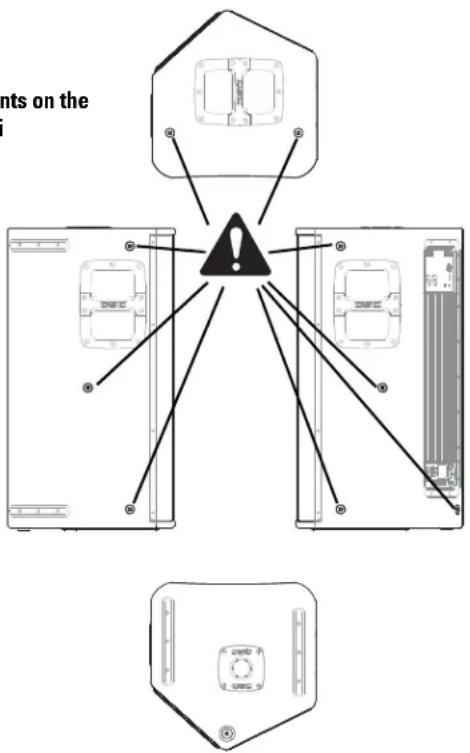
text_image
nts on the !Pickpoints on the HPR152i and HPR153i
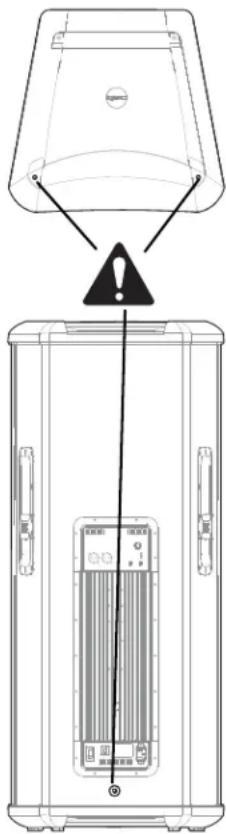
text_image
Diagram showing a device with warning symbol and labeled components, including a warning triangle and internal panel layout.AC Mains
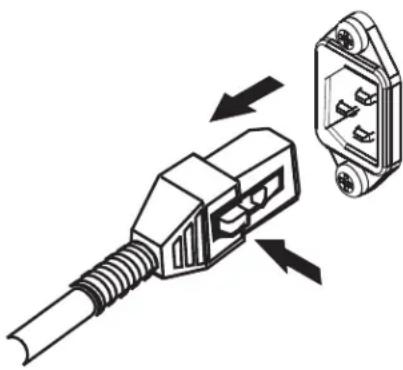
Connect AC power to the IEC socket on the back of the amplifier by locating the IEC connector-end of the AC power cord and inserting it fully into the IEC inlet on the power amplifier module. NOTE: Turn off the AC power switch before connecting AC power.
The V-LOCK power cord has a special latching feature to prevent the power cord from being unintentionally removed. The IEC plug and socket are both blue in color so the power cord can be identified as an HPRi loudspeaker cord.
If the QSC-supplied cord becomes lost or damaged, a replacement 18 gauge IEC power cord may be used. However, the latching system will only function with a V-LOCK power cord available from QSC Audio Products.

The correct AC line voltage is shown on the serial number label, on the rear panel. Connecting to the wrong line voltage may damage the amplifier or increase the risk of electric shock.
AC Mains Disconnection
Turn the AC power switch to the off position. To remove the AC mains cord, grasp the IEC connector's plastic body, press the yellow latch release button and pull, removing the connector from the socket.
Power Switch
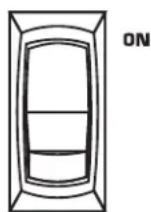
Push in on the top of the rocker switch to apply AC mains power to the powered loudspeaker. Push in on the bottom of the rocker switch to turn the powered loudspeaker off.
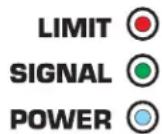
When turned on, the blue POWER indicator LED and the red LIMIT (limiter) indicator LED will illuminate; after a few seconds the red LIMIT indicator will extinguish.
LED POWER Indicator
The blue LED POWER indicator will illuminate when the AC Power switch is in the "ON" position, the AC mains power cord is connected properly, and the AC mains are functioning properly. The LED POWER indicator will extinguish when the AC Power switch is in the "off" position or AC mains power has been removed from the loudspeaker.
If the POWER indicator does not illuminate when the Power switch is placed in the "on" position, verify the AC mains line cord is properly attached to the loudspeaker and plugged into the AC outlet. Verify the outlet is functioning properly.

If the AC mains cordset is serviceable and the AC mains outlet is operating properly, but the loudspeaker fails to operate, the loudspeaker may require servicing. Contact QSC's Technical Services department.
System Power Sequencing
Proper power turn on sequence can help to prevent unexpected sounds from your system (pops, clicks, thumps). These unintended sounds can damage drivers and cause audience members to question the professionalism of the sound team. Turn on and off the system in the proper order to avoid unexpected sounds.
Power On Sequence: Turn on all source devices (CD players, mixers), turn on subwoofer, then turn on the "top-boxes" (HPR122i, HPR152i and HPR153i).
natural_image
Diagram of a plug connector with two views showing internal components (no text or symbols)To remove AC cord, press the yellow latch release button and pull on the connector body.
AC power switch
POWER
Power "on" indicator LED
POWER

Input Connections
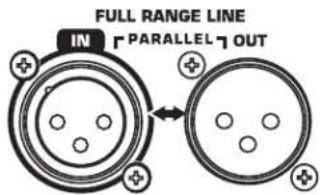
Full-range models have one female XLR line-level input marked FULL RANGE LINE IN.
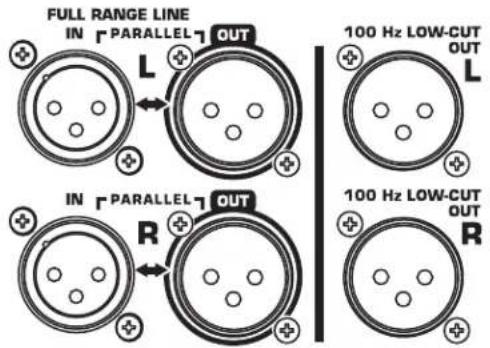
Subwoofers have a second set of connectors, one for the left channel's audio and one for the right channel's audio.
We recommend balanced connections be used. Balanced connections will reduce AC hum and interference, especially with long cable runs. Unbalanced connections may be suitable for short cables. The input impedance is 22k ohm for balanced connections or 11k ohm for unbalanced connections. The signal's source impedance should be less than 600 ohms.
HPR122i, HPR152i and HPR153i: Insert the male XLR input into the jack marked FULL RANGE LINE IN. Ensure the connector is fully seated.
HPR151i and HPR181i: Insert the left channel's XLR input into the left channel's (L) FULL RANGE LINE IN connector. Insert the right channel's XLR connector into the right channel's (R) FULL RANGE LINE IN connector. If a single input signal is used, plug into either the L (left) or R (right) channel's input.
If two input signals are used, plug the left channel's signal into the connector marked FULL RANGE LINE IN L (the top input connector) and the right channel's signal into the connector marked FULL RANGE LINE IN R (the bottom input connector). When two input signals are applied, the subwoofer's gain is automatically increased 6dB as the subwoofer will likely be used with two full-range loudspeakers.
Balanced inputs: Connect to the plug as shown.
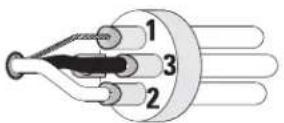
1= shield (ground)
3= minus (-)
2= plus (+)
Unbalanced inputs: Connect to the plug as shown. Pin 3 and pin 1 must be connected with a jumper as shown.
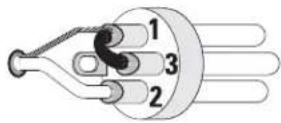
1= shield (ground)
3= jumper to pin 1
2= plus (+)
Full-range loudspeaker's Input (IN) and Output (OUT) Connectors
text_image
FULL RANGE LINE IN PARALLEL 7 OUTSubwoofer loudspeaker's Input (IN) and Output (OUT) Connectors
text_image
FULL RANGE LINE IN PARALLEL OUT L 100 Hz LOW-CUT OUT L IN PARALLEL OUT R 100 Hz LOW-CUT OUT ROutput Connections
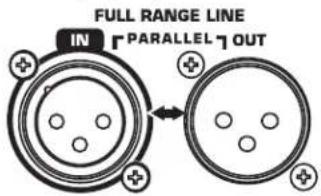
Full-range models have one XLR output connector marked FULL RANGE LINE OUT. The output connector is wired in parallel with the input enabling connection of multiple enclosures in a "daisy-chain" fashion.
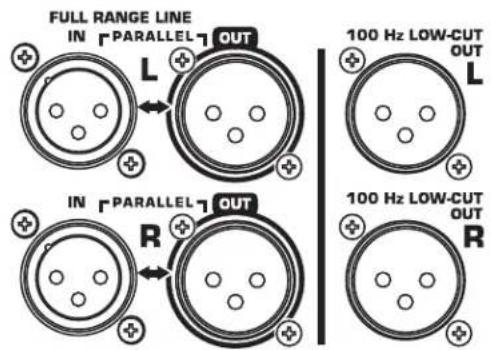
Subwoofer models have two sets of output connectors, one set for the left and one set for the right audio channel. Each channel has a FULL RANGE LINE OUT connector and a 100 Hz LOW-CUT OUT connector (active 100 Hertz filter applied, non-defeatable).
We recommend balanced connections be used. Balanced connections will reduce AC hum and interference, especially with long cable runs. Unbalanced connections may be suitable for short cables.
HPR122i, HPR152i and HPR153i
Insert the XLR connector into the jack marked FULL RANGE LINE OUT. Connect the other end of the cable to the next down-stream audio device's input connector. The output connector is wired in parallel with the input connector and is not effected by the 100 Hertz low-cut filter switch setting.
HPR151i and HPR181i
FULL RANGE LINE OUT: Use the outputs marked FULL RANGE LINE OUT (Left and/or Right) when connecting to down-stream powered loudspeakers which accept full-range audio or have their own filtering.
100 Hz LOW-CUT: Use the outputs marked 100 Hz LOW-CUT OUT (L and/or R) when connecting to downstream powered loudspeakers that have no low-frequency filtering but the low-frequency roll-off is desired. Do not use the 100 Hz LOW-CUT OUT connectors for connecting to other subwoofers. Instead, use the FULL RANGE LINE OUT. Be sure to turn off any loudspeaker connected to the 100 Hz LOW-CUT OUT before turning off the subwoofer's AC power. This prevents any undesired turn-off transients (thumps, bumps) in the connected devices.

If using the subwoofer's 100 Hz LOW-CUT OUT connector to provide signal to the top-boxes (HPR152i and HPR153i), be sure the top-box's low-cut filters are OFF. Do not apply a second filter as the sonic performance of the system will be notably degraded.
IMPORTANT! If using full range loudspeakers from another manufacturer, we recommend they be connected to the QSC subwoofer's 100 Hz LOW-CUT OUT. This will ensure proper phasing of the full range loudspeaker with respect to the subwoofer.
Full-range loudspeaker's Input (IN) and Output (OUT) Connectors
text_image
FULL RANGE LINE IN PARALLEL OUTSubwoofer loudspeaker's Input (IN) and Output (OUT) Connectors
text_image
FULL RANGE LINE IN PARALLEL OUT L 100 Hz LOW-CUT OUT L IN PARALLEL OUT R 100 Hz LOW-CUT OUT RGAIN Control
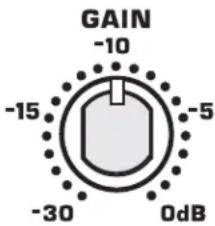
The GAIN control is marked in dB of attenuation. There are 21 detents for repeatable adjustments. Turn the GAIN control clockwise to increase gain and counter clockwise to decrease gain.
The upper 14 steps are about 1 dB each and settings should normally be made within this range. When operating with the GAIN set below -15 dB, it may be possible to exceed input headroom. If this is the case, reduce the input signal strength and increase the gain of the loudspeaker amplifier.
Subwoofer Gain Notes
Scenario: One input signal only to the subwoofer, one full-range loudspeaker for each subwoofer- The HPR loudspeakers are designed to be used as a system, typically using one subwoofer for each full-range loudspeaker. If the subwoofer and the full-range loudspeaker have their Gain controls set identically, the tonal balance will be correct (or very close to correct).
Scenario: Two input (L+R) signals to the subwoofer, and two full-range loudspeakers per subwoofer-
When two inputs (L+R) are applied to the subwoofer, an additional gain of 6dB is automatically applied to the subwoofer. The additional gain is added to the subwoofer to keep the tonal balance correct for use with two full-range loudspeakers.
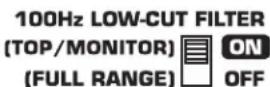
100 Hertz Low-Cut Filter Switch: HPR122i, HPR152i, and HPR153i
Below the LED indicators is a small recessed slide-switch that enables or disables a 100 Hertz low-cut filter.
Filter OFF (Full Range)
Turn the filter OFF when using without subwoofers or dedicated low-frequency enclosures.
Filter ON (100 Hz Low-Cut)
Turn the filter ON when using with optional subwoofers or low-frequency systems. This results in proper subwoofer operation and allows the top box to provide improved clarity in the middle and high frequencies. HPR122i: If using as a floor monitor, turn the filter ON for improved vocal range clarity and to reduce low frequency build-up on stage.
Gain control.
text_image
GAIN -10 -15 -5 -30 0dBHPR152i and HPR153i 100 Hertz low-cut filter switch.
100Hz LOW-CUT FILTER

HPR122i 100 Hertz low-cut filter switch.
Front LED Switch
The Front LED Switch, located on the rear panel, is used to enable or disable the LED located on the front of the enclosure near the bottom of the grill. Slide the switch to the ON position to enable the front LED and slide it to the OFF position to disable the front LED.
Most applications merit the use of the Front LED so power status can be visually confirmed, easily and quickly. For applications where the LED may distract audience members, it is easily disabled by sliding the FRONT LED switch to the OFF position.
Polarity Switch (HPR151i and HPR181i)
When all loudspeakers in system are properly polarized, a positive polarity drive signal results in a forward excursion of all loudspeaker cones. This, in turn, sets up a positive reinforcement of the sound wavefront (each loudspeaker reinforces the actions of the other loudspeakers). This effect is most pronounced at low (bass) frequencies.
If a loudspeaker is not properly polarized, its cone moves inward while the properly polarized loudspeaker's cones move outward. The inward movement will effectively cancel the bass response of a similarly-sized driver in the system, resulting in a reduction in the bass content.
It is critically important to maintain correct phasing in a loudspeaker system in order to realize maximum performance. Polarity can be altered by miswired input cables, interconnecting cables, mixer polarity switches set incorrectly, just to name a few likely culprits.
To make matters a bit more complicated, phasing is also influenced by the position of loudspeakers with respect to one another and by their position in a given room. It is possible to have all loudspeakers polarized properly (electrically) and yet achieve better bass response by having the subwoofer reverse polarized. It is even possible to achieve improved bass response from the system with multiple subwoofers polarized differently. Be aware that perceived bass response also will change with the listener's position, so move around the room (venue) when testing your setup.
Because phasing problems can so drastically effect the bass output of a system, the subwoofers are equipped with a switch marked POLARITY. When set to NORMAL, the polarity is such that a positive going input will cause the cone to move outward. When set to REVERSE, the input signal has its polarity reversed and a positive going input will cause the loudspeaker's cone to move inward.
How to Use the Polarity Switch
When using QSC subwoofers and QSC full range loudspeakers, NORMAL polarity will result in the best bass response IF the full range loudspeakers are sitting on or very close to the subwoofers. If the subwoofers are some distance away from the full range loudspeakers, polarity change may be of benefit.
Start with all subwoofer POLARITY switches in the NORMAL position. This applies to systems with one subwoofer as well. Then, with your system at or near expected operating levels, change the polarity of each subwoofer INDIVIDUALLY. Then walk around the venue and assess the overall bass response. Select the polarity that results in the best overall system bass response.
Front LED switch.

Polarity switch.


IMPORTANT! If using full range loudspeakers from another manufacturer, we recommend they be connected to the QSC subwoofer's 100 Hz LOW-CUT OUT. This will ensure proper polarity of the full range loudspeaker with respect to the subwoofer.
SIGNAL Indicator LED
The green SIGNAL indicator alerts the user to the presence of an input signal to the HPR loudspeaker.
Normal Indication
The green SIGNAL indicator illuminates when the input signal exceeds -25 dB.
If No Indication
Check Gain settings and increase gain if necessary. Check input connections and audio source for signal. If the red LIMIT LED illuminates, refer to the LIMIT indicator section, below.
Abnormal Indication
If the green SIGNAL LED illuminates with no signal input, there may be system oscillations or some other malfunction. Disconnect the input or fully reduce the gain. If the green SIGNAL LED remains on, the amp may need servicing.
LIMIT Indicator LED
The red LIMIT indicator alerts the user to several conditions within the HPR loudspeaker:
Continuous Bright Red Light
- Indicates protective mute mode.
- The speaker normally passes through muting for several seconds after applying power, after which the light should go out, and sound should be heard.
- If the speaker enters Mute during operation, it has either overheated or developed a fault.
- Overheating should correct itself within 1-2 minutes, after which sound should resume. See below for a full explanation of thermal protection.
- Short periods of muting indicate a component fault. In this case AC power should be removed and the speaker serviced.
Momentary Bright Red Flashes
- During operation, bright flashing indicates clipping (overdrive distortion). This is normally due to excessive volume and may be accompanied by audible distortion.
- If the loudspeaker mutes repeatedly during output peaks, there may be a component fault; AC power should be removed and the loudspeaker serviced.
Continuous Half-bright Light
- Indicates that the internal limiter is reducing gain, due to prolonged clipping and/or excessive temperature.
- After several seconds of severe clipping, the limiter will reduce power to protect the speaker and improve the sound. This results in a steady, half-bright red indication. Any further clipping will still result in bright flashes on top of the steady half-bright indication. When the program level is reduced, the limiter will clear after several seconds, and the red indicator will go out.
- If the power module overheats, the first response is to trigger limiting, to reduce volume and limit further temperature rise. This results in a steady half-bright illumination that does not clear even after reducing program level. It may take several minutes for temperature to drop and clear the limiter. During this time, the exposed heat sink will feel uncomfortably hot to the touch. If overheating continues, the amplifier will ultimately mute, resulting in a full-bright red indication. When muting clears, the amplifier will resume operation, with thermal limiting still active until it further cools off.
- Overheating is usually caused by excessive ambient temperature, since the internal temperature rise of the power module is relatively low. Protect the speaker from excessive temperatures, such as being placed over a heater vent, or allowing direct sunlight to impinge upon the heat sink surface.
LED indicators.
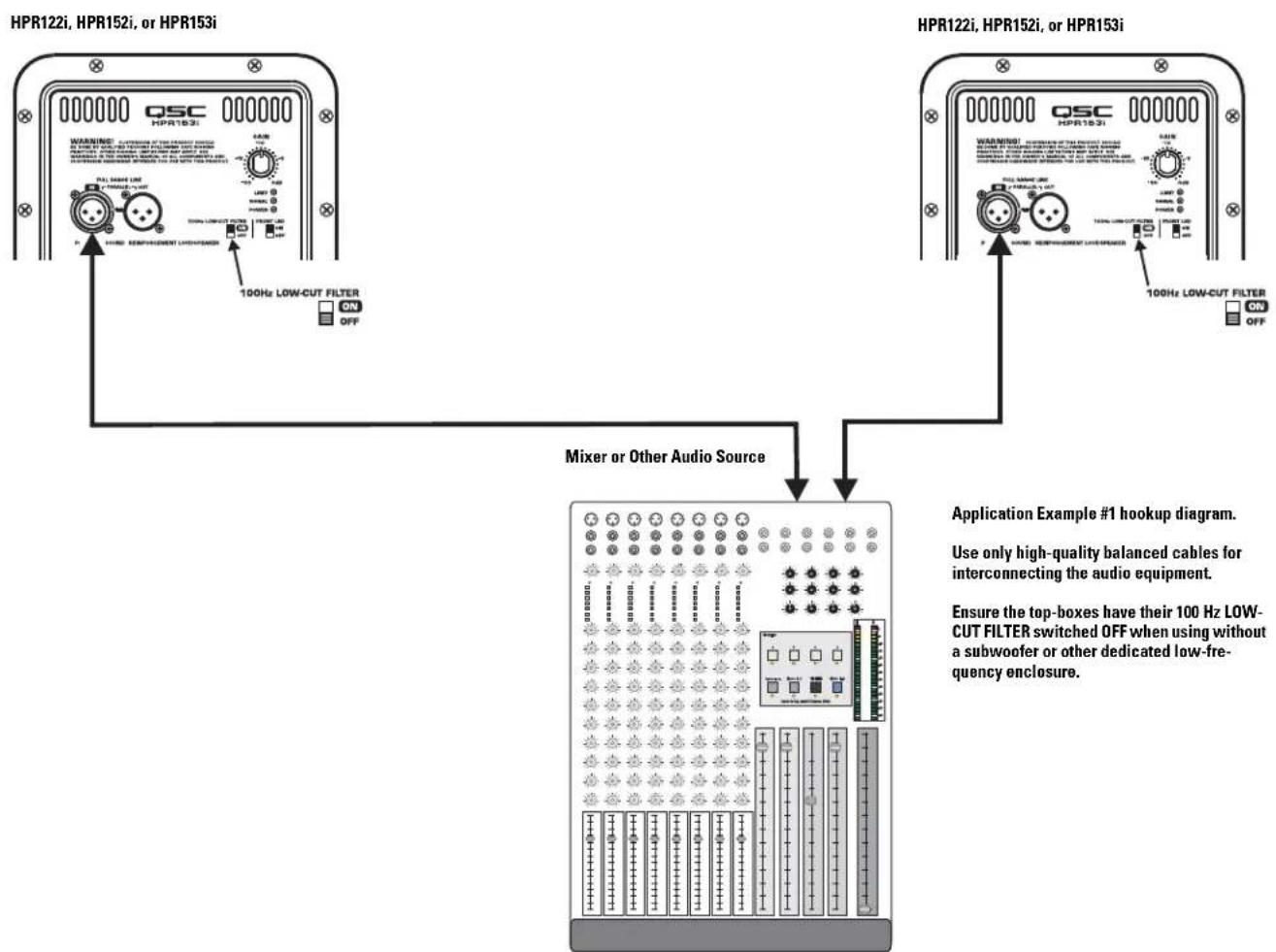
Application Example #1
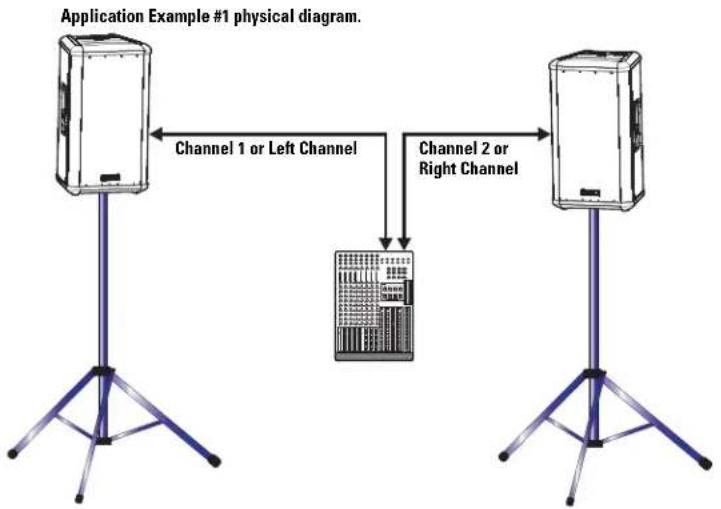
This example shows a two-channel (stereo) setup utilizing two top-boxes.
Audio signals for the Left and Right channels are supplied by the mixer console. This signal source can be just about any variable-output level audio source, such as DJ mixers, professional CD players, or computer-based audio signal sources.
Audio output from the mixer's Left channel is connected to the Left top-box's FULL RANGE LINE IN connector. Audio output from the mixer's Right channel is connected to the Right top-box's FULL RANGE LINE IN connector. Turn off each top-box's 100 Hz LOW-CUT FILTER. This will provide more low-frequency content (bass) in the absence of a subwoofer.
flowchart
graph TD
    A["Device 1"] -->|Channel 1 or Left Channel| C["Device 2"]
    B["Device 2"] -->|Channel 2 or Right Channel| C["Device 2"]
flowchart
graph TD
    A["HPR122i, HPR152i, or HPR153i"] --> B["Mixer or Other Audio Source"]
    C["HPR122i, HPR152i, or HPR153i"] --> B
    B --> D["Application Example #1 hookup diagram."]
    style A fill:#f9f,stroke:#333
    style C fill:#f9f,stroke:#333
    style B fill:#ccf,stroke:#333
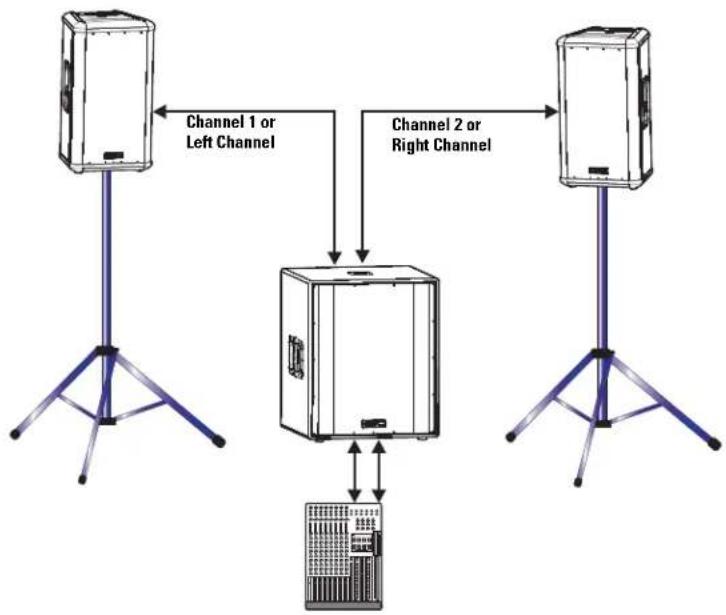
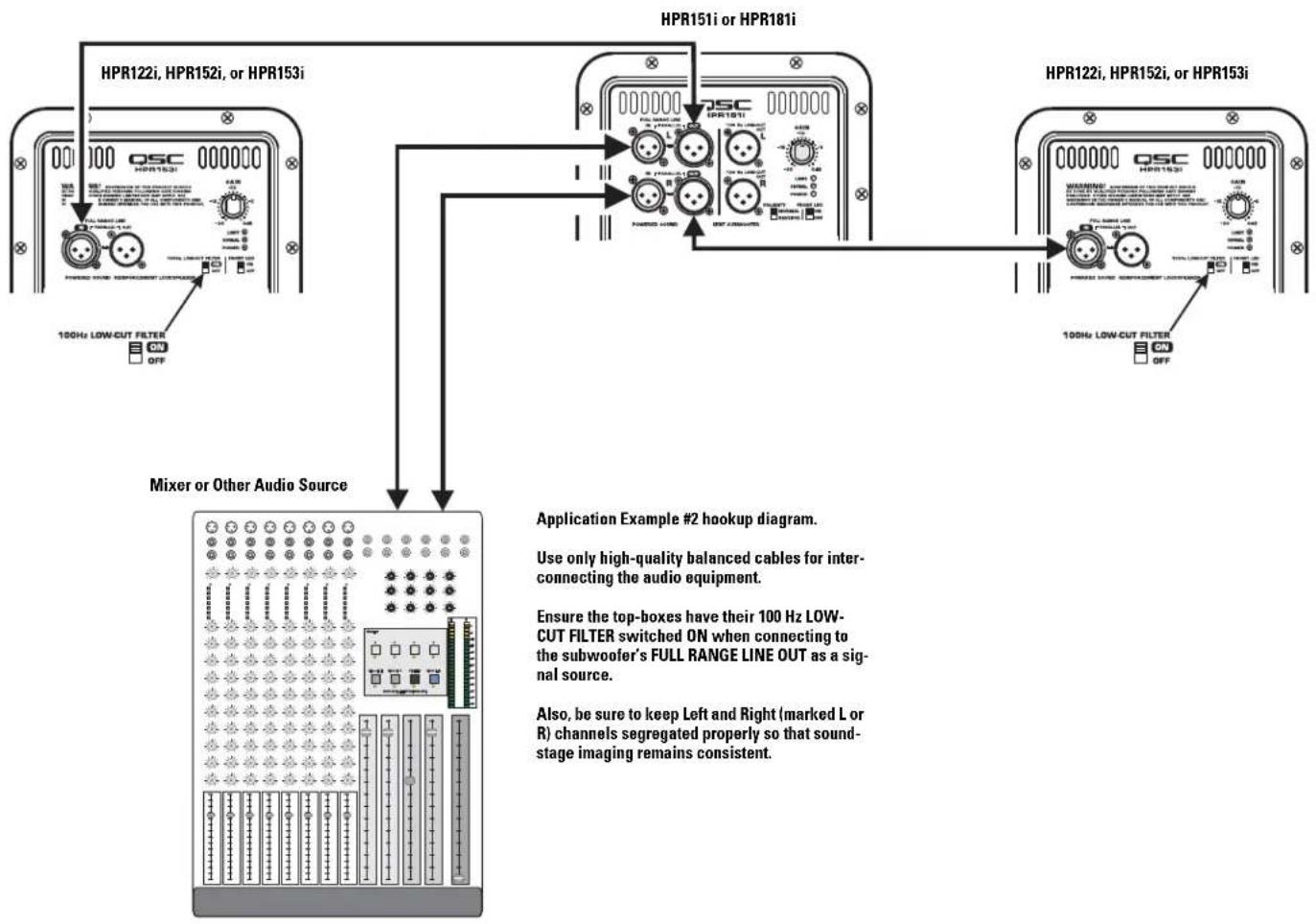
Application Example #2
This example shows a two-channel (stereo) setup utilizing one subwoofer and two top-boxes.
Audio signals for the Left and Right channels are supplied by the mixer console. This signal source can be just about any variable-output level audio source, such as DJ mixers, professional CD players, or computer-based audio signal sources.
Audio output from the mixer is connected to the subwoofer's Left (L) and Right (R) channels. The subwoofer's R and L FULL RANGE LINE OUT connectors are used to connect to its respective top-box. Turn ON each top-box's 100 Hz LOW-CUT FILTER.
Alternately, the top-boxes could be connected to the subwoofer's 100 Hz LOW-CUT OUT and the top-boxes 100 Hz LOW-CUT FILTERs turned off. The only possible issue with this method of connection is unexpected noises (turn-off thumps) if the subwoofer is powered up or down while the top boxes are on. If connected as shown, power sequencing is not an issue.
Application Example #2 physical diagram.
flowchart
graph TD
    A["Device"] -->|Channel 1 or Left Channel| B["Central Device"]
    C["Device"] -->|Channel 2 or Right Channel| B
    B --> D["Server"]
    style A fill:#f9f,stroke:#333
    style C fill:#f9f,stroke:#333
    style B fill:#ccf,stroke:#333
    style D fill:#cff,stroke:#333
flowchart
graph TD
    A["HPR122i, HPR152i, or HPR153i"] -->|ON/OFF| B["Mixer or Other Audio Source"]
    C["HPR151i or HPR181i"] --> D["Application Example #2 hookup diagram."]
    E["HPR122i, HPR152i, or HPR153i"] --> F["Application Example #2 hookup diagram."]
    B --> G["Application Example #2 hookup diagram."]
    D --> G
    F --> G
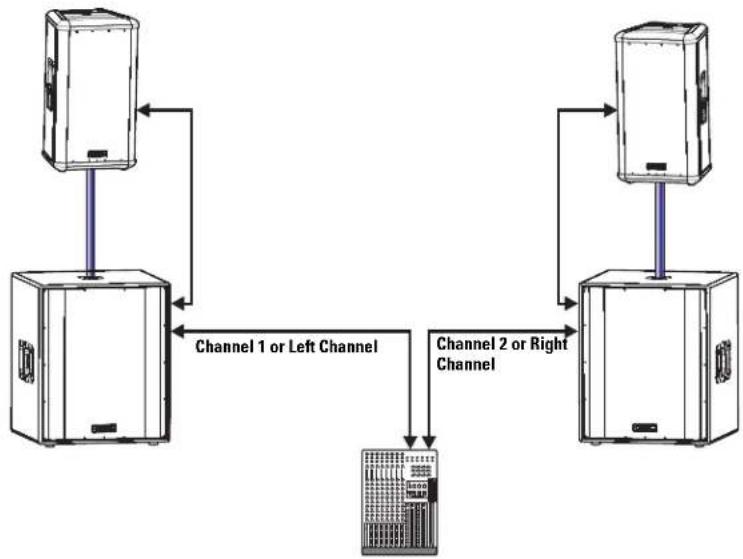
Application Example #3
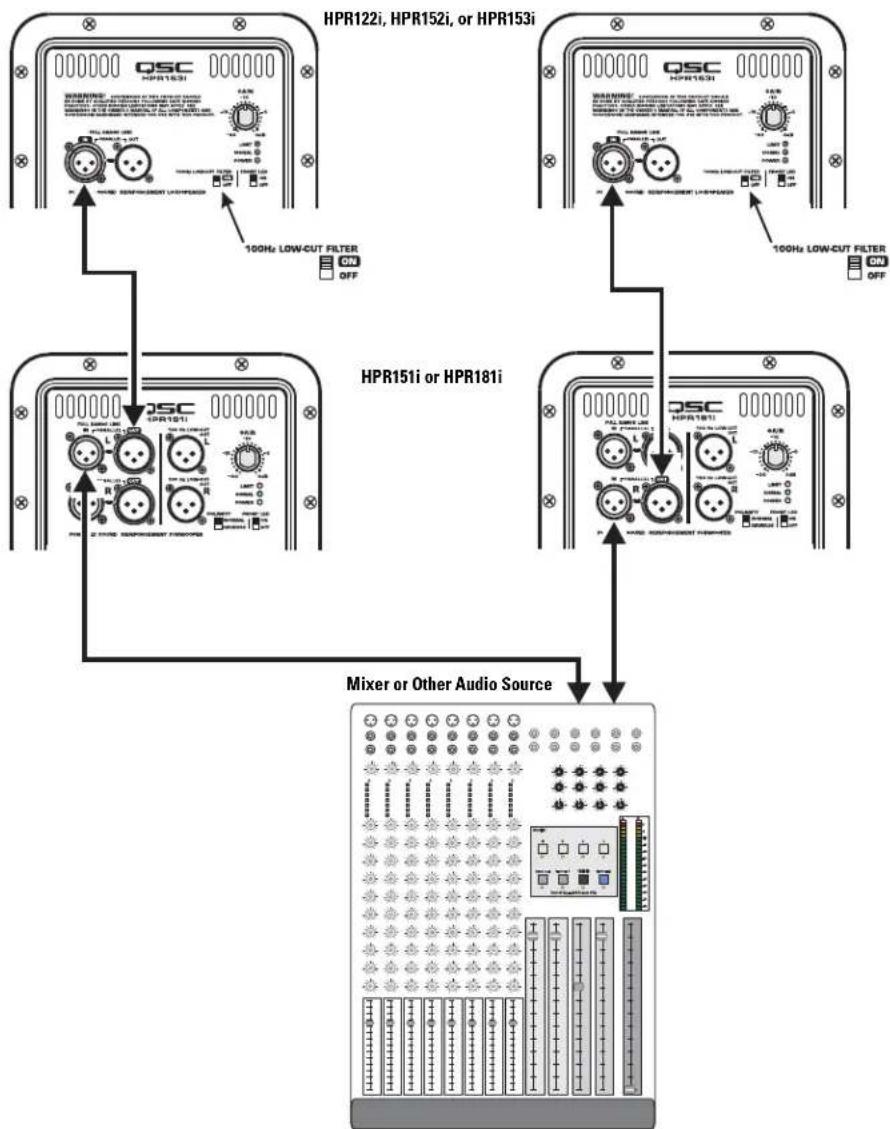
This example shows a two-channel (stereo) setup utilizing two subwoofers and two top-boxes.
Audio signals for the Left and Right channels are supplied by the mixer console. This signal source can be just about any variable-output level audio source, such as DJ mix-ers, professional CD players, or computer-based audio signal sources.
Audio output from the mixer is connected to the subwoofer input of each channel. Each subwoofer's FULL RANGE LINE OUT connector is used to connect to its respective top-box. Turn ON the top-box's 100 Hz LOW-CUT FILTER.
Alternately, the top-boxes could be connected to the subwoofer's 100 Hz LOW-CUT OUT and the top-box 100 Hz LOW-CUT FILTER turned off. The only possible issue with this method of connection is unexpected noises (turn-off thumps) if the subwoofer is powered down before the top-boxes. If connected as shown, power sequencing is not an issue.
Application Example #3 physical diagram.
flowchart
graph TD
    A["Server 1"] -->|Channel 1 or Left Channel| B["Server 2"]
    B -->|Channel 2 or Right Channel| A
    A --> C["Server 3"]
    B --> D["Server 4"]
Application Example #3 hookup diagram.
Use only high-quality balanced cables for interconnecting the audio equipment.
Ensure the top-boxes have their 100 Hz LOW-CUT FILTER switched ON when connecting to the subwoofer's FULL RANGE LINE OUT as a signal source.
Also, be sure to use either the Left or Right (marked L or R) on the subwoofers. If the subwoofer's input is connected to the Right (R) channel connector and the output to the top-boxes is connected to the Left (L) channel connector, no signal will reach the top-box (no sound from the top-box).
flowchart
graph TD
    A["QSC HPR161"] -->|100Hz LOW-CUT FILTER ON/OFF| B["HPR151i or HPR181i"]
    B -->|100Hz LOW-CUT FILTER ON/OFF| C["Mixer or Other Audio Source"]
    D["HPR122i, HPR152i, or HPR153i"] -->|100Hz LOW-CUT FILTER ON/OFF| E["HPR151i or HPR181i"]
    E --> F["Mixer or Other Audio Source"]
Application Example #4
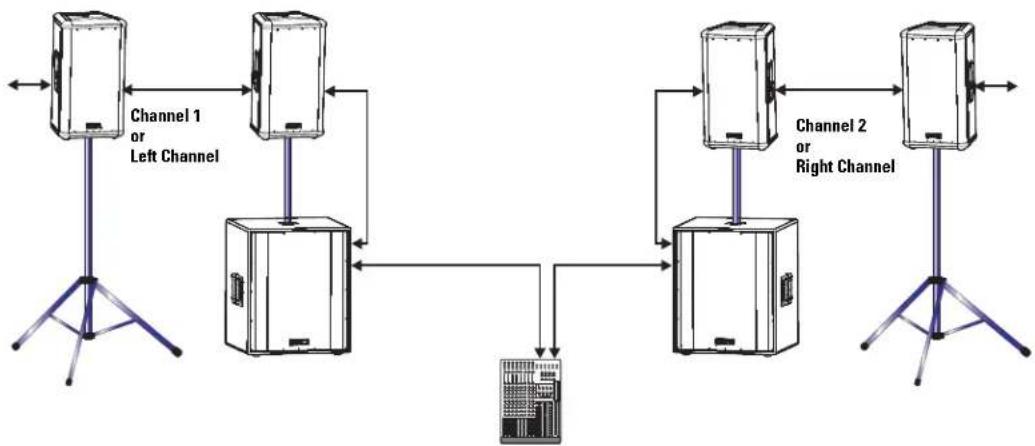
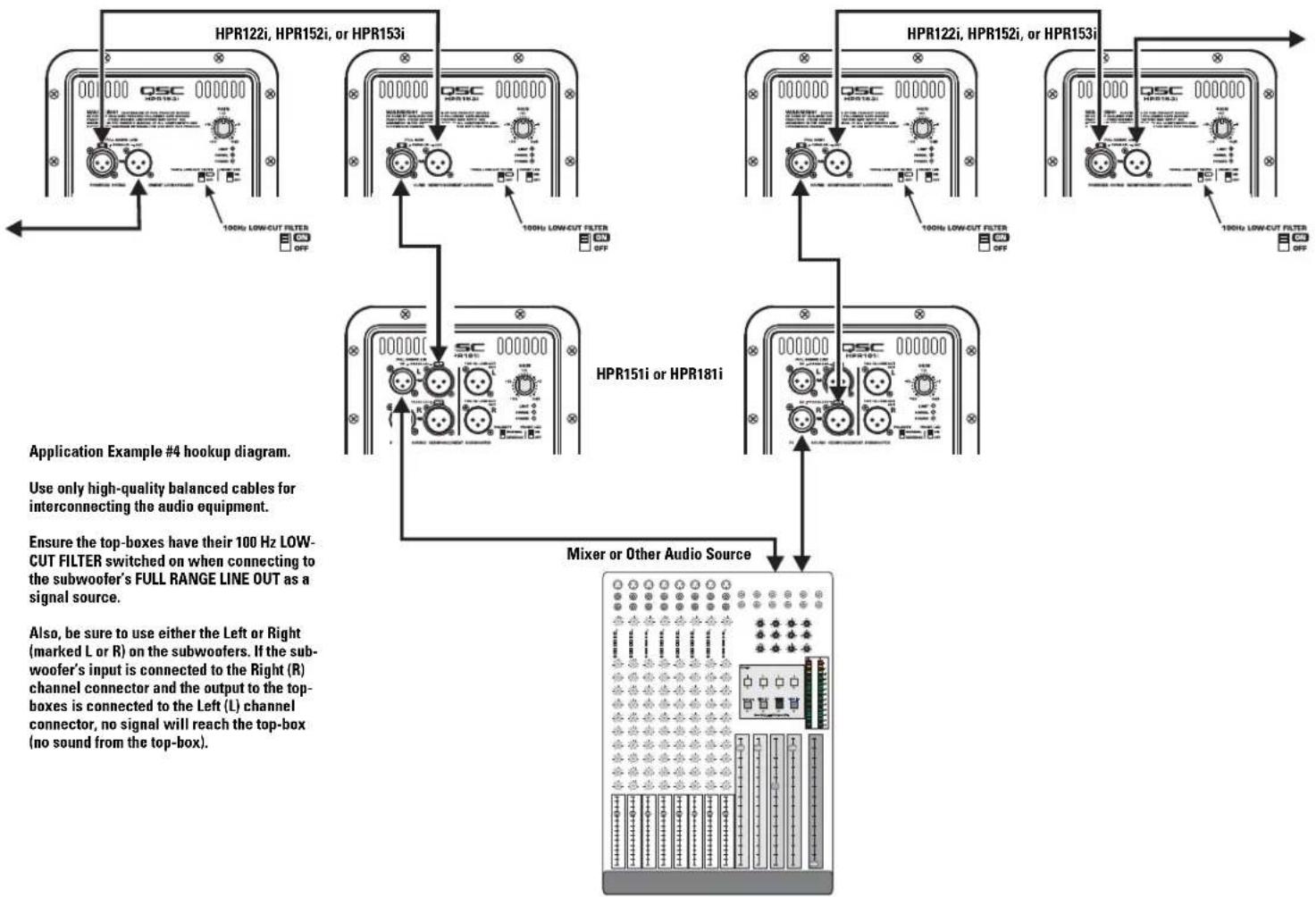
This example shows a two-channel (stereo) setup utilizing two sub-woofers and multiple top-boxes.
This is the same as Application Example #3 except an additional top-box has been added to each channel (and more could be added).
To connect to additional top-boxes, connect a cable from the last top box's FULL RANGE LINE OUT connector to the next top-box's FULL RANGE LINE IN connector. Up to 20 top-boxes could be "daisy-chained" without degrading signal quality.
Application Example #4 physical diagram.
flowchart
graph TD
    A["Server Unit"] -->|Channel 1 or Left Channel| B["Central Server Unit"]
    B -->|Channel 2 or Right Channel| C["Server Unit"]
    C -->|Channel 2 or Right Channel| D["Central Server Unit"]
    D -->|Channel 1 or Left Channel| A
    style A fill:#f9f,stroke:#333
    style C fill:#f9f,stroke:#333
    style D fill:#f9f,stroke:#333
flowchart
graph TD
    A["HPR122i, HPR152i, or HPR153i"] -->|100Hz LOW-CUT FILTER OFF| B["HPR151i or HPR181i"]
    C["HPR122i, HPR152i, or HPR153i"] -->|100Hz LOW-CUT FILTER OFF| D["Mixer or Other Audio Source"]
    E["HPR151i or HPR181i"] -->|100Hz LOW-CUT FILTER OFF| F["Mixer or Other Audio Source"]
    style A fill:#f9f,stroke:#333
    style C fill:#f9f,stroke:#333
    style E fill:#f9f,stroke:#333
    style B fill:#ccf,stroke:#333
    style D fill:#ccf,stroke:#333
    style F fill:#ccf,stroke:#333
Application Example #5
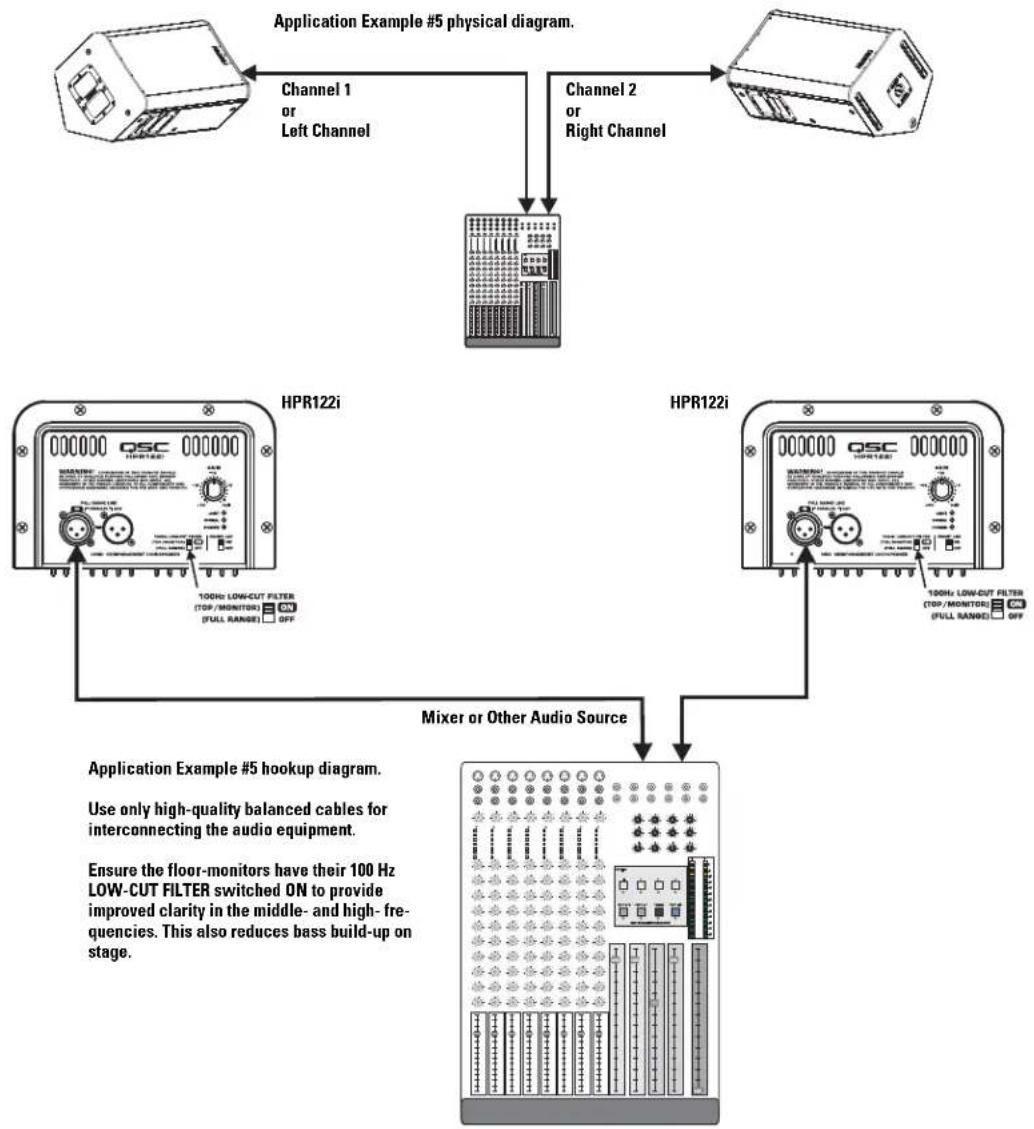
This example shows a two-channel (stereo) setup utilizing two HPR122i loudspeakers as floor monitors.
Audio signals for the Left and Right channels are supplied by the mixer console auxiliary buss. This allows the monitor level to be adjusted independently from the main (house) mix.
Audio output from the mixer's Left auxiliary buss is connected to the Left top-box's FULL RANGE LINE IN connector. Audio output from the mixer's Right auxiliary buss is connected to the Right floor monitor's FULL RANGE LINE IN connector. Turn ON each monitor's 100 Hz LOW-CUT FILTER. This will improve vocal clarity and minimize low frequency (bass) buildup on stage.
flowchart
graph TD
    A["Application Example #5 physical diagram."] --> B["Channel 1 or Left Channel"]
    B --> C["Channel 2 or Right Channel"]
    C --> D["HPR122i"]
    C --> E["HPR122i"]
    D --> F["Mixer or Other Audio Source"]
    E --> F
    F --> G["Application Example #5 hookup diagram. Use only high-quality balanced cables for interconnecting the audio equipment. Ensure the floor-monitors have their 100 Hz LOW-CUT FILTER switched ON to provide improved clarity in the middle- and high-frequencies. This also reduces bass build-up on stage."]
Dimensions, HPR122i
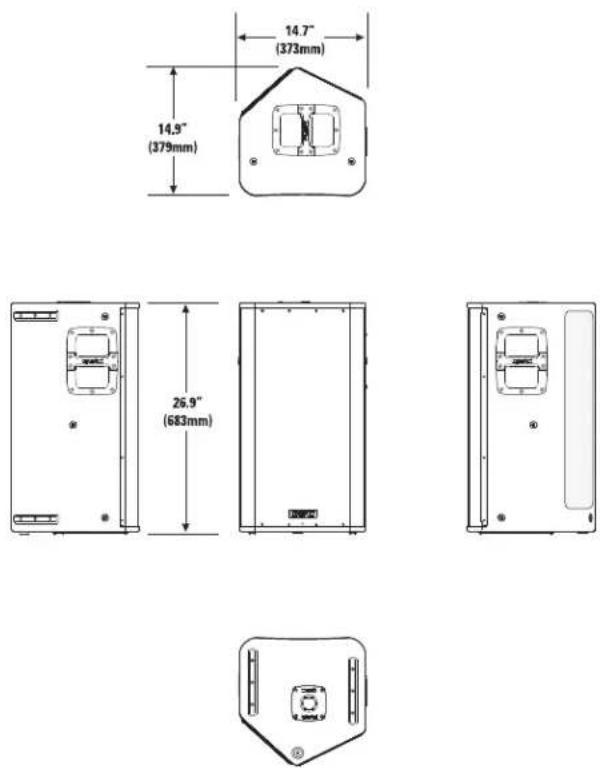
text_image
14.7" (373mm) 14.9" (379mm) 26.9" (683mm)Dimensions, HPR152i
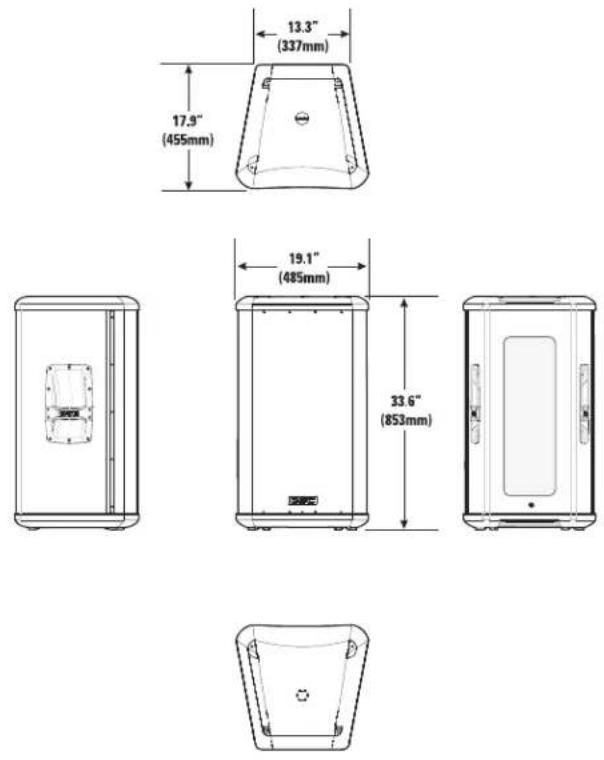
Dimensions, HPR153i
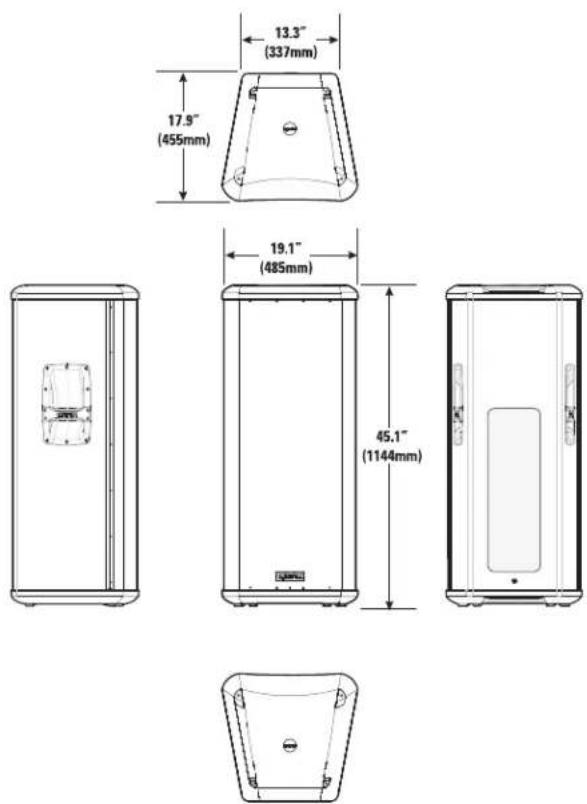
Dimensions, HPR151i
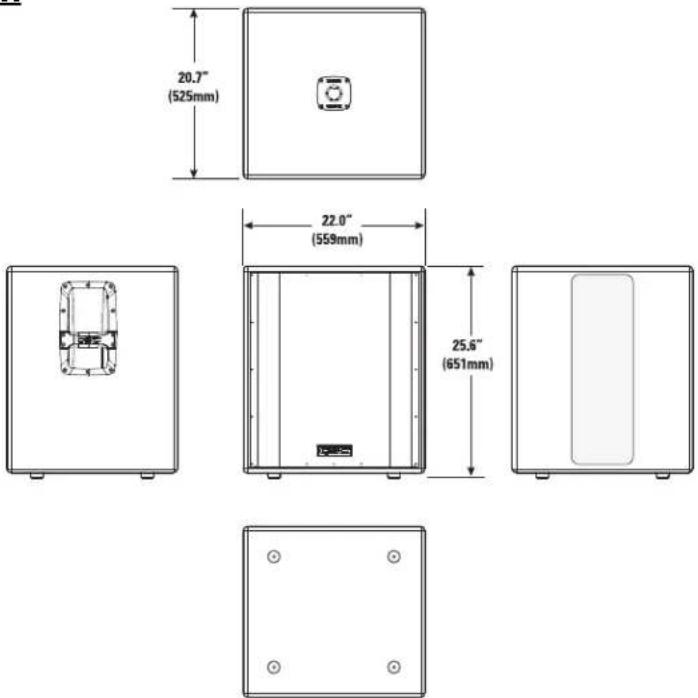
text_image
20.7" (525mm) 22.0" (559mm) 25.6" (651mm)Dimensions, HPR181i
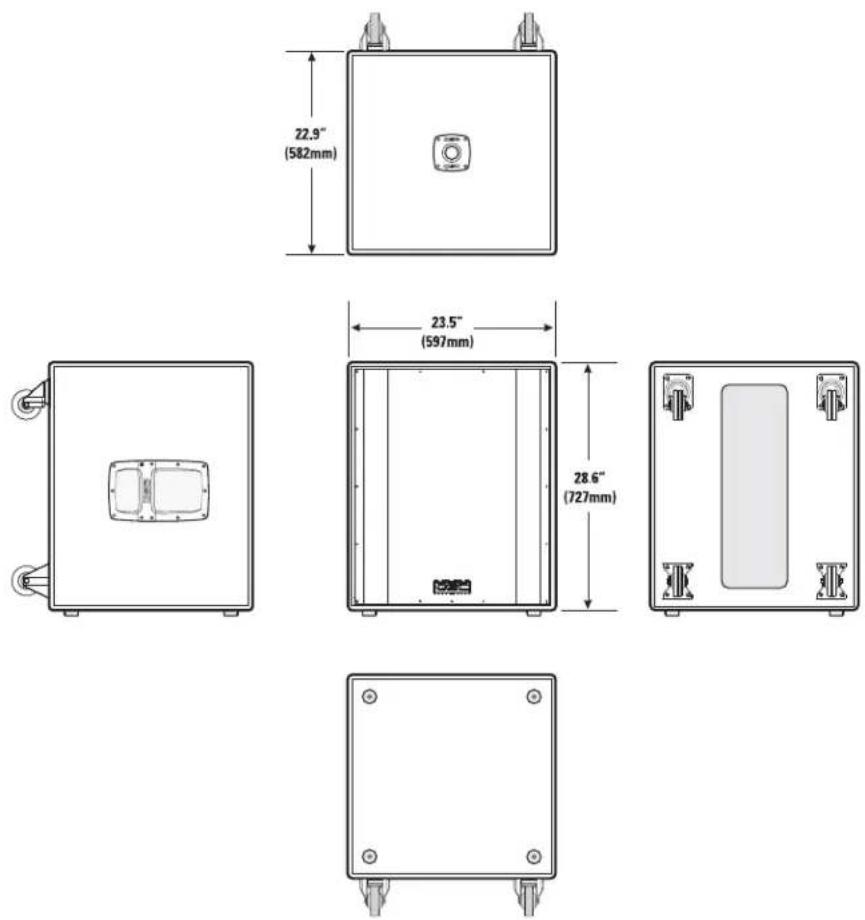
text_image
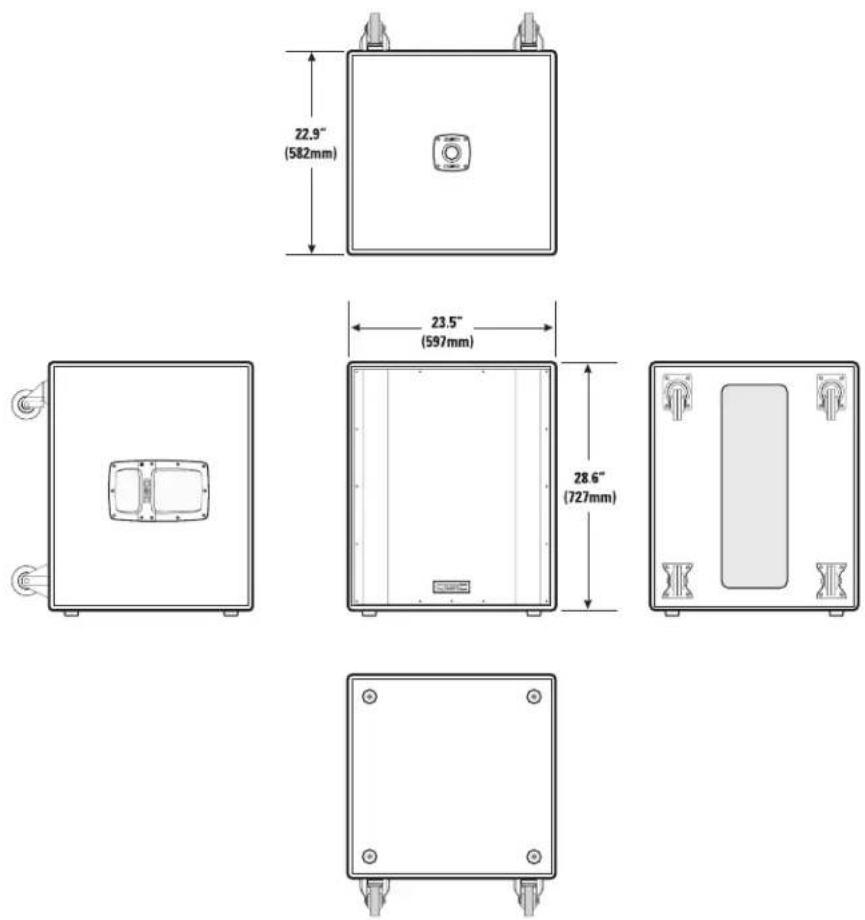
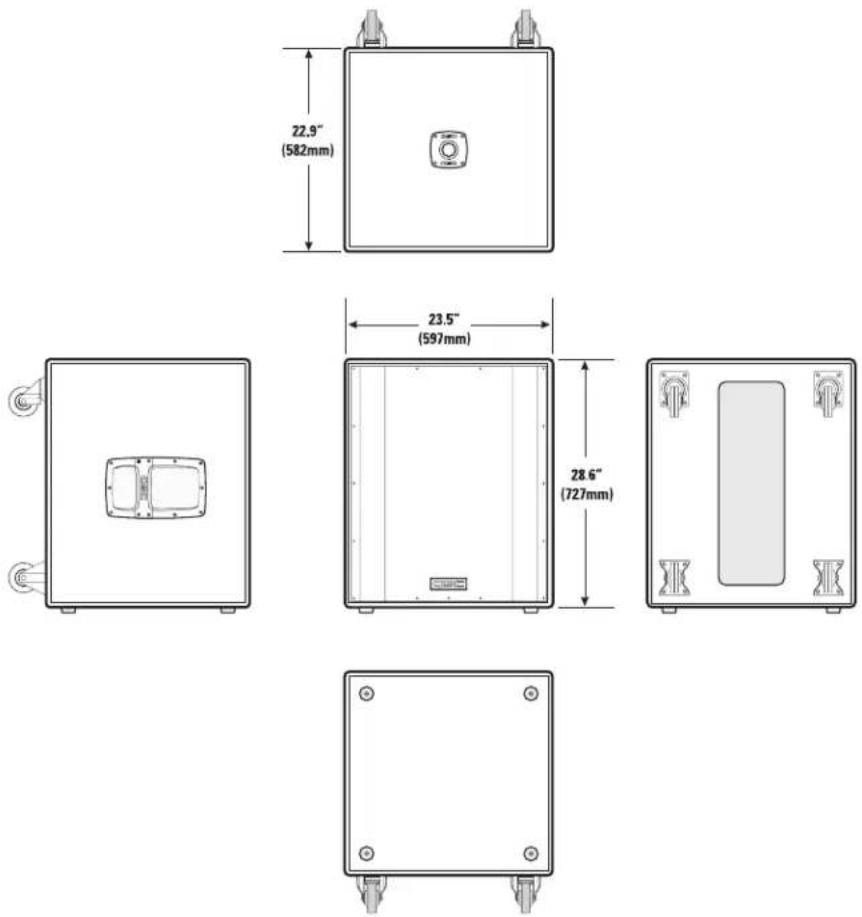
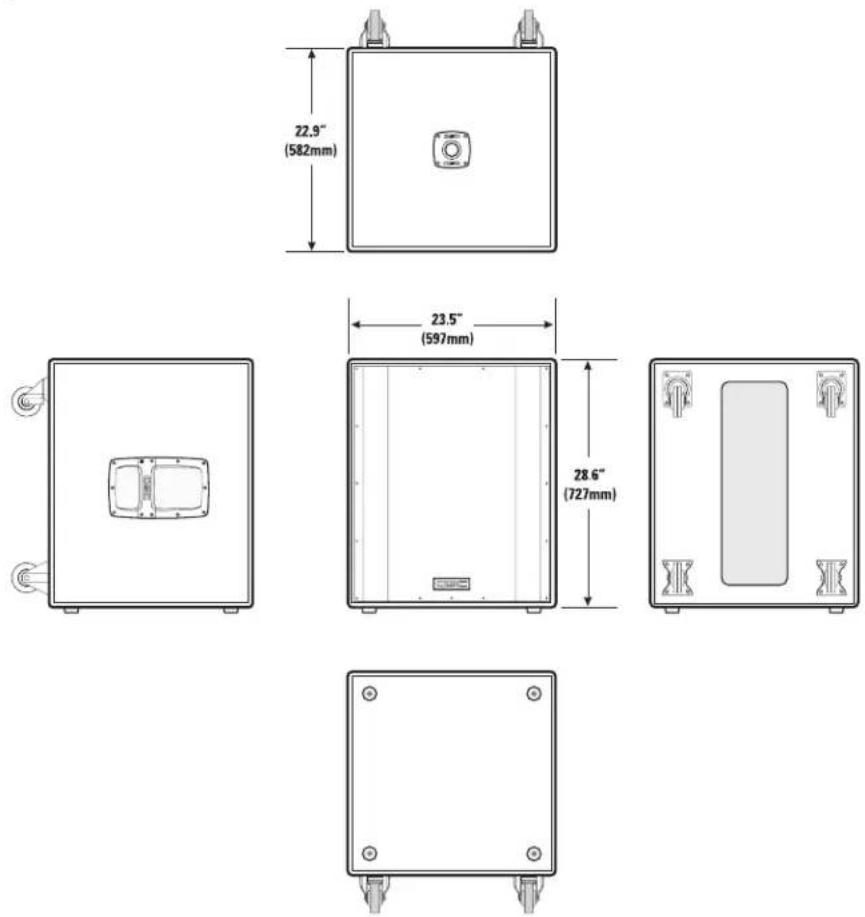
22.9" (582mm) 23.5" (597mm) 28.6" (727mm)Specifications, HPR122i
HPR122i
Frequency Response, -3dB 62-18kHz
Frequency Range, -10dB 53-22kHz
Maximum Peak SPL 131dB
Nominal coverage, H x V 75°x75°
Directivity Index 9.7
Directivity Factor 9.4
Transducer Description 12" (309mm) transducer with 3" (76mm) voice coil
1" (25mm) throat compression drive
Acoustic Crossover Freq. 2,000 Hz
Amp Power 400 Watts, low frequency
100 Watts, high frequency
Input Sensitivity 0.775 V
rms (+0dBu)
Input Headroom/Clipping 10 V
rms (+22.2dBu)
Input Connector/Impedance XLR female, 22k Ohm, balanced, line-level input
(unbalanced, 11k Ohm)
Output Connector XLR male, wired in parallel with Input connector
Controls, Indicators, and Adjustments
Gain control, 100 Hz low-cut filter switch, Front LED on/off switch, Limit/Clip (red LED), Signal presence (green LED), AC Power (blue LED), AC Power switch, AC circuit breaker
Protection, Agency certs.
Thermal limiting. On/Off muting, power limiting, DC protection, short circuit protection, ultrasonic protection, RF protection, UL/CE listed
AC Power Requirements
| AC Amperes at 120 V | BTU | |
| Idle | 0.2 A | <100 |
| 1/8 Power | 1.4 A | 360 |
| 1/3 Power | 2.3 A | 580 |
| Full Power | 4.4 A | 1225 |
| Notes:•1/8 power is typical of "normal" operation•1/3 power represents "maximum sustained" operation• full power only occurs for short peaks, multiply AC current by 0.5 for 230 V•BTU includes loudspeakers and amplifier | ||
AC Power Connector and Cordset
Factory supplied IEC cordset: 9' (3m) #18AWG 120V North American or European 230V cordset
Dimensions (height, width, depth)
26.9" (683mm) x 14.7" (373mm) x 14.9" (379mm)
Installation Clearance
Allow for 6.0" (152mm) of free space behind the enclosure to assure proper amplifier cooling
Weight
60 lb/27.2 kg
Finish and Grill
Wear-resistant textured paint finish on plywood enclosure and powder-coated perforated steel grill
Notes:
1- Maximum Peak SPL: Calculated by adding the loudspeaker's sensitivity (1W at 1m) to the peak power (dBw) of the amplifier provided.
2- Directivity Index (DI): Difference between on-axis SPL and average SPL (considering all axes) for the specified coverage range. DI=10 log Q
3- Directivity Factor (Q): Directivity index expressed as a power ratio Q=10 exp DI/10
4- Amplifier Power: The maximum sustained power at less than 1% clipping, averaged over the intended frequency range.
5- Input Sensitivity: The sine-wave input voltage required to reach amplifier clipping, measured within the frequency range used to determine Maximum Peak SPL, with the gain on "normal" and no gain reduction due to limiting.
6- Input Headroom/Clipping: Maximum input voltage.
7- Input Connector/Impedance: RF shunt capacitance should not reduce impedance by more than 30% at 20k Hz.
Specifications, HPR152i and HPR153i
HPR152i HPR153i
Frequency Response, -3dB 54-17.5kHz 41-17.5kHz
Frequency Range, -10dB 47-20kHz 36-20kHz
Maximum Peak SPL 135dB 133dB
Nominal coverage, H x V 90°x60° 90°x40°
Directivity Index 9.4 11.1
Directivity Factor 8.7 12.9
Transducer Description
15" (381mm) transducer with 3" (76mm) voice coil 1" (25mm) throat compression driver
15" (381mm) transducer with 3" (76mm) voice coil
6.5" (165mm) transducer with 1" (25mm) voice coil
1" (25mm) throat compression driver
Acoustic Crossover Freq.
2,000 Hz
500 and 2,000 Hz
Amp Power
400 Watts, low frequency 100 Watts, high frequency
400 Watts, low frequency 100 Watts, mid frequency 100 Watts, high frequency
Input Sensitivity
0.775 Vrms (+0dBu)
0.775 V _rms (+0dBu)
Input Headroom/Clipping
10 V _rms (+22.2dBu)
10 V _rms (+22.2dBu)
Input Connector/Impedance
XLR female, 22k Ohm, balanced, line-level input (unbalanced, 11k Ohm)
XLR female, 22k Ohm, balanced, line-level input (unbalanced, 11k Ohm)
Output Connector
XLR male, wired in parallel with Input connector
XLR male, wired in parallel with Input connector
Controls, Indicators, and Adjustments
Gain control, 100 Hz low-cut filter switch, Front LED on/off switch, Limit/Clip (red LED), Signal presence (green LED), AC Power (blue LED), AC Power switch, AC circuit breaker
Protection, Agency certs.
Thermal limiting, On/Off muting, power limiting, DC protection, short circuit protection, ultrasonic protection, RF protection, UL/CE listed
AC Power Requirements
| AC Amperes at 120 V | BTU | |
| Idle | 0.2 A | <100 |
| 1/8 Power | 1.5 A | 360 |
| 1/3 Power | 2.3 A | 580 |
| Full Power | 4.4 A | 1225 |
| Notes:•1/8 power is typical of "normal" operation•1/3 power represents "maximum sustained" operation• full power only occurs for short peaks, multiply AC current by 0.5 for 230 V•BTU includes loudspeakers and amplifier | ||
| AC Amperes at 120 V | BTU | |
| Idle | 0.2 A | <100 |
| 1/8 Power | 1.8 A | 440 |
| 1/3 Power | 2.9 A | 780 |
| Full Power | 6.2 A | 1830 |
| Notes:•1/8 power is typical of "normal" operation•1/3 power represents "maximum sustained" operation• full power only occurs for short peaks, multiply AC current by 0.5 for 230 V•BTU includes loudspeakers and amplifier | ||
AC Power Connector and Cordset
Factory supplied IEC cordset: 9' (3m) #18AWG 120V North American or European 230V cordset
Dimensions (height, width, depth)
33.6" (853mm) x 19.1" (485mm) x 17.9" (455mm)
45.1" (1144mm) x 19.1" (485mm) x 17.9" (455mm)
Installation Clearance
Allow for 6.0" (152mm) of free space behind the enclosure to assure proper amplifier cooling
Weight
100 lb/45.4 kg
118 lb/53.5 kg
Finish and Grill
Wear-resistant textured paint finish on plywood enclosure and powder-coated perforated steel grill
Notes:
1- Maximum Peak SPL: Calculated by adding the loudspeaker's sensitivity (1W at 1m) to the peak power (dBw) of the amplifier provided.
2- Directivity Index (DI): Difference between on-axis SPL and average SPL (considering all axes) for the specified coverage range. DI=10 log Q
3- Directivity Factor (Q): Directivity index expressed as a power ratio Q=10 exp DI/10
4- Amplifier Power: The maximum sustained power at less than 1% clipping, averaged over the intended frequency range.
5- Input Sensitivity: The sine-wave input voltage required to reach amplifier clipping, measured within the frequency range used to determine Maximum Peak SPL, with the gain on "normal" and no gain reduction due to limiting.
6- Input Headroom/Clipping: Maximum input voltage.
7- Input Connector/Impedance: RF shunt capacitance should not reduce impedance by more than 30% at 20k Hz.
Specifications, HPR151i and HPR181i
HPR151i HPR181i
Frequency Response, -3dB 51-105 Hz 45-95 Hz
Frequency Range, -10dB 43-145 Hz 39-145 Hz
Maximum Peak SPL 133dB 134dB
Nominal coverage, H x V Not applicable (N/A) Not applicable (N/A)
Transducer Description
15" (381mm) transducer with 3" (76mm) voice coil
18" (457mm) transducer with 4" (102mm) voice coil
Amp Power 700 Watts 700 Watts
Input Sensitivity 0.775 V
rms (+0dBu) 0.775 V
rms(+0dBu)
Input Headroom/Clipping
10 V _rms (+22.2dBu)
10 V _rms (+22.2dBu)
Input Connectors/Impedance
Two XLR female, 22k Ohm, balanced, left and right (L+R) inputs (11k Ohms unbalanced)
Output Connectors
Four XLR male: two wired in parallel with Input connector (full range), two post-100 Hz low-cut filters
Controls, Indicators, and Adjustments
Gain control, Polarity switch (normal/reverse), Front LED on/off switch, Limit/Clip (red LED), Signal presence (green LED), AC Power (blue LED) AC Power switch, AC circuit breaker
Protection, Agency certs.
Thermal limiting, On/Off muting, power limiting, DC protection, short circuit protection, ultrasonic protection, RF protection, UL/CE listed
AC Power Requirements
| AC Amperes at 120 V | BTU | |
| Idle | 0.3 A | <100 |
| 1/8 Power | 2.2 A | 620 |
| 1/3 Power | 3.5 A | 940 |
| Full Power | 7.5 A | 2250 |
| Notes:•1/8 power is typical of "normal" operation•1/3 power represents "maximum sustained" operation• full power only occurs for short peaks, multiply AC current by 0.5 for 230 V•BTU includes loudspeakers and amplifier | ||
| AC Amperes at 120 V | BTU | |
| Idle | 0.3 A | <100 |
| 1/8 Power | 2.5 A | 700 |
| 1/3 Power | 4.2 A | 1300 |
| Full Power | 8.4 A | 3020 |
| Notes:•1/8 power is typical of "normal" operation•1/3 power represents "maximum sustained" operation• full power only occurs for short peaks, multiply AC current by 0.5 for 230 V•BTU includes loudspeakers and amplifier | ||
AC Power Connector and Cordset
Factory supplied IEC cordset: 9' (3m) #18AWG 120V North American or European 230V cordset
Dimensions
25.6" (651mm) x 22" (559mm) x 20.7" (525mm)
28.6" (727mm) x 23.5" (597mm) x 22.9" (582mm)
Weight
98 lb/44.5 kg
127 lb/57.6 kg
Finish and Grill
Wear-resistant textured paint finish with powder-coated perforated steel grill
Notes:
1- Maximum Peak SPL: Calculated by adding the loudspeaker's sensitivity (1W at 1m) to the peak power (dBw) of the amplifier provided.
2- Directivity Index (DI): Difference between on-axis SPL and average SPL (considering all axes) for the specified coverage range. DI=10 log Q
3- Directivity Factor (Q): Directivity index expressed as a power ratio Q=10 exp DI/10
4- Amplifier Power: The maximum sustained power at less than 1% clipping, averaged over the intended frequency range.
5- Input Sensitivity: The sine-wave input voltage required to reach amplifier clipping, measured within the frequency range used to determine Maximum Peak SPL, with the gain on "normal" and no gain reduction due to limiting.
6- Input Headroom/Clipping: Maximum input voltage.
7- Input Connector/Impedance: RF shunt capacitance should not reduce impedance by more than 30% at 20k Hz.
Warranty (USA only; other countries, see your dealer or distributor)
Disclaimer
QSC Audio Products, Inc. is not liable for any damage to amplifiers or any other equipment that is caused by negligence or improper installation and/or use of this loudspeaker product.
QSC Audio Products 3 Year Limited Warranty
QSC Audio Products, Inc. ("QSC") guarantees its products to be free from defective material and / or workmanship for a period of three (3) years from date of sale, and will replace defective parts and repair malfunctioning products under this warranty when the defect occurs under normal installation and use - provided the unit is returned to our factory or one of our authorized service stations via prepaid transportation with a copy of proof of purchase (i.e., sales receipt). This warranty provides that the examination of the return product must indicate, in our judgment, a manufacturing defect. This warranty does not extend to any product which has been subjected to misuse, neglect, accident, improper installation, or where the date code has been removed or defaced. QSC shall not be liable for incidental and/or consequential damages. This warranty gives you specific legal rights. This limited warranty is freely transferable during the term of the warranty period.
Customer may have additional rights, which vary from state to state.
In the event that this product was manufactured for export and sale outside of the United States or its territories, then this limited warranty shall not apply. Removal of the serial number on this product, or purchase of this product from an unauthorized dealer, will void this limited warranty.
Periodically, this warranty is updated. To obtain the most recent version of QSC's warranty statement, please visit www.qscaudio.com.
Contact us at 800-854-4079 or visit our website at www.qscaudio.com
1675 MacArthur Blvd., Costa Mesa, CA, 92626 USA
Main Number (714) 754-6175 or toll free (USA only) (800) 854-4079
Customer Service(714) 957-7150 or toll free (USA only) (800) 772-2834
text_image
Technical diagram showing exploded view of a device's internal components with numbered labels for each part.text_image
Technical diagram of a device with labeled components, showing front, top, and side views with numbered parts.text_image
Exploded view diagram of a device showing six labeled components with numbered parts and Chinese labels.text_image
≤ 23" (583mm)
text_image
≤ 18" (456mm)text_image
Diagram showing a device with warning symbol and labeled components, likely illustrating a system or installation setup.natural_image
Diagram of a plug connector with two views showing internal components (no text or symbols)text_image
FULL RANGE LINE IN PARALLEL OUT L 100 Hz LOW-CUT OUT L IN PARALLEL OUT R 100 Hz LOW-CUT OUT Rtext_image
20.7" (525mm) 22.0" (559mm) 25.6" (651mm)Dimensiones, HPR181i
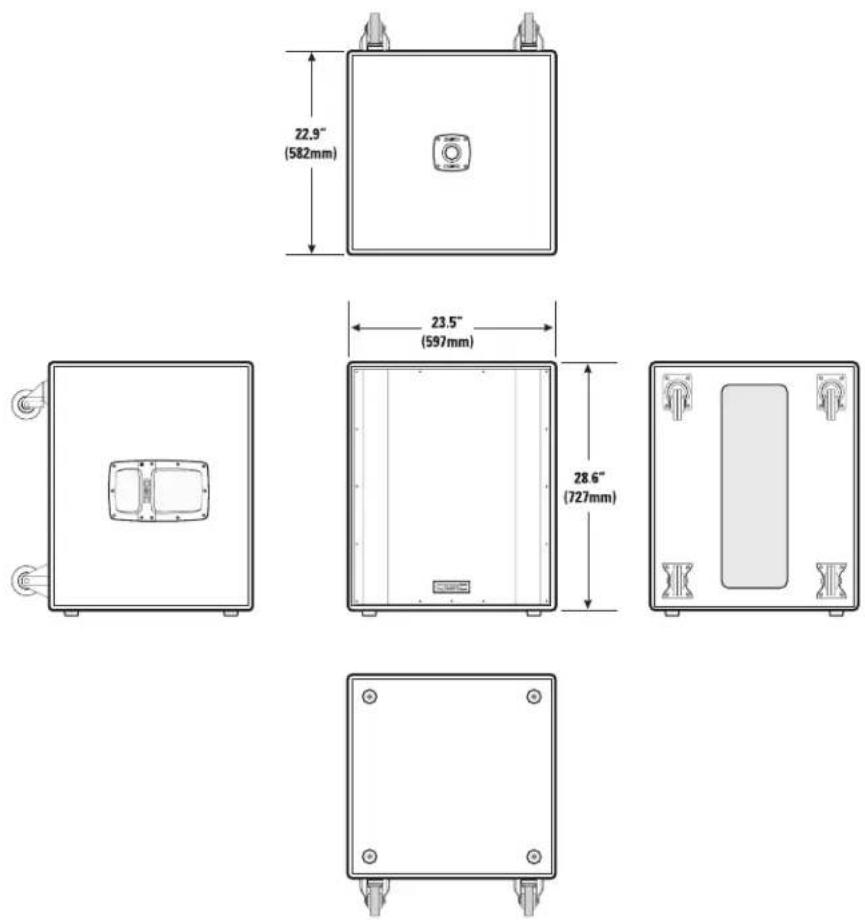
text_image
22.9" (582mm) 23.5" (597mm) 28.6" (727mm)| AC Amperes at 120 V | BTU | |
| Idle | 0.2 A | <100 |
| 1/8 Power | 1.4 A | 360 |
| 1/3 Power | 2.3 A | 580 |
| Full Power | 4.4 A | 1225 |
| Notes:•1/8 power is typical of "normal" operation•1/3 power represents "maximum sustained" operation• full power only occurs for short peaks, multiply AC current by 0.5 for 230 V•BTU includes loudspeakers and amplifier | ||
| AC Amperes at 120 V | BTU | |
| Idle | 0.2 A | <100 |
| 1/8 Power | 1.5 A | 360 |
| 1/3 Power | 2.3 A | 580 |
| Full Power | 4.4 A | 1225 |
| Notes:•1/8 power is typical of "normal" operation•1/3 power represents "maximum sustained" operation• full power only occurs for short peaks, multiply AC current by 0.5 for 230 V•BTU includes loudspeakers and amplifier | ||
| AC Amperes at 120 V | BTU | |
| Idle | 0.2 A | <100 |
| 1/8 Power | 1.8 A | 440 |
| 1/3 Power | 2.9 A | 780 |
| Full Power | 6.2 A | 1830 |
| Notes:•1/8 power is typical of "normal" operation•1/3 power represents "maximum sustained" operation• full power only occurs for short peaks, multiply AC current by 0.5 for 230 V•BTU includes loudspeakers and amplifier | ||
| AC Amperes at 120 V | BTU | |
| Idle | 0.3 A | <100 |
| 1/8 Power | 2.2 A | 620 |
| 1/3 Power | 3.5 A | 940 |
| Full Power | 7.5 A | 2250 |
| Notes:•1/8 power is typical of "normal" operation•1/3 power represents "maximum sustained" operation• full power only occurs for short peaks, multiply AC current by 0.5 for 230 V•BTU includes loudspeakers and amplifier | ||
| AC Amperes at 120 V | BTU | |
| Idle | 0.3 A | <100 |
| 1/8 Power | 2.5 A | 700 |
| 1/3 Power | 4.2 A | 1300 |
| Full Power | 8.4 A | 3020 |
| Notes:•1/8 power is typical of "normal" operation•1/3 power represents "maximum sustained" operation• full power only occurs for short peaks, multiply AC current by 0.5 for 230 V•BTU includes loudspeakers and amplifier | ||
text_image
Technical diagram showing exploded view of a device's internal components with numbered labels for each part.text_image
Technical diagram of a device's front panel with labeled components including door, panel, and internal compartmentsnatural_image
Simple diagram with a numbered arrow pointing to a square button (no text or symbols)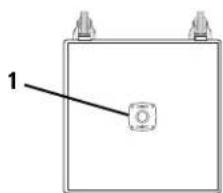
natural_image
Simple line drawing of a rectangular box with a central square and two corner handles (no text or symbols)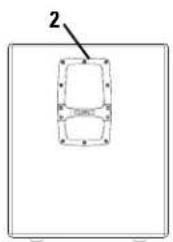
natural_image
Simple diagram of a rectangular frame with a labeled arrow pointing to it, no text or symbols present.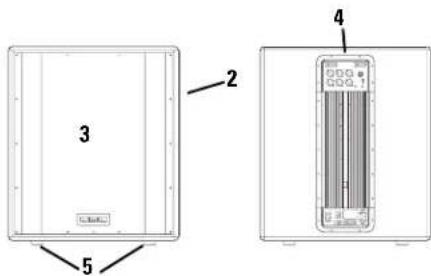
text_image
3 2 4 5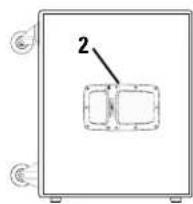
text_image
≤23" (583mm)
AVERTISSEMENT RELATIF AU HPR152i
text_image
≤ 18" (456mm)Installation (suite)
text_image
Diagram showing a device with warning symbol and labeled components, including a warning triangle and internal panel layout.natural_image
Diagram of an electrical connector with two views showing internal components (no text or symbols)text_image
FULL RANGE LINE IN PARALLEL OUT L 100 Hz LOW-CUT OUT L IN PARALLEL OUT R 100 Hz LOW-CUT OUT Rtext_image
FULL RANGE LINE IN PARALLEL OUT L 100 Hz LOW-CUT OUT L IN PARALLEL OUT R 100 Hz LOW-CUT OUT RSélecteur GAIN
text_image
HPR122i, HPR152i ou HPR153i HPR122i, HPR152i ou HPR153i WARNING: A transcription of the correct response the power is used to generate a 100 Hz low-CUT FILTER. The circuit is designed for the detection of the 100 Hz low-CUT FILTER. The 100 Hz low-CUT FILTER is designed to be an analog device. The 100 Hz low-CUT FILTER is designed to be an analog device. The 100 Hz low-CUT FILTER is designed to be an analog device. The 100 Hz low-CUT FILTER is designed to be an analog device. The 100 Hz low-CUT FILTER is designed to be an analog device. The 100 Hz low-CUT FILTER is designed to be an analog device. The 100 Hz low-CUFT FILTER is designed to be an analog device. The 100 Hz low-CUFT FILTER is designed to be an analog device. The 100 Hz low-CUFT FILTER is designed to be an analog device. The 100 Hz low-CUFT FILTER is designed to be an analog device. The 100 Hz low-CUFT FILTER is designed to be an analog device. The 100 Hz low-CUFT FILTER is designed to have a 100Hz low-CUT FILTER and a 100Hz high-CUT FILTER. The mixer or autre source audio Exemple d'application 1 - diagramme des branchements Utiliser uniquement des câbles équilibrés de haute qualité pour le branchement de l'équipement audio. S'assurer que les enceintes supérieures ont leur commutateur 100 Hz LOW-CUT FILTER sur OFF en l'absence d'un caisson d'extrêmes graves ou d'une autre enceinte basses fréquences dédiée.text_image
20.7" (525mm) 22.0" (559mm) 25.6" (651mm)Dimensions, HPR181i
text_image
22.9" (582mm) 23.5" (597mm) 28.6" (727mm)| AC Amperes at 120 V | BTU | |
| Idle | 0.2 A | <100 |
| 1/8 Power | 1.4 A | 360 |
| 1/3 Power | 2.3 A | 580 |
| Full Power | 4.4 A | 1225 |
| Notes:•1/8 power is typical of "normal" operation•1/3 power represents "maximum sustained" operation• full power only occurs for short peaks, multiply AC current by 0.5 for 230 V•BTU includes loudspeakers and amplifier | ||
| AC Amperes at 120 V | BTU | |
| Idle | 0.2 A | <100 |
| 1/8 Power | 1.5 A | 360 |
| 1/3 Power | 2.3 A | 580 |
| Full Power | 4.4 A | 1225 |
| Notes:•1/8 power is typical of "normal" operation•1/3 power represents "maximum sustained" operation• full power only occurs for short peaks, multiply AC current by 0.5 for 230 V•BTU includes loudspeakers and amplifier | ||
| AC Amperes at 120 V | BTU | |
| Idle | 0.2 A | <100 |
| 1/8 Power | 1.8 A | 440 |
| 1/3 Power | 2.5 A | 780 |
| Full Power | 6.2 A | 1830 |
| Notes:•1/8 power is typical of "normal" operation•1/3 power represents "maximum sustained" operation• full power only occurs for short peaks, multiply AC current by 0.5 for 230 V• BTU includes loudspeakers and amplifier | ||
| AC Amperes at 120 V | BTU | |
| Idle | 0.3 A | <100 |
| 1/8 Power | 2.2 A | 620 |
| 1/3 Power | 3.5 A | 940 |
| Full Power | 7.5 A | 2250 |
| Notes:•1/8 power is typical of "normal" operation•1/3 power represents "maximum sustained" operation• full power only occurs for short peaks, multiply AC current by 0.5 for 230 V•BTU includes loudspeakers and amplifier | ||
| AC Amperes at 120 V | BTU | |
| Idle | 0.3 A | <100 |
| 1/8 Power | 2.5 A | 700 |
| 1/3 Power | 4.2 A | 1300 |
| Full Power | 8.4 A | 3020 |
| Notes:•1/8 power is typical of "normal" operation•1/3 power represents "maximum sustained" operation• full power only occurs for short peaks, multiply AC current by 0.5 for 230 V•BTU includes loudspeakers and amplifier | ||
1675 MacArthur Blvd., Costa Mesa, CA 92626
© Copyright 2006, QSC Audio Products, Inc.
text_image
5 1 2 3 4 2 5 5 Exlcience on the left. 1. Flats & flaps. Fit 8text_image
Exploded view diagram of an electronic device with labeled components including front, top, and side viewstext_image
≤23" (583mm)
HPR152i ACHTUNG!
text_image
≤ 18" (456mm)text_image
Diagram showing a device with warning symbol and labeled components, likely illustrating a system or installation setup.Netzanschluss
natural_image
Diagram of a plug connector with two views showing internal components (no text or symbols)text_image
FULL RANGE LINE IN F PARALLEL OUT L 100 Hz LOW-CUT OUT L IN F PARALLEL OUT R 100 Hz LOW-CUT OUT RAusgangsanschlüsse
text_image
FULL RANGE LINE IN PARALLEL OUT L 100 Hz LOW-CUT OUT L IN PARALLEL OUT R 100 Hz LOW-CUT OUT RVerstärkungsregler
text_image
HPR122i, HPR152i oder HPR153i HPR122i, HPR152i oder HPR153i WARNING: A suspension of the circuit. In this case is a 100 Hz low-cut filter or a 100 Hz low-cut filter in the circuit. The circuit is designed to be a 100 Hz low-cut filter or a 100 Hz low-cut filter in the circuit. The circuit is designed to be a 100 Hz low-cut filter or a 100 Hz low-cut filter in the circuit. The circuit is designed to be a 100 Hz low-cut filter or a 100 Hz low-cut filter in the circuit. The circuit is designed to be a 100 Hz low-cut filter or a 80Hz low-cut filter in the circuit. The circuit is designed to be a 100Hz low-cut filter or a 80Hz low-cut filter in the circuit. The circuit is designed to be a 100Hz low-cut filter or a 80Hz low-cut filter in the circuit. The circuit is designed to be a 100Hz low-cut filter or a 80Hz low-cut filter in the circuit. The circuit is designed to be a 100Hz low-cut filter or a 80Hz low-cut filter in the circuit.text_image
20.7" (525mm) 22.0" (559mm) 25.6" (651mm)Abmessungen, HPR181i
text_image
22.9" (582mm) 23.5" (597mm) 28.6" (727mm)Frequenzgang, -10 dB 53-22 kHz
Maximaler Spitzen-SPL 131 dB
Nennabstrahlung, H x V 75°x75°
Richtungsmaß 9,7
Richtungsfaktor 9,4
(asymmetrisch, 11 kOhm)
| AC Amperes at 120 V | BTU | |
| Idle | 0.2 A | <100 |
| 1/8 Power | 1.4 A | 360 |
| 1/3 Power | 2.3 A | 580 |
| Full Power | 4.4 A | 1225 |
| Notes:•1/8 power is typical of "normal" operation•1/3 power represents "maximum sustained" operation• full power only occurs for short peaks, multiply AC current by 0.5 for 230 V•BTU includes loudspeakers and amplifier | ||
| AC Amperes at 120 V | BTU | |
| Idle | 0.2 A | <100 |
| 1/8 Power | 1.5 A | 360 |
| 1/3 Power | 2.3 A | 580 |
| Full Power | 4.4 A | 1225 |
| Notes:•1/8 power is typical of "normal" operation•1/3 power represents "maximum sustained" operation• full power only occurs for short peaks, multiply AC current by 0.5 for 230 V•BTU includes loudspeakers and amplifier | ||
| AC Amperes at 120 V | BTU | |
| Idle | 0.2 A | <100 |
| 1/8 Power | 1.8 A | 440 |
| 1/3 Power | 2.9 A | 780 |
| Full Power | 6.2 A | 1830 |
| Notes:•1/8 power is typical of "normal" operation•1/3 power represents "maximum sustained" operation• full power only occurs for short peaks, multiply AC current by 0.5 for 230 V• BTU includes loudspeakers and amplifier | ||
| AC Amperes at 120 V | BTU | |
| Idle | 0.3 A | <100 |
| 1/8 Power | 2.2 A | 620 |
| 1/3 Power | 3.5 A | 940 |
| Full Power | 7.5 A | 2250 |
| Notes:•1/8 power is typical of "normal" operation•1/3 power represents "maximum sustained" operation• full power only occurs for short peaks, multiply AC current by 0.5 for 230 V•BTU includes loudspeakers and amplifier | ||
| AC Amperes at 120 V | BTU | |
| Idle | 0.3 A | <100 |
| 1/8 Power | 2.5 A | 700 |
| 1/3 Power | 4.2 A | 1300 |
| Full Power | 8.4 A | 3020 |
| Notes:•1/8 power is typical of "normal" operation•1/3 power represents "maximum sustained" operation• full power only occurs for short peaks, multiply AC current by 0.5 for 230 V• BTU includes loudspeakers and amplifier | ||
text_image
Technical diagram showing exploded view of a device's internal components with numbered labels for each part.text_image
Technical diagram showing exploded view of a device's internal components with numbered labelstext_image
Exploded view diagram of a device showing six labeled components with numbered parts and labels.text_image
≤23" (583mm)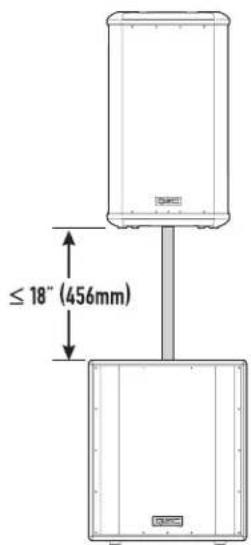
text_image
≤ 18" (456mm)安装(续)
起吊点(悬挂安装)
text_image
Diagram showing a device with warning symbol and warning label pointing to a panel, likely indicating an alert or hazard.交流电源
natural_image
Diagram of a plug connector with arrows indicating internal components (no text or symbols)text_image
FULL RANGE LINE IN PARALLEL OUT L 100 Hz LOW-CUT OUT L IN PARALLEL OUT R 100 Hz LOW-CUT OUT R输出连接
text_image
FULL RANGE LINE IN "PARALLEL" OUT L 100 Hz LOW-CUT OUT L IN "PARALLEL" OUT R 100 Hz LOW-CUT OUT R增益控制
text_image
20.7" (525mm) 22.0" (559mm) 25.6" (651mm)尺寸,HPR181i
text_image
22.9" (582mm) 23.5" (597mm) 28.6" (727mm)规格,HPR122i
HPR122i
频率响应,-3dB 62-18kHz
频率范围,-10dB 53-22kHz
最大峰值 SPL 131dB
标称覆盖范围,H×V75°×75°
定向指数9.7
定向因数9.4
| AC Amperes at 120 V | BTU | |
| Idle | 0.2 A | <100 |
| 1/8 Power | 1.4 A | 360 |
| 1/3 Power | 2.3 A | 580 |
| Full Power | 4.4 A | 1225 |
| Notes:•1/8 power is typical of "normal" operation•1/3 power represents "maximum sustained" operation• full power only occurs for short peaks, multiply AC current by 0.5 for 230 V•BTU includes loudspeakers and amplifier | ||
交流电源接头和电源线
| AC Amperes at 120 V | BTU | |
| Idle | 0.2 A | <100 |
| 1/8 Power | 1.5 A | 360 |
| 1/3 Power | 2.3 A | 580 |
| Full Power | 4.4 A | 1225 |
| Notes:•1/8 power is typical of "normal" operation•1/3 power represents "maximum sustained" operation• full power only occurs for short peaks, multiply AC current by 0.5 for 230 V•BTU includes loudspeakers and amplifier | ||
| AC Amperes at 120 V | BTU | |
| Idle | 0.2 A | <100 |
| 1/8 Power | 1.8 A | 440 |
| 1/3 Power | 2.5 A | 780 |
| Full Power | 6.2 A | 1830 |
| Notes:•1/8 power is typical of "normal" operation•1/3 power represents "maximum sustained" operation• full power only occurs for short peaks, multiply AC current by 0.5 for 230 V• BTU includes loudspeakers and amplifier | ||