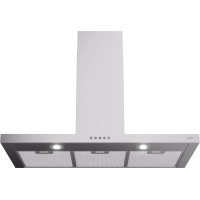
AB691RVS - Range hood ETNA - Free user manual and instructions
Find the device manual for free AB691RVS ETNA in PDF.


| Product type | Range hood |
| Brand | ETNA |
| Model | AB691RVS |
| Dimensions (W x D x H) | 90 x 50 x 60 cm (estimated) |
| Weight | Approximately 15 kg |
| Power supply | 220-240 V / 50 Hz |
| Motor power | 200 W (estimated) |
| Number of speeds | 3 speeds + intensive mode |
| Lighting | Integrated LED (to be replaced by a qualified technician) |
| Grease filter | Dishwasher-safe metal filters |
| Charcoal filter | HF2012 (regenerable) available for recirculation |
| Odor and fine particle filter | HF0013 (annual replacement) |
| Extraction mode | External extraction or recirculation (separate kit) |
| Hood material | Stainless steel |
| Controls | Electronic buttons with light indicators |
| Intensive mode timer | 5 minutes, automatic return to speed 2 |
| Cleaning | Clean with soapy water and a soft cloth |
| Protection rating | IPX4 (splash-proof) |
| Energy class | A (estimated) |
| Noise level | 55-65 dB(A) depending on speed |
| Safety | Unplug before maintenance |
| Charcoal filter lifespan | 3 years maximum, washable every 2 months |
| Warranty | 2 years (according to legislation) |
Frequently Asked Questions - AB691RVS ETNA
User questions about AB691RVS ETNA
0 question about this device. Answer the ones you know or ask your own.
Ask a new question about this device
Download the instructions for your Range hood in PDF format for free! Find your manual AB691RVS - ETNA and take your electronic device back in hand. On this page are published all the documents necessary for the use of your device. AB691RVS by ETNA.
USER MANUAL AB691RVS ETNA
natural_image
Line drawing of a kitchen appliance with a door and drawer, showing a hand inserting a tool into the drawer (no text or symbols)Verlichting

natural_image
Illustration of a microwave oven with a door and front panel, next to a hand holding a clip (no text or symbols)Éclairage

natural_image
Illustration of a microwave oven with a hand inserting a clip into it (no text or symbols)Kohlefilter HF2012
Beleuchtung

| Cleaning | 6 | |||
| Grease | filters | |||
| Carbon | filter | HF2012 | ||
| Odour/fine particle filter HF3001 | 8 | |||
| Lighting | 8 | |||
Appendix
| Disposal | 9 |
Introduction
On reading these user manuals you will soon become familiar with the features of this appliance. Please read the appliance's safety and maintenance instructions.
Please retain the operating and installation instructions as these may be useful for future reference.

Read the separate safety instructions before using the device!
You can find the most recent version of the instructions for use on our website.
Description
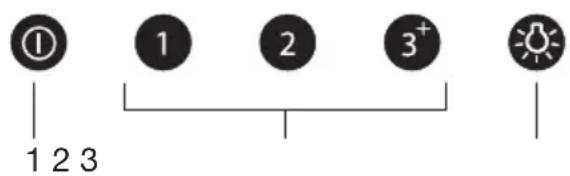
- Switching the extraction on or off
- Speed settings 1, 2, 3 and intensive setting
- Lighting
Operation


Switching the extraction on and off
- Press the on/off button.
The cooker hood is switched on at the lowest setting.
The on/off button and speed button 1 light up. - Select the desired extraction setting by pressing the appropriate speed setting button.
The cooker hood switches to the selected speed setting.
The speed setting button lights up. - Press the on/off button.
The cooker hood is switched off.
Switching to intensive setting
A timer function is automatically used for the intensive setting. The duration is 5 minutes, after which the cooker hood switches to speed setting 2.



-
Press the on/off button.
The cooker hood switches on at speed setting 1.
The on/off button and speed button 1 light up. -
Press speed setting button 3.
Speed setting button 3 lights up.
- Press speed setting button 3 again.
Speed setting button 3 flashes.
The intensive setting is switched on.
Press the on/off button or any other button to stop the intensive setting at any time.
Switching the lighting on and off
- Press the lighting button.
The lighting comes on. - Press the button again and the lighting goes off.


Cleaning

Important!
For all maintenance first switch off the mains power to the cooker hood by pulling the plug out of the socket or by turning off the home's master switch. The hood needs to be cleaned regularly, both inside as well as outside (at least in the same frequency as the grease filter cleaning). Do not use abrasive cleaning products. Do not use alcohol!
Important!
If the instructions regarding cleaning the appliance or replacing the filters are not followed, this can cause a fire. These instructions should be followed! The manufacturer is not liable for damage to the hood or fire damage resulting from incompetent maintenance or from non-adherence to the above safety instructions.
Cooker hood
Clean the cooker hood with soapy water and a soft cloth. Then wash off with clean water. Do not use aggressive cleaning agents such as caustic soda. The cooker hood finish stays in good condition if it is buffed periodically following the application of wax.
Stainless steel cooker hoods
Do not use scouring pads or other abrasive cleaners on stainless steel cooker hoods. Finish with a non-abrasive, non-polishing agent and buff the stainless steel in the direction of the grain.
Metal grease filters
Metal grease filters should be cleaned once a month (or when indicated by the filter saturation indication system, if present on your model), using a neutral cleaning agent, preferably by hand or in the dishwasher on a short, low-temperature program. Place the grease filters with the openings facing downwards in the dishwasher so the water can drain out of the filter. Aluminum-colored and black grease filters become dull as a result of dishwasher cleaning agents. This is normal and does not effect the working.
Grease filters
natural_image
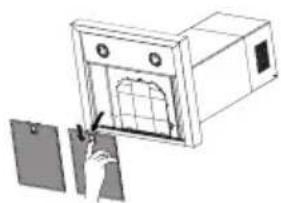
Illustration of a microwave oven with a door and a hand inserting a clip into it (no text or symbols)Removing the grease filters
- Switch off the motor and lighting.
- Remove the grease filters from the hood by pulling the special handle.
Carbon filter HF2012
- More noise is produced when carbon filters are used than when the cooker hood is used with an exhaust vent.
- Carbon filters function optimally at a lower motor speed. Consequently, you should avoid the intensive setting as much as possible.
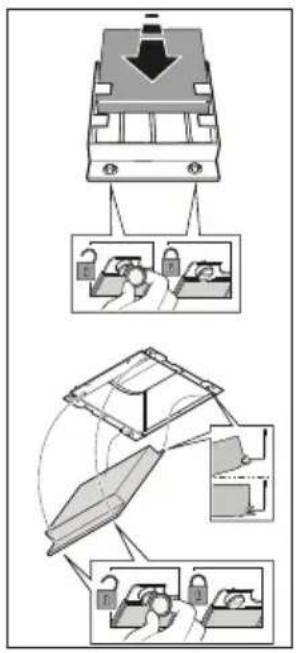
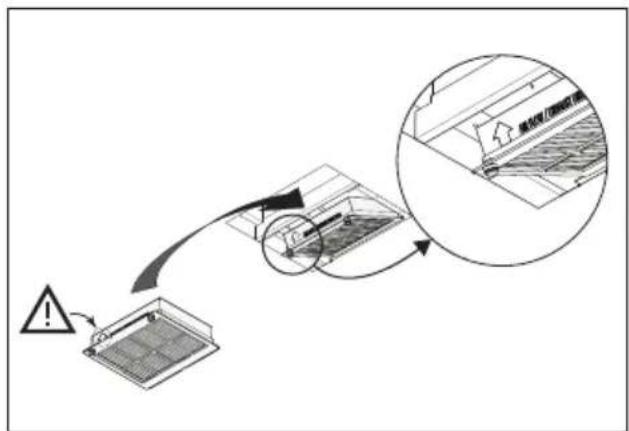
Replacing the carbon filter HF2012
The carbon filter must always be used if the cooker hood is not ducted.
Disassembly
Remove the carbon filter by turning the twist locks on the front 90°. Carefully remove the filter.
Assembly
First hook the carbon filter on the metal tab on the back of the hood and then secure the front, with the two twist locks, by turning them a quarter turn.
Note:
- The regenerable activated carbon filter can be washed by hand or in the dishwasher at a maximum temperature of 65 °C. The washing cycle must be done without other dishes and without dishwasher detergent. Do not use any cleaning agents!
- Remove excess water. Be careful to avoid damaging the filter. Let the filter dry in the oven for at least 1 hour at a maximum temperature of 80 °C. After a maximum of 3 years (or when the filter is damaged), the filter will need to be replaced.
- It is important that the grease filters and the regenerable activated carbon filter are properly dried before installation.
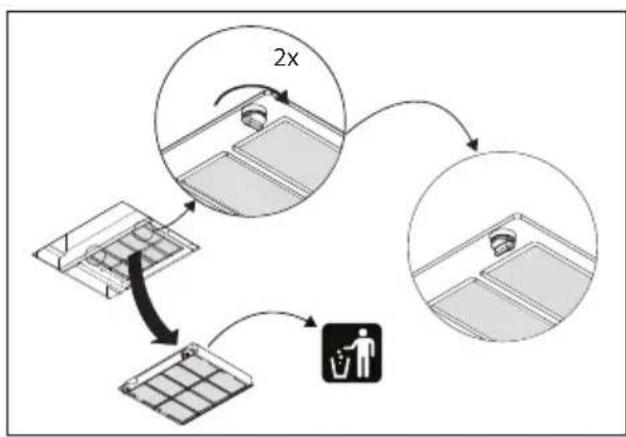
Odour/fine particle filter HF3001
- More noise is produced when odour/fine particle filters are used than when the cooker hood is used with an exhaust vent.
- Odour/fine particle filters function optimally at a lower motor speed. Consequently, you should avoid the intensive setting as much as possible.

Replacing the odour/fine particle filter HF3001
The odour/fine particle filter must be replaced annually. To replace the filter, follow the instructions supplied with the new filter. The recirculation set HR0013 must be ordered for the first installation.
Important:
- The saturation of the filter depends on the intensity of use, the manner of cooking and the regularity with which the grease filters are cleaned.
flowchart
graph TD
    A["Recycle Bin"] -->|2x increase| B["Recycle Bin"]
    B --> C["Recycle Bin"]
    C --> D["Recycle Bin"]
    D --> E["Recycle Bin"]
    E --> F["Recycle Bin"]
    F --> G["Recycle Bin"]
    G --> H["Recycle Bin"]
    H --> I["Recycle Bin"]
    I --> J["Recycle Bin"]
    J --> K["Recycle Bin"]
    K --> L["Recycle Bin"]
    L --> M["Recycle Bin"]
    M --> N["Recycle Bin"]
    N --> O["Recycle Bin"]
    O --> P["Recycle Bin"]
    P --> Q["Recycle Bin"]
    Q --> R["Recycle Bin"]
    R --> S["Recycle Bin"]
    S --> T["Recycle Bin"]
    T --> U["Recycle Bin"]
    U --> V["Recycle Bin"]
    V --> W["Recycle Bin"]
    W --> X["Recycle Bin"]
    X --> Y["Recycle Bin"]
    Y --> Z["Recycle Bin"]
    Z --> AA["Recycle Bin"]
    AA --> AB["Recycle Bin"]
    AB --> AC["Recycle Bin"]
    AC --> AD["Recycle Bin"]
    AD --> AE["Recycle Bin"]
    AE --> AF["Recycle Bin"]
    AF --> AG["Recycle Bin"]
    AG --> AH["Recycle Bin"]
    AH --> AI["Recycle Bin"]
    AI --> AJ["Recycle Bin"]
    AJ --> AK["Recycle Bin"]
    AK --> AL["Recycle Bin"]
    AL --> AM["Recycle Bin"]
    AM --> AN["Recycle Bin"]
    AN --> AO["Recycle Bin"]
    AO --> AP["Recycle Bin"]
    AP --> AQ["Recycle Bin"]
    AQ --> AR["Recycle Bin"]
    AR --> AS["Recycle Bin"]
    AS --> AT["Recycle Bin"]
    AT --> AU["Recycle Bin"]
    AU --> AV["Recycle Bin"]
    AV --> AW["Recycle Bin"]
    AW --> AX["Recycle Bin"]
    AX --> AY["Recycle Bin"]
Lighting

This hood is fitted with a light system. This light system has to be replaced by an authorized technician. Do not attempt to replace it by yourself.

The lamp in this household appliance is only suitable for illumination of this appliance. The lamp is not suitable for household room illumination.
Disposal
Disposal of appliance and packaging
By ensuring this product is disposed of correctly, you will help prevent potential negative consequences for the environment and human health, which could otherwise be caused by inappropriate waste handling of this product. The local authorities can provide you with the relevant information.
The packaging of this appliance is recyclable. It could have been made from:
- cardboard;
• polythene foil (PE); - CFK-free polystyrene (PS-hard foam).
You need to dispose of these materials responsibly in accordance with official regulations.
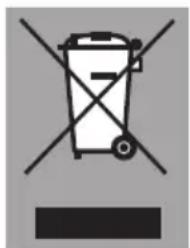
To draw attention to the fact that the segregated processing of electric household appliances is compulsory, this appliance carries the symbol of a crossed-out dustbin. This means that at the end of its working life, you may not dispose of the appliance as household refuse. Instead, you should hand it in at a special refuse collection centre run by the local authority or at a dealer's providing this service.
Segregated processing of household appliances avoids any negative effects on the environment and public health that might otherwise occur. It enables the recovery of the materials used in the production of this appliance, thus realising considerable savings in terms of raw materials and energy.
CE
Declaration of conformity
We hereby declare that our products satisfy the applicable European directives, orders and regulations, as well as the requirements stated in the referenced standards.

877006