31128 - Oven HAMILTON BEACH - Free user manual and instructions
Find the device manual for free 31128 HAMILTON BEACH in PDF.


User questions about 31128 HAMILTON BEACH
0 question about this device. Answer the ones you know or ask your own.
Ask a new question about this device
Download the instructions for your Oven in PDF format for free! Find your manual 31128 - HAMILTON BEACH and take your electronic device back in hand. On this page are published all the documents necessary for the use of your device. 31128 by HAMILTON BEACH.
USER MANUAL 31128 HAMILTON BEACH
Visit www.hamiltonbeach.com for our complete line of products and Use and Care Guides – as well as delicious recipes, tips, and to register your product online
Please call us – our friendly associates are ready to help. USA: 1.800.851.8900
Questions
natural_image
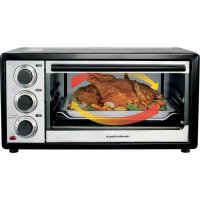
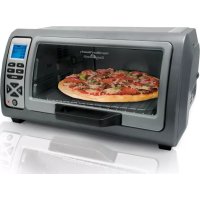
Exterior view of a Hamilton Beach electric toaster oven (no visible text or symbols on the device body)English 2
Français.... 13
Español 24
WARNING
natural_image
Silhouette of a flame with sharp edges, resembling a stylized fire or smoke plume (no text or symbols)Fire Hazard.
- If contents ignite, do not open oven door. Unplug oven and allow contents to stop burning and cool before opening door.
- Do not operate unattended while in Toast or Broil modes.
- Do not use with oven cooking bags.
- Do not heat taco shells in toaster oven. Always use full-size conventional oven.
• Always allow at least one inch between food and heating element.
• Always unplug toaster oven when not in use. - Regular cleaning reduces risk of fire hazard.
IMPORTANT SAFEGUARDS
When using electrical appliances, basic safety precautions should always be followed to reduce the risk of fire, electric shock, and/or injury to persons, including the following:
- Read all instructions.
- This appliance is not intended for use by persons (including children) with reduced physical, sensory, or mental capabilities, or lack of experience and knowledge, unless they are closely supervised and instructed concerning use of the appliance by a person responsible for their safety.
- Close supervision is necessary when any appliance is used by or near children. Children should be supervised to ensure that they do not play with the appliance.
- Do not touch hot surfaces. Use handles or knobs.
- To protect against electric shock, do not immerse cord, plug, or toaster oven in water or other liquid.
- Unplug from outlet when not in use and before cleaning. Allow to cool before cleaning appliance and putting on or taking off parts.
- Do not operate any appliance with a damaged supply cord or plug, or after the appliance malfunctions or has been dropped or damaged in any manner. Supply cord replacement and repairs must be conducted by the manufacturer, its service
agent, or similarly qualified persons in order to avoid a hazard. Call the provided customer service number for information on examination, repair, or adjustment.
- The use of accessory attachments not recommended by the appliance manufacturer may cause injuries.
- Do not use outdoors.
- Do not let cord hang over edge of table or counter or touch hot surfaces.
- Do not place on or near a hot gas or electric burner or in a heated oven.
- Extreme caution must be used when moving an appliance containing hot oil or other hot liquids.
- Use extreme caution when removing pan or disposing of hot grease.
- Do not clean with metal scouring pads. Pieces can break off the pad and touch electrical parts, creating a risk of electrical shock.
- Oversize foods or metal utensils must not be inserted in a toaster oven as they may create a fire or risk of electric shock.

- The bread may burn. A fire may occur if toaster is covered or touching flammable material, including curtains, draperies, walls, overhead cabinets, paper or plastic products, cloth towels, and the like, when in operation.
- Extreme caution should be exercised when using containers constructed of materials other than metal or glass.
- Do not store any materials, other than manufacturer-recommended accessories, in this oven when not in use.
- Do not place any of the following materials in the oven: paper, cardboard, plastic, and the like.
- Do not cover crumb tray or any part of the oven with metal foil. This will cause overheating of the oven.
-
To turn off any cooking cycle, press the Power Button (①). See "Parts and Features" section.
-
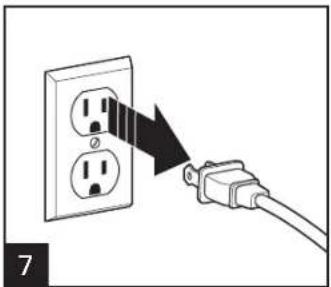
To disconnect, turn off cooking cycle; then remove plug from wall outlet.
- Do not place eyes or face in close proximity with tempered safety glass door, in the event that the safety glass breaks.
- Always use appliance with crumb tray securely in place.
- Do not use appliance for other than intended use.
- Clean oven interior carefully. Do not scratch or damage heating element tube.
- Do not operate the appliance by means of an external timer or separate remote-control system.
CAUTION: HOT SURFACE. The temperature of accessible ces may be high when the appliance is operating.

SAVE THESE INSTRUCTIONS
Other Consumer Safety Information
This product is intended for household use only.
⚠ WARNING Electrical Shock Hazard: This product is provided with a polarized plug (one wide blade) to reduce the risk of electric shock. The plug fits only one way into a polarized outlet. Do not defeat the safety purpose of the plug by modifying the plug in any way or by using an adapter. If the plug does not fit fully into the outlet, reverse the plug. If it still does not fit, have an electrician replace the outlet.
The length of the cord used on this appliance was selected to reduce the hazards of becoming tangled in or tripping over a longer cord. If a longer cord is necessary, an approved extension cord may be used. The electrical rating of the extension cord must be equal
to or greater than the rating of the appliance. Care must be taken to arrange the extension cord so that it will not drape over the countertop or tabletop where it can be pulled on by children or accidentally tripped over.
To avoid an electrical circuit overload, do not use another high-wattage appliance on the same circuit with this appliance.
BEFORE FIRST USE
Most heating appliances produce an odor and/or smoke when used the first time. Plug the toaster oven into an outlet. Turn Temperature Dial to 450^ F ( 230^ C). Heat at this temperature for 10 minutes. The odor should not be present after this initial preheating. Wash baking pan and oven rack before using.
Parts and Features
To order parts:
US: 1.800.851.8900
www.hamiltonbeach.com
Canada: 1.800.267.2826
Mexico: 01 800 71 16 100
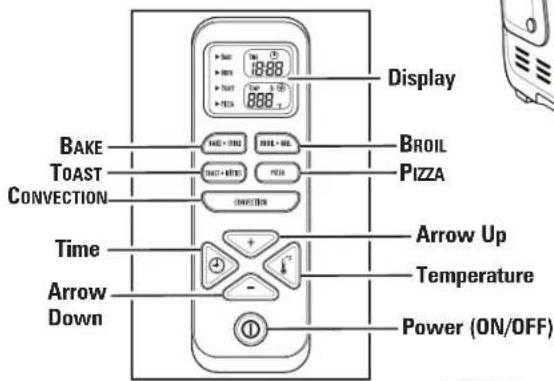
CONTROL PANEL
text_image
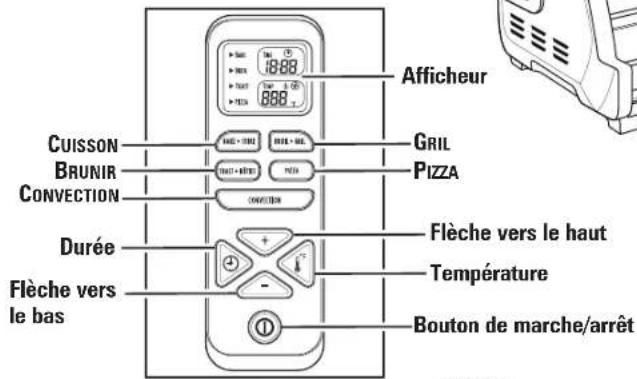
Display BAKE TOAST CONVECTION BROIL PIZZA Time Arrow Up Temperature Arrow Down Power (ON/OFF)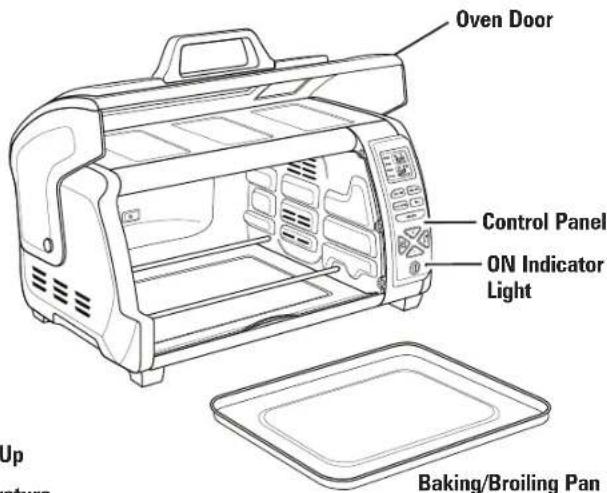
text_image
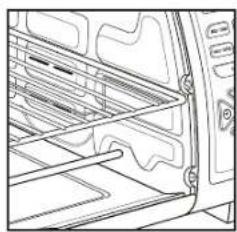
Oven Door Control Panel ON Indicator Light Baking/Broiling PanHIGH RACK POSITION: toasting and broiling
natural_image
Line drawing of a refrigerator interior showing shelves, doors, and doorways (no text or symbols)LOW RACK POSITION: baking
natural_image
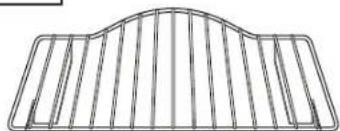
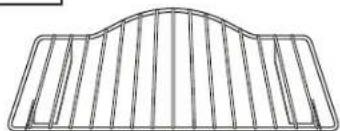
Pure structural diagram of a curved metal frame with vertical slats (no text or symbols)Oven Rack
natural_image
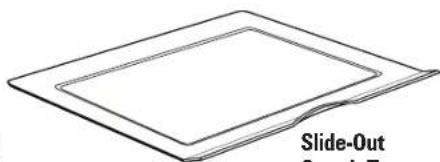
Simple line drawing of a slide-out device with no text or symbolsSlide-Out Crumb Tray
natural_image
Line drawing of a vehicle interior showing the rearview and side panels (no text or symbols)How to Toast
WARNING Fire Hazard.
- If contents ignite, do not open oven door. Unplug oven and allow contents to stop burning and cool before opening door.
- Do not operate with door open or removed.
- Do not leave appliance unattended when in operation.
• Always unplug toaster oven when not in use.
natural_image
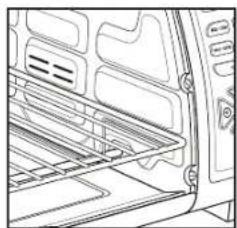
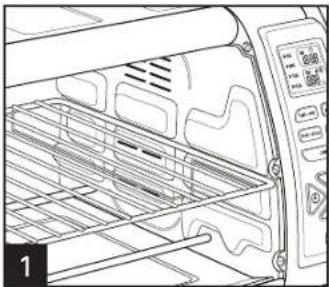
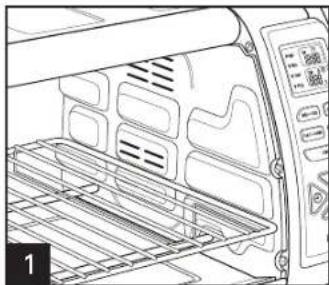
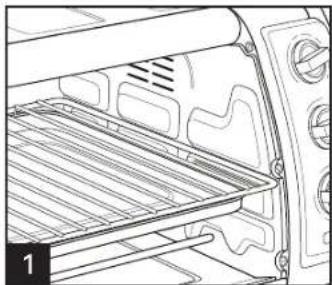
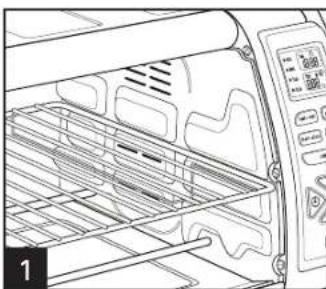
Line drawing of an oven with a rack and control panel (no text or symbols)Plug in toaster oven. Place oven rack in HIGH RACK POSITION (shown) for toast, English muffins, bagels, and waffles.
text_image
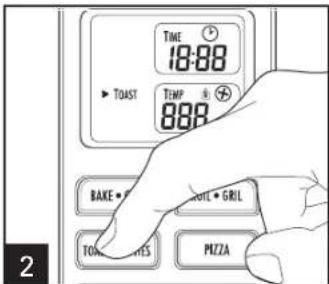
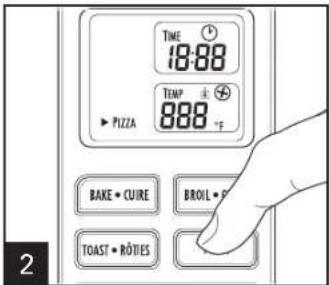
TIME 18:88 TEMP 888 BAKE • TOMA • GRIL PITZA 2Press TOAST.
text_image
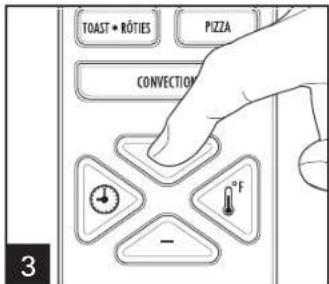
TOAST • ROTIES PIZZA CONVECTION °F 3Press + or - to select the toast from 1 to 5.
text_image
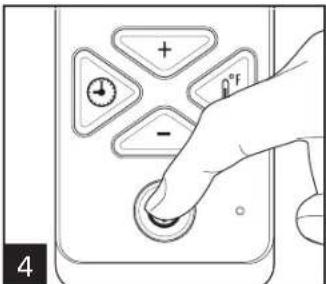
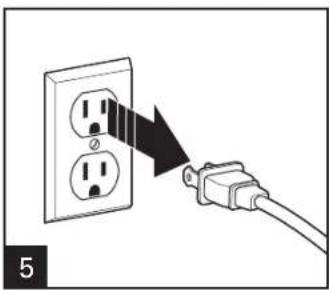
+ - °F 4Press POWER ① to start toasting. Buzzer sounds when toasting is finished.
natural_image
Diagram showing a cable being inserted into an electrical socket, with no text or symbols present.NOTES
- When toasting only two slices of bread, place bread in middle of oven rack to get even toasting on top and bottom.
- To toast bagels, English muffins, and waffles, place oven rack in HIGH RACK POSITION and place food cut/split side facing up. This will toast the cut/split side more than the bottom side. Press TOAST and then + or - for desired color.
-
To toast regular toaster pastries or frozen pastries, place oven rack in the HIGH RACK POSITION. Select a lighter color and toast directly on the oven rack. If pastry has a glaze or frosting, use baking pan.
-
Time is displayed on control panel and will begin to count down when unit is started.
- When toasting, condensation may form on the oven door. The moisture will slowly escape from the enclosed oven.
- The number of slices of bread and the bread freshness will affect toast color. For example, toasting 4 slices of bread will require a darker toast color setting than 2 slices of bread. Press TOAST and then + or - for desired color.
- If you are not satisfied with the color balance between the two sides of your food in the recommended rack position, select a different rack position.
How to Bake Pizza
WARNING Fire Hazard.
- If contents ignite, do not open oven door. Unplug oven and allow contents to stop burning and cool before opening door.
- Do not operate with door open or removed.
• Always allow at least 1 inch (2.5 cm) between food and heating element.
• Always unplug toaster oven when not in use.
natural_image
Line drawing of an oven with a rack and control panel (no text or symbols)Plug in toaster oven. Place oven rack on LOW RACK POSITION (shown).
text_image
TIME 18:88 TEMP 888 °F PIZZA BAKE • CUIRE BROIL • TOAST • ROTIES 2Press PIZZA. Press TIME. Then press + or - to set the time. Time can be adjusted in 1-minute increments from 1 to 60 in PIZZA, BAKE, and BROIL.

text_image
CONTROL FETA FETA + FETA FETA + FETA CONTROL 3- or - to set the time. Time can be 1 to 60 in PIZZA, BAKE, and BROIL.
text_image
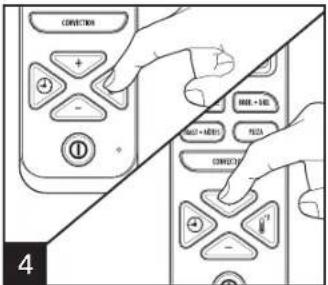
CONNECTION + - - MOR + END MOR + END FETA CONNECTION - 4Press TEMP. Then press + or - to set the temperature. Temperature can be adjusted in 5°F increments from 150°F to 450°F in PIZZA and BAKE.
text_image
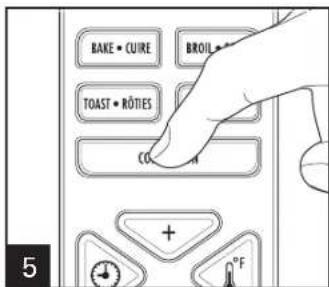
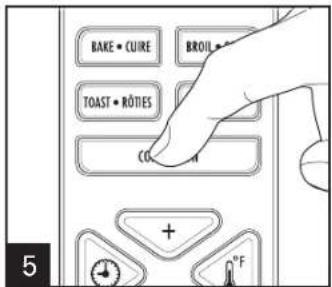
BAKE • CUIRE BROIL • TOAST • RÖTIES CO. + °F 5Press CONVECTION.
text_image
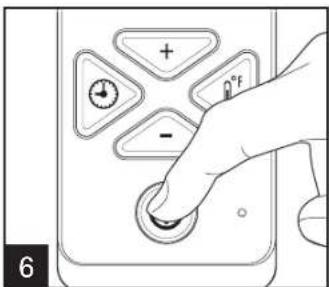
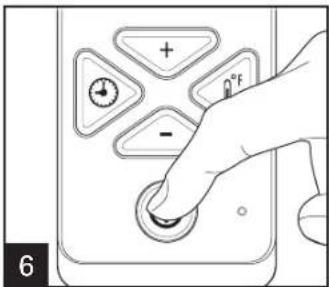
+ - °F 6Press POWER ① to start baking the pizza. Buzzer sounds when pizza baking is finished and oven automatically shuts off.
natural_image
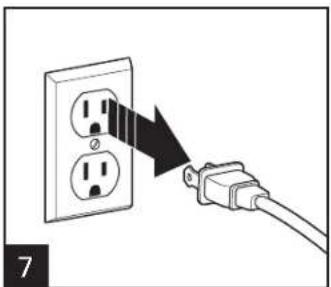
Diagram showing a cable being inserted into an electrical outlet, with no text or symbols present.zza. Buzzer sounds when pizza ically shuts off.
NOTES:
- Convection: When baking pizza, use convection setting and reduce cooking time by 25%.
- Bake foods, such as pizza, on the LOW RACK POSITION. Place food directly on oven rack or in baking pan.
How to Bake
WARNING Fire Hazard.
- If contents ignite, do not open oven door. Unplug oven and allow contents to stop burning and cool before opening door.
- Do not use oven cooking bags.
- Do not operate with door open or removed.
• Always allow at least 1 inch (2.5 cm) between food and heating element.
• Always unplug toaster oven when not in use.
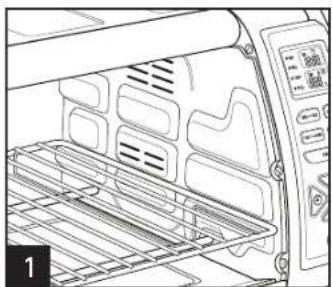
natural_image
Line drawing of an oven with rack and control panel (no text or symbols)Plug in toaster oven. Place oven rack on LOW RACK POSITION (shown).
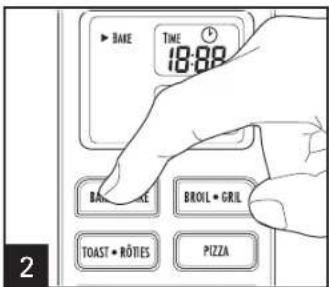
text_image
BAKE TIME 18:00 BAN LEE BROIL • GRIL TOAST • ROTIES PIZZAPress BAKE
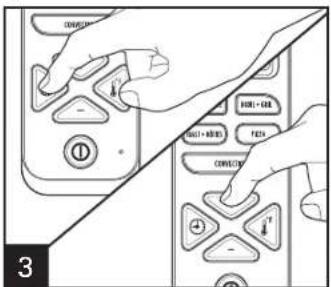
text_image
CONVOCATION INTL + AIR FETA CONVOCATION INTL + MODE FETA 3Press TIME. Then press + or - to set the time.
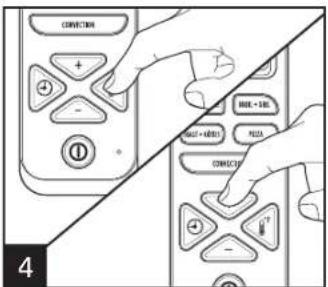
text_image
CONVECTION + - INPUT + CTRL INPUT + keyboard PIZZA CONVECTION - #7 4Press TEMP. Then press + or - to set the temperature.
text_image
BAKE • CURE BROIL • TOAST • RÔTIES CO. 5Press CONVECTION.
text_image
+ - 0°F 6Press POWER① to start baking. Buzzer sounds when baking is finished and oven automatically shuts off.
natural_image
Diagram showing a cable being inserted into an electrical socket (no text or symbols present)NOTES:
- Convection: When baking, use convection setting and reduce cooking time by 25%.
- Bake foods on the LOW RACK POSITION. Place food directly on oven rack or in baking pan.
How to Bake (cont.)
NOTES:
- Do not totally enclose foods in aluminum foil. Foil can insulate foods and slow down heating.
- To reheat rolls or biscuits, place on baking pan and heat at 300^ (149°C) for 10 minutes.
- Reheat leftover roasts or casseroles at 350^ (177°C) for 20 to 30 minutes or until heated through.
- Bake foods, such as a whole chicken, on the LOW RACK POSITION. Place food in baking pan.
- Turn foods halfway through cooking time.
Visit foodsafety.gov for more safe cooking temperature information.
IF YOU LIVE IN A HIGH-ALTITUDE AREA:
The Extension service will have detailed information about cooking for your area. To locate the Cooperative Extension service in your county, please visit: http://www.csrees.usda.gov/Extension/.
ADDITIONAL NOTES:
- Cook setting cannot be changed once selected function has begun.
- Press POWER at any time to cancel cooking.
- Press and hold TIME and TEMP at the same time to change from Fahrenheit (°F) to Celsius (°C). Fahrenheit is the default temperature.
How to Broil
WARNING Fire Hazard.
- If contents ignite, do not open oven door. Unplug oven and allow contents to stop burning and cool before opening door.
-
Do not leave oven unattended during operation.
-
Do not operate with door open or removed.
- Keep 1 inch (2.5 cm) between food and heating element.
- Do not use oven cooking bags.
- Do not heat foods in plastic containers.
- Follow food manufacturer's instructions.
natural_image
Line drawing of an oven with a rack inside, showing ventilation grilles and control knobs (no text or symbols)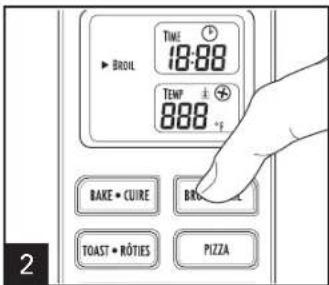
text_image
TIME 18:88 TEMP 888 °F BAKE • CUIRE BRO TOAST • RÔTIES PIZZAPlug in toaster oven. Place oven rack on HIGH RACK POSITION (shown). Slide baking/broiling pan under oven rack to catch drippings when broiling. Then place food directly on oven rack to broil. Press BROIL.
text_image
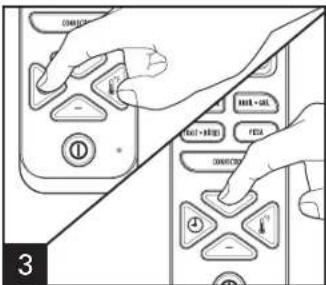
OK Cancel FETA OK + CAT FETA OK+STOP 3Press TIME. Then press + or - to set the time.
text_image
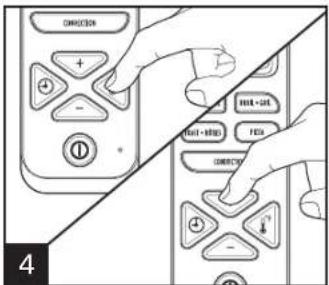
DIRECTION + - HILL+GAT HILL+RIP FETA DIRECTION - 4Press TEMP. Then press + or - to set the temperature. Temperature can be adjusted in 5°F increments from 400°F to 450°F.
text_image
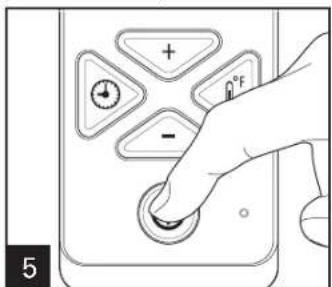
+ - °F 5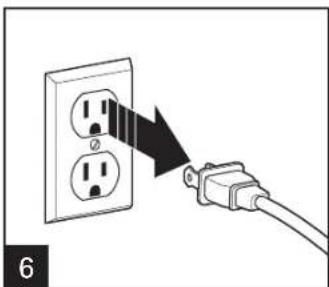
natural_image
Diagram showing a cable being inserted into an electrical socket (no text or symbols present)Press POWER ① to start broiling. Buzzer sounds when broiling is finished and oven automatically shuts off.
- Turn food over halfway through cooking.
• Cook beef to at least 145°F (63°C).
• Cook ground meat and pork to at least 160°F (71°C).
• Cook chicken to at least 165°F (73°C). - Cook fish until at least 145^ (63°C) or until opaque or flakes with a fork.
Visit foodsafety.gov for more safe cooking temperature information.
Care and Cleaning
text_image
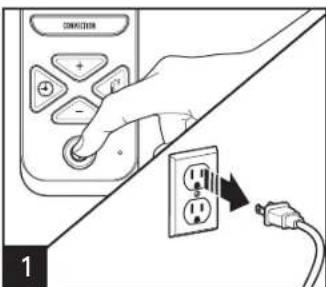
CONVATION + - 1When finished, press POWER ① and unplug.
natural_image
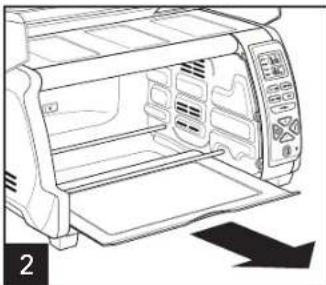
Line drawing of a microwave oven with control panel and door (no text or symbols)To clean inside of oven, wipe oven walls, bottom of oven, and glass door with a damp, soapy cloth. Repeat with a damp, clean cloth. For stubborn stains, use a plastic scouring pad.
WARNING Electrical Shock Hazard.
Do not clean with metal scouring pads. Pieces can break off pad and touch electrical parts.
text_image
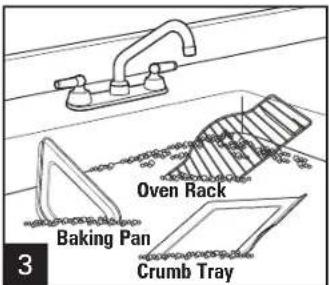
Oven Rack Baking Pan Crumb Tray 3Hand wash in warm, soapy water, rinse, and dry.
natural_image
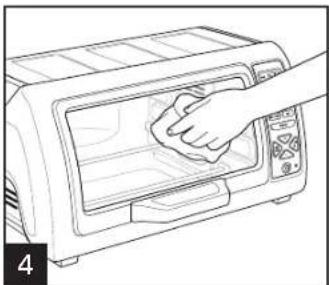
Line drawing of a hand cleaning a microwave oven (no text or symbols)Wipe outside of oven with a damp cloth. Do not use abrasive cleansers or metal scouring pads.
Troubleshooting
PROBLEM PROBABLE CAUSE/SOLUTION
| Oven will not heat. | Check to make sure electrical outlet is working and the oven is plugged in. Press TEMP and then press + or – to set the temperature. Press POWER 1. The ON indicator light will be illuminated. |
| Moisture forms on inside of oven door when toasting. | This is normal when toasting in a toaster oven. Moisture is slower to escape from a toaster oven than from a toaster. The amount of moisture will differ between fresh bread, bagels, and frozen pastries. |
| An odor and smoke come from oven. | Smoke and odor are normal during first use of most heating appliances. These will not be present after initial heating period. |
| Oven will not toast. | Check to make sure outlet is working and oven is plugged in. Press TOAST and then press + or – to select desired toast setting. Press POWER 1. The ON indicator light will be illuminated. |
| Some foods burn and some are not done. | Adjust oven temperature, cooking time, or rack position for best results with your recipes. |
| Concentrated steam comes out of top corners of oven door. | Moisture escaping from oven will be concentrated into streams from the top corners of the door. This gives the appearance of smoke. This is normal for this product. |
Visit www.hamiltonbeach.com for our complete line of products and Use and Care Guides – as well as delicious recipes, tips, and to register your product online!
Limited Warranty
This warranty applies to products purchased and used in the U.S. and Canada. This is the only express warranty for this product and is in lieu of any other warranty or condition.
This product is warranted to be free from defects in material and workmanship for a period of five (5) years from the date of original purchase in Canada and one (1) year from the date of original purchase in the U.S. During this period, your exclusive remedy is repair or replacement of this product or any component found to be defective, at our option; however, you are responsible for all costs associated with returning the product to us and our returning a product or component under this warranty to you. If the product or component is no longer available, we will replace with a similar one of equal or greater value.
This warranty does not cover glass, filters, wear from normal use, use not in conformity with the printed directions, or damage to the product resulting from accident, alteration, abuse, or misuse. This warranty extends only to the original consumer purchaser or gift recipient. Keep the original sales receipt, as proof of purchase is required to make a warranty claim. This warranty is void if the product is used for other than single-family household use or subjected to any voltage and waveform other than as specified on the rating label (e.g., 120V \~ 60 Hz).
We exclude all claims for special, incidental, and consequential damages caused by breach of express or implied warranty. All liability is limited to the amount of the purchase price. Every implied warranty, including any statutory warranty or condition of merchantability or fitness for a particular purpose, is disclaimed except to the extent prohibited by law, in which case such warranty or condition is limited to the duration of this written warranty. This warranty gives you specific legal rights. You may have other legal rights that vary depending on where you live. Some states or provinces do not allow limitations on implied warranties or special, incidental, or consequential damages, so the foregoing limitations may not apply to you.
To make a warranty claim, do not return this appliance to the store. Please call 1.800.851.8900 in the U.S. or 1.800.267.2826 in Canada or visit hamiltonbeach.com in the U.S. or hamiltonbeach.ca in Canada. For faster service, locate the model, type, and series numbers on your appliance.
⚠AVERTISSEMENT
natural_image
Silhouette of a flame with sharp edges, resembling a stylized fire or smoke plume (no text or symbols)Danger d'incendie.
natural_image
Line drawing of a refrigerator interior showing roof, door, and window (no text or symbols)PANNEAU DE CONTRÔLE
natural_image
Simple line drawing of a rectangular plate with two inner layers, labeled 'Plat de cuisson/gril' at the bottom (no other text or symbols)POSITION INFÉRIEURE
natural_image
Pure wireframe diagram of a curved structural element with vertical divisions (no text or symbols)Grille du four
natural_image
Simple line drawing of a rectangular frame with no text or symbols, labeled 'Ramasse-miettes' at the bottom (no other text or symbols)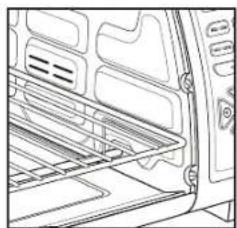
natural_image
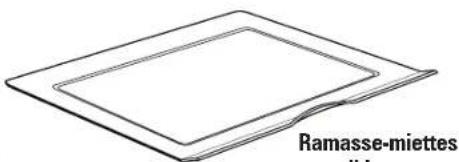
Line drawing of an open refrigerator interior showing door, seat, and front panel (no text or symbols)Ramasse-miettes amovible
Le grillage
natural_image
Line drawing of an oven with rack-mounted dish and control panel (no text or symbols)natural_image
Diagram showing a cable being inserted into an electrical socket, with no text or symbols present.natural_image
Line drawing of a refrigerator interior showing ventilation grilles and control panel (no text or symbols)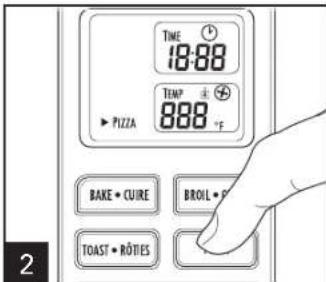
text_image
TIME 18:88 TEMP 888 °F PZZA BAKE • CUIRE BROIL • P TOAST • ROTIES 2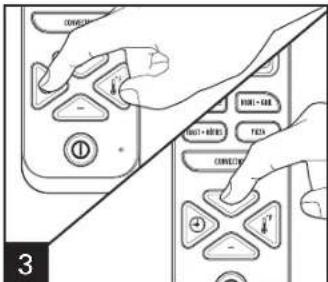
text_image
CONVEGET + - - - - - - - - - - - - - - - - - - - - - - - - - - - - - - - - - - - - - - - - - - - - - - - - - - - - - - - - - - - - - - - - - - - - - - - - - - - - - - - - - - - - - - - - - - - - - - - - - - -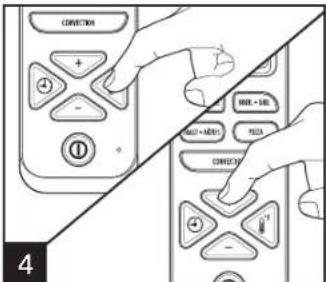
text_image
CONNECTION + - HALL - HLL HALL - MATH PICKA CONNECTION + - 4natural_image
Diagram showing a cable being inserted into an electrical outlet, with no text or symbols present.natural_image
Line drawing of a refrigerator interior with ventilation grilles and control panel (no text or symbols)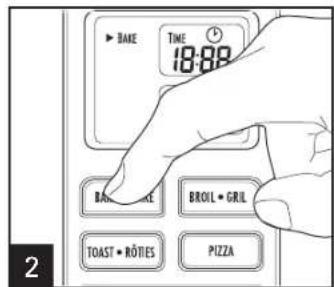
text_image
BAKE TIME 18:88 BANANCE BROIL • GRIL TOAST • ROTIES PIZZA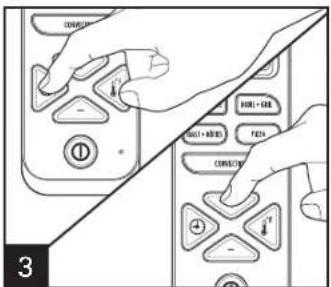
text_image
CONVEY FETA + FETA FETA + METER CONVEY 3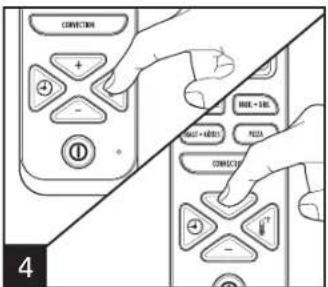
text_image
CONVECTION + - INPUT + BHA MUST + KHOYA PICKS CONVECTION - 4natural_image
Diagram showing a cable being inserted into an electrical socket (no text or symbols present)REMARQUES :
natural_image
Line drawing of an oven with a rack inside, showing ventilation grilles and control knobs (no text or symbols)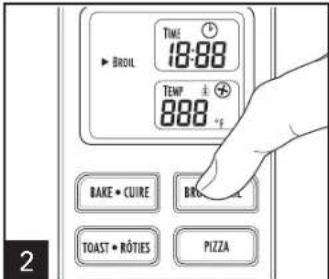
text_image
TIME 18:00 TENP 888 °F BAKE • CUIRE BRO TOAST • RÔTIES PIZZA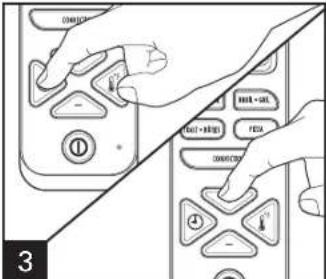
text_image
OK OUT FEN ON/OFF 3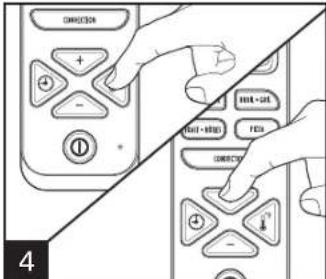
text_image
INT-HIP INT-OUT FIS INT-OUT FIS INT-OUT FIS INT-OUT FIS INT-OUT FIS INT-OUT FIS INT-OUT FIS INT-OUT FIS INT-OUT FIS INT-OUT FIS INT-OUT FIS INT-OUT FIS INT-OUT FIS INT-OUT FIS INT-OUT FIS FIS INT-OUT FIS INT-OUT FIS INT-OUT FIS INT-OUT FIS INT-OUT FIS INT-OUT FIS INT-OUT FIS INT-OUT FIS INT-OUT FIS INT-OUT FIS INT-OUT FIS INT-OUT FIS INT-OUT FIS INT-OUT Cnatural_image
Diagram showing a cable being inserted into an electrical socket (no text or symbols present)natural_image
Line drawing of a microwave oven with control panel and door (no text or symbols)natural_image
Line drawing of a hand cleaning a toaster oven with a cloth (no text or symbols)PROBLÈME CAUSE POSSIBLE/SOLUTION
natural_image
Silhouette of a flame with sharp edges (no text or symbols)natural_image
Line drawing of a refrigerator interior showing roof, door, and window (no text or symbols)natural_image
Line drawing of a refrigerator interior showing exterior panels and storage racks (no text or symbols)26
natural_image
Pure structural diagram of a curved frame with vertical slats (no text or symbols)Rejilla del Horno
text_image
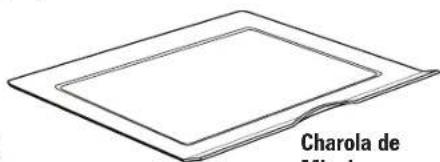
Charola de MinimaVingajas Deslizante
Como Tostar
natural_image
Line drawing of an oven with a rack and control panel (no text or symbols)natural_image
Diagram showing a cable being inserted into an electrical socket (no text or symbols present)NOTAS
natural_image
Line drawing of an oven interior with ventilation grilles and control panel (no text or symbols)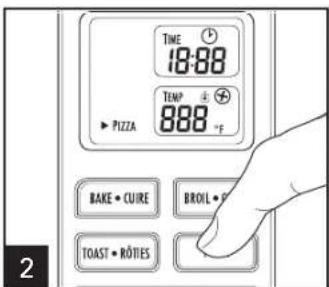
text_image
TIME 18:88 TEMP 888 °F PZZA BAKE • CUIRE BROIL • P TOAST • RÔTIES 2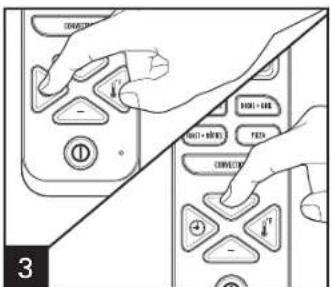
text_image
CONJUNCTION - + - CONJUNCTION - + - FOR FOR FOR FOR FOR FOR FOR FOR FOR FOR FOR FOR FOR FOR FOR FOR FOR FOR FOR FOR FOR FOR FOR FOR FOR FOR FOR FOR FOR FOR FOR FOR FOR FOR FOR FOR FOR FOR FOR FOR FOR FOR FOR FOR FOR FOR FOR FOR FOR FOR FOR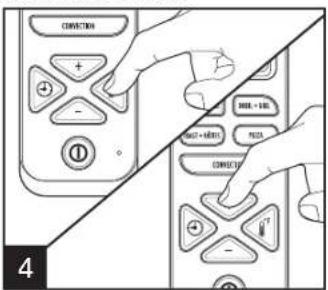
text_image
CONNECTION + - PRESS + BHA PRESS + BHA PRESS CONNECTION - 4natural_image
Diagram showing a cable being inserted into an electrical socket (no text or symbols present)NOTAS:
natural_image
Line drawing of an oven with a rack and control panel (no text or symbols)text_image
CONVECTION + - MOVE + BUY MOVE + BUY PICKS CONVECTION - 4natural_image
Diagram showing a cable being inserted into an electrical socket (no text or symbols present)NOTAS:
natural_image
Line drawing of an oven interior showing tray, vent, and door (no text or symbols)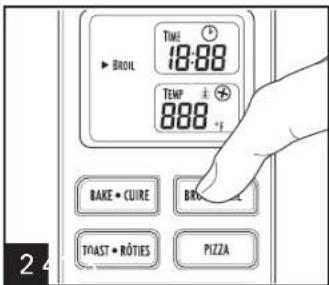
text_image
TIME 18:88 TEMP 888 °F BAKE • CUIRE BRO TOAST • ROTIES PIZZA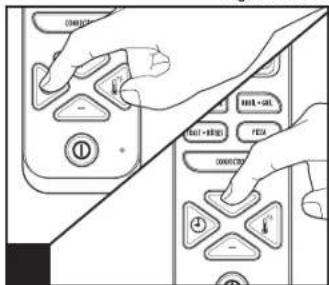
text_image
Diagram showing hand interacting with a control panel with labeled buttons and icons