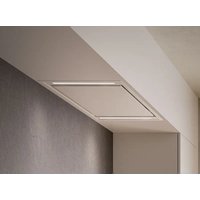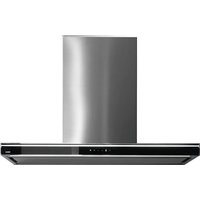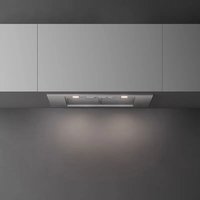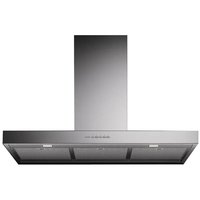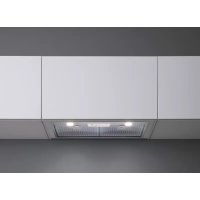
Gruppo Incasso E.ion - Basket FALMEC - Free user manual and instructions
Find the device manual for free Gruppo Incasso E.ion FALMEC in PDF.


User questions about Gruppo Incasso E.ion FALMEC
0 question about this device. Answer the ones you know or ask your own.
Ask a new question about this device
Download the instructions for your Basket in PDF format for free! Find your manual Gruppo Incasso E.ion - FALMEC and take your electronic device back in hand. On this page are published all the documents necessary for the use of your device. Gruppo Incasso E.ion by FALMEC.
USER MANUAL Gruppo Incasso E.ion FALMEC
natural_image
Exterior view of a modern kitchen air conditioner unit with ventilation grilles and a control panel (no visible text or symbols)E.ion® System
INSTRUCTIONS BOOKLET
LIBRETTO ISTRUZIONI ^1
INSTRUCTIONS BOOKLET EN
EN - Hole measurements for installation
EN - Hole measurements for installation
EN - Hole measurements for installation
natural_image
Illustration of five different types of home improvement tools: ladder, sawing machine, measuring tool, gloves, and hard hat (no text or symbols present)EN - Installation measurements (1), Separate the hood from the ionizing block (2) (3).
text_image
Technical diagram illustrating cable connection steps with labeled diagrams and directional arrows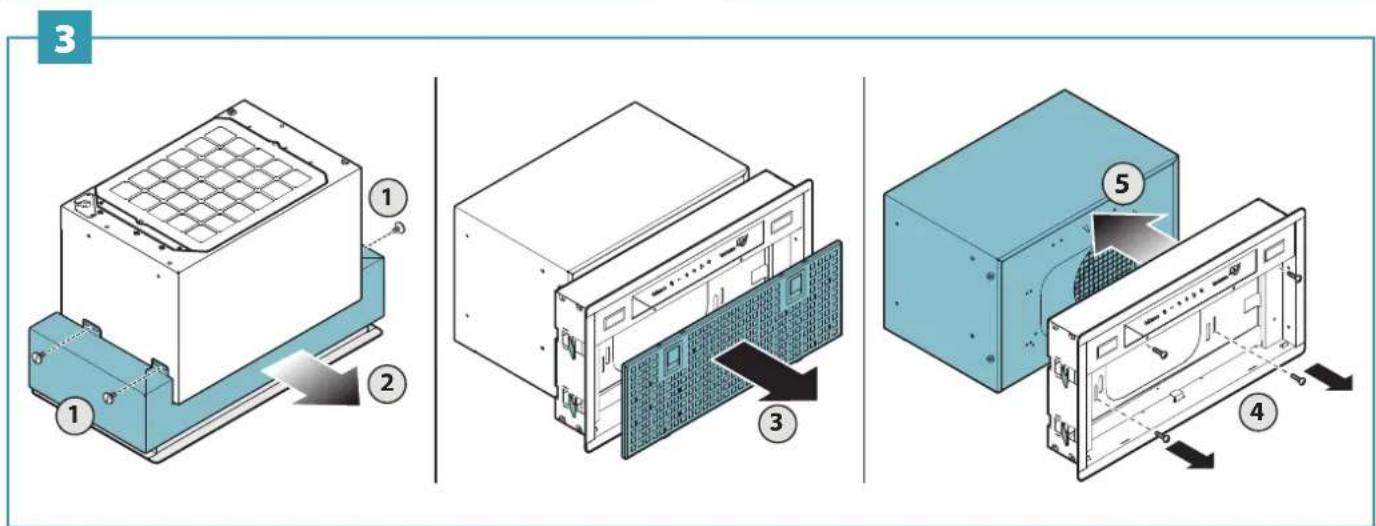
text_image
Diagram illustrating the assembly of a server rack system with labeled components and directional arrows indicating movement.IT - Foratura pensile (6).
EN - Hanging unit drilling (6).
DE - Bohrung Oberschrank (6).
natural_image
Illustration of hands using a tool to clean or install a blue panel, with no visible text or symbols.EN - Hood installation (7), fitting to the wall unit (8).
text_image
Technical diagram showing a mechanical setup with a tool and a block, labeled with number 3 and an arrow indicating direction.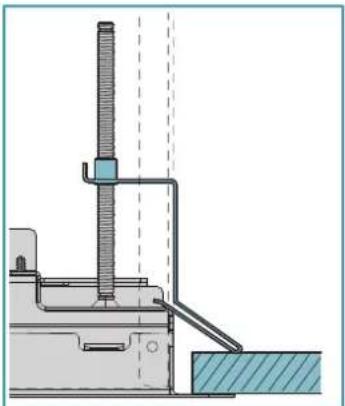
natural_image
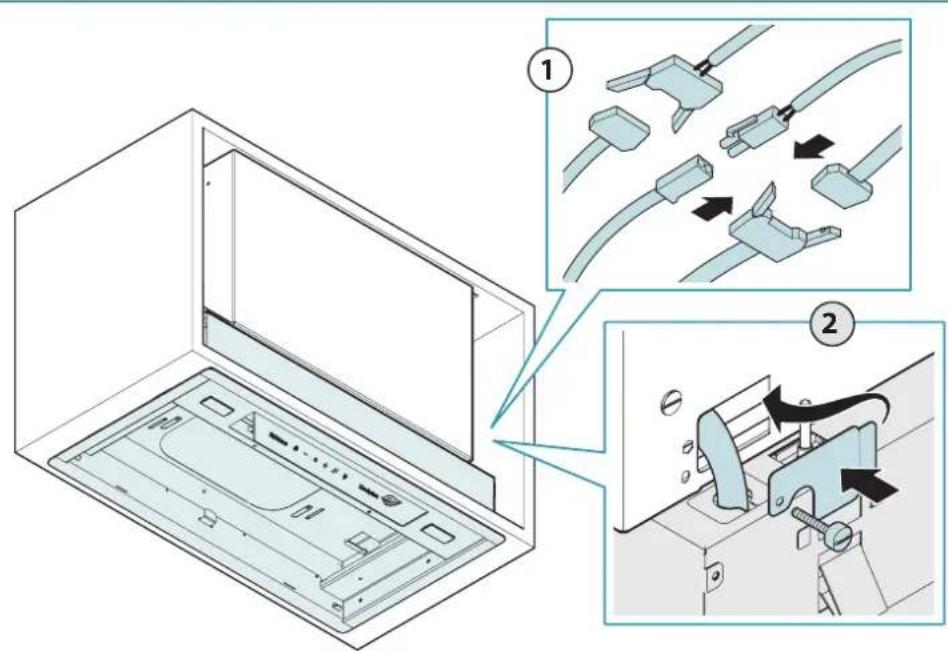
Technical diagram of a mechanical testing setup with a vertical rod and base, no visible text or symbolsEN - Installation of ionizing block (9) and power connection (10).
text_image
IMPORTANT X mm 0 mm OKNO V1 ① ② ③10
text_image
Diagram illustrating cable installation steps in a refrigerator, showing component disassembly and assembly with numbered instructions.IT - Rimettere il carter (11).
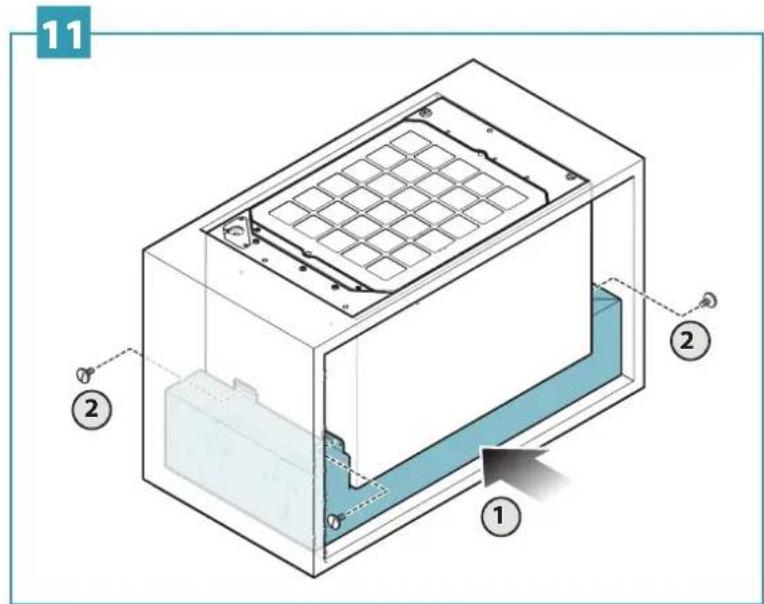
EN - Replace the guard (11).
DE - Die Verkleidung (11) wieder anbringen.
FR - Remettre le carter (11).
ES - Volver a colocar la carcasa (11).
RU - Установите на место крышку (11).
PL - Ponownie założyć osłonę (11).
NL - Breng de afscherming (11) weer aan.
PT - Colocar novamente o cárter (11).
DK - Sæt beklædningen (11) tilbage på plads.
SE - Sätt tillbaka kåpan (11).
FI - Aseta suojus (11) takaisin.
NO - Sett på plass dekselet (11).
text_image
11 2 2 1H 480 - H 600 - H 720
text_image
Technical diagram of a mechanical or electrical enclosure with numbered components and a highlighted internal component.15
natural_image
Technical line drawing of a mechanical device with a grid base and top panel, showing internal components (no text or symbols)H600 - H 720
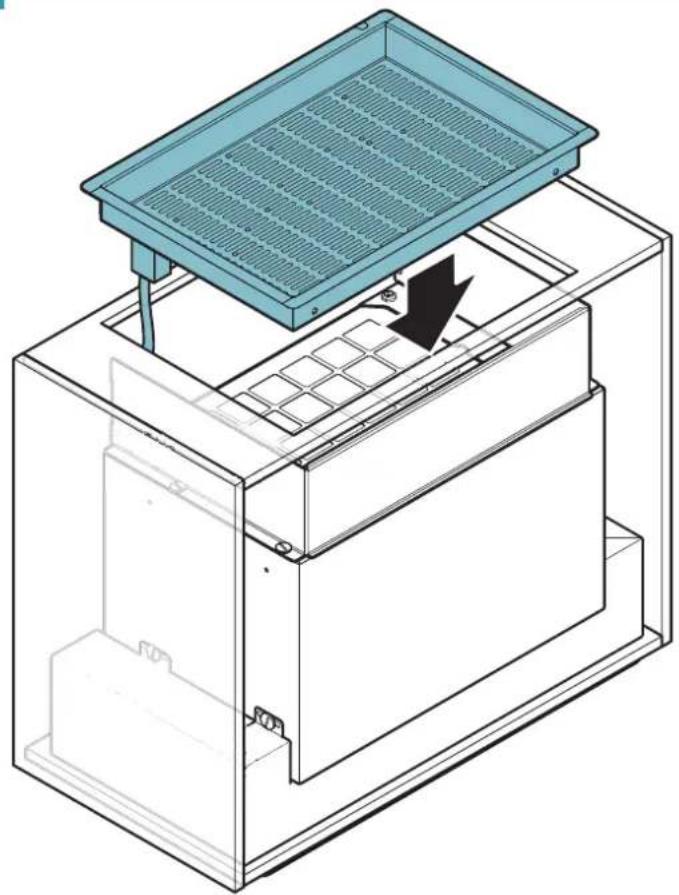
EN - Position and adjust the extensions (16), insert the grille and attach it to the extension (17).
natural_image
Isometric technical diagram of a mechanical housing or enclosure with internal components and mounting holes (no text or symbols)17
text_image
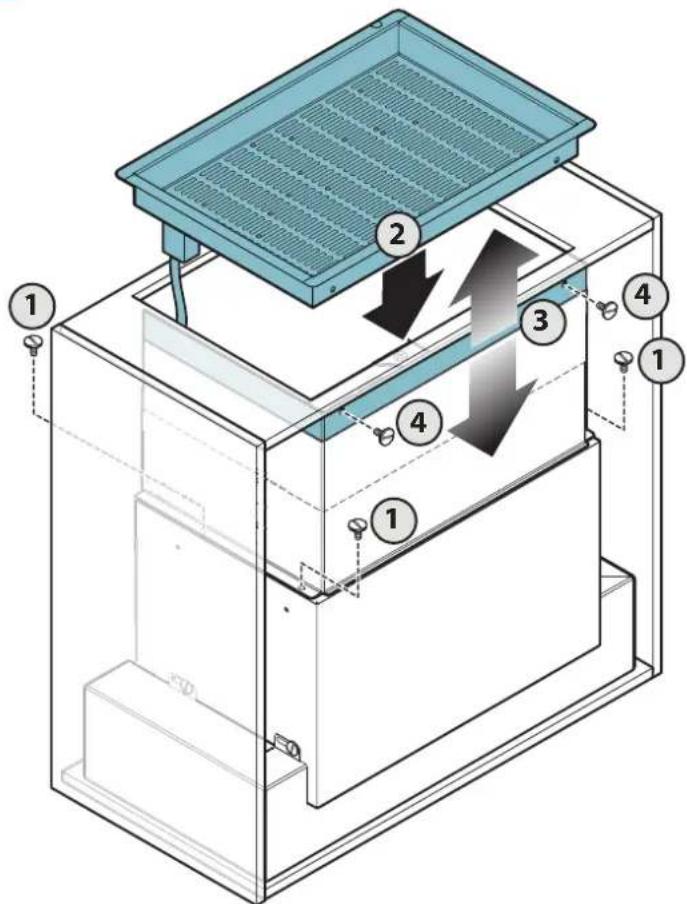
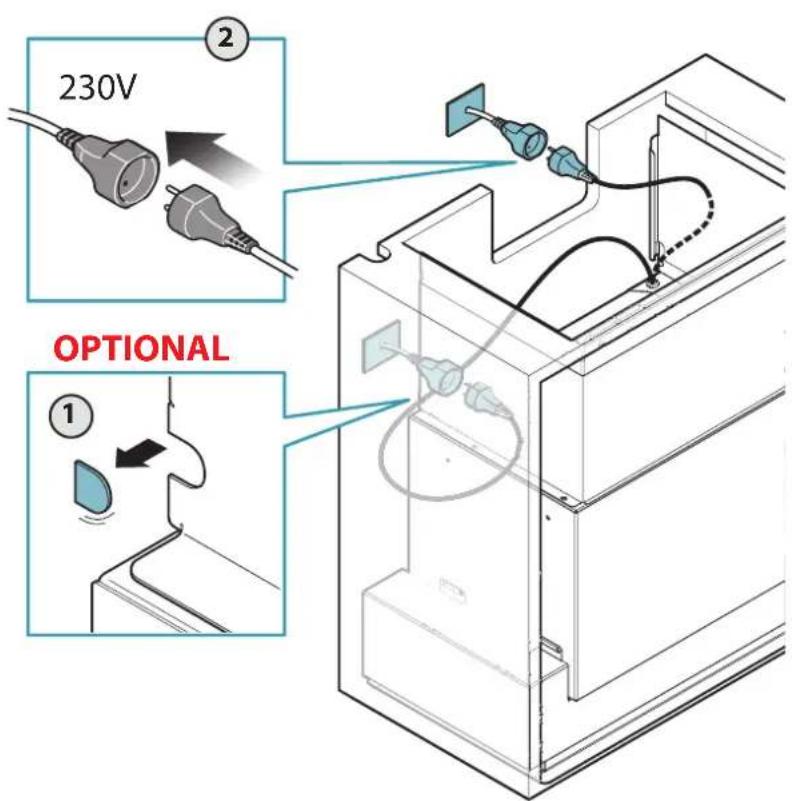
Technical diagram of a multi-level HVAC or cooling unit with numbered components and directional arrows indicating airflow or movement.EN - Replace the metal filter (18) and restore the electrical connection (19).
natural_image
Illustration of a computer monitor with an open rear panel and a blue keyboard partially inserted (no text or symbols visible)19
text_image
230V OPTIONAL20
UK - Ioniser removal for maintenance.
natural_image
Illustration of a hand holding a cylindrical container with a blue dome and upward arrow, no text or symbols present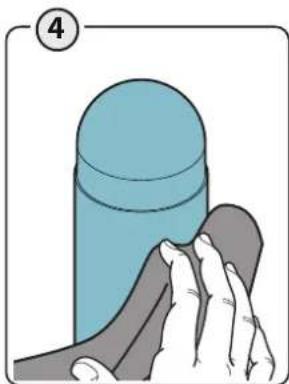
natural_image
Illustration of a hand cleaning a cylindrical object with a cloth (no text or symbols)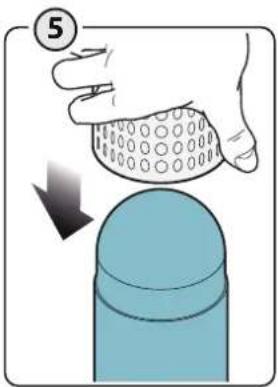
text_image
⑤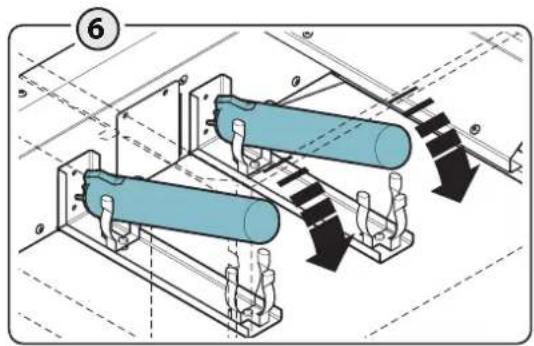
natural_image
Technical diagram of two cylindrical mechanical components mounted on a platform, with directional arrows indicating movement or force (no text or symbols present)21
UK - Ioniser removal for maintenance.
natural_image
Illustration of a hand holding a glass with a blue liquid, showing an upward arrow (no text or symbols)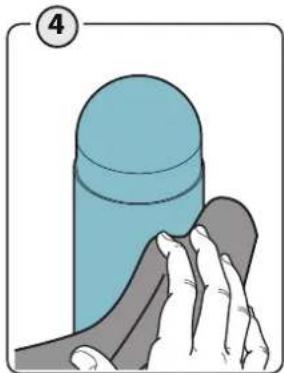
natural_image
Illustration of a hand cleaning a blue cylindrical object with a gray handle (no text or symbols)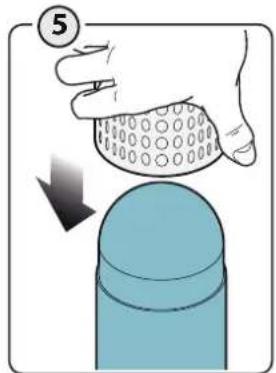
text_image
⑤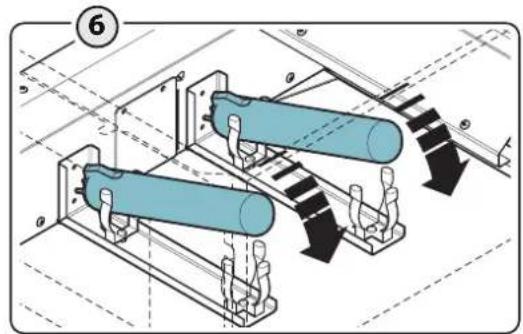
text_image
⑥text_image
Weather and weather icons including clock, moon, plus sign, leaf, and sunnatural_image
Illustration of a hand interacting with a small electronic device on a grid-patterned surface (no text or symbols)FILTRI AL CARBONE-ZEOLITE

text_image
Diagram showing two electrical setups with labeled components and a 12V power connectionSAFETY INSTRUCTIONS AND WARNINGS

Installation operations are to be carried out by skilled and qualified installers in accordance with the instructions in this booklet and in compliance with the regulations in force.
DO NOT use the hood if the power supply cable or other components are damaged: disconnect the hood from the electrical power supply and contact the Dealer or an authorised Servicing Dealer for repairs.
Do not modify the electrical, mechanical or functional structure of the equipment.
Do not personally try to carry out repairs or replacements. Interventions carried out by incompetent and unauthorised persons can cause serious damage to the unit or physical and personal harm, not covered by the Manufacturer's warranty.
WARNINGS FOR THE INSTALLER
TECHNICAL SAFETY

Before installing the hood, check the integrity and function of each part. Should anomalies be noted, do not proceed with ation and contact the Dealer.
Do NOT install the hood if an aesthetic (or cosmetic) defect has been detected. Put it back into its original package and contact the dealer.
No claim can be made for aesthetic (or cosmetic) defects once it has been installed.
During installation, always use personal protective equipment (e.g.: Safety shoes) and adopt prudent and proper conduct.
The installation kit (screws and plugs) supplied with the hood is only to be used on masonry walls: in case of installation on walls of a different material, assess other installation options keeping in mind the type of wall surface and the weight of the hood (indicated on page 2).
Keep in mind that installations with different types of fastening systems from those supplied, or which are not compliant, can cause electrical and mechanical seal danger.
Do not install the hood outdoors and do not expose it to atmospheric elements (rain, wind, etc.).
ELECTRICAL SAFETY

The electrical system to which the hood is to be connected must be in accordance with local standards and supplied with earthed connection in compliance with safety regulations in the country of use. It must also comply with European standards regarding radio antistatic properties.
Before installing the hood, check that the electrical mains power supply corresponds with what is reported on the identification plate located inside the hood.
The socket used to connect the installed equipment to the electrical power supply must be within reach: otherwise, install a mains switch to disconnect the hood when required.
Any changes to the electrical system must be carried out by a qualified electrician.
The maximum length of the flue fastening screws (supplied by the manufacturer) must be 13 mm. Use of non-compliant screws with these instructions can lead to danger of an electrical nature.
Do not try to solve the problem yourself in the event of equipment malfunction, but contact the Dealer or an authorised Servicing Department for repairs.

When installing the hood, disconnect the equipment by removing the plug or switch-f of the main switch.
FUMES DISCHARGE SAFETY

Do no connect the equipment to discharge pipes of fumes produced from combustion (for example boilers, fireplaces, etc.).
Before installing the hood, ensure that all standards in force regarding discharge of air out of the room have been complied with.
USER WARNINGS

These warnings have been drawn up for your personal safety and those of others.
You are therefore kindly asked to read the booklet carefully in its entirety before using the or cleaning the equipment.
The Manufacturer declines all responsibility for any damage caused directly, or indirectly, to persons, things and pets as a consequence of failing to comply with the safety warnings indicated in this booklet.
It is imperative that this instructions booklet is kept together with the equipment for any future consultation.
If the equipment is sold or transferred to another person, make sure that the booklet is also supplied so that the new user can be made aware of the hood's operation and relative warnings.
After the stainless steel hood has been installed, it will need to be cleaned to remove any residues remaining from the protection adhesive as well as any grease and oil stains which, if not removed, can cause irreversible damage to the hood surface. To properly clean the unit, the manufacturer recommends using the supplied moist wipes, which are also available sold separately.
Insist on original spare parts.
INTENDED USE
The equipment is solely intended to be used to extract fumes generated from cooking food in non-professional domestic kitchens: any other use is improper. Improper use can cause damage to persons, things, pets and exempts the Manufacturer from any liability.
The equipment can be used by children over the age of 8 and by persons with reduced physical, sensory and mental abilities, or with no experience or knowledge, as long as they do so under supervision or after having received relative instructions regarding safe use of the equipment and understanding of the dangers connected to it.
Children are not to play with the equipment. Cleaning and maintenance by the user must not be carried out by children without supervision.
USE AND CLEANING WARNINGS
Before cleaning or carrying out maintenance operations, disconnect the equipment by removing the plug or switching off the main switch.
Do not use the hood with wet hands or bare feet.
Always check that all electrical parts (lights, extractor fan) are off when the equipment is not being used.
The maximum overall weight of any objects placed or hung (if applicable) on the hood must not exceed 1.5 Kg.
Always supervise the cooking process during the use of deep-fryers: Overheated oil can catch fire.
Do not leave open, unattended flames under the hood.
Do not prepare food over an open flame under the hood.
Never use the hood without the metal anti-grease filters: in this case, grease and dirt will deposit in the equipment and compromise its operation.
Accessible parts of the hood can be hot when used at the same time as the cooking appliances.
Do not carry out any cleaning operations when parts of the hood are still hot. There can be a risk of fire if cleaning is not carried out according to the instructions and products indicated in this booklet.
Disconnect the main switch when the equipment is not used for long periods of time.
If other appliances that use gas or other fuels are being used at the same time (boiler, stove, fireplaces, etc.), make sure the room where the fumes are discharged is well-ventilated, in compliance with the local regulations.
INSTALLATION
only intended for qualified personnel

Before installing the hood, carefully read the chapter 'SAFETY INSTRUCTIONS AND WARNINGS'.
TECHNICAL FEATURES
The technical specifications are exhibited on the labels located inside the hood.
POSITIONING
The minimum distance between the highest part of the cooking equipment and the lowest part of the hood is indicated in the installation instructions.
Generally, when the hood is placed over gas cookers, the distance must be at least 65 cm (25.6"). However, according to of standard EN60335-2-31, the minimum distance between the cooker and lower part of the hood can be reduced to the quota reported in the installation instructions.
Should the instructions for the gas cooker specify a greater distance, this must be taken into consideration.
Do not install the hood outdoors and do not expose it to outdoor environment (rain, wind, etc.).
ELECTRICAL CONNECTION
(only intended for qualified personnel)

Disconnect the equipment from electrical mains power supply before carrying out any operations on the hood.
Ensure that the wires inside the hood are not disconnected or cut:
in the event of damage, contact your nearest Servicing Department. Refer to qualified personnel for electrical connections.
Connection must be carried out in compliance with the provisions of law in force.
Before connecting the hood to the electrical mains power supply, check that:
• voltage supply corresponds with what is reported on the data plate located inside the hood;
- the electrical system is compliant and can withstand the load (see the technical specifications located inside the hood);
- the power supply plug and cable do not come into contact with temperatures exceeding 70 °C;
- the power supply system is effectively and properly connected to earth in compliance with regulations in force;
• the socket used to connect the hood is within reach.
In case of:
- devices fitted with cables without a plug: the type of plug to use is a "standardised" one. The wires must be connected as follows: yellow-green for earthing, blue for neutral and brown for the phase. The plug must be connected to an adequate safety socket.
- fixed equipment not provided with a power supply cable and plug, or any other device that ensures disconnection from the electrical mains, with an opening gap of the contacts that enables total disconnection in overvoltage category ill conditions.
Said disconnection devices must be provided in the mains power supply in compliance with installation regulations.
The yellow/green earth cable must not be cut off by the switch.
The Manufacturer declines all responsibility for failure to comply with the safety regulations.
FUMES DISCHARGE
HOOD WITH INTERNAL RECIRCULATION (FILTERING)

In this version, air passes through zeolite-carbon filters and the EION Ionising system to be purified and recycled in the environment. Make sure the zeolite-carbon filters are installed in the hood, otherwise, apply them as indicated in the assembly instructions.
ASSEMBLY INSTRUCTIONS
only intended for personnel qualified

The hood can be installed in various configurations. The generic assembly steps apply to all installations; for each case, follow the specific steps provided for the required installation.
OPERATION
WHEN TO TURN ON THE HOOD?
Switch on the hood at least one minute before starting to cook to direct fumes and vapours towards the suction surface.
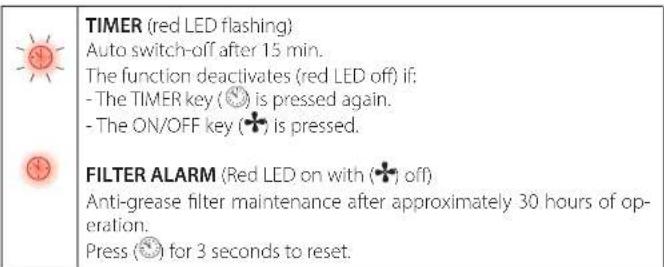
After cooking, leave the hood operating until complete extraction of all vapours and odours. By means of the Timer function, it is possible to set auto switch-off function which will allow the hood to turn off automatically after 15 minutes of operation.
AIR QUALITY

Air quality is displayed by the colour of the leaf. Green = excellent quality.
Yellow = pollutant agents found.
The higher the number of pollutant agents, the darker the yellow
colour.
WHICH SPEED IS TO BE SELECTED?
1st speed: maintains the circulation of clean air with low electricity consumption.
2nd speed: normal conditions of use.
3rd speed: presence of strong odours and vapours.
WHEN SHOULD THE FILTERS BE WASHED OR REPLACED?
The metal filters must be cleaned every 30 hours of operation.
The zeolite-carbon filters must be reactivated every 18 months and replaced every 3 years.
For further details see the "MAINTENANCE" chap.
text_image
Weather and energy icons including clock, minus sign, flower, plus sign, leaf with letter 'A', and sun icon| Motor ON/OFF | ||
| Increase speed from 1 to 3 | The speeds are indicated by the LEDs on the keys:Speed 1Speed 2Speed 3 | |
| Riduzione velocità da 3 a 1 | ||
| Automatic cycle: the hood only activates when pollutant agents are found.The function deactivates if:- no pollutant agents are found for 3 hours;- The TIMER key (is pressed again;- keys + and - are pressed | ||
| Light on/off | ||
text_image
TIMER (red LED flashing) Auto switch-off after 15 min. The function deactivates (red LED off) if: - The TIMER key (💡) is pressed again. - The ON/OFF key (♣) is pressed. FILTER ALARM (Red LED on with (♣) off) Anti-grease filter maintenance after approximately 30 hours of op- eration. Press (💡) for 3 seconds to reset.If the pushbutton panel is completely inactive, before contacting the Technical assistance service, disconnect power temporarily to the appliance (about 5"), possibly by acting on the main switch, to restore normal operation. If this measure has no effect, contact the Technical assistance service.
MAINTENANCE
Before cleaning or carrying out maintenance operations, disconnect the equipment by removing the plug or switching off the main switch.
Do not use detergents containing abrasive, acidic or corrosive substances or abrasive cloths.
Regular maintenance guarantees proper operation and performance over time. Special attention is to be paid to the metal anti-grease filters: frequent cleaning of the filters and their supports ensures that no flammable grease is accumulated.
CLEANING OF EXTERNAL SURFACES
You are advised to clean the external surfaces of the hood at least once every 15 days to prevent oily substances and grease from sticking to them.
Alternatively and for all the other types of surfaces, it can be cleaned using a damp cloth, slightly moistened with mild, liquid detergent or denatured alcohol. Finish off cleaning by rinsing well and drying with soft cloths.
Do not use too much water next to the push button control panel and lighting devices in order to prevent humidity from reaching electronic parts.
The glass panels can only be cleaned with specific, non-corrosive or non-abrasive detergents using a soft cloth.
The Manufacturer declines all responsibility for failure to comply with these instructions.
CLEANING OF INTERNAL SURFACES
It is forbidden to clean electrical parts, or parts related to the motor inside the hood, with liquids or solvents. For the internal metal parts, see the previous paragraph.
METAL ANTI-GREASE FILTERS
It is advised to frequently wash the metal filters (at least once a month) leaving them to soak in boiling water and washing up liquid for 1 hour, taking care not to bend them.
Do not use corrosive, acid or alkaline detergents.
Rinse them well and wait for them to be completely dry before reassembling them.
They are dishwasher safe.
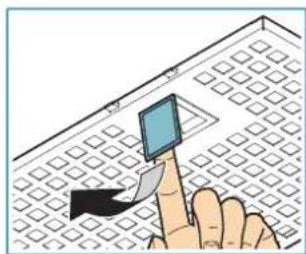
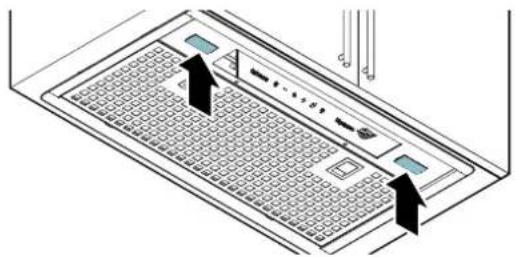
To extract and insert the metal anti-grease filters see the picture.
natural_image
Illustration of a hand holding a small electronic device with a blue screen, placed on a grid-patterned surface (no text or symbols)ZEOLITE-CARBON FILTERS

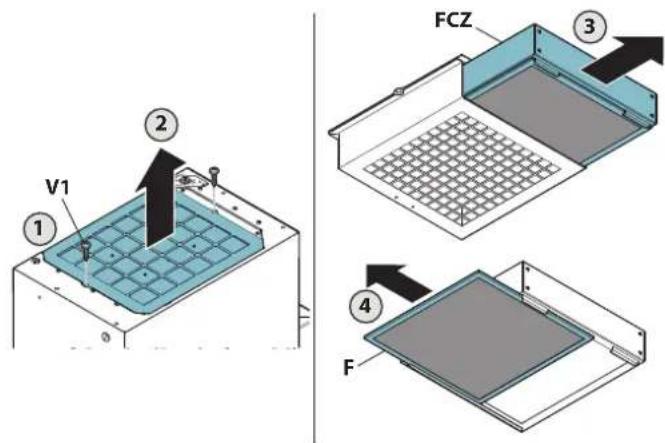
Before performing maintenance on zeolite-carbon filters (FCZ), remove the lower dust filter (F) and vacuum any deposited dust with a vacuum cleaner.
In normal use conditions, we recommend regenerating the zeolite-carbon filter every 18 months and replacing it after 3 years. Simply place it in a domestic oven at a temperature of 200^ C for approximately 2 hours to regenerate it. Wait until the filter cools before reassembling it.
text_image
V1 ① ② FCZ ③ ④ F
The zeolite-carbon filter and lower dust filter cannot be washed.
IONISING TUBES (qualified personnel only)

Cut-off electricity before cleaning.
In normal use conditions, we recommend cleaning every 18 months and their replacement after 5 years.
Remove the tubes from their housing and separate the metallic lining, as described in the instructions.
Gently clean the tube with a cloth using ethyl alcohol. Clean the metallic lining with soap and water and thoroughly rinse it.
Make sure it is WELL DRIED (placing in a 50°C oven for 10 minutes is recommended) before put it back on the tube.
LIGHTING
The range hood is equipped with high efficiency, low consumption LED with extremely long duration under normal use conditions.
Should replacement be required, contact a service centre.
natural_image
Diagram of a server rack with two arrows pointing to ports and indicators (no text or symbols present)DISPOSAL AFTER END OF USEFUL LIFE

The crossed-out wheeled bin symbol on the appliance means that the product is WEEE, i.e. "Waste electrical and electronic equipment", accordingly it must not be disposed of with unsorted waste (i.e. with "mixed household waste"), but it must be disposed of separately so that it can undergo specific operations for its re-use, or a specific treat-
ment, to remove and safely dispose of any substances that may be harmful to the environment and remove the raw materials that can be recycled. Proper disposal of these products contributes to saving valuable resources and avoid potential negative effects on personal health and the environment, which may be caused by inappropriate disposal of waste.
You are kindly asked to contact your local authorities for further information regarding the designated waste collection points nearest to you. Penalties for improper disposal of such waste can be applied in compliance with national regulations.
INFORMATION ON DISPOSAL IN EUROPEAN UNION COUNTRIES
The EU WEEE Directive was implemented differently in each country, accordingly, if you wish to dispose of this appliance we suggest contacting your local authorities or dealer to find out what the correct method of disposal is.
INFORMATION ON DISPOSAL IN NON-EUROPEAN UNION COUNTRIES
The crossed-out wheeled bin symbol is only valid in the European Union: if you wish to dispose of this appliance in other countries, we suggest contacting your local authorities or dealer to find out what the correct method of disposal is.

WARNING!
The Manufacturer reserves the right to make changes to the equipment at any time and without prior notice. Printing, translation and reproduction, even partial, of this manual are bound by the Manufacturer's authorisation.
Technical information, graphic representations and specifications in this manual are for information purposes and cannot be divulged.
This manual is written in Italian. The Manufacturer is not responsible for any transcription or translation errors.
natural_image
Illustration of a hand interacting with a smartphone on a keyboard (no text or symbols visible)KOHLE-ZEOLIT-FILTER

natural_image
Diagram of a computer monitor with two arrows pointing to the screen area (no text or symbols present)natural_image
Illustration of a hand pointing at a small electronic device on a grid-patterned surface (no text or symbols)FILTRES COMBINÉS CHARBON-ZÉOLITE

natural_image
Diagram of a computer monitor with labeled ports and arrows indicating navigation or assembly (no text or symbols present)ÉLIMINATION EN FIN DE VIE

natural_image
Illustration of a hand pointing at a small electronic device on a grid-patterned surface (no text or symbols)natural_image
Diagram of a computer monitor with two arrows pointing to the screen area (no text or symbols present)text_image
Weather and weather icons including clock, minus sign, flower, plus sign, leaf symbol, and sun iconnatural_image
Illustration of a hand holding a small electronic device on a grid-patterned surface (no text or symbols)natural_image
Diagram of a computer monitor with two arrows pointing to the screen area (no text or symbols present)natural_image
Illustration of a hand interacting with a small electronic device on a grid-patterned surface (no text or symbols)FILTRY WĘGLOWO-ZEOLITOWE

natural_image
Diagram of a computer monitor with labeled ports and navigation arrows (no text or symbols)UTYLIZACJA PO ZAKOŃCZENIU OKRESU EKSPLOATACJI

VEILIGHEIDSINSTRUCTIES EN WAARSCHUWINGEN

natural_image
Illustration of a hand interacting with a small electronic device on a grid-patterned surface (no text or symbols)ZEOLIET-KOOLSTOFFILTERS

natural_image
Diagram of a computer monitor with two arrows pointing to the screen area (no text or symbols present)no interior do exaustor:
natural_image
Illustration of a hand holding a small electronic device on a tiled floor (no text or symbols visible)FILTROS DE CARVÃO-ZEÓLITO

text_image
Diagram of a computer keyboard with labeled buttons and status indicatorsHVILKEN HASTIGHED SKAL MAN VÄLGE?
natural_image
Illustration of a hand pointing at a small electronic device on a grid-patterned surface (no text or symbols)ZEOLIT-KULFILTRE

natural_image
Diagram of a computer monitor with two arrows pointing to the screen area (no text or symbols present)BORTSKAFFELSE VED ENDT LEVETID

natural_image
Illustration of a hand pressing a small blue object on a grid-patterned surface (no text or symbols)FILTER I KOL/ZEOLIT

natural_image
Diagram of a computer keyboard with two arrows pointing to the keys (no text or symbols present)KASSERING I SLUTET AV LIVSLÄNGDEN

natural_image
Illustration of a hand pointing at a small electronic device on a grid-patterned surface (no text or symbols)HIILI-ZEOLITISTÄ VALMISTETUT SUODATTIMET

natural_image
Diagram of a laptop keyboard with two buttons and a grid layout, no text or symbols presentHÄVITTÄMINEN KÄYTÖN LOPUTTUA

natural_image
Illustration of a hand interacting with a small electronic device on a grid-patterned surface (no text or symbols)KARBON/ZEOLITT-FILTRE

natural_image
Diagram of a computer keyboard with two arrows pointing to the screen (no text or symbols present)KASSERING VED ENDT LEVETID