PW 300 - Wireless Speaker Paradigm - Free user manual and instructions
Find the device manual for free PW 300 Paradigm in PDF.


User questions about PW 300 Paradigm
0 question about this device. Answer the ones you know or ask your own.
Ask a new question about this device
Download the instructions for your Wireless Speaker in PDF format for free! Find your manual PW 300 - Paradigm and take your electronic device back in hand. On this page are published all the documents necessary for the use of your device. PW 300 by Paradigm.
USER MANUAL PW 300 Paradigm
PREMIUM WIRELESS series
PW 300
OWNER'S MANUAL




natural_image
Line drawing of a rectangular electronic device with ports and power indicators (no text or symbols)
RECYCLING AND REUSE GUIDELINES FOR EUROPE
In accordance with the European Union WEEE (Waste Electrical and Electronic Equipment) directive effective August 13, 2005, we would like to notify you that this product may contain regulated
materials which, upon disposal, according to the WEEE directive, require special reuse and recycling processing. For this reason Paradigm Electronics Inc. I manufacturers of Paradigm speakers and Anthem Electronics has arranged with our distributors in European Union member nations to collect and recycle this product at no cost to you. To find your local distributor please contact the dealer from whom you purchased this product or go to our website at paradigm.com. Please note that the product only falls under the WEEE directive. When disposing of packing and other shipping material we encourage you to recycle through the normal channels.

FCC ID: 2AJAAPW 300ST and IC ID: 21761PW 300BT This device complies with Part 15 of the FCC Rules. Operation is subject to the following two conditions:
(1) This device may not cause harmful interference, and (2) This device must accept any interference received, including information that may cause undesired operation. Changes or modifications not expressly approved by the party responsible for compliance could void the user's authority to operate the equipment.
This product has been tested and found to comply with the limits for a Class B digital device, pursuant to Part 15 of the FCC Rules. These limits are designed to provide reasonable protection against harmful interference in a residential installation. This product generates, uses, and can radiate radio frequency energy and, if not installed and used in accordance with the instructions, may cause harmful interference to radio communications. However, there is no guarantee that interference will not occur in a particular installation. If this product does cause harmful interference to radio or television reception, which can be determined by turning the equipment off and on, the user is encouraged to try to correct the interference by one or more of the following measures:
- Reorient or relocate the receiving antenna.
-
Increase the separation between the equipment and receiver.
-
Connect the equipment into an outlet on a circuit different from that to which the receiver is connected.
- Consult the dealer or an experienced radio/TV technician for help.
This device complies with Industry Canada licence-exempt RSS standard(s). Operation is subject to the following two conditions:
(1) this device may not cause interference, and
(2) this device must accept any interference, including interference that may cause undesired operation of the device.
WIRELESS TRANSMITTER COMPLIANCE INFORMATION
The term "IC" before the radio certification number only signifies that Industry Canada technical specifications were met. This equipment complies with FCC and IC radiation exposure limits set forth for an uncontrolled environment. This equipment should be installed and operated with minimum distance 20 cm between the radiator and your body. This transmitter must not be co-located or operating in conjunction with any other antenna or transmitter. To reduce potential radio interference to other users, the antenna type and its gain should be so chosen that the equivalent isotropically radiated power (e.i.r.p.) is not more than that permitted for successful communication.
PARADIGM ELECTRONICS RESERVES THE RIGHT TO CHANGE SPECIFICATIONS AND/OR FEATURES WITHOUT NOTICE AS DESIGN IMPROVEMENTS ARE INCORPORATED.
PARADIGM and ANTHEM are registered trademarks of Paradigm Electronics Inc. PW 300, PW Soundbar, and ARC are trademarks of Paradigm Electronics Inc. Copyright © Paradigm Electronics Inc. All rights reserved. All other products and services mentioned may be trademarks or service marks of their respective owner(s).
Apple and the Apple logo are trademarks of Apple Inc., registered in the U.S. and other countries. App Store is a service mark of Apple Inc.
Windows ^® is a registered trademark of Microsoft Corporation in the United States and other countries.
Amazon, Kindle, Fire, and all related logos are trademarks of Amazon.com, Inc. or its affiliates.
Android is a trademark of Google Inc.
Google Play is a trademark of Google Inc.
The Spotify software is subject to third party licenses found here: www.spotify.com/connect/third-party-licenses.
For DTS patents, see http://patents.dts.com. Manufactured under license from DTS Licensing Limited. DTS, Play-Fi, the Symbol, and Play-Fi together in combination with the Symbol are trademarks of DTS, Inc. DTS and Play-Fi are registered here: www.spotify.com/connect/third-party-licenses.
The Bluetooth ^® word mark and logos are registered trademarks owned by the Bluetooth SIG, Inc. and any use of such marks by Paradigm Electronics Inc. is under license. Other trademarks and trade names are those of their respective owners.
For more information visit paradigm.com

07.18.17
TABLE OF CONTENTS
Congratulations! 1 Play Music & Connect Multiple PW Series Products 9
Important Safety Instructions....2 Anthem Room Correction (ARC™)....9
Important Safety Information .... 3 Wireless Surround Sound Setup .... 10
What's In The Box 4 Updates 12
Network Requirements....5 Updates Via USB....12
System Requirements .... 5 Device Usage Guide.... 12
Features & Functions ....6 Basic Troubleshooting ....13
Controls & Connections....7 Technical Specifications....18
Bluetooth (Pairing & Operation)....8 Limited Warranty....19
CONGRATULATIONS!
Thank you for purchasing this Paradigm® Premium Wireless Series product.
Paradigm® and its sister company, Anthem® have leveraged over 30 years in groundbreaking loudspeaker and amplifier design to create the Paradigm® Premium Wireless Series of wireless speakers and powerful amplifier.
The inclusion of DTS Play-Fi® technology to Paradigm's technology platforms means you can enjoy high fidelity, lossless music streamed from your Android® device, iOS device, tablet or PC — to a premium sounding Paradigm speaker, or amplifier. Using your home Wi-Fi network, you can stream music to individual speakers, or play the same music to all Paradigm® Premium Wireless Series devices you have installed — all with crystal clear clarity.
IMPORTANT SAFETY INSTRUCTIONS
- Read these instructions.
- Keep these instructions.
- Heed all warnings.
- Follow all instructions.
- Do not use this apparatus near water.
- Clean only with dry cloth.
- Do not block any ventilation openings. Install in accordance with the manufacturer's instructions.
- Do not install near any heat sources such as radiators, heat registers, stoves, or other apparatus (including amplifiers) that produce heat.
- Do not defeat the safety purpose of the polarized or grounding-type plug. A polarized plug has two blades with one wider than the other. A grounding type plug has two blades and a third grounding prong. The wide blade or the third prong are provided for your safety. If the provided plug does not fit into your outlet, consult an electrician for replacement of the obsolete outlet.
- Protect the power cord from being walked on or pinched particularly at plugs, convenience receptacles, and the point where they exit from the apparatus.
-
Only use attachments/accessories specified by the manufacturer.
-
Usually with the cart, stand, tripod, bracket, or table specified by the manufacturer, or sold with the apparatus. When a cart is used, use caution when moving the cart/apparatus combination to avoid injury from tip-over.
-
Unplug this apparatus during lightning storms or when unused for long periods of time.
-
Refer all servicing to qualified service personnel. Servicing is required when the apparatus has been damaged in any way, such as power-supply cord or plug is damaged, liquid has been spilled or objects have fallen into the apparatus, the apparatus has been exposed to rain or moisture, does not operate normally, or has been dropped.
-
The apparatus shall not be exposed to dripping or splashing and that objects filled with liquids, such as vases, shall not be placed on apparatus.
-
Maintain a minimum of 20-30cm distance around the apparatus for sufficient ventilation.
-
The ventilation should not be impeded by covering the ventilation openings with items such as newspapers, table-cloths, curtains, etc.
-
No naked flame sources such as lighted candles, should be placed on the apparatus.
-
Apparatus may be used in tropical climates.
-
This equipment is a Class II or double insulated electrical appliance.
IMPORTANT SAFETY INFORMATION

The lightning bolt flash with arrowhead symbol, within an equilateral triangle, is intended to alert the user to the presence of uninsulated “dangerous voltage” within the product’s enclosure that may be of sufficient magnitude to constitute a risk of electric shock.

The exclamation point within an equilateral triangle is intended to alert the user to the presence of important operating and maintenance (servicing) instructions in the literature accompanying the appliance.

WARNING! Do not use your Paradigm product(s) outside of the country of original sale — voltage requirements vary by country. Improper voltage can cause damage that will be potentially expensive to repair. Paradigm products are shipped to authorized Paradigm distributors with the correct power supply for use in the country of intended sale. A list of authorized distributors can be accessed at www.paradigm.com or by emailing info@paradigm.com.

WARNING!
RISK OF ELECTRIC SHOCK DO NOT OPEN


WARNING: TO REDUCE THE RISK OF FIRE OR ELECTRIC SHOCK, DO NOT EXPOSE THIS APPARATUS TO RAIN OR MOISTURE AND OBJECTS FILLED WITH LIQUIDS, SUCH AS VASES, SHOULD NOT BE PLACED ON THIS APPARATUS.
• TO COMPLETELY DISCONNECT THIS APPARATUS FROM THE AC MAINS, DISCONNECT THE POWER SUPPLY CORD PLUG FROM THE AC RECEPTACLE.
- THE MAINS PLUG OF THE POWER SUPPLY CORD SHALL REMAIN READILY ACCESSIBLE.
WHAT'S IN THE BOX ...
- Paradigm PW 300 Speaker
- 6' (1.8 m) Power Cable
- Owner's Manual and Setup Guides
- Rubber Feet (x4)
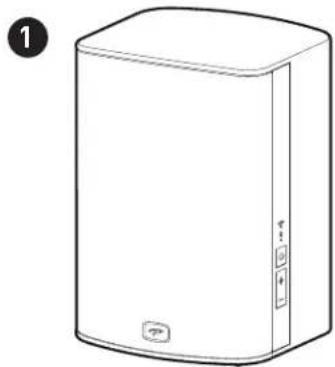
natural_image
Line drawing of a rectangular electronic device with a lid and buttons, labeled with number 1 (no text or symbols on the device itself)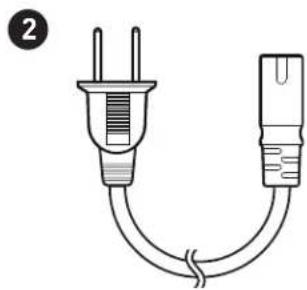
natural_image
Simple line drawing of a two-pin electrical plug with a coiled cable (no text or symbols)
text_image
P Preadigm | PREMIUM® WIRELESS® PW300 OWNER'S MANUAL Play-Fi Bluetooth
text_image
4NETWORK REQUIREMENTS
You must have the following to connect your Paradigm product to your network:
- A high-speed DSL/Cable modem or a fiber-to-the-home broadband connection for reliable playback of music services based on the internet. Note: Satellite internet services are prone to playback issues due to fluctuating download rates.
- If your modem is not a modem/router combination you must purchase and install a router into your home network before proceeding.
- If you plan to use the DTS Play-Fi App on an Android or iOS device or you are setting up a Paradigm product for Wi-Fi streaming, you will need a wireless router.
- Have your network password ready before connecting the Paradigm product to your network.
NOTE: To make the quickest connection, use a dual-band router and connect your Paradigm Product to the 5 GHz network instead of the 2.4 GHz Network.
NOTE: If your wireless connectivity is weak or not available, connect your Paradigm product to your router with an ethernet cable (not included).
TIP! Paradigm Premium Wireless Series products communicate with wireless networks that support 802.11 g/n wireless technology. For the fastest streaming performance, a network that supports 802.11 n wireless technology is recommended. A network supporting 802.11 b may be used, but it will effectively stream to only one device equipped with DTS Play-Fi.
TIP! For superior performance connect your PC or NAS (Network-Attached Storage) drive that holds your personal music library to your network router using the provided Ethernet cable.
SYSTEM REQUIREMENTS
- An Android device running Android 4.0 or later.
- An iOS device running iOS 8.0 or later.
• Devices running Bluetooth v2.1 or later.
- A Windows® PC running Windows® 7, 8, 8.1, and 10.
FEATURES & FUNCTIONS
Power Button (☐):
- Press ⏻ to power on/off.
- If no signal is received for 20 minutes, unit will enter into standby.
- Power & Bluetooth LED will turn off; Wi-Fi indicator will remain illuminated (unless connected via Ethernet).
Power Button (Reboot & Reset):
Reboot:
- Press & hold for 3 sec to clear currently connected Bluetooth Devices.
- Power button LED will blink once indicating pairing has been broken.
- Tone will verify a cleared unit.
- Bluetooth indicator will return to discovery mode.
Reset:
- Press & hold for 10 sec to reset your PW 300 to factory settings (Reset).
-
Note this will clear all current networks and Bluetooth devices.
-
Power button will begin to blink after 10 sec, followed by the Bluetooth and Wi-Fi Indicator.
- Tone will verify reset is complete.
Volume Up/Down Buttons (+ / +:
- Press + to increase the volume level.
- Press — to decrease the volume level.
- Press and hold either +/− to ramp the volume level up or down.
Wi-Fi Indicator ( 📋 ):
The Wi-Fi Indicator ( 🔵 tells you what your PW 300 is doing:
- Fast Blinking — Your PW 300 is booting up.
- Blinking — Your PW 300 is attempting to connect to a wireless router.
- Slow Pulse — Setup Mode.
- Two Blinks > Pause — WPS Mode.
• Solid White — Connected to router.
- Off — Connected to a router using a wired connection.
Bluetooth Indicator ( \* ):
The Bluetooth Indicator ( ✗ tells you what your Paradigm product is doing:
- Blinking — Discovery Mode.
- Solid Blue — Connected to Bluetooth Device.
- Solid Green — Connected to Play-Fi Device (Play-Fi In Use).
- Off — Unit In Standby Mode.
Wi-Fi Setup Button:
Initiates Wi-Fi setup for both Wi-Fi Protected Setup (WPS) and Standard Wi-Fi Setup.
- Push & hold for 4 seconds to enter WPS setup mode.
- Push & hold for 8 seconds to reset all wireless settings.
- Places your PW 300 into setup mode (Slow Pulse Wi-Fi Indicator).
CONTROLS & CONNECTIONS

text_image
Wi-Fi Indicator Bluetooth Indicator Power Volume Up Volume Down AC Power (Mains) Input Ethernet Input Paradigm PW300 Wi-Fi Setup LAN USB Wi-Fi Setup Button USB (factory use only) Note for watt mounting. The mounting bracket you choose must support the weight of the speaker.BLUETOOTH (PAIRING & OPERATION)
Bluetooth Pairing:
- Make sure your PW 300 is plugged in and powered on.
- The Bluetooth LED should be blinking indicating that the device is in discovery mode.
- Open Bluetooth settings on the desired device.
• From the list provided select PW 300. - Once paired the PW 300 will emit a tone verifying that it has been paired and is ready to be used.
- The LED will cease blinking and will now remain solid blue.
Pairing an additional Bluetooth Device:
If the two devices are in the same home/room the original device must be disconnected or Bluetooth must be disabled.
- Disable Bluetooth on the originally paired device (or simply disconnect from the PW 300 from the Bluetooth settings on the original device).
- The Bluetooth LED will return to its blinking state indicating that the device is in discovery mode.
- Open Bluetooth settings on the desired device.
• From the list provided select PW 300. - Once paired the PW 300 will emit a tone verifying that it has been paired and is ready to be used.
- The LED will cease blinking and will now remain solid blue.
Breaking a Bluetooth Pairing:
- Open Bluetooth settings on the desired device.
• From the list provided select PW 300. - From the device options select Forget this Device — PW 300.
- The LED will now return to its blinking state indicating that the device is in discovery mode.
Bluetooth Operation:
- Bluetooth LED should be Solid Blue.
- If LED is Solid Green — PW 300 is connected to a Play-Fi device, disconnect from Play-Fi device prior to using Bluetooth.
- On the desired device open media to be played.
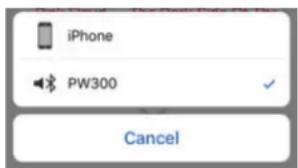
- Select PW 300 from device list (see image below).
- If unit is not on the list — PW 300 is connected to a different device.
- Start music playback.
• Volume adjustments made on device, should be reflected on PW 300.
• Volume adjustments made on PW 300, should be reflected on device.
text_image
iPhone PW300 CancelPLAY MUSIC & CONNECT MULTIPLE PW SERIES PRODUCTS
Once your PW 300 is connected to your home network, you can start playing music anytime.
- Activate the DTS Play-Fi App on your mobile device or PC. If you have setup more than one Paradigm product, select which one you want to stream music to.
- Select your music source — personal music library or any subscription-based music service contained on your mobile device or PC, Internet Radio, or from select online music services such as Deezer, Songza, etc. (visit our website at paradigm.com to view a full list of available music services).
How to Connect Multiple Paradigm Premium Wireless Series products:
- To connect additional Paradigm Premium Wireless Series products to your network, open the DTS Play-Fi App and select "Setting".
- Select, "Add Play-Fi Device"
- Follow the instructions to add each Paradigm Premium Wireless Series product.
Primary/Secondary Zones:
When using the DTS Play-Fi App on your device, you will notice when streaming music to your Paradigm Premium Wireless Series product that there are two groups: Primary and secondary zones. The DTS Play-Fi module within your Paradigm Premium Wireless Series product requires that a primary speaker be selected to create a new listening session or zone. The purpose of this is to eliminate any echo, found on other ecosystems, and to maximize synchronization down to 1 millisecond.
We suggest that you select the Paradigm Premium Wireless Series product with the strongest signal strength as your primary device. It should be noted that secondary speakers are connected to your primary speaker, so if you disable your primary speaker for any reason, your secondary speaker will be temporarily unavailable until a primary speaker is selected again.
ANTHEM ROOM CORRECTION (ARC™)
If you wish to use Anthem Room Correction on the PW 300, it must be connected to a Paradigm PW Soundbar in a wireless theater application. The PW Soundbar is the main source for
audio streaming when paired with the PW 300. The PW 300 will act strictly as a surround speaker and cannot be used as a single source for music playback for both DTS Play-Fi & Bluetooth.
NOTE: A Paradigm PW Soundbar and a device with the DTS Play-Fi app is required in order to complete this setup.
Once the PW Soundbar has been connected to your network, proceed with the Surround Sound setup in your DTS Play-Fi app.
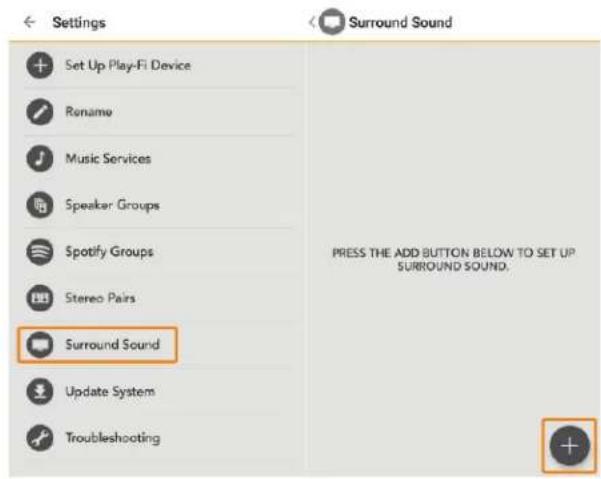
Start by simply tapping on the Settings icon on the main page of the DTS Play-Fi app, then navigate to the Surround Sound option. This will open the Settings page for Surround Sound, and since you haven't set up DTS Play-Fi Surround Sound yet, it will prompt you to do so by tapping on the + button down in the lower right.
text_image
Set Up Play-Fi Device Rename Music Services Speaker Groups Spotify Groups Stereo Pairs Surround Sound Update System Troubleshooting Surround Sound PRESS THE ADD BUTTON BELOW TO SET UP SURROUND SOUND.Surround Set-Up will begin and the app will preface with some information and instructions. Once you proceed, the app will detect if there are products available on the network that can support DTS Play-Fi Surround Sound, or if there are products that need an update from the manufacturer to enable support.
The guided setup will walk you through selecting a speaker to set the correct placement and distance (this and other settings can be adjusted later after setup is complete). This process is the same for all three speaker placements, but the PW Soundbar (Front position speaker) must be designated as a DTS Play-Fi Surround Sound Master.
NOTE: The PW 300 must be connected to the wireless network for the Wireless Surround Setup procedure. If your
PW 300 is wired to your network, disconnect the Ethernet cable and connect it wirelessly to your wireless network.

text_image
Surround Set-Up Select a speaker position below to set-up each speaker. Front Speaker Select the front speaker from the list below. Front Speaker Set the distance between the listener and the front speaker. Sound bar Distance: 10 FT (3.1M) Set Front... Set Surround Left... Set Surround Right... NextAfter you've setup every speaker(s) position and distance, the app will automatically configure your system as needed. Once the setup is complete after 60 seconds or so, a confirmation message will appear.

text_image
Surround Set-Up Select a speaker position below to set-up each speaker. Setting Up... Please wait while we set up your surround sound. Set-Up Complete You can now listen to your surround speakers (you may need to switch the input source). Front: Sound bar Distance: 10 FT (3.1M) Left: S Left Distance: 6 FT (1.9M) Right: S Right Distance: 6 FT (1.9M) Done DoneUPDATES UPDATES VIA USB
DTS Play-Fi App Update:
If the DTS Play-Fi app on your device requires an update, the app will notify you that an update is available and guide you through the update process.
Paradigm Firmware Update:
At Paradigm we constantly strive to improve the performance and functionality of your system, as a result from time to time your Paradigm Premium Wireless Series product will require firmware updates. Please regularly check our website at www.paradigm.com for the latest firmware updates.
- Get the software file from www.paradigm.com/software and place on your desktop.
- Unzip the file and copy firmware "PW 300.hex" into root directory of USB device.
- Ensure the PW 300 is disconnected from the wall outlet.
- Plug the USB device into the rear of the PW 300 where indicated.
- Press and hold the power button on the PW 300.
- While holding the power button down, plug the PW 300 into the electrical outlet. Continue to hold the power button for 2 or 3 seconds more.
- The power LED will rapidly blink.
- The update will be complete when the power LED stops blinking.
DEVICE USAGE GUIDE
| Device | App | Bluetooth [Single PW 300] | Content | Multi-Room (Play-Fi) |
| Apple iOS | Play-Fi | • | Select music servicesiTunes — music stored on device | Up to eightMultiple simultaneous usersSpeakers can be zoned |
| Mac OS | - | • | All audio content | - |
| Android | Play-Fi | • | Up to eightMultiple simultaneous usersSpeakers can be zoned | Select music servicesMusic stored on device |
| Windows PC | Play-Fi | • | All audio content | Up to eightMultiple simultaneous usersSpeakers can be zoned |
BASIC TROUBLESHOOTING

CAUTION: Warning: Do not open your PW 300. Under no circumstances should your PW 300 be repaired by anyone other than an authorized Paradigm Dealer, as this will invalidate the warranty. Please contact Paradigm Customer Support for more information.
If a problem occurs, you can try the troubleshooting suggestions listed below. If one of these doesn't remedy the problem, or you are not sure how to proceed, please contact the Paradigm Customer Support team at support@paradigm.com. Alternatively, visit our website at paradigm.com/support for detailed troubleshooting solutions.
Problem Possible Solutions
I am unable to connect my PW 300 to my Wi-Fi network.
- Verify that your Wi-Fi network is functioning.
- Your router's Wi-Fi signal may be weak or your PW 300 may be out of range of your router's Wi-Fi network. Move the PW 300 closer to the router.
- Before connecting to your network, verify that your PW 300's Discovery Mode Wi-Fi Indicator ( ) is pulsing slowly. This indicates the wireless network is ready to pair. A Solid White Wi-Fi Indicator ( ) indicates the PW 300 is paired to a wireless network. If the Bluetooth indicator ( ) is illuminated BLUE, this indicates the PW 300 is paired to a Bluetooth device; Try disconnect from the Bluetooth device.
- Reboot your PW 300 (see page 6).
- Reset your PW 300 to factory settings (see page 6).
BASIC TROUBLESHOOTING (cont'd ...)
| Problem Possible Solutions | |
| The DTS Play-Fi App cannot find my PW 300. | Verify that the following are true:1. The PW 300 is fully powered on and in Discovery Mode Wi-Fi Indicator (💡) is pulsing slowly).2. You are within the recommended range of your router.3. Your device has its Wi-Fi enabled.4. There are no other apps on your device that are currently running that are impeding wireless connectivity to your network.Restart your phone, tablet or PC (refer to the Owner’s Manual for further details).If you still can’t find the PW 300 on your network, and are in an office environment, verify with your network administrator that no special permissions are enabled that would prevent external wireless devices from broadcasting within the network.If the PW 300 remains unfound, perform a Reboot (Power Cycle) (see page 6) on the offending unit and redownload the DTS Play-Fi App.If the PW 300 remains unfound, perform a Factory Reset (see page 6) on the offending unit and redownload the DTS Play-Fi App. |
Problem Possible Solutions
The DTS Play-Fi App says "Play-Fi Devices Lost."
If you see this message, it could mean one or more things:
- The connection to your network is very weak.
• There is heavy network traffic. - You have moved out of your personal network's coverage range.
- You have lost your network connection.
- You have connected to a network other than the one your PW 300 is on.
- Your device's wireless streaming has been taken over by another app.
- Your device lost power in the middle of communication.
Make sure the following are true:
- Verify that your network setting and that your devices are connected to the same network.
- Ensure that your device has not left the range of your router.
- Verify that your device is on the same network as your PW 300.
Finally, exit and then restart the DTS Play-Fi App. It should now find your PW 300.
If you are still unable to find the Paradigm PW 300, perform a Reset (see page 6) on the offending unit and re-download the DTS Play-Fi App.
BASIC TROUBLESHOOTING (cont'd ...)
| Problem Possible Solutions | |
| I am unable to pair my PW 300 to my Bluetooth device | Verify that your PW 300 is powered on — power button should be illuminated, Bluetooth LED should be blinking (discovery mode).Verify that your PW 300 is within range — for pairing purposes unit should be no more than 5' away.Verify that your PW 300 is not connected to another Bluetooth device — bluetooth indicator should be blinking, Solid LED indicates pairing to another device.If the PW 300 remains unfound, Reboot your PW 300 (see page 6).If the PW 300 remains unfound, Reset your PW 300 (see page 6). |
| My Bluetooth device cannot find the PW 300 | Verify that your PW 300 is powered on — power button should be illuminated, Bluetooth LED should be solid blue (Paired).Verify that your PW 300 is within range — maximum range for Bluetooth devices is approx. 30' (line of sight).Verify that your PW 300 is not connected to another Bluetooth device.Restart your phone, tablet or PC (refer to the Owner's Manual for further details).If the PW 300 remains unfound, Reboot your PW 300 (see page 6).If the PW 300 remains unfound, Reset your PW 300 (see page 6). |
Problem Possible Solutions
My Bluetooth device has lost connection to the PW 300
- Verify that your PW 300 is powered on — power button should be illuminated, Bluetooth LED should be illuminated solid blue (Paired).
- Verify that your PW 300 is within range — maximum range for Bluetooth devices is approx. 30' (line of sight).
- Verify that your PW 300 is not connected to another device or that Play-Fi has not been opened on another device — green Bluetooth LED indicates Play-Fi Connection.
- Restart your device.
- If the PW 300 remains unfound, Reboot your PW 300 (see page 6).
- If the PW 300 remains unfound, Reset your PW 300 (see page 6).
TECHNICAL SPECIFICATIONS
| PW 300 Premium Wireless Speaker | |
| Design | 2-Driver, 2 way bookshelf |
| High Frequency Driver | 3/4" (19 mm) polymer dome |
| Bass/Midrange Driver | 4" (102 mm) polypropylene cone |
| Low Frequency Extension | 48 Hz |
| Frequency Response (On Axis) | 67 Hz to 18 kHz |
| Frequency Response (30°) | 67 Hz to 17 kHz |
| Sensitivity - Room | 82 dB |
| Sensitivity - Anechoic | 85 dB |
| Amplification | 40 W RMS, 80 W peak |
| Wireless Connectivity | 2.4 and 5.0 GHz, 802.11 g/n, Bluetooth |
| Inputs | USB (for firmware updates), Ethernet 10/100 |
| Dimensions (h x w x d) | 8-3/16" x 5-11/16" x 5-1/16" (20.8cm x 13.5cm x 12.8cm) |
| Weight | 4.5lbs (2.0 kg) each |
| Finish | Black & White |
LIMITED WARRANTY
Paradigm® Premium Wireless Series PW 300 covered in this manual is warranted to be and remain free of manufacturing and/or material defects for a period of one (1) year from the date of original purchase.
Within the time periods specified, repair, replacement or adjustment of parts for manufacturing and/or material defects will be free of charge to the original owner.
Thermal Or Mechanical Abuse/Misuse Is Not Covered Under Warranty.
Limitations:
- Warranty begins on date of original retail purchase. It is not transferable;
- Warranty applies to product in normal home use only. If product is subjected to any of the conditions outlined in the next section, warranty is void;
- Warranty does not apply if the product is used in professional or commercial applications.
Warranty is Void if:
- The product has been abused (intentionally or accidentally);
-
The product has been used in conjunction with unsuitable or faulty equipment;
-
The product has been subjected to damaging signals, derangement in transport, mechanical damage or any abnormal conditions;
- The product (including cabinet) has been tampered with or damaged by an unauthorized service facility;
- The serial number has been removed or defaced.
Owner Responsibilities:
- Provide normal/reasonable operating care and maintenance;
- Provide or pay for transportation charges for product to service facility;
- Provide proof of purchase (your sales receipt given at time of purchase must be retained for proof-of-purchase date).
Should servicing be required, contact us using the information below, to arrange, bring in or ship prepaid, any defective unit. Visit paradigm.com for more information.
Paradigm Electronics Inc. reserves the right to improve the design of any product without assuming any obligation to modify any product previously manufactured.
This warranty is in lieu of all other warranties expressed or implied, of merchantability, fitness for any particular purpose and may not be extended or enlarged by anyone. In no event shall Paradigm Electronics Inc., their agents or representatives be
LIMITED WARRANTY (cont'd ...)
responsible for any incidental or consequential damages. Some jurisdictions do not allow limitation of incidental or consequential damages, so this exclusion may not apply to you.
Retain this manual and your sales receipt for proof of warranty term and proof of purchase.
For additional product support, email us at service@paradigm.com
License Information for the Software Used in this Product
This product contains one or more free or open source software programs originating from third parties. This free and open source software is subject to the terms of the GNU General Public License, GNU Library/Lesser General Public License, or other different and/or additional copyright licenses, notices, and disclaimers. To understand your rights under these licenses, please refer to the specific terms of the licenses, notices, and disclaimers, which are provided in the links following.
To receive a copy of the source code for the open source software programs included in this product, please contact the Paradigm Customer Support team at support@paradigm.com.
Paradigm Electronics Inc. will distribute such source code to you on a disc for a charge covering the cost of performing such distribution, such as the cost of media, shipping and handling. All of the above referenced licenses, notices, and disclaimers are reproduced and available with such source code. However, note that we make no guarantees concerning the source code and we do not offer support for the contents of the source code. This offer is valid for a period of three (3) years following the date of distribution of this product by Paradigm Electronics Inc.
This section describes software licenses used for this unit. To maintain the correct content, the original (English) is used.
BSD License
Libupnp: http://pupnp.sourceforge.net/ Opus codec: http://www.opus-codec.org/
GPL (GNU-General Public License)
LinuxKernel 2.6.29: https://kernel.org/
libao: http://www.xiph.org/ao/
bridge-utils: http://www.linuxfoundation.org/collaborate/workgroups/networking/bridge
busybox: http://www.busybox.net/
Ebtables: http://ebtables.netfilter.org/
Wget: http://www.gnu.org/software/wget/
LGPL (GNU Lesser General Public License) License
LIVE555: http://www.live555.com/
mpg123: http://mpg123.de/
ffmpeg: http://www.ffmpeg.org/
avahi: http://www.avahi.org/
MIT/X derivate license
CURL: http://curl.haxx.se/
Academic Free License (AFL)
dbus: http://www.freedesktop.org/wiki/
OpenSSL License
OpenSSL: https://www.openssl.org/
MIT License
LibXML2: http://www.xmlsoft.org/
Others
https://github.com/abrasive/shairport/blob/master/LICENSES Abrasive: https://github.com/abrasive/shairport
NOTES

PREMIUM WIRELESS series
PW 300
MODE D'EMPLOI




natural_image
Line drawing of a rectangular electronic device with ports and power indicators (no text or symbols)
DIRECTIVES SUR LE RECYCLAGE ET LA RÉUTILISATION POUR L'EUROPE
natural_image
Line drawing of a rectangular electronic device with a lid and buttons, labeled with number 1 (no text or symbols on the device itself)
natural_image
Simple line drawing of a power plug and its terminal plug (no text or symbols)
text_image
P Pandigm | PREMIUM WIRELESS® PLW 300 MODE D'EMPLOI Play-Fi Bartuelli
text_image
4EXIGENCES DU RÉSEAU
Initiates Wi-Fi setup for both Wi-Fi Protected Setup (WPS) and Standard Wi-Fi Setup.
ANTHEM ROOM CORRECTION (ARC ^MC )
text_image
Settings Set Up Play-Fi Device Rename Music Services Speaker Groups Spotify Groups Stereo Pairs Surround Sound Update System Troubleshooting Surround Sound PRESS THE ADD BUTTON BELOW TO SET UP SURROUND SOUND.text_image
Surround Set-Up Select a speaker position below to set-up each speaker. Front Speaker Select the front speaker from the list below. Set the distance between the listener and the front speaker. Sound bar Distance: 10 FT (3.1M) Set Front... Set Surround Left... Set Surround Right... Nexttext_image
Surround Set-Up Select a speaker position below to set-up each speaker. Setting Up... Please wait while we set up your surround sound. Set-Up Complete You can now listen to your surround speakers (you may need to switch the input source). Front: Sound bar Distance: 10 FT (3.1M) Left: S Left Distance: 6 FT (1.9M) Right: S Right Distance: 6 FT (1.9M) Done DoneMISES À JOUR MISES À JOUR PAR USB
GPL (GNU-General Public License)
LinuxKernel 2.6.29: https://kernel.org/ libao: http://www.xiph.org/ao/ bridge-utils: http://www.linuxfoundation.org/collaborate/workgroups/networking/bridge busybox: http://www.busybox.net/ Ebtables: http://ebtables.netfilter.org/ Wget: http://www.gnu.org/software/wget/
LGPL (GNU Lesser General Public License)
LIVE555: http://www.live555.com/
mpg123: http://mpg123.de/
ffmpeg: http://www.ffmpeg.org/
avahi: http://www.avahi.org/
MIT/X derivate license
CURL: http://curl.haxx.se/
Academic Free License (AFL)
dbus: http://www.freedesktop.org/wiki/
OpenSSL License
OpenSSL: https://www.openssl.org/
MIT License
LibXML2: http://www.xmlsoft.org/
Autres
https://github.com/abrasive/shairport/blob/master/LICENSES Abrasive: https://github.com/abrasive/shairport
NOTES