WX272L.9 - Screwdriver WORX - Free user manual and instructions
Find the device manual for free WX272L.9 WORX in PDF.


| Brand | Worx |
| Model | WX272L.9 |
| Tool Type | Cordless Impact Wrench |
| Rated Voltage | 20 V Max (18 V nominal) |
| Compatible Battery | Li-ion 20 V, models WA3520, WA3525, WA3575, WA3578, WA3012 |
| Compatible Charger | WA3742 (0.4 A), WA3875 (2 A), WA3881 (2 A) |
| No-Load Speed | 0 - 1,300 / 2,200 / 2,900 rpm (3 speeds) |
| Impact Rate | 0 - 2,000 / 3,200 / 4,000 bpm |
| Max Torque | 300 Nm (2,655 in-lbs) |
| Chuck Size | 13 mm (1/2 inch), square drive |
| Weight (tool only) | 1.1 kg (2.43 lbs) |
| Speed Control | Electronic trigger speed control |
| Direction Selector | Forward / Reverse with center lock |
| Lighting | LED light |
| Included Accessories | Belt hook |
| Protection System | Overload, overheat, and deep discharge protection |
| Intended Use | Tightening and loosening bolts, nuts, and threaded fasteners |
| Maintenance | Clean with a dry cloth; no lubrication needed |
| Operating Temperature | 0 °C to 45 °C (32 °F to 113 °F) |
| Charging Temperature | 0 °C to 40 °C (32 °F to 104 °F) |
| Warranty | See manual or dealer |
Frequently Asked Questions - WX272L.9 WORX
User questions about WX272L.9 WORX
0 question about this device. Answer the ones you know or ask your own.
Ask a new question about this device
Download the instructions for your Screwdriver in PDF format for free! Find your manual WX272L.9 - WORX and take your electronic device back in hand. On this page are published all the documents necessary for the use of your device. WX272L.9 by WORX.
USER MANUAL WX272L.9 WORX
natural_image
Completely dark image with no visible content, text, or symbols.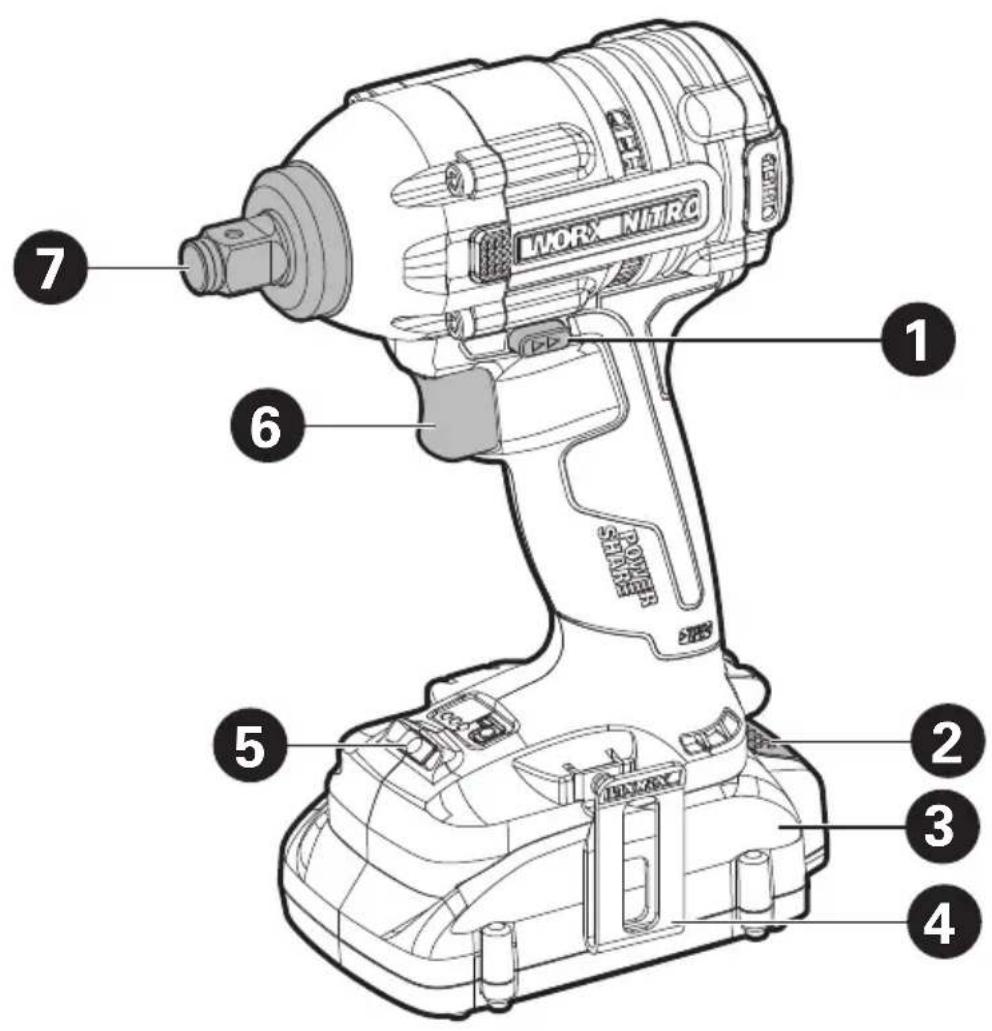
text_image
LI MOR NiTRO 1 2 3 4 5 6 7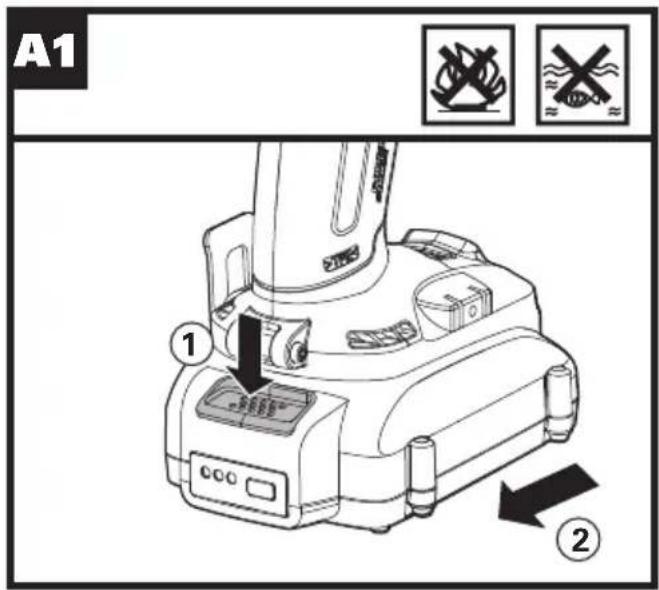
text_image
A1 ① ②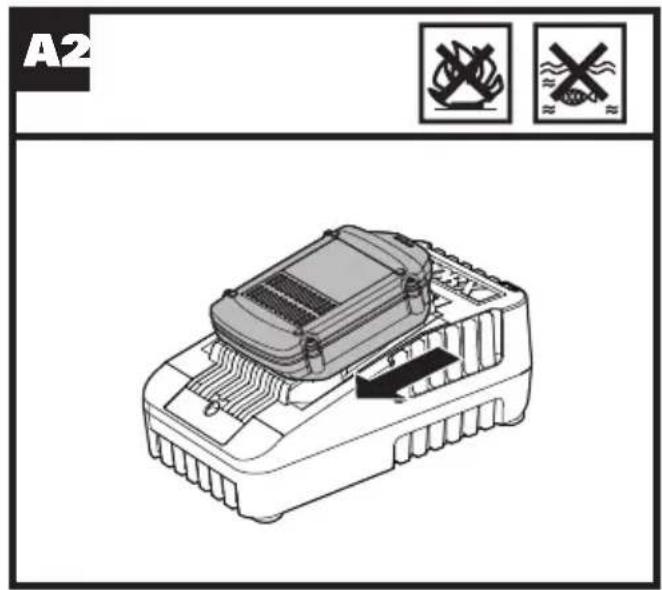
text_image
A2 22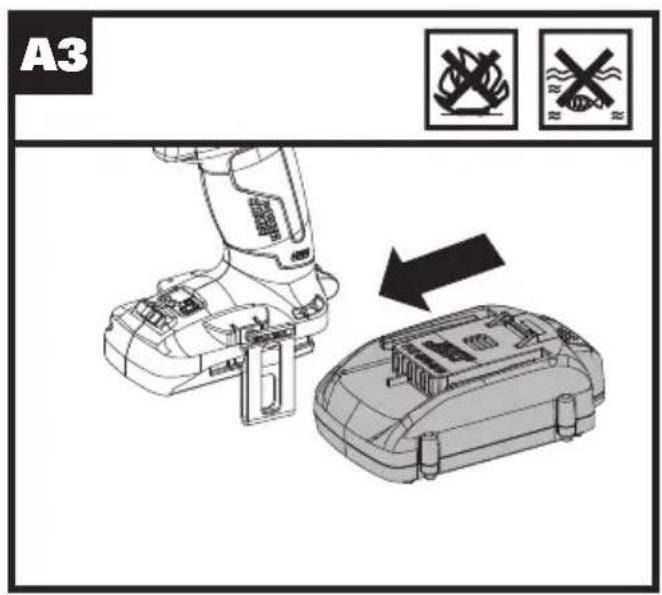
text_image
A3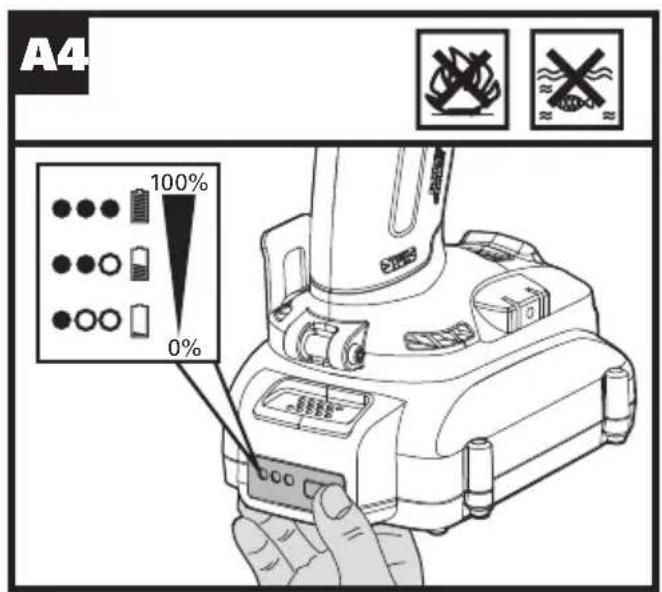
text_image
A4 100% 0%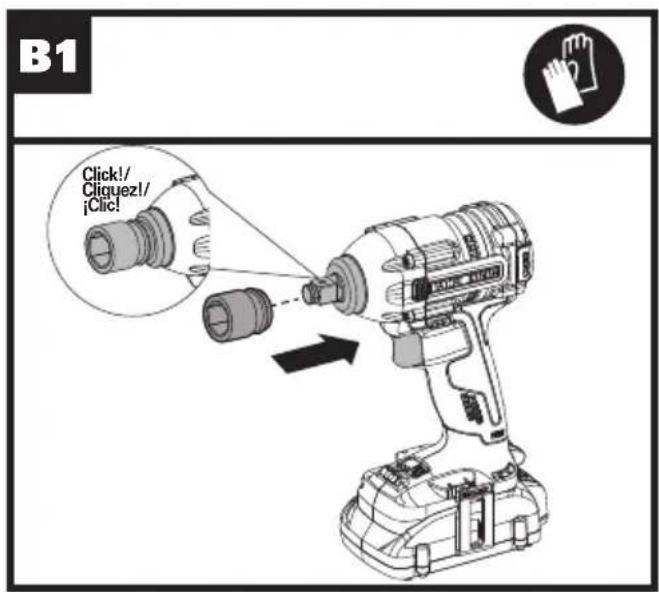
text_image
B1 Click!/ Cliquez!/ ¡Clic!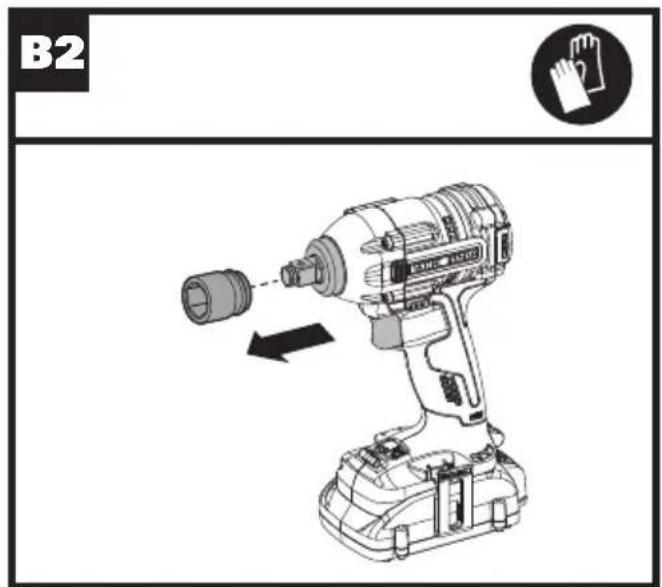
text_image
B2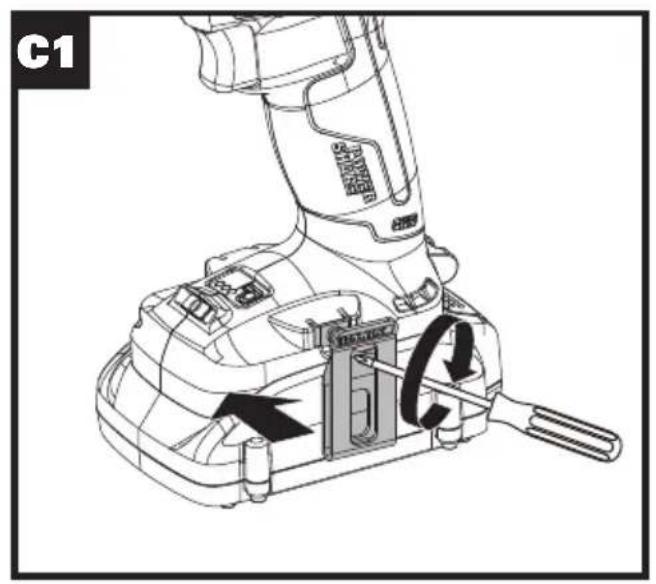
text_image
C1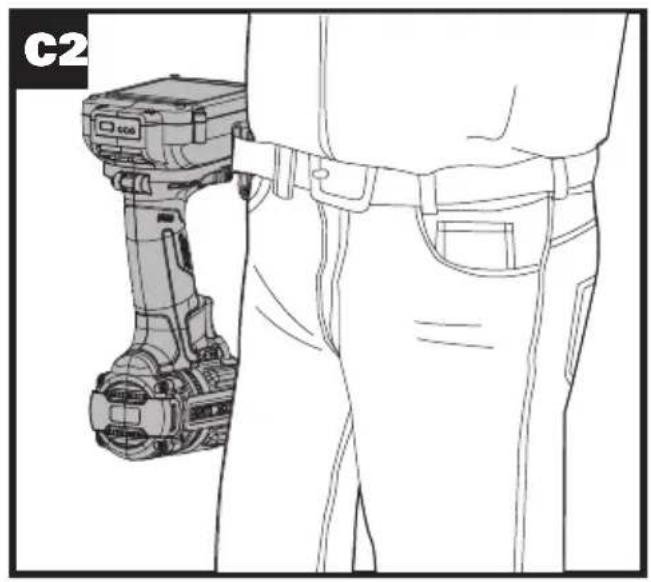
natural_image
Line drawing of a person wearing a hard hat and pants, standing beside a handheld device (no text or symbols visible)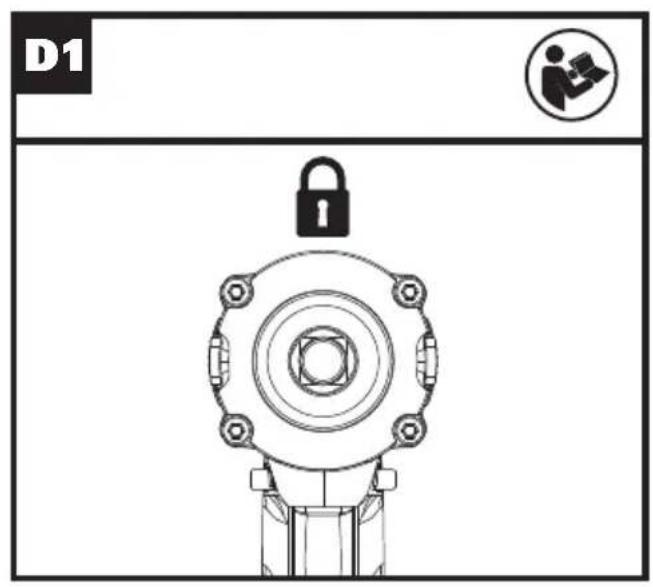
text_image
D1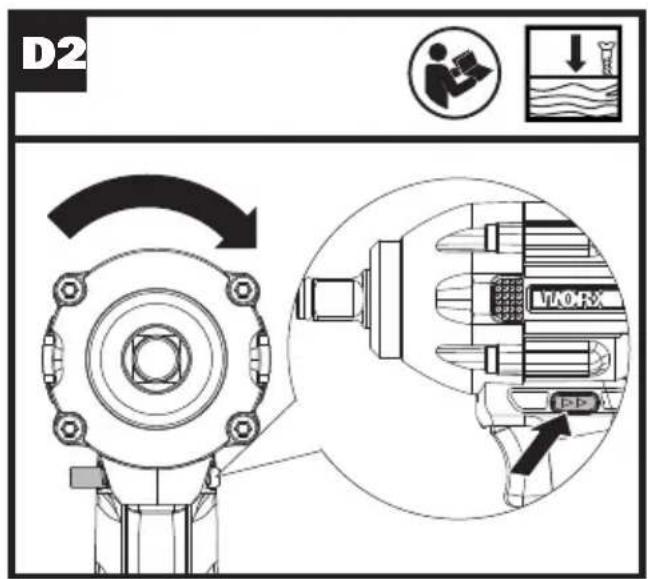
text_image
D2 MINORX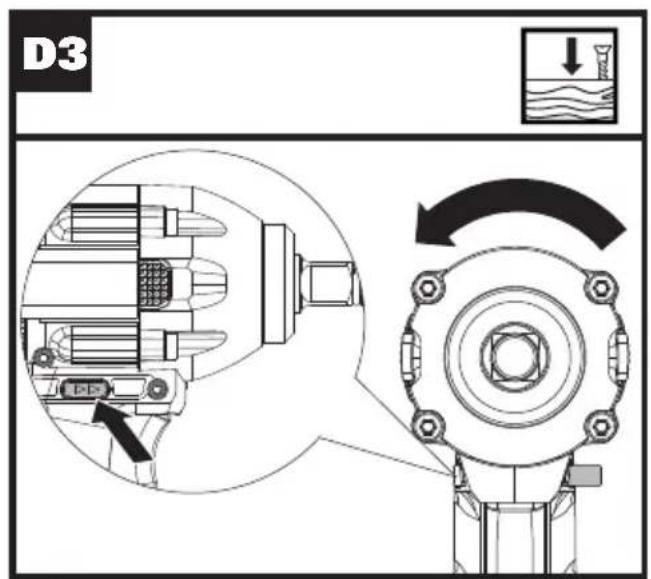
text_image
D3 ↓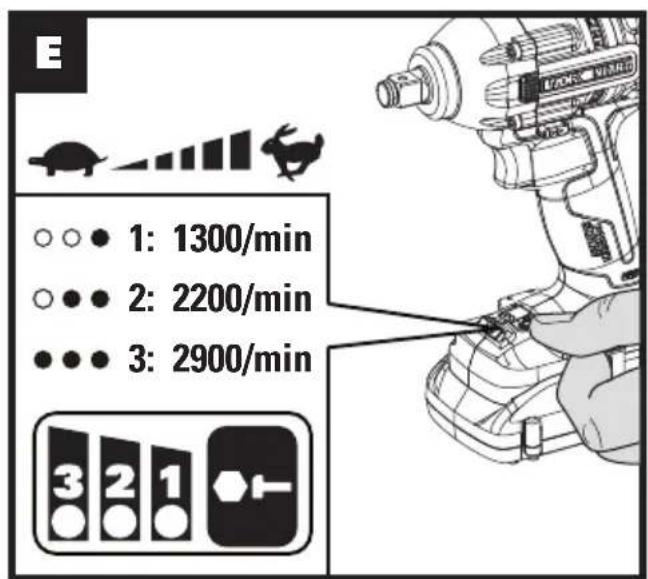
text_image
E 1: 1300/min 2: 2200/min 3: 2900/min 3 2 1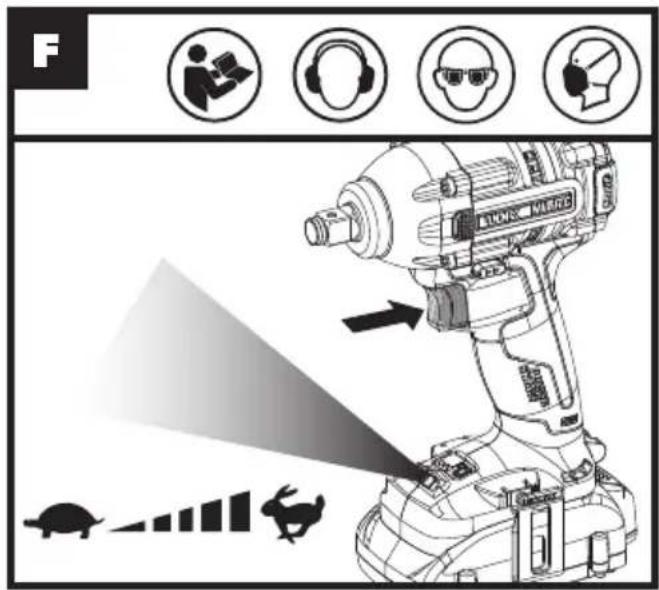
text_image
F LUNES MELIPTAPRODUCT SAFETY
WARNING: Some dust created by power sanding, sawing, grinding, drilling and other construction activities contains chemicals known to the State of California to cause cancer, birth defects or other reproductive harm. Some examples of these chemicals are:
- Lead from lead-based paints;
- Crystalline silica from bricks and cement and other masonry products;
- Arsenic and chromium from chemically-treated lumber.
Your risk from these exposures varies, depending on how often you do this type of work. To reduce your exposure to these chemicals, work in a well ventilated area, and work with approved safety equipment, such as those dust masks that are specially designed to filter out microscopic particles.
WARNING: This product can expose you to chemicals including lead and Di(2-ethylhexyl) phthalate (DEHP) which are known to the State of California to cause cancer and birth defects or other reproductive harm. For more information go to www.P65Warnings.ca.gov.
GENERAL POWER TOOL SAFETY WARNINGS
WARNING: Read all safety warnings, instructions, illustrations and specifications provided with this power tool. Failure to follow all instructions listed below may result in electric shock, fire and/or serious injury.
Save all warnings and instructions for future reference.
The term "power tool" in the warnings refers to your mains-operated (corded) power tool or battery-operated (cordless) power tool.
1) Work area safety
a) Keep work area clean and well lit. Cluttered or dark areas invite accidents.
b) Do not operate power tools in explosive atmospheres, such as in the presence of flammable liquids, gases or dust. Power tools create sparks which may ignite the dust or fumes.
c) Keep children and bystanders away while operating a power tool. Distractions can cause you to lose control.
2) Electrical safety
a) Power tool plugs must match the outlet. Never modify the plug in any way. Do not use any adapter plugs with earthed (grounded) power tools. Unmodified plugs and matching outlets will reduce risk of electric shock.
b) Avoid body contact with earthed or grounded surfaces, such as pipes, radiators, ranges and refrigerators. There is an increased risk of electric
shock if your body is earthed or grounded.
c) Do not expose power tools to rain or wet conditions. Water entering a power tool will increase the risk of electric shock.
d) Do not abuse the cord. Never use the cord for carrying, pulling or unplugging the power tool. Keep cord away from heat, oil, sharp edges or moving parts. Damaged or entangled cords increase the risk of electric shock.
e) When operating a power tool outdoors, use an extension cord suitable for outdoor use. Use of a cord suitable for outdoor use reduces the risk of electric shock.
f) If operating a power tool in a damp location is unavoidable, use a residual current device (RCD) protected supply. Use of an RCD reduces the risk of electric shock.
3) Personal safety
a) Stay alert, watch what you are doing and use common sense when operating a power tool. Do not use a power tool while you are tired or under the influence of drugs, alcohol or medication. A moment of inattention while operating power tools may result in serious personal injury.
b) Use personal protective equipment. Always wear eye protection. Protective equipment such as dust mask, non-skid safety shoes, hard hat, or hearing protection used for appropriate conditions will reduce personal injuries.
c) Prevent unintentional starting. Ensure the switch is in the off-position before connecting to power source and/or battery pack, picking up or carrying the tool. Carrying power tools with your finger on the switch or energizing power tools that have the switch on invites accidents.
d) Remove any adjusting key or wrench before turning the power tool on. A wrench or a key left attached to a rotating part of the power tool may result in personal injury.
e) Do not overreach. Keep proper footing and balance at all times. This enables better control of the power tool in unexpected situations.
f) Dress properly. Do not wear loose clothing or jewelry. Keep your hair and clothing away from moving parts. Loose clothes, jewelry or long hair can be caught in moving parts.
g) If devices are provided for the connection of dust extraction and collection facilities, ensure these are connected and properly used. Use of dust collection can reduce dust-related hazards.
h) Do not let familiarity gained from frequent use of tools allow you to become complacent and ignore tool safety principles. A careless action can cause severe injury within a fraction of a second.
4) Power tool use and care
a) Do not force the power tool. Use the correct power tool for your application. The correct power tool will do the job better and safer at the rate for which it was designed.
b) Do not use the power tool if the switch does not turn it on and off. Any power tool that cannot be
controlled with the switch is dangerous and must be repaired.
c) Disconnect the plug from the power source and/or remove the battery pack, if detachable, from the power tool before making any adjustments, changing accessories, or storing power tools. Such preventive safety measures reduce the risk of starting the power tool accidentally.
d) Store idle power tools out of the reach of children and do not allow persons unfamiliar with the power tool or these instructions to operate the power tool. Power tools are dangerous in the hands of untrained users.
e) Maintain power tools and accessories. Check for misalignment or binding of moving parts, breakage of parts and any other condition that may affect the power tool's operation. If damaged, have the power tool repaired before use. Many accidents are caused by poorly maintained power tools.
f) Keep cutting tools sharp and clean. Properly maintained cutting tools with sharp cutting edges are less likely to bind and are easier to control.
g) Use the power tool, accessories and tool bits etc. in accordance with these instructions, taking into account the working conditions and the work to be performed. Use of the power tool for operations different from those intended could result in a hazardous situation.
h) Keep handles and grasping surfaces dry, clean and free from oil and grease. Slippery handles and grasping surfaces do not allow for safe handling and control of the tool in unexpected situations.
5) Battery tool use and care
a) Recharge only with the charger specified by the manufacturer. A charger that is suitable for one type of battery pack may create a risk of fire when used with another battery pack.
b) Use power tools only with specifically designated battery packs. Use of any other battery packs may create a risk of injury and fire.
c) When battery pack is not in use, keep it away from other metal objects, like paper clips, coins, keys, nails, screws or other small metal objects, that can make a connection from one terminal to another. Shorting the battery terminals together may cause burns or a fire.
d) Under abusive conditions, liquid may be ejected from the battery; avoid contact. If contact accidentally occurs, flush with water. If liquid contacts eyes, additionally seek medical help. Liquid ejected from the battery may cause irritation or burns.
e) Do not use a battery pack or tool that is damaged or modified. Damaged or modified batteries may exhibit unpredictable behavior resulting in fire, explosion or risk of injury.
f) Do not expose a battery pack or tool to fire or excessive temperature. Exposure to fire or temperature above 270 °F (130 °C) may cause explosion.
g) Follow all charging instructions and do not
charge the battery pack or tool outside the temperature range specified in the instructions.
Charging improperly or at temperatures outside the specified range may damage the battery and increase the risk of fire.
6) Service
a) Have your power tool serviced by a qualified repair person using only identical replacement parts. This will ensure that the safety of the power tool is maintained.
b) Never service damaged battery packs. Service of battery packs should only be performed by the manufacturer or authorized service providers.
IMPACT WRENCH SAFETY WARNINGS
- Hold the power tool by insulated gripping surfaces, when performing an operation where the fastener may contact hidden wiring. Fasteners contacting a "live" wire may make exposed metal parts of the power tool "live" and could give the operator an electric shock.
SAFETY WARNINGS FOR BATTERY PACK
a) Do not dismantle, open or shred battery pack.
b) Do not expose battery pack to heat or fire. Avoid storage in direct sunlight.
c) Do not short-circuit a battery pack. Do not store battery packs haphazardly in a box or drawer where they may short-circuit each other or be short-circuited by other metal objects. When battery pack is not in use, keep it away from other metal objects, like paper clips, coins, keys, nails, screws or other small metal objects, that can make a connection from one terminal to another. Shorting the battery terminals together may cause burns or fire.
d) Do not subject battery pack to mechanical shock.
e) In the event of battery leaking, do not allow the liquid to come in contact with the skin or eyes. If contact has been made, wash the affected area with copious amounts of water and seek medical advice.
f) Do not use any battery pack which is not designed for use with the equipment.
g) Keep battery pack out of the reach of children.
h) Always purchase the battery pack recommended by the device manufacturer for the equipment.
i) Keep battery pack clean and dry.
j) Wipe the battery pack terminals with a clean dry cloth if they become dirty.
k) Battery pack needs to be charged before use. Always use the correct charger and refer to the manufacturer's instructions or equipment
manual for proper charging instructions.
I) Do not leave battery pack on prolonged charge when not in use.
m) After extended periods of storage, it may be necessary to charge and discharge the battery pack several times to obtain maximum performance.
n) Recharge only with the charger specified by WorxNITRO. Do not use any charger other than that specifically provided for use with the equipment.
o) Retain the original product literature for future reference.
p) Use only the battery pack in the application for which it was intended.
q) Remove the battery pack from the equipment when not in use.
r) Dispose of properly.
s) Do not mix cells of different manufacture, capacity, size or type within a device.
t) Keep the battery away from microwaves and high pressure.
SYMBOLS
| To reduce the risk of injury, user must read instruction manual | |
| Warning | |
| Wear ear protection | |
| Wear eye protection | |
| Wear dust mask | |
| Wear protective gloves | |
| Batteries may enter water cycle if disposed improperly, which can be hazardous for ecosystem. Do not dispose of waste batteries as unsorted municipal waste. | |
| Do not burn |

Li-Ion
Li-Ion battery, battery must be recycled

High speed

Low speed

Lock

call②recycle®
POSITEC Inc. has established a partnership with the RBRC Corporation to recycle any Positec batteries with the RBRC-call2recycle seal. For environmental protection, please do not discard batteries in the trash. After the batteries' life cycle is ended, then please call 1-800-822-8837 for a free service that will properly dispose of the battery.
COMPONENT LIST
| 1. FORWARD/REVERSE ROTATION SWITCH |
| 2. BATTERY PACK * |
| 3. HOOK |
| 4. BATTERY PACK RELEASE BUTTON * |
| 5. ON/OFF SWITCH |
| 6. LED LIGHT |
| 7. SQUARE ANVIL |
* Not all the accessories illustrated or described are included in standard delivery.
TECHNICAL DATA
Type WX272L WX272L.X (2 - designation of machinery, representative of Impact Wrench)
| WX272L WX272L.X** | |
| Rated voltage 20V Max*** | --- |
| No-load speed 0-1300/2200/2900/min | |
| Impact rate 0-2000/3200/4000 bpm | |
| Max torque | 2655 in-lbs (300 Nm) |
| Chuck capacity 1/2" (13mm) | |
| Machine weight (bare tool) | 2.43 lbs(1.1 kg) |
**X may be followed by one or two characters. All models are the same except model number and trademark. The suffix in models may be number from "1" to "999" or English letter "A" to "Z" or "M1" to "M9" which means different package or the various of accessories packed in the package.
*** Voltage measured without workload. Initial battery voltage reaches maximum of 20 volts. Nominal voltage is 18 volts.
| Category Model | Capacity | |
| 20V Battery | WA3520 1.5Ah | |
| WA3525 2.0Ah | ||
| WA3575 2.0Ah | ||
| WA3578 4.0Ah | ||
| WA3012 4.0Ah | ||
| 20V Charger | WA3742 0.4A | |
| WA3875 2.0A | ||
| WA3881 2.0A |
We recommend that you purchase your accessories from the same store that sold you the tool. Refer to the accessory packaging for further details. Store personnel can assist you and offer advice.
OPERATING INSTRUCTIONS

NOTE: Before using the tool, read the instruction book carefully.
INTENDED USE:
This tool is intended for the fastening and loosening of bolts, nuts and various threaded fasteners. This tool is not intended for use as a drill.
ASSEMBLY AND OPERATION
| ACTION FIGURE | |
| BEFORE OPERATION | |
| Removing the Battery Pack | See Fig. A1 |
| Charging the Battery | See Fig. A2 |
| Installing the Battery Pack | See Fig. A3 |
| Checking the battery conditionNOTE:Fig. A4 only applies for the battery pack with battery indicator light. | See Fig. A4 |
| ASSEMBLY | |
| Inserting and Removing Socket (not supplied)-Push the socket onto the anvil until the detent pin locks it into place.- To remove the socket, pull it away from the anvil.NOTE:Make sure the battery is removed before changing accessories.NOTE:Use only sockets designed for impact wrenches. Always select the correct size impact socket for nuts and bolts. | See Fig.B1, B2 |
| Assembling the belt hook | See Fig.C1, C2 |
| OPERATION | |
| Switch LockSet the direction of rotation selector in the OFF (center lock) position to lock the switch trigger and help prevent accidental starting when not in use. | See Fig. D1 |
| Forward And Reverse Rotation ControlPosition the direction of rotation selector to the left of the switch trigger for forward operation.Position the selector to the right of the switch trigger to reverse the directionWARNING: Never Change The Direction Of Rotation When The Chuck Is Rotating, Wait Until It Has Stopped! | See Fig. D2,D3 |
| Variable Speed ControlThe variable speed switch trigger delivers higher speed with increased trigger pressure and lower speed with decreased trigger pressure.To turn the tool ON, depress the switch trigger. To turn it OFF, release the switch trigger and allow the anvil to come to a complete stop | See Fig. E |
| Operating the On/Off SwitchWARNING: Do not operate for long periods at low speed because excess heat will be produced internally. | See Fig. F |
| Using The LED LightBefore operation, the LED light will be activated when the On/Off switch is slightly depressed, and will automatically turn off 20 seconds after the On/Off switch is released.The tool and battery are equipped with a protection system. When the LED Light is quickly flashing 3 seconds and turn off, the system will automatically cut off power to the tool to extend battery life. The tool will automatically stop during operation if the tool and/or battery are placed under one of the following conditions:Overloaded:The tool is operated in a manner that causes it to draw an abnormally high current. In this situation, release the Trigger Switch on the tool and stop the application that caused the tool to become overloaded. Then pull the Trigger Switch again to restart.Overheated: Under the condition above, if the tool does not start, the Tool and Battery are overheated. In this situation, let the Tool and Battery cool before pulling the Trigger Switch again.Low battery voltage:The remaining Battery capacity is too low and the tool will not operate. In this situation, remove and recharge the Battery.WARNING:To turn on the light, press the On/Off switch and make sure the Forward/Reverse Rotation Control is on right/left position. | See Fig. F |
TROUBLE SHOOTING
1. I CAN NOT FIT THE BATTERY INTO THE BATTERY CHARGER. WHY?
The battery can be inserted into the charger only in one direction. Turn the battery around until it can be inserted into the slot, the red LED Light should turn on when the battery is charging.
2. REASONS FOR DIFFERENT BATTERY PACK WORKING TIMES
Charging time problems, as above, and having not used a Battery Pack for a prolonged time will reduce the Battery Pack working time. This can be corrected after several charge and discharge operations by charging & working with your drill. Heavy working conditions such as large screws into hard wood will use up the Battery Pack energy faster than lighter working conditions. Do not re-charge your Battery Pack below 32 °F (0°C) and above 86 °F (30°C) as this will affect performance.
MAINTENANCE
Remove the battery pack from the machine before carrying out any adjustment, servicing or maintenance.
Your power tool requires no additional lubrication or maintenance. There are no user serviceable parts in your power tool. Never use water or chemical cleaners to clean your power tool. Wipe clean with a dry cloth. Always store your power tool in a dry place. Keep the motor ventilation slots clean. Keep all working controls free of dust. Occasionally you may see sparks through the ventilation slots. This is normal and will not damage your power tool.
FOR BATTERY TOOLS
The ambient temperature range for the use and storage of tool and battery is 0^ C- 45^ C.
The recommended ambient temperature range for the charging system during charging is 0^ C- 40^ C.
SÉCURITÉ DU PRODUIT
performances optimales.
Copyright © 2021, Positec. All Rights Reserved.