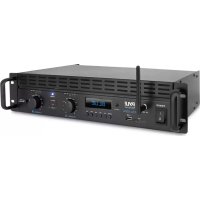
PTA1000BT - Receiver Pyle - Free user manual and instructions
Find the device manual for free PTA1000BT Pyle in PDF.



| Product Type | Professional Audio Amplifier Receiver |
| Brand | Pyle |
| Model | PTA1000BT |
| Maximum Output Power | 2000 Watts |
| Rated Power (4 Ohms) | 2 x 1000 Watts |
| Rated Power (8 Ohms) | 2 x 500 Watts |
| Total Harmonic Distortion | < 1.0% |
| Input Level | +4 dB |
| Signal-to-Noise Ratio | 102 dB |
| Frequency Response | 20 Hz - 20 kHz (± 0.2 dB) |
| Power Supply | 120/220 V AC, Switchable |
| Dimensions (L x W x H) | 48.4 x 24.9 x 8.99 cm |
| Bluetooth Connectivity | Version 5.0, Range up to 30 Feet |
| Bluetooth Network Name | PYLEUSA or BT |
| Supported Audio Formats | MP3, WMA, WAV |
| Built-in Functions | USB/SD Player, FM Radio (87.0-108 MHz), Digital Equalizer (6 modes) |
| Input Connectors | 2 x XLR, 2 x TRS 1/4", 2 x RCA, 1 x AUX 3.5 mm |
| Output Connectors | 3 x SpeakOn, 2 x Speaker Binding Posts, 1 x RCA Subwoofer Output |
| LED Indicators | Power, Signal, Clip, Fault, Level |
| Cooling System | Dual-Speed Fans |
| Rack Mountable | Yes |
| Bridge Mode | Yes |
| Safety | Short-Circuit, Overheat, and Overload Protection |
Frequently Asked Questions - PTA1000BT Pyle
User questions about PTA1000BT Pyle
0 question about this device. Answer the ones you know or ask your own.
Ask a new question about this device
Download the instructions for your Receiver in PDF format for free! Find your manual PTA1000BT - Pyle and take your electronic device back in hand. On this page are published all the documents necessary for the use of your device. PTA1000BT by Pyle.
USER MANUAL PTA1000BT Pyle
PTA1000BTEU-PTA1000BTUK
Wireless BT Pro Audio Power Amplifier
2 Channel Professional Rack Mount
Bridgeable Sound Amplifier (2000 Watt)
USERGUIDE
About PyleUSA
Pyle, founded in the 1960s, has evolved into a renowned manufacturer of high-quality advanced woofer. Our journey started with the iconic Pyle Driver, becoming a household name in original speakers. In the late 20th century, we expanded into replacement speakers, car audio, home audio, marine audio, and professional audio & musical instruments with our Pyle Pro line.
Pyle Car:
Transform your car into a perfect listening environment with our competitively priced speakers, amplifiers, and head units. Upgrade from factory speakers to enhance your music experience. Explore accessories like navigation systems, DVD players, iPod interfaces, and safety-focused cameras.
Pyle Home:
Discover a range of home entertainment products, including projectors, TVs, mounts, stands, and HD technology. Pyle Home offers bass-expanding mini speakers, headphones, vintage turntables, power amplifiers, horn speakers, and more for an enriched media experience at home and on the go.
Pyle Pro:
As the leading source of audio equipment worldwide, Pyle Pro caters to musicians, studio engineers, and amateurs. Our PA Systems, featuring wireless microphones, rechargeable batteries, and iPod/iPhone docks, are ideal for various events. Explore our emerging guitar line, effects pedals, and USB-to-analog converters without compromising on quality.
SAFETY INSTRUCTIONS

Intended to alert the user to the presence of uninsulated "Dangerous Voltage" within the product's enclosure that may be strong enough to create a risk electric shock to a person.

Intended to alert the user to the presence of important operating and maintenance (servicing) instructions in the literature accompanying the product.
CAUTION: To reduce the risk of electric shock, DO NOT ATTEMPT TO OPEN THE AMPLIFIER OR REMOVE THE COVER. There are no user serviceable parts inside. Please use a qualified technician for all servicing.
WARNING: To prevent electricalshock or fire hazard, this amplifier should not be exposed to rain or moisture. Do not place objects filled with liquid, such as vases, on the amplifier.
When using electrical products, caution should always be used. Please read and keep these safety instructions.
- Do not use this apparatus near water.
- Clean only with a dry cloth.
- Do not block any of the ventilation openings. Install the amplifier in accordance with all manufacture's instructions.
- Do not install near any heat source, such as a radiator, heat register, stove or other apparatus (including amplifiers).
- Do not alter a polarized plug (two blades with one wider than the other) or grounding-type plug (two blades with a third prong), as they provide protection. If the provided plug does not fit into your outlet consult an electrician for replacement of the obsolete outlet.
- Protect the power cord from being damaged, particularly near the plugs, convenience receptacles and the point where they connect to the amplifier.
- Only use attachments/accessories provided by the manufacture.
-
Use only with a cart, stand tripod, bracket, or table specified by the manufacturer, or sold with the amplifier. When a cart is used, use caution when moving to avoid injury from tipping over.
-
Unplug the amplifier during lightning storms or when unused for long periods of time.
- Refer all servicing to qualified service personnel. Servicing is required when the amplifier has been damaged in any way. Some examples when the power cord or plug is damaged, liquid has been spilled, objects have fallen into the amplifier, the amplifier has been exposed to rain or moisture, it does not operate normally, or has been dropped.
- Never break off the ground pin and connect only to a proper power supply type, indicated on the unit. For more information, write for our free booklet "Shock Hazard and grounding.
- If this product is to be mounted on an equipment rack, rear support should be provided.
- Exposure to extreme high noise levels may cause permanent hearing loss. Individuals vary considerably in regards to noise-induced hearing loss, but nearly everyone will experience some damage if exposed to intense noise for an extended period of time.
The US Government's Occupational and Health Administration (OSHA) has specified the following permissible noise level exposures:
SOUND LEVEL dBA, SLOW RESPONSE DURATION PER DAY IN HOURS
| 8 | 90 |
| 6 | 92 |
| 4 | 95 |
| 3 | 97 |
| 2 | 100 |
| 1 1/2 | 102 |
| 1 | 105 |
| 1/2 | 110 |
| 1/4 or less | 115 |
According to OSHA, any exposure in excess of the above permissible limits could result in some hearing loss. Ear plugs or protectors to the ear canals must be worn when operating this amplification system, in order to prevent permanent hearing loss, if exposure is in excess of the limits as set forth above. To ensure against potentially dangerous exposure to high sound pressure levels, it is recommended that all persons exposed to equipment capable of producing high sound pressure levels such as this amplification system be protected by hearing protectors while this unit is in operation.
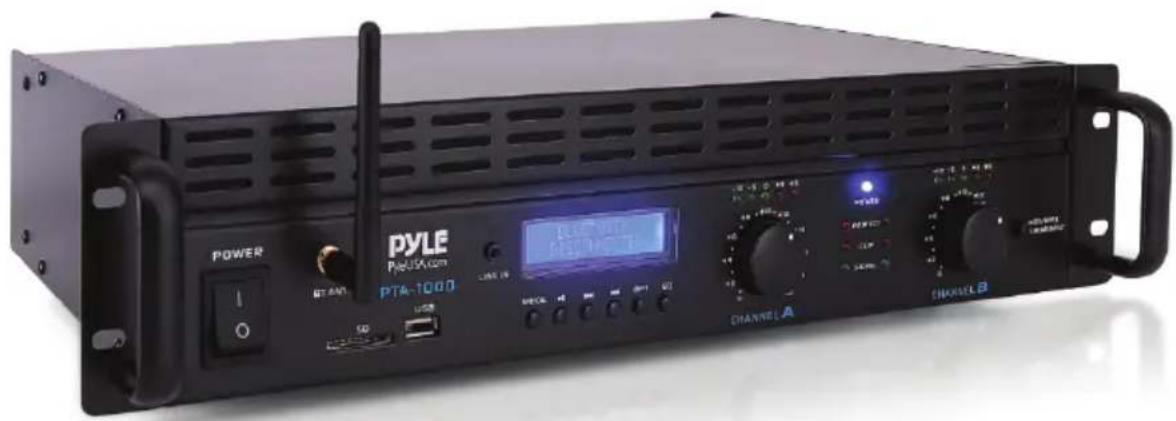
OPERATION Front Panel
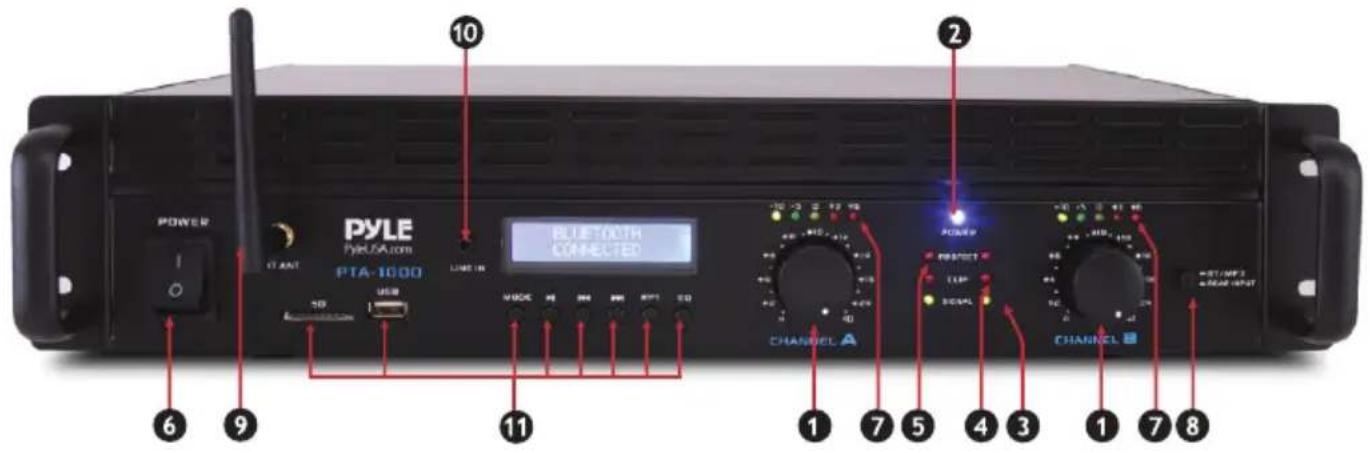
1. INPUT GAIN (dB)
These controls are used to adjust the input gain of each channel.
They determine how loud each channel of the power amplifier will sound for a given input signal level. The maximum input gain is achieved by turning the control completely clockwise – this setting yields the maximum mixer/system headroom. Turning the controlback counter-clockwise will yield lower system noise at the expense of mixer/system headroom. Turning the control fully counter clockwise turns this setting OFF. It is always a good idea to power up any new installing at this setting to protect the system loud speakers.
2. POWER LED (POWER)
These indicators illuminate when the AC main power is being supplied to the amp and both channels are operational. If either channel experiences faulty conditions, exceeds safe operating temperature limits, or if the main circuit breaker trips, then both channel power LED will be dark, indicating shutdown. If the BRIDGE mode is selected, the PWR indicator on channel B will remain dark as a positive indication of this mode selection.
3. SIGNAL ACTIVITY LEDs (SIGNAL)
These indicators illuminate when the associated channel output signal level exceeds 1 Volt RMS.
4. OVERLOAD LEDs (CLIP)
These indicators illuminate when the associated channel has been over loaded.
5. FAULT LEDs (FAULT)
These indicators illuminate when the amplifier has just been turned ON or if the amplifier has detected a problem, such as overheating or circuit problems.
6. POWER SWITCH
This heavy-duty, rocker-type switch turns on the power to the amplifier. When the unit is turned on, there is a three-second delay, which reduces /eliminates the turn-on transients associated with the system equipment connected to the amplifier and protects loudspeakers.
7. LEVEL INDICATOR
Channel A and Channel B level LED indicator.
8. BT/AUX IN BUTTON SWITCH
Press to switch Wireless BT mode. Unpress for AUX mode.
-
Wireless BT ANTENNA: Wireless BT receiver antenna for better signal.
-
AUX INPUT JACKS: Connect AUX input to these jacks.
11.DIGITAL MP3 PLAYER
- Support USB SD Card
Music format: Mp3, WMA, WAV - Connect via Wireless BT, Compatible Wireless BT: version 5.0
- With LCD display, shows ID3 format.
FM:87.0-108MHz - 6 Preset digital EQ effect.
USB, SD, Wireless BT/FM mode
Forward/Next channels
Play/Pause/Scan
Reverse/Previous channels
RPT: SD/USB repeat Play
FM Radio
- Press MODE key to select FM radio mode.
- Press key once, then it will begin to scan the FM frequency range and set P1 to P30 stations.
- Press or key to select the desired stations or use the track select key in 1 to 30 get the desired stations.
Wireless BT Audio Playback Operation
- Press MODE key to select Wireless BT mode.
- Enable the Wireless BT function of your external gadget and search the Wireless BT ID of the product then connect. Once connected, you can play the audio files in your gadget and listen your favorite music with high power audio output of the product.
Back Panel
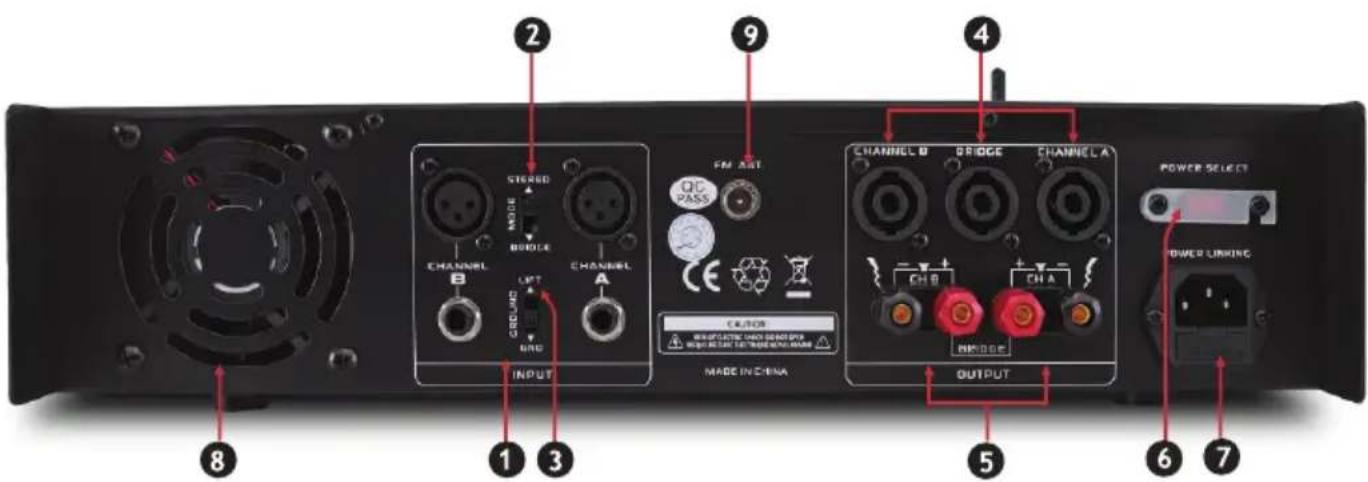
1. INPUT
Cannon and input jack connector provide balance or unbalance input mode.
2. MODE SWITCH
This switch is used to select STEREO or BRIDGE mode operation.
3. GROUND LIFT SWITCH
4. BINDING POST OUTPUTS
Shockproof binding posts are provided. For each channel, the outputs are in parallel and the speaker connection cables can be terminated with banana plugs or stripped wires.
5. SPEAKER OUTPUT
The amplifier provides (3) four conductor speaker connectors, one for each channel and one for bridge mode.
6. POWER SELECT
Switch to choose 110V-120V or 220V-240V power supply.
7. POWER INPUT
This is a standard IEC power connector. An AC main cord, which has the appropriate AC plug and rating for the intended operating voltage, is included in the carton.
8. FAN GRILL
(Two) 2 speed DC fans supply cool air to the amplifier. The fans switch to high speed automatically when the unit requires additional cooling.
- FM ANTENNA: Connect for tuner antenna.
Instruction
Pyle's PTA1000BT Wireless BT Pro Audio Power Amplifier is the perfect solution for all of your audio needs. Using the latest sound amplification technology and an impressive 1000 Wall power output, this receiver is designed to deliver pure stereo sounds from a wide range of connected music sources. Built-in Wireless BT audio receiver ability allows you to stream your music wirelessly and it works with all of your favorite devices (like Smartphones, Tablets, laptops, Computers, etc.) Enjoy full range stereo sound reproduction when streaming audio with a wireless range of up to 30^ feet. Additional system features include USB Flash Drive Reader, SD Card Reader, Push Type Speaker Terminal connectors, RCA Stereo Inputs, RCA Subwoofer Output, and along with an Aux (3.5mm) jack to connect even more external devices. Take control of your sound with the Pyle PTA1000BT Wireless BT Pro Audio Power Amplifier.
Wireless BT Operation Instruction:
External devices which have a built-in Wireless BT feature can be connected to this amplifier wirelessly to play through the amplifier's speakers.
- At first be sure that the amplifie is powered ON, and turn the volume to the MINI position and it's better to pull the Wireless BT Antenna on at the back panel for better receiving.
- Press the BT/line button switch in on the front panel, you will hear the voice "POWER ON" and also "PAIRING", and then the unit is automatically ready to pair with your external device.
- Turn ON the Wireless BT of your external devices like Smartphone, Computer, and others, etc.
- Search for available Wireless BT devices within range of your external device and wait for your device to select "PYLE PRO" on the pairing devices lists.
- And seconds later when you heard a voice "Your Device is Connected", then the Wireless BT pairing is successful.
- You can now play music on your external device through the amplifier.
Help & Troubleshooting
If you experience any of the following difficulties while using the unit, use this troubleshooting guide to help you remedy the problem, should any problem persist, consult your nearest dealer.
| Problem | Possible Cause & Solution |
| No Power | "Ensure the power cord is securely connected. *Plug a different device into the electrical outlet to verify that the outlet is working correctly |
| No Sound | *The wrong input was selected on the amplifier *Music master volume control is set to minimum • Fuse defective *Speakers and speaker cables are either not connected, loose or malfunctioning. |
| Microphone No Sound | *The microphone is not turned on *The microphone cable is either loose or not functioning *The microphone volume for that channel is set to minimum *The microphone is not functioning correctly |
| Severe Hum or Noise | *Ensure all cables and wires are securely connected *Connect a different source device to see if the buzzing persists.If does not, the problem may be with the original device. •Connect your device to a different input to the amplifier •The volume is set too high and the loudspeakers distort |
California Prop 65 Warning
WARNING:
This product may expose you to chemicals, which is known to the state of California to cause cancer, birth defects and other reproductive harm. Do not ingest.
For more info go to: www.P65 warnings.ca.gov
Features:
2-Channel Pro Audio Amplifier
- Bridge able Amp: Bridge Mode Ability
Built-in Wireless BT Streaming
(2) 1 / 4'' TRS Input Connector Jacks
(2) XLR Input Connector Jacks
(3) SpeakOn Output Connectors (AlB/Bridged)
(2) Pair Speaker Terminal Binding Post Connectors
- Power, Protect, Clip, Signal LED Indicators
- Left and Right Channel Level Signal Indicators
Built-in Ventilation Cooling Fans
- Front Panel Control Center
- Rack-Mountable System
Wireless BT Connectivity:
- Simple & Hassle-Free Pairing
- Instant Wireless Audio Streaming Ability
- Works with All of Today's Latest Wireless BT Devices
Wireless BT Network Name: 'PYLE PRO'
Wireless BT Version: 5.0
Wireless Range: Up to 30^ + ft.
What's in the Box:
Pro Audio Amplifier
- Power Cable
BT and FM Antenna
Technical Specs:
- Power Output: 2000 Watt MAX
- Amplifier Type: 2-Channel
- 2x 1000 Watt @ 40hm
- 2x 500 Watt @ 80hm
- Distortion: <1.0%
- Input Level: +4dB
- Signal/Noise Ratio: 102dB
Frequency Response: 20Hz - 20kHz, + / - 0.2dB - Power Supply: 120/220V, Switchable
- Dimensions (L x W x H): 19.09" x 9.84" x 3.54" -inches (48.4 x 24.9 x 8.99 -cm)
Register Product
Thank you for choosing PyleUSA. By registering your product, you ensure that you receive the full benefits of our exclusive warranty and personalized customer support. Complete the form to access expert support and to keep your PyleUSA purchase in perfect condition.

Start Here
Model Number: PTA1000BT
PyleUSA.com/pages/register
PYLE®
PyleUSA.com

Questions? Comments?
We are here to help!
Phone: (1) 718-535-1800
PyleUSA.com/ContactUs
PTA1000BTEU-PTA1000BTUK
AMPLIFICADOR INALÁMBRICO BT PRO PARA AUDIO
Questions? Commentaires?
5. LED DIGUASTO (FAULT)
2. POWER-LED (POWER)
5. WYJSCIE GLOSNIKOWE
Bu ağır hizmet tipi, rocker tipi anahtar amplifikatore giden güçü acar. Ünite acıldışında, amplifikatore®,®,®,®,®,®,®,®,®,®,®,®,®,®,®,®,®,®,®,®,®,®,®,®,®,®,®,®,®,®,®,®,®,®,®,®,®,®,®,®,®,®,®,®,®,®,®,®,®,®,®,®,®,®,®,®,®,®,®,®,®,®,®,®,®,®,®,®,®,®,®,®,®,®,®,®,®,®,®,®,®,®,®,®,®,®,®,®,®,®,®,®,®,®,®,®,®,®,®,®,®. geç,islerini azaltan/ortadan kaldıran ve hoparlörleri koruyan üç saniyetik birGPCikme olur.
7. SEVIYE GÖSTERGESI
| PROBLEM | Olası Neden ve Çozüm |
| Güç Yok | • Güç kablosunun güvenli bir seksildebaughışından emin olun. • Prizin.Doğru caliştalıkindoğrulamak icin elektrik prisine farklıbir cihaz takın |
| Ses Yok | • Amplifikatorde yanlış,girisi seçildi • Muzik ana ses seviyesi kontrlü minimuma ayarlandi • Sigorta arizalı • Hoparlörler ve hoparlör kabolari®,®,®,®,®,®,®,®,®,®,®,®,®,®,®,®,®,®,®,®,®,®,®,®,®,®,®,®,®,®,®,®,®,®,®,®,®,®,®,®,®,®,®,®,®,®,®,®,®,®,®,®,®,®,®,®,®,®,®,®,®,®,®,®,®,®,®,®,®,®,®,®,®,®,®,®,®,®,®,®,®,®,®,®,®,®,®,®,®,®,®,®,®,®,®,®,®,®,®,®,® |
| Mikrofon Ses Yok | • Mikrofon,açık®,®,®,®,®,®,®,®,®,®,®,®,®,®,®,®,®,®,®,®,®,®,®,®,®,®,®,®,®,®,®,®,®,®,®,®,®,®,®,®,®,®,®,®,®,®,®,®,®,®,®,®,®,®,®,®,®,®,®,®,®,®,®,®,®,®,®,®,®,®,®,®,®,®,®,®,®,®,®,®,®,®,®,®,®,®,®,®,®,®,®,®,®,®,®,®,®,®,®, ® |
| Şiddetli Üğultuveya Gürültü | • Tümm Kablolarin ve tellerin güvenli bir seksildebaugh】,„dindan emin olun • Uğultunun devam edip etmediigiin gormek icin farklıbir kaynak cihazbaugh. Devam etmezse, sorun orijinal cihazda olabilir. • Cihazın】, amplifikatorün farklıbir,girisi nebaughin • Ses seviyesi,...ok yüksek ayarlanmışvehoparlörler bozuluyor |
Kaliforniya Prop 65 Uyarisi

- PTA1000BTEU-PTA1000BTUK
- About PyleUSA
- Pyle Car:
- Pyle Home:
- Pyle Pro:
- SAFETY INSTRUCTIONS
- OPERATION Front Panel
- INPUT GAIN (dB)
- POWER LED (POWER)
- SIGNAL ACTIVITY LEDs (SIGNAL)
- OVERLOAD LEDs (CLIP)
- FAULT LEDs (FAULT)
- POWER SWITCH
- LEVEL INDICATOR
- BT/AUX IN BUTTON SWITCH
- 11.DIGITAL MP3 PLAYER
- USB, SD, Wireless BT/FM mode
- FM Radio
- Wireless BT Audio Playback Operation
- Back Panel
- INPUT
- MODE SWITCH
- GROUND LIFT SWITCH
- BINDING POST OUTPUTS
- SPEAKER OUTPUT
- POWER SELECT
- POWER INPUT
- FAN GRILL
- Instruction
- Wireless BT Operation Instruction:
- Help & Troubleshooting
- California Prop 65 Warning
- WARNING:
- Features:
- Wireless BT Connectivity:
- What's in the Box:
- Technical Specs:
- Register Product
- PYLE®
- PyleUSA.com
- AMPLIFICADOR INALÁMBRICO BT PRO PARA AUDIO
- LED DIGUASTO (FAULT)
- POWER-LED (POWER)
- WYJSCIE GLOSNIKOWE
- SEVIYE GÖSTERGESI
- Kaliforniya Prop 65 Uyarisi
Brand : Pyle
Model : PTA1000BT
Category : Receiver