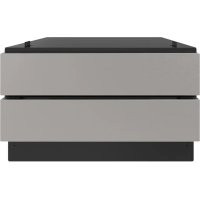
SKCD24U0GS - Microwaves SHARP - Free user manual and instructions
Find the device manual for free SKCD24U0GS SHARP in PDF.


User questions about SKCD24U0GS SHARP
0 question about this device. Answer the ones you know or ask your own.
Ask a new question about this device
Download the instructions for your Microwaves in PDF format for free! Find your manual SKCD24U0GS - SHARP and take your electronic device back in hand. On this page are published all the documents necessary for the use of your device. SKCD24U0GS by SHARP.
USER MANUAL SKCD24U0GS SHARP
INSTALLATION INSTRUCTIONS
Sharp Convection Microwave Printer & SuperSteam+ Pedestal Model SKCD24U0GS
For use with models SMD2499FS and SSC2489DS.
IMPORTANT NOTES TO THE INSTALLER
- PLEASE READ THESE INSTRUCTIONS THOROUGHLY BEFORE BEGINNING INSTALLATION.
- Observe all governing codes, ordinances, and safety instructions.
Refer to these specific models' installation instructions for more information on placement. - Be sure to leave these instructions with the consumer.
- Remove all packing material before beginning the installation.
NOTE:
This installation process requires two people. Please ensure you have another person to help lift and install the unit.
WARNING:
Follow all of the steps provided in this installation. Improperly securing or installing the unit can lead to possible injury or damage to the unit.
| ITEM | PART NAME QTY | PRICE CODE | |
| A | UTC PEDESTAL DPED-B002MRK0 | 1 N/A | |
| B | MOUNTING CLEATS SPAK-B128MRE0 | 2 | AK |
| C | MOUNTING CLEAT SCREWS XMSS742P38000 | 4 | AA |
| D | TOE KICK GCOVHB087MRT0 | 1 AT | |
| E | TOE KICK SCREWS XUPS840P12X00 | 2 | AA |
| F | DRAWER MATS PCOV-B009MRE0A | 2 | AN |
| G | SCREW LEVELING GLEGPB006MRE0 | 4 | AC |
| H | DRAWER DECORATION HDECAC157MRP0 | 2 | BB |
| I | SUPERSTEAM OVEN CONVERSION BRACKET LANGTB464MRP0 | 2 | AP |
| J | SUPERSTEAM OVEN CONVERSION BRACKET SCREWS LX-BZA148WREZ | 2 | AA |
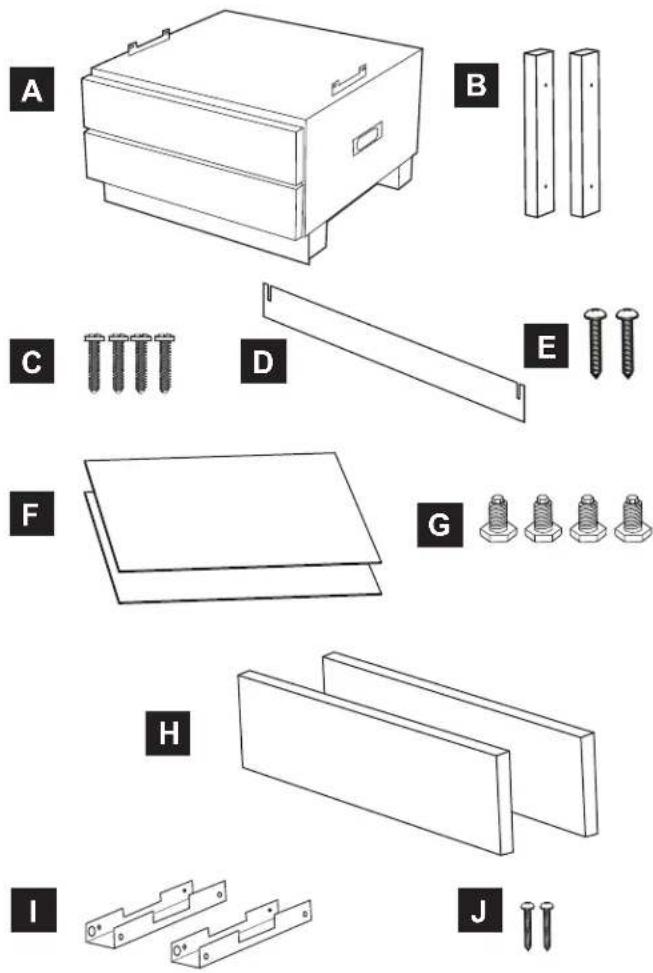
Items B-J are available for ordering.
INSTALLATION INSTRUCTIONS
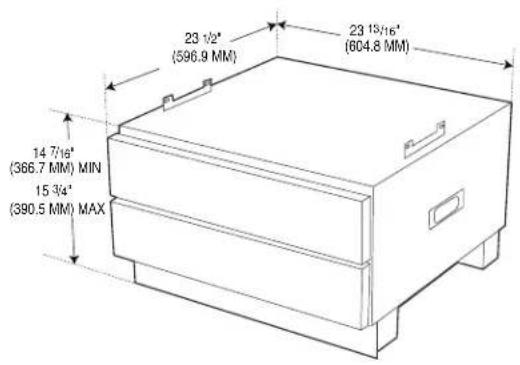
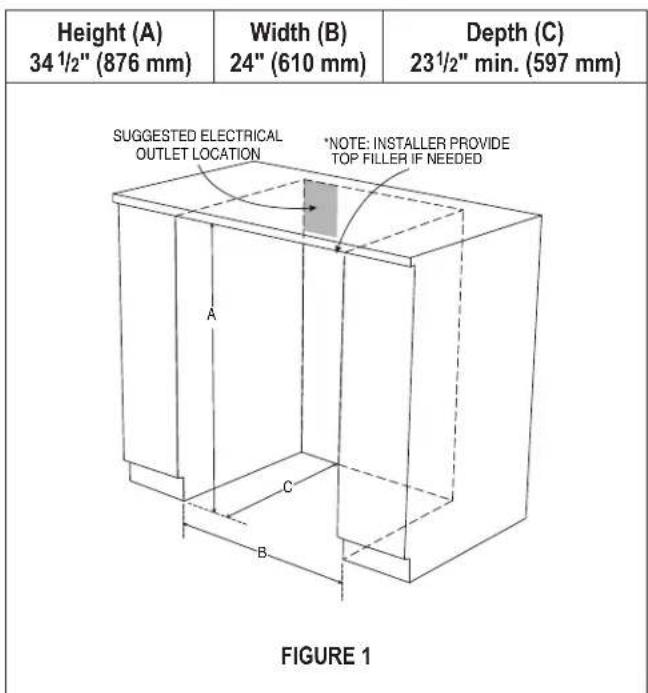
Overall Dimensions
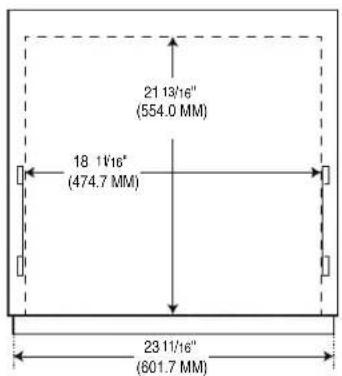
InsideDrawer Dimensions
- Cabinet cutout dimensions. Prepare the cabinet opening as shown in Figure 1.
INSTALLATION INSTRUCTIONS
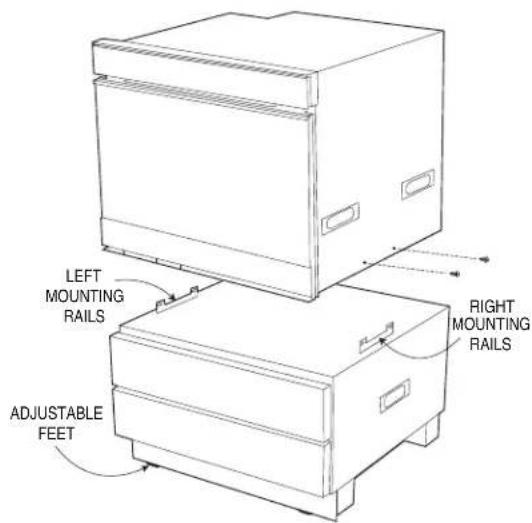
- Convection Microwave Printer - Place the oven on a secure surface. Remove the 4 bottom screws (2 on each side of the oven) as shown in Figure 2A. Carefully place the oven on top of the pedestal in-between the mounting rails on the left and right.
For Convection Microwave Printer
FIGURE 2A
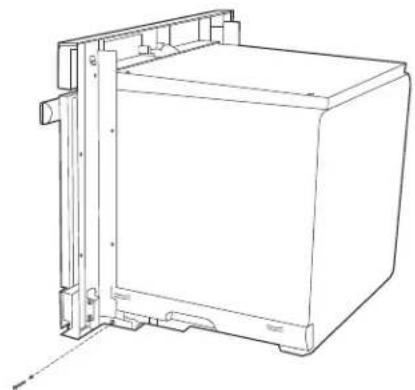
SuperSteam+ Oven - Place the oven on a secure surface. Remove the 2 bottom screws (1 on each side of the oven) as showing in Figure 2B. Install the two conversion brackets with the two provided screws (J). See Figure 2C. Carefully place the oven on top of the pedestal in-between the conversion brackets on the left and right.
For SuperSteam+ Oven
FIGURE 2B
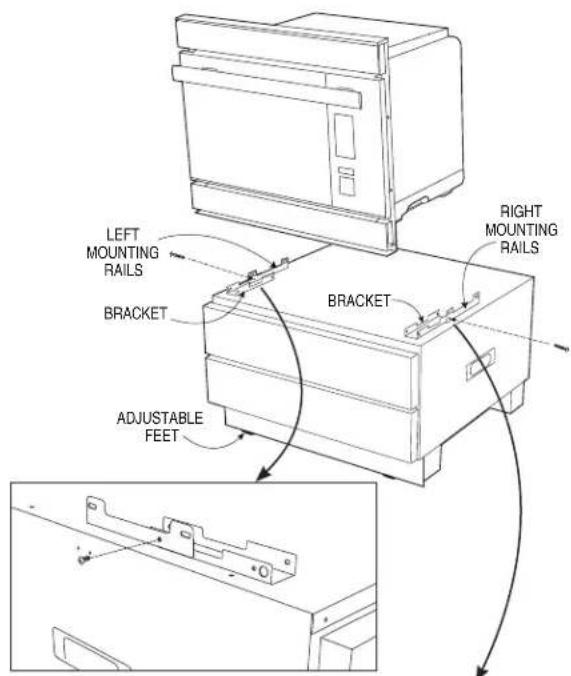
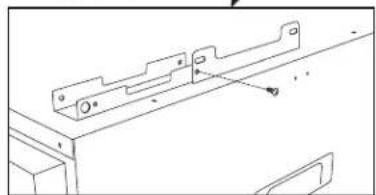
FIGURE 2C
INSTALLATION INSTRUCTIONS
- Align the front face of the oven with the front face of the pedestal drawers. Once positioned, fasten the oven to the pedestal.
Convection Microwave Printer - Use the same 4 removed screws from Step 2. See Figure 3A.
- Refer to oven installation instructions for the models' specific below-the-counter clearance guidelines.
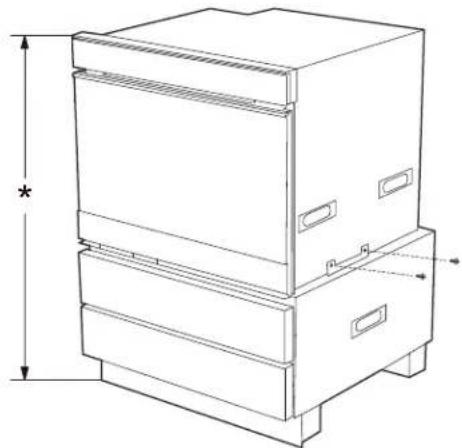
For Convection Microwave Printer
FIGURE 3A
SuperSteam+ Oven - Use the 2 removed screws from Step 2. See Figure 3B.
- Refer to oven installation instructions for the models' specific below-the-counter clearance guidelines.
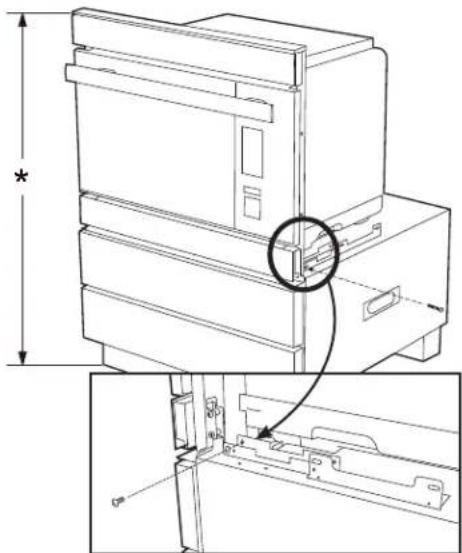
For SuperSteam+ Oven
FIGURE 3B
- Adjust the height of the overall unit to fit your specific opening. The pedestal contains 4 adjustable feet. To adjust, have one person tilt the unit to one side while the other person adjusts the 2 feet on the raised side to the desired height. Repeat this step by tilting the unit to the other side and adjusting the other 2 feet. Ensure that all feet are adjusted equally to balance the unit. See Figure 4.
CAUTION: Do not tilt forward. The pedestal drawers will extend out.
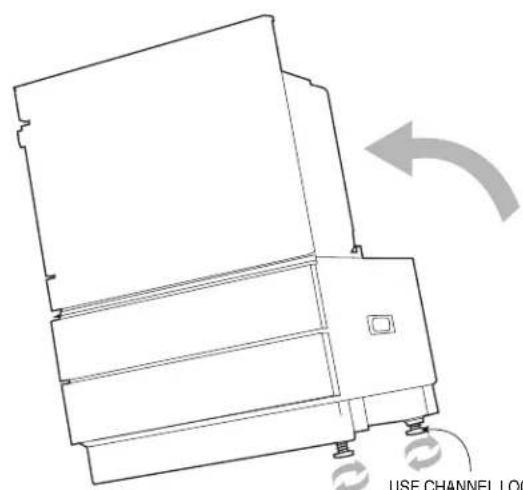
USE CHANNEL LOCK OR
SLIP-JOINT PLIERS TO
LOOSEN THE FEET
PRIOR TO ADJUSTMENT
FIGURE 4
- Once the overall height has been confirmed, measure the distance from the top surface of the pedestal unit to the floor. See Figure 5. This measurement will be needed for the installation of the wooden mounting cleats.
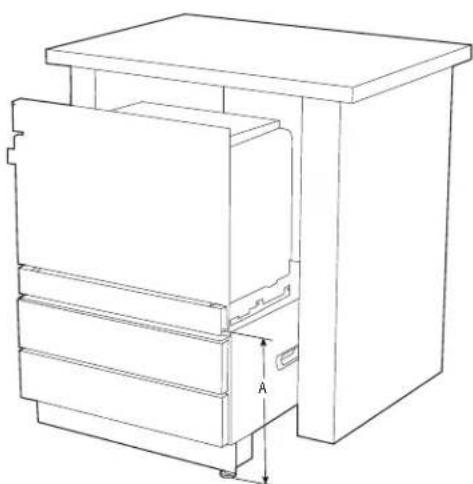
FIGURE 5
INSTALLATION INSTRUCTIONS
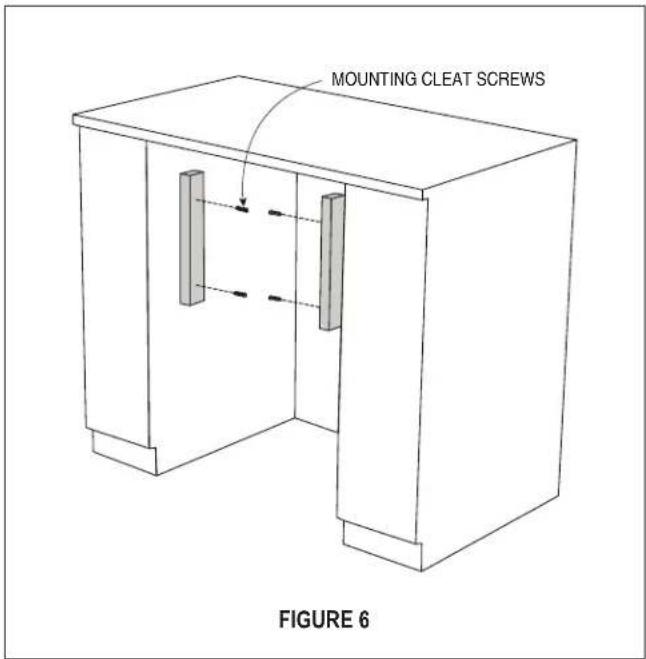
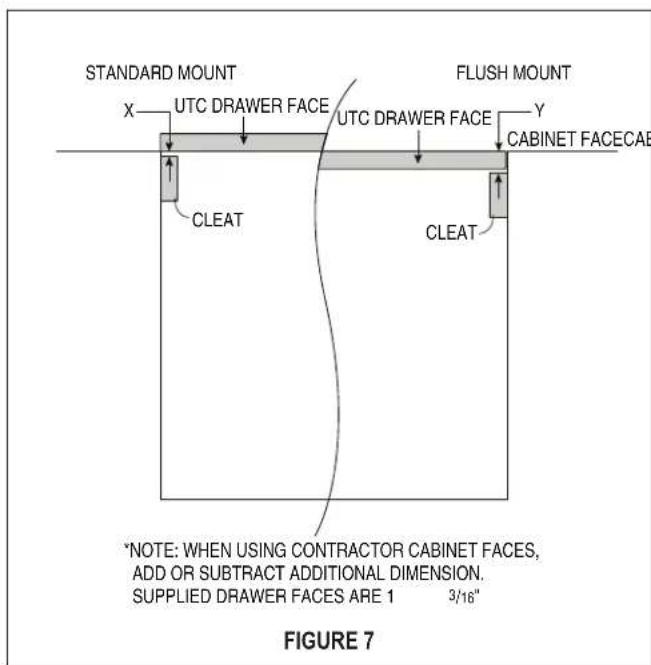
- Install the wooden cleats. Align the bottom of the cleat to the measurement from Step 5. The pedestal can be installed flush or standard with the face of the cabinet. Depending on the preference, the depth of the cleat position should be adjusted as such. See Figure 6. Position each cleat and mark the holes on the cabinet. Pre-drill each hole in the cabinet using a 1/16'' (1.6 mm) drill bit. Attach both cleats using the 4 mounting cleat screws. See Figure 7.
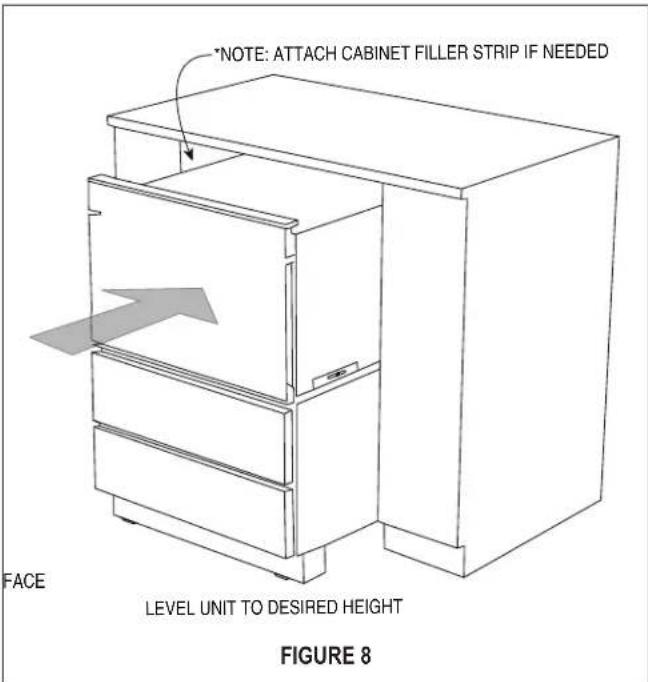
- Slide the unit into the opening. Plug oven into the wall receptacle prior to pushing the unit all the way in. See Figure 8. The mounting angles of the oven should rest against the installed wooden cleats.
NOTE:
- To aid in sliding the unit into the space, open the bottom drawer and use middle frame to push into place. In addition, there are built-in handles on each side of the pedestal that can assist in the movement of the unit. Tuck cord behind the oven before pushing the assembled unit in.
- If the chosen height of the installation presents a gap between the counter top and the unit, attach cabinet filler strip as noted in Figure 8. Cabinet filler strip can be purchased wherever cabinets are sold.
INSTALLATION INSTRUCTIONS
- Open the oven door and pre-drill each hole using a 1/16" (1.6 mm) drill bit. Fasten the unit to the mounting cleats using the 4 mounting screws provided with your oven. See Figure 9A or 9B.
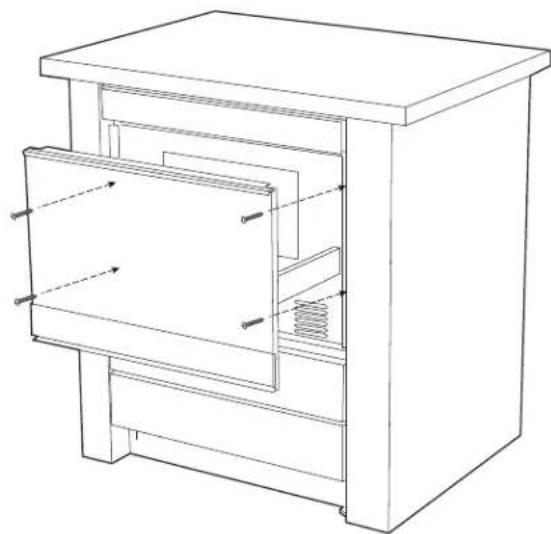
For Convection Microwave Printer
FIGURE 9A
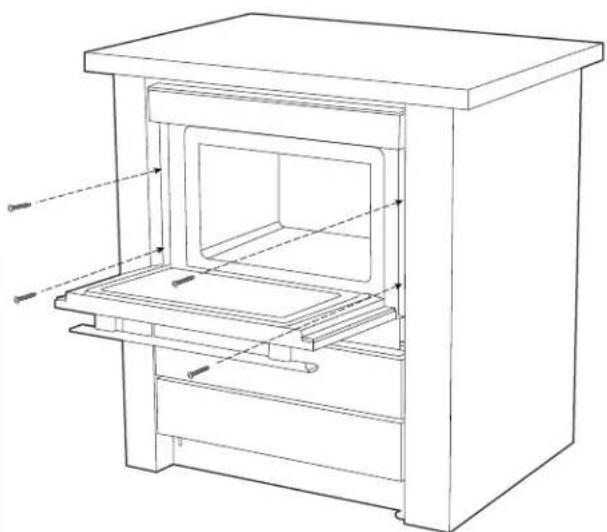
For SuperSteam+ Oven
FIGURE 9B
- Install bottom kickplate. Use the 2 toe kick screws to fasten the plate. The 2 toe kick screws come installed in the unit. Remove these 2 screws prior to positioning the kickplate. See Figure 10.
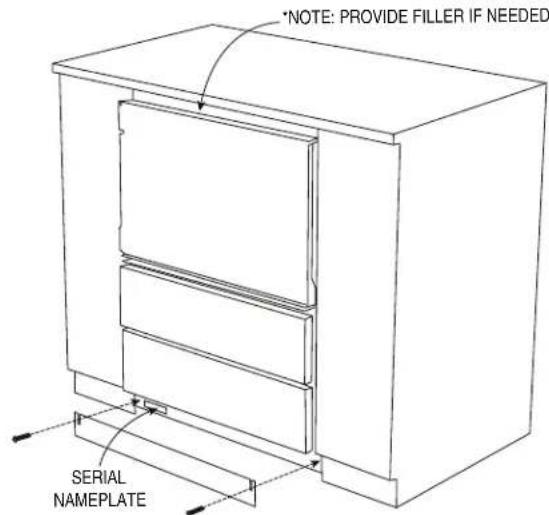
FIGURE 10
CUSTOM PANEL INSTALLATION
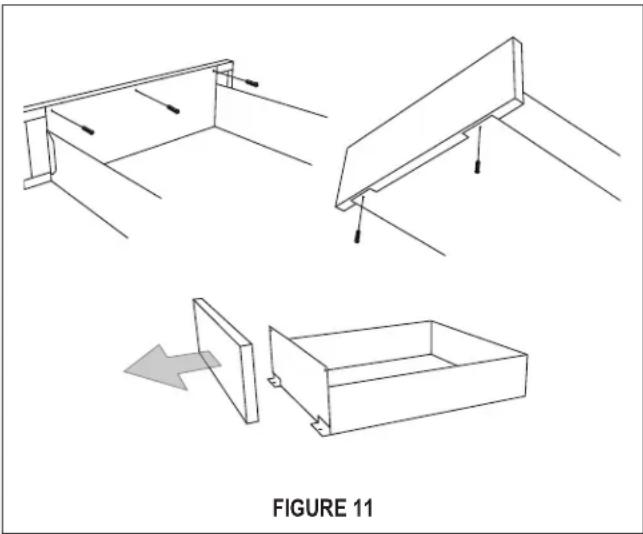
The pedestal drawer fronts can be replaced with custom wood fronts. If custom drawer faces are preferred, the stainless steel drawer faces can be taken off by removing 5 screws (3 on the back side and 2 underneath). See Figure 11.
Suggested custom drawer face dimensions:
Height 5^ (127 mm)
Width 2311/16" (602 mm)
Depth 1^3 / 16^ (30.2 mm)
SHARP®
SHARP ELECTRONICS CORPORATION • 100 Paragon Drive, Montvale, New Jersey 07645 • USA
For any other assistance or information about this kit, please call Sharp's Customer Assistance Center: 1-800-BE-SHARP (1-800-237-4277)
SHARP ELECTRONICS OF CANADA LTD • 335 Britannia Road East, Mississauga, Ontario, L4Z 1W9 • Canada
For any other assistance or information about this kit, please call 877-278-6709 Mon-Fri: 8am-5pm EST (except statutory holidays)
INSTRUCTIONS D'INSTALLATION

Pour le four SuperSteam+
FIGURE 9B
