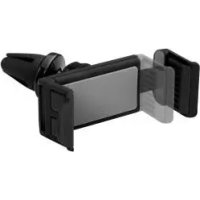
IAN 331773 - Car phone holder ULTIMATE SPEED - Free user manual and instructions
Find the device manual for free IAN 331773 ULTIMATE SPEED in PDF.



| Product type | Car smartphone holder |
| Brand | Ultimate Speed |
| Model | IAN 331773 |
| Intended use | In motor vehicles, for smartphones and mobile phones |
| Device compatibility | Width from 46 to 65 mm, height from 120 to 178 mm |
| Mounting | Clip for air vent with ball joint |
| Orientation | Adjustable ball joint |
| Locking function | Locking button for the holders |
| Material | Plastic |
| Dimensions (approx.) | 100 x 100 x 50 mm |
| Weight (approx.) | 150 g |
| Power supply | None (passive operation) |
| Delivery contents | 1 holder, 1 clip, 1 nut, 1 user manual |
| Cleaning | Dry lint-free cloth |
| Safety | Do not obstruct the driver's view, do not install near airbags |
| Warranty | 3 years |
| Customer service France | Phone 0800 919270, email: owim@lidl.fr |
Frequently Asked Questions - IAN 331773 ULTIMATE SPEED
User questions about IAN 331773 ULTIMATE SPEED
0 question about this device. Answer the ones you know or ask your own.
Ask a new question about this device
Download the instructions for your Car phone holder in PDF format for free! Find your manual IAN 331773 - ULTIMATE SPEED and take your electronic device back in hand. On this page are published all the documents necessary for the use of your device. IAN 331773 by ULTIMATE SPEED.
USER MANUAL IAN 331773 ULTIMATE SPEED
KFZ-SMARTPHONE-HALTER/CAR PHONE HOLDER/SUPPORT DE SMARTPHONE POUR VOITURE
DE AT CH
KFZ-SMARTPHONE-HALTER
Operation and safety notes
F 电
SUPPORT DE SMARTPHONE POUR VOITURE
GB/IE Operation and safety notes Page 27
Introduction Page 29
Intended use. Page 30
Scope of delivery. Page 31
Parts description. Page 31
Technical data. Page 32
Safety instructions......Page 32
Assembling the holder
Installing the smartphone Page 37
Attaching vent clamp..Page 38
Adjusting the bracket Page 38
Removing the smartphone and holder... Page 39
Cleaning and care...... Page 39
Disposal Page 40
Warranty......Page 40
Warranty claim procedure..Page 43
Service Page 44
List of pictograms used

Read the instructions!

Observe the warnings and safety notes!
Car Phone Holder
Introduction
We congratulate you on the purchase of your new
product. You have chosen a high quality product. Familiarise yourself with the product before using
it for the first time. In addition, please carefully refer to the operating instructions and the safety advice below. Only use the product as instructed and only for the indicated field of application. Keep these instructions in a safe place. If you pass the product on to anyone else, please ensure that you also pass on all the documentation with it.
Intendeduse
This product is intended to hold the smartphones and mobile
phones in automobiles. The product is for private use only.
Scopeofdelivery
1 holder
1 vent clamp with ball joint
1 nut
1 user manual
Parts description
1 Clip
2 Vent clamp
3 Ball joint
4 Nut
5 Ball socket
6 Button
Technicaldata
Suitable for appliances with a width of 46 mm to 65 mm and height of 120 mm to 178 mm.

Safety instructions
PLEASE READ THE INSTRUCTIONS PRIOR TO USE! PLEASE KEEP THE INSTRUCTIONS IN A SAFE PLACE! WHEN PASSING THIS PRODUCT ON TO A THIRD PARTY, ALSO INCLUDE ALL DOCUMENTS.
A WRRNING!
OF FATAL INJURY AND ACCIDENT HAZARD FOR TODDLERS AND SMALL
CHILDREN! Never leave children unsupervised with the packaging materials. The packaging material poses a suffocation hazard. This product is not a toy.
Vent clip needs to be mounted on inactive vent to prevent phone from shutting down due to overheating or freezing (see Fig E-F).
- When using in vehicles, do not place in a position that obstructs drivers view. This is dangerous and illegal in some countries.
- Do not place on or near airbag deployment areas.
-
Do not install near the steering wheel. This can result in accidents and injuries, particularly in the impact area of the head.
The positioning of the product must not impair the driver in any way. The field of vision must be clear. -
Do not use, install or adjust whilst driving.
RISKROFNG!
ACCRIDENTS! Do not reach or search for fallen objects whilst driving.
A RISRRONG!
ACCRIDENTS! Improper use can damage leads!
A RISRRNING!
OF ACCIDENTS! In case of failure to observe the safety guidelines, the holder or the product may come loose and be damaged. Consequential damages cannot be ruled out.
The manufacturer does not accept any liability for damages resulting from unintended use of the product.
- Assembling the holder (fig. A)
- Slide the nut 4 over the ball joint 3 .
- Push the ball into the ball socket until it clicks into place.
- Tighten the nut 4 on the ball socket 5.
- Installingthe smartphone
- Hold down the button 6 and slide the clips 1 apart (see Fig. B).
- Place the smartphone between the clips (see Fig. C).
- Slide the clamps together until the smartphone is securely clamped in place (see Fig. D).
- Attaching vent clamp
-
Switch off the ventilation (see Fig. E-F).
-
Clamp the bracket with the vent clamp ② into the ventilation louvers (see Fig. H).
Adjusting the bracket
Turn the bracket to the desired position (see Fig. G).

Removing the smartphone and holder
- Hold the mobile phone and press the upper clip slightly upwards to remove (see Fig. 1).
- Carefully pull the vent clamp out of the ventilation louvers.

Cleaning and care

Clean the product with a dry, lint-free cloth.
Disposal
The packaging is made entirely of recyclable materials, which you may dispose of at local recycling facilities.
Contact your local refuse disposal authority for more details of how to dispose of your worn-out product.
Warranty
The product has been manufactured to strict quality guidelines and meticulously examined before
delivery. In the event of product defects you have legal rights against the retailer of this product. Your legal rights are not limited in any way by our warranty detailed below.
The warranty for this product is 3 years from the date of purchase. Should this product show any fault in materials or manufacture within 3 years from the date of purchase, we will repair or replace it - at our choice - free of charge to you.
The warranty period begins on the date of purchase. Please keep
the original sales receipt in a safe location. This document is required as your proof of purchase. This warranty becomes void if the product has been damaged, or used or maintained improperly.
The warranty applies to defects in material or manufacture. This warranty does not cover product parts subject to normal wear, thus possibly considered consumables (e.g. batteries) or for damage to fragile parts, e.g. switches, rechargeable batteries or glass parts.
Warranty claim procedure
To ensure quick processing of your case, please observe the following instructions:
Please have the till receipt and the item number (e.g. IAN 123456_7890) available as
proof of purchase.
You will find the item number on the type plate, an engraving on the front page of the instructions (bottom left), or as a sticker on the rear or bottom of the appliance.
If functional or other defects occur, please contact the service department listed either by telephone or by e-mail.
You can return a defective product to us free of charge to the service address that will be provided to you. Ensure that you enclose the proof of purchase (till receipt) and information about what the defect is and when it occurred.
Service

Service Great Britain
Tel.: 0800 404 7657
E-Mail: owim@lidl.co.uk
44 GB/IE

Service Ireland
Tel.: 1890 930 034
(0,08 EUR / Min., (peak))
(0,06 EUR / Min.)
(off peak))
E-Mail: owim@lidl.ie
Montage du support (ill. A)
levering......Pages 79
Beschrijving van de
onderdelen......Pages 80
Technische gegevens.....Pagina 80
Last Information Update
Version des informations dot Stand


- KFZ-SMARTPHONE-HALTER/CAR PHONE HOLDER/SUPPORT DE SMARTPHONE POUR VOITURE
- KFZ-SMARTPHONE-HALTER
- SUPPORT DE SMARTPHONE POUR VOITURE
- List of pictograms used
- Car Phone Holder
- Introduction
- Intendeduse
- Scopeofdelivery
- Parts description
- Technicaldata
- Safety instructions
- A WRRNING!
- OF FATAL INJURY AND ACCIDENT HAZARD FOR TODDLERS AND SMALL
- - Installingthe smartphone
- - Attaching vent clamp
- Adjusting the bracket
- Removing the smartphone and holder
- Cleaning and care
- Disposal
- Warranty
- Warranty claim procedure
- Service
- Service Great Britain
- Service Ireland
- Montage du support (ill. A)
Brand : ULTIMATE SPEED
Model : IAN 331773
Category : Car phone holder