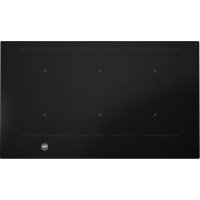
P906IM3G5NE - Cooker BERTAZZONI - Free user manual and instructions
Find the device manual for free P906IM3G5NE BERTAZZONI in PDF.



| Product type | Induction hob |
| Brand | Bertazzoni |
| Model | P906IM3G5NE |
| Dimensions (W x D x H) | 880 x 520 x 50 mm |
| Weight | 20 kg |
| Power supply | 230 V ~ 50/60 Hz (single-phase) or 400 V three-phase |
| Total power | 11100 W |
| Energy consumption | 188 Wh/kg |
| Number of cooking zones | 5 induction cooking zones |
| Main functions | Booster, Double booster, Timer, Keep warm, Automatic cooking, Stop&Go, Recall, Bridge, Chef, Grill, Pot Speed Test, Lock |
| Cleaning | Ceramic glass surface: clean with a damp cloth and mild detergent, avoid abrasives |
| Safety | Pan detection, residual heat indicator, child lock, automatic shut-off, overheating protection |
| Repairability | Repairs should be carried out by an authorized technician; original spare parts available |
| General information | User and installation manual available in French; protection class Y |
Frequently Asked Questions - P906IM3G5NE BERTAZZONI
User questions about P906IM3G5NE BERTAZZONI
0 question about this device. Answer the ones you know or ask your own.
Ask a new question about this device
Download the instructions for your Cooker in PDF format for free! Find your manual P906IM3G5NE - BERTAZZONI and take your electronic device back in hand. On this page are published all the documents necessary for the use of your device. P906IM3G5NE by BERTAZZONI.
USER MANUAL P906IM3G5NE BERTAZZONI
PRECAUTIONS BEFORE USING 3
USING THE APPLIANCE 4
PRECAUTIONS NOT TO DAMAGE THE APPLIANCE 5
PRECAUTIONS IN CASE OF APPLIANCE FAILURE 6
OTHER PROTECTIONS 6
DESCRIPTION OF THE APPLIANCE 7
TECHNICAL CHARACTERISTICS 7
CONTROL PANEL 7
USE OF THE APPLIANCE 8
DISPLAY 8
VENTILATION 8
STARTING-UP AND APPLIANCE MANAGEMENT 8
BEFORE THE FIRST USE 8
INDUCTION PRINCIPLE 8
SENSITIVE TOUCH 9
POWER SELECTION ZONE "SLIDER" AND TIMER SETTING ZONE 9
STARTING-UP 9
PAN DETECTION 9
RESIDUAL HEAT INDICATION 10
BOOSTER AND DOUBLE BOOSTER FUNCTION 10
TIMER 11
AUTOMATIC COOKING 12
STOP&GO FUNCTION 12
RECALL FUNCTION 12
"KEEP WARM" FUNCTION 13
BRIDGE OR AUTOMATIC BRIDGE FUNCTION 13
CONTROL PANEL LOCKING 13
"CHEF FUNCTION 14
GRILL FUNCTION 14
POT SPEED TEST FUNCTION 14
COOKING ADVICES 17
PAN QUALITY 17
PAN DIMENSION 17
EXAMPLES OF COOKING POWER SETTING 18
MAINTENANCE AND CLEANING 18
WHAT TO DO IN CASE OF A PROBLEM 18
ENVIRONMENT PRESERVATION 19
INSTALLATION INSTRUCTIONS 20
ELECTRICAL CONNECTION 22
Precautions before using
- Unpack all the materials.
- The installation and connecting of the appliance have to be done by approved specialists. The manufacturer can not be responsible for damage caused by building-in or connecting errors.
- To be used, the appliance must be well-equipped and installed in a kitchen unit and an adapted and approved work surface.
- This domestic appliance is exclusively for the cooking of food, to the exclusion of any other domestic, commercial or industrial use.
- Remove all labels and self-adhesives from the ceramic glass.
- Do not change or alter the appliance.
- The cooking plate can not be used as freestanding or as working surface.
- The appliance must be grounded and connected conforming to local standards.
- Do not use any extension cable to connect it.
- The appliance can not be used above a dishwasher or a tumble-dryer: steam may damage the electronic appliances.
- The appliance is not intended to be operated by means of external timer or separate remote control system.
Using the appliance
- Switch the heating zones off after using.
- Keep an eye on the cooking using grease or oils: that may quickly ignite.
- Be careful not to burn yourself while or after using the appliance.
- Make sure no cable of any fixed or moving appliance contacts with the glass or the hot saucepan.
- Magnetically objects (credit cards, floppy disks, calculators) should not be placed near to the engaged appliance.
- Metallic objects such as knives, forks, spoons and lids should not be placed on the hob surface since they can get hot.
- In general do not place any metallic object except heating containers on the glass surface. In case of untimely engaging or residual heat, this one may heat, melt or even burn.
- Never cover the appliance with a cloth or a protection sheet. This is supposed to become very hot and catch fire.
- This appliance can be used by children aged from 8 years and above and persons with reduced physical, sensory or mental capabilities or lack of experience and knowledge if they have been given supervision or instruction concerning use of the appliance in a safe way and understand the hazards involved.
Children shall not play with the appliance. - Cleaning and user maintenance shall not be made by children without supervision.
Precautions not to damage the appliance
- Raw pan bottoms or damaged saucepans (not enamelled cast iron pots,) may damage the ceramic glass.
- Sand or other abrasive materials may damage ceramic glass.
- Avoid dropping objects, even little ones, on the vitroceramic.
- Do not hit the edges of the glass with saucepans.
- Make sure that the ventilation of the appliance works according to the manufacturer's instructions.
- Do not put or leave empty saucepans on the vitroceramic hobs.
- Sugar, synthetic materials or aluminium sheets must not contact with the heating zones. These may cause breaks or other alterations of the vitroceramic glass by cooling: switch on the appliance and take them immediately out of the hot heating zone (be careful: do not burn yourself).
- WARNING: Unattended cooking on a hob with fat or oil can be dangerous and may result in fire.
- CAUTION: The cooking process has to be supervised. A short term cooking process has to be supervised continuously.
- WARNING: Danger of fire: do not store items on the cooking surface.
- Never place any hot container over the control panel.
- If a drawer is situated under the embedded appliance, make sure the space between the content of the drawer and the inferior part of the appliance is large enough (2 cm). This is essential to guaranty a correct ventilation.
- Never put any inflammable object (ex. sprays) into the drawer situated under the vitroceramic hob. The eventual cutlery drawers must be resistant to heat.
Precautions in case of appliance failure
- If a defect is noticed, switch on the appliance and turn off the electrical supplying.
- If the ceramic glass is cracked or fissured, you must unplug the appliance and contact the after sales service.
- Repairing has to be done by specialists. Do not open the appliance by yourself.
- WARNING: If the surface is cracked, switch off the appliance to avoid the possibility of electric shock.
Other protections
- Note sure that the container pan is always centred on the cooking zone. The bottom of the pan must have to cover as much as possible the cooking zone.
- For the users of pacemaker, the magnetic field could influence its operating. We recommend getting information to the retailer or of the doctor.
- Do not to use aluminium or synthetic material containers: they could melt on still hot cooking zones.
- NEVER try to extinguish a fire with water, but switch off the appliance and then cover flame e.g. with a lid or a fire blanket.

THE USE OF EITHER POOR QUALITY POT OR ANY INDUCTION ADAPTOR PLATE FOR NON-MAGNETIC COOKWARE RESULTS IN A WARRANTY BREACH. IN THIS CASE, THE MANUFACTURER CANNOT BE HELD RESPONSIBLE FOR ANY DAMAGE CAUSED TO THE HOB AND/OR ITS ENVIRONMENT.

Technical characteristics
| Type | P906IM3G5NE |
| Total power | 11100 W |
| Energy consumption for the hob EChob** | 188 Wh/kg |
| Front left heating zone | 210 x 190 mm |
| Minimum detection | Ø 100 mm |
| Nominal level* | 2100 W |
| Booster level* | 2600 W |
| Double booster level* | 3700 W |
| Cookware ** | Ø 150 mm (x2) |
| Energy consumption EChw** | 182.8 Wh/kg |
| Cookware ** | Ø 180 mm (x2) |
| Energy consumption EChw** | 190.6 Wh/kg |
| Cookware ** | Ø 210 mm (x2) |
| Energy consumption EChw** | 188.1 Wh/kg |
- The given power may change according to the dimensions and material of the pan.
**Calculated according to the method of measuring performance (EN 60350-2).
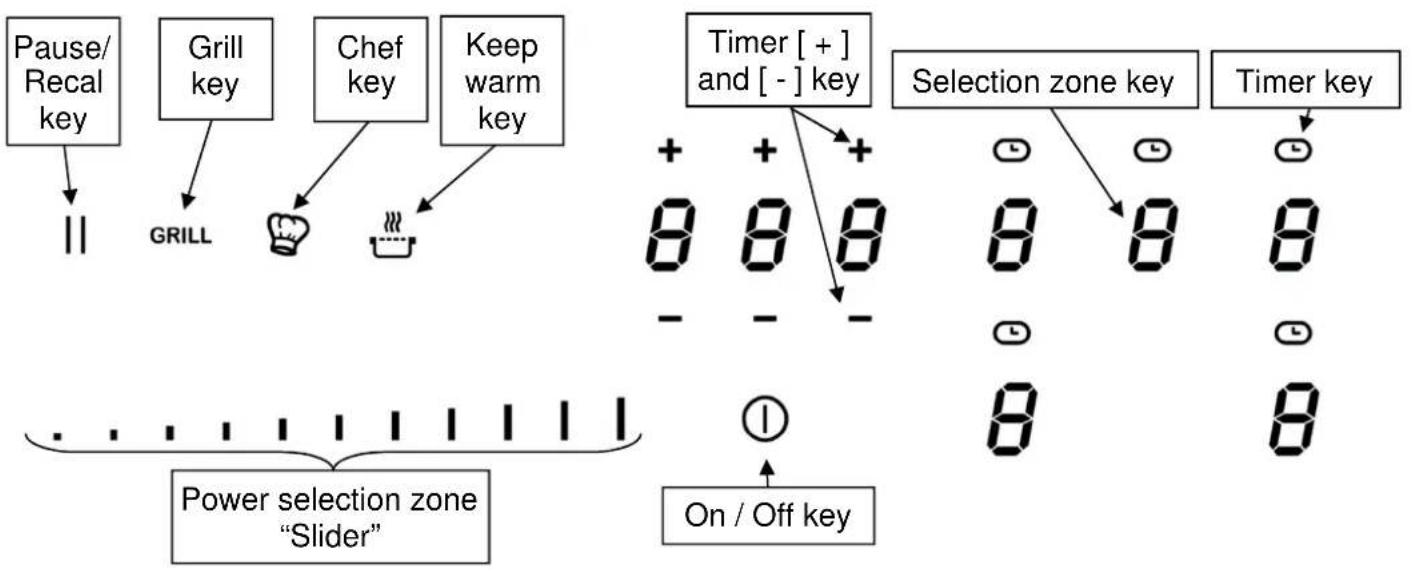
Control panel
Display
Display Designation Description
0 Zero The heating zone is activated.
1...9 Booster level Selection of the cooking level.
U No pan detection No pan or inadequate pan.
A Heat accelerator Automatic cooking.
E Error message Electronic failure.
H Residual heat The heating zone is hot.
P Power The Power is activated. Super Power The Super power is activated.
U Keep warm Maintain automatically of 42, 70 or 94^ Keep warm Maintain automatically of 42^ Keep warm Maintain automatically of 70^ Keep warm Maintain automatically of 90^ Stop&Go The hob is in pause. Bridge 2 cooking zones are combined.
Ventilation
The cooling system is fully automatic. The cooling fan starts with a low speed when the calories brought out by the electronic system reach a certain level. The ventilation starts his high speed when the hob is intensively used. The cooling fan reduces his speed and stops automatically when the electronic circuit is cooled enough.
STARTING-UP AND APPLIANCE MANAGEMENT
Before the first use
Clean your hob with a damp cloth, and then dry the surface thoroughly. Do not use detergent which risks causing blue-tinted colour on the glass surface.
Induction principle
An induction coil is located under each heating zone. When it is engaged, it produces a variable electromagnetic field which produces inductive currents in the ferromagnetic bottom plate of the pan. The result is a heating-up of the pan located on the heating zone.
Of course the pan has to be adapted:
- All ferromagnetic pans are recommended (please verify it thanks a little magnet): cast iron and steel pans, enamelled pans, stainless-steel pans with ferromagnetic bottoms...
- Are excluded: cupper, pure stainless-steel, aluminium, glass, wood, ceramic, stoneware,...
The induction heating zone adapts automatically the size of the pan. With a too small diameter the pan doesn't work. This diameter is varying in function of the heating zone diameter.
If the pan is not adapted to the induction hob the display will show [] .
Sensitive touch
Your ceramic hob is equipped with electronic controls with sensitive touch keys. When your finger presses the key, the corresponding command is activated. This activation is validated by a control light, a letter or a number in the display and/or a "beep" sound.
In the case of a general use press only one key at the same time.
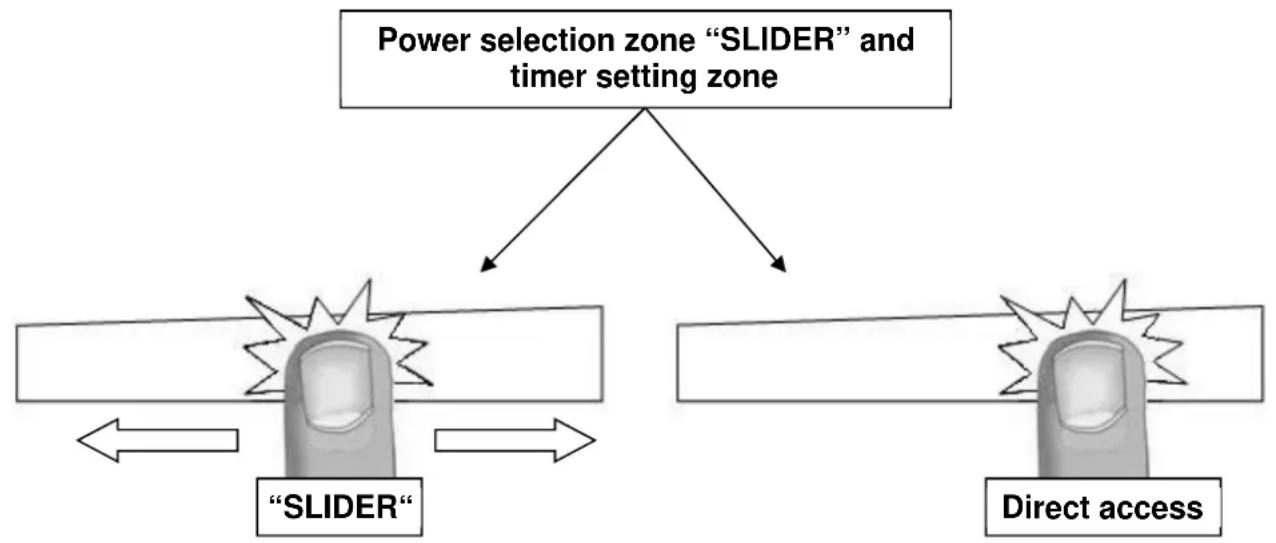
Power selection zone "SLIDER" and timer setting zone
To select the power with the slider, slide your finger on the "SLIDER" zone. You can already have a direct access if you put your finger directly on the chosen level.
Starting-up
- Start up / switch off the hob:
| Action | Control panel | Display | ||
| To start | press key [ | ①] for 2 sec. | [0] | |
| To stop | press key [ | ①] for 2 sec. | nothing or [H] | |
- Start up / switch off a heating zone:
| Action | Control panel | Display |
| To set | slide on the “SLIDER” [1] to [P] | |
| (adjust the power) | to the right or to the left | |
| To stop | slide to [0] on “SLIDER” [0] or [H] | |
If no action is made within 20 second the electronics returns in waiting position.
Pan detection
The pan detection ensures a perfect safety. The induction doesn't work:
-
If there is no pan on the heating zone or if this pan is not adapted to the induction. In this case it is impossible to increase the power and the display shows [] . This symbol disappears when a pan is put on the heating zone.
-
If the pan is removed from the heating zone the operation is stopped. The display shows [] . The symbol [] disappears when the pan is put back to the heating zone. The cooking continues with the power level set before.
After use, switch the heat element off: don't let the pan detection [U] active.
Residual heat indication
After the switch off of a heating zone or the complete stop of the hob, the heating zones are still hot and indicates [H] on the display.
The symbol [H] disappears when the heating zones may be touched without danger.
As far as the residual heat indicators are on light, don't touch the heating zones and don't put any heat sensitive object on them. There are risks of burn and fire.
Booster and double booster function
Power [P] and Super Power [11] grant a boost of Power to the selected heating zone.
If this function is activated the heating zones work during 10 minutes with an ultra-high Power.
This is foreseen for example to heat up rapidly big quantities of water, like nuddles
- Start up / Stop the booster:
Action
Control panel
Display
Start up the booster Slide to the end of the "SLIDER" [P]
Or press directly on the end of
the "SLIDER"
Stop the booster Slide on the "SLIDER" [9] to [0]
- Start up / Stop double booster
Action
Control panel
Display
Start up the booster Slide to the end of the "SLIDER" [P]
Or press directly on the end of
the "SLIDER"
Start up double booster Re-press key [P] and P]
Stop the double booster Slide on the "SLIDER" [P] to [0]
Stop booster Slide on the "SLIDER" [9] to [0]
- Power management:
The table is divided in 3 separate sets of heating zones, each set having a maximum power.
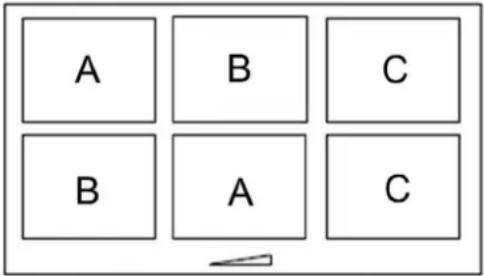
If the selected heating levels for both zones exceed the maximum available amount of power, the power management function is automatically reducing the power from one of these zones. The display of this zone is first blinking; the level is then automatically reduced to the highest suitable position.
Heating zone selected The other heating zone: (example: power level 9)
[P] is displayed [9] goes to [8] and blinks
It is possible to activate the booster function (or double booster) on several cooking zones at the same time, for this it is necessary to use the zones in a discriminant way (A-B, A-C, B-C or A-B-C).
Timer
The timer is able to be used simultaneous with all heating zones and this with different time settings (from 0 to 1H59 minutes) for each heating zone.
- Setting and modification of the cooking time:
Action
Control panel
Display
Select a zone
Press a zone
[0]
Select the power level slide on the "SLIDER" [1] to [P]
Select theTimer Press key [ ] Timer play on
Decrease the time Press key [-] from the timer [60] to 59, 58...
Increase the time Press key [+ ] from the timer Time increase
After a few seconds, the [ display stops with blinking.
The time is confirmed and the timer starts.
- To stop the cooking time:
Action
Control panel
Display
Select the Timer
Press key [ ]

Timer display on
Stop the time
Press key [-] from the timer
[000]
If several timers are activated, repeat the process.
- Egg timer function:
Egg timer is an independent function. It stops as soon as a heating zone starts up.
If the egg timer is on and the hob is switched off, the timer continues until time runs out.
Action
Control panel
Display
Activate the hob
Press key [①] for 2 sec.
Select the Timer
Press [000] [000]
Decrease the time
Press key [-] from the timer [60] to 59, 58...
Increase the time
Press key [+ ] from the timer Time increase
After a few seconds, the [min] display stops with blinking.
The time is confirmed and the timer starts.
Automatic stop at the end of the cooking time:
As soon as the selected cooking time is finished the timer displays blinking [000] and a sound rings.
To stop the sound and the blinking, press the key [-] and [+] .
Automatic cooking
All the cooking zones are equipped with an automatic cooking device. The cooking zone starts at full power during a certain time, and then reduces automatically its power on the pre-selected level.
- Start-up:
Action Control panel Display
Power level selection slide on the "SLIDER" to [7] [7] is blinking with [A] (for example « 7 ») and stay 3s
| Selected power | Automatic cooking time (Min:S) |
| 1 | 0:40 |
| 2 | 1:12 |
| 3 | 2:00 |
| 4 | 2:56 |
| 5 | 4:16 |
| 6 | 7:12 |
| 7 | 2:00 |
| 8 | 3:12 |
| 9 | - - - |
- Switching off the automatic cooking:
Action Control panel Display
Power level selection slide on the "SLIDER" [0] to [9]
Stop&Go function
This function brakes all the hob's cooking activity temporarily and allows restarting with the same settings.
- Start up/stop the pause function:
Action Control panel Display
Engage pause press [II] 2s [II] and control light on
Stop the pause press [II] 2s previous settings
Recall Function
After switching off the hob ( ①, it is possible to recall the last settings.
- cooking stages of all cooking zones (Booster)
- minutes and seconds of programmed cooking zone-related timers
- Keep warm function
Automatic cooking
The recall procedure is following:
- Press the key [ ① ] for 2 sec.
- Then press [II] before the light stops blinking.
The previous settings are again active.
"Keep warm" Function
This function allows the reach and automatically maintains at the temperature of 42, 70 or 94^ . This will avoid liquids overflowing and fast burning at the bottom of the pan.
To engage, to start the function « Keep warm »:
| Action | Control panel | Display | ||
| 42°C to engage | Press once on key [ ] | [U] and [ ] | ||
| 70°C to engage | Press twice on key [ ] | [U] and [ ] | ||
| 94°C to engage | Press 3 times on key [ ] | [U] and [ ] | ||
| To stop | Slide on the "SLIDER" [0] to [9] | |||
The maximum duration of keeping warm is 2 hours.
Bridge or Automatic Bridge Function
This function allows the use of 2 cooking zones at the same time with the same features as a single cooking zone. With this function the Booster function is allowed on the left and center zones.
| Action | Control panel | Display | |
| Activate the hob | Press key [①] for 2 sec. | [0] | |
| Activate the bridge | Place a pan on one of the two zones that will be bridged and press simultaneously the corresponding selection keys or Automatically: put a great pan on the 2 zones and press on the 2 “SLIDER” | [0] and [Π] | |
| Increase bridge | Slide on the “SLIDER” witch indicates the power [1] to [9] | [Π] blink [Π] | |
| Stop the bridge | Press simultaneously of the 2 cooking zones [0] | ||
Control panel locking
To avoid modification of the setting of the cooking zones, in particular during cleaning, the control panel can be locked (with exception to the On/Off key [ ① ]).
| Action | Control panel | Display | |
| Activate the hob | Press key [ ] for 2 sec. [0] | ||
| Locking the hob | Hold for 3s the key of an area then [L] press the "Slider" which scrolls and swipe from left to right | ||
| Unlock the hob | Hold for 3s the key of an area then press the "Slider" which scrolls and swipe from left to right | [0] ou [H] | |
"Chef" function
This function changes the hob in 2 big zones.
- Start up/stop the chef function:
Action Control panel Display
Engage the chef function press [ ] [3] et [ ], [9] et [ ]
Stop the chef function press[]
Grill function
This function allows the optimal use of the grill plate with combining two areas and using appropriate powers.
- Start up/stop the grill function:
Action Control panel Display
Engage the grill function press [GRILL] []
Stop the grill function press [GRILL] [0]
Pot Speed Test function
With induction technology the cookware is an important part of the cooking system.
As a part of the cooking system, you should make sure that the cookware you are using, offers the best cooking experience by giving back the high-performance level of our induction hob.
The Pot speed Test function offers the possibility to measure the efficiency and the heating rate of your cookware.
The test can only be performed when there is no current cooking operation and only on the zone specified below.
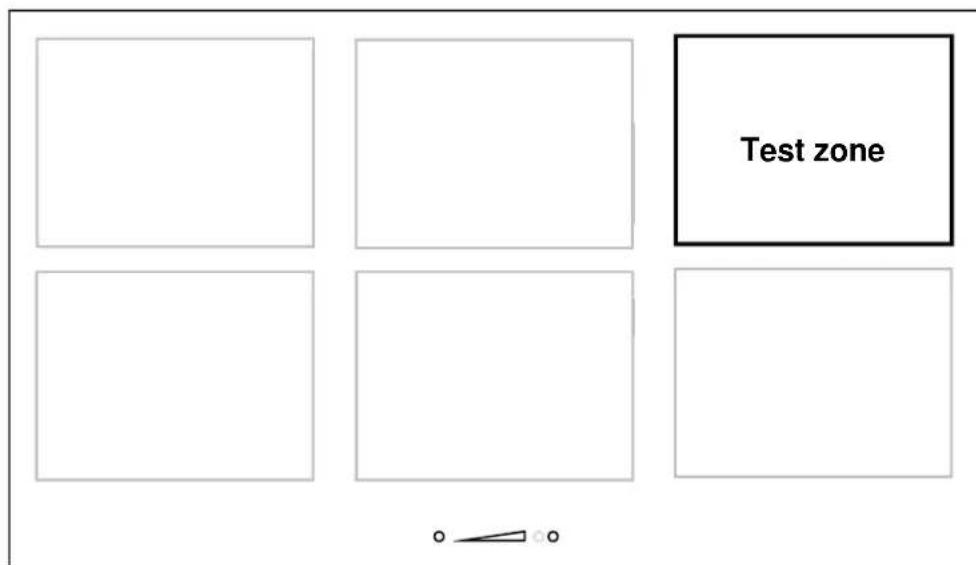
Each action has to be done in the 6 seconds after the previous one.
Put the cookware on test zone
Start the hob
Press on/off key [0]
In the 6 seconds after start
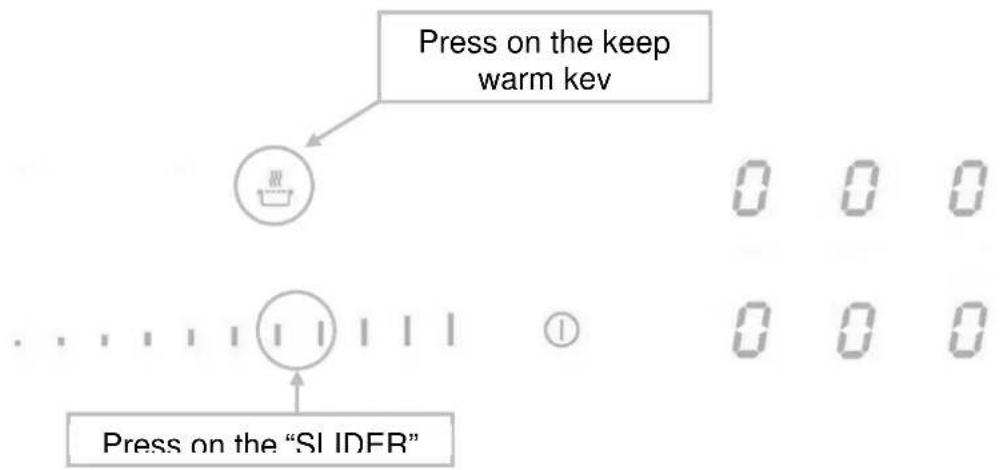
Activate the function
Press simultaneously on the keep warm key [ ] and on the "SLIDER".
[0], [t] are displayed.
[0] is fixed.
[t]is blinking.
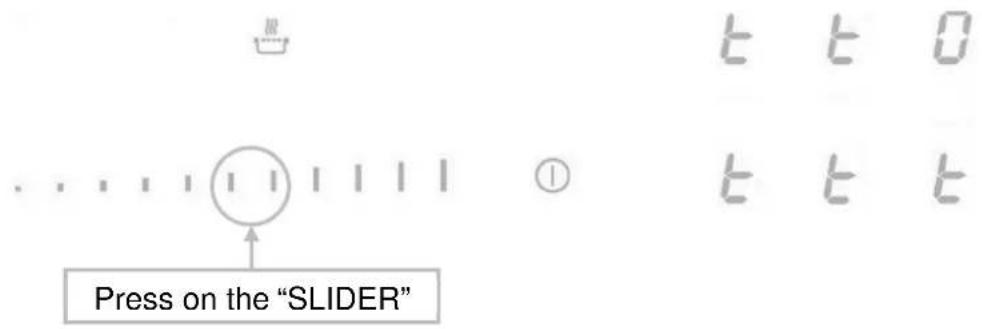
Start the test
Press on the "SLIDER".
[0] is moving.
[t] is blinking.
Test results
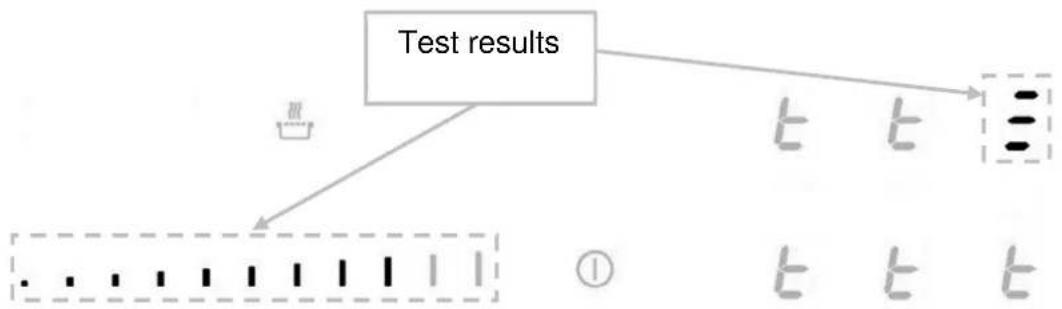
For example, the cookware speed level 7:
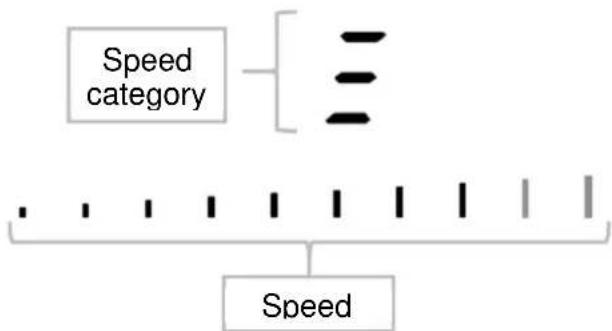
The cookware is classified in one of these 3 categories, with refined speed level displayed on the bar graph.
| Category symbol | Indication |
| - | Low speed performance, the cookware is not recommended for induction cooking. |
| - | Medium speed performance, the cookware is adapted for induction cooking. |
| - | High performance cookware for the best induction cooking experience. |
Important advises:
Some cookware could have such low efficiency that they are even not detected by the hob, in this case the symbol [] will be displayed.
The cookware should always be centered in the test zone, an improper centering may cause inaccurate results.
The results are displayed for 3 seconds, after this time the hob switches automatically in normal mode and can be used for cooking.
Note that the speed level is not the only important point assessing the quality of the cookware and to make sure that is perfectly adapted for induction please refers to the "Cooking advices" chapter for more details.
Pan quality
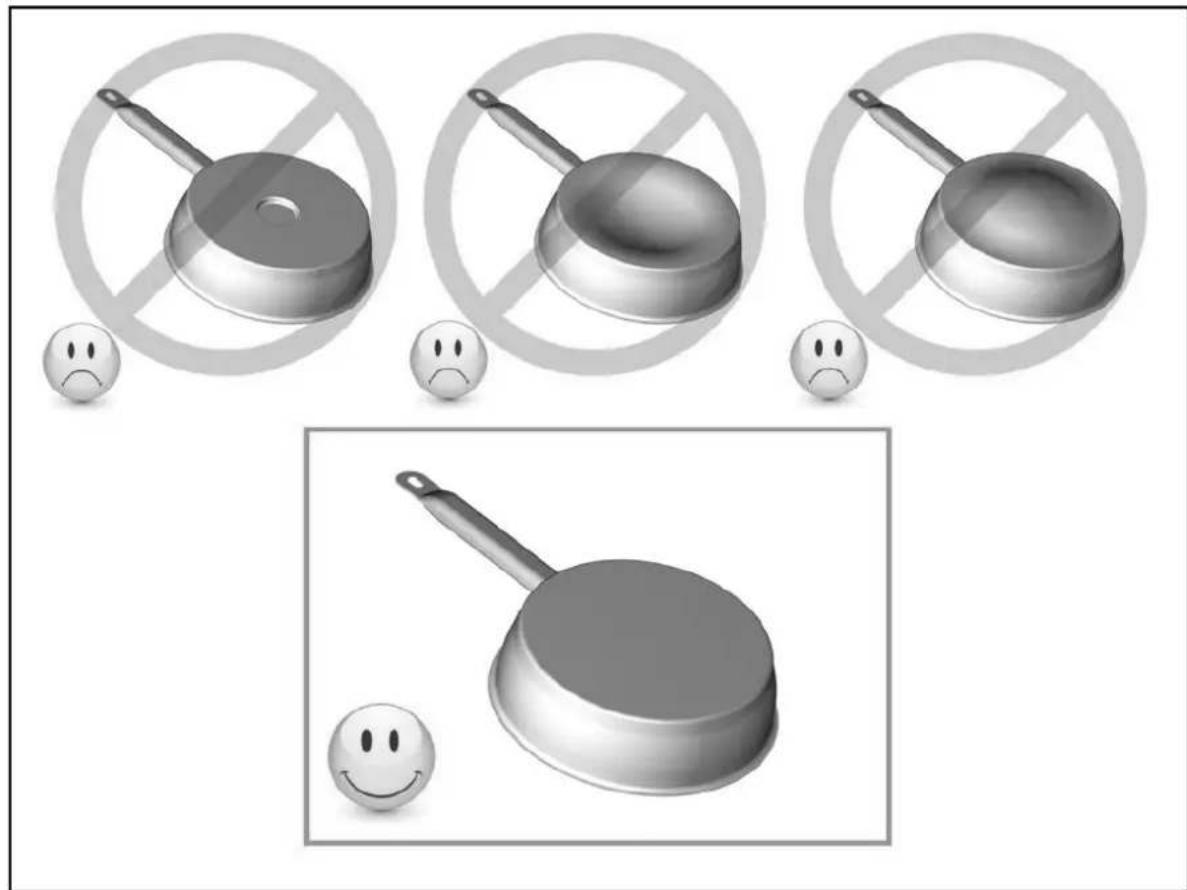
Adapted materials: steel, enamelled steel, cast iron, ferromagnetic stainless-steel, aluminium with ferromagnetic bottom.
Not adapted materials: aluminium and stainless-steel without ferromagnetic bottom, cupper, brass, glass, ceramic, porcelain.
The manufacturers specify if their products are compatible induction.
To check if pans are compatibles:
-
Put a little water in a pan placed on an induction heating zone set at level [ 9 ] . This water must heat in a few seconds.
-
A magnet stucks on the bottom of the pan.
Certain pans can make noise when they are placed on an induction cooking zone. This noise doesn't mean any failure on the appliance and doesn't influence the cooking operating.
The composition of the pan base can affect the evenness of the cooking results and power reception by the inductors.
Only use pots and pans with smooth bases. Rough bases will scratch the ceramic glass.
Where possible, use pans with vertically straight side. If a pan has angular sides, induction also acts on the side of the pan. The sides of the pan may discolour.
Pan dimension
The cooking zones are, until a certain limit, automatically adapted to the diameter of the pan. However the bottom of this pan must have a minimum of diameter according to the corresponding cooking zone.
To obtain the best efficiency of your hob, please place the pan well in the centre of the cooking zone.
Examples of cooking power setting
(the values below are indicative)
| 1 to 2 Melting | Reheating | Sauces, butter, chocolate, gelatine Dishes prepared beforehand |
| 2 to 3 Simmering | Defrosting | Rice, pudding, sugar syrup Dried vegetables, fish, frozen products |
| 3 to 4 | Steam | Vegetables, fish, meat |
| 4 to 5 Water Steamed | potatoes, soups, pasta, | fresh vegetables |
| 6 to 7 Medium cooking | Simmering | Meat, lever, eggs, sausages Goulash, roulade, tripe |
| 7 to 8 | Cooking | Potatoes, fritters, wafers |
| 9 Frying, roosting | Boiling water | Steaks, omelettes, fried dishes Water |
| P and | Frying, roosting Boiling water | scallops, steaks Boiling significant quantities of water |
MAINTENANCE AND CLEANING
Switch-off the appliance before cleaning.
Do not clean the hob if the glass is too hot because they are risk of burn.
- Remove light marks with a damp cloth with washing up liquid diluted in a little water. Then rinse with cold water and dry the surface thoroughly.
- Highly corrosive or abrasive detergents and cleaning equipment likely to cause scratches must be absolutely avoided.
- Do not ever use any steam-cleaner or pressure washer
- Do not use any object that may scratch the ceramic glass.
- Ensure that the pan is dry and clean. Ensure that there are no grains of dust on your ceramic hob or on the pan. Sliding rough saucepans will scratch the surface.
- Spillages of sugar, jam, jelly, etc. must be removed immediately. You will thus prevent the surface being damaged.
WHAT TO DO IN CASE OF A PROBLEM
The hob or the cooking zone doesn't start-up:
- The hob is badly connected on the electrical network.
The protection fuse cut-off. - The looking function is activated.
- The sensitive keys are covered of grease or water.
An object is put on a key.
The control panel displays [U]:
- There is no pan on the cooking zone.
- The pan is not compatible with induction.
- The bottom diameter of the pan is too small.
The control panel displays [E]:
- The electronic system is defective.
- Disconnect and replug the hob.
Call after sales
One or all cooking zone cut-off:
- The safety system functioned.
- You forgot to cut-off the cooking zone for a long time.
One or more sensitive keys are covered. - The pan is empty and its bottom overheated.
- The hob also has an automatic reduction of Booster level and breaking Automatic overheating
Continuous ventilation after cutting off the hob:
- This is not a failure, the fan continuous to protect the electronic device.
- The fan cooling stops automatically.
The automatic cooking system doesn't start-up:
- The cooking zone is still hot [H].
- The highest Booster level is set [9].
The control panel displays [U]:
Refer to the chapter "Keep warm".
The control panel displays [II]:
Refer to the chapter "Stop&Go"
The control panel displays [ ] or [ Er03 ] :
- An object or liquid covers the control keys. The symbol disappear as soon as the key is released or cleaned.
The control panel displays [E2]:
- The hob is overheated, let it cool and then turn it on again.
The control panel displays [E8]:
- The air inlet of the ventilator is obstructed, release it.
The control panel displays [U400]:
- The hob is not connected to the network. Check the connection and reconnect the hob.
The control panel displays [Er47]:
- The hob is not connected to the network. Check the connection and reconnect the hob.
If one of the symbols above persists, call the SAV.
ENVIRONMENT PRESERVATION
- The materials of packing are ecological and recyclable.
-
The electronic appliances are composed of recyclable, and sometimes harmful materials for the environment, but necessary to the good running and the safety of the appliance.
-
Don't throw your appliance with the household refuses
- Get in touch with the waste collection centre of your commune that is adapted to the recycling of the household appliances.
The installation comes under the exclusive responsibility of specialists.
The installer is held to respect the legislation and the standards enforce in his home country.
How to stick the gasket:
The gasket supplied with the hob avoids all infiltration of liquids in the cabinet. His installation has to be done carefully, in conformity of the following drawing.
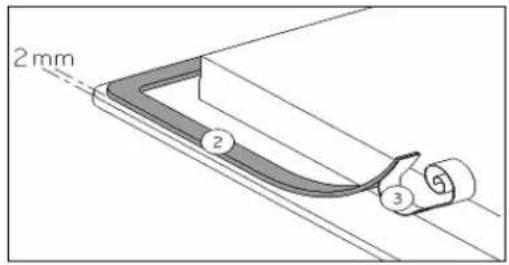
Stick the gasket (2) two millimeters from the external edge of the glass, after removing the protection sheet (3).
Fitting - installing:
The cut-out sizes are:
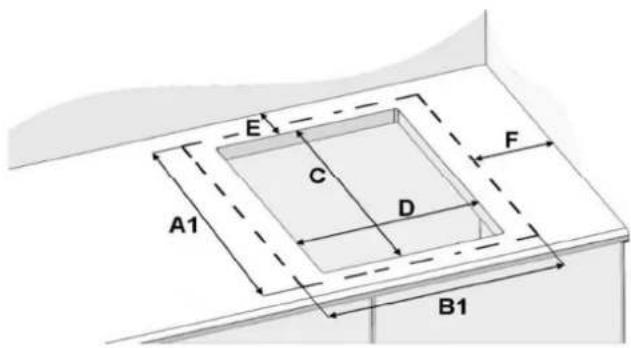
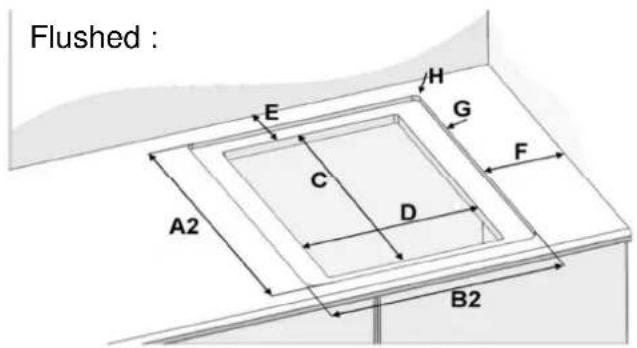
| Glass size | Cut-out size | Rear Side Radius | Cut size Deep | ||||||
| A1 | B1 | C D E F | H A2 | B2 G | |||||
| P906IM3G5NE | 520 | 880 | 490 | 750 | 50 | 40 | 8 | 526 | 886 |
- Ensure that there is a distance of 50mm between the hob and the wall or sides.
- The hobs are classified as "Y" class for heat protection. Ideally the hob should be installed with plenty of space on either side. There may be a wall at the rear and tall units or a wall at one side. On the other side, however, no unit or divider must stand higher than the hob.
- The piece of furniture or the support in which the hob is to be fitted, as well as the edges of furniture, the laminate coatings and the glue used to fix them, must be able to resist temperatures of up to 100^ .
- The mural rods of edge must be heat-resisting.
- Not to install the hob to the top of a not ventilated oven or a dishwasher.
- The supporting countertop must be able to support the weight of the induction cooktop which is approximately 20kg .
- To ensure the induction cooktop adheres correctly to the countertop, after having applied the gasket/silicone, place evenly distributed weights on the cooktop (pots filled with water may be used).
- To guarantee under the bottom of the hob casing a space of 20mm to ensure a good air circulation of the electronic device.
- If a drawer is placed under the work, avoid to put into this drawer flammable objects (for example: sprays) or not heat-resistant objects.
- Materials which are often used to make worktops expand on contact with water. To protect the cut-out edge, apply a coat of varnish or special sealant. Particular care must be given to applying the adhesive joint supplied with the hob to prevent any leakage into the supporting furniture. This gasket guaranties a correct seal when used in conjunction with smooth work top surfaces.
- The safety gap between the hob and the cooker hood placed above must respect the indications of the hood manufacturer. In case of absence of instructions respect a distance minimum of 760~mm .
- The connection cord should be subjected, after building, with no mechanical constraint, such for example of the fact of the drawer.
-
WARNING: Use only hob guards designed by the manufacturer of the cooking appliance or indicated by the manufacturer of the appliance in the instructions for use as suitable or hob guards incorporated in the appliance. The use of inappropriate guards can cause accidents.
-
The installation of this appliance and the connection to the electrical network should be entrusted only to an electrician perfectly to the fact of the normative regulations and which respects them scrupulously.
- Protection against the parts under tension must be ensured after the building-in.
- The data of connection necessary are on the stickers place on the hob casing near the connection box.
- The connection to the main must be made using an earthed plug or via an omnipolar circuit breaking device with a contact opening of at least 3mm .
- The electrical circuit must be separated from the network by adapted devices, for example: circuit breakers, fuses or contactors.
- If the appliance is not fitted with an accessible plug, disconnecting means must be incorporated in the fixed installation, in accordance with the installation regulations.
- The inlet hose must be positioned so that it does not touch any of the hot parts of the hob or oven.
Caution!
This appliance has only to be connected to a network 230V 50 / 60Hz
Connect always the earth wire.
Respect the connection diagram.
The connection box is located underneath at the back of the hob casing. To open the cover use a medium screwdriver. Place it in the slits and open the cover.
CONNECTION OF THE HOB:
| Mains Connection Supply | cord Supply cord | Circuit braker | |||
| 230 V~ 50/60 Hz | 1 phase +N 3 | x 4 mm2 | H 05 VV - F H 05 RR - F | 40 A* | |
| 400 V~ 50/60Hz | 2 phases + N | 4 x 2,5 mm2 | H 05 VV - F H 05 RR - F | 25 A* | |
| 400 V~ 50/60Hz | 3 phases + N 5 | x 1,5 mm2 | H 05 VV - F H 05 RR - F | 16 A* | |
- calculated with the simultaneous factor following the standard EN 60 335-2-6
For the various kinds of connection, use the brass bridges which are in the box next the terminal Monophase 230V 1P + N
Put the 1^st bridge between terminal 1, 2 and 3, the 2^nd between 4 and 5.
Attach the earth to the terminal "earth", the neutral N to terminal 4 or 5, the Phase L to one of the terminals 1, 2 or 3.
Biphas 400V\~2P+N
Put the 1^st bridge between terminal 1 and 2, the 2^nd between 4 and 5.
Attach the earth to the terminal "earth", the neutral N to terminal 4 or 5, the Phase L1 to the terminals 1 or 2 and the Phase L2 to the terminal 3.
Triphase 400V 3P + N
Put a bridge between terminal 4 and 5.
Attach the earth to the terminal "earth", the neutral N to terminal 4 or 5, the Phase L1 to the terminals 1 and the Phase L2 to the terminal 2 and the Phase L3 to the terminal 3.
Caution! Be careful that the cables are correctly engaged and tightened.
We cannot be held responsible for any incident resulting from incorrect connection or which could arise from the use of an appliance which has not been earthed or has been equipped with a faulty earth connection.
INDICE
SICUREZZA 25
PRECAZIONI PRIMA DEL PRIMO UTILIZZO 25
ISTRUZIONI DI SICUREZZA 26
PRECAUZIONI ONDE NON DANNEGGIARE L'APPARECCHIO 27
PRECAUZIONI IN CASO DI MALFUNZIONAMENTO DELL'APPARECCHIO 28
ALTRE PRECAUZIONI 28
DESCRIZIONE DELL'APPARECCHIO 29
DATI TECHNICI 29
PANNELLO DI CONTROLLO 29
USO DELL'APPARECCHIO 30
- DESCRIPTION OF THE APPLIANCE 7
- USE OF THE APPLIANCE 8
- STARTING-UP AND APPLIANCE MANAGEMENT 8
- COOKING ADVICES 17
- MAINTENANCE AND CLEANING 18
- WHAT TO DO IN CASE OF A PROBLEM 18
- ENVIRONMENT PRESERVATION 19
- INSTALLATION INSTRUCTIONS 20
- ELECTRICAL CONNECTION 22
- Precautions before using
- Using the appliance
- Precautions not to damage the appliance
- Precautions in case of appliance failure
- Other protections
- Display
- Ventilation
- STARTING-UP AND APPLIANCE MANAGEMENT
- Before the first use
- Induction principle
- Sensitive touch
- Power selection zone "SLIDER" and timer setting zone
- Starting-up
- Pan detection
- Residual heat indication
- Booster and double booster function
- Action
- Control panel
- Timer
- Automatic cooking
- - Start-up:
- - Switching off the automatic cooking:
- Stop&Go function
- - Start up/stop the pause function:
- Recall Function
- "Keep warm" Function
- Bridge or Automatic Bridge Function
- Control panel locking
- "Chef" function
- Grill function
- Pot Speed Test function
- Start the hob
- In the 6 seconds after start
- Activate the function
- Start the test
- Test results
- Important advises:
- Pan quality
- Pan dimension
- Examples of cooking power setting
- MAINTENANCE AND CLEANING
- Switch-off the appliance before cleaning.
- WHAT TO DO IN CASE OF A PROBLEM
- The hob or the cooking zone doesn't start-up:
- The control panel displays [U]:
- The control panel displays [E]:
- One or all cooking zone cut-off:
- Continuous ventilation after cutting off the hob:
- The automatic cooking system doesn't start-up:
- The control panel displays [II]:
- The control panel displays [ ] or [ Er03 ] :
- The control panel displays [E2]:
- The control panel displays [E8]:
- The control panel displays [U400]:
- The control panel displays [Er47]:
- If one of the symbols above persists, call the SAV.
- ENVIRONMENT PRESERVATION
- How to stick the gasket:
- Fitting - installing:
- Caution!
- CONNECTION OF THE HOB:
- INDICE
- SICUREZZA 25
- DESCRIZIONE DELL'APPARECCHIO 29
- USO DELL'APPARECCHIO 30
Brand : BERTAZZONI
Model : P906IM3G5NE
Category : Cooker