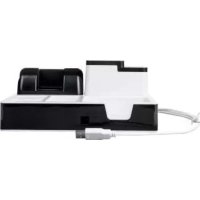
SDO 3 A1 - Desk organizer SILVERCREST - Free user manual and instructions
Find the device manual for free SDO 3 A1 SILVERCREST in PDF.


| Product type | Desk organizer with USB hub |
| Brand | SilverCrest |
| Model | SDO 3 A1 |
| Dimensions (W × D × H) | Approx. 21.6 × 21 × 9.52 cm |
| Weight | Approx. 505 g |
| Material | Plastic |
| Power supply | Via USB 2.0 port (5 V, 500 mA) or USB power adapter (5 V, 2 A) |
| USB output ports | 3 USB Type-A ports (USB 2.0) |
| USB input port | 1 USB Type-A port (integrated cable 80 cm) |
| Transfer rate | Up to 480 Mbps |
| Required systems | Windows 10/8/7/Vista, Mac OS 10.8 or higher |
| Main functions | USB 2.0 hub, smartphone holder, tablet holder, pen holder, storage compartments, cable routing |
| Included holders | 2 charging plug holders |
| Operating temperature | +5 to +35 °C |
| Storage temperature | 0 to +45 °C |
| Permissible humidity | 10% to 70% (non-condensing) |
| Maintenance and cleaning | Clean with a soft, dry cloth. Do not use abrasive cleaners or solvents. |
| Safety | Do not open the product. Do not expose to moisture, water splashes, or heat sources. Disconnect in case of malfunction. |
| Warranty | 3 years |
| Package contents | 1 desk organizer, 2 charging plug holders, 1 instruction manual |
| Intended use | Private use only. Do not use in tropical areas. |
Frequently Asked Questions - SDO 3 A1 SILVERCREST
User questions about SDO 3 A1 SILVERCREST
0 question about this device. Answer the ones you know or ask your own.
Ask a new question about this device
Download the instructions for your Desk organizer in PDF format for free! Find your manual SDO 3 A1 - SILVERCREST and take your electronic device back in hand. On this page are published all the documents necessary for the use of your device. SDO 3 A1 by SILVERCREST.
USER MANUAL SDO 3 A1 SILVERCREST
DESKORGANIZER / DESK ORGANISER / ORGANISEUR DE BUREAU SDO 3 A1
DE AT CH
DESKORGANIZER
Operation and safety notes
FR BE
ORGANISEUR DE BUREAU
GB/IE Operation and safety notes Page 20
Warnings and symbols used . Page 21
Introduction 22
Intended use. Page 22
Trademark notice. Page 22
Scope of delivery. 23
Safety notices. Page 23
Parts description. Page 26
Technical data. Page 27
Before use . Page 27
Operation. Page 28
Storage during non-use. Page 29
Cleaning and care . Page 30
Troubleshooting. Page 30
Disposal. Page 31
Warranty 32
| Warnings and symbols used The following warnings are used in this user manual and on the packaging: | |
| DANGER! This symbol in combination with the signal word "Danger" marks a high-risk hazard that if not prevented could result in death or serious injury. | |
| WARNING! This symbol in combination with the signal word "Warning" marks a medium-risk hazard that if not prevented could result in death or serious injury. | |
| CAUTION! This symbol in combination with the signal word "Caution" marks a low-risk hazard that if not prevented could result in minor or moderate injury. | |
| ATTENTION! This symbol with the signal word "Attention" indicates a possible property damage. | |
| NOTE: This symbol in combination with "Note" provides additional useful information. | |
| --- | Direct current |
| This symbol means that the operating instructions must be observed when using the product. | |
DESK ORGANISER
Introduction
We congratulate you on the purchase of your new product. You have chosen a high quality product. The instructions for use are part of the product. They contain important information concerning safety, use and disposal. Before using the product, please familiarise yourself with all of the safety information and instructions for use. Only use the product as described and for the specified applications. If you pass the product on to anyone else, please ensure that you also pass on all the documentation with it.
Intended use
This desk organiser (hereinafter called "product") is an Information Technology device. This product may only be used privately and not for industrial or commercial purposes. Furthermore, this product may not be used in tropical climates. Any other use is considered improper. Any claims resulting from improper use or due to unauthorised modification of the product will be considered un-warranted. Any such use is at your own risk.
Trademark notice
USBa registered trademark of USB Implementers Forum, Inc.
The SilverCrest trademark and trade name is the property of their respective owners.
Any other names and products may be trademarks or registered trademarks of their respective owners.
Scope of delivery
1 Desk organiser
2 Holders for charger plugs
1 Instructions for use

Safety notices
BEFORE USING THE PRODUCT, PLEASE FAMILIARIZE YOURSELF WITH ALL OF THE SAFETY INSTRUCTIONS AND INSTRUCTIONS FOR USE! WHEN PASSING THIS PRODUCT ON TO OTHERS, PLEASE ALSO INCLUDE ALL THE DOCUMENTS!
WARNING! DANGER TO LIFE AND RISK OF ACCIDENT FOR INFANTS AND CHILDREN!
DANGER! Risk of suffocation!
Never leave children unsupervised with the packaging material. The packaging material poses a suffocation hazard. Children frequently underestimate the dangers. The packaging material is not a toy.
This product may be used by children age 8 years and up, as well as by persons with reduced physical, sensory or mental capacities or lacking experience and / or knowledge, so long as they are supervised or instructed in the safe use of the product and understand the associated risks. Do not allow children to play with the product. Cleaning and user maintenance should not be performed by children without supervision. The product is not a toy.
ATTENTION!
Risk of property damage
This product does not contain any parts which can be serviced by the user.
- Keep the product away from moisture, dripping and splash water!
- Do not place burning candles or other open fire on or next to the product.
Check the product before every use! Discontinue use if any damage to the product or the charging cable is detected!
If you notice smoke or unusual noise or odour, unplug product immediately and remove the USB cable.
Sudden temperature changes may cause condensation inside the product. In this case, allow the product to acclimate for some time before using it again to prevent short circuits!
Do not operate the product near heat sources, e.g. radiators or other devices emitting heat!
- Do not throw the product into fire and do not expose to high temperatures.
DANGER!
Do not try to open the product! It has no internal parts requiring maintenance.
It is necessary to repair the product if they have been damaged in any way, for example, if the housing is damaged, if liquid or objects have penetrated the product or if the product has been exposed to rain or moisture.
Repair work is also required if the product is not working properly or has been dropped. If smoke is produced, or there are any unusual sounds or smells, disconnect the product immediately. In such cases, the product should not be used until they have been inspected by authorised service personnel. Only have the product repaired by qualified personnel. Never open the housing of the product.
WARNING! Ensure that:
No direct heat sources (e.g. heating) can affect the product.
The product is not exposed to bright artificial light.
Any contact with splashed and dripping water and corrosive liquids is avoided and the product are not operated in the vicinity of water. In particular, the product should never be submerged in liquid; do not place any vessels filled with liquid, for example, vases or drinks, on or near the product.
The product are not used in the immediate vicinity of magnetic fields (e.g. speakers).
No fire sources (e.g. burning candles) are placed on or near the product.
No foreign objects penetrate the product.
The product are never subjected to extreme temperature fluctuations as this could result in condensation and electrical short circuits. If the product were subjected to extreme temperature fluctuations, however, wait (approx. 2 hours) until the product have reached ambient temperature before use.
The product are never subjected to excessive shocks and vibrations.
When using an optional USB power supply, its operating instructions are observed.
Connected cables are always laid in such a manner that nobody can step on them or trip over them. There is a risk of injury.
No objects are placed on a connected cable and cables are not connected over sharp edges because they could be damaged otherwise. The functionality of sensitive electronics.
Parts description
Please refer to the fold out page.
1 Pen holder
2 Smartphone holder
3 Tablet holder
4 Cable duct (right) for charging and data cable
5 USB output ports (3x), type A
Storage compartments
7 Holder for charger plug (2x)
8 USB input cable (type A)
9 Cable duct (rear) for charging and data cable
10 Instructions for use
Technical data
USB specification: USB 2.0
System requirement: Windows 10 / 8 / 7 / Vista /
Mac OS 10.8 or higher
Data transfer rate: up to 480 mbps
Dimensions: approx. 21.6 × 21 × 9.52 cm
Weight: approx. 505 g
Operating temperature: +5 to +35 °C
Storage temperature: 0 to +45^ C
Humidity (no condensation): 10 to 70%
USB IN cable length: approx. 80 cm
Power source from PC USB 2.0 port
USB input: 5 V
= 500mA
USB output: 5 V
- -, max. 400 mA
Power source from USB adaptor (for charging only)
USB input: 5 V
---,2A
USB output: 5 V
max.1.8A
The specification and design may be changed without notification.
NOTE: Charging from USB-A output port may NOT work for some devices. Please check the manufacturer's requirement of the devices you connect.
Before use
NOTE: All parts have to be unpacked and the packaging material has to be removed completely. Before use, verify the package contents are complete and undamaged!
Operation
Connect with PC
- Switch your computer ON and wait until the operating system (OS) has booted up.
Connect the USB input cable to a free USB port on your computer. The required drivers are installed automatically upon connection.
You will now be able to connect USB devices to the USB output ports 5 for access to USB 2.0 connections with delivery speeds of up to 480 mbps.
Connecting a smartphone with charging and data cable
Feed the charging and data cable (not included) of your smartphone through the cable duct (rear) 9 of the product from below (fig. A), so that it protrudes upwards out of the smartphone holder 2 (fig. B).
Place the smartphone charging and data cable in the holder for the charger plug (fig. C). Ensure that the holder for the charger plug is holding firmly with the cable plug (fig. D).
Place the smartphone charging and data cable including the holder for the charger plug 7 into the smartphone holder 2 (fig. E).
You can now place your smartphone into the smartphone holder 2 and connect with the plug of the charging and data cable (fig. F). Connect the other end of the charging and data cable to the USB output ports 5 for charging / data transfer.
① NOTES:
In order to achieve maximum performance of the product, your computer system, peripherals, and cables must all support USB 2.0.
You can connect the product to PC / USB adaptor (see "Technical data").
ATTENTION!
Before you disconnect a USB device from the product, ensure that the data transfer has completed. Always disconnect connected USB devices via your operating system's eject function before physically disconnecting the USB device from the product or the product (with connected USB devices) from your computer. Incorrect disconnection could result in data loss or damage to the USB device.
Place the product on a firm, flat and level surface. We suggest to place a mat under the product.
For some USB peripherals that need to install a driver before use, you will receive the driver with the purchase of the appliance or from the appliance manufacturer.
There may be data transmission problems if the product is connected to an external hard drive. We suggest that you connect your external hard drive directly to a computer instead of the product.
Storage during non-use
Store the product in a dry dust-free location, protected from direct sunlight.
Cleaning and care
Unplug the product and remove all plugs before cleaning!
No acid, chafing or solvent cleaning agents should be used or the product can be damaged.
Clean the outside of the product using a soft, dry cloth!
At persistent soiling, a mild cleaning agent can be used.
Only use a clean, dry cloth for cleaning the product and never use any corrosive liquids. Use a slightly moistened cloth and a mild cleaning agent to remove stubborn dirt.
Troubleshooting
What should I do if USB devices are not recognized by the operating system of my computer?
Check the USB input cable connection between the power source and the product. Both ends of the USB cable must be firmly connected. Alternatively, try another power source.
Check the USB cable (not included) connection between the USB devices and the product. Make sure the USB device's charging plug is working properly.
Install the required driver for the USB device. This is available from the manufacturer of the USB device.
What should I do if the USB device cannot transfer data with my computer?
Make sure the USB cable (not included) has data transfer capability.
Disposal
The packaging is made entirely of recyclable materials, which you may dispose of at local recycling facilities.
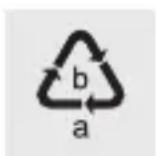
Observe the marking of the packaging materials for waste separation, which are marked with abbreviations (a) and numbers (b) with following meaning: 1 - 7: plastics / 20 - 22: paper and fibreboard / 80 - 98: composite materials.

The product and packaging materials are recyclable, dispose of it separately for better waste treatment. The Triman logo is valid in France only.
Contact your local refuse disposal authority for more details of how to dispose of your worn-out product.
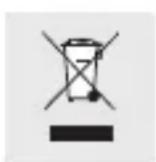
To help protect the environment, please dispose of the product properly when it has reached the end of its useful life and not in the household waste. Information on collection points and their opening hours can be obtained from your local authority.
Warranty
The product has been manufactured to strict quality guidelines and meticulously examined before delivery. In the event of product defects you have legal rights against the retailer of this product. Your legal rights are not limited in any way by our warranty detailed below.
The warranty for this product is 3 years from the date of purchase. Should this product show any fault in materials or manufacture within 3 years from the date of purchase, we will repair or replace it - at our choice - free of charge to you.
The warranty period begins on the date of purchase. Please keep the original sales receipt in a safe location. This document is required as your proof of purchase. This warranty becomes void if the product has been damaged, or used or maintained improperly.
The warranty applies to defects in material or manufacture. This warranty does not cover product parts subject to normal wear, thus possibly considered consumables (e.g. batteries) or for damage to fragile parts, e.g. switches, rechargeable batteries or glass parts.
Warranty claim procedure
To ensure quick processing of your case, please observe the following instructions:
Please have the till receipt and the item number (e.g. IAN 123456_7890) available as proof of purchase.
You will find the item number on the type plate, an engraving on the front page of the instructions (bottom left), or as a sticker on the rear or bottom of the appliance.
If functional or other defects occur, please contact the service department listed either by telephone or by e-mail.
You can return a defective product to us free of charge to the service address that will be provided to you. Ensure that you enclose the proof of purchase (till receipt) and information about what the defect is and when it occurred.
Service

Service Great Britain
Tel.: 0800 404 7657
E-Mail: owim@lidl.co.uk

Service Ireland
Tel.: 1890 930 034
(0,08 EUR/Min., (peak))
(0,06 EUR/Min., (off peak))
E-Mail: owim@lidl.ie

WAARSCHUWING! Let erop dat:
- DESKORGANIZER / DESK ORGANISER / ORGANISEUR DE BUREAU SDO 3 A1
- DESKORGANIZER
- ORGANISEUR DE BUREAU
- Warnings and symbols used . Page 21
- Introduction 22
- Safety notices. Page 23
- Parts description. Page 26
- Technical data. Page 27
- Before use . Page 27
- Operation. Page 28
- Storage during non-use. Page 29
- Cleaning and care . Page 30
- Troubleshooting. Page 30
- Disposal. Page 31
- Warranty 32
- DESK ORGANISER
- Introduction
- Intended use
- Trademark notice
- Scope of delivery
- Safety notices
- WARNING! DANGER TO LIFE AND RISK OF ACCIDENT FOR INFANTS AND CHILDREN!
- DANGER! Risk of suffocation!
- ATTENTION!
- Risk of property damage
- DANGER!
- WARNING! Ensure that:
- Parts description
- Technical data
- Power source from PC USB 2.0 port
- Power source from USB adaptor (for charging only)
- Before use
- Operation
- Connect with PC
- Connecting a smartphone with charging and data cable
- ① NOTES:
- Storage during non-use
- Cleaning and care
- Troubleshooting
- What should I do if USB devices are not recognized by the operating system of my computer?
- What should I do if the USB device cannot transfer data with my computer?
- Disposal
- Warranty
- Warranty claim procedure
- Service
- Service Great Britain
- Service Ireland
- WAARSCHUWING! Let erop dat:
Brand : SILVERCREST
Model : SDO 3 A1
Category : Desk organizer