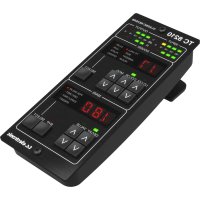
TC8210DT - Professional audio equipment TC ELECTRONIC - Free user manual and instructions
Find the device manual for free TC8210DT TC ELECTRONIC in PDF.


| Brand | TC Electronic |
| Model | TC8210DT |
| Category | Professional audio equipment |
| Product type | Classic reverb with native plug-in and desktop controller |
| Controller power supply | USB bus-powered (via included micro-USB cable) |
| Supported plug-in formats | VST, AU, AAX |
| License and activation | NATIVE version: PACE iLok license (iLok account required); DT version: connected desktop controller, with iLok License Manager installed |
| Free trial period | 14 days, full functionality, no physical iLok key |
| Main functions | Classic TC8210 reverb, control from plug-in interface or physical controller, real-time adjustments |
| Maintenance and cleaning | Clean with a dry cloth; do not use liquids |
| Safety | Follow usage instructions: do not expose to water, do not block ventilation, disconnect during thunderstorms, etc. |
| Operating environment | Tropical or moderate climate, maximum temperature 45°C |
| Software installation | Download the combined installer for NATIVE and DT Desktop Controller from the TC Electronic website |
| DAW compatibility | Works with any DAW supporting VST/AU/AAX formats |
| Warranty | Limited warranty, see community.musictribe.com for terms |
Frequently Asked Questions - TC8210DT TC ELECTRONIC
User questions about TC8210DT TC ELECTRONIC
0 question about this device. Answer the ones you know or ask your own.
Ask a new question about this device
Download the instructions for your Professional audio equipment in PDF format for free! Find your manual TC8210DT - TC ELECTRONIC and take your electronic device back in hand. On this page are published all the documents necessary for the use of your device. TC8210DT by TC ELECTRONIC.
USER MANUAL TC8210DT TC ELECTRONIC
Classic Mixing Reverb Plug-in with Dedicated Hardware Controller and Signature Presets

TC ICON
tc electronic

Terminals marked with this symbol carry electrical current of sufficient magnitude to constitute risk of electric shock. Use only high-quality professional speaker cables with 14 TS or twist-locking plugs pre-installed. All other installation or modification should be performed only by qualified personnel.
This symbol, wherever it appears, alerts you to the presence of uninsulated dangerous voltage inside the enclosure - voltage that may be sufficient to constitute a risk of shock.
This symbol, wherever it appears, alerts you to important operating and maintenance instructions in the accompanying literature. Please read the manual.
Caution To reduce the risk of electric shock, do not remove the top cover (or the rear section). No user serviceable parts inside. Refer servicing to qualified personnel.
Caution To reduce the risk of fire or electric shock, do not expose this appliance to rain and moisture. The apparatus shall not be exposed to dripping or splashing liquids and no objects filled with liquids, such as vases, shall be placed on the apparatus.
Caution These service instructions are for use by qualified service personnel only. To reduce the risk of electric shock do not
perform any servicing other than that contained in the operation instructions. Repairs have to be performed by qualified service personnel.
- Read these instructions.
- Keep these instructions.
- Heed all warnings.
- Follow all instructions.
- Do not use this apparatus near water.
- Clean only with dry cloth.
- Do not block any ventilation openings. Install in accordance with the manufacturer's instructions.
- Do not install near any heat sources such as radiators, heat registers, stoves, or other apparatus (including amplifiers) that produce heat.
- Do not defeat the safety purpose of the polarized or grounding-type plug. A polarized plug has two blades with one wider than the other. A grounding-type plug has two blades and a third grounding prong. The wide blade or the third prong are provided for your safety. If the provided plug does not fit into your outlet, consult an electrician for replacement of the obsolete outlet.
- Protect the power cord from being walked on or pinched particularly at plugs, convenience receptacles, and the point where they exit from the apparatus.
- Use only attachments/accessories specified by the manufacturer.

- Use only with the cart, stand, tripod, bracket, or table specified by the manufacturer, or sold with the apparatus. When a
cart is used, use caution when moving the cart/apparatus combination to avoid injury from tip-over.
-
Unplug this apparatus during lightning storms or when unused for long periods of time.
-
Refer all servicing to qualified service personnel. Servicing is required when the apparatus has been damaged in any way, such as power supply cord or plug is damaged, liquid has been spilled or objects have fallen into the apparatus, the apparatus has been exposed to rain or moisture, does not operate normally, or has been dropped.
- The apparatus shall be connected to a MAINS socket outlet with a protective earthing connection.
- Where the MAINS plug or an appliance coupler is used as the disconnect device, the disconnect device shall remain readily operable.

- Correct disposal of this product: This symbol indicates that this product must not be disposed of with household waste, according to the
WEEE Directive (2012/19/EU) and your national law. This product should be taken to a collection center licensed for the recycling of waste electrical and electronic equipment (EEE). The mishandling of this type of waste could have a possible negative impact on the environment and human health due to potentially hazardous substances that are generally associated with EEE. At the same time, your cooperation in the correct disposal of this product will contribute to the efficient use of natural resources. For more information about where you can take your waste equipment for recycling, please contact your local city office, or your household waste collection service.
- Do not install in a confined space, such as a book case or similar unit.
-
Do not place naked flame sources, such as lighted candles, on the apparatus.
-
Please keep the environmental aspects of battery disposal in mind. Batteries must be disposed-of at a battery collection point.
- This apparatus may be used in tropical and moderate climates up to 45^ .
LEGAL DISCLAIMER
Music Tribe accepts no liability for any loss which may be suffered by any person who relies either wholly or in part upon any description, photograph, or statement contained herein. Technical specifications, appearances and other information are subject to change without notice. All trademarks are the property of their respective owners. Midas, Klark Teknik, Lab Gruppen, Lake, Tannoy, Turbosound, TC Electronic, TC Helicon, Behringer, Bugera, Aston Microphones, Aston Microphones and Coolaudio are trademarks or registered trademarks of Music Tribe Global Brands Ltd. © Music Tribe Global Brands Ltd. 2021 All rights reserved.
LIMITED WARRANTY
For the applicable warranty terms and conditions and additional information regarding Music Tribe's Limited Warranty, please see complete details online at community.musictribe.com/pages/support#warranty.
BESCHRANKTE GARANTIE
Thank you for purchasing the TC8210 classic reverb. Read through this Quick Start Guide to get things set up, and don't forget to download the full manual from tcelectronic.com for all the in-depth explanations.
Software Download and Installation
The combined TC8210 plug-in installer for both the NATIVE and DT Desktop Controller products can be downloaded from the following page:
www.tcelectronic.com/TC8210-dt/support/
The TC8210 plug-in requires either an active PACE iLok license (when buying the NATIVE version) or a connected Desktop Controller (when you have purchased the DT version). All parameters are available in the plug-in.
Save the installer file (.pkg or .msi file) in a convenient location on your hard drive. Double click the installer and follow the instructions to install the plug-in.
Activate your TC8210 iLok license
(when you have purchased the NATIVE version)

Step 1: Install iLok
The first step is to create an iLok user account at www.iLok.com and install the PACE iLok License Manager on your computer if it's your first time using iLok.
Step 2: Activation
In the received mail (when buying the NATIVE version) you will find your personal Activation Code. To activate your software, please use the Redeem an Activation Code feature in the PACE iLok License Manager.
Get a Free Demo License
Make use of this hassle-free offer to try out our plug-ins before you buy.
14-Day Trial Period
Fully Functional
- No Feature Limitations
No Physical iLok Key Needed
Step 1: Install iLok
The first step is to create a free iLok user account at www.iLok.com and install the PACE iLok License Manager on your computer if it's your first time using iLok.
Step 2: Get your free license
Go to http://www.tcelectronic.com/brand/tcelectronic/free-trial-TC8210-native and enter your iLok User ID.
Step 3: Activation
Activate your software in the PACE iLok License Manager.
Connecting the TC8210-DT Desktop Controller (when you have purchased the DT Desktop Controller version)
Getting the Desktop Controller up and running couldn't get any easier. Plug the included USB cable into the unit's rear micro-USB port, and connect the other end to a free USB port on your computer. The Desktop Controller is bus powered so no other power cables are necessary, and no additional drivers need to be manually installed.
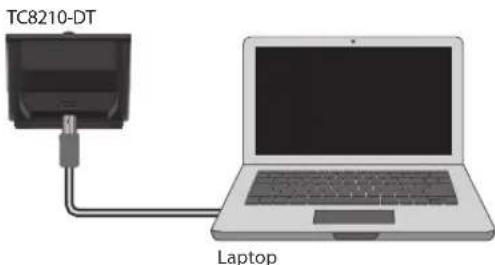
The Desktop Controller will light up upon successful connection. You can now apply the plug-in to a channel in your DAW to begin using the effect. This process may vary slightly depending on your software, but generally should require these steps:
- Select a channel or bus in your DAW to which you would like to add the effect Access the mixer page where you should see a section dedicated to effect slots.
- Open the menu where you can select from a list of effect types, which probably includes many stock plugins that are included with the DAW. There should be submenu to view general VST/All/AAX options.
- The plug-in will likely be found in a dedicated TC Electronic folder. Select the TC8210 and it will now be added to the signal chain.
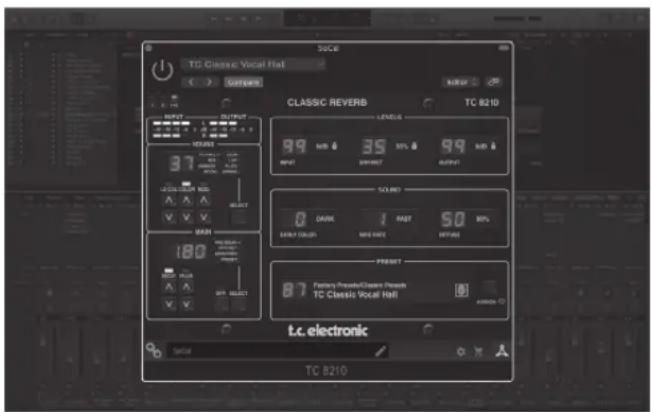
Double click on the effect slot that contains the TC8210 to view the plug-in UI. There should be a green link icon at the bottom, and text that indicates successful connection between the plug-in and the Desktop Controller.
Note: The iLok License Manager needs to be installed on your computer also if you have purchased the DT Desktop Controller version. In this case you don't need to create an iLok account or activate any license.
Quick Start Guide
Operating the TC8210
After you have installed the plug-in, and either activated the iLok license or connected the TC8210-DT Desktop Controller via USB, you can begin inserting the plug-in to your tracks.
Adjustments to the effect are done in two ways. Either by using the plug-in user interface or via the physical Desktop Controller.
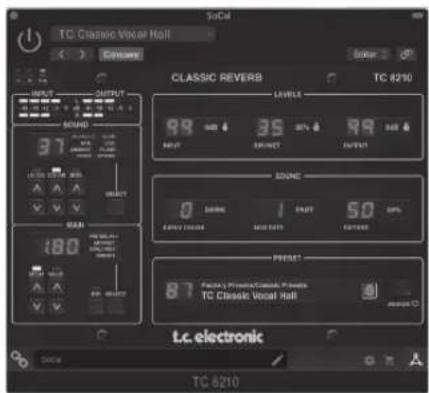
Download the full user manual from www.tcelectronic.com/tc8210-dt/support/ to learn about all the details of both the plug-in and the Desktop Controller functionality.
24TC821025Quick Start Guide
www.tcelectronic.com/TC8210-dt/support/
www.tcelectronic.com/TC8210-dt/support/
www.tcelectronic.com/TC8210-dt/support/
www.tcelectronic.com/TC8210-dt/support/
www.tcelectronic.com/TC8210-dt/support/
www.tcelectronic.com/TC8210-dt/support/
Stap 1: installer iLok
Stap 1: installer iLok
www.tcelectronic.com/TC8210-dt/support/
www.tcelectronic.com/TC8210-dt/support/
Other important information
EN Important information
ES Aspectos Importantes
FR Informations importantes
- Register online. Please register your new Music Tribe equipment right after you purchase it by visiting musictribe.com. Registering your purchase using our simple online form helps us to process your repair claims more quickly and efficiently. Also, read the terms and conditions of our warranty, if applicable.
- Malfunction. Should your Music Tribe Authorized Reseller not be located in your vicinity, you may contact the Music Tribe Authorized Fulfiller for your country listed under "Support" at musicro tribe.com. Should your country not be listed, please check if your problem can be dealt with by our "Online Support" which may also be found under "Support" at musicro tribe.com. Alternatively, please submit an online warranty claim at musicro tribe.com BEFORE returning the product.
-
Power Connections. Before plugging the unit into a power socket, please make sure you are using the correct mains voltage for your particular model. Faulty fuses must be replaced with fuses of the same type and rating without exception.
-
Registro online.
Le recommendamos que registre su nuevo aparato Music Tribe juste après de su compra accediendo a la頁ina web muscriche.com.
El registro de su compra atraves de我们的 sencillo sistemas online nos ayudara a resolver在哪ier quialci incidencia que se presente a la mayor brevedido possible.
Además,aproveche para leer los关键时刻 y conditiones de notrestra garantía,si es aplicable en su caso. -
Averias. En el caso de que no exista un distribuidor Music Tribe en las immediaciones, puisenone en contacto con el distribuidor Music Tribe de su pais, que encontrará bajo del apartado "Support" de unsere páginas web musicitride.com. En caso de que su pais no aparezca en este lista, acceda a la section "Online Support" (que también encontrará bajo del apartado "Support" de这是我们 páginas web) y compruebe si su problema aparece descripto y SOLUTIONADO ali. De forma alternatively, enviennent a工程技术 de la頁a interneta web una solicitation online de soporte en periodo de garantía ANTES de devolvernos el aparato.
-
Conexiones de corriente. Antes de enchufar este aparato a una calidad de corriente, aseguirse de que dicha peninsula sea del voltaje adequado para su modulo concreto. En caso de que deba sustitui un fusible quemado, deber necessities por other de identicas espécifaciones, sin exception.
Other important information
Responsible Party Name: Music Tribe Commercial NV Inc.
Address: 122 E. 42nd St.1,
8th Floor NY, NY 10168
United States
Email Address: legal@musictribe.com
TC8210-DT
This equipment has been tested and found to comply with the limits for a Class B digital device, pursuant to part 15 of the FCC Rules. These limits are designed to provide reasonable protection against harmful interference in a residential installation. This equipment generates, uses and can radiate radio frequency energy and, if not installed and used in accordance with the instructions, may cause harmful interference to radio communications. However, there is no guarantee that interference will not occur in a particular installation. If this equipment does cause harmful interference to radio or television reception, which can be determined by turning the equipment off and on, the user is encouraged to try to correct the interference by one or more of the following measures:
Reorient or relocate the receiving antenna.
- Increase the separation between the equipment and receiver.
- Connect the equipment into an outlet on a circuit different from that to which the receiver is connected.
- Consult the dealer or an experienced radio/TV technician for help.
This equipment complies with Part 15 of the FCC rules. Operation is subject to the following two conditions:
(1) this device may not cause harmful interference, and
(2) this device must accept any interference received, including interference that may cause undesired operation.
Important information:
Changes or modifications to the equipment not expressly approved by Music Tribe can void the user's authority to use the equipment.

Hereby, Music Tribe declares that this product is in compliance with Directive 2014/30/EU, Directive 2011/65/EU and Amendment 2015/863/EU, Directive 2012/19/EU, Regulation 519/2012 REACH SVHC and Directive 1907/2006/EC.
Full text of EU DoC is available at https://community.musictribe.com/
EU Representative: Music Tribe Brands DK A/S
Address: Gammel Strand 44, DK-1202 København K, Denmark
UK Representative: Music Tribe Brands UK Ltd.
Address: 6 Lloyds Avenue, Unit 4CL London EC3N 3AX, United Kingdom
