
RTAC59U V2 - Wireless Router ASUS - Free user manual and instructions
Find the device manual for free RTAC59U V2 ASUS in PDF.
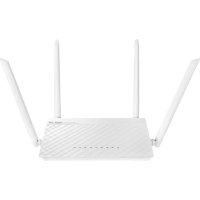


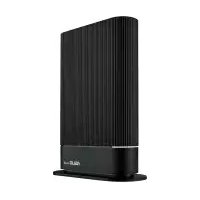
| Product Type | Wireless Router |
| Brand | ASUS |
| Model | RT-AC59U V2 |
| Wireless Standards | IEEE 802.11a/b/g/n/ac |
| Frequency Bands | 2.4 GHz and 5 GHz |
| Ports | 1 WAN port, 4 LAN ports (10/100/1000 Mbps) |
| Power Supply | AC adapter (input: 100-240 V AC, 50/60 Hz) |
| Operating Temperature | 0°C to 40°C |
| Key Features | AiMesh, WPS, guest network, firewall, parental controls, QoS |
| Security | WPA2-PSK, WPA-Enterprise, MAC filtering |
| Configuration | Setup wizard via http://router.asus.com |
| Mobile App | ASUS Router (iOS/Android) |
| Operating Modes | Router, access point, repeater |
| Box Contents | Router, AC adapter, Ethernet cable, quick start guide, manual |
| Weight | Approximately 300 g |
| Dimensions | Approximately 200 x 120 x 30 mm |
| Maintenance | Clean with a dry cloth, avoid liquids and humidity |
| Precautions | Use indoors, maintain a distance of 20 cm from persons for RF exposure |
| Compliance | CE, FCC, IC |
Frequently Asked Questions - RTAC59U V2 ASUS
User questions about RTAC59U V2 ASUS
0 question about this device. Answer the ones you know or ask your own.
Ask a new question about this device
Download the instructions for your Wireless Router in PDF format for free! Find your manual RTAC59U V2 - ASUS and take your electronic device back in hand. On this page are published all the documents necessary for the use of your device. RTAC59U V2 by ASUS.
USER MANUAL RTAC59U V2 ASUS
Wireless-AC1500 Dual Band Gigabit Router
Quick Start Guide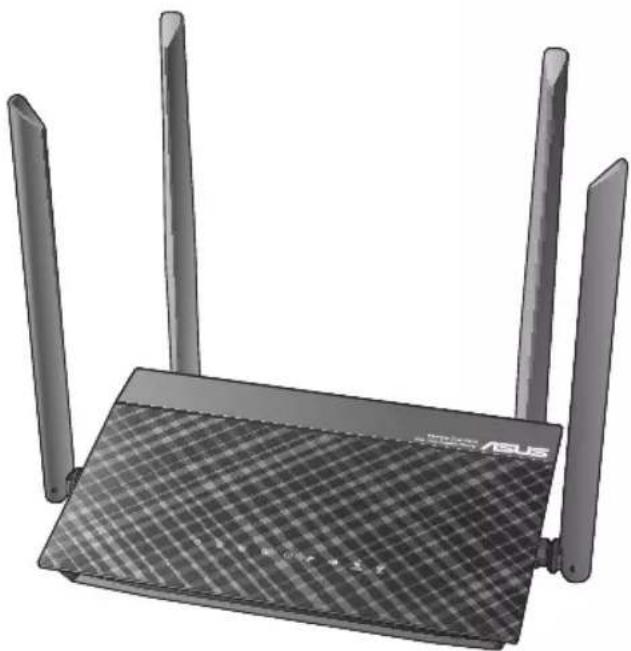
U16297/First Edition/January 2020



Table of contents
Package contents 3
A quick look at RT-AC59U V2. 3
Position your wireless router. 4
BEFORE SETTING. 5
ONE ROUTER SETUP STEPS 16
AiMesh SETUP STEPS 42
TROUBLESHOOTING 68
ASUS ROUTER APP 78
FAQ 100
This QSG contains these languages:
English
Greek
Serbian
Bulgarian
Hungarian
Slovak
Czech
Italian
Slovenian
Croatian
Latvian
Spanish
Danish
Lithuanian
Swedish
Dutch
Norwegian
Ukrainian
Estonian
Polish
Turkish
Finnish
Portuguese
French
Romanian
German
Russian

Package contents
RT-AC59U V2 Wireless Router AC adapter Network cable (RJ-45) Quick Start Guide
A quick look at RT-AC59UV2
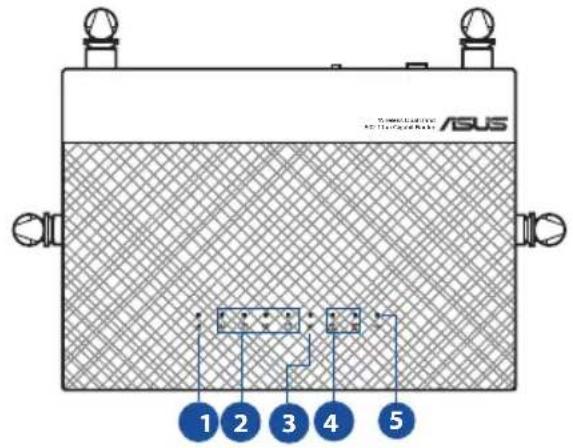

| 1 Power LED Power switch | 7 |
| 2 LAN 1~4 LEDs Power (DC-IN) port | 8 |
| 3 WAN (Internet) LED USB port | 9 |
| 4 2.4GHz LED / 5GHz LED WPS button | 10 |
| 5 USB LED WAN (Internet) port | 11 |
| 6 Reset button LAN 1 ~ 4 ports | 12 |
Position your wireless router
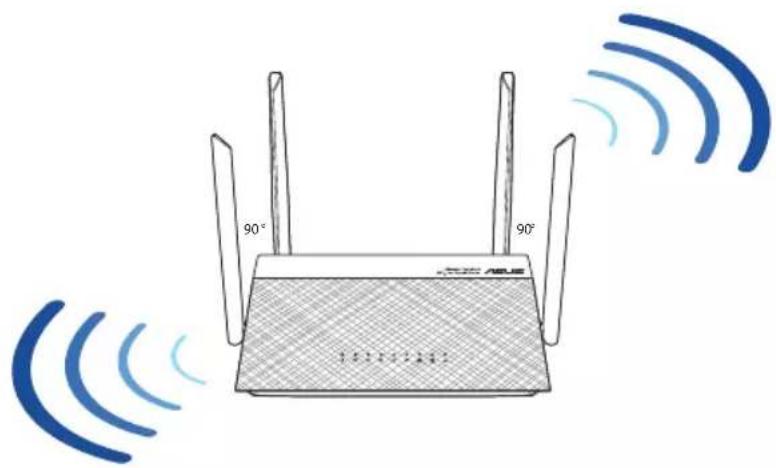
For optimal wireless transmission between the wireless router and connected wireless devices, ensure that you: - Place the wireless router in a centralized area for maximum wireless coverage for the network devices. - Keep the wireless router away from metal obstructions and away from direct sunlight. - Keep the wireless router away from 802.11g or 20MHz only Wi-Fi devices, 2.4GHz computer peripherals, Bluetooth devices, cordless phones, transformers, heavy-duty motors, fluorescent lights, microwave ovens, refrigerators, and other industrial equipment to prevent signal interference or loss. - Always update to the latest firmware. Visit the ASUS website at http://www.asus.com to get the latest firmware updates. - To ensure the best wireless signal, orient the four detachable antennas as shown in the drawing below. DO NOT mount this equipment higher than 2 meters.



BEFORE SETTING
A. Preparing to setup a standalone router
- Go to ONE ROUTER SETUP STEPS
ONE ROUTER SETUP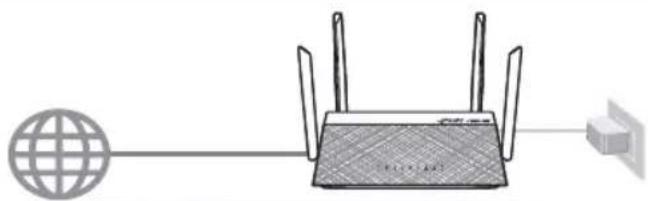
B. Preparing to setup an AiMesh Wi-Fi system
- Two (2) ASUS routers (models supporting AiMesh https://www.asus.com/AiMesh/).
- Assign one as AiMesh router, and another one as AiMesh node. **If you have multiple AiMesh routers, we recommend using the router with the highest specifications as your AiMesh router and the others as AiMesh nodes.
- Go to AiMesh SETUP STEPS.
AiMesh SETUP STEPS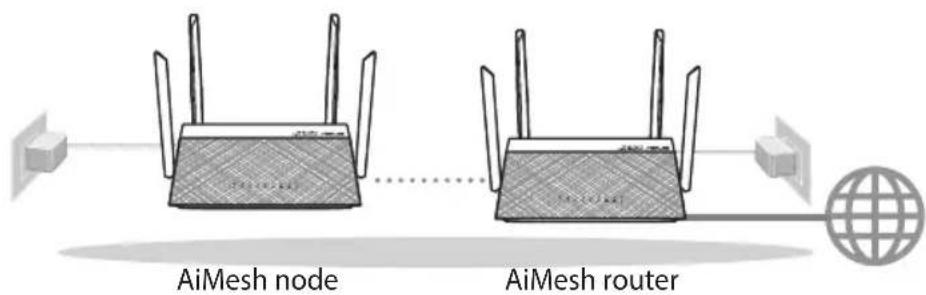
B. Preparing to setup an AiMesh Wi-Fi system
1. Two (2) ASUS routers (models supporting AiMesh https://www.asus.com/AiMesh/). 2. Assign one as AiMesh router, and another one as AiMesh node.
If you have an ASUS AiMesh router, we recommend that you use a router with the highest specifications as the AiMesh router, and keep it as the AiMesh node.
- Connect the AiMesh nodes to power.
Slovak
B. Preparing to set up the AiMesh Wi-Fi network system
- Two (2) ASUS routers (models supporting the AiMesh feature https://www.asus.com/AiMesh/).
- Designate one router as the AiMesh router and the other as the AiMesh node.
A. Prepare your Modem
- Unplug the power of cable / DSL modem. If it has a battery backup, remove the battery.*
- If you are using DSL for internet, you will need your username / password from your Internet service provider (ISP) to properly configure your router.
Modem back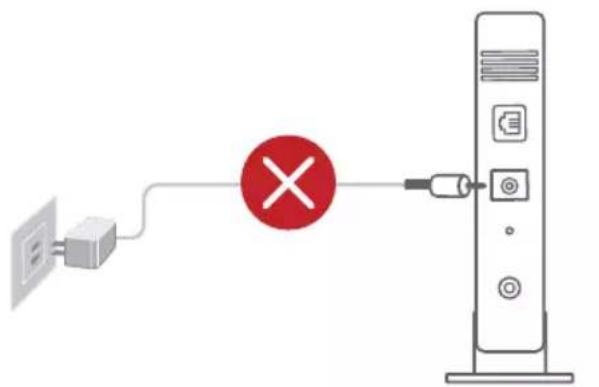
Bulgarian
A. Preparing the modem
1. REMOVE THE BATTERY FROM THE DEVICE. IF THERE IS A BACKUP BATTERY, REMOVE THE BATTERIES.
* To use the DSL modem for Internet, you must have a subscriber account provided by your Internet Service Provider (ISP), for proper modem configuration.
Slovak
A. Preparing the modem
- Check the modem LED lights to ensure the connection is active.
German
B. Connect your Device
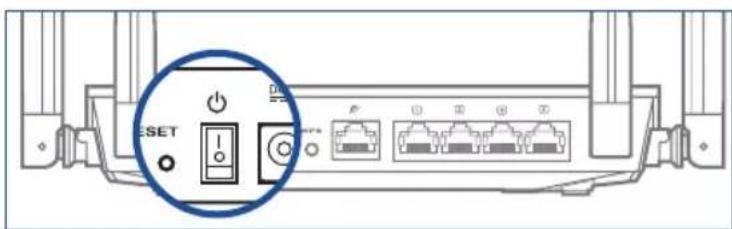
- Power on the router.
Plug in and press the power button at the back of your router.
Bulgarian
B. Connect your device
- Turn on the router. Plug in and press the power button on the back of the router.
Slovak
B. Connecting the device
- Turn on the router. Plug in and press the main switch on the back of the router.
French
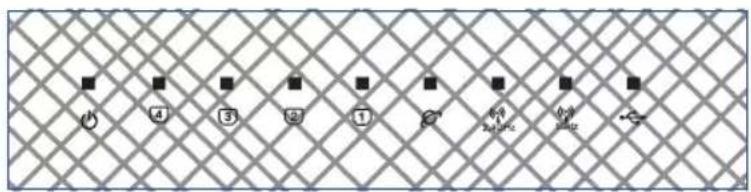
- Check the WAN and 2.4GHz/5GHz LED lights to ensure the hardware connection is ready.
Bulgarian
- Make sure the WAN and 2.4GHz/5GHz LED indicators are lit.
Slovak
- Check that the WAN and 2.4GHz/5GHz network indicators are lit, which signals that the hardware connection is ready.
French
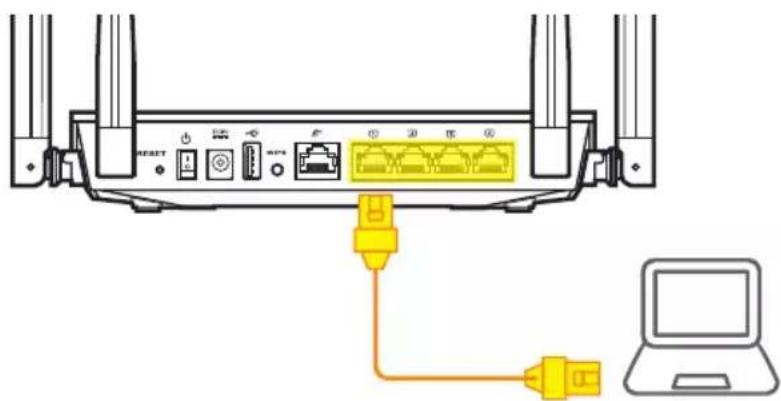
- Connect your PC to the router using an additional network cable.
Bulgarian
- Connect the computer to the router using the appropriate cable.
Slovak
C. Login and Connect
- Open a web browser: You will be redirected to the ASUS Setup Wizard. If not, navigate to: http://router.asus.com.
Find ASUS Device
http://router.asus.com
Bulgarian
C. Connection
- Open a web browser on your computer. If you are not redirected to the ASUS Setup Wizard (the setup guide for ASUS), enter http://router.asus.com in the URL field.
Slovak
C. Login and connection
C. Login and connection
- Open a browser. You will be redirected to the setup wizard. If not, go to http://router.asus.com



German
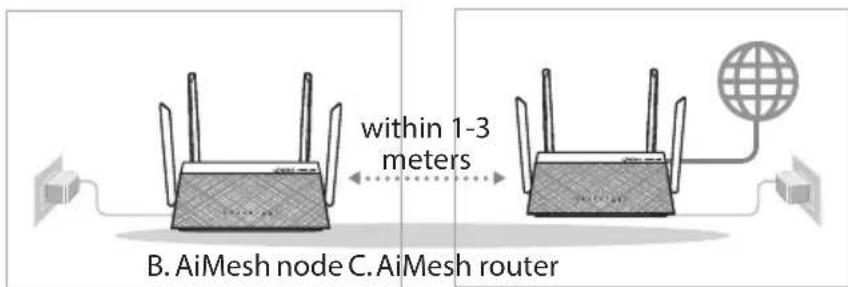
Place your AiMesh router and node within 1-3 meters of each other during the setup process.
B. AiMesh node
Factory default status. Keep power on and standby for AiMesh system settings.
Bulgarian
A. Preparation
Place your AiMesh router and AiMesh node at a distance of 1 to 3 meters from each other during the installation process.
B. AiMesh node
Factory settings no no. Adjustment. The preservation is included in the readiness for further system settings.

Slovak
A. Preparation
During the setup process, place the router and AiMesh node 1 to 3 meters apart.
B. AiMesh node
Factory default state. To perform AiMesh system settings, keep the power on in standby mode.
A. Preparation
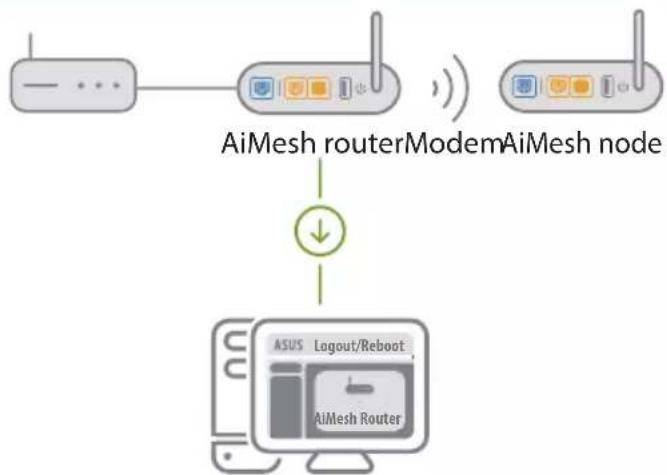
- Refer to ONE ROUTER SETUP STEPS to connect your AiMesh router to your PC and modem, and then log in into the web GUI.
C. AiMesh router
- Follow the steps for setting up a single router to connect your AiMesh router to your computer and modem, then log in to the web interface.
C. AiMesh router
- Click Search, it will automatically search for your AiMesh node. When the AiMesh node shows on this page, click it to add it into the AiMesh system. * If you cannot find any AiMesh node, please go to TROUBLE SHOOTING.
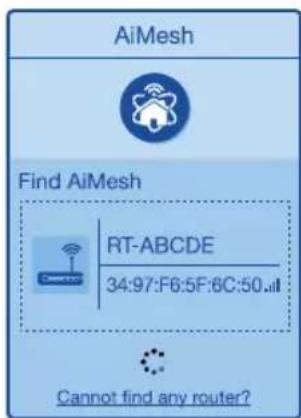
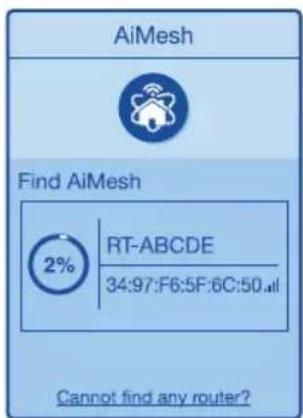

- Click Search to automatically search for your AiMesh node. When the AiMesh node appears on this page, click it to add it to the AiMesh system.
- If you cannot find the AiMesh node, go to Troubleshooting.
Slovak
- Click on Search; the AiMesh node will be automatically searched. When the AiMesh node appears on this page, click on it to add it to the AiMesh system.
- If you cannot find any AiMesh node, go to the TROUBLESHOOTING section.
French
4. A message is displayed when synchronization is completed.
Successfully added RT-ABCDE to your AiMesh system, it will take awhile to show up as connected in the AiMesh router list.
OK
Bulgarian
- If the synchronization of the devices is successful, a message will appear.
Slovak
If your AiMesh router cannot find any AiMesh node nearby or synchronization fails, please check the following and try again. a. Move your AiMesh node closer to the AiMesh router ideally. Ensure that it is within 1-3 meters. b. Your AiMesh node is powered on.
If your AiMesh router cannot find any AiMesh node nearby or synchronization fails, please check the following and try again.
a. Move your AiMesh node closer to the AiMesh router. Ensure that the distance between them is 1 to 3 meters. b. Your AiMesh node is powered on.
Locate the AiMesh router and node at the best place.
NOTES: To minimize interference, keep the routers away from devices like cordless phones, Bluetooth devices and microwave ovens.
We recommend that you place the routers in an open or spacious location.
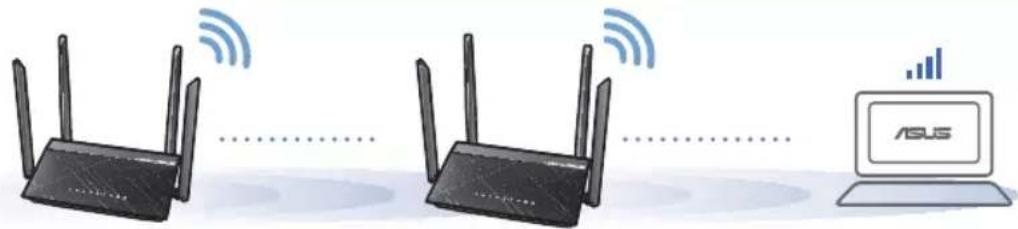
Choose the best place for the AiMesh router and node.
BENEXK: 3a da HamaJIte nHTepepeHcIyTa, dPbXTe pyTePnTe daleu OT yCTpoIcTba KaTO 6e3KuHN TeNEphiOnn, Bluetooth ycTpoINCTBa u MKNPOBJIHOBNOfypHn.
Open the valve and place the router in an open or spacious area.
Place the AiMesh router and node in the most suitable location.
NOTES: To minimize interference, keep the router away from devices such as cordless phones, Bluetooth devices, and microwave ovens.
Download free ASUS Router APP to set up and manage your router(s).

ASUS Router

GETITON GooglePlay

Download on the App Store
Download the ASUS Router app to set up and manage your routers easily via your mobile phone.
Slovak
Download the ASUS Router app for free to set up and manage your routers.
French
Download free ASUS Router APP to set up and manage your router(s).
German
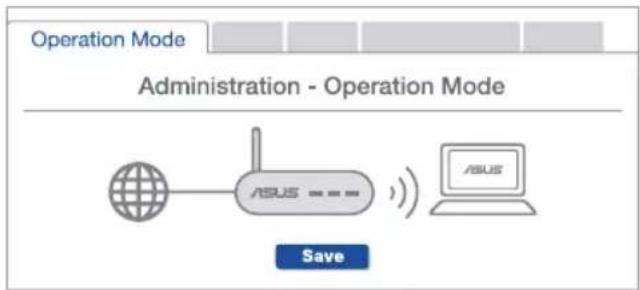
Does the AiMesh router support Access Point mode?
A: Yes. You can choose to set the AiMesh router as router mode or access point mode. Please go to the web GUI (http://router.asus.com), and go to the page Administration > Operation Mode.
Bulgarian
Q1: Does the AiMesh router support Access Point (AP) mode?
Q1 Does the AiMesh router support Access Point mode?
A: Yes. You can choose to set the AiMesh router as a router mode or access point mode. Access the GUI via the web browser (http://router.asus.com) and go to the Administration page > Operation Mode.
Q1 Can the AiMesh router be set to Access Point mode?
A: Yes. You can set the AiMesh router to router mode or access point mode. Access the GUI via the web browser (http://router.asus.com) and go to the Administration page > Operation Mode.
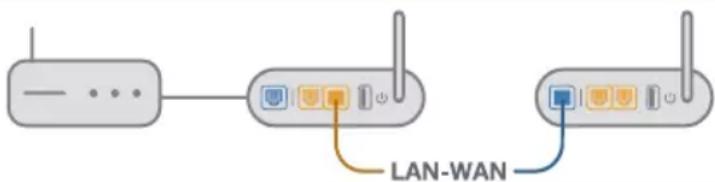
Could I set up wired connection between AiMesh routers (Ethernet backhaul)?
A: Yes. The AiMesh system supports both wireless and wired connection between the AiMesh router and node to maximize throughput and stability. AiMesh analyzes the wireless signal strength for each frequency band available, and then determines automatically whether a wireless or wired connection is the best to serve as the inter-router connection backbone.
a. Follow the setup steps to establish a connection between the AiMesh router and node via Wi-Fi first. b. Place the node in the ideal locations for best coverage. Run an Ethernet cable from the LAN port of the AiMesh router to the WAN port of AiMesh node. c. The AiMesh system will auto-select the best path for data transmission, whether wired or wireless.
Q2 Can I set up a wired connection between AiMesh routers (Ethernet backhaul)?
Yes. AiMesh system supports both wireless and wired connections between AiMesh routers, and wired connections provide maximum speed and stability. AiMesh analyzes the wireless signal strength for each frequency band, after which it automatically determines whether a wireless or wired connection should be used as the primary connection between routers.
a. Place the AiMesh node in a suitable location to establish a Wi-Fi connection between the AiMesh router and the node. b. Position the node in an ideal location for optimal coverage. Connect an Ethernet cable from the LAN port of the AiMesh router to the WAN port of the AiMesh node. c. The AiMesh system will automatically select the best path for data transmission, regardless of whether the connection is wired or wireless.
Q2 Can I make a wired connection between AiMesh routers (Ethernet backhaul)?
Remembering your wireless router settings
- Remember your wireless settings as you complete the router setup.
| Router Name: Password: | |
| 2.4 GHz network SSID: Password: | |
| 5GHz network SSID: Password: |
NOTES:
- Use only the adapter that came with your package. Using other adapters may damage the device.
- Specifications:
| DC Power adapter | DC Output: +12V with 1.5A current | ||
| Operating Temperature | 0~40 °C Storage | 0~70 | °C |
| Operating Humidity 50~90%Storage 20~90% | |||
- Where can I find more information about the wireless router?
- Online FAQ site: https://www.asus.com/support/faq
- Technical support site: https://www.asus.com/support
- Customer hotline: refer to the Support Hotline section in this Quick Start Guide
- You can get the user manual online at https://www.asus.com/support

ASUS Recycling/Takeback Services
ASUS recycling and takeback programs come from our commitment to the highest standards for protecting our environment. We believe in providing solutions for you to be able to responsibly recycle our products, batteries, other components, as well as the packaging materials. Please go to http://csr.asus.com/english/Takeback.htm for the detailed recycling information in different regions.
REACH
Complying with the REACH (Registration, Evaluation, Authorisation, and Restriction of Chemicals) regulatory framework, we published the chemical substances in our products at ASUS REACH website at http://csr.asus.com/english/REACH.htm
Federal Communications Commission Statement
This device complies with Part 15 of the FCC Rules. Operation is subject to the following two conditions:
- This device may not cause harmful interference.
- This device must accept any interference received, including interference that may cause undesired operation.
This equipment has been tested and found to comply with the limits for a class B digital device, pursuant to part 15 of the FCC Rules. These limits are designed to provide reasonable protection against harmful interference in a residential installation.
This equipment generates, uses and can radiate radio frequency energy and, if not installed and used in accordance with the instructions, may cause harmful interference to radio communications. However, there is no guarantee that interference will not occur in a particular installation. If this equipment does cause harmful interference to radio or television reception, which can be determined by turning the equipment off and on, the user is encouraged to try to correct the interference by one or more of the following measures:
- Reorient or relocate the receiving antenna.
- Increase the separation between the equipment and receiver.
- Connect the equipment into an outlet on a circuit different from that to which the receiver is connected.
- Consult the dealer or an experienced radio/TV technician for help.

WARNING! Any changes or modifications not expressly approved by the party responsible for compliance could void the user's authority to operate the equipment.
Prohibition of Co-location
This device and its antenna(s) must not be co-located or operating in conjunction with any other antenna or transmitter.
IMPORTANT NOTE:
Radiation Exposure Statement: This equipment complies with FCC radiation exposure limits set forth for an uncontrolled environment. End users must follow the specific operating instructions for satisfying RF exposure compliance. To maintain compliance with FCC exposure compliance requirement, please follow operation instruction as documented in this manual.

WARNING! This equipment must be installed and operated in accordance with provided instructions and the antenna(s) used for this transmitter must be installed to provide a separation distance of at least 20 cm from all persons and must not be co-located or operating in conjunction with any other antenna or transmitter.
Compliance Statement of Innovation, Science and Economic Development Canada (ISED)
This device complies with Innovation, Science and Economic Development Canada licence exempt RSS standard(s). Operation is subject to the following two conditions: (1) this device may not cause interference, and (2) this device must accept any interference, including interference that may cause undesired operation of the device.
Operation in the band 5150-5250 MHz is only for indoor use to reduce the potential for harmful interference to co-channel mobile satellite systems. CAN ICES-3(B)/NMB-3(B)
Radio Frequency (RF) Exposure Information
The radiated output power of the ASUS Wireless Device is below the Innovation, Science and Economic Development Canada radio frequency exposure limits. The ASUS Wireless Device should be used in such a manner such that the potential for human contact during normal operation is minimized.
This equipment should be installed and operated with a minimum distance of 20 cm between the radiator and any part of your body.
This device has been certified for use in Canada. Status of the listing in the Innovation, Science and Economic Development Canada's REL (Radio Equipment List) can be found at the following web address: http://www.ic.gc.ca/eic/site/ceb-bbst.nsf/eng/h_tt00020.html
Additional Canadian information on RF exposure also can be found at the following web: https://www.ic.gc.ca/eic/site/smt-gst.nsf/eng/sf08792.html
2.4 GHz: 802.11b, 802.11g, 802.11n (HT20), 802.11n (HT40),
5 GHz: 802.11a, 802.11n (HT20), 802.11n (HT40), 802.11ac (VHT20), 802.11ac (VHT40), 802.11ac (VHT80).
Maximum conducted output power per frequency band:
2412-2472 MHz: 19.98 dBm;
5180-5240 MHz: 19.98 dBm;
5260-5320 MHz: 19.98 dBm;
5500-5670 MHz: 19.98 dBm.
The device is intended to be used only indoors when operating in the 5150-5350 MHz frequency band.


Precautions for the use of the device
a. Pay particular attention to the personal safety when use this device in airports, hospitals, gas stations and professional garages. b. Medical device interference: Maintain a minimum distance of at least 15 cm (6 inches) between implanted medical devices and ASUS products in order to reduce the risk of interference. c. Kindly use ASUS products in good reception conditions in order to minimize the radiation's level. d. Keep the device away from pregnant women and the lower abdomen of the teenager.
UK support e-mail: network_support_uk@asus.com - For more information, visit the ASUS support site at: https://www.asus.com/support/
English
CE statement
Simplified EU Declaration of Conformity
ASUSTek Computer Inc. hereby declares that this device is in compliance with the essential requirements and other relevant provisions of Directive 2014/53/EU. Full text of EU declaration of conformity is available at https://www.asus.com/Networking/RTAC59UV2/HelpDesk/.
Declaration of Conformity for Ecodesign directive 2009/125/EC
Testing for eco-design requirements according to (EC) No 1275/2008 and (EU) No 801/2013 has been conducted. When the device is in Networked Standby Mode, its I/O and network interface are in sleep mode and may not work properly. To wake up the device, press the Wi-Fi on/off, LED on/off, reset, or WPS button.
This equipment complies with EU radiation exposure limits set forth for an uncontrolled environment. This equipment should be installed and operated with minimum distance 20 cm between the radiator and your body.
All operational modes:
2.4GHz: 802.11b, 802.11g, 802.11n (HT20), 802.11n (HT40), 802.11ac (VHT20), 802.11ac (VHT40)
5GHz: 802.11a, 802.11n (HT20), 802.11n (HT40), 802.11ac (VHT20), 802.11ac (VHT40), 802.11ac (VHT80)
The frequency, mode and the maximum transmitted power in EU are listed below:
2412-2472MHz (802.11g 6Mbps): 19.81 dBm
5180-5240MHz (802.11ac VHT20 MCSO): 20.1 dBm
5260-5320MHz (802.11ac VHT40 MCSO): 21.31 dBm
5500-5700MHz (802.11ac VHT80 MCSO): 27.48 dBm
The device is restricted to indoor use only when operating in the 5150 to 5350 MHz frequency range.
The adapter shall be installed near the equipment and shall be easily accessible.
| AT BE BG CZ DK EE FR | ||||||
| DE IS IE IT EL ES CY | ||||||
| LV | LI | LT | LU | HU | MT | NL |
| NO PL PT RO SI | SK TR | |||||
| FI | SE CH UK HR UA | |||||
Safety Notices
- Use this product in environments with ambient temperatures between 0°C (32°F) and 40°C (104°F). Refer to the rating label on the bottom of your product and ensure your power adapter complies with this rating. DO NOT place on uneven or unstable work surfaces. Seek servicing if the casing has been damaged. DO NOT place or drop objects on top and do not shove any foreign objects into the product. DO NOT expose to or use near liquids, rain, or moisture. DO NOT use the modem during electrical storms.
- DO NOT cover the vents on the product to prevent the system from getting overheated. DO NOT use damaged power cords, accessories, or other peripherals.
- If the Adapter is broken, do not try to fix it by yourself. Contact a qualified service technician or your retailer.
- To prevent electrical shock hazard, disconnect the power cable from the electrical outlet before relocating the system.
110
Bulgarian
U3aBVeHne OTHOCHO CE
OnpocTeHa DeKlapaun3a CbOTBeTcBHe Ha EC
C hacToaTO ASUSTeK Computer Inc.ДeКnapupa,уTe TOb yctpoiCTBO e B cBoTBeCTBne cbc CbIeCTBeHInTe n3NcKBaHn u npUIOxIMn noCTaHOBHeHn Ha IupeKTbBa 2014/53/EC.ПьнгТ TeKCT Na DeKnapaunTa 3a CboTBeTCTBne Ha EC e DocTbIeHn Ha aDpec https://www.asus.com/Networking/ RTAC59UV2/HelpDesk/.
Deknapaun3a CbOTBcTbne 3a DnpeKTHBa 3a eKoU3aHa 2009/125/EO
IpoBedeHn ca TcTObE 3a CbBMeCTMIOCT c N3NCKBaHnAra 3a eKoJn3aH NcRJaCHO (EO) No. 1275/2008 n (EC) No. 801/2013. Korato yctpOCTBOto e B Networked Standby Mode (PexmHa rTOBHOCT Ha mpeka), I/O n MpeKOBnT nHTepFeHc Ca B cPnI pExm H MoKe Da He pa6OT KaT0 TpR6Ba. 3a Da Cb6yDnTe YcTPOCTBOTo, HATNCHe Ti-Fi on/off (Wi-Fi Bk#./n3Kn.), LED on/off (LED Bk#./n3Kn.), reset (HynpaHe) nn 6yToHa WPS. ToBa yctpOCTBOe b CbOTBeTCTBne c rpaHnUte 3a paAnOueCTOTHO o6lbYBaHe, ycTaHOBeHn OT EC 3a HeKOHTpOINpHa cPeDa. ToBa O6OpYBaHe TpR6Ba Da ce nHCTaJInpa Nn3NON3Ba npn pa3CTOAHne Haimanko 20 cm 20 cm MeKdy n3JIbYBaUsoTO TnIo u YoBEWKOTO TnIo.
Bcnukenpeximna pa6ota:
2.4GHz: 802.11b, 802.11g, 802.11n (HT20), 802.11n (HT40), 802.11ac (VHT20), 802.11ac (VHT40)
5GHz: 802.11a, 802.11n (HT20), 802.11n (HT40), 802.11ac (VHT20), 802.11ac (VHT40), 802.11ac (VHT80)
IOn-DoNy ca nocoeyH uecToTa, peKIMbT mAKcMmaHOTo npedaHaHO 3axpaHaBe B EC.
2412-2472MHz (802.11g 6Mbps): 19.81 dBm
5180-5240MHz (802.11ac VHT20 MCS0): 20.1 dBm
5260-5320MHz (802.11ac VHT40 MCS0): 21.31 dBm
5500-5700MHz (802.11ac VHT80 MCS0): 27.48 dBm
This device is restricted to indoor use only when operating in the 5150 to 5350 MHz frequency range.
The antenna must be installed near the equipment and be easily accessible.
Safety information
- Use this product at an ambient temperature between 0°C (32°F) and 40°C (104°F). Check the rating label on the bottom of your product and ensure that your power adapter complies with the requirements. Do not place on uneven or unstable work surfaces. Contact service if the casing is damaged. Do not place, drop, or insert any objects into the product. Do not expose to or use near liquids. Do not use the modem during thunderstorms. Do not cover the ventilation openings of the product to prevent overheating. Do not use damaged power cords, accessories, or peripheral devices. If the adapter is damaged, do not attempt to repair it yourself. Contact a qualified technician or your supplier. To avoid electric shock, unplug the power cord from the electrical outlet before moving the system.
Croatian
CE declaration
Simplified EU declaration of conformity
ASUSTek Computer Inc. hereby declares that this device is in compliance with the essential requirements and other relevant provisions of Directive 2014/53/EU. The full text of the EU declaration of conformity is available at https://www.asus.com/Networking/RTAC59UV2/HelpDesk/.
Declaration of conformity for the Ecodesign Directive 2009/125/EC
Testing for ecodesign requirements has been carried out in accordance with (EC) No 1275/2008 and (EU) No 801/2013. When the device is in networked standby mode, its inputs/outputs and network interface are also in standby mode and may not function correctly. To start the device, press the power button for the Wi-Fi device, the LED toggle button, the reset button, or the WPS button.
This equipment complies with EU radiation exposure limits in an uncontrolled environment. This device must be installed and operated with a minimum distance of 20 cm between the radiator and your body. All operating modes:
2.4GHz: 802.11b, 802.11g, 802.11n (HT20), 802.11n (HT40), 802.11ac (VHT20), 802.11ac (VHT40)
5GHz: 802.11a, 802.11n (HT20), 802.11n (HT40), 802.11ac (VHT20), 802.11ac (VHT40), 802.11ac (VHT80)
The following are the frequency, mode of operation, and maximum radiated power in the EU:
2412-2472MHz (802.11g 6Mbps): 19.81 dBm
5180-5240MHz (802.11ac VHT20 MCS0): 20.1 dBm
5260-5320MHz (802.11ac VHT40 MCS0): 21.31 dBm
5500-5700MHz (802.11ac VHT80 MCS0): 27.48 dBm
The device is restricted to indoor use only when operating in the frequency range of 5150 to 5350 MHz.
The adapter must be installed near the device and must be easily accessible.
Safety Notices
- Use this product in environments with ambient temperatures between 0°C (32°F) and 40°C (104°F) .
- Refer to the rating label on the bottom of the product to verify that the adapter is compliant.
- DO NOT place the device on uneven or unstable work surfaces. In case of damage to the housing, seek assistance from a service technician.
- DO NOT place or drop objects on top of the device and do not insert foreign objects into the product.
- DO NOT expose or use the device near liquids, rain, or moisture. DO NOT use the modem during an electrical storm.
- DO NOT cover the openings on the product to avoid overheating the system.
- Do not use damaged power cables, accessories, or other external devices.
- If the adapter is damaged, do not attempt to repair it yourself. Contact a qualified service technician or supplier.
- To prevent the risk of electric shock, unplug the cable from the electrical outlet before moving the system.
CE Declaration
Norwegian CE Declaration
Simplified EU Declaration of Conformity
CE Declaration
- WIRELESS-AC1500 DUAL BAND GIGABIT ROUTER
- TABLE OF CONTENTS
- THIS QSG CONTAINS THESE LANGUAGES
- PACKAGE CONTENTS
- A QUICK LOOK AT RT-AC59UV
- POSITION YOUR WIRELESS ROUTER
- BEFORE SETTING
- PREPARING TO SETUP AN AIMESH WI-FI SYSTEM
- SLOVAK
- PREPARING TO SET UP THE AIMESH WI-FI NETWORK SYSTEM
- PREPARE YOUR MODEM
- BULGARIAN
- PREPARING THE MODEM
- GERMAN
- CONNECT YOUR DEVICE
- CONNECTING THE DEVICE
- FRENCH
- LOGIN AND CONNECT
- CONNECTION
- LOGIN AND CONNECTION
- PREPARATION
- AIMESH NODE
- AIMESH ROUTER
- A MESSAGE IS DISPLAYED WHEN SYNCHRONIZATION IS COMPLETED
- REMEMBERING YOUR WIRELESS ROUTER SETTINGS
- NOTES
- ASUS RECYCLING/TAKEBACK SERVICES
- REACH
- FEDERAL COMMUNICATIONS COMMISSION STATEMENT
- PROHIBITION OF CO-LOCATION
- IMPORTANT NOTE
- COMPLIANCE STATEMENT OF INNOVATION, SCIENCE AND ECONOMIC DEVELOPMENT CANADA (ISED)
- RADIO FREQUENCY (RF) EXPOSURE INFORMATION
- PRECAUTIONS FOR THE USE OF THE DEVICE
- ENGLISH
- CE STATEMENT
- SIMPLIFIED EU DECLARATION OF CONFORMITY
- DECLARATION OF CONFORMITY FOR ECODESIGN DIRECTIVE 2009/125/EC
- SAFETY NOTICES
- U3ABVEHNE OTHOCHO CE
- ONPOCTEHA DEKLAPAUN3A CBOTBETCBHE HA EC
- DEKNAPAUN3A CBOTBCTBNE 3A DNPEKTHBA 3A EKOU3AHA 2009/125/EO
- SAFETY INFORMATION
- CROATIAN
- CE DECLARATION
- DECLARATION OF CONFORMITY FOR THE ECODESIGN DIRECTIVE 2009/125/EC
- NORWEGIAN CE DECLARATION
Brand : ASUS
Model : RTAC59U V2
Category : Wireless Router