DP171BN - Blu-ray player LG - Free user manual and instructions
Find the device manual for free DP171BN LG in PDF.


User questions about DP171BN LG
0 question about this device. Answer the ones you know or ask your own.
Ask a new question about this device
Download the instructions for your Blu-ray player in PDF format for free! Find your manual DP171BN - LG and take your electronic device back in hand. On this page are published all the documents necessary for the use of your device. DP171BN by LG.
USER MANUAL DP171BN LG
Before connecting, operating or adjusting this product, please read this Instruction booklet carefully and completely.
P/NO:MFL30593007
Safety Precautions

CAUTION
RISK OF ELECTRIC SHOCK DO NOT OPEN

CAUTION:TO REDUCE THE RISK OF ELECTRIC SHOCK
DO NOT REMOVE COVER (OR BACK)
NO USER-SERVICEABLE PARTS INSIDE
REFER SERVICING TO QUALIFIED SERVICE PERSONNEL

This lightning flash with arrowhead symbol within an equilateral triangle is intended to alert the user to the presence of uninsulated dangerous voltage within the product's enclosure that may be of sufficient magnitude to constitute a risk of electric shock to persons.

The exclamation point within an equilateral triangle is intended to alert the user to the presence of important operating and maintenance (servicing) instructions in the literature accompanying the product.
WARNING: TO PREVENT FIRE OR ELECTRIC SHOCK, HAZARD. DO NOT EXPOSE THIS PRODUCT TO RAIN OR MOISTURE.
CAUTION: Do not block any ventilation openings. Install in accordance with the manufacturer's instructions.
Slots and openings in the cabinet are provided for ventilation and to ensure reliable operation of the product and to protect it from over heating. The openings should be never be blocked by placing the product on a bed, sofa, rug or other similar surface. This product should not be placed in a built-in installation such as a bookcase or rack unless proper ventilation is provided or the manufacturer's instruction have been adhered to.
CAUTION: VISIBLE AND INVISIBLE LASER RADIATION WHEN OPEN AND INTERLOCKSEDEFADED.
CAUTION:
This product employs a Laser System.
To ensure proper use of this product, please read this owner's manual carefully and retain it for future reference. Should the unit require maintenance, contact an authorized service center.
Use of controls, adjustments or the performance of procedures other than those specified herein may result in hazardous radiation exposure. To prevent direct exposure to laser beam, do not try to open the enclosure. Visible laser radiation when open. DO NOT STARE INTO BEAM.
CAUTION: The apparatus should not be exposed to water (dripping or splashing) and no objects filled with liquids, such as vases, should be placed on the apparatus.
NOTES ON COPYRIGHTS:
It is forbidden by law to copy, broadcast, show, broadcast via cable, play in public, or rent copyrighted material without permission.
This product features the copy protection function developed by Macrovision. Copy protection signals are recorded on some discs. When recording and playing the pictures of these discs on a VCR, picture noise will appear.
This product incorporates copyright protection technology that is protected by method claims of certain U.S. patents and other intellectual property rights owned by Macrovision Corporation and other rights owners. Use of this copyright protection technology must be authorized by Macrovision Corporation, and is intended for home and other limited viewing uses only unless otherwise authorized by Macrovision Corporation. Reverse engineering or disassembly is prohibited.
Safety Precautions (Continued)
CAUTION concerning the Power Cord
Most appliances recommend they be placed upon a dedicated circuit;
That is, a single outlet circuit which powers only that appliance and has no additional outlets or branch circuits. Check the specification page of this owner's manual to be certain.
Do not overload wall outlets. Overloaded wall outlets, loose or damaged wall outlets, extension cords, frayed power cords, or damaged or cracked wire insulation are dangerous. Any of these conditions could result in electric shock or fire. Periodically examine the cord of your appliance, and if its appearance indicates damage or deterioration, unplug it, discontinue use of the appliance, and have the cord replaced with an exact replacement part by an authorized servicer.
Protect the power cord from physical or mechanical abuse, such as being twisted, kinked, pinched, closed in a door, or walked upon. Pay particular attention to plugs, wall outlets, and the point where the cord exits the appliance.
To disconnect power from the mains, pull out the mains cord plug. When installing the product, ensure that the plug is easily accessible.
FCC WARNING: This equipment may generate or use radio frequency energy. Changes or modifications to this equipment may cause harmful interference unless the modifications are expressly approved in the instruction manual. The user could lose the authority to operate this equipment if an unauthorized change or modification is made.
REGULATORY INFORMATION: FCC Part 15
This product has been tested and found to comply with the limits for a Class B digital device, pursuant to Part 15 of the FCC Rules. These limits are designed to provide reasonable protection against harmful interference when the product is operated in a residential installation. This product generates, uses, and can radiate radio frequency energy and, if not installed and used in accordance with the instruction manual, may cause harmful interference to radio communications. However, there is no guarantee that interference will not occur in a particular installation. If this product does cause harmful interference to radio or television reception, which can be determined by turning the product off and on, the user is encouraged to try to correct the interference by one or more of the following measures:
Reorient or relocate the receiving antenna.
- Increase the separation between the product and receiver.
- Connect the product into an outlet on a circuit different from that to which the receiver is connected.
- Consult the dealer or an experienced radio/TV technician for help.
IMPORTANT SAFETY INSTRUCTIONS
CAUTION: PLEASE READ AND OBSERVE ALL WARNINGS AND INSTRUCTIONS IN THIS OWNER'S MANUAL AND THOSE MARKED ON THE PRODUCT. RETAIN THIS MANUAL FOR FUTURE REFERENCE.
This product has been designed and manufactured to assure personal safety. Improper use can result in electric shock or fire hazard. The safeguards incorporated in this product will protect you if you observe the following procedures for installation, use, and servicing.
This product does not contain any parts that can be repaired by the user.
DO NOT REMOVE THE CABINET COVER, OR YOU MAY BE EXPOSED TO DANGEROUS VOLTAGE. REFER SERVICING TO QUALIFIED SERVICE PERSONNEL ONLY.
- Read these instructions. - All these safety and operating instructions should be read before the product is operated.
- Keep these instructions. - The safety, operating and use instructions should be retained for future reference.
- Heed all warnings. - All warnings on the product and in the operating instructions should be adhered to.
-
Follow all instructions. - All operating and use instructions should be followed.
-
Do not use this product near water. - For example: near a bath tub, wash bowl, kitchen sink, laundry tub, in a wet basement; or near a swimming pool; and other areas located near water.
- Clean only with dry cloth. - Unplug this product from the wall power before cleaning. Do not use liquid cleaners.
IMPORTANT SAFETY INSTRUCTIONS
- Do not install near any heat sources such as radiators, heat registers, stoves, or other apparatus (including amplifiers) that produce heat.
- Do not defeat the safety purpose of the polarized or grounding-type plug. A polarized plug has two blades with one wider than the other. A grounding type plug has two blades and a third grounding prong. The wide blade or the third prong are provided for your safety. If the provided plug does not fit into your outlet, consult an electrician for replacement of the obsolete outlet.
- Protect the power cord from being walked on or pinched particularly at plugs, convenience receptacles, and the point where they exit from the product.
- Only use attachments/accessories specified by the manufacturer.
- Unplug this product during lightning storms or when unused for long periods of time.
-
Refer all servicing to qualified service personnel. Servicing is required when the product has been damaged in any way, such as power-supply cord or plug is damaged, liquid has been spilled or objects have fallen into the product, the product has been exposed to rain or moisture, does not operate normally, or has been dropped.
-
Do not block any ventilation openings. Maintain well ventilated conditions around the product. Do not put product on bed, sofa or anything that blocks ventilation. Install in accordance with the manufacturer's instructions.
- Use only with the cart, stand, tripod, bracket, or table specified by the manufacturer, or sold with the apparatus. When a cart is used, use caution when moving the cart/apparatus combination to avoid injury from tip-over.
onponpou
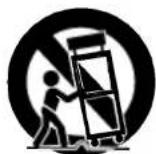
- Apparatus shall not be exposed to dripping or splashing and no objects filled with liquids, such as vases, shall be placed on the apparatus.
Table of Contents
Introduction
Safety Precautions 2-3
Table of Contents 6
Before Use 7-9
About the Symbol Display. 7
Symbol used in this Manual. 7
Notes on Discs 7
Maintenance and Service 83
Time of Plurally Pieces 9
Types of Playable Diees 9 Identification of Controls. 10-13
Main Unit 10-11
Remote Control 12-13
Power Connections 14-17
ACAdapter 14
Automotive Adapter 15
Batteries Drive 10.17
Rotate the LCD 18
Playing a Disc 19
Advanced Operations
Displaying Disc Information on-screen 20
Initial Settings 20-25
General Operation 20
LANGUAGE 21
DISPLAY 21
AUDIO 32
AODIO 22
LOCK (Parental Control) 23-24
OTHERS 25
General Features 26-28
Additional Features 29
Playing an Audio CD and MP3/WMA Disc 30
Programmed Playback 31
Repeat Programmed Tracks 31
Erasing a Track from Program List 31
Erasing the Complete Program List. 31
Viewing a JPEG disc 32-33
- Slide Show 32
- Still Picture 32
- Moving to another File 33
- Zoom 33
To rotate picture 33
To listen to MP3/WMA music while watching picture 33 - JPEG disc compatibility with this player is limited as follows . . . 33
Playing a DVD VR format Disc 34
Playing a DivX Movie Disc 35-36
DivX disc compatibility with this player is limited as follows . . . 36
Connections
Setting up the Player 37-38
DVD Player Connections 37
Audio Connection to Optional Equipment 38
Reference
Troubleshooting 39
Language Code List 40
Area Codes 41
Before Use
To ensure proper use of this product, please read this owner's manual carefully and retain for future reference.
This manual provides information on the operation and maintenance of your DVD player. Should the unit require service, contact an authorized service location.
About the Symbol Display
" " may appear on your LCD display during operation and indicates that the function explained in this owner's manual is not available on that specific DVD video disc.
Symbol Used in this Manual
NOTE
Indicates special notes and operating features.
TIP
Indicates tips and hints for making the task easier. A section whose title has one of the following symbols is applicable only to the disc represented by the symbol.
ALL All discs listed below
DVD DVD and finalized DVD±R/RW
VCD Video CDs
CD Audio CDs.
WMA WMA discs.
Notes on Discs
Handling Discs
Do not touch the playback side of the disc. Hold the disc by the edges so that fingerprints do not get on the surface. Never stick paper or tape on the disc.


Storing Discs
After playing, store the disc in its case. Do not expose the disc to direct sunlight or sources of heat and never leave it in a parked car exposed to direct sunlight.
Cleaning Discs
Fingerprints and dust on the disc can cause poor picture quality and sound distortion. Before playing, clean the disc with a clean cloth. Wipe the disc from the center out.

Do not use strong solvents such as alcohol, benzine, thinner, commercially available cleaners, or anti-static spray intended for older vinyl records.
Before Use (Continued)
Maintenance and Service
Refer to the information in this chapter before contacting a service technician.
Handling the Unit
When shipping the unit
Please save the original shipping carton and packing materials. If you need to ship the unit, for maximum protection, re-pack the unit as it was originally packed at the factory.
Keeping the exterior surfaces clean
- Do not use volatile liquids such as insecticide spray near the unit.
- Do not leave rubber or plastic products in contact with the unit for a long period of time, since they leave marks on the surface.
Cleaning the unit
To clean the player, use a soft, dry cloth. If the surfaces are extremely dirty, use a soft cloth lightly moistened with a mild detergent solution.
Do not use strong solvents such as alcohol, benzine, or thinner, as these might damage the surface of the unit.
Maintaining the Unit
The DVD player is a high-tech, precision device. If the optical pick-up lens and disc drive parts are dirty or worn, the picture quality could be diminished.
Depending on the operating environment, regular inspection and maintenance are recommended after every 1,000 hours of use.
For details, please contact your nearest authorized service center.
Before Use (Continued)
Types of Playable Discs
PMP
DVD
(8cm/12cm disc)

Video CD (VCD)
(8cm/12cm disc)

Audio CD
(8cm/12cm disc)
In addition, this unit plays DivX file, DVD±R, DVD±RW, SVCD, and CD-R or CD-RW that contains audio titles, MP3, WMA or JPEG files.

DOLBY
DIGITAL



This indicates a product feature that is capable of playing DVD-RW discs recorded with Video Recording format.
NOTES
- Depending on the conditions of the recording equipment or the CD-R/RW (or DVD±R/±RW) disc itself, some CD-R/RW (or DVD±R/±RW) discs cannot be played on the unit.
- Do not attach any seal or label to either side (the labeled side or the recorded side) of a disc.
- Do not use irregularly shaped CDs (e.g., heart-shaped or octagonal). It may result in malfunctions.
Customers should note that permission is required in order to download MP3 / WMA files and music from the Internet. Our company has no right to grant such permission. Permission should always be sought from the copyright owner.
Regional Code
This unit has a regional code printed on the rear of the unit. This unit can play only DVD discs labelled same as the rear of the unit or "ALL".
Notes on Regional Codes
- Most DVD discs have a globe with one or more numbers in it clearly visible on the cover. This number must match your unit's regional code or the disc cannot play.
- If you try to play a DVD with a different regional code from your player, the message "Check Regional Code" appears on the TV screen.
Manufactured under license from Dolby Laboratories.
"Dolby", "Pro Logic", and the double-D symbol are trademarks of Dolby Laboratories.
DTS and DTS Digital Out are trademarks of Digital Theater Systems, Inc.
Identification of Controls
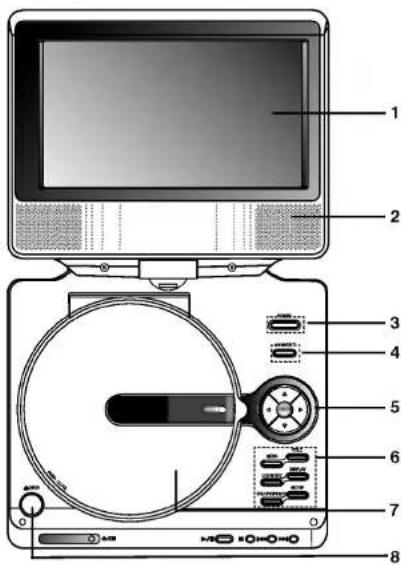
Main Unit
- LCD screen
- Speaker
- Power ON/OFF: Switches the player ON and OFF.
- A/V IN/OUT: Selects the source
- (left/right/up/down)
Selects an item in the menu.
- Adjusts the COLOR/BRIGHT.
-
ENTER: Confirms menu selection.
-
• COLOR/BRIGHT: Selects the mode of LCD adjustment Brightness Color CFF
-
SETUP: Accesses or removes setup menu.
- TITLE: Displays title menu, if available
- MENU:Accesses menu on a DVD disc.
- DISPLAY: Accesses On-Screen display
-
LCD MODE: NORMAL FULL ZOOM OFF
-
Disc Lid
- OPEN button : Push this button to open the Disc lid.
NOTE
Place a disc with the playback side down on the spindle, and push gently on the center of the disc so it goes into position.

Identification of Controls (continued)
Main Unit
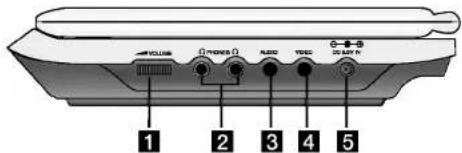
Volume Control
2 Earphone jack
3 AUDIO In/Out jack (OPTICAL OUT)
VIDEO In/Out jack
NOTE
If theVIDEO IN signal is not connected in AV IN mode, this unit will automatically power off in 10 minutes to prevent battery discharge.
5 DC 9.5V IN
Connect the AC adapter.
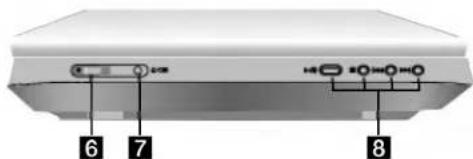
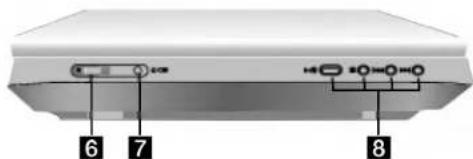
ouonpo
Remote sensor
Receive the signal from the Remote Control for operation.
7 Battery charge indicator
During recharging, charge indicator is red. If recharging is complete, charge indicator changes to green color.
8 · PLAY (▶/II): Starts playback/ Pauses playback temporarily.
-
STOP(■): Stops playback.
-
Reverse SKIP/SEARCH (14)
Search backward* go to beginning of current chapter or track or go to previous chapter or track.
Forward SKIP/SEARCH (▶)
Search forward*/ go to next chapter or track
* Press and hold button for about two seconds.
Identification of Controls (continued)
Remote Control
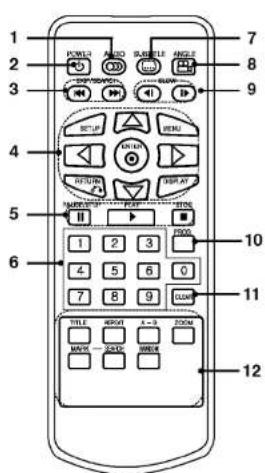
-
AUDIO Selects an audio language (DVD).
-
POWER Switches DVD Player ON and OFF.
-
Reverse SKIP/SEARCH ( ) Search backward/ go to beginning of current chapter or track or go to previous chapter or track.
Forward SKIP/SEARCH (▶▶) Search forward/ go to next chapter or track
Press and hold button for about two seconds.
4.·SETUP
Accesses or removes setup menu.
-MENU
Accesses menu on a DVD disc.
- RETURN
Displays the video CD with PBC.
- DISPLAY Accesses On-Screen display.
left/right/up/down
Selects an item in the menu.
- ENTER
Confirms menu selection.
- PAUSE Pauses playback temporarily/press repeatedly for frame-by-frame playback.
- PLAY
Starts playback.
STOP
Stops playback.
- 0-9 number buttons
Selects numbered items in a menu. - SUBTITLE
Selects a subtitle language. - ANGLE
9.SLOW(/)
Reverse/Forward slow playback.
10.PROG.
Places a track on the program list.
11.CLEAR
Removes a track number on the program list or a mark on the MARKER SEARCH menu.
12. A-B
Repeat sequence.
.2
Enlarges video image.
.
Displays title menu, if available.
MARKER
Marks any point during playback.
SEARCH
REPEAT
RANDOM
Displays MARKER SEARCH menu.
Repeat chapter, track, title all
Plays tracks in random order.
Identification of Controls (continued)
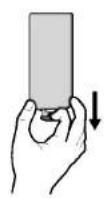
Insert the battery (Lithium battery)
NOTES
- Do not expose the remote control sensor to bright light.
- Do not place obstacles between the remote control sensor and the remote control.
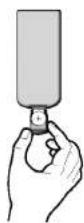
Replacing the button-type battery
The battery normally lasts for about a year. Replace the battery if the remote control fails to operate the unit when used within the operation range.
Button-type battery (Lithium battery)
- Pinch the battery holder clip together then pull the tab to remove the battery holder.
- Insert the battery with the ^+ facing in the same direction as the ^+ on the battery holder.
- Replace the battery holder with battery into the remote control unit making sure that it is fully inserted.
- Replace remote control unit battery with 3V micro lithium cells such as CR, 2025 or its equivalent.
- Dispose of battery safety in accordance with local laws. Do not dispose of in fire.
Warning: The battery used in this device may present a fire or chemical burn hazard if mistreated. Do not recharge, disassemble, incinerate, or heat above 100^ (212°F). Replace the battery with Matsushita Elec. Ind. Co., Ltd. (Panasonic), part no. CR. 2025 only. Use of another battery may present a risk of fire or explosion. Dispose of used batteries. Keep batteries away from children. Do not disassemble or dispose of in fire.
Power Connections
AC Adapter
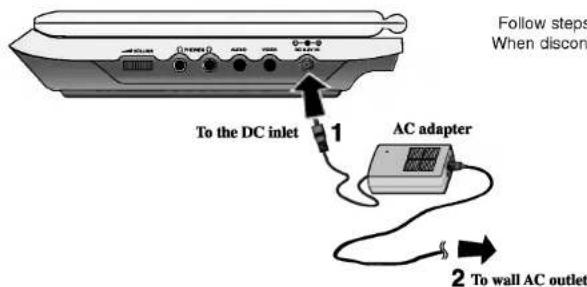
Caution
- Do not connect the power plug to a power outlet other than that indicated on the label, as this can result in a risk of fire or electric shock.
- Do not connect or disconnect the power plug with wet hands. Doing so may cause electric shock.
- Do not use an AC adapter other than one specified, as it can cause a fire or damage to the player.
AC adapter
- This AC adapter operates on 100-240V-1.5A 50-60Hz.
- MODEL NO.: DP-AC90
Manufactured by WANLIDA Digital Technology Co., Ltd. Contact an electrical parts distributor for assistance in selecting a suitable AC plug adapter or AC cord set.
Power Connections (continued)
Automotive Adapter
This DVD player and its automotive adapter are designed for use in vehicles that have 12 volt, negative ground electrical systems. (This is standard for most vehicles.) If your vehicle has a different type of electrical system, the DC power system cannot be used.
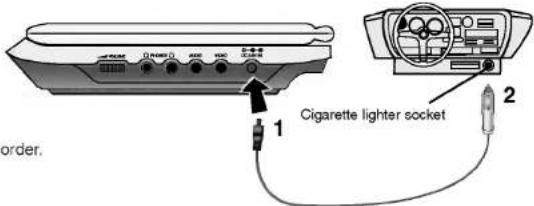
Follow steps 1 to 2 to connect. When disconnecting, reverse the order.
Caution
- To prevent electrical shock and possible damage to your DVD player or vehicle, always unplug the automotive adapter from the cigarette lighter socket before you remove the plug from your DVD player.
- A 3 amp. 250V fuse for protection is installed in the automotive adapter.
-
While the engine is being started, disconnect the automotive adapter from the car's cigarette lighter socket.
-
Do not operate your DVD player when the car battery is discharged. Peak current from the car generator may cause the DC fuse to blow.
- If the vehicle's supply voltage drops below approximately 10 volts, your DVD player may not work properly.
-
Do not leave your DVD player in a place where the temperature exceeds 70^ (158°F), or the pick-up device may be damaged. Examples include:
-
Inside a car with the windows closed and in direct sunshine.
- Near a heating appliance.
Automotive adapter
This automotive adapter operates on DC 12V.
- MODEL NO.:DPDC1
Manufactured by WANLIDA Digital Technology Co., Ltd.
- Contact an electrical parts distributor for assistance in selecting a suitable automotive adapter.
Power Connections (continued)
Battery Pack
- Charge the battery pack before using it for the first time.
Attaching the battery pack
- Match the hooks of the battery pack into the holes on the bottom of the player.
- Press and slide the battery pack until the hooks click.
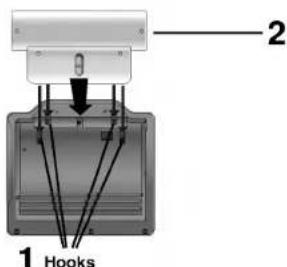
NOTES
- Do not detach the battery pack during playback.
- Be careful not to drop the battery pack.
Detaching the battery pack - Press the RELEASE knob.
- Pull the battery pack until the hooks click.
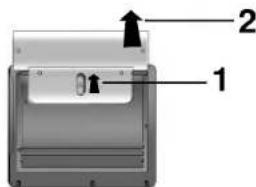

ATTENTION
The product that you have purchased contains a rechargeable battery. The battery is recyclable. At the end of it's useful life, under various state and local laws, it may be illegal to dispose of this battery into the municipal waste stream. Check with your local solid waste/officials for details in your area for recycling options or proper disposal.
Power Connections (continued)
Charging the battery pack
-
Attach the battery pack to the player.
-
Connect the AC power adapter to the player and the plug into an AC outlet.
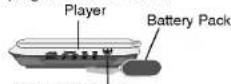
AC adapter cord insert jack (DC IN 9.5V)
Charge Indicator
- During recharging, charge indicator is red. If recharging is complete, charge indicator changes to green color.
CAUTION
Take the following precautions to avoid liquid leakage, overheating, etc.
- Do not use any unauthorized parts.
- Use the authorized AC adapter when recharging battery.
Do not expose to high temperature above 60^ (140^) - Do not attempt to dismantle or modify the unit.
- Excessive impact may cause the unit to malfunction.
- Do not incinerate.
-
Do not disassemble; dispose of properly.
-
Do not short-circuit.
NOTE
Charging a battery only happens when the power is off. The battery will not be charged when it is naturally or purposely discharged. Because the unit cannot perceive battery voltage, even if you attached the battery.
When you are in this situation, power on the unit and then power off again. Then battery charge will proceed.
Recharging and play times
Press "Display" to display the battery status on the screen.
| Recharging | Play time | |
| without player | LCD On | LCD Off |
| Approx. | Approx. | Approx. |
| 3 hour | 3.5 hours* | 4 hours |
- When Brightness control is set to initial mode.

If using the AC adapter, battery display does not appear.
- This unit power is off automatically after the "Check Battery Status" displayed on the screen.
If play time dramatically reduces after recharging
The battery pack has reached the end of its service life (it can be recharged about 300 times).
If the unit is not to be used for a long time
- Detach the battery pack. (Even if the unit is off, it still uses some power.)
This can lead to over discharging of the battery and malfunction.) - Recharge the battery pack when you are ready to use it again.
Battery Pack
MODEL NO.:DPB135
Rotate the LCD
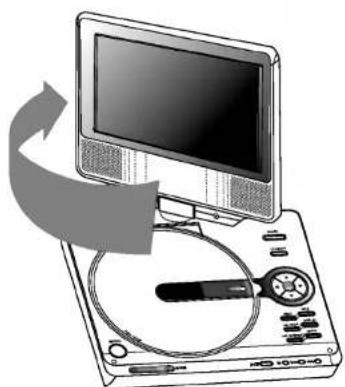
You can rotate LCD clockwise an angle of 180 degrees. However, if you turn it by force, it can cause serious damage.
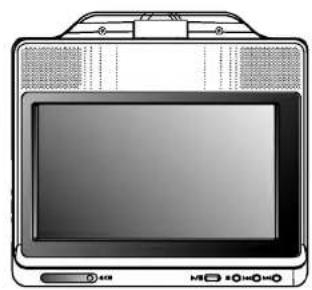
After rotating LCD completely, you can fold the LCD screen as shown above.
18
Playing a Disc
1.Prepare the power supply.
2. Open the outer cover and press POWER button.
3. Press OPEN to open the disc lid and insert a disc with the side you want to play label up. Close the disc lid by hand.
- If the disc is placed in upside down (and it is a single-sided disc), "NO DISC" or "DISC ERROR" appears on the screen.
-
After playing back all of the chapters in the title, the DVD player automatically stops and returns to the menu screen.
-
Press PLAY to start play.
- Adjust the volume.
NOTES
- Place a disc with the playback side down on the spindle, and push gently on the center of the disc so it goes into position.
- Confirm LCD MODE position by pressing LCD MODE button.
Changing the size of the picture
Use the LCD MODE button to change the picture mode. The
mode is shown on the unit's display as follows.
NORMAL FULL ZOOM OFF
NOTE
May appear to differ according to kind of disc.
On-Screen Display
Displaying Disc Information on-screen
You can display various information about the disc loaded on-screen.
- Press DISPLAY to show various playback information. The items displayed differ depending on the disc type or playing status.
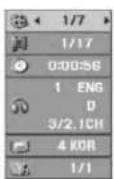
-
You can select an item by pressing and change or select the setting by pressing
-
Title (Track) - Current title (or track). number/total number of titles (or tracks).
Chapter Current chapter number/total number of chapters.
Time - Elapsed playing time. - Audio - Selected audio language or channel.
- Subtitle - Selected subtitle.
Angle - Selected angle/total number of angles.
NOTE
If no button is pressed for a few seconds, the on-screen display disappears.
Initial Settings
By using the Setup menu, you can make various adjustments to items such as picture and sound. You can also set a language for the subtitles and the Setup menu, among other things. For details on each Setup menu item, see pages 21 to 25.
To display and exit the Menu:
Press SETUP to display the menu. A second press of SETUP will take you back to initial screen.
To go to the next level:
Press on the remote control.
To go back to the previous level:
Press on the remote control.
General Operation
- Press SETUP. The Setup menu appears.
- Use / to select the desired option then press to move to the second level. The screen shows the current setting for the selected item, as well as alternate setting(s).
- Use / to select the second desired option then press to move to the third level.
- Use / to select the desired setting then press ENTER to confirm your selection. Some items require additional steps.
- Press SETUP or PLAY to exit the Setup menu.
Initial Settings
LANGUAGE
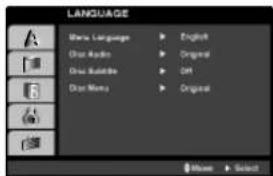
Menu Language
Select a language for the Setup menu and on-screen display.
Disc Audio/Subtitle/Menu
Select the language you prefer for the audio track (disc audio), subtitles, and the disc menu.
Original: Refers to the original language in which the disc was recorded.
Other: To select another language, press number buttons then ENTER to enter the corresponding 4-digit number according to the language code list in the reference chapter. If you enter the wrong language code, press CLEAR.
DISPLAY
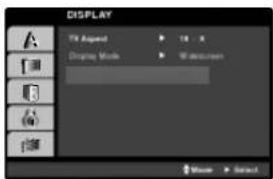
TV Aspect
4:3: Select when a standard 4:3 TV is connected.
16:9: Select when a 16:9 TV is connected.
Display Mode
Display Mode setting works only when the TV Aspect mode is set to "4:3".
LetterBox: Displays a wide picture with bands on the upper and lower portions of the screen.
Panscan: Automatically displays the wide picture on the entire screen and cuts off the portions that do not fit.
Initial Settings (continued)
AUDIO
Each DVD disc has a variety of audio output options. Set the player's AUDIO options according to the type of audio system you use.
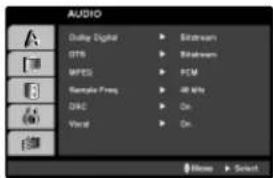
Dolby Digital / DTS / MPEG
Bitstream: Select "Bitstream" if you connect the DVD Player's DIGITAL CUT jack to an amplifier or other equipment with a Dolby Digital, DTS or MPEG decoder.
PCM (for Dolby Digital / MPEG): Select when connected to a two-channel digital stereo amplifier. DVDs encoded in Dolby Digital or MPEG will be automatically downmixed to two-channel PCM audio.
Off (for DTS): If you select "Off", the DTS signal is not output through the DIGITAL OUT jack.
Sample Freq. (Frequency)
If your receiver or amplifier is NOT capable of handling 96 kHz signals, select 48 kHz. When this choice is made, this unit automatically converts any 96 kHz signals to 48 kHz so your system can decode them.
If your receiver or amplifier is capable of handling 96 kHz signals, select 96 kHz. When this choice is made, this unit passes each type of signal through without any further processing.
Check the documentation for your amplifier to verify its capabilities.
Dynamic Range Control (DRC)
With the DVD format, you can hear a program's soundtrack in the most accurate and realistic presentation possible, thanks to digital audio technology. However, you may wish to compress the dynamic range of the audio output (the difference between the loudest sounds and the quietest ones). This allows you to listen to a movie at a lower volume without losing clarity of sound. Set DRC to On for this effect.
Vocal
Set to On only when a multi-channel karaoke DVD is playing. The karaoke channels on the disc mix into normal stereo sound.
Initial Settings (continued)
LOCK (Parental Control)
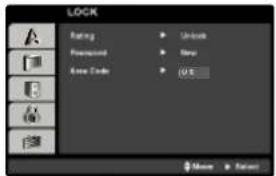
Rating
Blocks playback of rated DVDs based on their content. Not all discs are rated.
- Select "Rating" on the LOCK menu then press
- To access the Rating, Password and Area Code features, you must input the 4-digit security code you created. If you have not yet entered a security code you are prompted to do so. Input a 4-digit code and press ENTER. Enter it again and press ENTER to verify. If you make a mistake before pressing ENTER, press CLEAR.
- Select a rating from 1 to 8 using the / buttons.
Rating 1-8: Rating one (1) has the most restrictions and rating eight (8) is the least restrictive.
Unlock
If you select unlock, parental control is not active and the disc plays in full.
NOTE
If you set a rating for the player, all disc scenes with the same rating or lower are played. Higher rated scenes are not played unless an alternate scene is available on the disc. The alternative must have the same rating or a lower one. If no suitable alternative is found, playback stops. You must enter the 4-digit password or change the rating level in order to play the disc.
4. Press ENTER to confirm your rating selection, then press SETUP to exit the menu.
Initial Settings (continued)
Password
You can enter or change password.
- Select Password on the LOCK menu then press
- To make a new password:
Press ENTER when the "New" option is highlighted. Enter a new password using the numbered buttons then press ENTER. Enter the password again to verify.
To change the password:
Press ENTER when the "Change" option is highlighted. Enter a current password using the numbered buttons then press ENTER. Enter a new password using the numbered buttons then press ENTER. Enter the password again to verify.
3. Press SETUP to exit the menu.
Area Code
Enter the code of the area whose standards were used to rate the DVD video disc, based on the list in the reference chapter.
- Select "Area Code" on the LOCK menu then press
- Follow step 2 as shown previous page (Rating).
- Select the first character using / buttons.
- Press ENTER and select the second character using / buttons.
- Press ENTER to confirm your area code selection.
If you forget your Security Code
If you forget your security code you can clear it using the following steps:
- Press SETUP to display the Setup menu.
- Input the 6-digit number "210499" and the security code is cleared.
- Enter a new code as described above.
Initial Settings (continued)
OTHERS
The PBC, Auto Play, B.L.E. and DivX(R) VOD settings can be changed.
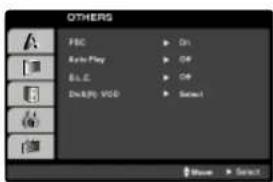
PBC
Set Playback Control (PBC) to On or Off.
On: Video CDs with PBC are played according to the PBC.
Off: Video CDs with PBC are played the same way as Audio CDs.
Auto Play
You can set up the DVD Player so a DVD disc automatically starts playing whenever the DVD is inserted.
If Auto Play mode is set to On, this DVD player will search for title that has the longest playback time and then play back the title automatically.
NOTE
The Auto Play function may not work for some DVDs.
B.L.E. (Black Level Expansion)
To select the black level of playback pictures. Set your preference and monitor's ability.
On: Expanded grey scale. (0 IRE cut off)
Off: Standard grey scale. (7.5 IRE cut off)
DivX(R) VOD
We provide you the DivX® VOD (Video On Demand) registration code that allows you to rent and purchase videos using the DivX® VOD service. For more information, visit www.divx.com/vod.
- Select "DivX(R) VOD" option then press
- Press ENTER while "Select" is selected and the registration code will appear.
Use the registration code to purchase or rent the videos from DivX® VOD service at www.divx.com/vod. Follow the instructions and download the video onto a disc for playback on this unit.
- Press ENTER to exit.
NOTE
All the downloaded videos from DivX® VOD can only be played back on this unit.
General Features
DVD
Use the buttons to select the title/chapter you want to view, then press ENTER to start. Press TITLE or MENU to return to the menu screen.
VCD
Use the number buttons to select the track you want to view and press RETURN to return to the menu screen. Menu settings and operating procedures may differ. Follow the instructions on the each menu screen. You also may set PBC to Off (See "PBC" on page 25).
NOTES
- If parental control is set and the disc is not within the rating settings you must input the password. (See "Lock Menu" on page 23-24.)
DVDs may have a region code. Your player does not play discs that have a region code different from your player.
Unless stated otherwise, all operations described use the remote control. Some features may also be available on the Setup menu.
Moving to another TITLE DVD
When a disc has more than one title, you can move to another title. Press DISPLAY while playback is stopped then the appropriate number (0-9) or use to move to another title. You can play any title by inputting its number while playback is stopped.
Moving to another CHAPTER/TRACK ALL
During playback, press SKIP (I or H) to go to the next chapter/track or to return to the beginning of the current chapter/track.
Press SKIP twice briefly to step back to the previous chapter/track.
Search ALL
- Press and hold SKIP/SEARCH or for about two seconds during playback. The player will now go into SEARCH mode.
- Press and hold SKIP/SEARCH or repeatedly to select the required speed.
DVD, DivX disc: 4 steps
Video CD, MP3, WMA, Audio CD: 3 steps - To exit SEARCH mode, press PLAY.
Slow Motion DVD VCD DivX
- Press SLOW or during playback. The player will enter SLOW mode. DVD disc; 4 steps Video CD. DivX; 4 steps (forward only)
- To exit slow motion mode, press PLAY.
General Features
Still Picture and Frame-by-Frame Playback
ALL
During playback, press to pause playback.
DVD VCD DivX
Press I repeatedly to play Frame-by-Frame. (Only Remocon) To exit still motion mode, press PLAY.
Time Search DVD VCD DivX
To start playing at any chosen time on the disc:
- Press DISPLAY during playback. The time search box shows the elapsed playing time.
- Press / to select the time clock icon and "---" appears.
- Input the required start time in hours, minutes, and seconds from left to right. If you enter the wrong numbers, press CLEAR to remove the numbers you entered. Then input the correct numbers.
- Press ENTER to confirm. Playback starts from the selected time.
Repeat A-B DVD VCD DivX ACD
During playback, each press of A-B button to select point A and point B and repeats a sequence from point A (Starting point) to point B (End point).
Repeat ALL
During playback, press REPEAT repeatedly to select a desired repeat mode.
DVD Video Discs - Chapter/Title/Off
Video CDs, Audio CD, DivX/MP3/WMA discs - Track/All/Off
NOTES
- On a Video CD with PBC, you must set PBC to Off on the setup menu to use the repeat function (See "PBC" on page 25).
- If you press SKIP (▶▶) once during Repeat Chapter (Track) playback, the repeat playback cancels.
Zoom DVD VCD DivX
During watching pictures, press ZOOM to enlarge the video image (4 steps).
You can move through the zoomed picture using buttons. Press CLEAR to exit.
NOTES
- Zoom may not work on some DVDs.
- Screen fit mode is available for playing the DVD disc, VR disc and movie file.
Resume Play
When play is stopped, the unit records the point where STOP was pressed (RESUME function).
Press PLAY and play will resume from this point.
General Features
Title Menu DVD
If the current DVD title has a menu, the title menu appears on the screen. Otherwise, the disc menu may appear.
Disc Menu DVD
Press MENU and the disc menu is displayed. Press MENU again to exit.
Changing the Audio Language DVD DivX
Press AUDIO repeatedly during playback to hear a different audio language or audio track.
With DVD-RW discs recorded in VR mode that have both a main and a Bilingual audio channel, you can switch between Main (L), Bilingual (R), or a mix of both (Main + Bilingual) by pressing AUDIO.
VCD
Press AUDIO repeatedly during playback to hear a different audio channel (STEREO, LEFT, or RIGHT).
Camera Angle DVD
During playback of DVD disc contains scenes recorded different camera angles, press ANGLE repeatedly to select a desired angle.
TIP
The angle indicator will blink on the screen during scenes recorded at different angles as an indication that angle switching is possible.
Subtitles DVD DivX
Press SUBTITLE repeatedly during playback to see the different subtitle languages.
NOTE
If there is no information or there is a code that can not read in the DivX file, "1" etc are displayed.
Additional features
Marker Search DVD VCD DivX
To enter a Marker
You can start playback from up to nine memorized points. To enter a marker, press MARKER at the desired point on the disc. The Marker icon appears on the TV screen briefly. Repeat to enter up to nine markers.
To Recall or Clear a Marked Scene
- During disc playback, press SEARCH. The marker search menu appears on the screen.
- Within 10 seconds, press to select a marker number that you want to recall or clear.
- Press ENTER and playback starts from the marked scene. Or, Press CLEAR and the marker number is erased from the list.
- You can play any marker by inputting its number on the marker search menu.
NOTES
These operations work only with discs for which the elapsed playing time appears in the display window during playback or stop.
- Some subtilies recorded around the marker may fail to appear (DVD).
- All the markers are cleared when the power is turned off or the disc is removed.
- The marker is not stored when the DVD or title menu is displayed on the screen.
Last Scene Memory DVD CD VCD1.1
This player memorizes last scene from the last disc that is viewed. The last scene remains in memory even if you remove the disc from the player or switch off the player. If you load a disc that has the scene memorized, the scene is automatically recalled.
NOTES
This player does not memorize the scene of a disc if you switch off the player before commencing to play the disc.
Screen Saver
The screen saver appears when you leave the DVD player in Stop mode for about five minutes. If the Screen Saver is displayed for five minutes, the DVD Player automatically turns itself off.
Playing an Audio CD or MP3/WMA Disc
The DVD player can play MP3/WMA formatted recordings on CD-ROM, CD-R, or CD-RW discs.
MP3/WMA/Audio CD
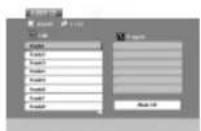
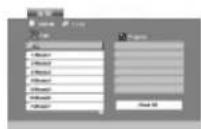
Once you insert an MP3/WMA files recorded media or Audio CD, a menu appears on the TV screen.
Press / to select a track/file then press PLAY or ENTER and playback starts. You can use variable playback functions. Refer to page 26-27.
ID3 TAG
- When playing a file containing information such as track titles, you can see the information by pressing DISPLAY. [Title, Artist, Album, Year, Comment]
If there is no information, "NO ID3 TAG" appears on the display.
TIPS
- If you are in a file list on the MUSIC menu and want to return to the Folder list, use the / to highlight L and press ENTER.
- Press MENU to move to the next page.
- On a CD with MP3/WMA and JPEG you can switch MP3/WMA and JPEG. Press TITLE and MUSIC or PHOTO word on top of the menu is highlighted.
MP3 / WMA disc compatibility with this player is limited as follows:
Sampling frequency: within 8 - 48 kHz (MP3), within 32 - 48kHz (WMA)
- Bit rate: within 8 - 320kbps (MP3)
32-192kbps(WMA)
The player cannot read an MP3/WMA file that has a file extension other than "mp3" / "wma".
CD-R physical format should be ISO 9660
- If you record MP3 / WMA files using software that cannot create a file system (eg. Direct-CD) it is impossible to playback MP3 / WMA files. We recommend that you use Easy-CD Creator, which creates an ISO 9660 file system.
- File names should have a maximum of 8 letters and must incorporate an .mp3 or .wma extension.
- They should not contain special letters such as /? * : “<> I etc.
The total number of files on the disc should be less than 650.
- This DVD player requires discs and recordings to meet certain technical standards in order to achieve optimal playback quality. Pre-recorded DVDs are automatically set to these standards. There are many different types of recordable disc formats (including CD-R containing MP3 or WMA files) and these require certain pre-existing conditions (see above) to ensure compatible playback.
Programmed Playback
The program function enables you to store your favorite tracks from any disc in the player memory.
A program can contain 30 tracks
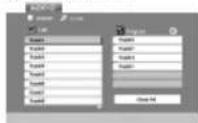
- Insert an Audio CD or MP3/WMA files recorded media. AUDIO CD or MUSIC menu appears.
- Press PROG. The mark will appear NOTE
Press PROG. again, then the mark will disappear to exit the Program Edit mode.
Audio CD Menu
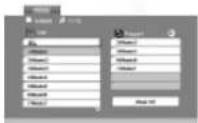
MP3/WMA Menu
- Select a track on the "List", then press ENTER to place the selected track on the "Program" list. Repeat to place additional tracks on the list.
- Press
Select the track you want to start playing on the "Program" list.
- Press PLAY or ENTER to start. Playback begins in the order in which you programmed the tracks. Playback stops after all of the tracks on the "Program" list have played once.
- To resume normal playback from programmed playback, select a track of AUDIO CD (or MUSIC) list and then press PLAY.
Repeat Programmed Tracks
Press REPEAT to select a desired repeat mode.
- Track: repeats the current track
- All: repeats all the tracks on programmed list.
- Off(No display): does not play repeatedly.
NOTE
If you press once during Repeat Track playback, the repeat playback cancels.
Erasing a Track from Program List
- Press PROGRAM and the mark will appear
- Use to select the track that you wish to erase from the Program list.
- Press CLEAR. Repeat step 1~3 to erase additional tracks on the list.
Erasing the Complete Program List
- Press PROGRAM and the mark will appear
- Use to select "Clear All", then press ENTER.
NOTE
The programs are also cleared when the power is off or the disc is removed.
Viewing a JPEG Disc
Using this DVD Player you can view discs with JPEG files.
- Insert a JPEG files recorded media. The PHOTO menu appears on the TV screen.
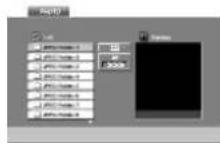
-
Press / to select a folder, and press ENTER. A list of files in the folder appears. If you are in a file list and want to return to the previous Folder list, use the / buttons on the remote to highlight and press ENTER.
-
If you want to view a particular file, press / to highlight a file and press ENTER or PLAY. While viewing a file, you can press STOP to move to the previous menu (PHOTO menu).
TIPS
- Press MENU to move to the next page.
There are three Slide Speed options : >> (Fast), >> (Normal) and > (Slow). Use ▲▼ ▼ to highlight the Speed. Then, use ↓ / ▽ to select the option you want to use then press ENTER. - On a disc with MP3/WMA and JPEG you can switch MP3/WMA and JPEG. Press TITLE and MUSIC or PHOTO word on top of the menu is highlighted.
- Press RETURN, information of file is hidden.
Slide Show
JPEG
Use ▲▼ ▲▶ to highlight the (Slide Show) then press ENTER.
Still Picture JPEG
- Press PAUSE during slide show.
The player will now go into PAUSE mode. - To return to the slide show, press PLAY or press PAUSE again.
32
Viewing a JPEG Disc (continued)
Moving to another File JPEG
Press SKIP/SEARCH (or or) or cursor (or) once while viewing a picture to advance to the next or previous file.
Zoom JPEG
During watching pictures, press ZOOM to enlarge the video image (4 steps).
You can move through the zoomed picture using buttons.
To rotate picture
Press / during showing a picture to rotate the picture clockwise or counter clockwise.
To listen to MP3/WMA music while watching picture JPEG
- Insert the disc containing the two types of file in the player.
- Press TITLE to display PHOTO menu.
- Press / to select a photo file.
- Use to select icon then press ENTER. Playback starts. The playback will continue until STOP is pressed.
TIP
To listen to only the desired music watching picture, programmed the desired tracks from the "MUSIC" menu and then proceed as above.
JPEG disc compatibility with this player is limited as follows:
- Depending upon the size and number of JPEG files, it could take a long time for the DVD player to read the disc's contents. If you don't see an on-screen display after several minutes, some of the files may be too large - reduce the resolution of the JPEG files to less than 2M pixels as 2760 × 2048 pixels and burn another disc.
- The total number of files and folders on the disc should be less than 650.
Some discs may be incompatible due to a different recording format or the condition of disc. - Ensure that all the selected files have the "jpg" extensions when copying into the CD layout.
If the files have "jpeg" or "jpeg" extensions, please rename them as ".jpg" file. - File names without ".jpg" extension will not be able to be read by this DVD player. Even though the files are shown as JPEG image files in Windows Explorer.
Playing a DVD VR format Disc
This unit will play DVD-RW discs recorded using the Video Recording (VR) format.
- Insert a disc and close the tray. The DVD-VR menu appears on the screen.
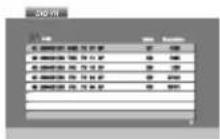
- Press / to select a track then press PLAY or ENTER and playback starts.
- Press DISC MENU to move to the list menu.
NOTES
- Unfinalized DVD-R/RW discs cannot be played in this player.
- Some DVD-VR disc are made with CPRM data by DVD RECOFDER. Player does not support these kinds of discs and display the "CHECK DISC".
What is 'CPRM'?
CPRM is a copy protection system (with scramble system) only allowing the recording of 'copy once' broadcast programs. CPRM stands for Content Protection for Recordable Media.

Playing a DivX Movie Disc
Using this DVD Player you can play DivX file.
- Insert a DivX file recorded media. The MOVIE menu appears on the screen.
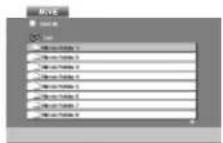
- Press / to select a folder, and press ENTER. A list of files in the folder appears. If you are in a file list and want to return to the Folder list, use the / buttons on the remote to highlight and press ENTER.
- If you want to view a particular file, press / to highlight a file and press ENTER or PLAY. You can use variable playback functions. Refer to page 26-27.
- Press STOP to stop the playback. The Movie menu appears.
Notice for displaying the DivX subtitle
If the subtitle does not display properly during playback, press and hold SUBTITLE about 3 seconds then press to select another language code until the subtitle is displayed properly.
TIP
- Press MENU to move to the next page.
- On a CD with MP3/WMA, JPEG and MOVIE file, you can switch MUSIC, PHOTO and MOVIE menu. Press TITLE and MUSIC, PHOTO and MOVIE word on top of the menu is highlighted.
- The disc subtitle may not be displayed properly, if a DivX subtitle is downloaded through the internet.
- If the disc subtitle setup menu does not have the DivX subtitle language you are going to play, the subtitle language may not be displayed properly.
Playing a DivX Movie Disc
DivX disc compatibility with this player is limited as follows:
Available resolution size of the DivX file is under 720x576 (W x H) pixel.
The file name of the DivX subtitle is limited to 56 characters.
- If there is impossible code to express in the DivX file, it may be displayed as " _" mark on the display.
- If the frame rate is over 30 frames per second, this unit may not operate normally.
- If the video and audio structure of recorded file is not interleaved, either video or audio is outputted.
- If the file is recorded with GMC, the unit supports only 1-point of the record level.
GMC?
GMC is the acronym for Global Motion Compensation. It is an encoding tool specified in MPEG4 standard. Some MPEG4 encoder, like DivX or Xvld, have this option.
There are different levels of GMC encoding, usually called 1-point, 2-point, or 3-point GMC.
Playable DivX file
:avi','mpg';mpeg
Playable Subtitle format
SubRip(.srt/.txt)
SAMI(.smi)
SubStation Alpha*ssa/.txt
MicroDVD(*.sub/*.txt)
SubViewer 2.0(.sub/.txt)
TMPlayer(.txt)
Dvd Subtitle System(* txt)
VobSub (.sub) Sub/idx, stream based format.
Playable Codec format
"DIVX3.xx", "DIVX4.xx", "DIVX5.xx", "XVID", "MP43", "31VX".
Playable Audio format
"Dolby Digital", "DTS", 'PCM", "MP3", "WMA",
Sampling frequency: within 8 - 48 kHz (MP3),
within 32 - 48kHz (WMA)
Bit rate: within 8 - 320kbps (MP3),
32-192kbps (WMA)
Setting up the Player
The picture and sound of a nearby TV, VCR, or radio may be distorted during playback. If this occurs, position the player away from the TV, VCR, or radio, or turn off the unit after removing the disc.
DVD Player Connections
Depending on your TV and other equipment there are various ways you can connect the player. Please refer to the manuals of your TV, stereo system or other devices as necessary for additional connection information.
Video and Audio Connections to Your TV
Make sure the DVD player is connected directly to the TV and not to a VCR, otherwise the DVD image could be distorted by the copy protection system.
Video
Connect the VIDEO OUT jack on the DVD player to the video in the jack on the TV using the video cable.
Audio Connection to Your TV:
Connect the AUDIO OUT jacks of the DVD Player to the audio left and right IN jacks on the TV using the audio cables. Do not connect the DVD Player's AUDIO OUT jack to the phone in jack (record deck) of your audio system.
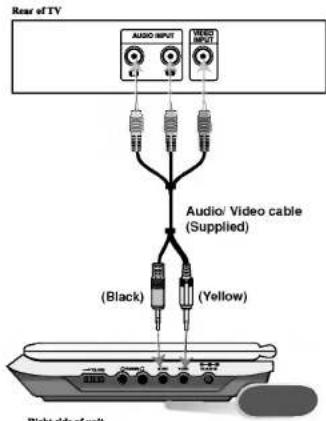
You must set the A/V IN/OUT switch to the "A/V OUT" mode
Setting up the Player (continued)
Audio Connection to Optional Equipment
Connect the DVD player to your optional equipment for audio output.
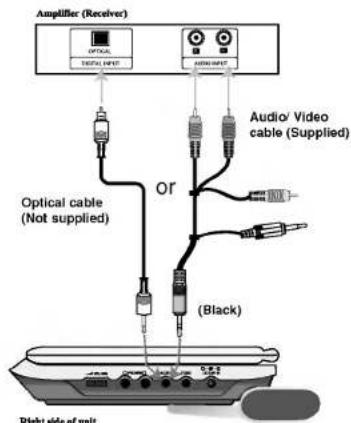
You must set the A/V IN/OUT switch to the "A/V OUT" mode
Amplifier equipped with 2-channel analog stereo or Dolby Pro Logic II / Pro Logic: Connect the AUDIO OUT jacks on the DVD player to the audio left and right IN jacks on your amplifier, receiver, or stereo system, using the audio cables.
Amplifier equipped with 2-channel digital stereo (PCM) or audio / video receiver equipped with a multi-channel decoder (Dolby DigitalTM, MPEG 2, or DTS): Connect one of the DVD Player's DIGITAL AUDIO OUT jack to the corresponding in jack on youramplifier. Use an optional digital audio cable.
Digital Multi-channel sound
A digital multi-channel connection provides the best sound quality. For this you need a multi-channel audio / video receiver that supports one or more of the audio formats supported by your DVD player such as MPEG 2, Dolby Digital and DTS. Check the receiver manual and the logos on the front of the receiver.
NOTES
- If the audio format of the digital output does not match the capabilities of your receiver, the receiver produces a strong, distorted sound or no sound at all.
- Six Channel Digital Surround Sound via a digital connection can only be obtained if your receiver is equipped with a Digital Multi-channel decoder.
To see the audio format of the current DVD in the on-screen display, press AUDIO.
Troubleshooting
| Symptom | Cause | Correction |
| No power. | ·The power cord is disconnected. | ·Plug the power cord into the wall outlet securely. |
| ·The battery is discharged. | ·Recharge the battery. | |
| No picture on the LCD or TV (including video from another unit). | ·The video cable is not connected securely. | ·Connect the video cable into the jacks securely. |
| ·The A/V IN/OUT switch is not set correctly. | ·Set the A/V IN/OUT switch correctly. - While you are playing a disc, set the A/V IN/OUT switch to OUT mode - While you are viewing video from other equipment, set the A/V IN/OUT switch to In mode. | |
| ·LCD mode is set to OFF. | ·Select a LCD mode other than OFF. | |
| ·Check that Brightness control is set to “-”. | ·Adjust the brightness. | |
| ·The TV is not set to receive DVD signal output. | ·Select the appropriate video input mode on the TV so the picture from the DVD player appears on the screen. | |
| No sound. | ·The equipment connected with the audio cable is not set to receive DVD signal output. | ·Select the correct input mode of the audio receiver so you can listen to the sound from the DVD player. |
| ·The audio cables are not connected securely. | ·Connect the audio cable into the jacks securely. | |
| The DVD player does not start playback. | ·An unplayable disc is inserted. | ·Insert a playable disc. (Check the disc type, color system and Regional code.) |
| ·The Rating level is set. | ·Cancel the Rating function or change the rating level. | |
| No response when but-tons are pressed. | ·Some discs prohibit certain operations. | ·“⊗” may appear on the screen during operation. |
| The remote control does not work properly. | ·The remote control is too far from the DVD player. | ·Operate the remote control within about 23 ft (7 m). |
Reene
Language Codes
- Use this list to input your desired language for the following initial settings:
- Disc Audio, Disc Subtitle, Disc Menu.
| Language | Code | Language | Code | Language | Code | Language | Code |
| Abkhazian | 6566 | Fiji | 7074 | Lingala | 7678 | Singhalese | 8373 |
| Afar | 6565 | Finnish | 7073 | Lithuanian | 7684 | Slovak | 8375 |
| Afrikaans | 6570 | French | 7082 | Macedonian | 7775 | Slovenian | 8376 |
| Albanian | 8381 | Frisian | 7089 | Malagasy | 7771 | Somali | 8379 |
| Armeharic | 6577 | Galician | 7176 | Malay | 7783 | Spanish | 6983 |
| Arabic | 6582 | Georgian | 7565 | Malayalam | 7776 | Sudanese | 8385 |
| Armenian | 7289 | German | 6869 | Maltese | 7784 | Swahili | 8387 |
| Assamese | 6583 | Greek | 6976 | Maori | 7773 | Swedish | 8386 |
| Aymara | 6588 | Greenlandic | 7576 | Marathi | 7782 | Tagalog | 8476 |
| Azerbaijan | 6590 | Guarani | 7178 | Moldavian | 7779 | Tajik | 8471 |
| Bashkir | 6665 | Gujarati | 7185 | Mongolian | 7778 | Tamil | 8465 |
| Basque | 6985 | Hausa | 7265 | Nauru | 7865 | Tatar | 8484 |
| Bengali; Bangla | 6678 | Hebrew | 7387 | Nepali | 7869 | Telugu | 8469 |
| Bhutani | 6890 | Hindi | 7273 | Norwegian | 7879 | Thai | 8472 |
| Bihari | 6672 | Hungarian | 7285 | Oriya | 7982 | Tibetan | 6679 |
| Breton | 6682 | Icelandic | 7383 | Panjabi | 8065 | Tigrinya | 8473 |
| Bulgarian | 6671 | Indonesian | 7378 | Pashto, Pushhto | 8083 | Tonga | 8479 |
| Burmese | 7789 | Interlingua | 7365 | Persian | 7065 | Turkish | 8482 |
| Byelorussian | 6669 | Irish | 7165 | Polish | 8076 | Turkmen | 8475 |
| Cambodian | 7577 | Italian | 7384 | Portuguese | 8084 | Twi | 8487 |
| Catalan | 6765 | Japanese | 7465 | Quechua | 8185 | Ukrainian | 8575 |
| Chinese | 9072 | Javanese | 7487 | Rhaeto-Romance | 8277 | Urdu | 8582 |
| Corsican | 6779 | Kannada | 7578 | Romanian | 8279 | Uzbek | 8590 |
| Croatian | 7282 | Kashmir | 7583 | Russian | 8285 | Vietnamese | 8673 |
| Czech | 6783 | Kazakh | 7575 | Samoan | 8377 | Volapuk | 8679 |
| Danish | 6865 | Kirghiz | 7589 | Sanskrit | 8365 | Welsh | 6789 |
| Dutch | 7876 | Korean | 7579 | Scotts Gaelic | 7168 | Wolof | 8779 |
| English | 6978 | Kurdish | 7585 | Serbian | 8382 | Xhosa | 8872 |
| Esperanto | 6979 | Laothian | 7679 | Serbo-Croatian | 8372 | Yiddish | 7473 |
| Estonian | 6984 | Latin | 7665 | Shona | 8378 | Yoruba | 8979 |
| Faroeese | 7079 | Latvian, Lettish | 7686 | Sindhi | 8368 | Zulu | 9085 |
Area Codes
Choose an area code from this list.
| Area | Code | Area | Code | Area | Code | Area | Code |
| Afghanistan | AF | Ethiopia | ET | Malaysia | MY | Saudi Arabia | SA |
| Argentina | AR | Fiji | FJ | Maldives | MV | Senegal | SN |
| Australia | AU | Finland | FI | Mexico | MX | Singapore | SG |
| Austria | AT | France | FR | Monaco | MC | Slovak Republic | SK |
| Belgium | BE | Germany | DE | Mongolia | MN | Slovenia | SI |
| Bhutan | BT | Great Britain | GB | Morocco | MA | South Africa | ZA |
| Bolivia | BO | Greece | GR | Nepal | NP | South Korea | KR |
| Brazil | BR | Greenland | GL | Netherlands | NL | Spain | ES |
| Cambodia | KH | Islands | HM | Netherlands Antilles | AN | Sri Lanka | LK |
| Canada | CA | Hungary | HU | New Zealand | NZ | Sweden | SE |
| Chile | CL | India | IN | Nigeria | NG | Switzerland | CH |
| China | CN | Indonesia | ID | Norway | NO | Thailand | TH |
| Colombia | CO | Israel | IL | Oman | OM | Turkey | TR |
| Congo | CG | Italy | IT | Pakistan | PK | Uganda | UG |
| Costa Rica | CR | Jamaica | JM | Panama | PA | Ukraine | UA |
| Croatia | HR | Japan | JP | Paraguay | PY | United States | US |
| Czech Republic | CZ | Kenya | KE | Philippines | PH | Uruguay | UY |
| Denmark | DK | Kuwait | KW | Poland | PL | Uzbekistan | UZ |
| Ecuador | EC | Libya | LY | Portugal | PT | Vietnam | VN |
| Egypt | EG | Luxembourg | LU | Romania | RO | Zimbabwe | ZW |
| El Salvador | SV | Russian Federation | RU |
Specifications
DVD Player
Power supply:
DC 9.5V (AC adapter terminal), DC 7.4V (Battery)
Power consumption: 12W with battery
Weight: 1.46 lbs (0.66 kg) (without battery pack)
External dimensions (W x H x D):
7.5× 1.1× 6.3 inches (190× 28× 159.5mm)
Signal system: NTSC
Laser:
DVD Laser wavelength 662+25 / 662-15 nm
CD Laser wavelength 785+25/785-15 nm
Frequency range (audio):
DVD linear sound: 48kHz sampling 8 Hz to 20 kHz 96kHz sampling 8 Hz to 44 kHz
Signal-to-noise ratio (audio): More than 95 dB
Dynamic range (audio): More than 95 dB
Harmonic distortion (audio): 0.008%
Operating conditions:
Temperature: 5^ to 35^ , Operation status: Horizontal
Connectors
Video input/output (VIDEO In/Out):
1.0 V (p-p), 75 Ω, negative sync., 03.5mm mini jack x 1
Audio input/output (AUDIO In/Out, analog audio):
2.0 Vrms(1 KHz, 0 dB), e3.5mm mini jack x 1
Earphone terminal: 03.5mm stereo mini jack x 2
Liquid Crystal Display
Panel size: 7 inches wide (diagonal)
Projection system: R.G.B. stripe
Driving system: TFT active matrix
Resolution: 234 x 480 x 3 (effective pixel rate: more than 99.99%)
Supplied Accessories
RCA Audio/Video cable 1
AC Adapter (DP-AC90) 1
Automotive Adapter (DPDC1)
Battery Pack (DPB135) 1
Remote control 1
Battery for Remote control (Lithium Battery) 1
Design and specifications are subject to change without notice.
Printed in China
DP171BN_AA1CLLW_FRE
Lecture programme 31
Raccordez I'adaptateur AC.
ouonpon
SAUT/RECHERCHE progressive (▶▶)
VobSub (*.sub) Sub/idx, format stream based
Format codec lisible
"DIVX3.xx", "DIVX4.xx", "DIVX5.xx", "XVID", "MP43", "31VX".
Format audio lisible
9,5 VCC (borne adaptateur CA), 7,4 VCC (battery)
Driving system: TFT active matrix