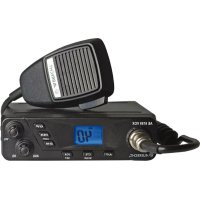
AE 6199 VOX - Radio ALBRECHT - Free user manual and instructions
Find the device manual for free AE 6199 VOX ALBRECHT in PDF.

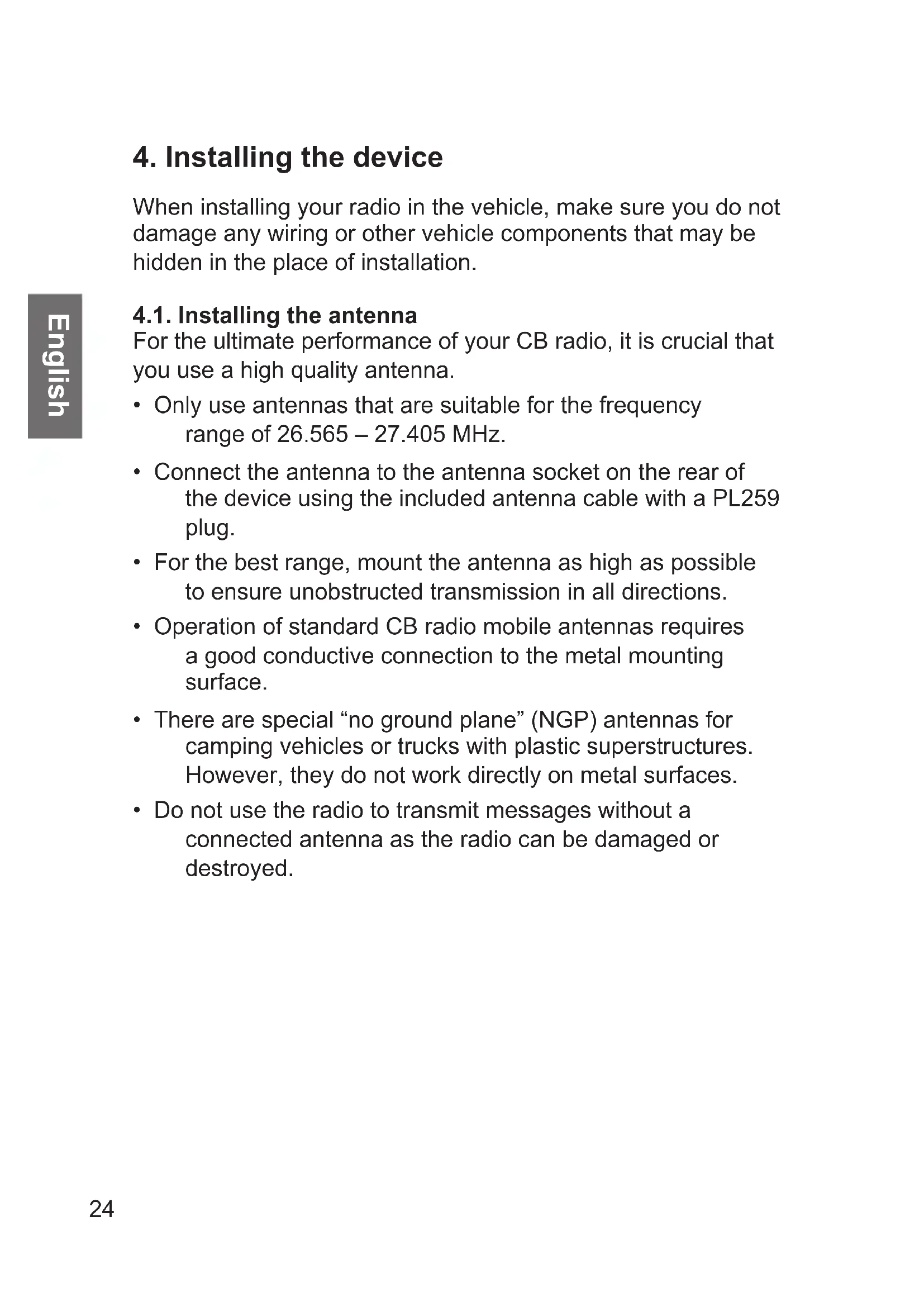


| Product type | CB Radio |
| Brand | Albrecht |
| Model | AE 6199 VOX |
| Frequency range | 26.565 - 27.405 MHz |
| Modulation modes | AM and FM |
| Number of channels | Up to 80 FM channels (depending on regional settings) |
| Transmit power | 4 watts (AM and FM) |
| Power supply | 12 V DC (power cable with fuse included) |
| Power consumption | Transmit max 3 A, receive max 1.2 A |
| Receiver sensitivity | FM: 0.8 µV, AM: 1.5 µV (for 20 dB SINAD) |
| Audio power | 3 W on 8 ohms |
| Noise suppressor | Automatic (ASQ), manual (SQ), CTCSS/DCS tones |
| VOX function | Yes, adjustable sensitivity (1-9) and delay (0.5-4.5 s) |
| Scan mode | Yes, automatic channel search |
| Emergency channel | 9/19 |
| Display | LCD screen with 7-color backlight |
| Antenna | PL259 connector |
| Microphone | Hand microphone included (6-pin connector) |
| External speaker | 3.5 mm jack socket (4-8 ohms) |
| Dimensions (approx.) | 180 x 60 x 200 mm |
| Weight (approx.) | 1 kg |
| Box contents | CB radio, microphone, power cable, mounting bracket, user manual |
| Warranty | 2 years |
| Standards | CE (Directive 2014/53/EU) |
Frequently Asked Questions - AE 6199 VOX ALBRECHT
User questions about AE 6199 VOX ALBRECHT
0 question about this device. Answer the ones you know or ask your own.
Ask a new question about this device
Download the instructions for your Radio in PDF format for free! Find your manual AE 6199 VOX - ALBRECHT and take your electronic device back in hand. On this page are published all the documents necessary for the use of your device. AE 6199 VOX by ALBRECHT.
USER MANUAL AE 6199 VOX ALBRECHT
- Important information 21
2.Product contents. 21 - Controls and connections 22
- Installing the device 24
4.1.Installing the antenna 24
- Operation 25
5.1. Turning on and adjusting volume 25
5.2.Choosing the right country setting 25
5.3. Country setting and use 26
5.4. Selecting the transmission channel 26
5.5.Squelch 26
5.5.1. Automatic squelch (ASQ) 27
5.5.2.CTCSS/DCS tone squelch 27
5.5.3.Manual squelch 28
5.6.AM/FM mode selector 28
5.7. Emergencycy channel 9/19 29
5.8.VOX function 29
5.8.1.VOX sensitivity 29
5.8.2.VOX delay 30
5.9.S-meter 30
5.10. Scan mode 30
5.11. Selecting the display colour 31
5.12. Resetting to factory settings 31
-
External speaker 31
-
Specifications 32
7.1.CTCSS tone frequency table 33 -
Warranty and information on recycling 34
- CE declaration of conformity 35
9.1.EEAG and Recycling 35 - Service address 36
1. Important information
Please read these instructions carefully before installing and operating your AE 6199 VOX radio.
Please use only the original microphone on the CB radio, otherwise the proper functioning of the VOX hands-free function can not be guaranteed.
The VOX sensitivity is preset for use in moderately loud vehicles. If your vehicle is very silent you can increase the VOX sensitivity, and the VOX function will trigger with softer speaking.
For optimal results mount the microphone 45 - 70 cm away and directly facing the driver.
2. Product contents
- AE 6199 VOX CB radio
- Handheld microphone
- Power supply cable with fuse
- Holding bracket with mounting screws
- Manual
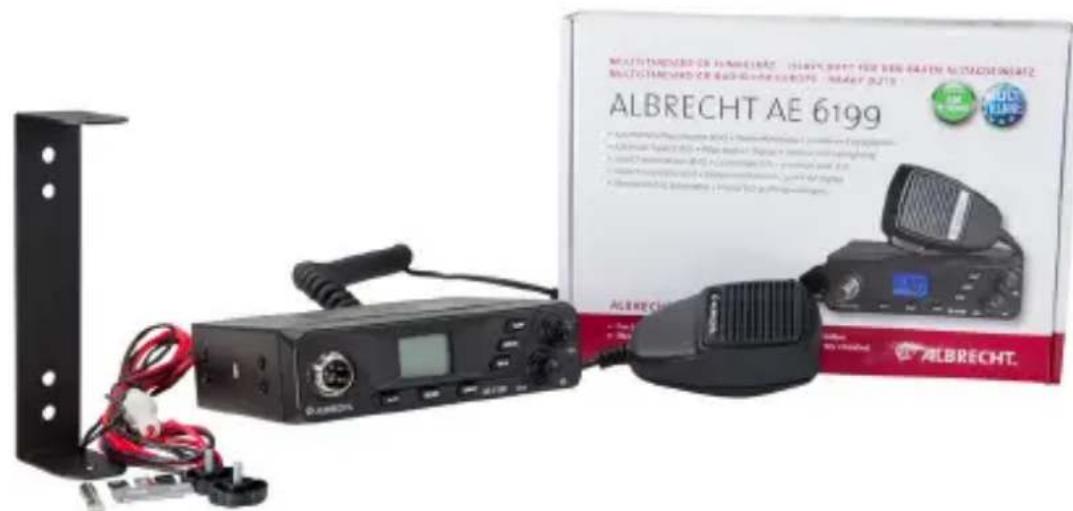
3. Controls and connections
The second function (in brackets) is activated by pressing and holding down the corresponding button.
| No. | Description Function | |
| 1 | Microphone jack 6-pin microphone jack | |
| 2 | Display Indication of all functions | |
| 3 | UP Move up in menus | |
| 4 | Volume knob Adjust volume | |
| 5 | A/F Switch AM/FM | |
| 6 | CTS / (SCAN) CTCSS/DCS tones / (station search) | |
| 7 | VOX / (SET) Activate VOX / (VOX settings) | |
| 8 | DN Move down in menus | |
| 9 | CH 9/19 / (Light) | Emergency channel 9/19 / (background colour) |
| 10 | ASQ / SQ knob Squelch setting / ASQ | |
| 11 | Antenna socket PL connector for antenna | |
| 12 | DC IN Power connection | |
| 13 | EXT SP External speaker connection |
Display
| No. | Display | Function |
| 1 | AQ | ASQ active |
| 2 | TQ | CTCSS/DCS tones active |
| 3 | TX | Transmission status |
| 4 | AM | AM or FM mode |
| 5 | SC | Scan function |
| 8 | when turning on: country setting in operation: S-meter display | |
| 9 | VOX function activated | |
| 7 | current channel |


4. Installing the device
When installing your radio in the vehicle, make sure you do not damage any wiring or other vehicle components that may be hidden in the place of installation.
4.1. Installing the antenna
For the ultimate performance of your CB radio, it is crucial that you use a high quality antenna.
- Only use antennas that are suitable for the frequency range of 26.565 - 27.405 MHz.
- Connect the antenna to the antenna socket on the rear of the device using the included antenna cable with a PL259 plug.
- For the best range, mount the antenna as high as possible to ensure unobstructed transmission in all directions.
- Operation of standard CB radio mobile antennas requires a good conductive connection to the metal mounting surface.
- There are special "no ground plane" (NGP) antennas for camping vehicles or trucks with plastic superstructures. However, they do not work directly on metal surfaces.
- Do not use the radio to transmit messages without a connected antenna as the radio can be damaged or destroyed.
5. Operation
5.1. Turning on and adjusting volume
To turn on the radio, turn the VOL knob to the right. To increase the volume, turn the volume knob further clockwise.
5.2. Choosing the right country setting
The AE 6199 VOX radio supports all current European CB radio standards. The factory default setting is "E".
Procedure for switching the country setting:
- Turn off the radio
- Press and hold down the A/F button (AM/FM)
Now turn on the radio - Release the A/F button
- Now use the UP/DN buttons to select one of the country settings "d, EC, Po, UK or E"
- Turn the radio off and then on again to confirm your selection. The radio uses the selected country setting from now on.
5.3. Country setting and use
| Band Display Channels | ||
| EU | E | FM 40 / 4 watts AM 40 / 4 watts |
| Poland Po | FM 40 / 4 watts AM 40 / 4 watts | |
| DE, CZ, SK d | FM 80 / 4 watts AM 40 / 4 watts | |
| UK UK | FM 40 / 4 watts FM 40 UK / 4 watts | |
| EC EC FM 40 Ceept / 4 watts | ||
You can switch the country setting at any time as described above. The country setting remains active until you select a different one.
5.4. Selecting the transmission channel
- Use the Up or Down button (UP/DN) on the radio to select channels. The current channel is displayed.
- Press and hold down the corresponding button to continuously switch channels up or down.
5.5. Squelch
The AE 6199 VOX radio has 3 squelch options
Automatic squelch (ASQ)
- Manual squelch (SQ)
- Tone squelch (CTCSS/DCS)
Each suppresses the channel noise by muting the speaker.
Squelch only unmutes the speaker for the received signal to be heard if certain criteria are met.
5.5.1. Automatic squelch (ASQ) Automatic squelch continuously evaluates the noise level. If a signal is received it decreases and the ASQ unmutes the speaker.
To turn ASQ on, turn the ASQ knob all the way to the left. The current status is indicated by the AQ symbol on the display.

ASQ has 3 configurable levels, with Level 1 being the most sensitive.
Advantage: the highest sensitivity and thus the greatest range.
Disadvantage: can be disturbed by interferences such as sunspot activity, other electronic devices, etc., so that the speaker is activated even if no signal is received. In this case, manual squelch or tone squelch should be used.
5.5.2. CTCSS/DCS tone squelch In addition to manual and automatic squelch, the AE 6199 VOX radio also supports CTCSS/DCS tones. CTCSS/ DCS adds an inaudible tone to the transmission. Once activated, the squelch opens only if a signal with the same tone is received from a remote station. CTCSS can be set separately for each channel and is only available in FM.

The active CTCSS/DCS function is indicated by the TQ symbol on the display.
- Select a channel with the channel selector
-
Press the CTS button (once for CTCSS, twice for DCS)
-
Select the CTCSS/DCS tone with the UP/DN buttons
- There are 38 CTCSS and 99 DCS tones to choose from
- Briefly press PTT to confirm.
Advantage: Enables selective reception of certain stations within a channel.
Disadvantage: All remote stations must also be equipped with CTCSS/DCS. Lower reception sensitivity and thus lower range.
5.5.3. Manual squelch
Turn the SQ squelch control to suppress the channel noise. The further you turn the control, the stronger a received signal has to be to open the squelch.
Usually, the squelch is set to just barely mute the speaker.
Advantage: Manual squelch can be set so that only close range stations can be heard.
Disadvantage: Manual setting is required. If the squelch is mistakenly set too high, it decreases the reception sensitivity and thus the range.
5.6. AM/FM mode selector
AM or FM modulation can be selected by pressing the AM/FM button.
The current setting is displayed on the LCD screen.
If a channel from 41 to 80 (only available in region mode d) is set, the device switches to FM mode regardless of the setting on the lower channels.

When you switch back to channels 1 to 40, the AM mode is restored, if it was previously selected.
The bar graph the display shows the signal strength (S values) in 9 levels during reception.
5.7. Emergencycy channel 9/19
This button is used to switch through CH 9, CH 19 and back to the previously selected "normal" channel. Simply press the button repeatedly.
5.8.VOX function
Briefly press the VOX button to switch the VOX function on or off. When the VOX function is activated, the radio automatically switches to transmission as soon as it detects speech. You no longer need to pick up the microphone to transmit messages.
The active VOX function is indicated by the symbol on the display.

5.8.1. VOX sensitivity
The VOX Level is used to select the volume level above which an automatic VOX transmission is activated.
Press and hold the VOX key and then use the UP/DN keys to select the desired sensitivity.
1 = low sensitivity, VOX only reacts to very high volume levels
9 = high sensitivity, VOX already reacts to very low volume levels
The default value is level 6.
5.8.2. VOX delay
Long press the VOX button once and press it again briefly.
Then use the UP/DN buttons to select the desired delay.
The VOX delay function sets the time after which the automatic transmission mode is disabled if no speech is detected:
| Level 1 2 3 4 | 5 6 7 | 8 9 | |||||||
| Time (sec) | 0.5 1.0 | 1.5 2. | 0 2.5 | 3.0 3. | 5 4.0 | 4.5 |
There are 9 configurable delay levels. The default value is level 4.
5.9. S-meter
The S-meter shows the current signal strength. The strength is indicated by the symbol in the lower left of the display. The more bars are displayed, the stronger the signal.
5.10. Scan mode
Your AE 6199 VOX radio has an automatic channel search that can be used to view all channels one after the other.
- Long press the SCAN button.
- This initiates immediate scanning of all channels and the SC symbol appears on the LC display.
- Scanning stops every time a signal is received and you can listen in on the conversation.
SC
If no action is taken, the scanning process continues after either the communication on the channel has ended or after approx. 5 seconds of observation time, if the communication continues.
- The search process can be cancelled at any time by pressing the SCAN button.
- Pressing the transmission button also automatically stops the scanning process.

5.11. Selecting the display colour
Long press the LIGHT button to cycle through 7 different backlight colours.
5.12. Resetting to factory settings
To reset the device to its factory settings, proceed as follows:
- Turn off the radio
- Press and hold down the radio VOX button while turning on the
- Release the button
- The display shows rS and after a short time the radio restarts with the factory settings
In most cases, the radio functions have now been restored.
6. External speaker
It is advisable to connect an external speaker depending on the ambient noise. Typical, commercial radio speakers with 4-8 ohms impedance and a minimum power of 2-4 W can be used.
Up to a 3 metre long cable can be used. For speakers that will be used in a vehicle, make sure that a two-pin 3.5mm jack is used and that none of the speaker connections are attached to the vehicle frame.
7. Specifications
Microphone jack wiring
| Pin 1 Mic audio |
| Pin 2 PTT-RX (on ground for reception) |
| Pin 3 PTT-TX (on ground for transmission) |
| Pin 4 Up and Down buttons |
| Pin 5 Ground |
| Pin 6 + voltage for microphone amplifier if needed |
Transmitter
| Transmission frequency 26.565 - 27.405 MHz | |
| Frequency accuracy better than +/- 300 Hz | |
| Transmission power 4 watts | |
| Harmonics and spurious radiation | less than -54 dBm = 4 nW |
| Audio frequency range 300 Hz to 3 kHz in AM/FM | |
| Adjacent channel power less than 20 μW | |
| Microphone sensitivity more than 3 mV | |
| FM frequency deviation less than 2.0 kHz | |
| AM modulation degree up to 90% | |
| Modulated signal distortion less than 5% | |
| Current consumption 3 A max. | |
Receiver
| FM sensitivity 0.8 μV for 20 dB SINAD | |
| AM sensitivity 1.5 μV for 20 dB SINAD | |
| Frequency response 300 Hz to 3 kHz | |
| Adjacent channel attenuation | more than 60 dB (EN 300 135-1) |
| Audio output power 3 W with 8 ohm load | |
| Squelch sensitivity 0.2 μV to 1 mV | |
| Current consumption 0.3 A nominal/1.2 A maximum |
7.1. CTCSS tone frequency table
| No. Freq. (Hz) No. Freq. (Hz) | ||
| Of CTCSS off 19 127.3 | ||
| 01 67.0 20 131.8 | ||
| 02 71.9 21 136.5 | ||
| 03 74.4 22 141.3 | ||
| 04 77.0 23 146.2 | ||
| 05 79.7 24 151.4 | ||
| 06 82.5 25 156.7 | ||
| 07 85.4 26 162.2 | ||
| 08 88.5 27 167.9 | ||
| 09 91.5 28 173.8 | ||
| 10 94.8 29 179.9 | ||
| 11 97.4 30 186.2 | ||
| 12 100.0 31 192.8 | ||
| 13 103.5 32 203.5 | ||
| 14 107.2 33 210.7 | ||
| 15 110.9 34 218.1 | ||
| 16 114.8 35 225.7 | ||
| 17 118.8 36 233.6 | ||
| 18 123.0 37 241.8 | ||
| 38 250.3 |
8. Warranty and information on recycling
We are legally obligated to enclose for each device information on disposal and warranty, as well as an EU declaration of conformity with the instructions for use in different countries. You will find this information on the following pages.
2-year warranty from the date of purchase
The manufacturer/dealer provides a two-year warranty from the date of purchase for this product. This warranty covers all failures that occur due to defective components or faulty functions within the warranty period, except for wear and tear such as empty batteries, scratches on the screen, housing and antenna defects, as well as defects due to external effects such as corrosion, overvoltage due to improper external power supply or use of unsuitable accessories. Defects caused by improper use are also excluded from the warranty.
In the event of a warranty claim, please contact your dealer. The dealer will repair or replace the device or pass it on to an authorised service centre.
You can also contact our service partner directly. Please enclose your proof of purchase with the device and describe the malfunction as accurately as possible.
9. CE declaration of conformity
Standards and directives

Alan Electronics GmbH hereby declares that the model AE 6199 VOX radio complies with regulation 2014/53/EU. The full text of the EU declaration of conformity can be found at the
following Internet address:
http://service.alan-electronics.de/CE-Papiere/
9.1. EEAG and Recycling

European laws prohibit the disposal of old or defective electrical or electronic equipment via household waste. To dispose of the device, return it to a collection point in your municipality for recycling. This system is financed by the industry and ensures environmentally friendly disposal and recycling of
valuable raw materials.
10. Service address
Technical hotline (for devices sold in Germany)
Call our service hotline +49 (0) 6103/9481 - 66 (normal rates on the German landline network) or send us an e-mail:
service@albrecht-midland.de
Print errors excepted.
© 2020 Alan Electronics GmbH