HLD10 - Tripod OLYMPUS - Free user manual and instructions
Find the device manual for free HLD10 OLYMPUS in PDF.



| Product Type | Battery grip for Olympus cameras |
| Brand | Olympus |
| Model | HLD-10 |
| Power Supply | Li-ion battery BLX-1 × 1 |
| Dimensions (L × H × D) | Approx. 132.6 × 57.9 × 69.9 mm |
| Weight (without battery or cover) | Approx. 242 g |
| Operating Temperature | -10 °C to 40 °C |
| Operating Humidity | 30% - 90% |
| Splash Protection | IPX3 (when attached to the camera) |
| Dust Resistance | IP5X (internal test) |
| Main Functions | Vertical shutter release, front/rear dials, buttons ‡ (exposure compensation), ISO, AF-ON, multi-selector, vertical shooting lock |
| Compatibility | Designed for compatible Olympus cameras (check camera manual) |
| Attachment | Via the attachment dial on the camera |
| Care and Cleaning | Wipe with a soft, dry cloth. Do not use thinner, benzene, or volatile cleaners. Clean the contacts with a dry cloth. |
| Safety | Use only specified batteries. Turn off the camera before attaching/removing. Do not touch the contacts. Avoid extreme temperatures and humidity. |
| Spare Parts and Repairability | Contact Olympus technical support for parts and repairs. |
| General Information | Specifications subject to change without notice. Complies with FCC and CE directives. Do not dispose of with household waste in the EU. |
Frequently Asked Questions - HLD10 OLYMPUS
User questions about HLD10 OLYMPUS
0 question about this device. Answer the ones you know or ask your own.
Ask a new question about this device
Download the instructions for your Tripod in PDF format for free! Find your manual HLD10 - OLYMPUS and take your electronic device back in hand. On this page are published all the documents necessary for the use of your device. HLD10 by OLYMPUS.
USER MANUAL HLD10 OLYMPUS
date of issue 2021.09.
OM SYSTEM
OM Digital Solutions Corporation
https://om-digitalsolutions.com/
WD847501
© 2021 OM Digital Solutions Corporation
Printed in Thailand
OM SYSTEM
HLD-10
04 - JP 取扱説明書
06 - EN INSTRUCTIONS
09 - FR MODE D'EMPLOI
12 - ES INSTRUCCIONES
15 - DE BEDIENUNGSANLEITUNG
17 - ВС ИНСТРУКЦИИ
19 - CS NÁVOD K POUŽITÍ
21 - DA BETJENINGSVEJLEDNING
23 - EL OΔΗΓΙΕΣ
25 - ET JUHISED
27 - FI KÄYTTÖOHJEET
29 - HR UPDATE
31 - HU HASZNÁLATI ÚTMUTATÓ
33 - IT ISTRUZIONI
35 - LT INSTRUKCIJA
37 - LV NORĀDĪJUMI
39 - NL AANWIJZINGEN
41 - NC INSTRUKSJONER
43 - PL INSTRUKCJA
45 - PT INSTRUÇÕES
47 - RC INSTRUCTIUNI
49 - RU ИНСТРУКЦИЯ
52 - SK NÁVOD NA POUŽITIE
54 - SL NAVODILA
56 - SV BRUKSANVISNING
58 - TR TALIMATLAR
60 - CHT 使用說明書
62 - TH ดําแนะนิทการ์เริ่ม
JP 取扱説明書
The following importer description applies to products imported into the EU directly by OM Digital Solutions GmbH only
Manufactured by OM Digital Solutions Corporation
49-3 Takakura-machi, Hachioji-ehi, Tokyo 192-0035, Japan
The following importer description applies to products imported into
the UK directly by OM Digital Solutions GmbH – UK Branch only.
OM Digital Solutions GmbH – UK Branch
16 Upper Woburn Place, London, WC1H 0AF
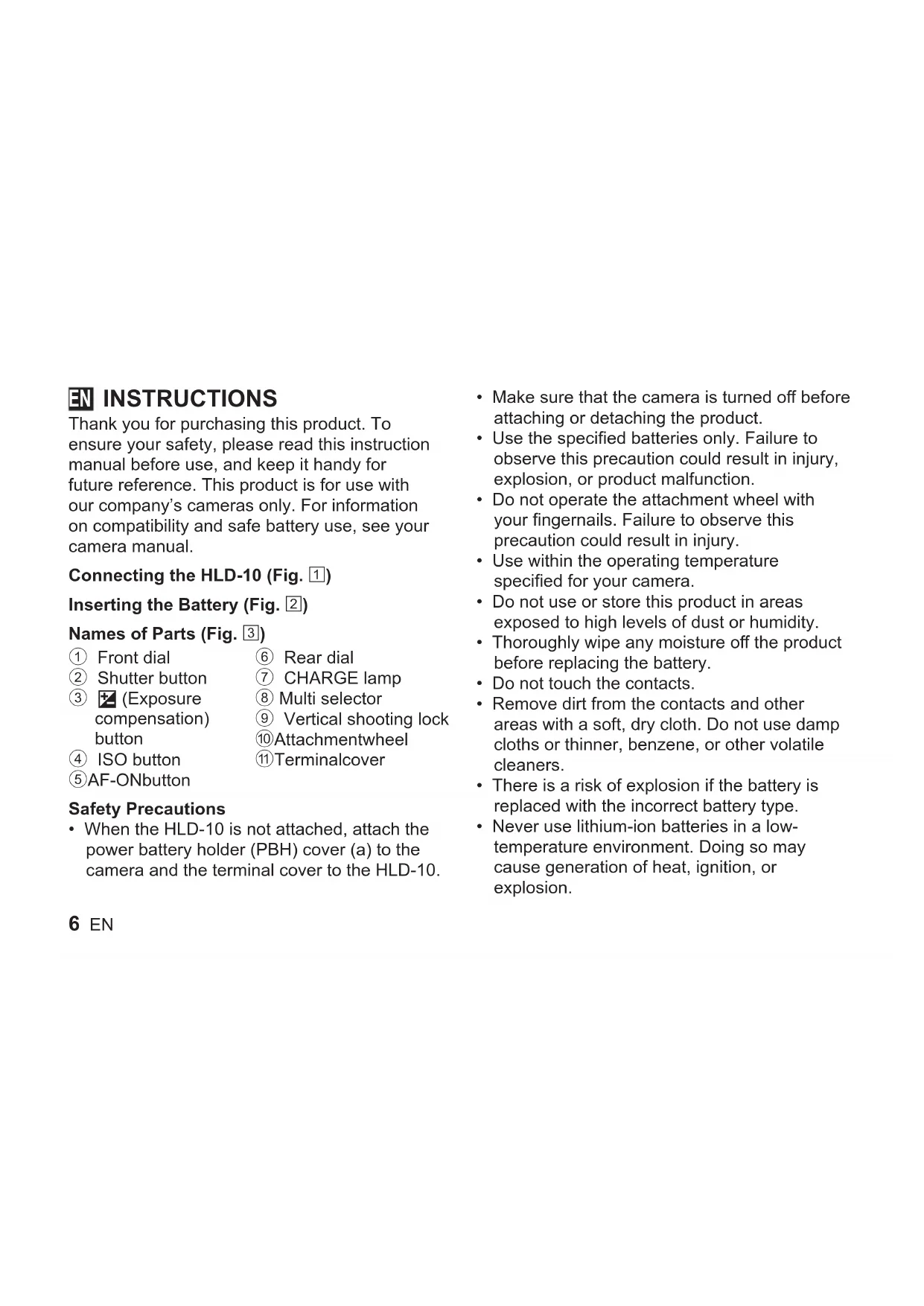
Thank you for purchasing this product. To ensure your safety, please read this instruction manual before use, and keep it handy for future reference. This product is for use with our company's cameras only. For information on compatibility and safe battery use, see your camera manual.
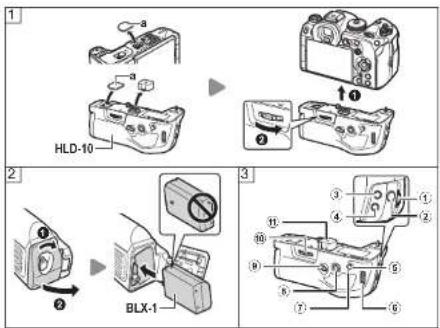
Connecting the HLD-10 (Fig. 1)
Inserting the Battery (Fig. 2)
Names of Parts (Fig. 3)
① Front dial
② Shutter button
③ ☑ (Exposure compensation) button
④ ISO button
⑤AF-ONbutton
Safety Precautions
- When the HLD-10 is not attached, attach the power battery holder (PBH) cover (a) to the camera and the terminal cover to the HLD-10.
⑥ Rear dial
⑦ CHARGE lamp
⑧ Multi selector
⑨ Vertical shooting lock
⑩Attachmentwheel
⑪Terminalcover
- Make sure that the camera is turned off before attaching or detaching the product.
- Use the specified batteries only. Failure to observe this precaution could result in injury, explosion, or product malfunction.
- Do not operate the attachment wheel with your fingernails. Failure to observe this precaution could result in injury.
- Use within the operating temperature specified for your camera.
- Do not use or store this product in areas exposed to high levels of dust or humidity.
- Thoroughly wipe any moisture off the product before replacing the battery.
- Do not touch the contacts.
- Remove dirt from the contacts and other areas with a soft, dry cloth. Do not use damp cloths or thinner, benzene, or other volatile cleaners.
- There is a risk of explosion if the battery is replaced with the incorrect battery type.
- Never use lithium-ion batteries in a low-temperature environment. Doing so may cause generation of heat, ignition, or explosion.
- We accept no liability for violations of local regulations caused by use of this product in jurisdictions outside the country or region of sale.
Specifications
| Power source BLX-1 Li-ion battery ×1 | |
| Dimensions(W×H×D) | Approx. 132.6 × 57.9 × 69.9 mm (5.2 × 2.3 × 2.8 in.) |
| Weight (excluding battery and terminal cover) | Approx. 242 g (8.5 oz.) |
| Temperature/Humidity(operation) | -10 °C - 40 °C (14 °F - 104 °F) / 30% - 90% |
| Splash proof (when attached to camera) | IPX3 |
| Dust resistance IP5X (in-house testing) | |
Note: More information on water- and dust-resistance is available via our support website.
Specifications are subject to change without any notice or obligation on the part of the manufacturer.
For customers in North America, Central America, South America and the Caribbean
FCC Notice
This device complies with part 15 of the FCC rules. Operation is subject to the following two conditions:
(1) This device may not cause harmful interference, and (2) this device must accept any interference received, including interference that may cause undesired operation.
This equipment has been tested and found to comply with the limits for a Class B digital device, pursuant to part 15 of the FCC Rules. These limits are designed to provide reasonable protection against harmful interference in a residential installation.
This equipment generates, uses and can radiate radio frequency energy and, if not installed and used in accordance with the instructions, may cause harmful interference to radio communications.
However, there is no guarantee that interference will not occur in a particular installation.
If this equipment does cause harmful interference to radio or television reception, which can be determined by turning the equipment off and on, the user is encouraged to try to correct the interference by one or more of the following measures:
- Reorient or relocate the receiving antenna.
- Increase the separation between the equipment and receiver.
- Connect the equipment into an outlet on a circuit different from that to which the receiver is connected.
- Consult the dealer or an experienced radio/TV technician for help.
- Only the our-supplied USB cable should be used to connect the camera to USB enabled personal computers.
FCC CAUTION
Changes or modifications not expressly approved by the party responsible for compliance could void the user's authority to operate the equipment.
This Class B digital apparatus complies with Canadian ICES-003. CAN ICES-3(B)/NMB-3(B)
Declaration of Conformity
Model Number: HLD-10
Trade Name: OM Digital Solutions Corporation
Responsible Party: OM Digital Solutions Americas, Inc.
Address: 306 South new street, Suite 110
Bethlehem, PA 18015, USA
Telephone Number: 1-800-622-6372
Tested To Comply With FCC Standards FOR HOME OR OFFICE USE
For customers in Europe (excluding England, Wales and Scotland)

This symbol [crossed-out wheeled bin WEEE Annex IV] indicates separate collection of waste electrical and electronic equipment in the EU countries.
Please do not throw the equipment into the domestic refuse.
Please use the return and collection systems available in your country for the disposal of this product.