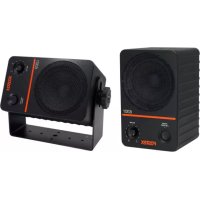
PM0.5d - Speaker FOSTEX - Free user manual and instructions
Find the device manual for free PM0.5d FOSTEX in PDF.


| Product Type | Active monitoring speaker (amplified speaker) |
| Brand | Fostex |
| Model | PM0.5d |
| Category | Speaker |
| Dimensions (approx.) | 170 x 270 x 220 mm (W x H x D) |
| Weight (approx.) | 5.5 kg per speaker |
| Power supply | Dedicated mains section, 220-240V AC, consumption < 60W |
| Amplification type | Integrated bi-amplification |
| Output power | 30 W + 30 W (low + high) |
| Frequency response | 50 Hz - 20 kHz |
| Woofer | 5.25" (130 mm) cone |
| Tweeter | 1" (25 mm) silk dome |
| Audio inputs | Female XLR + TRS 6.35 mm jack (balanced) |
| Adjustments | Volume, equalizer (HF trim) |
| Main functions | Professional monitoring, neutral sound reproduction, low distortion |
| Maintenance and cleaning | Disconnect before cleaning, use a dry soft cloth |
| Safety | Overload protection, built-in fuse, grounding |
| Spare parts and repairability | Repair by qualified personnel only, parts available from after-sales service |
| Wall mountable | Yes, with optional bracket (M5-L8 screws recommended) |
| General information | Compliant with FCC and ICES-003 standards, class B |
Frequently Asked Questions - PM0.5d FOSTEX
User questions about PM0.5d FOSTEX
0 question about this device. Answer the ones you know or ask your own.
Ask a new question about this device
Download the instructions for your Speaker in PDF format for free! Find your manual PM0.5d - FOSTEX and take your electronic device back in hand. On this page are published all the documents necessary for the use of your device. PM0.5d by FOSTEX.
USER MANUAL PM0.5d FOSTEX
WARNINGS and PRECAUTIONS p-2
IMPORTANT SAFETY INSTRUCTIONS p-3
FCC (U.S.A.) & ICES-003 (Canada) INFORMATION p-4
Introduction p-5
Unpacking p-5
Setup Instructions p-6
Back Panel Overview p-7
Product Specifications p-8
Product Cleaning Instructions p-9
Cable and Wiring Information p-9
Use of Mounting Bracket p-10
Declaration of EC Directive p-11
WARNINGS and PRECAUTIONS
- CAUTION: TO PREVENT ELECTRIC SHOCK, MATCH WIDE BLADE OF PLUG TO WIDE SLOT, FULLY INSERT. ATTENTION: POUR PREVENIR LES CHOCS ELEC- TRIQUES, APAR DE LA FENTE LARGE, FOND.
- WARNING: To reduce the risk of fire or electric shock, do not expose this apparatus to rain or moisture.
- CAUTION: Use of any controls or adjustments or performance of procedures other than those herein specified may result in hazardous radiation exposure.
- WARNING: Changes or modifications to this unit not expressly approved by the party responsible for compliance could void the user's authority to operate the equipment.
- WARNING: Do not place the unit on top of any soft, porous, or sensitive surfaces to avoid damaging the surface. Use a protective barrier between the unit and surface to protect the surface.
- WARNING: Use of this unit near fluorescent lighting may cause interference regarding use of the remote. If the unit is displaying erratic behavior move away from any fluorescent lighting, as it may be the cause.
- CAUTION: Danger of explosion if battery is incorrectly replaced. Replace only with the same or equivalent type.
- WARNING: Do not install this equipment in a confined space such as a book case or similar unit.
- WARNING: Mains plug is used as disconnect device and it should remain readily operable during intended use. In order to disconnect the apparatus from the mains completely, the mains plug should be disconnected from the mains socket outlet completely.
The lightning flash with arrowhead symbol, within an equilateral triangle, is intended to alert the user to the presence of non-insulated “dangerous voltage” within the product’s
enclosure that may be of sufficient magnitude to constitute a risk of electric shock to persons.
The exclamation point within an equilateral triangle is intended to alert the user to the presence of important operating and maintenance (servicing) instructions in the
literature accompanying the appliance.
IMPORTANT SAFETY INSTRUCTIONS
1) Read these instructions.
Lisez ces instructions.
2) Keep these instructions.
Conservez ces instructions.
3) Heed all warnings.
Respectez tous les avertissements.
4) Follow all instructions.
Suivez toutes les instructions.
5) Do not use this apparatus near water.
Ne pas utiliser cet appareil près de l'eau.
6) Clean only with dry cloth. Nettoyer uniquement avec un chiffon sec.
7) Do not block any ventilation openings. Install in accordance with the manufacturer's instructions.
Ne pas bloquer les ouvertures de ventilation. Ins-taller conformément aux instructions du fabri-cant.
8) Do not install near any heat sources such as radiators, heat registers, stoves, or other apparatus (including amplifiers) that produce heat.
Ne pas installer près de sources de chaleur telles que radiateurs, registres de chaleur, poêles ou autres appareils (y compris les amplificateurs) produisant de la chaleur.
9) Do not defeat the safety purpose of the polarized or grounding-type plug. A polarized plug has two blades with one wider than the other. A grounding type plug has two blades and a third grounding prong. The wide blade or the third prong are provided for your safety. If the provided plug does not fit into your outlet, consult an electrician for replacement of the obsolete outlet. Ne détruissez pas la sécurité de la terre ou polarisées - fiche. Une fiche polarisée possède deux lames dont une est plus large que l'autre. Une prise de terre possède deux lames et une broche
12) Use only with the cart, stand, tripod, bracket, or table specified by the manufacturer, or sold with the apparatus. When a cart is used, use caution when moving the cart/apparatus combination to avoid injury from tip-over.
natural_image
Symbolic icon of a person pushing a large object through a circular frame (no text or symbols)14) Refer all servicing to qualified service personnel. Servicing is required when the apparatus has been damaged in any way, such as power-supply cord or plug is damaged, liquid has been spilled or objects have fallen into the apparatus, the apparatus has been exposed to rain or moisture, does not operate normally, or has been dropped.
15) The apparatus shall be used in an open area.
16) Apparatus shall not be exposed to dripping or splashing and that no objects filled with liquids, such as vases, shall be placed on apparatus.
17) Mains plug is used as disconnect device. It shall remain readily operable and should not be obstructed during intended use. To completely disconnect the apparatus from supply mains, the main plug of the apparatus shall be disconnected from the mains socket outlet completely.
This product, when installed as indicated in the instructions contained in this manual, meets FCC and ICES-003 requirements. Changes or modifications not expressly approved by Fostex Company for compliance could void the user's authority to operate the equipment. DO NOT MODIFY THIS PRODUCT.
2. IMPORTANT
In order to comply with FCC and ICES-003 requirements, use high quality shielded cables for connection to accessories and / or another products. If any cables are supplied with this product, they MUST be used. Follow all installation instructions. Failure to do so could void your FCC / ICES-003 authorization to use this product in the USA / Canada.
3. NOTE
This equipment has been tested and found to comply with the limits for a Class B digital device, pursuant to Part 15 of the FCC Rules. These limits are designed to provide reasonable protection against harmful interference in a residential installation. This equipment generates, uses and can radiate radio frequency energy and, if not installed and used in accordance with instructions, may cause harmful interference to radio communications.
However, there is no guarantee that interference will not
occur in a particular installation. If this equipment does cause harmful interference to radio or television reception, which can be determined by turning the equipment off and on, the user is encouraged to correct the interference by one or more of the following measures:
- Reorient or relocate the receiving antenna.
- Increase the separation between the equipment and receiver.
- Connect the equipment into an outlet on a circuit different from that to which the receiver is connected.
-
Consult the dealer or an experienced radio/TV technician for help.
-
Compliance with Part 15 of FCC Rules and Canadian ICES-003.
This device complies with Part 15 of the FCC Rules. Operation is subject to the following two conditions: (1) This device may not cause harmful interference, and (2) this device must accept any interference received, including interference that many cause undesired operation.
This Class B digital apparatus complies with Canadian ICES-003.
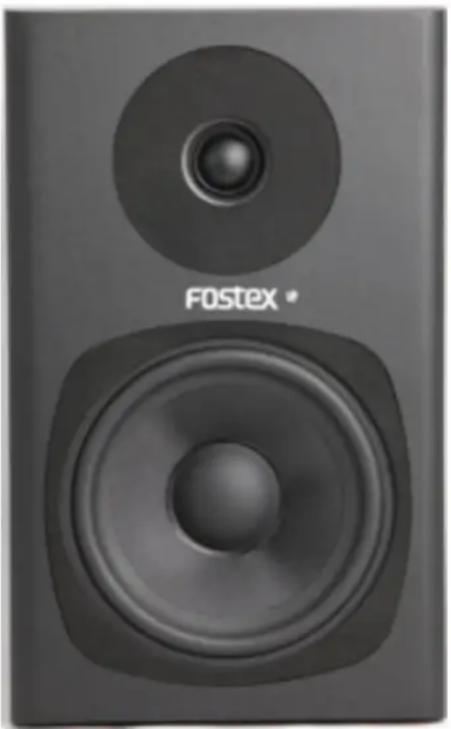
Thank you for purchasing the Fostex PM0.5d Personal Active Speaker System. As with all Fostex products, the PM0.5d has been designed to provide superlative performance, unquestioned reliability and exceptionally high value.
The PM0.5d was specially designed to fulfill all of your critical near-field monitoring needs and is emblematic of the years of experience Fostex has had in the professional audio marketplace. The PM0.5d takes full advantages of internal bi-amplification and employs two state of the art amplifiers that utilize high-quality discrete output devices. The 13 cm (5") woofer and 1.9 cm (3/4") tweeter were expressly designed for high output, ultra low distortion and incorporate the latest technologies and manufacturing techniques.
natural_image
Close-up of a black F0Stex speaker with a circular head and concentric sound waves (no text or symbols on the speaker body)Please take the time to thoroughly read this manual so that you may take full advantage of all the benefits of the Fostex PM0.5d Personal Active Speaker System.
Unpacking
Prior to unpacking your Fostex PM0.5d Personal Active Speaker System, carefully inspect the packing material for excessive damage. Once it has been determined that the packing material has not been compromised, carefully unpack the PM0.5d and inspect it carefully for obvious damage. Fostex takes great care in designing packing materials that will survive most expected impacts during shipping and transportation. If any damage is discovered during the inspection process, contact your Fostex dealer so that this issue can immediately be addressed.
Setup Instructions
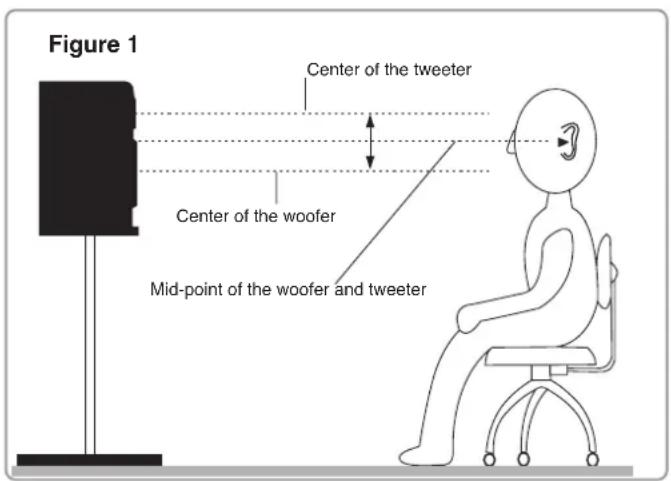
Monitoring Height the acoustic center aimed a seated ear height
It is recommended that the PM0.5d be located in such a way that the acoustic center is located at, or about, seated ear height (See Figure 1 on the next page). If this is not possible, it may be necessary to tilt/aim the speaker at the listeners ears.
Monitoring Angle = 60 Degrees
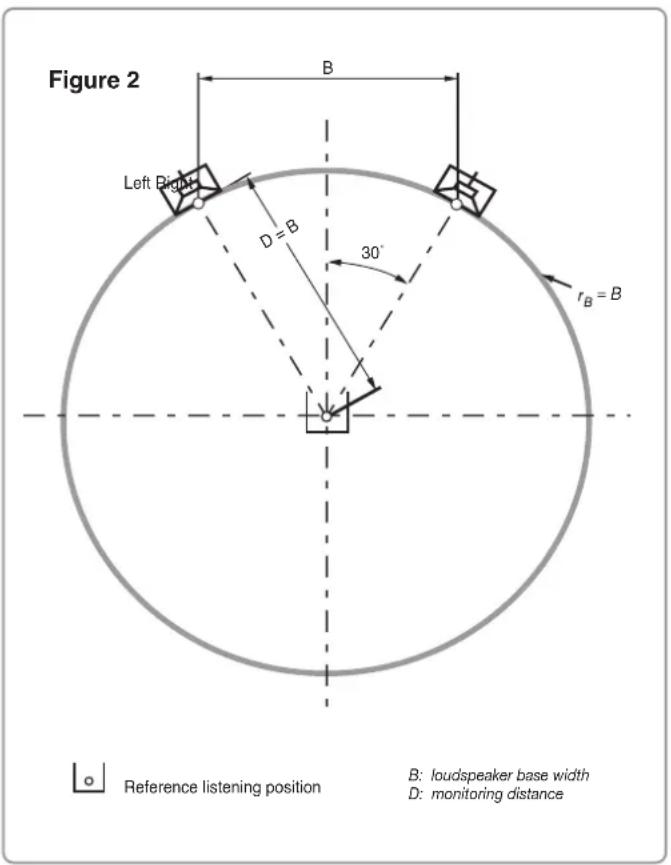
The monitoring angle between the left and right speakers and the listening position should equal 60 degrees. The easiest way to determine this is to place the speakers in such a way that the distance between the left and right speakers is equal to the monitoring distance / listening position (See Figure 2). It is also recommended that both speakers be “toed-in” towards the listening position.
Additional Information
The PM0.5d was designed to be placed vertically. This provides for the most accurate frequency response and reduces acoustic boundary interference. If it is not possible to place the speakers vertically, then the speakers should be placed with the woofers inside and the monitors “toed-in” towards the listening area.
Once the speakers have been placed in their final location, it is time to proceed to connecting your PM0.5d to the mixing console or digital workstation. Connection to the PM0.5d can be made using the XLR balanced connector, TS phone or RCA pin unbalanced jacks. The connection of PM0.5d to the console/digital workstation should be done in the following order.
Step 1: Make sure that all equipment has been powered down.
Step 2: Confirm that all gain controls on the speakers and the source are set to minimum.
Step 3: Connect the source to the PM0.5d.
Step 4: Power up all the equipment and then turn on the PM0.5d last.
Step 5: Set the gain of both speakers at medium setting and slowly bring up the gain of the console.
Step 6: Adjust the gain of both monitors for balance and for best signal to noise ratio.
Once the above steps have been completed, you are ready to use your PM0.5d. It is recommended that you now play some familiar audio material and make any final adjustments, as far as placement or level, to get the optimum performance in your monitoring environment.
Back Panel Overview
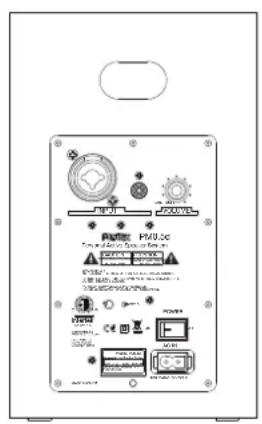
1. Input
The XLR out of XLR/PHONE combo connector is used for inputting the electrically balanced input signal. The PHONE out of XLR/PHONE combo connector as well as the RCA jack next to the XLR/PHONE combo connector are used for inputting the electronically unbalance d input signal.
* CAUTION: Do not input the signals to the XLR connector and RCA jack or PHONE connector and RCA jack at the same time. If you do so, both the signals are mixed and output.
2. Continuously variable gain control
This control adjusts the input level to the internal amplifiers.
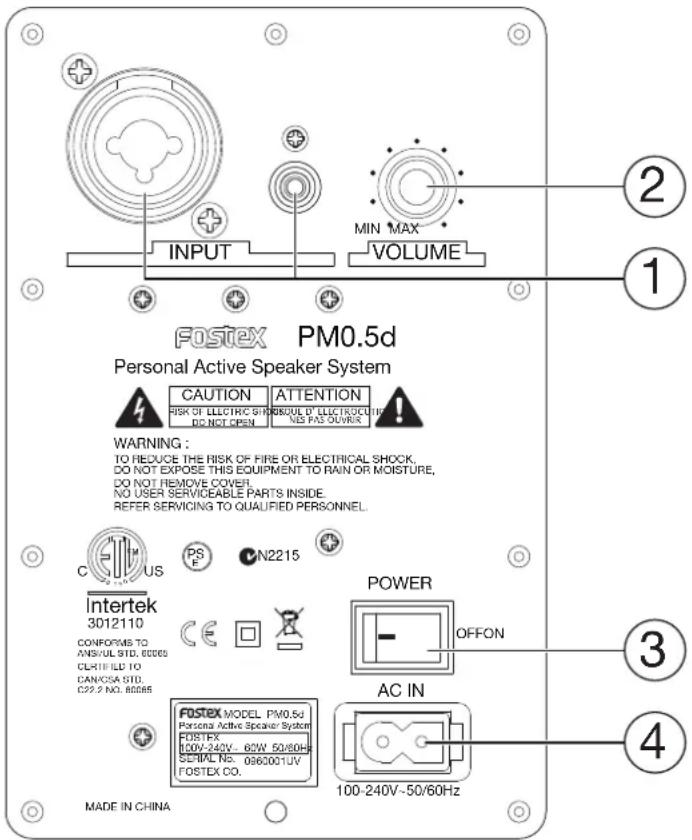
3. Power Switch
Turns the power to the amplifier section on or off. On-position is the spot side.
4. AC IN
Connects the supplied AC cord.
• Auto Stand-by Mode
When no input signal continues for about 13 minutes or so, the PM0.5d will go into the stand-by mode automatically and reduce the power consumption. This is indicated by the red lighting power LED. In the normal operation mode, the power LED is lit in blue. If the input audio signal comes in again, it will automatically return to the normal operation mode again.
Product Specifications
Drivers
High frequency driver 3/4" soft dome tweeter
Low frequency driver 5" woofer
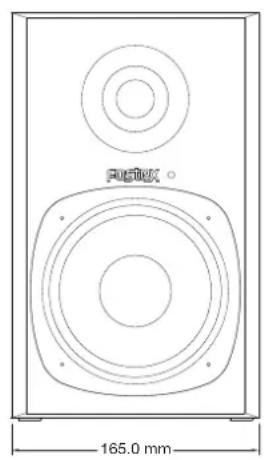
Dimensions 270 (H) x 165 (W) x 214.5 (D) mm
10.6" (H) x 6.5" (W) x 8.5" (D)
natural_image
Technical line drawing of a speaker with two circular speakers and a 165.0 mm dimension label (no text or symbols beyond the measurement)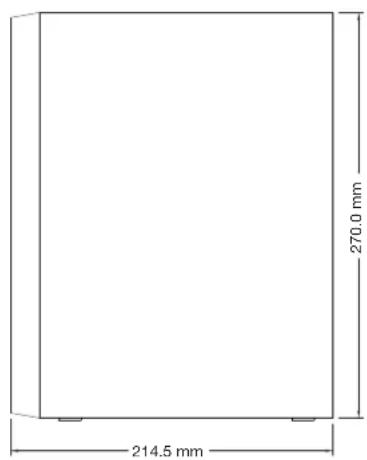
Weight 4.5 kg (/pc., net), 10.7 kg (/pair, gross)
9.9 lbs. (/pc., net), 23.5 lbs. (/pair, gross)
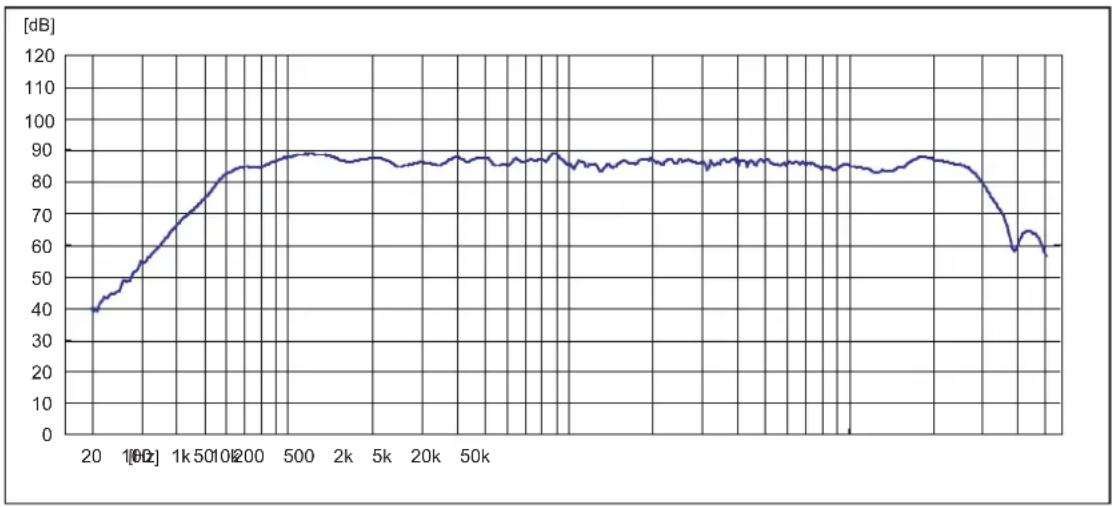
Frequency Response 55 Hz - 30 kHz
line
| Time [s] | Value [dB] | | -------- | ---------- | | 20 | 40 | | 1k | 60 | | 500 | 85 | | 2k | 88 | | 50k | 87 | | 20k | 86 | | 50k | 88 | | 100k | 89 | | 200k | 88 | | 500k | 87 | | 1000k | 86 | | 2000k | 85 | | 5000k | 84 | | 10000k | 60 |Amplifier maximum output
High frequency driver 23 W
Low frequency driver 35 W
Input
• Phone jack (TS) and RCA jack
Normal input level -10 dBV
Input impedance 10 kΩ or more
- XLR Connector (Pin-1: GND, Pin-2: HOT, Pin-3: COLD)
Normal input level +4 dBu
Input impedance 10 kΩ or more
Crossover Frequency 2 kHz
Power Consumption
Normal mode 60 W
Stand-by mode 0.5 W or less
Product Cleaning Instruction
Prior to the cleaning the PM0.5d Personal Active Speaker System, the power must be turned off and the AC cord is disconnected from the AC IN connector. Once the power has been terminated, cleaning can be accomplished using a dry cleaning rag. A light common household cleaner can also be used, but care must be taken not to use harsh cleaning fluids. Regular dusting or cleaning with a dry rag will keep your product looking new for years.
Cable and Wiring Information
Use high quality, shielded cables to connect your mixing console, workstation or other source to your speakers. Foil-shielded cables should do quite well. Other high quality cables that incorporate better shielding will yield an overall higher noise rejection, lowering your systems susceptibility to external interference. Another important tip to keep in mind when wiring your system is to route all line level cables away from the AC and other power sources, this will reduce the probability of having AC hum emanating from your monitor system.
Use of Mounting Bracket Usage de Monter le Support

When attaching a mounting bracket and installing the PM0.5d into a wall, etc., we highly recommend that the installation must be proceeded by professional installers. Fostex will not be held liable for any accident or hazard due to the use of mounting bracket.
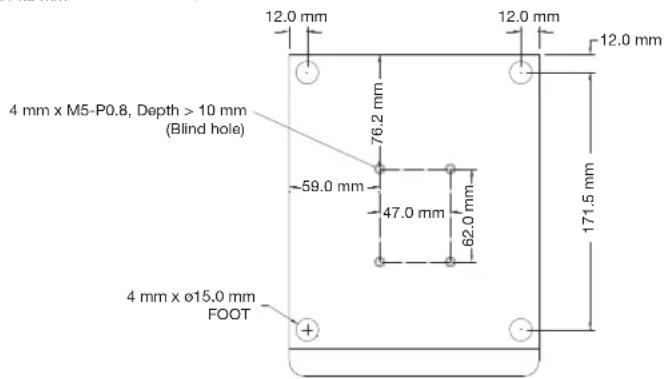
When attaching a mounting bracket, please only use the designated size / length of screws and securely tighten them. If not, it will not only damage the components inside, but it will bring serious hazard such as fire, electric shock, drop of product and injury.
The PM0.5d has 4 implanted nuts on the bottom that can be used to install with a wall mounting bracket. Fix the bracket using the proper size / length of screws. For handling the bracket, follow the bracket instruction manual.
Declaration of EC Directive
This equipment is compatible with the EMC Directive (2004/108/EC) - Directive on approximation of member nation's ordinance concerning the electromagnetic compatibility and with the Low Voltage Directive (73/23/EEC) - Directive on approximation of member nation's ordinance concerning electric equipment designed to be used within the specified voltage range.
The Affect of Immunity on This Equipment
The affect of the European Specification EN61000-6-1 (coexistence of electromagnetic waves - common immunity specification) on this equipment are as shown below.
In the electrical fast transient/burst requirements, surge, conducted disturbances by radio-frequency fields, power frequency magnetic field, radiate electromagnetic field requirements and static electricity discharging environment, this could be affected by generation of noise in some cases.
FOSTEX DISTRIBUTORS LIST IN EUROPE
* Including non-EU countries (as of May 2013)
NAME: Mega Audio GmbH
ADD: Stromberger Str. 32, D-55411 Bingen, Germany
TEL: (+49) 6721-94330, FAX: (+49) 6721-32046
NAME: Shark Art
ADD: 15 Hristo Popovich Str., Varna 9000, Bulgaria
TEL: (+359) 52-600172, FAX: (+359) 52-250578
NAME: Praha Music Center spol s.r.o.
ADD: Ocelarska 937/39, Praha 9, 190 00, Czecho
TEL: (+420) 226-011-111, FAX: (+420) 226-011-112
NAME: SC Sound A/S
ADD: Dalgas Alle 15, DK-6600 Vejen, Denmark
TEL: +45 4399 8877, FAX: +45 4399 8077
NAME: Noretron Oy Audio
ADD: P. O. Box 22, FIN-02631 Espoo, Finland
TEL: (+358) 9-5259330, FAX: (+358) 9-52593352
NAME: Sennheiser France
ADD: 128 bis, avenue Jean-Jaures, 94851 Ivry-sur-Seine Cedex,
France
TEL: (+33) 1 4987 0300, FAX: (+33) 1 4987 0324
NAME: Mega Audio GmbH
ADD: Stromberger Str. 32, D-55411 Bingen, Germany
TEL: (+49) 6721-94330, FAX: (+49) 6721-32046
NAME: Bon Studio S. A.
ADD: 6 Zaimi Street, Exarchia, 106.83 Athens, Greece
TEL: (+30) 210-3809-605, 606, 607, 608
FAX: (+30) 210-3845-755, 210-3827-868
NAME: ATEC Hungary Kft
ADD: H-110/ Budapest, Fogado u. 3, Hungary
TEL: (+36) 1-4319005, FAX: (+36) 1-4319006
NAME: Backline S.u.r.l.
ADD: Via Dell'Aprica 16, 20158, Milano Italy
TEL: (+39) 02 69015709, FAX: (+39) 02 69015645
NAME: IEMKE ROOS AUDIO B. V.
ADD: Kuiperbergweg 20, 1101 AG Amsterdam, The Netherlands
TEL: (+31) 20-697-2121, FAX: (+31) 20-697-4201
NAME: Siv. Ing. Benum AS
ADD: P. O. Box 145, Vinderen, 0319 Oslo, Norway
TEL: (+47) 2213 9900, FAX: (+47) 2214 8259
NAME: Mega Music Spolka z o.o
ADD: UI. Lesna 15, 81-876 Sopot, Poland
TEL: (+48) 58-551-18-82, FAX: (+48) 58-551-18-72
NAME: Letusa S. A.
ADD: C/Laguna 10, 28923 Alcorcon, Madrid, Spain
TEL: (+34) 91-4862800, 91-4470898, FAX: (+34) 91-6414597
NAME: Benum Nordic A/S
ADD: Aldermansvagen 17, 171 48 Solna, Sweden
TEL: (+46) 8 207710
NAME: Audio Bauer Pro AG
ADD: Bernerstrasse-Nord 182, CH-8064 Zurich, Switzerland
TEL: (+41) 1-4323230, FAX: (+41) 1-4326558
NAME: SCV London
ADD: 40 Chigwell Lane, Oakwood Hill Industrial Estate, Loughton,
Essex IG10 3NY U. K.
TEL: (+44) 20-8418-0778, FAX: (+44) 20-8418-0624

- WARNINGS and PRECAUTIONS
- IMPORTANT SAFETY INSTRUCTIONS
- IMPORTANT
- NOTE
- Unpacking
- Setup Instructions
- Monitoring Height the acoustic center aimed a seated ear height
- Monitoring Angle = 60 Degrees
- Additional Information
- Back Panel Overview
- Input
- Continuously variable gain control
- Power Switch
- AC IN
- • Auto Stand-by Mode
- Product Specifications
- Product Cleaning Instruction
- Cable and Wiring Information
- Use of Mounting Bracket Usage de Monter le Support
- Declaration of EC Directive
- The Affect of Immunity on This Equipment
- FOSTEX DISTRIBUTORS LIST IN EUROPE
Brand : FOSTEX
Model : PM0.5d
Category : Speaker