
X-12 - Speakers FOSTEX - Free user manual and instructions
Find the device manual for free X-12 FOSTEX in PDF.


User questions about X-12 FOSTEX
0 question about this device. Answer the ones you know or ask your own.
Ask a new question about this device
Download the instructions for your Speakers in PDF format for free! Find your manual X-12 - FOSTEX and take your electronic device back in hand. On this page are published all the documents necessary for the use of your device. X-12 by FOSTEX.
USER MANUAL X-12 FOSTEX
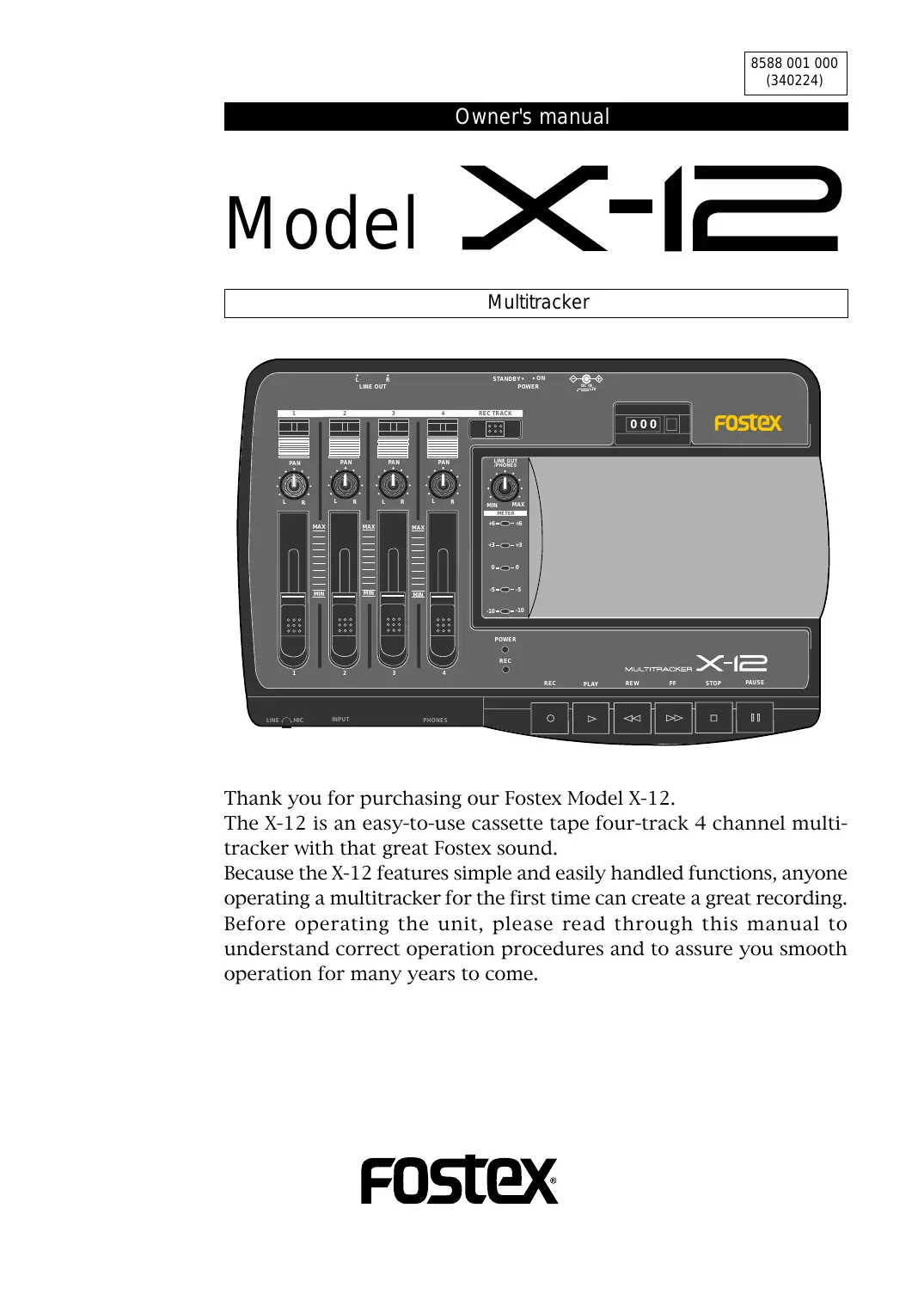
Thank you for purchasing our Fostex Model X-12.
The X-12 is an easy-to-use cassette tape four-track 4 channel multi-tracker with that great Fostex sound.
Because the X-12 features simple and easily handled functions, anyone operating a multitracker for the first time can create a great recording.
Before operating the unit, please read through this manual to understand correct operation procedures and to assure you smooth operation for many years to come.

CAUTION
RISK OF ELECTRIC SHOCK DO NOT OPEN

CAUTION: TO REDUCE THE RISK OF ELECTRIC SHOCK, DO NOT REMOVE COVER (OR BACK).
NO USER - SERVICEABLE PARTS INSIDE.
REFER SERVICING TO QUALIFIED SERVICE PERSONNEL.
"WARNING"
"TO REDUCE THE RISK OF FIRE OR ELECTRIC SHOCK, DO NOT EXPOSE THIS APPLIANCE TO RAIN OR MOISTURE."
SAFETY INSTRUCTIONS
- Read Instructions - All the safety and operating instructions should be read before the appliance is operated.
- Retain Instructions - The safety and operating instructions should be retained for future reference.
- Heed Warnings - All warnings on the appliance and in the operating instructions should be adhered to.
- Follow Instructions - All operating and use instructions should be followed.
- Water and Moisture - The appliance should not be used near water - for example, near a bathtub, washbowl, kitchen sink, laundry tub, in a wet basement, or near a swimming pool, and the like.
- Carts and Stands - The appliance should be used only with a cart or stand that is recommended by the manufacturer.
An appliance and cart combination should be moved with care. Quick stops, excessive force, and uneven surfaces may cause the appliance and cart combination to overturn.
- Wall or Ceiling Mounting - The appliance should be mounted to a wall or ceiling only as recommended by the manufacturer.
- Ventilation - The appliance should be situated so that its location or position dose not interfere with its proper ventilation. For example, the appliance should not be situated on a bed, sofa, rug, or similar surface that may block the ventilation openings; or, placed in a built-in installation, such as a bookcase or cabinet that may impede the flow of air through the ventilation openings.
CAUTION:
TO PREVENT ELECTRIC SHOCK, MATCH WIDE BLADE OF PLUG TO WIDE SLOT, FULLY INSERT.
ATTENTION:
POUR ÉVITER LES CHOCS ÉLECTRIQUES, INTRODUIRE LA LAME LA PLUS LARGE DE LA FICHE DANS LA BORNE CORRESPONDANTE DE LA PRISE ET POUSSER JUSQU' AU FOND.

The lightning flash with arrowhead symbol, within an equilateral triangle, is intended to alert the user to the presence of uninsulated "dangerous voltage" within the product's enclosure that may be of sufficient magnitude to constitute a risk of electric shock to persons.

The exclamation point within an equilateral triangle is intended to alert the user to the presence of important operating and maintenance (servicing) instructions in the literature accompanying the appliance.
- Heat - The appliance should be situated away from heat sources such as radiators, heat registers, stoves, or other appliances (including amplifiers) that produce heat.
- Power Sources - The appliance should be connected to a power supply only of the type described in the operating instructions or as marked on the appliance.
- Grounding or Polarization - The precautions that should be taken so that the grounding or polarization means of an appliance is not defeated.
- Power Cord Protection - Power supply cords should be routed so that they are not likely to be walked on or pinched by items placed upon or against them, paying particular attention to cords at plugs, convenience receptacles, and the point where they exit from the appliance.
- Cleaning - The appliance should be cleaned only as recommended by the manufacturer.
- Nonuse Periods - The power cord of the appliance should be unplugged from the outlet when left unused for a long period of time.
- Object and Liquid Entry - Care should be taken so that objects do not fall and liquids are not spilled into the enclosure through openings.
- Damage Requiring Service - The appliance should be serviced by qualified service personnel when:
A. The power supply cord or the plug has been damaged; or B. Objects have fallen, or liquid has been spilled into the appliance; or
C. The appliance has been exposed to rain; or
D. The appliance does not appear to operate normally or exhibits a marked change in performance; or
E. The appliance has been dropped, or the enclosure damaged.
- Servicing - The user should not attempt to service the appliance beyond that described in the operating instructions.
All other servicing should be referred to qualified service personnel.
Table of Contents
Precautions....3
Before Using the X-12....4
Important
Names and Functions....6
Basic Operation (recording)......9
Basic Operation ( playback)....11
Advanced Operation (multiple recording)......12
- Overdubbing....12
2.Mixdown....15
Using a tape recorded on a boom box or cassette deck....16
Troubleshooting....17
Maintenance....17
Specifications....18
Block Diagram....18
Accessories (option)....19
Precautions (please read before use)
Power supply
* When unplugging the AC adaptor from the outlet, be sure to grasp the adaptor. Attempting to unplug it by pulling on the AC cable may damage the wiring.
* It is dangerous to use any power cable that is cut or frayed. If the power cable is damaged, immediately stop using it, and have it repaired.
* Do not plug in or unplug the AC adaptor with wet hands. Doing so may result in dangerous electric shock.
* Do not open the unit or touch any parts inside. Doing so may result in a dangerous electric shock, and could damage the X-12.
* Do not let water or other liquids, flammable materials, or metal objects such as pins get inside the X-12.
These things may cause electrical shock or short circuit the X-12, and damage it. If the X-12 should become wet, unplug the AC adaptor from the AC outlet, and contact your authorized service station.
* When turning the power on, turn the X-12 on first before turning on any equipment connected to it. Doing so will avoid possible damage to the other equipment.
Also, when connecting or disconnecting cables to or from the X-12's input or output jacks, make sure that the [LINE OUT/PHONES] volume is set to "0."
* When the AC adaptor is connected to an AC outlet, it will continue to draw small amounts of power even if the switch is set to off (STANDBY). If you will not be using the X-12 for an extended period of time, be sure to unplug the AC adaptor from the outlet.
Location
* Avoid using the X-12 in the following locations:
* Locations of extreme low or high temperatures, or extreme changes in temperature.
* Locations with excessive moisture or dust.
* Locations where direct sunlight falls for an extended time, or near a stove or other source of heat.
* Locations where electrical voltage varies.
* Unstable locations or where there is heavy vibration.
* Near strong magnetic fields (on top of a television or speaker).
Before Using the X-12
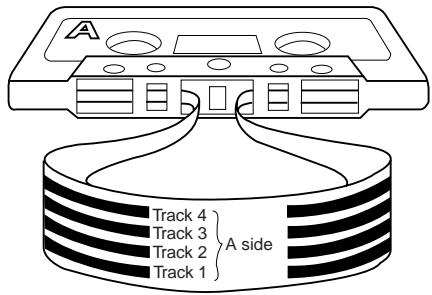
Boom boxes and stereo cassette decks record on both the A and B sides of cassette tape. As shown in Fig. 1, the cassette tape is divided in 4 tracks of which 2 are used for the A side and the remaining 2 for the B side (4 track 2 channel).

A multi-tracker as shown in Fig. 2, all four tracks can be recorded without turning over the cassette (four track 4 channel). For the X-12, the 4 tracks are recorded one at a time (some multitrackers can record multiple number of tracks in each pass). Also, in multitrackers, since all tracks are recorded in the same direction, if such a cassette tape is played back in a radio cassette or cassette deck, tracks 1 and 2 will be heard correctly but if the tape is turned over, tracks 3 and 4 will be heard in reverse.
Hint!
You can perform multitrack recording using a tape that was recorded on a boom box or a cassette deck. Refer to page 16 for more details.
Cassette tape suitable for recording:
The X-12 is designed to perform best with high-position cassette tape (TYPE II, HIGH). We recommended these or their equivalent.
The tape in C-120 versions (60 minutes each side) is too thin and not suitable for repeated recording or playback. Use C-90 or shorter tapes for stable performance.
Using write-protection tabs:
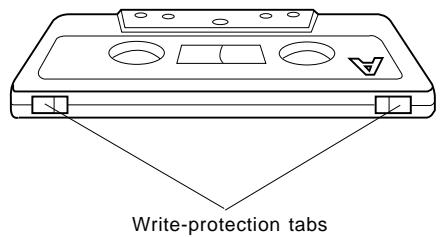
On the spine of a cassette tape are write-protection tabs that are used to prevent any recorded data from being erased accidentally.
You may want to break the tab for side A and side B of a cassette tape that you have already recorded, since the X-12 uses all four tracks at the same time.
If you later wish to record data on a tape with broken tabs, apply a piece of scotch tape to cover the tab hole.
** Advice **
Fresh or recorded tapes should not be kept in locations of strong magnetic fields (near speakers and TV sets) and stored in dust free and non-humid locations.
Important
- Do not bring the microphone too close to the monitor speakers connected to the [LINE OUT] jack when the [LINE OUT/PHONES] level control knob is raised.
Doing so could cause feedback from the speaker and headphone which could damage your hearing.
![[LINE OUT] jack The amplifier contained monitor speaker [INPUT] jack Microphone](/content/2025/01/168453/images/c7ec5a9a4c23371ac76171b9d3e171b213c98651805e91924f82d59baa52c10d.jpg)
- Do not directly apply an output signal from the [LINE OUT] jack to the [INPUT] jack.
As shown in schematic below, if the [LINE OUT] jack is directly connected to the [INPUT] jack and the [LINE OUT/PHONES] knob is raised, it will cause oscillation. Should you be monitoring by headphone, this could hurt your hearing.
![[LINE OUT] jack [INPUT] jack](/content/2025/01/168453/images/5079f7068cb8940fa356b80af89ec847eb2a63f64b3a1b0cd882ad962795abef.jpg)
Names and Functions
This section explains the names and functions of the X-12, such as switches, controls, and I/O jacks. Read this section so that you will understand the functions of the switches and controls.
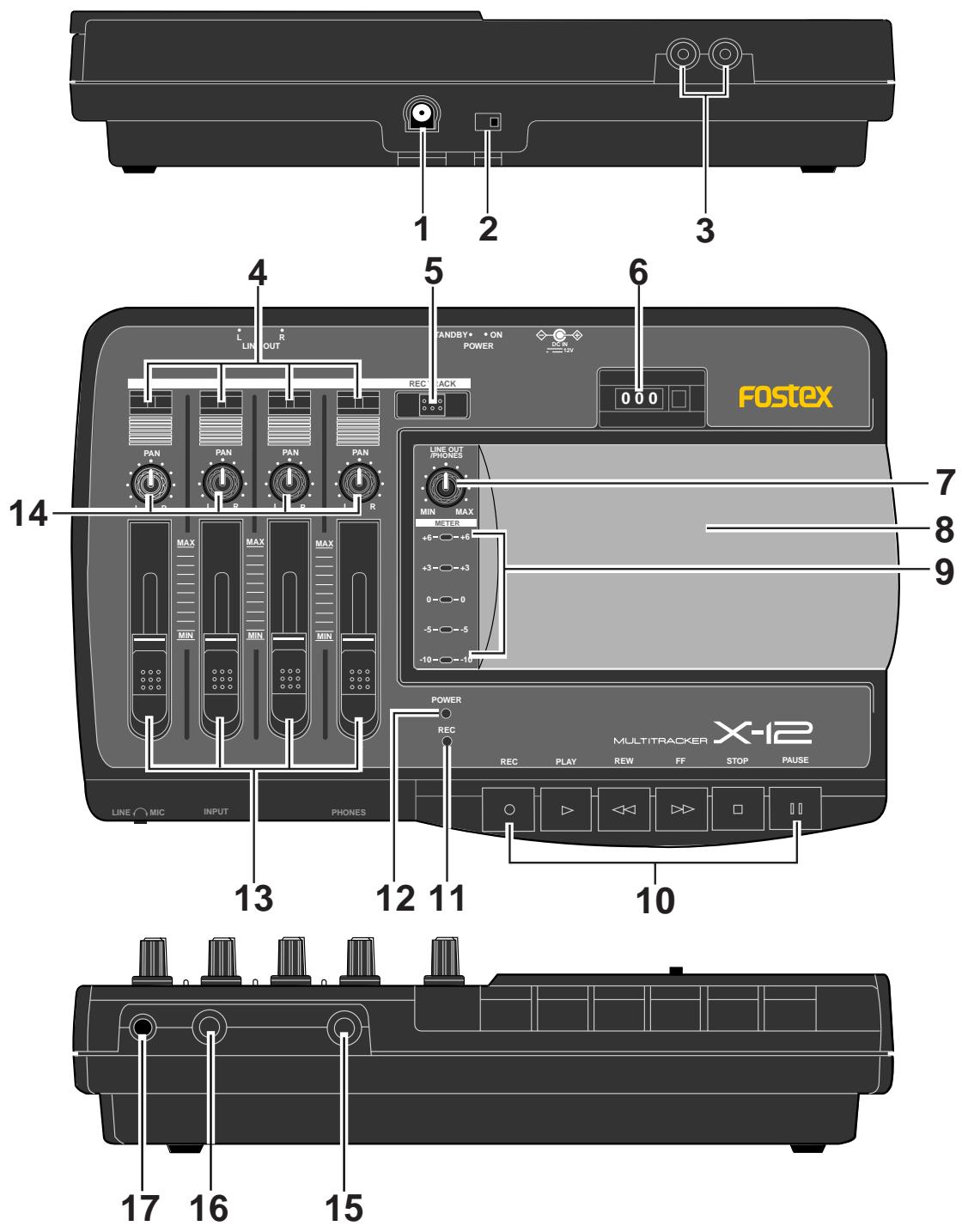
1. AC adaptor connector [DC IN]
Connect the AC adaptor included in the package.
Be sure to use the included AC adaptor or an equivalent model. Using an AC adaptor with a different rated voltage or a different plug polarity may cause a fire or damage to the product.
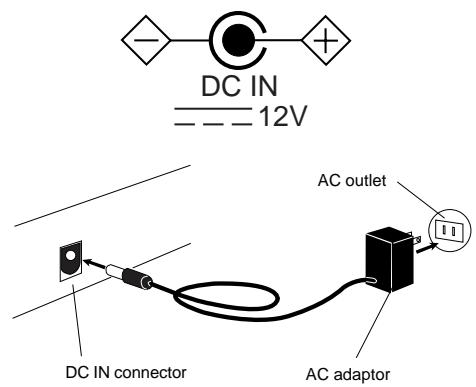
The following figure indicates that the output voltage of the AC adaptor is DC (direct current) 12V (volt), that the plug polarity is + (positive) in the center and - (negative) outside. Be sure to use an AC adaptor that complies with this indication.
2. Power switch [POWER]
Use this switch to turn the power on/off (STANDBY) to the X-12.
When the AC adaptor is plugged into an AC outlet, a very small current flows in the unit even if you turn off (STANDBY) the power switch. If you are not going to use the X-12 for a long period of time, remove the AC adaptor plugged into the AC.
3. Line output jack [LINE OUT L, R]
This jack outputs a signal adjusted by the [LINE OUT/PHONES] knob. Connect this jack to the input jack of a master recorder for mixdown.
4. Record track select indicator
The recording track selected by the [REC TRACK] selector will be indicated in red.
5. Record track selector [REC TRACK]
The recording track can be selected. Only one track can be selected at a time.
[REC TRACK] selector does not switch "OFF" the recording track. Since the track to be recorded is always in the selected state, be careful not to accidentally erase a prerecorded sound.
6. Counter / Reset button [RESET]
The counter indicates the tape count. Pressing the [RESET] button will reset the counter to "000."
7. Line out / Headphone level knob
[LINE OUT/PHONES]
This knob enables you to adjust the output level at the [LINE OUT L, R] jacks and the [PHONES] jack.
8. Cassette lid / Cassette tray
Insert a cassette tape here.
9. Level meter
This meter indicates the input level.
10. Transport control buttons
Record button [REC]
Press the button after you select a track using the [REC TRACK] selector.
The [PLAY] button will be automatically pressed, and the unit will enter the recording mode. This button is disabled if the cassette tape in the tray has a broken or removed write-protection tab.
Pause button [PAUSE]
To resume playback or recording, press this button again.
Stop button [STOP]
Press this button to stop tape transport.
Fast Forward button [F F]
Press this button to fast forward the tape.
Rewind button [REW]
Press this button to rewind the tape.
Play button [PLAY]
Press this button to playback the tape.
When you press the [REC] button, this button will be automatically engaged and the unit will enter recording mode.
11. Record indicator [REC]
This indicator will light red in recording mode (or record pause mode).
"Recording mode" means one of the tracks has been selected by the [REC TRACK] selector, the [REC] button has been pressed, and recording is in progress.
"Record pause mode" means you have pressed the [PAUSE] button during the recording mode, and the tape transport is stopped (recording standby mode).
12. Power indicator [POWER]
This indicator will light green when you turn on the [POWER] switch.
13. Playback level fader [1 - 4]
These faders enable you to adjust the playback level of each track.
14. Playback Panpot knob [PAN]
These knobs enable you to adjust the stereo image of the playback sound for each track.
15. Headphone jack [PHONES]
Connect monitoring headphones here.
You can adjust the headphone volume using the [LINE OUT/PHONES] knob.
16. Input jack [INPUT]
Sound sources such as an external mic and keyboard are connected here.
Input gain should be trimmed accordingly with the [LINE-MIC] knob located nearby.
17. Gain control knob [LINE-MIC]
Adjust the gain for best S/N ratio.
The output signal level from the sound sources (mic, keyboard, guitar, etc.) should be set in such a way that the output of the source should be neither too high or low. The difference can be corrected with the gain control.
< Gain control rule of thumb >
The gain is adjusted by rotating the [LINE-MIC] knob while watching the lighting condition of the level meter LED as the signal is input.
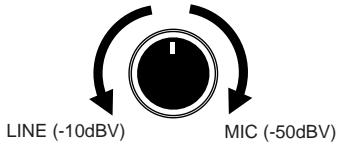
Gain of "MIC" is obtained at full CW rotation of the [LINE-MIC] knob and "LINE" at full CCW rotation.
Ideal gain is obtained by setting the level meter reading such that the "+6" LED does not light up. Should the "+6" LED lights up frequently, it is an indication that gain is too high and will result in distortion if recording is continued in this manner.
Basically, the knob should be adjusted toward "MIC" when a low level sound source such as a mic is connected, and toward "LINE" when connecting the output of an effects unit to which a keyboard or electric base is connected.
The X-12 uses the following connection plugs:
Stereo phone plug (stereo type)
Use this plug to connect to the [PHONES] jack.
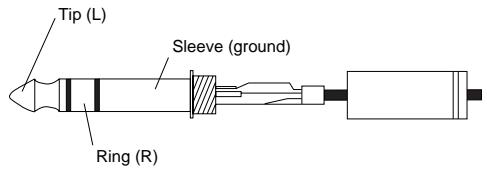
Phone plug (monaural type)
Use this plug to connect to the [INPUT] jack.
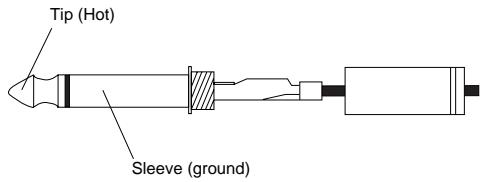
RCA pin jack (monaural type)
Use this plug to connect to the [LINE OUT L, R] jacks on the rear panel.

Basic Operation (recording)
As explained above, there are four recordable tracks.
The X-12, records each track independently. Let's try recording your mic/guitar/keyboard on the track of your choice. As an example here, the mic sound will be recorded in track 1.
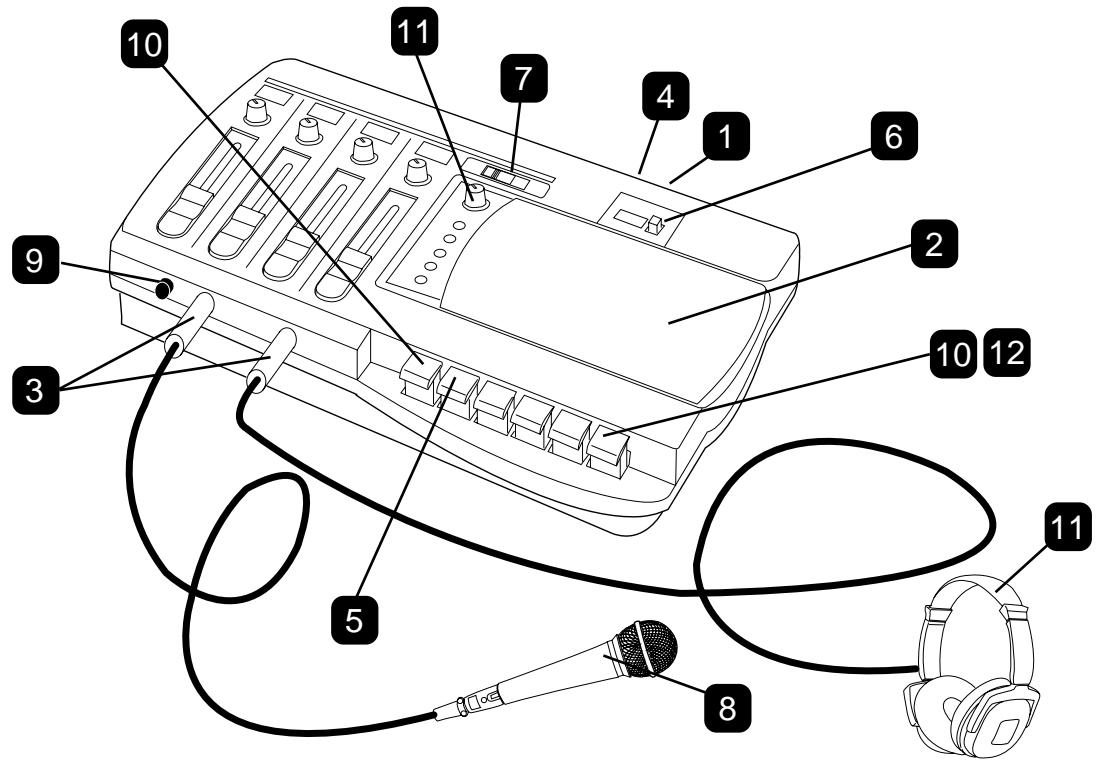
1 Connect the AC adaptor jack to the X-12's [DC IN] connector, and connect the power plug to the AC outlet.
Do not handle the AC adaptor with wet hands or you may receive an electrical shock.
2 Open the cassette lid and insert a recording tape into the cassette tray.
If you record on a used tape, make sure that the write-protection tabs on the spine of the tape are not removed. If any of them are broken, cover the tab hole with a piece of tape.
3 Plug the mic into the [INPUT] jack and the headphone into the [PHONES] jack.
4 Turn on the power switch.
The [POWER] indicator will light up in red.
5 Press the [PLAY] button to forward the tape for a few seconds.
This should be performed in order to wind past the leader part at the beginning of the cassette tape. If a used tape is not rewound completely, press the [REW] button to rewind the tape to the beginning and perform Step 5.
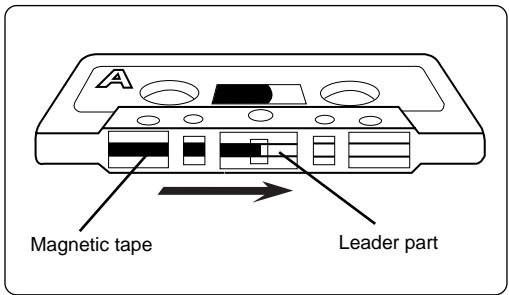
6 When the leader part is forwarded, press the [RESET] button to set the counter to "000."
7 Select the track to be recorded with the [REC TRACK] selector.
Select track 1 (the indicator will change to red) or whatever track you prefer to record on.
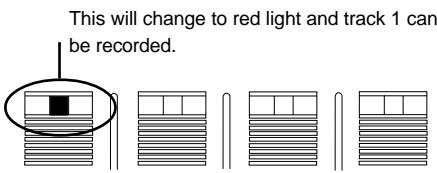
Do not move the [REC TRACK] selector during recording. If this is moved accidentally during recording, the recording track will switch.
8 Try speaking into the mic.
The level meter LED will blink.
9 For optimum gain, adjust the [LINE-MIC] knob CW (toward "MIC").
Adjust the [LINE-MIC] knob such that the level meter "+3" LED is illuminated at maximum sound volume.
When recording line level sound sources such as a keyboard and electric guitar, the optimum gain is obtained by rotating the [LINE-MIC] knob CCW (toward "LINE").
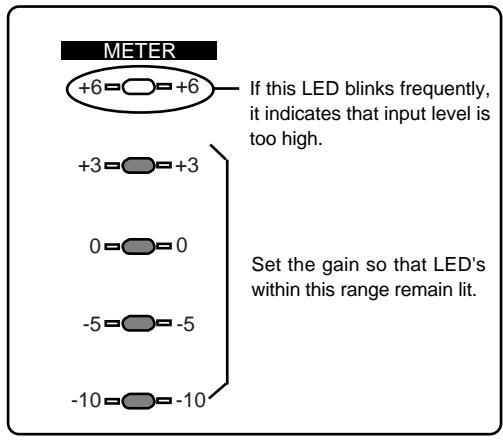
Be careful not to continue recording, if the level meter "+6" LED lights up frequently, as this will indicate the sound can be distorted.
10 Put X-12 in the record standby mode.
First, press the [PAUSE] button, then the [RECORD] button. The [PLAY] button will be engaged automatically at the same time. The tape will remain paused in the record mode.
11 When the [LINE OUT/PHONES] knob is slowly advanced, the input monitor sound will be heard in the headphone.
While monitoring the sound in the headphone, watch the level meter and adjust the recording to a suitable level.
Because the recording level cannot be adjusted with a fader, optimum recording levels must be determined by the sound volume applied to the mic or by adjusting the distance to the mic.
If you must monitor for a long time, be careful not to raise the [LINE OUT/PHONES] knob too high. If you monitor for long hours at high volumes, it could impair your hearing.
12 After confirming the level, release the [PAUSE] button (The [PAUSE] button is pressed again) to start recording.
13 If recording is to be momentarily stopped, press the [PAUSE] button. If recording is to be ended, press the [STOP] button.
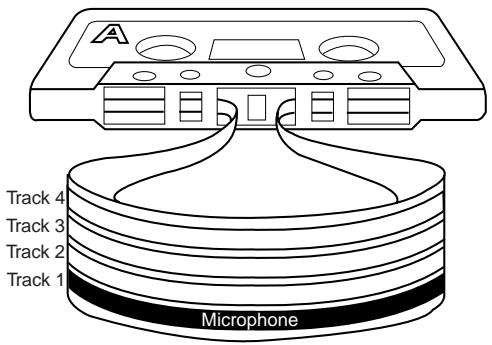
Following the procedures up to this point, the sound applied to the microphone has been recorded on track 1 as shown in schematic below.
Now, let's try recording another sound source to another track with the same procedures. Also, lets playback the recorded sound on each track as described below.
Basic Operation ( playback)
You can play back the recorded Track 1.
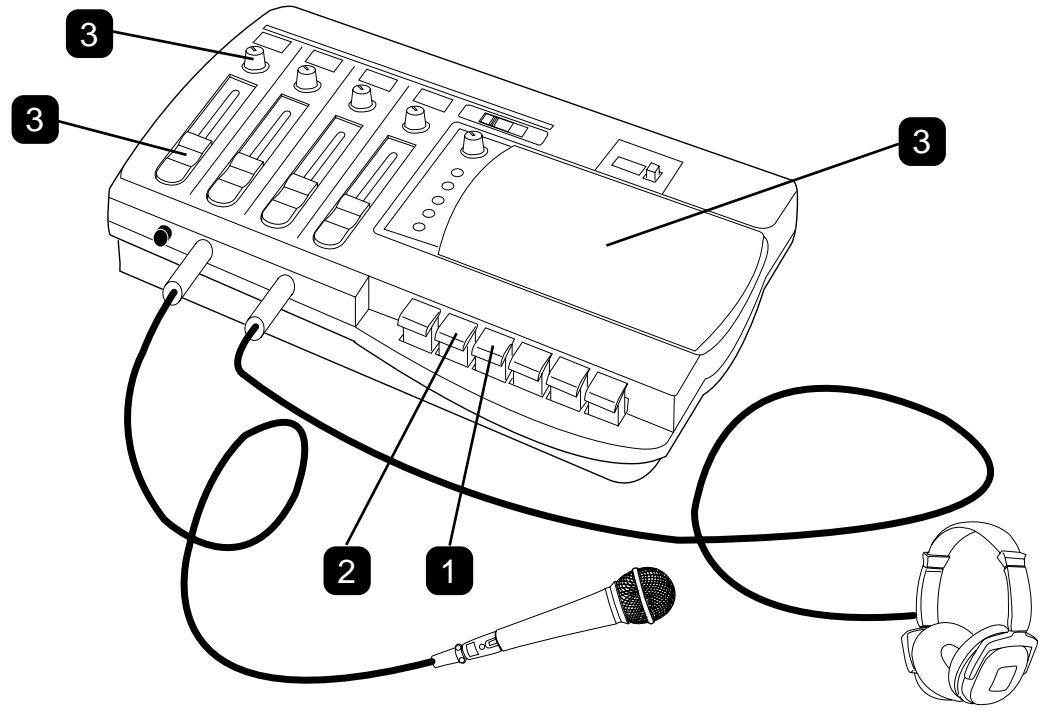
1 Press the [REW] button to rewind the tape to the beginning of the tape (counter "000").
2 Press the [PLAY] button to start playing back the tape from the "000" position.
Be careful not to press the [REC] button by mistake.
Note that the recording track is always in the selected state.
3 Slowly raise the channel 1 playback level fader for track 1, then adjust the sound balance with the playback [PAN] knob.
The same as when recording, the headphone volume will increase as the [LINE OUT/PHONES] knob is slowly raised.
The sound image can be moved left or right by rotating the [PAN] knob in either direction.
When monitoring the sound via headphones for a long period of time, do not set the level too high. Otherwise, your hearing may be damaged.
For playback of the sound recorded on the various tracks (1 - 4), the fader/[PAN] knobs corresponding to each track number is used i.e. track 1 playback sound by the channel 1 knob, the track 2 playback sound by the channel 2 knob, and so on.
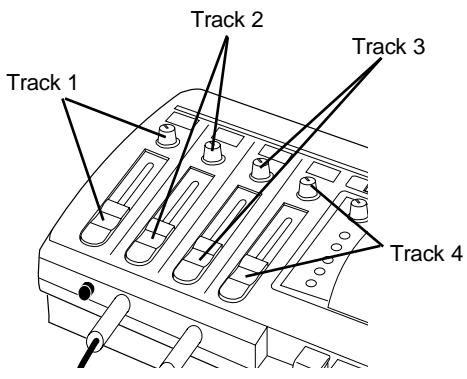
For playback of tape recorded on a boom box or cassette deck, the channel 1 and 2 faders and [PAN] knobs will be used regardless to whether the A side or B side is to be played back.
Advanced Operation
At this point, we assumed that you understand recording and playback of each track after studying the [Basic Operation] section and are ready to move on.
Next up, we'll work on more advanced functions such as multitrack recording - called "overdubbing" - which is fundamental in multiple recording, then the mixdown process when sounds recorded to the four tracks will be mixed to stereo, and finally, copying (dubbing) of the mix to a master recorder (stereo cassette deck, etc.).
1. Overdubbing
Overdubbing is a recording technique used to add a recorded performance to previously recorded tracks while listening (monitoring) to them.
For example, you might record a rhythm section (such as a drum machine) on Track 1 by following the basic recording procedure, then record an electric bass on Track 2 while listening to the recorded rhythm. In this way, you can record performances on all four tracks, one by one. This section uses an example in which Track 1 has the drum machine already recorded. Follow the recording steps described in the Basic Operation chapter and use the drum machine instead of the microphone. We are going to overdub the electric bass on Track 2, the keyboard on Track 3, and vocal on Track 4.
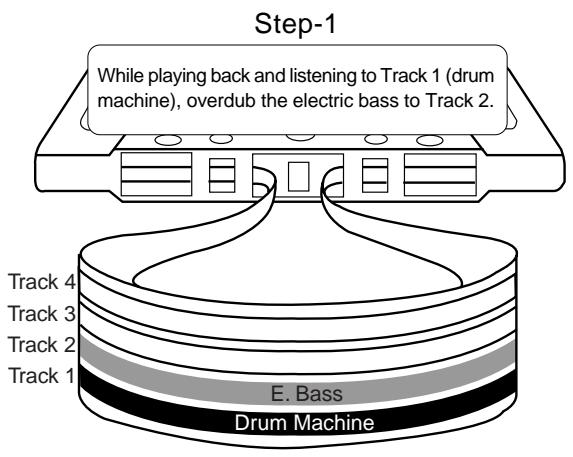
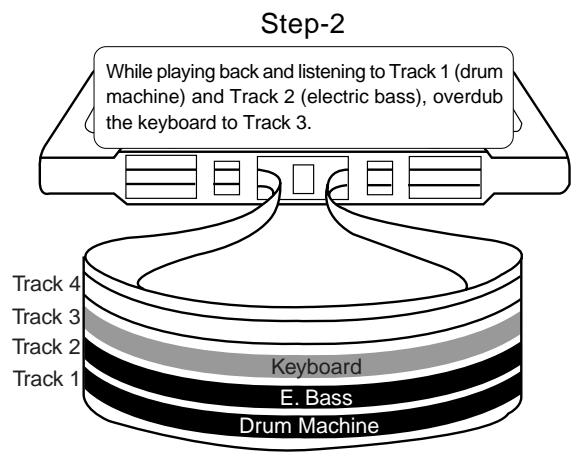
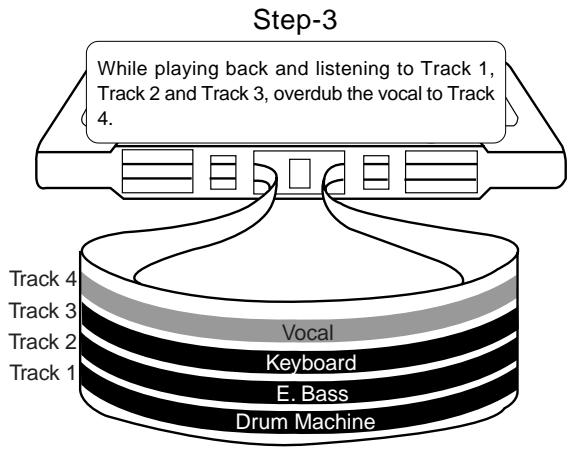
Overdubbing the electric bass to Track 2 while listening to Track 1 (drum machine)
Before you start overdubbing, practice your electric bass performance while monitoring the drum machine recording in Track 1 through the headphones.
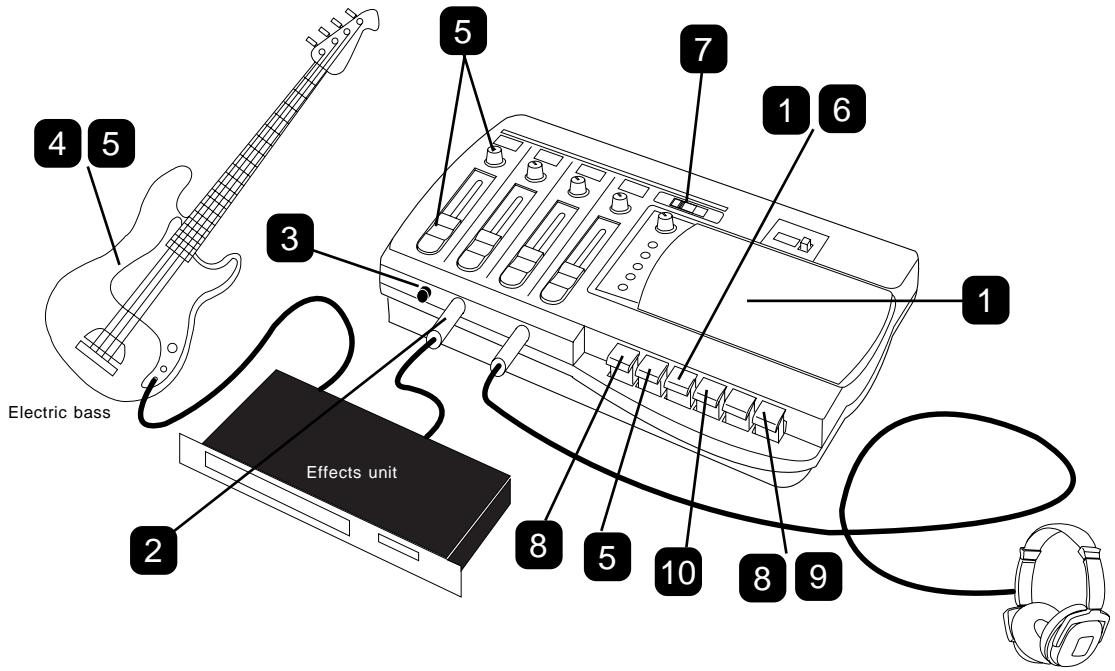
1 Insert the tape on which the drum machine has already been recorded, and rewind the tape to the recording start position "000."
2 The output of the effects unit to which the electric bass is connected is plugged into the [INPUT] jack.
3 Rotate the [LINE-MIC] knob CCW ("LINE") to match the effects unit output level.
4 Adjust the recording level of the electric bass. Play the electric bass to check to see how the level meter is responding. (Use the output volume on the bass so that the level is not too high.) Use the [LINE OUT/PHONES] knob to adjust the headphone volume to an appropriate level.
5 After you set the recording level, playback the tape from the "000" point and rehearse your bass accompanying the drum machine recording on Track 1.
Use playback level fader 1 and the playback [PAN] knob 1 to adjust the monitoring level and balance of Track 1.
6 After you finish rehearsing, rewind the tape to the "000" point.
7 Using the [REC TRACK] selector, select track 2 for recording.
8 Press the [PAUSE] button, the press the [REC] button.
The X-12 will enter record pause mode.
9 Press the [PAUSE] button again to cancel record pause mode and start recording.
Overdub the electric bass on Track 2, accompanying the drum machine on Track 1, while watching the recording level.
Do not move the [REC TRACK] selector during recording. If this is moved accidentally during recording, the recording track will be switched.
10 After you finish recording, press the [STOP] button or the [PAUSE] button to stop the tape.
If you have pressed the [PAUSE] button, press the [STOP] button to release the [REC] button and [PLAY] button, then press the [PAUSE] button again.
The following table indicates the switch and knob settings used for overdubbing to Tracks 3 and 4. Refer to this table and to the steps described on the previous page to overdub the keyboard to Track 3 and vocal to Track 4.
| Sound source | [LINE-MIC] knob | [REC TRACK] selector | Playback level fader | Playback [PAN] knob | |
| Overdubbing the keyboard to Track 3 | Plug the keyboard output to the [INPUT] jack. | Adjust to optimum level by CCW rotation (LINE) of the knob. | Select track 3 for recording. | Adjust playback levels of tracks 1 and 2 with playback faders 1 and 2. | Adjust the playback sound for comfortable monitoring (Refer tobelow). |
| Overdubbing the Vocal to Track 4 | Plug the mic into the [INPUT] jack. | Adjust to optimum level by rotating the knob CW (MIC). | Select track 4 for recording. | Adjust playback levels in tracks 1 - 3 with playback level faders 1, 2 and 3. | Adjust the playback sound for comfortable monitoring (Refer tobelow). |
When you are monitoring the recording sound and playback sound simultaneously, refer to the table below for the relationship between the position of the [PAN] knob and the sound balance.
Adjust the balance according to your needs. The recording sound will be always positioned in the center.
| [PAN] position | Monitoring sound position |
Center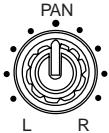 | Both playback sound and recording sound will be centered. |
Hard "R"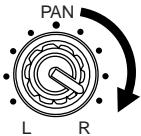 | The playback sound will be positioned on the right and the recording sound will be centered. |
Hard "L"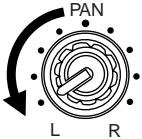 | The playback sound will be positioned on the left and the recording sound will be centered. |
2. Mixdown
Mixdown is a technique that enables you to adjust the volume balance of the overdubbed tracks 1-4, combine them to two channels, and dub (copy) to a master recorder (cassette deck or MD recorder etc.). Refer to the diagram below:
![graph LR A["Track 4 (Vocal)"] --> C["MIX"] B["Track 3 (Keyboard)"] --> C D["Track 2 (Electric bass)"] --> C E["Track 1 (Drum machine)"] --> C C --> F["LINE OUT"] F --> G["Master Recorder"] style A fill:#f9f,stroke:#333 style B fill:#f9f,stroke:#333 style D fill:#f9f,stroke:#333 style E fill:#f9f,str…](/content/2025/01/168453/images/df1e1e07bd13f80a927053484009dd7c827c4e2a86f3599e6c8daa79a11a3a17.jpg)
![Be careful not to mistakenly press the [REC] button. Remember that the recording track is always in the selected state. LINE OUT L, R jacks 1 2 3 4 4 LINE IN L, R jacks MINI component stereo system](/content/2025/01/168453/images/e08e3e65a9ebc298a05b66ac4321706e8fe479e6a260fa6452a71792cd888ca7.jpg)
1 Insert a tape with tracks 1-4 already recorded into the cassette tray, and rewind the tape up to the playback start point (reset the counter to "000").
2 Connect the input jack of a master recorder, such as cassette deck, and the [LINE OUT L, R] jacks.
Insert a recording tape (or MD) in the master recorder and locate the point on the tape at which you wish to start copying.
"Mini-components" which can be used for mixdown are limited to types able to record external inputs.
3 Set the master recorder to the record standby mode. (That is, press the [PAUSE] button so that the level meter will respond, then set the recorder in record pause mode.)
The method for setting the recorder in record standby mode will vary depending on the recorder you are using.
Refer to the instruction manual of the master recorder for more information.
4 Adjust the output level and balance (pan position) of tracks, then adjust input level on the master recorder.
Play back the tape on the X-12.
While monitoring the sound via the headphones, use the playback fader and the playback [PAN] knob of each track to adjust the output level and balance of the tracks.
Gradually raise the headphone volume using the [LINE OUT/PHONES] knob. This knob also adjusts the output level at the X-12's [LINE OUT L, R] jacks. Set the level so that the level meter of the master recorder will respond moderately.
5 After finishing the level adjustments, rewind the tape to the "000" point.
6 Now you can begin mixdown. First start recording on the master recorder, then press the [PLAY] button on the X-12 to start playback.
7 After mixdown is complete, stop the X-12 and the master recorder.
You can position the sound on tracks 1-4 anywhere in stereo image on mixdown.
This is where your creatively is important. Try for a sound that is pleasing to you!
Using a tape recorded on a boom box or cassette deck
You can record your favorite music on a boom box or cassette deck and overdub your performance or vocal, accompanying your musician's performance to make your own original tape. Follow the procedure below to make this type of tape.
- Record your favorite music source on the boom box or cassette deck.
Be sure to record on only one side of the tape (side A or B ).
That is, use Track 1 and 2 to record on the jam box or the cassette deck, and keep
Tracks 3 and 4 empty. (See the diagram below.)
| Track 4 | Do not record now. Later, you will record your performance or vocal here on the X-12. |
| Track 3 | |
| Track 2 (R channel) | Record your favorite song to Tracks 1 and 2 on the boom box or cassette deck. |
| Track 1 (L channel) |
- Insert the recorded tape in the X-12, and follow the "Overdubbing" procedure described previously to record your performance or vocal to Tracks 3 and 4.
Note that the law prohibits recording copyrighted or broadcast music, except for recordings intended only for personal use.
Troubleshooting
| Symptom | Check Point | Corrective Action |
| The power is not turned on when you press the power switch on. | Is the AC adaptor plugged in securely? | Check the connection at the AC outlet and the [DC IN] jack of the X-12. |
| Sound flutters or skips. | Is the head dirty? | Clean the head. |
| Are you using a type of tape other than high position? | Use a high-position tape. | |
| The sound distorted or clipping. | Is the level appropriate for the input signal? | Use the [LINE-MIC] knob to set the optimum level. |
| The [REC] button is not pushed in. | Is the write-protection tab on the cassette tape broken? | Place a strip of scotch tape over the broken tab. |
| The sound cannot be heard through the headphones. | Is the [LINE OUT/PHONES] knob turned up? | Turn the [LINE OUT/PHONES] knob. |
| You cannot record to a desired track. | Is the [REC TRACK] selector set correctly? | Set the [REC TRACK] selector repeatedly until the desired track is selected. |
Maintenance
* Cleaning the exterior
For normal cleaning, use a dry cloth.
For stubborn dirt, moisten a cloth in diluted detergent, wring it out firmly, and wipe the dirt off. Then polish with a dry cloth.
Never use solvents such as alcohol, thinner or benzene, since these will damage the printing and finish of the exterior.
* Cleaning the head
As the X-12 is used, the record/playback head will become coated with oxide residue from the tapes. If this residue is allowed to build up, recordings will contain more noise, and dropouts may occur during playback.
To prevent this, regular cleaning is important. Use a commercially available cleaning kit etc. to clean the head. If cleaning the head does not restore the sound quality, it is possible that the head is worn. Contact an authorized Fostex service station for repair.
* Cleaning the pinch roller and capstan
The capstan and pinch roller are important parts that hold the tape and move it along at the correct speed. As with the head, these parts can also become dirty with oxide residue and dust, which will cause increased wow or flutter,
or even damage the tape by pulling it out of the cassette. Since cassette tape is very thin, it is especially dangerous to use a cassette deck with dirty pinch rollers. As with the head, it is important to always keep these parts clean. Clean them using a cotton swab or gauze soaked in cleaning solution or isopropyl alcohol. Never use organic solvents such as lacquer thinner, since this will severely damage the pinch rollers.
* Demagnetizing the head
After long periods of use, the head begins to develop a magnetic field in addition to the oxide residue described above. This can also occur if a magnet or a magnetized object (scissors, etc.) is allowed to come near the head or touch it. If the head or capstans become magnetized, frequency response will be degraded and noise will increase.
In extreme cases, noise can be created on previously recorded tapes that you playback, rendering them useless. Once a month or so, you should use a demagnetizer (head eraser) to demagnetize the head. Carefully read and follow the instructions included with your demagnetizer, and do not allow it to come near recorded tapes.
Specifications
INPUT
Connector (x1) : ø6mm PHONE jack
Input Impedance : 20kΩ or higher
Reference Input Level : -50dBV \~ -10dBV
(adjustable with the GAIN knob)
LINE OUT (L, R)
Connector (x2) : RCA pin jack
Output Load Impedance: 10kΩ or higher
Reference Output Level : -10dBV
PHONES
Connector (x1) : ø6mm STEREO
PHONE jack
Output Load Impedance: 16Ω or higher
Maximum Output : 10mW (at 32Ω)
Recording Tape
: Less than C-90
(TYPE II/HIGH position)
Record Tracks
: 4 tracks, one direction
Tape Speed
: 4.76cm/s
Frequency Response
Mixer section : 20Hz \~ 20kHz
Recorder section : 40Hz \~ 10kHz
Heads
Rec/Play : 4-track, 4-channel
recording/playback
Erase : 4-track, 4-channel erase
Power Supply : Fostex AC Adaptor, AD-12A
DC12V (12 \~ 16V), 8W
Weight : Approx. 1.1kg (excluding
the AC adaptor)
Dimensions (mm) : 275 (W) x 68 (H) x 177 (D)
Accessories : Owner's manual x1, AC adaptor x1
* Specifications and appearance are subject to change without notice for product improvement.
Block Diagram
![graph LR A["INPUT -50dBV ~ -10dBV"] --> B["LINE-MIC"] B --> C["5DOT BARGRAPH"] C --> D["REC TRACK TRK 1 TRK 2 TRK 3 TRK 4"] D --> E["RECORDER TRK 1"] E --> F["PLAY BACK LEVEL"] F --> G["PAN"] G --> H["LINE OUT / PHONES LEVEL"] H --> I["L LINE OUT -10dBV R"] I --> J["PHONES 16Ω 10mW"] E --> K["LEVEL"…](/content/2025/01/168453/images/53326c52e0bbbc3eb93450070d3becfb2a516706d4fc7486326a4261df954ab7.jpg)
Accessories (option)
T-5

Specifications
Type: Semi-Open/Dynamic type
Freq. Response: 20\~20,000Hz
Output Impedance: 44Ω
Sensitivity: 96dB (dB/mW)
Rated Input: 30mW
Maximum Input: 100mW
Sound Pressure Level: 116dB
Weight: Approx. 220g
Cable Length: 2.5m
T-20RP

Specifications
Type: Semi-Open/RP Dynamic
Freq. Response: 20\~25,000Hz
Output Impedance: 50Ω
Sensitivity: 96dB (dB/mW)
Rated Input: 10mW
Maximum Input: 200mW
Sound Pressure Level: 119dB
Weight: Approx. 340g
Cable Length: 3.0m
T-7

Specifications
Type: Semi-Open/Dynamic type
Freq. Response: 20\~20,000Hz
Output Impedance: 77Ω
Sensitivity: 98dB (dB/mW)
Rated Input: 23mW
Maximum Input: 100mW
Sound Pressure Level: 118dB
Weight: Approx. 230g
Cable Length: 2.5m
T-40RP

Specifications
Type: Semi-Open/RP Dynamic
Freq. Response: 25\~25,000Hz
Output Impedance: 50Ω
Sensitivity: 93dB (dB/mW)
Rated Input: 10mW
Maximum Input: 200mW
Sound Pressure Level: 116dB
Weight: Approx. 360g
Cable Length: 3.0m
M321
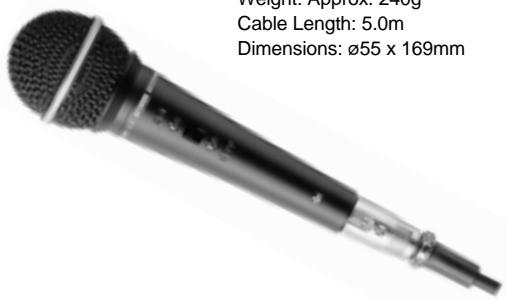
Specifications
Type: Uni-direction/Dynamic type
Freq. Response: 90\~16,000Hz
Output Impedance: 500Ω
Sensitivity: -56dB (0dB=1V/Pa)
Connector: 3 Pin Cannon type
Weight: Approx. 240g
Cable Length: 5.0m
Dimensions: ∅55 x 169mm
M521
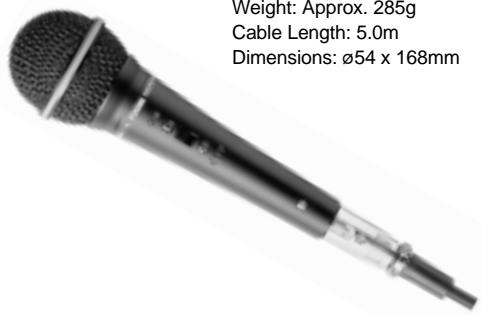
Specifications
Type: Uni-direction/Dynamic type
Freq. Response: 60\~16,000Hz
Output Impedance: 500Ω
Sensitivity: -54dB (0dB=1V/Pa)
Connector: 3 Pin Cannon type
Weight: Approx. 285g
Cable Length: 5.0m
Dimensions: ∅54 x 168mm
Declaration of EC Directive
This equipment is compatible with the EMC Directive (89/336/EEC) - Directive on approximation of member nation's ordinance concerning the electromagnetic compatibility and with the Low Voltage Directive (73/23/EEC) - Directive on approximation of member nation's ordinance concerning electric equipment designed to be used within the specified voltage range.
The Affect of Immunity on This Equipment
The affect of the European specification EN50082-1 (coexistence of electromagnetic waves - common immunity specification) on this equipment are as shown below.
* In the electrical fast transient / burst requirements, radiated electromagnetic field requirements and static electricity discharging environment, this could be affected by generation of noise in some cases.
FOSTEX DISTRIBUTORS LIST IN EUROPE
* Including non - EU countries. * underlined: contracted distributors (as of August, 2000)
NAME: ATEC Audio-u. Videogeraete VertriebsgesmbH.
NAME: Sound Industries NV
ADD: P. O. Box 22, FIN-02631 Espoo, Finland
TEL: (+358) 9-5259330, FAX: (+358) 9-52593352
NAME: Musikengro
ADD: ZAC de Folliouses, B. P. 609, 01706 Les Echets, France
TEL: (+33) 472 26 27 00, FAX: (+33) 472 26 27 01
NAME: Studiosound & Music GmbH
ADD: Industriestrasse 20, D-35041 Marburg, F. R. Germany
TEL: (+49) 6421-92510, FAX: (+49) 6421-925119
NAME: Bon Studio S. A.
ADD: 6 Zaimi Street, Exarchia, 106.83 Athens, Greece
TEL: (+30) 1-3809605-8, 3302059, FAX: (+30) 1-3845755
NAME: I. D. elrf. electronic Ltd.
ADD: Armula 38 108 Reykjavik, Iceland
TEL: (+354) 588 5010, FAX: (+354) 588 5011
NAME: General Music S. p. A.
ADD:Via delle Rose, 12 S. Giovanni M. (RN), Italy
TEL: (+39) 0541-959511, FAX: (+39) 0541-957404
NAME: IEMKE ROOS AUDIO B. V.
ADD: Kuiperbergweg 20, 1101 AG Amsterdam, The Netherlands
TEL: (+31) 20-697-2121, FAX: (+31) 20-697-4201
NAME: Siv. Ing. Benum A/S
ADD: P. O. Box 145 Vinderen, 0319 Oslo 3, Norway
TEL: (+47) 22-139900, FAX: (+47) 22-148259
NAME: Caius - Tecnologias Audio e Musica, Lda.
ADD: Rua de Santa Catarina, 131 4000 Porto, Portugal
TEL: (+351) 2-2086009/2001394
FAX: (+351) 2-2054760/2087488
ADD: C/Garcilaso No. 9, Madrid 28010, Spain
TEL: (+34) 91-4470700, 91-4470898, FAX: (+34) 91-5930716
NAME: Professional Television AB
ADD: Kavallerivagen 24, 172 48 Sundbyberg, Sweden
TEL: (+46) 8-59798000, FAX: (+46) 8-59798001
NAME: Audio Bauer Pro AG
ADD: Bernerstrasse-Nord 182, CH-8064 Zurich, Switzerland
TEL: (+41) 1-4323230, FAX: (+41) 1-4326558
NAME: SCV London
ADD: 3A 6-24 Southgate Road, London N1 3JJ, England, UK
TEL: (+44) 171-923-1892, FAX: (+44) 171-241-3644

- CAUTION
- WARNING
- SAFETY INSTRUCTIONS
- ATTENTION
- TABLE OF CONTENTS
- PRECAUTIONS (PLEASE READ BEFORE USE)
- POWER SUPPLY
- LOCATION
- BEFORE USING THE X-12
- HINT
- ADVICE
- IMPORTANT
- NAMES AND FUNCTIONS
- AC ADAPTOR CONNECTOR [DC IN]
- POWER SWITCH [POWER]
- LINE OUTPUT JACK [LINE OUT L, R]
- RECORD TRACK SELECT INDICATOR
- RECORD TRACK SELECTOR [REC TRACK]
- COUNTER / RESET BUTTON [RESET]
- LINE OUT / HEADPHONE LEVEL KNOB
- [LINE OUT/PHONES]
- CASSETTE LID / CASSETTE TRAY
- LEVEL METER
- TRANSPORT CONTROL BUTTONS
- RECORD BUTTON [REC]
- PAUSE BUTTON [PAUSE]
- STOP BUTTON [STOP]
- FAST FORWARD BUTTON [F F]
- REWIND BUTTON [REW]
- PLAY BUTTON [PLAY]
- RECORD INDICATOR [REC]
- POWER INDICATOR [POWER]
- PLAYBACK LEVEL FADER [1 - 4]
- PLAYBACK PANPOT KNOB [PAN]
- HEADPHONE JACK [PHONES]
- INPUT JACK [INPUT]
- GAIN CONTROL KNOB [LINE-MIC]
- GAIN CONTROL RULE OF THUMB
- STEREO PHONE PLUG (STEREO TYPE)
- PHONE PLUG (MONAURAL TYPE)
- RCA PIN JACK (MONAURAL TYPE)
- BASIC OPERATION (RECORDING)
- BASIC OPERATION ( PLAYBACK)
- ADVANCED OPERATION
- OVERDUBBING
- OVERDUBBING THE ELECTRIC BASS TO TRACK 2 WHILE LISTENING TO TRACK 1 (DRUM MACHINE)
- MIXDOWN
- USING A TAPE RECORDED ON A BOOM BOX OR CASSETTE DECK
- MAINTENANCE
- SPECIFICATIONS
- INPUT
- LINE OUT (L, R)
- PHONES
- FREQUENCY RESPONSE
- HEADS
- BLOCK DIAGRAM
- ACCESSORIES (OPTION)
- DECLARATION OF EC DIRECTIVE
- THE AFFECT OF IMMUNITY ON THIS EQUIPMENT
- FOSTEX DISTRIBUTORS LIST IN EUROPE
Brand : FOSTEX
Model : X-12
Category : Speakers