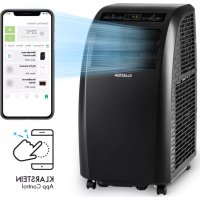
USER MANUAL Metrobreeze Rom Smart Klarstein
ONNNNNNNNNNNNNNNNNNNNNNNNNNNNNNNNNNNNNNNNNNNNNNNNNNNNNNNNNNNNNNNNNNNNNNNNNNNNNNNNNNNNNNNNNNNNNNNNNNNNNNNNNNNNNNNNNNNNNNNNNNNNNNNN
KLARSTEIN
www.klarstein.com


Unit 6 Riverside Business Centre
Brighton Road
Shoreham-by-Sea
BN436RE
United Kingdom
Congratulations on purchasing this device. Please read the following instructions carefully and follow them to prevent possible damages. We assume no liability for damage caused by disregard of the instructions and improper use. Scan the QR code to get access to the latest user manual and more product information.

CONTENT
Technical Data 25
Notes on Refrigerant R290 26
Safety Instructions 27
Product Description 29
Control Panel 30
Remote Control 31
Commissioning and Operation 32
Device Control by Smartphone 34
Installation 36
Attaching the window seal 37
Drainage Operation 40
Cleaning and Care 41
Troubleshooting 42
Product Data Sheet 44
Disposal Considerations 46
Declaration of Conformity 46
TECHNICAL DATA
| Item number 10035803, 10035804 | |
| Power supply 220-240 V ~ 50/60 Hz | |
| Cooling capacity 10.000 BTU | |
| WiFi standard | 802.11 b/g/n |
| WiFi frequency | 2,4 GHz |
| WiFi radio-frequency power (max.) | 20 dBm |
NOTES ON REFRIGERANT R290
Warnings
- The air conditioning system must be kept and transported upright. Otherwise, irreparable compressor damage may occur. Leave the unit for at least 24 hours before putting it into operation.
- Switch off the device and disconnect it from the power supply before cleaning.
- Make sure that the product creates a steady stream of air. Ensure the air inlets and outlets are not blocked.
- To prevent leaks, operate this unit on a horizontal surface.
- Any person performing work on a refrigerant circuit should have a current certificate from an industry-accredited assessment body. This ensures competence for the safe handling of refrigerants according to an industry-recognised assessment specification.
- If the device stops working, dispose of it properly.
- Store the device in a well-ventilated place when not in use.
- Store the device so that it is not damaged.
- Repairs may only be carried out by the manufacturer or an authorised specialist company.
- Do not damage any components of the refrigerant circuit. Escaping refrigerant may not be noticed because it is odourless.
- Maintenance and repairs must be carried out under the supervision of specialists in the use of flammable refrigerants.
- Limit the piping to a minimum.
- Be careful not to damage the piping.
- Appliances with flammable refrigerants may only be installed in a well-ventilated room.
Comply with national gas regulations.
- All mechanical connections must be freely accessible for maintenance purposes.

CAUTION
Risk of fire! This device contains the flammable refrigerant R290. If the refrigerant escapes and is exposed to an external ignition source, there is a risk of fire.
SAFETY INSTRUCTIONS
Special notes
- Only use agents recommended by the manufacturer for defrosting or cleaning.
- Never store the appliance in a room in which there are permanent sources of ignition (e.g. open flames, a switched on gas appliance or a switched on electric heater).
- Do not puncture or burn the appliance.
Note that coolant may be odourless.
Note: Only use the unit in rooms larger than Xm^2 (see table):
| Model X (m2) | |
| 5000 BTU/h, 7000 BTU/h, 8000 BTU/h 10 m2 | |
| 9000 BTU/h, 10000 BTU/h, 10500 BTU/h 13 m2 | |
| 12000 BTU/h, 14000 BTU/h, 16000 BTU/h, 18000 BTU/h 1 | 8 m2 |
General safety instructions
- The device is only suitable for indoor use.
- Do not use the product if it needs to be repaired or if it has not been installed properly.
-
Do not use the product in the following areas:
-
near heat sources,
- in areas where oil can splash,
- in areas exposed to direct sunlight,
- in areas where splash water can occur,
-
near bathtubs, in washrooms, near showers or swimming pools.
-
Never insert your fingers or other objects into the ventilation openings. In particular, warn children of the dangers this may cause.
- Ensure that the unit is held vertically during transport and storage so that the compressor is correctly positioned.
- Always turn off the appliance before cleaning and unplug it from the wall outlet.
-
Switch off the appliance before moving it and unplug it from the wall outlet. Move the appliance slowly and carefully.
-
To avoid the risk of fire, do not cover the unit.
- All fan connections must comply with local electrical safety regulations. If necessary, refer to these regulations.
Supervise children so that they do not play with the unit.
- If the power cord is damaged, it must be replaced by the manufacturer, customer service or a similarly qualified person to avoid danger.
- This equipment may be used by children over the age of 8 and by persons (including children) with limited physical, sensory or mental capabilities and/or lack of experience and knowledge, provided they have been instructed in the use of this equipment by a person responsible for their safety and understand the hazards associated with the use of this equipment. Cleaning and maintenance of the appliance may only be carried out by children under supervision.
- The appliance must be installed in accordance with national wiring regulations.
Type and voltage of fuses: T, 250 V AC, 2 A or higher.
- Contact customer service for cleaning and maintenance.
- Do not pull the power cord, deform or modify it, or immerse it in water. Incorrect handling of the power cord may result in damage to the equipment and/or electric shock.
- National gas regulations must be observed.
- Do not block the ventilation openings.
- Do not operate the appliance solely by inserting or removing the power plug, as this may result in electric shock or fire due to heat.
- Immediately unplug the appliance from the wall outlet if it emits strange noises, odours or smoke.
Instructions for Handling Damage
- In case of damage to the device, contact the manufacturer, customer service or a similarly qualified person.
- If damage occurs, turn off the power, unplug the power cord, and contact the manufacturer, the service representative, or a similarly qualified person.
The power cord must be securely earthed.
- If the power cord is damaged, turn off the power to avoid danger and unplug the power cord from the wall outlet. The power cord must be replaced by the manufacturer, customer service or a similarly qualified person.

WARNING
Risk of injury! Repairs to the coolant circuit may only be carried out by trained specialist personnel. Never attempt to repair the unit yourself!
PRODUCT DESCRIPTION
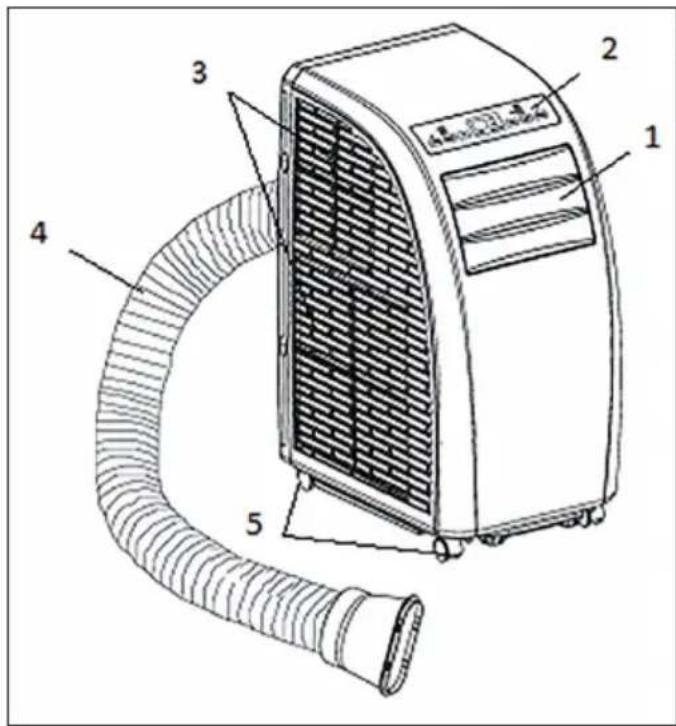
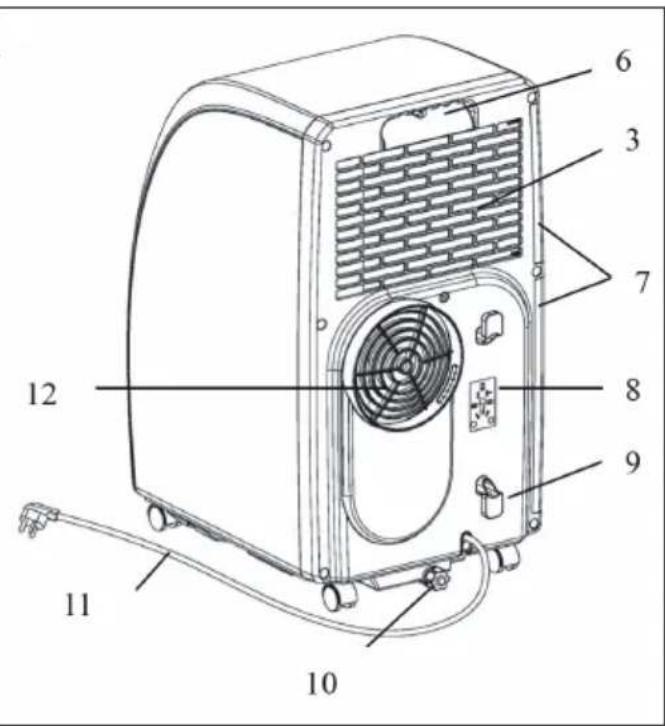
| 1 | Guide strip | 7 | Strainer |
| 2 | Control panel | 8 | For installation of power line plug |
| 3 | Inlet grid | 9 | Buckle of power line |
| 4 | Exhaust pipe | 10 | Drainage outlet |
| 5 | Corner wheel | 11 | Power line with plug |
| 6 | Handle | 12 | Exhaust outlet |
CONTROL PANEL
| POWER | Press this button to turn on or off the air conditioner, and the powered indicator lamp is normally on. |
| MODE | During on or timer on pressing this button can select COOL, DEHUMIDIFY, FAN etc. The corresponding indicator lamp to the selected mode is on. |
| UP/DOWN | If the timer on or timer off is set, pressing UP or DOWN can adjust on/off time; in running state of COOL or timer state, pressing UP or DOWN can adjust the set temperature; and pressing UP and DOWN simultaneously can realize conversion between and , and is displayed in default. |
| SPEED | Pressing this button can select different speeds in cycle of HIGH, MID and LOW; in FAN mode press this button for 5s to run the internal dry function, press this button for another 5s to cancel, the corresponding indicator lamp to the selected speed is on. |
| TIMER | Press this button to enter timer setting state, and the indicator lamp is on. |
| 88 | This pattern displays the set temperature in COOL and HEAT modes, and displays room temperature in FAN and DEHUMIDIFY modes; display of °C shows current centigrade temperature, and display of °F shows current Fahrenheit temperature. |
| SLEEP | This indicator lamp is normally on when SLEEP state is started. |
| WATER FULL | In water full state this indicator lamp flickers with buzzer to prompt drainage. |
| TIMER + SPEED | Press and hold the fan and timer buttons simultaneously for 2 seconds to activate the swing function of the slats. |
REMOTE CONTROL
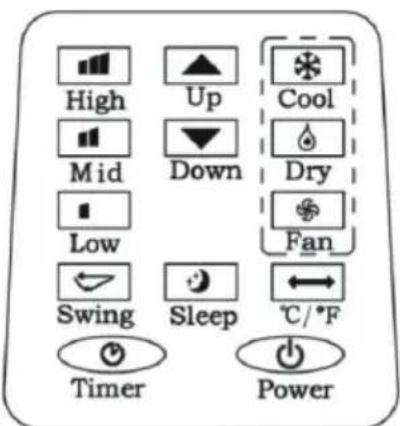
| ① | POWER: Press this button to turn on/off the air conditioner. |
| ② | TIMER: Press this button to set timer. |
| ← | SWING: Press this button, and the horizontal guide vane rotates automatically. |
| → | TEMPERATURE CONVERSION: Temperature is converted from °C to °F. |
| * | COOL: Press this button to select COOL mode. |
| DEHUMIDIFY: Press this button to select DEHUMIDIFY mode. |
| FAN: Press this button to select FAN mode. |
| UP/DOWN: Press UP or DOWN to set temper- rature or adjust timer. |
| HIGH: Press this button to select HIGH speed. |
| MID: Press this button to select MID speed. |
| LOW: Press this button to select LOW speed. |
| SLEEP: Press this button to set SLEEP mode. At the moment the speed of upper and lo- wer fans is fixed at LOW speed, in SLEEP mode temperature and speed cannot be changed. Press this button again to cancel. |
COMMISSIONING AND OPERATION
Setting of timer off
When the air conditioner is running, press this button, the timer LED lamp is on, and meanwhile 88 Nixie tube will flicker "00" for 5 times, at the moment, press UP and DOWN to adjust time from 1h to 24h. Between 1 24h of timer, up/down adjustment once changes 1h. When the set time expires, the air conditioner turns off automatically.
Setting timer on
When the air conditioner is in standby state, press TIMER, the timer LED lamp is on, and meanwhile the display will flicker "00" for 5 times, at the moment press UP/DOWN to adjust the desired time, and the method of adjustment is the same as that during timer off. During setting of timer, the operating modes after start can be selected, if COOL mode is selected, the set temperature can be adjusted simultaneously; if DEHUMIDIFY mode is selected, the set humidity can be adjusted simultaneously. After the set time expires, the air conditio-ner starts automatically and runs in the selected operating mode.
Change of the set time / Turning the timer off
In the running process of timer, if you are intended to change the existing timer, you can press TIMER once, at the moment 88 Nixie tube will flicker and display the remaining time, during flicker pressing UP/DOWN can increase/decrease time on the basis of the original time. If you press TIMER again during flicker, the set time will be cancelled, namely timer quits.
COOL mode
- In on or timer on state press MODE to select COOL mode. At the moment the corresponding LED on panel displays.
- Press UP/DOWN to set appropriate temperature in a range of 18 30^ (64- 86^ ). When UP or DOWN is pressed once, temperature will go up or down by 1^ or 1^ every time.
-
Press SPEED to select appropriate speed, and LOW, MID and HIGH speeds can be circularly selected.
-
After selecting COOL mode, press SLEEP on remote control (or press UP and TIMER on operating panel simultaneously) to enter SLEEP mode, both upper and lower fans are forcibly set at LOW speed. In approximate 7h the air conditioner turns off automatically. If SLEEP is to be cancelled, press SLEEP again or conversion mode to cancel the sleep function.
- Press SWING to turn off or turn on the swing function.
DEHUMIDIFY mode
- In on or timer on state press MODE to select DEHUMIDIFY mode. At the moment the corresponding indicator lamp is on.
- Temperature and speed are not adjustable.
- Press SWING to turn off or turn on the up/down swing function.
FAN mode
- In on or timer on state press MODE to select FAN mode. At the moment the corresponding indicator lamp is on.
- Press SPEED to select appropriate speed, and LOW, MID and HIGH speeds can be circularly selected. In this mode press SPEED for "5s" to run the internal dry function, i.e. both upper and lower fans work simultaneously. Press SPEED for another "s" to cancel the internal dry function.
- Temperature is not adjustable.
- Press SWING to turn off or turn on the up/down swing function.
Important Hints on Use
- When full water indication is displayed, the air conditioner will stop work, you should drain water in time. After drainage the air conditioner will start automatically.
- In DEHUMIDIFY and FAN (including the internal dry function) modes, you need not use exhaust pipe.
- If your room faces the sun directly, please draw the curtains.
DEVICE CONTROL BY SMARTPHONE
If you integrate the device into your home WiFi, you can conveniently operate it via the associated Klarstein app. The app not only allows you to remotely control the device via your smartphone, but also gives you access to recipes and additional information.
Follow these steps to connect your smartphone to your Klarstein device:
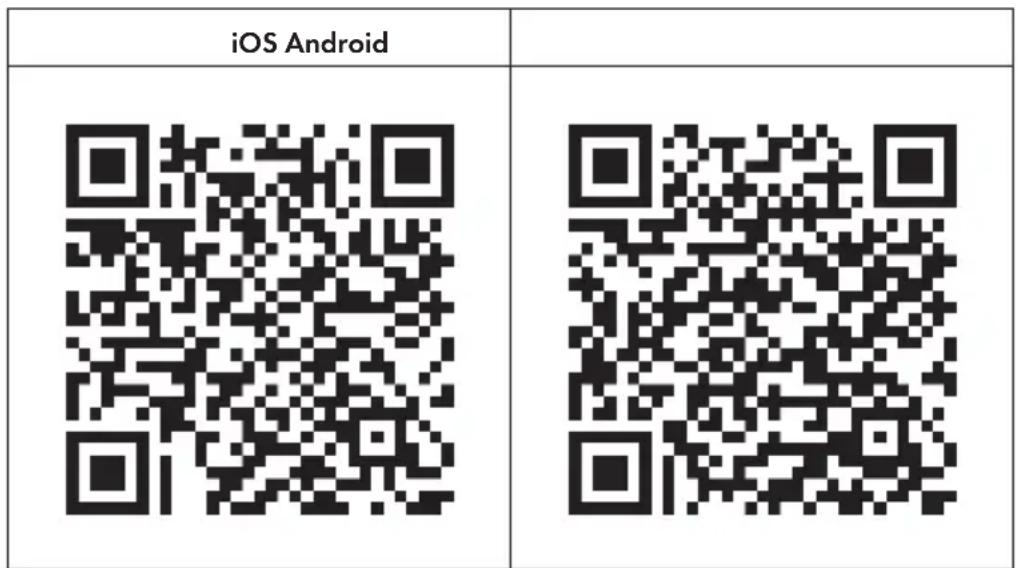
- Download the Klarstein app first by scanning the QR code with your smartphone (see below), or download it directly from App Store or Google Play.
- Make sure your smartphone is connected to the same WiFi network that your Klarstein device is to be connected to.
- Open the Klarstein app.
- Sign in to your account. If you do not have an account, sign up in the Klarstein app.
- Follow the instructions from the app.
App Download
Use the scan function of your smartphone to scan the QR code and save the app on your smartphone.
Note: The app provides further information on how to use the app and help on how to connect to your device as soon as you open it for the first time.
Troubleshooting connection problems
If your Klarstein device cannot be found in the WLAN, check the following:
Is the device plugged in?
- Is the WiFi feature of my phone enabled?
- Is the WiFi function of the Klarstein device activated? (Follow the instructions in the app)
- Has the WLAN password been entered correctly?
- Are the router, Klarstein device and smartphone in the immediate vicinity during the connection attempt? (Ideally no more than 5 m apart)
- If you have deactivated the 2.4 GHz band in the settings of your wireless router, activate it in your router settings.
Note: For further help, follow the instructions in the app when setting up the connection.
INSTALLATION
Location
Install in a flat and dry place, and 50cm must be left around the air conditioner to enable smooth circulation of air, as shown in Fig.5 (before connection of exhaust pipe).
Assembly method of exhaust pipe
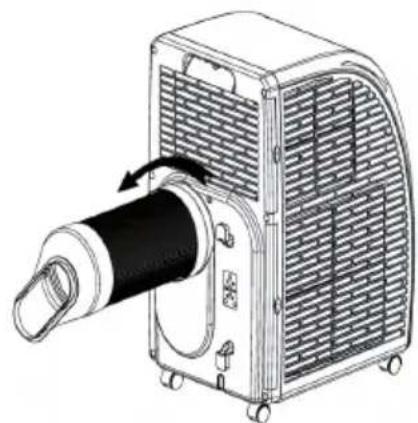
- Connect exhaust pipe assembly with round joint.
Fix the round end of the connected exhaust pipe assembly at air outlet of the air conditioner as shown in figure.
- Connect the oblate joint of the connected exhaust pipe assembly with sealplate of window.
Install sealplate on the nearest window. No Obstacles at a distance of 50cm around the Window should be ensured to guaran- tee unimpeded air exhaust.
Cautions
- Exhaust pipe is 60cm 170cm long (including adapter). We recommend using the minimum length so as to save energy for you.
- The length of exhaust pipe is especially designed in accordance with the specification of the air conditioner. Please do not use other exhaust pipes of different lengths or materials, in such way failure may be caused.
ATTACHING THE WINDOW SEAL
Sliding window
-
Measure the size of window.
-
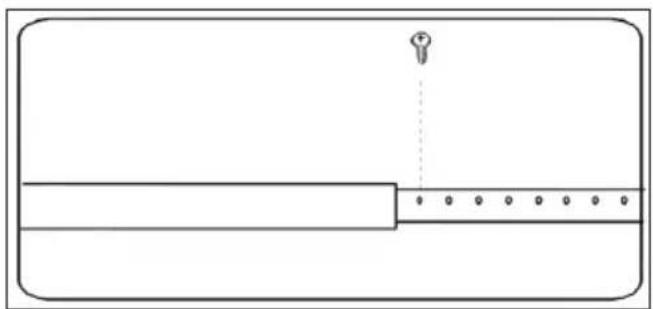
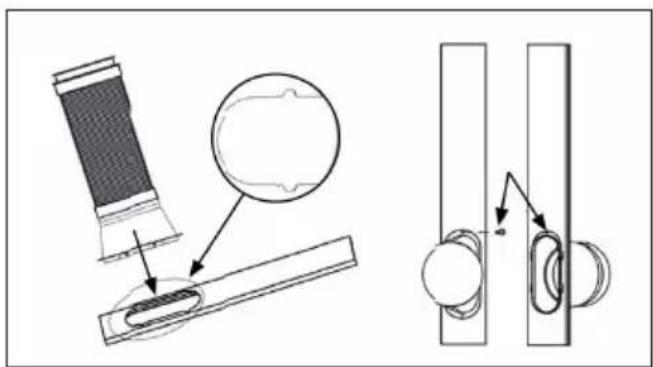
Adjust the length of the window sealing plate to fit the size of the window. After adjusting the window sealing plate, fix it with screws (see picture).
- Install the fixed window sealing plate on the window (see pictures).
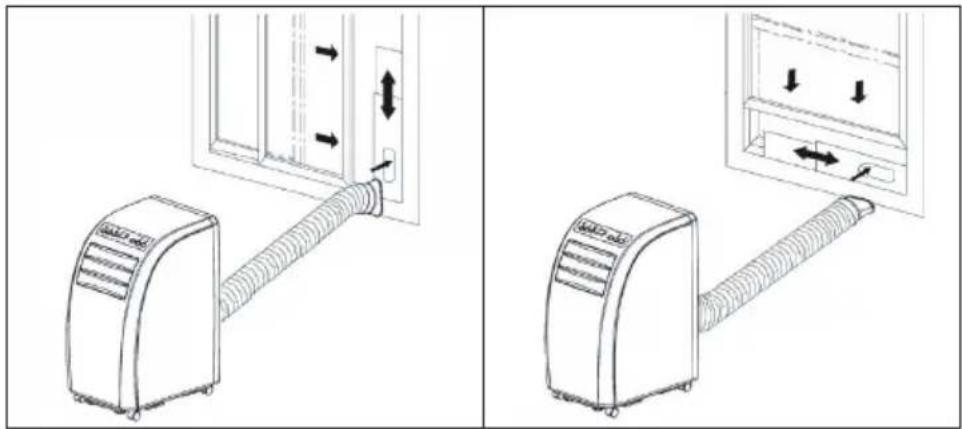
- Insert the air exhaust hose into the window sealing plate, fix it with screws.
Tilted window
Installing the window sealing is easy. You can attach it to a tilted window or to a laterally opened window. Our demonstration is performed on a laterally opened window. It is especially suitable for low positions of the exhaust pipe.
The velcro tape must be attached on three sides. Leave out the side with the window being connected to the frame. Clean the frame and dry it first, so that the tape sticks.
| 1 2 3 | | |
| | |
| Attach the velcro tape on the left, on the top and on the bottom of the window frame.
We recommend that you cut the tape into strips for each window side first. | Now attach the velcro tape to the inner window sides. | Stick the window sealing to the velcro strips on the window frame first (starting with the top), then on the velcro strips on the window.
Push the exhaust air tube of the air conditioner through the hole, which can be adjusted in height and size. |
Wall mounted
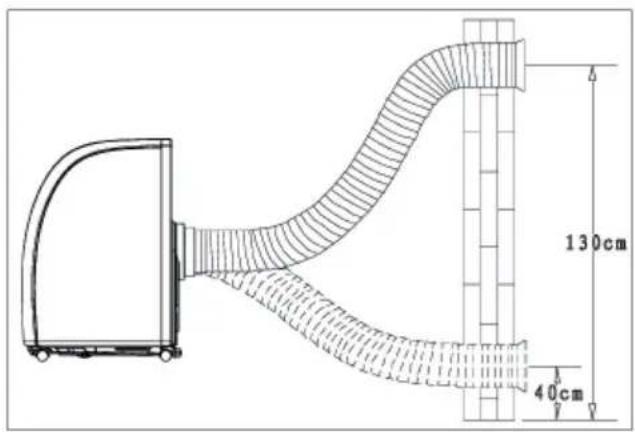
Bow alignment
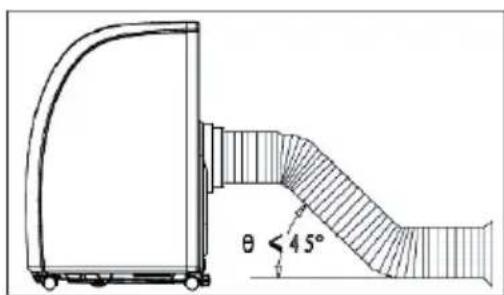
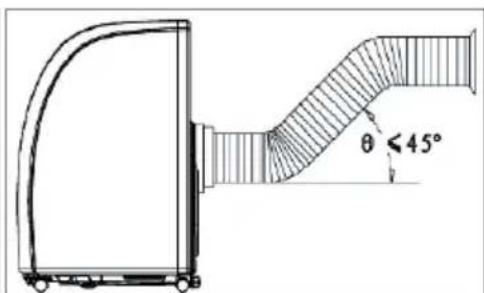
Incorrect bending
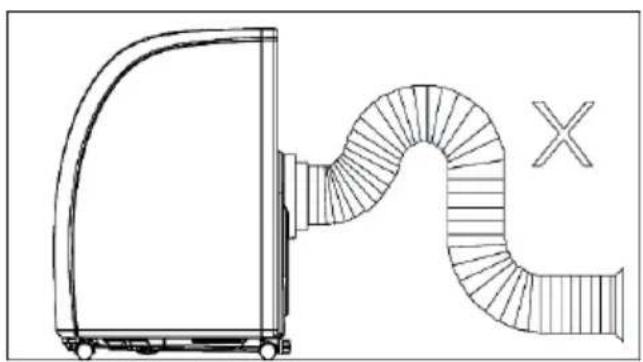
DRAINAGE OPERATION
-
When COOL or DEHUMIDIFY is run in humid weather, more condensate is produced, water full alarm will be issued as he level in water pan reaches a certain location, compressor stops operation. Water full indication on display screen will light up and an audible alarm will be issued simultaneously till the level in water pan is lower than alarm level or water in water pan has been drained manually. When the alarm is relieved, the air conditioner will resume normal operation automatically.
-
When the air conditioner issues water full alarm, please drain water in time. You can move the air conditioner to the site where water can be drained directly (such as toilet or sewer), unscrew nut and pull out water plug to drain all water. Install water plug and nut before use. When water is full, please move the air conditioner steadily, otherwise, water may overflow from inside.
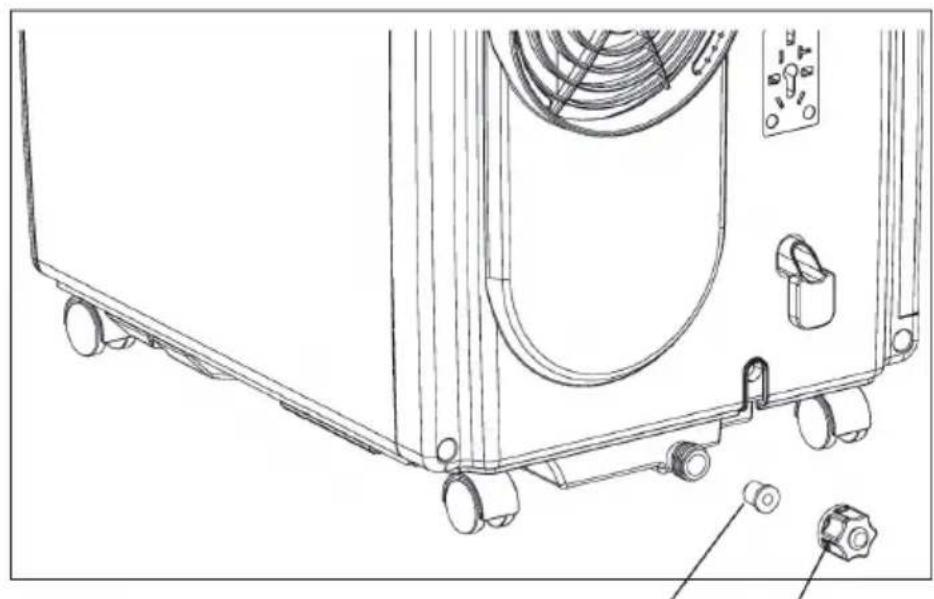
Water plug Nut
CLEANING AND CARE
Before cleaning turn off the air conditioner and pull out the plug.
Cleaning surface
Clean surface of the air conditioner with duster or semi-wet soft cloth. Do not use chemical reagents, such as benzene, alcohol and gasoline, etc. Otherwise surface of the air conditioner will be damaged, and even the whole air conditioner is damaged.
Cleaning of strainers
If strainers are blocked by dust, air circulation will be impeded to reduce efficiency of the air conditioner. On condition that the air conditioner is used for long time, cleaning strainers once per two weeks is recommended.
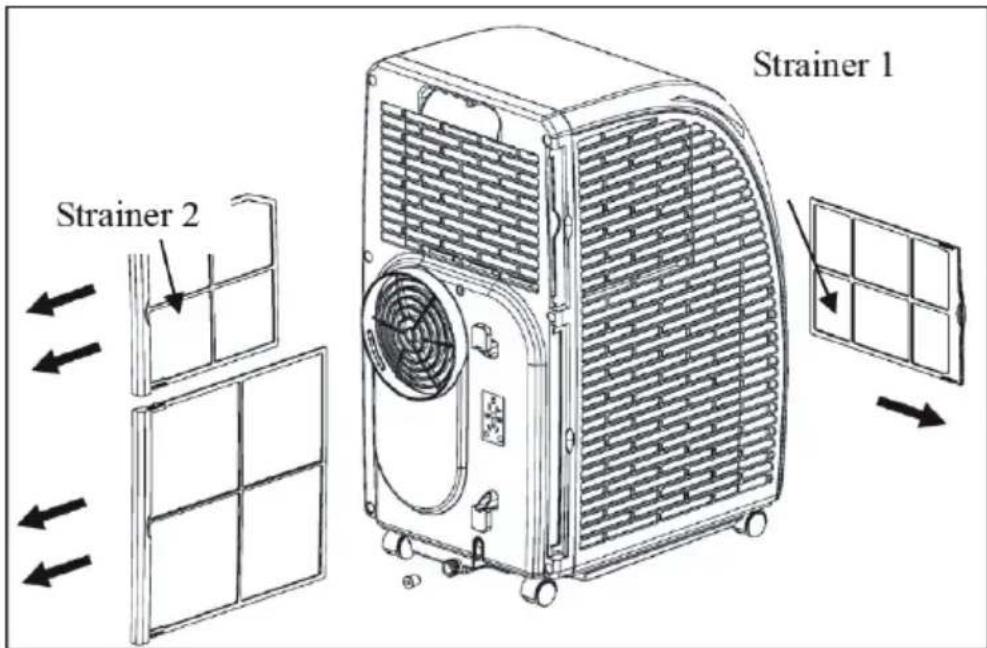
- Pull out strainers in the direction as shown in Figure.
- Put strainers into warm water with neutral de- tergent (about 40^) and clean up, and after that dry in shade place.
- Install strainers to the original position in the direction as shown in Figure.
- Process of taking out strainers: first take out strainer 2 and then strainer 1; process of ins- talling strainers: first install strainer 1 and then strainer 2.
Postseason storage
When the air conditioner is out of season or not used for long time, corresponding maintenance measures should be taken.
- Drain all water in water pan from outlet (water can be poured out by slowly leaning the body backward during drainage), and adjust operating mode to FAN mode, and then press SPEED for 5s till fan works, keep this operating mode for 2 3h . This method can dry inside of the body and prevent mildew.
- Turn off the air conditioner and pull out power plug.
- Wind up, fasten and put away power line.
- Remove exhaust pipe and keep properly.
- Set the air conditioner into plastic bag and put it in a dry place.
Take out of cells of remote control and keep properly.
TROUBLESHOOTING
| Fault Possible Cause Solution | |
| The air conditioner does not work. | Power off? Normal phenomenon. | |
| Plug not inserted? Insert power plug steadily. | |
| Fuse burnt out or power supply turned off? | Replace fuse or turn on power supply. |
| Time set properly? Change time setting. | |
| Water full alarm? Pour water. | |
| COOL effect not good. | Air inlet/outlet blocked? Remove blocking. | |
| Other heating sources available in room? | Remove other heat sources. |
| Strainers too dirty? Clean strainers. | |
| Temperature setting appropriate? | Change temperature. |
| Fan speed set at LOW? Select appropriate speed. | |
| Noise too large and shake. | Body inclined? Ground uneven? | Put the air conditioner on even ground. |
Caution: when the following abnormalities occur to the air conditioner, shut down and pull out the plug, and then contact a professional electrician.
- Fuse and switch are often broken.
- Power line is overheating or its coat is naked.
The body produces abnormal odour.
Error Codes
| E1: Abnormal sense of coil pipe sensor | Note: When heating indicator is displayed, the air conditioner is in anti-freezing or defrosting state, and this is a normal phenomenon. |
| E2: Abnormal sense of room temperature sensor |
| E4: Anti-frost protection |
| FL: The air conditioner is in water full alarm state |
Information according to regulation (EU) No. 626/2011
Supplier's trademark:
Klarstein
Supplier's model identifier:
10035803, 10035804
Inside sound power levels at standard rating conditions on cooling mode in dB: 63 dB
Refrigerant (R290) leakage contributes to climate change. Refrigerant with lower global warming potential (GWP) would contribute less to global warming than a refrigerant with higher GWP, if leaked to the atmosphere. This appliance contains a refrigerant fluid with a GWP equal to 3. This means that if 1kg of this refrigerant fluid would be leaked to the atmosphere, the impact on global warming would be 3 times higher than 1kg of CO_2 , over a period of 100 years. Never try to interfere with the refrigerant circuit yourself or disassemble the product yourself and always ask a professional.
Energy efficiency ratio (EER rated): 3,1
Energy efficiency class:
A
Energy consumption 0,9 kWh per 60 minutes, based on standard test results. Actual energy consumption will depend on how the appliance is used and where it is located.
Cooling capacity _rated in kW:
2,9 kW
Information according to regulation (EU) No. 206/2012
| Model identifier(s) 10035803, 10035804 | |
| Description Symbol Value Unit | | | |
| Rated capacity for cooling P | rated for cooling | 2,9 kW | |
| Rated capacity for heating P | rated for heating | kW | |
| Rated power input for cooling P | EER | 0,9 kW | |
| Rated power input for heating P | COP | - kW | |
| Rated Energy efficiency ratio EERd 3,1 - | | | |
| Rated Coefficient of performance COPd - - | | | |
| Power consumption in thermostat-off mode | PTO | - | W |
| Power consumption in standby mode | PSB | 0,5 W | |
| Electricity consumption of single/double duct appliances (indicate for cooling and heating separately) | DD: QDDSD: QSD | 0,9 DD: kWh/aSD: kWh/h |
| Sound power level | LWA | 63 | dB(A) |
| Global warming potential | GWP | 3 | kgCO2eq. |
| Contact details for obtaining more information | Chal-Tec GmbH, Wallstraße 16, 10179 Berlin, Germany. |
DISPOSAL CONSIDERATIONS
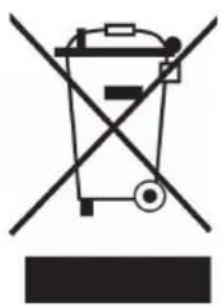
If there is a legal regulation for the disposal of electrical and electronic devices in your country, this symbol on the product or on the packaging indicates that this product must not be disposed of with household waste. Instead, it must be taken to a collection point for the recycling of electrical and electronic equipment. By disposing of it in accordance with the rules, you are protecting the environment and the health of your fellow human beings from negative consequences. For information about the recycling and disposal of this product, please contact your local authority or your household waste disposal service.
This product contains batteries. If there is a legal regulation for the disposal of batteries in your country, the batteries must not be disposed of with household waste. Find out about local regulations for disposing of batteries. By disposing of them in accordance with the rules, you are protecting the environment and the health of your fellow human beings from negative consequences.

Manufacturer:
Chal-Tec GmbH, Wallstrasse 16, 10179 Berlin, Germany.
Importer for Great Britain:
Chal-Tec UK limited
Unit 6 Riverside Business Centre
Brighton Road
Shoreham-by-Sea
BN436RE
United Kingdom
The complete declaration of conformity of the manufacturer can be found at the following link: use.berlin/10035804
Estimado cliente,
Unit 6 Riverside Business Centre
Brighton Road
Shoreham-by-Sea
BN436RE
United Kingdom
Chere cliente, cher client,
Unit 6 Riverside Business Centre
Brighton Road
Shoreham-by-Sea
BN436RE
United Kingdom
Far defloure I'acqua 106
Unit 6 Riverside Business Centre
Brighton Road
Shoreham-by-Sea
BN436RE
United Kingdom