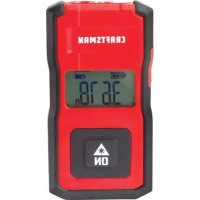
CMHT77637 - Laser level Craftsman - Free user manual and instructions
Find the device manual for free CMHT77637 Craftsman in PDF.


| Product Type | Laser Level |
| Brand | Craftsman |
| Model | CMHT77637 |
| Measuring Range | 25.4 cm to 12 m (10 in to 40 ft) |
| Accuracy | ± 6 mm (± 1/4 in) |
| Resolution | 1 mm (1/16 in) |
| Laser Class | Class 2 (IEC/EN60825-1) |
| Laser Wavelength | 620-690 nm, ≤ 1.0 mW |
| Power Supply | Built-in rechargeable battery, USB charging (2.5 h) |
| Battery Life | Up to 3000 measurements or 30 days without use |
| Auto Shut-off | After 45 seconds of inactivity |
| Measurement Units | Decimal feet, fractional feet, meters, inches |
| Dimensions (H x D x L) | 62 x 17.5 x 32 mm (2.44 x 0.69 x 1.25 in) |
| Weight | 31.75 g (1.12 oz) |
| Operating Temperature | 0 °C to 40 °C (32 °F to 104 °F) |
| Storage Temperature | -10 °C to 60 °C (14 °F to 140 °F) |
| Warranty | 3-year limited warranty |
| Maintenance and Cleaning | Wipe with a soft, dry cloth. Do not use solvents. |
| Safety | Do not look directly at the laser beam. Use only the provided antenna. |
Frequently Asked Questions - CMHT77637 Craftsman
User questions about CMHT77637 Craftsman
0 question about this device. Answer the ones you know or ask your own.
Ask a new question about this device
Download the instructions for your Laser level in PDF format for free! Find your manual CMHT77637 - Craftsman and take your electronic device back in hand. On this page are published all the documents necessary for the use of your device. CMHT77637 by Craftsman.
USER MANUAL CMHT77637 Craftsman
- User Safety
- Battery Safety
- Setup
Operation
Warranty - Error Codes
- Specifications
Retain all sections of this manual for future reference.
User Safety

WARNING:
Carefully read the Safety Instructions and Product Manual before using this product. The person responsible for the product must ensure that all users understand and adhere to these instructions.

WARNING:
The following label information is placed on your laser tool to inform you of the laser class for your convenience and safety.
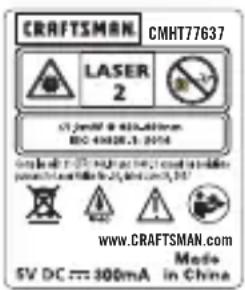
The CMHT77637 tool emits a visible laser beam, as shown in Figure A 1. The laser beam emitted is Laser Class 2 per IEC 60825-1 and complies with 21 CFR 1040.10 and 1040.11 except for deviations pursuant to Laser Notice No. 50, dated June 24, 2007.

WARNING:
While the laser tool is in operation, be careful not to expose your eyes to the emitting laser beam (red light source). Exposure to a laser beam for an extended time period may be hazardous to your eyes. Do not look into the beam with optical aids.

WARNING:
To reduce the risk of injury, the user must read the product User Manual and the Safety Manual.
FCC Compliance
This device complies with Part 15 of the FCC Rules. Operation is subject to the following two conditions: (1) This device may not cause harmful interference, and (2) this device must accept any interference received, including interference that may cause undesired operation.
FCC Statement
This equipment has been tested and found to comply with the limits for a Class B digital device, pursuant to part 15 of the FCC rules. These limits are designed to provide reasonable protection against harmful interference in a residential installation. This equipment generates, uses, and can radiate radio frequency energy and, if not installed and used in accordance with the instructions, may cause harmful interference to radio communications. However, there is no guarantee that interference will not occur in a particular installation. If this equipment does cause harmful interference to radio or television reception, which can be determined by turning the equipment off and on, the user is encouraged to try to correct the interference by one or more of the following measures:
- Reorient or relocate the receiving antenna.
- Increase the separation between the equipment and the receiver.
- Connect the equipment into an outlet on a different circuit (not the circuit to which the receiver is connected).
- Consult the dealer or an experienced radio/TV technician for help.
Canada, Industry Canada (IC) Notices
Class B digital circuitry of this device complies with Canadian ICES-003. This device complies with Industry Canada license-exempt RSS standard(s). Operation is subject to the following two conditions: (1) this device may not cause interference, and (2) this device must accept any interference, including interference that may cause undesired operation of the device. Under Industry Canada regulations, the radio transmitter(s) in this device may only operate using an antenna of a type and maximum (or lesser) gain approved for the transmitter by Industry Canada. To reduce potential radio interference to other users, the antenna type and its gain should be so chosen that the equivalent isotropically radiated power (e.i.r.p.) is not more than that necessary for successful communication.
E Setup
Attaching the Wrist Strap
- While facing the front of the tool, insert the thin end of the wrist strap through one of the holes in the lower right corner of the tool.
- Push the thin end of the wrist strap until it goes through the other hole.
- Separate the two wires, which make up the thin end of the wrist strap, to form a loop.
- Insert the thick end of the wrist strap all the way through the loop in the thin end, so the wrist strap is securely fastened to the tool (Figure B).
Charging the Battery
Fully charge the battery before initial use and whenever the tool has not been used for 6 months or longer.
- Locate the port cover on the side of the tool (Figure A 4).
- Using your finger, gently pull the port cover down (Figure E 1).
- Insert the small end of the USB Recharge Cable into the port on the side of the tool, making sure to insert the flat side of the cable into the flat side of the port (Figure E 2).
- Insert the USB end of the cable into a USB port in a computer or USB power outlet (Figure E 3).
- Wait approximately 2.5 hours for the battery to fully charge and then disconnect the USB Recharge Cable.
When the tool is ON, the battery level appears in the display window (Figure ①).
Operation
- Point the laser (Figure A) toward the wall whose distance you need to measure (Figure C).
- Click figure A 3 to turn the tool on and display a laser dot on the wall (Figure C 1).
- When the bottom of the tool is positioned at the correct distance from the wall, click to take the measurement (Figure C2).
- View the measurement on the display window (Figure ①②).
Changing the Unit of Measure
Once the current measurement is taken, you can change the unit of measure from decimal ft (6.21 ft) to fractional ft (6'02"9/16), fractional ft to meters (1.894 m), meters to inches (74 9/16 in), or inches to decimal ft.
To change the unit of measurement, press and hold until you see the measurement change (2-3 seconds).
NOTE: If you continue to hold after the measurement changes, the tool will turn off.
Re-measuring
If you need to take a new measurement, click
The previous measurement (Figure ②) will be cleared from the display window.
- When you are ready to take the new measurement, click
Turning Off the Tool
The tool can be turned off in either of these ways:
After taking a measurement, press and hold for 5 seconds (until the display window clears).
- If you do not use the tool for 45 seconds, it will automatically turn off.
Limited Warranty
Duration of coverage may vary; check product instructions for precise length of coverage.
WARRANTY SERVICE
To obtain the warranty coverage stated below, return a defective product with proof of sale to the retailer from which it was purchased.
CRAFTSMAN LIMITED WARRANTY
FOR ONE YEAR from the date of sale, this product is warranted against defects in material or workmanship.
WITH PROOF OF SALE, a defective product will be replaced free of charge.
This warranty does not cover expendable parts that can wear out from normal use within the warranty period.
This warranty applies for only 90 days from the date of sale if this product is ever used while providing commercial services or if rented to another person.
If INFO appears on the display window with a Code number, perform the corresponding Corrective Action.
| Code Description Corrective Action | |
| 101 Received Signal Too Weak, Measuring Time Too Long | Use the target plate or change the target surface. |
| 102 Received Signal Too High Target is too reflective. Use the target plate or change the target surface. | |
| 201 Too Much Background Light Reduce the background light on the target area. | |
| 202 Laser Beam Interrupted Remove the obstacle and repeat the measurement. | |
| 203 Insufficient Power Recharge the tool's battery. | |
| 301 Temperature Too High Allow the device to cool down to a temperature within the specified Operating Temperature Range. | |
| 302 Temperature Too Low Allow the device to warm up to a temperature within the specified Operating Temperature Range. | |
| 401 Hardware Error Switch the device on/off several times. If the error still occurs, return the defective device to the Service Center or distributor. Refer to the Warranty. | |
| 402 Unknown Error Contact the Service Center or distributor. Refer to the Warranty. | |
E
Specifications
| Range 10in to 40ft (25.4cm to 12m) | |
| Measuring Accuracy* Typically ± 1/4in (± 6mm)* | |
| Resolution** 1/16in (1mm)** | |
| Laser Class Class 2 (IEC/EN60825-1: 2014) | |
| Laser Wavelength ≤ 1.0mW @ 620-690nm | |
| Auto Power Switch-off After 45s | |
| Battery Life Up to 3000 Measurements | or 30 days (if the tool is not used) |
| Dimension (H x D x W) 2.44 x .69 x 1.25in (62 x 17.5 x 32mm) | |
| Weight | 1.12oz (31.75g) |
| Storage Temperature Range | 14°F ~ 140°F (-10°C ~ +60°C) |
| Operating Temperature Range | 32°F ~ 104°F (0°C ~ +40°C) |
| * Measuring Accuracy depends on the current conditions. Under favorable conditions (good target surface and room temperature) up to 40ft (12m). ** Resolution is the finest measurement you can see. In inches, that is 1/16". In mm, that is 1mm. | |

Contidente

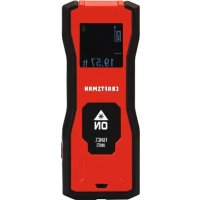

Brand : Craftsman
Model : CMHT77637
Category : Laser level