TRANSPORT QuietClean SC535A - Vacuum Cleaner Sanitaire - Free user manual and instructions
Find the device manual for free TRANSPORT QuietClean SC535A Sanitaire in PDF.



User questions about TRANSPORT QuietClean SC535A Sanitaire
0 question about this device. Answer the ones you know or ask your own.
Ask a new question about this device
Download the instructions for your Vacuum Cleaner in PDF format for free! Find your manual TRANSPORT QuietClean SC535A - Sanitaire and take your electronic device back in hand. On this page are published all the documents necessary for the use of your device. TRANSPORT QuietClean SC535A by Sanitaire.
USER MANUAL TRANSPORT QuietClean SC535A Sanitaire
natural_image
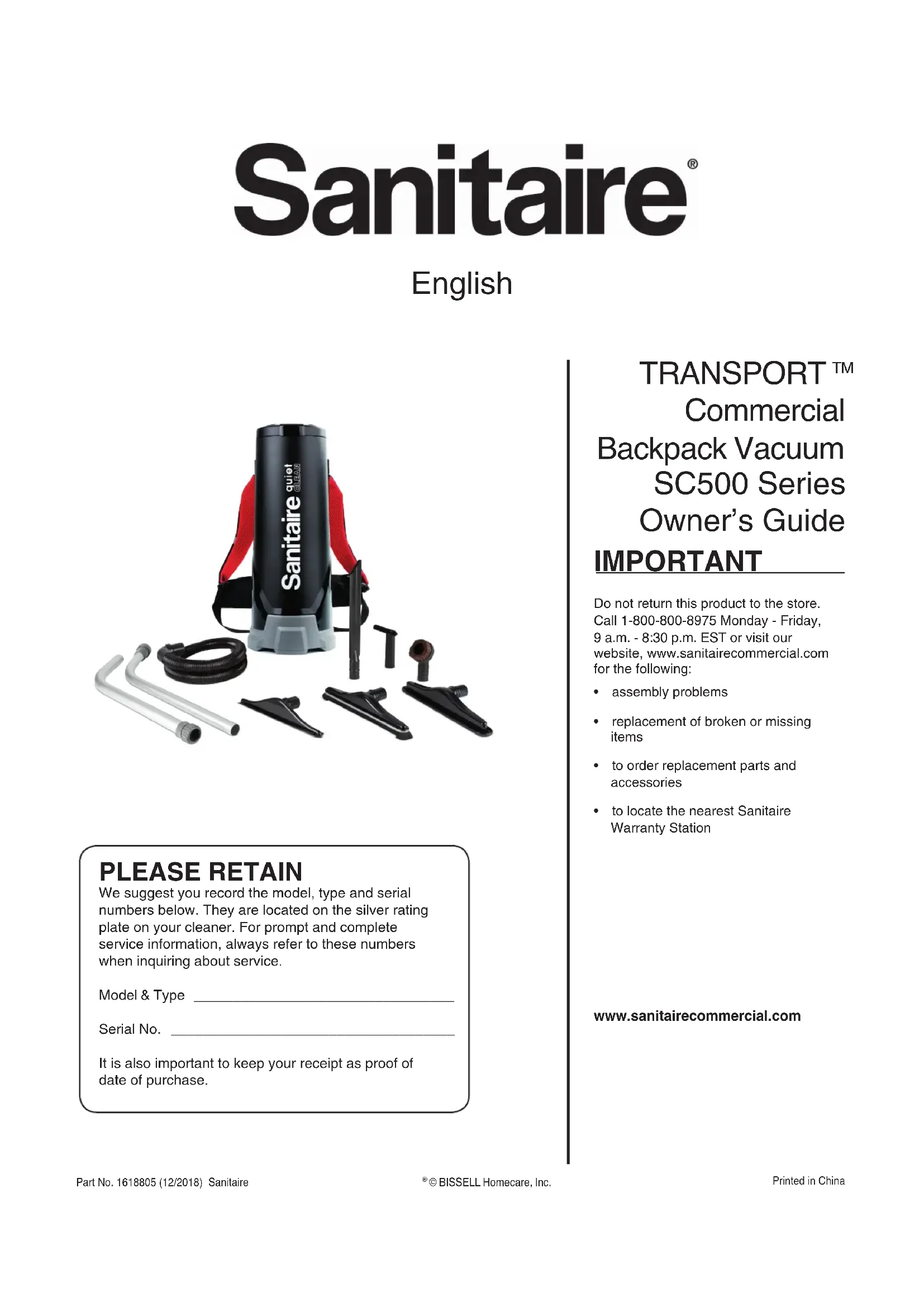
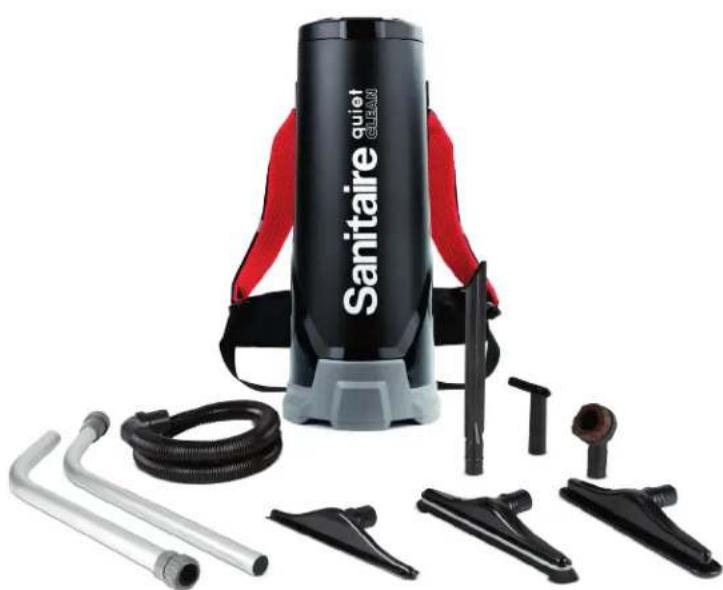
Product photo of a Sanitaire quiet CLEAN vacuum cleaner with attached tubing and accessories (no text or symbols visible on main body)PLEASE RETAIN
We suggest you record the model, type and serial numbers below. They are located on the silver rating plate on your cleaner. For prompt and complete service information, always refer to these numbers when inquiring about service.
Model & Type ____
Serial No. ____
It is also important to keep your receipt as proof of date of purchase.
TRANSPORT™ Commercial Backpack Vacuum SC500 Series Owner's Guide
IMPORTANT
Do not return this product to the store. Call 1-800-800-8975 Monday - Friday, 9 a.m. - 8:30 p.m. EST or visit our website, www.sanitairecommercial.com for the following:
- assembly problems
- replacement of broken or missing items
• to order replacement parts and accessories
• to locate the nearest Sanitaire Warranty Station
Grounding Instructions 3
Identify Parts ....3
Operating Instructions 4
Maintenance 5
Wearing the Backpack Vacuum .... 5
Warranty 6
Service Information
The instructions in this booklet serve as a guide to routine maintenance. If additional service is required, telephone toll free:
USA: 1-800-800-8975
IMPORTANT SAFEGUARDS
When using an electrical appliance, basic precautions should always be followed, including the following:
READ ALL INSTRUCTIONS BEFORE USING THIS VACUUM CLEANER.
WARNING
To reduce the risk of fire, electric shock or injury:
- Do not use outdoors or on wet surfaces.
- Do not leave vacuum cleaner unattended when plugged in. Turn off the switch, and unplug the electrical cord when not in use and before servicing.
- Do not allow to be used as a toy. Close attention is necessary when used by or near children.
- Use only as described in this manual. Use only manufacturer's recommended attachments.
- Do not use with damaged cord or plug. If vacuum cleaner is not working as it should, has been dropped, damaged, left outdoors or dropped into water, return it to a service center before using.
- Do not pull or carry by cord, use cord as a handle, close a door on cord or pull cord around sharp edges or corners. Do not run over cord. Keep cord away from heated surfaces.
- Connect to a properly grounded outlet only. (Refer to grounding instructions).
- Do not use extension cords or outlets with inadequate current carrying capacity.
- Turn off all controls before unplugging.
- Do not unplug by pulling on cord. To unplug, grasp the plug, not the cord.
- Do not handle plug or vacuum cleaner with wet hands or operate without shoes.
- Do not put any object into openings. Do not use with any opening blocked; keep free of dust, lint, hair and anything that may reduce airflow.
- This vacuum cleaner creates suction. Keep hair, loose clothing, fingers and all parts of body away from openings and moving parts.
- Do not pick up anything that is burning or smoking, such as cigarettes, matches or hot ashes.
- Do not use without dust bag or filter(s) in place.
- Use extra care when cleaning on stairs.
- Do not pick up flammable or combustible liquids such as gasoline, or use in areas where they may be present.
- Store your cleaner indoors in a cool, dry area.
- Keep your work area well lighted.
- Unplug electrical appliances before vacuuming them.
SAVE THESE INSTRUCTIONS
Commercial Backpack SC500 Series Owner's Guide
Grounding Instructions
This appliance must be grounded. If it should malfunction or breakdown, grounding provides a path of least resistance for electric current to reduce the risk of electric shock. This appliance is equipped with a cord having an equipment-grounding conductor and grounding plug. The plug must be plugged into an appropriate outlet that is properly installed and grounded in accordance with all local codes and ordinances.
DANGER
Improper connection of an equipment-grounding conductor can result in risk of electrical shock. Check with a qualified electrician or service person of you are in doubt as to whether the outlet is properly grounded. Do not modify the plug provided with the appliance. If it will not fit the outlet, have a proper outlet installed by a qualified technician.
This appliance is for use on a nominal 120-volt circuit and has a grounding plug that looks like the plug illustrated in Figure A. A temporary adaptor which looks like the adapter illustrated in Figure B maybe used to connect this plug to a two-pole receptacle, as shown, if a properly grounded outlet is not available. The temporary adaptor should be used only until a properly grounded outlet, Figure A, can be installed by a qualified electrician. The green-colored rigid ear lug, or the like, extending from the adapter must be connected to a permanent ground such as a properly grounded outlet box cover. Whenever the adapter is used, it must be held in place by a metal screw.

NOTE: In Canada, the use of a temporary adaptor is not permitted by the Canadian Electrical Code.
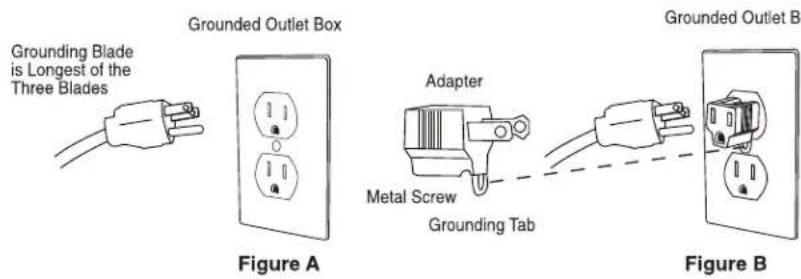
text_image
Grounding Blade is Longest of the Three Blades Figure A Adapter Metal Screw Grounding Tab Figure BIdentify Backpack Vacuum Component Parts
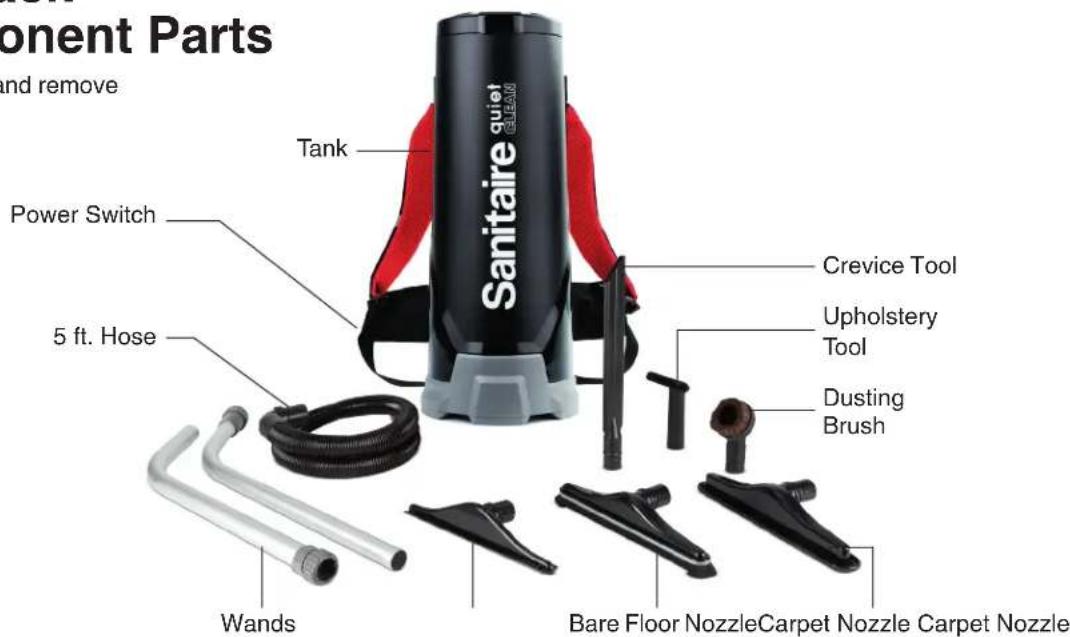
Unpack accessories from carton and remove vacuum cleaner.
text_image
Component Parts and remove Tank Power Switch 5 ft. Hose Crevice Tool Upholstery Tool Dusting Brush Wands Bare Floor Nozzle Carpet Nozzle Carpet NozzleCommercial Backpack SC500 Series Owner's Guide
Operating Instructions & Quick Start Guide
Please read the following operating instructions carefully. They will help you get the best performance from this professional quality vacuum cleaner and also to maintain it in optimum condition.
Follow these simple steps for easy and effective operation of the Backpack Vacuum.
text_image
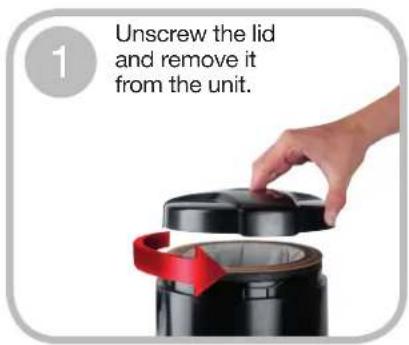
1 Unscrew the lid and remove it from the unit.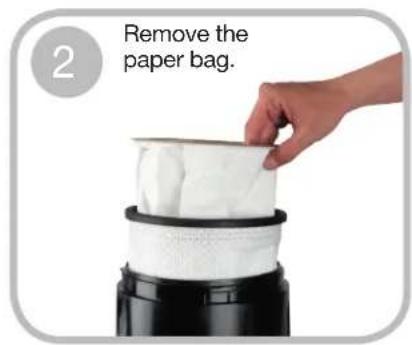
text_image
2 Remove the paper bag.
text_image
3 Remove the cloth bag and inspect the flexible ring. 4 Inspect to make sure the foam filter is in place.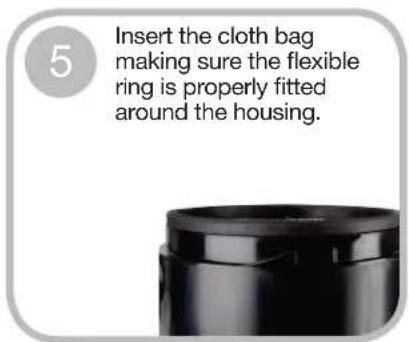
text_image
5 Insert the cloth bag making sure the flexible ring is properly fitted around the housing.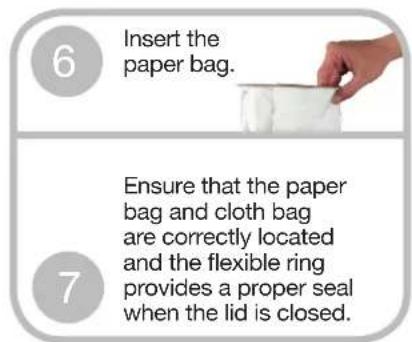
text_image
6 Insert the paper bag. 7 Ensure that the paper bag and cloth bag are correctly located and the flexible ring provides a proper seal when the lid is closed.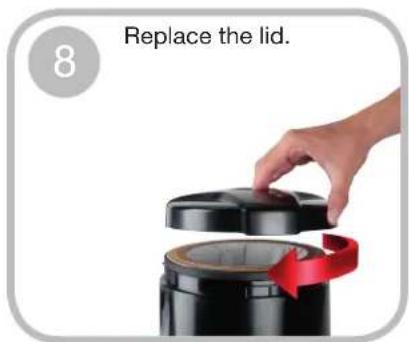
text_image
8 Replace the lid.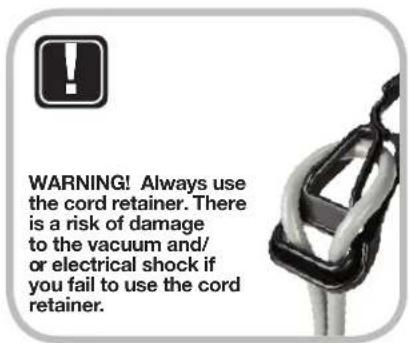
text_image
WARNING! Always use the cord retainer. There is a risk of damage to the vacuum and/ or electrical shock if you fail to use the cord retainer.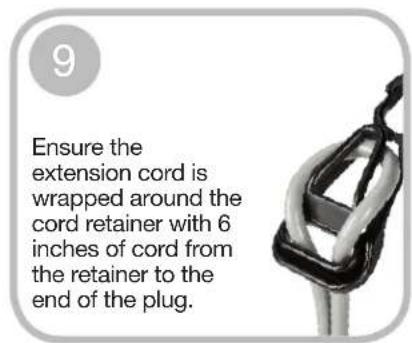
text_image
9 Ensure the extension cord is wrapped around the cord retainer with 6 inches of cord from the retainer to the end of the plug.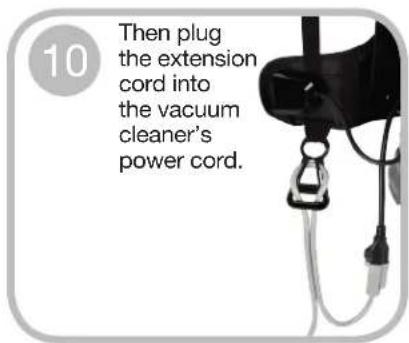
text_image
10 Then plug the extension cord into the vacuum cleaner's power cord.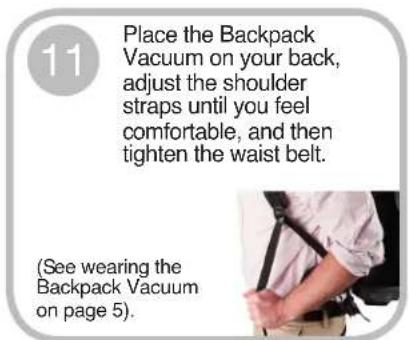
text_image
11 Place the Backpack Vacuum on your back, adjust the shoulder straps until you feel comfortable, and then tighten the waist belt. (See wearing the Backpack Vacuum on page 5).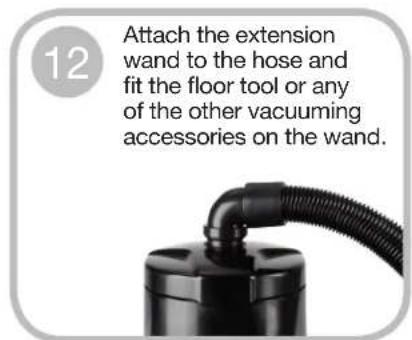
text_image
12 Attach the extension wand to the hose and fit the floor tool or any of the other vacuuming accessories on the wand.
text_image
13 Turn the vacuum on. The toggle switch is located on the switch box. You may clip the switch box to the waist belt.Commercial Backpack SC500 Series Owner's Guide
Wearing the Backpack Vacuum
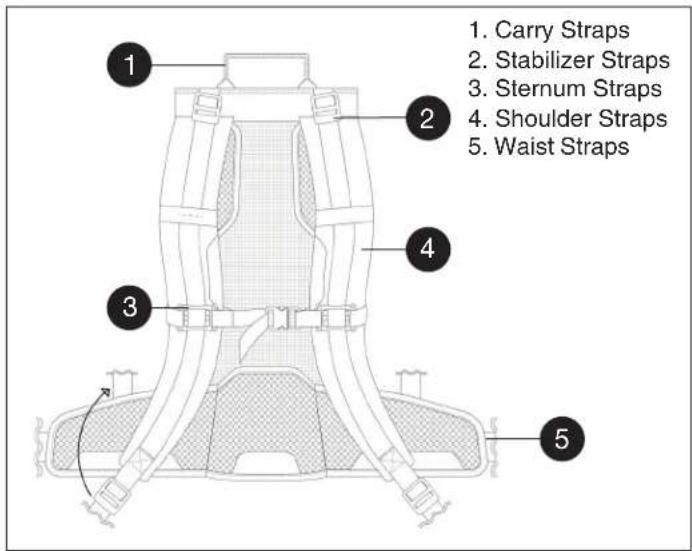
The Backpack is designed to balance the weight of the vacuum on the hips, not the shoulders.
text_image
1. Carry Straps 2. Stabilizer Straps 3. Sternum Straps 4. Shoulder Straps 5. Waist StrapsMaintenance
Warning! Always unplug vacuum before cleaning, or making any adjustments or repairs.
- Clean the cloth vacuum bag regularly. After emptying the vacuum bag, turn it inside out and shake out as much dust from the fabric as possible. Optimum performance is achieved by using a paper vacuum bag with the cloth bag.
- Check the power cord for damage. Always unwind the cable completely.
- Ensure that the vacuum hose, the extension wand and the vacuuming accessories are not blocked.
- Ensure that the electrical outlet and the plug are securely connected. Incorrect connections may cause sparking and damage to the cable socket.
- Have your machine serviced by an authorized repair service center if you suspect any potential problems.
- Use only approved paper vacuum bags.
-
Ensure that the flexible vacuum bag ring provides a proper seal before vacuuming.
-
Loosen all the straps and place the vacuum on your back.
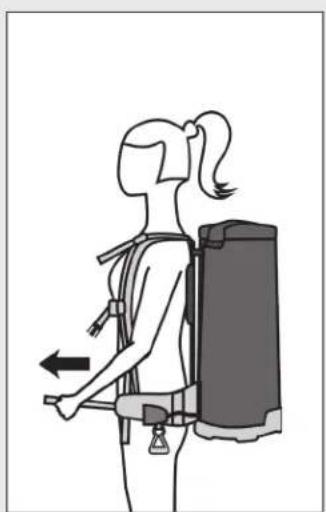
- Place the waist straps over your hips and connect the buckle. Pull the straps forward to center the weight of the unit, so that it is concentrated on your hips. Fig (1)
- Adjust the shoulder straps to tighten the Backpack on your shoulders, ensuring the weight is still concentrated on your hips. Fig (2)
- Connect the sternum straps, and adjust to fit comfortably across your chest. Fig (3)
- Adjust the stabilizer straps as needed. Fig (4)
natural_image
Side profile illustration of a person wearing a backpack and stretching arm (no text or symbols)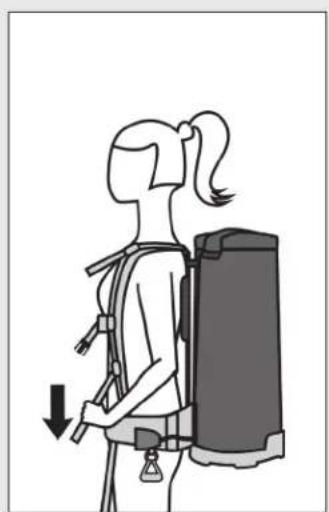
natural_image
Illustration of a person wearing a backpack and holding a device, with a downward arrow indicating motion (no text or symbols)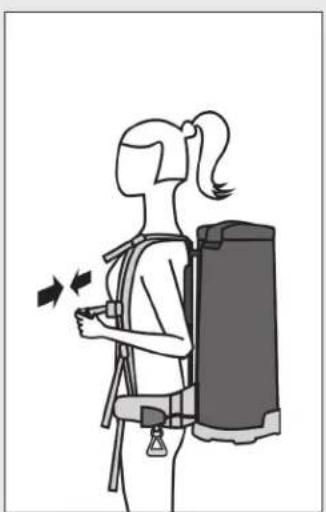
natural_image
Illustration of a person wearing a backpack and carrying a backpack, with motion arrows indicating movement (no text or symbols)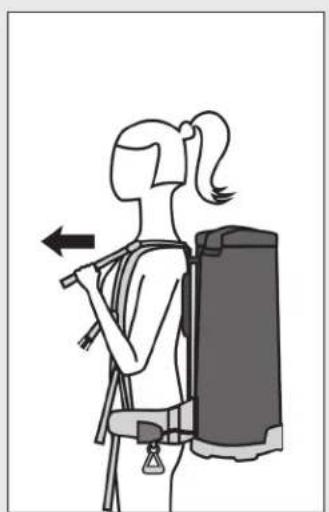
natural_image
Illustration of a person wearing a backpack and holding a tool, with an arrow indicating direction (no text or symbols)Figure 1 Figure 2 Figure 3 Figure 4
The Sanitaire® commercial limited warranty
This warranty gives you specific legal rights, and you may also have other rights which may vary from state to state. If you need additional instruction regarding this warranty or have questions regarding what it may cover, please contact Sanitaire® Customer Service by E-mail or telephone as described below.
Limited two-year warranty
Subject to the *EXCEPTIONS AND EXCLUSIONS identified below, upon receipt of the product Sanitaire will repair or replace (with new, refurbished, lightly used, or remanufactured components or products), at Sanitaire's option, free of charge from the date of purchase by the original purchaser, for two years any defective or malfunctioning part.
See information below on "If your Sanitaire product should require service."
This warranty does not apply to fans or routine maintenance components such as filters, belts or brushes. Damage or malfunction caused by negligence, abuse, neglect, unauthorized repair, or any other use not in accordance with the user guide is not covered.
Some states do not allow the exclusion or limitation of incidental or consequential damages, so the above limitation or exclusion may not apply to you.
\*EXCEPTIONS AND EXCLUSIONS FROM THE TERMS OF THE LIMITED WARRANTY
THIS WARRANTY IS EXCLUSIVE AND IN LIEU OF ANY OTHER WARRANTIES, EITHER ORAL OR WRITTEN. ANY IMPLIED WARRANTIES WHICH MAY ARISE BY OPERATION OF LAW, INCLUDING THE IMPLIED WARRANTIES OF MERCHANTABILITY AND FITNESS FOR A PARTICULAR PURPOSE, ARE LIMITED TO THE TWO YEAR DURATION FROM THE DATE OF PURCHASE AS DESCRIBED ABOVE.
Some states do not allow limitations on how long an implied warranty last so the above limitation may not apply to you.
NOTE: Please keep your original sales receipt. It provides proof of date of purchase in the event of a warranty claim.
If your Sanitaire product should require service
You will find the nearest Sanitaire Authorized Service Center in your area online at sanitairecommercial.com under service locator or contact Sanitaire Customer Service.
If you need information about repairs or replacement parts, or if you have questions about your warranty, contact Sanitaire Customer Service.
Website: www.sanitairecommercial.com
Call: Sanitaire Customer Service
1-800-800-8975
Monday - Friday 9 a.m. - 8:30 p.m. ET
Sanitaire®
Español
natural_image
Product photo of a Sanitaire quiet CLEAN vacuum cleaner with attached tools and tubing (no text or symbols visible on main body)CONSERVE ESTO
natural_image
Side profile illustration of a person wearing a backpack and holding a device, with no visible text or symbols.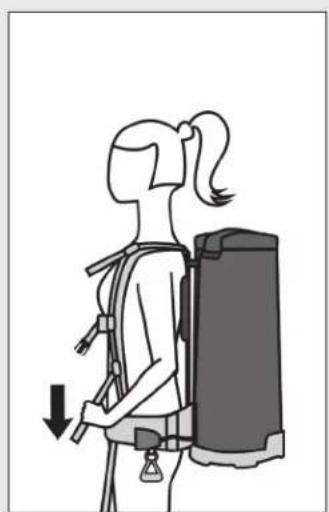
natural_image
Illustration of a person wearing a backpack and holding a device, with a downward arrow indicating motion (no text or symbols)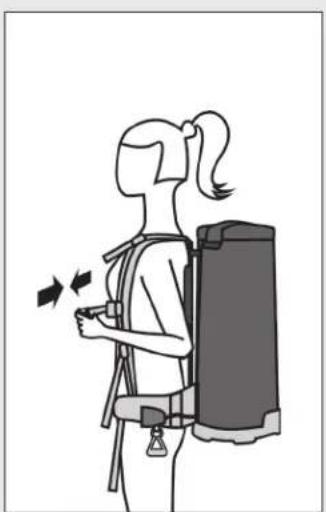
natural_image
Illustration of a person wearing a backpack and carrying a backpack, with motion arrows indicating movement (no text or symbols)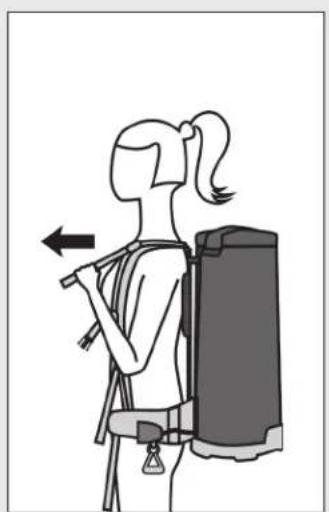
natural_image
Illustration of a person wearing a backpack and holding a tool, with an arrow indicating direction (no text or symbols)Figure 1 Figure 2 Figure 3 Figure 4
natural_image
Product photo of a Sanitaire quiet CLEAN vacuum cleaner with attached tools and tubing (no text or symbols visible on main body)VEUILLEZ CONSERVER
natural_image
Four-panel illustration showing a person in different postures of backpacks, illustrating posture changes (no text or symbols)Figure 1 Figure 2 Figure 3 Figure 4
\*LES EXCEPTIONS ET EXCLUSIONS DES CONDITIONS DE LA GARANTIE LIMITÉE
À TOUTES AUTRES GARANTIES, QU'ELLES SOIENT VERBALES OU ÉCRITES. TOUTES GARANTIES TACITES EN VERTU DE LA LOI, INCLUANT LES GARANTIES IMPLICITES DE QUALITÉ MARCHANDE ET D'ADÉQUATION À UNE UTILISATION PARTICULIÈRE, SONT LIMITÉES À DEUX ANS À PARTIR DE LA DATE D'ACHAT CONFORMÉMENT À CE QUI EST DÉCRIT PRÉCÉDEMMENT.