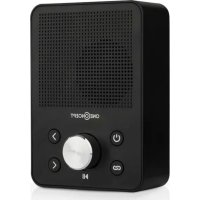
Plug+Play FM - Alarm clock radio OneConcept - Free user manual and instructions
Find the device manual for free Plug+Play FM OneConcept in PDF.


User questions about Plug+Play FM OneConcept
0 question about this device. Answer the ones you know or ask your own.
Ask a new question about this device
Download the instructions for your Alarm clock radio in PDF format for free! Find your manual Plug+Play FM - OneConcept and take your electronic device back in hand. On this page are published all the documents necessary for the use of your device. Plug+Play FM by OneConcept.
USER MANUAL Plug+Play FM OneConcept
https://use.berlin/10032323
SICHERHEITSHINWEISE
Congratulations on purchasing this equipment. Please read this manual carefully and take care of the following hints to avoid damages. Any failure caused by ignoring the items and cautions mentioned in the instruction manual is not covered by our warranty and any liability. Scan the QR code to get access to the latest user mannaual and other information about the product:
CONTENT
Safety Instructions 10
Product Overview 11
Start and Operation 12
BT Function 12
USB/ MP3 Player 13
FM Radio 13
Technical Data 13
Hints on Disposal 14
DECLARATION OF CONFORMITY

Producer:
Chal-Tec GmbH, Wallstraße 16, 10179 Berlin, Germany.
This product is conform to the following European Directives:
2011/65/EU (RoHS)
2014/53/EU (RED)
The complete declaration of conformity of the manufacturer can be found at the following link: https://use.berlin/10032323
SAFETYINSTRUCTIONS
- Observe all notes listed in the operating instructions.
- Do not use the unit near water or in a humid environment.
- Make sure that no liquid is spilled over the unit and the unit openings.
- Move the unit carefully to avoid damaging it.
- Do not block the device outputs.
- Do not place the unit near heat sources (e.g. heating). Do not expose the device to direct sunlight.
- Plug the power plug of the unit into the power outlet in the manner intended.
- The device is equipped with overload protection. Should this need to be replaced, contact customer service or a similarly qualified person.
- Unplug the unit from the wall outlet if it will not be used for a long period of time.
- Do not attempt to service or repair the unit yourself. In this case, the warranty expires.
- The mains plug is used to disconnect the device from the mains after it has been switched off. Make sure that the mains plug is always freely accessible.
- Do not expose the device to splash water or place objects filled with liquid, such as vases, on the device.
- Do not expose the batteries to extreme heat such as sunlight or fire.
- Do not obstruct the ventilation of the unit by blocking the ventilation openings with objects such as newspapers, tablecloths, curtains, etc..
- Ensure that a minimum distance of 5mm to all sides of the unit is maintained.
- Do not place sources of open flame ignition, such as lit candles, on the unit.
- Dispose of used batteries in an environmentally friendly manner.
- Use the device only in temperate climate, not in tropical climate.
WARNING
Risk of injury! To reduce the risk of electric shock, do not open either the cover or the back of the unit. The device does not contain any parts that could be serviced by the customer. Please contact customer service or similarly qualified personnel for maintenance and repair.
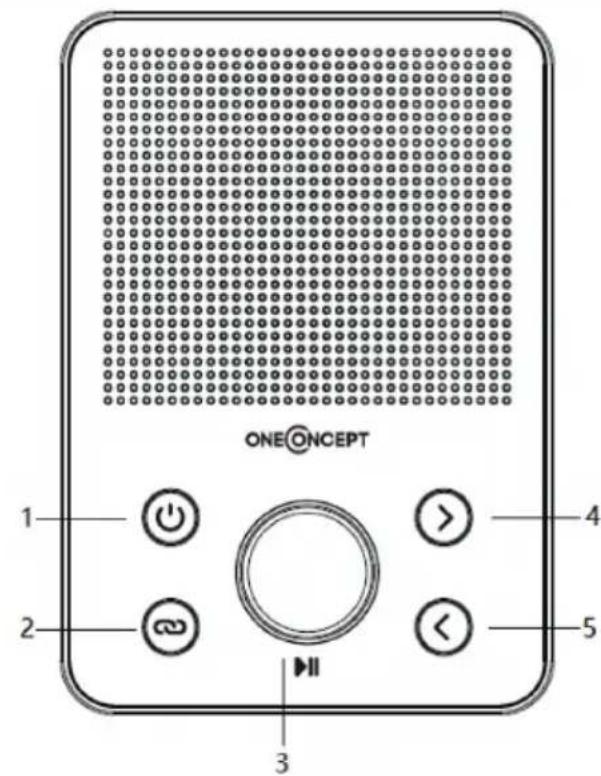
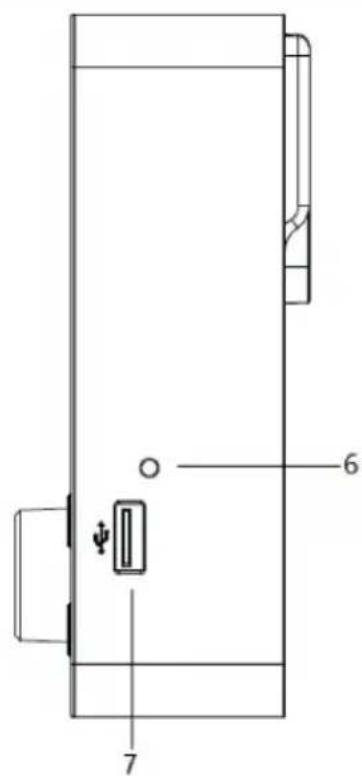
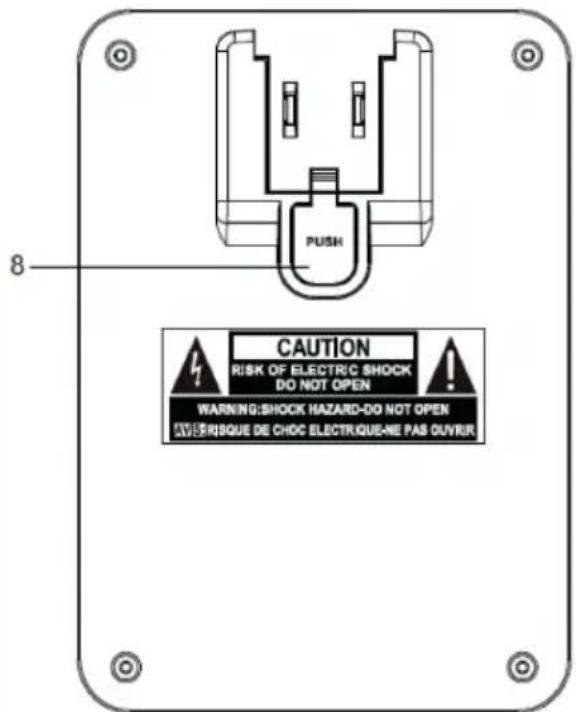
1 Standby / Mode button
2 BT pair / FM AMS button
3 Volume + / - , Play/Pause button
4 Next / P+, Tuning+ button
5 Prev. / P-, Tuning- button
6 USB indicator
7 USB port
8 Detachable plug release button
START AND OPERATION
Power On/Off
- Plug the mains plug into the socket.
- Press the STANDBY button to turn it on. In BT mode, the BT input beep sounds.
- Press and hold the STANDBY button for 2 seconds to turn it off.
Volume adjustment
- Turn the volume control clockwise to increase the volume and counterclockwise to decrease the volume.
Function Mode Selection
- Press the MODE button once to enter the BT mode. The BT input tone will sound. 2.
- Press the MODE button twice to enter the USB playback mode. The USB stick input tone will sound. 3.
- Press the MODE button three times to enter FM radio mode. The FM mode input sound will sound.
BT FUNCTION
- Press the MODE button once to enter the BT mode. The BT input tone will sound.
- Look in the device list of your mobile device for „Plug+PLay FM". Select „Plug+PLay FM" to pair the mobile device with your radio via BT.
- Press the Pause button to play or pause a track.
- Press the [>] key to select the next track.
- Press the [<] key to select the previous track.
- Press and hold the BT icon to disconnect from the mobile device.
USB/ MP3 PLAYER
- Press the MODE button twice to enter the USB Playback mode. The USB stick input beep sounds.
- The USB indicator light flashes rapidly when a USB stick is connected to the USB port. All tracks will be read and playback will start. The USB indicator light flashes intermittently.
- To play or pause a title, press the PLAY/Pause button.
- Press the [>] button to select the next track.
- Press the [<] button to select the previous track.
FM RADIO
- Press the MODE button three times to enter FM radio mode. The FM mode input sound will sound.
- When you press the FM AMS button, the unit automatically searches for and stores 30 FM radio stations.
- Press the [<] button to select previous preset stations. Press and hold to start automatic station search for previous stations. 4.
- Press the [>] button to select subsequent preset stations. Press and hold to start automatic station search for subsequent stations.
TECHNICAL DATA
| Item number 10032323, 10032324 | |
| Power supply 220-240 V ~ 50/60 Hz | |
| FM Frequency 88 – 108 MHz | |
| BT Frequency 2402 – 2480 MHz |
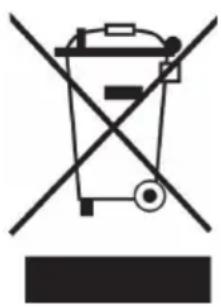
According to the European waste regulation 2012/19/EU this symbol on the product or on its packaging indicates that this product may not be treated as household waste. Instead it should be taken to the appropriate collection point for the recycling of electrical and electronic equipment. By ensuring this product is disposed of correctly, you will help prevent potential negative consequences for the environment and human health, which could otherwise be caused by inappropriate waste handling of this product. For more detailed information about recycling of this product, please contact your local council or your household waste disposal service.
Estimado cliente:
https://use.berlin/10032323
https://use.berlin/10032323
CONSIGNES DE SECURITÉ
https://use.berlin/10032323