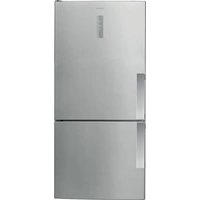
CSX22BCBWH - Fridge HOTPOINT - Free user manual and instructions
Find the device manual for free CSX22BCBWH HOTPOINT in PDF.



User questions about CSX22BCBWH HOTPOINT
0 question about this device. Answer the ones you know or ask your own.
Ask a new question about this device
Download the instructions for your Fridge in PDF format for free! Find your manual CSX22BCBWH - HOTPOINT and take your electronic device back in hand. On this page are published all the documents necessary for the use of your device. CSX22BCBWH by HOTPOINT.
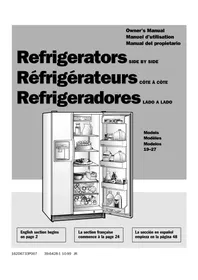
USER MANUAL CSX22BCBWH HOTPOINT
natural_image
Illustration of an open refrigerator with food and beverage shelves (no text or symbols)Models
Modèles
Modelos
19-27
English section begins on page 2
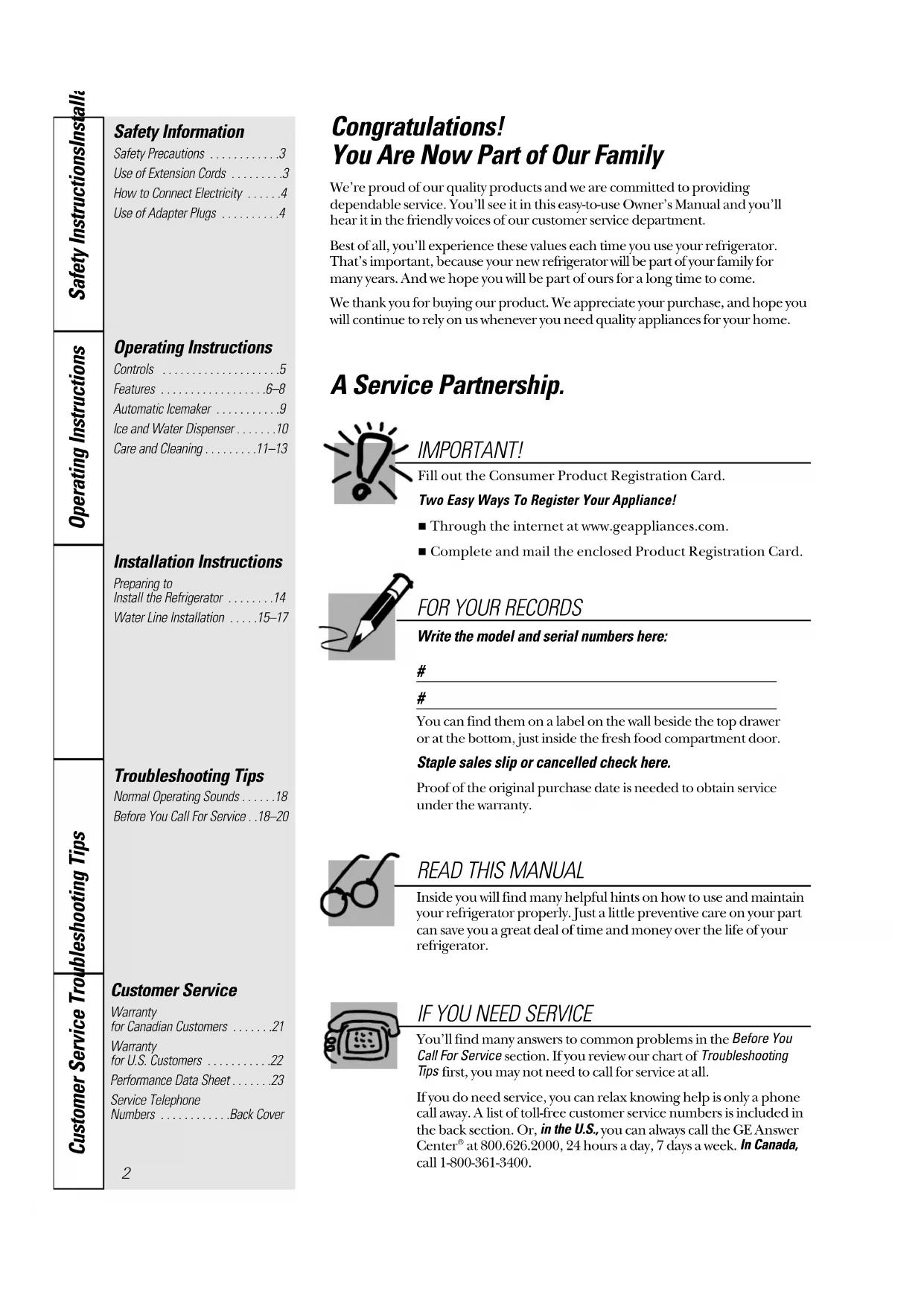
Safety Precautions ....3
Use of Extension Cords .....3
How to Connect Electricity .....4
Use of Adapter Plugs .....4
Operating Instructions
Controls 5
Features 6-8
Automatic Icemaker .....9
Ice and Water Dispenser .....10
Care and Cleaning .....11–13
Installation Instructions
Preparing to Install the Refrigerator .....14
Water Line Installation .....15–17
Troubleshooting Tips
Normal Operating Sounds .....18
Before You Call For Service ..18–20
Customer Service
Warranty for Canadian Customers .....21
Warranty for U.S. Customers .....22
Performance Data Sheet .....23
Service Telephone Numbers ....Back Cover
Congratulations!
You Are Now Part of Our Family
We're proud of our quality products and we are committed to providing dependable service. You'll see it in this easy-to-use Owner's Manual and you'll hear it in the friendly voices of our customer service department.
Best of all, you'll experience these values each time you use your refrigerator. That's important, because your new refrigerator will be part of your family for many years. And we hope you will be part of ours for a long time to come.
We thank you for buying our product. We appreciate your purchase, and hope you will continue to rely on us whenever you need quality appliances for your home.
A Service Partnership.

IMPORTANT!
Fill out the Consumer Product Registration Card.
Two Easy Ways To Register Your Appliance!
■ Through the internet at www.geappliances.com.
■ Complete and mail the enclosed Product Registration Card.
FOR YOUR RECORDS
Write the model and serial numbers here:
#
#
You can find them on a label on the wall beside the top drawer or at the bottom, just inside the fresh food compartment door.
Staple sales slip or cancelled check here.
Proof of the original purchase date is needed to obtain service under the warranty.
READ THIS MANUAL
Inside you will find many helpful hints on how to use and maintain your refrigerator properly. Just a little preventive care on your part can save you a great deal of time and money over the life of your refrigerator.
IF YOU NEED SERVICE
You'll find many answers to common problems in the Before You Call For Service section. If you review our chart of Troubleshooting Tips first, you may not need to call for service at all.
If you do need service, you can relax knowing help is only a phone call away. A list of toll-free customer service numbers is included in the back section. Or, in the U.S., you can always call the GE Answer Center ^® at 800.626.2000, 24 hours a day, 7 days a week. In Canada, call 1-800-361-3400.
⚠ WARNING!
Use this appliance only for its intended purpose as described in this Owner's Manual.

SAFETY PRECAUTIONS
When using electrical appliances, basic safety precautions should be followed, including the following:
This refrigerator must be properly installed and located in accordance with the Installation Instructions before it is used.
Do not allow children to climb, stand or hang on the shelves in the refrigerator. They could damage the refrigerator and seriously injure themselves.
- Do not touch the cold surfaces in the freezer compartment when hands are damp or wet. Skin may stick to these extremely cold surfaces.
- Do not store or use gasoline or other flammable vapors and liquids in the vicinity of this or any other appliance.
In refrigerators with automatic icemakers, avoid contact with the moving parts of the ejector mechanism, or with the heating element that releases the cubes. Do not place fingers or hands on the automatic icemaking mechanism while the refrigerator is plugged in.
- Keep fingers out of the “pinch point” areas; clearances between the doors and between the doors and cabinet are necessarily small. Be careful closing doors when children are in the area.
■ Unplug the refrigerator before cleaning and making repairs.
NOTE: We strongly recommend that any servicing be performed by a qualified individual.
■ Turning the control to the (off) position does not remove power to the light circuit. - Do not refreeze frozen foods which have thawed completely.
▲ DANGER! RISK OF CHILD ENTRAPMENT
PROPER DISPOSAL OF THE REFRIGERATOR
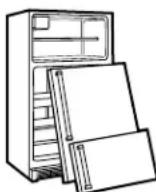
Child entrapment and suffocation are not problems of the past. Junked or abandoned refrigerators are still dangerous...even if they will sit for “just a few days.” If you are getting rid of your old refrigerator, please follow the instructions below to help prevent accidents.
Before You Throw Away Your Old Refrigerator or Freezer:
■ Take off the doors.
- Leave the shelves in place so that children may not easily climb inside.
CFC Disposal
Your old refrigerator has a cooling system that used CFCs (chlorofluorocarbons). CFCs are believed to harm stratospheric ozone.
If you are throwing away your old refrigerator, make sure the CFC refrigerant is removed for proper disposal by a qualified servicer. If you intentionally release this CFC refrigerant you can be subject to fines and imprisonment under provisions of environmental legislation.
USE OF EXTENSION CORDS
Because of potential safety hazards under certain conditions, we strongly recommend against the use of an extension cord.
However, if you must use an extension cord, it is absolutely necessary that it be a UL-listed (in the United States) or a CSA certified (in Canada), 3-wire grounding type appliance extension cord having a grounding type plug and outlet and that the electrical rating of the cord be 15 amperes (minimum) and 120 volts.
IMPORTANT SAFETY INFORMATION. READ ALL INSTRUCTIONS BEFORE USING.
WARNING!
HOW TO CONNECT ELECTRICITY
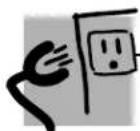
Do not, under any circumstances, cut or remove the third (ground) prong from the power cord. For personal safety, this appliance must be properly grounded.
The power cord of this appliance is equipped with a 3-prong (grounding) plug which mates with a standard 3-prong (grounding) wall outlet to minimize the possibility of electric shock hazard from this appliance.
Have the wall outlet and circuit checked by a qualified electrician to make sure the outlet is properly grounded.
Where a standard 2-prong wall outlet is encountered, it is your personal responsibility and obligation to have it replaced with a properly grounded 3-prong wall outlet.
The refrigerator should always be plugged into its own individual electrical outlet which has a voltage rating that matches the rating plate.
This provides the best performance and also prevents overloading house wiring circuits which could cause a fire hazard from overheated wires.
Never unplug your refrigerator by pulling on the power cord. Always grip plug firmly and pull straight out from the outlet.
Repair or replace immediately all power cords that have become frayed or otherwise damaged. Do not use a cord that shows cracks or abrasion damage along its length or at either end.
When moving the refrigerator away from the wall, be careful not to roll over or damage the power cord.
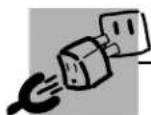
USE OF ADAPTER PLUGS (Adapter plugs not permitted in Canada)
Because of potential safety hazards under certain conditions, we strongly recommend against the use of an adapter plug.
However, if you must use an adapter, where local codes permit, a temporary connection may be made to a properly grounded 2-prong wall outlet by use of a UL-listed adapter available at most local hardware stores.
The larger slot in the adapter must be aligned with the larger slot in the wall outlet to provide proper polarity in the connection of the power cord.
When disconnecting the power cord from the adapter, always hold the adapter in place with one hand while pulling the power cord plug with the other hand. If this is not done, the adapter ground terminal is very likely to break with repeated use.
If the adapter ground terminal breaks, DO NOT USE the refrigerator until a proper ground has been established.
Attaching the adapter ground terminal to a wall outlet cover screw does not ground the appliance unless the cover screw is metal, and not insulated, and the wall outlet is grounded through the house wiring. You should have the circuit checked by a qualified electrician to make sure the outlet is properly grounded.

Read and follow this Safety Information carefully.
SAVE THESE INSTRUCTIONS
About the controls on the refrigerator.
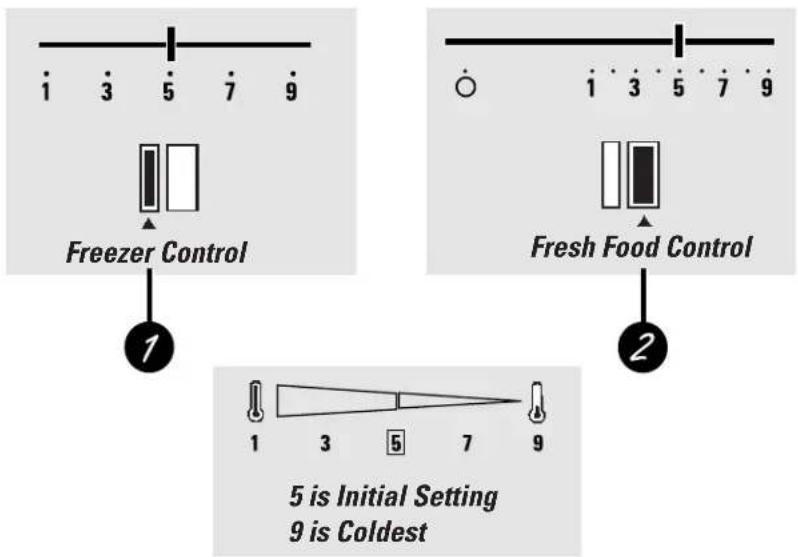
The temperature controls on your refrigerator have numbers. Initially set the fresh food control at 5 and the freezer control at 5.
If you want colder or warmer temperatures, adjust the fresh food temperature first. When satisfied with that setting, adjust the freezer temperature.
text_image
i 3 5 7 9 Freezer Control 1 2 Fresh Food Control 1 3 5 7 9 5 is Initial Setting 9 is Coldest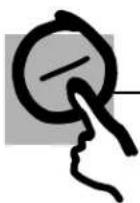
Control Settings
1 Freezer Control The freezer control
2 Fresh Food Control The fresh food control
The fresh food control maintains the temperatures throughout the fresh food compartment.
Moving the fresh food control to (Off) stops cooling in both areas—fresh food and freezer—but does not shut off power to the refrigerator.
How To Test Temperatures
Use the milk test for the fresh food compartment. Place a container of milk on the top shelf and check it a day later. If the milk is too warm or too cold, adjust the temperature controls.
Use the ice cream test for the freezer compartment. Place a container of ice cream in the center of the freezer and check it after a day. If it's too hard or too soft, adjust the temperature controls.
After changing the controls, allow 24 hours for the refrigerator to reach the temperature you have set.
About the water filter cartridge.
On some models
text_image
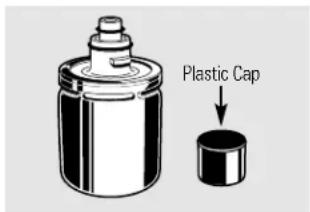
Plastic CapDiscard the plastic cap.
text_image
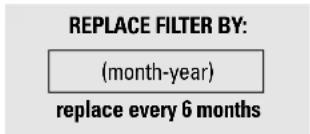
REPLACE FILTER BY: (month-year) replace every 6 months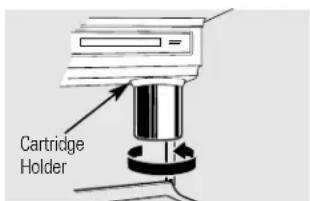
text_image
Cartridge HolderPlace the top of the cartridge up inside the cartridge holder and slowly turn it to the right.
text_image
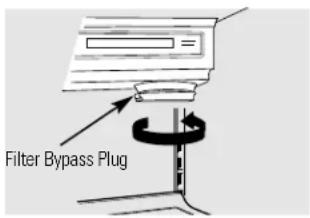
Filter Bypass PlugThe water filter cartridge is located in the upper right-hand corner of the fresh food compartment, right below the temperature controls.
The filter cartridge should be replaced every six months or earlier if the flow of water to the water dispenser or icemaker decreases.
Installing the Filter Cartridge
If you are replacing the cartridge, first remove the old one by slowly turning it to the left. Do not pull down on the cartridge. A small amount of water may drip down.
2 Remove and discard the plastic cap from the new cartridge.
3 Fill the replacement cartridge with water from the tap.
4 Apply the month and year sticker to the cartridge to remind you to replace the filter in six months.
5 Place the top of the cartridge up inside the cartridge holder. Do not push it up into the holder.
6 Slowly turn it to the right until the filter cartridge stops. DO NOT OVERTIGHTEN. As you turn the cartridge, it will automatically raise itself into position.
7 Run water from the dispenser for 1 minute (about a half gallon) to clear the system and prevent sputtering.
NOTE: A newly-installed water filter cartridge may cause water to spurt from the dispenser.
Filter Bypass Plug
You must use the filter bypass plug when a replacement filter cartridge is not available. The dispenser and the icemaker will not operate without the filter or filter bypass plug.
Questions?...In the United States, call the GE Answer Center® 800.626.2000.
Replacement Filters:
To order additional filter cartridges in the United States, call GE Parts and Accessories, 800-626-2002.
HXRT—Chlorine, Taste and Odor Suggested Retail \$29.95
Customers in Canada should consult the yellow pages for the nearest Camco Service Center.
About the refrigerator shelves and bins.
Not all features are on all models.
Rearranging the Shelves
Shelves in the fresh food and freezer compartments are adjustable.
Fresh Food Compartment:
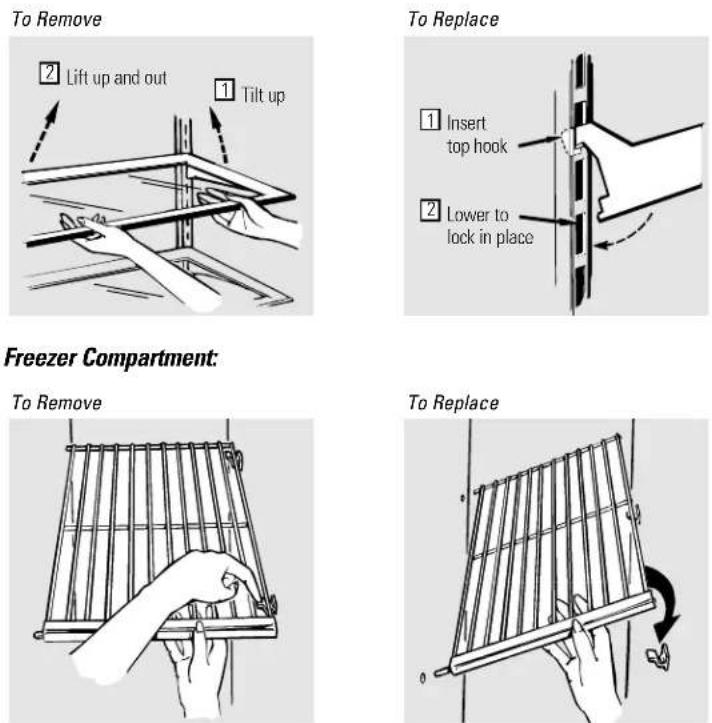
text_image
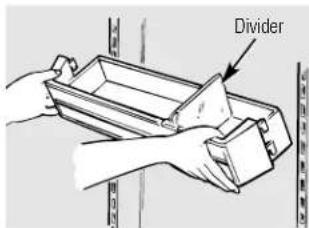
DividerBins on the Fresh Food Compartment Door
Adjustable bins can easily be carried from refrigerator to work area.
To remove: Lift bin straight up until mounting hooks disengage.
To replace or relocate: Select desired shelf height, engage bin's hook in slots on the tracks of the door, and push in. Bin will lock in place.
The divider helps prevent tipping, spilling or sliding of small items stored on the door shelf. Place a finger on either side of the divider near the front and move it back and forth to fit your needs.
About the storage drawers.
Not all features are on all models.
natural_image
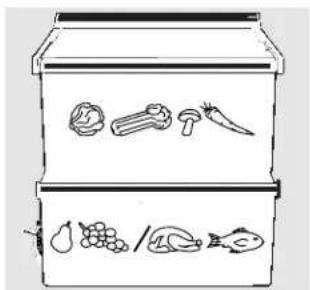
Line drawing of a multi-tiered storage unit with icons for food items (no text or labels)Fruit and Vegetable Drawers
Excess water that may accumulate in the bottom of the drawers should be emptied and the drawers wiped dry.
text_image
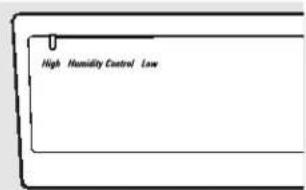
High Humidity Control LowAdjustable Humidity Drawers
Slide the control all the way to the High or stringing to provide high humidity recommended for most vegetables.

Slide the control all the way to the Low or setting to provide lower humidity levels recommended for most fruits.
text_image
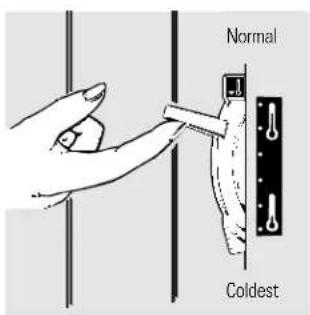
Normal ColdestConvertible Meat Drawer
The convertible meat drawer has its own cold air duct to allow a stream of cold air from the freezer compartment to flow around the drawer.
The variable temperature control regulates the air flow from the freezer compartment.
Set control lever down to the coldest setting to store fresh meats. If lever is left in meat position for a long period of time, some frost may form on the inside of the drawer.
Set control lever up to convert the drawer to normal refrigerator temperature and provide extra vegetable storage space. Cold air duct is turned off. Variable settings between these extremes can be selected.
text_image
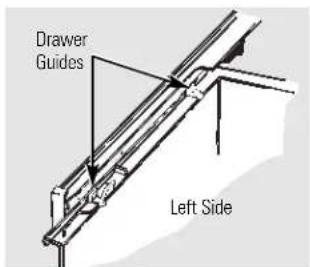
Drawer Guides Left SideDrawer Removal
Drawers can easily be removed by tilting up slightly and pulling past stop location.
On some models you may need to remove the door bins from the fresh food door before removing the drawers.
If the door prevents you from taking out the drawers, the refrigerator will need to be rolled forward until the door opens enough to slide the drawers out. In some cases when you roll the refrigerator out you will need to move the refrigerator to the left as you roll it out.
When replacing the drawers, make sure you slide them through the drawer guides on the left side.
About the automatic icemaker.
A newly-installed refrigerator may take 8 to 12 hours to begin making ice.
text_image
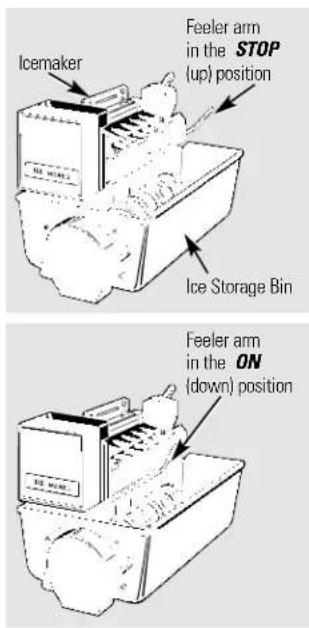
Icemaker Feeler arm in the STOP (up) position Ice Storage Bin Feeler arm in the ON (down) positionAutomatic Icemaker (on some models)
The icemaker will produce eight cubes per cycle—approximately 120 cubes in a 24-hour period, depending on freezer compartment temperature, room temperature, number of door openings and other use conditions.
If the refrigerator is operated before the water connection is made to the icemaker, keep the feeler arm in the STOP (up) position.
When the refrigerator has been connected to the water supply, move the feeler arm to the ON (down) position.
The icemaker will fill with water when it cools to freezing. A newly-installed refrigerator may take 8 to 12 hours to begin making ice cubes.
Throw away the first few batches of ice to allow the water line to clear.
Be sure nothing interferes with the swing of the feeler arm.
It is normal for several cubes to be joined together.
If ice is not used frequently, old ice cubes will become cloudy and taste stale.
Icemaker Accessory Kit
If your refrigerator did not come already equipped with an automatic icemaker, an icemaker accessory kit is available at extra cost.
Check the back of the refrigerator for the specific icemaker kit needed for your model.
About the ice and water dispenser.
On some models
text_image
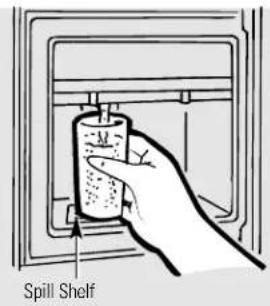
Spill ShelfTo Use the Dispenser
Press the rim of the glass gently against the dispenser pad.
Select CUBED ICE 📋, CRUSHED ICE (on some models) or WATER 📋.
The spill shelf is not self-draining. To reduce water spotting, the shelf and its grille should be cleaned regularly.
If no water is dispensed when the refrigerator is first installed, there may be air in the water line system. Press the dispenser pad for at least two minutes to remove trapped air from the water line and to fill the water system. To flush out impurities in the water line, throw away the first six glassfuls of water.
A light switch (on some models) turns the night light in the dispenser on or off. The light also comes on when the dispenser pad is pressed. The light in the dispenser should be replaced with a 7 watt maximum bulb when it burns out.
CAUTION: Never put fingers or any other objects into the ice crusher discharge opening.
natural_image
Illustration of a hand inserting a card into a folder (no text or symbols visible)Ice Storage Bin
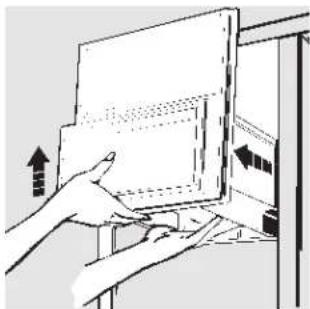
To remove:
Lift the left corner to free the bin from the shelf and pull the bin straight out while supporting it at front and rear.
To replace:
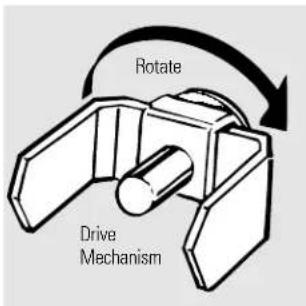
Slide the bin back until the tab on the bin locks into the slot on the shelf. If the bin does not go all the way back, remove it and rotate the drive mechanism 1/4 turn. Then push the bin back again.
text_image
Rotate Drive MechanismImportant Facts About Your Dispenser
- Do not add ice from trays or bags to the storage bin. It may not crush or dispense well.
- Avoid overfilling glass with ice and use of narrow or extra-tall glasses. Backed-up ice can jam the chute or cause the door in the chute to freeze shut. If ice is blocking the chute, poke it through with a wooden spoon.
■ Beverages and foods should not be quick-chilled in the ice storage bin. Cans, bottles or food packages in the storage bin may cause the icemaker or auger to jam.
Some crushed ice may be dispensed even though you selected CUBED ICE. This happens occasionally when a few cubes accidentally get directed to the crusher.
■ After crushed ice is dispensed, some water may drip from the chute.
■ Sometimes a mound of snow will form on the door in the ice chute. This condition is normal and usually occurs when you have dispensed crushed ice repeatedly. The snow will eventually evaporate.
■ Dispensed water is not ice cold. For colder water, simply add crushed ice or cubes before dispensing water.
Care and cleaning of the refrigerator.
text_image
Press here to remove grille.Cleaning the Outside
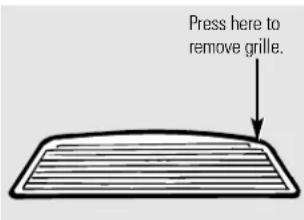
The dispenser well, (on some models) beneath the grille, should be wiped dry. Water left in the well may leave deposits. Remove the deposits by adding undiluted vinegar to the well. Soak until the deposits disappear or become loose enough to rinse away.
The dispenser pad (on some models). Clean with warm water and baking soda solution—about a tablespoon (15 ml) of baking soda to a quart (1 L) of water. Rinse thoroughly and wipe dry.
HINT: Open the freezer door part way to prevent dispensing of ice or water when cleaning.
The door handles and trim. Clean with a cloth dampened with soapy water. Dry with a soft cloth.
Keep the outside clean. Wipe with a clean cloth lightly dampened with kitchen appliance wax or mild liquid dish detergent. Dry and polish with a clean, soft cloth.
Do not wipe the refrigerator with a soiled dish cloth or wet towel. These may leave a residue that can erode the paint. Do not use scouring pads, powdered cleaners, bleach or cleaners containing bleach because these products can scratch and weaken the paint finish.
Cleaning the Inside
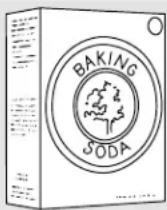
To help prevent odors, leave an open box of baking soda in the fresh food and freezer compartments.
Unplug the refrigerator before cleaning. If this is not practical, wring excess moisture out of sponge or cloth when cleaning around switches, lights or controls.
Use warm water and baking soda solution—about a tablespoon (15 ml) of baking soda to a quart (1 L) of water. This both cleans and neutralizes odors. Rinse and wipe dry.
After cleaning the door gaskets, apply a thin layer of petroleum jelly to the door gaskets at the hinge side. This helps keep the gaskets from sticking and bending out of shape.
Avoid cleaning cold glass shelves (on some models) with hot water because the extreme temperature difference may cause them to break. Handle glass shelves carefully. Bumping tempered glass can cause it to shatter.
Do not wash any plastic refrigerator parts in the dishwasher.
Wash ice trays in lukewarm water only—do not put them in an automatic dishwasher.
natural_image
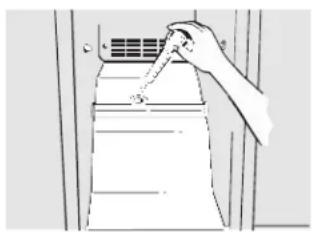
Line drawing of a hand pressing down on a wall-mounted air conditioner unit (no text or symbols)Drain opening in freezer compartment. During yearly cleaning, remove bottom freezer basket and flush a solution of baking soda—1 teaspoon (5 ml) and 2 cups (500 ml) of hot (not boiling) water—through the drain line with the help of a meat baster. This will help eliminate odor and reduce the likelihood of a clogged drain line. If drain becomes clogged, use a meat baster and baking soda solution to force the clog through the drain line.
Care and cleaning of the refrigerator.
Behind the Refrigerator
Be careful when moving the refrigerator away from the wall. All types of floor coverings can be damaged, particularly cushioned coverings and those with embossed surfaces.
When pushing the refrigerator back, make sure you don't roll over the power cord or icemaker supply line (on some models).
Pull the refrigerator straight out and return it to position by pushing it straight in. Moving the refrigerator in a side direction may result in damage to the floor covering or refrigerator.
natural_image
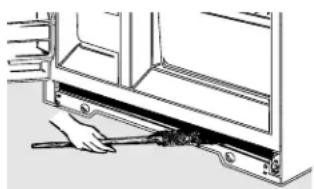
Line drawing of a hand using a tool to adjust or install a mechanical component (no text or symbols visible)Clean the condenser coils at least once a year.
Under the Refrigerator
For most efficient operation, keep the area under the refrigerator clean. Remove the base grille and sweep away or vacuum up dust.
For best results, use a brush specially designed for this purpose. It is available at most appliance parts stores.
Preparing for Vacation
For long vacations or absences, remove food and unplug the refrigerator. Move the fresh food control to the @ff position, and clean the interior with a baking soda solution of one tablespoon (15 ml) of baking soda to one quart (1 L) of water. Leave the doors open.
If the temperature can drop below freezing, have a qualified servicer drain the water supply system (on some models) to prevent serious property damage due to flooding.
Move the icemaker feeler arm (on some models) to the STOP (up) position and shut off the water supply to the refrigerator.
Preparing to Move
Secure all loose items such as grille, shelves and drawers by taping them securely in place to prevent damage.
Be sure the refrigerator stays in an upright position during moving.
Replacing the light bulbs.
Turning the control to the (off) position does not remove power to the light circuit.
text_image
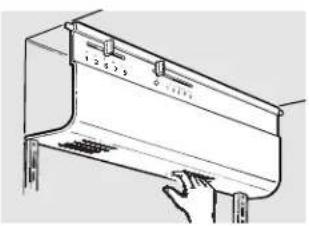
1 2 3 4 5 6 7 8 9 10Fresh Food Compartment
1 Unplug the refrigerator.
2 Pull off the temperature control knobs.
3 Pull bottom of light shield down and forward, then rotate the top up and off.
After replacing with an appliance bulb of the same or lower wattage, reinstall the light shield, replace temperature control knobs and plug the refrigerator back in.
Freezer Compartment
1 Unplug the refrigerator.
2 Remove the shelf just below light shield. (The shelf will be easier to remove if it is emptied first.)
3 Pull the light shield toward you to reach the bulb.
After replacing with an appliance bulb of the same or lower wattage, reinstall the shield and shelf and plug the refrigerator back in.
Preparing to install the refrigerator.
Read these instructions completely and carefully.

Water Supply to the Icemaker (on some models)
If the refrigerator has an icemaker, it will have to be connected to a cold water line.
A water supply kit (containing copper tubing, shutoff valve, fittings and instructions) is available at extra cost from your dealer or from Parts and Accessories, 800-626-2002.
Refrigerator Location
Do not install the refrigerator where the temperature will go below 60^ F ( 16^ C) because it will not run often enough to maintain proper temperatures.
Install it on a floor strong enough to support it fully loaded.
Clearances
Allow the following clearances for ease of installation, proper air circulation and plumbing and electrical connections:
Sides 5/8" (15 mm)
Top 1" (25 mm)
If built-in, allow 7/8" (22 mm) for hinge covers.
Back 1" (25 mm)
If the refrigerator is against a wall on either side, allow the following door clearances:
19'-25' models
3/4" (19 mm)
27' models
1^1/2''(38mm)
Rollers
The rollers have 3 purposes:
1 Rollers adjust so the door closes easily when opened about halfway. [Raise the front about 5/8" (15 mm) from the floor.]
To assure that the doors will close automatically from a halfway open position, there is a built-in tilt from the front to the back of the cabinet. Side-by-side refrigerators also have specially designed door hinges that lift both doors slightly when opened, allowing the force of gravity to help close them securely.
2 Rollers adjust so the refrigerator is firmly positioned on the floor and does not wobble.
3 Rollers allow you to move the refrigerator away from the wall for cleaning.
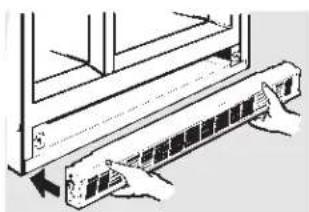
To adjust the rollers, remove the base grille by pulling it out at the bottom.
natural_image
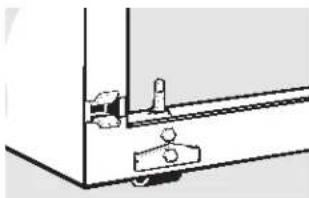
Illustration of hands installing or adjusting a wall-mounted device component (no text or symbols visible)Turn the roller adjusting screws clockwise to raise the refrigerator, counterclockwise to lower it. Use an adjustable wrench (3/8" hex head bolt) or pliers.
natural_image
Simple line drawing of a mechanical assembly or mounting bracket (no text or symbols)To replace base grille, align prongs on back of grille with clamps in cabinet and push forward until grille snaps into place.
Read these instructions completely and carefully.

Before You Begin
When connecting a GE Reverse Osmosis Water System to your refrigerator, the only approved installation is with a GE RVKIT.
If the water supply to the refrigerator is from a Reverse Osmosis Water Filtration System AND the refrigerator also has a water filter, use the refrigerator's filter bypass plug. Using the refrigerator's water filtration cartridge in conjunction with the RO filter can result in hollow ice cubes and slower water flow from the water dispenser.
This water line installation is not warranted by the refrigerator or icemaker manufacturer. Follow these instructions carefully to minimize the risk of expensive water damage.
Water hammer (water banging in the pipes) in house plumbing can cause damage to refrigerator parts and lead to water leakage or flooding. Call a qualified plumber to correct water hammer before installing the water supply line to the refrigerator.
To prevent burns and product damage, do not hook up the water line to the hot water line.
If you use your refrigerator before connecting the water line, make sure the icemaker feeler arm is kept in the STOP (up) position.
Do not install the icemaker tubing in areas where temperatures fall below freezing.
When using any electrical device (such as a power drill) during installation, be sure the device is insulated or wired in a manner to prevent the hazard of electric shock.
All installations must be in accordance with local plumbing code requirements.
What You Will Need
To determine how much copper tubing you need:
Measure the distance from the water valve on the back of the refrigerator to the water supply pipe. Then add 8 feet (244 cm). Be sure there is sufficient extra tubing [about 8 feet (244 cm) coiled into 3 turns of about 10 inches (25 cm) diameter] to allow the refrigerator to move out from the wall after installation.
A water supply kit (containing copper tubing, shutoff valve and fittings listed below) is available at extra cost from your dealer or from Parts and Accessories, 800-626-2002.
- Cold water supply. The water pressure must be between 20 and 120 p.s.i. (1.4–8.2 bar).
Power drill.
- Copper tubing, 1/4" outer diameter to connect the refrigerator to the water supply. Be sure both ends of the tubing are cut square.
Do not use plastic tubing or plastic fittings because the water supply line is under pressure at all times. Certain types of plastic tubing may become brittle with age and crack, resulting in water leakage.
■ Two 1/4" outer diameter compression nuts and 2 ferrules (sleeves)—to connect the copper tubing to the shutoff valve and the refrigerator water valve.
If your existing water line has a flared fitting at the end, you will need an adapter (available at plumbing supply stores) to connect the water line to the refrigerator OR you can cut off the flared fitting with a tube cutter and then use a compression fitting.
Shutoff valve to connect to the cold water line. The shutoff valve should have a water inlet with a minimum inside diameter of 5/32" at the point of connection to the COLD WATER LINE. Saddle-type shutoff valves are included in many water supply kits. Before purchasing, make sure a saddle-type valve complies with your local plumbing codes.
Installing the water line.
Read these instructions completely and carefully.

Shut Off the Main Water Supply
Turn on the nearest faucet long enough to clear the line of water.
Install the Shutoff Valve
1 Install the shutoff valve on the nearest frequently used drinking water line.
2 Choose a location for the valve that is easily accessible. It is best to connect into the side of a vertical water pipe. When it is necessary to connect into a horizontal water pipe, make the connection to the top or side, rather than at the bottom, to avoid drawing off any sediment from the water pipe.
3 Drill a 1/4" hole in the water pipe, using a sharp bit. Remove any burrs resulting from drilling the hole in the pipe.
4 Fasten the shutoff valve to the cold water pipe with the pipe clamp.
5 Tighten the clamp screws until the sealing washer begins to swell.
Do not overtighten or you may crush the copper tubing.
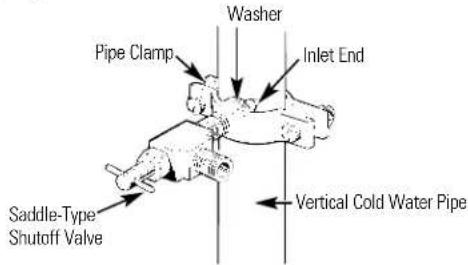
text_image
Washer Pipe Clamp Inlet End Saddle-Type Shutoff Valve Vertical Cold Water PipeRoute the Copper Tubing and Connect It to the Shutoff Valve
Route the copper tubing between the cold water line and the refrigerator.
Route the tubing through a hole drilled in the wall or floor (behind the refrigerator or adjacent base cabinet) as close to the wall as possible.
Be sure there is sufficient extra tubing [about 8 feet (244 cm) coiled into 3 turns of about 10" (25 cm) diameter] to allow the refrigerator to move out from the wall after installation.
Place the compression nut and ferrule (sleeve) onto the end of the tubing and connect it to the shutoff valve.
Make sure the tubing is fully inserted into the valve. Tighten the compression nut securely.
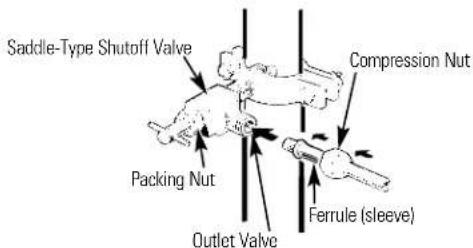
text_image
Saddle-Type Shutoff Valve Packing Nut Compression Nut Outlet Valve Ferrule (sleeve)Turn On the Water and Flush Out the Tubing
1 Turn the main water supply on and flush out the tubing until the water is clear.
2 Shut the water off at the water valve after about one quart (1 L) of water has been flushed through the tubing.
Connect the Tubing to the Refrigerator
Before making the connection to the refrigerator, be sure the refrigerator power cord is not plugged into the wall outlet.
We recommend installing a water filter if your water supply has sand or particles that could clog the screen of the refrigerator's water valve. Install it in the water line near the refrigerator.
Remove screws and fold back access cover.
2 Remove the plastic flexible cap from the water valve (refrigerator connection).
3 Place the compression nut and ferrule (sleeve) onto the end of the tubing as shown.
4 Insert the end of the copper tubing into the water valve connection as far as possible. While holding the tubing, tighten the fitting.
5 Fasten the copper tubing into the clamp provided to hold it in a vertical position. You may need to pry open the clamp.
One of the illustrations below will look like the connection on your refrigerator.
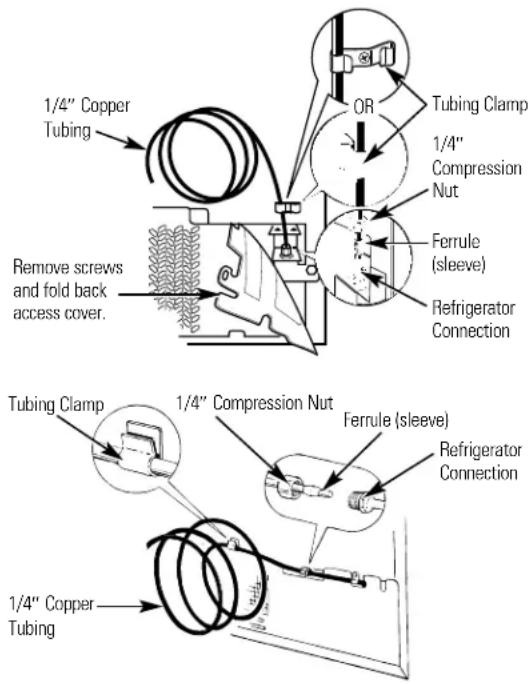
text_image
1/4" Copper Tubing OR Tubing Clamp 1/4" Compression Nut Ferrule (sleeve) Refrigerator Connection Remove screws and fold back access cover. 1/4" Compression Nut Ferrule (sleeve) Refrigerator Connection 1/4" Copper TubingTurn the Water On at the Shutoff Valve
1 Tighten any connections that leak. Replace the access cover and screws (on some models).
Plug In the Refrigerator
Arrange the coil of copper tubing so that it does not vibrate against the back of the refrigerator or against the wall.
Push the refrigerator back to the wall.
Start the Icemaker
Set the icemaker feeler arm to the ON (down) position. The icemaker will not begin to operate until it reaches its operating temperature of 15^ F (-9°C) or below. It will then begin operation automatically if the icemaker feeler arm is in the ON (down) position.
NOTE: The icemaker may double-cycle when it first starts, causing some water spillage from the icemaker into the ice bucket. This is normal and should not happen again.
Normal operating sounds.

Depending on the placement of the refrigerator in your kitchen, you may want to place a piece of rubber backed carpet under the refrigerator to reduce noise.
natural_image
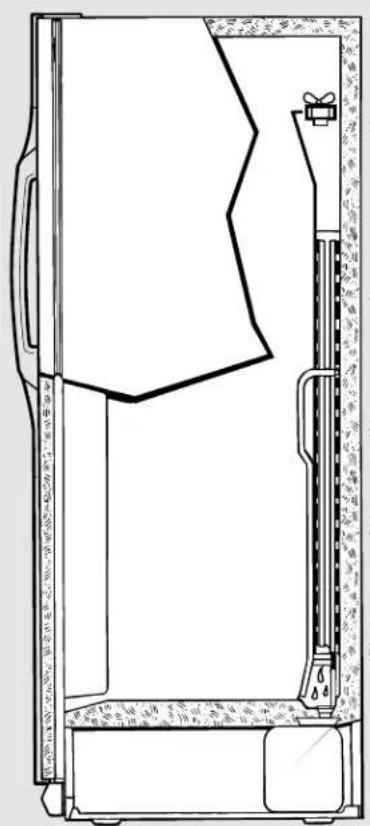
Technical line drawing of a mechanical device with internal components and mounting base (no text or symbols)The new high efficiency compressor runs faster and will have a higher pitch hum or pulsating sound while operating.
Defrost timer and refrigerator control click on and off.
The fan circulating air inside the freezer which keeps the temperatures throughout.
Water dropping on the defrost heater causing a sizzling, hissing or popping sound during the defrost cycle.
The flow of refrigerant through the freezer cooling coils sounds like boiling water or a gurgling noise.
Cracking or popping of cooling coils caused by expansion and contraction during defrost and refrigeration following defrost.
Water dripping as it melts from the evaporator and flows to the drain pan during the defrost cycle.
Icemaker (on some models)
The icemaker water valve will buzz when the icemaker fills with water. If the feeler arm is in the ON (down) position it will buzz even if it has not yet been hooked up to water. Keeping the feeler arm in the ON (down) position before it is hooked up to water can damage the icemaker. To prevent this, raise the feeler arm to the STOP (up) position. This will stop the buzzing.
The sound of cubes dropping into the bin and water running in pipes as icemaker refills.
These sounds are normal and are due mostly to highly efficient operation.
Before you call for service...

Troubleshooting Tips Save time and money! Review the charts on the following pages first and you may not need to call for service.
Problem Possible Causes What To Do
| Refrigerator does not operate | Refrigerator in defrost cycle. | • Wait about 30 minutes for defrost cycle to end. |
| Fresh food control in ○ (off) position. | • Move the fresh food control to a temperature setting. | |
| Refrigerator is unplugged. | • Push the plug completely into the outlet. | |
| The fuse is blown/circuit breaker is tripped. | • Replace fuse or reset the breaker. | |
| Vibration or rattling (slight vibration is normal)18 | Rollers need adjusting. | • See Rollers. |
| Problem Possible Causes What To Do | ||
| Motor operates for long periods or cycles on and off frequently. (Modern refrigerators with more storage space and a larger freezer require more operating time. They start and stop often to maintain even temperatures.) | Normal when refrigerator is first plugged in. cool down. | Wait 24 hours for the refrigerator to completely |
| Often occurs when large • This is normal. amounts of food are placed in refrigerator. | ||
| Door left open. | Check to see if package is holding door open. | |
| Hot weather or frequent • This is normal. door openings. | ||
| Temperature controls • See set at the coldest setting. | About the controls. | |
| Grille and condenser • See need cleaning. | Care and cleaning. | |
| Orange glow in freezer | Defrost heater is on. | This is normal. |
| Fresh food or freezer compartment too warm | Temperature control not set cold enough. | See About the controls. |
| Warm weather or frequent door openings. | Set the temperature control one step colder.See About the controls. | |
| Door left open. | Check to see if package is holding door open. | |
| Frost or ice crystals on frozen food (frost within package is normal) | Door left open. | Check to see if package is holding door open. |
| Too frequent or too long door openings. | ||
| Divider between fresh food and freezer compartment feels warm | Automatic energy saver system circulates warm liquid around front edge of freezer compartment. | This helps prevent condensation on the outside. |
| Automatic icemaker does not work (on some models) | Icemaker feeler arm in the STOP (up) position. | Move the feeler arm to the ON (down) position.Cubes may have fused to the side of the mold. Move the feeler arm to the STOP (up) position then remove these cubes. |
| Water supply turned off or not connected. | See Installing the water line. | |
| Freezer compartment too warm. | Wait 24 hours for the refrigerator to completely cool down. | |
| Piled up cubes in the storage bin cause the icemaker to shut off. | Level cubes by hand. | |
| Ice cubes have odor/taste | Ice storage bin needs cleaning. | Empty and wash bin. Discard old cubes. |
| Food transmitting odor/taste to ice cubes. | Wrap foods well. | |
| Interior of refrigerator needs cleaning. | See Care and cleaning. | |
| Slow ice cube freezing | Door left open. | Check to see if package is holding door open. |
| Temperature control not set cold enough. | See About the controls. | |
Before you call for service...
| Problem Possible Causes What To Do | ||
| Cube dispenser does not work (on some models) | Icemaker turned off or water supply turned off. | Turn on icemaker or water supply. |
| Ice cubes are frozen to icemaker feeler arm. | Remove cubes and move the feeler arm to the ON (down) position. | |
| Irregular ice clumps in storage container. remaining clumps. | Break up with fingertip pressure and discardFreezer may be too warm. Adjust the freezer control to a colder setting, one position at a time, until clumps do not form. | |
| Water has poor taste/odor (on some models) | Water dispenser has not been used for a long time. | Dispense water until all water in system is replenished. |
| Water dispenser does not work (on some models) | Water supply line turned • See off or not connected. | Installing the water line. |
| Water filter clogged. | Replace filter cartridge or remove filter and install plug. | |
| Air may be trapped in the water system. | Press the dispenser pad for at least two minutes. | |
| Water is not dispensed but icemaker is working (on some models) | Water in reservoir is • Call for service. frozen. | |
| No water or ice cube production (on some models) | Supply line or shutoff • Call a plumber. valve is clogged. | |
| Water filter clogged. | Replace filter cartridge or remove filter and install plug. | |
| Refrigerator has odor | Foods transmitting odor to refrigerator. | Foods with strong odors should be tightly wrapped.Keep an open box of baking soda in the refrigerator; replace every three months. |
| Interior needs cleaning. | See Care and cleaning. | |
| Moisture forms on outside of refrigerator | Not unusual during periods of high humidity. | Wipe surface dry. |
| Moisture collects inside (in humid weather, air carries moisture into refrigerator when doors are opened) | Too frequent or too long door openings. | |
| Interior light does not work | No power at outlet. | Replace fuse or reset the breaker. |
| Light bulb burned out. | See Replacing the light bulbs. | |
| Water on kitchen floor or on bottom of freezer | Drain in the bottom of the freezer clogged. | See Care and cleaning. |
| Cubes jammed in chute. | Poke ice through with a wooden spoon. | |
| Door not closing properly | Door gasket on hinge side sticking or folding over. | Apply petroleum jelly on face of gasket. |
| Small or hollow cubes (on some models) | Water filter clogged. | Replace filter cartridge with new cartridge or with plug. |
| Water spurting from dispenser (on some models) | Newly-installed filter cartridge. | Run water from the dispenser for 1 minute (about a half gallon). |
Problem Possible Causes What To Do
| Hot air from bottom of refrigerator | Normal air flow cooling • Your floor covering supplier should be consulted if you motor. In the refrigeration object to this discoloration. process, it is normal that heat be expelled in the area under the refrigerator. Some floor coverings will discolor at these normal and safe temperatures. |
CONSUMER WARRANTY
(for customers in Canada)
Your refrigerator is warranted to be free of defects in material and workmanship.
| What is covered How Long | Warranted Parts Labour(From Date of Sale) Repair or Replaceat Camco's Option | |
| Compressor Ten (10) Years | Ten (10) Years Five (5) Years | |
| Sealed System (including Evaporator, condenser tubing and refrigerant) | Five (5) Years Five (5) Years Five (5) Years | |
| All Other Parts | One (1) Year | One (1) Year |
TERMS AND CONDITIONS:
This warranty applies only for single family domestic use in Canada when the Refrigerator has been properly installed according to the instructions supplied by Camco and is connected to an adequate and proper utility service.
Damage due to abuse, accident, commercial use, and alteration or defacing of the serial plate cancels all obligations of this warranty.
Service during this warranty must be performed by an Authorized Camco Service Agent.
Neither Camco nor the Dealer is liable for any claims or damages resulting from any failure of the Refrigerator or from service delays beyond their reasonable control.
To obtain warranty service, purchaser must present the original bill of sale. Components repaired or replaced are warranted through the remainder of the original warranty period only.
This warranty is in addition to any statutory warranty.
WHAT IS NOT COVERED:
• Service trips to your home to teach you how to use the product.
• Damage to finish after delivery.
- Improper installation—proper installation includes adequate air circulation to the refrigeration system, adequate electrical, plumbing and other connecting facilities.
- Replacement of house fuses or resetting of circuit breakers.
- Replacement of light bulbs.
- Damage to product caused by accident, fire, floods or acts of God.
- Loss of food due to spoilage.
- Proper use and care of product as listed in the owner's manual, proper setting of controls.
- WARRANTOR IS NOT RESPONSIBLE FOR CONSEQUENTIAL DAMAGES.
IMPORTANT
Keep this warranty and your bill of sale as proof of original purchase and purchase date.
Camco Service is available coast to coast.
If further help is needed concerning this warranty, contact:
Manager, Consumer Relations, Camco Inc.,
Suite 310, 1 Factory Lane, Moncton, N.B. E1C 9M3
Refrigerator Warranty (For customers in the United States)
All warranty service provided by our Factory Service Centers, or an authorized Customer Care® technician. For service, call 800-GE-CARES.
For The Period Of: We Will Replace:
| One Year Any partFrom the date of the original purchase | of the refrigerator which fails due to a defect in materials or workmanship.During thisfull one-year warranty, we will also provide,free of charge, all labor and in-home service to replace the defective part. |
| Five Years Any part of thesealed refrigerating system (the compressor, condenser, evaporator From the date of the original purchase and all connecting tubing) which fails due to a defect in materials or workmanship.During thisfive-year warranty, we will also provide,free of charge, all labor and in-home service to replace the defective part. | |
| Lifetime Any see-throughpan or drawerfurnished with the refrigerator if the pan or drawerFrom the date of the original purchase breaks during normal household use. Drawer covers are not included. | |
| Thirty Days Any partFrom the date of the original purchase | of the water filter cartridge which fails due to a defect in materials or workmanship. During thisfull thirty-day warranty, we will also provide,free of charge, all labor and in-home service to replace the defective part. |
What Is Not Covered:
■ Service trips to your home to teach you how to use the product.
■ Improper installation.
■ Failure of the product if it is abused, misused, or used for other than the intended purpose or used commercially.
■ Loss of food due to spoilage.
■ Replacement of house fuses or resetting of circuit breakers.
■ Replacement of the water filter cartridge due to water pressure that is outside the specified operating range or due to excessive sediment in the water supply.
■ Damage to the product caused by accident, fire, floods or acts of God.
■ Incidental or consequential damage to personal property caused by possible defects with this appliance.
This warranty is extended to the original purchaser and any succeeding owner for products purchased for home use within the USA. In Alaska, the warranty excludes the cost of shipping or service calls to your home.
Some states do not allow the exclusion or limitation of incidental or consequential damages. This warranty gives you specific legal rights, and you may also have other rights which vary from state to state. To know what your legal rights are, consult your local or state consumer affairs office or your state's Attorney General.
Warrantor: General Electric Company. Louisville, KY 40225
Performance Data Sheet
Hotpoint
Filtration by GE SmartWater™
HXRT Cartridge
Performance Tested to NSF/ANSI*
(100% safety factors built in for unmetered usage)
| Standard No. 42: Aesthetic Effects | ||||||
| Parameter USEPA | Influent Effluent %MCL Challenge | Reductionge Average Maximum | ||||
| Average Minimum | ||||||
| Chlorine – 1.96 ppm | 0.30 ppm 0.44 ppm | 8578 | ||||
| T & O | — | — | — | — | — | — |
| Particulate** | — | 2296 | 62 | 116 | 97.3 | 94.9 |
* Tested using a flow rate of 0.5 gpm; pressure of 60 psig; pH of 7.5 ± 0.5; temp. of 20° ± 2.5°C
** Measurement in Particles/ml of 10μ Particles
Operating Specifications
■ Capacity: certified for up to 250 gallons (946 L)
■ Pressure requirement: 40–120 psi (2.8–8.2 bar), non-shock
■ Temperature: 33^-100^ F ( 0.6^-38^ C)
■ Flow rate: 0.5 gpm (1.9 Lpm)
General Installation/Operation/Maintenance Requirements
■ Flush new cartridge at full flow for 60 seconds to purge out trapped air.
- Replace cartridge when flow becomes too slow; at least every six months.
Special Notices
■ Installation instructions, parts and service availability, and standard warranty are included with the product when shipped.
This drinking water system must be maintained according to manufacturer's instructions, including replacement of filter cartridges.
Do not use with water that is microbiologically unsafe or of unknown quality without adequate disinfection before or after the system.
■ The contaminants or other substances removed or reduced by this water treatment system are not necessarily in your water.
- Check for compliance with the state and local laws and regulations.
General Electric, Appliance Park, Louisville, KY 40225
© 1997 GE
Mesures de sécurité
text_image
Freezer Control Fresh Food Control 5 is Initial Setting 9 is Coldest
natural_image
Illustration of a multi-tiered container with food icons (no text or labels)text_image
High Humidity Control Lownatural_image
Illustration of a hand inserting a rectangular object into a cabinet (no text or symbols visible)Bac à glaçons
natural_image
Line drawing of a hand pressing down on a wall-mounted air conditioner unit (no text or symbols)natural_image
Line drawing of a hand using a tool to adjust or install a mechanical component (no text or symbols visible)natural_image
Illustration of hands installing or adjusting a server rack component (no text or symbols visible)natural_image
Pure mechanical diagram showing a sliding mechanism with no text or symbolsnatural_image
Technical line drawing of a mechanical device with internal components and mounting bracket (no text or symbols)EXCLUSIONS DE LA GARANTIE:
General Electric, Appliance Park, Louisville, KY 40225
© 1997 GE
Numéros de service.
text_image
i 3 5 7 9 Freezer Control 1 2 Fresh Food Control 5 is Initial Setting 9 is Coldest
natural_image
Illustration of a multi-tiered container with food items including vegetables, meat, peppers, fish, grapes, and nuts (no text or labels)text_image
High Humidity Control Lownatural_image
Hand inserting a cylindrical object into a control panel (no text or symbols visible)Recogedor
natural_image
Illustration of a hand pressing down a rectangular object with directional arrows indicating movement (no text or symbols)natural_image
Line drawing of a hand using a tool to clean or exhaust air from a window (no text or symbols)natural_image
Line drawing of a hand using a tool to adjust or install a mechanical component (no text or symbols visible)natural_image
Illustration of hands inserting a device into a rack (no text or symbols visible)natural_image
Simple line drawing of a mechanical assembly or mounting bracket (no text or symbols)natural_image
Technical line drawing of a mechanical device with internal components and mounting bracket (no text or symbols)General Electric, Appliance Park, Louisville, KY 40225 ©1997 GE
Service Telephone Numbers
GE Answer Center® In the U.S.: 800.626.2000
The GE Answer Center ^® is open 24 hours a day, 7 days a week.
In Canada, contact: Manager, Consumer Relations, Camco Inc., Suite 310, 1 Factory Lane, Moncton, N.B. E1C 9M3.
In-Home Repair Service In the U.S.: 800-432-2737
Expert GE repair service is only a phone call away.
In Canada, call 1-800-361-3400.
Special Needs Service In the U.S.: 800.626.2000
GE offers, free of charge, a brochure to assist in planning a barrier-free kitchen for persons with limited mobility. In the U.S., call 800-TDD-GEAC (800-833-4322).
In Canada, contact: Manager, Consumer Relations, Camco Inc., Suite 310, 1 Factory Lane, Moncton, N.B. E1C 9M3.
Service Contracts In the U.S.: 800-626-2224
Purchase a GE service contract while your warranty is still in effect and you'll receive a substantial discount. GE Consumer Service will still be there after your warranty expires.
In Canada, call 1-800-461-3636.
Parts and Accessories\* In the U.S.: 800-626-2002
Individuals qualified to service their own appliances can have parts or accessories (*including water filters) sent directly to their homes (VISA, MasterCard and Discover cards are accepted).
Instructions contained in this manual cover procedures to be performed by any user. Other servicing generally should be referred to qualified service personnel. Caution must be exercised, since improper servicing may cause unsafe operation.
Customers in Canada should consult the yellow pages for the nearest Camco service center, or call 1-800-361-3400.
Service Satisfaction
If you are not satisfied with the service you receive from GE:
First, contact the people who serviced your appliance.
Next, if you are still not pleased, in the U.S., write all the details—including your phone number—to: Manager, Customer Relations, GE Appliances, Appliance Park, Louisville, KY 40225; or, in Canada, to Director, Consumer Relations, Camco Inc., Suite 310, 1 Factory Lane, Moncton, N.B. E1C 9M3.